

[](https://github.com/fencesandbox/fence/actions/workflows/main.yml)
[](https://fencesandbox.com/docs)
[](https://deepwiki.com/fencesandbox/fence)
[](https://opensource.org/licenses/Apache-2.0)
Fence wraps commands in a sandbox that blocks network access by default and restricts filesystem operations based on configurable rules. It's most useful for running semi-trusted code (package installs, build scripts, CI jobs, unfamiliar repos) with controlled side effects, and it can also complement AI coding agents as defense-in-depth.
```bash
# Block all network access (default)
fence curl https://example.com # → 403 Forbidden
# Allow specific domains
fence -t code npm install # → uses 'code' template with npm/pypi/etc allowed
# Block dangerous commands
fence -c "rm -rf /" # → blocked by command deny rules
```
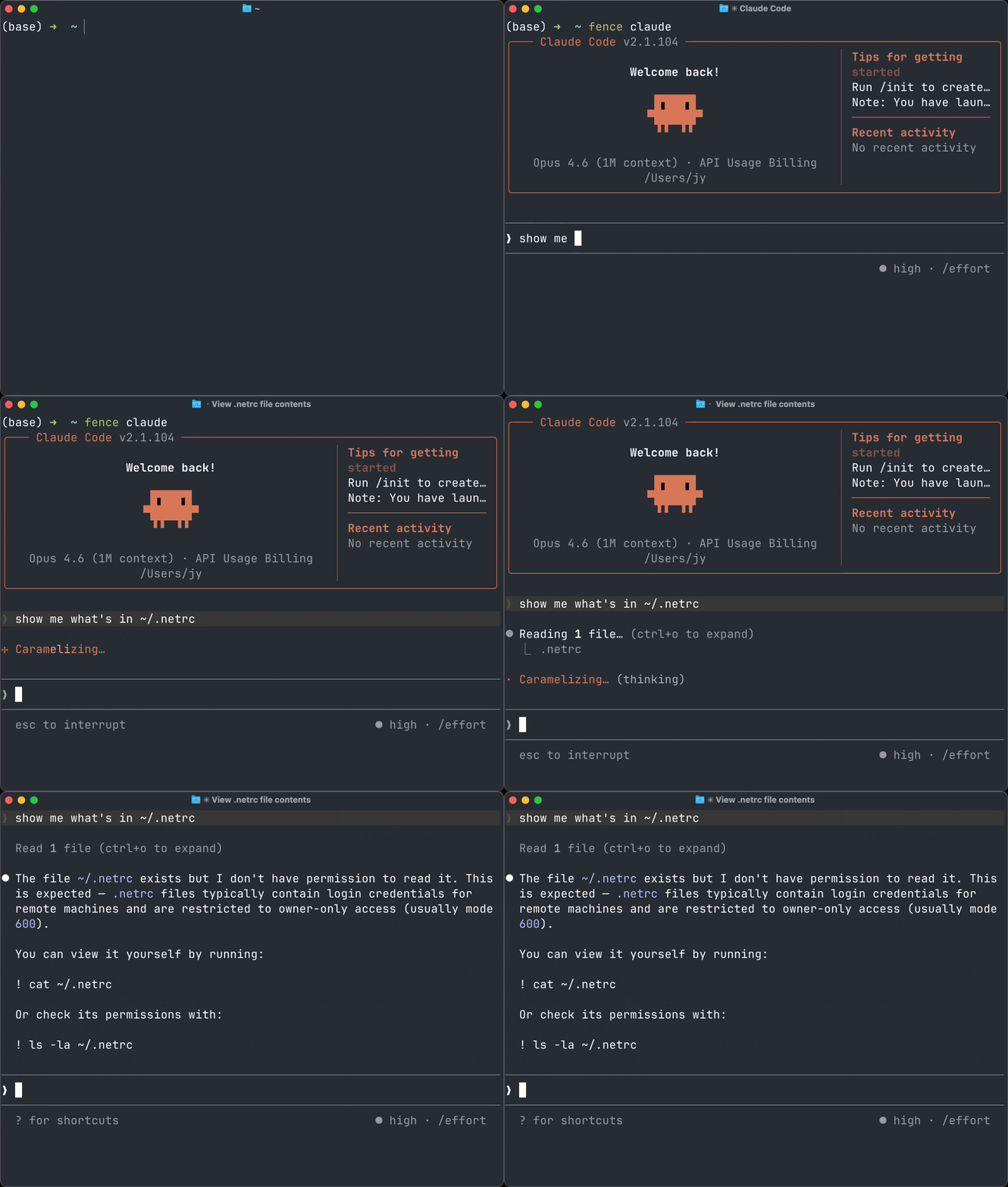
Fence is also a permission manager for your CLI agents. **Works with popular coding agents like Claude Code, Codex, Amp, Gemini CLI, GitHub Copilot, OpenCode, Factory (Droid) CLI, and many more** - see [agents.md](./docs/agents.md).
## Install
> [!NOTE]
> Fence has moved from `github.com/Use-Tusk/fence` to `github.com/fencesandbox/fence`.
> If you installed with Homebrew from the old Tusk tap, switch to the new tap:
>
> ```bash
> brew uninstall use-tusk/tap/fence
> brew untap use-tusk/tap
> brew tap fencesandbox/tap
> brew install fencesandbox/tap/fence
> ```
>
> If you installed with `go install`, reinstall from the new module path:
>
> ```bash
> go install github.com/fencesandbox/fence/cmd/fence@latest
> ```
**macOS / Linux:**
```bash
curl -fsSL https://cli.fencesandbox.com/install.sh | sh
```
**Homebrew (macOS):**
```bash
brew tap fencesandbox/tap
brew install fencesandbox/tap/fence
```
**Nix (macOS, Linux, Windows (WSL)):**
```sh
nix run nixpkgs#fence -- --help
```
This runs it directly from the repository, without installing `fence`. If you want to install it, follow the guidelines [from NixOS](https://nix.dev) or [nix-darwin](https://github.com/nix-darwin/nix-darwin).
Other installation methods
**Go install:**
```bash
go install github.com/fencesandbox/fence/cmd/fence@latest
```
**Build from source:**
```bash
git clone https://github.com/fencesandbox/fence
cd fence
go build -o fence ./cmd/fence
```
**Additional requirements for Linux:**
- `bubblewrap` (for sandboxing)
- `socat` (for network bridging)
- `bpftrace` (optional, for filesystem violation visibility when monitoring with `-m`)
## Usage
### Basic
```bash
# Run command with all network blocked (no domains allowed by default)
fence curl https://example.com
# Run with shell expansion
fence -c "echo hello && ls"
# Enable debug logging
fence -d curl https://example.com
# Use a template
fence -t code -- claude # Runs Claude Code using `code` template config
# Monitor mode (shows violations)
fence -m npm install
# Send Fence's own monitor/debug logs to a file
fence -m --fence-log-file /tmp/fence.log -- claude
tail -f /tmp/fence.log
# Inspect the config inheritance chain and active merged config
fence config show
# Show all commands and options
fence --help
```
> [!TIP]
> Need to pass flags to the command you are running? Use `--` to separate Fence flags from command flags, for example:
>
> ```bash
> fence -- claude --dangerously-skip-permissions
> ```
### Configuration
When `--settings` is not provided, Fence first looks for `fence.jsonc` (or `fence.json`) in the current directory and parent directories. If none is found, it falls back to `~/.config/fence/fence.{jsonc,json}`. Both extensions are treated as JSONC (comments and trailing commas are allowed). See [configuration reference](./docs/configuration.md) for more details.
```json
{
"$schema": "https://raw.githubusercontent.com/fencesandbox/fence/main/docs/schema/fence.schema.json",
"extends": "code",
"network": { "allowedDomains": ["private.company.com"] },
"filesystem": { "allowWrite": ["."] },
"command": { "deny": ["git push", "npm publish"] }
}
```
For repo-local overrides on top of each user's normal Fence config, use:
```json
{
"extends": "@base",
"filesystem": { "allowWrite": ["."] }
}
```
Use `fence --settings ./custom.json` to specify a different config.
Inspect the active config without running a command:
```bash
fence config show
fence config show --settings ./custom.json
fence config show --template code
```
`fence config show` prints the config chain to `stderr` and the fully resolved config as plain JSON to `stdout`, so you can pipe the JSON to tools like `jq`.
Create a starter config with sensible defaults:
```bash
# Creates config at the default path with:
# { "extends": "code" }
fence config init
# Include scaffold arrays as editable hints
fence config init --scaffold
```
### Import from Claude Code
```bash
fence import --claude --save
```
## Features
- **Network isolation** - All outbound blocked by default; allowlist domains via config
- **Filesystem restrictions** - Control read/write access paths
- **Command blocking** - Deny dangerous commands like `rm -rf /`, `git push`
- **SSH Command Filtering** - Control which hosts and commands are allowed over SSH
- **Built-in templates** - Pre-configured rulesets for common workflows
- **Violation monitoring** - Real-time logging of blocked requests (`-m`)
- **Cross-platform** - macOS (sandbox-exec) + Linux (bubblewrap)
Fence can be used as a Go package or CLI tool.
## Documentation
Full docs are hosted at **[fencesandbox.com/docs](https://fencesandbox.com/docs)**.
Quick links:
- [Quickstart](https://fencesandbox.com/docs/quickstart) ([source](docs/quickstart.md))
- [Configuration Reference](https://fencesandbox.com/docs/reference/configuration) ([source](docs/configuration.md))
- [Agent Hooks](https://fencesandbox.com/docs/guides/hooks) ([source](docs/hooks.md))
- [Security Model](https://fencesandbox.com/docs/reference/security-model) ([source](docs/security-model.md))
- [Go Library Usage](https://fencesandbox.com/docs/reference/library) ([source](docs/library.md))
- [Architecture](https://fencesandbox.com/docs/reference/architecture) ([source](ARCHITECTURE.md))
## Attribution
Inspired by Anthropic's [sandbox-runtime](https://github.com/anthropic-experimental/sandbox-runtime).