
Source-grounded workflow diagrams for coding agents and codebase exploration.




Website
· Quick Start
· Agent Workflow
· Manual Viewer
· Changelog
CodeDebrief turns a local codebase into deterministic workflow flowcharts that coding
agents can inspect, render, expand, translate, and explain. It statically maps entrypoints,
decisions, branches, internal calls, returns, exceptions, and outcomes before the agent
answers, so the visual explanation is grounded in reusable artifacts instead of a fresh
best-effort reconstruction.
The analyzer, artifacts, viewer, and MCP server are local-first and do not require an LLM
provider key. CodeDebrief is not a documentation generator, a bug finder, a generic graph
database, or an LLM enrichment service; it is a workflow navigation layer for understanding
how code paths actually connect.
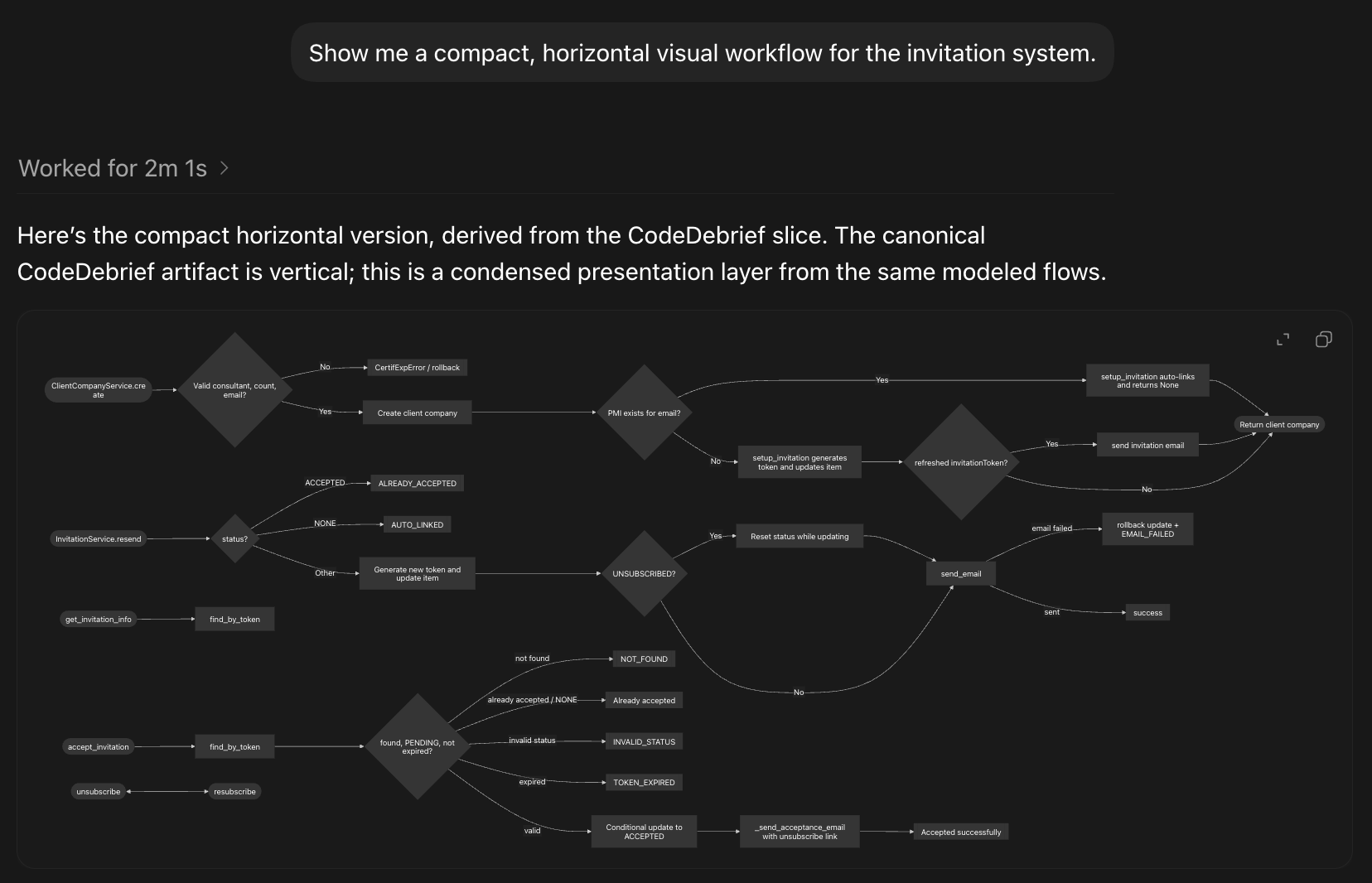
Example output: a compact presentation layer generated from local CodeDebrief artifacts.
Canonical workflow visuals are vertical by default; horizontal diagrams are used when the
user explicitly asks for a compact overview.
> Status: pre-1.0 alpha. The model is versioned, but schema and MCP payloads may evolve
> before 1.0. Latest release:
> [v0.17.0](https://github.com/ferdinandobons/CodeDebrief/releases/tag/v0.17.0).
## Quick Start
CodeDebrief requires Python 3.10 or newer. Install it from PyPI with `uv`:
```bash
uv tool install codedebrief
codedebrief setup claude
```
Replace `claude` with `codex`, `gemini`, or `cursor` for another supported agent surface.
To analyze only selected folders while keeping `codedebrief-out` in the current project
root, pass them during setup:
```bash
codedebrief setup claude --source backend/ frontend/
```
For a multi-repo workspace, create or choose one folder to hold CodeDebrief config and
artifacts, then point `--source` at the repos:
```bash
mkdir pipeline-map
cd pipeline-map
codedebrief setup claude --source ../ingest-service ../transform-service ../warehouse-ui
```
Scope size matters. Pointing CodeDebrief at the whole repository or at many large folders
can materially increase `setup`, `update`, and MCP response times because there are more
files to hash, parse, link, and search. Prefer the smallest source roots that still contain
the workflows you want agents to explain.
MCP responses are bounded by `token_budget`. If an agent passes an explicit budget,
CodeDebrief honors it. For broad `agent_context` requests that use the default budget,
CodeDebrief automatically raises the effective budget on large projects so the first slice
has enough room without forcing the agent to retry with a bigger request.
After setup, ask ordinary questions:
```text
Show me the checkout workflow.
Which branches handle a failed payment?
What workflows are affected by this file?
Where is this status handled?
Expand this workflow one level deeper.
```
For manual exploration:
```bash
codedebrief view
```
`setup` keeps CodeDebrief-owned config and artifacts in `codedebrief-out/` by default:
```text
codedebrief-out/
├── codedebrief.toml optional project config created by setup
├── codedebrief.html local interactive full-project viewer
├── codedebrief.md reviewable Mermaid flowcharts
├── codedebrief.json canonical model for MCP, CI, scripts, and the viewer
├── codedebrief.hash.json model hash sidecar for faster MCP cold starts
└── codedebrief.errors.jsonl saved CLI/MCP diagnostics, when errors occur
```
Provider-required files still live where the client expects them, for example `.mcp.json`,
`AGENTS.md`, `CLAUDE.md`, `GEMINI.md`, `.cursor/rules/codedebrief.mdc`, and agent skill
directories.
For explicit refresh during development:
```bash
codedebrief update
codedebrief validate --check-sync
```
The default CLI output is intentionally compact. Add `--verbose` to `setup`, `update`,
`validate`, or `doctor` when you need detailed progress and file paths.
To inspect saved local errors from failed CLI/MCP operations:
```bash
codedebrief doctor --errors
codedebrief doctor --errors --clear
```
To remove CodeDebrief from the current project folder:
```bash
codedebrief clear
```
`clear` removes `codedebrief-out/`, legacy root `codedebrief.toml`, `.codedebriefignore`,
installed CodeDebrief skills, MCP server entries, and managed instruction blocks. It asks
for confirmation by default; use `codedebrief clear --yes` in scripts.
To install a pinned GitHub release instead:
```bash
uv tool install "git+https://github.com/ferdinandobons/CodeDebrief.git@v0.17.0"
```
Or install from a source checkout:
```bash
git clone https://github.com/ferdinandobons/CodeDebrief.git codedebrief
cd codedebrief
uv tool install .
```
## Why It Exists
A coding agent can reconstruct a workflow from raw source, but that reconstruction normally
depends on the searches it performs, the files it selects, and the context it has room to
read. Repeating that process is slow, and less obvious branches or cross-file paths can be
left out.
CodeDebrief creates a reusable navigation layer before the agent explains anything:
- entrypoints, decisions, branches, calls, outcomes, and source ranges;
- domain concepts such as statuses, roles, permissions, enums, and feature flags;
- affected-workflow context for changed files, symbols, flows, and dependency paths;
- canonical visual slices with stable diagram hashes;
- optional language-friendly labels derived as a presentation layer from analyzer facts.
## Where It Fits
CodeDebrief does not replace maintained project documentation. Documentation should capture
architecture, intent, invariants, conventions, operational knowledge, and why important
decisions were made.
CodeDebrief serves a faster and narrower need: inspecting the workflow encoded in the current
source while brainstorming, debugging, planning a change, or reviewing impact. Use it to:
- visualize one focused part of a workflow on demand;
- follow decisions and internal calls across files;
- inspect workflows affected by a file, symbol, or planned change;
- give a coding agent a shared structural slice to reason over immediately.
Documentation explains the system over time. CodeDebrief provides an on-demand visual slice
of the current source when you need to reason about it. Any agent-written explanation or
language-friendly label is a presentation layer over the analyzer-generated flowchart, not
the source of the flowchart itself.
The generated agent instructions treat CodeDebrief artifacts as part of done for
workflow-relevant changes: after meaningful source, route, config, or agent-instruction
edits, run `codedebrief update` and `codedebrief validate --check-sync` before finalizing
or committing so MCP answers, Markdown summaries, and `codedebrief view` use current
graphs.
## What You Can Verify
A returned `workflow_slice` can expose:
- source ranges for modeled steps;
- explicit decisions, branches, calls, and outcomes;
- callers, callees, and unresolved-call context;
- omissions caused by token budget, ambiguity, stale artifacts, or unsupported capabilities;
- stable handles for expanding the slice, tracing a path, or opening the related visual.
These signals make the source-level model inspectable. They do not prove business
correctness or runtime behavior.
## Map First, Then Explain
Once `setup` has configured the project MCP server and agent instructions, supported
agents should start code-logic questions with MCP `agent_context`. The agent receives a
bounded `workflow_slice` before deciding whether it needs more source, a deeper slice, or a
path trace.
```text
Show me a visual workflow for the invitation system.
Explain this code path with a source-grounded flowchart.
Which workflows are affected by this change?
Where is this status handled?
Expand the omitted branches in this workflow_slice.
Rewrite the diagram labels in plain English.
```
The agent can explain the flowchart, but the static analyzer creates the underlying map.
## Setup
Supported targets:
```bash
codedebrief setup codex
codedebrief setup claude
codedebrief setup claude --source backend/ frontend/
codedebrief setup claude ../my-app --source backend-api frontend/src
codedebrief setup claude ../pipeline-map --source ../repo-a ../repo-b
codedebrief setup cursor --full
```
The selected target controls which files are written:
| Target | Files |
| --- | --- |
| `codex` | `AGENTS.md`, `.agents/skills/codedebrief/SKILL.md`, project MCP config |
| `claude` | `CLAUDE.md`, `.claude/skills/codedebrief/SKILL.md`, project MCP config |
| `gemini` | `GEMINI.md`, `.gemini/skills/codedebrief/SKILL.md`, `.gemini/settings.json` MCP config |
| `cursor` | `.cursor/rules/codedebrief.mdc`, project MCP config |
`setup ` writes only that target's files. Run it separately for each agent
surface you want to configure.
`setup` creates `codedebrief-out/codedebrief.toml` when needed, installs the selected
agent instruction file, installs a provider-native CodeDebrief skill where supported,
registers project-scoped MCP where supported, generates initial artifacts, runs `doctor`,
and validates the result. Use `--source` to set `source_roots` before that initial artifact
generation starts.
On Windows, run `setup` in the same environment that will run the coding agent when
possible. If you run `setup` from WSL inside a `/mnt/c/...` project, CodeDebrief writes
JSON MCP configs that launch the server through `wsl.exe` with `--cd ` and
`bash -lc "codedebrief mcp ."`,
so Windows-native agent clients do not receive a raw WSL path as their command target.
The `gemini` target follows Gemini CLI / Antigravity conventions: `GEMINI.md` provides
project context, `.gemini/skills/codedebrief/SKILL.md` provides provider-native workflow
guidance, and `.gemini/settings.json` registers the project-scoped CodeDebrief MCP server.
## Agent Workflow
For natural-language questions, agents should start with MCP `agent_context`.
`agent_context` returns a `workflow_slice` with:
- normalized intent and task type;
- primary and supporting flows;
- ordered source-grounded steps;
- decision nodes, branches, values, and outcomes;
- calls, callers, callees, and unresolved call context;
- domain logic for relevant state-like concepts;
- source ranges the agent can cite;
- visual handles for `snapshot_slice` and `codedebrief view`;
- omissions caused by token budget, ambiguity, stale artifacts, or unsupported capability;
- follow-up tools for expansion, path tracing, focused explanation, and snapshots.
When a user asks for a visual workflow, the agent should first render the deterministic
Mermaid visual returned by CodeDebrief:
1. Render `workflow_slice.presentation.canonical_visual.diagram` exactly as returned only
when the client renders Mermaid inline.
2. If the client cannot render Mermaid inline, use `snapshot_slice` with
`include_svg=false` and provide the returned `.mmd` or Mermaid Markdown artifact before
prose. Do not paste a long Mermaid code block as the primary visual unless the user asks
for raw or copyable Mermaid. These generated files are meant to be opened with the best
available local preview path, for example by opening the Markdown artifact in VS Code
and using Markdown or Mermaid preview support.
3. Use SVG snapshot artifacts only when the user explicitly asks for SVG or local
inspection. They are not the canonical chat visual.
The model may choose the first visible depth, but the text inside shown blocks must come from
CodeDebrief payloads. After the visual, the answer should include a short high-level written
flow in the user's language, derived from ordered steps, selected flows, decisions, domain
logic, and source ranges. That written flow should explain the happy path first and include
only the branches needed by the request. The answer should also say that the diagram is a
bounded summary and can be expanded. If the user wants a more language-friendly view, the
agent may rewrite both labels and the written flow in the user's language as a separate
presentation layer, preserving ids or source anchors and without adding facts.
## MCP Surface
Primary MCP tools:
| Tool | Purpose |
| --- | --- |
| `agent_context` | Default entrypoint for natural-language questions and changed-code context. |
| `expand_slice` | Widen or deepen a workflow slice from stable flow handles. |
| `workflow_path` | Trace a deterministic path between flows, symbols, or concepts. |
| `snapshot_slice` | Render a deterministic visual snapshot for a slice. |
| `explain_flow` | Explain one flow with ordered steps, decisions, calls, and source anchors. |
| `explain_node` | Explain one flowchart node with local edge and source context. |
| `explain_edge` | Explain one modeled edge with source context. |
| `validate_artifacts` | Check generated model validity and optional JSON/Markdown sync. |
| `update_codedebrief` | Refresh JSON, Markdown, and HTML artifacts from local source. |
Use `codedebrief view` for the manual UI. The CLI intentionally stays small:
`setup`, `update`, `view`, `validate`, `doctor`, `clear`, and `mcp`.
## Generated Artifacts
| File | Commit? | Purpose |
| --- | --- | --- |
| `codedebrief.json` | Yes | Canonical model consumed by MCP, CI, scripts, and the viewer. |
| `codedebrief.md` | Yes | Generated inspection artifact with Mermaid flowcharts. It is not a replacement for maintained project documentation. |
| `codedebrief.errors.jsonl` | Usually no | Append-only local diagnostics for failed CLI/MCP operations. Inspect it with `codedebrief doctor --errors`. |
| `codedebrief.html` | Usually no | Local interactive viewer generated from the model. |
Commit `codedebrief.json` and `codedebrief.md` when CodeDebrief is part of the project
workflow. `codedebrief validate --check-sync` verifies that the JSON model matches current
source and that `codedebrief.md` was rendered from that model. Regenerate HTML locally
when a human needs the viewer.
`codedebrief doctor` also reports legacy `logicchart` MCP server configs left from older
installs. Re-run `codedebrief setup ` for the affected agent to replace them
with project-scoped `codedebrief` MCP config.
`codedebrief doctor --errors` shows recent saved diagnostics from
`codedebrief-out/codedebrief.errors.jsonl`; use `codedebrief doctor --errors --clear` after
you have resolved them.
`codedebrief validate --quality` reports analyzer health. Its call-resolution rate is
based on project calls only: deterministic runtime, standard-library, DOM/browser, and
dynamic receiver calls are counted separately as `runtime_or_dynamic` so they do not look
like unresolved workflow edges.
## Team Workflow
A simple shared workflow is:
1. Run `codedebrief setup ` in the project.
2. Commit `codedebrief.json` and `codedebrief.md`.
3. Let teammates pull the same source-grounded model.
4. After workflow-relevant source, route, config, or agent-instruction changes, run
`codedebrief update` and `codedebrief validate --check-sync` before finalizing or
committing.
The HTML viewer is normally regenerated locally rather than committed.
## Manual Viewer
`codedebrief view` opens the complete interactive flowchart for a human. It is the official
manual experience for broad exploration:
```bash
codedebrief view
codedebrief view --render-only --no-open
```
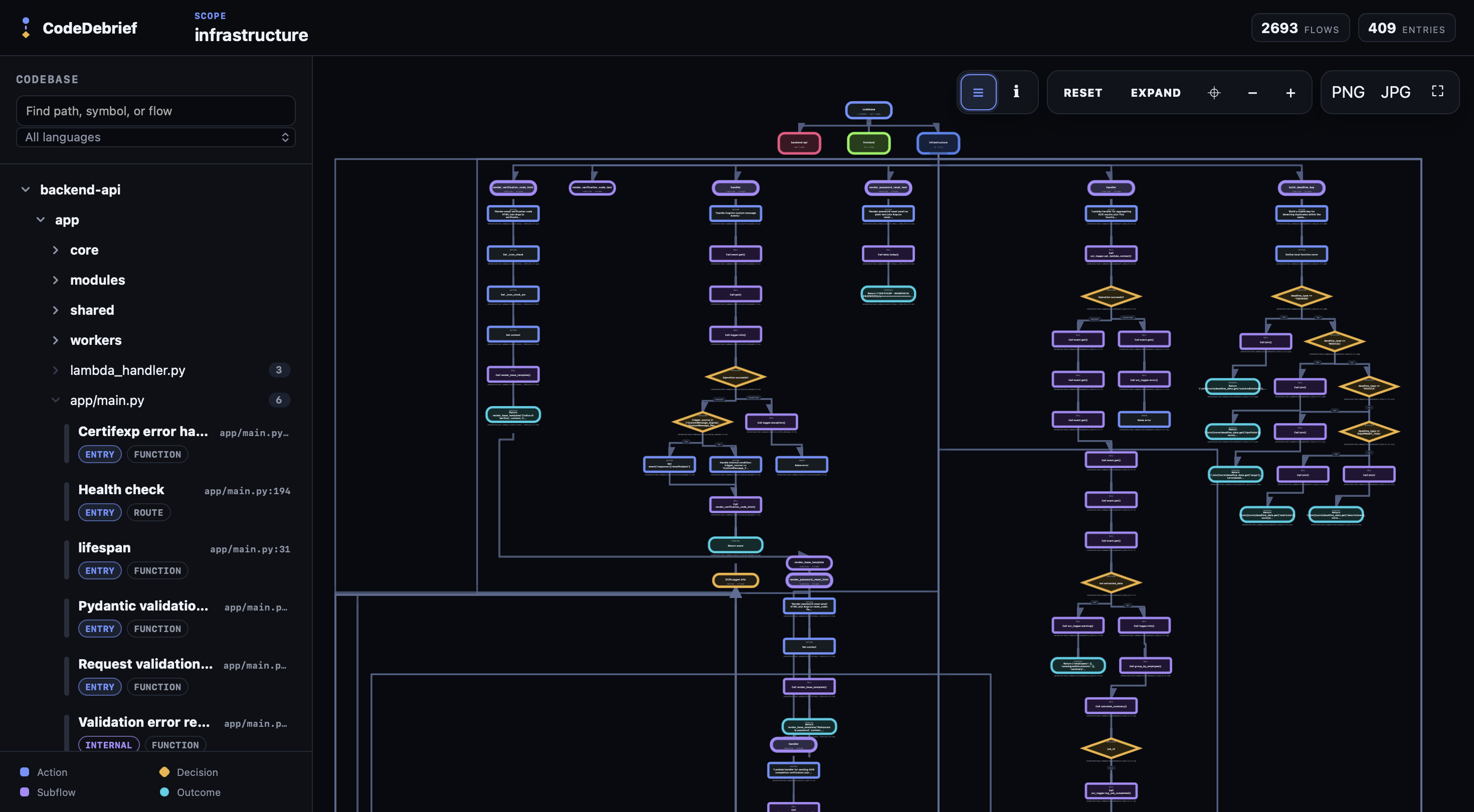
Example manual view: the interactive browser canvas for exploring scopes, files, entry
points, and connected workflow flows.
Use the viewer when you need to inspect the whole project graph, navigate scopes, compare
neighboring flows, or visually follow callers and callees. Use MCP when an agent should
answer a bounded question with a focused `workflow_slice`.
## Domain Logic
CodeDebrief extracts and aggregates domain concepts such as:
- enum members;
- status and lifecycle states;
- roles and permissions;
- feature flags;
- handled values and the decisions that branch on them.
`agent_context` includes relevant domain logic inside the returned `workflow_slice`, with
links back to flows, nodes, source ranges, snapshots, and viewer targets. Value matching
uses modeled code facts, including enum-style suffix matches such as `PAID` for
`Status.PAID`.
## Supported Code
CodeDebrief currently extracts control flow for 11 language ids:
| Language | Current coverage |
| --- | --- |
| Python (`.py`) | AST analyzer with functions, methods, decisions, loops, calls, returns, exceptions, tests, enum harvest, and import dependencies. |
| TypeScript / TSX (`.ts`, `.tsx`) | Tree-sitter analyzer with Next.js and React entrypoint detection, decisions, loops, calls, returns, expression-bodied arrows, tests, enum harvest, and import dependencies. |
| JavaScript / JSX (`.js`, `.jsx`, `.mjs`, `.cjs`) | Tree-sitter analyzer with JavaScript labeling, decisions, loops, calls, returns, expression-bodied arrows, tests, and import dependencies. |
| Go (`.go`) | Profile-driven tree-sitter analyzer with functions, methods, decisions, loops, calls, returns, tests, and import dependencies. |
| Java (`.java`) | Profile-driven tree-sitter analyzer with methods, decisions, loops, calls, returns, exceptions, tests, imports, and Spring route annotations. |
| C# (`.cs`) | Profile-driven tree-sitter analyzer with methods, decisions, loops, calls, returns, exceptions, and tests. |
| PHP (`.php`) | Profile-driven tree-sitter analyzer with functions, methods, decisions, loops, calls, returns, exceptions, and tests. |
| C (`.c`, `.h`) | Profile-driven tree-sitter analyzer with functions, decisions, loops, calls, returns, and tests. |
| C++ (`.cc`, `.cpp`, `.cxx`, `.hh`, `.hpp`, `.hxx`, `.ipp`, `.tpp`) | Profile-driven tree-sitter analyzer with functions, methods, decisions, loops, calls, returns, exceptions, and tests. |
| Rust (`.rs`) | Profile-driven tree-sitter analyzer with functions, decisions, loops, calls, match handling, returns, and tests. |
| Ruby (`.rb`) | Profile-driven tree-sitter analyzer with methods, decisions, loops, calls, returns, and tests. |
Generated models include `metadata.language_capabilities`, with feature flags and limitation
notes per language. Agents should use that contract when explaining analyzer depth.
## Privacy
The analyzer, canonical artifacts, Mermaid generation, local viewer, and MCP server do not
require an LLM API key. CodeDebrief itself builds the workflow model locally.
When CodeDebrief is connected to a hosted coding agent, the agent may receive the workflow
slices and source ranges returned through MCP. That transfer is governed by the coding
agent and provider you use.
## Configuration
CodeDebrief works without config. New `setup` runs create
`codedebrief-out/codedebrief.toml` only when defaults are not enough; legacy root
`codedebrief.toml` files are still read and preserved.
```toml
[codedebrief]
# Analyze only these folders or files. Paths are relative to the project root where you
# run CodeDebrief unless absolute; sibling repos such as "../api" are supported.
# Artifacts still write under output_dir relative to this project root.
source_roots = ["."]
exclude = []
exclude_dirs = []
include_public_functions = true
max_call_depth = 4
output_dir = "codedebrief-out"
self_exclude = true
[codedebrief.entrypoints]
include = []
exclude = []
[codedebrief.scopes]
backend = ["backend/**", "services/**"]
frontend = ["frontend/**", "web/**"]
edge = ["edge/**", "workers/**"]
```
Defaults prune common VCS, dependency, cache, temporary, generated, and output directories,
including `.git`, `node_modules`, virtualenv folders, `.next`, `.turbo`, `.svelte-kit`,
`.nx`, `.pytest_cache`, `.mypy_cache`, `.ruff_cache`, `.pyre`, `.dart_tool`, `dist`,
`build`, `out`, `target`, `obj`, `coverage`, `vendor`, `Pods`, and `codedebrief-out`.
### Analyze Selected Folders Or Repos
Yes, this is supported. Run CodeDebrief from the directory where you want the workspace
configuration and `codedebrief-out` folder to live, then pass the selected folders or repos
to `--source`.
For example, from the repository root:
```bash
cd path/to/my-project
codedebrief setup claude --source backend-api frontend/src
```
With that configuration:
- CodeDebrief analyzes only `backend-api/` and `frontend/src/`;
- `codedebrief-out/codedebrief.json`, `codedebrief-out/codedebrief.md`, the hash sidecar,
and the local viewer HTML are still created in the current project root;
- MCP and the manual viewer keep using the root project context, but the modeled workflows
come only from the selected folders.
For sibling repos, use a dedicated workspace folder:
```bash
mkdir pipeline-map
cd pipeline-map
codedebrief setup claude --source ../repo-ingest ../repo-transform ../repo-app
```
With that configuration, CodeDebrief writes its config and artifacts under
`pipeline-map/codedebrief-out/`, while model paths stay relative to the workspace, for
example `../repo-ingest/src/pipeline.py`. Inferred scopes use the repo folder name
(`repo-ingest`, `repo-transform`, `repo-app`) unless you define `[codedebrief.scopes]`
manually.
`--source` values may point to folders or individual source files. CodeDebrief writes them
into the active config as `source_roots` before the initial analysis starts. If you want
separate models for different parts of a monorepo or multi-repo workspace, use different
workspace roots or profiles with different `output_dir` values.
## Limitations
CodeDebrief does not run code, observe runtime state, perform full symbolic execution, prove
business correctness, or reconstruct deep framework state. It statically models source
files, control flow, selected framework conventions, and resolvable internal calls.
Important practical limits:
- dynamic dispatch may remain unresolved;
- language capability varies by analyzer frontend;
- generated or unsupported files may be skipped;
- large slices are token-budgeted and report omissions;
- the displayed first slice is a bounded summary and can be expanded with MCP tools.
## FAQ
### Does CodeDebrief replace project documentation?
No. Maintained documentation should explain architecture, intent, design rationale,
conventions, and operational knowledge. CodeDebrief is for fast, source-grounded workflow
inspection during brainstorming, debugging, planning, and impact analysis.
### Does an LLM generate the flowcharts?
No. The analyzer builds the canonical workflow model and Mermaid diagrams from source. A
coding agent can choose a bounded slice, render it, translate labels, or explain it, but
those actions remain a presentation layer over the deterministic graph.
### How is this different from a generated repository summary?
A generated summary is prose produced for one request and one context window. CodeDebrief
maintains a reusable structural model that can return bounded flowcharts, source anchors,
omissions, and expansion handles for later questions.
### Is CodeDebrief an AI code review tool?
No. CodeDebrief is for code comprehension and workflow navigation. It helps humans and
coding agents understand modeled logic; it does not present possible defects as product
output.
### Does CodeDebrief require an LLM API key?
No. The analyzer, artifacts, Mermaid diagrams, manual viewer, and MCP server are local-first
and deterministic. Coding agents can use the MCP tools without any required provider key.
### How is CodeDebrief different from a call graph?
A call graph shows relationships between symbols. CodeDebrief models workflow slices with
entrypoints, decisions, branches, ordered steps, source ranges, domain concepts, visual
targets, and expansion tools for coding agents.
### Can CodeDebrief generate Mermaid workflow diagrams from code?
Yes. `agent_context` returns a canonical top-to-bottom Mermaid visual for the selected
`workflow_slice`, and `snapshot_slice` can persist Mermaid files for clients that cannot
render Mermaid inline.
### Can I use CodeDebrief only as a manual visual explorer?
Yes. Run `codedebrief view` to open the interactive local viewer. MCP is the primary agent
surface, but the viewer remains the official manual exploration surface.
## Development
For local development in this repository:
```bash
uv sync --extra dev
uv run codedebrief --help
```
Standard gates:
```bash
UV_CACHE_DIR=/tmp/codedebrief-uv-cache uv run ruff check .
UV_CACHE_DIR=/tmp/codedebrief-uv-cache uv run ruff format --check .
UV_CACHE_DIR=/tmp/codedebrief-uv-cache uv run mypy
UV_CACHE_DIR=/tmp/codedebrief-uv-cache uv run pytest --cov
UV_CACHE_DIR=/tmp/codedebrief-uv-cache uv run codedebrief validate . --check-sync --json
```
Viewer gates:
```bash
npm run viewer:typecheck
npm run viewer:test
npm run viewer:build
UV_CACHE_DIR=/tmp/codedebrief-uv-cache uv run codedebrief update
UV_CACHE_DIR=/tmp/codedebrief-uv-cache uv run codedebrief view --render-only --no-open
```
Schemas:
- [schema/codedebrief.schema.json](schema/codedebrief.schema.json) documents the canonical
artifact model.
## License
Apache License 2.0. See [LICENSE](LICENSE).