
worki
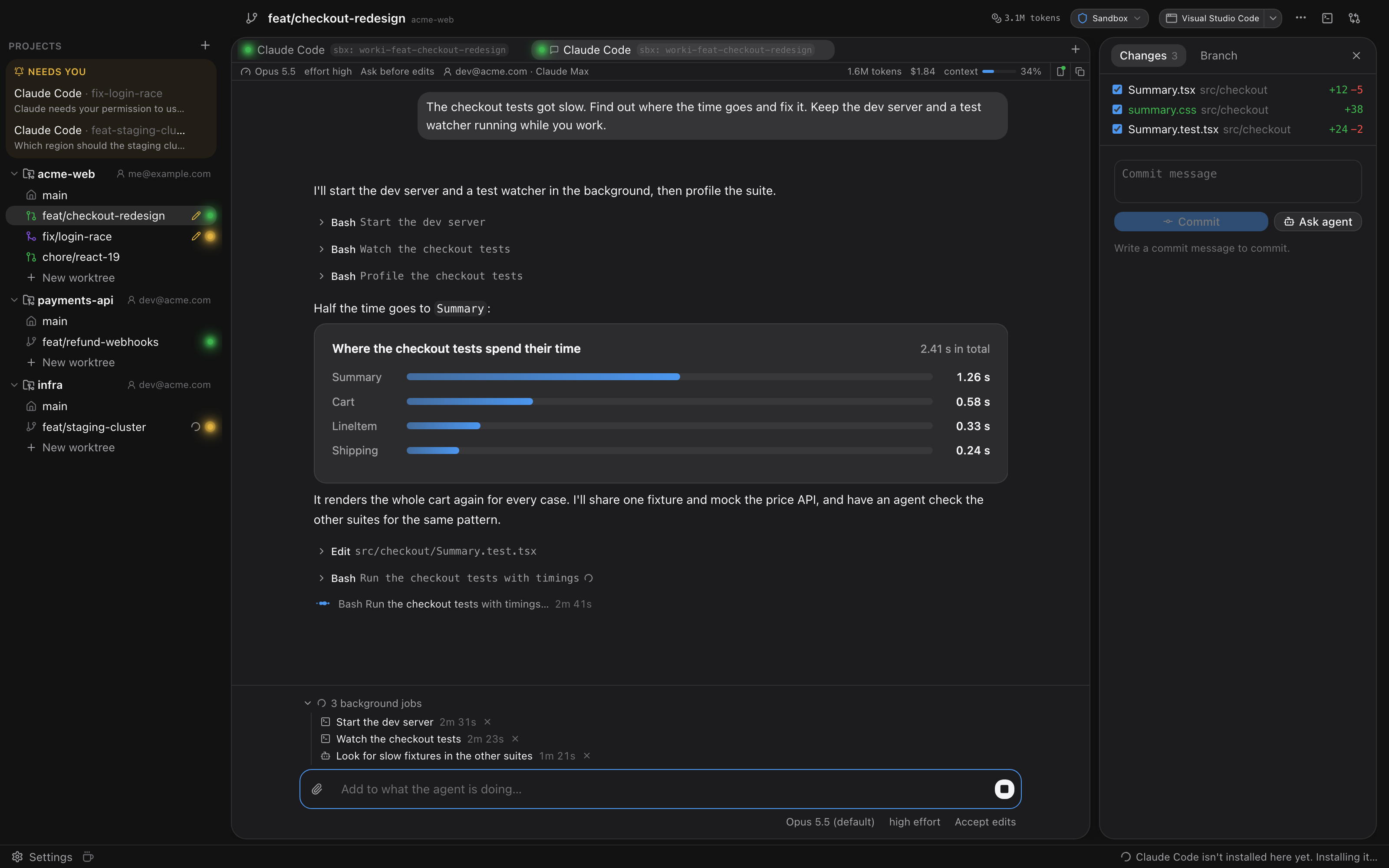
Run coding agents in parallel, each in its own git worktree, each locked in its own sandbox.




Install with [Homebrew](https://brew.sh), or download the DMG from the
[latest release](https://github.com/fischsil/worki/releases/latest):
```bash
brew tap fischsil/tap
brew trust fischsil/tap
brew install --cask worki
```
Coding agents are at their best when you let them run on their own: accept edits, run the tests,
try again. That's exactly when you don't want them anywhere near your SSH keys, your browser
profile or your other repositories.
worki is a native macOS app that gives every task its own git worktree and its own isolated
environment, and shows all your agents side by side. Isolation isn't a plugin or a wrapper
script; it's how worki starts every agent.
## Isolation, built in
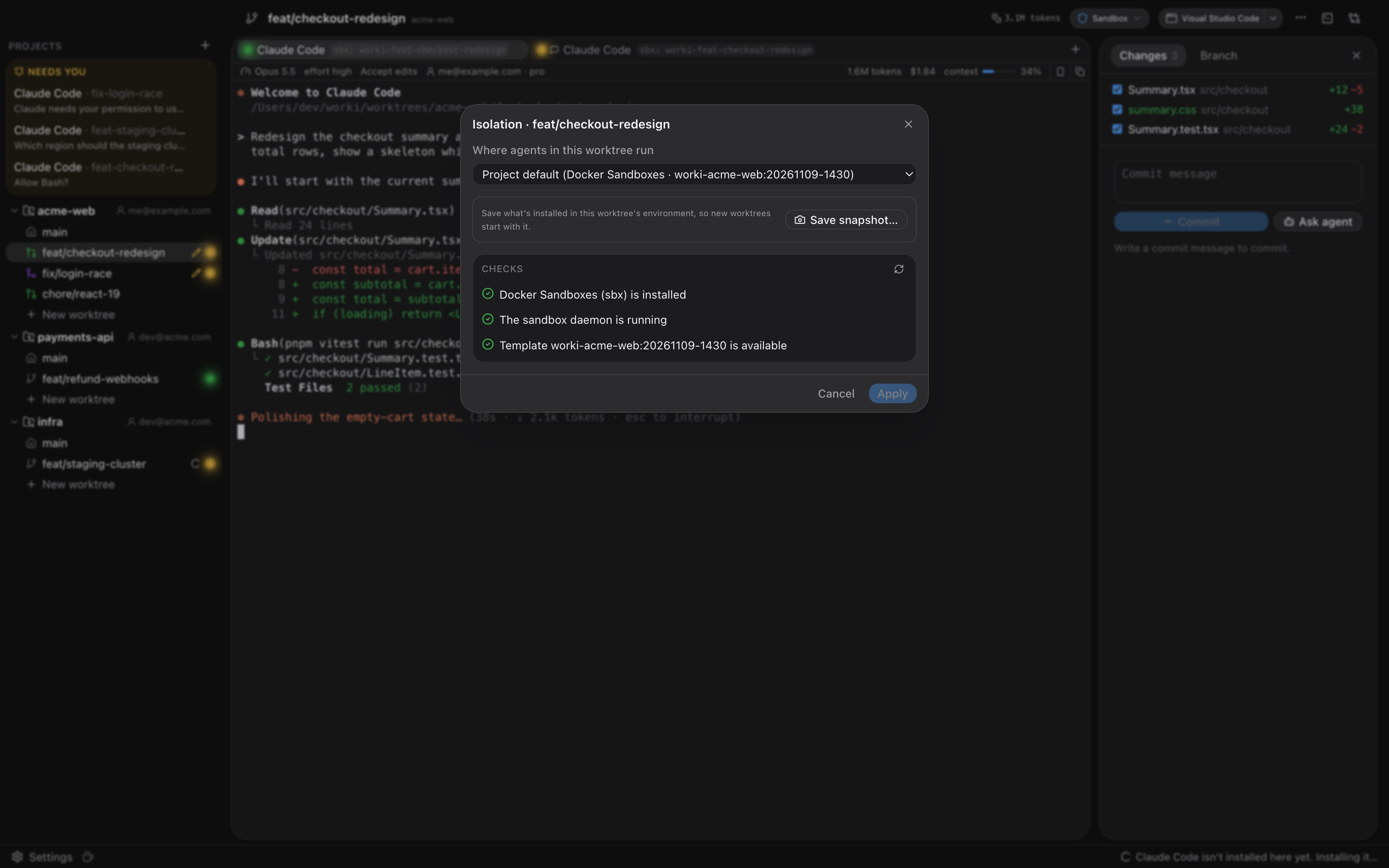
Pick where agents run: globally, per project or per worktree. worki sets the environment up,
checks it and cleans it up again.
| Isolation | What the agent gets | Needs |
|---|---|---|
| **User Isolation** | A hidden macOS user (`_worki`) that can only reach the worktrees it was given. Your home folder stays unreadable. | Nothing extra; a one-time admin setup |
| **Docker Sandboxes** | Its own Linux microVM per worktree | Docker Sandboxes (`sbx`) |
| **Docker** | Its own container per worktree, from a small Alpine image worki builds for you | Docker Desktop |
| **Podman** | The same, on Podman | A Podman machine |
| **None** | Runs as you, for trusted work | — |
- **Only the worktree, nothing else.** The worktree is mounted (or, for User Isolation, granted
by ACLs) at the same path as on your Mac, so paths in agent output match yours. Of the
repository's `.git`, only what committing needs is writable; hooks and config stay read-only,
so an agent can't plant anything that later runs as you.
- **No credentials unless you hand them over.** No SSH agent, no `~/.gitconfig` or git
credential helper, no GitHub CLI login and none of your environment variables (API keys in your
shell) reach an agent; it gets the terminal type, language and worki's own session variables,
plus the tokens you store for an isolation. With isolation set to None, an agent runs as you.
- **A doctor for every backend.** Checks phrased the way you'd want to read them ("_worki can't
read files in your home folder") with one-click fixes: create the agent user, start the
sandbox daemon or Podman machine, build the image.
- **Agents ready inside the sandbox.** Claude Code, Codex or any other agent is installed in a
worktree's environment the first time you start it there, and the agent trusts the worktree
without asking. Claude Code gets the settings you define for isolated sessions and signs in
with one of your [accounts](#several-claude-accounts-side-by-side) (with User Isolation, a token
that uses your subscription), while your own login stays untouched. Codex signs in per
environment with a code you approve in the browser.
- **Secrets stay in your Keychain.** Set them for every agent or for one project; sessions get
them as environment variables, the project's over the global ones.
- **Snapshots.** Install what a project needs (a JDK, system packages) once, save the worktree's
sandbox or container as a snapshot, and the project's new worktrees start from it with
everything installed.
- **A shared project folder.** Turn it on, and every worktree's sandbox or container of the
project gets the same folder at `/worki/project` (`$WORKI_PROJECT_DIR`), for a build cache,
say.
- **Agents stay put.** Environments keep running when worki quits (or stop, if you prefer), and
Claude Code sessions pick up their conversation when worki starts again.
- **No leftovers.** Environments are removed together with their worktree or project.
## Several Claude accounts, side by side
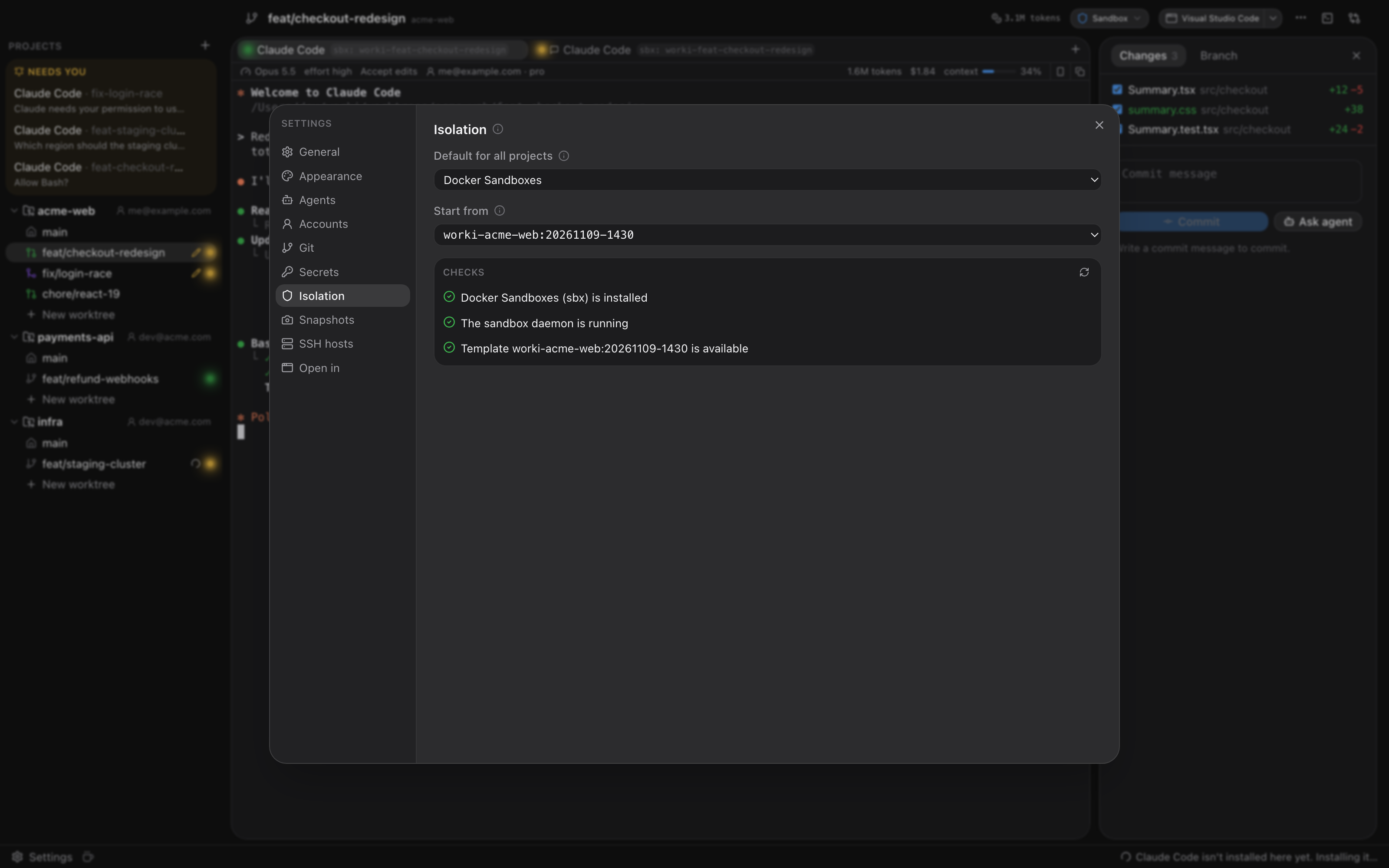
Use your company's Claude subscription for work projects and your own for side projects, at the
same time, without signing out and in again.
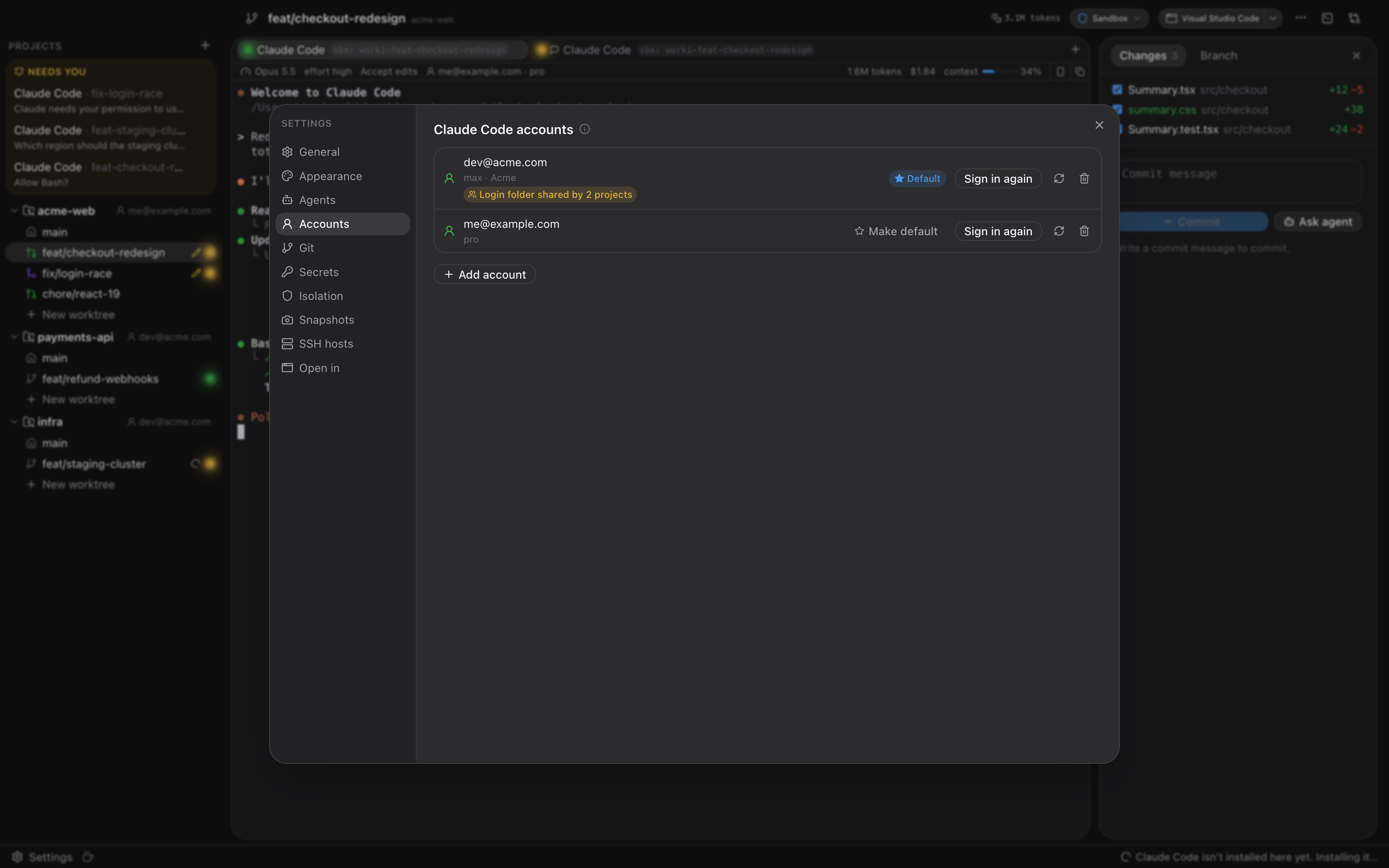
- **Sign in once per account.** Add accounts under Settings › Accounts and approve each one in your
browser. worki keeps every login in its own folder, apart from your own Claude Code login.
- **One account per project.** Mark one account as the default; any project can pick another.
The sidebar shows each project's account, and every session shows the account it's actually
signed in as.
- **Real subscription logins.** Not API keys: the login renews itself, and Remote Control works.
Every project on the account shares it, so you sign in once per account. To switch who an
account is, sign in again under Settings › Accounts; `/login` is off inside those sessions,
since it would switch every project.
- **Projects share a login, nothing else.** Each project (or each worktree, if you like) has its
own Claude Code folder: settings, `CLAUDE.md`, skills, history and memory. Projects on one
account share only its login. Or a project signs in with the account's `claude setup-token`
token instead; such tokens only run the model, so Remote Control doesn't work with them. Or it
uses no account at all: each worktree's sessions sign in themselves with `/login`, and that
login is shared with nothing, not even the project's other worktrees.
- **Switching is safe.** When a project changes account, each worktree's sandbox or container
moves over the next time an agent starts there while none is running.
Accounts work in Docker Sandboxes, Docker and Podman.
## Nothing happens out of sight
Creating a worktree, starting an agent in a sandbox, saving a snapshot: whatever worki does in
the background, you can watch it happen.
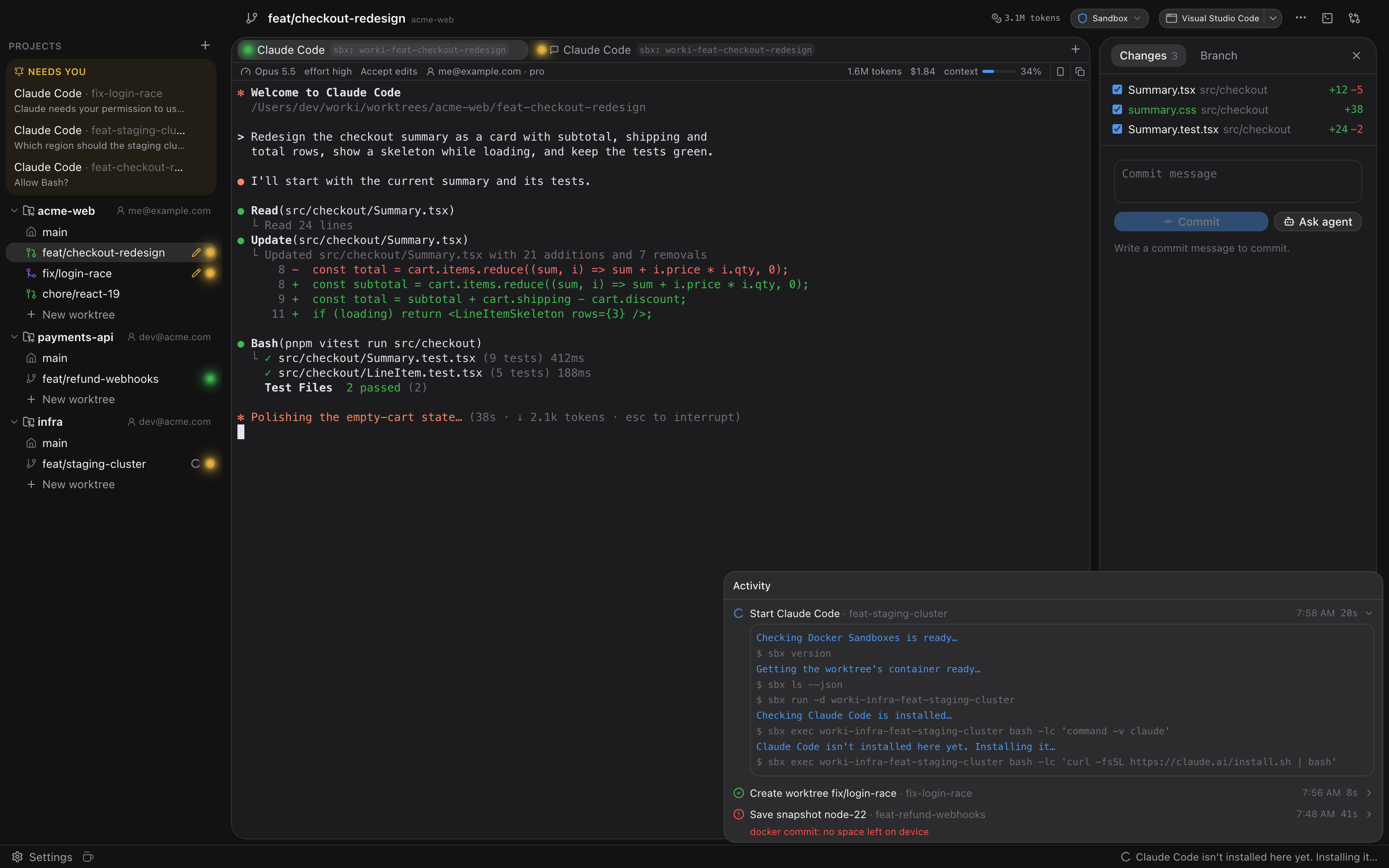
- **Every step, as it happens.** The sidebar shows what's running right now, and the worktree it
runs for gets a spinner. The Activity panel keeps the recent operations with when they started
and how long they took.
- **The commands it ran.** Each step lists the commands worki ran for it: `git`, `docker`, `sbx`,
`ssh`, your setup script. Secret-looking values are hidden.
- **Nothing blocks you.** Dialogs close as soon as you confirm; the work carries on in the
background, and a failure shows up in the panel with its error.
## Chat or terminal
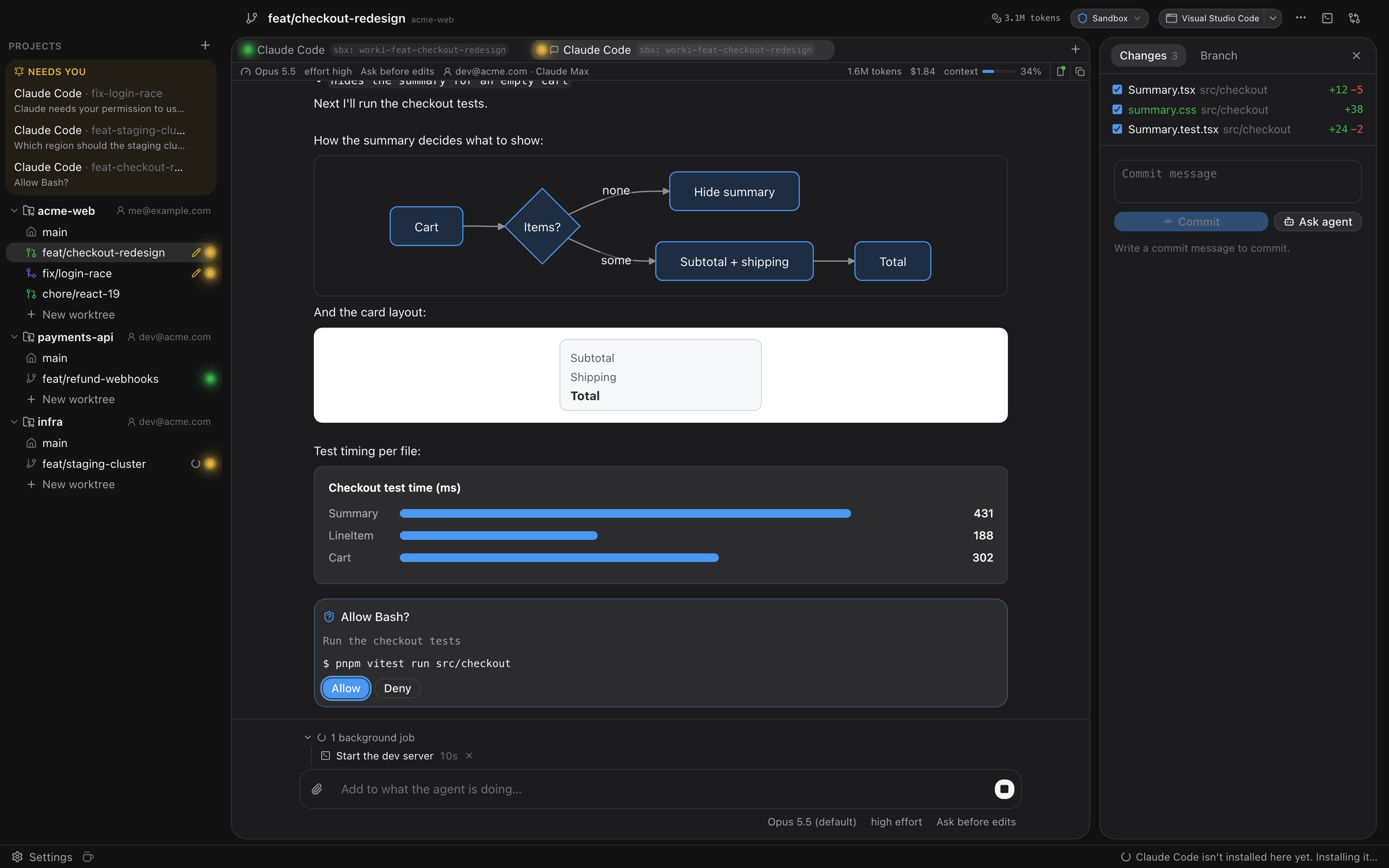
Run Claude Code or Codex in its terminal, or as a chat that worki draws itself:
- **The conversation, readable.** Answers stream in as Markdown, tool calls fold into one line
each and open to show the command, the diff or the output.
- **Questions as buttons.** Permission requests get Allow and Deny, the agent's questions their
options, and Esc stops a turn.
- **Switch while you talk.** Model, effort and permission mode sit under the message box.
- **Attach text files and images, or paste screenshots.** worki reads them itself, so they reach agents in any
isolation.
- **Visuals in place.** Diagrams (Mermaid), drawings (SVG) and charts (HTML, in a sandboxed frame)
match worki's theme and open full-window. Diagrams and drawings zoom and save as SVG or PNG;
charts save as HTML.
- **Picks up where you left off.** Chats reopen with their history when worki starts.
- **Continue on your phone.** Turn on Remote Control below the message box and carry on in the
Claude app or on claude.ai/code; what you send from there shows up in worki. Under Settings ›
Agents, new Claude Code sessions, terminals included, start with it. worki allows it in Docker
Sandboxes for you.
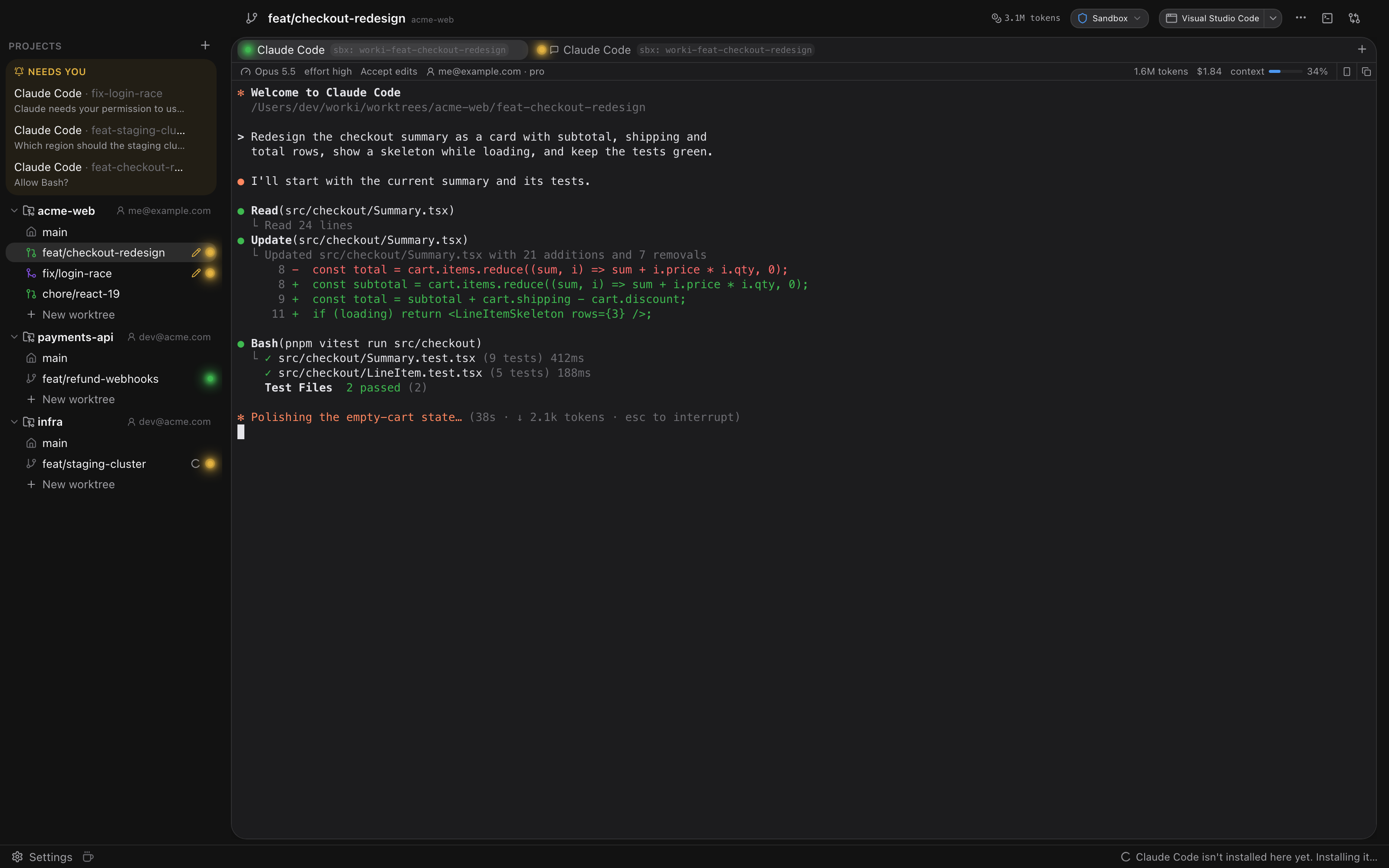
Choose the default under Settings › General; the **+** menu offers both.
**Codex** runs as a chat or in a terminal, in any isolation. worki installs it with OpenAI's
installer, signs it in per environment with a code you approve in the browser, lists it under
**Needs you** when it asks for approval or finishes a turn, and resumes its conversation when
worki starts again. The status bar details (model, context, token usage) are Claude Code only.
## From task to pull request
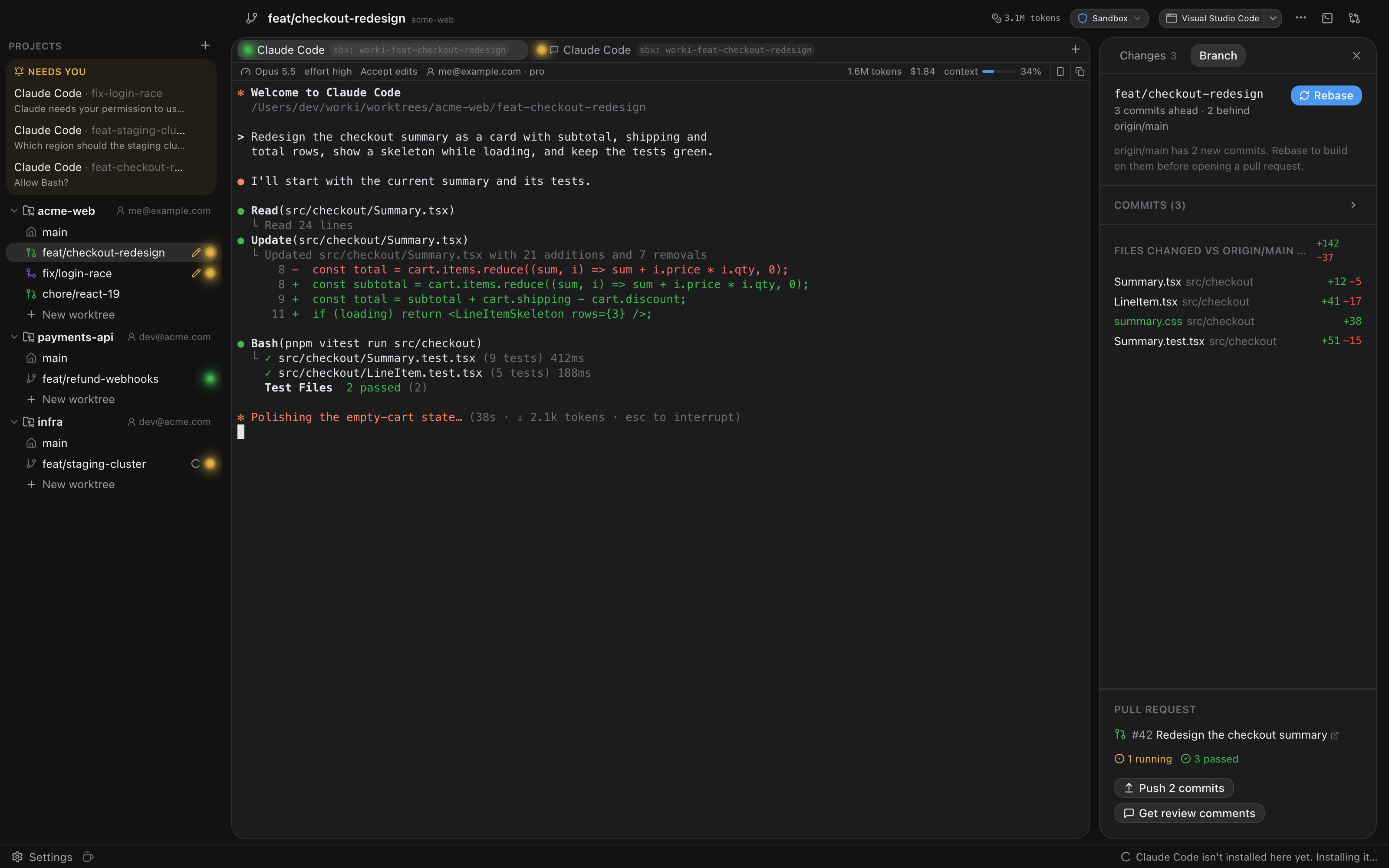
- **Commit** the files you pick from the **Changes** tab, or let the agent write the commit
messages.
- **Branch** tab: how the branch stands against the branch it was started from, with **Rebase** (it fetches
first; on conflicts nothing changes and the agent can resolve them), the branch's commits and
every file it touched.
- **Pull requests** through the GitHub CLI: create one, follow its checks, push new commits, and
pull review comments into worki to send them to the agent. The sidebar shows each worktree's
pull request (open, draft, merged or closed) and marks failed checks.
- **Review in place.** Comment on any diff line, expand hidden context, and send the comments to
the agent as one review.
Commits and pull requests can be turned off under Settings › Git. Pull requests need
[`gh`](https://cli.github.com) installed and signed in (`gh auth login`).
## Everything around it
- **Parallel worktrees.** Branch off any existing branch in one step, with an optional setup
script (`pnpm install`, copying `.env` files) that runs in the same isolation as the agent.
- **See who needs you.** Agents waiting for an answer are listed under **Needs you**, across all
projects, the moment they ask, with a notification and a Dock badge.
- **Real terminals.** Agent and shell sessions in GPU-rendered terminals that keep running when
you switch worktrees, a shell of your own below the agent (⌃\`), and links that open in your
browser, sign-in links included. For Claude Code, the status bar shows model, context and token
usage. YOLO mode is one checkbox per agent.
- **Remote projects.** Work on repositories on an SSH host, with saved hosts you set up once;
terminal sessions run in tmux there and survive a dropped connection.
- **Keyboard first.** ⌘K jumps to any worktree or action, ⌘T starts an agent, ⌘J shows the
changes.
- **Open in anything.** Jump to the worktree in your editor or terminal from the toolbar.
## Getting started
1. Download `worki__universal.dmg` from the
[latest release](https://github.com/fischsil/worki/releases/latest). It runs on
Apple Silicon and Intel Macs with macOS 13 or later, and is signed and notarized by Apple.
2. Open the DMG and drag **worki** into **Applications**. Or install it with Homebrew:
```bash
brew tap fischsil/tap
brew trust fischsil/tap
brew install --cask worki
```
3. For container isolation, install Docker Sandboxes, Docker Desktop or Podman. User Isolation
needs nothing extra.
Add a repository with **+**, create a worktree, pick its isolation, and start an agent. The
doctor walks you through anything that's missing.
### Build from source
You need Rust (stable), Node 20+, pnpm and the Xcode command line tools.
```bash
git clone https://github.com/fischsil/worki.git
cd worki
./start_dev.sh
```
`start_dev.sh` installs the frontend dependencies when needed, compiles the app and starts it with
hot reload for the UI.
Dev builds keep their secrets in `~/Library/Application Support/worki/dev-secrets.json`, readable
only by you, instead of the Keychain: macOS would ask again for Keychain access after every rebuild.
### Share setup with your team
Commit a `.worki.toml` to share the setup script, and the base branch worki picks up when the
project is added:
```toml
[worktree]
base = "main"
setup = """
cp "$WORKI_ROOT_PATH/.env.local" .env.local
pnpm install
"""
```
A setup script set in the project settings overrides the file.
## Development
```bash
cargo test --workspace
pnpm typecheck
```
The README screenshots are the real UI rendered against demo data (`ui/demo.html`):
```bash
scripts/screenshots.sh
```
End-to-end tests against real container engines (need `sbx`, Docker Desktop or a Podman machine):
```bash
cargo test -p worki-isolation --test containers -- --ignored
```
| Path | What |
|---|---|
| `crates/worki-isolation` | Isolation backends: macOS user, Docker Sandboxes, Docker, Podman, SSH |
| `crates/worki-core` | Projects, worktrees and git (local and over SSH), SQLite store, agent settings |
| `crates/worki-pty` | PTY sessions with replay buffer and agent activity tracking |
| `src-tauri` | Tauri app and IPC commands |
| `ui` | React + Tailwind frontend |
Design notes are in [docs/design.md](docs/design.md).
## License
[MIT](LICENSE)