A free, open-source guide addon for World of Warcraft: Forever: leveling routes for every start, found by simulation and written step by step.
On CurseForge, or from the Releases page. Questions, feedback and bug reports: join the Polestar Discord.
Polestar is free; if it saves you a few hours, you can buy me a coffee.
## Quick start
1. **Install it with the CurseForge app** (search for
[Polestar Guides](https://www.curseforge.com/wow/addons/polestar-guides)),
then skip to step 3. **Or download** `Polestar-.zip` from the
newest release on the
[Releases page](https://github.com/fitzforge/polestar/releases), under
*Assets* (not "Source code").
2. **Unzip it into the game's AddOns folder**, so the Polestar folders
(`Polestar`, `Polestar_Guides`, `Polestar_Codex`, `Polestar_Nav` and the
others, with one `Polestar_` folder per client language such as
`Polestar_deDE`) sit directly inside it:
`World of Warcraft/_classic_beta_/Interface/AddOns/` on the beta client,
`_forever_/Interface/AddOns/` on the `_forever_` client. The same zip
works for both; if you have both clients installed, unzip into each one.
In the game's AddOns list they all sit under one "Polestar" heading,
which its arrow folds away.
3. **Restart the game completely** (a `/reload` does not load new addons) and
log in. The guide window opens with a guide for your race, level and zone:
follow the arrow, and the goals tick themselves off as you play.
Good to know:
- `/polestar guides` opens the hub: every guide, Lookup, Dungeons and Rares.
`/polestar options` holds every setting; quest markers on the map are off
until you turn them on under **Map**.
- `/polestar skip` moves on for good; `/polestar next` and `prev` only look
ahead or back.
- **Updating:** delete the old Polestar folders, then unzip the new release
the same way. Coming from 0.2.x, also delete the `Polestar_Guides_deDE`,
`Polestar_Names_deDE` kind (one of each per language): `Polestar_deDE` and
its siblings replace them, and Polestar reminds you at login while they are
still there.
- **Memory:** [CHECK: figures after the final 0.3.0 measurement] the arrow's walking routes (`Polestar_Nav`) load after login,
never in combat: about 34 MB for the walking maps, and while a walk is being
searched up to about 45 MB more for the stretch of map it crosses, released
when the search ends. **Walk real paths** (Options, Arrow & routes) off
never loads them.
- **Optional:** `Polestar_Recorder-.zip` from the same release
records your sessions to improve the routes. It does nothing until you turn
it on.
- **Community guides** are other people's guides for Polestar, each a
separate addon from its own author: see
[Community guides](#community-guides).
- Something wrong? Click the bug in the guide window, beside Skip: say what
went wrong; the report already holds the step, where you stand, your other
addons and the versions. **Copy report** and post it in **#bugs** on the
[Polestar Discord](https://discord.gg/polestar) — a bot files it for the
developers and replies in your thread when it's fixed. **Get the invite** is
there if you're not in the Discord yet. Have a GitHub account?
**Open on GitHub** pre-fills a new issue with your report. `/polestar report`
opens the window too, and [issues](https://github.com/fitzforge/polestar/issues)
are welcome as well. The release's `SHA256SUMS` holds the zips' checksums.
## What it is
Polestar is one addon for the whole of WoW: Forever. It carries 222 guides:
57 leveling guides that take both factions from 1 to 60 from every race's
starting zone (Zephras Isle for the Skyborne included), 62 class guides for
every class's quest chains, the twelve professions from 1 to 300, 17
reputations, 7 exploration guides, the Legacy challenges, 64 collectible
guides (one per mount and per pet) and 2 miscellaneous guides. Around the
guides it adds a 3D waypoint arrow that walks real paths (on Polestar's
walking maps, with a router that started from Shortest Path Forever's by
Cillian Berragan) and a travel planner, quest markers on the map, an upgrade
indicator on item tooltips, a search for where any item, mount or pet comes
from, a dungeon quest journal, rare alerts and the quality-of-life helpers a
long leveling session needs. Its interface and its guides read in English,
German, French, Spanish (Spain and Latin America), Brazilian Portuguese,
Russian, Korean and Chinese (simplified and traditional).
The leveling routes are not hand-picked. Polestar Forge models every quest
Forever offers a faction, starts from the order of the guides players know
and keeps only the changes that reach 60 sooner under its model, without
undoing a fix from a player's report; the guides are written from that route
and judged against the last ones
([How the routes are made](#how-the-routes-are-made)).
Other people can publish their own guides for Polestar as community
addons: separate addons, made and supported by their authors
([Community guides](#community-guides)). Each new character's first login opens a short
welcome: a hello and what Polestar does; on the account's first character,
quest automation, the guide at login and the colour scheme, then the route
style (Fastest, Balanced or Roads, with a line on what each does); then the
guide Polestar suggests for that character, the Discord and community guides
(`/polestar welcome` shows it again).
### New in 0.3.0
- **Better routes.** Every race's route is rebuilt by Polestar Forge, and on
each side the races share one route after their starting zones, so a fix
or an improvement reaches all of them.
- **The arrow walks the guide's own paths.** The walk into each step is
worked out when the guides are built (on Leffe's navigation maps and
Polestar's own), so the arrow follows it at once instead of searching
first; far waypoints draw their whole walk along the ground.
- **Lifts and cities.** "Ride the elevator up" or "down", with the
departure time; walks get on and off where the car stops; one fixed way in
and out of the Undercity; Stormwind and the other capitals are left by
their streets and gates.
- **Less memory.** Your race's guides, the quest database and the names in
other languages each take a fraction of what they did.
[CHANGELOG.md](CHANGELOG.md) lists every change.
> [!NOTE]
> **Beta.** Every guide compiles, lints and plays to the end in a simulator
> for every race and class it serves, but nothing has been play-tested on
> Forever yet. Forever's new 30-60 content (Riverglades, Shen'dralas, Mount
> Hyjal) is not in any data yet; the routes take it in at launch.
## A look inside
Screenshots from the game: World of Warcraft: Forever (beta client) with
Polestar 0.1.0 at its default settings. Click a picture for full size.
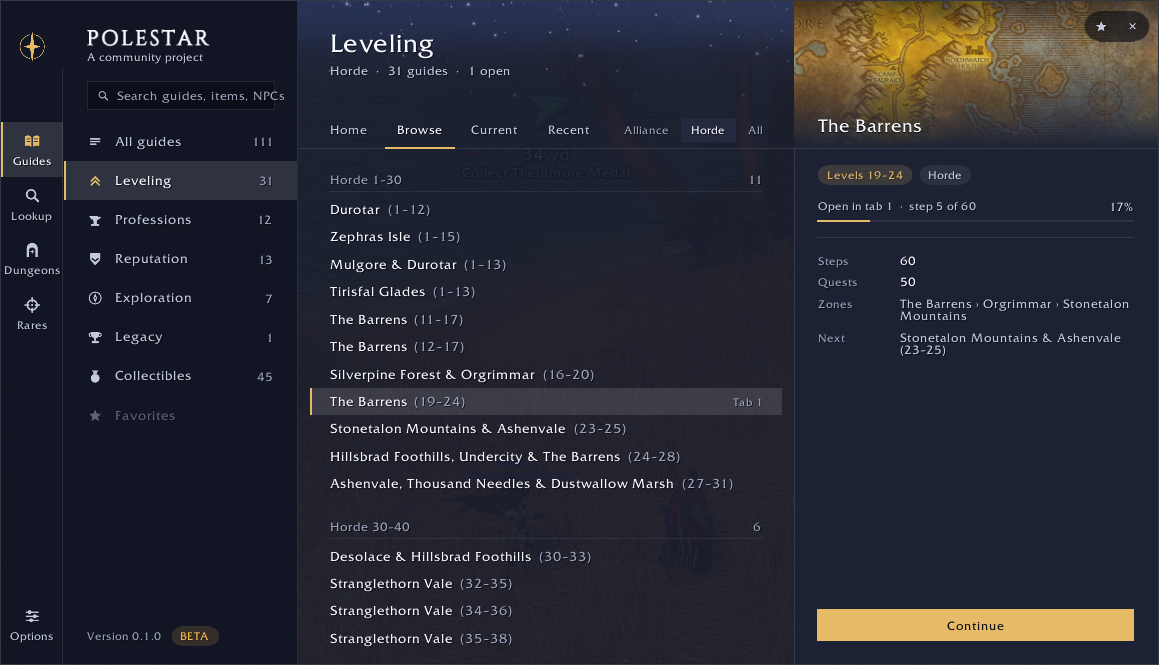
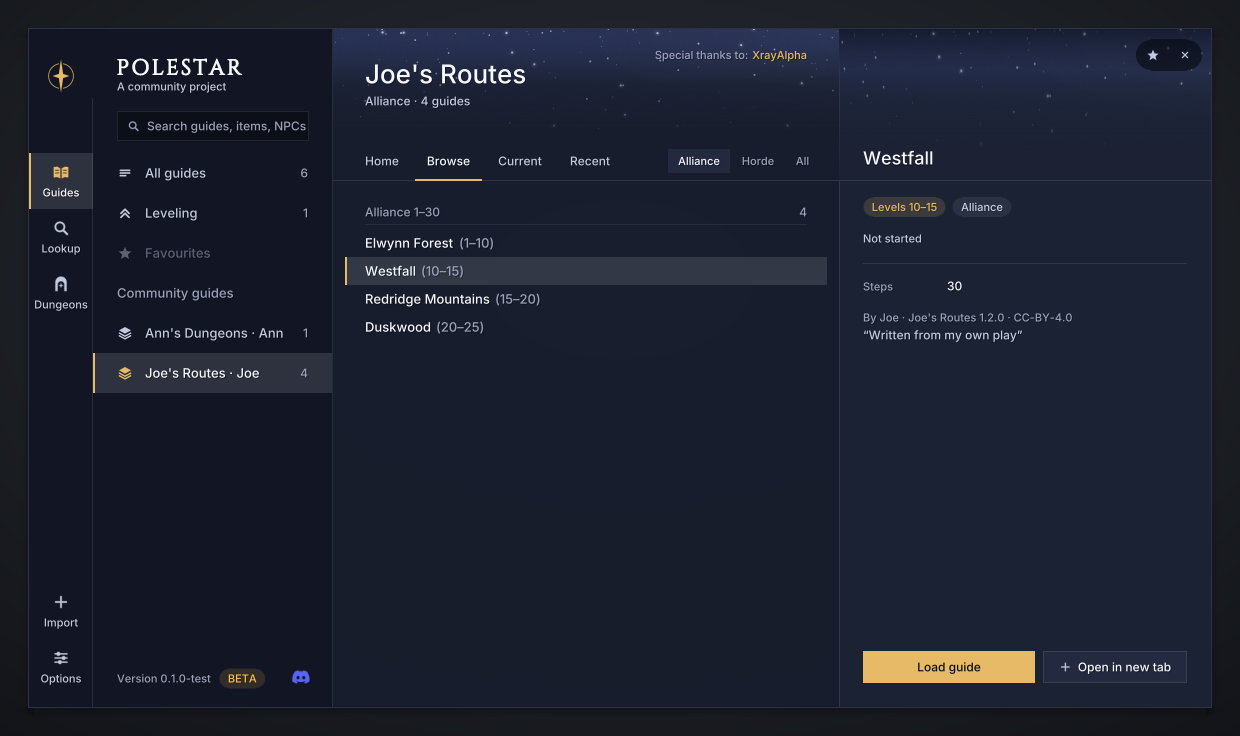
The hub. Guides, Lookup, Dungeons and Rares on one rail, Options at its foot. Here the Horde leveling guides by level band, and the selected guide's zone, progress, quests and the guide after it.
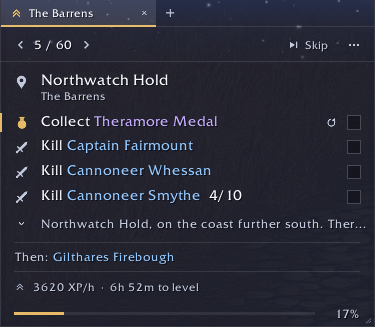
The guide window. The step's goals with their counters, who comes next, XP per hour and the time to level.
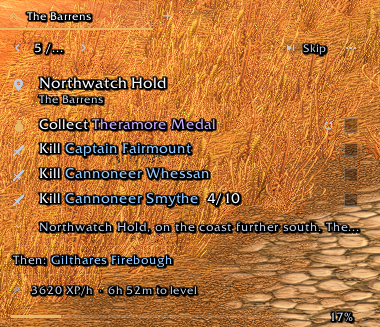
Transparent mode. Outlined text straight on the world; the controls appear under the cursor.
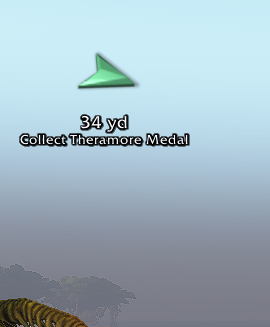
The arrow. Distance and the goal it leads to.
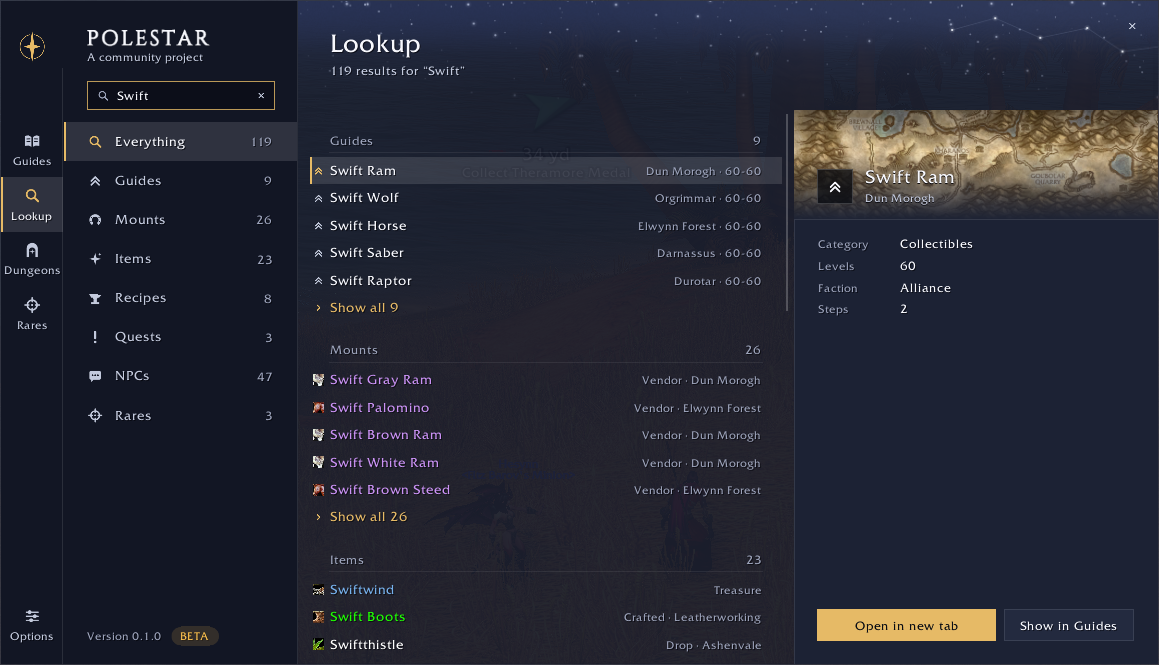
Lookup. One search over guides, mounts, items, recipes, quests, NPCs and rares, each with where it comes from.
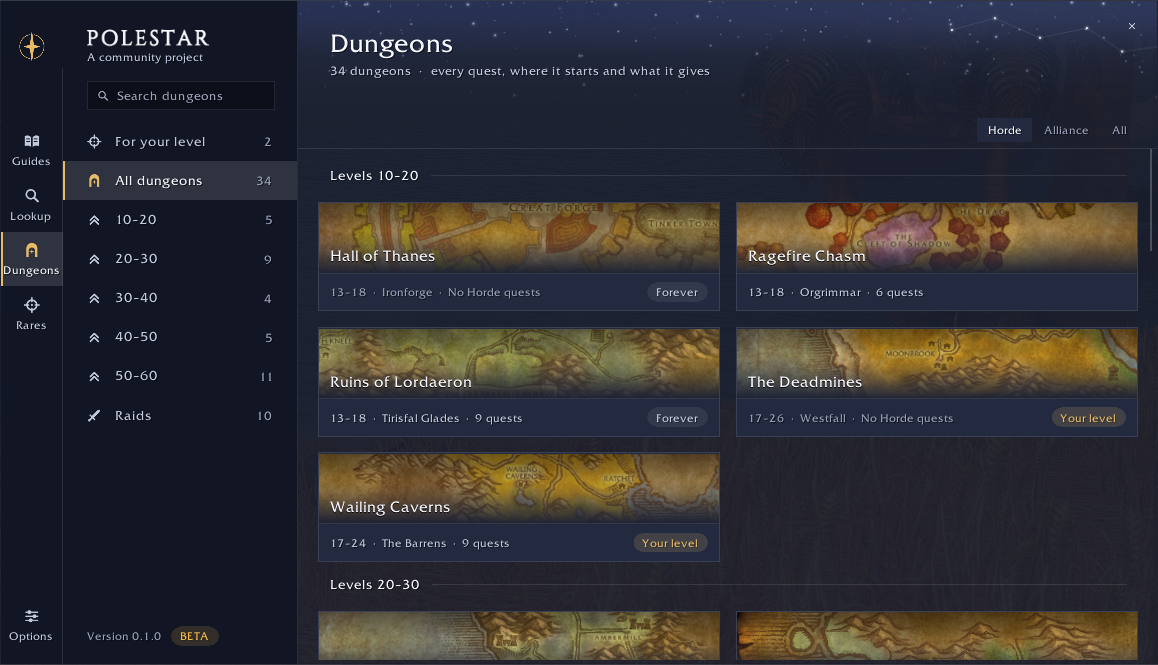
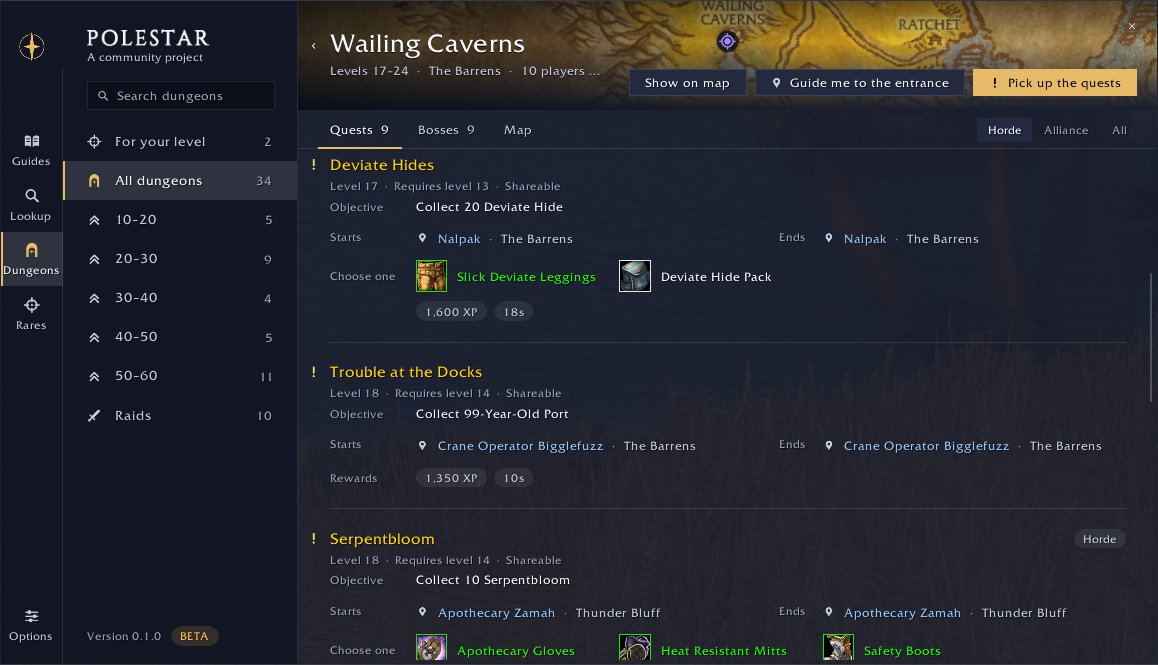
Dungeons. Every dungeon by level, its quests counted for your faction, the ones for your level marked.
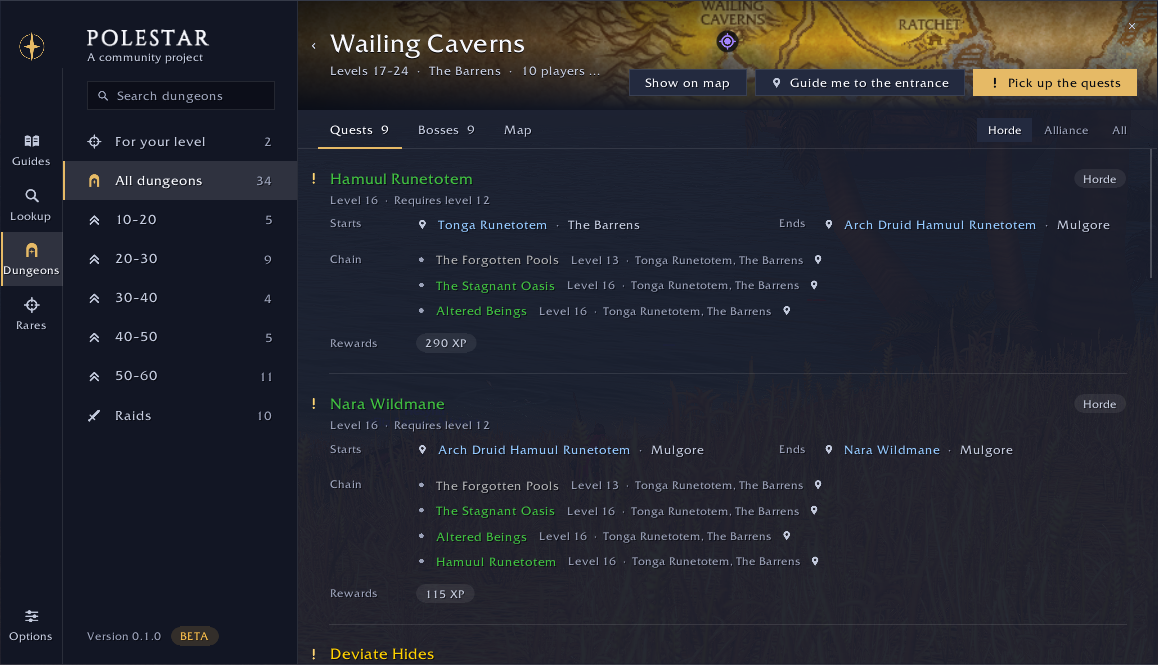
A dungeon's page. Who starts and ends each quest and its chain; one button guides you round to pick them all up.
Objectives and rewards. The items to choose from with their icons, the experience and the money.
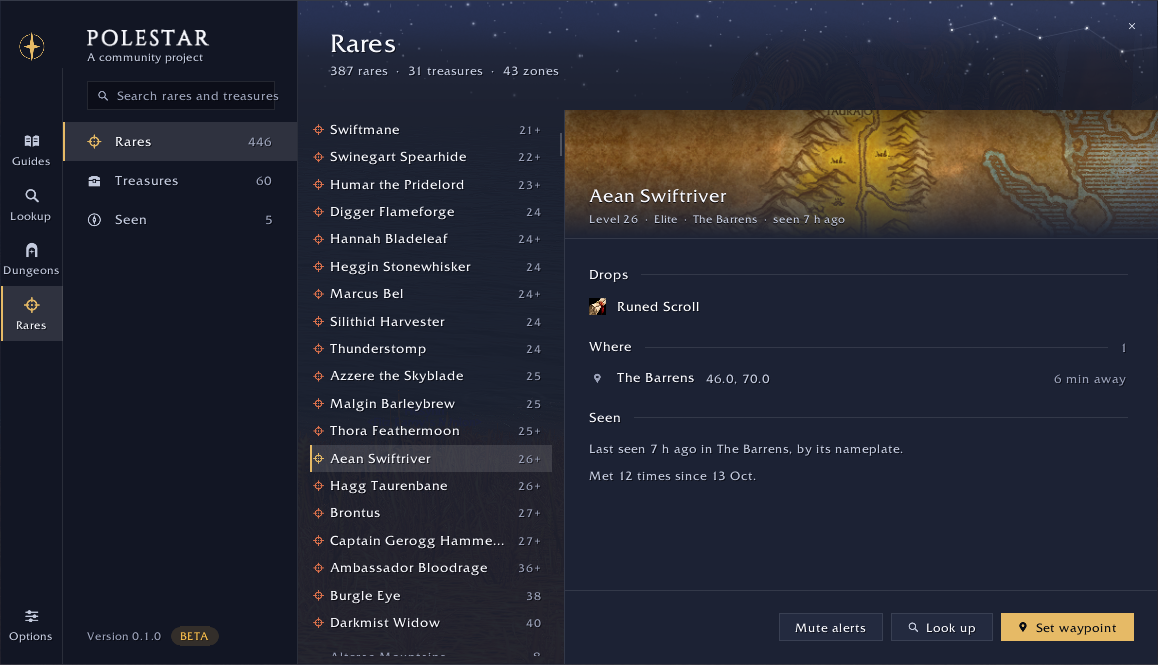
Rares. Every rare and treasure, its drops, where it spawns and how far, and when you last met it.
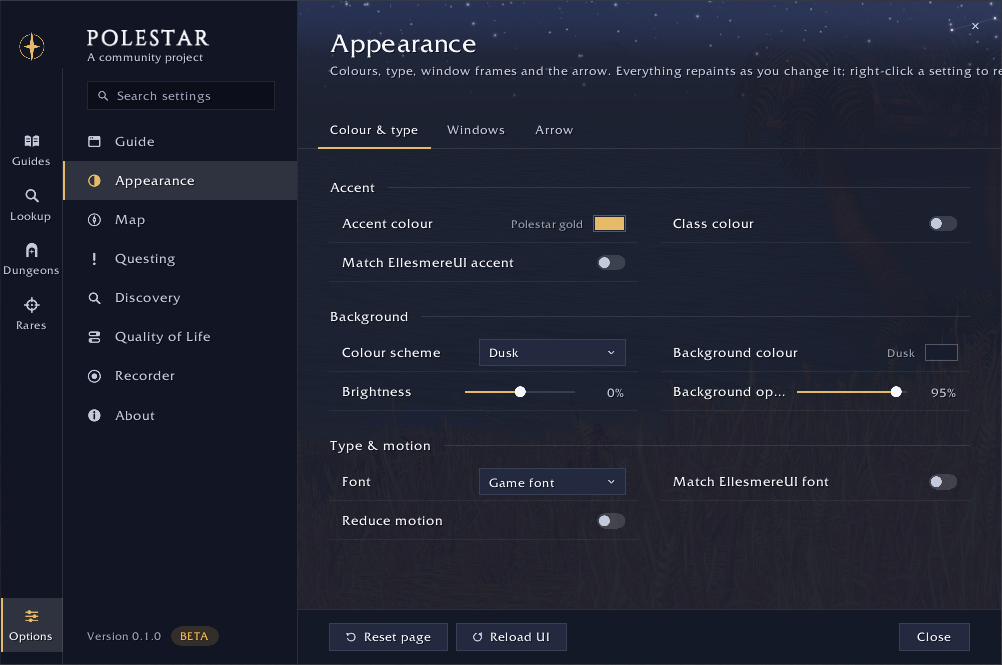
Options. Every setting as one row, applied as you change it; here Appearance.
Lookup, Dungeons and Rares read the Codex, a data pack that ships in the
release as `Polestar_Codex` ([Lookup, Dungeons and
Rares](#lookup-dungeons-and-rares)). Not pictured yet: the rare alert, the
upgrade marks on the quest reward panel and the quest markers on the world
map. Renders of every window and state, drawn without the game, are in
[docs/preview](docs/preview).
## Features
### Guides and the engine
- **One person at a time.** In a quest hub the window shows only who to talk
to now and their quests, then "Then: *next person*" and "Person 2 of 8";
the arrow points at that person. Counters sit right after each goal ("Kill
Zhevra Chargers 3/8") and a bar at the foot shows how far into the guide you
are.
- **Goals check themselves off** as you play: accepted and turned-in quests,
kills, loot, places reached, trainers visited, skills and reputation. Your
place in a guide is recomputed from your quest log, so it survives lost
saved variables.
- **Skip a quest.** Right-click a quest's line, Skip this quest: the guide
drops it and the quests that follow from it, in every guide, and the
banner's Undo brings them back. Skip, at the top, passes the whole step.
- **It catches up.** With "Skip grey quests" on, a guide you open on a
character who already did part of the route goes over what is done to
where you are: grey quests are left out, and so are green ones behind your
progress, unless a later quest needs them. A guide you are past, given to
you when no guide is open or by Start guide, hands over to the next.
Item, mount, reputation, profession and class guides do every step.
- **A guide for where you are.** The window opens with a guide suggested for
your race, class, level and location, and each guide hands over to the
next one in its chain when you finish it.
- **Tabs.** Up to six guides open at once (a leveling route and a profession,
say); quests are auto-accepted for all of them.
- **Professions** send you to the nearest trainer, vendor or inn of your own
faction from where you stand, never into a city of the other faction; a
goal's cycle button picks another.
- **Class training reminder** every two levels (configurable): the nearest
trainer of your class, unless your guide is about to take you there.
- **Elite quests are optional.** Leveling routes use only quests a player can
do alone; a quest that needs an elite appears as an extra marked "optional".
- **Escort notes.** On an escort quest the guide window says so under the
quest's accept and under the goal to complete it: "Escort: if the NPC is
not there, wait for it to respawn", so an empty spot means someone else is
on the escort, not a wrong place.
- **Bar at the bottom** (Options, Guide, Window): puts the tabs and the step
bar at the bottom edge when the window grows upward, so they stay in one
place as steps get longer. Off by default.
- **Hide in dungeons** (Options, Guide, Window, In dungeons; off by default):
the guide window hides inside dungeons and raids and comes back when you
leave. `/polestar`, the key binding or the minimap button still opens it
while you are inside.
### Navigation
- **A 3D waypoint arrow** points at the current goal, shifting from the
accent to jade as you arrive, with distance and ETA. Distances read in
yards, the game's unit, or in metres (Options, Arrow & routes).
- **The travel planner** uses known flight paths, boats, zeppelins and your
Hearthstone when they are faster. Each leg has its own caption on the arrow
("Fly to Crossroads", "Take the boat to Menethil Harbor", "Hearth to Razor
Hill").
- **Trail dots** on the world map and the minimap crawl along the route
between its waypoints (Map options can turn them off).
- **Zone crossings.** Walks between zones go through the real tunnels,
passes, bridges and gates (Carbonite's zone connections), one waypoint at a
time ("Go to Ashenvale"): from Sun Rock Retreat to Astranaar through the
Talondeep Path, not over the ridge.
- **`/polestar way [label]`** points the arrow anywhere on the current
map.
- **Go anywhere.** Shift-click the world map or the minimap and the arrow
takes you there, routed like any goal; Alt-click works over map icons.
Click the spot again to let it go.
- **Nearby services.** `/polestar near repair` (trainer, a profession,
class, weapon, reagents, vendor, innkeeper, bank, auction, flight, stable)
points the arrow at the quickest one to reach; the map's tracking menu and
the guide window's Nearby services button list them, the button with a
page of the weapons a weapon master can teach you. Once you get there,
the arrow is back on the guide.
- **OpenMap.** On [OpenMap](https://www.curseforge.com/wow/addons/openmap)'s
seamless world map the trail dots carry on across zone borders and show on
the whole-world view too. OpenMap's menu has a "Polestar trail dots" switch.
- **Other addons' waypoints** (Options, Integrations, TomTom). Without TomTom, "Let other addons set
waypoints" (off by default) lets addons that set TomTom waypoints point
Polestar's arrow and makes `/way` work; addons that expect TomTom's own
settings may not work with it on. With TomTom, the arrow can follow
TomTom's. Addon authors: `Polestar.Nav.API` (docs/ARCHITECTURE.md, "Nav
API").
- **Flight map destination.** On the flight map, the destination the guide
flies you to is marked with a bobbing arrow and its name above it, and a
slow ripple on the node itself. With Reduce motion on, the mark stands still.
- **Lock arrow and buttons** (Options, Guide, Window; off by default): a stray
drag no longer moves the arrow, the quest item, target and Hearthstone
buttons or the flight and instance timers. Shift-drag still moves them.
### Pathing by Shortest Path Forever
The arrow walks real paths: round cliffs, water and walls, through the town
gate and down into the mine, not over the edge. That is the work of
[Shortest Path Forever](https://github.com/cjber/shortest-path-forever) by
**Cillian Berragan** ([cillian.dev](https://cillian.dev)), who baked walking
maps of the continents from the game client and wrote a router that finds a
route over them a couple of milliseconds at a time, so the game never
stutters. It is beautiful work, and he generously said yes when we asked to
use it. Polestar's travel planner still picks the flights, boats and
Hearthstone; the router that started from his walks every leg between them.
It keeps to roads where they are not much longer, round steep slopes, and out
of the other faction's towns; when a walk must enter one (a quest inside
Southshore for a Horde character), the arrow says "Hostile town: Southshore"
once as the walk starts, and the walk's journey step reads the same when the
route has more steps. **Route style** (Options, Guide, Arrow & routes) picks
how it walks: Fastest takes the shortest way over hills and across fields,
Balanced (the default) keeps to roads that aren't much longer and goes round
hills, and Roads stays on roads even when they're longer. Every style keeps
out of the other faction's towns.
The router ships with Polestar as the `Polestar_Nav` folder. Polestar's
walking router started from Shortest Path Forever v1.16.0 by Cillian
Berragan, with thanks; Polestar maintains it since 2026-10-16. It runs on
Polestar's own walking maps of Eastern Kingdoms, Kalimdor and Zephras Isle,
made from the game's geometry in a format grown from his by a port of his map
baker (GPL-3.0-or-later; what came from where is in
[addon/Polestar_Nav/CREDITS.md](addon/Polestar_Nav/CREDITS.md)).
**Walk real paths** (Options, Arrow & routes) turns it off. If you like it, try
his addon:
[Shortest Path Forever on CurseForge](https://www.curseforge.com/wow/addons/shortest-path-forever)
plans whole journeys with flights, boats, zeppelins, portals and live
departure times.
**Shortest Path Forever: an option.** With it installed, Polestar still
guides by default. **Hand guiding to Shortest Path Forever** (Options,
Integrations) hands it the route instead: each goal goes to Shortest Path
Forever, whose arrow, route and journey take you there, and Polestar's own
arrow, route lines, journey steps, travel button, transport alerts, map
clicks and `/way` step aside, so the two never guide at once (Polestar's
walking maps are not even loaded). The guide window and the map pins stay. A
kill or collect area is handed over as an area, so it holds you there until
the goal is done; if you clear or replace the journey, Polestar leaves it be
until the guide moves on. With the option off, a journey you start in
Shortest Path Forever itself still wins: Polestar steps aside the same way
while it runs, and guides again when it ends. If Shortest Path Forever
finds no way to a goal, or turns its journeys off, Polestar's own arrow
guides you there instead.
### Quests and the map
- **Quest markers**: givers, objectives and turn-ins on the world map and the
minimap, with tooltip lines on the mobs and items a quest needs and quest
levels in the log. Nameplate icons mark the mobs you still need, with a
live kill or loot count beside the quest icon ("3/10", "3/10 · 1/8" for
two quests), beside the health bar of EllesmereUI and other replacement
nameplates too.
- **Rare and treasure spawns, dungeon entrances, flight masters, docks and
inns** can mark the map too. Every map icon is off by default and turns on
under **Map** in the options; the arrow's target, its route and the
regions the guide step's mobs and objects spawn in (shaded on the world map
and the minimap) always show.
- **A world map without fog of war**, with coordinates and zone level ranges.
- **Mark what they target** (Options, Questing, Buttons; off by default): the
target button and the step key put a raid icon on the mob or NPC they
target — a skull and a star by default, configurable — leaving icons
already placed alone. Either can be set to "A new one each press", so the
last few targets keep theirs. Your party sees the icons.
### Gear advice
- **Upgrade indicator** on item tooltips: by how much an item is an upgrade
for your spec at your level, from stat weights per spec (detected from your
talent points) and level band.
- **On the game's reward panel** every choice that is an upgrade gets a green
arrow, the one to take is framed, and a coin marks the one that sells for
most. Turn-in goals name the best reward.
- **In your bags** every item that is an upgrade gets the same green arrow,
in the game's bags, in Baganator and in EllesmereUI Bags. With Pawn
installed, "Leave bag arrows to Pawn" hides Polestar's.
- **Your own stat weights**: paste a Pawn scale string (Options, Questing,
Rewards & gear, or `/polestar gear import`) and choose it under Stat weights
as "Custom: ". It replaces the built-in weights at every level. One
window lists your scales for every class: use, rename, export or delete
them, change their weights, and start one from a built-in spec.
### Lookup, Dungeons and Rares
- **Lookup** searches guides, items, mounts, pets, NPCs, quests, zones,
dungeons and rares, and answers "how do I get that?" with the sources
ranked for your character. "Guide me" opens the curated guide or builds one
on the spot. Target or mouse over a player to see their mount and how to get
it; Alt-click an item link for a guide.
- **Dungeons**: a journal page per dungeon with every quest (where it starts
and ends, its objective, chain and rewards), the bosses and the entrance.
A chip beside each dungeon's name shows how far its quests take you (or
its recommended level); hovering it shows the XP and the levels it spans.
"Pick up the quests" builds a guide that collects every quest of the
dungeon you can take, earlier quests first, on the shortest path from where
you stand to the entrance; after the run, "Hand in the quests" guides you
to where they are turned in and takes the follow-ups there.
- **Rares**: rares and treasures by zone with their spawns and signature
drop, and an alert when one shows up on your minimap, nameplates or target.
A **Rare button** appears under the Target button when Polestar spots a rare
nearby and targets it by name (Options, Questing, Buttons, Rare button).
Lookup, Dungeons and Rares read the Codex, a data pack built on your own
machine from addons you have installed ([Data and licensing](#data-and-licensing));
it is not part of the release. Without it Lookup still searches the guides,
and each section says what is missing.
### Appearance and UI suites
- **Colour schemes**: Dusk (the default), Night and Graphite, and
EllesmereUI's own panel colour and accent while it is installed. On top of
any scheme: your own accent or your class colour, background colour,
opacity and brightness. Text stays legible whatever you pick: a ground too
light for its text is darkened until it reads.
- **Windows**: the border, its colour and thickness, the starlit header band
and the shadow, each on or off; the guide window's style (standard, compact
or transparent), scale, width and opacity; the menu scale; the arrow's style,
scale, opacity and colours; reduced motion. Everything applies live,
without a reload; right-click any setting to reset it.
- **Fonts**: the game's own by default, or Inter, or EllesmereUI's.
- **EllesmereUI** (Options, Integrations): Polestar follows its accent and font by default through
its public skinning API, and where its Quality of Life or Friends module
does the same job as a Polestar toggle, the toggle starts off.
### Quality of life
Quest item, target and Hearthstone buttons; XP per hour and time to level;
the level the guide wants you to reach, marked on the game's XP bar;
selling greys and repairing (optionally from the guild bank first); buying
what a step asks you to buy; learning new spells at class trainers; taking
the best quest reward and wearing rewards that are upgrades; instant quest
text, single-option gossip and faster auto-loot; hiding combat error spam;
flight map and death helpers, and releasing at once in battlegrounds;
setting your home at the inn the guide names when you talk to its innkeeper
(off by default). Requests from other players: accept summons, resurrections
and friends' or guildmates' party invitations; decline other party
invitations, guild invitations and duels (friends and guild excepted). Hold
**Shift** to skip auto-accept, auto-turn-in, auto-sell, training, binding or
the flight helper once, or to answer a request yourself.
### With a gamepad
Polestar plays with a gamepad on Forever (ported from Ding! by Yendi,
@moust4ki). Open its options from the minimap button (or `/polestar
gamepad` without the game's gamepad interface): their **Gamepad** page names
the buttons (Xbox letters or PlayStation shapes, read off the gamepad by
default), and its **Key bindings** tab binds every Polestar action: next and
previous step, browse the guide, show or hide the guide window, the guide
menu, the options, report a problem, and the quest item, target and
Hearthstone buttons. Nothing is bound until you bind it. Press A on a row,
then a button, or hold one button and press another for a combination:
Polestar watches its combinations itself, keeps the second button from the
game only while you hold the first, and never acts on one in a fight. With
the game's gamepad interface on, LB and RB are its targeting buttons and
every combination with them is the game's own: the row says so before it
binds one. Tap B to cancel, hold B to bind B itself; Y unbinds. The rows take
keys of the keyboard too.
The guide window never takes a button away from the game. To browse it with
the gamepad, bind **Browse the guide with the gamepad**: the D-pad picks a
line (up from the goals: Skip, the bug, the menu and the tabs), A points the
arrow there or uses the quest item on its line (not with the game's gamepad
interface, whose own buttons Polestar leaves alone), X shows the line's
details, LB / RB look at the previous and next step, Y minimizes the window,
and B gives the gamepad back to the game.
Every Polestar window you open (the guide menu with Lookup and Dungeons, the
options, the welcome, the route choice, the report and copy windows, the
drop-down menus) answers the gamepad while it is open: the D-pad moves the
focus (an accent ring), A selects, B closes or goes back, LB / RB change tabs
or pages, left / right adjust a slider or a drop-down, Y puts a setting back
to its default. A window that opens by itself (the welcome on a new
character, the choice of where to level next) takes no button until you press
the Browse the guide button, which its bar shows. A bar under the window lists
the buttons no button on screen shows; B sits on the window's close button.
The gamepad goes back to the game when the window closes or a fight starts,
and returns after it. Turn the bar off, or the windows' navigation
altogether, on the Gamepad page. Without a gamepad plugged in, none of it
shows: everything works with the mouse and keyboard as before.
### Recorder
`Polestar_Recorder` is an optional companion addon that records your
sessions to improve the routes. It is off until you turn it on (`/psrec on`,
or Options > Recorder > Start recording) and writes nothing while off.
Recordings replace the Classic Era estimates with Forever facts (quest XP,
NPC and object positions, trainers, flight paths and times), feed the Codex
what only play shows (rares and treasures, drops and how often they fall,
dungeon entrances and bosses), and
`record report` turns them into per-step timings: passes, median and p75
time, XP per hour, time in combat, deaths and travel, then the slowest
steps and detours, the steps to fix first.
### Slash commands
`/polestar` (or `/pole`) shows or hides the guide window; settings live in
`/polestar options`, grouped by what you came to do: Guide, Appearance, Map,
Questing, Discovery, Quality of Life, Integrations (settings for other addons
Polestar works with, such as Questie, shown while they are installed), Guide
packs, Gamepad, Recorder and About, with a search that finds any setting.
With the game's gamepad interface on (Options, Gamepad, Enable Gamepad UI)
there are no slash commands: the game blocks gamepad actions after any
addon command typed in chat, until the game freezes. Polestar's minimap
button (on by default then) and its key bindings open the guide and the
settings instead, and Polestar keeps out of the game's own windows.
Every slash command
| Command | What it does |
|---|---|
| `help` | List every command |
| `show`, `hide` | Show or hide the guide window |
| `guides` | Open the hub on Guides |
| `options [page]` | Open the settings, optionally on a page |
| `next`, `prev` | Look at the next or previous step (nothing is skipped) |
| `skip` | Skip the step shown, for good (the window offers Undo) |
| `status` | Current guide and step |
| `guide ` | Switch to a guide by id |
| `tabs`, `tab `, `close` | List, switch and close guide tabs |
| `path` | Choose where to level next, where a guide offers a choice of route |
| `route` | Show the travel route to the current target |
| `way [label]` | Point the arrow at x y on your current map (no argument clears it) |
| `arrow show\|hide\|reset` | The waypoint arrow (drag it to move it) |
| `reset` | Clear ticks and skips for the current guide |
| `xp` | XP per hour, time to level and level splits |
| `gear [item link]` | Gear advice: the weights in use, or compare an item |
| `gear import [string]` | Import a Pawn scale: opens the paste box, or imports the string given |
| `gear scales` | Open the window that manages your custom stat-weight scales |
| `instances [clear]` | Instance limits, runs and lockouts |
| `dungeons [name]` | Open Dungeons, or a dungeon's page |
| `lookup [search]` | Open Lookup, optionally searching |
| `mount` | Look up the mount of your target (or mouseover) and how to get it |
| `rares [test]` | Open Rares, or show a sample rare alert |
| `questdb` | Quest database status |
| `packs` | Open Options > Community guides |
| `import` | Open the Import page: paste a shared guide string to save it without installing an addon; `import clear` or `import delete` to remove it |
| `gamepad` | Open Options > Gamepad: button names and key bindings |
| `welcome` | Show the welcome again |
| `where` | Print your map and position as guide lines (`zone map `, `goto x,y live`), in a box to copy |
| `report` | Report a problem with the step on screen (the guide window's bug button) |
| `discord` | The invite to the Polestar Discord, to copy |
| `debug` | Toggle debug output |
The Recorder has its own: `/psrec on | off | ui | mark | trail on
[label] | trail off | clear` and a few more listed by `/psrec`. `/psrec trail
on Brill` records a dense position trail (a point every yard, height
included) until `/psrec trail off` or 30 minutes; `record trail `
writes it out. `/psrec ui` (or Options > Recorder > Recorder window) opens a
small window with the same controls, a key binding for the trail, and a
checklist of the spots we need walked.
## How the routes are made
```mermaid
flowchart LR
game["The game's data + the guides"] --> data["Reference data"]
data --> world["World model solo quests"]
world --> walks["Walks priced on the maps"]
walks --> routes["Routes v1 improved"]
routes --> guides["Guides route written in"]
guides --> judge["Judge report"]
judge --> addon["Polestar_Guides"]
```
The routes are made by **Polestar Forge**, one program (`forge build`) that runs every step from
the installed game to judged guides ([docs/FORGE.md](docs/FORGE.md)):
1. **Reference data.** Forge reads the game's own tables from the installed client, Forever's quest
data and our corrections into the facts every tool uses: quests, givers and enders, objectives,
spawns, items, travel ([data](docs/forge/data.md)).
2. **World model.** Every quest the faction can do alone, with its level, prerequisites and the
work its objectives take: kills at the mob's camps, item drops at their rates, objects, escorts.
Dungeon, raid, PvP and elite quests are left out, so a route is something one player can do.
3. **Walks.** Every walk a route may take is priced on the terrain, with Leffe's navigation maps
where they cover it and Polestar's own walking grid elsewhere ([nav](docs/forge/nav.md)).
4. **Routes, v1 improved.** Each start begins from the order of the shipped guides, which players
know and like, and changes only by local edits that reach 60 faster in the model: a quest
picked up where you pass it, work folded into an earlier visit instead of a trip back, a stop
moved within its zone. An edit is kept only when the guides' deliberate orders (the fixes from
player reports) still hold and it does not add returns or passed-by quests
([routes](docs/forge/routes.md), [model](docs/forge/model.md)).
5. **Guides.** The improved route is written into the guides themselves, keeping their text
([writer](docs/forge/writer.md)).
6. **Judge.** The written guides are played the way a player follows them and compared with v1:
hours, quests passed by, returns, the player-report checks; a change that loses to v1 is not
shipped ([judge](docs/forge/judge.md)).
Every quest a route leaves out is listed with the reason (`forge sim skips`), so a missing quest is
a question with an answer.
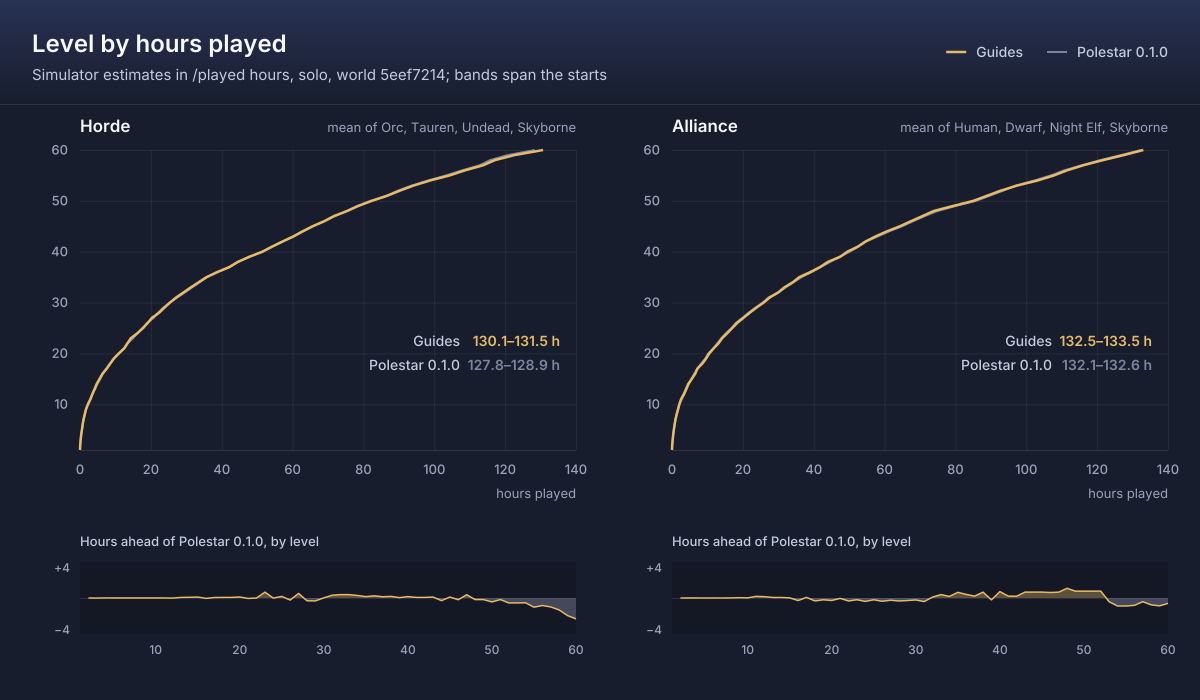
### The numbers (guides up to 0.2.4)
The guides shipped so far were written from the earlier JavaScript simulator's searches
([docs/legacy/SIMULATION-js.md](docs/legacy/SIMULATION-js.md)); these are its numbers.
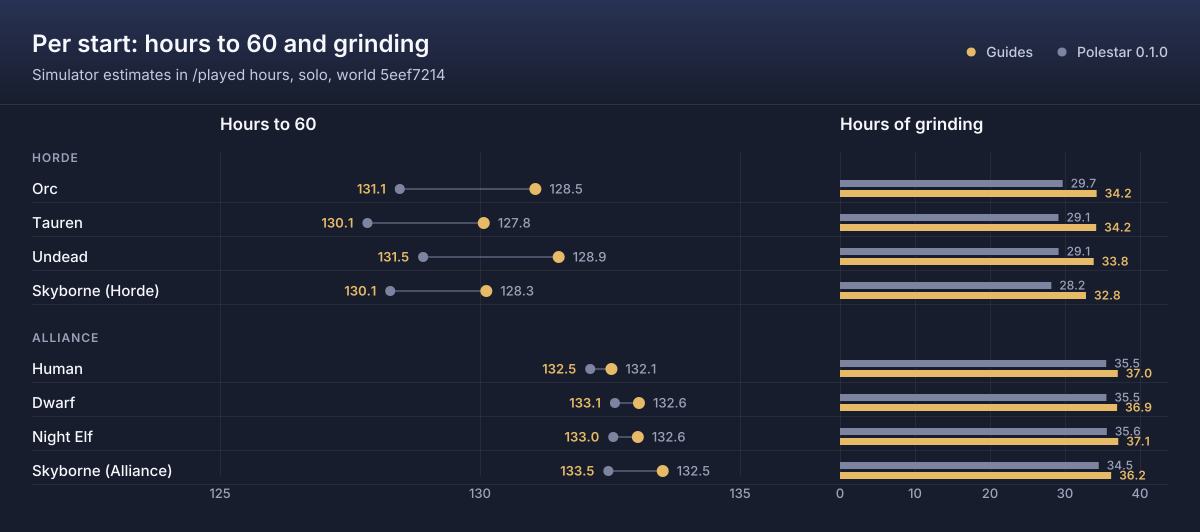
Hours to 60, solo, under the model. The routes were searched four times,
independently: the first search is the one the guides were written from;
each later one used another random seed, more routes and newer data. Each
search is scored on its own world. The guides are scored on the world of the
data this release ships with (`5eef72140b61`), beside those of the first
release.
The guides are scored on what they require. Their optional extras (quests
started by rare drops such as the OOX beacons, the Green Hills of
Stranglethorn pages, profession and bag quests, rares) are left out, because
most players will not get them; the last column counts them as done, which is
how these hours were published before 0.2.4 (issue
[#30](https://github.com/fitzforge/polestar/issues/30)).
| Start | Search 1: best / consensus | Search 2 | Search 3 | Search 4 | Guides 0.2.4 (grinding) | Guides 0.1.0 (grinding) | Guides 0.2.4 with every optional extra |
|---|---:|---:|---:|---:|---:|---:|---:|
| Orc | 119.4 / 120.5 | 120.7 / 117.8 | 117.7 / 116.8 | 119.6 / 117.3 | 131.1 (34.2) | 128.5 (29.7) | 122.8 |
| Tauren | 120.4 / 120.2 | 119.1 / 117.4 | 118.3 / 116.5 | 117.1 / 116.8 | 130.1 (34.2) | 127.8 (29.1) | 121.9 |
| Undead | 120.8 / 120.6 | 119.0 / 118.1 | 119.3 / 117.0 | 118.8 / 117.4 | 131.5 (33.8) | 128.9 (29.1) | 123.3 |
| Skyborne (Horde) | 120.2 / 120.1 | 117.3 / 117.3 | 116.3 / 116.3 | 116.8 / 116.8 | 130.1 (32.8) | 128.3 (28.2) | 122.3 |
| Human | 119.6 / 119.1 | 120.7 / 118.8 | 119.2 / 116.8 | 119.3 / 118.9 | 132.5 (37.0) | 132.1 (35.5) | 127.5 |
| Dwarf | 119.5 / 119.5 | 120.8 / 118.8 | 117.4 / 117.3 | 119.8 / 118.8 | 133.1 (36.9) | 132.6 (35.5) | 128.2 |
| Night Elf | 120.0 / 119.5 | 120.9 / 118.9 | 119.0 / 117.5 | 119.1 / 119.1 | 133.0 (37.1) | 132.6 (35.6) | 128.1 |
| Skyborne (Alliance) | 121.2 / 119.6 | 118.6 / 118.6 | 118.2 / 117.3 | 119.0 / 118.4 | 133.5 (36.2) | 132.5 (34.5) | 129.0 |
So a Horde character following the guides should expect about 130-132 h,
an Alliance one about 132-134 h; doing the optional extras as they come can
save up to about 8 h (Horde) and 5 h (Alliance). With every optional extra
counted, the guides of 0.2.4 and 0.1.0 are within 0.6 h (Horde) and the
Alliance guides of 0.2.4 are 0.8-1.6 h faster; counting only what each
requires, 0.1.0 comes out 1.8-2.6 h faster for the Horde because the later
guides marked more of their quests optional.
The charts show only the guides: the searches' best and consensus routes
were searched on earlier worlds, and a chart draws only numbers from one
world.
**How close to the best?** Nobody can prove a route is the best one
possible, so the claim is narrower and checked:
- **The searches land in the same place.** Four independent searches
(3.5 to 30 million complete routes per start) find routes within
116.3-121.2 h to 60, and their consensus routes within 116.3-120.6 h. The
top of the search space is flat: many different routes finish within about
2% of each other, and most searches were still finding small improvements
when they reached their cap on routes, so later searches keep shaving
minutes, not hours.
- **The winners hold up when the model is wrong.** Re-scored under 2000
random draws of the model's parameters, the best route found stays within
1% of each draw's best in 76-100% of draws (fourth search), and no route
wins every draw: "best found" names one of several near-equal routes.
- **The guides trade hours for a smooth, safe run.** For what they require
they take 13.3-14.1 h (Horde) and 13.6-15.1 h (Alliance) longer than the
fourth search's consensus (scored on its own world). Almost all of that is
grinding the guides choose: side trips for one or two small quests behind
a flight, boat or hearth are left out, and quests that need a group, a
rare drop or a level the route has not reached are optional or gone, so
the guides grind about 33-34 h (Horde) and 36-37 h (Alliance) where the
searched routes grind under 1 h and about 8 h. The Alliance mid-40s have
few solo quests left once those trips are gone.
- **Dungeons do not beat questing solo** under the model: searched with
dungeons allowed (Orc, Tauren, Undead), no dungeon route came out ahead.
> [!IMPORTANT]
> The hours are **model estimates in /played hours**, not measurements. No
> recorded play exists yet, so time parameters such as kill time and travel
> detours keep their priors, and Forever's 30-60 content is not in the data.
> Comparisons between routes are what the numbers support; absolute hours
> are not. Recordings from the Recorder are what will calibrate kill time
> (`forge sim calibrate`); travel detours keep their priors even then.
That simulator's method and parameters are in
[docs/legacy/SIMULATION-js.md](docs/legacy/SIMULATION-js.md); Forge's model is in
[docs/forge/model.md](docs/forge/model.md).
## A guide, from source to game
Guides are plain text, compiled to Lua. The compiler fills in names, titles
and coordinates from the reference data, so a line can be as short as
`accept 788`. From the Orc and Troll starting guide,
[`guides/forever/horde/orc-troll/01-durotar.guide`](guides/forever/horde/orc-troll/01-durotar.guide):
```
guide forever/horde/orc-troll/01-durotar
title Durotar
faction Horde
race Orc,Troll
levels 1-12
zone Durotar
next forever/horde/orc-troll/02-the-barrens
step Gornek
tip Gornek waits inside the Den, the building just west of Kaltunk.
turnin 4641
accept 788
accept 97279
step Training weapons and boars
tip The weapons lie around the Den and the training grounds; the Mottled Boars roam the whole valley floor.
collect 277653 quest 97279.1
kill 3098 quest 788.1
```
The second step compiles to (goals wrapped here; the compiler writes each
on one line):
```lua
{
title = "Training weapons and boars",
note = "The weapons lie around the Den and the training grounds; the Mottled Boars roam the whole valley floor.",
goals = {
{ t = "collect", quest = 97279, title = "Wayward Weapons",
item = 277653, itemName = "Abandoned Training Weapon", count = 6, oi = 1,
map = 1411, x = 44, y = 67.2, f = "e",
spots = { { x = 44.4, y = 66.6, r = 45, n = 4 }, --[[ eleven more spawn clusters ]] } },
{ t = "kill", quest = 788, title = "Cutting Teeth",
target = "Mottled Boar", npc = 3098, count = 10, oi = 1,
map = 1411, x = 44.49, y = 65.1, f = "e",
spots = { { x = 45, y = 65.7, r = 56, n = 8 }, --[[ ten more spawn clusters ]] } },
},
},
```
Every verb, modifier and condition is in
[docs/GUIDE_FORMAT.md](docs/GUIDE_FORMAT.md); guides of your own ship as a
[community addon](#community-guides).
## Community guides
Guides for Polestar written by other players and published as their own
addons. Install one next to Polestar and its guides show up in the guide
menu under **Community guides**, with the arrow, the map markers and
everything else Polestar does. Each is made and supported by its author;
Polestar does not ship, host or recommend any.