
Hand-Outs Logo

Hand-Outs

A simple, privacy-first tool for turning PDF presentations into printable handout sheets.
Everything runs in your browser, your files never leave your device.

https://hand-outs.com [![Live Demo](https://img.shields.io/badge/Live_Demo-hand--outs.com-brightgreen?style=flat-square)](https://hand-outs.com) [![License: MIT](https://img.shields.io/badge/License-MIT-yellow.svg?style=flat-square)](LICENSE) [![Next.js](https://img.shields.io/badge/Next.js-15-black?style=flat-square&logo=next.js)](https://nextjs.org/) [![100% Client-Side](https://img.shields.io/badge/100%25-Client--Side-blue?style=flat-square)](#privacy) [![No Tracking](https://img.shields.io/badge/No-Tracking-red?style=flat-square)](#privacy)

--- ## What is this? If you've ever needed to print out lecture slides, meeting decks, or any multi-page PDF as a compact handout (2, 4, 6, or 9 slides per page), this is for you. Just drag and drop your PDF, pick a layout, and download the result. No sign-up, no uploads, no waiting.
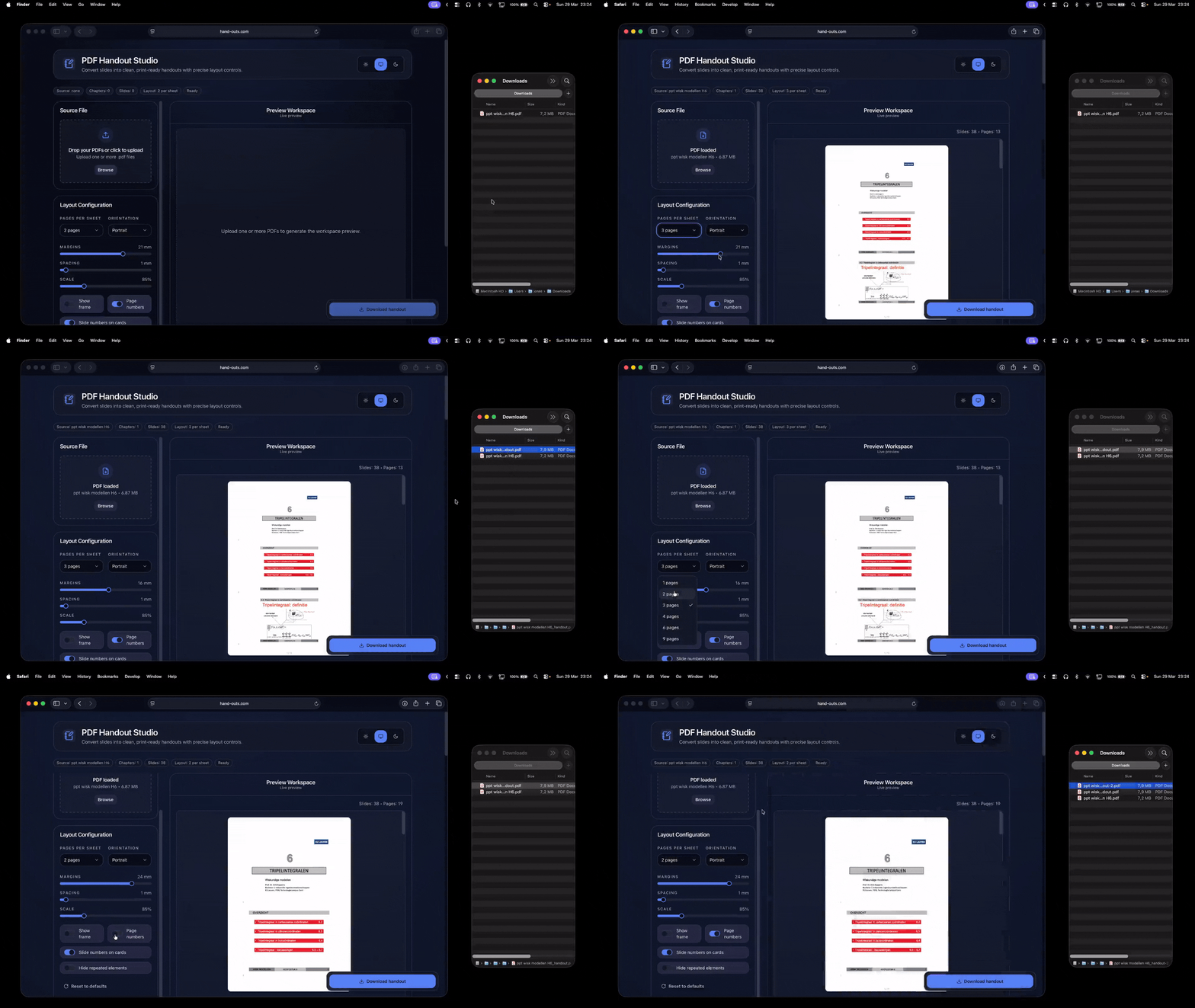
PDF Hand-Out Studio Preview

--- ## Why This Exists I got tired of the same frustrating cycle every time I needed to print lecture slides: - **Adobe Acrobat?** Buried in menus, confusing options, requires a subscription. - **Online tools?** Upload my confidential slides to some random server? No thanks. - **Desktop apps?** Install sketchy software just to print 4 slides per page? I just wanted something simple: drag, drop, done. So I built it. No accounts. No uploads. No tracking. Just a tool that respects your time and your privacy. --- ## Features - **Drag & drop upload** — Just drop your PDF and you're ready to go - **Multiple layouts** — 1, 2, 3, 4, 6, or 9 slides per page, portrait or landscape - **Live preview** — See exactly what you'll get before exporting - **Fine-tuned control** — Adjust margins, spacing, scale, frames, and page numbers - **Built-in templates** — One-click presets for common use cases - **Notes lines** — Optional ruled lines for taking notes - **Slide selection** — Include only the pages you need - **Hide repeated elements** — Automatically detects and removes recurring headers, footers, ... from slides - **Dark/light mode** — Follows your system preference (or toggle manually) - **Completely private** — All processing happens locally in your browser --- ## Getting Started ### Use it online The easiest way is to use the hosted version (if deployed). No installation needed. https://hand-outs.com ### Run it locally ```bash # Clone the repo git clone https://github.com/flodlol/pdf-handout-studio.git cd pdf-handout-studio # Install dependencies npm install # Start the dev server npm run dev ``` Then open [http://localhost:3000](http://localhost:3000) in your browser. ### Build for production ```bash npm run build npm start ``` --- ## How It Works The app is built with **Next.js 14** using the App Router, **React 18**, and **TypeScript**. ### Architecture ``` app/ --> Next.js app router pages components/ --> React UI components lib/ --> Core logic (PDF processing, layout engine, templates) public/ --> Static assets (logos, images) styles/ --> Global CSS ``` ### The layout engine When you configure a handout, the layout engine (`lib/layoutEngine.ts`) calculates the exact positions and sizes for each slide slot on the output page. It handles: - Grid calculations based on pages-per-sheet and orientation - Margin and spacing math (all in millimeters, converted to PDF points) - Slot positioning for consistent layouts ### PDF generation The actual PDF creation happens in `lib/generateHandout.ts` using **pdf-lib**. This library lets us: - Embed pages from the source PDF into new pages - Scale and position each slide precisely - Add frames, page numbers, and notes lines - Output a new PDF that preserves vector quality Since pdf-lib runs entirely in JavaScript, there's no server needed, the browser does all the work. ### Preview rendering For the live preview, we use **pdfjs-dist** (Mozilla's PDF.js) to render pages to a canvas. The worker is lazy-loaded to keep initial page load fast. ### Theming Dark and light modes use **next-themes** with CSS variables. Your preference is remembered in localStorage. --- ## Tech Stack | Category | Technology | |----------|------------| | Framework | Next.js 14 (App Router) | | UI | React 18, TailwindCSS, shadcn/ui | | PDF Generation | pdf-lib | | PDF Preview | pdfjs-dist | | Theming | next-themes | | Language | TypeScript | --- ## Privacy This is a big one. **Your PDFs never leave your device.** - No server uploads - No analytics tracking your documents - No cloud processing The entire app runs client-side. When you "export" a PDF, your browser generates it locally and triggers a download. --- ## Contributing Contributions are welcome and appreciated! Whether it's fixing a typo, improving the UI, adding a feature, or just reporting a bug. All help is valued. ### Ways to contribute - **Bug reports** — Found something broken? Open an issue - **Feature requests** — Have an idea? Let's hear it - **Pull requests** — Code contributions are always welcome - **Documentation** — Help make the README or comments clearer - **Design feedback** — Suggestions for better UX are great too ### To submit a PR 1. Fork the repo 2. Create a branch (`git checkout -b my-feature`) 3. Make your changes 4. Run `npm run lint` to check for issues 5. Commit and push 6. Open a pull request No contribution is too small. Even fixing a single typo helps. --- ## License MIT — do whatever you want with it. --- ## Acknowledgments - [pdf-lib](https://pdf-lib.js.org/) for making client-side PDF generation possible - [PDF.js](https://mozilla.github.io/pdf.js/) for reliable PDF rendering - [shadcn/ui](https://ui.shadcn.com/) for the beautiful component primitives - Everyone who's given feedback or contributed ---
If you find this useful, a star on GitHub would be nice. ⭐
Thanks for checking it out! ❤️
Sponsor this project
