# Kotlin Please Animate
[](https://android-arsenal.com/details/1/6837)
[](https://circleci.com/gh/florent37/NoActivityResult/tree/master)
[](https://www.github.com/florent37/KotlinPleaseAnimate)
`Kotlin, please, can you animate my views ?`
A Kotlin way to declare and run beautiful animations !
Please be gentle with Kotlin :)
 [](https://github.com/florent37/KotlinPleaseAnimate)
```kotlin
please {
animate(avatar) toBe {
bottomOfItsParent(marginDp = 36f)
leftOfItsParent(marginDp = 16f)
width(40, keepRatio = true, toDp = true)
}
}.start()
```
# Download
[](https://github.com/florent37/KotlinPleaseAnimate)
```kotlin
please {
animate(avatar) toBe {
bottomOfItsParent(marginDp = 36f)
leftOfItsParent(marginDp = 16f)
width(40, keepRatio = true, toDp = true)
}
}.start()
```
# Download
 In your module [](https://bintray.com/florent37/maven/KotlinPleaseAnimate/_latestVersion)
```groovy
implementation 'com.github.florent37:kotlinpleaseanimate:1.0.2'
```
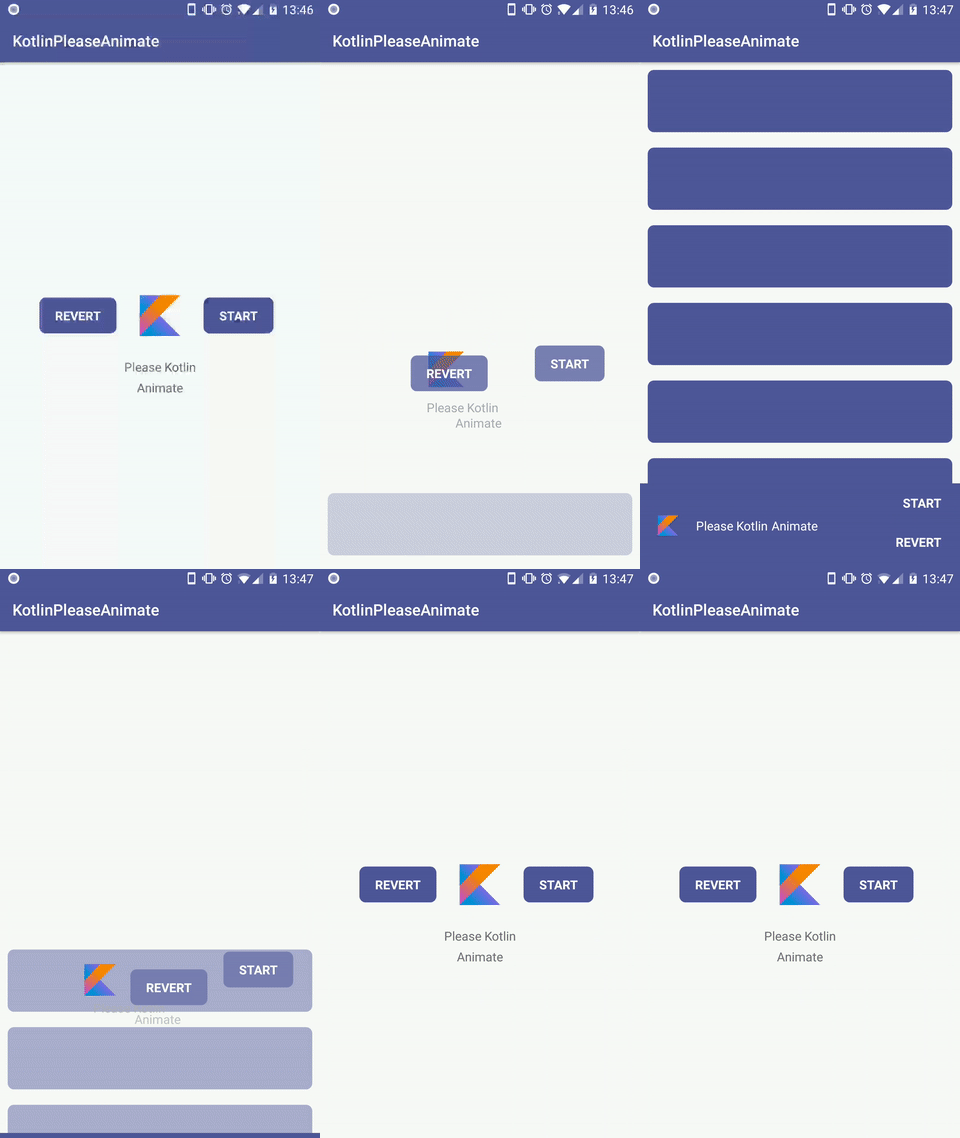
This code describe the video above
```kotlin
please(duration = 1500L) {
animate(avatar) toBe {
bottomOfItsParent(marginDp = 36f)
leftOfItsParent(marginDp = 16f)
visible()
width(40, keepRatio = true, toDp = true)
}
animate(name) toBe {
rightOf(avatar, marginDp = 16f)
sameCenterVerticalAs(avatar)
textColor(Color.WHITE)
}
animate(subname) toBe {
rightOf(name, marginDp = 5f)
sameCenterVerticalAs(name)
textColor(Color.WHITE)
}
animate(revert) toBe {
rightOfItsParent(marginDp = 4f)
bottomOfItsParent(marginDp = 12f)
backgroundAlpha(0f)
}
animate(start) toBe {
aboveOf(revert, marginDp = 4f)
rightOfItsParent(marginDp = 4f)
backgroundAlpha(0f)
}
animate(bottomLayout) toBe {
originalPosition()
}
animate(content) toBe {
originalPosition()
visible()
}
}.start()
```
## Follow scroll
[](https://github.com/florent37/KotlinPleaseAnimate)
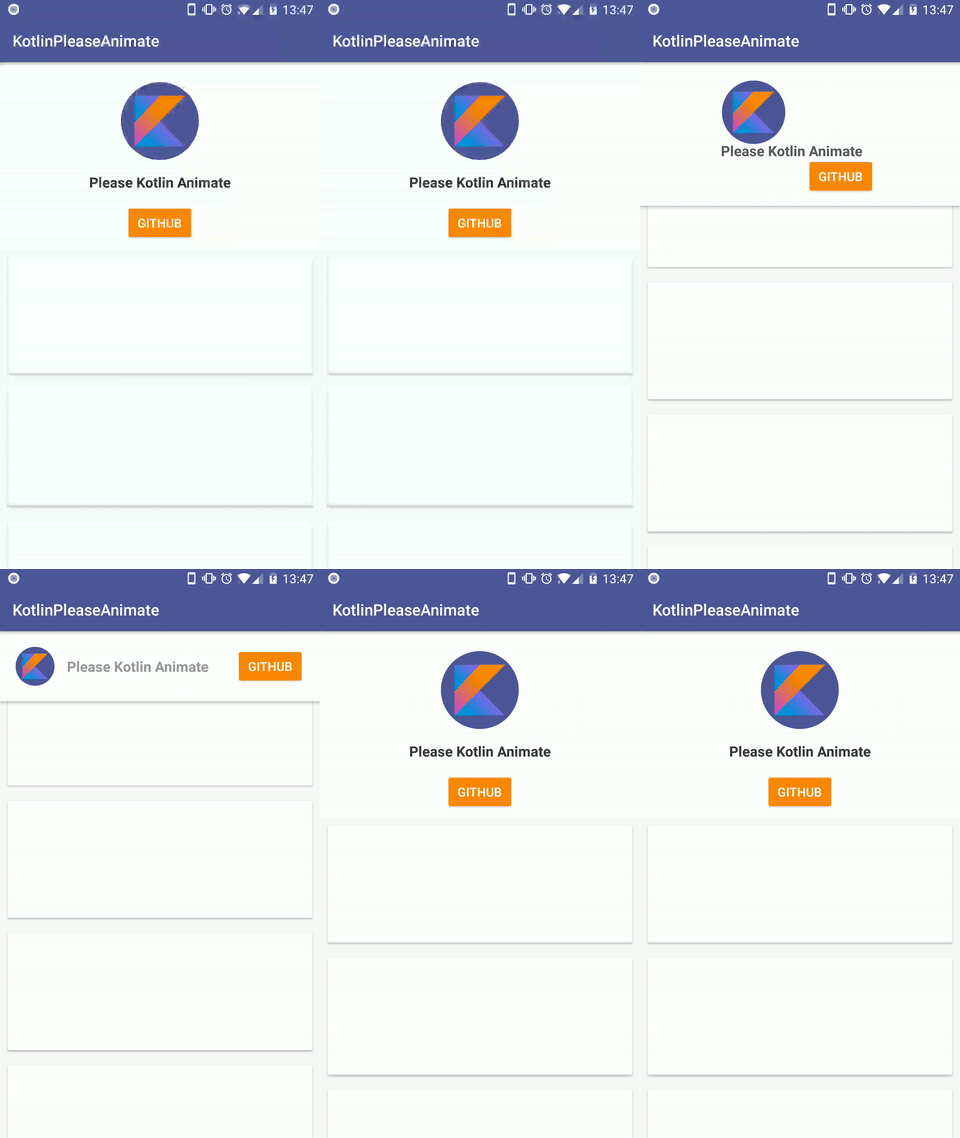
Use `setPercent` to apply modify the current step of the animation
Exemple with a scrollview
```kotlin
val animation = please {
animate(avatar) toBe {
topOfItsParent(marginDp = 20f)
leftOfItsParent(marginDp = 20f)
scale(0.5f, 0.5f)
}
animate(username) toBe {
rightOf(avatar, marginDp = 16f)
sameCenterVerticalAs(avatar)
alpha(0.5f)
}
animate(revert) toBe {
rightOfItsParent(marginDp = 20f)
sameCenterVerticalAs(avatar)
}
animate(background) toBe {
height(h, horizontalGravity = Gravity.LEFT, verticalGravity = Gravity.TOP)
}
}
scrollview.setOnScrollChangeListener(NestedScrollView.OnScrollChangeListener { v, scrollX, scrollY, oldScrollX, oldScrollY ->
val percent = scrollY * 1f / v.maxScrollAmount
animation.setPercent(percent)
})
```
## Chain animations
Just ask the kotlin's animation if he wants to execute another animation after, using `thenCouldYou animate`
```
please(duration = 1000L) {
animate(image, withCameraDistance = 500f) toBe {
flippedHorizontally()
}
}.thenCouldYou(duration = 500L) {
animate(image, withCameraDistance = 1000f) toBe {
alpha(0.5f)
}
}.start()
```
## Apply directly
If you want your animation to be applied directly, be bossy with kotlin and force it to apply it using `now()` !
```kotlin
please {
animate(view) toBe {
outOfScreen(Gravity.BOTTOM)
}
}.now();
```
## Reset
Use `reset` to return to the initial state of views
```kotlin
animation.reset():
```
# List of expectations
```
please {
animate(view) { //toBe is optional
rightOf(view, marginDp=)
leftOf(view, marginDp=)
belowOf(view, marginDp=)
aboveOf(view, marginDp=)
originalPosition()
sameCenterAs(view, horizontal=, vertical=)
sameCenterHorizontalAs(view)
sameCenterVerticalAs(view)
centerInParent(horizontal=, vertical=)
centerVerticalInParent()
centerHorizontalInParent()
centerBetweenViews(view1, view2, horizontal, vertical)
centerBetweenViewAndParent(otherView, horizontal, vertical, toBeOnRight, toBeOnBottom)
topOfItsParent()
rightOfItsParent()
bottomOfItsParent()
leftOfItsParent()
alignBottom(otherView, marginDp=)
alignTop(otherView)
alignLeft(otherView)
alignRight(otherView)
outOfScreen(gravitiy) //Gravity.LEFT / Gravity.RIGHT / Gravity.TOP / Gravity.BOTTOM
alpha(alpha)
sameAlphaAs(otherView)
visible()
invisible()
custom(object: CustomAnimExpectation(){ ... })
originalScale()
scale(scaleX, scaleY)
height(height, keepRatio=, useDp=)
width(width, keepRatio=, useDp=)
sameScaleAs(otherView)
sameWidthAs(otherView)
sameHeightAs(otherView)
marginTop(margin)
marginBottom(margin)
marginRight(margin)
marginLeft(margin)
paddingTop(padding)
paddingBottom(padding)
paddingRight(padding)
paddingLeft(padding)
textColor(textColor)
textSize(textSize)
backgroundAlpha(alpha)
rotated(rotation)
vertical(bottomOfViewAtLeft)
atItsOriginalRotation()
}
````
# Credits
Author: Florent Champigny
Blog : [http://www.tutos-android-france.com/](http://www.tutos-android-france.com/)
Fiches Plateau Moto : [https://www.fiches-plateau-moto.fr/](https://www.fiches-plateau-moto.fr/)
Forked from ExpectAnim: https://github.com/florent37/ExpectAnim
In your module [](https://bintray.com/florent37/maven/KotlinPleaseAnimate/_latestVersion)
```groovy
implementation 'com.github.florent37:kotlinpleaseanimate:1.0.2'
```
This code describe the video above
```kotlin
please(duration = 1500L) {
animate(avatar) toBe {
bottomOfItsParent(marginDp = 36f)
leftOfItsParent(marginDp = 16f)
visible()
width(40, keepRatio = true, toDp = true)
}
animate(name) toBe {
rightOf(avatar, marginDp = 16f)
sameCenterVerticalAs(avatar)
textColor(Color.WHITE)
}
animate(subname) toBe {
rightOf(name, marginDp = 5f)
sameCenterVerticalAs(name)
textColor(Color.WHITE)
}
animate(revert) toBe {
rightOfItsParent(marginDp = 4f)
bottomOfItsParent(marginDp = 12f)
backgroundAlpha(0f)
}
animate(start) toBe {
aboveOf(revert, marginDp = 4f)
rightOfItsParent(marginDp = 4f)
backgroundAlpha(0f)
}
animate(bottomLayout) toBe {
originalPosition()
}
animate(content) toBe {
originalPosition()
visible()
}
}.start()
```
## Follow scroll
[](https://github.com/florent37/KotlinPleaseAnimate)
Use `setPercent` to apply modify the current step of the animation
Exemple with a scrollview
```kotlin
val animation = please {
animate(avatar) toBe {
topOfItsParent(marginDp = 20f)
leftOfItsParent(marginDp = 20f)
scale(0.5f, 0.5f)
}
animate(username) toBe {
rightOf(avatar, marginDp = 16f)
sameCenterVerticalAs(avatar)
alpha(0.5f)
}
animate(revert) toBe {
rightOfItsParent(marginDp = 20f)
sameCenterVerticalAs(avatar)
}
animate(background) toBe {
height(h, horizontalGravity = Gravity.LEFT, verticalGravity = Gravity.TOP)
}
}
scrollview.setOnScrollChangeListener(NestedScrollView.OnScrollChangeListener { v, scrollX, scrollY, oldScrollX, oldScrollY ->
val percent = scrollY * 1f / v.maxScrollAmount
animation.setPercent(percent)
})
```
## Chain animations
Just ask the kotlin's animation if he wants to execute another animation after, using `thenCouldYou animate`
```
please(duration = 1000L) {
animate(image, withCameraDistance = 500f) toBe {
flippedHorizontally()
}
}.thenCouldYou(duration = 500L) {
animate(image, withCameraDistance = 1000f) toBe {
alpha(0.5f)
}
}.start()
```
## Apply directly
If you want your animation to be applied directly, be bossy with kotlin and force it to apply it using `now()` !
```kotlin
please {
animate(view) toBe {
outOfScreen(Gravity.BOTTOM)
}
}.now();
```
## Reset
Use `reset` to return to the initial state of views
```kotlin
animation.reset():
```
# List of expectations
```
please {
animate(view) { //toBe is optional
rightOf(view, marginDp=)
leftOf(view, marginDp=)
belowOf(view, marginDp=)
aboveOf(view, marginDp=)
originalPosition()
sameCenterAs(view, horizontal=, vertical=)
sameCenterHorizontalAs(view)
sameCenterVerticalAs(view)
centerInParent(horizontal=, vertical=)
centerVerticalInParent()
centerHorizontalInParent()
centerBetweenViews(view1, view2, horizontal, vertical)
centerBetweenViewAndParent(otherView, horizontal, vertical, toBeOnRight, toBeOnBottom)
topOfItsParent()
rightOfItsParent()
bottomOfItsParent()
leftOfItsParent()
alignBottom(otherView, marginDp=)
alignTop(otherView)
alignLeft(otherView)
alignRight(otherView)
outOfScreen(gravitiy) //Gravity.LEFT / Gravity.RIGHT / Gravity.TOP / Gravity.BOTTOM
alpha(alpha)
sameAlphaAs(otherView)
visible()
invisible()
custom(object: CustomAnimExpectation(){ ... })
originalScale()
scale(scaleX, scaleY)
height(height, keepRatio=, useDp=)
width(width, keepRatio=, useDp=)
sameScaleAs(otherView)
sameWidthAs(otherView)
sameHeightAs(otherView)
marginTop(margin)
marginBottom(margin)
marginRight(margin)
marginLeft(margin)
paddingTop(padding)
paddingBottom(padding)
paddingRight(padding)
paddingLeft(padding)
textColor(textColor)
textSize(textSize)
backgroundAlpha(alpha)
rotated(rotation)
vertical(bottomOfViewAtLeft)
atItsOriginalRotation()
}
````
# Credits
Author: Florent Champigny
Blog : [http://www.tutos-android-france.com/](http://www.tutos-android-france.com/)
Fiches Plateau Moto : [https://www.fiches-plateau-moto.fr/](https://www.fiches-plateau-moto.fr/)
Forked from ExpectAnim: https://github.com/florent37/ExpectAnim


 # License
Copyright 2018 florent37, Inc.
Licensed under the Apache License, Version 2.0 (the "License");
you may not use this file except in compliance with the License.
You may obtain a copy of the License at
http://www.apache.org/licenses/LICENSE-2.0
Unless required by applicable law or agreed to in writing, software
distributed under the License is distributed on an "AS IS" BASIS,
WITHOUT WARRANTIES OR CONDITIONS OF ANY KIND, either express or implied.
See the License for the specific language governing permissions and
limitations under the License.
# License
Copyright 2018 florent37, Inc.
Licensed under the Apache License, Version 2.0 (the "License");
you may not use this file except in compliance with the License.
You may obtain a copy of the License at
http://www.apache.org/licenses/LICENSE-2.0
Unless required by applicable law or agreed to in writing, software
distributed under the License is distributed on an "AS IS" BASIS,
WITHOUT WARRANTIES OR CONDITIONS OF ANY KIND, either express or implied.
See the License for the specific language governing permissions and
limitations under the License.