# Neutrinos Electrónicos WRO 2026 - Terreneitor
## Table of Contents
- [Project Overview](#project-overview)
- [Team Introduction](#team-introduction)
- [The Robot: Terreneitor](#the-robot-terreneitor)
- [System Architecture](#system-architecture)
- [Hardware Specifications](#hardware-specifications)
- [Software Architecture](#software-architecture)
- [Programming Languages](#programming-languages)
- [Python Libraries](#python-libraries)
- [Flowcharts](#flowcharts)
- [Directory Structure](#directory-structure)
- [Algorithmic Logic](#algorithmic-logic)
- [Finite State Machine (FSM)](#finite-state-machine-fsm)
- [Computer Vision Processing](#computer-vision-processing)
- [LiDAR-Based Parking](#lidar-based-parking)
- [Serial Communication Protocol](#serial-communication-protocol)
- [Emergency Navigation System](#emergency-navigation-system)
- [Module Descriptions](#module-descriptions)
- [Installation and Setup](#installation-and-setup)
- [Configuration](#configuration)
- [Usage Instructions](#usage-instructions)
- [Component List](#component-list)
- [Robot Images](#robot-images)
- [Practice Videos](#practice-videos)
- [Development Milestones](#development-milestones)
---
## Project Overview
**Terreneitor** is an autonomous vehicle designed for the World Robot Olympiad (WRO) 2026 Future Engineers competition. The robot implements a hybrid computing architecture combining a **Raspberry Pi 4** as the high-level perception and decision unit and an **Arduino UNO** as the real-time hardware controller. This design guarantees sophisticated decision-making alongside deterministic, low-latency motor control.
**Key Design Principles:**
- **Hybrid Centralized Architecture:** Single Raspberry Pi 4 as master node with Arduino UNO as dedicated hardware controller to eliminate latency issues.
- **Isolated Control Loop:** PID-based motor control with encoder feedback running directly on the Arduino for immediate, smooth velocity regulation.
- **Configuration-Driven Logic:** Main competition parameters decoupled from source code via centralized `config.py` for rapid adjustments.
- **Modular Software Design:** Event-based Finite State Machine (FSM) on Raspberry Pi enabling independent development and validation of each race phase.
- **Dual-Track Reliability:** Complete primary vision-based navigation system alongside a lightweight, reactive **Safety System** (`code/safety_sys`).
---
## Team Introduction
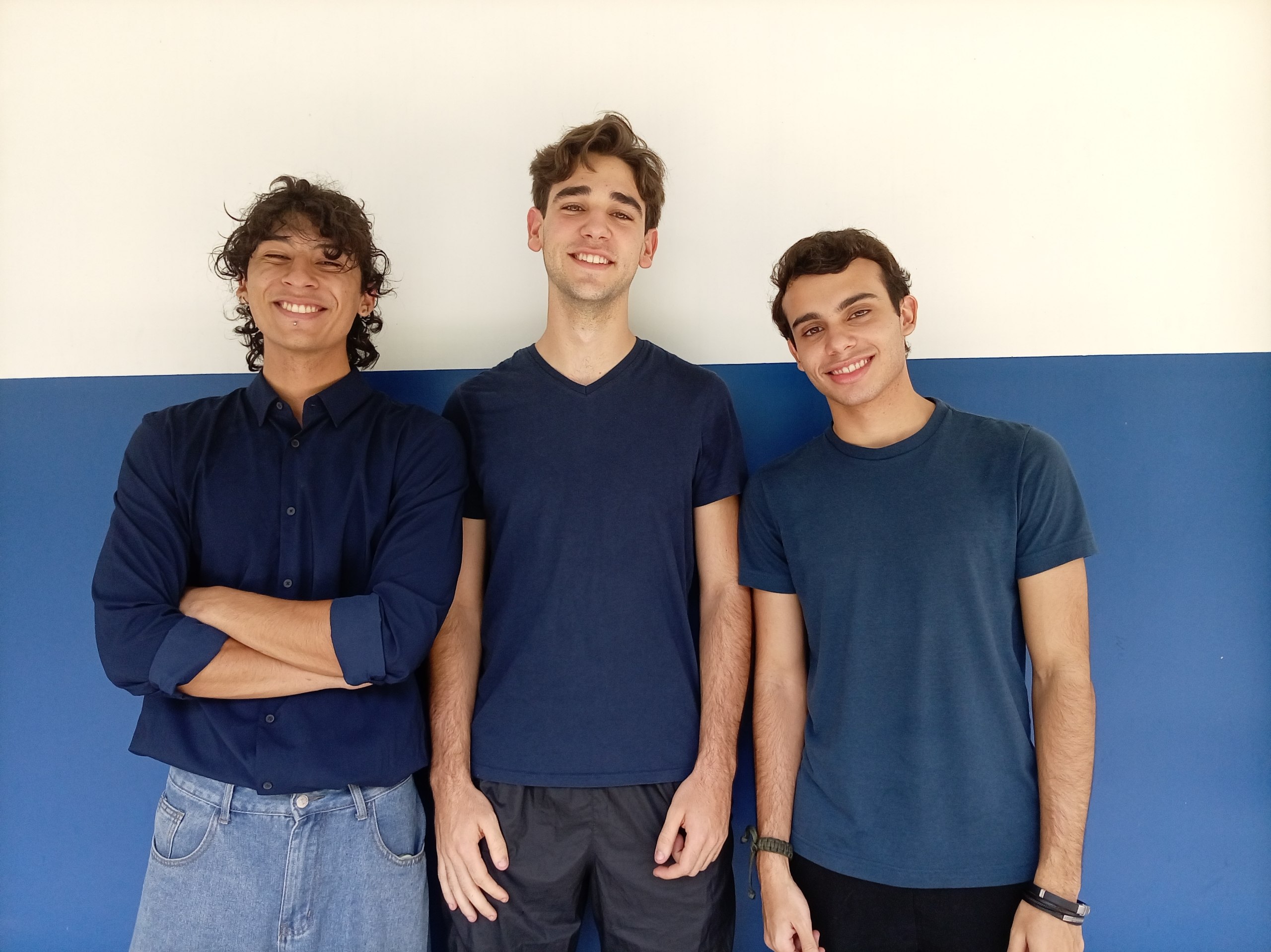
| Name | Role |
|------|------|
| **Ismael Armada** | Software Architecture & Control |
| **Sebastián Vera** | Mechanics & Chassis Design |
| **Andrés Lugo** | Electronics & Power Systems |
| **Milagro Rojas** | Coach |
- **Ismael Armada:** I am 20 years old, in my 4th semester of my Computer Science major. I learned about WRO thanks to a mutual friend I share with our team's coach. With this competition, I simply aim to challenge myself as a programmer by diving headfirst, for the very first time, into the development of a robotics project.
- **Sebastián Vera:** I am 18 years old and a Mechanical Engineering student, currently in my 3rd semester. I discovered WRO through my high school, as we were able to represent it during our senior year. I loved that experience, and it introduced me to this amazing world of robotics—how fun and challenging it really is! I hope to have the opportunity to represent both my team and my country in such an incredible competition.
- **Andrés Lugo:** I am 19 years old and an Electrical Engineering student, currently taking 2nd-semester courses in Mechanical Engineering. I got to know WRO by competing alongside Sebastián for the first time in our senior year of high school. I didn't have much knowledge back then, but it was my gateway into this world.
---
## The Robot: Terreneitor
Every project needs an identity, and ours was born out of a shared childhood memory. During one of our first team meetings, a conversation about remote-controlled cars revealed that every single member of our team had owned a "Terreneitor" toy car growing up. That shared memory inspired the name of our autonomous vehicle.
---
## System Architecture
The robot employs a dual-processor architecture optimized for high-level perception and real-time execution:
```
+-------------------------------------------------------------+
| RASPBERRY PI 4 |
| - Computer Vision (OpenCV / CSI Camera) |
| - TF-Luna LiDAR Reader & SG90 Servo Control |
| - Finite State Machine (INICIO, NAVEGACION, ESTACIONAR) |
| - PID Steering & Speed Calculation |
| - Rule Enforcement & Lap Counter |
+------------------------------+------------------------------+
| USB Serial (115200 baud)
| Command: V:;A:\n
| Telemetry: T:Z:;A:;U:\n
+------------------------------v------------------------------+
| ARDUINO UNO |
| - Non-blocking Command Parser |
| - BTS7960 H-Bridge DC Motor PWM Drive |
| - MG996R Steering Servo Control (40° - 140°) |
| - 100-line Quadrature Optical Encoder Interrupts |
| - HC-SR04 Rear Ultrasonic Distance Reader |
| - MPU6050 6-DOF IMU Yaw Angle Integration |
+-------------------------------------------------------------+
```
---
## Hardware Specifications
### Main Processing Units
- **SBC:** Raspberry Pi 4 Model B (4GB RAM)
- **MCU:** Arduino UNO R3
### Power Architecture
- Independent high-capacity battery pack for traction motors
- Dedicated power supply for Raspberry Pi 4 and Arduino
- Voltage regulator: **XL4015** step-down buck converter (high-current stabilization)
- 5V active cooling fan for Raspberry Pi 4
- Two distinct switches: Main master power and physical start button (GPIO 23 / Pin 16)
### Sensors
- **Camera:** OV5647 5MP with 120° wide-angle field of view (CSI ribbon interface)
- **Front LiDAR:** TF-Luna ToF distance sensor mounted on SG90 panning servo
- **Rear Distance:** HC-SR04 ultrasonic sensor (connected to Arduino)
- **IMU:** MPU6050 6-DOF accelerometer and gyroscope (I2C)
- **Speed Sensor:** 100-line optical quadrature encoder on main transmission
### Actuators
- **Motor Driver:** BTS7960 43A High-Power H-Bridge
- **Traction Motor:** High-torque DC motor
- **Steering Servo:** MG996R metal-gear 180° servo motor
- **LiDAR Panning Servo:** SG90 micro servo
---
## Software Architecture
### Programming Languages
- **Python 3:** Raspberry Pi high-level logic, state machine, vision, and emergency modules.
- **C++:** Arduino firmware for real-time motor drive and sensor polling.
### Python Libraries
- `opencv-python`: Real-time color detection, ROI extraction, and morphological filtering.
- `pyserial`: Direct non-blocking serial communication between Pi and Arduino.
- `gpiozero`: Hardware interface for physical start button (WRO Rule 9.11) and servos.
- `numpy`: Numerical processing for vision masks and arrays.
### Flowcharts
#### 1. Raspberry Pi Perception & Decision-Making Flow
#### 2. Arduino UNO Real-Time Control Flow
#### 3. Integrated Dual-Node System & Inter-Board Communication
### Directory Structure
```
WRO2026-neutrinos-electronicos/
├── README.md # Main project documentation
├── LICENSE # Project license
├── .gitignore # Git exclusion rules
│
├── code/ # Source code directory
│ ├── env/ # Shared Python virtual environment
│ ├── requirements.txt # Shared Python package dependencies
│ │
│ ├── scripts/ # Execution and setup scripts
│ │ ├── start.sh # Parametrized launcher (robot|safety)
│ │ └── setup_services.sh # Systemd service installation script
│ │
│ ├── services/ # Systemd service files
│ │ ├── wro-robot.service # Primary system service
│ │ └── wro-safety.service # Alternative system service
│ │
│ ├── main_sys/ # Primary Navigation System
│ │ ├── src/ # Core modules
│ │ │ ├── main.py # Main entrypoint and FSM orchestrator
│ │ │ ├── config.py # Direct configuration (no YAML)
│ │ │ ├── estados.py # Consolidated FSM + states
│ │ │ ├── comms.py # Arduino + LiDAR serial drivers
│ │ │ ├── vision.py # Asynchronous HSV color detection
│ │ │ └── hardware.py # Hardware interfaces for testing
│ │ └── tests/ # Standalone diagnostic tests
│ │ ├── test_camara.py # Camera headless & GUI diagnostic
│ │ ├── test_lidar.py # LiDAR & servo angle test
│ │ ├── test_ultrasonico.py # Ultrasonic reading test
│ │ └── test_completo.py # Full sensor integration test
│ │
│ ├── safety_sys/ # Alternative Navigation System
│ │ └── main.py # Dynamic mode reactive racer
│ │
│ └── arduino/ # Arduino C++ Firmware
│ └── firmware_terreneitor.ino # Monolithic firmware (motors, sensors, comms)
│
├── elec/ # Electrical schematics and diagrams
├── mech/ # 3D models and CAD files
├── photos/ # Team and vehicle photographic documentation
└── videos/ # Practice run videos
```
---
## Configuration
The system uses direct Python configuration in `main_sys/src/config.py` instead of YAML files. All competition parameters can be adjusted directly in the code:
- **Velocities:** Motor PWM values and target speeds for PID control
- **Servo Angles:** Steering angles for different navigation states
- **HSV Color Ranges:** Detection thresholds for red, green, and magenta
- **Competition Settings:** Lap limits, time limits, and challenge modes
- **Hardware Configuration:** GPIO pins and serial port settings
- **Vision Parameters:** Camera resolution and optical flow calibration
- **LiDAR Settings:** Servo angles and distance thresholds
- **Vehicle Dimensions:** Physical dimensions for parking calculations
The Safety System uses hardcoded constants in `safety_sys/main.py` for simplicity and reliability.
---
## Algorithmic Logic
### Finite State Machine (FSM)
The primary software on the Raspberry Pi uses an event-driven Finite State Machine (`code/raspberry_pi/estados/fsm.py`):
1. **`EstadoInicio` (Standby & Ready):**
- Initializes sensor communication and hardware drivers.
- Waits in standby mode until the physical start button (`GPIO 23`) is pressed (WRO Rule 9.11).
- Transitions to `EstadoNavegacion`.
2. **`EstadoNavegacion` (Race Execution):**
- Continuously receives non-blocking HSV vision detections (obstacle centroid, color).
- Computes proportional steering angles to avoid pillars (Red $\rightarrow$ evade left, Green $\rightarrow$ evade right).
- Tracks lap completion using accumulated encoder telemetry.
- Enforces the 3-minute WRO round time limit.
- Transitions to `EstadoEstacionar` (Obstacle Challenge) or `EstadoFin` (Open Challenge).
3. **`EstadoEstacionar` (Parallel Parking):**
- Executes an automated 4-phase parking sequence using LiDAR gap detection:
- **Phase 1 (Scan):** Sweeps LiDAR servo to identify the parking bay gap.
- **Phase 2 (Approach):** Aligns the vehicle alongside the detected gap.
- **Phase 3 (Reverse Entry):** Reverses into the space with calculated steering angle.
- **Phase 4 (Straighten):** Centers vehicle between walls.
- Transitions to `EstadoFin`.
4. **`EstadoFin` (Safe Shutdown):**
- Immediately stops traction motor (`V:0`), centers steering (`A:90`), and safely releases all hardware connections.
---
## Safety System
Located in [`code/safety_sys/`](code/safety_sys), this system is a single-file, zero-overhead reactive alternative designed to guarantee full completion of 3 laps under high-stress competition conditions without relying on camera lighting calibration, OpenCV, or configuration files.
### Safety System Features:
**[`main.py`](code/safety_sys/main.py) — Dynamic Mode Reactive Racer:**
- Uses direct serial UART reads from the **TF-Luna LiDAR in a fixed forward position ($90^\circ$)** at 40 Hz.
- Cruises in straight lines (`V:65, A:90`).
- Camera always active for color detection (rojo/verde/morado)
- Upon detecting any color, permanently switches to obstacle avoidance mode
- When frontal obstacle is detected ($\le 50\text{ cm}$), performs reactive evasion
- Detects outer track corners ($\le 75\text{ cm}$) and completes 3 laps reliably.
- Automatically halts after exactly 12 corners (3 laps).
The script strictly follows the **WRO 9.11 Standby $\rightarrow$ Start Button** protocol.
---
## Installation and Setup
### Raspberry Pi Setup
1. **Clone repository:**
```bash
cd /home/pi
git clone https://github.com/flvr-soda/WRO2026-neutrinos-electronicos.git
cd WRO2026-neutrinos-electronicos/code
```
2. **Create shared Python virtual environment & install dependencies:**
```bash
python3 -m venv env
source env/bin/activate
pip install -r requirements.txt
deactivate
```
3. **Install systemd services (automated):**
```bash
cd scripts
./setup_services.sh setup # Configure environment and permissions
./setup_services.sh install-robot # Install primary system service
./setup_services.sh install-safety # Install alternative system service
```
4. **Install Arduino Firmware:**
- Open `code/arduino/firmware_terreneitor.ino` in Arduino IDE.
- Select Board `Arduino Uno` and target serial port.
- Compile and upload.
---
## Usage Instructions
### Manual Execution
**Using the parametrized script:**
```bash
cd /home/pi/WRO2026-neutrinos-electronicos/code
source env/bin/activate
# Primary system
./scripts/start.sh robot
# Safety system
./scripts/start.sh safety
```
**Direct execution:**
```bash
cd /home/pi/WRO2026-neutrinos-electronicos/code
source env/bin/activate
# Primary system
cd main_sys
python3 src/main.py
# Safety system
cd safety_sys
python3 main.py
```
### Systemd Service Management
The `scripts/setup_services.sh` script provides automated service management:
```bash
cd /home/pi/WRO2026-neutrinos-electronicos/code/scripts
# Setup environment and permissions
./setup_services.sh setup
# Install and enable primary system
./setup_services.sh install-robot
# Switch to safety system
./setup_services.sh switch-safety
# Check service status
./setup_services.sh status robot
./setup_services.sh status safety
# View service logs
./setup_services.sh logs robot
./setup_services.sh logs safety
```
**Manual Service Management:**
```bash
# Enable primary system:
sudo systemctl enable wro-robot.service
sudo systemctl start wro-robot.service
# Enable safety system:
sudo systemctl enable wro-safety.service
sudo systemctl start wro-safety.service
# Check status:
sudo systemctl status wro-robot.service
sudo systemctl status wro-safety.service
```
---
## Component List
| Category | Component | Model / Specs | Purpose |
|:---|:---|:---|:---|
| **Processing** | Single Board Computer | Raspberry Pi 4 Model B (4GB) | Vision, FSM, Navigation, Decision Making |
| **Processing** | Microcontroller | Arduino UNO R3 | Real-time Motor Control, Telemetry |
| **Vision** | Camera Module | OV5647 5MP (120° FOV) | Pillar Color & Position Detection |
| **Distance** | LiDAR Sensor | Benewake TF-Luna (ToF UART) | Corner Detection, Wall Ranging & Parking |
| **Distance** | Ultrasonic Sensor | HC-SR04 | Rear Obstacle Measurement |
| **IMU** | Motion Sensor | MPU6050 6-DOF | Yaw Angle Tracking |
| **Actuator** | Motor Driver | BTS7960 43A H-Bridge | DC Traction Motor Drive |
| **Actuator** | Steering Servo | MG996R Metal Gear (180°) | Front Wheel Steering |
| **Actuator** | LiDAR Servo | SG90 Micro Servo (180°) | LiDAR Panning |
| **Regulation** | Buck Converter | XL4015 Step-Down Module | High-Current Clean Voltage Stabilization |
## License
This project is licensed under the MIT License - see the [LICENSE](LICENSE) file for details.