**English** · [中文](./README.zh.md)
---
# dsh-remote
[](https://www.npmjs.com/package/dsh-remote)
[](LICENSE)
[](https://github.com/topics/dsh-plugin)
**Remote-work assistant for [DeepSeek Harness](https://github.com/deepseek-ai/deepseek-harness) (DSH).**
Manage several SSH machines, then pick a **remote workspace** (or a **local** one) and let the agent operate right there without leaving the harness — listing files, reading code, running builds & commands over the remote host, and keeping that remote directory mirrored into a real local workspace object.
The harness Web UI intentionally binds `127.0.0.1` (the CLI rejects `--host 0.0.0.0` for safety). This plugin goes the other way: **you connect out** to the machines you maintain, pick a workspace, and work in it through the normal DSH workspace + agent fs flows — no changes to `dsh-workspace` or the harness core.
## Screen previews
Settings → **远程工作区** — a multi-machine SSH registry (add / edit / delete / set-current, password stored locally):
`**, a path field that **auto-prefills `/` and live-completes** directories (picking one immediately reveals its next level, OS/VSCode-style), plus a **浏览…** floating browser that fills the field without committing — you review, edit, then **设为远程工作区**.
Real capture (host scrubbed to a placeholder):
--/` (usually `web`).
```bash
# install the bundle into a profile (npm is pulled by pnpm; recommended)
dsh plugin --profile web add dsh-remote
# same but when `dsh` is not on PATH (e.g. Windows PowerShell inside a repo)
npx --yes @deepseek-ai/dsh plugin --profile web add dsh-remote
# confirm it is installed wire
dsh plugin --profile web list
npx --yes @deepseek-ai/dsh plugin --profile web list
# start the web surface (reload profile; the plugin activates on boot)
dsh --profile web
npx --yes @deepseek-ai/dsh --profile web # http://127.0.0.1:3080
# use a local checkout instead of the npm version (dev iteration)
npx --yes @deepseek-ai/dsh plugin --profile web add /path/to/dsh-remote
npx --yes @deepseek-ai/dsh plugin --profile web remove dsh-remote # back to release
```
After a successful start, `Settings → 远程工作区` appears and the "Add workspace" flow gains the 本机 / 远程 tabs (screenshots above).
## Development (sandbox, not product)
Iterate **in the sandbox**, never by hand-editing a product profile — the
product profile is re-managed by the plugin manager and reverts hand-deployed
files on reinstall. Use the helper script:
```bash
scripts/dev-run.sh --restart # start / restart the isolated sandbox
scripts/dev-run.sh --stop # stop it
scripts/dev-run.sh --status # is it running?
```
- Runs its own DSH instance (`dev-harness/harness` inside this repo) with the
plugin copied in from `lib/` — it boots through the same `bin.js web --patch`
path as the desktop app, so the sandbox reproduces the product boot behavior.
- The sandbox web UI serves on `http://127.0.0.1:50599` and the plugin routes
are live immediately (e.g. `GET /dsh-remote/machines`).
- **Host-half changes** (`lib/index.js`) need a sandbox restart (`--restart`);
**client-half changes** (`lib/client.js`) need a page refresh.
- Node ESM resolves dependencies from the importing file's real path, so the
script **copies** `lib/` (hardlink copy, `cp -al`) into the sandbox profile
instead of symlinking — a symlink breaks `@deepseek-ai/*` resolution.
- Run `scripts/check.mjs` (static framework-constraint gate: command-name
regex, …) before every commit; `scripts/boot-smoke.sh` boots an isolated
instance to prove the plugin still starts.
- Full rules live in `scripts/dev-standards.md` (command names, cordis service
access via `ctx.get()` only, optional framework services may never register,
verify third-party callback contracts against the real runtime, …).
Deploying to a product profile is a separate, explicit action (`./sync.sh`)
and should be done only when you intend to release.
## Configuration
| Key | Type | Default | Meaning |
| --- | --- | --- | --- |
| `host` | string | `''` | default SSH host (else start disconnected) |
| `port` | int | `22` | default SSH port |
| `username` | string | `''` | default SSH user |
| `password` | string | `''` | default SSH password (non-empty overrides key) |
| `privateKeyPath` | string | `''` | private key path (used only when explicitly provided) |
| `passphrase` | string | `''` | passphrase for an encrypted private key |
| `workspace` | string | `''` | default remote workspace path |
| `shell` | string | `''` | remote command terminal strategy: `''`=auto-detect (Git Bash on Windows remotes), `'git-bash'`=prefer Git Bash, `'native'`=never wrap, anything else=explicit bash.exe path (e.g. `C:\Program Files\Git\bin\bash.exe`) |
| `commandTimeoutMs` | int | 20000 | per remote command timeout |
| `connectTimeoutMs` | int | 15000 | SSH connect timeout |
| `maxFileBytes` | int | 52428800 | skip mirroring/reading files larger than this (0 = no cap) |
| `hostKeyMode` | string | `accept-new` | host-key policy: `accept-new` (TOFU), `verify` (reject unknown hosts), `off` (skip) |
| `useAgent` | bool | `false` | authenticate via the OpenSSH agent (`SSH_AUTH_SOCK`) |
| `keyboardInteractive` | bool | `false` | allow keyboard-interactive auth (OTP/MFA) with the configured password |
| `proxy` | object | — | jump host: `{ host, port?, username?, password?, privateKeyPath? }` |
| `autoPush` | bool | `false` | auto-push edited mirror files back to the remote (watcher, debounced) |
| `auditLog` | bool | `true` | append executed commands to `$DSH_HOME/remote-workspaces/audit.log` |
| `encoding` | string | `utf-8` | text encoding for remote file reads/writes (e.g. `gbk`) |
## FAQ / troubleshooting
**Host key 变了 / 提示可能中间人** — 主机重装过或密钥更换过:`/remote-forget-key`(或设置页 → 机器 → 重新信任),下次连接重新记录。
**连接报"认证失败"** — 检查用户名/密码/私钥路径;私钥加密了要填 Passphrase;公司机器要求 OTP/动态码时勾选 keyboard-interactive。
**连不上内网机器** — 走跳板机:机器表单里填「跳板机」主机(也可以先把它本身配成一台机器)。主机不可达类错误会给出分类提示。
**rw_sync/rw_push 报冲突** — 远端和本地都改过同一个文件时会跳过并列出冲突(绝不静默覆盖)。处理:手动合并后重新同步,或用 `force=true` 以一边为准。
**Windows 远程** — 列表/读写/搜索/同步全部走 SFTP 协议,不依赖 POSIX shell;中文文件用 `encoding=gbk` 读。
**镜像里没有某个目录** — 默认 ignore 规则(`.git`、`node_modules`、`target` 等)会跳过;在 `$DSH_HOME/remote-workspaces/.dsh-remote-ignore` 加 `!` 之外的条目即可调整(gitignore 语法)。
**侧边栏远程文件保存失败(409)** — 远端文件在你打开后已被改动,重新读取后再编辑(mtime 乐观锁保护)。
**密码怎么加密保存** — 机器表单勾选「加密保存密码」:macOS 用系统钥匙串(security),Windows 用 DPAPI,Linux 需要 secret-tool(libsecret);后端不可用时自动回退明文。
## Safety
Giving the plugin a machine's credentials lets the agent run **shell commands as your user** on that host. Only add machines you trust. Passwords are saved on the local machine file (or the OS keychain when enabled); treat it as sensitive (you may lock file ACLs). Every executed command is recorded in the audit log when `auditLog` is on — review it from the Settings page.
## License
MIT
## Changelog
See [CHANGELOG.md](./CHANGELOG.md). 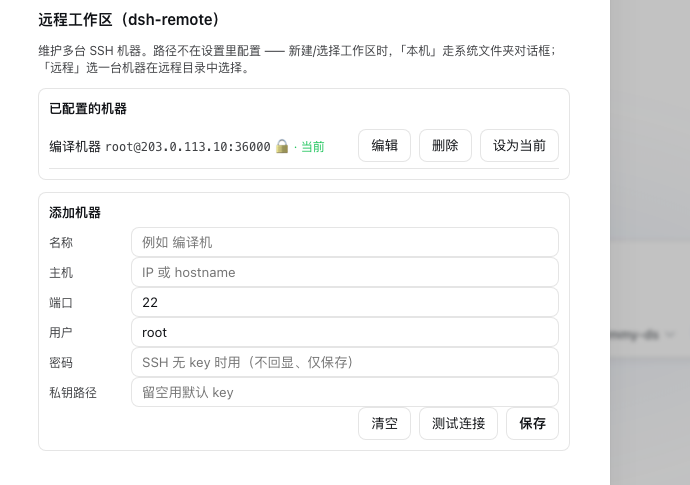 The native **"Add workspace" / "Select workspace"** flow — a centered modal, two tabs, opens on **本机 (local)**; switch to **远程 (remote)**:
- **远程** — a **machine `
The native **"Add workspace" / "Select workspace"** flow — a centered modal, two tabs, opens on **本机 (local)**; switch to **远程 (remote)**:
- **远程** — a **machine `