[English](./README.md) · **中文**
---
# dsh-remote
[](https://www.npmjs.com/package/dsh-remote)
[](LICENSE)
[](https://github.com/topics/dsh-plugin)
**为 [DeepSeek Harness](https://github.com/deepseek-ai/deepseek-harness)(DSH)打造的远程工作助手。**
维护多台 SSH 机器,然后在「选择工作区」时选一个**远程工作区**(或**本地工作区**),Agent 就能在不离开 harness 的情况下直接操作——列文件、读代码、在远程主机上跑构建/命令,并把远程目录镜像成一个真实的本地工作区对象。
DSH 的 Web 界面刻意只监听 `127.0.0.1`(CLI 为安全拒绝 `--host 0.0.0.0`)。本插件反过来:**由你主动连出**到你维护的机器,选一个工作区,然后通过 DSH 原生的工作区 + 文件流来工作——**不改动 `dsh-workspace` 核心**。
## 界面预览
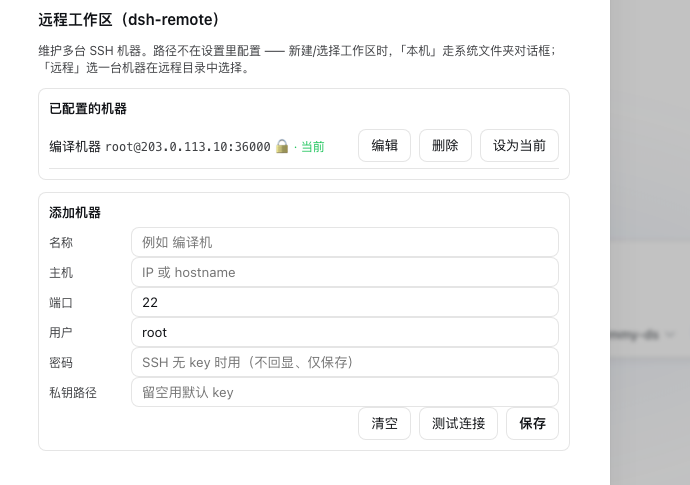
设置 → **远程工作区** —— 多机 SSH 列表(增/删/改/设为当前,密码本地保存、不回显):
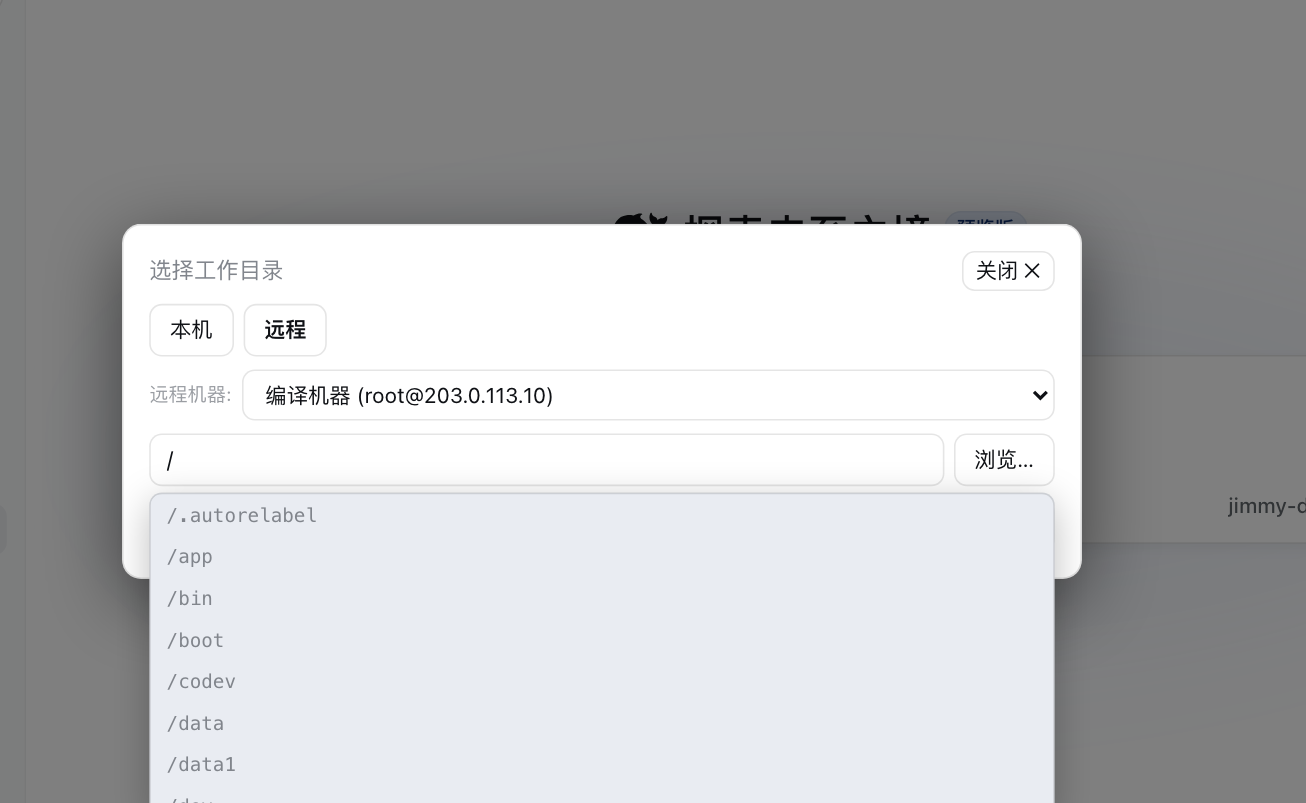
 原生 **「Add workspace / 选择工作区」** 流程 —— **居中弹窗**、两个 tab,**默认落在「本机」**;切到 **「远程」**:
- **远程** —— 一个**机器下拉**;路径输入框**自动预填 `/` 并实时补全目录**(点选一个目录后**立即列出它的下一级**,像系统/VSCode 逐级选目录);另外有**「浏览…」浮窗**,选中仅回填到输入框(不直接提交),你复核 / 修改后点「设为远程工作区」。
真实截图(机器已打码为占位):
原生 **「Add workspace / 选择工作区」** 流程 —— **居中弹窗**、两个 tab,**默认落在「本机」**;切到 **「远程」**:
- **远程** —— 一个**机器下拉**;路径输入框**自动预填 `/` 并实时补全目录**(点选一个目录后**立即列出它的下一级**,像系统/VSCode 逐级选目录);另外有**「浏览…」浮窗**,选中仅回填到输入框(不直接提交),你复核 / 修改后点「设为远程工作区」。
真实截图(机器已打码为占位):
 ---
## 功能
- **多机 SSH** —— 可存任意多台主机(host/port/user + **私钥**或**密码**)。密码只存在本地,界面不回显;在设置里一键切当前机。
- **双 tab 工作区选择器**(填充原生「Add workspace」流程):
- **本机** —— 走 **host 端原生系统文件夹对话框**选本地目录(或直接输入本地路径)→ 直接成为普通 DSH 本地工作区(与本地工作区共存)。
- **远程** —— 选择器是**居中弹窗**(窄侧边栏也不会被挤压)。先**选机器** → 路径框**自动预填 `/`** 并**实时补全**目录;**选中一个目录立即列出它下一级**(OS/VSCode 式级联)。另有 **「浏览…」浮层**(不透明、定高、内部滚动、跟随软链),选中**回填输入框不提交**,你复核/修改后再确定。确定会创建**真实本地镜像**(`~/.dsh/remote-workspaces//-`,`fs.realpath` 通过)→ harness 把它当真实工作区收养,同时 dsh-remote 通过 SFTP 保持同步。
- **双向 SFTP 同步** —— `rw_sync`(远程→镜像)、`rw_push`(镜像→远程),本地镜像改动可回传机器。
- **模型工具** —— `rw_info`、`rw_connect`、`rw_pick_workspace`、`rw_list_dir`、`rw_read_file`、`rw_write_file`、`rw_exec`、`rw_sync`、`rw_push`、`rw_disconnect`。
- **直接写远程文件** —— `rw_write_file` 直接创建/覆盖远程文件(自动建父目录),单个文件改动不必绕本地镜像来回同步。
- **连接体检** —— 设置页提供「测试连接」按钮,在保存机器之前先验证 host/user/密码/私钥是否可用。
- 当前 `user@host:/path` 会注入每次系统提示,让 Agent 明确自己的工作根。
- **不改任何 `dsh-workspace` 官方代码** —— 全部作为普通插件实现(client 半以 `priority -100` 填充 directory-flow holes)。
## 安装
```bash
dsh plugin add dsh-remote # 添加 bundle
```
(或 `npm install dsh-remote`,再在 `cordis.patch.yml` 加 `- id: dsh-remote / name: dsh-remote`。)
## 快速上手
1. **加一台机器** —— 设置 → 远程工作区 → 填 host/port/user + 密码或 key →(可选)设为当前。
2. **选工作区** —— 点侧边栏/会话的 **Add workspace**:
- **本机** → 系统文件夹选择(或输入本地路径)→ 本地工作区。
- **远程** → 选机器 → 浏览到远程目录(或输入 `/path`)→ 「设为远程工作区」⇒ 创建并收养一个本地镜像工作区。
3. **让 Agent 工作** —— 把它当普通工作区用:
- `rw_list_dir(path?)` / `rw_read_file` —— 查看远程文件
- `rw_write_file(path, content)` —— 直接创建或覆盖远程文件
- `rw_exec(command)` —— 在远程执行命令
- `rw_sync` / `rw_push` —— 拉取/推送本地镜像 <-> 远程
## 可选:CLI 默认机
可在 `cordis.patch.yml` 提供默认机:
```yaml
# 示例:请换成你自己的机器
- id: dsh-remote
name: dsh-remote
config:
host: 203.0.113.10 # 或你的真实主机 / hostname
port: 22
username: dev
privateKeyPath: ~/.ssh/id_rsa
# 或用密码登录:
# password: '…'
workspace: ~/project
```
若 `host` 为空,插件启动时处于断开状态,在 UI 里配置机器即可。
## 常用命令(安装 / 查看 / 启动)
DSH 的 `dsh` 可能不在某些 shell 的 PATH(比如 Windows PowerShell 里在某个仓库目录下),所以同时列出 `dsh` 与 `npx` 两种写法。操作都要用 `--profile ` 指定 profile(一般 `web`):
```bash
# 安装(从 npm 拉到 profile)
dsh plugin --profile web add dsh-remote
# 同一效果:当 `dsh` 不在 PATH 时用 npx
npx --yes @deepseek-ai/dsh plugin --profile web add dsh-remote
# 确认已装
dsh plugin --profile web list
npx --yes @deepseek-ai/dsh plugin --profile web list
# 启动 web 界面(重载 profile,新插件在启动时生效)
dsh --profile web
npx --yes @deepseek-ai/dsh --profile web # 访问 http://127.0.0.1:3080
# 迭代用本地源码替换 npm 版(便于改 dsh 插件代码后即测)
npx --yes @deepseek-ai/dsh plugin --profile web add D:/path/to/dsh-remote
npx --yes @deepseek-ai/dsh plugin --profile web remove dsh-remote # 恢复用发行版
```
启动成功后,设置 →「远程工作区」会出现;「Add workspace」流程会带「本机 / 远程」两个 tab(见上方效果图)。
## 配置
| 键 | 类型 | 默认 | 说明 |
| --- | --- | --- | --- |
| `host` | string | `''` | 默认 SSH 主机(空=断开) |
| `port` | int | `22` | 默认 SSH 端口 |
| `username` | string | `''` | 默认 SSH 用户 |
| `password` | string | `''` | 默认 SSH 密码(非空覆盖 key) |
| `privateKeyPath` | string | `''` | 私钥路径(空=`~/.ssh/id_rsa`) |
| `workspace` | string | `''` | 默认远程工作区路径 |
| `commandTimeoutMs` | int | 20000 | 单条远程命令超时 |
| `connectTimeoutMs` | int | 15000 | SSH 连接超时 |
## 安全提醒
把机器凭据交给插件,等于允许 Agent 以你的用户身份在主机上执行 **shell 命令**。只添加你可信的机器。密码保存在本机文件里,请当作敏感数据处理(可收紧文件 ACL)。
## License
MIT
## 变更记录
见 [CHANGELOG.md](./CHANGELOG.md)。
---
## 功能
- **多机 SSH** —— 可存任意多台主机(host/port/user + **私钥**或**密码**)。密码只存在本地,界面不回显;在设置里一键切当前机。
- **双 tab 工作区选择器**(填充原生「Add workspace」流程):
- **本机** —— 走 **host 端原生系统文件夹对话框**选本地目录(或直接输入本地路径)→ 直接成为普通 DSH 本地工作区(与本地工作区共存)。
- **远程** —— 选择器是**居中弹窗**(窄侧边栏也不会被挤压)。先**选机器** → 路径框**自动预填 `/`** 并**实时补全**目录;**选中一个目录立即列出它下一级**(OS/VSCode 式级联)。另有 **「浏览…」浮层**(不透明、定高、内部滚动、跟随软链),选中**回填输入框不提交**,你复核/修改后再确定。确定会创建**真实本地镜像**(`~/.dsh/remote-workspaces//-`,`fs.realpath` 通过)→ harness 把它当真实工作区收养,同时 dsh-remote 通过 SFTP 保持同步。
- **双向 SFTP 同步** —— `rw_sync`(远程→镜像)、`rw_push`(镜像→远程),本地镜像改动可回传机器。
- **模型工具** —— `rw_info`、`rw_connect`、`rw_pick_workspace`、`rw_list_dir`、`rw_read_file`、`rw_write_file`、`rw_exec`、`rw_sync`、`rw_push`、`rw_disconnect`。
- **直接写远程文件** —— `rw_write_file` 直接创建/覆盖远程文件(自动建父目录),单个文件改动不必绕本地镜像来回同步。
- **连接体检** —— 设置页提供「测试连接」按钮,在保存机器之前先验证 host/user/密码/私钥是否可用。
- 当前 `user@host:/path` 会注入每次系统提示,让 Agent 明确自己的工作根。
- **不改任何 `dsh-workspace` 官方代码** —— 全部作为普通插件实现(client 半以 `priority -100` 填充 directory-flow holes)。
## 安装
```bash
dsh plugin add dsh-remote # 添加 bundle
```
(或 `npm install dsh-remote`,再在 `cordis.patch.yml` 加 `- id: dsh-remote / name: dsh-remote`。)
## 快速上手
1. **加一台机器** —— 设置 → 远程工作区 → 填 host/port/user + 密码或 key →(可选)设为当前。
2. **选工作区** —— 点侧边栏/会话的 **Add workspace**:
- **本机** → 系统文件夹选择(或输入本地路径)→ 本地工作区。
- **远程** → 选机器 → 浏览到远程目录(或输入 `/path`)→ 「设为远程工作区」⇒ 创建并收养一个本地镜像工作区。
3. **让 Agent 工作** —— 把它当普通工作区用:
- `rw_list_dir(path?)` / `rw_read_file` —— 查看远程文件
- `rw_write_file(path, content)` —— 直接创建或覆盖远程文件
- `rw_exec(command)` —— 在远程执行命令
- `rw_sync` / `rw_push` —— 拉取/推送本地镜像 <-> 远程
## 可选:CLI 默认机
可在 `cordis.patch.yml` 提供默认机:
```yaml
# 示例:请换成你自己的机器
- id: dsh-remote
name: dsh-remote
config:
host: 203.0.113.10 # 或你的真实主机 / hostname
port: 22
username: dev
privateKeyPath: ~/.ssh/id_rsa
# 或用密码登录:
# password: '…'
workspace: ~/project
```
若 `host` 为空,插件启动时处于断开状态,在 UI 里配置机器即可。
## 常用命令(安装 / 查看 / 启动)
DSH 的 `dsh` 可能不在某些 shell 的 PATH(比如 Windows PowerShell 里在某个仓库目录下),所以同时列出 `dsh` 与 `npx` 两种写法。操作都要用 `--profile ` 指定 profile(一般 `web`):
```bash
# 安装(从 npm 拉到 profile)
dsh plugin --profile web add dsh-remote
# 同一效果:当 `dsh` 不在 PATH 时用 npx
npx --yes @deepseek-ai/dsh plugin --profile web add dsh-remote
# 确认已装
dsh plugin --profile web list
npx --yes @deepseek-ai/dsh plugin --profile web list
# 启动 web 界面(重载 profile,新插件在启动时生效)
dsh --profile web
npx --yes @deepseek-ai/dsh --profile web # 访问 http://127.0.0.1:3080
# 迭代用本地源码替换 npm 版(便于改 dsh 插件代码后即测)
npx --yes @deepseek-ai/dsh plugin --profile web add D:/path/to/dsh-remote
npx --yes @deepseek-ai/dsh plugin --profile web remove dsh-remote # 恢复用发行版
```
启动成功后,设置 →「远程工作区」会出现;「Add workspace」流程会带「本机 / 远程」两个 tab(见上方效果图)。
## 配置
| 键 | 类型 | 默认 | 说明 |
| --- | --- | --- | --- |
| `host` | string | `''` | 默认 SSH 主机(空=断开) |
| `port` | int | `22` | 默认 SSH 端口 |
| `username` | string | `''` | 默认 SSH 用户 |
| `password` | string | `''` | 默认 SSH 密码(非空覆盖 key) |
| `privateKeyPath` | string | `''` | 私钥路径(空=`~/.ssh/id_rsa`) |
| `workspace` | string | `''` | 默认远程工作区路径 |
| `commandTimeoutMs` | int | 20000 | 单条远程命令超时 |
| `connectTimeoutMs` | int | 15000 | SSH 连接超时 |
## 安全提醒
把机器凭据交给插件,等于允许 Agent 以你的用户身份在主机上执行 **shell 命令**。只添加你可信的机器。密码保存在本机文件里,请当作敏感数据处理(可收紧文件 ACL)。
## License
MIT
## 变更记录
见 [CHANGELOG.md](./CHANGELOG.md)。