# dsh-vision-proxy
[English](README.en-US.md) | [简体中文](README.md)
**Keep DeepSeek as the brain — paste images anyway.** GUI image attachments auto-transcribed for text-only DeepSeek on [DeepSeek Harness](https://github.com/deepseek-ai/deepseek-harness).







## Why this exists
DeepSeek Harness natively gates image attachments on the selected model's declared `inputModalities`. DeepSeek's chat-completions line is text-only, so attaching an image with DeepSeek selected is rejected by design. Tool-based vision plugins exist, but **GUI image attachments still fail** with a text-only model.
This plugin closes that gap: it registers a new provider route (`deepseek-vision`) that wraps the real DeepSeek adapter, claims image input (so the preflight admits attachments), and **transcribes every attached image to text in the request stream** before delegating to DeepSeek. The conversation is still answered by DeepSeek; vision is an add-on.
```
user attaches image ──▶ deepseek-vision route ──▶ transcribe via VLM (OCR + layout + details)
│ │
▼ ▼
DeepSeek answers ◀── text-only conversation (images replaced by [图片转译] text)
```
## Features
- **No hangs, ever.** Anonymous endpoints are hard-capped at 20 s (a hanging free tier can no longer stall a turn for minutes); HTTP 429 on anonymous endpoints fails immediately instead of sleeping on a useless `Retry-After`; endpoints that just failed (429/timeout) are cooled down for 60 s and skipped.
- **Multi-model, multi-provider.** Any OpenAI-compatible VLM endpoint works — DashScope/Qwen, QwenCloud (international), Zhipu, OpenRouter, local Ollama, or your own. Each `fallbackModels` entry can carry its **own** `baseURL`/`model`, so one install can chain providers.
- **Zero-config local path.** With `autoLocalOllama` (default on), a running Ollama at `http://localhost:11434` is detected at startup and prepended to the fallback chain — images never leave your machine. No key, no account.
- **Fast, clear failures.** With no key and no local Ollama, transcription fails in seconds with actionable guidance (configure `VISION_API_KEY` / `DASHSCOPE_API_KEY` or install Ollama) — never a silent stall.
- **Automatic upgrade when you have a key.** Export `VISION_API_KEY` / `DASHSCOPE_API_KEY` and your configured paid endpoint is used automatically (default: DashScope `qwen3.7-flash` — fast, cheap, no rate limit; DashScope, QwenCloud, Zhipu, OpenRouter, or any OpenAI-compatible endpoint all work); keyless entries are skipped, not failed.
- **Install-time consent prompt.** `postinstall` asks whether you have a VLM API key. Non-interactive environments skip the prompt; the install never hangs. A PRIVACY NOTICE is printed at startup naming the active endpoint.
- **Fallback chain with classified errors.** `rate_limit` / `quota` / `auth` / `region` / `model_not_found` / `context_too_large` / `http` are classified with actionable hints.
- **Content-hash cache.** Transcriptions are cached by the SHA-256 of the image bytes (in-process, capped at 200) — the same image is transcribed at most once per process, even re-attached or in another conversation.
- **Auto-downscale (optional).** With `sharp` installed, images above `maxImagePixels` are downscaled before transcription — fewer image tokens, much faster on big screenshots. Degrades gracefully without sharp.
- **`read_image` compatible.** The native `read_image` tool also works on this route (its capability gate reads the same model info).
## Supported models & providers
One config (`baseURL` + `model`, optionally `apiKey`) covers every backend:
| Scenario | baseURL | model | Notes |
|---|---|---|---|
| **DashScope (China)** — default main | `https://dashscope.aliyuncs.com/compatible-mode/v1` | `qwen3.7-flash` / `qwen3-vl-flash` | Cheap, fast, no rate limit. Keys: `sk-ws-…` from [platform.qianwenai.com](https://platform.qianwenai.com) or `sk-…` from [bailian.console.aliyun.com](https://bailian.console.aliyun.com) |
| **Local Ollama (auto-detected)** | `http://localhost:11434/v1` | first vision-capable model | Zero config when installed; images never leave the machine |
| **QwenCloud (intl.)** | `https://dashscope-intl.aliyuncs.com/compatible-mode/v1` | `qwen3-vl-plus` etc. | International variant |
| **Zhipu (free tier)** | `https://open.bigmodel.cn/api/paas/v4` | `glm-4.6v-flash` | Free tier, still needs a (free) Zhipu API key |
| **Anything OpenAI-compatible** | your endpoint | your model | OpenRouter, Ark, vLLM, gateways… the plugin only speaks `/chat/completions` |
> ⚠️ **Anonymous third-party free tiers are NOT bundled as a default fallback.** In field testing, anonymous free endpoints (e.g. OVHcloud AI Endpoints) were strictly rate-limited AND occasionally hung without a response — as a default they just reproduce a broken experience. If you still want to point at one, add it yourself via `fallbackModels` with `anonymous: true` (the 20 s cap still applies).
### Pricing (CNY, Alibaba Model Studio mainland, Aug 2026 reference)
| Model | Input | Output | One 1080p screenshot (≈2000 tokens) |
|---|---|---|---|
| qwen3-vl-flash | ¥0.15 / 1M tokens | ¥1.5 / 1M tokens | ≈ ¥0.0005 (0.05 fen) |
| qwen3.7-flash | ¥0.2 / 1M tokens | ¥0.8 / 1M tokens | ≈ ¥0.001 (0.1 fen) |
| Local Ollama | free | free | ¥0 (images never leave the machine) |
> Images are billed by token (providers convert image resolution into tokens; a 1080p screenshot ≈ 2000 tokens). At the prices above **one image costs well under one li** (0.001 CNY); even heavy use (100 images/day) is only a few yuan a month. Local Ollama is completely free. Always check the console for live pricing.
**Key resolution order**: config `apiKey` → `$VISION_API_KEY` → `$DASHSCOPE_API_KEY`. Anonymous endpoints (`anonymous: true`) and local hosts need no key; keyless non-anonymous entries are skipped automatically.
## Quick start
```sh
dsh plugin --profile web add dsh-vision-proxy
```
During install you are asked one question — *do you have a VLM API key?* Answer `y` for the paid fast path, or `N` (default) for the local/zero-config path. Restart `dsh web`, pick **DeepSeek + 自动识图** in the model selector, then paste an image into any conversation.
**pnpm ≥ 10 blocks dependency build scripts by default** — the first install exits non-zero with `Ignored build scripts: dsh-vision-proxy, sharp`. Approve both (the plugin's consent prompt and `sharp`'s optional binary), then re-run the install to finish bundle registration:
```yaml
# in the profile's pnpm-workspace.yaml
allowBuilds:
dsh-vision-proxy: true
sharp: true
```
```sh
dsh plugin --profile web add dsh-vision-proxy # re-run after approving
```
> **Slow npm registry in China?** `dsh plugin --profile web add dsh-vision-proxy --registry=https://registry.npmmirror.com` (the flag is forwarded to pnpm).
## Live demo: a real GUI image turn
A real conversation on the `deepseek-vision` route (DeepSeek-V4-Flash as the brain): the user pasted a meme and asked **"你看到了什么"** (what do you see?); the image was auto-transcribed by the VLM and DeepSeek answered from the text — one step, ~7.6 s.
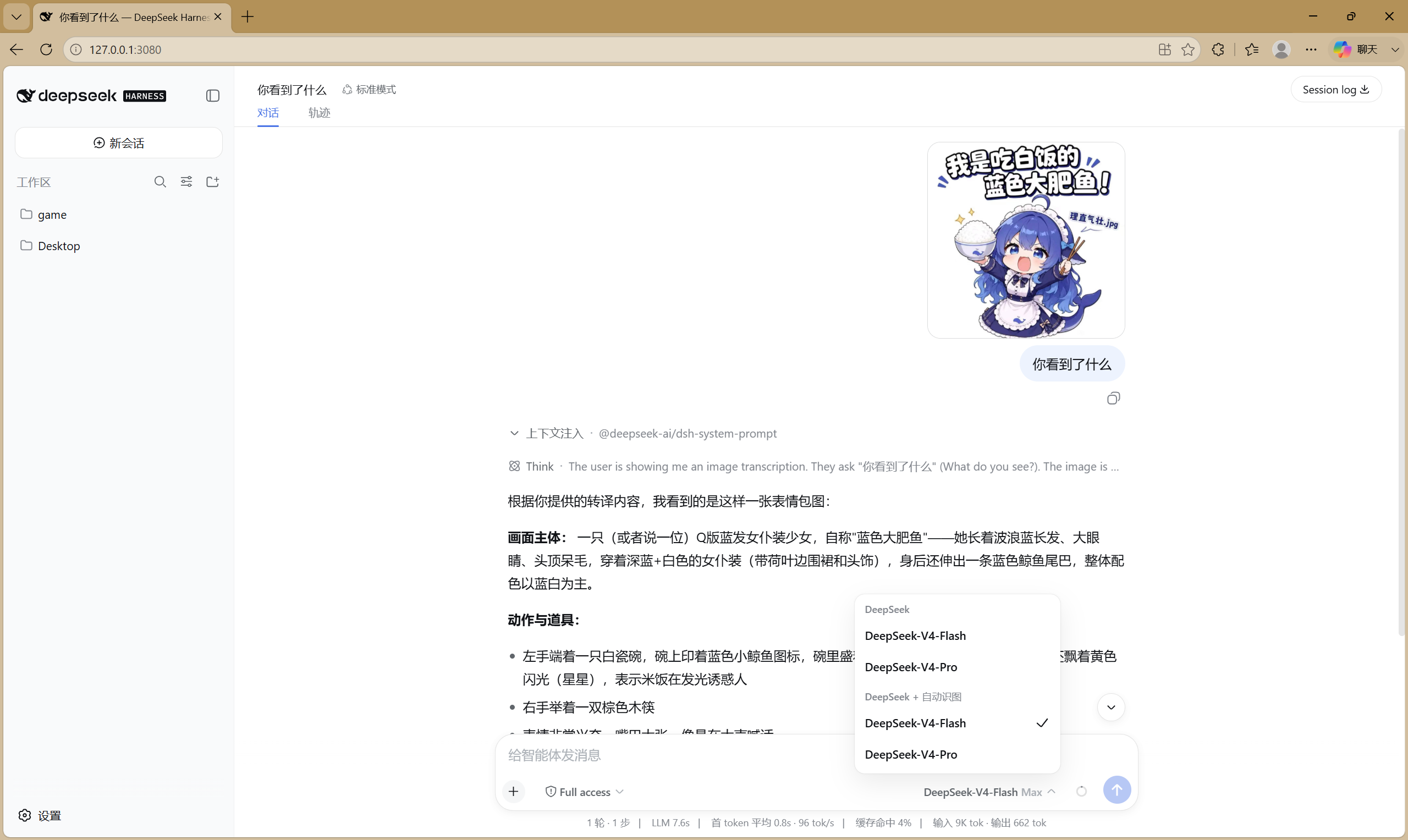
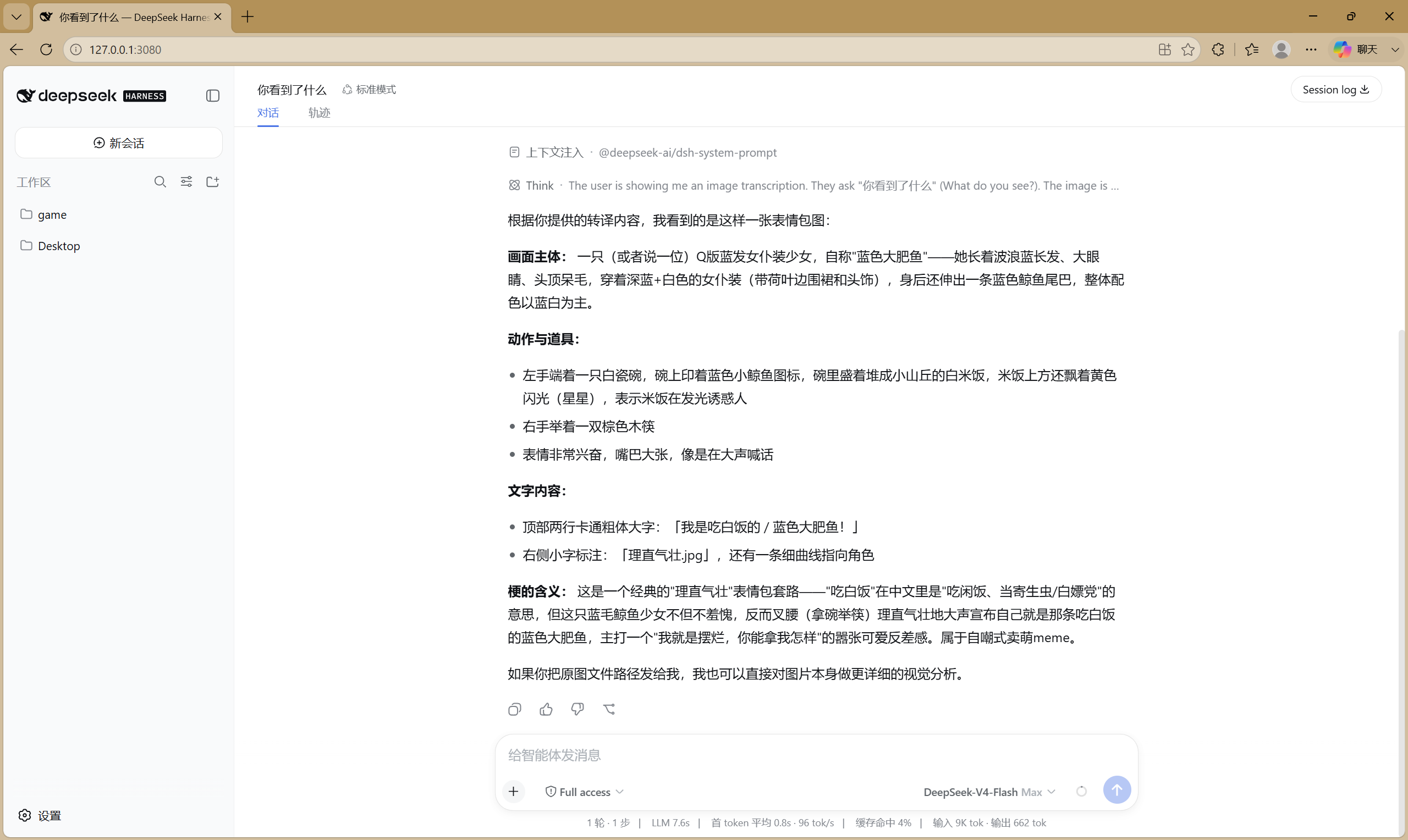
*Left: the model picker showing the `deepseek-vision` route (**DeepSeek + 自动识图**) selected — that is what admits image attachments. Right: DeepSeek's full answer derived from the transcribed image text.*
```
user pastes a meme image + "你看到了什么"
→ image block auto-transcribed via the VLM (OCR + layout):
"我是吃白饭的 / 蓝色大肥鱼! (理直气壮.jpg) — Q-version blue-haired maid girl
with a whale tail, holding a bowl of rice and chopsticks, excited expression"
→ DeepSeek answers with a full visual analysis of the meme
```
Two autonomous paths are covered: the `view_image` tool (any route, file paths & URLs) and image-block auto-transcription (on the `deepseek-vision` route — images you attach mid-conversation).
## Configuration
The bundle already ships sensible defaults (see the strategy above) — you normally don't need to configure anything. To override them in your profile, use an **id-targeted override**, NOT an `insert` (see the warning below):
```yaml
# $DSH_HOME/profiles/web/cordis.patch.yml — user-layer override example
- id: dsh-vision-proxy
name: 'dsh-vision-proxy'
config:
baseURL: https://dashscope.aliyuncs.com/compatible-mode/v1
apiKey: 'sk-…' # or leave '' to read env vars (writing it here is the reliable way on Windows)
model: qwen3.7-flash
maxTokens: 4096
timeoutMs: 120000 # anonymous endpoints are hard-capped at 20 s anyway
maxImagePixels: 4000000
marker: '[图片转译]'
autoLocalOllama: true
fallbackModels: [] # add your own {model, baseURL, apiKey?, anonymous?, timeoutMs?}
```
> ⚠️ **Do NOT write this as `- insert: [{id: dsh-vision-proxy, …}]`.** In dsh's patch semantics an `insert` **appends** entries to the list — the bundle's own entry and yours (same id) would both be instantiated, registering the `deepseek-vision` adapter **twice** (undefined behavior). A top-level `- id:` entry targets the existing row and **replaces its whole `config`**; keys you omit fall back to the plugin schema's `.default()` values (e.g. `maxTokens=4096`, `timeoutMs=120000`, `autoLocalOllama=true`), so writing only `apiKey`/`model` also works.
| Key | Default | Meaning |
|---|---|---|
| `providerId` | `deepseek-vision` | Route id shown in the model picker |
| `innerProvider` | `deepseek-official` | Existing adapter route to wrap |
| `baseURL` | DashScope compatible-mode | OpenAI-compatible VLM endpoint (any vendor, Ollama included) |
| `apiKey` | `''` | VLM key; falls back to `$VISION_API_KEY`, then `$DASHSCOPE_API_KEY`. On Windows, environment changes may not reach a running dsh — writing `apiKey` here is the reliable way |
| `anonymous` | `false` | Skip the Authorization header (for registration-free endpoints; 20 s timeout cap applies) |
| `model` | `qwen3.7-flash` | Vision model id (e.g. `Qwen2.5-VL-72B-Instruct`, `qwen3-vl-flash`, `glm-4.6v-flash`, `qwen3-vl:4b`) |
| `maxTokens` | `4096` | VLM output cap (thinking models spend tokens on reasoning first) |
| `timeoutMs` | `120000` | VLM request timeout (anonymous endpoints are capped at 20 s regardless) |
| `maxImagePixels` | `4000000` | Images above this are downscaled before transcription when `sharp` is installed (0 disables) |
| `marker` | `[图片转译]` | Marker prepended to each transcription |
| `autoLocalOllama` | `true` | Probe `http://localhost:11434` at startup; when found, prepend it to the fallback chain |
| `localOllamaModel` | `''` | Ollama model id; empty picks the first vision-capable model the local Ollama reports |
| `fallbackModels` | `[]` | Ordered fallback list `{model, baseURL?, apiKey?, anonymous?, timeoutMs?}` — each entry may point at a **different provider**; keyless non-anonymous entries are skipped |
> **About API keys on Windows**: `dsh --profile --dump-config` prints the composed config as-is (so a key in `cordis.patch.yml` shows in plaintext dumps), but environment variables set after a process started (explorer.exe caches them) may never reach a running dsh. If you see `skipped — no API key` despite having exported the key, **write `apiKey` directly into the plugin config** — it is the only reliable path on Windows. (Note: dsh rc.6 does NOT load `.env` files, so that is not an alternative.)
## Verify the install
```sh
dsh --profile web --dump-config | grep -A3 dsh-vision-proxy # exactly ONE entry (note: dumps config in plaintext, key included)
```
1. Restart `dsh web` → the model picker shows **DeepSeek + 自动识图**.
2. Paste an image into a conversation → you should see the `[图片转译]` marker followed by DeepSeek's answer.
3. With no key and no local Ollama, the turn should fail **fast** (seconds) with the guidance message — that is the intended no-hang behavior.
## Behavior notes
- Only messages containing image blocks are touched; plain-text conversations hit DeepSeek with zero overhead.
- Anonymous endpoints: 20 s hard timeout cap, HTTP 429 fails immediately (no retry), failures arm a 60 s endpoint cooldown — consecutive images don't re-hit a broken endpoint.
- The request only fails after every chain entry failed, with one error listing each attempt plus actionable guidance.
- Transcription results are cached in-process by image content hash (never persisted).
- On startup the plugin logs a one-line summary — route id, wrapped provider, VLM model, endpoint, timeout, maxTokens, apiKey source and fallback list (the key itself is never logged), plus a PRIVACY NOTICE and a local-Ollama detection line.
- Tested: 14 unit tests on Node 22 and 24 via GitHub Actions (incl. no-hang fast-fail, cooldown skip, and Ollama detection).
- Transcription quality: dense UI screenshots may lose small text details — that is the vision model's capability ceiling, not a plugin bug. For OCR-heavy work, use a stronger model (e.g. `qwen3-vl-plus`) or raise `maxTokens`.
## Troubleshooting
| Symptom | Cause & fix |
|---|---|
| `skipped — no API key` despite exporting `VISION_API_KEY` | Windows caches environment variables in explorer.exe; the running dsh never saw them. Write `apiKey` directly into the plugin config, then restart dsh |
| `Ignored build scripts: dsh-vision-proxy, sharp` on install | pnpm ≥ 10 blocks dependency build scripts. Add `allowBuilds: {dsh-vision-proxy: true, sharp: true}` to the profile's `pnpm-workspace.yaml`, then re-run the install |
| `ERR_PNPM_MINIMUM_RELEASE_AGE_VIOLATION` on a fresh release day | pnpm 11 defaults `minimumReleaseAge` to 1 day (supply-chain policy). Add `minimumReleaseAge: 0` to the profile's `pnpm-workspace.yaml`, or pass `--config.minimum-release-age=0` to `dsh plugin add`, then re-run |
| `all N vision model(s) failed … rate_limit` on an anonymous endpoint | Anonymous free tiers are strictly rate-limited and may hang. Configure a key or use local Ollama |
| Turn stalls ~20 s then fails on a fresh install with no key | No key and no local Ollama — that is the intended fast-fail path. Install Ollama or add a key |
| Slow downloads from registry.npmjs.org | Use `--registry=https://registry.npmmirror.com` (forwarded to pnpm) |
## Privacy
Transcription sends image bytes (base64, over HTTPS) to the configured VLM endpoint — **the image data leaves your machine** unless `baseURL` points at a local service (e.g. Ollama). Nothing is stored beyond the harness's own attachment store. For sensitive images, use your own endpoint or a local model — or don't install.
## How it works (for plugin developers)
The plugin uses only public harness seams, stable on rc.6:
- `ctx.llm.registration(innerProvider).adapter` — reach the wrapped adapter;
- `ctx.llm.registerAdapter([providerId], proxyAdapter)` — register a NEW route (no `DUPLICATE_ADAPTER` conflict);
- proxy `resolveModel` overrides `inputModalities` to `['text', 'image']` — satisfies the attachment preflight (`api-proxy`) and the `read_image` gate (`dsh-tool-fs`);
- proxy `stream` transcribes image blocks (shape `{ type: 'image', attachment }`, bytes via `ctx.get('attachments').readImage(ref)`) and `yield*`s the inner adapter's stream unchanged.
## License
MIT