> **Task**
>
> *Use public data to complete a reproducible classification experiment and deliver a data audit, statistical review, 4 result figures, a scientific report, and a 7-slide group-meeting deck.*
The diagram shows what happened after the requirement and plan were approved:
how the task was executed, what it produced, and how the result was checked.
The task used the `L` workflow and proceeded in order. During publication
preparation, the configured folders on the same host contained more than 100
Skills. VibeSkills reviewed the candidates and their `SKILL.md` files, selected
7 for this task, and arranged the work into 5 groups and 10 work units. Those
units covered environment setup, data audit, modeling, statistical review,
figures, the report, and the slide deck.
After the work finished, VibeSkills ran 17 checks across the data, experiment
results, figures, report, and slides. The task passed final acceptance after the
required files, cross-deliverable consistency, and core reproduction all passed.
7 Skills selected · 5 work groups · 10 / 10 work units completed · 17 / 17 checks passed
```mermaid
%%{init: {"flowchart": {"curve": "monotoneX", "nodeSpacing": 18, "rankSpacing": 36}}}%%
flowchart LR
subgraph DISC["Skill discovery"]
direction TB
A["Configured Skill folders 100+ Skills"]
B["Shortlist candidates Read SKILL.md"]
SEL["Skill selection 7 Skills assigned"]
A --> B
B --> SEL
end
subgraph EXEC["Execution · 5 work groups · 10 work units"]
direction TB
subgraph G1["G1 · 01 Environment and data"]
direction LR
u01["U01 Environment setup"]
u02["U02 Data audit"]
u01 --> u02
end
subgraph G2["G2 · 02 Modeling and reproduction"]
direction LR
u03["U03 Baseline experiment"]
end
subgraph G3["G3 · 03 Statistics and scientific review"]
direction LR
u04["U04 Statistical analysis"]
u05["U05 Scientific review"]
u04 --> u05
end
subgraph G4["G4 · 04 Figures and report"]
direction LR
u06["U06 Result figures"]
u07["U07 Report draft"]
u08["U08 Report review"]
u06 --> u07
u07 --> u08
end
subgraph G5["G5 · 05 Slides and acceptance"]
direction LR
u09["U09 Group-meeting slides"]
u10["U10 Case package and consistency"]
u09 --> u10
end
G1 --> G2
G2 --> G3
G3 --> G4
G4 --> G5
end
subgraph MID["Run and outputs"]
direction TB
S(["Run status 10 / 10 completed 0 failed · 0 blocked"])
D["Real outputs 4 figures · Scientific report 7-slide deck"]
S --> D
end
subgraph VERIFY["Verification · 17 checks"]
direction TB
subgraph V1["V1 · Foundation and plan"]
direction LR
t01["T01 required-files"]
t02["T02 module-output- patterns"]
t03["T03 runtime-plan- binding"]
t04["T04 environment- contract"]
t01 --> t02
t02 --> t03
t03 --> t04
end
subgraph V2["V2 · Data, model, and reproduction"]
direction LR
t05["T05 dataset-contract"]
t06["T06 split-and-model- contract"]
t07["T07 baseline-results"]
t08["T08 exact- reproduction"]
t05 --> t06
t06 --> t07
t07 --> t08
end
subgraph V3["V3 · Statistics and deliverables"]
direction LR
t09["T09 uncertainty- consistency"]
t10["T10 statistics-write- protection"]
t11["T11 figure- traceability"]
t12["T12 report- consistency"]
t13["T13 slides- consistency"]
t09 --> t10
t10 --> t11
t11 --> t12
t12 --> t13
end
subgraph V4["V4 · Publication and boundaries"]
direction LR
t14["T14 bilingual-summary- consistency"]
t15["T15 visual-material- guidance"]
t16["T16 manifest- boundary"]
t17["T17 artifact-path- boundary"]
t14 --> t15
t15 --> t16
t16 --> t17
end
V1 --> V2
V2 --> V3
V3 --> V4
end
E(["Final acceptance 17 / 17 checks passed PASS"])
DISC --> EXEC
EXEC --> MID
MID --> VERIFY
VERIFY --> E
classDef source fill:#EAF3F3,stroke:#2B6F73,color:#182026;
classDef selected fill:#F5EBEE,stroke:#8A5363,color:#182026;
classDef unit fill:#FFFFFF,stroke:#5B7F83,color:#182026;
classDef status fill:#F7EEF1,stroke:#8A5363,color:#182026,stroke-width:2px;
classDef output fill:#E8F2F0,stroke:#2D7F75,color:#182026;
classDef check fill:#FFFFFF,stroke:#8A9AA7,color:#182026;
classDef result fill:#EAF4EE,stroke:#2F7A4B,color:#182026,stroke-width:2px;
class A,B source;
class SEL selected;
class u01,u02,u03,u04,u05,u06,u07,u08,u09,u10 unit;
class S status;
class D output;
class t01,t02,t03,t04,t05,t06,t07,t08,t09,t10,t11,t12,t13,t14,t15,t16,t17 check;
class E result;
style DISC fill:transparent,stroke:#AAB7C4,stroke-width:1px,stroke-dasharray:4 3;
style EXEC fill:transparent,stroke:#AAB7C4,stroke-width:1px,stroke-dasharray:4 3;
style MID fill:transparent,stroke:#AAB7C4,stroke-width:1px,stroke-dasharray:4 3;
style VERIFY fill:transparent,stroke:#AAB7C4,stroke-width:1px,stroke-dasharray:4 3;
style G1 fill:#FFFFFF,stroke:#DCE4EA,stroke-width:1px;
style G2 fill:#FFFFFF,stroke:#DCE4EA,stroke-width:1px;
style G3 fill:#FFFFFF,stroke:#DCE4EA,stroke-width:1px;
style G4 fill:#FFFFFF,stroke:#DCE4EA,stroke-width:1px;
style G5 fill:#FFFFFF,stroke:#DCE4EA,stroke-width:1px;
style V1 fill:#FFFFFF,stroke:#DCE4EA,stroke-width:1px;
style V2 fill:#FFFFFF,stroke:#DCE4EA,stroke-width:1px;
style V3 fill:#FFFFFF,stroke:#DCE4EA,stroke-width:1px;
style V4 fill:#FFFFFF,stroke:#DCE4EA,stroke-width:1px;
linkStyle default stroke:#6D878B,stroke-width:1px;
```
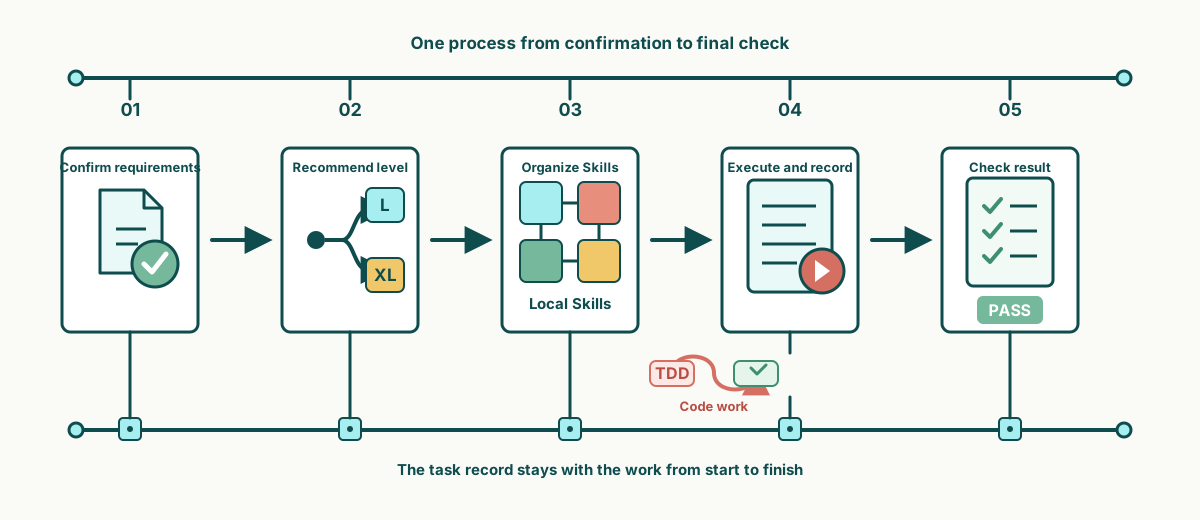
*VibeSkills gives an Agent one process from receiving a task to checking the delivery.*
Each stage answers a concrete question: what needs to be done, how the
work should proceed, which Skills should take part, what actually happened, and
whether the result is ready to deliver.
Confirms the requirement. Before work begins, it confirms the goal, constraints, available material, and expected delivery. The process stops here until the requirement is approved, giving the plan and final check a clear basis.
Recommends a level. VibeSkills recommends L or XL from the task's scope, steps, dependencies, and opportunities for parallel work. You then confirm the level. Manageable work proceeds in order; larger work is split more finely.
Organizes Skills. VibeSkills reviews the local Skill folders, selects the methods that fit each part, and states what each Skill owns, what it should deliver, and how completion will be checked.
Executes and records. After plan approval, the current Agent completes the work. Code tasks can use test-driven development (TDD) when appropriate: show the problem with a failing test, make the change, and run the tests again. Completed, failed, and blocked states are recorded so a later session can continue.
Checks the result. VibeSkills compares the actual result with every planned item. Required work that is incomplete, failed, or blocked prevents final acceptance.
When to use L or XL
| Level | Best for | How it works |
|:---|:---|:---|
| `L` | Multi-step work of manageable size | Splits the task, then works through the parts in order with less time and context overhead |
| `XL` | Larger work with several relatively independent parts | Uses a more detailed breakdown and can run up to two non-conflicting parts at the same time, with additional coordination and result collection |
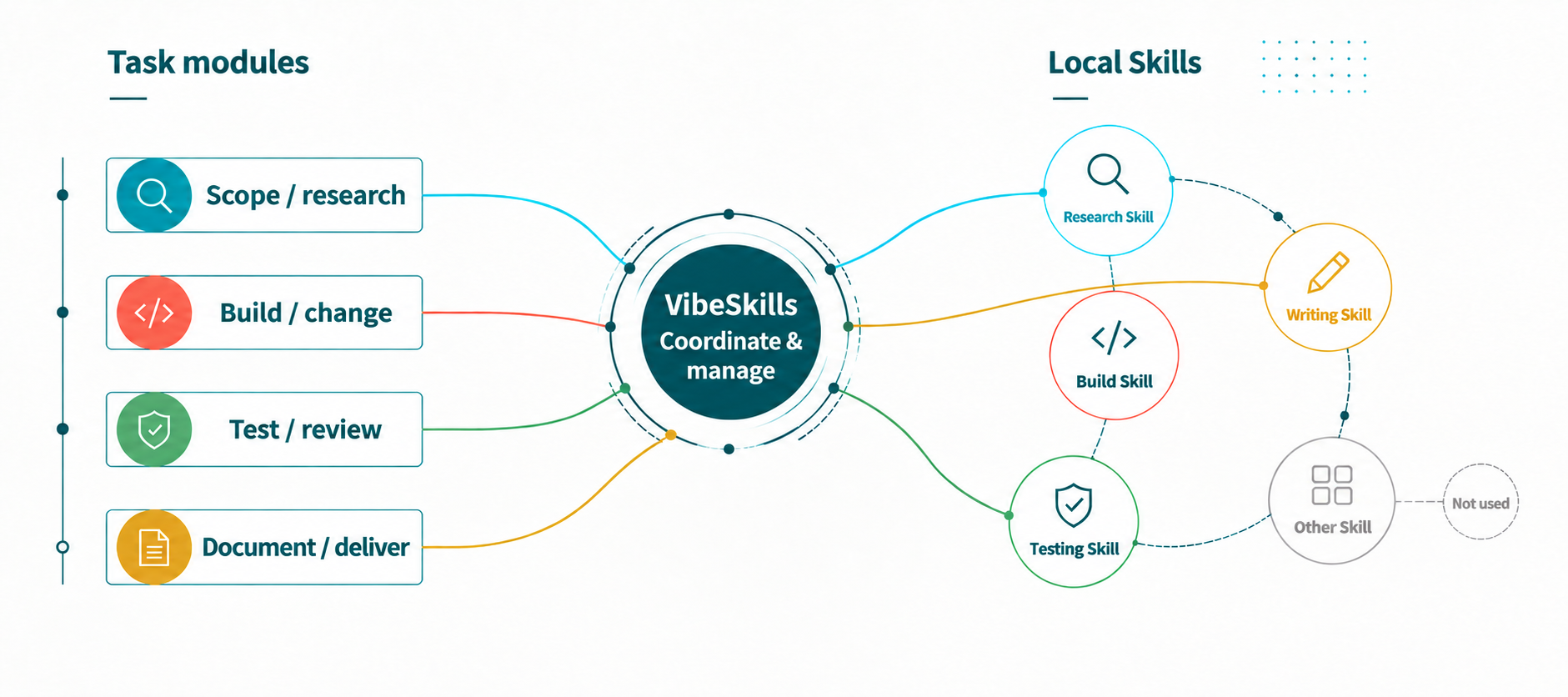
*Local Skills can store tool usage, working steps, decision rules, and checking methods.*
VibeSkills reviews the local Skill folders you configure, then
shortlists the Skills that fit the work required by each part of the task.
The left side shows the different kinds of work in the task, VibeSkills makes
the assignment in the middle, and the local Skill folders are on the right. A
selected Skill is tied to concrete work, expected delivery, and a check. The
current Agent then follows the shared plan.
Passive Skill triggering
With VibeSkills
The AI reacts to a few obvious words
It splits the whole task first
The same familiar Skills are used repeatedly
Each part is checked for a better-fitting Skill
Unmatched work is handled on the spot
A useful Skill is assigned to specific work with a stated result
Separate calls are left disconnected
All results are brought together and checked at the end
VibeSkills does something straightforward: **it first makes the whole task
clear, then assigns the right Skills to the relevant parts**. It coordinates
the work and checks the combined result at the end. The task uses the Skills it
needs; the rest of the local library stays available without entering the plan.
You can keep adding your own Skills, team Skills, and third-party Skills.
VibeSkills does not call every installed Skill automatically; it selects the
Skills that fit the current task. The size of the library defines the available
choices, not a list that every task must use.
Will a large Skill library use a lot of tokens?
VibeSkills checks the Skill folders you configure, but finding files locally
and placing their full contents in the model context are different operations.
Discovery and index generation happen locally. VibeSkills first extracts compact
information such as each Skill's name, description, intended use, and boundaries,
then uses that information to shortlist candidates for each part of the task.
Only retained candidates are then read as complete `SKILL.md` files. Execution
uses only the Skills written into the plan. Token usage therefore depends mainly
on how many candidates the task retains, how long those documents are, and how
complex the task is. It is not the same as reading the full local Skill library
into the model context.
This overhead is not zero. More candidates, longer Skill documents, or a more
finely divided task will use more context. The current design bounds that cost
with a local index, candidate shortlisting, and on-demand reading.
Local folders and selection records
Alongside the shared Skills directory, more local folders can be listed in
`~/.vibeskills/skill-roots.json` or
`/.vibeskills/skill-roots.json`.
A Skill needs a readable `SKILL.md`, a name that does not conflict with another
Skill, and a clear fit for the current work before it can be selected. Adding a
local folder makes those Skills available to later tasks without waiting for the
VibeSkills repository to include them.
During planning, `agent_skill_organization` stores which Skills are intended for
each part of the task. During execution, `module_assignments` stores the actual
assignment. Finding a Skill means it can be considered; it does not mean the
Skill has already taken part in the work.
*A public example lets readers follow the requirement, plan, actual result, and final check.*
VibeSkills keeps the approved requirement, plan, execution progress, and final
check in the same task record. A later session can continue from the saved
progress, and a review can compare the original plan with the actual result.
Installation state is recorded separately so it is not confused with task
completion.
View the record files
| File or directory | What it is for |
|:---|:---|
| `install-receipt.json` | Records the files written by the installer so `check` can find missing or changed files |
| `session_root` | Stores the input, progress, important decisions, and summary for one task |
| `module-work-plan.json` | Stores the approved work plan, including responsibility, expected output, and checks |
| `module-execution.json` | Stores what each part actually produced and whether it completed, failed, or was blocked |
| `delivery-acceptance-report.json` or `.md` | Stores the final check and shows which items passed |
Maintainers can use the
[pre-release checklist](docs/status/non-regression-proof-bundle.md). Start with
the checks in that list and run wider audits only when there is a reason.
A successful installation does not mean the task ran, and a task record does
not mean the final result passed its checks.
Invoke. In any AI application that supports local Skills, invoke VibeSkills through the application's Skills entry, using $vibe, /vibe, or the syntax it provides.
Discover. VibeSkills scans the Skills installation directory and any additional local Skill folders you configure to find the Skills currently available.
Organize. It selects suitable Skills for the task, assigns them to the relevant work, and coordinates the result. You do not need to remember which Skill should be used when.
Questions, corrections, and well-scoped contributions are welcome through
[GitHub Issues](https://github.com/foryourhealth111-pixel/Vibe-Skills/issues)
and pull requests.
VibeSkills discussions and community practice can also continue on
[LINUX DO](https://linux.do/). It is a place to exchange technical questions,
AI practice, and experience. Thank you to the LINUX DO community for supporting
this project.
The [VibeSkills 3.1.0 community practice cases](https://linux.do/t/topic/2061161)
collect several examples that were shared with the community.
Community contributors include
[xiaozhongyaonvli](https://github.com/xiaozhongyaonvli) and
[ruirui2345](https://github.com/ruirui2345).
Third-party software attribution and license information are listed in
[NOTICE](./NOTICE) and [third-party licenses](./THIRD_PARTY_LICENSES.md).