# 💰 DeepSeek Balance Monitor & Usage Stats
**A DeepSeek Harness (DSH) plugin** — balance monitoring · official top-up link · Miyu-style usage statistics · third-party plugin manager
[](LICENSE)
[](https://github.com/Francis-Xavier-code/dsh-balance-plugin)
[](https://github.com/Francis-Xavier-code/dsh-balance-plugin)
**🌐 [English](README.md) · [简体中文](README.zh-CN.md)**
[✨ Features](#-features) · [🖼 Screenshots](#-screenshots) · [📥 Install](#-install) · [⚙️ Configuration](#️-configuration) · [🎮 Usage](#-usage) · [🗑 Uninstall](#-uninstall) · [🏗 Architecture](#-architecture) · [❓ FAQ](#-faq)
---
## ✨ Features
| Module | Capability |
| --- | --- |
| **Balance monitoring** | Monitors DeepSeek API balance (CNY / USD dual balance pool) with parallel multi-account queries; auto-reads the DSH credential `DEEPSEEK_API_KEY` — **no manual entry needed** |
| **Low-balance alerts** | Independent CNY / USD thresholds (default ¥10 / $2, configurable); the balance bar turns red when below threshold |
| **One-click top-up** | Jumps straight to the official DeepSeek top-up page `platform.deepseek.com/top_up`, plus a usage-details page link |
| **Usage statistics** | 1:1 recreation of the [Miyu WebUI usage page](https://github.com/SHORiN-KiWATA/Miyu/tree/main/web): stat tiles / GitHub-contribution-style usage calendar / three-segment stacked trend bar chart / model consumption donut chart with detail table / recent 50 call records |
| **Performance metrics** | Turns · steps · LLM duration · tool-call duration · avg first-token latency · tok/s · cache hit rate |
| **Third-party plugin manager** | Lists unofficial (non-`@deepseek-ai`) web plugins: package name / local path / Bundle rev / dependencies, with a one-click "Open Directory" to locate source code |
| **Model tool** | Registers the `query_api_quota` tool — just ask "How much DeepSeek balance is left?" and get a balance summary |
Charts use Miyu's chart / heat palettes (blue / gold / rose / purple + blue-purple heat scale) and auto-adapt to dark / light themes.
---
## 🖼 Screenshots
| Screenshot | Description |
| --- | --- |
| 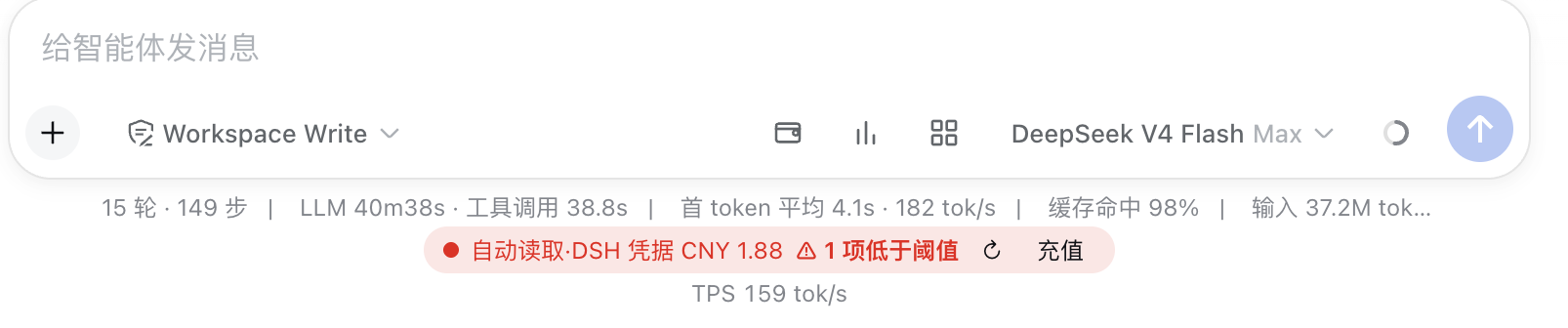 | Three icon entries on the right of the input toolbar (💰 Wallet / 📊 Usage / 🧩 Plugins) plus a persistent balance bar below |
| 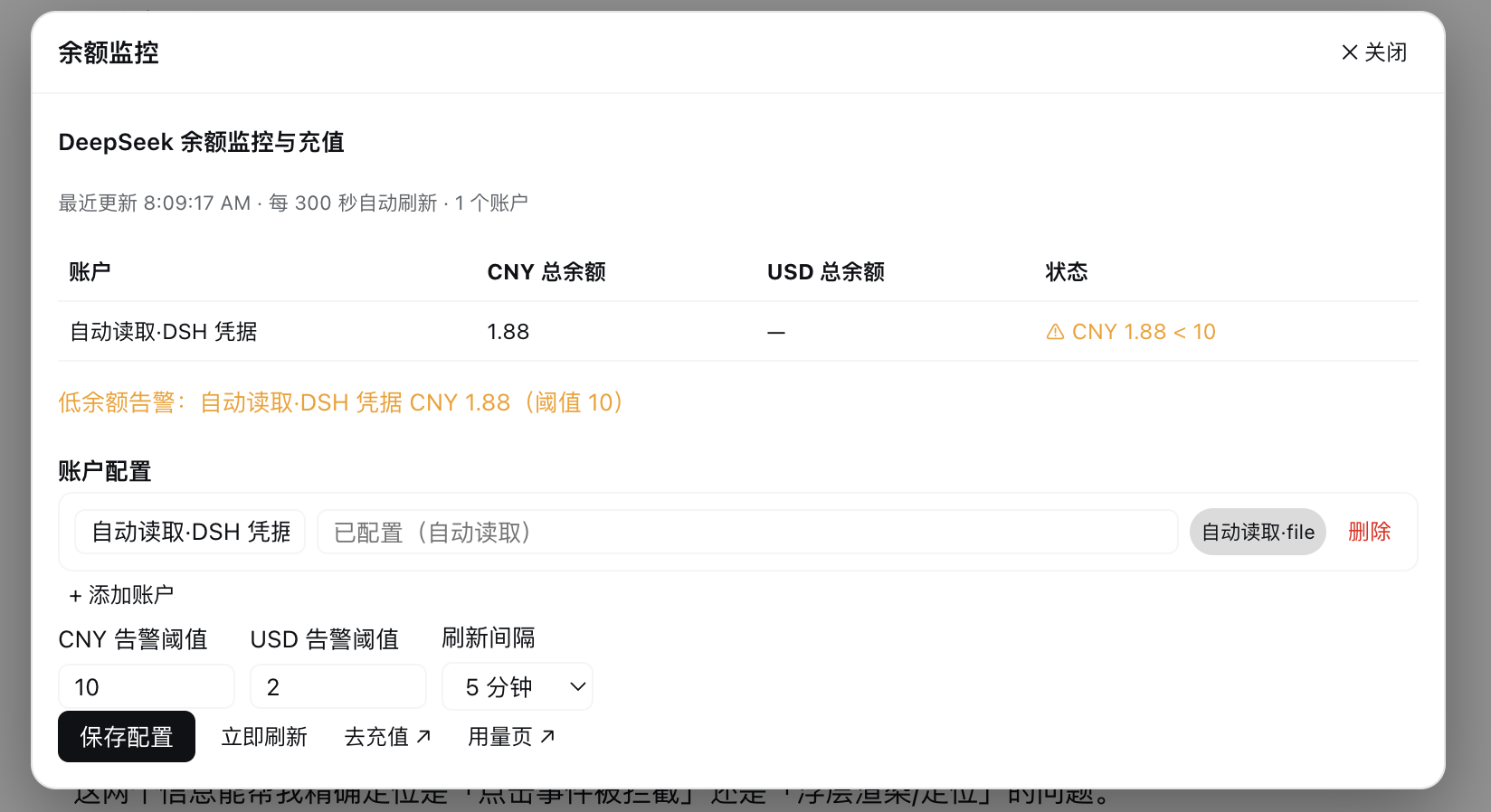 | Balance monitoring panel: balance table, low-balance alerts, account config, thresholds & refresh interval, top-up entry |
| 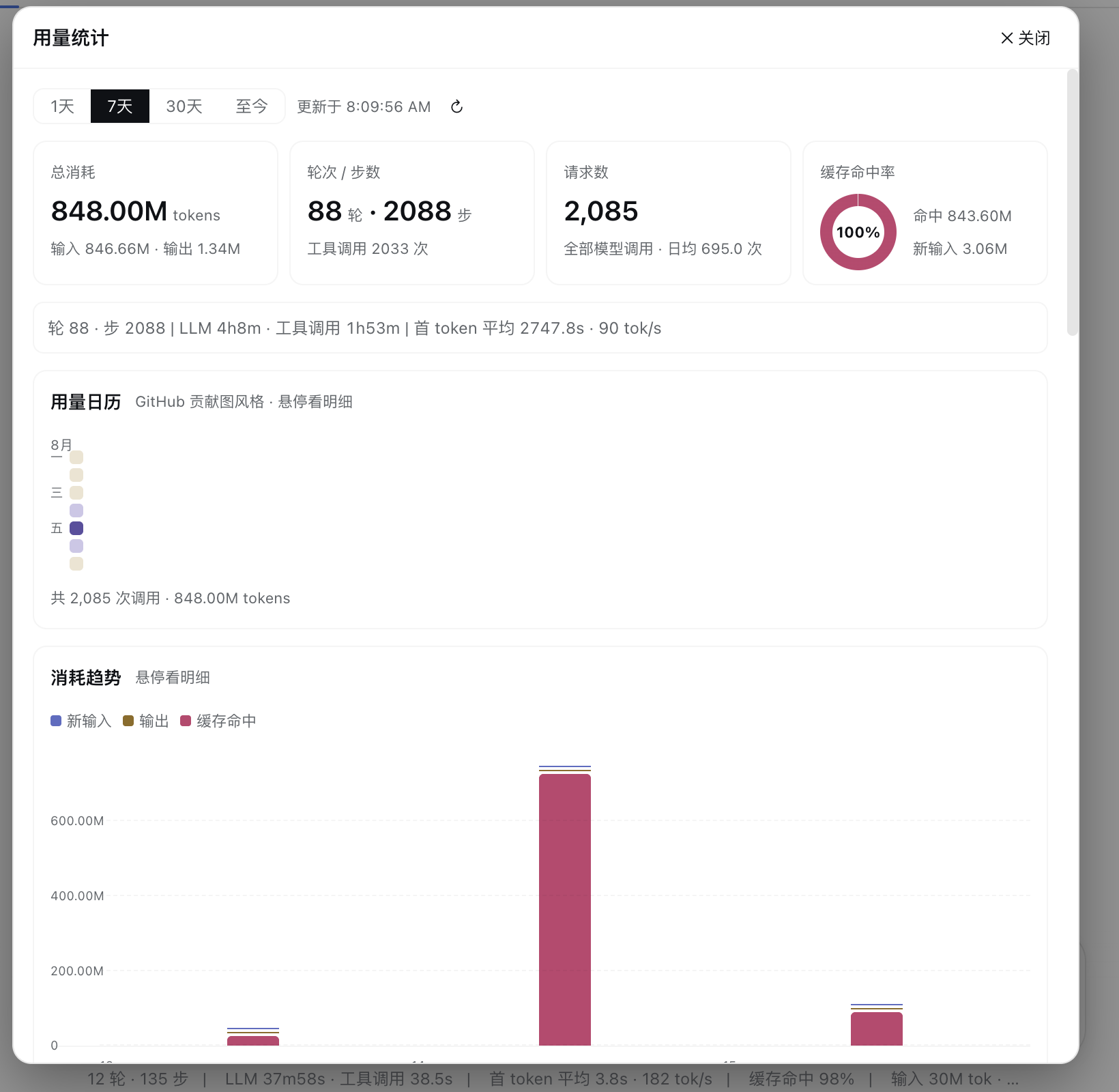 | Usage page top: range switcher, stat tiles, live performance metric bar, GitHub-style usage calendar |
| 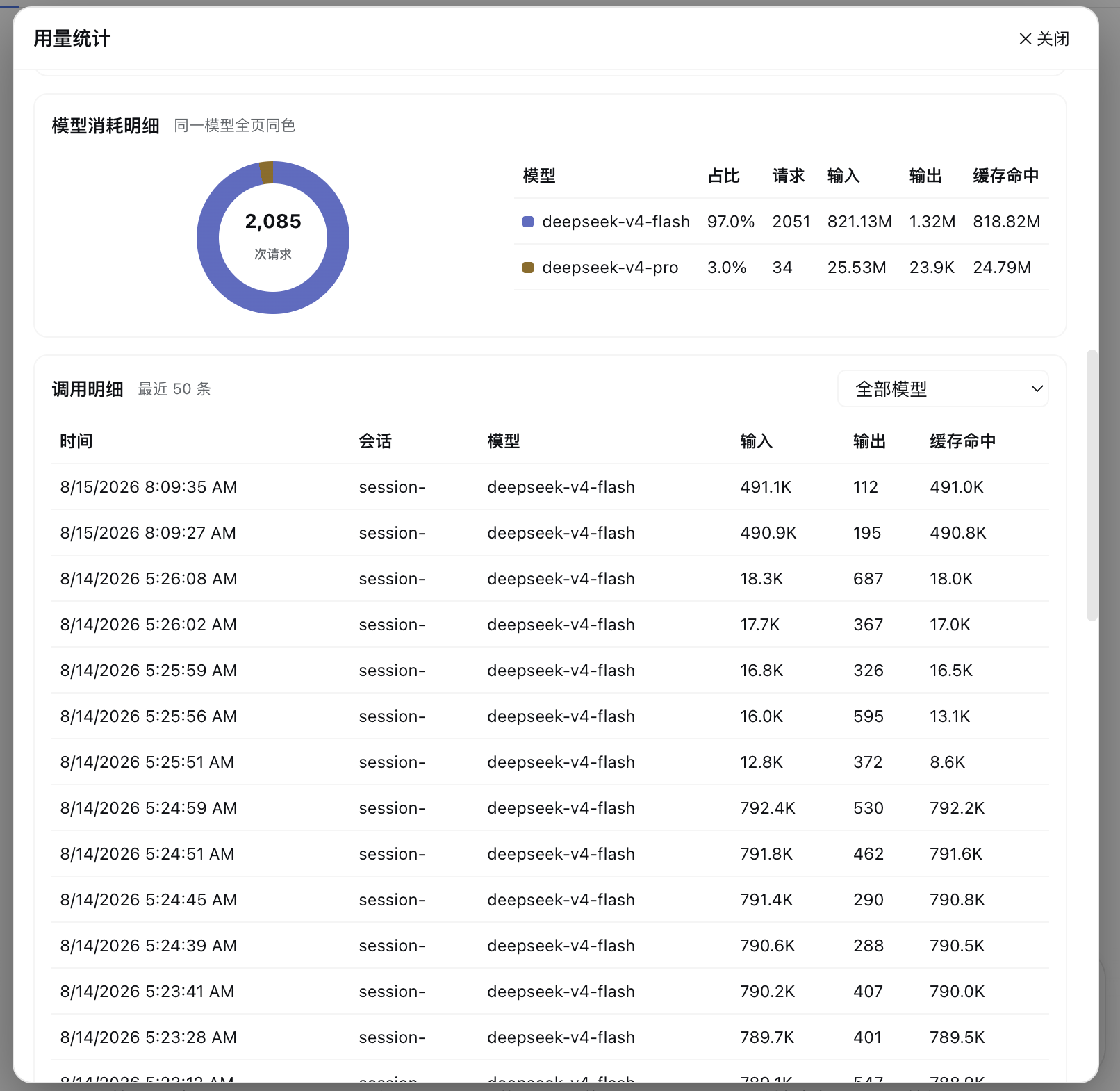 | Usage page bottom: trend bar chart, model consumption details, call record details |
| 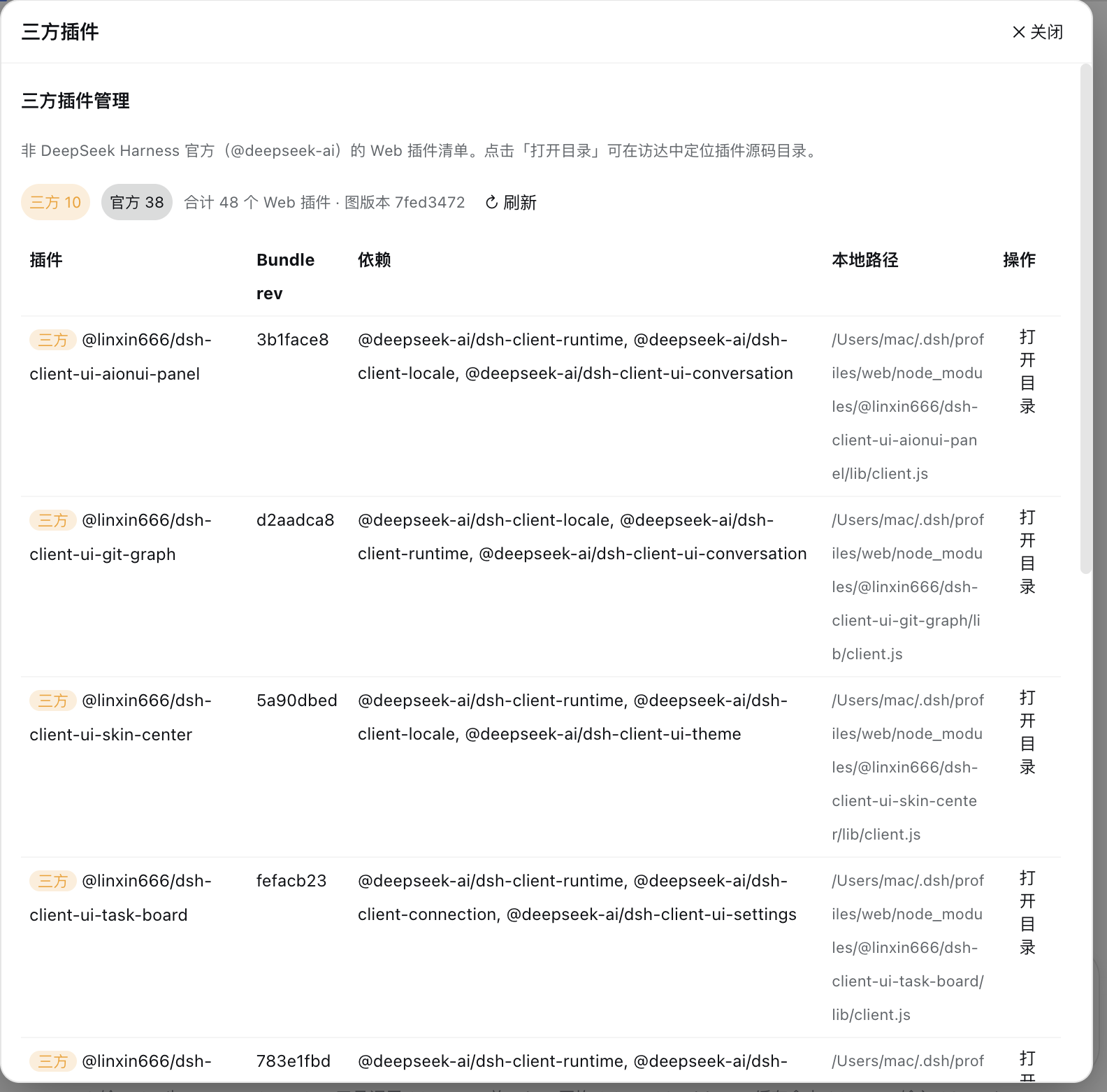 | Third-party plugin manager: stat badges, plugin list, "Open Directory" action |
---
## 📥 Install
### Prerequisites
- **DeepSeek Harness** installed and running
- (Optional) DeepSeek API Key — get one at [platform.deepseek.com](https://platform.deepseek.com); if `DEEPSEEK_API_KEY` is already configured on this machine, the plugin **auto-reads it at startup — no manual input required**
### One-click install (recommended)
```bash
# Installs automatically (install deps → write compose patch → prompt restart)
curl -fsSL https://raw.githubusercontent.com/Francis-Xavier-code/dsh-balance-plugin/main/install.sh | bash
```
**Restart DeepSeek Harness** after installation — three icon buttons appear on the right of the input box. Use `DSH_PROFILE=` to target another profile.
### Manual install (equivalent)
```bash
# 1. Install the dependency (use the github: source, not the bare package name — a third party owns a same-named package on npm)
dsh plugin --profile web add github:Francis-Xavier-code/dsh-balance-plugin
# 2. Append the plugin line to ~/.dsh/cordis.patch.yml (skip if already present)
- insert:
- id: dsh-balance-plugin
name: 'dsh-balance-plugin'
# 3. Restart DeepSeek Harness
```
---
## ⚙️ Configuration
Click the **wallet icon (💰)** on the right of the input toolbar to open the "Balance Monitor" panel:
| Setting | Description |
| --- | --- |
| **Account list** | Click "+ Add Account" to add; each account can have a name and API Key |
| **API Key input** | Enter the plaintext Key, or reference an environment variable like `$env:DEEPSEEK_API_KEY`; leaving an existing Key empty keeps it unchanged |
| **Auto-read account** | At startup, if the DSH credential `DEEPSEEK_API_KEY` is detected, an "Auto-read · DSH credential" account is created automatically |
| **CNY / USD alert thresholds** | Triggers a low-balance alert when the balance of the corresponding currency drops below the threshold (default ¥10 / $2) |
| **Refresh interval** | 30 seconds ~ 30 minutes (default 5 minutes); "Save Config" triggers an immediate refresh |
> 🔒 Key security: API Keys are kept only in the plugin process memory on your machine and are never uploaded to any third party; the UI only shows masked values.
---
## 🎮 Usage
| Entry | Location | Description |
| --- | --- | --- |
| 💰 Wallet icon | Right of the input toolbar | Opens the balance monitor panel (config / balance / top-up) |
| 📊 Bar-chart icon | Right of the input toolbar | Opens the usage statistics panel |
| 🧩 Four-grid icon | Right of the input toolbar | Opens the third-party plugin manager panel |
| Persistent balance bar | Below the input box | Real-time balance summary, ↻ refresh, top-up link; turns fully red on low balance |
| `query_api_quota` tool | Model calls | Just ask "How much DeepSeek balance is left?" |
All panels are centered overlays: click the backdrop or "✕ Close" to exit.
---
## 🗑 Uninstall
```bash
# One-click uninstall (removes dependency + cleans the compose patch)
curl -fsSL https://raw.githubusercontent.com/Francis-Xavier-code/dsh-balance-plugin/main/uninstall.sh | bash
```
Manual equivalent:
```bash
dsh plugin --profile web rm dsh-balance-plugin
# and remove the corresponding two lines from ~/.dsh/cordis.patch.yml
```
Restart DeepSeek Harness after uninstalling.
---
## 🏗 Architecture
```
Host (Node.js process)
├─ Balance query: shell runs curl → api.deepseek.com/user/balance (Bearer auth)
├─ Usage aggregation: real-time session/event listening + 90-day history scan (deduped by seq)
├─ Third-party plugins: clientModules.graph() + clientPath() + open -R to locate
├─ RPC routes: /bmon/api/get-state · refresh · recharge · set-config ·
│ get-usage · list-plugins · open-plugin-dir
└─ Model tool: query_api_quota
Client (browser)
├─ Entry: 3 SVG icon buttons on the right of the input toolbar
├─ Overlays: self-rendered fixed panels inside the component (no overlay slot dependency)
└─ Charts: Miyu chart/heat palettes, dark/light adaptive
```
---
## ❓ FAQ
**Q: Will the plugin still be there after a restart?**
A: Yes — static plugins are installed persistently and survive restarts. Manually configured account keys reset (the auto-read `DEEPSEEK_API_KEY` account needs no reconfiguration and restores automatically after restart).
**Q: I can't see the entry button at the bottom of the sidebar?**
A: The DSH sidebar bottom slot is exclusively occupied by the official Cordis panel plugin. This plugin's entry is fixed on the **right of the input toolbar** and does not depend on that slot.
**Q: Will my Key leak?**
A: No. Keys are kept only in the plugin process memory on your machine and the UI only shows masked values; neither the source code nor the README contains any secrets.
**Q: Balance query fails?**
A: Check the error hint in the panel: no Key configured (`API Key not configured`), missing environment variable (`Environment variable xxx not set`), invalid Key (401 error message), and handle accordingly.
**Q: No historical usage data?**
A: The plugin scans session events from the last 90 days at startup; "avg first token" only counts streaming data captured in real time after the plugin is running.
**Q: Why not use `dsh plugin add dsh-balance-plugin`?**
A: A third party owns a same-named package on npm (`dsh-balance-plugin@0.1.0`), so the bare name would install the wrong one. Use the one-click script or the `github:` source (see [Install](#-install)).
---
## 💬 QQ Community
---
## 📄 License
[MIT](LICENSE) © 2026 [Black Cat (Francis-Xavier-code)](https://github.com/Francis-Xavier-code)