# Lovelace Entity Progress Card
[![Home Assistant][ha-badge]][repo-link] [![HACS Custom][hacs-badge]][hacs-link]
[![Latest stable release][release-badge]][release-link]
[![License][license-badge]][GPL-3.0 license]
[![Discord][discord-badge]][discord-link]
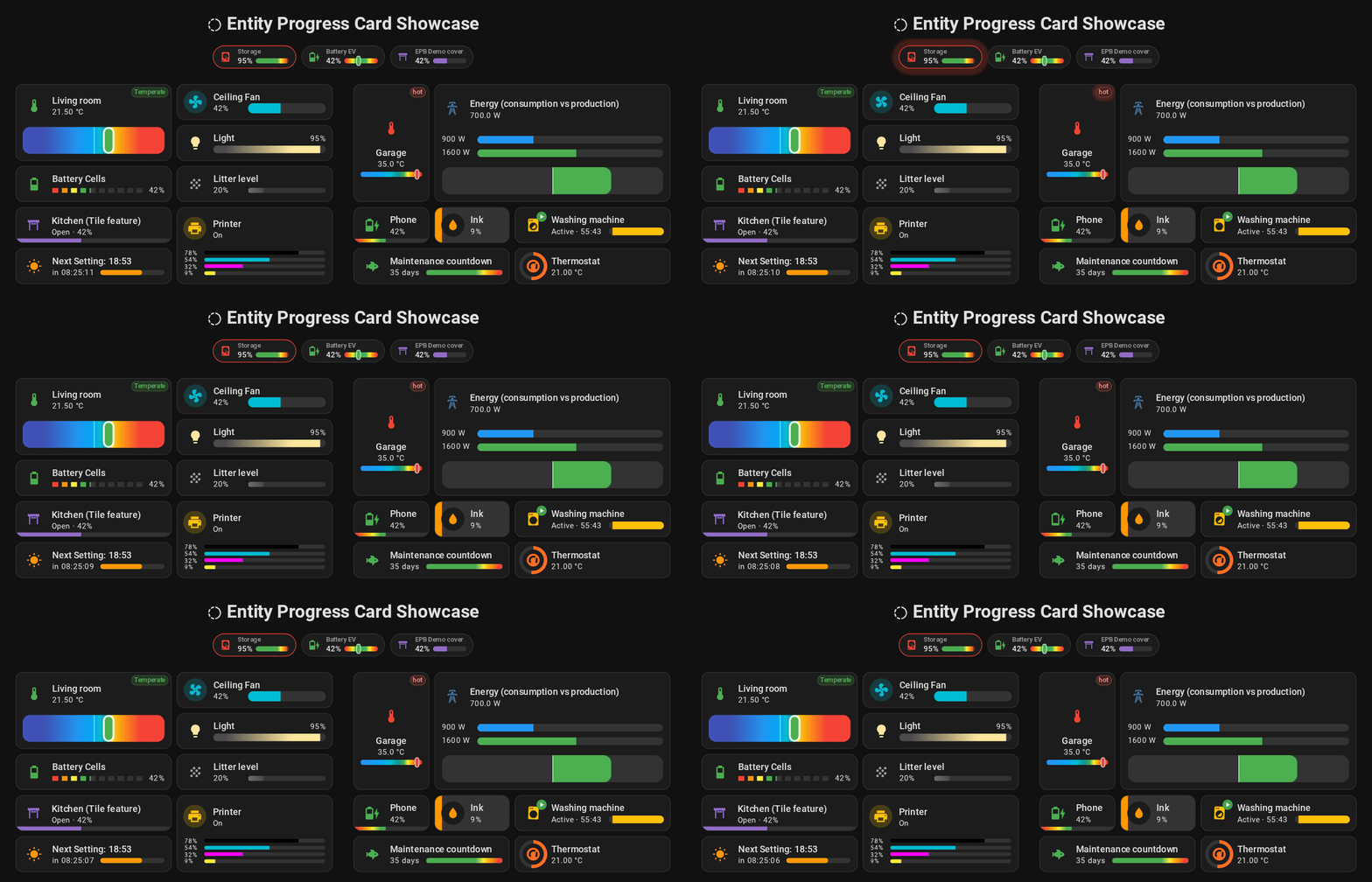
A modern Entity progress card for Home Assistant's Lovelace UI.
> Thousands of Home Assistant dashboards run this card, every day. On a
> wall-mounted tablet. A phone. A screen that never turns off.
>
> A glance is all it takes. A battery. A washing machine. A boiler. Read at a
> distance, in half a second — not deciphered.
>
> Want simple? One click, and it's done. The right unit. The right icon. The
> right math. Resolved automatically, the moment you add an entity. No YAML
> required.
>
> Want more? Every value can be a Jinja template. As deep as you want to go.
>
> Not another progress bar. The progress bar that disappears — because it simply
> does what it's supposed to.
## 🚀 Features
- **7 variants, one consistent card**: a full dashboard card, a compact badge, a
native Tile feature, several bars stacked into one — plain YAML or
Jinja-powered, your call. Pick the shape that fits. Keep the same options.
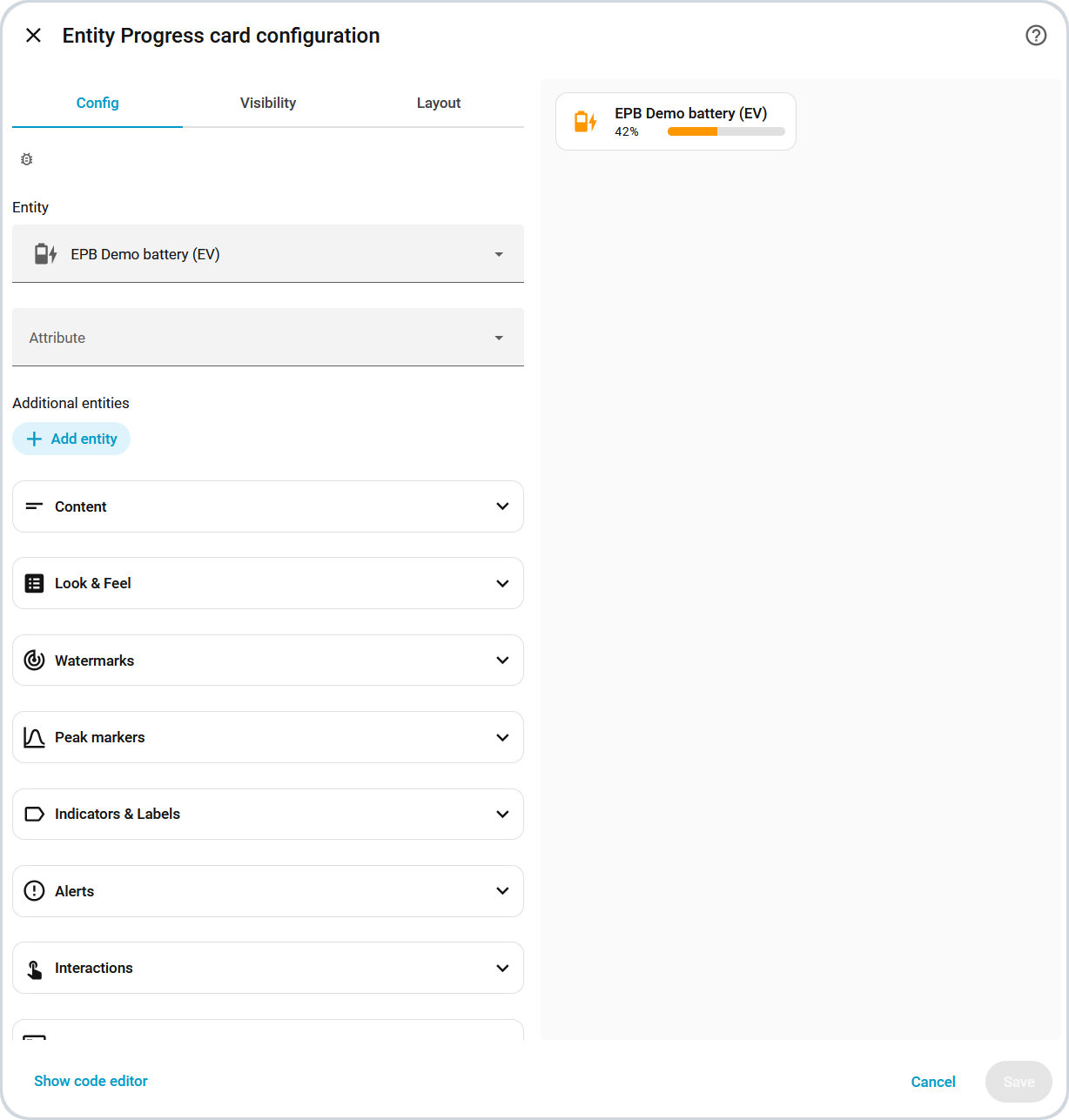
- **Native visual editor**: point, click, done — most variants ship a full
editor styled straight from Home Assistant's own design tokens, not a generic
form bolted on top. No YAML required to get started (Tile Feature and
Multi-Card/Multi-Feature are still YAML-only).
- **It finds you first**: pick a compatible entity — sensor, cover, fan, light,
humidifier, climate, counter, timer — in Home Assistant's own
[entity-first card picker](https://developers.home-assistant.io/blog/2026/05/27/custom-card-suggestions/)
(2026.6+), and this card raises its hand. Pre-filled. Ready to use. No blank
YAML stub to figure out.
- **Set it and forget it**: the right unit, icon and percentage math are
resolved automatically from the entity's own domain — a sensible result out of
the box, YAML or editor either way, before you override anything.
- **Visual effects, built in**: the bar sweeps, glows and shifts through
full-theme gradients on its own — shimmer, glass, rainbow, segmented, or your
own [`custom_theme`][config-custom_theme] color zones — and icons spin, pulse,
or react to what the entity is actually doing. All combinable. No `card_mod`
needed.
- **Alerts that find you**: cross an [`alert_when`][config-alert_when] threshold
and the card reacts on its own — a glowing border, a tinted background, a
status pill, static or Jinja-driven. Pair it with `center_zero` for
bidirectional flows like charge/discharge in a single bar.
- **Reference lines that read as intent**: [`watermark`][config-watermark] marks
a low/high threshold — blended, striped, triangle, round, or a hard line —
sourced from a fixed value, another entity, or a Jinja template. Each side can
override its own color/opacity/style, or just hide with a single `false`.
- **Knows where it's been**: [`trend_indicator`][config-trend_indicator] reads a
real history window to show ↑/↓/flat instead of reacting to a single noisy
sample; [`peak_marker`][config-peak_marker] marks the min/max/average observed
over that same window directly on the bar. Both seed themselves from Home
Assistant's own history on load — no separate helper entity needed.
- **Jinja everywhere**: skip the helper sensors — the Template variants compute
the percentage, color, icon and text directly in YAML, non-linear math and
multi-sensor logic included.
- **Style without reverse-engineering the DOM**: every color, spacing, border
and animation is exposed as a documented CSS variable (58 `--epb-*` hooks, see
the [Theme Guide]) — apply them from a theme, or point `card_mod` at exactly
the ones that matter instead of guessing at internal class names. Zero runtime
dependencies, so nothing extra to break.
- **Accessibility first**: screen readers announce the right value, not a pile
of divs. Motion backs off automatically for anyone with "Reduce Motion" set
system-wide. Tap, hold, double-tap — all native Home Assistant actions,
nothing reinvented.
- **41-language i18n**: editor and error messages localized, not just the
README.
🇸🇦 🇧🇩 🇨🇿 🇩🇰 🇩🇪 🇬🇷 🇬🇧 🇪🇸 🇫🇮 🇫🇷 🇮🇳 🇭🇷 🇮🇩 🇮🇹 🇯🇵 🇰🇷 🇲🇰 🇳🇴 (bokmål) 🇳🇱 🇵🇱 🇵🇹 🇷🇴 🇸🇪
🇹🇭 🇹🇷 🇺🇦 🇻🇳 🇨🇳.
## 📦 Installation
Prerequisites / Browser compatibility (click to expand)
| Platform | Browsers | | | | |
| :-----------------: | :--------------------: | :----------------: | :----------------------: | :--------------------: | :------------------: |
| ![HA][ha-logo] | ![Chrome][chrome-logo] | ![Edge][edge-logo] | ![Firefox][firefox-logo] | ![Safari][safari-logo] | ![Opera][opera-logo] |
| **Home Assistant** | **Chrome** | **Edge** | **Firefox** | **Safari** | **Opera** |
| `2024.0+` | `98+` | `98+` | `94+` | `15.4+` | `84+` |
| Full visual effects | `111+` | `111+` | `113+` | `16.2+` | `97+` |
> Ensure your Home Assistant instance is up to date to support this custom card.
>
> The first row is the functional minimum — the card loads and works. A handful
> of purely decorative touches (a soft tint behind icons, the pulsing alert/ping
> animations, the bar's gradient sheen) need the newer "Full visual effects"
> versions and gracefully degrade below that: same information, just a little
> less vivid. See the
> [live degraded-mode comparison](https://htmlpreview.github.io/?https://raw.githubusercontent.com/francois-le-ko4la/lovelace-entity-progress-card/main/docs/graphic-effects-compatibility.html)
> for exactly what's affected.
>
> I'm aware upgrading an embedded/kiosk device (a wall-mounted control panel in
> particular, e.g. an older Chromium like Chrome 92 — see
> [issue #128](https://github.com/francois-le-ko4la/lovelace-entity-progress-card/issues/128))
> isn't always simple, so this is a deliberate, pragmatic trade-off rather than
> an oversight: full functionality first, full polish where the browser allows
> it.
`entity-progress-card` is available in [HACS](https://hacs.xyz) (Home Assistant
Community Store).
Use this link to directly go to the repository in HACS
[](https://my.home-assistant.io/redirect/hacs_repository/?owner=francois-le-ko4la&repository=lovelace-entity-progress-card&category=plugin)
> [!TIP]
>
> If you are unable to use the button above, follow the steps below:
>
> ✅ Add this repository to HACS: Go to **HACS** ➡️ **Integrations** ➡️ **`⋮`**
> ➡️ **Custom repositories**.
>
> ✅ Paste the URL of this repository and select **Dashboard** as the category.
>
> ✅ Install the Entity Progress Card from HACS.
Manual Installation (click to expand)
Download `entity-progress-card.js` from the latest release into `/config/www/`,
then declare it as a resource:
- Go to **Settings** ➡️ **Dashboards** ➡️ **Resources** ➡️ **`⋮`** ➡️ **Add
Resource**
- URL: `/local/entity-progress-card.js`
- Type: `JavaScript Module`
- Save, then reload the browser cache (**`CTRL`** + **`F5`** or clear cache)
> [!NOTE]
>
> The release also carries the visual editor, `entity-progress-card-editor.js`,
> and one `entity-progress-card-.json` file per language. Copy the editor
> and the language file you need — or all of them — next to the `.js` file:
> without the editor, Home Assistant offers its YAML editor instead; without the
> language file, the visual editor falls back to English. The cards themselves
> work and stay translated either way, and HACS brings these files down for you.
## 📝 Usage
### 🖱️ Don't write YAML — just pick the entity
1. Open Home Assistant's native "Add Card" picker and search for your entity.
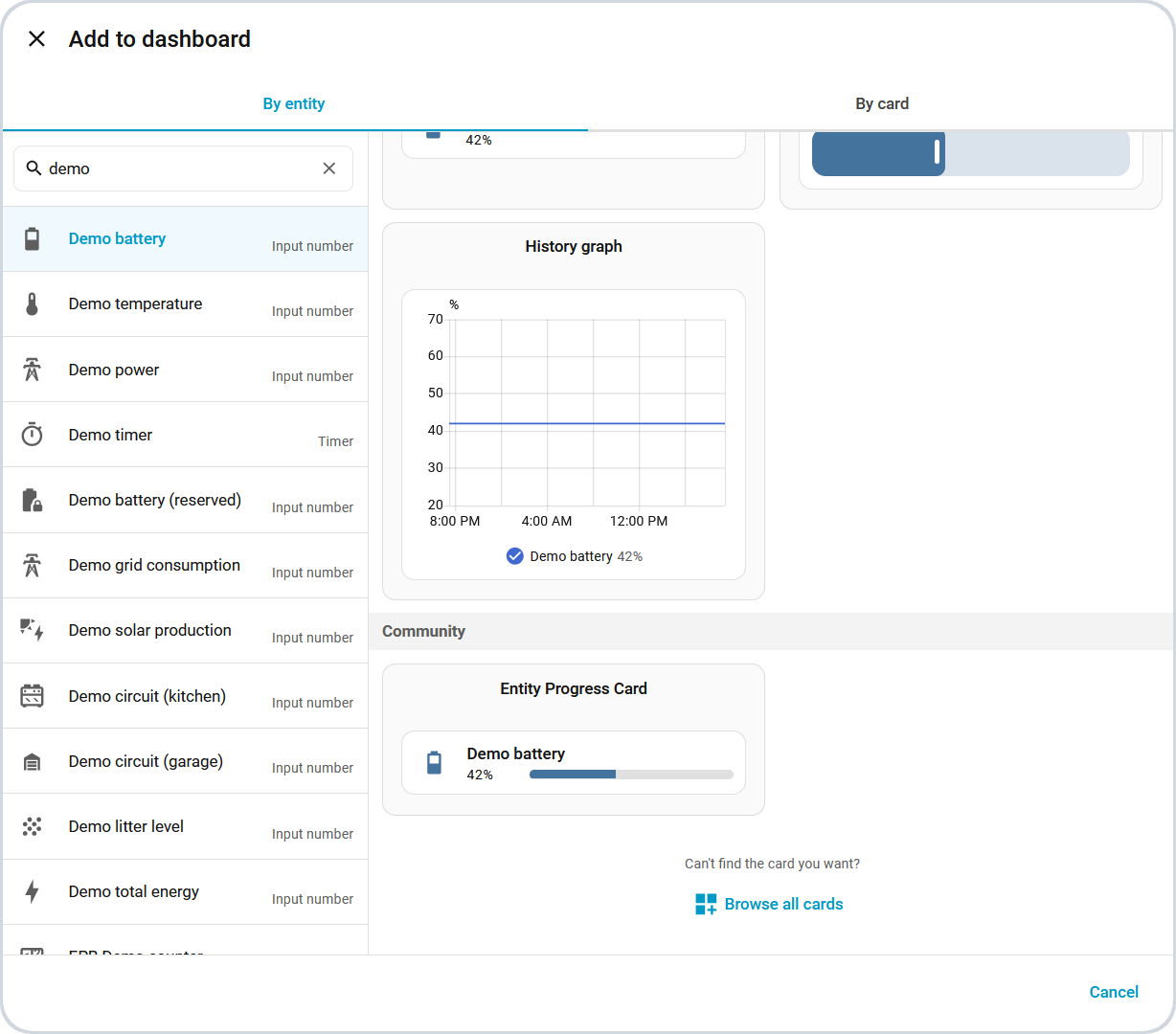 2. Click **Entity Progress Card** — it's already there, pre-filled.
3. Enjoy.
2. Click **Entity Progress Card** — it's already there, pre-filled.
3. Enjoy.
Then tweak it — the visual editor (click to expand)
No YAML here either — every option gets its own field, styled straight from Home
Assistant's own design tokens.
### 🚀 Or write it yourself
Point it at an entity, and it works:
```yaml
type: custom:entity-progress-card
entity: sensor.washing_machine_progress
name: Washing Machine
icon: mdi:washing-machine
```
Want a specific color, a different bar style, an alert when it crosses a
threshold? Same options work the same way across all **7 variants** — Card,
Template Card, Badge, Badge Template, Tile Feature, Multi-Card, Multi-Feature.
## 📚 Guides
That's enough to get started. Past that, here's where the rest of the depth
lives — pick whichever guide matches what you're trying to do:
| Guide | What's in it |
| -------------------------------------- | ------------------------------------------------------------------------------------------------------------------------------------------------------------ |
| 🍳 [Cookbook][cookbook] | Every variant's option summary, every visual effect with a screenshot, and real-world recipes (washing machine brands, an SSL countdown, a sun-tracking bar) |
| 🎨 [Theme Guide] | All 12 built-in themes with their exact value ranges, the full `--epb-*` CSS API, and the DOM reference for `card_mod`/UI-X styling |
| 📖 [Full Configuration Reference][FCR] | Every option, every variant — type, default, and a working example |
## ♿ Accessibility
The card is designed to work well for everyone, out of the box.
Details (click to expand)
- **Screen readers**: the progress bar exposes proper ARIA semantics
(`role="progressbar"` with live `aria-valuenow`, including negative ranges in
`center_zero` mode). Purely decorative elements (fill layers, watermarks, icon
shape) are hidden from assistive technologies, so the card is announced once,
with the right value — not as a pile of divs.
- **Reduce Motion**: the card respects the system-level "Reduce Motion" setting
(iOS/macOS, Android, Windows). When enabled, bar transitions and shimmer
animations are disabled automatically to prevent dizziness, migraines or
distraction.
- **Manual control**: animations can also be tuned or disabled per card or per
theme through the CSS API — e.g. `--epb-progress-transition: none` (see the
[Theme Guide]).
- **Interactions**: tap, hold and double-tap are handled by Home Assistant's
native action system, so they behave consistently with official cards.
## 🌍 Language & Number Support
🌟 Our goal is to make this card a seamless and intuitive tool for users
worldwide, eliminating language barriers and ensuring proper data formatting for
every region. The card defaults to the language set in the user's profile, and
is translated into **41 languages**.
Full language list & number formatting (click to expand)
### 📖 Text Display
We strive to make this card as inclusive as possible, with support for:
| Flag | Code | Language (English / Native) |
| ------------------------------------------------------------------------------------------------------------------------------------------------------------- | ------- | ------------------------------------------------- |
| 🇸🇦 | ar | Arabic / العربية |
| 🇧🇩 | bn | Bengali / বাংলা |
|  | ca | Catalan / Català |
| 🇨🇿 | cs | Czech / Čeština |
| 🇩🇰 | da | Danish / Dansk |
| 🇩🇪 | de | German / Deutsch |
| 🇬🇷 | el | Greek / Ελληνικά |
| 🇬🇧 | en | English / English |
| 🇪🇸 | es | Spanish / Español |
| 🌎 | es-419 | Spanish (Latin America) / Español (Latinoamérica) |
| 🇪🇪 | et | Estonian / Eesti |
| 🇫🇮 | fi | Finnish / Suomi |
| 🇫🇷 | fr | French / Français |
| 🇮🇳 | hi | Hindi / हिन्दी |
| 🇭🇷 | hr | Croatian / Hrvatski |
| 🇭🇺 | hu | Hungarian / Magyar |
| 🇮🇩 | id | Indonesian / Bahasa Indonesia |
| 🇮🇹 | it | Italian / Italiano |
| 🇯🇵 | ja | Japanese / 日本語 |
| 🇰🇷 | ko | Korean / 한국어 |
| 🇱🇹 | lt | Lithuanian / Lietuvių |
| 🇱🇻 | lv | Latvian / Latviešu |
| 🇲🇰 | mk | Macedonian / Македонски |
| 🇳🇴 | nb | Norwegian Bokmål / Norsk Bokmål |
| 🇳🇱 | nl | Dutch / Nederlands |
| 🇵🇱 | pl | Polish / Polski |
| 🇵🇹 | pt | Portuguese / Português (Portugal) |
| 🇧🇷 | pt-BR | Portuguese / Português (Brazil) |
| 🇷🇴 | ro | Romanian / Română |
| 🇷🇺 | ru | Russian / Русский |
| 🇷🇸 | sr | Serbian (Cyrillic) / Српски (Ћирилица) |
| 🇷🇸 | sr-Latn | Serbian (Latin) / Srpski (Latinica) |
| 🇸🇰 | sk | Slovak / Slovenský |
| 🇸🇮 | sl | Slovene / Slovenščina |
| 🇸🇪 | sv | Swedish / Svenska |
| 🇹🇭 | th | Thai / ไทย |
| 🇹🇷 | tr | Turkish / Türkçe |
| 🇺🇦 | uk | Ukrainian / Українська |
| 🇻🇳 | vi | Vietnamese / Tiếng Việt |
| 🇨🇳 | zh-Hans | Chinese (Simplified) / 中文(简体) |
| 🇹🇼 | zh-Hant | Chinese (Traditional) / 中文(繁體) |
> [!IMPORTANT]
>
> I use translation tools to help bridge language gaps, as I'm not fluent in
> every language.
>
> If you notice any mistakes, please understand they are **purely
> unintentional** — feel free to reach out on GitHub or Discord to fix it.
More languages may be added in the future to enhance accessibility!
### 🔢 Intelligent Number Formatting
Numbers are displayed based on your regional preferences, using:
- Your selected language settings (auto)
- Your specific format (manual selection)
- Or the system-defined format from your Home Assistant user profile
By default, the card uses standard Arabic numerals (0-9) for maximum
compatibility.
| ca | Catalan / Català |
| 🇨🇿 | cs | Czech / Čeština |
| 🇩🇰 | da | Danish / Dansk |
| 🇩🇪 | de | German / Deutsch |
| 🇬🇷 | el | Greek / Ελληνικά |
| 🇬🇧 | en | English / English |
| 🇪🇸 | es | Spanish / Español |
| 🌎 | es-419 | Spanish (Latin America) / Español (Latinoamérica) |
| 🇪🇪 | et | Estonian / Eesti |
| 🇫🇮 | fi | Finnish / Suomi |
| 🇫🇷 | fr | French / Français |
| 🇮🇳 | hi | Hindi / हिन्दी |
| 🇭🇷 | hr | Croatian / Hrvatski |
| 🇭🇺 | hu | Hungarian / Magyar |
| 🇮🇩 | id | Indonesian / Bahasa Indonesia |
| 🇮🇹 | it | Italian / Italiano |
| 🇯🇵 | ja | Japanese / 日本語 |
| 🇰🇷 | ko | Korean / 한국어 |
| 🇱🇹 | lt | Lithuanian / Lietuvių |
| 🇱🇻 | lv | Latvian / Latviešu |
| 🇲🇰 | mk | Macedonian / Македонски |
| 🇳🇴 | nb | Norwegian Bokmål / Norsk Bokmål |
| 🇳🇱 | nl | Dutch / Nederlands |
| 🇵🇱 | pl | Polish / Polski |
| 🇵🇹 | pt | Portuguese / Português (Portugal) |
| 🇧🇷 | pt-BR | Portuguese / Português (Brazil) |
| 🇷🇴 | ro | Romanian / Română |
| 🇷🇺 | ru | Russian / Русский |
| 🇷🇸 | sr | Serbian (Cyrillic) / Српски (Ћирилица) |
| 🇷🇸 | sr-Latn | Serbian (Latin) / Srpski (Latinica) |
| 🇸🇰 | sk | Slovak / Slovenský |
| 🇸🇮 | sl | Slovene / Slovenščina |
| 🇸🇪 | sv | Swedish / Svenska |
| 🇹🇭 | th | Thai / ไทย |
| 🇹🇷 | tr | Turkish / Türkçe |
| 🇺🇦 | uk | Ukrainian / Українська |
| 🇻🇳 | vi | Vietnamese / Tiếng Việt |
| 🇨🇳 | zh-Hans | Chinese (Simplified) / 中文(简体) |
| 🇹🇼 | zh-Hant | Chinese (Traditional) / 中文(繁體) |
> [!IMPORTANT]
>
> I use translation tools to help bridge language gaps, as I'm not fluent in
> every language.
>
> If you notice any mistakes, please understand they are **purely
> unintentional** — feel free to reach out on GitHub or Discord to fix it.
More languages may be added in the future to enhance accessibility!
### 🔢 Intelligent Number Formatting
Numbers are displayed based on your regional preferences, using:
- Your selected language settings (auto)
- Your specific format (manual selection)
- Or the system-defined format from your Home Assistant user profile
By default, the card uses standard Arabic numerals (0-9) for maximum
compatibility.
## 🚨 Errors, Deprecations & Troubleshooting
Need help? Find solutions and important updates in the [Errors, Deprecations &
Troubleshooting Guide].
## 🧪 Code quality
[![CI][ci-badge]][ci-link] [![HACS validation][hacs-ci-badge]][hacs-ci-link]
[![DeepSource][deepsource-badge]][deepsource-link]
[![Dependabot][dependabot-badge]][dependabot-link]
[![TypeScript strict][ts-badge]][ts-link]
[![Code style: Prettier][prettier-badge]][prettier-link]
Every push runs the lint, type-check, tests and build; releases run the same
gate. [DeepSource](https://deepsource.com) reviews the code, and Dependabot
keeps the GitHub Actions up to date.
**Tooling**: [TypeScript][ts-link] · [esbuild](https://esbuild.github.io) ·
[ESLint](https://eslint.org) with
[SonarJS](https://github.com/SonarSource/SonarJS) · [Prettier][prettier-link] ·
[knip](https://knip.dev) ·
[markdownlint](https://github.com/DavidAnson/markdownlint) ·
[happy-dom](https://github.com/capricorn86/happy-dom) ·
[es-check](https://github.com/yowainwright/es-check)
## 👥 Contributing
Want more features? Want to improve this card? Contributions are welcome! 🚀
Check out the [Contributing Guide] to get started.
## 🙏 Credits & Acknowledgements
- **Resources from Home Assistant**
➡️ [Custom Card Documentation](https://developers.home-assistant.io/docs/frontend/custom-ui/custom-card/)
- **Resources from [@thomasloven](https://github.com/thomasloven)** – _thank
you!_
➡️
[PreLoading Lovelace Elements](https://github.com/thomasloven/hass-config/wiki/PreLoading-Lovelace-Elements)
➡️
[Custom Element Loader Gist](https://gist.github.com/thomasloven/5f965bd26e5f69876890886c09dd9ba8)
- **Inspired by [Mushroom](https://github.com/piitaya/lovelace-mushroom)**
**(Apache-2.0 license) —** **Copyright © Paul Bottein
([@piitaya](https://github.com/piitaya))**
➡️ For the look & feel
- **Inspired by [bar-card](https://github.com/custom-cards/bar-card)** **(MIT
License) —** **Copyright © Lucas Bramlage
([@Gluwc](https://github.com/Gluwc))**
➡️ No code was copied; this project is an original implementation.
- **Inspired by [superstruct](https://github.com/ianstormtaylor/superstruct)**
**(MIT License) —** **Copyright © Ian Storm Taylor
([@ianstormtaylor](https://github.com/ianstormtaylor))**
➡️ Structural validation ideas to manage inputs (v1.5+). This implementation
is original and does not reuse code from the library.
- **Inspired by**
**[hass-progress-bar-feature](https://github.com/ytilis/hass-progress-bar-feature)**
**(MIT License) —** **Copyright © Yury Tilis
([@ytilis](https://github.com/ytilis))**
➡️ override HA's default feature row sizing behavior, preventing card height
increase when using overlay features.
- **Special thanks to
[@harmonie-durrant](https://github.com/harmonie-durrant)**
➡️ PRs, HACS testing, debugging, `Light` theme and illustrations:
- `docs/images/example.png`
- `docs/images/thumbnail.png`
- **Special thanks to [@jam3sward](https://github.com/jam3sward) &
[@Duncan1106](https://github.com/Duncan1106)**
➡️ README proofreading and improvements
- **Special thanks to [@mooseBringer](https://github.com/mooseBringer) & @RKT62
from [Discord]**
➡️ Discord activity
➡️ Regular tests & feedbacks
- **Special thanks to all contributors** – including those who submitted pull
requests, opened issues, and shared feedback ([GitHub Issues] / [Discord])!
## 📄 License
This project is licensed under the [GPL-3.0 license].
[ha-badge]:
https://img.shields.io/badge/Home%20Assistant-blue?style=flat&logo=homeassistant&logoColor=white&color=blue
[discord-badge]:
https://img.shields.io/badge/Discord-%235865F2?style=flat&logo=Discord&logoColor=white&color=%235865F2
[hacs-badge]: https://img.shields.io/badge/HACS-Custom-41BDF5.svg?style=flat
[release-badge]:
https://img.shields.io/github/v/release/francois-le-ko4la/lovelace-entity-progress-card?label=latest%20stable&style=flat&color=blue
[license-badge]:
https://img.shields.io/github/license/francois-le-ko4la/lovelace-entity-progress-card?style=flat
[ci-badge]:
https://img.shields.io/github/actions/workflow/status/francois-le-ko4la/lovelace-entity-progress-card/validate-js.yaml?label=CI&style=flat
[hacs-ci-badge]:
https://img.shields.io/github/actions/workflow/status/francois-le-ko4la/lovelace-entity-progress-card/validate-hacs.yaml?label=HACS%20validation&style=flat
[deepsource-badge]:
https://app.deepsource.com/gh/francois-le-ko4la/lovelace-entity-progress-card.svg/?label=active+issues
[dependabot-badge]:
https://img.shields.io/badge/dynamic/yaml?url=https%3A%2F%2Fraw.githubusercontent.com%2Ffrancois-le-ko4la%2Flovelace-entity-progress-card%2Fmain%2F.github%2Fdependabot.yml&query=%24.updates%5B0%5D.schedule.interval&label=Dependabot&logo=dependabot&style=flat
[ts-badge]:
https://img.shields.io/badge/TypeScript-strict-3178C6?style=flat&logo=typescript&logoColor=white
[prettier-badge]:
https://img.shields.io/badge/code%20style-prettier-ff69b4?style=flat&logo=prettier&logoColor=white
[repo-link]: https://github.com/francois-le-ko4la/lovelace-entity-progress-card
[hacs-link]: https://hacs.xyz
[release-link]:
https://github.com/francois-le-ko4la/lovelace-entity-progress-card/releases/latest
[ci-link]:
https://github.com/francois-le-ko4la/lovelace-entity-progress-card/actions/workflows/validate-js.yaml
[hacs-ci-link]:
https://github.com/francois-le-ko4la/lovelace-entity-progress-card/actions/workflows/validate-hacs.yaml
[deepsource-link]:
https://app.deepsource.com/gh/francois-le-ko4la/lovelace-entity-progress-card/
[dependabot-link]:
https://github.com/francois-le-ko4la/lovelace-entity-progress-card/blob/main/.github/dependabot.yml
[ts-link]: https://www.typescriptlang.org
[prettier-link]: https://prettier.io
[GPL-3.0 license]:
https://github.com/francois-le-ko4la/lovelace-entity-progress-card/blob/main/LICENSE
[discord-link]: https://discord.gg/tyMQ2SfyNG
[Discord]: https://discord.gg/tyMQ2SfyNG
[GitHub Issues]:
https://github.com/francois-le-ko4la/lovelace-entity-progress-card/issues
[Errors, Deprecations & Troubleshooting Guide]:
https://github.com/francois-le-ko4la/lovelace-entity-progress-card/blob/main/docs/troubleshooting.md
[Contributing Guide]:
https://github.com/francois-le-ko4la/lovelace-entity-progress-card/blob/main/docs/contributing.md
[Theme Guide]:
https://github.com/francois-le-ko4la/lovelace-entity-progress-card/blob/main/docs/theme.md
[cookbook]:
https://github.com/francois-le-ko4la/lovelace-entity-progress-card/blob/main/docs/cookbook.md
[ha-logo]: https://avatars.githubusercontent.com/u/13844975?s=64&v=4
[chrome-logo]:
https://raw.githubusercontent.com/alrra/browser-logos/main/src/chrome/chrome_64x64.png
[edge-logo]:
https://raw.githubusercontent.com/alrra/browser-logos/main/src/edge/edge_64x64.png
[firefox-logo]:
https://raw.githubusercontent.com/alrra/browser-logos/main/src/firefox/firefox_64x64.png
[safari-logo]:
https://raw.githubusercontent.com/alrra/browser-logos/main/src/safari/safari_64x64.png
[opera-logo]:
https://raw.githubusercontent.com/alrra/browser-logos/main/src/opera/opera_64x64.png
[FCR]:
https://github.com/francois-le-ko4la/lovelace-entity-progress-card/blob/main/docs/configuration.md
[config-alert_when]:
https://github.com/francois-le-ko4la/lovelace-entity-progress-card/blob/main/docs/configuration.md#alert_when
[config-watermark]:
https://github.com/francois-le-ko4la/lovelace-entity-progress-card/blob/main/docs/configuration.md#watermark
[config-custom_theme]:
https://github.com/francois-le-ko4la/lovelace-entity-progress-card/blob/main/docs/configuration.md#custom_theme
[config-trend_indicator]:
https://github.com/francois-le-ko4la/lovelace-entity-progress-card/blob/main/docs/configuration.md#trend_indicator
[config-peak_marker]:
https://github.com/francois-le-ko4la/lovelace-entity-progress-card/blob/main/docs/configuration.md#peak_marker

