# MindBase — Karpathy's LLM Wiki, as a product
[](https://www.npmjs.com/package/mindbase-mcp)
[](https://www.npmjs.com/package/mindbase-mcp)
[](https://github.com/frankchu91/mindbase-llm-wiki/actions)
[](LICENSE)
[](https://frankchu91.github.io/mindbase-llm-wiki/)
[](https://glama.ai/mcp/servers/frankchu91/mindbase)
> **An open-source implementation of Andrej Karpathy's LLM Wiki idea: an AI that builds and maintains a wiki from your sources.** Not RAG-in-a-vector-DB. A real markdown wiki on your disk, that an LLM gardens for you between conversations.
```bash
npx mindbase-app
```
One command: starts the local server, opens the web app, and walks you through picking a **free local model** that fits your RAM. No API key, nothing leaves your machine. (Node 20+)
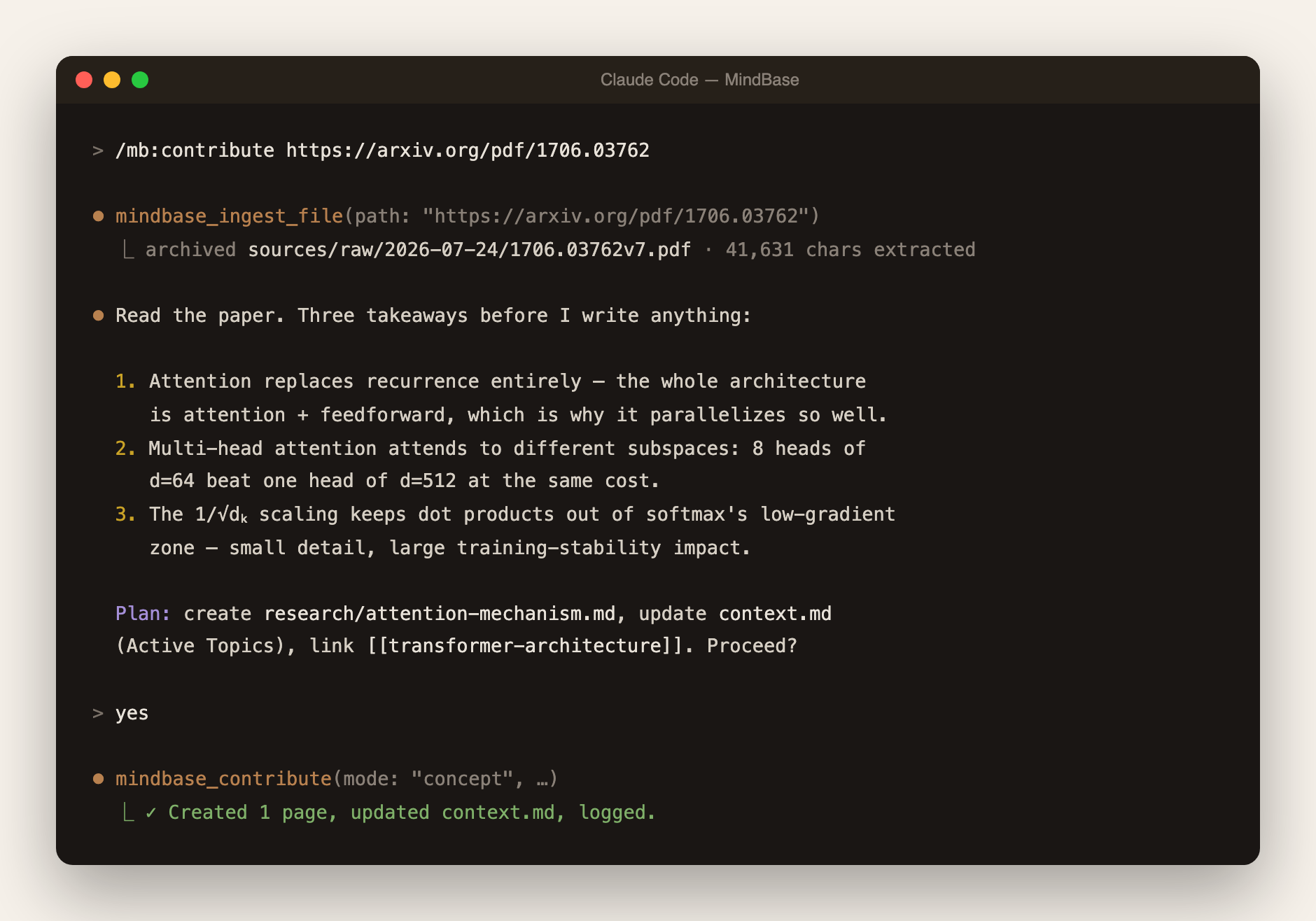
MindBase implements Andrej Karpathy's [LLM-Wiki pattern](https://x.com/karpathy/status/1911080091498963196): you feed it sources (papers, articles, thoughts); the LLM reads, cross-references, flags contradictions, and writes structured wiki pages. Later, when you ask a question, the wiki already has the synthesized answer — no vector-search re-derivation at query time.
**Status:** Early access, actively developed. What's new: [CHANGELOG](CHANGELOG.md) · [Releases](https://github.com/frankchu91/mindbase-llm-wiki/releases)
---
## Why MindBase
You read a lot. Papers, articles, tweets, docs. You want to remember them, connect them, form opinions from them. Today you have two bad options:
- **Notion / Obsidian / Roam:** Passive containers. You do all the organizing. AI features are bolted-on generation, not maintenance.
- **NotebookLM / Perplexity Pages / ChatGPT search:** RAG-based. Nothing accumulates. Every question re-derives the answer from raw sources.
**MindBase is the third option:** the LLM actively maintains a persistent, structured wiki as you feed it sources. Knowledge compounds. Your `context.md` gets sharper every time you contribute. The AI *remembers you across sessions* because your beliefs are written down in markdown files — not stored in a chat history that gets summarized away.
Think of it as **a personal Wikipedia that an AI intern writes for you**, kept up to date, cross-referenced, and honest about what it doesn't know.
## How it works (30 seconds)
Three physical layers on disk (Karpathy's model):
| Layer | Who owns it | What lives there |
|---|---|---|
| `sources/` | **You** — append-only, the AI never rewrites it | Quick captures, full notes, PDFs, URLs |
| `context.md` + `sources/research/` | **The AI** — every change human-approved | The maintained wiki: synthesis, concept pages, `[[wikilinks]]` |
| `state/` · `logs/` · `artifacts/` | Derived — always rebuildable | Search index, snapshots, lint findings, op history |
Three operations run the loop: **ingest** (AI reads a source, discusses takeaways, you approve the wiki updates), **build** (regenerate `context.md` from everything unbuilt), **lint** (the AI audits its own wiki for contradictions, stale claims, and orphans).
## What makes it different
- **The AI asks before writing.** Every ingest shows takeaways + a checkbox plan; only what you approve gets written. No black-box edits to your knowledge.
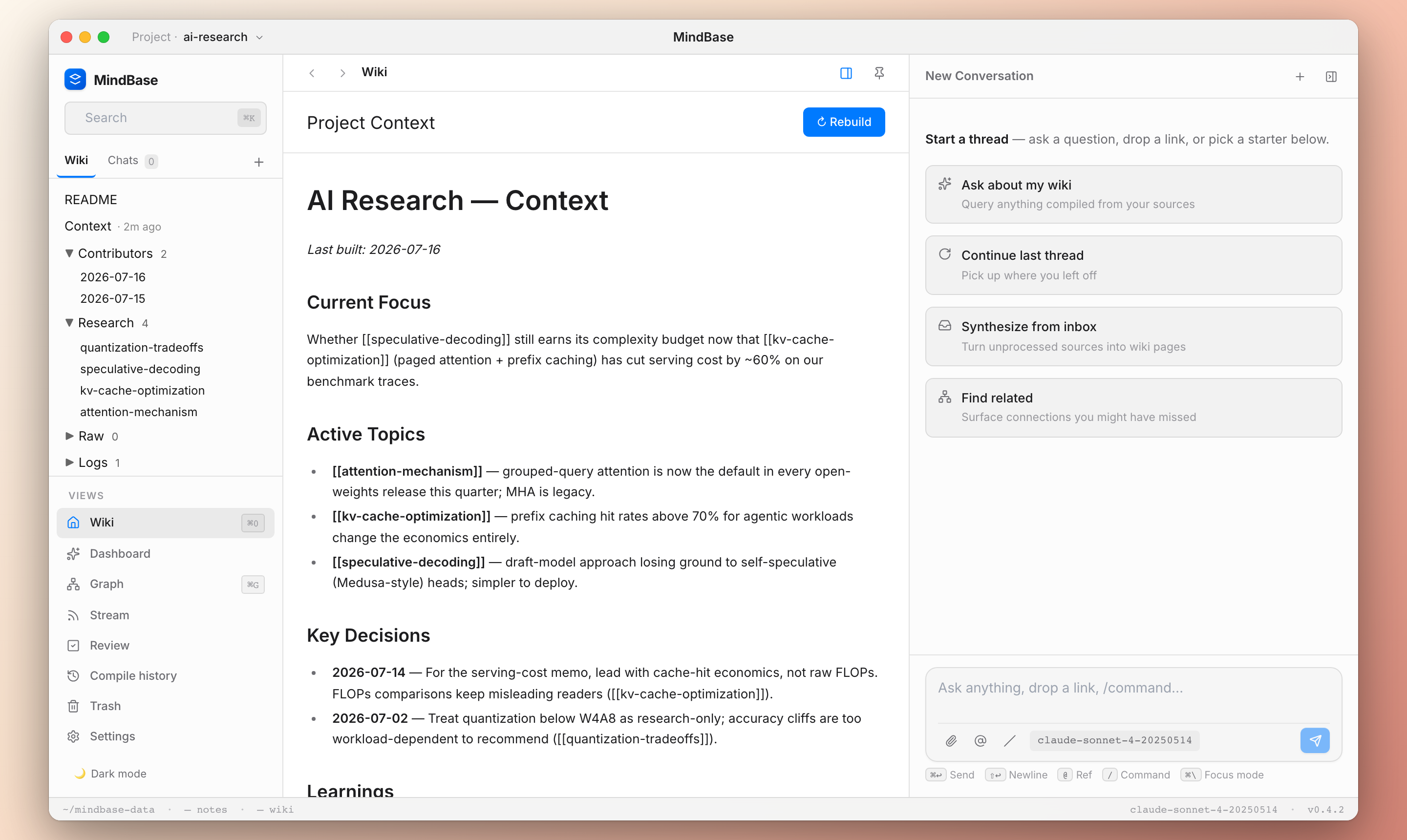
- **You can watch the wiki absorb your notes.** Every note carries a status chip — ✨ *Add to wiki* until digested, ✓ *In wiki* after.
- **It audits its own knowledge.** One command re-reads the whole wiki and reports contradictions with the exact conflicting sentences quoted. Notion and NotebookLM structurally cannot do this.
- **Free and local by default.** Hardware-detect wizard installs the best Ollama model for your RAM. Cloud keys optional.
- **Plain markdown on disk.** Grep it, git it, open it in Obsidian, leave anytime.
## Install
**Browser (fastest):** `npx mindbase-app` — shown above. Everything runs locally at `localhost:4321`.
**Claude Code (flagship):** the full Karpathy 8-step ingest with sub-agents, slash commands, and per-agent tool boundaries:
```
/plugin marketplace add frankchu91/mindbase-llm-wiki
/plugin install mb@mindbase
```
Restart when prompted, then type `/` — you should see `/mb:contribute`, `/mb:build`, `/mb:ask`, `/mb:lint` and 8 more. You get 5 sub-agents with strict tool allowlists (the builder has no file-write tool at all — only an atomic-write MCP call), plus a SessionStart hook that auto-injects your project context.
Cursor
Add to `~/.cursor/mcp.json`:
```json
{ "mcpServers": { "mindbase": { "command": "npx", "args": ["-y", "mindbase-mcp"] } } }
```
Restart Cursor — the tool picker should list `mindbase_contribute` and 48 others. Recommended: add a conventions block to `~/.cursor/rules.md` so the LLM reliably routes "add to mindbase X" to the tools — copy it from the [guide](docs/guide.md#the-llm-in-cursorwindsurf-ignores-my-add-to-mindbase-request).
Windsurf
Cascade settings → MCP → add:
```json
{ "mcpServers": { "mindbase": { "command": "npx", "args": ["-y", "mindbase-mcp"] } } }
```
Same rules-file approach as Cursor works for Cascade.
Cline (VSCode)
Cline settings → **MCP Servers**:
```json
{ "mcpServers": { "mindbase": { "command": "npx", "args": ["-y", "mindbase-mcp"] } } }
```
Cline auto-detects; every tool call gets a confirmation dialog by default.
Continue.dev
`~/.continue/config.json`, under `experimental.modelContextProtocolServers`:
```json
{ "experimental": { "modelContextProtocolServers": [ { "transport": { "type": "stdio", "command": "npx", "args": ["-y", "mindbase-mcp"] } } ] } }
```
MCP tools appear under `@` in chat.
Any other MCP client (Zed, Aider, Goose, Claude Agent SDK…)
Point it at `npx -y mindbase-mcp` as a stdio server. See your client's MCP docs for the config location.
**Next:** create your first project and learn the four daily workflows in the **[Guide →](docs/guide.md)**
## The web UI
Since 0.3 the browser app stands on its own — write notes in a full WYSIWYG editor (`Cmd+N`), quick-capture from anywhere (`Cmd+I`), and run the AI operations with approval cards: `/contribute`, `/build`, `/lint`, `/research`. Live demos on the **[website](https://frankchu91.github.io/mindbase-llm-wiki/)**.
**Free local models:** the setup wizard detects your hardware and installs what fits — `llama3.2:3b` (8GB), `qwen3:14b` (24GB+), or Meta's **Muse Glimmer 30B** (32GB+ Apple Silicon, Ollama ≥ 0.32.7). Measured guidance: qwen3:14b for interactive work (~30s), Glimmer for background lint/build — slower, but its findings quote the exact conflicting sentences. The model switcher on the chat composer flips between them in two clicks.
Feature matrix by editor
| Feature | Claude Code | Cursor / Windsurf / Cline / Continue | Web UI |
|---|---|---|---|
| Slash commands (`/mb:*`) | ✅ | ❌ (use natural language) | ✅ (`/contribute`, `/build`, `/lint`, `/research`) |
| MCP tools directly | ✅ | ✅ | ❌ |
| Karpathy 8-step ingest with approval | ✅ (sub-agents) | ⚠️ Manual via prompt | ✅ (approval cards) |
| Contribute / ingest PDF & URL | ✅ | ✅ | ✅ (upload + ✨ Process) |
| Ask wiki with cited answers | ✅ | ✅ | ✅ |
| Build / health check | ✅ | ✅ | ✅ |
| Wiki tree browsing + rich editor | ❌ | ❌ | ✅ |
| `-p project-id` routing | ✅ | ⚠️ natural language | ✅ (switcher) |
## Where your data lives
Everything is plain markdown under `~/mindbase-data/` (override: `MINDBASE_DATA_DIR`):
```
~/mindbase-data/projects/my-research/
├── README.md # Ops manual — you edit, LLM reads
├── context.md # Synthesized truth — LLM writes, you approve
├── index.yaml # Auto-generated catalog
├── sources/
│ ├── contributors// # Your dated entries + notes (append-only)
│ ├── research/ # LLM-authored wiki pages
│ └── raw/ # PDFs, HTML captures
├── logs/ # Chronological operation log
├── artifacts/ # Briefs, exports, lint findings
└── state/builder/snapshots/ # context.md snapshots for rollback
```
No proprietary database — what you see on disk is what MindBase knows. `git init` it, back it up with anything, delete a project with `rm -rf`.
## Architecture at a glance
```
Claude Code / Cursor / any MCP editor Web UI (npx mindbase-app)
│ MCP · sub-agents with │ /commands ·
│ per-agent tool allowlists │ approval cards
└─────────────┬─────────────────────────┬──────┘
▼ ▼
┌──────────────────────────────────────────────┐
│ One ops engine: gather context → single │
│ constrained JSON completion → human │
│ approval → whitelisted executors → log │
└─────────────────────┬────────────────────────┘
▼
~/mindbase-data/ · plain markdown
(LLM: Ollama local models or any cloud key)
```
Monorepo: `packages/core` (TS strict library) · `apps/mcp` (49-tool MCP server) · `apps/server` + `apps/web` (Express + React UI) · `apps/app` (npx launcher) · `apps/plugin` (Claude Code bundle).
## Docs & help
- **[Guide](docs/guide.md)** — first project, the four daily workflows, multi-project routing, troubleshooting
- **[Website](https://frankchu91.github.io/mindbase-llm-wiki/)** — live demos
- **[CHANGELOG](CHANGELOG.md)** · **[Issues](https://github.com/frankchu91/mindbase-llm-wiki/issues)** — I reply to every issue same-day during beta
- **The idea:** [Karpathy's LLM Wiki gist](https://gist.github.com/karpathy/442a6bf555914893e9891c11519de94f)
## Roadmap
**Next:** browser extension for one-click page capture · audio input via Whisper · unified meta-tool for Cursor/Windsurf slash-like UX.
**Later:** team projects with human-in-the-loop review · audio digests · desktop app · mobile capture.
## Feedback
Beta through 2026-Q4. If you tried MindBase and gave up — please tell me why: [issues](https://github.com/frankchu91/mindbase-llm-wiki/issues) or [haobing0304@gmail.com](mailto:haobing0304@gmail.com). The blockers you hit are gold.
## License
[MIT](LICENSE) — do what you want, no warranty. If you build something interesting on top, I'd love to hear about it.
---
**Built with the belief that AI's most valuable gift is not "generation on demand" but "gardening of a persistent artifact you own."**