# parrot.nvim 🦜
This is [parrot.nvim](https://github.com/frankroeder/parrot.nvim), the ultimate [stochastic parrot](https://en.wikipedia.org/wiki/Stochastic_parrot) to support your text editing inside Neovim.
[Features](#features) • [Demo](#demo) • [Getting Started](#getting-started) • [Commands](#commands) • [Configuration](#configuration) • [Roadmap](#roadmap) • [FAQ](#faq)

https://github.com/user-attachments/assets/0df0348f-85c0-4a2d-ba1f-ede2738c6d02
---
Trigger code completions based on comments.
https://github.com/user-attachments/assets/197f99ac-9854-4fe9-bddb-394c1b64f6b6
---
Let the parrot fix your bugs.
https://github.com/user-attachments/assets/d3a0b261-a9dd-45e6-b508-dc5280594b06
---
Rewrite a visual selection with `PrtRewrite`.
https://github.com/user-attachments/assets/c3d38702-7558-4e9e-96a3-c43312a543d0
---
Append code with the visual selection as context with `PrtAppend`.
https://github.com/user-attachments/assets/80af02fa-cd88-4023-8a55-f2d3c0a2f28e
---
Add comments to a function with `PrtPrepend`.
https://github.com/user-attachments/assets/9a6bfe66-4bc7-4b63-8694-67bf9c23c064
---
Retry your latest rewrite, append or prepend with `PrtRetry`.
https://github.com/user-attachments/assets/03442f34-687b-482e-b7f1-7812f70739cc
## Getting Started
### Dependencies
This plugin requires the latest version of Neovim and relies on a carefully selected set of established plugins.
- [`neovim 0.11+`](https://github.com/neovim/neovim/releases)
- [`ripgrep`](https://github.com/BurntSushi/ripgrep) (optional)
- [`fzf`](https://github.com/junegunn/fzf) (optional, requires ripgrep)
- [`telescope`](https://github.com/nvim-telescope/telescope.nvim) (optional)
> [!IMPORTANT]
> **Breaking:** parrot.nvim now requires Neovim 0.11+ and no longer depends on [`plenary`](https://github.com/nvim-lua/plenary.nvim): processes run via `vim.system` and filetypes are detected with `vim.filetype.match`.
> You can drop plenary from parrot's `dependencies` unless another plugin needs it.
> Custom `get_available_models` functions that use `require("plenary.job")` must keep plenary installed or switch to `vim.system` (see the Ollama example below).
> Models of an outdated cache are now refreshed in the background after startup instead of blocking it.
### Installation
lazy.nvim
```lua
{
"frankroeder/parrot.nvim",
dependencies = { "ibhagwan/fzf-lua" },
opts = {}
}
```
Packer
```lua
require("packer").startup(function()
use({
"frankroeder/parrot.nvim",
requires = { 'ibhagwan/fzf-lua' },
config = function()
require("parrot").setup()
end,
})
end)
```
Neovim native package
```sh
git clone --depth=1 https://github.com/frankroeder/parrot.nvim.git \
"${XDG_DATA_HOME:-$HOME/.local/share}"/nvim/site/pack/parrot/start/parrot.nvim
```
### Setup
The minimal requirement is to at least set up one provider, such as the one provided below or one from the [provider configuration examples](#provider-configuration-examples).
```lua
{
"frankroeder/parrot.nvim",
dependencies = { 'ibhagwan/fzf-lua' },
-- optionally include "folke/noice.nvim" or "rcarriga/nvim-notify" for beautiful notifications
config = function()
require("parrot").setup {
-- Providers must be explicitly set up to make them available.
providers = {
openai = {
name = "openai",
api_key = os.getenv "OPENAI_API_KEY",
endpoint = "https://api.openai.com/v1/chat/completions",
params = {
chat = { temperature = 1.1, top_p = 1 },
command = { temperature = 1.1, top_p = 1 },
},
topic = {
model = "gpt-4.1-nano",
params = { max_completion_tokens = 64 },
},
models ={
"gpt-4o",
"o4-mini",
"gpt-4.1-nano",
}
},
},
}
end,
}
```
## Usage
### Chat Basics
Chats in `parrot.nvim` are essentially standard Markdown buffers.
**How it works:**
1. **Open a Chat**: Use `:PrtChatNew` to open a fresh chat buffer (or `:PrtChatToggle` to toggle the last one).
2. **Type your prompt**: Just write your question or instruction in the buffer after the user prefix `🗨:`.
3. **Trigger the LLM**: Press the trigger keymap (default `` in insert mode) or use the `:PrtChatRespond` command.
4. **Receive Response**: The LLM streams its response directly into the buffer at your cursor position.
5. **Stop Generation**: Press `s` to stop the generation at any time.
**Key Concepts:**
- **Context**: The entire buffer content is sent as context (unless hidden comments are used).
- **System Prompts**: You can set unique system prompts per chat or globally.
- **Persistence**: Chats are saved as `.md` files in your configured directory.
### Command Mode (Interactive Commands)
Command mode allows you to interact with LLMs directly on your code without leaving your current buffer.
**Available Commands:**
- `:PrtRewrite` – Rewrite the visual selection based on your prompt.
- `:PrtAppend` – Append generated text after the selection.
- `:PrtPrepend` – Prepend generated text before the selection.
- `:PrtRetry` – Retry the last rewrite/append/prepend operation.
- `:PrtEdit` – Edit and re-run the last command with a modified prompt.
**Workflow:**
1. Select the code you want to modify (visual mode).
2. Run one of the commands above (e.g., `:PrtRewrite fix the bug`).
3. The LLM processes your selection and streams the result or presents you with a `diff view`.
**Separate Model Selection:**
`parrot.nvim` maintains **two independent model selections**:
- **Chat Model**: Used for chat buffers. Change it from within a chat buffer using `:PrtModel`.
- **Command Model**: Used for interactive commands (`PrtRewrite`, etc.). Change it from any non-chat buffer using `:PrtModel`.
This allows you to use a fast/cheap model for quick inline edits while keeping a more capable model for in-depth chat conversations.
## Commands
Below are the available commands that can be configured as keybindings.
These commands are included in the default setup.
Additional useful commands are implemented through hooks (see below).
### General
| Command | Description |
| ------------------------- | ----------------------------------------------|
| `PrtChatNew ` | Open a new chat |
| `PrtChatToggle ` | Toggle chat (open last chat or new one) |
| `PrtChatPaste ` | Paste visual selection into the latest chat |
| `PrtInfo` | Print plugin config |
| `PrtContext ` | Edits the local context file |
| `PrtChatFinder` | Fuzzy search chat files using fzf |
| `PrtChatDelete` | Delete the current chat file |
| `PrtChatRespond` | Trigger chat respond (in chat file) |
| `PrtStop` | Interrupt any ongoing Parrot generation (works everywhere) |
| `PrtProvider ` | Switch the provider (empty arg triggers fzf) |
| `PrtModel ` | Switch the interactive command model (empty arg triggers fzf). Note: Chat model must be changed from within the chat buffer. |
| `PrtStatus` | Prints current provider and model selection |
| `PrtReloadCache ` | Reload cached models for all or specific provider |
| `PrtCmd ` | Directly generate executable Neovim commands (requires explicit Return to execute) |
| __Interactive__ | |
| `PrtRewrite ` | Rewrites the visual selection based on a provided prompt (direct input, input dialog or from collection) |
| `PrtEdit` | Like `PrtRewrite` but you can change the last prompt |
| `PrtAppend ` | Append text to the visual selection based on a provided prompt (direct input, input dialog or from collection) |
| `PrtPrepend ` | Prepend text to the visual selection based on a provided prompt (direct input, input dialog or from collection) |
| `PrtRetry` | Repeats the last rewrite/append/prepend |
| __Example Hooks__ | |
| `PrtImplement` | Takes the visual selection as prompt to generate code |
| `PrtAsk` | Ask the model a question |
With ``, we indicate the command to open the chat within one of the following target locations (defaults to `toggle_target`):
- `popup`: open a popup window which can be configured via the options provided below
- `split`: open the chat in a horizontal split
- `vsplit`: open the chat in a vertical split
- `tabnew`: open the chat in a new tab
All chat commands (`PrtChatNew, PrtChatToggle`) and custom hooks support the
visual selection to appear in the chat when triggered.
Interactive commands require the user to make use of the [template placeholders](#template-placeholders)
to consider a visual selection within an API request.
## Configuration
### Options
```lua
{
-- The provider definitions include endpoints, API keys, default parameters,
-- and topic model arguments for chat summarization. You can use any name
-- for your providers and configure them with custom functions.
providers = {
openai = {
name = "openai",
endpoint = "https://api.openai.com/v1/chat/completions",
-- endpoint to query the available models online
model_endpoint = "https://api.openai.com/v1/models",
api_key = os.getenv("OPENAI_API_KEY"),
-- OPTIONAL: Alternative methods to retrieve API key
-- Using GPG for decryption:
-- api_key = { "gpg", "--decrypt", vim.fn.expand("$HOME") .. "/my_api_key.txt.gpg" },
-- Using macOS Keychain:
-- api_key = { "/usr/bin/security", "find-generic-password", "-s my-api-key", "-w" },
--- default model parameters used for chat and interactive commands
params = {
chat = { temperature = 1.1, top_p = 1 },
command = { temperature = 1.1, top_p = 1 },
},
-- topic model parameters to summarize chats
topic = {
model = "gpt-4.1-nano",
params = { max_completion_tokens = 64 },
},
-- a selection of models that parrot can remember across sessions
-- NOTE: This will be handled more intelligently in a future version
models = {
"gpt-4.1",
"o4-mini",
"gpt-4.1-mini",
"gpt-4.1-nano",
},
},
...
},
-- default system prompts used for the chat sessions and the command routines
system_prompt = {
chat = ...,
command = ...
},
-- the prefix used for all commands
cmd_prefix = "Prt",
-- optional parameters for curl
curl_params = {},
-- The directory to store persisted state information like the
-- current provider and the selected models
state_dir = vim.fn.stdpath("data"):gsub("/$", "") .. "/parrot/persisted",
-- The directory to store the chats (searched with PrtChatFinder)
chat_dir = vim.fn.stdpath("data"):gsub("/$", "") .. "/parrot/chats",
-- Chat user prompt prefix
chat_user_prefix = "🗨:",
-- llm prompt prefix
llm_prefix = "🦜:",
-- Explicitly confirm deletion of a chat file
chat_confirm_delete = true,
-- Local chat buffer shortcuts
chat_shortcut_respond = { modes = { "n", "i", "v", "x" }, shortcut = "" },
chat_shortcut_delete = { modes = { "n", "i", "v", "x" }, shortcut = "d" },
chat_shortcut_stop = { modes = { "n", "i", "v", "x" }, shortcut = "s" },
chat_shortcut_new = { modes = { "n", "i", "v", "x" }, shortcut = "c" },
-- Option to move the cursor to the end of the file after finished respond
chat_free_cursor = false,
-- Default target for PrtChatToggle, PrtChatNew, PrtContext and the chats opened from the ChatFinder
-- values: popup / split / vsplit / tabnew
toggle_target = "vsplit",
-- The interactive user input appearing when can be "native" for
-- vim.ui.input or "buffer" to query the input within a native nvim buffer
-- (see video demonstrations below)
user_input_ui = "native",
-- Popup window layout
-- border: "single", "double", "rounded", "solid", "shadow", "none"
style_popup_border = "single",
-- margins are number of characters or lines
style_popup_margin_bottom = 8,
style_popup_margin_left = 1,
style_popup_margin_right = 2,
style_popup_margin_top = 2,
style_popup_max_width = 160,
-- Prompt used for interactive LLM calls like PrtRewrite where {{llm}} is
-- a placeholder for the llm name
command_prompt_prefix_template = "🤖 {{llm}} ~ ",
-- auto select command response (easier chaining of commands)
-- if false it also frees up the buffer cursor for further editing elsewhere
command_auto_select_response = true,
-- Time in hours until the model cache is refreshed
-- Set to 0 to deactive model caching
model_cache_expiry_hours = 48,
-- Notify about the token usage of each request, when the provider reports it.
-- OpenAI-compatible APIs only send usage while streaming if the request asks
-- for it, so also set `params.chat.stream_options = { include_usage = true }`
-- for those providers. Anthropic and Gemini report usage by default.
report_usage = false,
-- fzf_lua options for PrtModel and PrtChatFinder when plugin is installed
fzf_lua_opts = {
["--ansi"] = true,
["--sort"] = "",
["--info"] = "inline",
["--layout"] = "reverse",
["--preview-window"] = "nohidden:right:75%",
},
-- Enables the query spinner animation
enable_spinner = true,
-- Type of spinner animation to display while loading
-- Available options: "dots", "line", "star", "bouncing_bar", "bouncing_ball"
spinner_type = "star",
-- Show hints for context added through completion with @file, @buffer or @directory
show_context_hints = true,
-- Show diff preview before applying changes from rewrite/append/prepend
enable_preview_mode = true,
preview_auto_apply = false, -- If true, applies changes automatically after preview timeout
preview_timeout = 10000, -- Time in ms before auto-apply (if enabled)
preview_border = "rounded",
preview_max_width = 120,
preview_max_height = 30,
}
```
#### Demonstrations
With user_input_ui = "native", use vim.ui.input as slim input interface.
https://github.com/user-attachments/assets/c2fe3bde-a35a-4f2a-957b-687e4f6f2e5c
With user_input_ui = "buffer", your input is simply a buffer. All of the content is passed to the API when closed.
https://github.com/user-attachments/assets/63e6e1c4-a2ab-4c60-9b43-332e4b581360
The spinner is a useful indicator for providers that take longer to respond.
https://github.com/user-attachments/assets/ebcd27cb-da00-4150-a0f8-1d2e1afa0acb
### Key Bindings
This plugin provides the following default key mappings:
| Keymap | Description |
|--------------|-------------------------------------------------------------|
| `c` | Opens a new chat via `PrtChatNew` |
| `` | Trigger the API to generate a response via `PrtChatRespond` |
| `s` | Stop any ongoing Parrot generation via `PrtStop` |
| `d` | Delete the current chat file via `PrtChatDelete` |
### Provider Configuration Examples
The unified provider system allows you to configure any OpenAI-compatible API provider. Below are examples for popular providers:
Anthropic Claude
```lua
providers = {
anthropic = {
name = "anthropic",
endpoint = "https://api.anthropic.com/v1/messages",
model_endpoint = "https://api.anthropic.com/v1/models",
api_key = utils.get_api_key("anthropic-api-key", "ANTHROPIC_API_KEY"),
params = {
chat = { max_tokens = 4096 },
command = { max_tokens = 4096 },
},
topic = {
model = "claude-haiku-5-5",
params = { max_tokens = 32 },
},
headers = function(self)
return {
["Content-Type"] = "application/json",
["x-api-key"] = self.api_key,
["anthropic-version"] = "2023-06-01",
}
end,
models = {
"claude-opus-5-5",
"claude-sonnet-5-5",
"claude-haiku-5-5",
},
preprocess_payload = function(payload)
for _, message in ipairs(payload.messages) do
message.content = message.content:gsub("^%s*(.-)%s*$", "%1")
end
if payload.messages[1] and payload.messages[1].role == "system" then
-- remove the first message that serves as the system prompt as anthropic
-- expects the system prompt to be part of the API call body and not the messages
payload.system = payload.messages[1].content
table.remove(payload.messages, 1)
end
return payload
end,
},
}
```
Google Gemini
```lua
providers = {
gemini = {
name = "gemini",
endpoint = function(self)
return "https://generativelanguage.googleapis.com/v1beta/models/"
.. self._model
.. ":streamGenerateContent?alt=sse"
end,
model_endpoint = function(self)
return { "https://generativelanguage.googleapis.com/v1beta/models?key=" .. self.api_key }
end,
api_key = os.getenv "GEMINI_API_KEY",
params = {
chat = { temperature = 1.1, topP = 1, topK = 10, maxOutputTokens = 8192 },
command = { temperature = 0.8, topP = 1, topK = 10, maxOutputTokens = 8192 },
},
topic = {
model = "gemini-3.5-flash-lite",
params = { maxOutputTokens = 64 },
},
headers = function(self)
return {
["Content-Type"] = "application/json",
["x-goog-api-key"] = self.api_key,
}
end,
models = {
"gemini-3.8-flash",
"gemini-3.6-flash",
"gemini-3.5-flash-lite",
"gemini-3.1-flash-lite",
},
preprocess_payload = function(payload)
local contents = {}
local system_instruction = nil
for _, message in ipairs(payload.messages) do
if message.role == "system" then
system_instruction = { parts = { { text = message.content } } }
else
local role = message.role == "assistant" and "model" or "user"
table.insert(
contents,
{ role = role, parts = { { text = message.content:gsub("^%s*(.-)%s*$", "%1") } } }
)
end
end
local gemini_payload = {
contents = contents,
generationConfig = {
temperature = payload.temperature,
topP = payload.topP or payload.top_p,
maxOutputTokens = payload.max_tokens or payload.maxOutputTokens,
},
}
if system_instruction then
gemini_payload.systemInstruction = system_instruction
end
return gemini_payload
end,
process_stdout = function(response)
if not response or response == "" then
return nil
end
local success, decoded = pcall(vim.json.decode, response)
if
success
and decoded.candidates
and decoded.candidates[1]
and decoded.candidates[1].content
and decoded.candidates[1].content.parts
and decoded.candidates[1].content.parts[1]
then
return decoded.candidates[1].content.parts[1].text
end
return nil
end,
},
}
```
xAI
```lua
providers = {
xai = {
name = "xai",
endpoint = "https://api.x.ai/v1/responses",
model_endpoint = "https://api.x.ai/v1/language-models",
api_key = os.getenv "XAI_API_KEY",
params = {
chat = { temperature = 1.1, top_p = 1 },
command = { temperature = 1.1, top_p = 1 },
},
topic = {
model = "grok-4.3",
params = { max_output_tokens = 64 },
},
models = {
"grok-4.3",
"grok-4.5",
"grok-4.20",
},
},
}
```
Grok Build (ACP)
Use the [Grok Build CLI](https://docs.x.ai/build/overview) as a provider through the
[Agent Client Protocol](https://agentclientprotocol.com/get-started/introduction).
This routes chat, inline edits (`PrtRewrite`, etc.), and slash commands through
`grok agent stdio` instead of direct HTTP API calls. `:PrtModel` lists the models
of `grok models` (`models` below is the fallback); grok silently runs its default
model for an id it does not list.
Install the CLI from https://x.ai/cli, then authenticate with `grok login` or
`XAI_API_KEY`.
```lua
providers = {
grok = {
type = "acp",
name = "grok",
-- the subcommand comes last; parrot inserts `-m ` before it. Extra flags go into the
-- command, e.g. { "grok", "--no-auto-update", "agent", "--reasoning-effort", "medium", "stdio" }
command = { "grok", "agent", "stdio" },
cli_command = { "grok" },
models = { "grok-4.7", "grok-4.6" },
always_approve = false, -- set true to skip ACP permission prompts
resume_session = true, -- resume a chat's Grok session after restarting Neovim (default)
command_reasoning_effort = "low", -- inline edits and popups (default); false keeps Grok's default
-- command_rules = "...", -- replace the rules of command sessions ("" disables)
},
}
```
#### How sessions fit into the parrot workflow
The markdown buffer stays the source of truth; Grok sessions follow it.
| Buffer | Grok session |
|--------|--------------|
| **Chat file** (any file under `chat_dir`) | One session per chat file. Each prompt only sends the messages Grok has not seen yet. If the transcript diverges (you edit or delete earlier messages, change the system prompt, or respond to a range), parrot starts a new session and replays the whole transcript. The session id is stored in `state.json` (`acp_sessions`) and resumed via `session/load` after restarting Neovim (`resume_session = false` starts a new session instead). |
| **Everything else** (`PrtRewrite`, `PrtAppend`, `PrtPrepend`, `PrtEdit`, `PrtAsk` popups, `PrtCmd`, topic generation) | A one-shot session per prompt with an **empty toolset** (grok agent profile), rules that the reply is inserted verbatim (no preamble or narration), and `command_reasoning_effort`. The session is closed and deleted from `~/.grok/sessions` right after the prompt. Slash commands outside chats also run in a one-shot, deleted session, but with the full agent. |
System prompts (`system_prompt`, chat `system` headers) are passed as session rules, not as prompt text.
**Chat project binding** (`chat_project_cwd` in `state.json`): set at `:PrtChatNew` or when a chat file is first opened while the chat provider is an ACP agent (else at its first ACP prompt), to the git root of Neovim's `cwd` (fallback: the `cwd` itself) — so `:cd` to the intended repo before opening an older chat. Once bound, the chat's agent works in that project even if you `:cd` elsewhere. Command sessions use the git root of the current file (fallback: Neovim `cwd`).
**Lifecycle:**
1. The first prompt spawns `grok agent stdio` (one process per model) → `initialize` → `authenticate`. At startup only a stale model cache runs `grok models`, in the background.
2. Each prompt → `session/new` (or reuse / `session/load` for chats) → `session/prompt`, streamed via `session/update` (`agent_message_chunk`).
3. Neovim exits → parrot terminates ACP processes (`VimLeavePre`).
**Slash commands:** The full list arrives after `session/new` via `available_commands_update`. Parrot learns it lazily per agent process (first `:PrtAcpSlashCommand` or Tab completion, which opens a throwaway session if needed). Output is shown in a popup; in a chat buffer the command runs in that chat's session (e.g. `/compact`). Some commands such as `/compact` and `/context` only act on the session and print nothing over ACP.
**ACP-specific commands** (registered automatically):
- `:PrtAcpSlashCommand [cmd]` — run Grok slash commands (`/compact`, `/context`, `/goal`, …)
- `:PrtAcpMode [mode]` — toggles the auto-approval of permission prompts (`always-approve-on` / `always-approve-off`)
- `:PrtReloadCache [provider]` — refresh the model cache (use after CLI updates)
**Other options:**
- `always_approve = true` — approve ACP permission prompts automatically (toggle with `:PrtAcpMode`)
- `show_thoughts = true` — include `agent_thought_chunk` streams in the response (when the agent emits them)
**File edits:** when the agent edits a file that is open in Neovim, it reads the buffer (including unsaved changes) and its edit is written into the buffer and saved.
Ollama
```lua
providers = {
ollama = {
name = "ollama",
endpoint = "http://localhost:11434/api/chat",
api_key = "", -- not required for local Ollama
params = {
chat = { temperature = 1.5, top_p = 1, num_ctx = 8192, min_p = 0.05 },
command = { temperature = 1.5, top_p = 1, num_ctx = 8192, min_p = 0.05 },
},
topic_prompt = [[
Summarize the chat above and only provide a short headline of 2 to 3
words without any opening phrase like "Sure, here is the summary",
"Sure! Here's a shortheadline summarizing the chat" or anything similar.
]],
topic = {
model = "llama3.2",
params = { max_tokens = 32 },
},
headers = {
["Content-Type"] = "application/json",
},
models = {
"codestral",
"llama3.2",
"gemma3",
},
resolve_api_key = function()
return true
end,
process_stdout = function(response)
if response:match "message" and response:match "content" then
local ok, data = pcall(vim.json.decode, response)
if ok and data.message and data.message.content then
return data.message.content
end
end
end,
get_available_models = function(self)
local url = self.endpoint:gsub("chat", "")
local logger = require "parrot.logger"
local res = vim.system({ "curl", "-H", "Content-Type: application/json", url .. "tags" }, { text = true }):wait(5000)
local parsed_response = res.stdout or ""
self:process_onexit(parsed_response)
if parsed_response == "" then
logger.debug("Ollama server not running on " .. url)
return {}
end
local success, parsed_data = pcall(vim.json.decode, parsed_response)
if not success then
logger.error("Ollama - Error parsing JSON: " .. vim.inspect(parsed_data))
return {}
end
if not parsed_data.models then
logger.error "Ollama - No models found. Please use 'ollama pull' to download one."
return {}
end
local names = {}
for _, model in ipairs(parsed_data.models) do
table.insert(names, model.name)
end
return names
end,
},
}
```
Perplexity
```lua
providers = {
perplexity = {
name = "perplexity",
api_key = os.getenv("PERPLEXITY_API_KEY"),
endpoint = "https://api.perplexity.ai/chat/completions",
headers = function(self)
return {
["Content-Type"] = "application/json",
["Accept"] = "application/json",
["Authorization"] = "Bearer " .. self.api_key,
}
end,
topic = {
model = "sonar",
params = {
max_tokens = 64,
},
},
models = {
"sonar",
"sonar-pro",
},
}
}
```
Perplexity ended support for Sonar Chat Completions on 2026-09-27 and now reformulates these requests for its Agent API;
check the [migration notes](https://docs.perplexity.ai/docs/agent-api/migrate-from-sonar/overview) for the current status.
Mistral
```lua
providers = {
mistral = {
name = "mistral",
endpoint = "https://api.mistral.ai/v1/chat/completions",
model_endpoint = "https://api.mistral.ai/v1/models",
api_key = os.getenv("MISTRAL_API_KEY"),
topic = {
model = "mistral-small-latest",
params = { max_tokens = 32 },
},
-- fallback when the model list cannot be fetched
models = {
"mistral-large-latest",
"mistral-small-latest",
},
},
}
```
DeepSeek
```lua
providers = {
deepseek = {
name = "deepseek",
endpoint = "https://api.deepseek.com/chat/completions",
model_endpoint = "https://api.deepseek.com/models",
api_key = os.getenv("DEEPSEEK_API_KEY"),
topic = {
model = "deepseek-flash",
params = { max_tokens = 32 },
},
-- fallback when the model list cannot be fetched
models = {
"deepseek-flash",
"deepseek-v4-pro",
},
},
}
```
EveryAPI
```lua
providers = {
everyapi = {
name = "everyapi",
endpoint = "https://api.everyapi.ai/v1/chat/completions",
model_endpoint = "https://api.everyapi.ai/v1/models",
api_key = os.getenv("EVERYAPI_API_KEY"),
params = {
chat = { temperature = 0.7, top_p = 1 },
command = { temperature = 0.7, top_p = 1 },
},
topic = {
model = "deepseek-chat",
params = { max_tokens = 64 },
},
-- fallback when the model list cannot be fetched
models = {
"claude-3-5-sonnet",
"gpt-4o",
"gemini-2.5-pro",
"deepseek-chat",
"deepseek-reasoner",
},
},
}
```
### Adding a new command
#### Ask a single-turn question and receive the answer in a popup window
```lua
require("parrot").setup {
-- ...
hooks = {
Ask = function(parrot, params)
local template = [[
In light of your existing knowledge base, please generate a response that
is succinct and directly addresses the question posed. Prioritize accuracy
and relevance in your answer, drawing upon the most recent information
available to you. Aim to deliver your response in a concise manner,
focusing on the essence of the inquiry.
Question: {{command}}
]]
local model_obj = parrot.get_model("command")
parrot.logger.info("Asking model: " .. model_obj.name)
parrot.Prompt(params, parrot.ui.Target.popup, model_obj, "🤖 Ask ~ ", template)
end,
}
-- ...
}
```
#### Start a chat with a predefined chat prompt to check your spelling.
```lua
require("parrot").setup {
-- ...
hooks = {
SpellCheck = function(prt, params)
local chat_prompt = [[
Your task is to take the text provided and rewrite it into a clear,
grammatically correct version while preserving the original meaning
as closely as possible. Correct any spelling mistakes, punctuation
errors, verb tense issues, word choice problems, and other
grammatical mistakes.
]]
prt.ChatNew(params, chat_prompt)
end,
}
-- ...
}
```
Refer to my [personal lazy.nvim setup](https://github.com/frankroeder/dotfiles/blob/master/nvim/lua/plugins/parrot.lua) or
those of [other users](https://github.com/search?utf8=%E2%9C%93&q=frankroeder%2Fparrot.nvim+language%3ALua&type=code&l=Lua) for further hooks and key bindings.
### Prompt Collection
If you're repeatedly typing the same prompts into the input fields when using
`PrtRewrite`, `PrtAppend`, or `PrtPrepend`, a more lightweight alternative to
user commands (also known as hooks) is to define prompts as follows:
```lua
require("parrot").setup {
-- ...
prompts = {
["Spell"] = "I want you to proofread the provided text and fix the errors.", -- e.g., :'<,'>PrtRewrite Spell
["Comment"] = "Provide a comment that explains what the snippet is doing.", -- e.g., :'<,'>PrtPrepend Comment
["Complete"] = "Continue the implementation of the provided snippet in the file {{filename}}." -- e.g., :'<,'>PrtAppend Complete
}
-- ...
}
```
They will appear as arguments for the aforementioned interactive commands and
can also be used with the [template placeholders](#template-placeholders).
### Template Placeholders
Users can utilize the following placeholders in their hook and system templates to inject
additional context:
| Placeholder | Content |
|-------------------------|--------------------------------------|
| `{{command}}` | Your instruction (interactive input) |
| `{{selection}}` | Current visual selection |
| `{{filetype}}` | Filetype of the current buffer |
| `{{filename}}` | Full path of the current file |
| `{{filecontent}}` | Full content of the current buffer |
| `{{multifilecontent}}` | Full content of all open buffers |
Below is an example of how to use these placeholders in a completion hook, which
receives the full file context and the selected code snippet as input.
```lua
require("parrot").setup {
-- ...
hooks = {
CompleteFullContext = function(prt, params)
local template = [[
I have the following code from {{filename}}:
```{{filetype}}
{{filecontent}}
```
Please look at the following section specifically:
```{{filetype}}
{{selection}}
```
Please finish the code above carefully and logically.
Respond just with the snippet of code that should be inserted.
]]
local model_obj = prt.get_model("command")
prt.Prompt(params, prt.ui.Target.append, model_obj, nil, template)
end,
}
-- ...
}
```
The placeholders `{{filetype}}` and `{{filecontent}}` can also be used in the `chat_prompt` when
creating custom hooks calling `prt.ChatNew(params, chat_prompt)` to directly inject the whole file content.
```lua
require("parrot").setup {
-- ...
hooks = {
CodeConsultant = function(prt, params)
local chat_prompt = [[
Your task is to analyze the provided {{filetype}} code and suggest
improvements to optimize its performance. Identify areas where the
code can be made more efficient, faster, or less resource-intensive.
Provide specific suggestions for optimization, along with explanations
of how these changes can enhance the code's performance. The optimized
code should maintain the same functionality as the original code while
demonstrating improved efficiency.
Here is the code
```{{filetype}}
{{filecontent}}
```
]]
prt.ChatNew(params, chat_prompt)
end,
}
-- ...
}
```
## Completion
Instead of using the [template placeholders](#template-placeholders),
`parrot.nvim` supports inline completion via [nvim-cmp](https://github.com/hrsh7th/nvim-cmp)
and [blink.cmp](https://github.com/Saghen/blink.cmp/) for additional contexts:
- `@buffer:foo.txt` - Includes the content of the open buffer `foo.txt`
- `@file:test.lua` - Includes the content of the file `test.lua`
- `@directory:src/` - Includes all file contents from the directory `src/`
> Hint: The option `show_context_hints` allows you to transparently see notifications about the
actual file contents considered by the request. The completion keywords (e.g., `@file`) need to be placed
on a **new line**!
### Setup nvim-cmp
To enable `parrot.nvim` completions, add the source to your `nvim-cmp` configuration:
```lua
...
sources = cmp.config.sources({
{ name = "parrot" },
}),
...
```
### Setup blink.cmp
For `blink.cmp` you need to add `"parrot"` to the default sources and configure
the provider the following way:
```lua
...
parrot = {
module = "parrot.completion.blink",
name = "parrot",
score_offset = 20,
opts = {
show_hidden_files = false,
max_items = 50,
}
},
...
```
## Statusline Support
Knowing the current chat or command model can be shown using your favorite statusline plugin.
Below, we provide an example for [lualine](https://github.com/nvim-lualine/lualine.nvim):
```lua
-- define function and formatting of the information
local function parrot_status()
local status_info = require("parrot.config").get_status_info()
local status = ""
if status_info.is_chat then
status = status_info.prov.chat.name
else
status = status_info.prov.command.name
end
return string.format("%s(%s)", status, status_info.model)
end
-- add to lueline section
require('lualine').setup {
sections = {
lualine_a = { parrot_status }
}
}
```
## Adding a custom provider
If the default provider is unavailable, you may define as many additonal custom
providers to suit your needs. This allows you to customize various aspects such as
endpoints, available models, default parameters, headers, and functions for
processing the LLM responses.
Please note that configuring providers in this manner is intended for advanced
users. I encourage you to open an issue or a discussion if you require assistance
or have suggestions for improving provider support.
All hooks are optional and default to the OpenAI chat completions format:
| Hook | Returns |
|---------------------------------------|----------------------------------------------------------|
| `endpoint`, `model_endpoint` | a URL string, or `function(self)` returning one |
| `headers(self)` | header table (`self.api_key` is the resolved key) |
| `resolve_api_key(self, api_key)` | the key string, or `false` on error |
| `preprocess_payload(payload)` | the request body table |
| `process_stdout(line)` | text of one streamed line, or `nil` |
| `process_onexit(response)` | text of the full (non-streamed) response, or `nil` |
| `extract_usage(response)` | `{ prompt_tokens?, completion_tokens?, total_tokens? }` |
| `get_available_models(self, args)` | list of model ids; `args` are the curl arguments (model endpoint, `curl_params`, headers) |
`curl_params` must be a flat list of strings (or numbers), one curl argument each.
```lua
providers = {
my_custom_provider = {
name = "my_custom_provider",
api_key = os.getenv("MY_API_KEY"),
endpoint = "https://api.example.com/v1/chat/completions",
model = { "model-1", "model-2" },
-- Provider-specific curl parameters (optional)
curl_params = { "--insecure", "--max-time", "30", "--proxy", "http://proxy:8080" },
-- Custom headers function (or a static table); `self.api_key` holds the resolved key
headers = function(self)
return {
["Content-Type"] = "application/json",
["Authorization"] = "Bearer " .. self.api_key,
["X-Custom-Header"] = "custom-value",
}
end,
-- Custom payload preprocessing
preprocess_payload = function(payload)
-- Modify payload for your API format
return payload
end,
-- Custom response processing
process_stdout = function(response)
-- Parse streaming response from your API
local success, decoded = pcall(vim.json.decode, response)
if success and decoded.content then
return decoded.content
end
end,
-- Custom token usage extraction (used when `report_usage = true`).
-- Called for every streamed chunk and the final response; return any
-- subset of the fields, they get merged across chunks.
extract_usage = function(response)
local success, decoded = pcall(vim.json.decode, response)
if success and decoded.tokens then
return {
prompt_tokens = decoded.tokens.input,
completion_tokens = decoded.tokens.output,
total_tokens = decoded.tokens.total,
}
end
end,
},
}
```
## Cancellation
You can stop any ongoing Parrot generation at any time using multiple methods:
### Methods
1. **Keybinding**: `s` (configurable via `chat_shortcut_stop`)
2. **Command**: `:PrtStop` (works everywhere)
### Behavior
When you cancel a generation:
- **Immediate Termination**: The API request is stopped immediately
- **Preserves Generated Text**: The text generated so far remains in the buffer
- **Visual Feedback**: You receive a notification confirming the cancellation
- **Preview Mode**: If cancelled during streaming, the preview won't be shown
- **Multiple Jobs**: If multiple generations are running, all are stopped
### Autocommand Event
A `User PrtCancelled` event is fired when generation is cancelled, allowing you to create custom hooks:
```lua
vim.api.nvim_create_autocmd("User", {
pattern = "PrtCancelled",
callback = function()
-- Your custom logic here
print("Parrot generation was cancelled")
end,
})
```
### Advanced Usage
For buffer-specific cancellation in custom code:
```lua
-- Stop only jobs for current buffer
local chat_handler = require("parrot").chat_handler
chat_handler:stop({ buffer = vim.api.nvim_get_current_buf() })
-- Stop without notification
chat_handler:stop({ notify = false })
```
## Bonus
Access parrot.nvim directly from your terminal:
```bash
command nvim -c "PrtChatNew"
```
Also works by piping content directly into the chat:
```bash
ls -l | command nvim - -c "normal ggVGy" -c ":PrtChatNew" -c "normal p"
```
## Roadmap
- Add status line integration/ notifications for summary of tokens used or money spent
- Improve the documentation
- Create a tutorial video
- Reduce overall code complexity and improve robustness
## FAQ
- I am encountering errors related to the state.
> If the state is corrupted, simply delete the file `~/.local/share/nvim/parrot/persisted/state.json`.
- The completion feature is not functioning, and I am receiving errors.
> Ensure that you have an adequate amount of API credits and examine the log file `~/.local/state/nvim/parrot.nvim.log` for any errors.
- How do model selections work for chat vs. interactive commands?
> Model selection is separate for chat and interactive commands. To change the chat model, you must be inside a chat window started with `PrtChatNew`. Switching the model outside of a chat window only affects the interactive command model (e.g., `PrtRewrite`, `PrtAppend`). The selections are persistent after being set.
- I have discovered a bug, have a feature suggestion, or possess a general idea to enhance this project.
> Everyone is invited to contribute to this project! If you have any suggestions, ideas, or bug reports, please feel free to submit an issue.
## Related Projects
- [parrot.nvim](https://github.com/frankroeder/parrot.nvim) is a fork of an earlier version of [robitx/gp.nvim](https://github.com/Robitx/gp.nvim), branching off the commit `607f94d361f36b8eabb148d95993604fdd74d901` in January 2024. Since then, a significant portion of the original code has been removed or rewritten, and this effort will continue until `parrot.nvim` evolves into its own independent version. The original `MIT` license has been retained and will be maintained.
- [huynle/ogpt.nvim](https://github.com/huynle/ogpt.nvim)
- The idea for `PrtCmd` was inspired by [exit.nvim](https://github.com/3v0k4/exit.nvim).
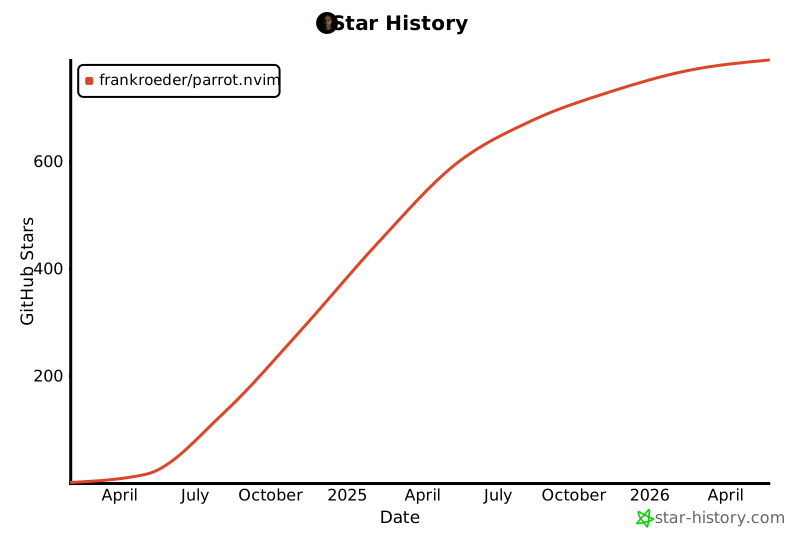
## Star History
[](https://star-history.com/#frankroeder/parrot.nvim&Date)