# Configuration, diagnostics, and recovery
English | [中文](reference.zh.md)
For installation and the verified release pairing, start with the [user guide](../README.md). This reference covers account behavior, optional capabilities, configuration, and diagnostic commands.
## Accounts, models, and quota
OAuth credentials are stored on the DSH host and used there to authenticate and send requests to OpenAI. The Models card and the Plugin configuration page share the same account state; selecting an account is not a per-session binding. **Manage accounts** can add, select, or remove accounts. Browser responses expose only plugin-generated account keys and masked labels, never OAuth tokens or raw OpenAI account ids.
Choose an `openai-codex` model in the normal Harness model picker. Model names remain canonical in every UI language. **More settings → Models** controls which models appear in discovery; hiding a model does not disable routing by its exact id.
The Codex catalog comes from the installed `@earendil-works/pi-ai` package, not a live query of the account's available models. DSH `0.1.2-rc.1` uses pi-ai `^0.84.2`, which lacks `gpt-6-astra`; Codex Connect supplies that definition. Alpha 4.33 is also verified with DSH `0.1.5-alpha.1` and pi-ai `0.85.1`. Mixed host package versions and other DSH/pi-ai combinations remain unverified. With a native Astra entry, the plugin preserves its metadata and retains Low, Medium, High, Xhigh, and Max reasoning choices without modifying the installed catalog. Users do not need to upgrade pi-ai separately to select Astra. The exact verified pairs and acceptance limits are recorded in the release notes; dependency declarations alone do not establish verification. Neither catalog source proves account access.
- Adding an account leaves the current account usable while authorization is pending.
- Cancelling or timing out a new authorization preserves every existing account and closes accepted callback connections, including incomplete HTTP requests. After cancellation, the browser reads account labels and quota together before updating the view. Pending authorization expires after 10 minutes by default; `oauthTimeoutMs` accepts 1,000–1,800,000 milliseconds and is applied when the plugin loads.
- Switching accounts affects subsequent requests. A request captures its account before resolving authentication, so a concurrent switch cannot mix credentials. If that account becomes unavailable during authentication, the request fails and requires an explicit retry with the selected account.
- Quota, search, image generation and Auto-review keep that same account through token refresh. Each quota response pairs its usage and account labels from one snapshot; a concurrent switch may leave an older snapshot visible until the next refresh, but does not relabel its quota as another account's.
- Removing the active account requires selecting a replacement when another account remains. Removing the last account signs out; **Sign out all accounts** deletes all locally stored Codex credentials.
- Codex Connect does not rotate accounts automatically or fail over when a request is rejected.
Credential changes wait up to 20 seconds for the writer lock, allowing an in-progress token refresh to finish. A lock timeout fails the operation without deleting another writer's lock or changing stored accounts. A lock left behind by a crashed process requires operator recovery after confirming that no writer is running.
Request authentication failures use fixed messages without upstream response bodies or nested provider errors. A failed refresh preserves the stored credentials.
An explicit OAuth `invalid_grant` rejection during refresh shows the reauthorization prompt. Network failures, timeouts and server errors keep the account selected and show a quota error so you can retry; they do not delete credentials or start a new login.
For GPT Codex conversations, the Composer shows Fast Mode and quota:
- **Fast Mode** requests priority service (`service_tier: 'priority'`) for that conversation only. It is off by default and does not change the model. Actual speed and quota consumption depend on the service; a fixed speed multiplier is not guaranteed.
- **Quota bars** normally refresh every 60 seconds while signed in and show only the `5h` and `7d` windows returned by the server, with the exact remaining percentage and reset time. `gpt-5.3-codex-spark` uses its separate Spark bucket. Codex Connect never invents missing windows or suppresses returned windows based on a plan name.

## Optional capabilities
Fresh installations register the model provider and leave every additional capability disabled:
```yaml
- id: llm-openai-codex
config:
enableProxy: false
enableSearch: false
enableImageTool: false
enableImageGeneration: false
enableAutoReview: false
```
Edit these options under **Settings → Plugins → Plugin configuration → Codex Connect** or **Settings → Models → Openai-Codex → More settings**. Changes are staged until **Save changes**. Saving commits edited fields together and preserves concurrent changes to untouched fields. A conflicting edit or failed save keeps your draft; discard it to reload the latest settings. Most settings affect only this plugin; enabling Codex Search also selects it as the active profile-wide search route.
### Proxy
Disabling the proxy or unloading the plugin gives active proxy operations one second to finish, then destroys this instance's pools with a further one-second completion limit. New proxy operations are rejected during shutdown; interrupted requests are not retried directly. Arbitrary application callbacks cannot be forcibly terminated by the proxy manager. The scoped dispatcher remains until late callbacks settle, so they cannot bypass their destroyed proxy; unrelated traffic still uses the host dispatcher.
Direct connection is the default. An enabled credential-free HTTP(S) proxy applies only to this plugin's model, OAuth, refresh, quota, search, image, and Auto-review traffic. Detection checks standard proxy environment variables and documented loopback candidates without making a model call, consuming quota, or saving settings. A failed proxy request never silently retries through a direct connection. Loading Codex Connect does not replace Node's environment-proxy dispatcher, so unrelated Harness requests continue using the process's existing proxy policy.
### Search and image tools
- `enableSearch: true` registers Codex as an available search provider and selects it for profile-wide searches. Disabling it unregisters the provider and restores the route that was active before Codex Search was enabled.
- Search has a 30-second total deadline covering authentication, response headers and body reading. Responses larger than 1 MiB are rejected, and unfinished response bodies are cancelled on failure. Caller cancellation can end a search sooner.
- `enableImageTool: true` registers `view_image` on vision-capable models. Remote reads accept credential-free public HTTP(S) only and revalidate DNS and redirects.
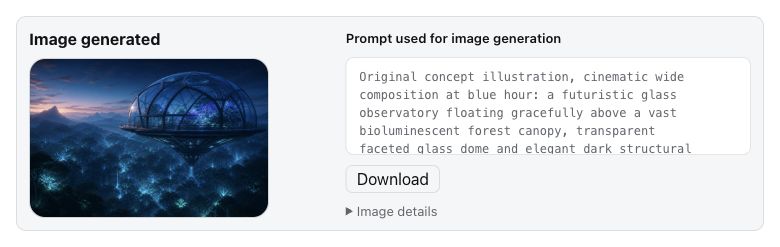
- `enableImageGeneration: true` registers prompt-only GPT Image generation. Use the image generation capability included with your current GPT subscription. Availability, dimensions, and quota remain account- and service-controlled.
- `imageModelHint` is an optional profile-scoped setting in Plugin configuration or the profile config. Empty uses `gpt-image-2`; a custom value accepts 1–128 ASCII letters, digits, dots, underscores, or hyphens and must start with a letter or digit. Saving changes the `model` field of subsequent image requests to the same fixed endpoint; clearing restores the default. The tool still accepts only `prompt`. This is an unverified route hint: the service may ignore or reject it, and it does not guarantee the returned model.
Generated originals are stored under `$DSH_HOME/dsh-codex-connect/images/v1`; the conversation receives a separate DSH attachment preview. The result card reports dimensions and file sizes and can download either representation. Originals are owner-only, integrity-checked, and available only to the creating session and forks that inherited the result. Disabling or uninstalling the plugin does not delete those files automatically.
### Auto-review
`enableAutoReview: true` lets the Codex reviewer assess eligible Harness approval requests after DSH policy has determined that approval is required. First enablement requires confirmation because bounded recent approval context, tool arguments, working directory, and the planned action are sent to `chatgpt.com`. Hidden reasoning and stored credentials are excluded. Only a complete structured allow result authorizes one execution; ambiguity, malformed output, transport failure, and timeout return to human approval. See [Auto-review](auto-review.md) for the full decision and retry rules.
## Routing and configuration
Installing Codex Connect does not select a default model or search provider. Enabling Codex Search selects it while the capability remains enabled; select a default model separately only when intended. The equivalent configuration is:
```yaml
- id: agent-default-model
config:
provider: openai-codex
model: gpt-5.6-sol
- id: llm-openai-codex
config:
enableSearch: true
searchMode: live
searchContextSize: medium
```
The main plugin options are:
| Field | Default | Meaning |
|---|---:|---|
| `models` | full catalog | Visible Codex model ids; an empty array hides all entries |
| `enableProxy` | `false` | Use `proxyUrl` for Codex Connect traffic |
| `proxyUrl` | `http://127.0.0.1:7890` | Credential-free HTTP(S) proxy origin; inactive until enabled |
| `contextWindowOverrides` | none | Per-model client context-budget overrides |
| `enableSearch` | `false` | Register Codex search and select it when the setting is saved |
| `enableImageTool` | `false` | Register `view_image` |
| `enableImageGeneration` | `false` | Register GPT Image generation |
| `imageModelHint` | empty | Optional unverified image route hint; empty keeps the default request |
| `enableAutoReview` | `false` | Review eligible approval requests with Codex |
| `searchModel` | `gpt-5.6-sol` | Model used by standalone search |
| `searchMode` | `cached` | `cached`, `indexed`, or `live` |
| `searchContextSize` | `medium` | `low`, `medium`, or `high` |
| `searchMaxOutputTokens` | `10000` | Positive integer output budget for search |
`contextWindowOverrides` changes the client budget, not OpenAI's server capacity. Unknown model ids and values above the plugin's documented configuration ceiling fail explicitly. Use `null` for the whole field to mask inherited overrides, or `null` for one model to restore its catalog default while preserving other entries. Leave room for output and protocol overhead, and treat larger values as deployment-specific experiments rather than entitlement evidence. [Alpha design](design.md) documents the ownership and persistence rules.
## Diagnostics and recovery
### Local installation diagnostics
Published Alpha 4.33 can fail to list or prepare Codex models on DSH `0.1.5-rc.1` with `Cannot read properties of undefined (reading 'get')`. That host requires a per-model error index absent from the older plugin profile. Builds containing [the Issue #178 fix](https://github.com/franksong2702/dsh-codex-connect/issues/178) initialize the index; re-authorizing does not supply it. Choose an exact plugin release verified with your host version, not merely one with the same Alpha series.
Run `dsh plugin --profile web exec dsh-codex-connect doctor --json` to inspect local installation metadata without a network request. Compatibility statuses mean: `compatible` matches the declared version requirements, not a behavioral test; `unverified` identifies package versions outside the declared support set; `unknown` means required version metadata is missing or unreadable; `incompatible` identifies a Node version outside the declared engine requirement. The aggregate prioritizes `incompatible`, then `unknown`, then `unverified`. Doctor exits `1` for any non-compatible result or unsafe credential-file metadata; this does not authorize or recommend changing DSH.
The normal update card checks only Codex Connect releases. It reuses successful plugin-version checks for up to 24 hours and retries unavailable checks every five minutes while mounted; a manual check bypasses the cache. It neither queries host compatibility nor recommends host upgrades or downgrades. An unlisted DSH/plugin combination requires verification, not an assumption of failure.
### Capability probes
The local capability report performs no network request. With valid local credentials and a supported invocation, `capabilities --probe` sends one fixed short request and may consume quota. `auto-review-probe` checks the OAuth reviewer route and its structured response only; it does not exercise the full Harness approval integration or execute the reviewed action. It may also send a request and consume quota when its preconditions are met:
```sh
dsh plugin --profile web exec dsh-codex-connect capabilities --model gpt-5.6-sol --json
dsh plugin --profile web exec dsh-codex-connect capabilities --model gpt-5.6-sol --probe --json
dsh plugin --profile web exec dsh-codex-connect auto-review-probe --json
```
Probes use a direct connection unless `--proxy ` is supplied. `--timeout-ms <1..60000>` overrides the 30-second deadline. They do not follow redirects or retry, cap responses at 64 KiB, and do not refresh credentials. Results label each check `supported`, `rejected`, or `unknown`; a catalog entry alone never proves entitlement. Exit `0` means the command's required checks were supported, `1` means at least one was rejected, and `2` means evidence was unknown or the invocation was invalid. Reports omit credentials, account ids, paths, proxy origins, response ids, headers, and generated text.
### Remote browser authorization
OAuth routes accept loopback browsers by default. If DSH runs on another device in a trusted network, add the exact origin from the browser address bar on the DSH host:
```sh
dsh plugin --profile web exec dsh-codex-connect trust-origin http://192.168.1.20:3080
dsh plugin --profile web exec dsh-codex-connect trusted-origins
dsh plugin --profile web exec dsh-codex-connect untrust-origin http://192.168.1.20:3080
```
Include the scheme and port, never a path, query, or fragment. Do not expose the OAuth route to the public Internet; use an SSH tunnel when the network is not trusted. The Web client displays these commands but never edits the allowlist.
The origin allowlist controls access to DSH; it does not forward OpenAI's localhost callback from your browser device to the DSH host. To finish a pending login without forwarding port 1455:
1. Start **Authorize** (or **Add account**) in the Models or plugin account settings and complete approval in the opened browser tab.
2. When redirected to `http://localhost:1455/auth/callback`, the remote browser may show a connection error. Copy the **complete URL from its address bar**, including the query string. Do not copy the initial authorization link or only the code.
3. Return to the same DSH account view, expand the optional manual callback form, paste the URL into its callback URL field, and submit it. The form is collapsed by default; normal automatic callback login is unchanged.
4. Wait for the account status to update. An invalid URL does not cancel the pending login; paste the correct current callback and retry. If authorization expired or was cancelled, start again and use the new flow's callback. After reloading the DSH page, use **Continue authorization** to rejoin a still-pending login.
The callback must match the pending flow's redirect URI and OAuth state; code-only input, missing or mismatched state, duplicate parameters, and reused callbacks are rejected. Submission uses the existing same-origin/trusted-origin checks and a bounded JSON POST. The pasted URL is not fetched, logged, or persisted by the plugin, and the input is cleared on submission. Tokens remain on the DSH host. Only paste into this dedicated field: the URL contains a short-lived credential and must not be shared in chat, issues, logs, or configuration. Use an SSH tunnel for untrusted networks; manual callback entry does not make an unauthenticated public DSH deployment safe or relax its origin policy.
### Migration and conflicts
If startup reports an `openai-codex` collision, inspect the effective configuration and remove only the confirmed legacy `dsh-codex` bundle or manual provider row. Do not delete credentials or unrelated providers. See [MIGRATION.md](../MIGRATION.md) for package migration and repair of Alpha 4.10 search histories.
OAuth is stored separately at `$DSH_HOME/.openai-codex-auth.json` (`~/.dsh` by default); `~/.codex/auth.json` is never copied or modified. Removing the package does not remove OAuth state. Run `logout` only when deleting credentials is intentional.