> **CPR-vCodex is a personal fork of [CrossPoint Reader](https://github.com/crosspoint-reader/crosspoint-reader)**, focused on improving reading consistency, long-term reading habits, and overall reader experience without sacrificing simplicity or performance.
>
> Instead of only tracking progress, this fork focuses on the full reading journey — consistency, habits, milestones, statistics, customization, and personal reading identity.
>
> The project adds optional layers such as reading streaks, detailed analytics, achievements, heatmaps, Sync Day tracking, session history, and deeper personalization, while still allowing the interface to remain clean and distraction-free if preferred.
# CPR-vCodex

Logo contributed by Which-Estimate4566.
## Screenshots
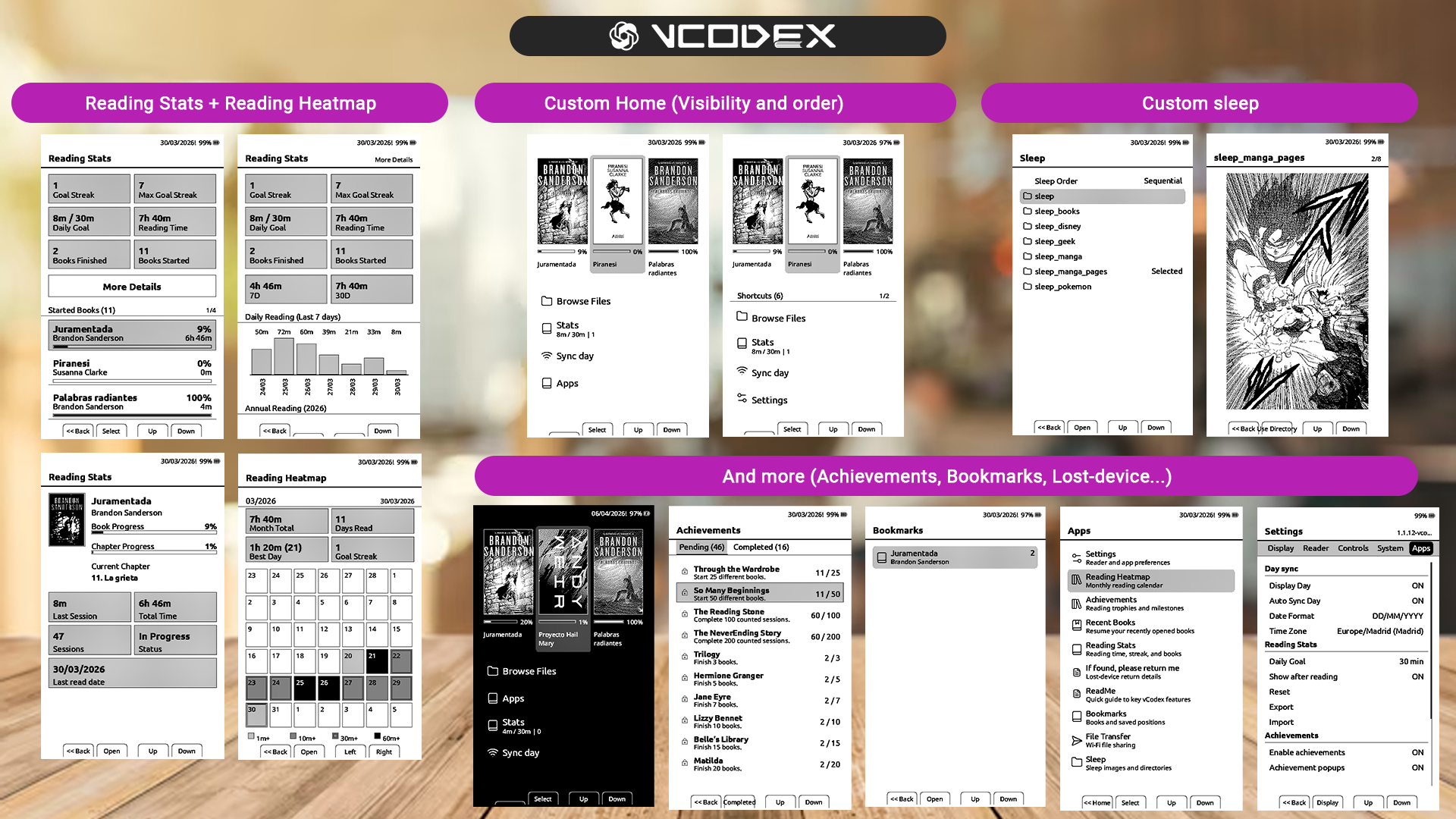
## What's different in this fork
My goal with this fork was to preserve CrossPoint experience while expanding the firmware around long-term reading engagement and personalization.
Unlike a complete rewrite, CPR-vCodex intentionally stays close to the upstream CrossPoint project and only carries forward additions or upstream changes that are stable and safe enough for daily reading.
Some of the main additions include:
- full reading analytics: reading stats, heatmaps, day detail, reading profile, session history, goals, streaks, and achievements
- Sync Day support for reliable offline day-based statistics on hardware without a trustworthy sleep RTC
- per-book statistics tools, including reading-time correction, start-date editing, and per-book stats reset
- StarDict dictionary support from the SD card, with selectable monolingual and translation dictionaries, per-language folders, reader word lookup, suggestions, and lookup history
- offline Flashcards with CSV decks, multiple study modes, recents, stats, and session summaries
- EPUB bookmarks with explicit reader-menu actions plus a global bookmarks app
- customizable Home and Apps shortcuts, reader quick settings, reading layouts, themes, and Lyra Carousel workflow improvements
- enhanced sleep tools, including custom image directories, cover/custom stats screens, sleep previews, cached sleep frames, and configurable clean sleep refresh
- downloadable and manually installable SD-card fonts, including vCodex-only families such as `ChareInk`
- Screen Clean, SD firmware update, Auto Flash, reading stats editor, and other maintenance/workflow utilities
- KOReader Sync, OPDS filename options, reader refresh controls, Bionic Reading, text darkness, dark mode, and other reader quality-of-life settings
- carefully selected upstream CrossPoint improvements and fixes adapted without dropping vCodex-specific behavior
The philosophy of this fork is simple: keep the firmware fast, stable, and focused on reading, while making the device feel more rewarding and personal for people who read every day.
## At a glance
| Item | Value |
|---|---|
| Project | `CPR-vCodex` |
| Device | `Xteink X4`; `Xteink X3` compatibility reported by users, not personally tested |
| Current release (CPR-vCodex) build | [`1.3.0.27-cpr-vcodex`](https://github.com/franssjz/cpr-vcodex/releases/tag/1.3.0.27-cpr-vcodex) |
| Latest SD font package | [`sd-fonts-m1-b4`](https://github.com/franssjz/cpr-vcodex/releases/tag/sd-fonts-m1-b4) |
| Changelog | [CHANGELOG.md](./CHANGELOG.md) |
| Current release sync | Selected CrossPoint Reader fixes after [`3392b3e3`](https://github.com/crosspoint-reader/crosspoint-reader/commit/3392b3e3) through [`fd5b8078`](https://github.com/crosspoint-reader/crosspoint-reader/commit/fd5b8078), including EPUB image/cache/CSS/parser performance, KOReader chapter-start mapping, font-upload hardening, long-press chapter-start navigation, progress-bar placement, and `open-x4-sdk` [`26648d6`](https://github.com/crosspoint-reader/community-sdk/commit/26648d643a1c883ab2f71e1869d05fe2a0c9d498). Hebrew/RTL, translation-only churn, OpenDyslexic storage migration, docs-only guide updates, and t5s3 README-only changes remain deferred. |
| Current release fixes | Improves memory resilience for KOReader Sync, XTC reading on X3/X4, and problematic ZIP/EPUB inflate streams. |
| Latest release notes | - KOReader Sync now frees font/SD-font caches before HTTPS, stops NTP before TLS, retries transient auth failures, and reports clearer low-memory/network details.
- XTC reading uses less RAM by reading page-table/chapter data on demand, closing the XTC file between reads, and streaming 1-bit pages without a full page buffer.
- ZIP/EPUB inflate reads now detect no-progress stalls and fail cleanly instead of hanging indefinitely on problematic compressed streams. |
| Base firmware line | `CrossPoint Reader 1.3.0` |
| Latest official commit reviewed | [`fd5b8078`](https://github.com/crosspoint-reader/crosspoint-reader/commit/fd5b8078) |
| Latest official commit incorporated | Selected EPUB/rendering, cache, filesystem, image, KOReader Sync, font-upload, SDK, and navigation fixes from [`7accc607`](https://github.com/crosspoint-reader/crosspoint-reader/commit/7accc607) through [`fd5b8078`](https://github.com/crosspoint-reader/crosspoint-reader/commit/fd5b8078); larger upstream bookmark, RTL, OTA/downloader, translation-bulk, and settings rewrites remain intentionally deferred. |
| Intentional upstream exclusions | Unsupported upstream theme variants such as `RoundedRaff` remain out of the supported vCodex theme list; other upstream UI/config changes are adapted selectively to preserve the existing X4 workflow. |
## Web tools
- [Auto Flash](https://franssjz.github.io/cpr-vcodex/flash.html) installs the latest CPR-vCodex firmware from Chrome or Edge using Web Serial.
- [Reading Stats Editor](https://franssjz.github.io/cpr-vcodex/reading-stats-editor/) edits exported reading stats locally in the browser. No upload, no server.
## SD card DICTIONARIES
`CPR-vCodex` can use StarDict-format dictionaries stored on the microSD card. Dictionary data stays on the SD card; after a dictionary is selected, the firmware creates a small `.cpridx` cache next to it so later lookups stay fast.
Important: a loose `.dict` file is not enough. The dictionary must be a complete StarDict package with matching `.ifo`, `.idx`, and uncompressed `.dict` files using the same base filename.
Recommended microSD layout:
```text
SD:/
dictionaries/
spanish/
es-es.ifo
es-es.idx
es-es.dict
es-es.syn # optional synonym/headword file
es-es.cpridx # generated by CPR-vCodex; do not copy manually
english-spanish/
en-es.ifo
en-es.idx
en-es.dict
```
Each language or dictionary group lives in `dictionaries//`. The directory name is the visible language/group label, so names such as `spanish`, `english`, `english-spanish`, or `en-es` are all valid. Each directory may contain one or more dictionaries.
For every StarDict dictionary, the required files are:
- `.ifo`: dictionary metadata, including name, word count, and format hints.
- `.idx`: word index; it maps each headword to the byte offset of its definition.
- uncompressed `.dict`: definition data.
Optional files:
- `.syn` enables alternate headwords and synonym redirects when the dictionary provides them.
- `.cpridx` is generated by CPR-vCodex after preparing the dictionary and should not be downloaded or copied by hand.
*All files with the same name.
Compressed `.dict.dz` dictionaries are detected but are not currently supported directly. If the downloaded package contains a `.dict.dz` file, open or extract it first and copy the resulting uncompressed `.dict` file to the SD card. The valid format for CPR-vCodex is `.dict`, not compressed `.dict.dz`.
Use on the Xteink:
1. Copy the dictionary files to `dictionaries//` on the microSD card.
2. Reinsert the card and open `Apps > Dictionary`.
3. Choose the definition text size. `Medium` is the default.
4. Select the dictionary to prepare and activate it. Depending on the dictionary size, the first activation can take several seconds while CPR-vCodex builds its lookup cache.
5. While reading an EPUB, open the reader menu to use `Look up word`, `Lookup history`, or `Dictionary` to change the active dictionary/configuration and return to the book.
Dictionary download sources vary in quality, completeness, format, and license. Always extract the downloaded package until you have the `.ifo`, `.idx`, and `.dict` files, and check the license before redistributing a dictionary.
Monolingual (Defining) dictionary:
- [Monolingual dictionaries adapted for CPR-vCodex](https://www.mediafire.com/folder/xistn8eurgvih/xteink#7ox8nert1gl68) includes several monolingual dictionaries adapted for cpr-vcodex.
Bilingual (Translation) dictionary:
- [Bilingual dictionaries adapted for CPR-vCodex](https://www.mediafire.com/folder/xistn8eurgvih/xteink#jdlxf65m3l4c3) includes several bilingual dictionaries adapted for cpr-vcodex.
- [WikDict StarDict downloads](https://download.wikdict.com/dictionaries/stardict/) includes translation dictionaries such as German-English and English-German, depending on the published package. Includes several StarDict packages. Extract packages until you have matching `.ifo`, `.idx`, and uncompressed `.dict` files.
If you know reliable public dictionary links for more languages, please contact the project or open an issue/discussion so this list can be updated.
## SD card fonts
`CPR-vCodex` supports extra `.cpfont` families stored on the microSD card. The built-in reader fonts still work as usual, and downloaded SD fonts appear in `Settings > Reader > Font Family` after the firmware discovers them.
SD-card font rendering keeps a fast per-glyph advance cache when it is complete, and falls back to direct glyph measurement when an external font cache is missing an entry. Browser File Transfer downloads also preserve the advertised response size so downloaded files do not fail with content-length mismatch errors.
Device download:
1. Connect the reader to Wi-Fi.
2. Open `Settings > Reader > Manage Fonts`.
3. Select a family and download it.
4. Return to `Reader Font Family` and choose the newly installed font.
Manual install from GitHub is faster when Wi-Fi on the device is slow. The CPR-vCodex package contains only
vCodex-only additions; use the CrossPoint source/package for common families:
1. Download [`all-fonts.zip`](https://github.com/franssjz/cpr-vcodex/releases/download/sd-fonts-m1-b4/all-fonts.zip) from the latest CPR-vCodex SD font package.
2. Extract it into the root of the microSD card. The archive creates `fonts//*.cpfont`.
3. Reinsert the card, restart the device, and select the font under `Settings > Reader > Font Family`.
Manual single-family install also works. Download the four files for a family from [`sd-fonts-m1-b4`](https://github.com/franssjz/cpr-vcodex/releases/tag/sd-fonts-m1-b4), create `fonts//` on the microSD card, and copy the matching `Family_12.cpfont`, `Family_14.cpfont`, `Family_16.cpfont`, and `Family_18.cpfont` files there.
Recommended microSD layout:
```text
SD:/
fonts/
ChareInk/
ChareInk_12.cpfont
ChareInk_14.cpfont
ChareInk_16.cpfont
ChareInk_18.cpfont
```
## Flashcards study modes
`Flashcards` currently offers four review modes:
- `Due`: builds a finite session from cards that are due first, then fills with unseen cards if needed. `Session size` is respected here, and `All` means "all due cards plus unseen cards".
- `Scheduled`: builds a finite shuffled session from the whole deck. `Session size` is respected here, and `All` means the whole deck.
- `Infinite`: ignores `Session size`, keeps drawing cards from the whole deck, and never finishes on its own. Exit manually when you want the session summary.
- `Sequential`: uses every card in CSV order, ignores `Session size`, and finishes after the last card.
Why it is split this way:
- `Study mode` decides **which cards** enter the session
- `Session size` decides **how many** of those cards are included
`Fail` and `Next` send the current card back through the session flow. In `Infinite`, the queue is rebuilt again when a full pass is consumed, so practice can continue indefinitely. In `Sequential`, the deck is kept in file order.
Example CSV deck structure:
```csv
front,back
"What is the capital of France?","Paris"
"Who wrote Don Quixote?","Miguel de Cervantes"
"What is 12 x 12?","144"
```
Sample deck ready to copy to the SD card:
- [flashcards_sample.csv](./flashcards_sample.csv)
`CPR-vCodex` is a reading-focused firmware fork for the **Xteink X4**, built on top of the stable **CrossPoint Reader** baseline and extended with analytics, reader utilities, branding cleanup, extra UI features, and carefully selected upstream carry-forwards.
The official `crosspoint-reader` project is treated as the stable reference. `vcodex` only carries forward upstream work when it is useful on the X4 and safe enough to keep the reader fast and reliable.
There may be some **involuntary or incidental X3 compatibility** because parts of the upstream codebase still carry X3-aware paths. `CPR-vCodex` now also includes an **experimental X3-only tilt page-turn option** for devices with the QMI8658 IMU, but it is hidden when the sensor is not detected and remains off by default. The firmware is still developed and validated on **X4**, and I do **not** currently have an **X3** device available to test or confirm that compatibility.
This project is **not affiliated with Xteink**.
## Highlights
- stable upstream-based reader baseline kept fast on large EPUBs
- richer on-device analytics: `Reading Stats`, `Reading Heatmap`, `Reading Day`, `Reading Profile`
- manual per-book reading-time/date corrections for missed or accidental stats
- `Achievements` built on top of the same reading data model
- `Sync Day` for coherent day-based stats on hardware without a trustworthy sleep RTC
- `Lyra Carousel` Home theme, originally created by [zgredex](https://github.com/zgredex), adapted to this fork by [erickosanchezj](https://github.com/erickosanchezj), limited to 3 books for smoother X4 navigation, with a sliding bottom shortcut row so every configured Home action remains reachable
- experimental X3-only `Tilt Page Turn`, hidden unless the QMI8658 IMU is detected and disabled by default
- downloadable SD-card fonts from CrossPoint plus vCodex-only families such as `ChareInk`
- SD-card firmware update from Settings for local `.bin` flashing without a browser
- configurable long-press side-button behavior: `Off`, `Chapter skip`, or `Orientation change`
- EPUB bookmarks plus a global bookmarks app
- context-aware screenshot filenames that include the current book title when available
- KOReader Sync compatibility improvements, including Calibre-Web-Automated `/kosync` support
- configurable OPDS download filename format: `Author - Title` or `Title - Author`
- configurable `Home` and `Apps` shortcuts
- `Flashcards` with offline CSV decks, session summary, recents, stats and settings
- `Text Darkness`, `Bionic Reading`, `Reader Refresh Mode`, `Lexend`, `X Small`
- `Sleep` tools with directory selection, preview, cache, sequential and shuffle behavior
- `Dark Mode (Experimental)`
- Vietnamese UI support and synchronized translation coverage across all shipped languages
## Languages
`CPR-vCodex` currently ships with **23 UI languages**:
- English
- Spanish
- French
- German
- Czech
- Portuguese
- Russian
- Swedish
- Romanian
- Catalan
- Ukrainian
- Belarusian
- Italian
- Polish
- Finnish
- Danish
- Dutch
- Turkish
- Kazakh
- Hungarian
- Lithuanian
- Slovenian
- Vietnamese
The translation set is maintained from `english.yaml` as the source of truth. Current shipped UI keys are synchronized across all 23 languages; safe English fallback remains available for future keys that have not been translated yet.
## Easy installation
For most users, this is the easiest way to install the firmware:
1. Download the latest `*-cpr-vcodex.bin` release file.
2. Turn on and unlock your Xteink X4.
3. Open [xteink.dve.al](https://xteink.dve.al/).
4. In `OTA fast flash controls`, select the firmware file.
5. Click `Flash firmware from file`.
6. Select the device when the browser asks.
7. Wait for the installation to finish.
8. Restart the device if needed.
To return to the original CrossPoint Reader later, repeat the same process with the original firmware file.
## 5-minute start
If you just flashed `CPR-vCodex` and want the main value quickly:
1. Open `Home > Sync Day`
2. Connect to Wi-Fi and sync the date
3. Open a book and read normally
4. Open `Apps > Reading Stats`
5. Open `Apps > Reading Heatmap`
That is enough to start using the core `vcodex` additions: coherent day-based analytics, better stats visibility, and improved app-level reading tools.
## What this fork adds
| Feature | What it adds | More info |
|---|---|---|
| `Reading Stats` | totals, streaks, goal tracking, started books, finished books, and per-book detail | [Reading analytics suite](#reading-analytics-suite) |
| `Manual stats correction` | add or subtract per-book minutes for a selected date without typing on the device | [Reading analytics suite](#reading-analytics-suite) |
| `Reading Heatmap` | monthly calendar of reading intensity | [Reading analytics suite](#reading-analytics-suite) |
| `Reading Day` | one-day drill-down from the heatmap | [Reading analytics suite](#reading-analytics-suite) |
| `Reading Profile` | weekly reading behavior summary | [Reading analytics suite](#reading-analytics-suite) |
| `Achievements` | console-style milestones and optional popups | [Achievements](#achievements) |
| `Flashcards` | offline deck study with `Scheduled` and `Infinite` session modes | [Flashcards](#flashcards) |
| `Sync Day` | manual Wi-Fi date sync and fallback-day logic | [Sync Day and date model](#sync-day-and-date-model) |
| `Home + Apps shortcuts` | configurable placement, visibility, ordering, and a fallback to `Lyra vCodex` for removed/unknown themes | [Home and Apps](#home-and-apps) |
| `SD card fonts` | download, upload, or manually install extra `.cpfont` families from the SD card | [Settings](#settings) |
| `SD firmware update` | select a `.bin` from the SD card and flash it locally from Settings | [Settings](#settings) |
| `Long-press button behavior` | choose `Off`, `Chapter skip`, or `Orientation change` for reader side-button holds | [Settings](#settings) |
| `Bookmarks` | EPUB bookmarks plus a global bookmarks app | [Bookmarks](#bookmarks) |
| `Sleep tools` | folder selection, preview, cache, sequential and shuffle behavior | [Sleep](#sleep) |
| `Text Darkness` | global `Normal / Dark / Extra Dark` text rendering control, based on the idea first seen in `crosspet` | [Settings](#settings) |
| `Bionic Reading` | `Off / Normal / Subtle` EPUB focus-reading modes with stable text weight in BW and anti-aliased rendering | [Settings](#settings) |
| `Reader Refresh Mode` | `Auto / Fast / Half / Full` | [Settings](#settings) |
| `Lexend` | additional reader font family | [Settings](#settings) |
| `Dark Mode (Experimental)` | optional white-on-black UI and reader presentation | [Settings](#settings) |
| `ReadMe` | on-device quick guide for the main fork features | [ReadMe](#readme) |
| `If found, please return me` | lost-device contact screen from `/if_found.txt` on the SD card | [If found, please return me](#if-found-please-return-me) |
| `Vietnamese UI` | extra UI language with matching font binding | [Languages](#languages) |
## Home and Apps
The launcher is split into `Home` and `Apps`.
`Home` stays focused on frequently used reading entry points, while `Apps` collects the richer tools added by the fork.
Notable launcher behavior:
- shortcut placement can be moved between `Home` and `Apps`
- shortcut visibility can be toggled
- ordering is configurable
- stats-related shortcuts show useful live metadata
- `Apps` paginates long lists and supports page-jump navigation
- `Lyra Carousel` is available as an optional cover-focused Home theme and is limited to 3 books for smoother X4 navigation; its bottom shortcut row shows five icons at a time but scrolls laterally with selection so longer Home shortcut lists remain reachable
It was originally created by [zgredex](https://github.com/zgredex) and adapted to CPR-vCodex by [erickosanchezj](https://github.com/erickosanchezj).
Management lives in:
- `Settings > Apps > Location Home and Apps`
- `Settings > Apps > Visibility Home and Apps`
- `Settings > Apps > Order Home shortcuts`
- `Settings > Apps > Order Apps shortcuts`
## Sync Day and date model
This part matters, because several `vcodex` features depend on day-level data.
The ESP32-C3 in the X4 does not provide a sleep-resilient real-time clock you can trust after every sleep cycle. So the fork uses a practical model:
1. `Sync Day` connects over Wi-Fi and gets a valid date/time using NTP
2. that becomes the trusted reference date for stats
3. if the live clock later becomes unreliable, the firmware falls back to the last valid saved date
4. day-based views stay coherent instead of drifting randomly
In practice:
- syncing once per day before reading is usually enough
- day-based stats depend on having a valid day reference
- timezone and date format are configurable globally
## Reading analytics suite
All reading analytics features share the same persistence model and data source.
That means these views stay coherent with each other:
- `Reading Stats`
- `Reading Heatmap`
- `Reading Day`
- `Reading Profile`
- per-book stats detail
### What gets tracked
- started books
- finished books
- total reading time
- daily reading time
- counted sessions
- daily-goal progress
- goal streak and max streak
- per-book progress and last-read state
### Important rules
- a session counts only after reaching the minimum tracked duration
- daily goal is configurable
- day-based analytics depend on a valid synced or recovered day
- books under ignored stats paths are excluded from tracking
### Main views
| View | Purpose |
|---|---|
| `Reading Stats` | main analytics hub with goal, streak, totals and started books |
| `More Details` | wider trends and graphs |
| `Reading Heatmap` | monthly calendar of reading intensity |
| `Reading Day` | one-day detail view opened from the heatmap |
| `Reading Profile` | summary of recent reading behavior |
| `Per-book stats detail` | cover, progress, sessions, time and last-read info for one book |
Per-book detail also includes a small settings button under the cover. It opens book-specific stats actions:
- `Adjust reading time` opens the correction screen for missed or accidental reading time
- `Modify start date` changes only the book's displayed start date metadata
- `Reset this book's stats` asks for confirmation, then removes that book's stats entry, attributed session history, and rebuilds aggregate reading totals
The correction screen can:
- choose `Add` or `Subtract`
- choose the exact date with the same numeric picker style used by `Sync Day`
- choose 15, 30, 45, or 60 minutes
- subtracting is capped so a day can never go below zero
Manual corrections update the same daily totals used by streaks, heatmaps and achievements.
## Achievements
`Achievements` adds a lightweight progression layer on top of the same reading data used by stats.
It provides:
- a dedicated `Apps > Achievements` screen
- pending vs completed sections
- unlock popups
- reset support
- retroactive sync from existing reading stats
The current catalog rewards, among other things:
- started books
- counted sessions
- finished books
- total reading time
- goal-completion days
- streaks
- bookmark usage
- long sessions
## ReadMe
`ReadMe` is an on-device quick guide for the main fork features.
It includes compact help pages for:
- `Sync Day`
- `Reading Stats`
- `Bookmarks`
- `Flashcards`
- `Sleep`
- `Customize Home and Apps`
- `Achievements`
- `If found, please return me`
This gives device-side help without needing to reopen GitHub every time.
## If found, please return me
This app is a simple lost-device return screen.
How it works:
- open `Apps > If found, please return me`
- the screen always shows a fixed intro message
- if `/if_found.txt` exists on the SD root, its content is shown below
- common filename/encoding variants are tolerated, including case differences, `if_found.txt.txt`, UTF-8 BOM, and UTF-16 text files
- if the file does not exist, the app shows a fallback message explaining how to create it
## Bookmarks
Bookmarks are implemented for EPUB and work in two ways:
- inside the reader
- from the global `Apps > Bookmarks` screen
Supported flow:
- long-press `Select` inside EPUB reading to toggle bookmark
- open the reader menu and choose `View bookmarks`
- open the reader menu and choose `Save bookmark` to save the current page without removing an existing bookmark
- reopen a book directly at a saved bookmark from the global bookmarks app
- delete individual bookmarks or all bookmarks for one book
## Flashcards
`Flashcards` is an offline study app built around CSV decks on the SD card.
Main sections:
- `Open`
- `Recents`
- `Statistics`
- `Settings`
Deck flow:
- open a CSV deck from the SD card
- study in landscape using `Flip`, `Next`, `Success` and `Fail`
- leave the deck through the page buttons when you want to finish
- get a session summary when you exit
Study modes:
- `Due`: finite review-oriented session, using due cards first and unseen cards second
- `Scheduled`: finite shuffled session from the whole deck
- `Infinite`: endless practice, ignores `Session size`
- `Sequential`: whole deck in CSV order, ignores `Session size`
Statistics:
- each deck keeps its own seen / unseen / due / mastered metrics
- `Statistics` lists known decks
- holding `Select` on a deck inside `Statistics` lets you reset that deck's flashcard stats after confirmation
## Sleep
The `Sleep` app makes custom sleep images easier to manage.
It supports:
- directory discovery
- preview
- sequential vs shuffle order
- persistent selected directory
- cached sleep framebuffers
- reduced repetition through recent-wallpaper tracking
- `Reading Dashboard` sleep mode with daily goal, streak, reading totals, and achievement progress
- `Cover + Stats` and `Custom + Stats` sleep modes with compact reading overlays on either the current cover or configured custom images
## Settings
The most important fork-specific options are concentrated in `Settings > Apps`, while reader and display behavior stay under the normal settings categories.
Useful reader/display additions include:
| Area | Options |
|---|---|
| Reader | `Text Anti-Aliasing`, `Text Darkness`, `Bionic Reading`, `Reader Refresh Mode`, `Reader Font Family`, `Reader Font Size`, `Manage Fonts` |
| Display | `UI Theme`, sleep-screen controls, `Dark Mode (Experimental)`, `Sunlight Fading Fix` |
| Controls | `Side Button Layout`, `Long-press button behavior`, `Short Power Button Click`, `Tilt Page Turn` |
| Status bar | EPUB/status-bar fields, battery visibility, `XTC Status Bar` |
| System | `SD Card Firmware Update`, OTA update check, cache clearing, language, OPDS servers |
| Date | `Display Day`, `Date Format`, `Time Zone`, `Sync Day` reminder behavior |
| Reading stats | `Daily Goal`, `Show after reading`, `Reset Reading Stats`, `Export Reading Stats`, `Import Reading Stats` |
| Achievements | `Enable achievements`, `Achievement popups`, `Reset achievements`, `Sync with prev. stats` |
| Navigation | `Location Home and Apps`, `Visibility Home and Apps`, `Order Home shortcuts`, `Order Apps shortcuts` |
`Text Darkness` is a feature idea seen in the `crosspet` fork and adapted here for `vcodex`.
Font notes:
- `Bookerly` and `Noto Sans` have full regular/bold/italic coverage in the compiled sizes
- `Lexend` is available as an extra reader family
- `Lexend` italic and bold-italic still use safe fallbacks rather than separate real italic assets
- `Manage Fonts` downloads common SD-card font families from CrossPoint and vCodex-only additions from CPR-vCodex release assets, currently `ChareInk`
## What requires Sync Day
Anything tied to day-level analytics depends on having a valid day reference.
That includes:
- daily goal
- goal streak
- max goal streak
- heatmap
- `today`
- `7D`
- `30D`
- last read date
Recommended rule:
- do `Sync Day` once before reading each day
## Data persistence
`CPR-vCodex` keeps storage compatibility as a first priority.
It does **not** use a database. User state is persisted mainly under `/.crosspoint/`.
Important artifacts include:
- `/.crosspoint/state.json`
- `/.crosspoint/reading_stats.json`
- `/.crosspoint/achievements.json`
- `/.crosspoint/recent.json`
- per-book `bookmarks.bin`
- `/exports/*.json` for reading stats export/import
This is one of the main reasons the fork was rebuilt on a cleaner upstream-derived base instead of continuing to patch the older fork in place.
## Versioning
Each packaged dev build now keeps the base firmware line and the local flash identity easy to distinguish.
Practical values to look at:
- base firmware line: `CrossPoint Reader 1.3.0`
- current release build style: `1.3.0.27-cpr-vcodex`
- packaged artifact style: `artifacts/-cpr-vcodex.bin`
The incremental `.bNNNN` suffix exists specifically to help distinguish newer flashes from older ones on real hardware.
## Main docs
- [User Guide](./USER_GUIDE.md)
- [Scope](./SCOPE.md)
- [i18n notes](./docs/i18n.md)
- [Contributing docs](./docs/contributing/README.md)
## Build from source
### Prerequisites
- `PlatformIO Core` (`pio`) or `VS Code + PlatformIO IDE`
- Python 3.8+
- USB-C cable for flashing the ESP32-C3
- Xteink X4
- Xteink X3 compatibility has been reported by users, but this maintainer does not have X3 hardware for direct validation
Possible note about X3:
- the codebase may still retain some upstream X3-aware behavior
- the X3-only `Tilt Page Turn` setting is experimental, off by default, and hidden unless the QMI8658 IMU is detected
- `CPR-vCodex` is not validated on X3 hardware
- no X3 device is currently available for testing
### Build
Use the project build wrapper:
```powershell
.\bin\build-vcodex.ps1
```
The wrapper forces UTF-8 Python/console output for PlatformIO on Windows and
uses one build job by default for more repeatable local diagnostics. You can
still pass another environment or job count explicitly:
```powershell
.\bin\build-vcodex.ps1 -Environment gh_release_rc -Jobs 2
```
To verify the `gh_release` environment locally without advancing the release
counter or rewriting this README:
```powershell
$env:VCODEX_RELEASE_DRY_RUN = "1"
.\bin\build-vcodex.ps1 -Environment gh_release
Remove-Item Env:\VCODEX_RELEASE_DRY_RUN
```
This generates a packaged firmware artifact under:
```text
artifacts/-cpr-vcodex.bin
```
Versioning rules:
- release builds: `1.3.0.-cpr-vcodex.bin`
- dev builds: `1.3.0..dev-cpr-vcodex.bin`
Release publishing:
- before tagging, run:
```powershell
python scripts/pre_release_check.py --tag 1.3.0.27-cpr-vcodex
```
- push a stable tag named like `1.3.0.27-cpr-vcodex`
- the release workflow builds `gh_release`, validates that the packaged artifact
name matches the tag, and attaches only the flashable `.bin` to the GitHub Release
- tagged CI release builds derive the firmware release number from the tag, not
from a local counter file
- the auto-flash sync workflow then mirrors that published release asset into
`docs/firmware/firmware.bin` and updates `docs/firmware/manifest.json`
## Credits
Huge credit goes to:
- the **CrossPoint Reader** project for the upstream base
- the Xteink X4 community around the firmware ecosystem
- [zgredex](https://github.com/zgredex) for the original `Lyra Carousel` Home theme
- [erickosanchezj](https://github.com/erickosanchezj) for adapting `Lyra Carousel` to CPR-vCodex
- Which-Estimate4566 for the logo artwork used in the docs
---
CPR-vCodex is **not affiliated with Xteink or any manufacturer of the X4 hardware**.