# Freelens
[](https://freelens.app)
[](https://github.com/freelensapp/freelens)
[](https://discord.gg/NjKZERK95Y)
[](https://www.reddit.com/r/freelens/)
[](https://bountyhub.dev/bounties?repo=freelens)
[](https://deepwiki.com/freelensapp/freelens)
[](https://insights.linuxfoundation.org/project/freelens)
[](https://github.com/freelensapp/freelens?tab=MIT-1-ov-file#readme)
[](https://github.com/freelensapp/freelens/releases/latest)
[](https://formulae.brew.sh/cask/freelens#default)
[](https://winstall.app/apps/Freelensapp.Freelens)
[](https://scoop.sh/#/apps?q=freelens&s=1&d=0)
[](https://flathub.org/apps/app.freelens.Freelens)
[](https://snapcraft.io/freelens)
[](https://aur.archlinux.org/packages/freelens-bin)
[](https://www.npmjs.com/package/@freelensapp/core)
[](https://github.com/freelensapp/freelens/actions/workflows/unit-tests.yaml)
[](https://github.com/freelensapp/freelens/actions/workflows/integration-tests.yaml)
[](https://github.com/freelensapp/freelens/actions/workflows/trunk-check.yaml)
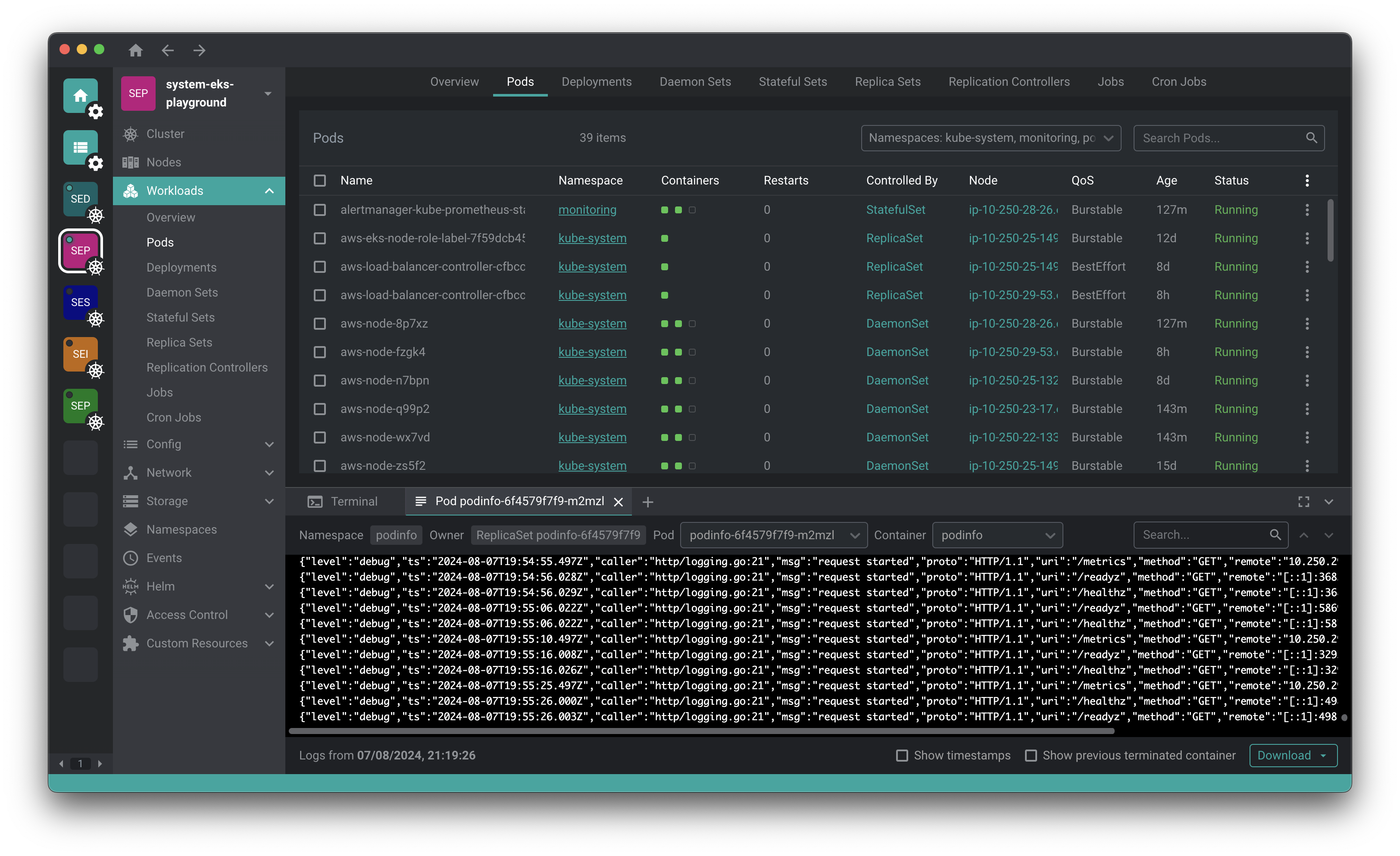
[Freelens](https://freelens.app) is a free and open-source user interface
designed for managing Kubernetes clusters. It provides a standalone
application compatible with macOS, Windows, and Linux operating systems,
making it accessible to a wide range of users. The application aims to
simplify the complexities of Kubernetes management by offering an intuitive
and user-friendly interface.
## Requirements
Kubernetes 1.22 or later. Older clusters fall back to the bundled `kubectl`,
which may not work correctly; a different one can be set in Preferences.
## Downloads
See the [releases](https://github.com/freelensapp/freelens/releases) page and
download the right package for your system.
### macOS
macOS 12 or later is required.
Download either the PKG (installer) or DMG (image) package from the
[releases](https://github.com/freelensapp/freelens/releases) page. Both arm64
(M1 chip or newer) and amd64 (Intel) variants are available.
All binary packages are built on macOS 15 and should be compatible with newer
systems.
#### Homebrew
Run the following command:
```sh
brew install --cask freelens
```
### Linux
Linux with GNU C Library 2.34 or later is required. It is provided ie. by
Debian 12, Fedora 35, Mint 21, openSUSE Leap 15.4, Ubuntu 22.04 and by
rolling release distributions like Arch, Manjaro or Tumbleweed.
Download DEB or RPM (package) or AppImage (executable) from the
[releases](https://github.com/freelensapp/freelens/releases) page. Both arm64
(aarch64) and amd64 (x86_64) variants are available.
All binary packages are built on Ubuntu 22.04 and should be compatible with
new systems.
#### AppImage
The Linux AppImage file requires libz.so and libfuse.so.2. You can add them
by running:
```sh
sudo apt install libfuse2 zlib1g-dev
```
Run the application with additional arguments:
```sh
./Freelens*.AppImage --no-sandbox --ozone-platform-hint=auto --enable-features=WebRTCPipeWireCapturer --enable-features=WaylandWindowDecorations --disable-gpu-compositing
```
#### Flatpak
The package is available on the
[Flathub](https://flathub.org/apps/app.freelens.Freelens) App Store for
Linux.
Use GNOME Software application or run the following commands:
```sh
flatpak install flathub app.freelens.Freelens
flatpak run app.freelens.Freelens
```
The application is sandboxed. It includes bundled `kubectl` and `helm`
commands and uses the `~/.kube/config` file by default.
Flatpak adds wrappers for the `aws`, `doctl`, `gke-gcloud-auth-plugin`, and
`kubelogin` tools, running them as commands from the host system.
The terminal uses `/bin/sh` by default, but it can be switched to, for
example, `/bin/bash` for a sandboxed environment or `/app/bin/host-spawn` for
a host environment.
#### Snap
The package is available on the [Snap](https://snapcraft.io/freelens) Store
for Linux.
Use App Center application or run the following command:
```sh
snap install freelens --classic
```
#### APT repository
Run the following commands:
```sh
curl -L https://raw.githubusercontent.com/freelensapp/freelens/refs/heads/main/freelens/build/apt/freelens.asc | sudo tee /etc/apt/keyrings/freelens.asc
curl -L https://raw.githubusercontent.com/freelensapp/freelens/refs/heads/main/freelens/build/apt/freelens.sources | sudo tee /etc/apt/sources.list.d/freelens.sources
sudo apt update
sudo apt install freelens
```
#### Arch User Repository
The package is available on the [Arch User Repository
(AUR)](https://wiki.archlinux.org/title/Arch_User_Repository).
Check the [freelens-bin](https://aur.archlinux.org/packages/freelens-bin)
package page.
### Windows
Windows 10 or later is required.
Download the EXE (NSIS) or MSI installers from the
[releases](https://github.com/freelensapp/freelens/releases) page.
Both the x64 (amd64) and arm64 versions of the Windows binaries are provided.
However, an EXE installer (NSIS) itself is x86 binary only even if it installs
arm64 application and then installs to `C:\Program Files (x86)\Freelens` path
by default.
The version of the MSI package has the last 4th digit always `0` and this is a
limitation of this package format.
#### Portable
Download the Portable EXE from the
[releases](https://github.com/freelensapp/freelens/releases) page. It is a
self-contained executable that can be run without installation.
#### WinGet
The package is available in
[WinGet](https://winstall.app/apps/Freelensapp.Freelens) Community
[repository](https://github.com/microsoft/winget-pkgs).
Run the following command:
```powershell
winget install Freelensapp.Freelens
```
The `--silent` option is supported to suppress all UI.
The `--scope user` or `--scope machine` option can be used to install it
either to local user directory or to `C:\Program Files`.
WinGet installs the application from EXE installer (NSIS).
#### Scoop
The package is available in the
[Scoop](https://scoop.sh/#/apps?q=freelens&s=1&d=0) command-line installer for
Windows.
Run the following command:
```powershell
scoop bucket add extras
scoop install freelens
```
Scoop uses MSI package to install the application.
## Development
Visit the [Development](DEVELOPMENT.md) document to see how to build the
application from source.
Check out the [Freelens Docs](https://freelensapp.github.io/docs/) to contribute to development or create your own extension.
## Extensions
Anyone can develop extensions for Freelens and many extensions previously used
with Open Lens have already been converted.
Visit the [Extensions](https://github.com/freelensapp/freelens/discussions/2291)
discussion to see them and write in the [appropriate
discussion](https://github.com/freelensapp/freelens/discussions/117) if you
also want to propose yours.
## Community
Get updates about Freelens & keep in touch with our community
- Follow us on [LinkedIn](https://www.linkedin.com/company/freelensapp/)
- Follow us on [Bluesky](https://bsky.app/profile/freelensapp.bsky.social)
- Follow us on [X](https://x.com/freelensapp)
- Join our [Discussions](https://github.com/freelensapp/freelens/discussions)
- Chat on [Discord](https://discord.gg/NjKZERK95Y)
- Discuss on [Reddit](https://www.reddit.com/r/freelens/)
- Watch us on [YouTube](https://www.youtube.com/@Freelensapp)
- Open an [Issue](https://github.com/freelensapp/freelens/issues)
## Adopters
Freelens is used by many individuals, companies, and organizations.
We have created the [adopters](https://github.com/freelensapp/freelens/blob/main/ADOPTERS.md) file for anyone who would like to be part of the official list.
Anyone is welcome to request to be added to the official list by opening a dedicated Pull Request.
## Contributing
Anyone is welcome to collaborate to advance the Freelens project. Read
[CONTRIBUTING.md](CONTRIBUTING.md) to see how you can help.
## Expenses and Donations
Anyone can support the Freelens project by making donations to cover
maintenance costs and invest in its development.
For more information, see our dedicated discussion: [Expenses and
Donations](https://github.com/freelensapp/freelens/discussions/2292)
## Fund an issue or earn money by developing
Anyone who wishes can also make targeted donations, funding their preferred issues alone or with others via [BountyHub](https://www.bountyhub.dev/en/bounties?repo=freelens).
At the same time, anyone who wishes can apply by doing PR to earn the bounty.
Features are, in any case, decided democratically according to the community's wishes and overseen by the Freelens core team.
For more information, see our dedicated discussion: [Fund an issue or earn money by developing](https://github.com/freelensapp/freelens/discussions/2293)
## The Freelens Teams
### Core Team
Each member of the core team is focused on specific roles. You can contact us
at any time according to them.
- [Roberto Bandini](https://www.linkedin.com/in/bandiniroberto/) - [@robertobandini](https://github.com/robertobandini) - Founder
General organization management, relationships, product management, community, marketing, freelens-ai extension
- [Piotr Roszatycki](https://www.linkedin.com/in/piotr.roszatycki) - [@dex4er](https://github.com/dex4er) - Maintainer
Development direction, architecture and release management, flux-cd extension, freelens-ai extension
- [Mario Offertucci](https://www.linkedin.com/in/mario-offertucci-703113b6/) - [@mariomamo](https://github.com/mariomamo) - Maintainer
UI, Docs, freelens-ai extension development management
- [Leopoldo Capuano](https://www.linkedin.com/in/leo-capuano/) - [@leo-capvano](https://github.com/leo-capvano) - Maintainer
GenAI solutions & freelens-ai extension development management
### Release Engineering Team
This team is responsible for driving Freelens releases forward, reviewing PRs, and making decisions about the architecture and technical roadmap under the supervision of the core team.
- [Piotr Roszatycki](https://www.linkedin.com/in/piotr.roszatycki) - [@dex4er](https://github.com/dex4er) - Maintainer
Release Engineering Team Lead
- [Omar Alani](https://www.linkedin.com/in/omarluq/) - [@omarluq](https://github.com/omarluq) - Maintainer
Release Engineering Team Member
- [Matías Roje](https://www.linkedin.com/in/matias-roje-carrasco/) - [@MatiasRoje](https://github.com/MatiasRoje) - Maintainer
Release Engineering Team Member
The project is growing very quickly and everyone is welcome!
If you also want to be part of it, visit the [We want
you!](https://github.com/freelensapp/freelens/discussions/2297) discussion.
Or contact us at for any questions or suggestions!
## License
This repository is a fork of [Open
Lens](https://github.com/lensapp/lens/tree/master), the core of [Lens
Desktop](https://k8slens.dev), with the aim of carrying forward its
open-source version.
Copyright (c) 2024-2026 Freelens Authors.
Copyright (c) 2022 OpenLens Authors.
[MIT License](https://opensource.org/licenses/MIT)