# WebTestBench
[](https://opensource.org/licenses/Apache-2.0) [](https://arxiv.org/abs/2603.25226) [](https://huggingface.co/datasets/friedrichor/WebTestBench) [](https://github.com/friedrichor/WebTestBench)
## 📖 Overall
The rise of "vibe coding" enables developers to rapidly build complete web applications through natural language instructions, but this introduces a critical question: how do we automatically verify that AI-generated web functionalities are correctly implemented?
**WebTestBench** is a benchmark designed for evaluating computer-use agents on end-to-end automated web testing. It grounds evaluation in realistic AI-driven web development scenarios and goes beyond standard functional checks to assess latent logical constraints — nuanced behavioral rules such as permission boundaries and business logic that are often invisible in the interface but critical to software quality.
Key features include:
- Web applications spanning 7 diverse application categories
- Evaluation dimensions: Functionality, Constraint, Interaction, and Content
- WebTester, a two-stage baseline framework consisting of:
- Checklist Generation Agent — automatically generates a structured test checklist from the development instruction
- Defect Detection Agent — interacts with the application to detect defects against the checklist
## 🔍 Dataset
**Example**
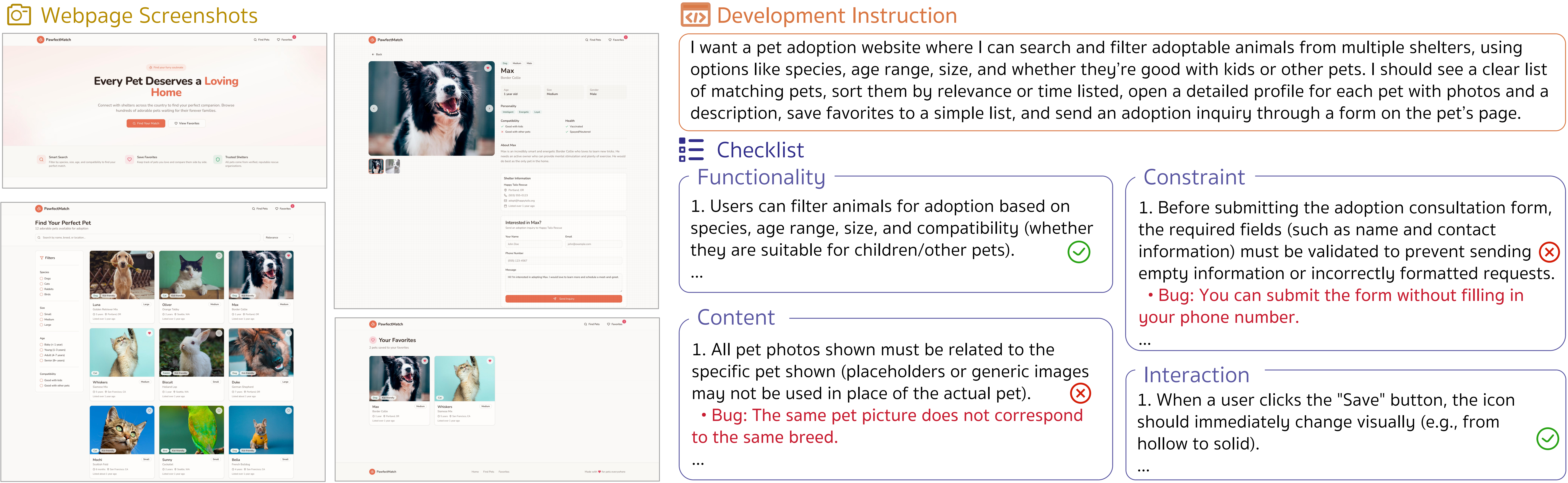
All web projects can be deployed via:
```bash
npm install
npm run dev
```
You may use this to preview the applications manually, but no pre-deployment is needed before evaluation. Automatic deployment and teardown are handled within the evaluation code.
## 🚀 Quick Start
### Install
- Python `>=3.11`
- Node.js `18+` (required by Claude Code)
- A valid API key for your provider (for example, OpenRouter)
**1) Python Environment**
```bash
pip install -r requirements.txt
```
**2) Install Claude Code, Playwright MCP, and Claude Agent SDK**
Please read the official Claude Code quickstart first:
- https://code.claude.com/docs/en/quickstart
Shortcut commands
```bash
# Install Claude Code (Node.js 18+)
npm install -g @anthropic-ai/claude-code
# First-time login
claude
# Complete login in the CLI, then exit
/exit
# Add Playwright MCP server to Claude Code
claude mcp add playwright npx @playwright/mcp@0.0.61 # Do not use @playwright/mcp@latest
npx playwright install
# Claude Agent SDK (already included in requirements.txt)
pip install claude-agent-sdk
```
⚠️ **Note on Playwright MCP Version**
Do not use `@playwright/mcp@latest` for now. The latest version may cause Claude Code to fail when accessing Playwright MCP. [issue](https://github.com/microsoft/playwright-mcp/issues/1359)
**Verify Playwright MCP Availability**
```bash
claude mcp list
```
Example Output:
```
playwright: npx @playwright/mcp@0.0.61 - ✓ Connected
```
If you change the Playwright MCP version, make sure to update the corresponding version in `eval/agent/claude_code.py` (specifically in ClaudeAgentOptions) to keep them consistent.
**3) Configure OpenRouter for API Models**
We use OpenRouter to access and route requests to different models, but other providers are also supported.
For OpenRouter integration, follow the official guide:
- https://openrouter.ai/docs/guides/coding-agents/claude-code-integration
Configure .claude.json for OpenRouter
Add the following configuration to your local `.claude.json` file (on macOS, located at `/Users/{user_name}/.claude.json`). Locate the active project entry under `"projects"`, such as `"xxx/WebTestBench"`, and update its `"env"` section to include the OpenRouter settings below.
```json
"env": {
"ANTHROPIC_BASE_URL": "https://openrouter.ai/api",
"ANTHROPIC_AUTH_TOKEN": "sk-or-v1-xxx",
"ANTHROPIC_API_KEY": "" // remain an empty string
}
```
A complete example is shown here:
```json
"xxx/WebTestBench": {
"allowedTools": [],
"mcpContextUris": [],
"mcpServers": {
"playwright": {
"type": "stdio",
"command": "npx",
"args": [
"@playwright/mcp@0.0.61"
],
"env": {
"ANTHROPIC_BASE_URL": "https://openrouter.ai/api",
"ANTHROPIC_AUTH_TOKEN": "sk-or-v1-xxx",
"ANTHROPIC_API_KEY": "" // remain an empty string
}
}
}
}
```
### Evaluation
Before running, edit each script with your local settings (`API_BASE_URL`, `API_KEY`, `MODEL`, dataset paths, etc.).
API and Model setup example
```bash
export API_BASE_URL="https://openrouter.ai/api"
export API_KEY=""
export MODEL="openai/gpt-5.2" # It is recommended to first use a low-cost model with agentic capabilities to successfully run a single sample.
export ANTHROPIC_DEFAULT_SONNET_MODEL="$MODEL"
export ANTHROPIC_DEFAULT_OPUS_MODEL="$MODEL"
export ANTHROPIC_DEFAULT_HAIKU_MODEL="$MODEL"
```
```bash
# Single-run evaluation
bash scripts/run_webtester_cc.sh
# Parallel evaluation
bash scripts/run_webtester_cc_parallel.sh
# Scoring
bash scripts/run_scoring.sh
```
## 🙇 Acknowledgments
We are grateful for the following projects our work arise from:
- [Claude Code](https://www.claude.com/product/claude-code), [claude-agent-sdk-python](https://github.com/anthropics/claude-agent-sdk-python), [Playwright MCP](https://github.com/microsoft/playwright-mcp)
- [Lovable](https://lovable.dev/)
## 📋 Citation
If you find our work helpful, feel free to give us a cite.
```
@article{kong2026webtestbench,
title={WebTestBench: Evaluating Computer-Use Agents towards End-to-End Automated Web Testing},
author={Kong, Fanheng and Zhang, Jingyuan and Yue, Yang and Sun, Chenxi and Tian, Yang and Feng, Shi and Yang, Xiaocui and Wang, Daling and Tian, Yu and Du, Jun and Zeng, Wenchong and Li, Han and Gai, Kun},
journal={arXiv preprint arXiv:2603.25226},
year={2026}
}
```