# DSH Research Kit
[](LICENSE)
[](https://github.com/fsrmqi/dsh-research-kit/actions/workflows/ci.yml)
[](https://github.com/topics/dsh-plugin)
[](https://nodejs.org)
[](https://dsh-plugin.org/plugins/fsrmqi/dsh-promptkit)
[English](README.en.md) · [简体中文](README.md)
> A catalog and launcher for research workflows in DeepSeek Harness: 65 human-reviewed workflows, 8 skill-guidance modules, 55 scientific data sources.
It turns recurring research tasks — peer review, writing an introduction, literature synthesis, planning a statistical analysis — into **parameterized, editable prompts that you review before sending**. The plugin only assembles the task and hands it back to your session; execution stays with your own DSH agent.
---
## Prerequisite: what is DSH?
This project is a plugin for [DeepSeek Harness](https://github.com/deepseek-ai/deepseek-harness) (CLI name `dsh`), an open-source local agent harness by DeepSeek built around one idea: *Everything is a Plugin* — models, tools, UI and storage are all replaceable plugins.
**Without DSH, this plugin cannot run.** It ships no model and starts no service; it only adds research entry points to the DSH session UI.
| What you need | Where to get it |
| --- | --- |
| DSH itself | [deepseek-ai/deepseek-harness](https://github.com/deepseek-ai/deepseek-harness) · [official site](https://deepseek.com/harness) |
| Plugin ecosystem | [GitHub topic: dsh-plugin](https://github.com/topics/dsh-plugin) |
| Node.js | `>= 22.6` |
> DSH is currently a **Developer Preview** and will iterate quickly, possibly with breaking changes. The `conversation.view` slot and the `inputActions` contract evolve with DSH versions — after upgrading DSH, re-run the [manual QA checklist](docs/MANUAL-QA.md).
## The problem it solves
Generic chat input suits ad-hoc questions, not recurring research tasks with defined steps, material requirements and quality boundaries. Reviewing a paper, writing an introduction, running a literature synthesis or planning an analysis all need four things:
1. **Explicit** input materials and output scope;
2. **Auditable** steps instead of one vague instruction;
3. **Human review before send** — you see, edit and confirm the task description;
4. **Hard rules** against fabricated citations, data and conclusions.
Research Kit turns those four into reusable assets.
## How it works
```text
Research capability catalog (128 entries)
→ pick a workflow
→ fill parameters, reference materials via @file
→ review and edit the final prompt
→ write to composer, or send to the current session
→ executed by the current DSH session's agent and its configured tools
```
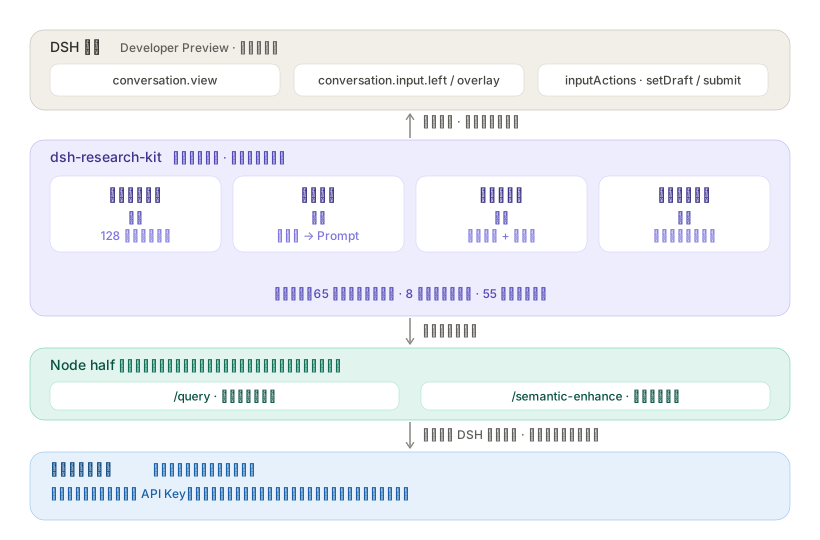
Deliberate trade-offs:
- **No model calls, no stored keys.** Execution belongs entirely to the current session;
- **No file-upload reimplementation.** Materials use DSH's native `@file` mentions;
- **No pretending to have retrieved anything.** Database entries state their access prerequisites honestly and fall back to Agent/MCP explicitly.
## Capabilities
**🧪 65 human-reviewed research workflows**
Across six disciplines: paper & manuscript, literature research, genomics, clinical research, data analysis, study design. Each is a parameterized, editable prompt template with built-in anti-fabrication boundaries (never invent citations, data, page numbers or authorial intent) and explicit "draft pending human verification" framing.
**🧩 8 composable skill-guidance modules**
Scientific writing, statistics review, citation hygiene, evidence synthesis, reproducibility, review ethics & confidentiality, data integrity, uncertainty communication. Each carries a discipline fragment and a human checklist; toggle them at launch to fold them into the prompt.
**🔬 55 scientific data sources, 11 of them queryable in-plugin**
Literature, clinical, genetics, omics, protein/chemistry — plus astronomy & space, biodiversity, climate & environment, geospatial. Public APIs return candidate records with links and stable identifiers; rate-limited, licensed or parameter-heavy sources fall back explicitly to the DSH agent / MCP.
**✍️ Fully visible and editable before send**
Parameter substitution updates the preview live. After manual edits, later parameter changes never silently rewrite the body, and a "restore generated prompt" action is one click away. Missing required parameters block sending.
**🧭 One view, four sections**
A single `conversation.view` tab, sectioned along the research loop. The section bar stays pinned and shows each section's purpose and responsibility boundary:
| Section | Layer | Purpose |
| --- | --- | --- |
| Resources & Workflows | Discover | Catalog search, parameterized assembly, direct database lookup |
| Method Workshop | Construct | Method cards + variable fill-in → editable prompt; extract a draft from the current conversation |
| Research Vault | Deposit | Asset CRUD, version diff, verification tracking; an **Evidence Vault** sub-module saves source metadata and notes per item, project-isolated and de-duplicated |
| Evidence Graph | Evidence | Traceable relations among this session's resources, workflows, query sources, assets and saved evidence |
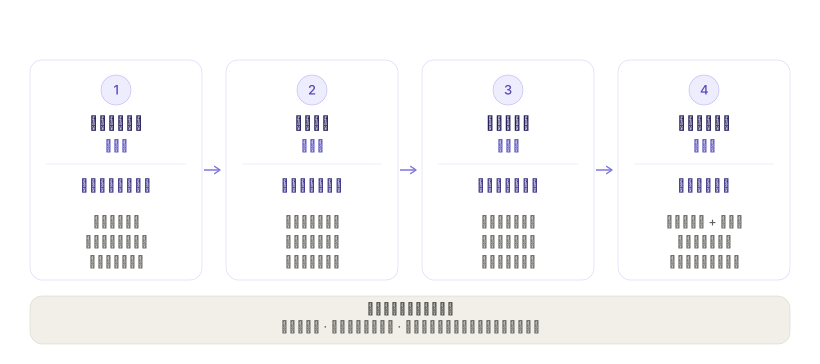
More capabilities (click to expand)
- **Science mode presets** — one-click domain presets: **Genetics** (attaches 6 skills; the preamble adds ACMG/AMP interpretation rules, omics filtering accountability, association≠causation, cross-species caveats), **Clinical cohort** (de-identified data only, mandatory "research draft — not for clinical use" framing, bias discussion), **General research**. Presets are guidance bundles, not capability switches — nothing auto-executes.
- **Composer quick entry** — "Resources / Workflows" buttons on the composer toolbar open an overlay picker without leaving the chat; a selected workflow goes through a preview dialog and writes the draft. **It never auto-sends.**
- **Draft enhancer** — one click beside the composer: a lightweight tier (zero-token structuring) and a semantic tier (reuses the current session model, streams, five-dimension diagnosis, cancellable), with three strength levels; enhanced drafts can be undone and compared against the original.
- **Favorites & history** — one-click star on any entry; successful write/send/copy is recorded locally (ID, name, first-line summary, timestamp; 20 entries max).
- **Evidence vault** — save individual results from public database lookups, each carrying a stable identifier (DOI / PMID / NCT / arXiv) and source link, defaulting to "unverified"; project-isolated de-duplication, JSON export/import and hard delete. **Only source metadata and notes you write are stored — no full text, no query terms, and nothing is saved automatically.**
- **Evidence graph** — traces relations among this session's resources, workflows, query sources, assets and **saved evidence**; evidence nodes carry only source database / stable identifier / verification status, **never notes or query terms**; arrows show relation direction, with anchors chosen from the two endpoints' actual positions rather than a fixed "always left-to-right".
- **Multiple prompt exits** — beyond write-to-composer and send, "Copy prompt" works even when host actions are missing.
- **Launch-time validation** — field-level errors (red border + message) inside the preview dialog; missing required parameters never write the draft.
- **Manageable resource picks** — the overlay footer lists selected resources as removable chips.
- **Manual-edit protection** — editing the prompt by hand switches to an explicit manual state with a one-click restore; the detail pane always belongs to the current filter result.
- **Host-action degradation** — when `setDraft`/`submit` are absent, buttons disable with an explanation and the view does not crash.
- **Dark theme & narrow screens** — follows the system and DSH theme; single column below 880px; native `aria-*` attributes and focus rings.
## Installation
Requires Node `>= 22.6` and a DSH web profile providing the `conversation.view`, `conversation.input.left` and `conversation.input.overlay` slots.
**Local directory (currently recommended; not published to npm)**
```bash
git clone https://github.com/fsrmqi/dsh-research-kit.git
dsh plugin --profile web add ./dsh-research-kit
```
**GitHub (pin a commit for reproducible installs)**
```bash
dsh plugin --profile web add github:fsrmqi/dsh-research-kit#
```
**tarball (offline / audit)**
```bash
npm pack && dsh plugin --profile web add ./dsh-research-kit-0.1.0.tgz
```
> The build artifact `ui/client.js` is committed, so a clone installs without building.
After installing, refresh the browser and open the "Research Workbench" view, or use the "Resources / Workflows" entry beside the composer. Uninstalling or closing the view leaves no duplicate registrations behind.
**Common pitfall**: `dsh plugin` calls the `pnpm` on your PATH, and its store-layout major version must match the target profile's record — otherwise the command fails with `ERR_PNPM_UNEXPECTED_STORE`. See [manual QA §1](docs/MANUAL-QA.md) for how to compare.
## Usage
Two entrances, one set of catalog assets.
**Option A: the unified Research Workbench view**
1. Open the Research Workbench in a session — it lands on "Resources & Workflows"; search or filter the 128 catalog entries;
2. Select a workflow and review its purpose, required materials and limitations;
3. Fill in parameters; for file-dependent workflows, reference files via `@文件` in the DSH composer first;
4. Toggle skill guidance as needed — the preview updates live;
5. "Write to composer" keeps the draft editable, or "Send to session" submits it.
**Option B: composer quick entry**
1. Click "Workflows" or "Resources" on the composer toolbar to open an overlay above the input card;
2. The Workflows panel filters by discipline and opens a preview dialog where you fill parameters and inspect the prompt, then "Use workflow" writes it to the draft;
3. The Resources panel toggles databases and skills; checked skills fold in as guidance fragments and databases as research notes for the next workflow you launch;
4. After writing, attach materials with DSH's native paperclip or `@文件`, then send yourself — the quick entry **only writes the draft, never auto-sends**.
DSH performs the actual send; this plugin creates no model routes, stores no keys, and never reads file contents.
## Catalog contents
| Category | Workflows (65) |
| --- | --- |
| Paper & manuscript (13) | Peer review, write introduction/methods/results/discussion, abstract, language polish, reviewer response, journal formatting, reference check, cover letter, translation, supplementary materials |
| Literature research (12) | Literature review & gaps, literature search, structured paper digest, paper comparison, systematic-review protocol, research landscape, citation analysis, dataset finder, trend tracking, preprint digest, methods comparison, data-source selection |
| Genomics (22) | bulk/single-cell RNA-seq, variant calling, GWAS, ACMG variant interpretation, gene set enrichment, regulatory network, comparative genomics, metagenomics, phylogenetics, expression atlas, methylation, ATAC-seq, ChIP-seq, genome annotation, RNA velocity, spatial transcriptomics, cell-type annotation, trajectory, multi-omics integration, immune profiling, biomarker discovery |
| Clinical research (5) | Patient cohort, case-control, longitudinal data, EHR analysis, risk prediction model (all framed "research draft — not for clinical use") |
| Data analysis (11) | Statistical analysis plan, exploratory analysis, data cleaning, reproduction check, statistical audit, figure audit, statistical analysis, meta-analysis, survival analysis, regression modeling, ANOVA |
| Study design (2) | Sample size & power estimation, research plan |
Plus 8 skills and 55 database entries. Full definitions live in [`catalog/`](catalog/); the data contract is in [architecture §4](docs/ARCHITECTURE.md).
## Privacy & security
| Access | Purpose | Notes |
| --- | --- | --- |
| Current session composer | Writes or submits the final prompt only when you click "Write/Send" | No Enter interception, no auto-send, never touches other sessions' history |
| `@file` mentions | Only nudges you toward DSH's native mention menu | Never reads, uploads or parses file contents |
| Browser storage | Favorites, history, method cards and research-vault assets (`localStorage`) | No parameter values, full prompts or file contents; clearing browser data clears them |
| Browser IndexedDB | Evidence entries: source metadata and notes you wrote yourself | Written **only after you confirm each save**; no full text, query terms or raw responses; per-project isolation, export / import / permanent delete. The evidence graph shows only their source / identifier / verification status, never the notes |
| Current-page memory | Per-session evidence index (started workflows and direct-query source summaries) | Used only to update the evidence graph across views; cleared on refresh or page close, and never stores query terms, raw files or full results |
| Network | Direct public-database lookup (only when you trigger it) | Requests go through DSH's controlled web service; the plugin holds no API keys |
**Zero telemetry.** Nothing is collected or uploaded. Every workflow output is framed as a **draft pending human verification** and does not replace the researcher, reviewer or ethics approval.
Security boundaries and vulnerability reporting: see [SECURITY.md](SECURITY.md).
### Database queries
Database detail pages can query a first batch of public sources directly: PubMed, Crossref, OpenAlex, Semantic Scholar, Europe PMC, ClinicalTrials.gov, openFDA, UniProt, PubChem, GBIF and iNaturalist. These 11 entries are marked `available-in-plugin` in the catalog, and their detail page reads "queryable directly by the plugin". Candidate results show source links and stable identifiers and can be written into the composer, or you can explicitly click "Let the agent verify and continue" — that button invokes the current DSH session's agent, which then uses the web/MCP/file tools it already has to complete a multi-step search.
The remaining 44 sources are marked `requires-mcp` or `reference-only`, state the MCP, subscription, API key or data-use agreement they require, and offer the same controlled agent fallback. Catalog labels and the query implementation are cross-checked by `npm run check` in both directions (an adapter must be labelled, and a label must have an adapter), so the capability shown in the UI cannot drift from what is actually implemented. **The plugin never fabricates a search result.**
## Compatibility & status
Current version `0.1.0` (not yet published to npm). Development status and next steps: [ROADMAP.md](ROADMAP.md).
Verified so far: catalog contract validation (128 entries, 128 unique IDs), 122 regression tests, two rounds of real DSH web-profile smoke testing (fast lane F1–F4, release gate R1 and observation items O1–O3 all passed), and on-site acceptance of evidence-vault-to-prompt writing (W1–W3: the button is enabled once entries are selected, nothing is injected when nothing is selected, and the write lands in the composer without auto-sending, with the announced count matching) and of saved evidence in the graph (G1–G4: evidence nodes carry only source / identifier / verification status, link to their source database, and edges anchor by actual direction).
> Real-profile acceptance cannot be replaced by unit tests — `test/dsh-slots.test.js` does execute the real build artifact, but the slots service is simulated. Re-run the [manual QA checklist](docs/MANUAL-QA.md) after upgrading DSH.
## Development
```bash
npm run build # generate ui/client.js (committed; do not hand-edit)
npm run check # catalog contract validation + syntax checks
npm test # pure-logic and contract regression tests (122)
```
After touching `catalog/`, `src/` or `dsh/`, run `npm run build && npm run check && npm test`; CI verifies the committed bundle matches the sources (any diff fails the build).
## Documentation
| Document | Contents |
| --- | --- |
| [docs/README.md](docs/README.md) | **Documentation index and recommended reading order** |
| [Architecture & data contracts](docs/ARCHITECTURE.md) | Module responsibilities, data flow, DSH host boundaries, catalog schema |
| [Development guide](docs/DEVELOPMENT.md) | Local setup, implementation order, test strategy, delivery checklist |
| [Manual QA checklist](docs/MANUAL-QA.md) | Why unit tests are not enough, step-by-step acceptance, failure triage tree |
| [Method Workshop embedding](docs/METHOD-WORKSHOP.md) | Vendored artifact governance, namespace discipline, builder integration |
| [Scope & boundaries](docs/PRODUCT.md) | Problem statement, product boundaries, quality and safety principles |
> The in-depth documents are currently **Chinese-only**. English readers can follow the architecture and QA checklists structurally; the code and catalog are the authoritative reference.
## Contributing
Issues and PRs welcome — see [CONTRIBUTING.md](CONTRIBUTING.md). To add a workflow, append a JSON object to `catalog/workflows.json` following the existing entries and run `npm run check && npm test`; the contract validator enforces placeholder consistency and anti-fabrication boundaries.
## License
[MIT](LICENSE).
Third-party attribution and licensing for bundled vendored artifacts: see [NOTICE](NOTICE).