
# dsh-workbuddy-connect-functy
**A Functy fork of corrinehu/dsh-workbuddy-connect: dashboard UI, multi-account rotation and credit in the sidebar, bringing WorkBuddy desktop-app models into DeepSeek Harness.**
[](https://github.com/functy23/dsh-workbuddy-connect-functy)
[](https://www.typescriptlang.org/)
[](https://github.com/functy23/dsh-workbuddy-connect-functy)
[](https://github.com/functy23/dsh-workbuddy-connect-functy)
[](./LICENSE)
[](https://github.com/functy23/dsh-workbuddy-connect-functy/releases)
[](https://github.com/functy23/dsh-workbuddy-connect-functy/stargazers)
[](https://github.com/functy23/dsh-workbuddy-connect-functy)
[](https://github.com/functy23/dsh-workbuddy-connect-functy/graphs/contributors)
[Issues](https://github.com/functy23/dsh-workbuddy-connect-functy/issues) • [Changelog](CHANGELOG.md) • [English](README.en.md) / [中文](README.md)
---
This is a fork of [corrinehu/dsh-workbuddy-connect](https://github.com/corrinehu/dsh-workbuddy-connect), not the upstream project. The upstream npm package is still `dsh-workbuddy-connect` (currently `0.7.1`, DSH `0.2.0-rc.2` only). This repository publishes as **`dsh-workbuddy-connect-functy`**, with a different UI and account model.
Both the CN **WorkBuddy** app and the international **WorkBuddy AI** app are supported: whichever you have installed shows up as its own model group; both installed shows both, each with its own account and credit.
## How this fork differs
Compared with upstream **0.7.1** (2026-10-01). Features both trees share are not listed as ours.
| | Upstream `dsh-workbuddy-connect` 0.7.1 | This tree 0.13.11 |
|---|---|---|
| UI | two legacy plugin cards in Settings | sidebar credit card + centre dashboard + settings section page |
| Accounts | follows the desktop app's current sign-in | multi-account pool: rotation, QR, token, desktop adopt; a removed account is not swept back in |
| Credit | on the settings card only | in the sidebar, remaining or used/total, can be hidden |
| DSH | **`0.2.0-rc.2` only** | `0.1.7-alpha.1` / `0.2.0-rc.1` / `0.2.0-rc.2` |
| Update notice | bottom-right reminder | not ported |
| npm | `dsh-workbuddy-connect` | `dsh-workbuddy-connect-functy` |
Both trees have: CN/AI groups, image input, reasoning-effort detection, per-account model visibility, CN enterprise credit, picker rate/promo badges, Windows Electron discovery, per-region effort-rejection codes.
## Screenshots
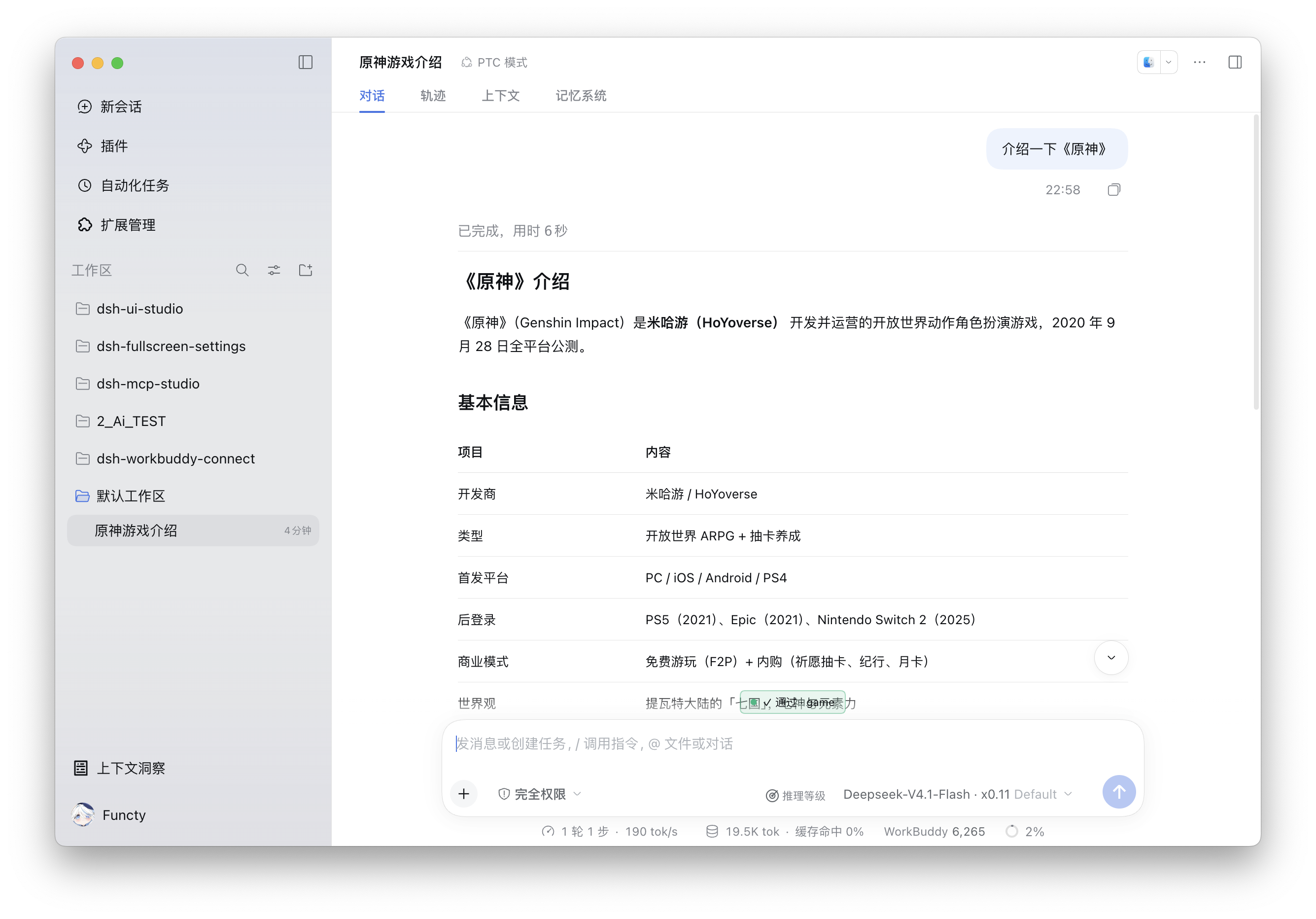
WorkBuddy models in chat (rate and reasoning level in the composer, usage and credit on the status bar):
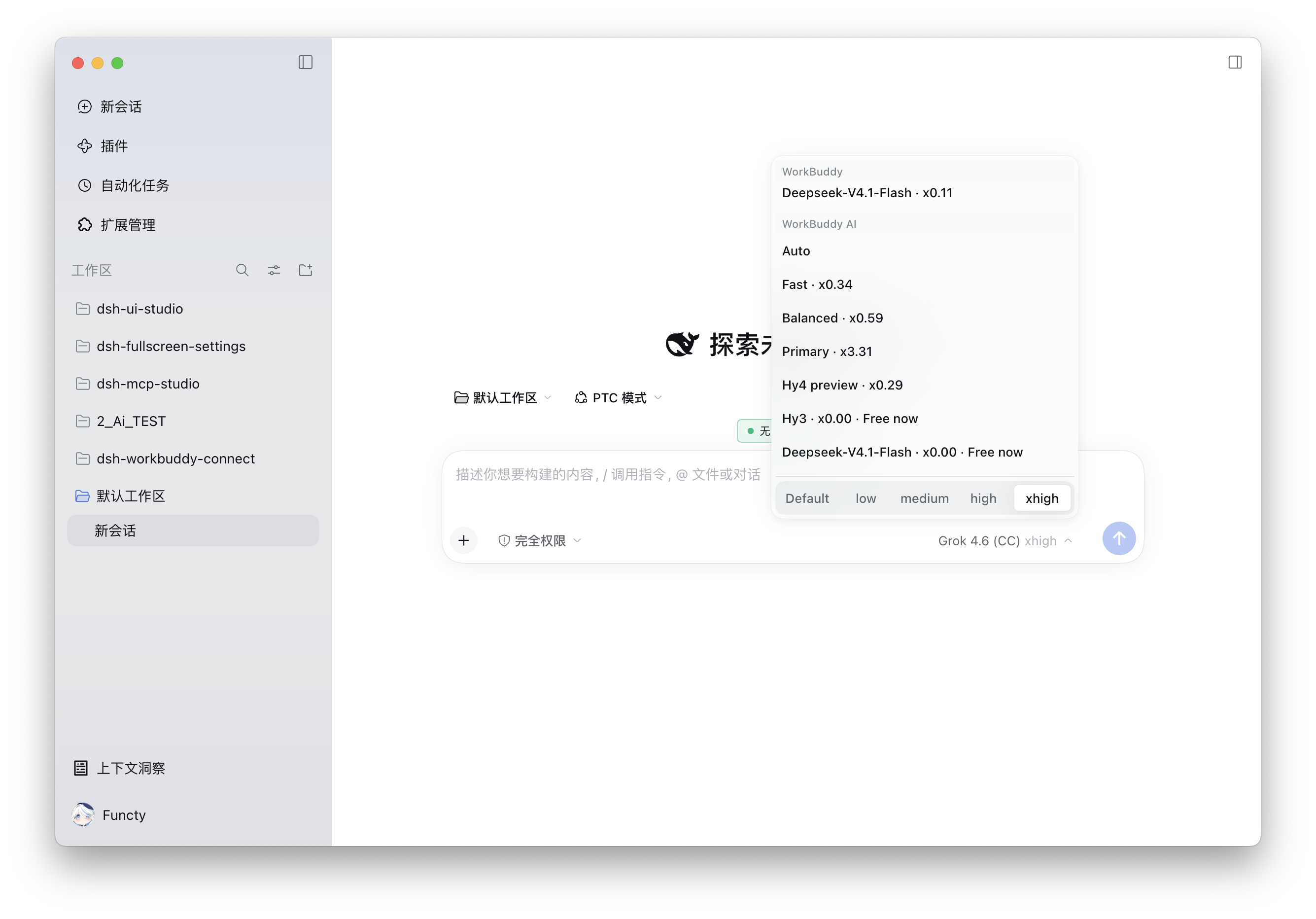
 Picker groups WorkBuddy / WorkBuddy AI, with rates and free badges:
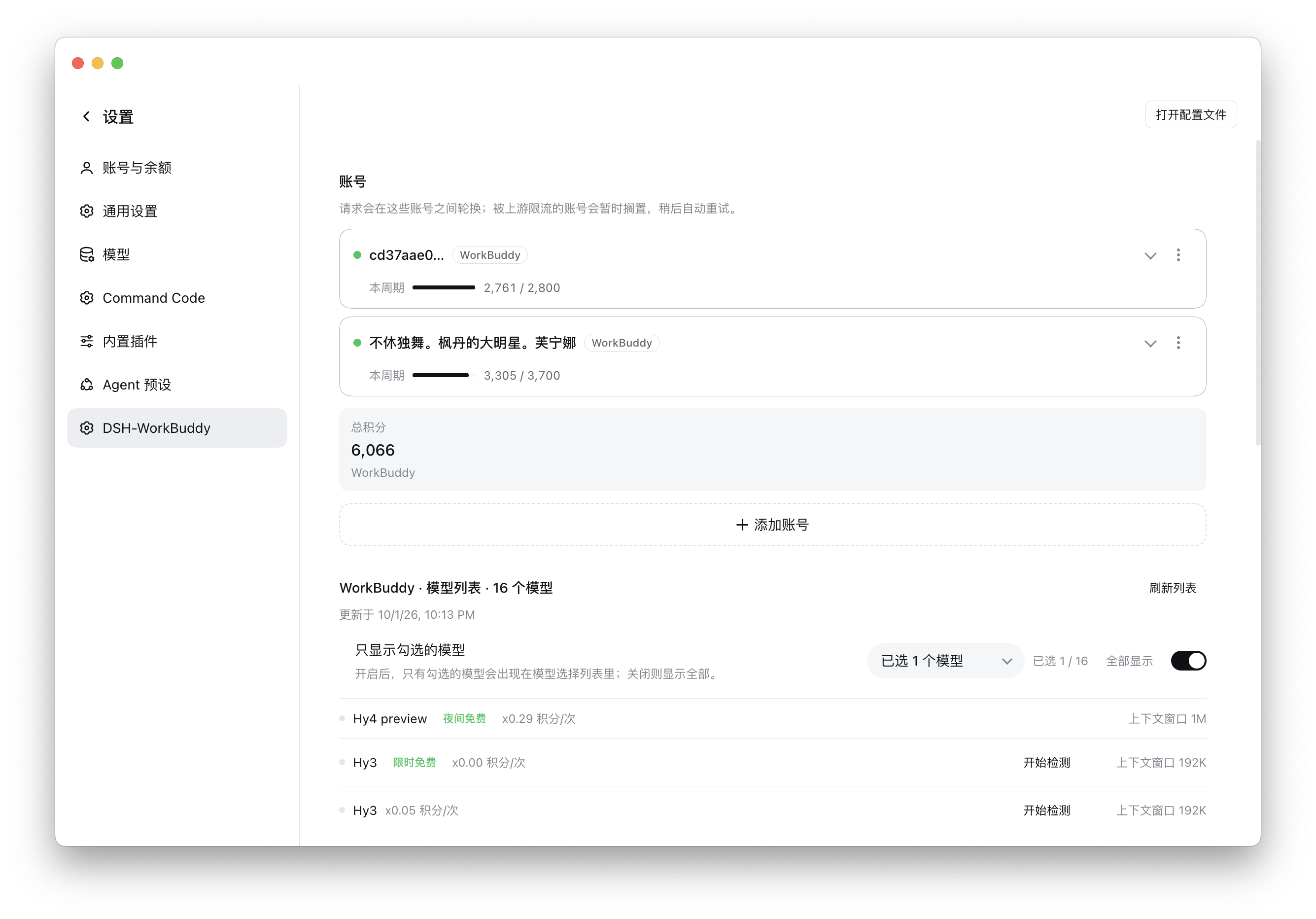
 Settings page for the account pool, cycle credit and the model list:
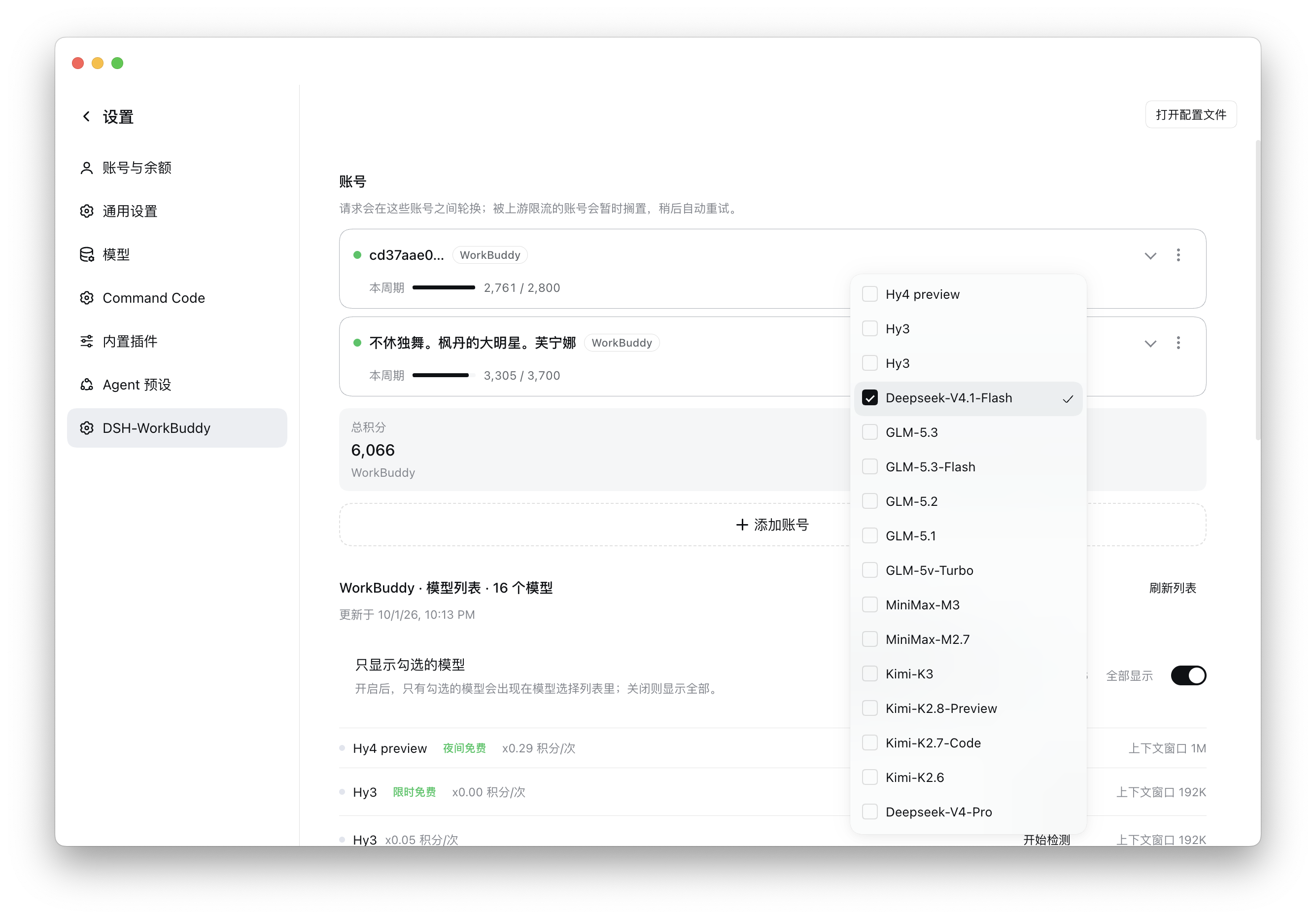
 Choose which models appear in the picker:
 ## Features
- **Zero configuration**: after install, pick a WorkBuddy model in chat. The plugin reuses the desktop app's sign-in and follows account switches.
- **Dashboard**: a credit card at the sidebar foot opens the centre-column panel; Settings → **DSH-WorkBuddy** manages accounts, models, context length and reasoning-level detection. The card itself can be switched off.
- **Multi-account rotation**: several accounts per product. Requests rotate across available ones; a rate-limited account is benched and retried later. Add via QR, a pasted token, or the desktop app's own sign-in.
- **Credit**: sidebar can show remaining credit or used/total; CN enterprise accounts use the enterprise billing endpoint.
- **Images**: most models accept paste or drag-and-drop.
- **Reasoning levels**: declared sets show up directly. Undeclared models can be probed from the picker on Web / Desktop (a few requests, may spend credit).
- **Visibility**: saved per signed-in account. Hiding a model only affects the picker; existing chats keep working.
## Install
Prerequisite: the WorkBuddy desktop app is installed and signed in (same for WorkBuddy AI). A mismatched DSH core fails to start.
**This release (`0.13.11`)** targets DSH `0.1.7-alpha.1`, `0.2.0-rc.1` and `0.2.0-rc.2`. Newer prereleases (e.g. `0.2.1-rc.x`) are not covered automatically.
> **Do not install npm's `dsh-workbuddy-connect`.** That is the upstream package, a different code line.
### From the UI
DSH **Add plugin** accepts a package name (optional version), a Git address, a tarball, or an absolute local path.
1. Open **Settings → Plugins** (some clients label this Extensions).
2. Choose **Add plugin**.
3. Paste either identifier and confirm:
```text
dsh-workbuddy-connect-functy
```
or:
```text
github:functy23/dsh-workbuddy-connect-functy
```
4. **Reload the page**; if nothing changed, **restart the DSH client**. The desktop app starts its own profile — do not use `dsh --profile desktop` as a launcher.
### From the CLI
Replace `
## Features
- **Zero configuration**: after install, pick a WorkBuddy model in chat. The plugin reuses the desktop app's sign-in and follows account switches.
- **Dashboard**: a credit card at the sidebar foot opens the centre-column panel; Settings → **DSH-WorkBuddy** manages accounts, models, context length and reasoning-level detection. The card itself can be switched off.
- **Multi-account rotation**: several accounts per product. Requests rotate across available ones; a rate-limited account is benched and retried later. Add via QR, a pasted token, or the desktop app's own sign-in.
- **Credit**: sidebar can show remaining credit or used/total; CN enterprise accounts use the enterprise billing endpoint.
- **Images**: most models accept paste or drag-and-drop.
- **Reasoning levels**: declared sets show up directly. Undeclared models can be probed from the picker on Web / Desktop (a few requests, may spend credit).
- **Visibility**: saved per signed-in account. Hiding a model only affects the picker; existing chats keep working.
## Install
Prerequisite: the WorkBuddy desktop app is installed and signed in (same for WorkBuddy AI). A mismatched DSH core fails to start.
**This release (`0.13.11`)** targets DSH `0.1.7-alpha.1`, `0.2.0-rc.1` and `0.2.0-rc.2`. Newer prereleases (e.g. `0.2.1-rc.x`) are not covered automatically.
> **Do not install npm's `dsh-workbuddy-connect`.** That is the upstream package, a different code line.
### From the UI
DSH **Add plugin** accepts a package name (optional version), a Git address, a tarball, or an absolute local path.
1. Open **Settings → Plugins** (some clients label this Extensions).
2. Choose **Add plugin**.
3. Paste either identifier and confirm:
```text
dsh-workbuddy-connect-functy
```
or:
```text
github:functy23/dsh-workbuddy-connect-functy
```
4. **Reload the page**; if nothing changed, **restart the DSH client**. The desktop app starts its own profile — do not use `dsh --profile desktop` as a launcher.
### From the CLI
Replace `