# ๐Ÿง  rm-brain **A local-first "second brain" for your handwritten reMarkable notebooks โ€” searched through a normal Claude Desktop conversation.** [![CI](https://github.com/gabrielanhaia/remarkable-brain/actions/workflows/ci.yml/badge.svg)](https://github.com/gabrielanhaia/remarkable-brain/actions/workflows/ci.yml) [![License: MIT](https://img.shields.io/badge/License-MIT-yellow.svg)](./LICENSE) [![Node](https://img.shields.io/badge/node-%3E%3D20-brightgreen.svg)](https://nodejs.org) [![PRs welcome](https://img.shields.io/badge/PRs-welcome-brightgreen.svg)](./CONTRIBUTING.md) [![Website](https://img.shields.io/badge/website-xgabriel.com-6E56CF?style=for-the-badge&logo=safari&logoColor=white)](https://xgabriel.com)   [![Buy Me a Coffee](https://img.shields.io/badge/Buy%20Me%20a%20Coffee-support-FFDD00?style=for-the-badge&logo=buymeacoffee&logoColor=black)](https://buymeacoffee.com/anhaia) **Built by [Gabriel Anhaia](https://xgabriel.com) ยท [โ˜• Buy me a coffee](https://buymeacoffee.com/anhaia)**
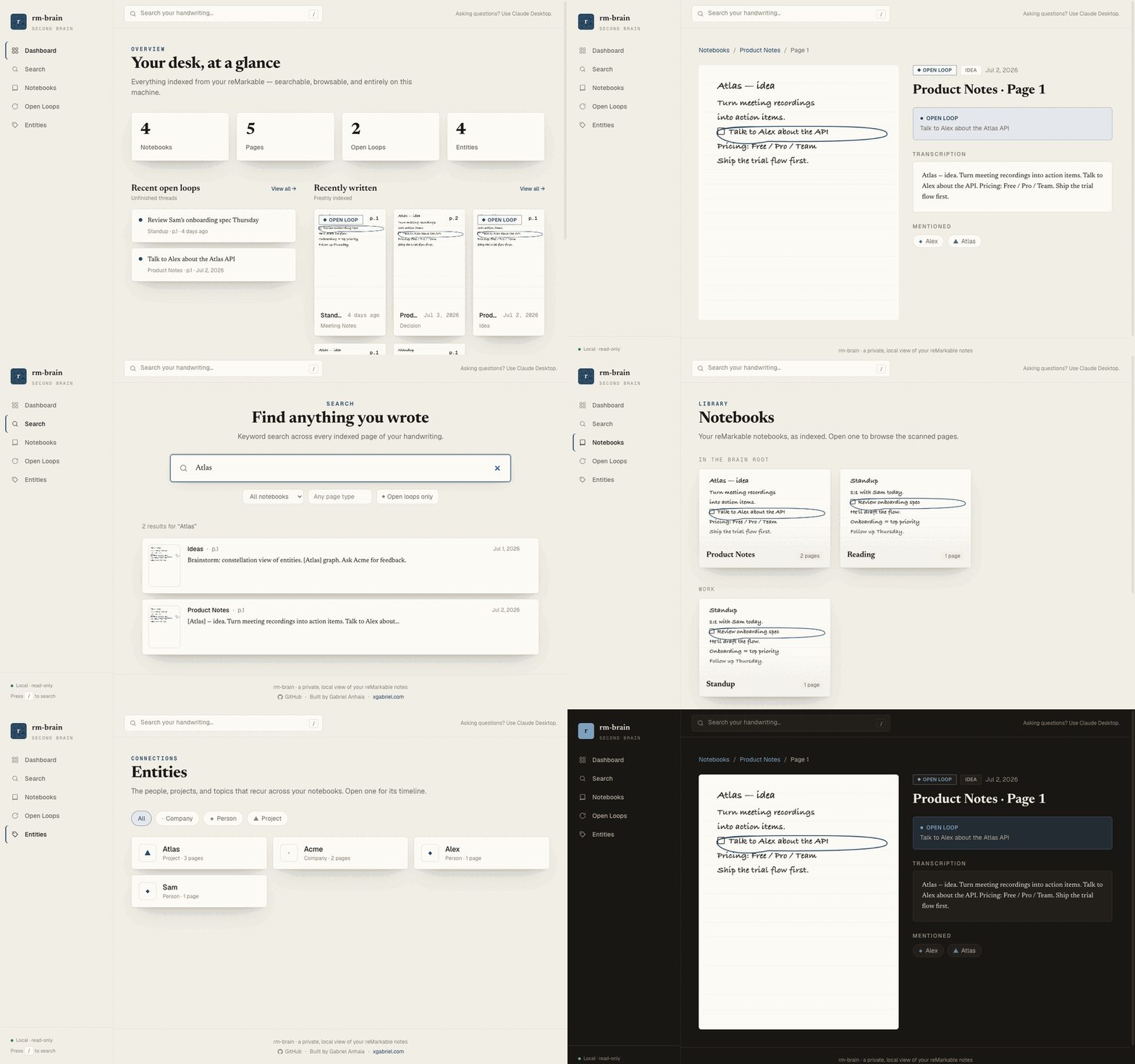
rm-brain web app in motion โ€” dashboard, typo-tolerant search, notebooks grouped by folder, page detail (scan beside transcription), and entities The local web app โ€” dashboard ยท search ยท notebooks ยท page detail ยท entities. Fictional example data.
--- rm-brain quietly syncs the notebooks you drop into a **Brain** folder on your reMarkable, transcribes and classifies the handwriting with the Claude API, and stores everything in a local SQLite database. You then **search and explore your notes as an ordinary conversation in Claude Desktop** โ€” no separate app, no hosted service, using your existing Claude subscription. > **You:** *"What did I decide about the Acme pricing model?"* > **Claude:** *Pulls it from your notes and answers with receipts โ€” notebook name, page > number, date, and the scanned page.* It's designed to feel less like a search box and more like a system that quietly organizes itself and surfaces things you forgot about. ## Why it's different - **Your handwriting, actually understood.** Claude vision transcribes messy handwriting and diagrams far better than built-in OCR, and classifies each page (journal / meeting / idea / decision / โ€ฆ), extracts people & projects, and flags open loops. - **The interface is a conversation, not a dashboard.** Search happens inside Claude Desktop via [MCP](https://modelcontextprotocol.io) โ€” you get a world-class chat UI for free. - **Local-first and private by design.** The database, page images, and manifest never leave your machine. See [Privacy](#-privacy--safety). - **Answers with receipts.** Every answer cites the notebook, page number, and date, and can show you the scanned page โ€” so you verify, not trust blindly. ## How it works ```mermaid flowchart TD A["โ˜๏ธ reMarkable Cloud"] -->|"rmapi: list Brain folder ยท stat ยท get"| B["๐Ÿ“ฆ .rmdoc archive
(.rm v6 vector files)"] B -->|rmc| C["๐Ÿ–ผ๏ธ per-page SVG"] C -->|rsvg-convert| D["๐Ÿž๏ธ page PNGs"] D -->|"Claude vision ยท 1 call/page"| E["โœ๏ธ Extraction
text ยท type ยท entities ยท open loops"] E --> F[("๐Ÿ—„๏ธ SQLite + FTS5
~/.rm-brain")] CLI["โŒจ๏ธ CLI
sync ยท search ยท backup"] --> F F <--> G["๐Ÿ”Œ MCP server"] G <--> H["๐Ÿ’ฌ Claude Desktop"] G <--> H2["๐Ÿค– ChatGPT"] G <--> H3["โœฆ Gemini"] F --> W["๐Ÿ–ฅ๏ธ Web app
browse ยท search (localhost)"] classDef cloud fill:#e8f0fe,stroke:#4285f4,color:#1a1a1a; classDef local fill:#e9f7ef,stroke:#27ae60,color:#1a1a1a; classDef ai fill:#f3e8fd,stroke:#8e44ad,color:#1a1a1a; class A cloud; class B,C,D,F,CLI,W local; class E,G,H,H2,H3 ai; ``` The MCP server speaks the open [Model Context Protocol](https://modelcontextprotocol.io), so any MCP-capable assistant can use your notes โ€” Claude Desktop (the primary, best-tested target), ChatGPT, Gemini, and others. See [docs/mcp.md](docs/mcp.md). reMarkable notebooks are stored as proprietary `.rm` v6 vector files (not PDFs), so pages are rendered with [`rmc`](https://github.com/ricklupton/rmc) + `rsvg-convert`. See [ARCHITECTURE.md](./ARCHITECTURE.md) for the full design. ## ๐Ÿ”’ Privacy & safety - **Local-first, always.** `db.sqlite`, page images, and the manifest live in one folder (`~/.rm-brain` by default) and never leave your machine as a whole. - **The only things that ever go over the network** are (a) individual page images sent to the Claude API during `sync`, and (b) individual queries + retrieved snippets sent through MCP while you search in Claude Desktop. - **Opt-in by folder.** Nothing is indexed unless you put the notebook in your Brain folder. - **The folder is the source of truth.** Remove a notebook from it and the next `sync` prunes it from your local index โ€” pages and images included. - **Hard exclusion always wins.** A notebook whose name matches `/^\./`, `/private/i`, or `/noindex/i` is skipped entirely, even inside the Brain folder โ€” and so is anything filed under a **subfolder** with such a name (e.g. `Brain/private/โ€ฆ`). - **Read-only cloud access.** rm-brain only ever *reads* from reMarkable (`list` / `stat` / `get`); it never uploads or modifies anything. - **No telemetry.** rm-brain phones home to nobody. See [SECURITY.md](./SECURITY.md). ## Prerequisites > โœ… **No jailbreak, rooting, developer mode, or SSH hacks โ€” ever.** rm-brain works entirely > through reMarkable's **official cloud sync** (via `rmapi`). Your tablet stays completely stock, > stock firmware, and under warranty. Nothing is installed on or modified on the device. | Tool | Why | Install | | --- | --- | --- | | **Node.js 20+** | runtime | [nodejs.org](https://nodejs.org) | | **rmapi** (ddvk `sync15` build) | reMarkable Cloud CLI | [ddvk/rmapi releases](https://github.com/ddvk/rmapi/releases) โ€” reMarkable's newer sync protocol returns HTTP 410 with older builds | | **rmc** | renders `.rm` v6 pages | `pipx install rmc` | | **librsvg** (`rsvg-convert`) | SVG โ†’ PNG | `brew install librsvg` | | **Anthropic API key** | handwriting extraction (used only during `sync`) | [console.anthropic.com](https://console.anthropic.com) | ## Quickstart ```bash # 1. Install git clone https://github.com/gabrielanhaia/remarkable-brain.git cd remarkable-brain npm install && npm run build npm link # puts `rm-brain` on your PATH # 2. Guided setup (pairs rmapi, saves your API key, wires Claude Desktop) rm-brain setup # 3. On the tablet: create a "Brain" folder, move a notebook in, let it sync rm-brain sync # 4. Fully quit & reopen Claude Desktop, then just ask it about your notes ``` The `setup` wizard checks your tools, pairs rmapi, **prompts for your API key once and saves it** (to `~/.rm-brain/config.json`, chmod 600 โ€” no re-`export` needed), helps you pick the Brain folder, offers to run the first sync, and can write your Claude Desktop config automatically. Re-run it anytime โ€” it's idempotent. ## Usage Once a notebook is indexed and Claude Desktop is connected, just talk to Claude: - *"What are my open loops?"* / *"What did I forget to follow up on?"* - *"Search my notes for the Atlas pricing decision."* - *"How has my thinking on the onboarding flow evolved?"* (entity timeline) - *"Show me the page where I sketched the architecture."* ### Web interface Prefer to *see* your notes? rm-brain ships a local-first, **read-only** web app โ€” an alternative way to **browse and search** your indexed notebooks and view the actual scanned handwriting in the browser. Its design is a quiet, fountain-pen-ink-on-fine-paper reading room that follows your system light/dark theme (scans always stay light paper, so handwriting never inverts). It complements the conversation, it doesn't replace it: **asking questions still happens in Claude Desktop** (over MCP); the web app is for seeing and searching. ![rm-brain web โ€” Dashboard](docs/screenshots/dashboard.png)

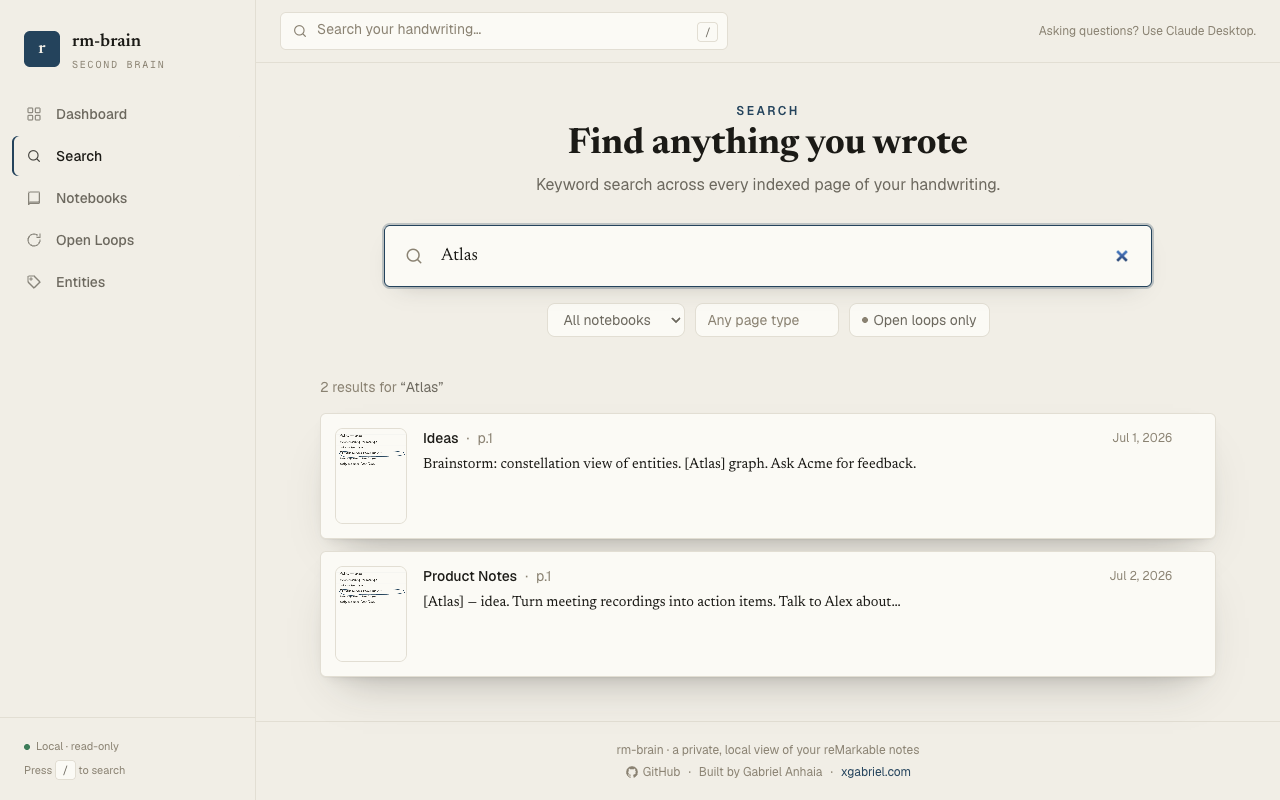
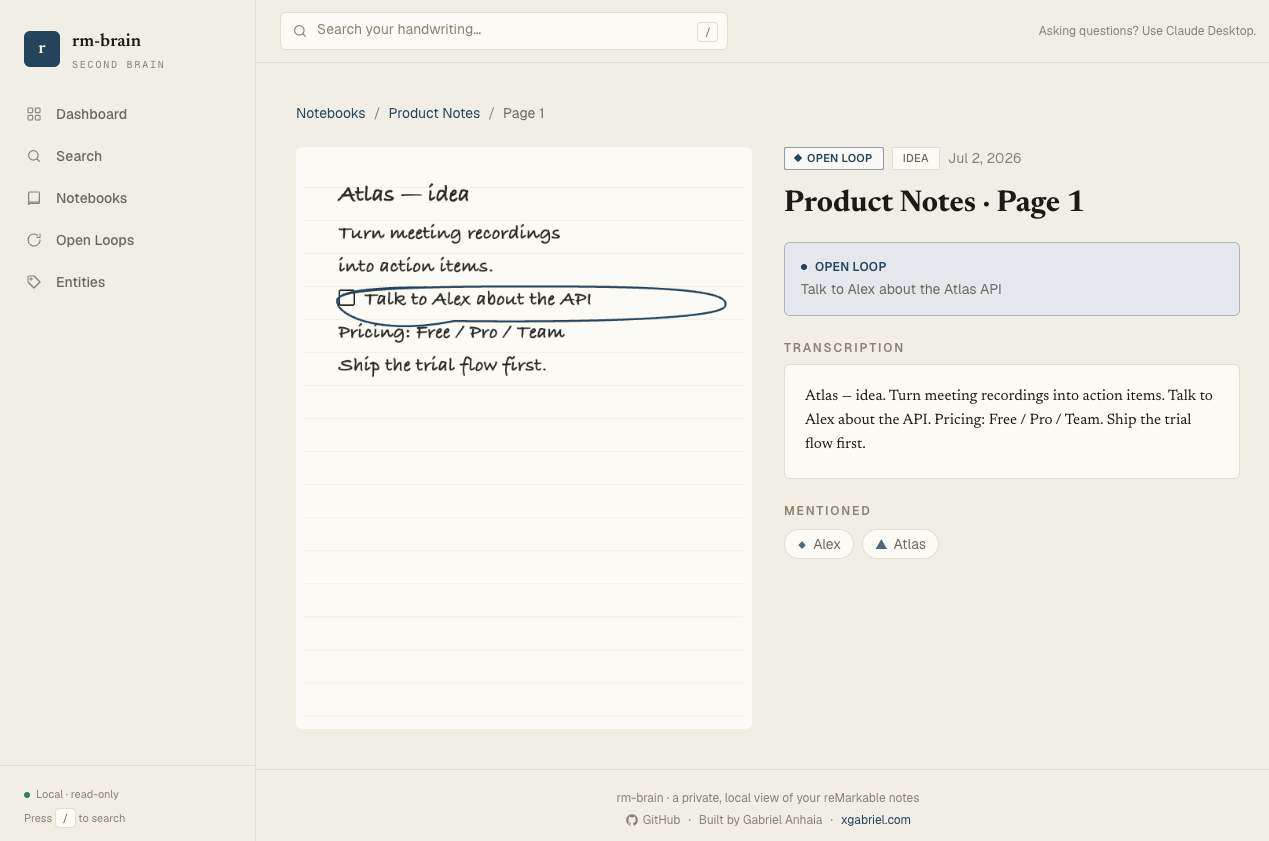
rm-brain web โ€” full-text search with filters and thumbnails rm-brain web โ€” page detail: scanned handwriting beside the transcription

Screens shown with fictional example data. Everything runs on your machine. ```bash rm-brain web # builds nothing โ€” opens http://localhost:4123 in your browser rm-brain web --port 8080 # pick a different port rm-brain web --host 127.0.0.1 # bind address (localhost only, by design) rm-brain web --no-open # don't auto-open the browser ``` It serves the Dashboard (counts + recent open loops and pages), **forgiving search** โ€” word forms (meeting/meetings), partial words, and small misspellings all match โ€” with filters (notebook, page type, open-loop only), a Notebooks grid **grouped by reMarkable subfolder**, per-page detail (scanned image side-by-side with the transcription), Open Loops, and Entity timelines. Same guarantees as the rest of rm-brain: it binds `127.0.0.1` only, exposes GET endpoints only, has no auth surface, and makes no outbound network calls. The **frontend ships prebuilt** (in `web/dist`), so there's no build step for end users โ€” just run `rm-brain web`. ### CLI reference | Command | What it does | | --- | --- | | `rm-brain setup` | Interactive setup wizard (start here) | | `rm-brain sync` | Pull Brain-folder notebooks, render, extract, index | | `rm-brain reindex` | Re-extract all indexed pages (after a prompt/model change) | | `rm-brain search ""` | Search from the terminal (keyword + local semantic) | | `rm-brain embed` | Build local semantic-search vectors (optional; on-device, no API) | | `rm-brain list` | Show indexed notebooks and page counts | | `rm-brain info` | Where the data lives + stats | | `rm-brain backup [dest]` | Write a portable `.tar.gz` of the whole index | | `rm-brain exclude ""` / `include ""` | Exclude (purges) / re-include a notebook | | `rm-brain purge` | Delete the entire local index | | `rm-brain doctor` | Check dependencies | | `rm-brain mcp` | Start the MCP server (Claude Desktop runs this) | | `rm-brain web` | Open the local read-only web app to browse & search your notes (`--port` / `--host` / `--no-open`) | ### Configuration All config is via environment variables (env wins) or the saved store (`~/.rm-brain/config.json`). | Env var | Default | Purpose | | --- | --- | --- | | `RM_BRAIN_HOME` | `~/.rm-brain` | Where all local data lives | | `RM_BRAIN_FOLDER` | `/Brain` | reMarkable folder whose notebooks get indexed (case-insensitive) | | `RMAPI_BIN` | `rmapi` | Path/name of the rmapi binary (ddvk sync15 build) | | `RMC_BIN` | `rmc` | Path/name of the rmc renderer | | `RSVG_BIN` | `rsvg-convert` | Path/name of rsvg-convert | | `ANTHROPIC_API_KEY` | โ€” | Required only for `sync` (extraction) | | `ANTHROPIC_MODEL` | `claude-sonnet-5` | Vision model for extraction | | `RM_BRAIN_SEARCH` | `auto` | `auto` uses local semantic search when available; `keyword` forces keyword-only | | `RM_BRAIN_EMBED_MODEL` | `Xenova/all-MiniLM-L6-v2` | On-device model for semantic embeddings | ### Portability & backup The whole index is one self-contained folder, so: - **Back up:** `rm-brain backup [dest.tar.gz]`, or just copy `~/.rm-brain`. - **Roam / auto-backup:** point `RM_BRAIN_HOME` at a Dropbox/iCloud/Syncthing folder. - **Restore:** extract the archive anywhere and point `RM_BRAIN_HOME` at it. ## Troubleshooting
rmapi says "failed to build documents tree โ€ฆ status 410" Your reMarkable account is on the newer sync protocol. Use the [**ddvk `sync15` build**](https://github.com/ddvk/rmapi/releases) of rmapi (a release binary is easiest), not the original `juruen/rmapi`. Then re-run `rm-brain doctor`.
Claude Desktop gives empty results even though the note exists Claude Desktop launches the MCP server once at startup and keeps it running. After any `rm-brain` update, **fully quit Claude Desktop (โŒ˜Q, not just close the window)** and reopen it so it reloads the server.
Claude answers from the calendar/memory instead of my notes Add a one-line personal instruction in **Claude Desktop โ†’ Settings โ†’ Profile / Custom Instructions**: *"I keep my handwritten notes in rm-brain. For anything about my tasks, plans, or notes, use the rm-brain tools first."* The server also ships proactive instructions, but a personal instruction is the most reliable nudge.
My notebook isn't being indexed Make sure it's **inside the Brain folder** (case-insensitive) and that the tablet has **synced to the cloud** (Wi-Fi on). Then run `rm-brain sync`. Notebooks named `private`/`noindex`/dotted are skipped by design.
I changed the extraction prompt / model โ€” old pages didn't update A normal `sync` skips pages whose image is unchanged. Run `rm-brain reindex` to re-extract everything.
## Roadmap / not in v1 (on purpose) Search is FTS5 keyword by default (stemmed, typo-tolerant, order-independent), with **optional on-device semantic search** you can turn on locally (see [docs/search.md](docs/search.md)) โ€” no cloud search, ever. No notifications or daily digests. The web app is a read-only way to *see and search* your notes โ€” asking questions stays in Claude Desktop, so this remains a tool you reach for, not one that reaches for you. Ideas and PRs welcome โ€” see [CONTRIBUTING.md](./CONTRIBUTING.md). ## Documentation Want to understand how it works under the hood? - **[How search works](docs/search.md)** โ€” local keyword search, stemming (word forms), typo tolerance, and word-order independence, all offline. - **[How rm-brain uses AI](docs/how-ai-works.md)** โ€” where Claude vision comes in (indexing only), what it extracts from each page, and exactly what does and doesn't cross the network. - **[How the MCP integration works](docs/mcp.md)** โ€” the read-only tools rm-brain exposes to Claude Desktop, and how a question becomes an answer with citations. - **[ARCHITECTURE.md](./ARCHITECTURE.md)** โ€” the full system design and data flow. ## Contributing Contributions are very welcome! Please read [CONTRIBUTING.md](./CONTRIBUTING.md) to get set up, and [CODE_OF_CONDUCT.md](./CODE_OF_CONDUCT.md). Security issues: [SECURITY.md](./SECURITY.md). ## ๐Ÿ’› Support If rm-brain is useful to you, consider supporting development โ€” it genuinely helps and keeps the project going:

Buy Me a Coffee    xgabriel.com

You can also โญ star the repo โ€” it helps others discover it. ## License [MIT](./LICENSE) ยฉ [Gabriel Anhaia](https://xgabriel.com)
Built by Gabriel Anhaia ยท โ˜• Buy me a coffee