
Connect any MCP-compatible AI assistant (Claude, Cursor, and others) to your eToro account for portfolio analysis, market research, and trading.
[](https://github.com/gabrielcerutti/etoro-mcp-server/actions/workflows/ci.yml)
[](https://deepwiki.com/gabrielcerutti/etoro-mcp-server)
[](https://nodejs.org)
[](https://www.typescriptlang.org)
[](https://modelcontextprotocol.io)
[](LICENSE)
[Overview](#overview) • [Installation](#installation) • [Configuration](#configuration) • [Tools](#tools-35-total)
---
## Overview
MCP server wrapping the [eToro public API](https://public-api.etoro.com/api/v1), exposing **35 tools** for AI assistants (Claude Desktop, Cursor, Claude Code, etc.). Built for **investment research and portfolio analysis** — assess positions, research instruments and themes, vet popular investors for copy-trading, backtest DCA strategies against historical data. Trading is fully supported, but use care: letting an AI agent place real-money orders is genuinely risky, and you should treat it as such.
## What Can You Do With It?
The server is built around **research workflows** first. The examples below show real multi-tool conversations — the assistant chains several `etoro_*` calls together to answer a single question. Numbers are representative; actual responses draw from live eToro data.
### 1. Portfolio health check
The assistant calls `etoro_get_portfolio` to pull your open positions, then `etoro_get_instruments` to resolve instrument IDs to names and sectors, and `etoro_get_rates` for live prices. It assembles a full snapshot from the raw data.
> **You:** How is my portfolio doing? Break it down by sector and flag any trouble spots.
>
> **Assistant:** I pulled your portfolio (98 open positions), resolved each instrument, and fetched live rates. Here's the picture:
>
> - **Cash:** $22,265 • **Invested:** $45,782 • **Positions:** 98 open
>
> **Sector breakdown:**
>
> | Sector | % of invested | Top holdings |
> | --- | --- | --- |
> | Technology | 38% | GOOG, META, MSFT, NVDA, AMZN |
> | ETFs & Index | 22% | VOO, QQQ, SOXX, ARGT, IEUR |
> | Crypto | 15% | BTC, ETH |
> | Healthcare | 10% | UNH |
> | Financials | 8% | SAP |
> | Other | 7% | LDO + others |
>
> 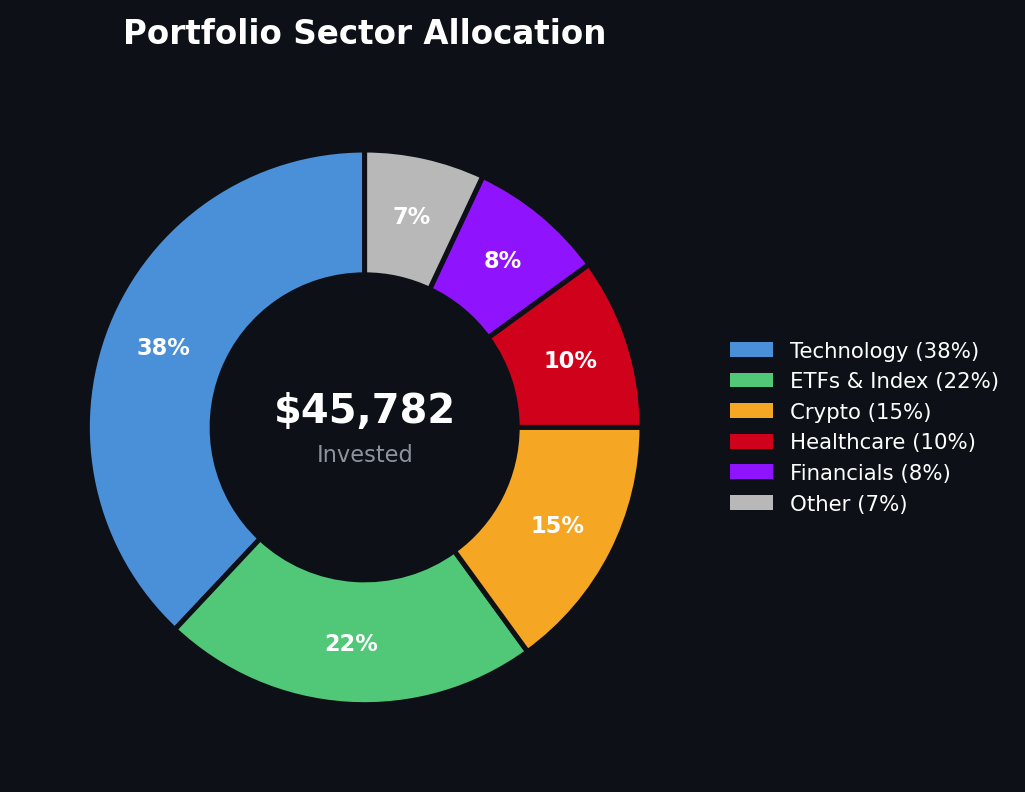 >
> **Trouble spot:** Your tech sleeve is 38% of invested capital and concentrated in 5 mega-caps. A single sector drawdown hits hard — consider whether the ETF overlap (QQQ, SOXX) is intentional diversification or accidental doubling-down.
**Tools used:** `etoro_get_portfolio` → `etoro_get_instruments` → `etoro_get_rates`
---
### 2. Instrument research
Search is keyword-based — `etoro_search_instruments` finds instruments by ticker or company name, then you chain `etoro_get_instruments` for full details and `etoro_get_candles` for price history.
> **You:** Pull up NVDA — I want the current price and a weekly chart for the last month.
>
> **Assistant:** Searching for "NVDA" and pulling candle data:
>
> - **NVIDIA Corporation** (NVDA) — InstrumentID 1545
> - **Live rate:** Bid $208.14 / Ask $208.40
> - **Exchange:** NASDAQ • **Type:** Stock • **Sector:** Semiconductors
>
> Weekly candles (last 5 weeks):
>
> | Week of | Open | High | Low | Close |
> | --- | --- | --- | --- | --- |
> | Mar 22 | $172.65 | $181.20 | $167.01 | $167.61 |
> | Mar 29 | $165.26 | $177.47 | $162.95 | $176.72 |
> | Apr 5 | $176.12 | $189.98 | $173.66 | $188.53 |
> | Apr 12 | $184.15 | $201.69 | $183.98 | $201.64 |
> | Apr 19 | $199.02 | $210.92 | $197.23 | $208.26 |
>
>
>
> **Trouble spot:** Your tech sleeve is 38% of invested capital and concentrated in 5 mega-caps. A single sector drawdown hits hard — consider whether the ETF overlap (QQQ, SOXX) is intentional diversification or accidental doubling-down.
**Tools used:** `etoro_get_portfolio` → `etoro_get_instruments` → `etoro_get_rates`
---
### 2. Instrument research
Search is keyword-based — `etoro_search_instruments` finds instruments by ticker or company name, then you chain `etoro_get_instruments` for full details and `etoro_get_candles` for price history.
> **You:** Pull up NVDA — I want the current price and a weekly chart for the last month.
>
> **Assistant:** Searching for "NVDA" and pulling candle data:
>
> - **NVIDIA Corporation** (NVDA) — InstrumentID 1545
> - **Live rate:** Bid $208.14 / Ask $208.40
> - **Exchange:** NASDAQ • **Type:** Stock • **Sector:** Semiconductors
>
> Weekly candles (last 5 weeks):
>
> | Week of | Open | High | Low | Close |
> | --- | --- | --- | --- | --- |
> | Mar 22 | $172.65 | $181.20 | $167.01 | $167.61 |
> | Mar 29 | $165.26 | $177.47 | $162.95 | $176.72 |
> | Apr 5 | $176.12 | $189.98 | $173.66 | $188.53 |
> | Apr 12 | $184.15 | $201.69 | $183.98 | $201.64 |
> | Apr 19 | $199.02 | $210.92 | $197.23 | $208.26 |
>
> 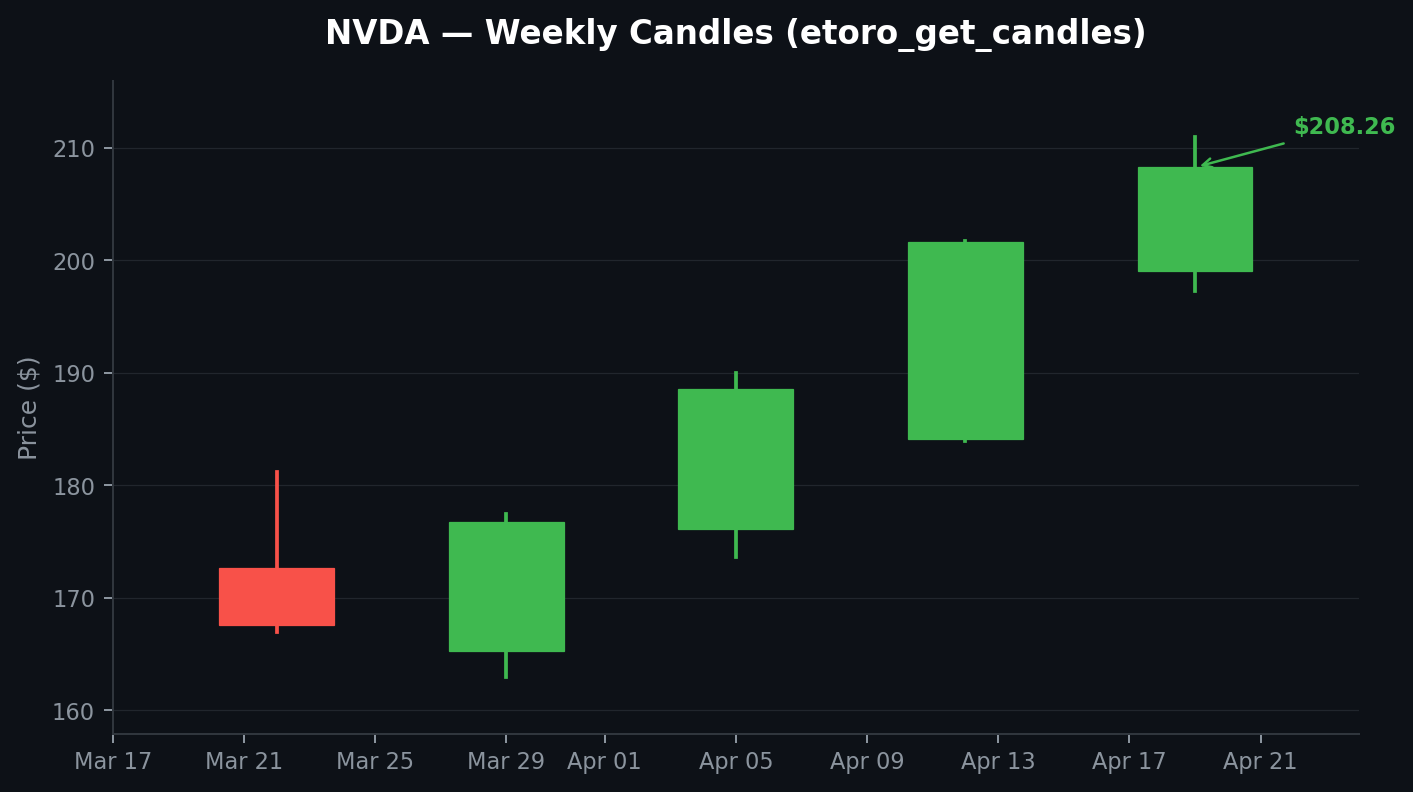 >
> NVDA rallied +27% off the March low ($162.95 → $208.26), with each weekly candle printing a higher low. Momentum is strong but the move is getting extended.
**Tools used:** `etoro_search_instruments` → `etoro_get_instruments` → `etoro_get_rates` → `etoro_get_candles`
---
### 3. Copy-trading due diligence
Vet popular investors using real public data. The assistant calls `etoro_get_user_profile` for identity and stats, then `etoro_get_user_performance` for the full yearly return history.
> **You:** Vet user jeppekirkbonde for a long-term copy allocation. I want the honest risk picture.
>
> **Assistant:** Here's what the data says on **jeppekirkbonde**:
>
> - **Name:** Jeppe Kirk Bonde • **PI Level:** 6 (highest tier)
> - **Copiers:** 25,000+ • **AUM:** $200M+
> - **Background:** MSc Finance, Copenhagen Business School
>
> **Year-by-year performance (real data):**
>
> | Year | Return | | Year | Return |
> | --- | --- | --- | --- | --- |
> | 2013 | +8.9% | | 2020 | +36.9% |
> | 2014 | −14.3% | | 2021 | +15.9% |
> | 2015 | +22.4% | | 2022 | −19.2% |
> | 2016 | +81.1% | | 2023 | +23.9% |
> | 2017 | +150.9% | | 2024 | +21.0% |
> | 2018 | −10.9% | | 2025 | +37.7% |
> | 2019 | +45.1% | | | |
>
>
>
> NVDA rallied +27% off the March low ($162.95 → $208.26), with each weekly candle printing a higher low. Momentum is strong but the move is getting extended.
**Tools used:** `etoro_search_instruments` → `etoro_get_instruments` → `etoro_get_rates` → `etoro_get_candles`
---
### 3. Copy-trading due diligence
Vet popular investors using real public data. The assistant calls `etoro_get_user_profile` for identity and stats, then `etoro_get_user_performance` for the full yearly return history.
> **You:** Vet user jeppekirkbonde for a long-term copy allocation. I want the honest risk picture.
>
> **Assistant:** Here's what the data says on **jeppekirkbonde**:
>
> - **Name:** Jeppe Kirk Bonde • **PI Level:** 6 (highest tier)
> - **Copiers:** 25,000+ • **AUM:** $200M+
> - **Background:** MSc Finance, Copenhagen Business School
>
> **Year-by-year performance (real data):**
>
> | Year | Return | | Year | Return |
> | --- | --- | --- | --- | --- |
> | 2013 | +8.9% | | 2020 | +36.9% |
> | 2014 | −14.3% | | 2021 | +15.9% |
> | 2015 | +22.4% | | 2022 | −19.2% |
> | 2016 | +81.1% | | 2023 | +23.9% |
> | 2017 | +150.9% | | 2024 | +21.0% |
> | 2018 | −10.9% | | 2025 | +37.7% |
> | 2019 | +45.1% | | | |
>
> 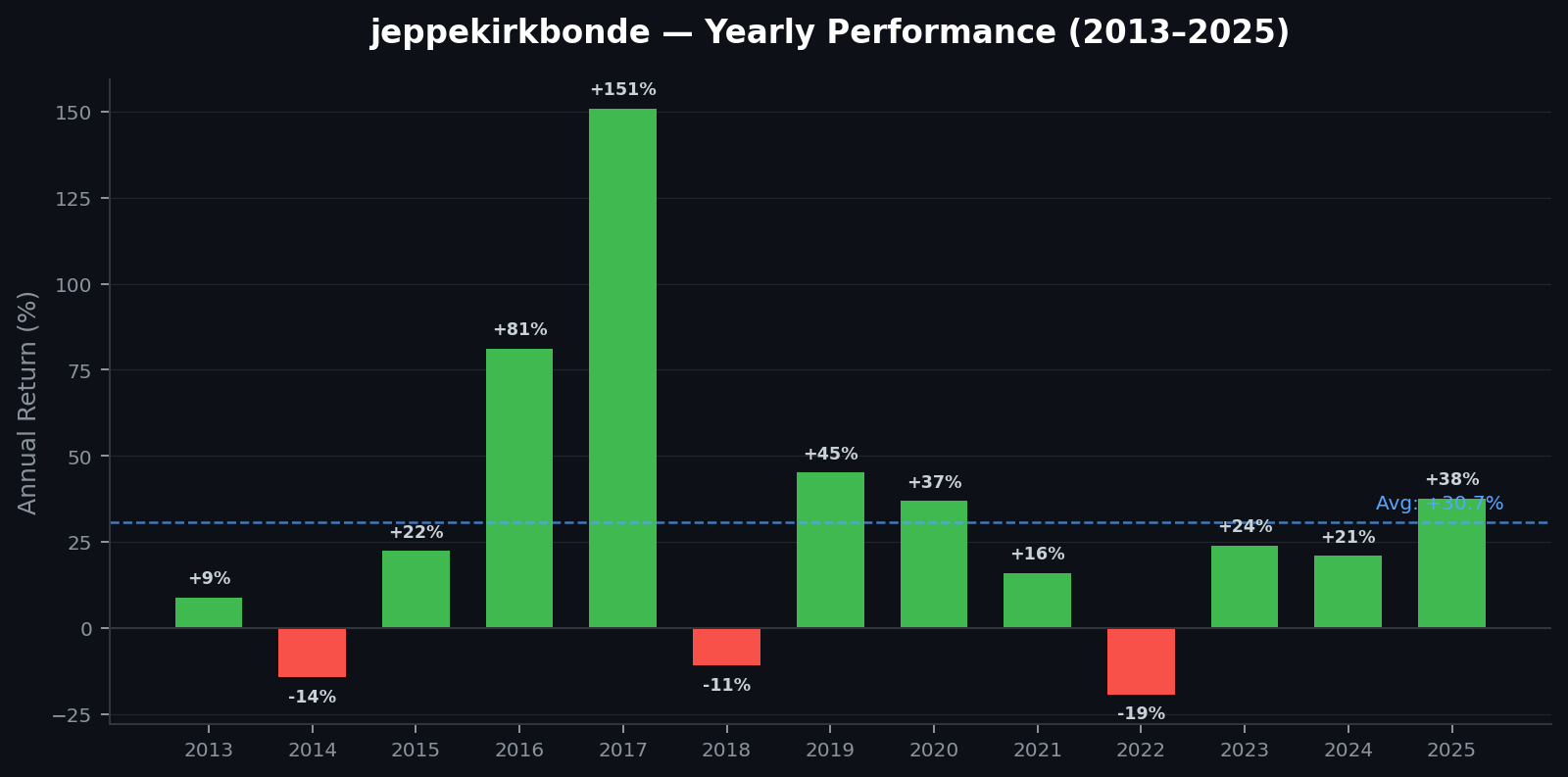 >
> **Average annual return:** +30.7% across 13 full years. Three down years (2014, 2018, 2022) with a max drawdown of −19.2% in the 2022 tech selloff.
>
> **What you should know:**
>
> 1. This is a concentrated, long-only US tech strategy. The +150.9% in 2017 and +81.1% in 2016 are outliers — don't expect those every year.
> 2. Down years are real: 2022 cost −19.2%. If you can't stomach a 20% paper loss, this isn't the right copy.
> 3. 25K+ copiers and $200M+ AUM means his moves have market impact in smaller names. Slippage is a factor.
>
> Reasonable for multi-year capital if you accept the volatility. Not appropriate for money you need inside 18 months.
**Tools used:** `etoro_get_user_profile` → `etoro_get_user_performance`
---
### 4. Watchlist management
The full watchlist lifecycle — create, populate, rename, and curate — all through natural language.
> **You:** Create a "Semiconductor" watchlist and add NVDA, AMD, ASML, TSM, and AVGO to it.
>
> **Assistant:** Done:
>
> 1. Created watchlist **"Semiconductor"** (ID: 48291)
> 2. Searched and resolved all 5 tickers to instrument IDs
> 3. Added: NVDA (1545), AMD (2842), ASML (5765), TSM (3901), AVGO (6192)
>
> Your watchlists now:
>
> | Watchlist | Items |
> | --- | --- |
> | Recently Invested | 38 |
> | My Watchlist | 34 |
> | Stocks pre-screening | 69 |
> | ETFs | 54 |
> | Semiconductor ← new | 5 |
> | People & Smart Portfolios | 26 |
> | Crypto | 6 |
> | Commodities | 5 |
**Tools used:** `etoro_create_watchlist` → `etoro_search_instruments` → `etoro_add_watchlist_items` → `etoro_get_watchlists`
---
### 5. DCA backtest with historical candles
Use `etoro_get_candles` to pull years of OHLCV data, then simulate a dollar-cost averaging strategy — no orders placed, pure research.
> **You:** Backtest a $500/month DCA into QQQ over the last 3 years. What would I have today?
>
> **Assistant:** Pulling weekly QQQ candles (156 weeks) and simulating $500 on the first trading day of each month:
>
> - **Total invested:** $18,000 (36 months × $500)
> - **Units accumulated:** ~38.2 QQQ
> - **Current value:** $25,365 (at $664.01/share)
> - **Gain:** +$7,365 (+40.9% on invested capital)
> - **Approx. IRR:** ~12.8%/year
>
> **Worst stretch:** Nov 2022 – Mar 2023, paper drawdown of −22% on the accumulated stack. You bought through it — those discounted shares are now your biggest winners.
>
> No orders placed. This is research only.
**Tools used:** `etoro_get_candles` → `etoro_get_rates` (for current price)
---
### 6. Macro-aware portfolio review
Combine portfolio data with the assistant's general knowledge to get a risk assessment tied to your actual holdings.
> **You:** My portfolio is heavy on tech. Flag any risks from this week's macro calendar.
>
> **Assistant:** Your tech exposure totals ~$17,400 (38% of invested capital) across GOOG, META, MSFT, NVDA, AMZN and the SOXX/QQQ ETFs. This week's watch-list:
>
> - **Wed** — CPI print (core consensus +0.3% MoM). A hot number re-prices rate-cut odds → tech multiples compress first.
> - **Thu** — Fed speakers (Williams, Waller). Hawkish language strengthens USD, pressuring mega-cap international revenue.
> - **Fri** — NVDA earnings (after close). Binary event for your largest single-stock position.
>
> **What this means for you:**
>
> - A hot CPI + hawkish Fed combo could knock 3–5% off your tech sleeve short-term.
> - NVDA earnings will drive ~8% of your portfolio's week-over-week change. Know your thesis before it prints.
**Tools used:** `etoro_get_portfolio` → `etoro_get_instruments` → `etoro_get_rates` (+ assistant's macro knowledge)
---
>
> **Average annual return:** +30.7% across 13 full years. Three down years (2014, 2018, 2022) with a max drawdown of −19.2% in the 2022 tech selloff.
>
> **What you should know:**
>
> 1. This is a concentrated, long-only US tech strategy. The +150.9% in 2017 and +81.1% in 2016 are outliers — don't expect those every year.
> 2. Down years are real: 2022 cost −19.2%. If you can't stomach a 20% paper loss, this isn't the right copy.
> 3. 25K+ copiers and $200M+ AUM means his moves have market impact in smaller names. Slippage is a factor.
>
> Reasonable for multi-year capital if you accept the volatility. Not appropriate for money you need inside 18 months.
**Tools used:** `etoro_get_user_profile` → `etoro_get_user_performance`
---
### 4. Watchlist management
The full watchlist lifecycle — create, populate, rename, and curate — all through natural language.
> **You:** Create a "Semiconductor" watchlist and add NVDA, AMD, ASML, TSM, and AVGO to it.
>
> **Assistant:** Done:
>
> 1. Created watchlist **"Semiconductor"** (ID: 48291)
> 2. Searched and resolved all 5 tickers to instrument IDs
> 3. Added: NVDA (1545), AMD (2842), ASML (5765), TSM (3901), AVGO (6192)
>
> Your watchlists now:
>
> | Watchlist | Items |
> | --- | --- |
> | Recently Invested | 38 |
> | My Watchlist | 34 |
> | Stocks pre-screening | 69 |
> | ETFs | 54 |
> | Semiconductor ← new | 5 |
> | People & Smart Portfolios | 26 |
> | Crypto | 6 |
> | Commodities | 5 |
**Tools used:** `etoro_create_watchlist` → `etoro_search_instruments` → `etoro_add_watchlist_items` → `etoro_get_watchlists`
---
### 5. DCA backtest with historical candles
Use `etoro_get_candles` to pull years of OHLCV data, then simulate a dollar-cost averaging strategy — no orders placed, pure research.
> **You:** Backtest a $500/month DCA into QQQ over the last 3 years. What would I have today?
>
> **Assistant:** Pulling weekly QQQ candles (156 weeks) and simulating $500 on the first trading day of each month:
>
> - **Total invested:** $18,000 (36 months × $500)
> - **Units accumulated:** ~38.2 QQQ
> - **Current value:** $25,365 (at $664.01/share)
> - **Gain:** +$7,365 (+40.9% on invested capital)
> - **Approx. IRR:** ~12.8%/year
>
> **Worst stretch:** Nov 2022 – Mar 2023, paper drawdown of −22% on the accumulated stack. You bought through it — those discounted shares are now your biggest winners.
>
> No orders placed. This is research only.
**Tools used:** `etoro_get_candles` → `etoro_get_rates` (for current price)
---
### 6. Macro-aware portfolio review
Combine portfolio data with the assistant's general knowledge to get a risk assessment tied to your actual holdings.
> **You:** My portfolio is heavy on tech. Flag any risks from this week's macro calendar.
>
> **Assistant:** Your tech exposure totals ~$17,400 (38% of invested capital) across GOOG, META, MSFT, NVDA, AMZN and the SOXX/QQQ ETFs. This week's watch-list:
>
> - **Wed** — CPI print (core consensus +0.3% MoM). A hot number re-prices rate-cut odds → tech multiples compress first.
> - **Thu** — Fed speakers (Williams, Waller). Hawkish language strengthens USD, pressuring mega-cap international revenue.
> - **Fri** — NVDA earnings (after close). Binary event for your largest single-stock position.
>
> **What this means for you:**
>
> - A hot CPI + hawkish Fed combo could knock 3–5% off your tech sleeve short-term.
> - NVDA earnings will drive ~8% of your portfolio's week-over-week change. Know your thesis before it prints.
**Tools used:** `etoro_get_portfolio` → `etoro_get_instruments` → `etoro_get_rates` (+ assistant's macro knowledge)
---