# fdbg
An npm package for easier "console.logs" that are still traceable on the browser.
## Why?
Because generally, when I am trying to debug something, instead of using a `debugger`
I use some kind of `console.log` variants. But sometimes, it is very annoying
to change the syntax just to add a `console.log` so I created this npm package inspired
by Rust's `dbg!` macro which I think is really helpful.
## How?
To replicate Rust's `dbg!` behaviour there are a few challenges to overcome in JavaScript.
Just plainly looking at Rust's behaviour, we can see the reason they use macros,
to print the actual code alognside the yielded value. This is intended so you can see a bit of
context beside it.
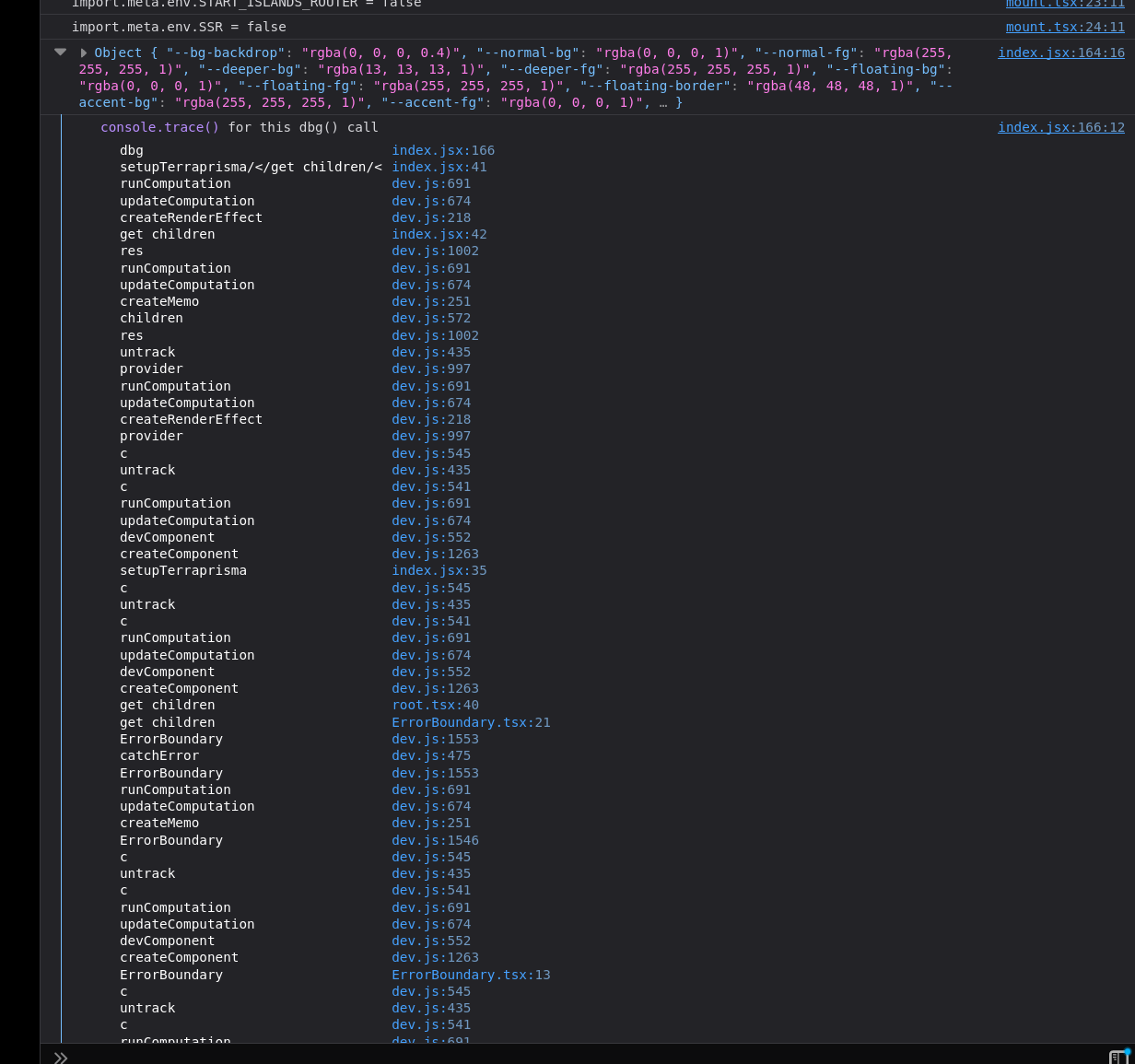
Since this is not quite possible with JavaScript (at least right now), we can just collapse the
output with a trace to the dbg call. This is how it looks in the end:
This is the same example when uncollapsed:
The other challenge is with `dbg` being global. For this, one can easily assign the
dbg function to the global context where the JS will be running, in the case of the browser,
the window. As for the TypeScript support for this, you can just declare the dbg function inside
of the global and it will be recognized flawlessly.
## When is it most useful?
When I would consider this most useful is at some annoying to debug parts of the code,
like in places where you may be assigning values or similar ones. Consider the follwowing React component:
```javascript
export default function Button({ disabled, children }) {
return ;
}
```
Now, saying you wanted to see what the value of disabled is at all re-renders you may write a new line
using a console.log, like:
```javascript
export default function Button({ disabled, children }) {
console.log(disabled);
return ;
}
```
But this will, at many times, take a long time to write and will be quite a hastle to always write.
So you can use the `dbg` function, as follows:
```javascript
export default function Button({ disabled, children }) {
return ;
}
```
This will keep the value for `disabled` in the `aria-disabled`, but will still console.log it
without any hastle at all. No importing nor anything.
## How to use it?
To use it is quite simple. You will first need to install with your favorite package manager, like:
```bash
npm install fdbg
```
Then, since the package manually declares the dbg function on the global scope of your running project
it requires at least to be imported for the code to run, so you need to find some index point of your code
and import it there, as simple as follows:
```javascript
import 'fdbg';
```
That's it, you can use the `dbg` function anywhere you wish and it will work flawlessly (I hope).
You will not need to import anything from `dbg` besides this import though, since the dbg function
will be declared in the global scope of your application.
That's it, thanks.
 This is the same example when uncollapsed:
 The other challenge is with `dbg` being global. For this, one can easily assign the
dbg function to the global context where the JS will be running, in the case of the browser,
the window. As for the TypeScript support for this, you can just declare the dbg function inside
of the global and it will be recognized flawlessly.
## When is it most useful?
When I would consider this most useful is at some annoying to debug parts of the code,
like in places where you may be assigning values or similar ones. Consider the follwowing React component:
```javascript
export default function Button({ disabled, children }) {
return ;
}
```
Now, saying you wanted to see what the value of disabled is at all re-renders you may write a new line
using a console.log, like:
```javascript
export default function Button({ disabled, children }) {
console.log(disabled);
return ;
}
```
But this will, at many times, take a long time to write and will be quite a hastle to always write.
So you can use the `dbg` function, as follows:
```javascript
export default function Button({ disabled, children }) {
return ;
}
```
This will keep the value for `disabled` in the `aria-disabled`, but will still console.log it
without any hastle at all. No importing nor anything.
## How to use it?
To use it is quite simple. You will first need to install with your favorite package manager, like:
```bash
npm install fdbg
```
Then, since the package manually declares the dbg function on the global scope of your running project
it requires at least to be imported for the code to run, so you need to find some index point of your code
and import it there, as simple as follows:
```javascript
import 'fdbg';
```
That's it, you can use the `dbg` function anywhere you wish and it will work flawlessly (I hope).
You will not need to import anything from `dbg` besides this import though, since the dbg function
will be declared in the global scope of your application.
That's it, thanks.
The other challenge is with `dbg` being global. For this, one can easily assign the
dbg function to the global context where the JS will be running, in the case of the browser,
the window. As for the TypeScript support for this, you can just declare the dbg function inside
of the global and it will be recognized flawlessly.
## When is it most useful?
When I would consider this most useful is at some annoying to debug parts of the code,
like in places where you may be assigning values or similar ones. Consider the follwowing React component:
```javascript
export default function Button({ disabled, children }) {
return ;
}
```
Now, saying you wanted to see what the value of disabled is at all re-renders you may write a new line
using a console.log, like:
```javascript
export default function Button({ disabled, children }) {
console.log(disabled);
return ;
}
```
But this will, at many times, take a long time to write and will be quite a hastle to always write.
So you can use the `dbg` function, as follows:
```javascript
export default function Button({ disabled, children }) {
return ;
}
```
This will keep the value for `disabled` in the `aria-disabled`, but will still console.log it
without any hastle at all. No importing nor anything.
## How to use it?
To use it is quite simple. You will first need to install with your favorite package manager, like:
```bash
npm install fdbg
```
Then, since the package manually declares the dbg function on the global scope of your running project
it requires at least to be imported for the code to run, so you need to find some index point of your code
and import it there, as simple as follows:
```javascript
import 'fdbg';
```
That's it, you can use the `dbg` function anywhere you wish and it will work flawlessly (I hope).
You will not need to import anything from `dbg` besides this import though, since the dbg function
will be declared in the global scope of your application.
That's it, thanks.