
English | 中文
BoxPlayer - unified cloud drive management, smart media library, media servers, and high-speed downloads.
🌐 Website: xbyvideohub.com



[](#features-) [](#pro-vs-open-source-) [](#new-features-) [](#screenshots-) [](#installation-) [](#clouddrive-cli-) [](#wechat-official-account-) [](#community-) [](#credits-) [](#disclaimer-)
# Features [](#features-)
## Media Servers
1. **Multiple server types**: connect to popular media servers such as Emby, Jellyfin, and Plex.
2. **Custom server icons**: assign a custom icon to each media server so multiple instances are easy to tell apart.
3. **Aggregated home page**: view Continue Watching, Recently Added, Movies, TV Shows, Anime, and more in one place.
4. **Full library browsing**: browse by media type, including movies, TV series, anime, documentaries, poster wall, and list views.
5. **Media server search**: search inside one server or across multiple servers at once.
6. **Episode details**: show posters, ratings, summaries, episode lists, and playback progress.
## Multiple Cloud Drives
7. **Multi-platform cloud drive support**: supports Aliyun Drive, Baidu Netdisk, 123Pan, 115 Drive, and other mainstream cloud drive services.
8. **WebDAV connections**: connect to Quark Cloud Drive, Tianyi Cloud, and more through WebDAV.
9. **Local folder import**: import local folders and scrape TMDB metadata.
10. **Multi-account management**: sign in to and manage multiple cloud drive accounts at the same time.
## Smart Media Library
11. **TMDB metadata scraping**: scan cloud drives and local files, then fetch movie and TV metadata from TMDB.
12. **Media organization**: classify and organize media files into a complete personal media library.
13. **Unified search**: search across cloud drives and local libraries to find media quickly.
## Document AI
13.1 **Single-document questions**: open a supported PDF, EPUB, TXT, Markdown, or DOCX file and select **BoxPlayer AI / Analyze with AI** to ask about that document in Preview.
13.2 **Multi-document conversations**: select supported files from a cloud-drive list, folder, or search result, then ask one question across up to 10 sources.
13.3 **Grounded answers**: start with built-in prompts such as Summarize, Key takeaways, Improve, and Next steps; answers include hoverable source citations and PDF location jumps.
13.4 **Source control**: browse the current cloud drive from the conversation to add files in batches, use global filename search as a shortcut, and type `@filename` to clarify the source in a prompt.
13.5 **Conversation controls**: switch to a wider view, clear the current conversation, copy an answer, and submit response feedback without leaving the document workflow.
## Playback
14. **Online HD playback**: play original-quality videos in many formats directly from cloud drives.
15. **Multi-audio tracks**: switch between audio tracks inside the player.
16. **External subtitles**: load external subtitle files and switch between subtitle tracks.
17. **Video stream and quality switching**: switch video streams and choose quality according to network conditions.
18. **Playback speed control**: customize playback speed.
19. **Playlist management**: create and manage playlists.
20. **External players**: supports professional players such as MPV and IINA.
## High-Speed Downloads
21. **Aria2c downloads**: built-in high-speed Aria2c engine with multi-threaded downloads.
22. **Remote downloads**: use remote Aria2 to download files directly to a VPS or NAS.
## File Management
23. **Folder tree view**: a dedicated folder tree for fast navigation and operations.
24. **Smart sorting**: show folder sizes and sort folders and files together by name, size, or time.
25. **Batch operations**: batch rename large numbers of files and deeply nested folders.
26. **Quick preview**: copy files quickly, preview video sprite images, and delete files directly.
27. **Large-scale file handling**: manage tens of thousands of folders and files, and list all files in a folder at once.
28. **Bulk transfer**: upload or download massive numbers of files and folders in one operation.
## Cross-Platform
29. **Platform support**: supports Windows 7-11, macOS, and Linux.
 # Pro vs Open Source [](#pro-vs-open-source-)
BoxPlayer keeps the core client free and open source: file management, media playback, cloud-drive connections, local reading, and clouddrive-cli automation remain available. Pro mainly covers hosted AI features and account services that create recurring server costs.
| Capability | Not signed in | Signed in · Free | Pro |
|---|---|---|---|
| Multi-cloud file management, upload, download, folder tree | — | ✅ | ✅ |
| Video / music playback, local media library, media server clients | ✅ | ✅ | ✅ |
| Local book reading, bookshelf, highlights, notes, bookmarks | ✅ | ✅ | ✅ |
| clouddrive-cli / MCP Agent tools | ✅ | ✅ | ✅ |
| BYOK · Use your own third-party API key for AI | ✅ Your own quota | ✅ Your own quota | ✅ Your own quota |
| Built-in BoxPlayer AI models | ❌ | ❌ | ✅ Monthly hosted AI credits |
| AI Smart Search, semantic indexing | ❌ | ❌ | ✅ |
| AI Agent cloud-drive search | ❌ | ❌ | ✅ |
| PDF / EPUB AI reading companion | ❌ | ❌ | ✅ |
| Reader AI instant translation | ❌ | ❌ | ✅ |
| Reader AI cloud text-to-speech | ❌ | ❌ | ✅ 🚧 Coming soon |
| Reader basic text-to-speech (Local TTS) | ❌ | ✅ (sign-in required) | ✅ |
| One-click public share save | ❌ | 5/day | ✅ Unlimited |
| TMDB + Douban movie discovery | Basic | Basic | ✅ |
| Website support tickets and priority handling | Standard | Standard | ✅ Priority support |
> **AI credit notes:** Pro hosted AI features (AI Search, AI Reading Companion, Translation, AI Media Scraping) draw from a unified credit pool that resets monthly. **BYOK (bring your own key) is completely free** for everyone — uses your own third-party API quota, no BoxPlayer credits consumed, works even without signing in. **Signed-in free users** also get local TTS and 5 public share saves per day. Cloud TTS is coming soon.
# New Features [](#new-features-)
> This release ships **45+ major upgrades**, covering AI Read-Aloud / AI Reading Assistant / AI Translation / multi-model chat / advanced music playback / Download infrastructure / 3 new cloud drives / AI media organizer agent. Every new capability is grouped by module below.
## Recent additions: built-in AI, Pro account, and support tickets
1. **Built-in BoxPlayer AI (Pro)**: new `boxplayer-cloud` provider lets Pro users use hosted DeepSeek / Workers AI without entering an API key, while OpenAI, DeepSeek, OpenRouter, Ollama, Vercel AI Gateway, and custom BYOK providers remain available.
# Pro vs Open Source [](#pro-vs-open-source-)
BoxPlayer keeps the core client free and open source: file management, media playback, cloud-drive connections, local reading, and clouddrive-cli automation remain available. Pro mainly covers hosted AI features and account services that create recurring server costs.
| Capability | Not signed in | Signed in · Free | Pro |
|---|---|---|---|
| Multi-cloud file management, upload, download, folder tree | — | ✅ | ✅ |
| Video / music playback, local media library, media server clients | ✅ | ✅ | ✅ |
| Local book reading, bookshelf, highlights, notes, bookmarks | ✅ | ✅ | ✅ |
| clouddrive-cli / MCP Agent tools | ✅ | ✅ | ✅ |
| BYOK · Use your own third-party API key for AI | ✅ Your own quota | ✅ Your own quota | ✅ Your own quota |
| Built-in BoxPlayer AI models | ❌ | ❌ | ✅ Monthly hosted AI credits |
| AI Smart Search, semantic indexing | ❌ | ❌ | ✅ |
| AI Agent cloud-drive search | ❌ | ❌ | ✅ |
| PDF / EPUB AI reading companion | ❌ | ❌ | ✅ |
| Reader AI instant translation | ❌ | ❌ | ✅ |
| Reader AI cloud text-to-speech | ❌ | ❌ | ✅ 🚧 Coming soon |
| Reader basic text-to-speech (Local TTS) | ❌ | ✅ (sign-in required) | ✅ |
| One-click public share save | ❌ | 5/day | ✅ Unlimited |
| TMDB + Douban movie discovery | Basic | Basic | ✅ |
| Website support tickets and priority handling | Standard | Standard | ✅ Priority support |
> **AI credit notes:** Pro hosted AI features (AI Search, AI Reading Companion, Translation, AI Media Scraping) draw from a unified credit pool that resets monthly. **BYOK (bring your own key) is completely free** for everyone — uses your own third-party API quota, no BoxPlayer credits consumed, works even without signing in. **Signed-in free users** also get local TTS and 5 public share saves per day. Cloud TTS is coming soon.
# New Features [](#new-features-)
> This release ships **45+ major upgrades**, covering AI Read-Aloud / AI Reading Assistant / AI Translation / multi-model chat / advanced music playback / Download infrastructure / 3 new cloud drives / AI media organizer agent. Every new capability is grouped by module below.
## Recent additions: built-in AI, Pro account, and support tickets
1. **Built-in BoxPlayer AI (Pro)**: new `boxplayer-cloud` provider lets Pro users use hosted DeepSeek / Workers AI without entering an API key, while OpenAI, DeepSeek, OpenRouter, Ollama, Vercel AI Gateway, and custom BYOK providers remain available.
2. **Unified AI credit pool**: chat, AI search, translation, embeddings, and TTS share one internal credit system. Anonymous users cannot call hosted AI; signed-in trial users receive a small daily pool; Pro users receive a monthly hosted AI allowance.
3. **Full-page bilingual reader translation**: EPUB / PDF reading can show original text and translation line by line, or hide the original text for translated-only reading. Translation renders progressively by paragraph and is cached across page turns.
4. **Reader layout fixes**: single-page, double-page, and scroll modes were recalibrated to fix multi-column text, half-width pages, scroll mode pagination, and double-page pagination bugs.
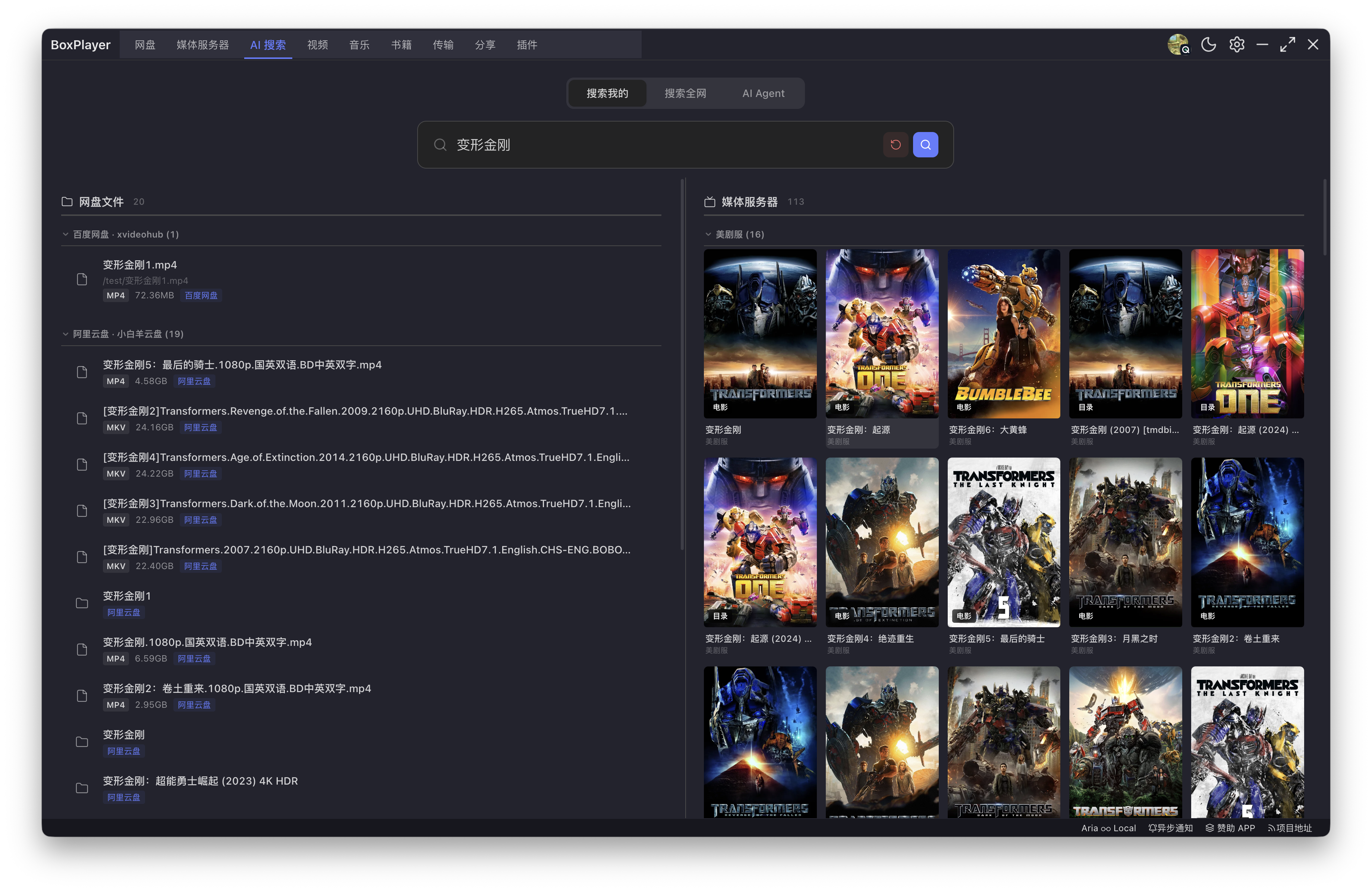
5. **AI Global Search upgrade**: global search now connects to built-in AI Agent / OpenAI-compatible tool calling, semantic search, movie cards, and cloud-drive resource results.
6. **Pro account and payment flow**: the website now has monthly / yearly / lifetime pricing, hosted Creem checkout, app callback handling, and post-payment polling to confirm Pro status inside the app.
7. **Website support ticket system**: `/support/` accepts anonymous or signed-in Bug / Feature tickets. Signed-in tickets are linked to the user account for follow-up.
8. **AI settings redesign**: provider config caching, model refresh, built-in AI Pro labeling, embedding model settings, and SQLite hybrid retrieval options are now managed in one API settings page.
## Brand-new “Library” — AI-powered personal e-book reader
1. **AI Text-to-Speech (TTS)**: built-in **Azure Neural TTS** + Web Speech API dual engines, with dozens of natural voices (Xiaoxian / Xiaoxiao / Yunxi / Yunyang and more), reading any book aloud from the cursor with **continuous cross-chapter playback**, adjustable speed / voice / pitch — turn any e-book into a professional audiobook instantly.
2. **AI Reading Assistant**: one-click access to 10+ leading models — **OpenAI / DeepSeek / Zhipu GLM / Qwen / Moonshot Kimi / SiliconFlow / Ollama (local) / OpenRouter / Vercel AI Gateway** — to **summarize chapters / answer questions / recommend similar books / hold multi-turn conversations**. Includes a **local chapter-vector RAG index** so “what does chapter 3 actually say?” gets a grounded answer.
3. **AI Word Translation + Whole-Book Translation**: select to translate, with **AI translation (DeepL-grade quality) / Azure / Google Translate**, **bilingual side-by-side reading**, or **whole-book translation mode** — read any foreign-language book without friction.
4. **Multi-format e-book reader**: supports **EPUB / PDF / TXT / MOBI / AZW / AZW3 / FB2 / DOCX / MD / HTML / CBZ / CBR / CB7 / CBT** — every major format.
5. **Three pagination modes**: single / double-page / scroll, freely switchable. The new release fixes the “only partial text shown, large blank areas” rendering bug, restoring native pagination and container scrolling.
6. **Cloud + local dual book sources**: every connected cloud drive auto-detects books; one-click local-folder import; auto-scrape covers / authors / publication dates / summaries.
7. **Professional typography engine**: built-in **Heti / Hanzi Standard Format / Chinese Web Typography Reset / Tufte CSS / Typebase** academic-grade styles — better Chinese-English mixed typesetting than Kindle.
8. **Bookshelf / favorites / tags / trash**: complete book lifecycle management with card / list / cover view modes.
9. **Notes / highlights / bookmarks / selection menu**: customizable highlight colors, attached notes, in-document jumps, keyboard shortcuts.
10. **Bulk annotation export**: one-click export of all highlights and notes to Markdown / JSON / CSV / TXT.
11. **Reading statistics**: visualize daily reading time / page turns / completion rate.
12. **OPDS subscriptions**: subscribe to any OPDS-compliant online library.
13. **PDF full-text search + chapter navigation + dictionary lookup + reference search**.
## Advanced Music Playback
14. **AudioContext audio engine**: 10-band EQ + reverb + panning + pitch shift (without speed change) + real-time spectrum visualization.
15. **Word-by-word karaoke lyrics**: per-character highlight animations powered by Web Animations API, with translation / romaji dual-line support.
16. **Floating desktop lyrics window**: independent transparent always-on-top window, draggable, scrolling with playback.
17. **Multi-source lyrics / cover fallback**: when LRCLIB has no match, automatically fetches lyrics and covers from NetEase / KuGou / QQ Music / Kuwo / Migu open APIs (metadata only, no audio stream download).
18. **Customizable theme system**: 12-color visual editor + 15 built-in preset themes, fully CSS-variable-driven.
## Download Infrastructure
19. **Main-process aria2c hosting**: PID file + session resume + graceful shutdown + auto-reconnect on crash.
20. **EngineClient real-time events**: aria2-lib low-latency event-driven, subscribes to `onDownloadStart/Complete/Error/Stop/BtComplete`, sub-100ms state feedback.
21. **UPnP automatic port mapping**: BT downloads automatically open NAT ports for better seeding connectivity.
22. **BT tracker auto-sync every 12h**: pulls the latest public trackers from [ngosang/trackerslist](https://github.com/ngosang/trackerslist) every 12 hours after launch.
23. **Torrent file selector**: select specific files within a BT task to avoid downloading the whole torrent.
24. **Task detail drawer**: GID / total size / progress / speed / seeders / connections / InfoHash / save path / file list — all visible at a glance.
25. **Drag-and-drop add tasks**: drop URLs / magnet links / .torrent files from browser address bars / Finder / File Explorer to create tasks instantly.
26. **Protocol associations**: `magnet://` / `mo://` automatically captured to open the download dialog (supports macOS `open-url` / `open-file`).
27. **Download progress indicator**: macOS Dock / Windows taskbar shows real-time download progress ring.
28. **Completion system notifications**: each completed file triggers a system notification; click to focus the main window.
29. **Batch pause / resume / delete**: direct RPC, no polling delay.
30. **Per-platform aria2 configurations**: 7 optimized `aria2.conf` profiles across darwin / linux / win32 × x64 / arm64 / armv7l / ia32.
31. **Expanded settings**: upload speed cap, seed ratio, seed time, auto-resume unfinished tasks, browser extension RPC URL display, tracker editor (one URL per line) with instant sync.
32. **Sleep prevention**: blocks system sleep while downloads are in progress.
## New Cloud Drives
| Cloud Drive | App capabilities | clouddrive-cli `--provider` |
|---|---|---|
| **Quark Cloud Drive** | Login / browse / download / upload / rename / move / share / search | `quark` |
| **China Mobile Cloud (139)** | Login / browse / download / upload / rename / move | `cloud139` |
| **China Telecom Cloud (189)** | Login / browse / download / upload / rename / move | `cloud189` |
33. clouddrive-cli adds three new providers — `cloud139` / `cloud189` / `quark` — and extracts shared `ossUpload` / `uploadUtils` helpers for unified resumable uploads, chunked transfer, and progress callbacks.
34. clouddrive-cli adds `commandManifest` and `mcpToolSchema` metadata so MCP clients (Claude Desktop, Cursor, etc.) can auto-discover commands, parameters, and examples.
## AI Media Organizer Agent
35. **AgentMediaOrganizer drawer**: right-click any cloud-drive folder to launch “AI Organize”, letting the AI see the current directory and execute renames / moves / classifications according to your description, with multi-turn conversation.
36. **Powered by Vercel AI SDK**: compatible with all OpenAI-protocol models (GPT / Claude / DeepSeek / Qwen / GLM / Moonshot / Ollama via Gateway, etc.).
37. **Reversible operation log**: every AI action is recorded in `operationHistory`; one-click rollback to the pre-operation state.
38. **Pan-context tool set**: built-in `walkDirectory` / `renamePlan` / `movePlan` / `mediaClassifier` and other safe tools the AI can call.
39. **clouddrive-cli `organize` command**: exposes the same capabilities to AI terminals (Claude Code, Cursor, etc.) so AI agents can organize cloud drives remotely.
## Settings and Infrastructure Refactor
40. **Unified AI / API key configuration page** (`SettingAPI.vue`): centrally manage OpenAI / DeepSeek / Azure TTS / Vercel AI Gateway / translation API keys, shared by the reader and organizer agents.
41. **Advanced download settings panel** (`SettingDownloadAdvanced.vue`): aggregates aria2, seeding, tracker, and protocol-association advanced parameters.
42. **`shared/` cross-cutting layer**: constants, UA, `configKeys`, `tracker`, and `rename` utilities reused by main process / renderer / CLI.
43. **Protocol handler refactor**: unified `electron/main/core/protocol.ts` handles magnet / file / custom protocols, with unit-test coverage.
44. **aria2 engine policy** (`aria2EnginePolicy.ts`): auto-selects the optimal aria2c binary and configuration based on platform and architecture.
# Screenshots [](#screenshots-)
## v5.0.36: Unified library and immersive details
The home page combines Continue Watching, favorites, movies, TV, music, and books, with draggable shelves and file sources.
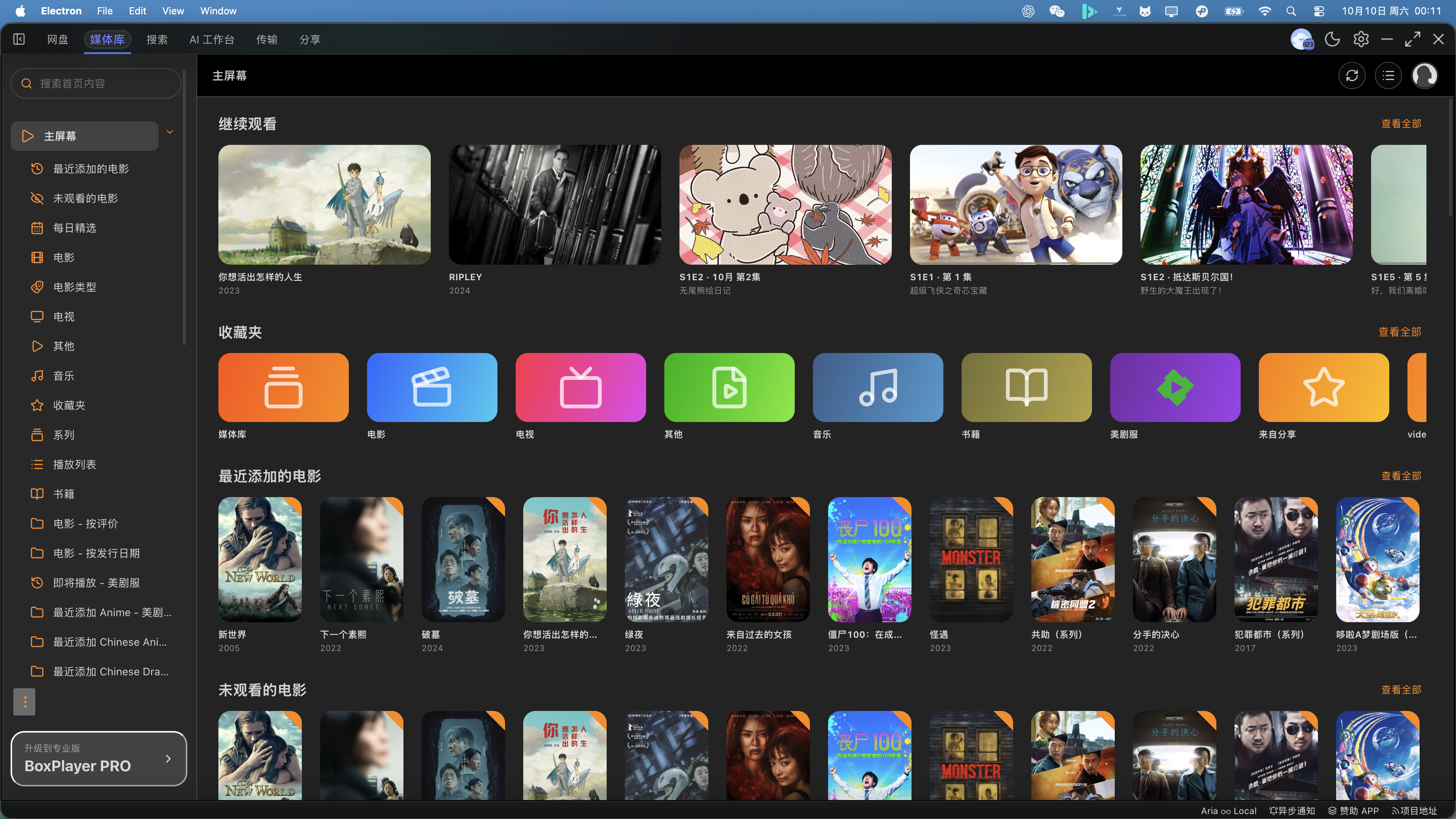
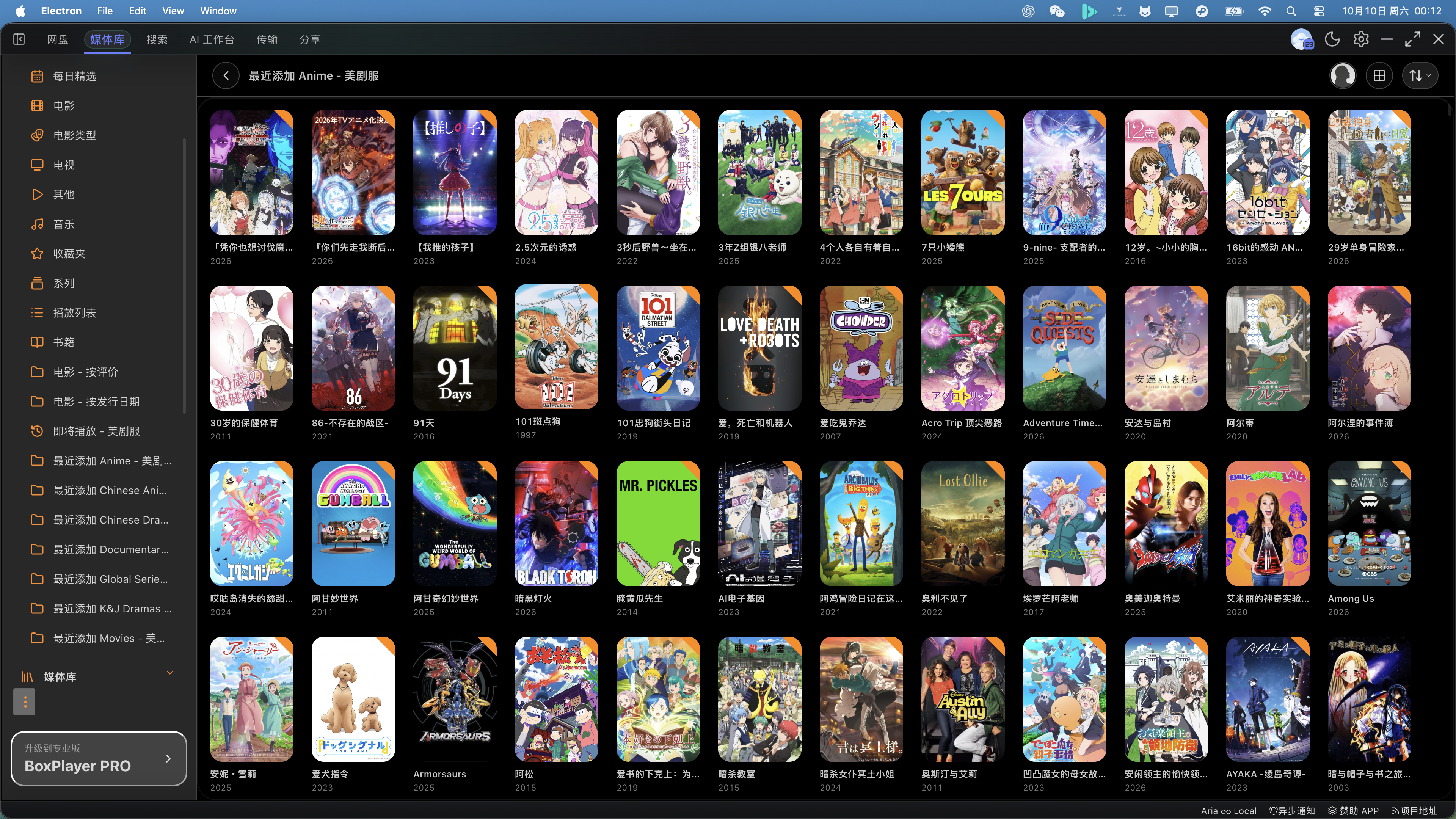
Media-server lists share the home page's poster sizing, rounded corners, and title layout.
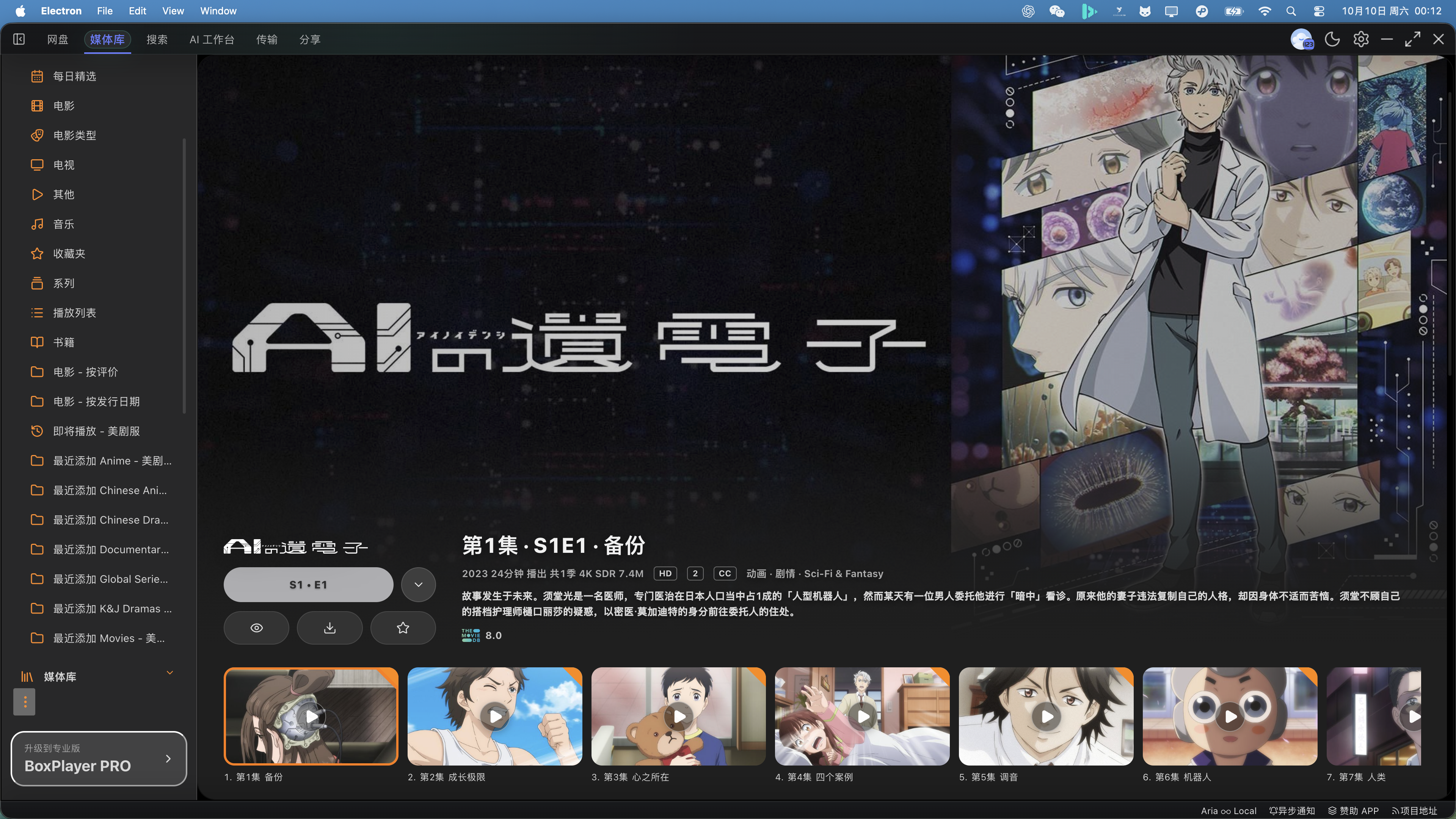
Immersive details bring together backdrop artwork, playback controls, and episode covers with centered play buttons. Trakt sign-in opens the system browser and supports watchlist and personal-rating updates.
[Read the v5.0.36 release notes](docs/releases/v5.0.36.md)
## AI Smart Search and Agent
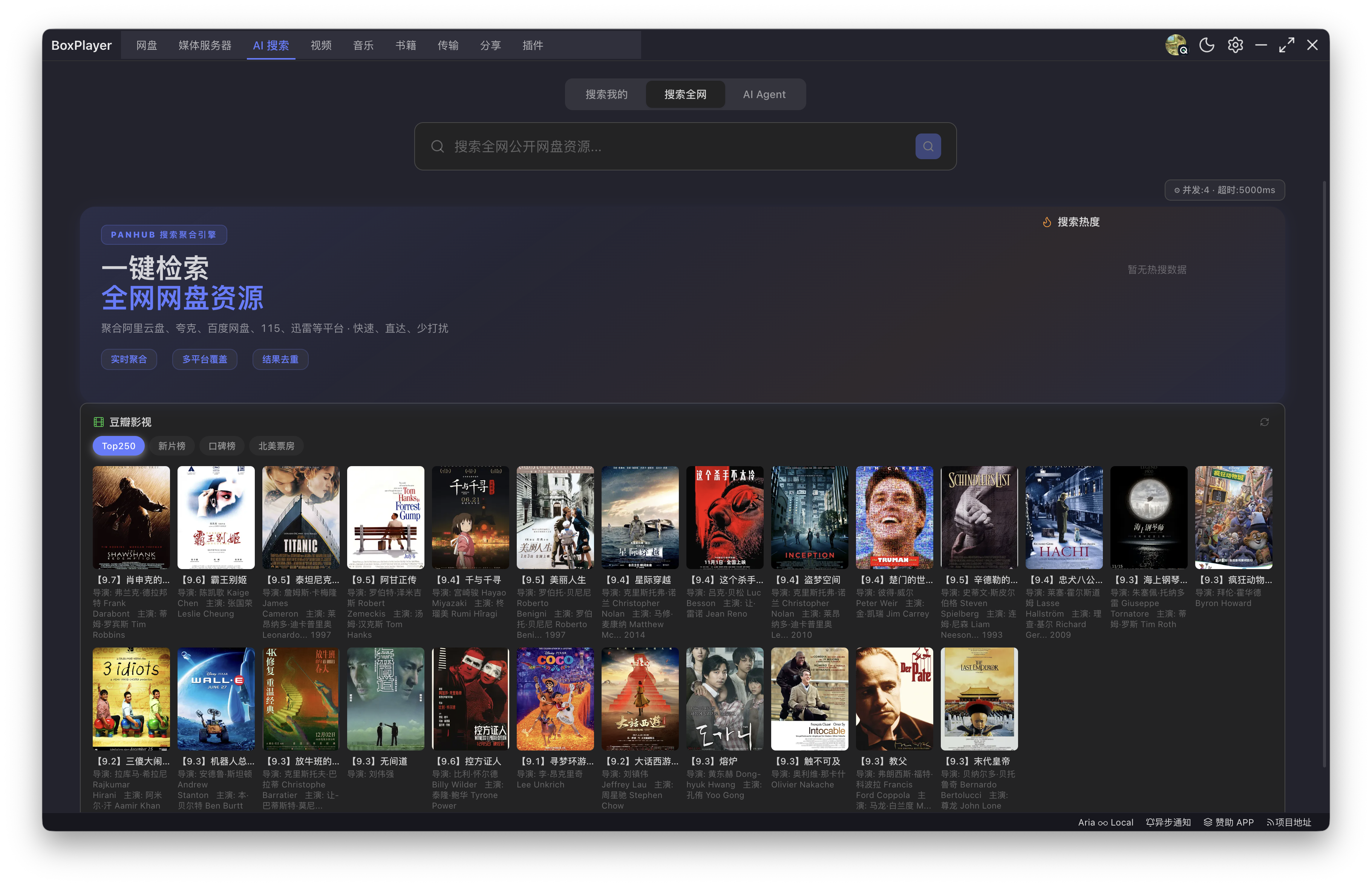
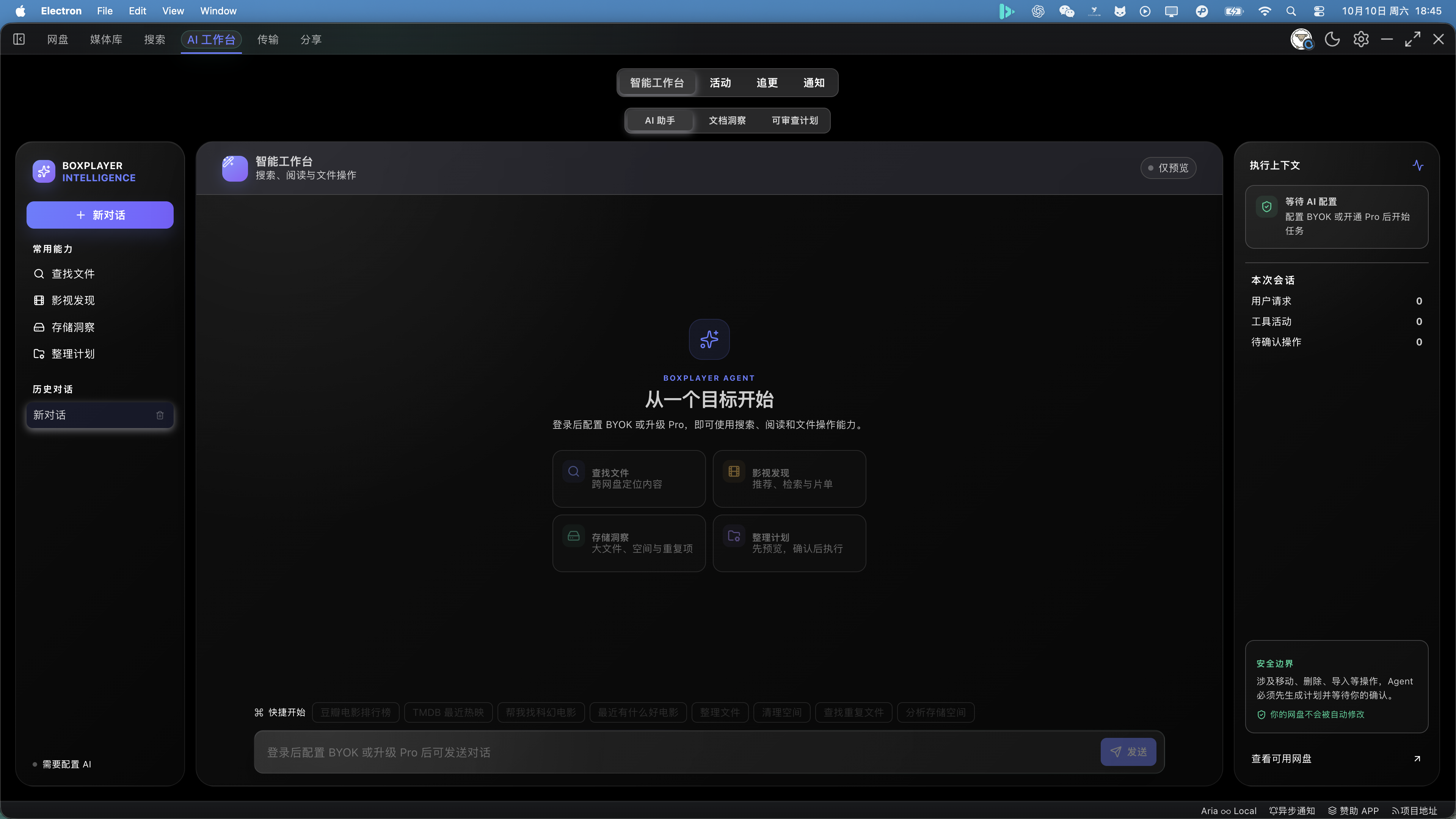 *Global resource search, AI Agent semantic search, and cloud-drive result cards.*
## AI Reader
*Global resource search, AI Agent semantic search, and cloud-drive result cards.*
## AI Reader
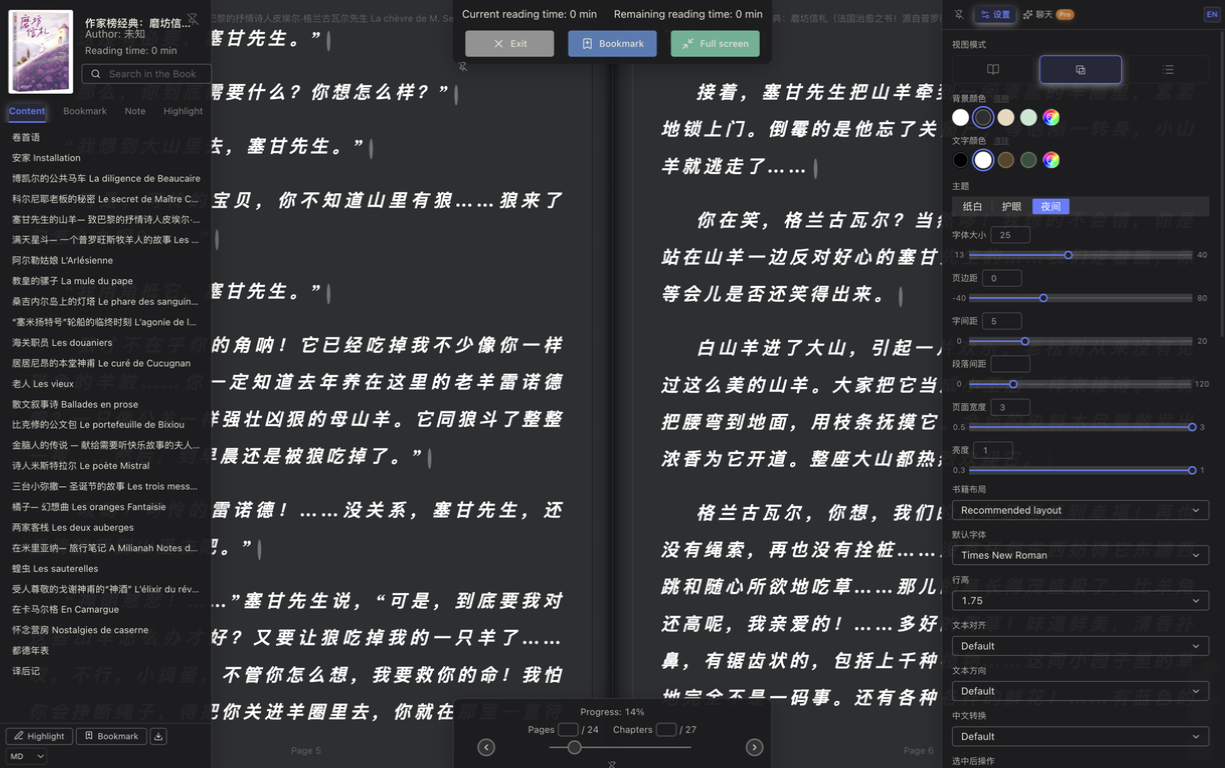
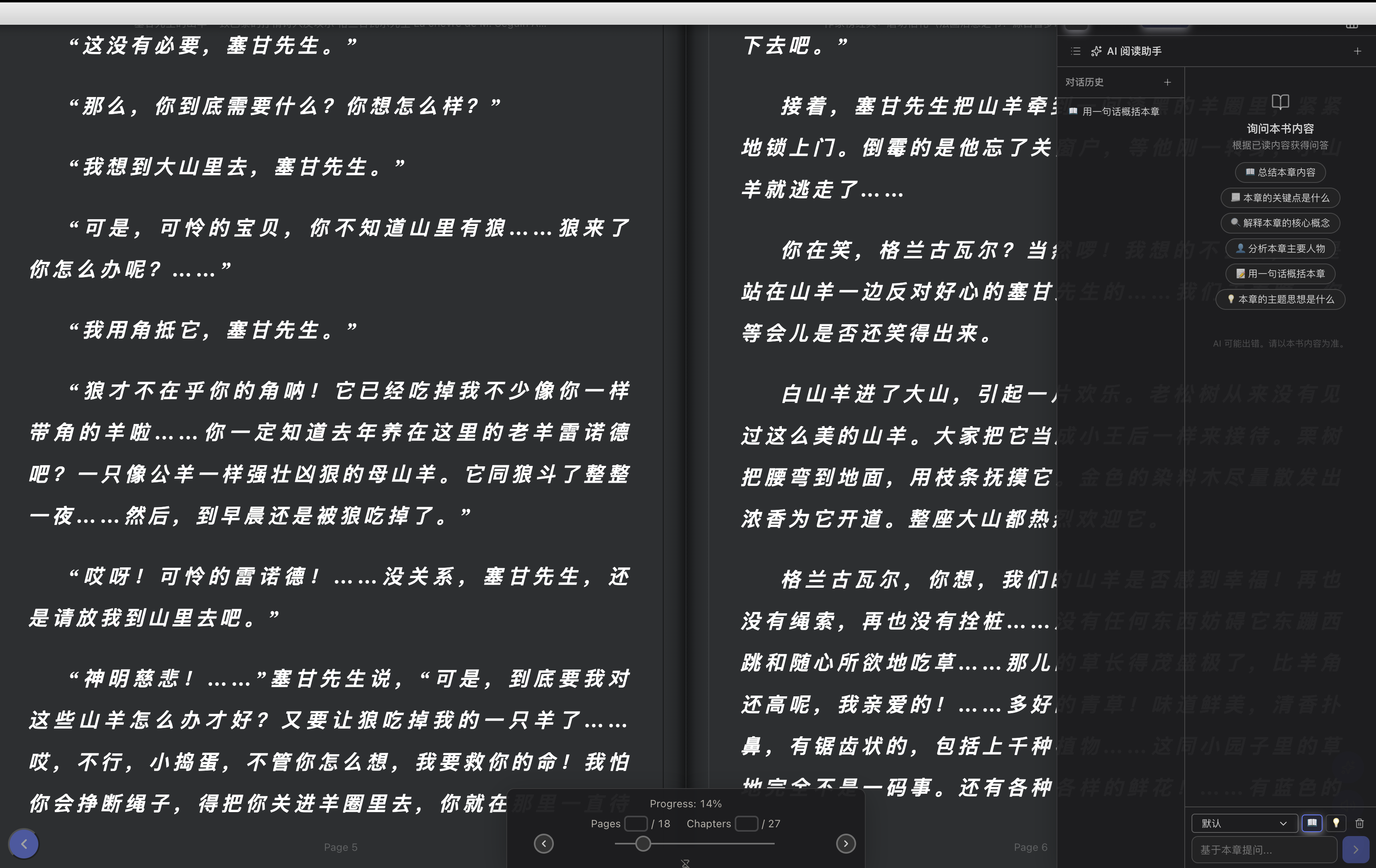 *Reader AI chat, TTS, full-page bilingual translation, translated-only view, and cached translations.*
## Particle Music Player
*Reader AI chat, TTS, full-page bilingual translation, translated-only view, and cached translations.*
## Particle Music Player
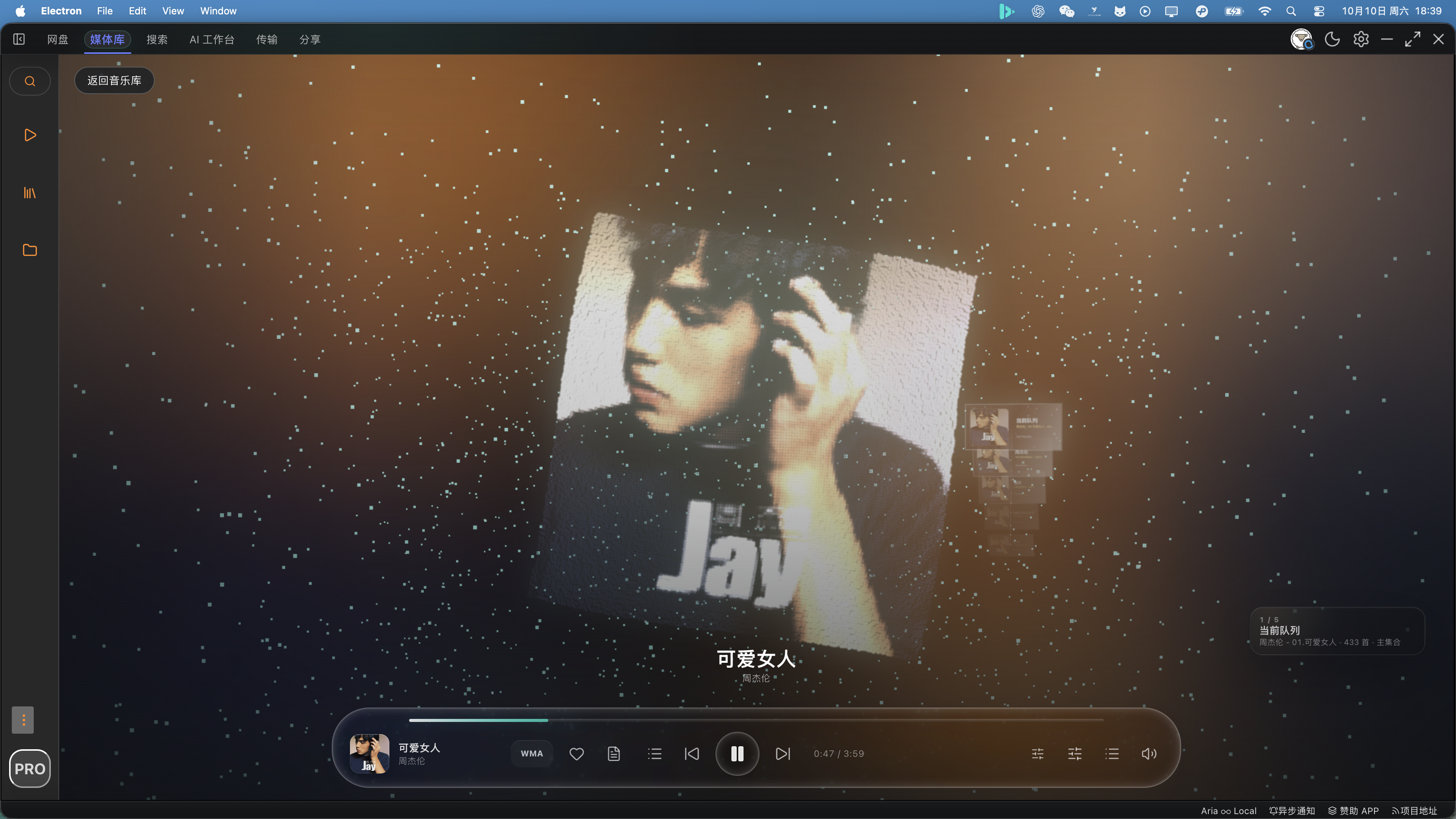 *Real-time spectrum visualization with particle animation background, 10-band EQ, reverb, pan, pitch-shift, word-level karaoke lyrics, and desktop floating lyric window.*
## Music Library
*Real-time spectrum visualization with particle animation background, 10-band EQ, reverb, pan, pitch-shift, word-level karaoke lyrics, and desktop floating lyric window.*
## Music Library
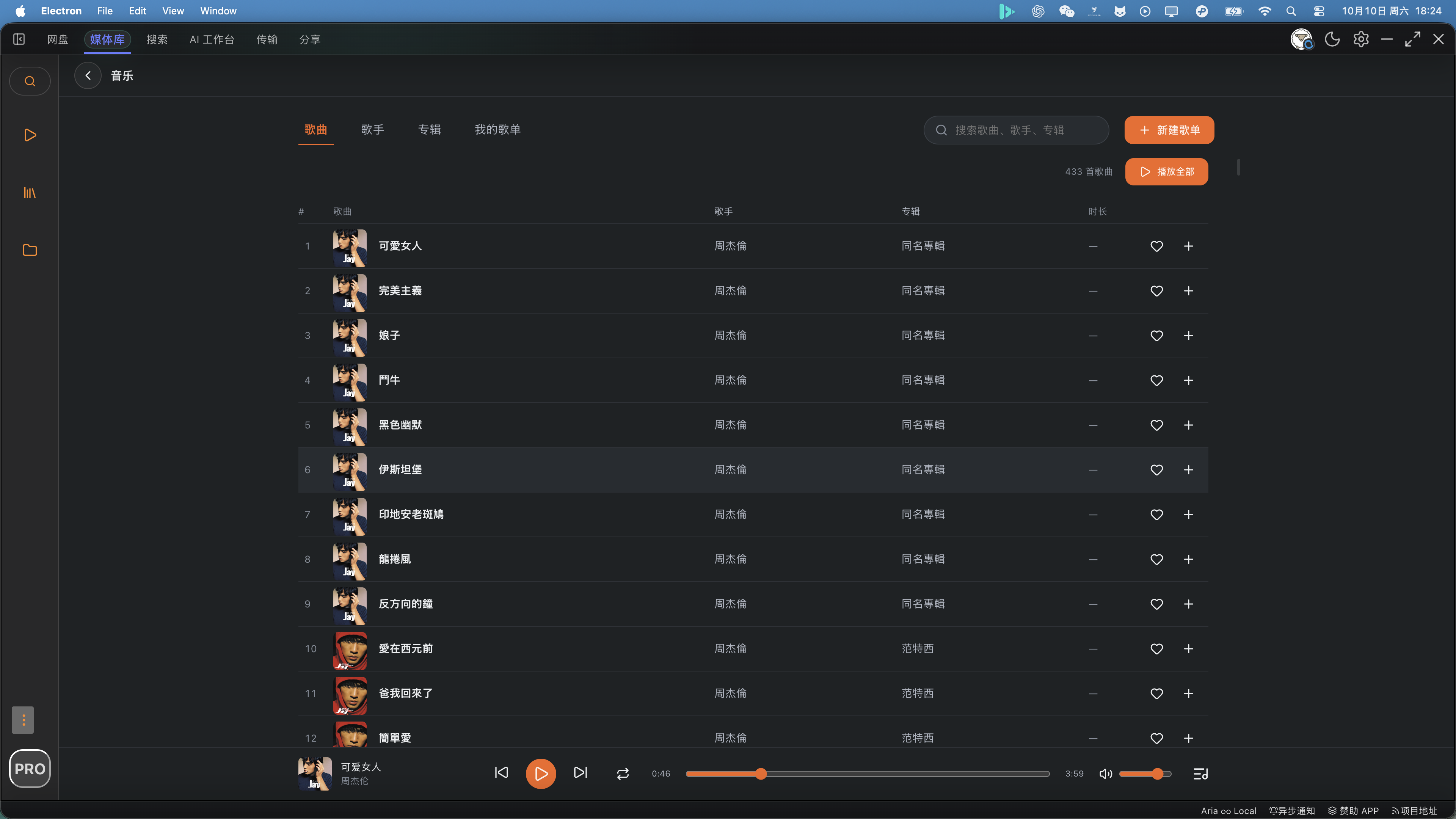
 *Music library, lyric enhancements, local media library, and local search.*
## Document AI
*Music library, lyric enhancements, local media library, and local search.*
## Document AI
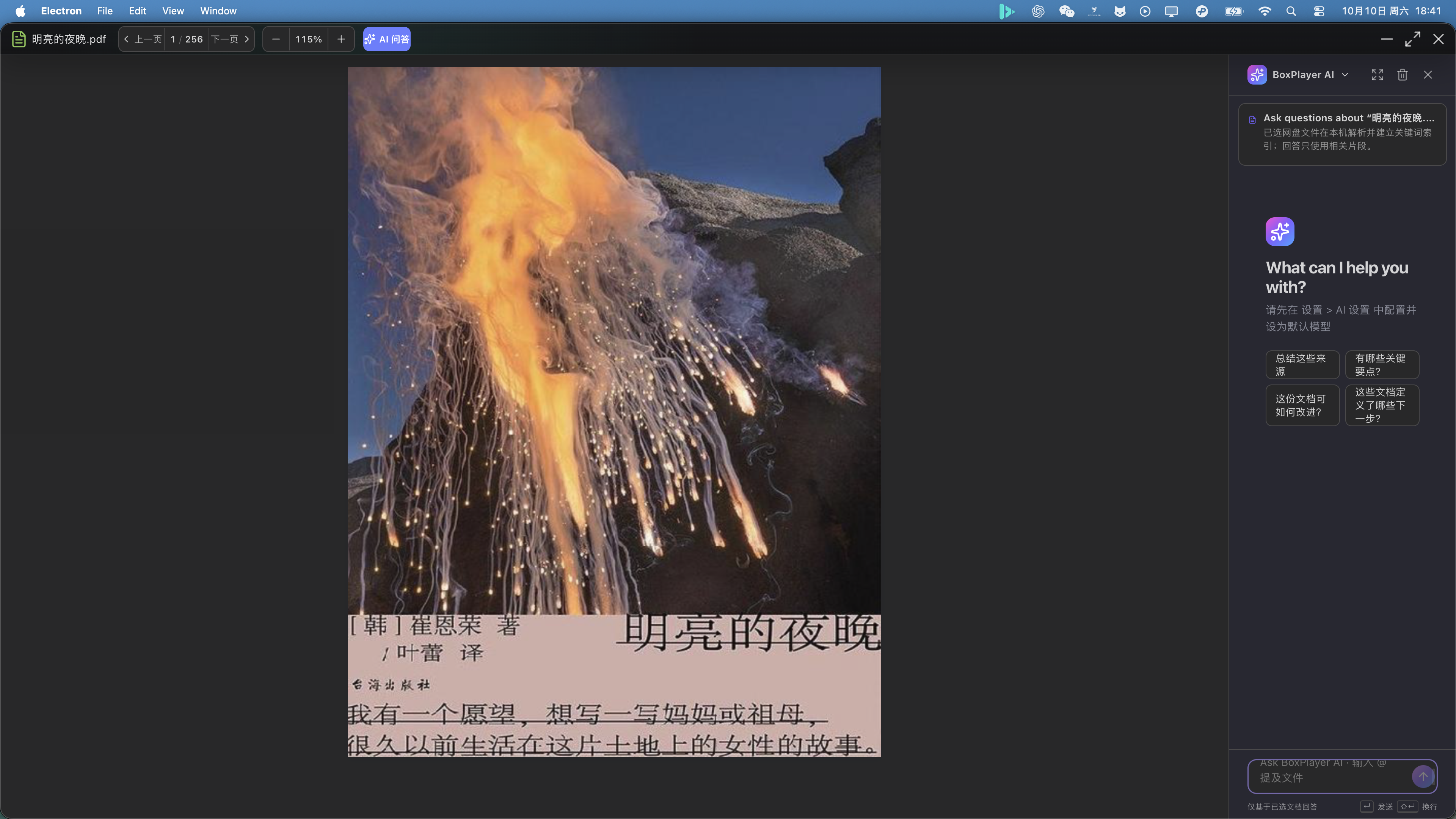 *Ask questions about supported documents and inspect cited passages.*
## Media Server
*Ask questions about supported documents and inspect cited passages.*
## Media Server

 *Media server home with Continue Watching and categorized media library browsing.*
## Episode Details
*Media server home with Continue Watching and categorized media library browsing.*
## Episode Details
 *Episode detail page and collection view.*
## Search & Aggregation
*Media server search and aggregated cross-drive search.*
## Media Library & Drive
*Episode detail page and collection view.*
## Search & Aggregation
*Media server search and aggregated cross-drive search.*
## Media Library & Drive
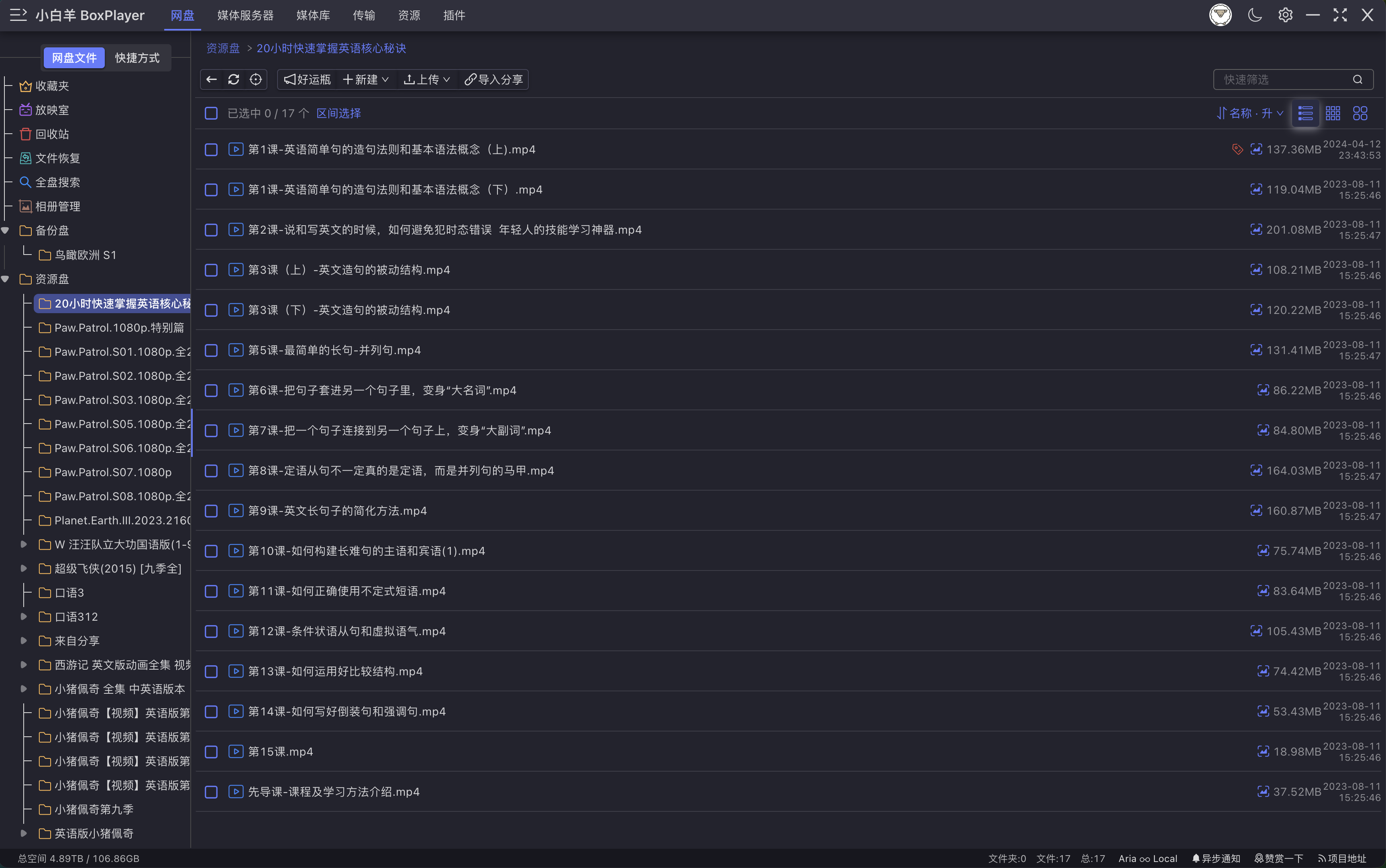 *Local media library list view and cloud-drive file management.*
*Multi-cloud account management and QR code login.*
# Installation [](#installation-)
## Package Guide
The `release` folder contains installers for each platform and CPU architecture. Use the keywords in each filename to pick the right package.
### Windows
| File name | Platform | Notes |
|--------|----------|------|
| `...-win.exe` | Windows universal | Detects system architecture automatically. Recommended for most users. |
| `...-win-x64.exe` | Windows x64 | For Intel / AMD 64-bit processors. |
| `...-win-ia32.exe` | Windows 32-bit | For 32-bit systems or older processors. |
| `...-win-arm64.exe` | Windows ARM64 | For ARM64 processors, such as Qualcomm Snapdragon X Elite. |
| `...-win-x64.zip` | Windows x64 portable | Extract and run, no installation required. |
| `...-win-ia32.zip` | Windows 32-bit portable | Extract and run, no installation required. |
| `...-win-arm64.zip` | Windows ARM64 portable | Extract and run, no installation required. |
**How to install:** double-click the `.exe` installer and follow the prompts. For the portable version, extract the `.zip` package and run `xbyboxplayer.exe`.
### macOS
| File name | Platform | Notes |
|--------|----------|------|
| `...-mac-x64.dmg` | macOS Intel | For Macs with Intel chips. |
| `...-mac-arm64.dmg` | macOS Apple Silicon | For Macs with M1 / M2 / M3 / M4 chips. |
**How to install:** double-click the `.dmg` file and drag the app to the `Applications` folder. If Apple Silicon shows a damaged-file warning after installation, run:
```sh
sudo xattr -d com.apple.quarantine /Applications/xbyboxplayer.app
```
### Linux
| File name | Platform | Notes |
|--------|----------|------|
| `...-linux-amd64.deb` | Debian / Ubuntu x64 | For Debian, Ubuntu, and similar distributions on 64-bit Intel/AMD. |
| `...-linux-arm64.deb` | Debian / Ubuntu ARM64 | For ARM64 Debian / Ubuntu. |
| `...-linux-armv7l.deb` | Debian / Ubuntu ARMv7 | For 32-bit ARM Debian / Ubuntu. |
| `...-linux-x86_64.AppImage` | Generic Linux x64 | Portable package for most 64-bit Linux distributions. |
| `...-linux-arm64.AppImage` | Generic Linux ARM64 | Portable package for ARM64 Linux. |
| `...-linux-armv7l.AppImage` | Generic Linux ARMv7 | Portable package for 32-bit ARM Linux. |
| `...-linux-x64.pacman` | Arch Linux / Manjaro x64 | For Arch Linux and derivatives on 64-bit systems. |
| `...-linux-aarch64.pacman` | Arch Linux ARM64 | For Arch Linux ARM64. |
| `...-linux-armv7l.pacman` | Arch Linux ARMv7 | For Arch Linux ARMv7. |
| `...-linux-x64.zip` / `arm64.zip` / `armv7l.zip` | Linux portable | Extract and run the executable inside. |
**How to install:**
- `.deb`: `sudo dpkg -i .deb`
- `.AppImage`: `chmod +x .AppImage && ./.AppImage`
- `.pacman`: `sudo pacman -U .pacman`
- `.zip`: extract and run the executable inside the folder
---
# clouddrive-cli [](#clouddrive-cli-)
`clouddrive-cli` is the terminal and AI Agent automation interface for BoxPlayer. It supports Aliyun Drive, OneDrive, Dropbox, Box, Baidu Netdisk, 115 Drive, and PikPak.
Key capabilities:
- List and recursively walk cloud drive files
- Generate media rename plans compatible with Jellyfin / Emby / Plex
- Dry-run validation before executing trackable, reversible batch renames
- Upload plans with dry-run and cloud drive organization plans
- Expose the same capabilities to MCP-compatible AI clients (Claude Desktop, Cursor, etc.) via `clouddrive-mcp`
**Install (with App):** open BoxPlayer → **Account Settings → Install CLI**
**Standalone install:**
```bash
npm install -g clouddrive-cli
```
Full documentation: [clouddrive-cli/README.en.md](./clouddrive-cli/README.en.md) | [中文](./clouddrive-cli/README.md)
---
# WeChat Official Account [](#wechat-official-account-)
*Local media library list view and cloud-drive file management.*
*Multi-cloud account management and QR code login.*
# Installation [](#installation-)
## Package Guide
The `release` folder contains installers for each platform and CPU architecture. Use the keywords in each filename to pick the right package.
### Windows
| File name | Platform | Notes |
|--------|----------|------|
| `...-win.exe` | Windows universal | Detects system architecture automatically. Recommended for most users. |
| `...-win-x64.exe` | Windows x64 | For Intel / AMD 64-bit processors. |
| `...-win-ia32.exe` | Windows 32-bit | For 32-bit systems or older processors. |
| `...-win-arm64.exe` | Windows ARM64 | For ARM64 processors, such as Qualcomm Snapdragon X Elite. |
| `...-win-x64.zip` | Windows x64 portable | Extract and run, no installation required. |
| `...-win-ia32.zip` | Windows 32-bit portable | Extract and run, no installation required. |
| `...-win-arm64.zip` | Windows ARM64 portable | Extract and run, no installation required. |
**How to install:** double-click the `.exe` installer and follow the prompts. For the portable version, extract the `.zip` package and run `xbyboxplayer.exe`.
### macOS
| File name | Platform | Notes |
|--------|----------|------|
| `...-mac-x64.dmg` | macOS Intel | For Macs with Intel chips. |
| `...-mac-arm64.dmg` | macOS Apple Silicon | For Macs with M1 / M2 / M3 / M4 chips. |
**How to install:** double-click the `.dmg` file and drag the app to the `Applications` folder. If Apple Silicon shows a damaged-file warning after installation, run:
```sh
sudo xattr -d com.apple.quarantine /Applications/xbyboxplayer.app
```
### Linux
| File name | Platform | Notes |
|--------|----------|------|
| `...-linux-amd64.deb` | Debian / Ubuntu x64 | For Debian, Ubuntu, and similar distributions on 64-bit Intel/AMD. |
| `...-linux-arm64.deb` | Debian / Ubuntu ARM64 | For ARM64 Debian / Ubuntu. |
| `...-linux-armv7l.deb` | Debian / Ubuntu ARMv7 | For 32-bit ARM Debian / Ubuntu. |
| `...-linux-x86_64.AppImage` | Generic Linux x64 | Portable package for most 64-bit Linux distributions. |
| `...-linux-arm64.AppImage` | Generic Linux ARM64 | Portable package for ARM64 Linux. |
| `...-linux-armv7l.AppImage` | Generic Linux ARMv7 | Portable package for 32-bit ARM Linux. |
| `...-linux-x64.pacman` | Arch Linux / Manjaro x64 | For Arch Linux and derivatives on 64-bit systems. |
| `...-linux-aarch64.pacman` | Arch Linux ARM64 | For Arch Linux ARM64. |
| `...-linux-armv7l.pacman` | Arch Linux ARMv7 | For Arch Linux ARMv7. |
| `...-linux-x64.zip` / `arm64.zip` / `armv7l.zip` | Linux portable | Extract and run the executable inside. |
**How to install:**
- `.deb`: `sudo dpkg -i .deb`
- `.AppImage`: `chmod +x .AppImage && ./.AppImage`
- `.pacman`: `sudo pacman -U .pacman`
- `.zip`: extract and run the executable inside the folder
---
# clouddrive-cli [](#clouddrive-cli-)
`clouddrive-cli` is the terminal and AI Agent automation interface for BoxPlayer. It supports Aliyun Drive, OneDrive, Dropbox, Box, Baidu Netdisk, 115 Drive, and PikPak.
Key capabilities:
- List and recursively walk cloud drive files
- Generate media rename plans compatible with Jellyfin / Emby / Plex
- Dry-run validation before executing trackable, reversible batch renames
- Upload plans with dry-run and cloud drive organization plans
- Expose the same capabilities to MCP-compatible AI clients (Claude Desktop, Cursor, etc.) via `clouddrive-mcp`
**Install (with App):** open BoxPlayer → **Account Settings → Install CLI**
**Standalone install:**
```bash
npm install -g clouddrive-cli
```
Full documentation: [clouddrive-cli/README.en.md](./clouddrive-cli/README.en.md) | [中文](./clouddrive-cli/README.md)
---
# WeChat Official Account [](#wechat-official-account-)

# Community [](#community-)
#### Telegram
[](https://t.me/+wjdFeQ7ZNNE1NmM1)
# Credits [](#credits-)
This project continues development based on https://github.com/liupan1890/aliyunpan.
Thanks to [liupan1890](https://github.com/liupan1890).
Global search feature from [panhub.shenzjd.com](https://github.com/wu529778790/panhub.shenzjd.com)
# Disclaimer [](#disclaimer-)
1. This is a free and open-source project intended for sharing cloud-drive files, convenient downloads, and Electron learning. Please comply with all applicable laws and regulations and do not abuse it.
2. This program works through official SDKs and APIs and does not damage or bypass official interfaces.
3. This program only performs 302 redirects / traffic forwarding. It does not intercept, store, or tamper with user data.
4. Before using this program, you should understand and accept the related risks, including but not limited to account bans and download speed limits. These risks are unrelated to this program.
5. If there is any infringement, please contact me by email and I will handle it promptly.