






# [numerable](https://github.com/gastonmesseri/numerable)
**numerable** is a number formatting library for Javascript and Typescript apps.
---
## :gear: Installation
Use [npm](https://www.npmjs.com/) or [yarn](https://yarnpkg.com/) to install **numerable**.
```bash
npm install --save numerable
# or
yarn add numerable
```
## :book: Usage
```javascript
import { format, parse } from 'numerable';
format(1500250.2, '0,0.00');
//=> '1,500,250.20'
format(0.25, '0.0 %');
//=> '25.0 %'
format(1200, '0.00 a');
//=> '1.20 K'
parse('80.5%');
//=> 0.805
```
---
### :1234: Formatting numbers
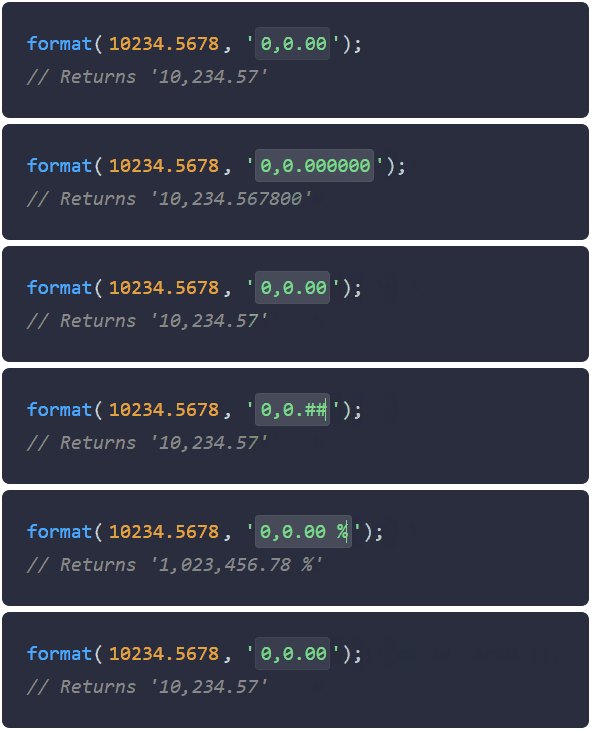
Numbers formatting in **numerable** is done through a pattern-based syntax. With these patterns you can easily define common number formats, similar to date formatting.
The numeric pattern syntax defines:
- **Amount of decimal places**
- **Thousands separator** (grouping)
- **Number sign type** (**+** **-** and **()**)
- **Number sign position**
- **Positive sign visibility**
Examples
| Number | Pattern | Result | Locale |
|---------------: |-------------: |-------------------: |:-----------------:|
| 10000 | "0,0.0000" | "10,000.0000" | en (English) |
| 1.23 | "0.0" | "1.2" | en (English) |
| 10000.23 | "0,0" | "10,000" | en (English) |
| 1000.2345 | "0,0.X" | "1,000.2345" | en (English) |
| 1000.2345 | "0,0.X" | "1 000,2345" | fr (French) |
| 0 | "0.00" | "0,00" | fr (French) |
| -10000 | "0,0.0" | "-10.000,0" | es (Spanish) |
| 10000.1234 | "0.000" | "10000.123" | en (English) |
| 10000.001 | "0[.]00" | "10000" | en (English) |
| 10000 | "(0,0.0)" | "10,000.0" | en (English) |
| -10000 | "(0,0.0)" | "(10,000.0)" | en (English) |
| -12300 | "+0,0.00" | "-12,300.00" | en (English) |
| 12300 | "+0,0.00" | "+1,2300.00" | ja (Japanese) |
| 1230 | "0,0+" | "1,230+" | en (English) |
| 1230 | "0,0-" | "1,230" | en (English) |
| 0.67 | "0.0####" | "0.67" | en (English) |
| 0.67 | "0.000##" | "0.670" | en (English) |
| 3162.63 | "0.0####" | "3162.63" | en (English) |
| 3162.6338 | "0.0####" | "3162.6338" | en (English) |
| 0.23 | "000.##" | "000.23" | en (English) |
| 1234.567 | "0,0.00" | "١٬٢٣٤٫٥٧" | arEG (Arabic) |
| *undefined* | "0,0.00" | "" | en (English) |
| *null* | "0.00" | "" | en (English) |
| *NaN* | "0.0" | "" | en (English) |
| ![]() |
![]() |
![]() |
![]() |
#### :small_orange_diamond: Percentages
By adding the % symbol to any of the previous patterns, the value is multiplied by 100 and the % symbol is added in the place indicated.
| Number | Pattern | Result | Locale |
|---------------: |-------------: |-------------------: |:-----------------:|
| 0.52 | "0.##%" | "52%" | en (English) |
| 1 | "0.##%" | "100%" | en (English) |
| 1 | "0,0.00 %" | "100.00 %" | en (English) |
| -0.88 | "0 %" | "-88 %" | en (English) |
|
![]() |
![]() |
![]() |
![]() |
#### :small_orange_diamond: Abbreviated numbers
If an abbreviation is specified in the pattern (**a**), **numerable** will look for the shortest abbreviation for your number, and it will display the number with a locale-specific abbreviation.
| Number | Pattern | Result | Locale |
|---------------: |-------------: |-------------------: |:------------------:|
| 2000000000 | "0.0a" | "2.0B" | en (English) |
| 1230974 | "0.0a" | "1.2M" | en (English) |
| 2460 | "0 a" | "2 mil" | es (Spanish) |
| -104000 | "0 a" | "-104 K" | en (English) |
| 999950 | "0.0a" | "1.0тыс." | ru (Russian) |
| 999999999 | "0 a" | "1 Mio." | de (German) |
|
![]() |
![]() |
![]() |
![]() |
#### :small_orange_diamond: Currency
**numerable** will format the currency symbol if the currency ISO code ([ISO 4217](https://www.iso.org/iso-4217-currency-codes.html)) is passed as a format option (e.g. `format(155, '$ 0.00', { currency: 'EUR' })`) and the dollar symbol (**$**) is found in the pattern.
| Number | Pattern | Result | Currency |
|---------------: |-------------: |-------------------: |:------------------: |
| 1500.143 | "$0,0.00" | "$1,500.14" | USD (US Dollar) |
| 1500.143 | "$0,0.00" | "€1,500.14" | EUR (Euro) |
| -1500.143 | "0,0.00 $" | "-1,500.14 £" | GBP (Pound Sterling) |
| 1500.143 | "0,0.00 $" | "1,500.14 ¥" | JPY (Yen) |
| 1500.143 | "(0,0.00 $)" | "1,500.14 CN¥" | CNY (Yuan Renminbi) |
| -1500.143 | "(0,0.00 $)" | "(1,500.14 A$)" | AUD (Australian dollar) |
|
![]() |
![]() |
![]() |
![]() |
#### :small_orange_diamond: Bytes
**numerable** allows you to format bytes by adding the '**bd**' or '**bb**' characters to the pattern.
- '**bd**' format bytes in a decimal scale (1000)
- '**bb**' format bytes in a binary scale (1024)
| Number | Pattern | Result | Locale |
|---------------: |-------------: |-------------------: |:-----------------:|
| 3500 | "0.00bd" | "3.50KB" | en (English) |
| 3500 | "0.00bb" | "3.42KiB" | en (English) |
| -3500000 | "0.00bb" | "-3.34MiB" | en (English) |
| 2444222000000 | "0.00bd" | "2.44TB" | en (English) |
| 2444222000000 | "0.00bb" | "2.22TiB" | en (English) |
|
![]() |
![]() |
![]() |
![]() |
#### :small_orange_diamond: Ordinal numbers
**numerable** allows you to format ordinal numbers based on the locale. The character '**o**' in the mask will enable the ordinal numbers formatting.
| Number | Pattern | Result | Locale |
|---------------: |-------------: |-------------------: |:-----------------:|
| 1 | "0o" | "1st" | en (English) |
| 2 | "0o" | "2nd" | en (English) |
| 3 | "0o" | "3rd" | en (English) |
| 4 | "0o" | "4th" | en (English) |
| 1 | "0o" | "1er" | fr (French) |
| 12 | "0o" | "12º" | es (Spanish) |
| 8 | "0o" | "8." | de (German) |
|
![]() |
![]() |
![]() |
![]() |
#### :small_orange_diamond: Time durations
Given an amount of seconds, it will display hours, minutes, and seconds.
| Number | Pattern | Result | Locale |
|---------------: |-------------: |-------------------: |:------------------:|
| 0 | "00:00:00" | "0:00:00" | en (English) |
| 37 | "00:00:00" | "0:00:37" | en (English) |
| 520 | "00:00" | "0:08:40" | en (English) |
| 48923 | "00:00" | "13:35:23" | en (English) |
| -48923 | "00:00" | "-13:35:23" | en (English) |
|
![]() |
![]() |
![]() |
![]() |
---
### format()
\- Syntax
```
format(number, [pattern="0,0.##########"], [options=DEFAULT_OPTIONS])
```
- *number*
- type: ***number*** | ***string*** | ***null*** | ***undefined***
- The number to format
- *pattern*
- type: ***string*** | ***null*** | ***undefined***
- default: ***"0,0.##########"***
- The pattern used to format the provided number.
- examples:
- `"0.00"`
- `"0,0.00##"`
- `"0,0.00 %"`
- `"0.0 a"`
- *options*
- type: ***FormatOptions*** | ***null*** | ***undefined***
- The options to apply in the format process.
- example:
```javascript
format(1234.56, '0,0.00', {
defaultPattern: '0,0.##########',
nullFormat: 'N/A',
nanFormat: 'NaN',
zeroFormat: '-',
rounding: 'floor',
locale: fr,
});
```
- FormatOptions properties:
- **defaultPattern**:
- type: ***string***
- default: ***"0,0.##########"***
- It will be the formatting pattern applied in case that the provided pattern in the arguments is null, undefined or "" (empty string).
- **rounding**:
- type:
- ***string***: *"truncate"* | *"ceil"* | *"floor"* | *"half-up"* | *"half-away-from-zero"*
*or*
- ***function***: *(value: number) => number*
- default: ***"half-away-from-zero"***
- It will be the rounding function applied to the number in the resolved maximum amount of decimal places.
- **nullFormat**:
- type: ***string***
- default: ***""***
- If defined, it will be the returned string when the value is ***null*** | ***undefined*** | ***NaN***.
- **nanFormat**:
- type: ***string***
- default: ***""***
- If defined, it will be the returned string when the value is ***NaN***.
- **zeroFormat**:
- type: ***string***
- default: ***undefined***
- If defined, it will be the returned string when the value is ***0***.
- **locale**:
- type: ***NumerableLocale***
- default: ***en*** *(english NumerableLocale)*
- If a **NumerableLocale** is provided, it will format the number with the specified locale configuration.
- **scalePercentage**:
- type: ***boolean***
- default: ***true***
- If **true** (default), it will multiply the number by 100 when a percentage format is detected. If **false**, the number won't be scaled when a percentage format is detected.
- **trim**:
- type: ***boolean***
- default: ***true***
- If **true** (default), it will trim the output formatted string. If **false**, the surrounding spaces will be preserved.
- **signedZero**:
- type: ***boolean***
- default: ***false***
- If **true**, it will display a negative sign for numbers that before the rounding where negative, but after rounding became zero. If **false** (default), it will never append the minus sign (-) to zero.
- This option also applies to the positive zeros if the *force sign* option is defined on the pattern (+ sign in the pattern).
- Example:
- `format(-0.008, '0.0', { signedZero: true }) //=> '-0.0'`
- `format(0.008, '+0.0', { signedZero: true }) //=> '+0.0'`
- **nonBreakingSpace**:
- type: ***boolean***
- default: ***false***
- If **true**, the spaces in the resulting string will be replaced with ***[non-breaking-spaces](https://en.wikipedia.org/wiki/Non-breaking_space)***. This will help preventing a line break when a normal space is found (although in the end, this will depend on the display engine).
---
### parse()
\- Syntax
```
parse(numberString, [options=DEFAULT_OPTIONS])
```
- *numberString*
- type: ***string***
- The numeric string to parse
- *options*
- type: ***FormatOptions*** | ***null*** | ***undefined***
- The options to apply in the parse process.
- Same options as in format() function.
---
## :crossed_flags: Internationalization (i18n)
**numerable** includes two functions that support i18n:
- ***format***
- ***parse***
---
### Usage (i18n)
In order to handle internationalization:
- **Import a numerable locale** and pass it to the locale option.
```javascript
import { format, parse } from 'numerable';
import { es, enIN, fr, de } from 'numerable/locale';
format(2500000, '0,0.0 a', { locale: es }); //=> '2,5 M'
format(2500000, '0,0.0 a', { locale: enIN }); //=> '25.0 L'
format(2500000.25, '0,0.00', { locale: fr }); //=> '2 500 000,25'
format(1.5, '0.00', { locale: de }); //=> '1,5'
parse('1,5', { locale: de }); //=> 1.5
```
---
### App localization handling (i18n)
#### - Using custom wrappers
To make your app internationalization handling easy, you can **create your own function wrappers** and use those instead of the original functions. With this approach, you can make your app localized number formatting API simple.
```javascript
// my-app/utils/format.js
import { format } from 'numerable';
import { es, fr, enIN } from 'numerable/locale';
const locales = {
es,
fr,
'en-in': enIN,
};
export default function (value, pattern = '0,0.000', options) {
const appLocaleId = window.__myLocaleId__;
return format(value, pattern, { locale: locales[appLocaleId], ...options });
}
```
```javascript
// Later...
// Importing my custom localized format wrapper
import format from 'my-app/utils/format';
window.__myLocaleId__ = 'es';
format(1234.56, '0,0.00');
// => "1.234,56"
// With our wrapper function, if the pattern is omitted, it will take the default from the wrapper function.
window.__myLocaleId__ = 'fr';
format(1234.56);
// => "1 234,560"
window.__myLocaleId__ = 'en-in';
format(123456789.12, '0,0.0');
// => "12,34,56,789.1"
// 'en' will work, as it is the default locale of numerable
window.__myLocaleId__ = 'en';
format(1234.56, '0,0.00');
// => "1,234.56"
```
---
### Numerable locales (i18n)
If a **NumerableLocale** is provided in any format function, it will format the number with the specified locale.
The locales provided by **numerable** allow localized support for the following formatting options:
- **Thousands and decimal delimiters**
- **Abbreviations** (e.g. "1.5 K")
- **Digit grouping style** (e.g. "10,00,000.00" or "100,0000.00")
- **Different numeral systems** (e.g. "٢٬٥٩٩٬٦٥٤٫٠")
- **Ordinal numbers** (e.g. "3rd")
```javascript
import { format } from 'numerable';
import { fr, es, enIN, zh } from 'numerable/locale';
format(1234.56, '0.000', { locale: fr }); // Returns "1 234,560"
format(2500000, '0,0.0 a', { locale: es }); //=> '2,5 M'
format(2500000, '0,0.0 a', { locale: enIN }); //=> '25.0 L'
format(2500000, '0,0.0', { locale: zh }); //=> '250,0000.0'
format(2544609, '0,0.0', { locale: arEG }); //=> '٢٬٥٤٤٬٦٠٩٫٠'
```
---
### Using platform locales (i18n)
If you app is simple and you are not supporting legacy browsers or Node. You can create a **NumerableLocale** based on the platform.
> :warning: Take into account that the support for platform locales is limited. And some of the features, like "*ordinal numbers formatting*" won't be available if you obtain the locale from the platform.
**numerable** provides the function **getLocaleFromPlatform**. This function will dynamically generate a **NumerableLocale** using the platform **[Intl.NumberFormat](https://developer.mozilla.org/en-US/docs/Web/JavaScript/Reference/Global_Objects/Intl/NumberFormat)** configuration.
```javascript
import { format, getLocaleFromPlatform } from 'numerable';
format(2500, '0,0.0 a', { locale: getLocaleFromPlatform('fr') }); //=> '2,5 k'
format(2500, '0,0.0 a', { locale: getLocaleFromPlatform('cs') }); //=> '2,5 tis.'
format(2500, '0.0 a', { locale: getLocaleFromPlatform('es') }); //=> '2,5 mil'
```
> Cons:
> - Some features won't work on legacy browsers like IE11 or Node (they will fallback to *en* language), resulting in potential inconsistency across browsers.
> - No full support for formatting features like "*ordinal number formatting*"
---
## :star: Acknowledgements
**numerable** started as a fork from [Adam Draper](https://github.com/adamwdraper)'s project [Numeral.js](http://numeraljs.com/).
It has been completely rewriten in Typescript with a functional API and extended features.
Also, [date-fns](https://date-fns.org/) served as inspiration for some of the features.
> The patterns used in **numerable** are an extended version of the original patterns created by [Numeral.js](http://numeraljs.com/).
## :raised_hands: Contributing
Pull requests are welcome. For major changes, please open an issue first to discuss what you would like to change.
Please make sure to update tests as appropriate.
## :pencil: License
[MIT © Gaston Meseri](LICENSE.md)