



One Roof is a new kind of way to build with agents: one place to keep up, and you stay in charge. It isn't an IDE, nor is it a terminal. It's the place your whole team of agents works, from Claude Code and Codex to Gemini, Kimi and Antigravity, with everything they ask, run, learn and cost. Free and open source.
⬇ Download for Mac (.zip) · Website · Demo video · Chorus coding (the idea behind it) · Blog · About me · X · LinkedIn · Getting started · Setup guide · Contribute
Free · open source · MIT · signed and notarized · needs macOS 14 or later on Apple silicon
> **Status: version 2.0.6.** Free and open source under the MIT licence. Tested on Apple-silicon Macs only. > Evals is still a draft, and is marked as one in the app. Please > [open an issue](https://github.com/gaurav8936/oneroof/issues) with anything that breaks or reads badly; see > [CONTRIBUTING.md](CONTRIBUTING.md).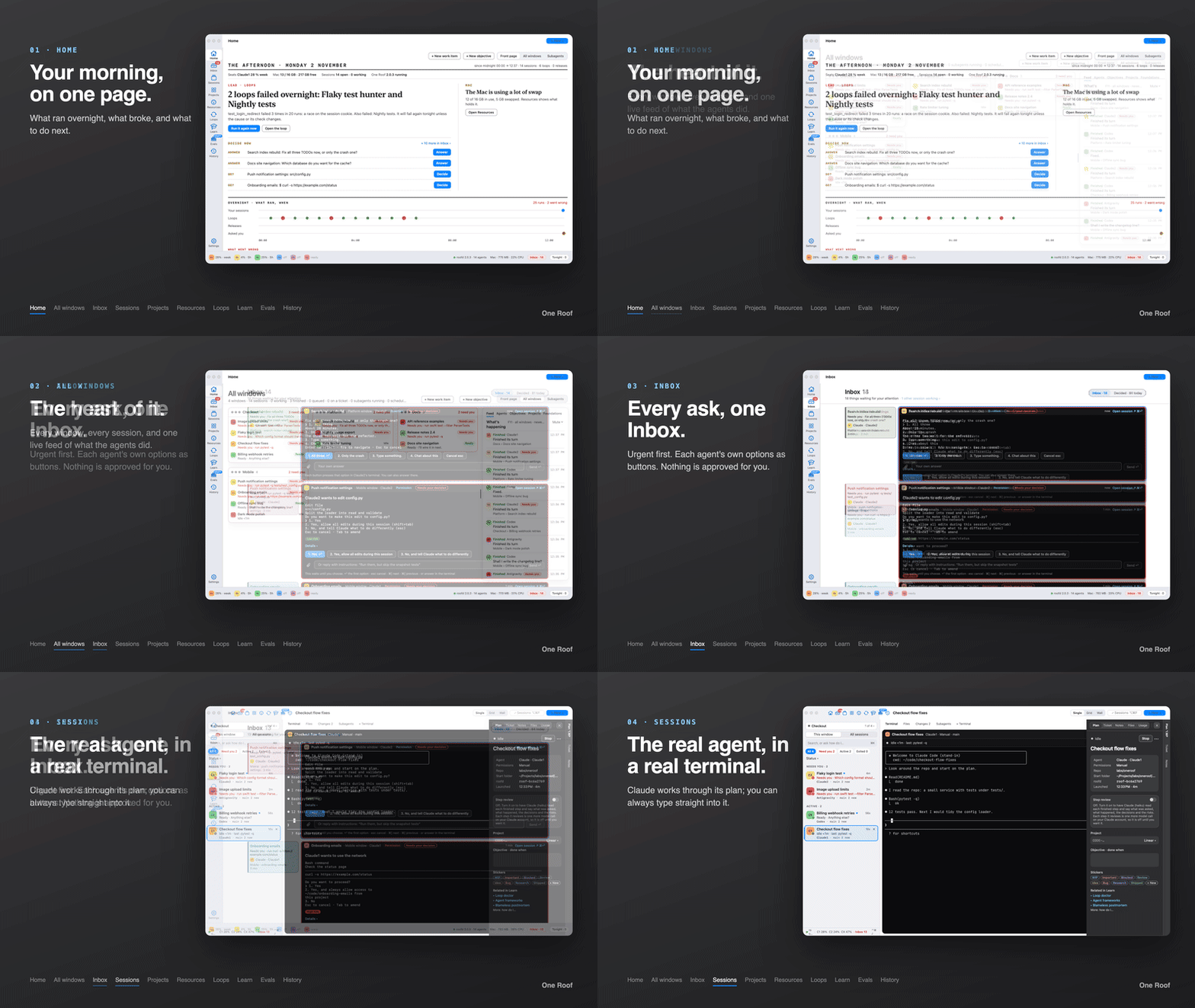
▶ Watch the full 2:46 demo on YouTube
**Works with:** Claude Code · Codex · Gemini CLI · Kimi · Antigravity · plain shells One Roof finds the agent command-line tools on your Mac and the accounts you are signed in to. It does not replace them: each session runs the real tool, and you can always type straight into it. Optional: OpenCode and Goose on a hosted model with your own API key and a spending cap. ## The idea: chorus coding I call it chorus coding: several coding agents on the same piece of work, each doing the part it does best, one checking another. One plans, one builds, one reviews. A loop re-runs the tests every night. The agents are not the bottleneck any more. You are. Five terminals look the same. A question waits in a tab you are not looking at. Something failed at 3 AM and nobody told you. The Mac slows down and you do not know which session is to blame. One Roof is the app I built to keep up with that, and to stay the one who decides. More in the post: [Chorus coding](https://console.zibajoon.com/blog/chorus-coding). ## Six things that go wrong with many agents Each one is easy with one session. Each one adds up with five. | What goes wrong | What One Roof does | |---|---| | **Questions get lost.** An agent stops to ask something in a tab you are not watching, and waits for an hour. | **Inbox:** every ask from every session in one place, the urgent ones first, answered in place. | | **You miss what happened overnight.** Loops and long sessions ran while you slept. Which ones failed, and what now? | **Home:** a morning front page with what went wrong, what to do next and what ran fine. | | **Nobody reads the whole stream.** Reading every agent's output is a full-time job. | **History:** the important moments of each session, as short cards, with what you answered. | | **Every terminal looks the same.** You end up typing WIP: in front of tab names to tell them apart. | **Sessions:** each one labelled with its state, agent, account and folder, and its own colour. | | **The Mac slows down.** One session's processes quietly grow to several gigabytes. | **Resources:** memory and CPU per session and per app, with a guard that stops a runaway session. | | **Agents act before you look.** An agent edits files or runs commands you did not expect. | **Permissions per agent.** On a new Mac every agent starts in Manual and asks first. | ## The tour The window has a rail of places, each with one job. ### Home: a front page for the morning Built from your own sessions and loops. The lead story is the thing that matters most. **Decide now** lists what waits on you, one button each. The overnight timeline shows every run since midnight as a dot, and under it: **What went wrong** (each failure once), **What to do next** (up to three steps) and **Ran fine** (repeats folded, such as "Cost watch ×12"). ### Inbox · ⌘I: everything the agents ask you, in one column One block per session that needs you, with the prompt's own options as buttons (or press 1–9). When an agent is blocked until you act, its block gets a red border and goes to the top. A finished turn waits here too, with a reply box; paste a screenshot and the agent reads it. Nothing is approved for you, and you can always answer in the terminal instead. **Decided** keeps what you answered, newest first.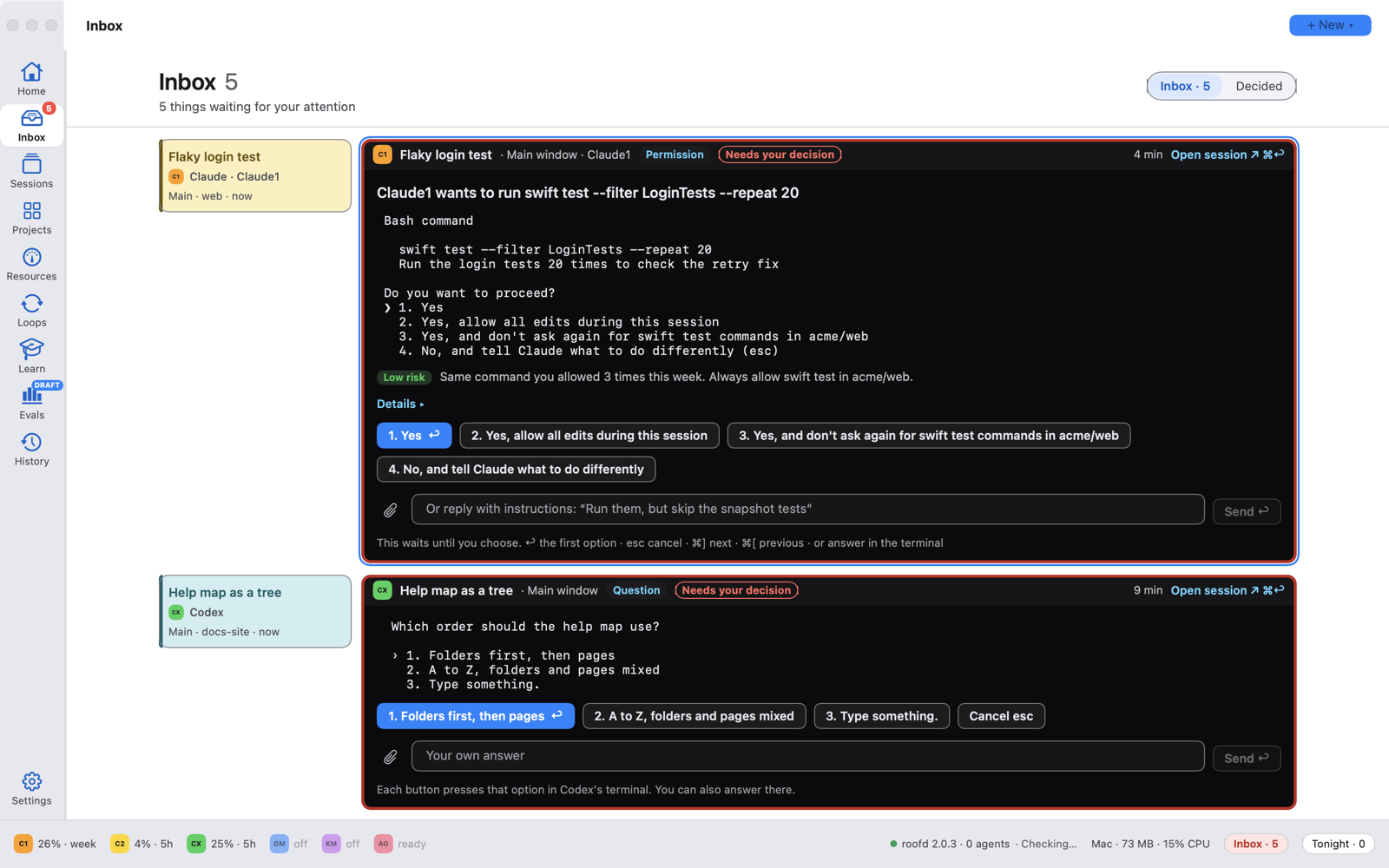 ### Sessions: real terminals that keep running
Every agent session and plain shell, grouped by state: Needs you, Active, Next, Planned, Exited. Each row shows the
agent, the account, the folder and a live one-line status. Show one terminal, a grid or a wall. Sessions run inside
**roofd**, a small background service, so they keep going when you close the app, and come back with their screens
when you open it again.
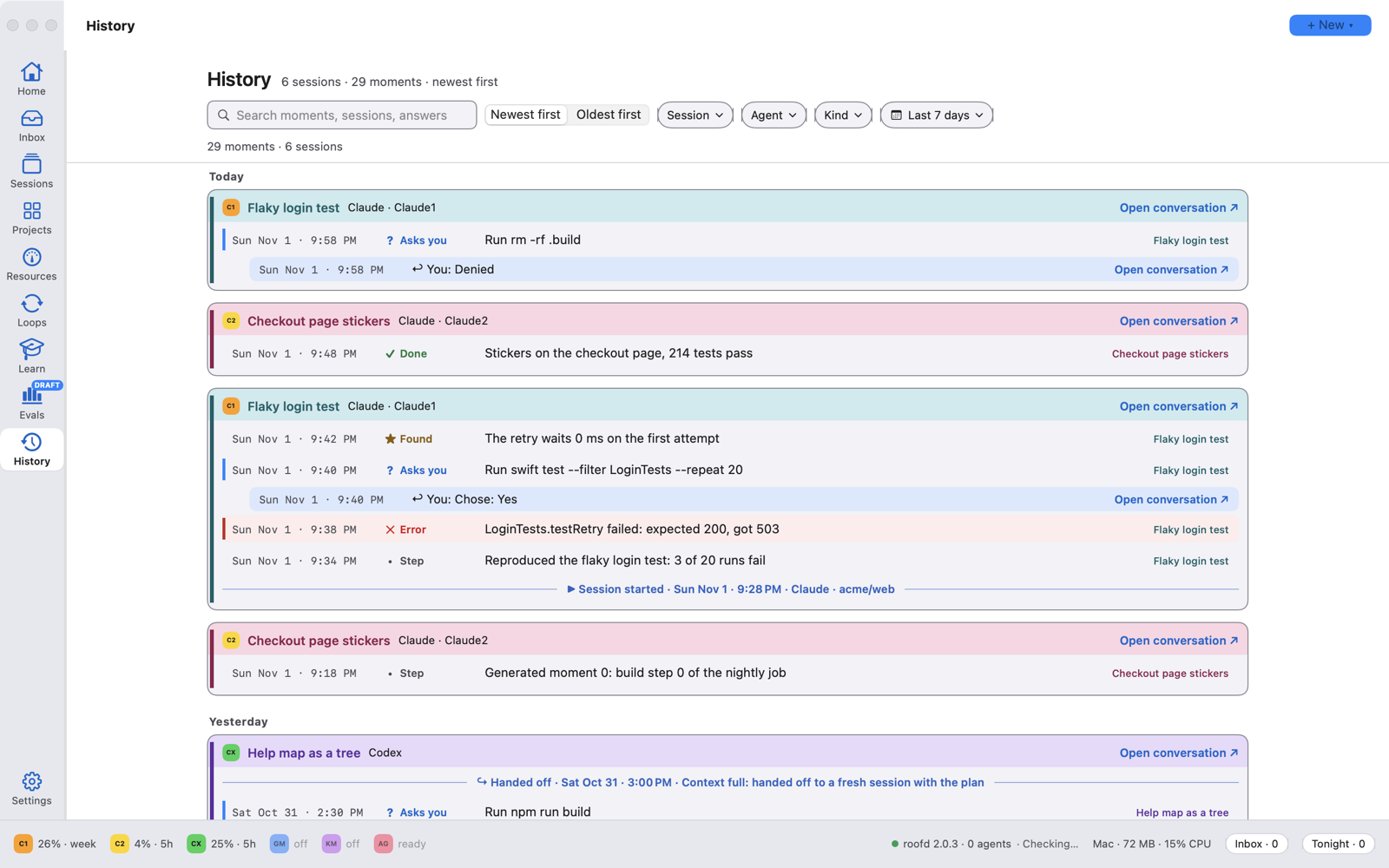
### History: what happened while you were away
A read-only record of each session's important moments: steps, findings, errors, what the agent asked and what you
answered, hand-offs between sessions. Each session's run of moments is one card, in its own colour. Search it, or
filter by session, agent, kind and date. Kept for 30 days.
 ### Loops: work that repeats until a check passes
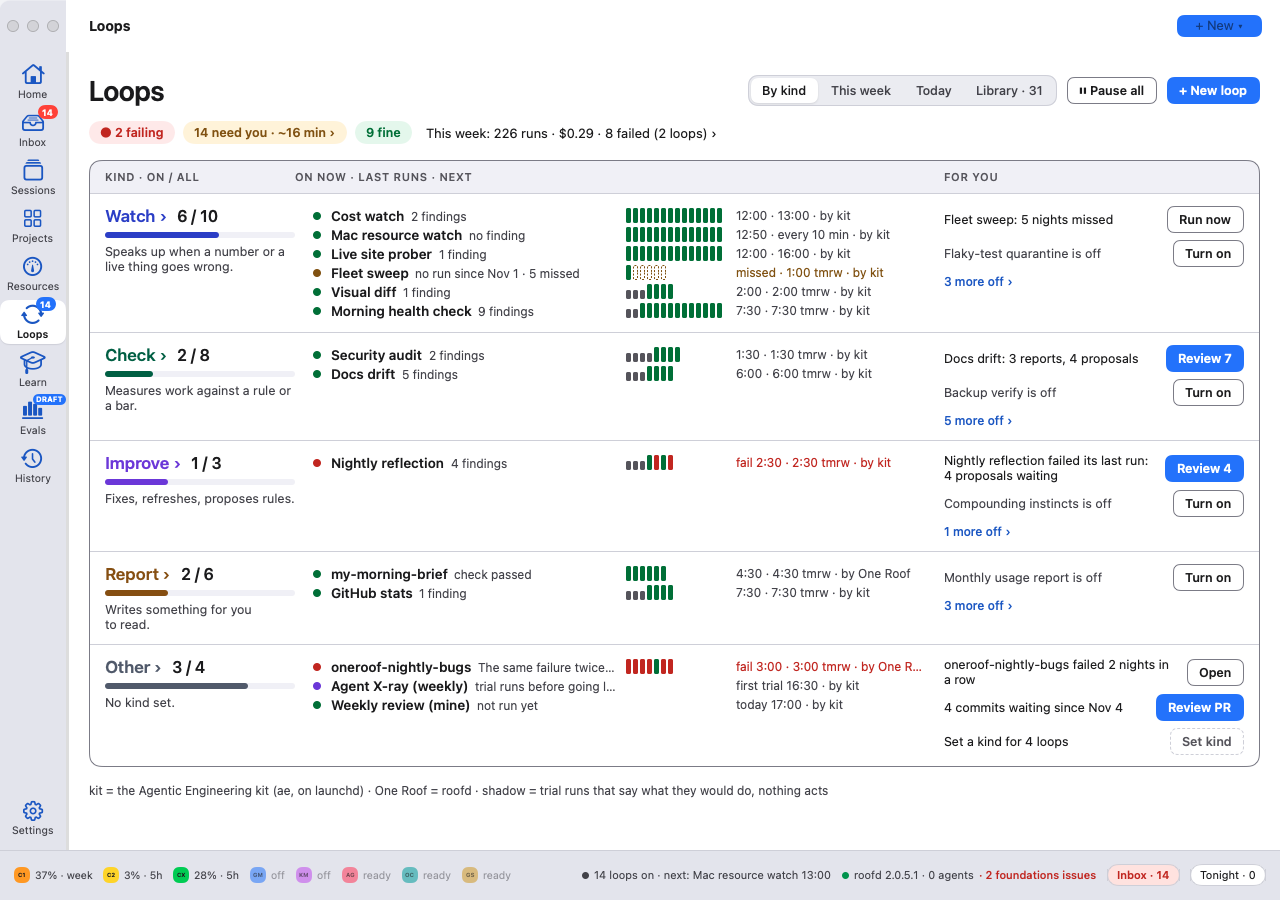
A loop gives an agent a goal and a check, such as "until the tests pass" or "every night at 3". One Roof runs the
check, starts another round when it fails, and stops at a limit. The agent works in the loop's own copy of the repo,
never in yours. What a loop produces waits in the Inbox for your approval.
1. **Check first.** If it already passes, no agent is started.
2. **One round.** The agent works on a separate branch.
3. **Check again.** Done, or another round, up to a limit.
4. **You decide.** A loop never pushes, merges or deploys on its own.
The built-in loops are off until you turn one on.
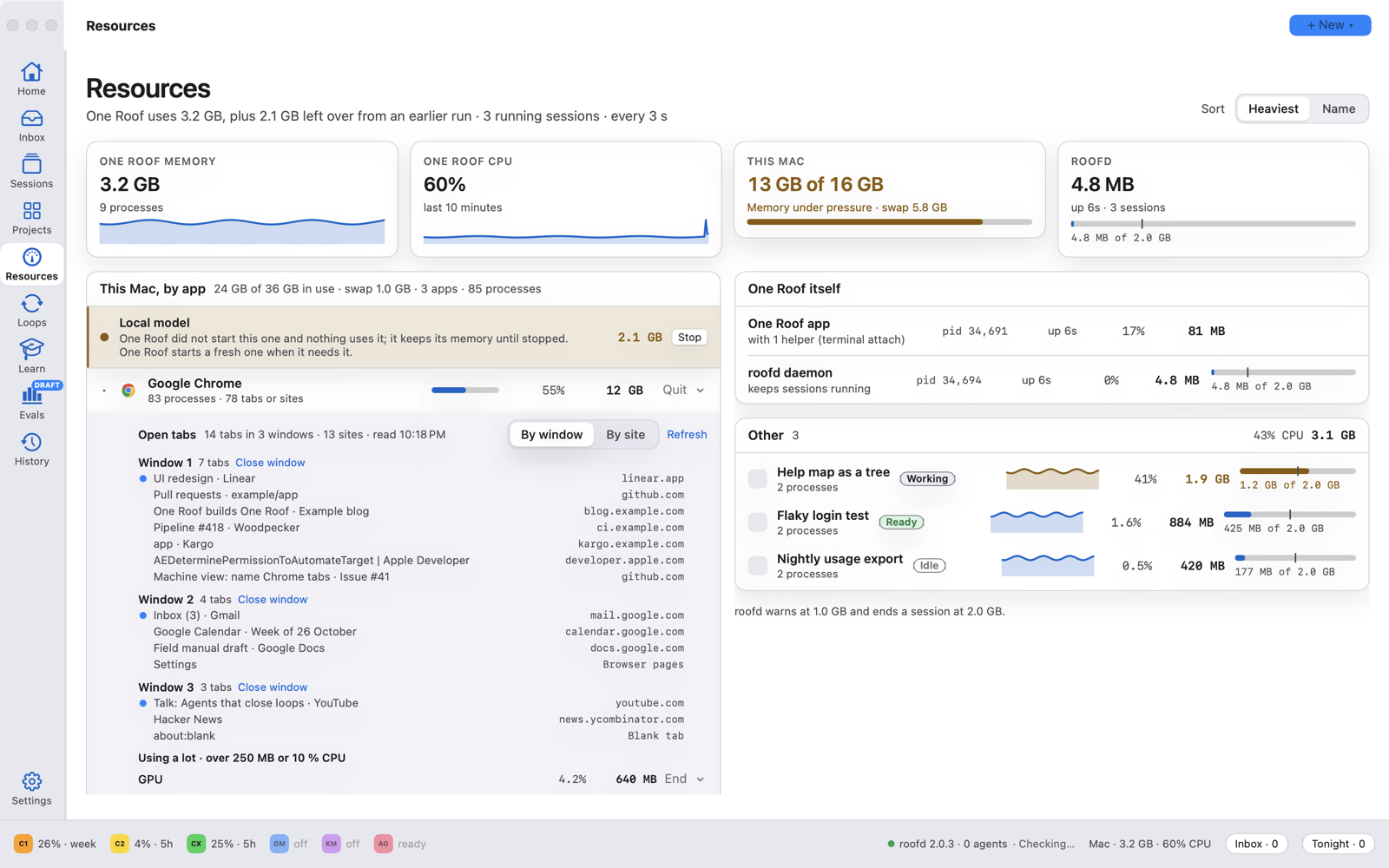
 ### Resources: see which session is slowing the Mac
Memory and CPU for each session, for One Roof itself and for every app on the Mac, with 10-minute charts. A browser
shows its windows and tabs, and you can close a tab or a window from here. roofd warns when a session grows past 1 GB
and ends it at 2 GB, before it can freeze the Mac.
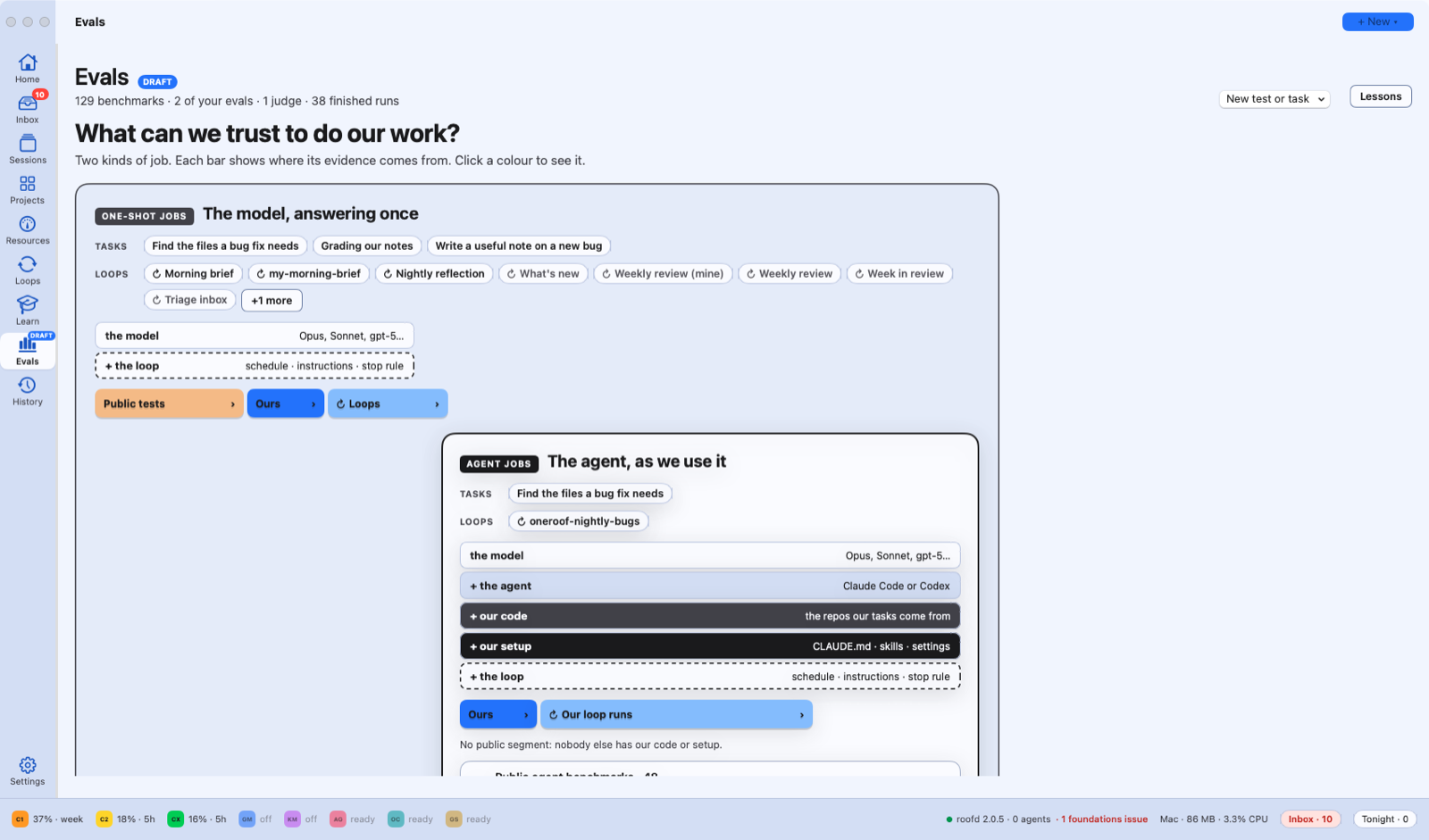
 ### Evals (draft): measure agents and models on your own work
Still a draft, and marked as one in the app. Run public benchmarks or build a question set from your own repo's fixed
bugs, then compare agents and models on it. Every score comes with its range and a plain explanation of what it means.
The cost shows before anything starts.
 ### Also on the rail, both optional
- **Projects:** your Linear teams, projects and tickets, with each project's roadmap. Only if you connect Linear with
your own API key; without it, Projects shows a single Connect Linear card.
- **Learn:** a course on agentic engineering. The narrated Agentic Engineering deck and a timeline of papers that
shaped coding agents. The narration is an AI-generated voice, and says so.
## Safe by default
One Roof never decides for you. These are the defaults on a new Mac.
- **Manual first.** Each agent has one permission mode: Manual, Plan, Auto or Full. On a new Mac every agent starts
in Manual and asks before it edits a file or runs a command. Change it per agent in Settings › Permissions.
- **Nothing is approved for you.** The Inbox shows the agent's own options. You press one, or answer in the terminal.
Loops stage their results for your approval and never merge on their own.
- **Your folders, not your home folder.** Setup asks for the folder that holds your code, or offers to create
`~/Projects`. One Roof never scans your home folder, so macOS does not ask about Desktop, Documents or Downloads.
- **Sessions survive the app.** roofd keeps your sessions running when One Roof is closed or updated. A crash in one
session ends only that session.
- **No keys in the app.** The app ships no keys, no tokens and no datasets. Linear, hosted models and gated
benchmarks use your own accounts, only if you add them.
- **Signed and open.** Signed with an Apple Developer ID and notarized by Apple. The full source is here, under the
MIT licence.
## Not tied to one vendor's agent
Agents differ in what they are good at, which model they bring and how much room is left on each subscription. Each
vendor's own app keeps you inside that vendor's agent. One Roof is no vendor's: Claude Code, Codex, Gemini CLI, Kimi
and Antigravity run side by side. The bar at the foot of the window shows how much of each subscription is used, so
you can pick the agent with room left.
## Install the app
**What you need**
| | What | How |
|---|---|---|
| Required | A Mac with Apple silicon, macOS 14 or later | |
| Required | git | `xcode-select --install` (Xcode Command Line Tools) |
| Required | At least one agent CLI, installed and signed in: `claude`, `codex`, `gemini`, `kimi` or `agy` | each agent's own installer (Gemini CLI needs a Gemini API key; Antigravity signs in with a Google account) |
| Optional | OpenCode or Goose on a hosted model | OpenCode 1.19.5 or Goose 1.57.0, Python 3.11+ with PyYAML, and an API key for Together AI, OpenRouter or Fireworks (see [hosted agents](docs/help/hosted-agents.md)) |
| Optional | On-device model for captions and reasons | `brew install llama.cpp`, then **Get the model** in Settings (Qwen3 1.7B, Apache-2.0, 1.1 GB; it runs on your Mac) |
| Optional | Projects (Linear) | your own Linear API key, in Settings › Linear |
1. **Download** `One-Roof-