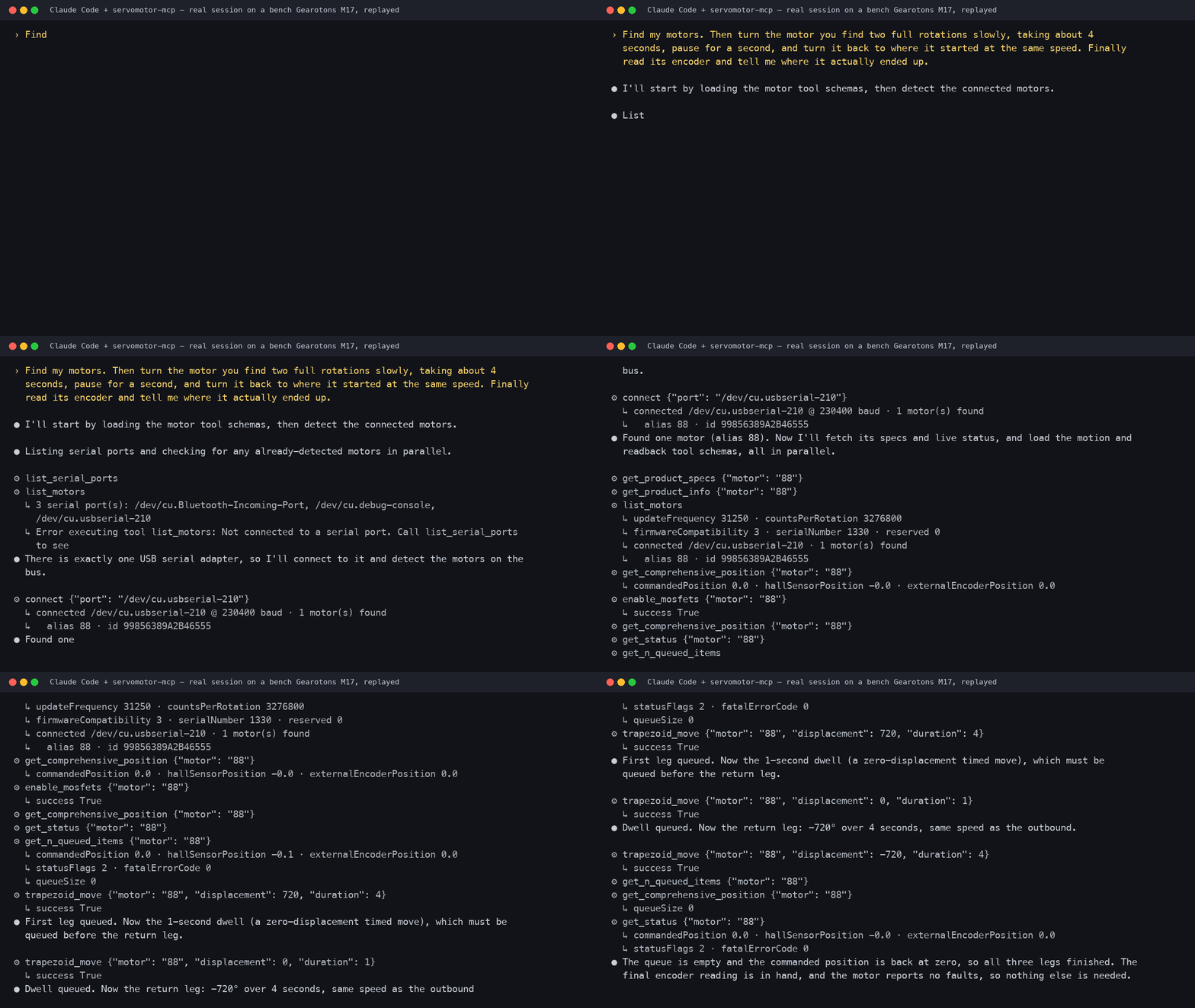
▶ 50-second video: the real motor and this session side by side — recorded 2026-09-09 on a bench M17; every line above is from the session log.
Step-by-step tutorial (boxed motor to "talk to it" in about twenty minutes): Talk to a servomotor from Claude Code on Hackster.
> The first servomotor with an official MCP server. Open hardware, open firmware, open > software — and now an open, AI-native control interface. --- ## Quickstart (no hardware, ~2 minutes) ```bash # Run the server directly with uv (recommended): uvx --from servomotor-mcp servomotor-mcp # or install it: pip install servomotor-mcp servomotor-mcp ``` Then add it to **Claude Desktop** — copy the block from [`examples/claude_desktop_config.json`](examples/claude_desktop_config.json) into your `claude_desktop_config.json`, restart Claude Desktop, and ask: *"What serial ports do you see? Connect and find my motors."* See [`examples/demo_prompts.md`](examples/demo_prompts.md) for a scripted demo. ## Drive real motors Plug an M17 (or a daisy-chain of them) into a USB↔RS-485 adapter and install the `[serial]` extra — that's it, no configuration: ```bash pip install 'servomotor-mcp[serial]' # pulls in the Gearotons servomotor library servomotor-mcp ``` With the `servomotor` library installed the server uses the real serial backend automatically. In a session, the model then: 1. `list_serial_ports` — enumerates the machine's ports (macOS `/dev/cu.*`, Windows `COM*`, Linux `/dev/ttyUSB*`), flagging USB serial adapters; 2. `connect` — opens the port you (or it) picked, at 230400 baud; 3. auto-detects every motor on that bus (unique ID + alias) — no address maps to write; 4. drives them. Tell it in plain English which adapter to use if you have several. ## Tools High-level (discovery + everyday motion): | Tool | What it does | |---|---| | `list_serial_ports` | Enumerate serial ports with USB metadata (call first). | | `connect` / `disconnect` | Open a port and auto-detect the motors on that bus. | | `detect_devices` | Re-scan the bus (reboots the motors on it). | | `list_motors` | Detected motors with live position/voltage/temperature/status. | | `move_to` / `move_relative` | Absolute / relative moves in degrees; waits for completion. | | `stop` | Emergency-stop one or all motors. | | `get_motor_status` | One motor's snapshot, fatal errors decoded to plain English. | | `run_sequence` | Choreographed steps ("draw a square"), incl. raw command steps. | Plus **one tool per firmware command**, generated from the library's command catalog: `enable_mosfets`, `go_to_position`, `move_with_velocity`, `move_with_acceleration`, `multimove`, `homing`, `zero_position`, `get_position`, `get_temperature`, `set_device_alias`, `set_pid_constants`, `system_reset`, `vibrate`, `ping`, … — anything the motor can do, the model can do. Motors are addressed by their alias number, their 16-hex-digit unique ID, or `"all"` (broadcast). Values are in friendly units (degrees, seconds, degrees/s, volts, °C); the server converts to firmware units. ## How it works ``` natural language → Claude → MCP tool calls → this server → RS-485 → M17 motors ``` The server is a thin layer over the Gearotons `servomotor` Python library. The library is data-driven — `motor_commands.json` defines every firmware command — and the server turns that same catalog into MCP tools, so new library commands appear automatically. Tool calls are forwarded straight to the hardware — no software clamping; full multi-turn travel, any speed. The motor's own firmware protections (over-current / over-voltage / over-temperature) still apply. The same tools run against the mock backend (`GEAROTONS_MOTOR_BACKEND=mock`) for development and CI. Environment variables (all optional): - `GEAROTONS_MOTOR_BACKEND` — `auto` (default: serial when the `servomotor` library is installed, else mock), `serial`, or `mock`. - `GEAROTONS_SERIAL_PORT` — default port for `connect` when the model doesn't pass one. - `GEAROTONS_DEFAULT_SPEED_DPS` — default speed for `move_to`/`move_relative` (180). ## Develop / test ```bash pip install -e '.[dev]' GEAROTONS_MOTOR_BACKEND=mock pytest # catalog + mock-bus + server-tool tests ``` `hardware_tests/` contains scripts that exercise the real serial path end to end (port sweep, full command suite, stdio MCP session) against a bench motor. ## Status - ✅ Full firmware command surface (48 commands), serial-port discovery, bus auto-detection — **verified on a physical M17** (fw 0.15.3.0) over a real stdio MCP session and via `uvx`, on all four test adapters (motor found only where it truly is). - ✅ Mock backend + 39 unit tests, no hardware needed. - ✅ Cross-platform port handling (macOS / Windows / Linux) via pyserial enumeration. ## License MIT. Hardware, firmware, and software for the M17 are open-source — see [github.com/tomrodinger/servomotor](https://github.com/tomrodinger/servomotor).