DocKit Logo # DocKit **Open-source GUI client for Elasticsearch, OpenSearch, DynamoDB and MongoDB — one native desktop app for all your NoSQL databases.** **Privacy-first. Your data, your keys. Open source.** [![Release](https://img.shields.io/github/v/release/geek-fun/dockit?color=orange&label=release&style=for-the-badge&logo=github)](https://github.com/geek-fun/dockit/releases) [![Downloads](https://img.shields.io/github/downloads/geek-fun/dockit/total?color=orange&style=for-the-badge&logo=docusign)](https://github.com/geek-fun/dockit/releases) [![License](https://img.shields.io/badge/License-Apache_2.0-blue.svg?style=for-the-badge&logo=apache)](LICENSE) [![Stars](https://img.shields.io/github/stars/geek-fun/dockit?style=for-the-badge&logo=github)](https://github.com/geek-fun/dockit/stargazers) [![CI](https://github.com/geek-fun/dockit/actions/workflows/node.yml/badge.svg?style=for-the-badge)](https://github.com/geek-fun/dockit/actions/workflows/node.yml)



[Download](https://www.geekfun.club/download) · [Docs](https://www.geekfun.club/docs/dockit/) · [Website](https://www.geekfun.club/products/dockit/) · [Releases](https://github.com/geek-fun/dockit/releases) English · [简体中文](README_zh.md)
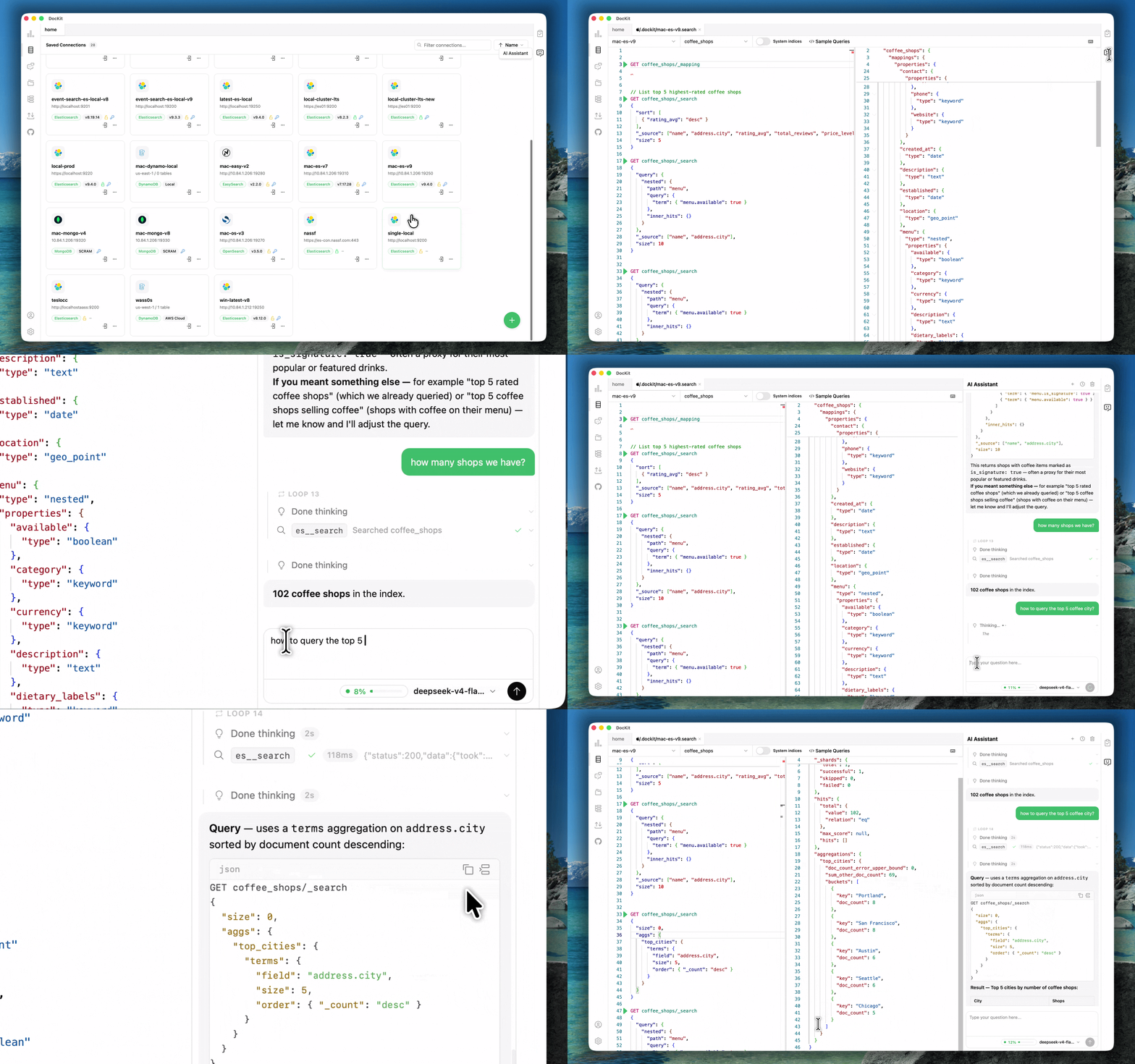
--- DocKit replaces browser consoles like Kibana and AWS Console with a single native desktop app. Describe what you need in natural language and get runnable queries, or use the Monaco-powered editors directly. Supports OpenAI, Anthropic, and DeepSeek — bring your own key.

DocKit Client UI Demo

## Installation Download   Releases   Website ## Key Features ### Agentic Data Studio Describe what you need in natural language — the agent writes queries, inspects schemas, updates documents, deletes records, creates indexes, and returns results. - **Query generation** — natural language to Elasticsearch DSL, PartiQL, MongoDB queries - **Schema inspection** — agent reads and explains your database schema - **Data operations** — CRUD, index management, bulk actions through conversation - **Safety** — per-source permissions, confirmation gate for destructive ops, credentials never exposed to the LLM - **Supported providers** — OpenAI, Anthropic, DeepSeek, Ollama, LM Studio ### DynamoDB Visual tools for DynamoDB — query builder, PartiQL editor, table management, import/export. - **Query Builder** — scan and query with primary key filtering and 13+ operators - **PartiQL Editor** — autocomplete, syntax highlighting, inline item CRUD - **Table management** — create, modify tables, manage indexes (GSI/LSI), TTL, streams, PITR, encryption - **DynamoDB Local** — offline development without AWS credentials - **Authentication** — AWS profiles, SSO, access keys, IAM roles ### MongoDB Full-featured MongoDB client with query editor, document browser, and import/export. - **Query editor** — autocomplete, result formatting, bulk write support - **Document browser** — pagination, inline CRUD - **Manage view** — indexes, storage stats, collection metadata at a glance - **Connections** — authentication, TLS, replica set configurations - **Import / Export** — JSON, CSV, JSONL ### Elasticsearch & OpenSearch Separate connection types with independent configs. Monaco-powered editor with full syntax highlighting and autocomplete. - **Cluster management** — node health, shard state, index tracking, alias control - **Authentication** — native API key support for both ES and OpenSearch - **Editor** — Monaco (VS Code engine), JSON5, inline comments, field autocomplete from live mapping - **Grammar catalog** — 120+ ES and OpenSearch API endpoints for reference - **Version support** — Elasticsearch 1.x–9.x, OpenSearch 1.x–3.x ### Management & Monitoring - **Cluster health** — node status, shard states, storage metrics - **Index management** — create, delete, open, close, manage aliases and mappings - **Table/collection metadata** — view and edit schema, indexes, and configurations ### Query History - **Auto-recording** — every query saved, no manual save needed - **500 entries per connection** — stored locally, searchable - **Replay** — copy, reload into editor, or re-execute past queries - **Covers** — PartiQL, MongoDB, and visual form queries ### Import & Export - **Formats** — JSON, CSV, JSONL - **Scale** — batch operations handle millions of records - **Use cases** — cluster migration, backup, dev environment seeding ### Privacy & Security - **No telemetry** — DocKit does not phone home - **Local storage** — queries, credentials, analytics stay on your machine - **Encrypted** — connection profiles secured by your OS keychain - **Air gap** — fully offline capable, no internet required ### Accessibility - **Keyboard navigation** — tab through all interactive elements, arrow keys in lists and trees, enter/space to activate - **Screen reader** — action buttons and query results fully accessible - **Focus indicators** — visible on all interactive elements ## Development DocKit is Built with [Tauri](https://tauri.app/) (Rust), Vue 3 + TypeScript, [shadcn-vue](https://www.shadcn-vue.com/), [UnoCSS](https://unocss.dev/), [Monaco Editor](https://microsoft.github.io/monaco-editor/), and Pinia. ### Prerequisites - Node.js >= 20 - NPM >= 10 - Rust toolchain (for Tauri) ### Setup ```bash git clone https://github.com/geek-fun/dockit.git --depth=1 cd dockit npm install npm run tauri dev ``` ### Build ```bash npm run tauri build # current platform npm run build:macos # macOS Universal ``` ## Contributing Issues and PRs welcome. Check the [contribution guide](CONTRIBUTION.md). ## Community

WeChat Group       WeChat Official Account

Discord     X / Twitter     YouTube     GitHub

## Sponsor

WeChat Sponsor QR       GitHub Sponsors

## Star History Star History Chart ## License [Apache 2.0](LICENSE) © GEEKFUN