# Unity Biome MCP
Concept illustration of an AI client sending a live MCP signal through Unity Biome MCP to the Unity Editor **Control the Unity Editor from MCP-compatible AI clients or from chat inside Unity.** Inspect scenes, edit GameObjects, run playtests, and capture results through structured tools.

Documentation MIT license Latest release

Python CI C# Linux EditMode C# macOS EditMode C# Windows EditMode

Python coverage C# coverage SonarCloud Quality Gate Tool quality score

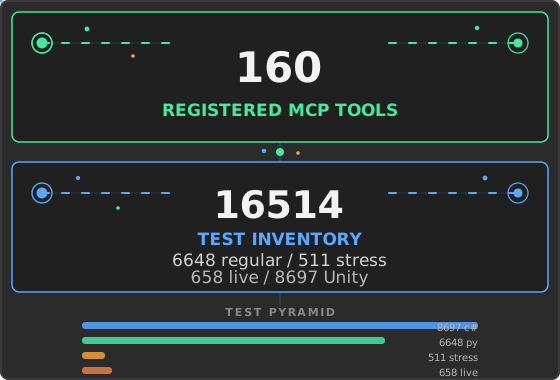
Registered MCP tools Discovered test inventory unity-biome-mcp MCP server

Quick Start · Documentation · Comparison · Changelog

## Quick Start Requirements: Unity 6 (`6000.0` or newer), Git 2.14+ on `PATH`, and [uv](https://docs.astral.sh/uv/). The MCP server does not need a separate Python installation when it runs through `uvx`; optional Codex skill synchronization requires Python 3.14 or newer on `PATH`. See the full [Getting Started prerequisites](docs/getting-started/index.md#prerequisites). ### 1. Install uv macOS and Linux: ```bash curl -LsSf https://astral.sh/uv/install.sh | sh ``` Windows: ```powershell winget install astral-sh.uv ``` ### 2. Add the Unity package 1. In Unity, open **Window > Package Manager**. 2. Select **+ > Add package from git URL**. 3. Enter: ```text https://github.com/german-krasnikov/unity-biome-mcp.git?path=unity-plugin ``` ### 3. Configure your client Open **MCP > Setup Wizard**, choose a client, and follow the result shown by the Wizard. Configuration depends on the client. The Wizard may write a project configuration, run the configuration helper, copy a client-specific snippet, or defer configuration until In-Unity Chat starts. Restart the selected client when prompted. The Wizard configures the integration; it does not perform an end-to-end connection test.
Manual client setup guides Use the matching guide: [Claude Code](docs/install/claude-code.md) | [Claude Desktop](docs/install/claude-desktop.md) | [Codex](docs/install/codex.md) | [Cursor](docs/install/cursor.md) | [Junie](docs/install/junie.md) | [Kimi](docs/install/kimi.md) | [OpenCode](docs/install/opencode.md) | [Rider AI Assistant](docs/install/rider.md) | [VS Code](docs/install/vscode.md) | [Windsurf](docs/install/windsurf.md) For external OpenCode setup, do not use the Wizard's standard clipboard JSON: OpenCode has a different configuration shape. Follow the [OpenCode guide](docs/install/opencode.md#external-mcp-client).
### 4. Verify the first connection For an external MCP client, keep the Unity project open, restart the client if the Wizard asked you to, and send: > Read the active Unity scene hierarchy at depth 2 and summarize its root objects. The client should call: ```python get_hierarchy(depth=2) ``` A successful response contains the active scene hierarchy. If the call fails, open **MCP > Status > Diagnose** in Unity. For Chat-only verification, use the [Chat quick check](docs/getting-started/index.md#3-verify-the-first-connection). For command-line diagnostics, run: ```bash uvx --from git+https://github.com/german-krasnikov/unity-biome-mcp.git#subdirectory=server unity-biome-mcp doctor ``` See [Getting Started](docs/getting-started/index.md) for recovery steps and platform details.
Local development installation Requirements for a source checkout: Git and Python 3.14 or newer. > **Upgrading from older Python:** Install Python 3.14 via `brew install python@3.14` (macOS), your system package manager (Linux), or [python.org](https://www.python.org/downloads/) (Windows). Then run `python install.py update` to recreate the virtual environment. ```bash git clone https://github.com/german-krasnikov/unity-biome-mcp.git cd unity-biome-mcp python install.py setup python install.py configure --tool claude-code python install.py doctor ``` The configuration helper supports `claude-code`, `claude-desktop`, `cursor`, `windsurf`, `vscode`, `codex`, `kimi`, `junie`, and `opencode`.
## Documentation | Goal | Guide | |---|---| | Install and connect | [Getting Started](docs/getting-started/index.md) | | Choose and configure an MCP client | [Client guides](docs/install/index.md) | | Install project-local AI guidance | [AI Skills and Agents](docs/install/ai-skills.md) | | Find a tool for a task | [Tool Guide](docs/features/tool-guide.md) | | Use batch safely | [Batch Operations](docs/tools/batch.md) | | Build Play Mode workflows | [PlayTest DSL](docs/features/playtest.md) | | Configure In-Unity Chat | [Chat Backends](docs/chat/backends.md) | | Extend Unity Biome MCP | [Plugin Quick Start](docs/plugins/index.md) | | Diagnose failures | [Diagnostics](docs/tools/diagnostics.md) | ## What You Can Do - **Scene and object editing:** inspect and modify GameObjects, components, assets, materials, shaders, and UI. - **Playtesting and verification:** run PlayTest DSL workflows, compile checks, console checks, runtime diagnostics, and visual comparisons. - **Animation and VFX:** work with clips, Animator controllers, Timeline, particles, materials, shaders, and Shader Graph. - **Efficient tool use:** group compatible operations with `batch`, request deferred schemas, and enable capability categories only when needed. - **Extensibility:** add project-specific server tools, Unity commands, Chat context chips, and plugin hooks.
Prompt and batch examples Example prompts: > Create a player object, add a Rigidbody, and place it at the scene origin. > Find enemies without colliders and add a BoxCollider to each. > Run a playtest that moves the player to the door and verifies that the score increases. > Capture the Game View and compare it with the saved baseline. > Summarize scene changes since the last checkpoint. ### Batch example Use `batch` for two or more compatible operations: ```python batch(commands=""" create_object name=Enemy set_property path=Enemy component=Transform prop=position value=0,1,0 manage_component path=Enemy type=Rigidbody action=add set_property path=Enemy component=Rigidbody prop=mass value=2 """) ``` Some typed tools are direct-only and cannot be placed in a batch. See the [Batch guide](docs/tools/batch.md) for validation, Undo-backed rollback, and error handling.
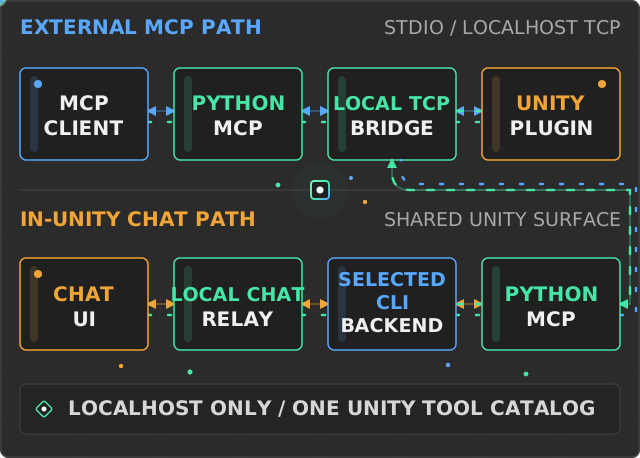
## Ways to Work ### External MCP client An MCP client launches the Python server over stdio. The server discovers the active Unity project and sends framed commands to the editor plugin over localhost TCP. ### In-Unity Chat Open **MCP > Chat** to work inside the editor. Select a supported CLI backend and use Ask or Agent mode. Authentication is handled by the selected CLI. Context chips can attach scene objects, scripts, and assets to a turn, while each completed AI turn is grouped for Unity undo. See [Chat backends](docs/chat/backends.md) for setup and behavior. ## Architecture Animated architecture diagram: external clients and In-Unity Chat reach the Python MCP server and Unity Editor plugin through their local transport paths The external path is `MCP client -> Python MCP server -> localhost TCP -> Unity Editor plugin`. In-Unity Chat invokes the selected CLI through the local chat relay; that CLI connects to the same Python MCP server and rejoins the shared TCP-to-plugin path. ## AI Skills The Unity package includes 12 reusable domain skills and 4 focused agents for Claude Code and Codex. They cover efficient MCP tool selection, batching, Unity authoring, playtesting, diagnostics, and evidence-based verification. Open **MCP > Install AI Skills** to install them into the current project. Existing and generated files are ownership-checked before replacement. See [AI Skills and Agents](docs/install/ai-skills.md) for paths, safe updates, and Codex synchronization. ## Project Inventory The values below are generated from registrations, pytest collection, Unity test discovery or source scanning, and package metadata. They are discovery counts, not a claim that every test was executed in the current checkout. 160 registered MCP tools. Test inventory: 16514 entries: 6648 regular Python, 511 Python stress, 658 live Python, and 8697 Unity source attributes. Unity count source: static source scan. Server package version: v2.1.0. ## Unity MCP Product Comparison Verified August 16, 2026: - **Unity Biome MCP:** 160 registered tools, deterministic PlayTest DSL, and visual baseline/diff workflows. - **Unity MCP Server 2.17:** first-party local bridge, connection approval, and multi-client support. - **MCP for Unity 10.1.2:** Unity 2021.3 compatibility, 47 tool entrypoints, and authenticated remote hosting. - **AI Game Developer 0.87.0:** compiled-player runtime plus local, HTTP, cloud, and Docker deployment. - **MCP Unity:** 33 listed tools, optional Undo rollback for batches, and an MCP App dashboard. The detailed matrix cites exact source commits or versioned official documentation and records constraints as well as strengths. [Open the full source-backed comparison](docs/comparison.md) ## Recent Changes **Current release: v2.1.0 (2026-09-25).** [Read the full changelog.](CHANGELOG.md) ## Contributing Read [CONTRIBUTING.md](CONTRIBUTING.md) before opening a pull request. New contributors can start with [good first issues](https://github.com/german-krasnikov/unity-biome-mcp/issues?q=is%3Aissue+is%3Aopen+label%3A%22good+first+issue%22). Report security issues through [SECURITY.md](SECURITY.md). ## License [MIT](LICENSE) · [Third-Party Notices](THIRD-PARTY-NOTICES.md)