# [ICLR 2025] ChemAgent: Self-updating Memories in Large Language Models Improves Chemical Reasoning




## Table of Contents
- [Overview](#overview)
- [Key Features](#key-features)
- [Project Structure](#project-structure)
- [Getting Started](#getting-started)
- [How to run](#how-to-run)
- [How to dev](#how-to-dev)
## Overview
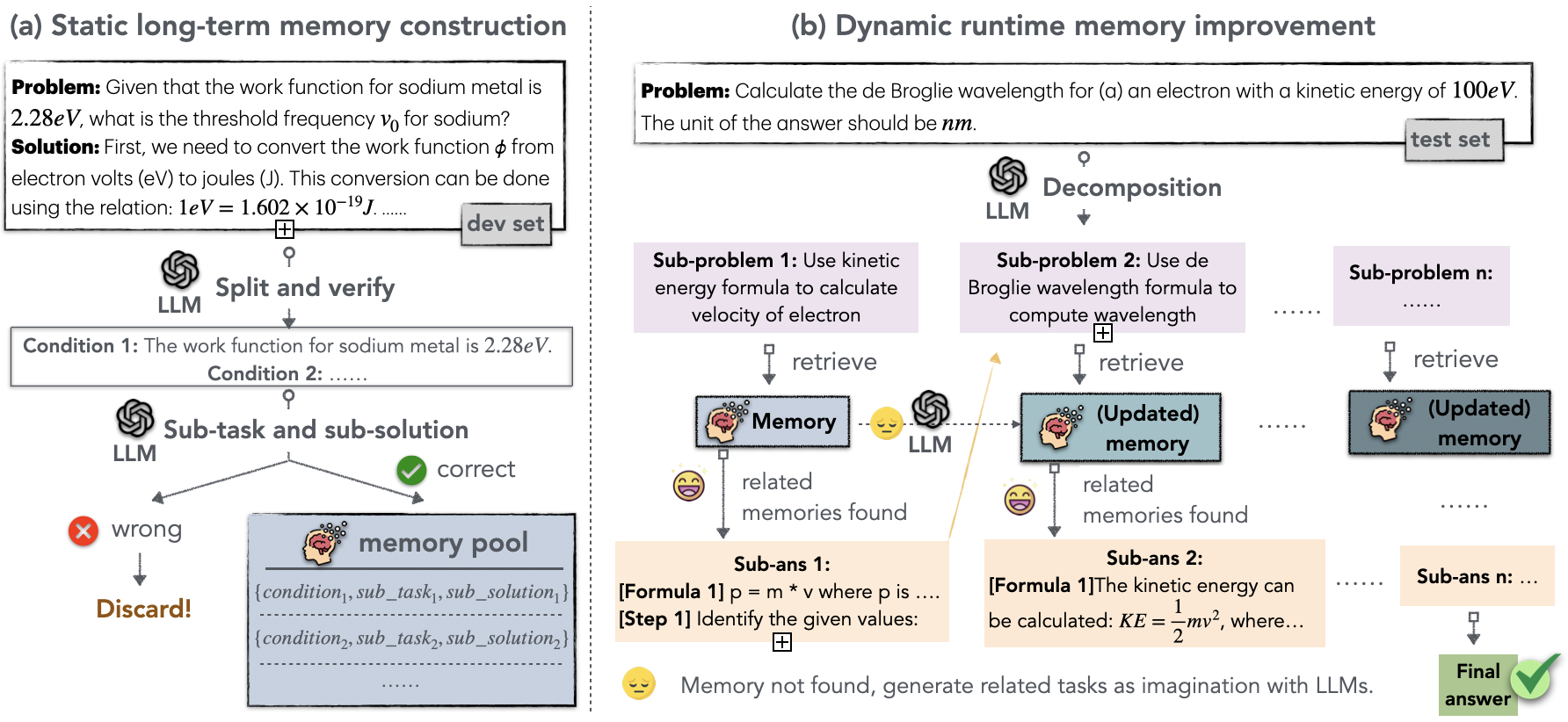
ChemAgent leverages an innovative self-improving memory system to significantly enhance performance in complex scientific tasks, with a particular focus on Chemistry.
## Key Features
- **Self-updating Memory System**: Continuously improves model performance
- **Specialized for Chemistry**: Tailored for chemical reasoning tasks
- **Modular Architecture**: Includes task splitting, execution, association, and reflection modules
## Project Structure
- `Xagent/agent/`: Contains prompts and code for functional modules
- `dev_test.py`: Execution code for memory pool construction
- `assets/config.yml`: Configuration and module activation management
- `output/`: Experimental results for GPT-4 and GPT-3.5 across four datasets
- `memory/`: Plan Memory and Execute Memory for the four datasets
- `dataset/`: Experimental datasets from [SciBench](https://github.com/mandyyyyii/scibench)
## Getting Started
1. **Installation**: (Add installation instructions here)
2. **Configuration**: Modify `assets/config.yml` to suit your needs
3. **Running Experiments**: Use `dev_test.py` with appropriate parameters
For detailed usage instructions, see the "How to run" and "How to dev" sections below.
## How to run
#### Run on dataset
```
python dev_test.py --tool python --mode test --list_source
```
You can choose from the following datasets located in the `dataset` folder: `atkins`, `chemmc`, `matter`, or `quan`.
## How to dev
Before executing tasks using this framework, it is necessary to first construct memory according to the process outlined in the paper.
1. **Add Few-shot Examples:**
In the `XAgent/agent/simple_agent/prompt.py` file, select two examples from `fewshot_examples` and incorporate them into the model prompt.
2. **Update Configuration File:**
Modify the `assets/config.yml` file to adjust the configuration according to your requirements.
3. **Run Development Tests:**
Execute the development test mode using the following command:
```bash
python dev_test.py --tool python --mode dev --list_source
## Configuration
The `assets/config.yml` file allows you to customize various settings for the ChemAgent framework:
### Model Settings
```yaml
default_completion_kwargs:
model: gpt-3.5-turbo-16k
eva_model: gpt-4
temperature: 0.2
request_timeout: 60
```
To change other settings:
```yaml
save_dir: "./memory/exec_memory/storage_matter_gpt4"
plan_save_dir: "./memory/plan_memory/plan_storage_matter_gpt4"
score: False
refine: False
image: False
```
The configuration parameters control various aspects of the system:
1. Memory Pools:
- `plan_save_dir`: Specifies the memory pool for Plan Memory
- `save_dir`: Specifies the memory pool for Execution Memory
2. Knowledge Memory:
- `img`: Controls the activation of Knowledge Memory
3. Task Execution:
- `refine`: Determines if the system should refine the task strategy upon execution failure
4. Evaluation:
- `score`: Decides if the evaluation module is enabled
## Cite Us
```
@inproceedings{tang2025chemagent,
title={ChemAgent: Self-updating Library in Large Language Models Improves Chemical Reasoning},
author={Tang, Xiangru and Hu, Tianyu and Ye, Muyang and Shao, Yanjun and Yin, Xunjian and Ouyang, Siru and Zhou, Wangchunshu and Lu, Pan and Zhang, Zhuosheng and Zhao, Yilun and others},
booktitle={The Twelfth International Conference on Learning Representations}
}
```