# Knit
**Message the people around you when there is no network at all — an end-to-end-encrypted mesh messenger for Android.**
Phones talk straight to each other over Wi-Fi Aware and Bluetooth LE, relaying for one another hop by hop, so a message reaches further than any one radio does. No internet, no accounts, no Google Play services.
🌐 **[getknit.app](https://getknit.app)** — the Knit website
-3DDC84?logo=android&logoColor=white)





[](https://github.com/getknit/knit/releases/latest)
[](https://hosted.weblate.org/engage/knit/)
[](https://whatsnew.fyi/product/knit#changelog-grade)
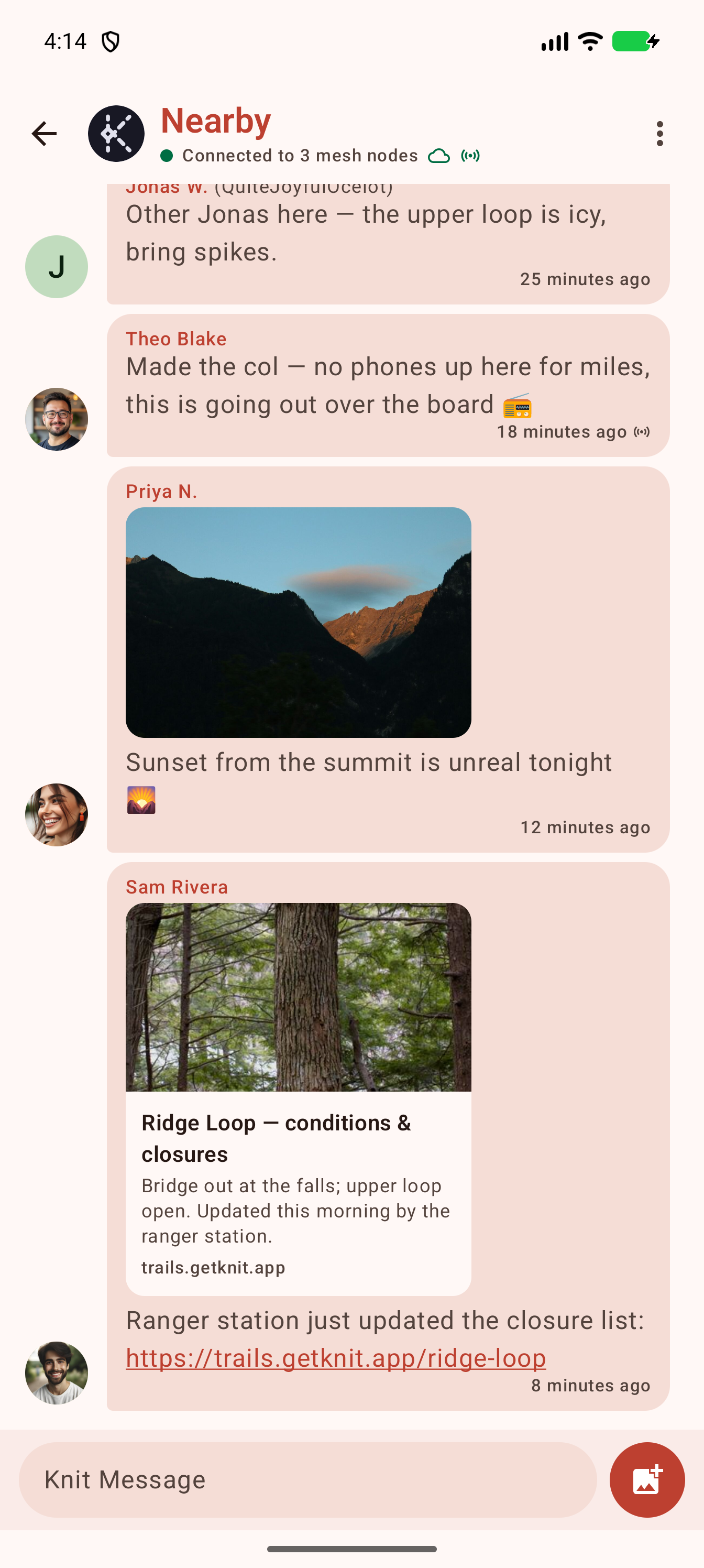 The public Nearby room, relayed over Wi-Fi Aware + BLE with no internet — photos, link previews,
and a line that came the long way over a LoRa radio.
The public Nearby room, relayed over Wi-Fi Aware + BLE with no internet — photos, link previews,
and a line that came the long way over a LoRa radio.
[](https://play.google.com/store/apps/details?id=app.getknit.knit)
[](https://f-droid.org/packages/app.getknit.knit/)
- **Google Play** — open
[the listing](https://play.google.com/store/apps/details?id=app.getknit.knit) (or search *Knit* in the
Play Store app) and tap **Install**; updates arrive automatically.
- **F-Droid** — install the [F-Droid client](https://f-droid.org/) and search for *Knit*, or open
[the package page](https://f-droid.org/packages/app.getknit.knit/) and tap **Download APK**. F-Droid
**rebuilds Knit from source and byte-compares** the result against our published release, then
distributes *our* signed APK verbatim — see [the reproducibility
contract](.agents/context/distribution.md).
- **Direct APK** — the same F-Droid-verified, self-signed universal APK is attached to every
[GitHub Release](https://github.com/getknit/knit/releases), for sideloading without any store. Alpha
pre-releases appear there too, signed with the same key so they update in place; F-Droid skips them.
- **From a nearby phone, no store or internet needed** — an installed copy of Knit can hand itself to
another device: **Install offline** in the app menu merges its installed splits into a universal APK,
re-signs it on-device, and sends it over Quick Share or Bluetooth. Open the received file on the other
phone and allow installing it.
> [!IMPORTANT]
> **Play and non-Play installs carry different signatures and can't upgrade one another.** Play App
> Signing re-signs the app with Google's key, so switching between the Play build and the
> F-Droid/APK/offline-shared build requires uninstalling first — **which erases your local message history
> and identity key**. The F-Droid, GitHub-Release, and offline-shared APKs all share one signature, so
> those three interoperate and update in place.
## How it works
```
┌─────────┐ Wi-Fi Aware / BLE ┌─────────┐ Wi-Fi Aware / BLE ┌─────────┐
│ Phone A │ ────────────────────► │ Phone B │ ────────────────────► │ Phone C │
└─────────┘ send + relay └─────────┘ relay (dedup) └─────────┘
│ │ │
originates a overhears & re-floods (jittered, delivers — even though
signed, encrypted suppressed) — only carries ciphertext A was never in its range
frame once it can't decrypt
```
Every message is a signed CBOR frame that relays forward **byte-for-byte** (they rewrite only
TTL/hop-count), so the originator's Ed25519 signature survives every hop. A relay that can't decrypt or
even recognize a frame still forwards it — an old build is never a black hole. See
[`docs/ARCHITECTURE.md`](docs/ARCHITECTURE.md) for the full protocol.
## 🧭 Use it when
Knit is built for situations where there's **no reliable network but people are physically nearby**:
- **Off-grid & remote** — hiking, camping, festivals, sailing, or anywhere without cell coverage.
- **Disaster & emergency** — earthquakes, storms, or outages that knock out cell towers and internet.
- **Crowded venues** — concerts, stadiums, and conferences where the cellular network is saturated.
- **Privacy-sensitive** — no servers, no accounts, no phone numbers; DMs and groups are end-to-end
encrypted and identities are verifiable in person via safety numbers / QR codes.
- **Censored or shut-down networks** — communication that doesn't depend on any ISP or provider.
## ✨ Features
- **Two radios at once, so there are more paths to you** — **Wi-Fi Aware (NAN)** and **Bluetooth LE**
both run behind a single `MeshTransport` seam (`CompositeMeshTransport`), with no Google Nearby / GMS.
Knit advertises, discovers, connects, and floods with hop-count/TTL bounds and dedup; relays
rebroadcast on a **jitter with overhear suppression**, so a dense cluster doesn't storm itself. A
phone with only one of the two radios still meshes over that one. Where both phones support
Bluetooth's long-range mode (Coded PHY), they find each other from further apart, and a link drifting
out of range switches to it to stay up.
- **Broadcast room, 1:1 DMs, and group chats** — a conversation list and contact picker, message
bubbles, relative timestamps, unread badges, and delivery ticks (✓ / ✓✓).
- **End-to-end encryption with forward secrecy** for DMs and groups — each message's body, mentions,
and attachments are sealed with AES-256-GCM and authenticated with an Ed25519 signature, so
relays only ever carry ciphertext. Between current builds the keys rotate: a DM session bootstraps
from a signed prekey published in the peer's profile (X3DH-style, so the first message still needs
no round trip) and rekeys as the conversation turns over, and groups run a sender-key ratchet on top
of those sessions with each member driving their own chain. Message keys are dropped after use, so
recorded ciphertext stops being readable once its epoch ages out. Peers on older builds fall back to
the static-key scheme automatically. Identity keypairs are **hardware-backed** (AndroidKeyStore),
advertised in profiles, pinned on first use (TOFU), and confirmable out of band via a
**safety-number / QR-code** verification screen — or by trading contact links, which pins the same key
without either of you needing to be in the room. What the app keeps on disk is encrypted at rest with
SQLCipher.
- **Store-and-forward delivery** — a message whose recipient isn't in range is held in encrypted custody
and re-offered when they (or a path to them) later come into range, so two phones that meet only
briefly still backfill each other. A content-digest anti-entropy layer means an idle mesh does zero
data-path work; a new message triggers a targeted sync only with the peers that need it.
- **Photos, videos, files, voice notes, reactions, and @-mentions** — send an image (GIF/JPEG/PNG/WebP),
a short video (Knit re-encodes it to about 3 MB and keeps the first 61 seconds), any other file up to
8 MB, or a voice note held down in the composer. Files and voice notes are for DMs and groups, and the
public room takes photos and videos only, so everything strangers see has been screened. In a group,
@everyone mentions every other member at once.
React with any emoji — the quick row learns the ones you actually use — and mentions raise their own
notification. Attachment bytes are content-addressed and pulled on demand instead of riding the
flood (encrypted ones by ciphertext hash, so dedup and pull are unchanged), and reactions converge
across the mesh (last-writer-wins), sealed alongside delivery receipts in DMs and groups.
- **Big files, phone to phone** — a file too large to attach goes to one nearby contact from the menu
in a direct message: the two phones raise a Wi-Fi Direct link between themselves for the transfer
(up to 8 GB, measured at ~70 MB/s between two Pixels) and tear it down after. The bytes never ride
the mesh and are never held in custody; the chat keeps a record of the hand-off, and the file lands
in the other phone's Downloads.
- **Voice calls** — call a contact from their profile or the top of your chat. Someone nearby is
reached over a Wi-Fi Direct link with no Internet at all, someone further off over the Internet, and
when there's no live path the call becomes a walkie-talkie over the mesh. See [Calls](#-calls).
- **Search everything you have** — the magnifier at the top of the chat list finds a chat, a contact,
or a message by what it said, from an on-device full-text index. Open a hit and its chat lands on
that message. A stranger's message request stays out of the results until you accept it.
- **See what your phone did for the mesh** — tap the nearby count above the chat list for **Your
mesh**: messages your phone passed along or handed straight to the person they were for, what it is
carrying right now, and how many people it has met. Every number is counted on the phone and stays
there, apart from the totals the [watch app](#-on-your-watch) preview reads from it.
- **Kilometres of range from a Meshtastic radio, if you want them** — pair a LoRa board over Bluetooth
and the **Nearby room and your 1:1 messages** get a hop measured in kilometres instead of metres,
shared by every phone meshed with yours: one board extends the whole group. LoRa spends speed to buy
that distance, so the board carries small frames only — group chats and attachments keep to the phone
mesh or an optional relay — and a message that a Wi-Fi or Bluetooth link already delivered never
spends airtime on the radio. Nothing leaves over LoRa until you pair a board.
- **Link previews and shared locations, each opt-in** — paste a link and *your* phone fetches the
page's title and picture and sends them with the message, so the people you send to never contact the
site. Fetching one shows that site your IP address, which is why it's off until you turn it on. The
pin beside the paperclip reads your position once, between the tap and the send, and puts it in the
message as a `geo:` line the other phone opens in any maps app — the only place the app ever reads
where you are.
- **Profiles** — display name, status, and avatar flooded across the mesh; avatars transferred as files
(re-pushed only when they actually change) and shown next to messages. Supporters can switch on a small
badge on their photo, which every phone checks offline before it draws it.
- **Backup and restore** — your identity, contacts, groups and messages go into one encrypted file,
locked by a recovery key Knit shows you once. Restore it on a new phone from the welcome screen. A
backup belongs on one phone at a time, and if the same one turns up on two, each phone says so and
offers to sign out there.
- **On-device content moderation** — abusive-text and explicit-image (NSFW) filtering that runs
**entirely offline** (no network, no server): a deterministic profanity filter, a bundled TFLite
**toxicity** text classifier, and a bundled TFLite **NSFW** image classifier. In the public Nearby and
Meshtastic rooms, abusive **text** and explicit **images and videos are blocked on send**; DMs, groups and the
commons are never checked on the sender's phone. Everything received, in every conversation, is
**collapsed/blurred behind tap-to-reveal** (receiver-side enforcement is what actually protects a user
in a mesh), under the receiver's own toggle, with one-tap block-sender. Your own avatar and group photos
are screened when you set them. See
[`docs/CONTENT_MODERATION.md`](docs/CONTENT_MODERATION.md).
- **Messaging-style notifications** with per-context channels (Nearby, groups, DMs) and a separate
channel for mentions. A reaction to one of your messages notifies you too.
- **Always-on background mesh** via a foreground service, kept healthy by a heartbeat alarm,
significant-motion re-scan, and radio-availability recovery; prompts to disable battery optimization.
The mesh notification can pause Knit for 15 minutes or an hour so another app can have Bluetooth, and
the mesh comes back by itself. **Low-power mode** in Settings turns Wi-Fi Aware off to save battery,
and switches on by itself under Battery Saver: Bluetooth keeps you on the mesh, so messages still
arrive while photos and files take longer.
- **Offline app sharing** — hand Knit to a nearby phone with no store: the installed splits are merged
into a universal APK and re-signed on-device (ARSCLib + apksig).
- **Material 3** UI with a coral brand theme and full dark mode — following your phone, pinned to light
or dark in Settings, or taking your wallpaper's colours if you turn those on (Android 12+). A message
you start and don't send is still waiting in that chat when you come back, and the chat list shows it
as `Draft:` until it goes.
## 📞 Calls
Knit can call your contacts too, one to one. Call someone your phone meshes with and you don't need the
Internet. The two phones raise a Wi-Fi Direct
link between themselves, the same kind a big-file transfer uses, and the call runs over it. For someone
further away the call goes over the Internet: it rings as a sealed direct message through the mesh or your
relays, and your voice goes straight to the other phone where the network allows it, or through a TURN
server where it doesn't.
When neither path exists, Knit places a **mesh call** instead, which works like a walkie-talkie: hold the
button to talk and your words stream across the mesh in small chunks, playing about a second behind you
between neighbours. Nothing is stored, and no burst lands in the chat. A contact's profile has a Mesh call
button too, for when you'd rather start one yourself.
Only the two of you hear a call. A live call's audio is encrypted with DTLS-SRTP under keys each phone
checks against the other's Knit identity, so a TURN server relays only ciphertext. Walkie chunks are sealed
like any direct message, and the phones that carry them can't read them. A live call does show each phone's
IP address to the other, and **Relay all calls** in Settings → Calls hides yours by routing every call
through a TURN server instead.
Calls register with Android as calls, so a Bluetooth headset, a watch or a car can answer and hang up, and
the audio follows your headset. Each call leaves a line in the chat, like "Missed call · 9:15 AM". Knit can
also write each walkie burst out as text while it plays, and caption the other person on a live call. The
speech recognition runs on the phone, and the words are never sent anywhere. Its model is a one-time
download from getknit.app that starts only when you tap for it.
## ⌚ On your watch
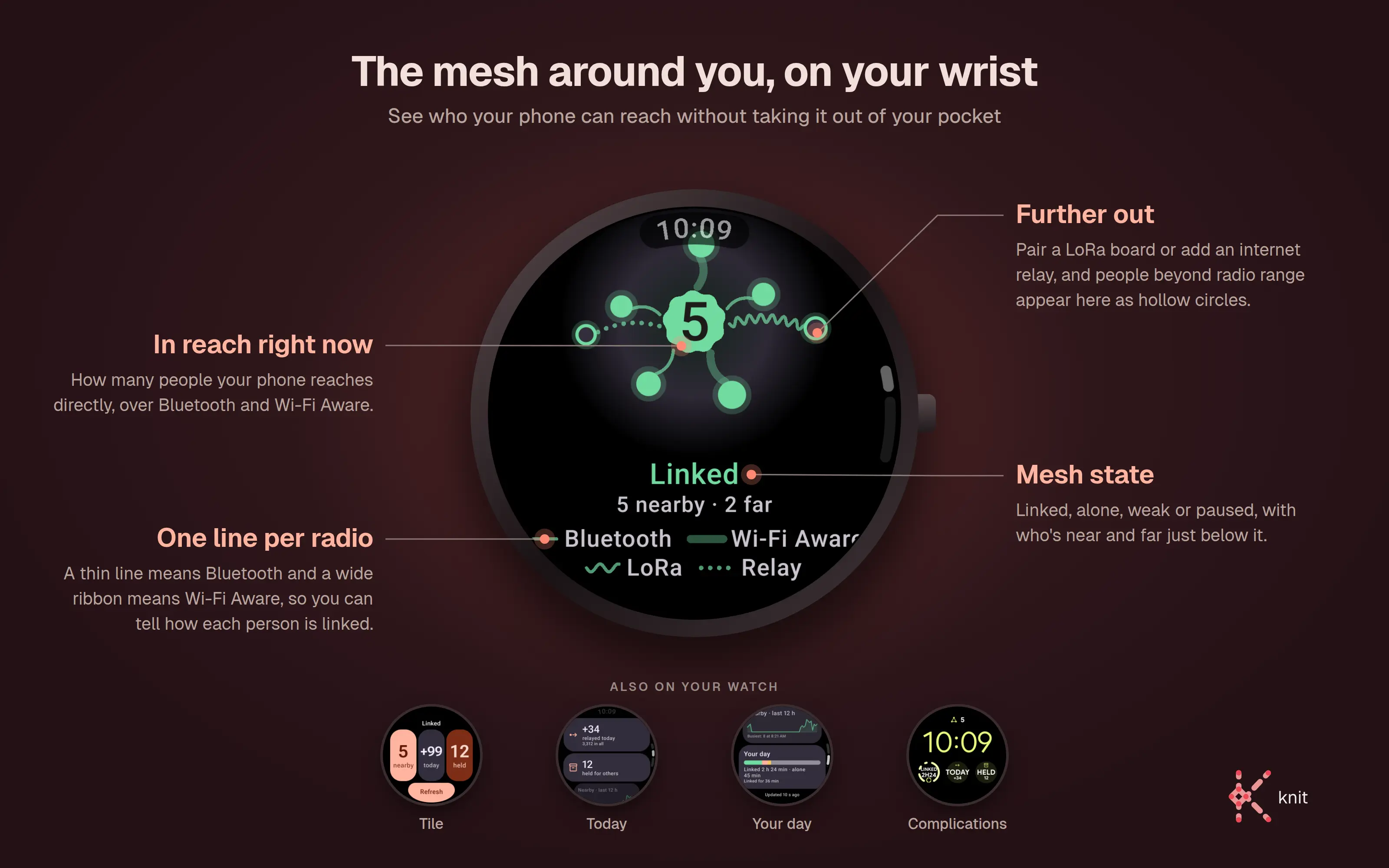
Knit is coming to Wear OS. The watch app shows who your phone can reach without you taking the phone out
of your pocket. Its map draws a line to each person in the style of the radio that links you: thin for
Bluetooth, a wide ribbon for Wi-Fi Aware, a wave for LoRa, dots for an Internet relay. People reached only
over LoRa or a relay sit further out as hollow circles. The Knit tile is a swipe away from the time, and
five complications can put the mesh state, people nearby, messages relayed today, messages carried for
others, or a breakdown of your day on your watch face. It needs Wear OS 3 or newer.
The watch gets all of this from the Knit app on the phone it's paired with, directly over Bluetooth, so
neither end needs Google Play services. The phone answers only a device it's paired with, over an encrypted
connection, and what it sends names nobody: counts, the mesh state, and which radios reach each person, with
no ids, names, or keys. The watch keeps the history of your day to itself.
The watch app is a preview for now. Release builds of the phone app don't serve it yet, and it's headed
for Google Play once they do. To try it from source, see [Build](#-build).
## 📋 Requirements
- **Android 10 (API 29) or newer**, with **Wi-Fi Aware** and/or **Bluetooth LE** hardware. Nearly all
phones have BLE; Wi-Fi Aware is on Pixel 3+ and many recent devices. A device with only one radio
still meshes over it — the app is unsupported only when *neither* radio exists. No Google Play services
required.
- Wi-Fi Aware uses Instant Communication Mode + `NEARBY_WIFI_DEVICES` on **API 33+**, falling back to
`ACCESS_FINE_LOCATION` (location-scoped, no ICM) on **API 29–32**. The location permissions are
declared on every version for **Send location**, which asks for them the first time you pick it from
a chat's menu.
- **For the [watch app](#-on-your-watch) (a preview):** a watch on **Wear OS 3 or newer**, paired with
the phone over Bluetooth.
- **JDK 21** and the **Android SDK** to build (versions in [Tech stack](#-tech-stack)).
- Real mesh testing needs **two or more physical devices** — see [Running](#-running).
## 🧰 Tech stack
| Area | Choice |
|------|--------|
| Language / UI | Kotlin 2.4.21 · Jetpack Compose (Material 3) + Navigation Compose |
| Build | AGP 9.5.0 / Gradle 9.7.1 · JDK 21 · minSdk 29 / targetSdk 36 / compileSdk 37.1 |
| DI | Koin (pure-Kotlin, no Gradle plugin) |
| Storage | Room 3 + SQLCipher (encrypted at rest) · DataStore |
| Wire format | kotlinx.serialization **CBOR** (layered `WireEnvelope`) |
| Crypto | **Google Tink** — HPKE/X25519 key-wrap, AES-256-GCM, Ed25519 signatures |
| Radios | **Wi-Fi Aware + Bluetooth LE** (framework APIs — no external transport dependency) |
| On-device ML | LiteRT / TFLite (NSFW image + toxicity text classifiers) |
| Calls | WebRTC (Opus over DTLS-SRTP) · Jetpack core-telecom · Moonshine on-device speech recognition |
| Networking (opt-in planes only) | OkHttp — WebSocket to relays you configure, the sender-side link-preview fetch, and (debug builds) the ticket key swap; confined to three files |
| Images & video | Coil 3 · Media3 Transformer (on-device video re-encode) |
| Verification | ZXing (safety-number QR) |
| App sharing | ARSCLib + apksig (on-device split-APK merge & re-sign) |
| Quality | detekt · ktlint · Kover (all pinned; detekt/ktlint run as Gradle plugins) |
> The bleeding-edge toolchain forces several non-obvious choices — Koin over
> Hilt, a Kotlin override off AGP's bundled compiler, and Gradle-plugin linting. See
> [`AGENTS.md`](AGENTS.md) before touching build config or dependencies.
## 🔨 Build
The source lives at ****. You need **JDK 21** and the
Android SDK — Android Studio is optional. When building from the command line without
Studio, point Gradle at your SDK first: create a git-ignored `local.properties` containing
`sdk.dir=/path/to/Android/Sdk`, or export `ANDROID_HOME`.
```bash
git clone https://github.com/getknit/knit.git
cd knit
./gradlew :app:assembleDebug # build the debug APK (does NOT compile test sources)
./gradlew :app:compileDebugKotlin # fast compile check of main sources
./gradlew :app:testDebugUnitTest # JVM unit tests — mesh router, flood suppression, dedup, CBOR codec,
# crypto, store-and-forward, + Robolectric Room/DAO & migration tests
./gradlew installDebug # install on a connected device
./gradlew detekt ktlintCheck # static analysis & style (Gradle plugins; ktlintFormat autoformats)
./gradlew :app:koverHtmlReportDebug # test coverage report
```
The debug APK lands at `app/build/outputs/apk/debug/app-debug.apk`.
Every build includes [calls](#-calls); debug builds add their transcripts. A release build adds transcripts with
`-Pstt=true`, and `-Pcalls=false` leaves calls out of any build.
The Wear OS app is a separate module that is in the build only when you ask for it:
```bash
./gradlew :wear:assembleDebug -Pknit.wear=true
adb -s install wear/build/outputs/apk/debug/wear-debug.apk
```
It shares the phone app's package name, so install it with an explicit `-s` (or `ANDROID_SERIAL`): a
`./gradlew installDebug -Pknit.wear=true` with a phone attached can replace the phone app with the watch
build. Debug builds of the phone app serve the watch; release builds don't yet.
The Knit watch face (Wear OS 6+) is a second module behind the same switch; install it next to the watch app
and pick "Knit" in the watch's face picker:
```bash
./gradlew :watchface:assembleDebug -Pknit.wear=true
adb -s install watchface/build/outputs/apk/debug/watchface-debug.apk
./gradlew :watchface-monogram:assembleDebug -Pknit.wear=true # the analog "Knit Monogram"
adb -s install watchface-monogram/build/outputs/apk/debug/watchface-monogram-debug.apk
scripts/check-watchface.sh # both faces: Google's WFF validator and memory budget
```
## 📱 Running
The mesh drives the Wi-Fi Aware and Bluetooth LE radios directly, so it needs **physical devices**:
1. Install the debug build on **two (or more) Wi-Fi-Aware- and/or Bluetooth-LE-capable phones**.
2. Launch on each, grant the requested permissions, and (recommended) allow background battery use.
3. Within range, the devices auto-discover and connect ("Connected to N mesh nodes" appears).
4. Send a message on one — it appears on the others; a third device out of direct range receives it
relayed through the middle device.
The app launches and the UI works on an emulator, but an emulator cannot form a real mesh (it has no
Wi-Fi Aware or BLE peer radio), so use real devices for connectivity testing. Debug builds carry a
headless `am broadcast` bridge (`…debug.SEND` / `SENDIMG` / `STATE` / `STORE` / `REACT` / `XFER` / `LORA` /
`SPOOL` and more) so the send→verify loop can be driven over `adb` without screenshots — see
[`AGENTS.md`](AGENTS.md).
## 🧪 Testing
- **JVM unit tests** — `./gradlew :app:testDebugUnitTest` (mesh/protocol/data logic, plus Robolectric +
in-memory Room DAO/migration and Compose-`*ScreenContent` tests). No device.
- **Mesh in a box** — `app/src/test/…/mesh/lab/` runs several complete, real Knit stacks in one JVM (the
real router, custody, key exchange and both ratchets over Robolectric's in-memory SQLite), linked by an
in-process transport with no radio — plus real LoRa and relay planes when a scenario asks for them. It
is where the bugs that live *between* two nodes get caught, so a change to what two phones exchange gets
a scenario here that ends in a convergence check, not only a single-node test against mocks. Part of
the same `testDebugUnitTest` run.
- **Seeded UI instrumentation tests** — a Compose/Espresso suite (`app/src/androidTest/…/ui/`) that renders
every screen fully populated with **no radios**, to hunt device/API-specific UI quirks. It runs the
demo-seeded build (`-PseedDemo=true`: a no-op transport + a seeded conversation history), so it works on an
emulator or any device:
```bash
./gradlew :app:connectedDebugAndroidTest -PseedDemo=true # on every attached adb device/emulator
./gradlew :app:pixel7api33DebugAndroidTest -PseedDemo=true # on a Gradle-managed emulator only (Pixel 7 @ API 33)
```
The `pixel7api33` variant is a **Gradle Managed Device**: Gradle boots a headless emulator, runs the suite,
and tears it down — it never touches attached physical devices (which the plain `connected…` task would).
Because the suite is radio-less it also runs unmodified on **Firebase Test Lab** physical devices: build the
debug and debug-`androidTest` APKs (with `-PseedDemo=true`) and submit them with `gcloud firebase test android
run` (Android Test Orchestrator, per-test isolation), capturing a screenshot per test per device. See
[`AGENTS.md`](AGENTS.md) for the recommended device/API matrix and the free-tier budget.
- **Black-box UIAutomator tests** — a UIAutomator suite (`app/src/androidTest/…/uiauto/`) that drives the
*real running app* through the accessibility / resource-id layer, so it reaches what the in-process Compose
suite can't: the system **notification shade**, **process lifecycle** (Home / Recents / rotation), and real
dropdown-menu / dialog **popups**. It shares the same demo-seeded, radio-less build. Run **all** of them
locally on the Gradle-managed emulator (no physical device, no `adb` involvement):
```bash
./gradlew :app:pixel7api33DebugAndroidTest -PseedDemo=true \
-Pandroid.testInstrumentationRunnerArguments.package=app.getknit.knit.uiauto
```
Drop the `-P…package` filter to run the seeded Compose suite alongside it, or submit the same APKs to Firebase
Test Lab for the isolated physical-device pass. (Run a single class with
`…arguments.class=app.getknit.knit.uiauto.OverflowNavigationUiAutomatorTest`.)
- **Accessibility (ATF) suite** — `app/src/androidTest/…/a11y/` runs Google's Accessibility Test Framework,
the same checks behind the Play Console pre-launch report, over every seeded screen: missing labels,
small touch targets, and (on a physical device) text and image contrast. Errors fail the run; every
finding is written out per screen. It needs API 34+, so run it with the `pixel8api34` managed device or
on Firebase Test Lab (`…arguments.package=app.getknit.knit.a11y`).
- **Screenshot tests** — every public `@Preview` is rendered and compared against a reference PNG with
`./gradlew :app:validateDebugScreenshotTest`, on the JVM with no device. After changing a preview,
regenerate the wrappers with `scripts/gen-screenshot-tests.py`, re-render with
`./gradlew :app:updateDebugScreenshotTest`, and review the PNG diff before committing.
## ❓ FAQ
**Does Knit need the internet or a cell signal?**
No. Knit works entirely offline. Nearby phones connect directly over Wi-Fi Aware and Bluetooth LE and
relay messages for each other, so it needs neither internet, cellular, nor a Wi-Fi router.
**Does it require Google Play services or an account?**
No. There is no Google Nearby / GMS dependency — the radios are driven through framework APIs — and
there are no accounts, sign-ups, phone numbers, or servers.
**If it's offline, why does the app declare the `INTERNET` permission?**
Because Android gates local sockets behind it. Wi-Fi Aware forms a direct radio link between two phones
and runs a TCP socket *over that local link* (link-local IPv6, no router or gateway), and a big-file
transfer does the same over a Wi-Fi Direct link the two phones raise between themselves — neither sends a
byte off the mesh, and either alone would require the permission. Two opt-in features use it for real:
the [Internet relay plane](#-roadmap), once you switch it on, and link previews, once you switch *those*
on — your own phone fetches a page's title and picture for a link you type and sends them with the
message, so the people you send to never contact the site. Both are off on a fresh install, which
therefore makes no network calls at all. A call over the Internet and a relay's free ticket both go
through the relay plane, and the speech model for call transcripts is downloaded from getknit.app only
when you tap for it. (`ACCESS_NETWORK_STATE` is how the app checks that the default network actually
reaches the Internet before it opens any of these sockets, so a phone that is only on the mesh never
tries.) Knit bundles no analytics or telemetry, and a crash is
kept on the phone for you to copy into a bug report, never uploaded. The same goes for the field log, which is off
unless you turn it on in Diagnostics: a three-day record of how your radios behaved, with no names, messages
or ids in it, that you can share if you want to help tune Knit. You can confirm all of it from the source and the deliberately
GMS-free dependency list.
**Why does the app declare the location permission?**
For two things, and it only ever asks for the permission when it needs one of them. On Android 10–12,
finding peers over Wi-Fi Aware and Bluetooth LE requires it, so onboarding asks there — on Android 13+ it
does not, and onboarding stays location-free. And for **Send location**, in the menu at the top of a
chat: it reads your position once, between that tap and the send, shows you what it found, and puts it in
the message as a `geo:` line the other phone draws as a card and can open in any maps app. That is the
only place the app reads your position, never at start and never in the background. The first tap
explains it, then lets Android ask.
**How far can messages travel?**
Further than any one radio reaches. Each phone relays for the others, so a message hops device to device
across the mesh, and a store-and-forward layer carries it onward to people who only come into range
later. Pair a Meshtastic LoRa board and the Nearby room and 1:1 messages get hops measured in
kilometres on top of that.
**Are messages encrypted?**
1:1 direct messages and group chats are **end-to-end encrypted** (only the intended recipients can read
the body, mentions, and attachments; relays carry only ciphertext), and between phones on a
current build they are **forward-secret**: the keys rotate as the conversation goes on and old ones are
deleted, so recording traffic today and getting hold of a phone later does not open the older messages.
Delivery receipts and reactions are encrypted too. The public "Nearby" broadcast room is plaintext by
design, since it has no fixed recipient set. The local database is encrypted at rest with SQLCipher.
**Can I call someone?**
Yes: 1:1 voice calls over a Wi-Fi Direct link to someone nearby or over the Internet to someone further
away, and a walkie-talkie over the mesh when neither path exists. See [Calls](#-calls).
**What phones does it support?**
Android 10 (API 29) and newer, with Wi-Fi Aware and/or Bluetooth LE. Almost all phones have BLE; Wi-Fi
Aware is on Pixel 3+ and many recent devices. A phone with only one of the two radios still meshes over
it. An iPhone port, [Knit for iOS](https://github.com/getknit/knit-ios), speaks the same protocol and
links with Android phones over Bluetooth LE; it is headed for the App Store and not released yet.
**Is it free and open source?**
Yes — Knit is free software under the **GNU General Public License v3.0 or later**. There are no ads and no
tracking, and Knit is funded by its supporters (see [Support Knit](#-support-knit)).
**How is it different from Bridgefy / Briar / Meshtastic?**
Knit runs **two radios at once** (Wi-Fi Aware + Bluetooth LE) behind a single transport seam, has **no
Google Play services dependency**, end-to-end encrypts DMs and groups, and needs no hardware beyond an
Android phone — where Meshtastic needs a LoRa radio. Meshtastic is complementary rather than a rival:
pair one of its boards over Bluetooth and Knit carries the **Nearby room and 1:1 messages** across it,
kilometres past phone-to-phone range, for every phone meshed with yours. Group chats and attachments
stay on the phone mesh or an optional relay, and the radio sits idle until you pair a board.
## 📚 Documentation
- [`AGENTS.md`](AGENTS.md) — build/test commands, toolchain constraints, architecture, conventions, and
the hard-won gotchas (start here before changing build config, the mesh layer, or the DI graph).
- [`docs/ARCHITECTURE.md`](docs/ARCHITECTURE.md) — detailed design: mesh algorithm, wire protocol, data
flow, background survival, build-tooling decisions, and testing strategy.
- [`docs/WIRE_COMPAT.md`](docs/WIRE_COMPAT.md) — the wire format's compatibility contract and break
record; read before changing any wire type.
- [`docs/FORWARD_SECRECY_RATCHET.md`](docs/FORWARD_SECRECY_RATCHET.md) — the DM ratchet: keys and
derivations, epoch advance rules, session races and reset, and an honest account of what a device
compromise still exposes.
- [`docs/GROUP_FORWARD_SECRECY.md`](docs/GROUP_FORWARD_SECRECY.md) — the group sender-key scheme built
on those DM sessions, including seed distribution, recovery, and what a member's departure costs.
- [`docs/ENCRYPTED_RECEIPTS_REACTIONS.md`](docs/ENCRYPTED_RECEIPTS_REACTIONS.md) — receipts and
reactions as sealed control frames, and the store-and-forward trade that came with them.
- [`docs/SPOOL_PROTOCOL.md`](docs/SPOOL_PROTOCOL.md) — the normative spec for the optional Internet
relay plane ("spools"): scope derivation, sealing, the relay protocol, and test vectors.
- [`docs/CONTACT_CARD.md`](docs/CONTACT_CARD.md) — the contact card behind QR codes and share links:
layout, golden vectors, and what importing one does and does not establish.
- [`docs/RELAY_INVITE.md`](docs/RELAY_INVITE.md) — the relay invite link (`getknit.app/r`): what one
carries, why it is a bearer link, and the consent sheet it is only ever applied through.
- [`docs/CONTENT_MODERATION.md`](docs/CONTENT_MODERATION.md) — on-device abusive-text / explicit-image
moderation: design, hook points, and the bundled models.
- [`docs/BACKUP_FORMAT.md`](docs/BACKUP_FORMAT.md) — the backup file: what it carries and leaves out, how
the recovery key seals it, and how a restore is staged.
- [`docs/FIELD_LOG.md`](docs/FIELD_LOG.md) — the opt-in field log: every event it records, and why none
of them can name a person.
- [`docs/SUPPORTER_BADGE.md`](docs/SUPPORTER_BADGE.md) — the supporter badge: the credential, how a
phone carries it, and how every receiver checks it.
- [`docs/VOICE_CALLS.md`](docs/VOICE_CALLS.md) — voice calls (a draft spec): signaling, TURN from relays,
the Wi-Fi Direct leg, the walkie-talkie, the audio route, and transcripts.
## 🗺️ Roadmap
**Implemented & verified:** broadcast room · 1:1 DMs · multi-member group chats · profiles · reactions ·
mentions · photos, videos, files and voice notes · at-rest DB encryption (SQLCipher) · **E2E encryption +
identity verification** for DMs and groups · **forward secrecy** for both (an epoch ratchet for DMs, a
sender-key ratchet for groups) · **encrypted delivery receipts and reactions** · dual **Wi-Fi Aware +
Bluetooth LE** transports behind `MeshTransport` (no GMS) · **store-and-forward** delay-tolerant
delivery · **key-request / retransmit** for messages received before a sender's key is known · contacts
by QR **or** shared link · on-device toxicity + NSFW moderation · offline app sharing · **big files phone
to phone** over Wi-Fi Direct · **voice calls**, with a walkie-talkie over the mesh and on-device
transcripts · **search** across chats, contacts and messages · the **Your mesh** screen · drafts ·
**backup and restore** · **low-power mode**.
**Shipped, and off until you turn it on:** a **Meshtastic LoRa bridge** carrying the Nearby room and 1:1
DMs kilometres past phone range, **Internet relays**, **link previews**, and **sending your location**.
The relay layer is the largest of those. It carries DMs and group messages, and their photos and files,
between contacts you already have when no radio path exists, keeping the mesh's delay-tolerant behaviour and running through small
relays ("spools") that hold sealed frames without learning whose they are or what is in them. Turning it
on takes an explicit consent sheet in the relay settings screen that spells out what a spool can see —
your IP address, when you send, and roughly how much — and what it cannot: your messages, who you are
talking to, or who else is in a group. A relay's operator can hand you their relay as one invite link
(`getknit.app/r`); it opens the same sheet before anything is added. Until you say yes, a fresh install
makes no network calls at all. Some relays carry photos and files only for phones holding a ticket from
their operator; where the operator gives out free ones, Knit fetches one on the days it sends something
through that relay, and a switch in Internet relays turns that off. The protocol is specified in [`docs/SPOOL_PROTOCOL.md`](docs/SPOOL_PROTOCOL.md) with executable test
vectors; the client implements it, and the reference spool daemon lives in
[`getknit/knit-spool`](https://github.com/getknit/knit-spool). Knit is built around proximity meshing
either way.
**In preview, debug builds only:** a **Wear OS app** with a tile and five complications that read the
mesh from your phone ([On your watch](#-on-your-watch)).
**Explicitly deferred (don't start without direction):**
- **True DM routing** — DMs currently flood the whole mesh and only the addressed recipient delivers/
acks (a DM addressed to a peer we hold a live link to takes that one hop directly); targeted multi-hop
routing is future work.
- **Encrypting the broadcast room** — the last cleartext plane, and as much a product question as a
crypto one: a room with no fixed recipient set has nobody in particular to encrypt to.
## 🔐 Security note
**Direct and group messages are end-to-end encrypted.** Each message's content (body, mentions,
attachments) is sealed with AES-256-GCM and the whole envelope is signed with the sender's Ed25519 key.
Relays, which flood every message hop-by-hop, only ever see ciphertext, and only the addressed
recipient(s) can decrypt. Each device's identity keypair is generated on first run and stored wrapped
under a hardware-backed AndroidKeyStore key, outside the database.
**Between current builds the encryption is forward-secret.** A DM session starts from an X3DH-style
handshake against a signed prekey the peer publishes in their profile, then rekeys per *epoch*: each
side mints a fresh X25519 pair as the conversation turns over, and message keys are deleted once used.
Group chats layer a sender-key ratchet on those DM sessions, so every member drives their own chain and
distributes its seed inside sealed DMs. Taking a device's identity key therefore no longer opens the
whole archive; what a compromise exposes is bounded by how long the ratchet keeps state, and
[`docs/FORWARD_SECRECY_RATCHET.md`](docs/FORWARD_SECRECY_RATCHET.md) §9 and
[`docs/GROUP_FORWARD_SECRECY.md`](docs/GROUP_FORWARD_SECRECY.md) §9 state exactly what stays
recoverable and for how long. Delivery receipts and reactions are sealed the same way, so an observer
cannot read when a DM landed or who reacted to what.
Peers' keys are pinned on first use (TOFU); if a peer's key later changes, verification is reset and
flagged. Confirm a contact's key out of band — compare the **safety number** in person or scan their
**QR code** — to defend against a relay substituting keys.
**Caveats:** the public **Nearby broadcast room is plaintext** by design (no fixed recipient set), and
its receipts and reactions stay cleartext with it. Forward secrecy is **epoch-granular, not
per-message** — a bounded window of messages shares one compromise fate. A conversation with a phone
that hasn't updated falls back to the older **static-key** scheme, which has none; one member on an old
build pins a whole group to it, and a group's info screen says which scheme it is on. Relays still see
who is talking to whom and how often, since DMs flood the mesh rather than being routed. On a paired
**LoRa board** the content stays sealed, but a DM's sender, recipient, timing, and size ride the board's
shared rendezvous channel at kilometre range — **Private messages over LoRa** on the radio screen turns
that off while the Nearby room keeps going. The at-rest database is encrypted with SQLCipher.
To report a vulnerability, see [`SECURITY.md`](SECURITY.md) — please **do not** open a public issue for
security problems.
## 💛 Support Knit
Knit is free and open source, with no ads and no tracking. Most of the help it needs
costs nothing:
- **Bring the people around you.** Every phone running Knit carries messages for the others, so the mesh
you're on reaches further with each friend who installs it. Add each other with a QR code or a contact
link the next time you're together, and you can keep talking when there's no signal.
- **Rate it on [Google Play](https://play.google.com/store/apps/details?id=app.getknit.knit).** A line
about where you used it helps someone who has never tried a mesh messenger decide whether it fits them.
- **Star [the repository](https://github.com/getknit/knit) on GitHub.** Stars are how people searching
for an open-source messenger come across it.
- **[Report a bug](https://github.com/getknit/knit/issues/new/choose) when something misbehaves.** Radios
behave differently on every phone model, so a report from yours can turn up a problem no test phone
shows.
- **Ask a question or share an idea in [Discussions](https://github.com/orgs/getknit/discussions).** They
live at the getknit organization rather than on this repository, so Knit for Android, Knit for iOS and
the relay share one place to talk.
- **Translate it on [Weblate](https://hosted.weblate.org/engage/knit/).** Native speakers review each
language there: suggest a better word, fix a string, or ask for your language.
[#43](https://github.com/getknit/knit/issues/43) tracks where each one stands.
Knit is also funded by its supporters, through GitHub Sponsors and Ko-fi. Knit is its developer's full-time job.
Supporters help pay their bills and keep Knit's servers running.
[](https://github.com/sponsors/getknit)
[](https://ko-fi.com/knit)
[Liberapay](https://liberapay.com/zaventh/) supports the developer directly, and carries no supporter perks.
Knit thanks its supporters with a supporter badge in the app and with
**[Knit Anywhere](https://anywhere.getknit.app/sponsor)**: calls through Knit's own call relay (a TURN server),
and larger files in chats over Knit's free public relay. Relaying calls and storing files costs real money for
every person who uses them, so Knit offers them as a thank-you to the people who pay for them. The level that
comes with them is on [the supporter page](https://anywhere.getknit.app/sponsor).
Everything else is free for everyone: the app, nearby messaging, messages over the internet, calls wherever a
direct path exists, and small files over Knit's public relay. Anyone can also run
[knit-spool](https://github.com/getknit/knit-spool) (AGPL-3.0-or-later), the software behind Knit's own relay, with
any attachment size and their own TURN server, unrestricted. Knit is GPLv3 and stays that way.
## 📄 License
Knit is free software, licensed under the **GNU General Public License v3.0 or later**
([`COPYING`](COPYING)).
```
Copyright (C) 2026 Jeffrey Walter Mixon
This program is free software: you can redistribute it and/or modify it under the terms of the
GNU General Public License as published by the Free Software Foundation, either version 3 of the
License, or (at your option) any later version.
This program is distributed in the hope that it will be useful, but WITHOUT ANY WARRANTY; without
even the implied warranty of MERCHANTABILITY or FITNESS FOR A PARTICULAR PURPOSE. See the GNU
General Public License for more details.
You should have received a copy of the GNU General Public License along with this program. If not,
see .
```
Contributions are welcome under the same license — see [`CONTRIBUTING.md`](CONTRIBUTING.md), which
also sets out the (deliberately modest) **support expectations**.
Knit redistributes third-party open-source libraries, all under GPL-compatible licenses (Apache-2.0,
BSD, MIT) and with no Google Play services; see [`THIRD-PARTY-NOTICES.md`](THIRD-PARTY-NOTICES.md) for
the full component list and their licenses. The same list ships in the app (**Open-source licenses**, from
the menu on the Settings screen) with every license text readable offline, and a test pins it to both
that file and the release classpath so the two cannot drift.
### Bundled model & data attribution
The on-device moderation models and data bundled under `app/src/main/assets/moderation/` are third-party
works, redistributed under their own licenses (full notices in
[`app/src/main/assets/moderation/README.md`](app/src/main/assets/moderation/README.md)):
- **Toxicity text model** — derived from [**Detoxify**](https://github.com/unitaryai/detoxify)
(`unbiased-small`, ALBERT `albert-base-v2`), used under the **Apache License 2.0**.
- **NSFW image model** — [**GantMan `nsfw_model`**](https://github.com/GantMan/nsfw_model)
(MobileNetV2), used under the **MIT License**, © 2020 The nsfw_model Developers.
- **Profanity word list** — generated from [**dsojevic/profanity-list**](https://github.com/dsojevic/profanity-list),
used under the **MIT License**, © 2021 David Sojevic.
- **Emoji catalog** (`app/src/main/assets/emoji/`) — generated from Unicode's
[**`emoji-test.txt`**](https://www.unicode.org/reports/tr51) (Emoji 17.0), used under the
**Unicode License v3**, © Unicode, Inc. (full notice in
[`app/src/main/assets/emoji/README.md`](app/src/main/assets/emoji/README.md)).
See [`docs/CONTENT_MODERATION.md`](docs/CONTENT_MODERATION.md) for how they are used.
---