# Queue
Some tasks are too long to be processed synchronously. Instead, they can be processed in the background via a job queue and worker.
The `queue` construct deploys a properly configured **SQS queue** with a **worker running on AWS Lambda**.
## Quick start
```bash
serverless plugin install -n serverless-lift
```
```yaml
service: my-app
provider:
name: aws
constructs:
my-queue:
type: queue
worker:
handler: src/worker.handler
plugins:
- serverless-lift
```
## How it works
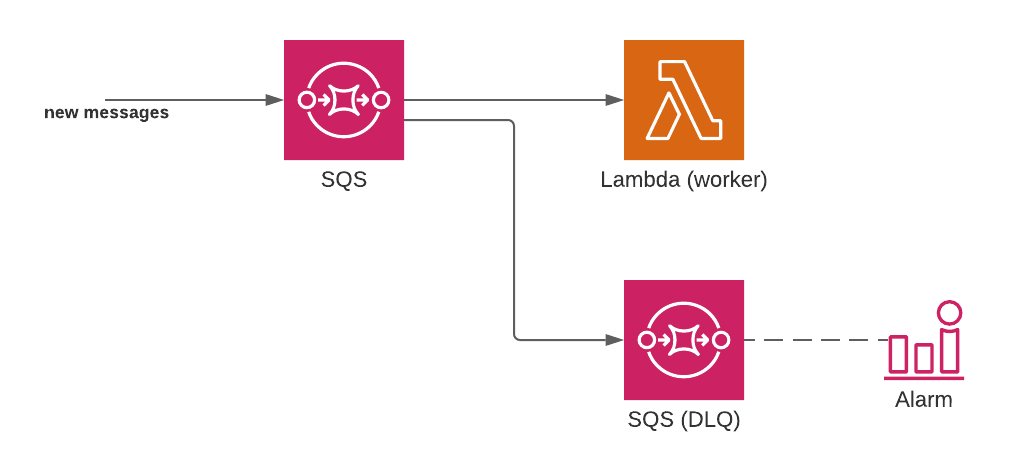
The `queue` construct deploys the following resources:
- An SQS queue: this is where messages to process should be sent.
- A `worker` Lambda function: this function processes every message sent to the queue.
- An SQS "[dead letter queue](https://docs.aws.amazon.com/AWSSimpleQueueService/latest/SQSDeveloperGuide/sqs-dead-letter-queues.html)": this queue stores all the messages that failed to be processed.
- Optionally, a CloudWatch alarm that sends an email when the dead letter queue contains failed messages.
 ### Production ready
Lift constructs are production-ready:
- Failed messages are retried up to 3 times ([configurable](#retries)) instead of "infinitely" by default
- Messages that still fail to be processed are stored in the SQS dead letter queue
- Failed messages in the dead letter queue are stored for 14 days (the maximum) to give developers time to deal with them
- The SQS "Visibility Timeout" setting is configured per AWS recommendations ([more details](#retry-delay))
- Batch processing is disabled by default ([configurable](#batch-size)): errors need to be handled properly using [partial batch failures](#partial-batch-failures)
- The event mapping is configured with `ReportBatchItemFailures` enabled by default for [partial batch failures](#partial-batch-failures) to work out of the box
## Example
Let's deploy a queue called `jobs` (with its `worker` function), as well as a separate function (`publisher`) that publishes messages into the queue:
```yaml
service: my-app
provider:
name: aws
constructs:
jobs:
type: queue
worker:
handler: src/worker.handler
functions:
publisher:
handler: src/publisher.handler
environment:
QUEUE_URL: ${construct:jobs.queueUrl}
plugins:
- serverless-lift
```
Our `publisher` function can send messages into the SQS queue using the AWS SDK:
```js
// src/publisher.js
const { SQSClient, SendMessageCommand } = require('@aws-sdk/client-sqs');
const sqs = new SQSClient({
region: process.env.AWS_REGION,
});
exports.handler = async function(event, context) {
// Send a message into SQS
await sqs.send(
new SendMessageCommand({
QueueUrl: process.env.QUEUE_URL,
// Any message data we want to send
MessageBody: JSON.stringify({
fileName: 'foo/bar.mp4'
}),
})
);
}
```
When the `publisher` function is invoked, it will push a message into SQS. SQS will then automatically trigger the `worker` function, which could be written like this:
```js
// src/worker.js
exports.handler = function(event, context) {
// SQS may invoke with multiple messages
for (const message of event.Records) {
const bodyData = JSON.parse(message.body);
const fileName = bodyData.fileName;
// do something with `fileName`
}
}
```
## Variables
All queue constructs expose the following variables:
- `queueUrl`: the URL of the deployed SQS queue
- `queueArn`: the ARN of the deployed SQS queue
- `dlqUrl`: the URL of the deployed SQS dead letter queue
- `dlqArn`: the ARN of the deployed SQS dead letter queue
These can be used to reference the queue from other Lambda functions, for example:
```yaml
constructs:
my-queue:
type: queue
functions:
otherFunction:
handler: src/publisher.handler
environment:
QUEUE_URL: ${construct:my-queue.queueUrl}
```
_How it works: the `${construct:my-queue.queueUrl}` variable will automatically be replaced with a CloudFormation reference to the SQS queue._
## Permissions
By default, all the Lambda functions deployed in the same `serverless.yml` file **will be allowed to push messages into the queue**.
In the example below, there are no IAM permissions to set up: `myFunction` will be allowed to send messages into `my-queue`.
```yaml
constructs:
my-queue:
type: queue
# ...
functions:
myFunction:
handler: src/publisher.handler
environment:
QUEUE_URL: ${construct:my-queue.queueUrl}
```
Automatic permissions can be disabled: [read more about IAM permissions](permissions.md).
## Commands
The following commands are available on `queue` constructs:
```
serverless :logs
serverless :send
serverless :failed
serverless :failed:purge
serverless :failed:retry
```
- `serverless :logs`
This command displays the logs of the Lambda "worker" function.
It is an alias to `serverless logs --function Worker` and supports the same options, for example `--tail` to tail logs live.
- `serverless :send`
Send a message into the SQS queue.
This command can be useful while developing to push sample messages into the queue.
When the command runs, it will prompt for the body of the SQS message. It is also possible to provide the body via the `--body="message body here"` option.
- `serverless :failed`
This command lists the failed messages stored in the dead letter queue.
Use this command to investigate why these messages failed to be processed.
Note: this command will only fetch the first messages available (it will not dump thousands of messages into the terminal).
- `serverless :failed:purge`
This command clears all messages from the dead letter queue.
Use this command if you have failed messages and you don't want to retry them.
- `serverless :failed:retry`
This command retries all failed messages of the dead letter queue by moving them to the main queue.
Use this command if you have failed messages and you want to retry them again.
## Configuration reference
### Worker
```yaml
constructs:
my-queue:
type: queue
worker:
# The Lambda function is configured here
handler: src/worker.handler
```
or
```yaml
function:
my-worker:
handler: src/worker.handler
constructs:
my-queue:
type: queue
# References the my-worker function defined in the function section
worker: my-worker
```
It is both possible to reference an existing function as `worker` or specify the entire worker as an object.
By defining the Lambda "worker" as an object, a new function is configured in the `queue` construct.
For the function object, the only required setting is the `handler`: this should point to the code that handles SQS messages.
Whether the handler is referenced, or created, it [should be written to handle SQS events](https://docs.aws.amazon.com/lambda/latest/dg/with-sqs.html), for example in JavaScript:
```js
exports.handler = async function (event, context) {
event.Records.forEach(record => {
// `record` contains the message that was pushed to SQS
});
}
```
When defined as an object, [all settings allowed for functions](https://www.serverless.com/framework/docs/providers/aws/guide/functions/) can be used under the `worker` key. For example:
```yaml
constructs:
my-queue:
# ...
worker:
handler: src/worker.handler
memorySize: 512
timeout: 10
```
_Note: Lift will automatically configure the function to be triggered by SQS. It is not necessary to define `events` on the function._
### Alarm
```yaml
constructs:
my-queue:
# ...
alarm: alerting@mycompany.com
```
It is possible to configure email alerts in case messages end up in the dead letter queue.
After the first deployment, an email will be sent to the email address to confirm the subscription.
### FIFO (First-In-First-Out)
```yaml
constructs:
my-queue:
# ...
fifo: true
```
[SQS FIFO](https://docs.aws.amazon.com/AWSSimpleQueueService/latest/SQSDeveloperGuide/FIFO-queues.html) queues provide strict message ordering guarantees. Configuring a FIFO queue is as easy as provding the `fifo: true` option on your construct. This will ensure both the main and Dead-Letter-Queue are configured as FIFO.
By default, FIFO queues have [content-based deduplication](https://docs.aws.amazon.com/AWSSimpleQueueService/latest/SQSDeveloperGuide/FIFO-queues-exactly-once-processing.html) enabled by default. You must disable content based deduplication explicitly if you want to deduplicate using unique deduplication ids. See the SQS documentation for more information on [deduplication ids](https://docs.aws.amazon.com/AWSSimpleQueueService/latest/SQSDeveloperGuide/using-messagededuplicationid-property.html).
To disable content based deduplication you must use a custom extension:
```
constructs:
my-queue:
# ...
extensions:
queue:
Properties:
ContentBasedDeduplication: false
```
### Retries
```yaml
constructs:
my-queue:
# ...
maxRetries: 5
```
*Default: 3 retries.*
SQS retries messages when the Lambda processing it throws an error. The `maxRetries` option configures how many times each message will be retried in case of failure.
Sidenote: errors should not be captured in the code of the `worker` function, else the retry mechanism will not be triggered.
If the message still fails after reaching the max retry count, it will be moved to the dead letter queue for storage.
### Retry delay
When Lambda fails processing an SQS message (i.e. the code throws an error), the message will be retried after a delay. That delay is also called SQS "_Visibility Timeout_".
By default, Lift configures the retry delay to 6 times the worker functions timeout, [per AWS' recommendation](https://docs.aws.amazon.com/lambda/latest/dg/with-sqs.html#events-sqs-queueconfig). Since Serverless deploy functions with a timeout of 6 seconds by default, that means that messages will be retried **every 36 seconds**.
When the function's timeout is changed, the retry delay is automatically changed accordingly:
```yaml
constructs:
my-queue:
# ...
worker:
handler: src/worker.handler
# We change the timeout to 10 seconds
timeout: 10
# The retry delay on the queue will be 10*6 => 60 seconds
```
### Delivery delay
When a message is sent to the queue, it will be available immediately to the worker.
You can postpone the delivery of messages by a given amount of seconds using the `delay` option.
The maximum value is 900 seconds (15 minutes).
```yaml
constructs:
my-queue:
# ...
# Messages delivery will be delayed by 1 minute
delay: 60
```
### Encryption
Turn on server-side encryption for the queue.
You can set the `encryption` option to `kmsManaged` to use a SQS managed master key.
```yaml
constructs:
my-queue:
# ...
# Encryption will be enabled and managed by AWS
encryption: 'kmsManaged'
```
Or you can set it to `kms` and provide your own key via `encryptionKey` option.
```yaml
constructs:
my-queue:
# ...
# Encryption will be enabled and managed by AWS
encryption: 'kms'
encryptionKey: 'MySuperSecretKey'
```
### Batch size
```yaml
constructs:
my-queue:
# ...
batchSize: 5 # Lambda will receive 5 messages at a time
```
*Default: 1*
When the SQS queue contains more than 1 message to process, it can invoke Lambda with a batch of multiple messages at once.
By default, Lift configures Lambda to be invoked with 1 messages at a time. The reason is to simplify error handling: in a batch, any failed message will fail the whole batch by default.
Note you can use [partial batch failures](#partial-batch-failures) to avoid failing the whole batch.
It is possible to set the batch size between 1 and 10 for FIFO queues and 10000 for regular queues.
For batch size over 10, [maxBatchingWindow](#maximum-batching-window) must be set.
### Max Concurrency
```yaml
constructs:
my-queue:
# ...
maxConcurrency: 10 # The maximum number of concurrent function instances that the SQS event source can invoke is 10
```
The launch of maximum concurrency for SQS as an event source allows you to control Lambda function concurrency per source. You set the maximum concurrency on the event source mapping, not on the Lambda function.
This event source mapping setting does not change the scaling or batching behavior of Lambda with SQS. You can continue to batch messages with a customized batch size and window. It rather sets a limit on the maximum number of concurrent function invocations per SQS event source. Once Lambda scales and reaches the maximum concurrency configured on the event source, Lambda stops reading more messages from the queue. This feature also provides you with the flexibility to define the maximum concurrency for individual event sources when the Lambda function has multiple event sources.
It is possible to set the `maxConcurrency` between 2 and 10000.
### Maximum Batching Window
```yaml
constructs:
my-queue:
# ...
maxBatchingWindow: 5 # SQS will wait 5 seconds (so that it can batch any messages together) before delivering to lambda
```
*Default: 0 seconds*
The maximum amount of time to gather records before invoking the lambda. This increases the likelihood of a full batch at the cost of delayed processing.
It is possible to set the `maxBatchingWindow` between 0 and 300.
### Partial batch failures
When using message batches, an error thrown in your worker function would consider the whole batch as failed.
If you want to only consider specific messages of the batch as failed, you need to return a specific format in your worker function.
It contains the identifier of the messages you consider as failed in the `itemIdentifier` key.
```json
{
"batchItemFailures": [
{
"itemIdentifier": "id2"
},
{
"itemIdentifier": "id4"
}
]
}
```
You can learn more in the [official AWS documentation](https://docs.aws.amazon.com/lambda/latest/dg/with-sqs.html#services-sqs-batchfailurereporting).
## Extensions
You can specify an `extensions` property on the queue construct to extend the underlying CloudFormation resources. In the example below, the SQS Queue CloudFormation resource generated by the `my-queue` queue construct will be extended with the new `MaximumMessageSize: 1024` CloudFormation property.
```yaml
constructs:
my-queue:
type: queue
worker:
handler: src/worker.handler
extensions:
queue:
Properties:
MaximumMessageSize: 1024
```
### Available extensions
| Extension key | CloudFormation resource | CloudFormation documentation |
|--------------- |------------------------- |----------------------------------------------------------------------------------------------------------- |
| queue | AWS::SQS::Queue | [Link](https://docs.aws.amazon.com/AWSCloudFormation/latest/UserGuide/aws-resource-sqs-queue.html) |
| dlq | AWS::SQS::Queue | [Link](https://docs.aws.amazon.com/AWSCloudFormation/latest/UserGuide/aws-resource-sqs-queue.html) |
| alarm | AWS::CloudWatch::Alarm | [Link](https://docs.aws.amazon.com/fr_fr/AWSCloudFormation/latest/UserGuide/aws-properties-cw-alarm.html) |
> ⚠️ The `alarm` extension key is only available if an alarm email destination has been configured on the construct.
### More options
Feel like a common extension pattern should be implemented as part of the construct configuration? [Open a GitHub issue](https://github.com/getlift/lift/issues/new).
### Production ready
Lift constructs are production-ready:
- Failed messages are retried up to 3 times ([configurable](#retries)) instead of "infinitely" by default
- Messages that still fail to be processed are stored in the SQS dead letter queue
- Failed messages in the dead letter queue are stored for 14 days (the maximum) to give developers time to deal with them
- The SQS "Visibility Timeout" setting is configured per AWS recommendations ([more details](#retry-delay))
- Batch processing is disabled by default ([configurable](#batch-size)): errors need to be handled properly using [partial batch failures](#partial-batch-failures)
- The event mapping is configured with `ReportBatchItemFailures` enabled by default for [partial batch failures](#partial-batch-failures) to work out of the box
## Example
Let's deploy a queue called `jobs` (with its `worker` function), as well as a separate function (`publisher`) that publishes messages into the queue:
```yaml
service: my-app
provider:
name: aws
constructs:
jobs:
type: queue
worker:
handler: src/worker.handler
functions:
publisher:
handler: src/publisher.handler
environment:
QUEUE_URL: ${construct:jobs.queueUrl}
plugins:
- serverless-lift
```
Our `publisher` function can send messages into the SQS queue using the AWS SDK:
```js
// src/publisher.js
const { SQSClient, SendMessageCommand } = require('@aws-sdk/client-sqs');
const sqs = new SQSClient({
region: process.env.AWS_REGION,
});
exports.handler = async function(event, context) {
// Send a message into SQS
await sqs.send(
new SendMessageCommand({
QueueUrl: process.env.QUEUE_URL,
// Any message data we want to send
MessageBody: JSON.stringify({
fileName: 'foo/bar.mp4'
}),
})
);
}
```
When the `publisher` function is invoked, it will push a message into SQS. SQS will then automatically trigger the `worker` function, which could be written like this:
```js
// src/worker.js
exports.handler = function(event, context) {
// SQS may invoke with multiple messages
for (const message of event.Records) {
const bodyData = JSON.parse(message.body);
const fileName = bodyData.fileName;
// do something with `fileName`
}
}
```
## Variables
All queue constructs expose the following variables:
- `queueUrl`: the URL of the deployed SQS queue
- `queueArn`: the ARN of the deployed SQS queue
- `dlqUrl`: the URL of the deployed SQS dead letter queue
- `dlqArn`: the ARN of the deployed SQS dead letter queue
These can be used to reference the queue from other Lambda functions, for example:
```yaml
constructs:
my-queue:
type: queue
functions:
otherFunction:
handler: src/publisher.handler
environment:
QUEUE_URL: ${construct:my-queue.queueUrl}
```
_How it works: the `${construct:my-queue.queueUrl}` variable will automatically be replaced with a CloudFormation reference to the SQS queue._
## Permissions
By default, all the Lambda functions deployed in the same `serverless.yml` file **will be allowed to push messages into the queue**.
In the example below, there are no IAM permissions to set up: `myFunction` will be allowed to send messages into `my-queue`.
```yaml
constructs:
my-queue:
type: queue
# ...
functions:
myFunction:
handler: src/publisher.handler
environment:
QUEUE_URL: ${construct:my-queue.queueUrl}
```
Automatic permissions can be disabled: [read more about IAM permissions](permissions.md).
## Commands
The following commands are available on `queue` constructs:
```
serverless :logs
serverless :send
serverless :failed
serverless :failed:purge
serverless :failed:retry
```
- `serverless :logs`
This command displays the logs of the Lambda "worker" function.
It is an alias to `serverless logs --function Worker` and supports the same options, for example `--tail` to tail logs live.
- `serverless :send`
Send a message into the SQS queue.
This command can be useful while developing to push sample messages into the queue.
When the command runs, it will prompt for the body of the SQS message. It is also possible to provide the body via the `--body="message body here"` option.
- `serverless :failed`
This command lists the failed messages stored in the dead letter queue.
Use this command to investigate why these messages failed to be processed.
Note: this command will only fetch the first messages available (it will not dump thousands of messages into the terminal).
- `serverless :failed:purge`
This command clears all messages from the dead letter queue.
Use this command if you have failed messages and you don't want to retry them.
- `serverless :failed:retry`
This command retries all failed messages of the dead letter queue by moving them to the main queue.
Use this command if you have failed messages and you want to retry them again.
## Configuration reference
### Worker
```yaml
constructs:
my-queue:
type: queue
worker:
# The Lambda function is configured here
handler: src/worker.handler
```
or
```yaml
function:
my-worker:
handler: src/worker.handler
constructs:
my-queue:
type: queue
# References the my-worker function defined in the function section
worker: my-worker
```
It is both possible to reference an existing function as `worker` or specify the entire worker as an object.
By defining the Lambda "worker" as an object, a new function is configured in the `queue` construct.
For the function object, the only required setting is the `handler`: this should point to the code that handles SQS messages.
Whether the handler is referenced, or created, it [should be written to handle SQS events](https://docs.aws.amazon.com/lambda/latest/dg/with-sqs.html), for example in JavaScript:
```js
exports.handler = async function (event, context) {
event.Records.forEach(record => {
// `record` contains the message that was pushed to SQS
});
}
```
When defined as an object, [all settings allowed for functions](https://www.serverless.com/framework/docs/providers/aws/guide/functions/) can be used under the `worker` key. For example:
```yaml
constructs:
my-queue:
# ...
worker:
handler: src/worker.handler
memorySize: 512
timeout: 10
```
_Note: Lift will automatically configure the function to be triggered by SQS. It is not necessary to define `events` on the function._
### Alarm
```yaml
constructs:
my-queue:
# ...
alarm: alerting@mycompany.com
```
It is possible to configure email alerts in case messages end up in the dead letter queue.
After the first deployment, an email will be sent to the email address to confirm the subscription.
### FIFO (First-In-First-Out)
```yaml
constructs:
my-queue:
# ...
fifo: true
```
[SQS FIFO](https://docs.aws.amazon.com/AWSSimpleQueueService/latest/SQSDeveloperGuide/FIFO-queues.html) queues provide strict message ordering guarantees. Configuring a FIFO queue is as easy as provding the `fifo: true` option on your construct. This will ensure both the main and Dead-Letter-Queue are configured as FIFO.
By default, FIFO queues have [content-based deduplication](https://docs.aws.amazon.com/AWSSimpleQueueService/latest/SQSDeveloperGuide/FIFO-queues-exactly-once-processing.html) enabled by default. You must disable content based deduplication explicitly if you want to deduplicate using unique deduplication ids. See the SQS documentation for more information on [deduplication ids](https://docs.aws.amazon.com/AWSSimpleQueueService/latest/SQSDeveloperGuide/using-messagededuplicationid-property.html).
To disable content based deduplication you must use a custom extension:
```
constructs:
my-queue:
# ...
extensions:
queue:
Properties:
ContentBasedDeduplication: false
```
### Retries
```yaml
constructs:
my-queue:
# ...
maxRetries: 5
```
*Default: 3 retries.*
SQS retries messages when the Lambda processing it throws an error. The `maxRetries` option configures how many times each message will be retried in case of failure.
Sidenote: errors should not be captured in the code of the `worker` function, else the retry mechanism will not be triggered.
If the message still fails after reaching the max retry count, it will be moved to the dead letter queue for storage.
### Retry delay
When Lambda fails processing an SQS message (i.e. the code throws an error), the message will be retried after a delay. That delay is also called SQS "_Visibility Timeout_".
By default, Lift configures the retry delay to 6 times the worker functions timeout, [per AWS' recommendation](https://docs.aws.amazon.com/lambda/latest/dg/with-sqs.html#events-sqs-queueconfig). Since Serverless deploy functions with a timeout of 6 seconds by default, that means that messages will be retried **every 36 seconds**.
When the function's timeout is changed, the retry delay is automatically changed accordingly:
```yaml
constructs:
my-queue:
# ...
worker:
handler: src/worker.handler
# We change the timeout to 10 seconds
timeout: 10
# The retry delay on the queue will be 10*6 => 60 seconds
```
### Delivery delay
When a message is sent to the queue, it will be available immediately to the worker.
You can postpone the delivery of messages by a given amount of seconds using the `delay` option.
The maximum value is 900 seconds (15 minutes).
```yaml
constructs:
my-queue:
# ...
# Messages delivery will be delayed by 1 minute
delay: 60
```
### Encryption
Turn on server-side encryption for the queue.
You can set the `encryption` option to `kmsManaged` to use a SQS managed master key.
```yaml
constructs:
my-queue:
# ...
# Encryption will be enabled and managed by AWS
encryption: 'kmsManaged'
```
Or you can set it to `kms` and provide your own key via `encryptionKey` option.
```yaml
constructs:
my-queue:
# ...
# Encryption will be enabled and managed by AWS
encryption: 'kms'
encryptionKey: 'MySuperSecretKey'
```
### Batch size
```yaml
constructs:
my-queue:
# ...
batchSize: 5 # Lambda will receive 5 messages at a time
```
*Default: 1*
When the SQS queue contains more than 1 message to process, it can invoke Lambda with a batch of multiple messages at once.
By default, Lift configures Lambda to be invoked with 1 messages at a time. The reason is to simplify error handling: in a batch, any failed message will fail the whole batch by default.
Note you can use [partial batch failures](#partial-batch-failures) to avoid failing the whole batch.
It is possible to set the batch size between 1 and 10 for FIFO queues and 10000 for regular queues.
For batch size over 10, [maxBatchingWindow](#maximum-batching-window) must be set.
### Max Concurrency
```yaml
constructs:
my-queue:
# ...
maxConcurrency: 10 # The maximum number of concurrent function instances that the SQS event source can invoke is 10
```
The launch of maximum concurrency for SQS as an event source allows you to control Lambda function concurrency per source. You set the maximum concurrency on the event source mapping, not on the Lambda function.
This event source mapping setting does not change the scaling or batching behavior of Lambda with SQS. You can continue to batch messages with a customized batch size and window. It rather sets a limit on the maximum number of concurrent function invocations per SQS event source. Once Lambda scales and reaches the maximum concurrency configured on the event source, Lambda stops reading more messages from the queue. This feature also provides you with the flexibility to define the maximum concurrency for individual event sources when the Lambda function has multiple event sources.
It is possible to set the `maxConcurrency` between 2 and 10000.
### Maximum Batching Window
```yaml
constructs:
my-queue:
# ...
maxBatchingWindow: 5 # SQS will wait 5 seconds (so that it can batch any messages together) before delivering to lambda
```
*Default: 0 seconds*
The maximum amount of time to gather records before invoking the lambda. This increases the likelihood of a full batch at the cost of delayed processing.
It is possible to set the `maxBatchingWindow` between 0 and 300.
### Partial batch failures
When using message batches, an error thrown in your worker function would consider the whole batch as failed.
If you want to only consider specific messages of the batch as failed, you need to return a specific format in your worker function.
It contains the identifier of the messages you consider as failed in the `itemIdentifier` key.
```json
{
"batchItemFailures": [
{
"itemIdentifier": "id2"
},
{
"itemIdentifier": "id4"
}
]
}
```
You can learn more in the [official AWS documentation](https://docs.aws.amazon.com/lambda/latest/dg/with-sqs.html#services-sqs-batchfailurereporting).
## Extensions
You can specify an `extensions` property on the queue construct to extend the underlying CloudFormation resources. In the example below, the SQS Queue CloudFormation resource generated by the `my-queue` queue construct will be extended with the new `MaximumMessageSize: 1024` CloudFormation property.
```yaml
constructs:
my-queue:
type: queue
worker:
handler: src/worker.handler
extensions:
queue:
Properties:
MaximumMessageSize: 1024
```
### Available extensions
| Extension key | CloudFormation resource | CloudFormation documentation |
|--------------- |------------------------- |----------------------------------------------------------------------------------------------------------- |
| queue | AWS::SQS::Queue | [Link](https://docs.aws.amazon.com/AWSCloudFormation/latest/UserGuide/aws-resource-sqs-queue.html) |
| dlq | AWS::SQS::Queue | [Link](https://docs.aws.amazon.com/AWSCloudFormation/latest/UserGuide/aws-resource-sqs-queue.html) |
| alarm | AWS::CloudWatch::Alarm | [Link](https://docs.aws.amazon.com/fr_fr/AWSCloudFormation/latest/UserGuide/aws-properties-cw-alarm.html) |
> ⚠️ The `alarm` extension key is only available if an alarm email destination has been configured on the construct.
### More options
Feel like a common extension pattern should be implemented as part of the construct configuration? [Open a GitHub issue](https://github.com/getlift/lift/issues/new).