# mcpm — MCP security guard and package manager
**Block prompt injection, tool poisoning, rug-pulls and credential theft in Model Context Protocol (MCP) servers -- at runtime, on your machine.** Your AI agent trusts every MCP server it talks to; mcpm scores each install, verifies its supply chain with Sigstore, pins every tool definition, and inspects every tool call through a local relay -- with an opt-in OS sandbox on macOS. No cloud, no account, no LLM in the enforcement path.
**Everything runs on your machine.** No account, no mcpm backend, no telemetry -- the guard is a local stdio relay, and trust scores are computed locally with no model and no remote verdict (the 40-point static-scan bucket is deterministic regex/structural checks you can read yourself; the rest is a local health check, registry metadata, and an external scanner only if you name one). Commands that resolve, audit or re-verify a server do reach the public MCP registry and npm -- nothing reaches an mcpm server.
[](https://www.npmjs.com/package/@getmcpm/cli)
[](./LICENSE)
[](https://github.com/getmcpm/cli/actions)
[](https://snyk.io/advisor/npm-package/@getmcpm/cli)
---
The risky part of an MCP server doesn't show up at install -- it shows up while your agent is running: prompt injection hidden in a tool's output, a server that quietly rewrites its tools after you approved them, a sampling request that smuggles instructions into your model. Being listed in a registry is not a safety signal -- in 2026 a proof-of-concept poisoned server was [accepted by 9 of 11 public registries and marketplaces](https://www.ox.security/blog/mcp-supply-chain-advisory-rce-vulnerabilities-across-the-ai-ecosystem/). So mcpm scores every install for hardcoded secrets, prompt injection, and typosquatting -- then runs a live guard between your AI client and each server, pinning tool definitions against rug-pulls and blocking injection before it reaches the model.
**You don't have to take our word for any of that.** Guards are easy to claim and hard to check, so the measuring stick is public: [**mcp-guardbench**](https://github.com/getmcpm/mcp-guardbench) is a guard-agnostic benchmark -- versioned attack and benign cases, an open schema, and a runner that scores *any* MCP guard through its own published CLI. mcpm is scored the same way as everyone else, by shelling out to `mcpm guard inspect`, never by importing its own engine.
The corpus isn't mcpm's own test fixtures anymore. As of [corpus v5](https://github.com/getmcpm/mcp-guardbench#corpus-v5---the-first-live-in-the-wild-campaign-case-deadbugz) (57 cases: 33 attack, 20 benign, 4 warn-and-forward) it includes seven cases rebuilt from real, publicly disclosed CVEs in third-party MCP servers, plus three cases reproducing Deadbugz, an active in-the-wild MCP supply-chain campaign -- the third contributed externally by [@vguillaume8](https://github.com/vguillaume8) (see below). The published top row: `@getmcpm/cli@0.43.0` scores 86.5% recall / 0.0% false-positive rate / 100% precision; every mcpm row is measured through that exact version's published CLI. That is a baseline, not a boast -- mcpm's misses are published on the same page as its wins, including all three Deadbugz-derived cases (below).
**How this differs.** [Microsoft APM](https://github.com/microsoft/apm) is the closest analog -- an npm-style installer and lockfile for MCP servers (and skills/prompts/plugins) across 9+ clients -- but its own docs say it [produces no signed attestation](https://github.com/microsoft/apm/blob/main/docs/src/content/docs/enterprise/governance-guide.md) for its install/audit gates, list Sigstore verification as [out of scope until v0.2](https://github.com/microsoft/apm/blob/main/docs/src/content/docs/specs/openapm-v0.1.md), and give its policy schema [no fields for runtime permissions or agent sandboxing](https://github.com/microsoft/apm/blob/main/docs/src/content/docs/enterprise/apm-policy.md). Smithery, [acquired by Arcade.dev](https://www.arcade.dev/blog/smithery-joins-arcade/) (2026-08-05), is a hosted-execution lane, not a local CLI. OSS runtime proxies like [McpVanguard](https://pypi.org/project/mcp-vanguard/) and [MCP Firewall](https://github.com/evalops/mcp-firewall) inspect and enforce policy at runtime, and MCP Firewall also offers containment -- but neither adds install-time trust scoring or Sigstore-verified supply-chain checks. (mcp-guardbench carries a McpVanguard row, but its own README says that row is not comparable to the mcpm rows and should not be quoted as a head-to-head: it drives one offline harness layer rather than McpVanguard's real proxy deployment, and abstains on roughly half the corpus.) What mcpm combines is a trust score, offline Sigstore provenance verification, and a runtime relay with pin/drift plus OS confinement in a single local, account-free tool.
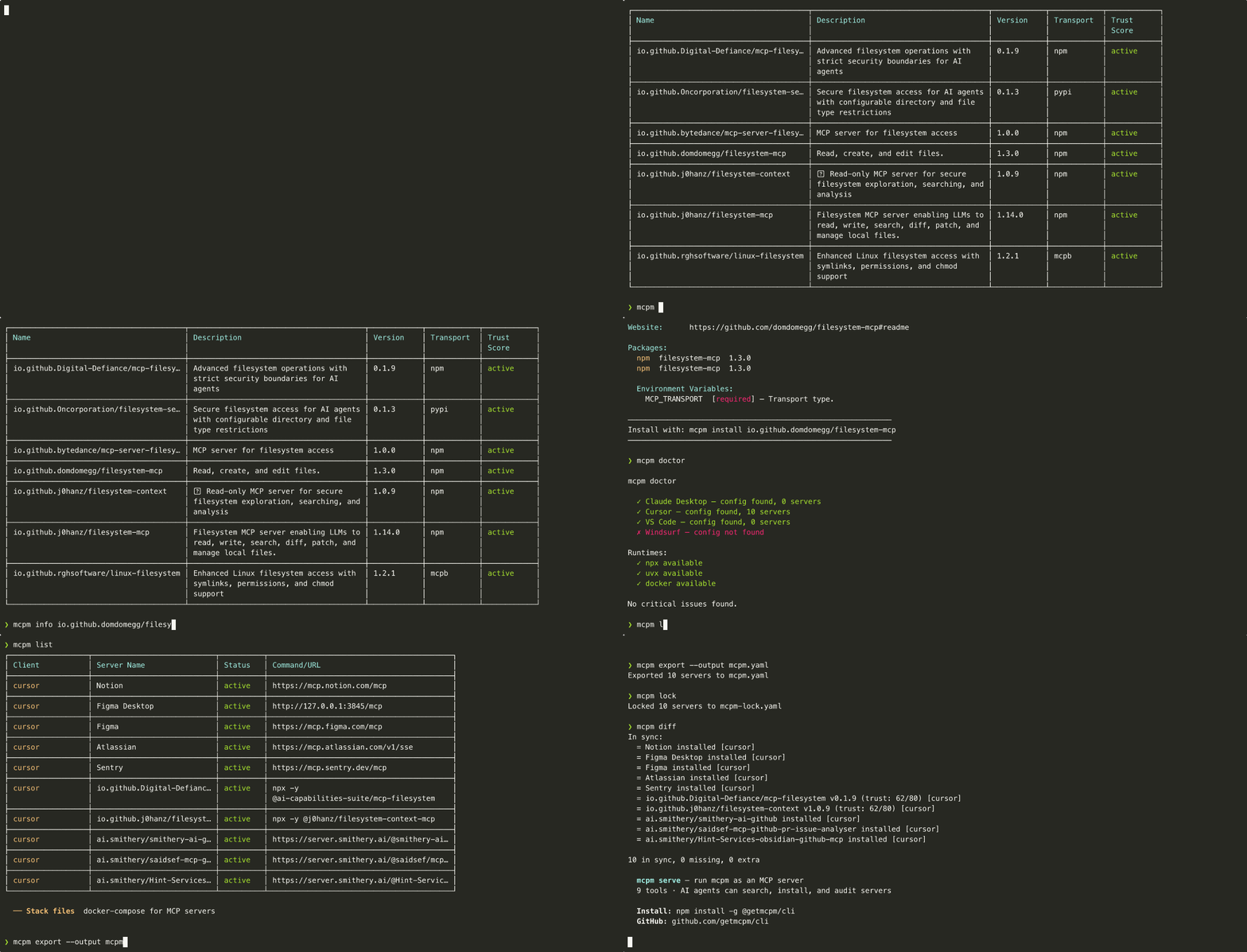
## Quick start
Install with the package manager you already use:
| Method | Command |
|---|---|
| **npm** (global) | `npm install -g @getmcpm/cli` |
| **npx** (no install) | `npx @getmcpm/cli ` |
| **pnpm** | `pnpm add -g @getmcpm/cli` |
| **mise** | `mise use -g npm:@getmcpm/cli` |
**Requires Node `^22.22.2 || ^24.15.0 || >=26.0.0`** — that is **22.22.2+, 24.15.0+ or
26+**, the intersection of what every runtime dependency itself supports. Everything
else is excluded, 23.x and 25.x included. npm warns `EBADENGINE` and fails outright
under `--engine-strict`; pnpm installs silently and exits 0 unless you set
`engine-strict=true`, so there an unsupported Node surfaces as a runtime error rather
than an install one.
The binary is `mcpm`. **Heads up:** the `mcpm` Homebrew formula is a *different,
unrelated* project ([mcpm.sh](https://mcpm.sh)) — install this mcpm via
npm/npx/pnpm/mise above (all resolve the scoped `@getmcpm/cli` package, so there's
no name collision). A dedicated Homebrew tap is deferred; see
[`docs/DISTRIBUTION.md`](docs/DISTRIBUTION.md).
```bash
mcpm search filesystem
mcpm info io.github.domdomegg/filesystem-mcp
mcpm install io.github.domdomegg/filesystem-mcp
```
## Features
### Search the MCP registry
Query the official MCP Registry and see results with trust indicators.
```
$ mcpm search filesystem
Name Description Version Transport Status
io.github.domdomegg/filesystem-mcp File system access via MCP 1.4.0 stdio active
io.github.Digital-Defiance/mcp-filesystem Read-only filesystem server 0.9.2 stdio active
...
```
Search shows registry lifecycle status, not a trust score -- it is a fast discovery list and does not run the scanner per result. Computed trust lives in `mcpm why`, `info`, `install`, and `audit`.
### Install with trust assessment
Every install runs a metadata-based trust assessment before writing config.
```
$ mcpm install io.github.domdomegg/filesystem-mcp
███████████████░░░░░ 57/80 CAUTION
├─ Health check: not yet run
├─ Tool descriptions: score 32/40
├─ Package: publisher verification passed
└─ External scan: not available (set MCPM_EXTERNAL_SCANNER for deeper analysis)
Install to Claude Desktop? (Y/n)
```
### Audit installed servers
Scan everything you have installed. Get a trust report.
```
$ mcpm audit
┌─────────────────────────────────────────────┬─────────────────────────┬─────────────────┬──────────┐
│ Server │ Score │ Level │ Findings │
├─────────────────────────────────────────────┼─────────────────────────┼─────────────────┼──────────┤
│ servers-filesystem │ ████████░░ 62/80 │ clean · not run │ 0 │
├─────────────────────────────────────────────┼─────────────────────────┼─────────────────┼──────────┤
│ servers-github │ ████████░░ 60/80 │ caution │ 1 │
├─────────────────────────────────────────────┼─────────────────────────┼─────────────────┼──────────┤
│ servers-fetch │ ███████░░░ 52/80 │ caution │ 2 │
├─────────────────────────────────────────────┼─────────────────────────┼─────────────────┼──────────┤
│ some-sketchy-server │ ██░░░░░░░░ 16/80 │ risky │ 5 │
└─────────────────────────────────────────────┴─────────────────────────┴─────────────────┴──────────┘
4 servers scanned, 0 safe, 1 clean · not run, 2 caution, 1 risky
```
`audit` never executes a server, so the 30-point health-check bucket scores a flat 15 and
**62/80 is the ceiling** — no server can be rated `safe` here. A server that cleared every
check that actually ran reads `clean · not run` instead. `servers-github` scores 60 because
an `npx -y` launcher draws one `low` install-script finding, which is also why it reads
`caution` rather than `clean · not run`: that label requires the scan to have found
*nothing*, not merely a top-band score.
`audit` also does not apply the **release-age cooldown** finding that `why`, `install`,
`up` and `lock` do (`src/scanner/cooldown.ts` is an install-gate signal — it exists to
arm `install --min-release-age` / `policy.minReleaseAgeHours`, and re-penalising an
*already-installed* server for being young is not a decision `audit` is making). For a
release under 24 h old that is a `medium`, so `mcpm audit` can read **5 points higher**
than `mcpm why` for the same server at the same moment. Neither number is wrong; they
answer different questions.
### Cross-IDE support
One tool for all your AI clients. mcpm reads and writes the correct config format for each.
```
$ mcpm list
Client Server Name Status Command/URL
Claude Desktop servers-filesystem active npx -y servers-filesystem
Claude Desktop servers-github active npx -y servers-github
Cursor servers-fetch disabled npx -y servers-fetch
```
### Doctor: check your MCP setup health
Find misconfigurations, missing runtimes, broken servers, and plaintext secrets pasted into client config.
```
$ mcpm doctor
mcpm doctor
✓ Claude Desktop — config found, 3 servers
✗ Claude Code — config not found
✓ Cursor — config found, 1 server
✗ VS Code — config not found
✗ Windsurf — config not found
✗ Gemini CLI — config not found
Runtimes:
✓ npx available
✓ uvx available
✓ docker available
Cross-client (advisory):
⚠ servers-filesystem — in claude-desktop; missing in cursor
⚠ servers-github — in claude-desktop; missing in cursor
Run `mcpm sync --check` for the full matrix (advisory, not a failure).
Plaintext secrets (advisory):
⚠ claude-desktop · servers-github · env 'GITHUB_TOKEN' — GitHub token
Move env secrets to the encrypted store: `mcpm secrets set ` or re-install with `--secrets keychain`.
No critical issues found.
```
The plaintext-secret scan reports the key name and label only — never the value — and skips values already stored as `mcpm:keychain:` placeholders. It's advisory (never fails `doctor`).
### Client lifecycle compatibility
Cursor and Gemini enable/disable retain the definition in an mcpm-owned parking map in
the same global config file; rerun disable to repair older ignored flags.
This affects future discovery and does not stop running peers or override
project-local definitions. See [Cursor validation](docs/CURSOR-CLIENT-VALIDATION.md).
Gemini enable restores only the managed definition; native exclusions and
enablement state still apply. Its native toggle commands have separate measured
limitations; see [Gemini validation](docs/GEMINI-CLIENT-VALIDATION.md).
### Stack files: docker-compose for MCP
Declare your project's MCP servers in `mcpm.yaml`, lock versions with trust snapshots, and let every team member replicate the setup with one command.
```bash
mcpm export > mcpm.yaml # dump current setup
mcpm lock # resolve versions + trust snapshot
mcpm up # install everything from mcpm.yaml
mcpm diff # compare installed vs declared state
```
Stack files include a trust policy. If a server's trust score drops below the threshold, `mcpm up` blocks it.
Locks record the MCP publication version separately from the actual package
version. `up` verifies the locked package tuple before writing any client config,
then launches that npm/PyPI version or explicit OCI tag/digest. Old locks without
package-version evidence need `mcpm lock` again. OCI tags remain mutable, and
integrity checks compare registry records; mcpm does not intercept the bytes that
package managers download at launch.
```yaml
version: "1"
policy:
minTrustScore: 60
blockOnScoreDrop: true
servers:
io.github.domdomegg/filesystem-mcp:
version: "^1.0.0"
io.github.modelcontextprotocol/servers-github:
version: "1.2.3"
env:
GITHUB_TOKEN: { required: true, secret: true }
```
### Scaffold a stack file
Start a new project's MCP setup in one command. `mcpm init` writes a starter `mcpm.yaml` you fill in with servers from `mcpm search`.
```
$ mcpm init
Created mcpm.yaml.
Next steps:
mcpm search find MCP servers in the registry
edit mcpm.yaml add them under `servers:`
mcpm lock resolve and lock versions
mcpm up install from the stack file
```
It refuses to clobber an existing `mcpm.yaml` (pass `--force` to overwrite). mcpm deliberately doesn't ship curated packs — blessing specific community servers is a trust decision a security tool shouldn't bake in.
## Trust score
The trust score is a 0-100 assessment based on publicly available metadata. It is **not** a source code audit.
What it checks:
| Component | Points | What it measures |
|---|---|---|
| Health check | 0-30 | Can the server start and respond to `list_tools`? |
| Static scan | 0-40 | Regex-based detection of hardcoded secrets, prompt injection patterns in tool descriptions, typosquatting in package names, suspicious argument schemas |
| External scanner | 0-20 | Results from a third-party scanner you have installed, opt-in via `MCPM_EXTERNAL_SCANNER` (off by default) |
| Registry metadata | 0-10 | Verified publisher, publish date, download count (capped to 0 when critical findings present) |
Levels are a **ratio** of the points available, not absolute: **safe** at 80% of `maxPossible` or better, **caution** at 50-79%, **risky** below 50%. With no external scanner (`maxPossible` 80) that puts safe at 64 points, not 80.
`mcpm audit` shows **`clean · not run`** where the server cleared every check that actually ran and the only unmeasured component is the health check — audit never executes servers, so that bucket scores a flat 15/30 and would otherwise drag every flawless server into **caution**. It is a statement about what mcpm did (found nothing, ran nothing), deliberately weaker than **safe**, which is reserved for servers whose health check really ran.
Without an external scanner, the maximum possible score is 80/100 and the bucket is dropped from the total rather than counted as a failure. The static scan catches common patterns but cannot detect all vulnerabilities. Treat the score as a signal, not a guarantee.
**External scanning is opt-in and mcpm never downloads a scanner.** Set `MCPM_EXTERNAL_SCANNER` to the path or name of a scanner you have already installed. mcpm probes it with ` --version` and, if that exits 0, scans each server with ` --json `, expecting `{"findings": [...]}` on stdout. A scanner whose output cannot be read is treated as **absent** rather than as a clean pass, so the bucket leaves the total instead of silently earning 20/20 — otherwise any binary that exits 0 would raise trust scores.
Package runners (`npx`, `uvx`, `pipx`, `docker`, shells, …) are refused, including via symlink or a runner's `-cli.js` entrypoint. Be clear about what that is worth: it is a **footgun guard**, not a security boundary. Anyone who can set this variable can usually set `PATH` or drop a file too. What it buys is that a pasted `npx …` recipe — or a future mcpm default drifting back toward one — cannot quietly re-create the fetch-and-execute vector this seam was rebuilt to remove.
No scanner is recommended here because none evaluated so far fits: `snyk/agent-scan` (the actively maintained successor to Invariant Labs' mcp-scan) does accept a bare registry coordinate as input, but it converts that coordinate into an `npx`/`uvx`/`docker run` invocation and starts the server to inspect it live — conflicting with mcpm's install-then-verify design at the two call sites (install, lock) where this runs before you've committed to installing — and it requires a Snyk account and `SNYK_TOKEN`, with no offline mode. See `src/scanner/tier2.ts`'s header comment for the full evaluation.
Those 20 points **inform the score but cannot clear a safety floor.** The MCP server surface (`mcpm_install`, `mcpm_up`, `mcpm_setup`) enforces a hard trust floor of 25 that no caller-supplied value may lower — and since `MCPM_EXTERNAL_SCANNER` names an arbitrary executable, a two-line script printing `{"findings": []}` is caller-supplied input too. So the floor is compared against mcpm's own evidence only: health check + static scan + registry metadata, out of 80. The exclusion is one-directional — a scanner reporting a critical finding still drags a server *down* through the floor (via the registry-metadata cap), it just can't push one up through it. Your own `--min-trust` threshold, a stack file's `policy.minTrustScore`, and `mcpm audit --fix` are unaffected: there the same person picks both the threshold and the scanner. `audit --fix` is also the one score gate that *deletes* rather than refuses, so subtracting the bucket there would remove more servers, not fewer.
## Commands
| Command | Description |
|---|---|
| `mcpm search ` | Search the MCP registry for servers |
| `mcpm install ` | Install an MCP server from the registry |
| `mcpm info ` | Show full details for an MCP server |
| `mcpm list` | List all installed MCP servers across detected AI clients |
| `mcpm remove ` | Remove an MCP server from client config(s) |
| `mcpm audit` | Scan all installed servers and produce a trust report (`--json`, `--sarif` for GitHub code-scanning) |
| `mcpm update` | Check for newer versions and update installed servers |
| `mcpm outdated` | Show version drift for installed servers (use `mcpm audit` for current security findings) |
| `mcpm secrets` | Manage MCP server credentials (AES-GCM encrypted at rest; key held in the OS keychain — macOS Keychain / libsecret / Windows DPAPI — so a copied store can't be decrypted off-machine, with a machine-derived-key fallback where no keychain is available). `mcpm secrets migrate` upgrades older entries |
| `mcpm publish scaffold` | Create a .mcpm-publish.yaml manifest interactively |
| `mcpm publish check` | Dry-run: show trust score and what would be submitted (`--json` emits the exact request body) |
| `mcpm publish` | Submit to the official MCP registry (requires `GITHUB_TOKEN`/`MCPM_TOKEN`, or `--github-oidc` in GitHub Actions with `id-token: write`) |
| `mcpm doctor` | Check MCP setup health and report issues (`--json` structured model, `--report` redacted paste-for-bug-reports snapshot) |
| `mcpm init` | Scaffold a starter `mcpm.yaml` stack file in the current directory |
| `mcpm disable ` | Disable an MCP server without removing it from config |
| `mcpm enable ` | Re-enable a previously disabled MCP server |
| `mcpm import` | Import existing MCP servers from client config files |
| `mcpm alias` | Create short aliases for long MCP server names |
| `mcpm export` | Export installed servers as an mcpm.yaml stack file |
| `mcpm lock` | Resolve versions and create mcpm-lock.yaml with trust snapshots (+ npm provenance identity, WARNs on drift) |
| `mcpm up` | Install all servers from mcpm.yaml with trust verification |
| `mcpm verify` | Repo-only CI gate: verify lockfile integrity + re-verify Sigstore provenance vs npm's published record (`--json`) |
| `mcpm diff` | Compare installed servers against mcpm.yaml and lock file |
| `mcpm sync` | Show cross-client config drift across all detected clients (`--check` gates CI with exit 2, `--json`) |
| `mcpm completions ` | Generate shell completion scripts (bash, zsh, fish) |
| `mcpm why ` | Explain a server's trust score (breakdown of all components) |
| `mcpm serve` | Start mcpm as an MCP server (stdio transport) |
| `mcpm guard enable` | Wrap detected client configs with the inspection relay |
| `mcpm guard disable` | Restore original client configs |
| `mcpm guard status` | Show what's wrapped and the per-server pin state |
| `mcpm guard demo` | Run the synthetic prompt-injection scenario (visible block) |
| `mcpm guard accept-drift ` | Re-pin a tool's schema after a legitimate upgrade |
| `mcpm guard mute ` | Disable a signature with optional `--for ` |
| `mcpm guard unmute ` | Re-enable a muted signature |
| `mcpm guard pause` | Pause all guard inspection (debugging escape hatch) |
| `mcpm guard cleanup` | Prune pin entries for uninstalled servers |
| `mcpm guard inspect [file]` | Run the signature catalog over MCP JSON-RPC frame(s), offline — no relay, no server |
| `mcpm guard list-signatures` | Show the shipped OWASP MCP Top 10 signature catalog |
| `mcpm guard doctor-confine` | Report sandbox-backend availability and which servers are enrolled in confinement (`--json`) |
| `mcpm guard reset-integrity` | Regenerate the pins.json or guard-policy.yaml integrity sidecar |
Run `mcpm --help` for options and flags.
## CI: verify your lockfile
`mcpm verify` is a repo-only, **client-free** gate: it checks your committed
`mcpm-lock.yaml` against npm's **published** `dist.integrity` record and exits
non-zero on integrity drift, an unverifiable record, a format mismatch, or a
suspicious missing baseline. Because it needs no AI clients installed, it runs on a
hosted CI runner (where `mcpm up` cannot).
It also checks that the lock **covers** what `mcpm.yaml` declares. The other gates
read only the lock, so they pass over a lock that is missing servers — the coverage
check is what stops a truncated lock from verifying green while enforcing less than
you asked for. A lock holding no servers at all never passes unless an `mcpm.yaml`
beside it confirms nothing was declared. Correspondingly, `mcpm lock` is
all-or-nothing: if any server fails to resolve it reports every failure and writes
**nothing**, leaving the previous lock intact.
It **also re-verifies Sigstore provenance** for every npm server whose lock recorded
a cryptographically `verified` baseline: it re-runs the offline crypto verification
against npm's current record and fails closed if the attestation regressed — the
signer identity changed, it no longer verifies, or it can't be re-checked. This is
evidence-gated, so a lock with no `verified` baselines (the common case) is
unaffected. `mcpm up --frozen` runs the same integrity + provenance freeze before
installing.
`mcpm lock` also records each npm server's **published provenance identity** (the
source repo + immutable GitHub repo/owner ids behind the build) and WARNs when it
drifts across versions — a repo/owner change or a signed→unsigned drop, the shape
of a hijacked-publish (Postmark) attack.
`mcpm lock` and `mcpm why` additionally **cryptographically verify** the provenance
**offline** — the attestation's Sigstore bundle is checked against a vendored trust
root (no network at verify time), and the attested subject digest is bound to the
package's `dist.integrity`, so a valid attestation for a *different* tarball can't
pass. When it holds, the record reads `verified`; otherwise `attested` — an
*unverified* registry record — or `unsigned` (neutral). Report-only, and honest
about scope: `verified` means the **build identity** is cryptographically attested
by the CI's OIDC token — **not** that the code is safe (a same-repo CI compromise
mints a valid attestation).
```yaml
# .github/workflows/mcpm.yml
jobs:
verify:
runs-on: ubuntu-latest
steps:
- uses: actions/checkout@v4
- uses: getmcpm/cli/.github/actions/mcpm-verify@v0.43.0 # or: run: npx @getmcpm/cli verify
```
The Action writes a job step summary from `--json`; the same verb works as a
pre-commit hook. See [`.github/actions/mcpm-verify`](.github/actions/mcpm-verify).
**Code scanning:** `mcpm audit --sarif` emits a SARIF 2.1.0 report (one rule per
finding type, findings anchored file-level to `mcpm.yaml`) that GitHub ingests as
code-scanning alerts:
```yaml
- run: npx @getmcpm/cli audit --sarif > mcpm.sarif
continue-on-error: true # audit exits 1 when a server is risky
- uses: github/codeql-action/upload-sarif@v3
if: always() # upload even if the audit flagged a risk
with:
sarif_file: mcpm.sarif
```
`mcpm audit` exits `1` when a server is risky and `2` when the invocation itself
cannot be satisfied — an impossible `--min-trust`, or a flag combination mcpm
refuses (`--sarif` is report-only and cannot be combined with `--fix`). A script
that treats every non-zero exit as "a server is risky" will misread the second.
> Honesty boundary: a failure means npm's *published record* diverged from your
> lock — not that mcpm caught malicious bytes; npx/uvx fetch the artifact
> independently at server launch.
## Runtime defense (mcpm-guard)
The v0.47.0 guard compatibility update inspects modern MCP discovery and
embedded sampling/elicitation requests. Unknown embedded request shapes produce
a coverage warning. See the [protocol coverage matrix](docs/GUARD.md#protocol-and-carrier-coverage)
for the exact stdio boundaries and remaining gaps.
v0.47.1 adds a reproducible [sandbox compatibility harness](docs/PROTOCOL-VALIDATION.md)
for the pinned published v0.47.0 baseline and official SDK v1/v2 peers. Its named
stdio matrix passes on Linux/arm64 and Linux/amd64; that matrix does not exercise
installed native clients or complete protocol conformance. Runtime behavior is unchanged.
v0.47.2 adds the repository [native client smoke suite](docs/NATIVE-CLIENT-VALIDATION.md)
for pinned VS Code and Claude Code builds in disposable macOS VMs. Its published
mcpm baseline remains 0.47.1. It exercises
actual global configurations and MCP calls with synthetic inputs; live models,
interactive chat and other client/platform combinations require separate tests.
v0.47.8 fixes Gemini effective disable: Gemini now shares Cursor's parking behavior for
user-global disable. The reviewed candidate passes 11 real Gemini lifecycle
checks; two native-command limitations remain separate. Rerun disable for older
ignored flags. See [Gemini validation](docs/GEMINI-CLIENT-VALIDATION.md).
[v0.47.8 publication](https://github.com/getmcpm/cli/releases/tag/v0.47.8)
is verified on npm and the official registry, with actual tarball integrity,
provenance, signed SBOM and clean-install checks.
v0.47.7 fixes Cursor global disable by parking definitions outside the active
server map. Rerun disable to repair old ignored flags. The reviewed candidate
passes eight Cursor CLI cases; Gemini connection validation records seven passes
and three explicit toggle limitations. [v0.47.7 publication](https://github.com/getmcpm/cli/releases/tag/v0.47.7)
is verified on npm and the official registry, with actual tarball integrity,
provenance, signed SBOM and clean-install checks.
v0.47.5 adds candidate-only native workspace/server trust validation: four cases
each in pinned VS Code and Claude Code, with Astra-reviewed evidence checks.
Application source and dependencies are unchanged from v0.47.4.
v0.47.4 refreshes dependency locks and pinned build/security Actions, preserving
all nine security overrides. Application source and compatibility claims are
unchanged; native/reference test baselines remain explicitly pinned.
v0.47.3 fixes VS Code user-global JSONC configuration edits so unrelated
comments/settings and the raw backup survive the MCP lifecycle. It also adds
separate native approval/denial tests: four cases each in the pinned VS Code
and Claude Code builds, with synthetic model responses. A later candidate-only
Phase 2D suite validates workspace/server trust in both pinned clients: VS Code
re-prompts when an imported server definition changes, while Claude Code 2.1.296
persists approval by project server name and does not. Inline chat/Agent Host,
native macOS dialogs and live providers remain unverified.
Install-time trust scoring catches most poisoned servers before they ship. But what about **rug-pulls** — a server that changes its tool definitions after you've already approved them? Or **prompt-injection in tool responses** — adversarial text embedded in a Slack message, web page, or calendar invite that the agent reads through your trusted MCP server?
`mcpm guard` adds a runtime inspection layer. It wraps every installed MCP server with a stdio relay, scans tool descriptions / responses / arguments for OWASP MCP Top 10 attack patterns, pins each tool's schema at install time, and blocks calls when the live response drifts from the pin (rug-pull defense).
### What happens on every tool call
The guard sits inline on the stdio channel between your AI client and each MCP server, so it sees **both halves of every tool call** and inspects them as they pass:
- **The request your agent sends** — the tool name and arguments, checked for sensitive-path exfil and injection smuggled into call parameters.
- **The response the server returns** — checked for instruction injection hidden in the tool's output (the Slack message, web page, or calendar invite your agent is about to read).
- **Skills discovery metadata (v0.48.1)** — skill list/get frontmatter and resource listing metadata use the same injection/concealment checks. Critical metadata matches block; file text remains warn-and-forward. See [Skills guard validation](docs/SKILLS-GUARD-VALIDATION.md) for measured scope and host-approval limits.
- **The tool's own definition** — `tools/list` descriptions, schemas, and annotations, checked against the schema pinned at approval time, so a server can't quietly rewrite a tool you already trusted.
When a frame trips a signature, drift check, or policy rule, the guard **drops it and hands your agent a JSON-RPC error in its place** — carrying the signature id and a `remediation` string — so the poisoned content never reaches your model. Clean calls pass straight through (p99 ~0.065 ms on small frames). Server-initiated `sampling` / `elicitation` requests are inspected the same way, with the error routed back to the server rather than to your agent.
### Quick start
```bash
npm install -g @getmcpm/cli@latest
mcpm guard enable # wrap detected client configs (Claude Desktop / Claude Code / Cursor / VS Code / Windsurf / Gemini CLI)
# → restart your IDE so it re-spawns the wrapped server processes
mcpm guard demo # synthetic prompt-injection scenario — see a live block in your terminal
mcpm guard status # what's protected, what's still in first-session-pin mode
```
The `demo` command boots an in-process synthetic malicious server that returns a canned prompt-injection payload; the relay blocks it. Total time from `npm install` to a screenshot-worthy block: ~5 minutes (most of which is the IDE restart).
### What it catches
Categories are the [OWASP MCP Top 10 (beta)](https://github.com/OWASP/www-project-mcp-top-10) ids mcpm pins in `src/guard/owasp.ts`; see `docs/owasp-mcp-mapping.md` for the pinned spec commit and the reasoning behind each assignment. "unclassified" means the signature was evaluated and does not map cleanly to a category at that commit — never that it is unreviewed.
| Category | Attack class | Action |
|---|---|---|
| MCP03 Tool Poisoning | Tool-description injection (poisoning) | block |
| MCP03 Tool Poisoning | Instruction-shaped text in tool annotations (title or a custom annotation field) | block |
| MCP03 Tool Poisoning | Schema / annotation drift since install (rug-pull) | block |
| MCP03 Tool Poisoning | Description-only drift (cosmetic tier) | warn |
| MCP03 Tool Poisoning | Instruction injection in tool responses | block |
| MCP03 Tool Poisoning | Exfil-named parameter in a tool's input schema (`_system_prompt_`, …) | block (list-time) |
| MCP03 Tool Poisoning | Any invisible (`Default_Ignorable_Code_Point`) or control character in tool metadata — zero-width, bidi, combining grapheme joiner, fillers, variation selectors, Unicode TAG block — except a single VS15/VS16 after an emoji, keycaps, ZWJ emoji sequences and the three RGI subdivision flags | warn |
| MCP03 Tool Poisoning | Payload concealed in U+E0000–U+E007F on any carrier ("ASCII smuggling") | decoded and re-scanned — the recovered signature decides; a bare presence floor warns |
| MCP03 Tool Poisoning | One `tools/list` advertises two tool names that are visually indistinguishable after normalization | warn |
| MCP03 Tool Poisoning | A run of two or more variation selectors outside tool metadata ("emoji smuggling"; presence floor, no decode) | warn |
| MCP03 Tool Poisoning | A tool name carries an invisible or blank-width character (no carve-outs), or mixes Latin with another script | warn |
| MCP06 Intent Flow Subversion | Injection in `initialize` instructions (line-jumping) | block |
| MCP06 Intent Flow Subversion | Instruction injection in resource / prompt content | warn (forward) |
| MCP06 Intent Flow Subversion | Server solicits a wallet seed phrase / private key / card CVV / SSN / PIN | block (to the server) |
| MCP06 Intent Flow Subversion | Injection in a server-initiated `sampling` prompt | block (to the server) |
| MCP05 Command Injection & Execution | Shell-metacharacter / command-substitution syntax in an identifier- or path-shaped `tools/call` argument (CVE-2025-53818, CVE-2026-25546 shape) | block |
| MCP05 Command Injection & Execution | Query-language control syntax in a table/column/database-name-shaped argument (CVE-2026-33980 shape) | block |
| MCP05 Command Injection & Execution | An embedded `--`-prefixed CLI flag token in a namespace- or opaque-identifier-shaped argument (CVE-2026-39884 shape) | block |
| MCP01 Token Mismanagement & Secret Exposure | High-confidence secret returned in a tool response | warn (secret redacted in the log) |
| MCP01 Token Mismanagement & Secret Exposure | Generic bearer token disclosed in a tool response | warn (secret redacted in the log) |
| MCP02 Privilege Escalation via Scope Creep | Server's advertised capabilities changed across the `initialize` handshake | warn (once) |
| unclassified | Sensitive-path exfil in tool arguments | warn (promote to block via policy) |
| unclassified | HTML/script in a tool response calling the `electron.mcp` privileged IPC bridge (CVE-2025-68669, CVE-2026-22793 shape) | warn |
Detection is regex + structural; NFKC + stripping every Unicode default-ignorable codepoint (and folding blank-width fillers to a space) defeats the common Unicode evasions, and a separate hidden-character *presence* check flags evasion carriers before they're normalized away. ["ASCII smuggling"](https://arxiv.org/abs/2607.05744) -- hiding a payload in the Unicode TAG block (U+E0000-U+E007F), which renders as nothing but is readable by a model -- gets two dedicated passes, because that stripping ERASES a fully encoded payload rather than revealing it. The guard decodes TAG runs back to ASCII and re-runs the carrier's own signatures, so a concealed payload is judged by what it says: a TAG-encoded wallet-seed solicitation is blocked by the credential-phishing signature, not merely noted as suspicious. Beneath that sits a presence floor for payloads that are concealed but match nothing. Emoji subdivision flags are built from the same codepoints, so the three a client actually renders (England, Scotland, Wales) are carved out by whole-sequence validation; another well-formed subdivision flag still warns. Base64 / base64url payloads inside server responses are also decoded and re-scanned, so an injection or credential hidden behind an encoding can't slip past the regex floor (base64-decoded hits warn, never hard-block; TAG-decoded hits keep their native severity, since concealment on that plane is not something benign content does). See `mcpm guard list-signatures` for the current shipped set.
### Confinement (opt-in enforcement)
Everything above is *detection* — the relay reasons about the JSON-RPC bytes and warns or blocks. But a server that decides to read `~/.ssh` or write a `~/Library/LaunchAgents` persistence hook never expresses that through inspectable traffic. `mcpm guard enable --confine` complements detection with *enforcement*: it wraps each relayed stdio server in an OS sandbox that physically denies reads of a secret-file denylist and writes outside caches/scratch, so the server can't exfil credentials or persist regardless of the JSON-RPC it emits. `mcpm guard doctor-confine` reports backend availability and which servers are enrolled. **macOS only** for now (Seatbelt/`sandbox-exec`); on other platforms it warns and runs unconfined rather than giving a false sense of protection. See `docs/GUARD.md` for the tier details and caveats.
### Day-1 commands
```bash
mcpm guard enable [--client ] [--server ] [--dry-run] # wrap detected configs
mcpm guard disable [--client ] [--server ] # unwrap
mcpm guard status # what's wrapped + pin state
mcpm guard demo # synthetic attack-block demo
mcpm guard list-signatures [--json] # show shipped signatures
mcpm guard inspect frames.ndjson # verdicts for captured traffic, offline
mcpm guard enable --confine # also OS-sandbox wrapped stdio servers (macOS)
mcpm guard doctor-confine [--json] # confine backend availability + enrolled servers
```
### Inspect frames without a server
`mcpm guard inspect` runs the same signature catalog the relay uses over MCP JSON-RPC frames you already have — a captured response, a suspicious `tools/list`, a payload from a writeup — with no wrapped server, no relay, and no network:
```bash
# one frame, human-readable
mcpm guard inspect suspicious-response.json
# a capture, machine-readable — one verdict line per input frame, in input order
cat frames.ndjson | mcpm guard inspect --json
```
Exit status makes it a CI gate over recorded traffic: `0` all clear, `1` something warns (or a frame wouldn't parse or couldn't be inspected), `2` something would be blocked.
Verdicts are the signature catalog's default actions, including the warn-only carrier clamp — so an injection in a `resources/read` body reports `warn` here exactly as it would inline. Your local policy overrides (mutes, `log_only`) are deliberately *not* applied: this answers "what do the signatures see", not "what would my config do".
It is also the seam [mcp-guardbench](https://github.com/getmcpm/mcp-guardbench) uses to score mcpm's guard — through this published binary, never by importing the engine, so mcpm is measured on exactly the same footing as any other guard. [**mcp-guardbench**](https://github.com/getmcpm/mcp-guardbench) is the reference consumer: a guard-agnostic corpus + runner that scores any MCP guard this way.
### When a block fires
The relay returns a JSON-RPC error response to your IDE with the signature id + a `remediation` string telling you exactly which command to run. Two typical cases:
```bash
# False positive on a legitimate signature
mcpm guard mute owasp-mcp-2-instruction-injection-in-response --for 5m
# Schema drift on a legitimate server upgrade
mcpm guard accept-drift slack-mcp --tool send_message --new-hash sha256:abc... --yes
```
### Audit the log
Every block / warn is appended to `~/.mcpm/guard-events.jsonl`. Inspect with `jq`:
```bash
# Last hour's blocks
tail -n 1000 ~/.mcpm/guard-events.jsonl | jq 'select(.action == "block")'
# Group by signature id
jq -s 'group_by(.findings[0].signature_id) | map({sig: .[0].findings[0].signature_id, n: length})' \
< ~/.mcpm/guard-events.jsonl
# Top-N most-blocked servers
jq -s 'group_by(.server_name) | map({server: .[0].server_name, n: length}) | sort_by(-.n) | .[:10]' \
< ~/.mcpm/guard-events.jsonl
```
### When you're debugging and need to turn it off briefly
```bash
mcpm guard pause --for 10m # disables all inspection for 10 minutes
mcpm guard pause --off # cancel an active pause
```
### Why this exists
Independent 2026 evidence for each thing the guard does, so you can check the premise rather than trust the pitch:
- **[NSA AI Security Center, "MCP: Security Design Considerations"](https://media.defense.gov/2026/Jun/02/2003943289/-1/-1/0/CSI_MCP_SECURITY.PDF)** — recommends filtering outbound proxies, data-loss prevention, sandboxing, and local MCP scanning. That is the guard relay, the credential-egress detectors, `--confine`, and `mcpm audit`, in one government document.
- **[OX Security, "Mother of All AI Supply Chains"](https://www.ox.security/blog/mcp-supply-chain-advisory-rce-vulnerabilities-across-the-ai-ecosystem/)** (2026-04-15) — 10 assigned critical/high CVEs from the config-to-process-spawn design, and a proof-of-concept poisoned server accepted by 9 of 11 public registries and marketplaces. Registry listing is not a safety signal.
- **Microsoft's tool-poisoning warning** (2026-06-30, [reported here](https://thehackernews.com/2026/06/microsoft-warns-poisoned-mcp-tool.html)) — poisoned tool descriptions steer an agent about as effectively as rewriting its system prompt; the recommended mitigation is code-review-style diffing of description changes. Schema pinning plus drift detection covers the detection half: mcpm tells you a description changed since you approved it, and blocks on schema or annotation drift. It does not render a before/after diff of the text.
- **[SmartLoader](https://www.straiker.ai/blog/smartloader-clones-oura-ring-mcp-to-deploy-supply-chain-attack)** (disclosed Feb 2026) — a trojanized Oura Ring MCP server, backed by fake GitHub accounts with manufactured social proof, seeded into legitimate registries to drop an infostealer. Stars and listings are forgeable, which is why `mcpm lock`, `why` and `verify` check build provenance instead (it is reported and gated there, not folded into the trust score). Note the honest limit: provenance attests *who built a package*, not that the code is safe — an attacker publishing their own trojanized package from their own CI gets valid provenance. It raises the cost of impersonating someone else; it would not by itself have stopped SmartLoader.
- **[Deadbugz](https://www.pillar.security/blog/deadbugz-currently-active-mcp-supply-chain-campaign)** (Pillar Security, disclosed 2026-08-12) — an active MCP supply-chain campaign: 23 pull requests to unrelated AI/MCP/dev-tool projects from one GitHub account, distributing a server that stays benign for its first three tool calls before its `tools/list` and `prompts/get` responses flip to solicit SSH keys, AWS credentials, shell history, and Kubernetes config. mcpm's session-based schema-drift check blocks the `tools/list` flip in a real session (it compares against the session's own first-seen definitions, not only an on-disk pin) — but [mcp-guardbench's](https://github.com/getmcpm/mcp-guardbench#corpus-v5---the-first-live-in-the-wild-campaign-case-deadbugz) three single-frame, context-free reproductions of that wording -- including a third, externally contributed variant against a real mongodb-mcp-server tool surface -- are published misses at `@getmcpm/cli@0.43.0` (the phrasing doesn't match today's regex signatures), and mcpm's own tests record that the `prompts/get` channel this campaign also poisons has no drift protection at all (`src/guard/__tests__/deadbugz.test.ts`).
- **[Grafana MCP, CVE-2026-19516](https://www.pillar.security/blog/valid-but-never-issued-session-spoofing-and-ssrf-in-grafana-mcp)** (Pillar Security, 2026-09-02; [Grafana advisory](https://grafana.com/security/security-advisories/cve-2026-19516/), CVSS 9.1, fixed in v1.1.0) — session spoofing plus SSRF in `mcp-grafana` before v1.1.0 let an unauthenticated caller mint a session in the expected format and act with the server's own Grafana credentials, then point the server's `grafana_api_request` tool at internal and cloud-metadata services through the caller-supplied `X-Grafana-URL` request header. The CVE number covers the SSRF half; the auth gap was a companion finding in the same research, and the bearer-token auth v1.1.0 added for it is optional. Honest limit: this is a remote HTTP/SSE server, and mcpm's guard relay is stdio-only — it fails closed (refuses to wrap) on HTTP/SSE transports rather than covering them.
- **[Context7, CVE-2026-75130](https://nvd.nist.gov/vuln/detail/CVE-2026-75130)** (published 2026-08-18; the assigner scores it 6.4 medium under CVSS 4.0 and 9.0 critical under CVSS 3.1) — a prompt-injection flaw in Upstash's widely used documentation server (~50k GitHub stars, 8M+ npm downloads): its Custom AI Instructions feature could inject unsanitized text into a connected coding agent's context on a routine library-documentation request, enabling credential exfiltration and destructive file deletion. Already fixed — the reporter's [write-up](https://noma.security/blog/contextcrush-context7-the-mcp-server-vulnerability/) records private disclosure on 2026-02-18 and a fix deployed to Context7's production service on 2026-02-23, months before the CVE was published. That is the part worth noting here: the fix was to how the service *serves* those instructions, so no version pin or lockfile entry on the installed package would have moved.
- **[The official registry's own moderation policy](https://modelcontextprotocol.io/registry/moderation-policy)** — consumers "should assume minimal-to-no moderation", with security scanning explicitly delegated to package registries and downstream subregistries. mcpm is one of those downstream layers.
### Read more
- `docs/GUARD.md` — full command reference
- `docs/SIGNATURES.md` — signature catalog + how to contribute new ones
- `docs/POLICY.md` — `~/.mcpm/guard-policy.yaml` reference
- `docs/owasp-mcp-mapping.md` — every mcpm mechanism mapped to an OWASP MCP Top 10 (beta) category, with an honest gap list for what's not covered
- `docs/VISION.md` — where the project is going (thesis, horizons, doctrine)
## Agent mode
mcpm can run as an MCP server itself, letting AI agents search, install, and audit MCP servers programmatically.
Since v0.49.0, `mcpm_doctor` advertises its existing version-1 health model as
structured results alongside the unchanged JSON text. Agents can inspect missing
configs, critical issues and advisory drift/secrets without discarding unknown
coverage. See [doctor contract](docs/CONTRACTS.md#doctor-evidence) and
[validation](docs/DOCTOR-EVIDENCE-VALIDATION.md).
v0.48.0: the stdio entry supports modern `2026-07-28` discovery and legacy initialization
with the same nine tools and trust gates. See [serve validation](docs/SERVE-PROTOCOL-VALIDATION.md)
for the named peer matrix and limits. [Publication](https://github.com/getmcpm/cli/releases/tag/v0.48.0) is verified
on npm and the MCP registry; the exact published archive passes 43 protocol
comparisons (two expected unsupported combinations), signed-artifact verification
and clean-install smoke.
```json
{
"mcpServers": {
"mcpm": {
"command": "npx",
"args": ["-y", "@getmcpm/cli", "serve"]
}
}
}
```
This exposes 9 tools: `mcpm_search`, `mcpm_install`, `mcpm_info`, `mcpm_list`, `mcpm_remove`, `mcpm_audit`, `mcpm_doctor`, `mcpm_setup`, and `mcpm_up`.
**In v0.46.0:** search/info expose versioned structured evidence alongside their
existing JSON text: lifecycle status, findings, score denominator/ceiling, and
checks performed or not run. A score is not a safety probability, and an unrun
check is not a pass. `verify --json` retains its existing versioned coverage and
failure model. See [stability contracts](docs/CONTRACTS.md) and
[agent workflows](docs/AGENT-WORKFLOW.md).
The `mcpm_setup` tool takes a natural language description like "filesystem and GitHub" and handles everything: search, trust scoring, install. One tool call to assemble a working MCP toolchain.
**Try it** -- add the config above to your MCP client, restart, then ask your agent:
> Use mcpm to find MCP servers for filesystem access and GitHub. Explain their findings, lifecycle status, and checks that did not run. Show the proposed configuration changes before installing.
The repository includes a portable [mcpm usage skill](skills/mcpm/SKILL.md).
Install it from a reviewed, pinned repository checkout into your client's skill
directory; it is not included in the npm package. It has no scripts, hooks,
permission grants, model subscription or external decision service.
## Supported clients
| Client | Config path (macOS) |
|---|---|
| Claude Desktop | `~/Library/Application Support/Claude/claude_desktop_config.json` |
| Claude Code | `~/.claude.json` (user-global `mcpServers`) |
| Cursor | `~/.cursor/mcp.json` |
| VS Code | `~/Library/Application Support/Code/User/mcp.json` |
| Windsurf | `~/.codeium/windsurf/mcp_config.json` |
| Gemini CLI | `~/.gemini/settings.json` (user-global `mcpServers`) |
VS Code's managed `mcp.json` supports JSONC comments and trailing commas. Changes
edit the selected server while preserving unrelated settings/comments and the
original backup. Other clients retain strict JSON parsing. Variable references
are retained for the client to resolve. Portable/workspace configurations and
Copilot Agent Host configuration paths are not managed by these adapters; see
the [native validation scope](docs/NATIVE-CLIENT-VALIDATION.md).
Linux and Windows paths are also supported. See `mcpm doctor` to verify which clients are detected on your system.
## How it works
mcpm is a local-first CLI. There is no mcpm backend or account system.
```mermaid
flowchart TD
subgraph user["User / Terminal"]
CLI["mcpm CLI Commander entry point"]
end
subgraph commands["Commands (src/commands/)"]
SEARCH["search"]
INSTALL["install"]
AUDIT["audit"]
GUARD["guard enable/disable/status"]
end
subgraph registry["Registry API (Only Remote)"]
REGAPI["https://registry. modelcontextprotocol.io v0.1"]
end
subgraph scanning["Local Scanning & Trust (src/scanner/)"]
HEALTH["Health Check (0-30): spawn + verify response"]
TIER1["Tier 1: Static Patterns (0-40): secrets, injection, typosquatting, exfil"]
TIER2["Tier 2: External Scan (0-20): opt-in via MCPM_EXTERNAL_SCANNER"]
META["Registry Metadata (0-10): publisher, age, downloads"]
SCORE["Trust Score (max 80; 100 with external scan)"]
end
subgraph config["Config Management (src/config/adapters/)"]
DETECT["Detect AI clients Claude Desktop / Claude Code / Cursor VS Code / Windsurf / Gemini CLI"]
ATOMIC["Atomic writes 0o600 + symlink-safe .tmp/.bak"]
end
subgraph guard_runtime["Guard Runtime (src/guard/)"]
WRAP["Config entry wrap via run --inner"]
RELAY["Stdio MITM Relay per-server"]
PATTERNS["Pattern Engine OWASP MCP Top 10"]
PINS["Schema Pins + Drift Detection"]
FAILCLOSED["Fail-closed on pins.json error"]
EVENTS["Event Log guard-events.jsonl"]
end
subgraph local_state["Local State (~/.mcpm/)"]
SERVERS["servers.json"]
ALIASES["aliases.json"]
SECRETS["secrets.enc.json"]
PINS_STORE["pins.json"]
POLICY["guard-policy.yaml"]
end
subgraph clients["Native AI Clients"]
CD["Claude Desktop"]
CC["Claude Code"]
CURSOR["Cursor"]
VSCODE["VS Code"]
WINDSURF["Windsurf"]
GEMINI["Gemini CLI"]
end
CLI --> commands
commands -->|searchServers| REGAPI
commands -->|scan| HEALTH
commands -->|scan| TIER1
commands -->|if available| TIER2
commands -->|registry meta| META
HEALTH --> SCORE
TIER1 --> SCORE
TIER2 --> SCORE
META --> SCORE
commands -->|detect| DETECT
commands -->|merge & write| ATOMIC
DETECT -->|config paths| clients
ATOMIC -->|config| clients
GUARD -->|wrap| WRAP
WRAP -->|modifies config to invoke| clients
WRAP -->|setup| RELAY
RELAY -->|parse frames inspect msg| PATTERNS
PATTERNS -->|check pins| PINS
PINS -->|read| PINS_STORE
PATTERNS -->|read policy| POLICY
PINS -->|fail-closed| FAILCLOSED
RELAY -->|record| EVENTS
commands -->|store| SERVERS
commands -->|aliases| ALIASES
commands -->|secrets| SECRETS
```
1. **Search and install** query the [official MCP Registry API](https://registry.modelcontextprotocol.io) (v0.1) maintained by the Model Context Protocol project.
2. **Trust assessment** runs locally using built-in scanners (regex-based pattern detection), and can additionally shell out to a third-party scanner you have installed and named via `MCPM_EXTERNAL_SCANNER`.
3. **Config management** reads and writes the native config file for each AI client. All writes use atomic file operations with restricted permissions (0o600 files, 0o700 directories).
4. **Local state** lives in `~/.mcpm/` — `servers.json` (installed server registry), `aliases.json`, `secrets.enc.json` (the encrypted credential store), and the guard files (`pins.json`, `guard-policy.yaml`, `guard-confine.yaml`, `guard-unguarded.json`, `guard-events.jsonl`). There is no registry cache: every registry read is a live fetch.
No telemetry. No analytics. No account required.
## Contributing
Contributions are welcome.
```bash
git clone https://github.com/getmcpm/cli.git
cd cli
pnpm install
pnpm test
pnpm build
```
Before submitting a PR:
- Run `pnpm test` and ensure all tests pass
- Run `pnpm lint` to check types
- Keep commits focused -- one change per commit
- Follow [conventional commit](https://www.conventionalcommits.org/) format
This project is MIT licensed. See [LICENSE](./LICENSE).
## Security
If you discover a security vulnerability, please use [GitHub's private vulnerability reporting](https://github.com/getmcpm/cli/security/advisories/new) instead of opening a public issue. We will respond within 48 hours.
For trust assessment issues (false positives/negatives in the scanner), regular GitHub issues are fine.
## License
[MIT](./LICENSE)