## What is nao?
nao is a framework to build and deploy analytics agent.
Create the context of your analytics agent with nao-core cli: data, metadata, modeling, rules, etc.
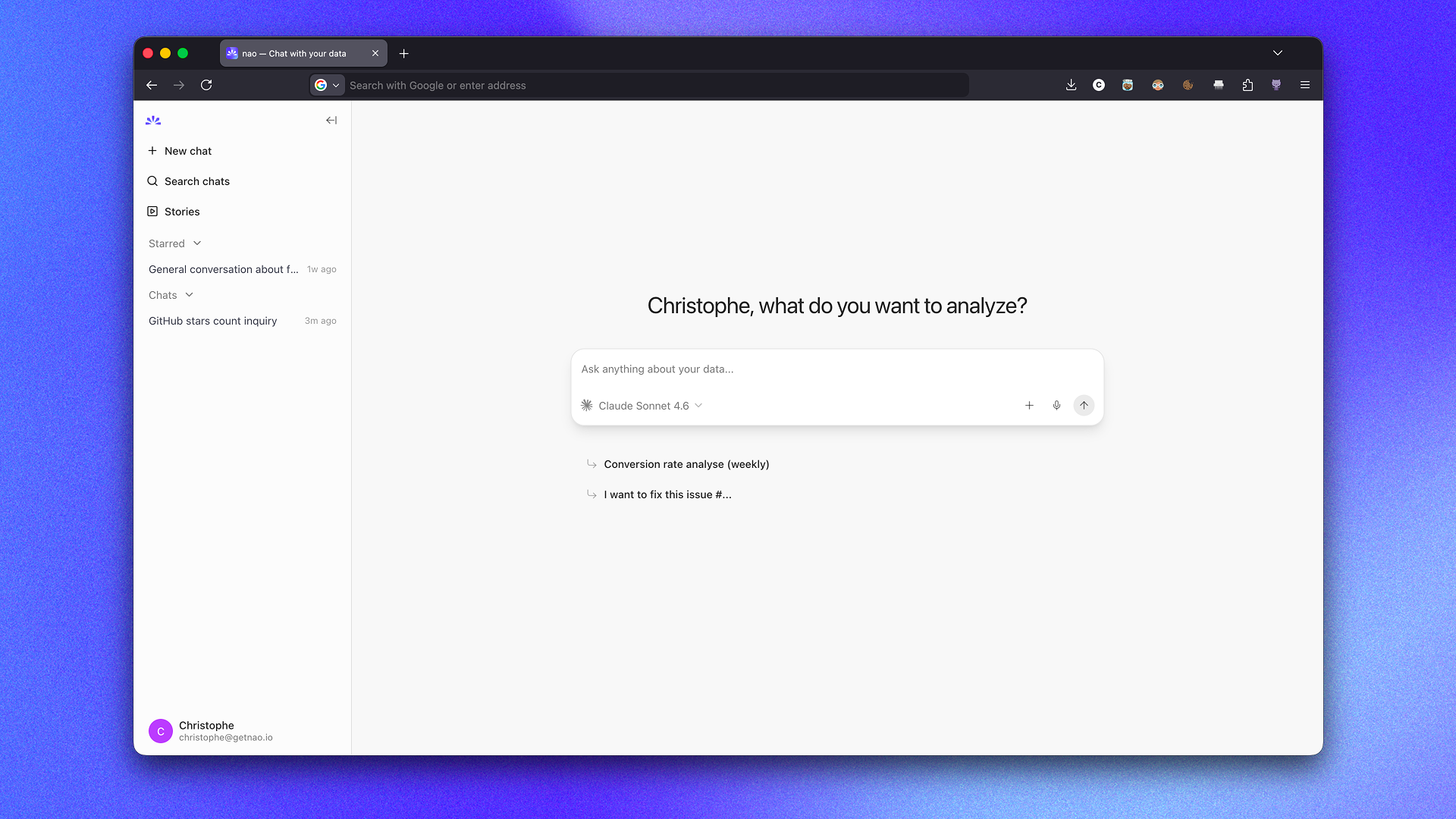
Deploy a UI for anyone to chat with your agent and run analytics on your data.
## Key Features
For **data teams**:
- 🧱 **Open Context Builder** — Create a file-system like context for your agent. Add anything you want in the context: data, metadata, docs, tools, MCPs. No limit.
- 🏳️ **Data Stack Agnostic** — Works with any data warehouse, stack, type of context, LLM.
- 🕵🏻♀️ **Agent Reliability Visibility** — Unit test your agent performance before deploying it to users. Version the context and track the performance of your agent over time. Get users feedbacks to improve the agent and track their usage.
- 🔒 **Self-hosted & secure** — Self-host your analytics agent and use your own LLM keys to guarantee maximum security for your data.
For **business users**:
- 🤖 **Natural Language to Insights** — Ask questions in plain English, get analytics straight away
- 📊 **Native Data Visualization** — Create and customize visualizations directly in the chat interface
- 🧊 **Transparent Reasoning** — See the agent reasoning and sources clearly
- 👍 **Easy Feedback** — Send feedback to the data team when a answer is right or wrong
## ⚡️ Quickstart your agent in 1 minute
- **Step 1**: Install nao-core package
```bash
pip install nao-core
```
- **Step 2**: Initialize a nao project
```bash
nao init
```
It will ask you:
- To name your project
- If you want to connect a database _(optional)_
- If you want to add a repo in agent context _(optional)_
- To add an LLM key _(optional)_
- If you want to setup a Slack connection _(optional)_
💡 You can skip any optional question and configure them later in your `nao_config.yaml` file.
This will create:
- A new folder with your project name
- An architecture for your context files
- A `nao_config.yaml` configuration file
- A `RULES.md` file
- **Step 3**: Verify your setup
cd to the project folder and run:
```bash
nao debug
```
- **Step 4**: Synchronize your context
```bash
nao sync
```
This will populate your context folder with your context files (data, metadata, repos, etc.)
- **Step 5**: Launch the chat and ask questions
```bash
nao chat
```
This will start the nao chat UI. It will open the chat interface in your browser at `http://localhost:5005`.
From there, you can start asking questions to your agent.
## Evaluation framework
Unit test your agent performance before deploying it to users. First, create a folder `tests/` with questions and expected SQL in yaml.
Then, measure agent's performance on examples with nao test command:
```bash
nao test
```
View results in tests panel:
```bash
nao test server
```
## Commands
```bash
nao --help
Usage: nao COMMAND
╭─ Commands ────────────────────────────────────────────────────────────────╮
│ chat Start the nao chat UI. │
│ init Initialize a new nao project. │
│ sync Sync context from your context sources (databases, repos) │
│ test Measure agent's performance on test examples. │
│ debug Debug and troubleshoot your nao setup. │
│ --help (-h) Display this message and exit. │
│ --version Display application version. │
╰───────────────────────────────────────────────────────────────────────────╯
```
## 🐳 Docker
Pull the image from DockerHub:
```bash
docker pull getnao/nao:latest
```
Run nao chat with Docker using the example project bundled in the image:
```bash
docker run -d \
--name nao \
-p 5005:5005 \
-e BETTER_AUTH_URL=http://localhost:5005 \
getnao/nao:latest
```
Run nao chat with Docker using your local nao project:
```bash
docker run -d \
--name nao \
-p 5005:5005 \
-e BETTER_AUTH_URL=http://localhost:5005 \
-v /path/to/your/nao-project:/app/project \
-e NAO_DEFAULT_PROJECT_PATH=/app/project \
getnao/nao:latest
```
Access the UI at http://localhost:5005 (or at any URL you configured).
See the [DockerHub page](https://hub.docker.com/r/getnao/nao) for more details.
For end-to-end self-hosted deployment (for example on Cloud Run with PostgreSQL), see the [Deployment Guide](https://docs.getnao.io/nao-agent/self-hosting/deployment-guide).
## 🧩 Skills
Use nao skills to create your nao project and context with your favourite agent.
Install the nao skill pack:
```bash
npx skills add getnao/nao
```
Docs on nao skills: https://docs.getnao.io/nao-agent/context-engineering/skills
## 👩🏻💻 Development
See [CONTRIBUTING.md](CONTRIBUTING.md) for development setup, commands, and guidelines.
## 📒 Stack
### Backend
- Fastify: https://fastify.dev/docs/latest/
- Drizzle: https://orm.drizzle.team/docs/get-started
- tRPC router: https://trpc.io/docs/server/routers
### Frontend
- tRPC client: https://trpc.io/docs/client/tanstack-react-query/usage
- Tanstack Query: https://tanstack.com/query/latest/docs/framework/react/overview
- Shadcn: https://ui.shadcn.com/docs/components
## ⛹️♀️ Join the Community
- Star the repo
- Subscribe to releases (Watch → Custom → Releases)
- Follow us on [LinkedIn](https://www.linkedin.com/company/getnao)
- Join our [Slack](https://join.slack.com/t/naolabs/shared_invite/zt-4080jlm79-nm52x5nZhG2N1ben8zwpiQ)
- Contribute to the repo!
## 🫰🏻 Partners
nao Labs is a proud Y Combinator company!
## 📄 License
This project is licensed under the Apache 2.0 License - see the [LICENSE](LICENSE) file for details.