# Create Your Own Ghada Express Profiler Scope
The below implementation gives an example of a package written in Typescript and [ejs template engine][URL_ejs].
It is recommended to use [Typescript][URL_typescript] to build your `scope package`. All Ghada Express Profiler `scope packages` are built using Typescript.
You can refer to [Axios Scope Repo][URL_scopes_axios] to check how it was implemented and resemble it.
No let's start with the steps for `scope package` creation:
## 1. Make your package directory
```sh
mkdir mypackage
cd mypackage
```
## 2. Create a nodejs project
```sh
npm init
```
## 3. Install required packages
```sh
npm i @ghadautopia/express-profiler on-finished
```
In your `package.json` file, make sure to lock the `@ghadautopia/express-profiler` to the version required for your scope to work. If the user installed your `scope package` while using a mismatched version of `@ghadautopia/express-profiler`, the user will end up with something like the below error
```sh
Error: The scope {"name":"axios","hasToolbarSlot":true,"hasPageView":true} is not instance of ProfilerScope
```
For example, to allow your `scope package` to be used with any `@ghadautopia/express-profiler` version, in your `package.json` the required version for `@ghadautopia/express-profiler` should be `"*"`. Like the below
```json
"dependencies": {
// ...
"@ghadautopia/express-profiler": "*",
// ...
}
```
## 4. Install template engine packages
Install template engine which you will use for rendering the scope view page. Here we are installing ejs but you can install your preferred template engine
```sh
npm i ejs
```
## 5. Install specific packages needed for your scope or stream
## 6. Create the project structure as below
```dir
📦mypackage
┣ 📂doc
┃ ┗ 📂images
┃ ┃ ┣ 📜my-img1.png
┃ ┃ ┗ 📜my-img2.png
┣ 📂src
┃ ┣ 📜index.ts
┃ ┣ 📜scope.ts
┃ ┗ 📜stream.ts
┣ 📂views
┃ ┣ 📂script
┃ ┃ ┗ 📜index.js
┃ ┣ 📂styles
┃ ┃ ┗ 📜index.css
┃ ┗ 📂template
┃ ┃ ┗ 📜index.ejs
┣ 📜CHANGELOG.md
┣ 📜README.md
┣ 📜package.json
┗ 📜tsconfig.json
```
__Directory Structure Explanation:__
| dir/file | Eeplanation |
|----|----------|
| doc | contains the resources (e.g. images) used in the README.md file |
| src/index.ts | contains modules you need to expose to be used by the project using your package. At least, you need to expose your package `scope` module which will be added to `Ghada Express Profiler` config `scopes` array prop to enable your scope. For example, in [Axios scope package][URL_scopes_axios], we are exposing the `axiosScope` and the `axiosStreamMiddlware` modules. Those modules should be added to `Ghada Express Profiler` config props `scopes` and `streamMiddlwares` respectively |
| src/scope.ts | file containing your scope implementation logic |
| src/stream.ts | file containing your stream implementation logic. This module is __optional__. Required in case your scope needs a new stream to log new data |
| views | contains views related files. Not required if your scope only renders a `toolbar slot` |
| views/script/index.js | __optional JS file__ contains the javascript which will run in your scopes page view |
| views/styles/index.css | __optional CSS file__ contains the CSS styles which will run in your scopes page view |
| views/template/index.ejs | file containing your HTML template which will be rendered to display the scope page |
| CHANGELOG.md | the changlog file for this package |
| README.md | the readme file for this package |
| package.json | package.json file |
| tsconfig.json | typescript configuration file |
## 7. Implement your stream (optional)
The stream is responsible for logging data that will be used to render your scope components. It's __only__ required if your scope will use data not already logged by other streams.
Each stream should have a unique name. When creating your stream make sure not to collide with other stream names. Check current stream names below:
| Stream name (__UNIQUE__) | Package | Git repo |
| --- | --- | --- |
| req-res | within profiler | --
| axios | TBD | [here][URL_scopes_axios]
| mongoose | TBD | [here][URL_scopes_mongoose]
The stream implementation should be located in `src/stream.ts`. Check [Axios stream][URL_scopes_axios_stream]
The stream is created via `createStream` helper function. You can import it from `@ghadautopia/express-profiler`
```typescript
import { createStream } from '@ghadautopia/express-profiler';
const myStream = createStream('my-stream-name');
```
The `createStream` will return an instance of `ProfilerStream`. You can use the `ProfilerStream::persist` method to log the required data at any point of time of the request lifecycle. The `persist` method takes 2 arguments:
- The current `Server response`
- Object of the data you want to log
__VERY IMPORTANT__
__MAKE SURE TO CLEAN UP AFTER LOGGING THE REQUIRED DATA. YOU CAN DO THIS BY USING THE [ON-FINISHED][URL_ON-FINISHED] PACKAGE TO DETECT THAT THE `RESPONSE` HAS BEEN SENT.__
The example below shows how data is being logged by `axios stream`. The `axiosMiddleware` will be exposed to the package user to use it during instantiating `Ghada Express Profiler` in the `streamMiddlewares` config array.
In this middleware, we are making use of axios interceptors and `persisting` every response generated by axios. Then, we are using the `onFinished` method on the `Server response` to destroy the interceptor, because at this point we are sure that the `Server response` was sent to the client. Finally, we use `next()` to let the request pass through.
```typescript
export const axiosStreamMiddleware: (axios: AxiosInstance) => RequestHandler = (axios: AxiosInstance) => {
return (req, res, next) => {
const intercept = axios.interceptors.response.use(async function (response) {
await axiosStream.presist(res, response);
return response;
}, async function (error) {
await axiosStream.presist(res, { ...error.response, error });
return Promise.reject(error);
});
onFinished(res, () => axios.interceptors.response.eject(intercept));
next();
}
}
```
## 8. Implement your scope
The scope mainly responsible for rendering:
- The scope toolbar slot in `Ghada Express Profiler` toolbar (__optional__)
### toolbar image

- The scope pageview (__optional__)
### pageview image
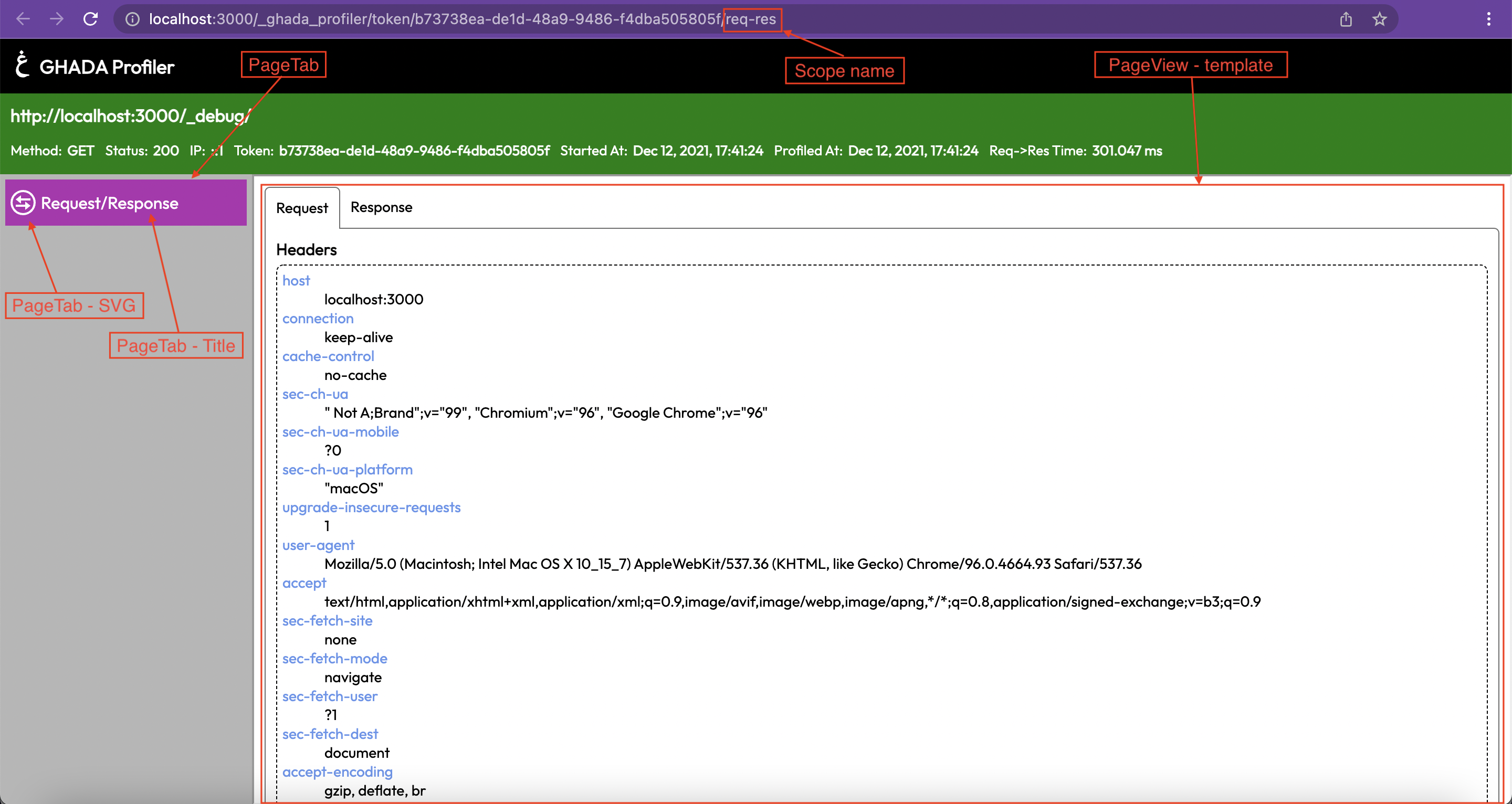
The scope should be located in `src/scope.ts`. Check [Axios scope][URL_scopes_axios_scope]
The scope is created via `createScope` helper function. You can import it from `@ghadautopia/express-profiler`
```typescript
import { createScope } from '@ghadautopia/express-profiler';
export const myScope = createScope(props);
```
__createScope function props:__
| prop | type | desctiption |
| ---- | ---- | ----------- |
| name | string | The name of your scope. It will be used in scope url to direct to the scope's page view|
| getToolbarSlot | (__optional__) async (streamsData) => ToolbarSlotData |
Required if your scope will render a [toolbar slot][REF-IMG_toolbar]
Its argument is a Map with all the available [streams data][REF_streamsdata-structure]
Its should return a Promise of [ToolbarSlotData object][REF_toolbarSlotData-props]
Required if your scope will render a [pageview][REF-IMG_pageview]
It renders the pageview in scopes page
Its first argument is a Map with all the available [streams data][REF_streamsdata-structure]
Its second argument is a string containing the directory where the views are located in `@ghadautopia/express-profiler` package in case you wanted to reuse any [ejs mixin][REF_ejs-mixins] from there
It should return a Promise of [PageViewData object][REF_pageviewdata-props]
|
### Scope data types
- #### streamsData structure
```typescript
Map {
'stream_name' => [
{
token: string; // profiler token id
stream: string; // stream name
time: string; // time of logging (epoch)
data: any; // raw logged data
}
]
}
```
- #### [ToolbarSlotData props][REF-IMG_toolbar]
| prop | type | description |
| --- | --- | --- |
| text | string | text rendered in the toolbar slot|
| description | string (optional) | tooltip text when the user hovers over the slot |
| svg | string (optional) | svg image code as a string |
| color | ProfilerColor enum (optional) | Background color of the slot |
- #### [PageTabData props][REF-IMG_pageview]
| prop | type | description |
| --- | --- | --- |
| svg | string (optional) | tab svg |
| title | string | tab text |
- #### [PageViewData props][REF-IMG_pageview]
| prop | type | description |
| --- | --- | --- |
| template | string | string of html tags to render the page view |
| styles | string (optional) | string of CSS styles used in page view |
| script | string (optional) | string of JS script used in page view |
### Global CSS classes
The below css classes are available. You can use them whenever you want
| css class | description | example |example result |
| --- | --- | --- | --- |
| container | wrapper |
| bg-defaultbg-dangerbg-success bg-warning bg-info bg-info-dark | background colors|
|color-white color-default color-danger color-success color-warning color-info color-info-dark| colors |
| gp-tabs gp-tabs__links gp-tabs__link gp-tabs__link--active gp-tabs__content| create contents which can be switched by tabs | `````` `````` ```Content of first tab``` ```Content of second tab``` `````` |  |
|gp-el gp-el__header gp-el__content| default element | ```
``` | 
### EJS Mixins
If you are using `ejs` to implement your templates. Then you can benefit from `Ghada Express Profiler` mixins below
| mixin | description |
| --- | --- |
|[formatTimestamp][URL_mixin_format-timestamp]| format valid date string |
|[getReqStartTime][URL_mixin_get-req-start-time]| return formatted request start time |
|[getReqUrl][URL_mixin_get-req-url]| return the request full url |
|[getResStatus][URL_mixin_get-res-status]| return color status of the response `default`, `danger`, `warning`, `info` or `success`. Used with classes `bg-{{ color }}` or `color-{{ color }}` to style HTML elements|
|[getScopeUrl][URL_mixin_get-scope-url]| return url for the scope's page view |
In order to use those mixins, you need to pass the `profilerViewsDir` paramter (the second argument of the `getPageView` function) to your view template. Then you can include any mixin in your template as shown below. check [Axios scope][URL_scopes_axios_scope]
```ejs
<%- include(`${profilerViewsDir}/mixins/format-timestamp.ejs`) -%>
<%= formatTimestamp(time) %>
```
```ejs
<%- include(`${profilerViewsDir}/mixins/get-res-status.ejs`) -%>
<%= res.status %>
```
## 9. README
Please add a __README.md__ file to your package. You can refer to [Axios scope readme][URL_scopes_axios_readme]
## Helpers you can use from `@ghadautopia-express-profiler`
- __createScope__: Function to create new scope
- __createStream__: Function to create new stream
- __getTokenFromRes__: Function to get the profiler token assigned to server response
- __ProfilerError__: Class of Profiler error
## Types you can use from `@ghadautopia-express-profiler`
- __ProfilerColor__: An enum to identify background color of toolbar slot
[//]: # (reference links)
[URL_scopes_axios]:
[URL_scopes_mongoose]:
[URL_scopes_axios_readme]:
[URL_scopes_axios_scope]:
[URL_scopes_axios_stream]:
[URL_ejs]:
[URL_typescript]:
[URL_on-finished]:
[URL_mixin_format-timestamp]:
[URL_mixin_get-req-start-time]:
[URL_mixin_get-req-url]:
[URL_mixin_get-res-status]:
[URL_mixin_get-scope-url]:
[REF-IMG_toolbar]: <#toolbar-image>
[REF-IMG_pageview]: <#pageview-image>
[REF_streamsdata-structure]: <#streamsdata-structure>
[REF_toolbarslotdata-props]: <#toolbarslotdata-props>
[REF_pagetabdata-props]: <#pagetabdata-props>
[REF_pageviewdata-props]: <#pageviewdata-props>
[REF_ejs-mixins]: <#ejs-mixins>