





# Buddy
**A floating chat bubble that lets Claude Code, Codex, OpenCode, Antigravity or Grok use your Android phone.**
Type or say what you want, like "reply to Sam that I'm running late" or "add a Switch 2 to my Amazon cart". Buddy reads the screen, taps and types to get it done, and asks you before anything is sent, posted, bought or deleted.
It runs inside the app, on your own plan: [Claude Code](https://docs.claude.com/en/docs/claude-code) with your Claude plan, Codex with your ChatGPT plan, Google's [Antigravity CLI](https://antigravity.google) with your Google account, xAI's [Grok Build](https://x.ai/build) with your Google or X account, or [OpenCode](https://opencode.ai) with its free models and no account at all. No PC, no adb, no root, and no API key needed (you can add keys for other services, such as DeepSeek or OpenRouter, and use them with Claude Code, Codex or OpenCode).
Download the APK · Website · Android 11+, 64-bit
https://github.com/user-attachments/assets/d07936fc-4788-4ab5-a105-31b3e9aeba4f
Codex turns on the lights while OpenCode's free model adds a Switch 2 to the Amazon cart (real recordings, waiting sped up)
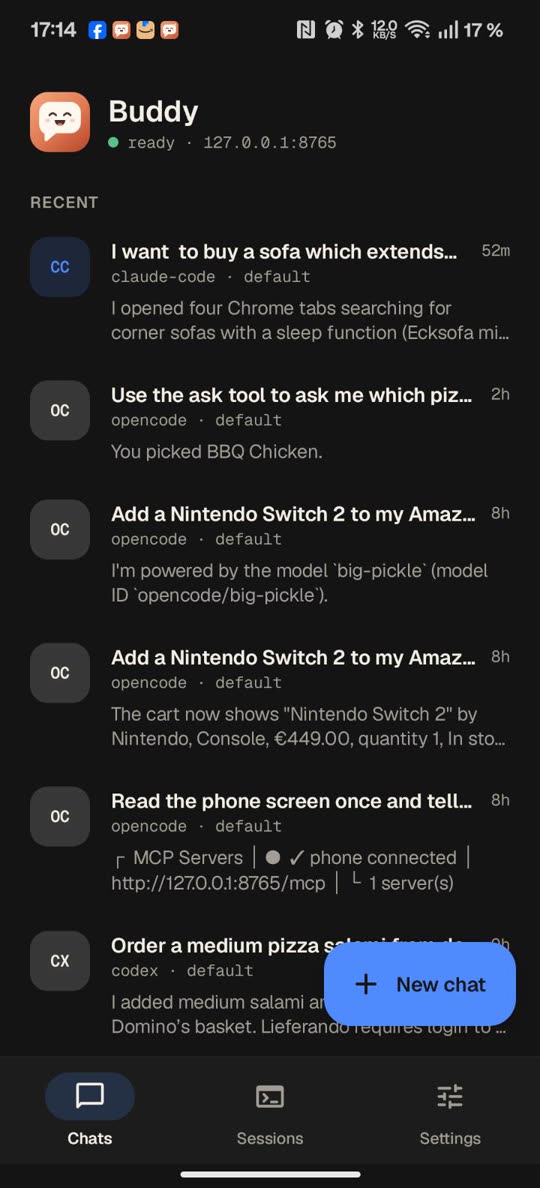
Chats with any agent |
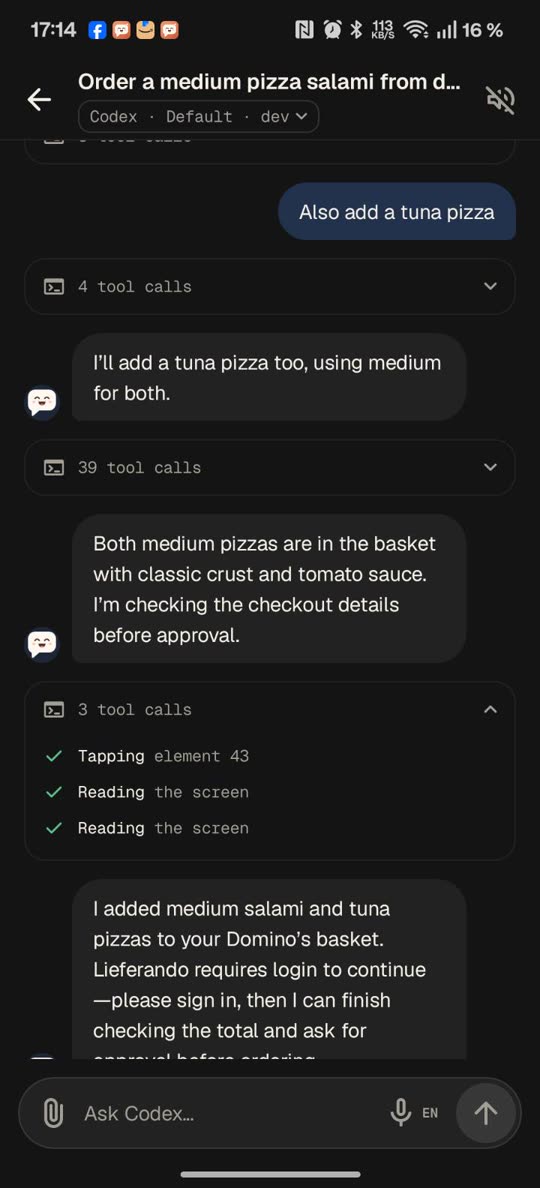
Tool calls fold into one line |
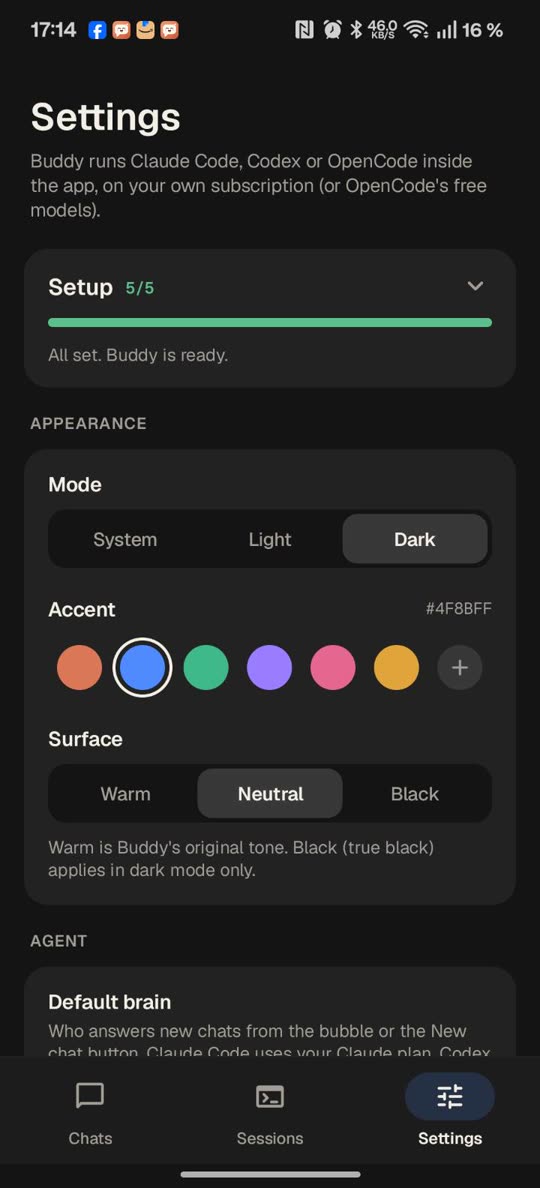
Setup guide and themes |
## What it can do
| | |
|---|---|
| **Uses your apps** | Messages, shopping, smart home, settings: anything on screen. Add instructions while it works. |
| **Asks first** | Approve, Deny or Change before anything is sent, posted, bought or deleted. |
| **Shows you how** | "Show me how to turn on dark mode": it points at each step and waits for your tap. |
| **Acts on notifications** | "When a customer asks on WhatsApp, reply with our opening hours", with your OK, a countdown you can stop, or right away. |
| **Voice** | Talk to it and have replies read aloud. |
| **Background mode** | The agent works in your apps on a screen of its own that you don't see, while you keep using your phone. Set up once with the phone's own Wireless debugging, no computer; watch it live in the chat. Optional: let it run `adb shell` commands on the phone, each one approved by you. |
| **Sub-agents** | "Compare this on eBay, Amazon and AliExpress": the agent starts sub-agents that each work in an app on a hidden screen of their own, at the same time, and report back. They only look things up; you see every screen in the chat. |
| **Background browser** | Web pages in a browser inside Buddy, without taking over your screen, even while the phone is locked. Watch and use it live in the chat; it marks what you need to do (sign in, a captcha) and never types your passwords. |
| **Builds apps** | Turn on Linux tools in a chat and "make me a calculator app" builds a real APK on the phone; the GitHub version also installs it for you. |
| **Phone tools anywhere** | The same tools as a local MCP server for your own Claude Code, Codex, OpenCode, Antigravity or Grok sessions, or over stdio with [mcp-bridge](mcp-bridge) for clients that start servers as commands. |
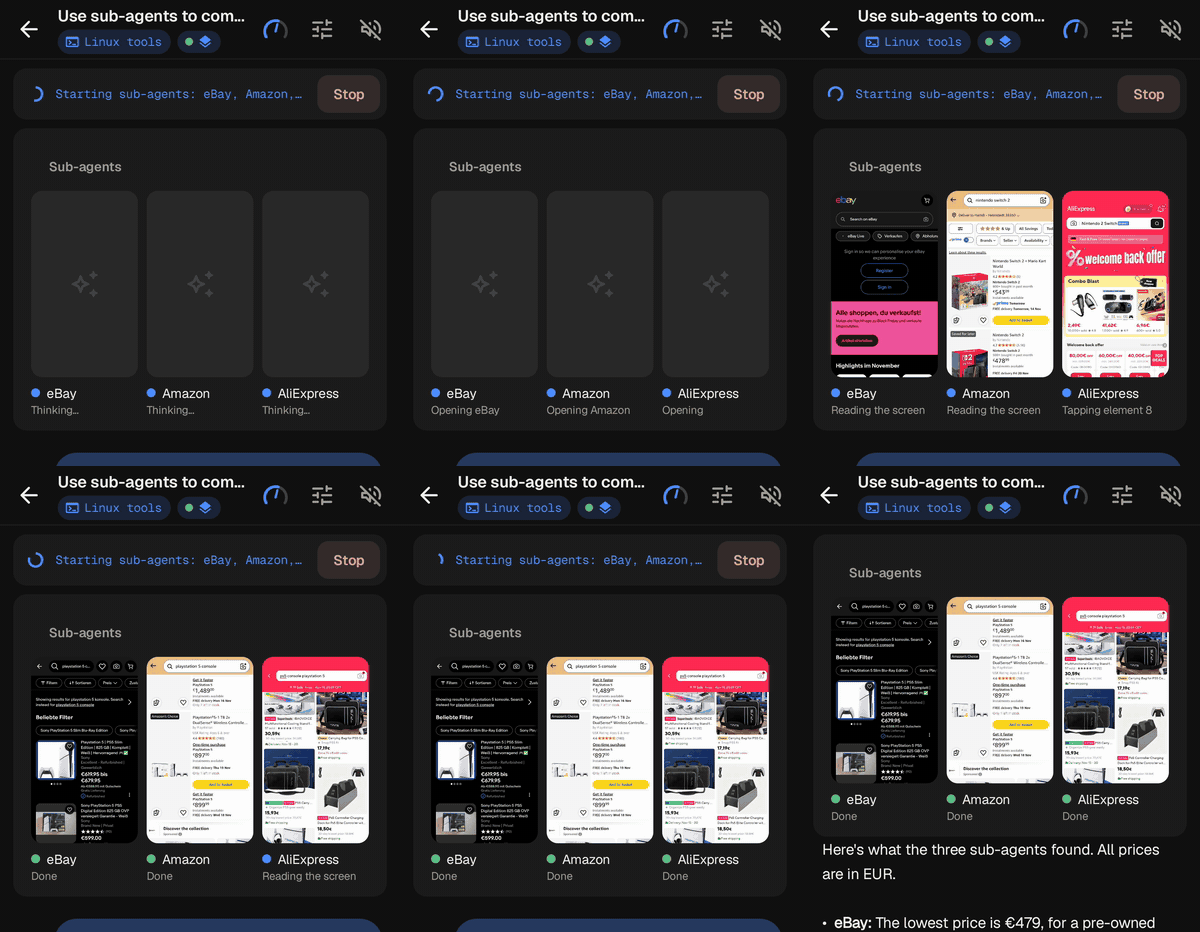
Three sub-agents, three shops, at the same time (30 s video)
> **Status: 2.3, early.** It works well day to day but has rough edges. Tested most on a OnePlus 12 (Android 16). Buddy is an independent project, not made by or affiliated with Anthropic, OpenAI, Google or xAI.
## How it works
```
Buddy app / bubble ──► Buddy's Linux (Alpine via proot): claude, codex, opencode, agy or grok
▲ │
└──────────── streamed replies ◄──────────────────────┤
▼
Buddy accessibility service ◄──── MCP on 127.0.0.1 (phone tools)
```
Buddy is a normal Android app with an accessibility service, the kind of permission screen readers use. The agent runs in a small Linux inside the app and uses Buddy's phone tools (read the screen, tap, type, scroll, open apps) over a local MCP server. No adb or Wireless debugging, and it works without Wi-Fi.
## Setup
You need a 64-bit Android 11+ phone, plus a Claude, ChatGPT or Google account for those agents (Grok: a Google or X account). OpenCode's free models need no account.
1. **Install Buddy:** [download buddy.apk](https://github.com/ghorbelhamdi/buddy-android/releases/latest/download/buddy.apk) and open it. It updates itself, and installs the apps it builds for you. (Google Play turned Buddy down for production: its policy doesn't allow apps that use accessibility to carry out tasks.)
2. **Follow the setup guide** that opens on first launch: pick your agent, turn on the accessibility service, install and sign in, and try a first task.
**Install blocked or "Restricted setting"?** See [Setup in detail](docs/GUIDE.md#setup-in-detail).
## Local models
Run the model on your own computer and nothing goes to an AI company. Start [Ollama](https://ollama.com), LM Studio or llama.cpp's server on a PC (for Ollama, set `OLLAMA_HOST=0.0.0.0` and a context of at least 24k tokens, e.g. `OLLAMA_CONTEXT_LENGTH=24576`, since the phone tools take about 7k). In Buddy: Settings → API keys → Add API key → **Ollama** (or LM Studio, llama.cpp), put the PC's address on your Wi-Fi instead of `localhost`, leave the key empty, and use it in an OpenCode chat. Plain `http://` works on your own network and over Tailscale.
What to expect, from tests on an RTX 2060 Super (8 GB): Qwen3 8B and Qwen3 4B handle simple one-step requests, like the battery level or the phone's status. Multi-step tasks on the screen are another matter: in a calculator test the 4B tapped the wrong buttons and then said it had worked. For real tasks, use a bigger model that's good at tool calling. The first answer of a chat takes longest, since the model first reads about 13k tokens of instructions and tool descriptions. A model running on the phone itself works too, but it's slow and makes the phone lag.
## Updating
Install the new APK over the old one: chats, settings and sign-ins stay (don't uninstall first). You can also ask Buddy to *"update yourself"*, or let [Obtainium](https://obtainium.imranr.dev) do it ([how](docs/GUIDE.md#updating)).
## Security
An accessibility service is powerful, so please read this.
- **Local only.** The phone tools listen on `127.0.0.1` with a random per-install token.
- **Buddy enforces the approvals, not the agent.** Messaging, shopping and money apps start on a hard limit: Buddy itself stops on buttons like Send, Pay and Delete until you OK them.
- **Prompt injection is the main risk.** A message or web page could try to give the agent orders. On-screen text is treated as content, and the approval card is the backstop, so read it.
- **No passwords.** Buddy never types passwords, codes or payment details; it hands those to you.
- **What leaves the phone:** only what the agent sends to its provider (Anthropic, OpenAI, Google, xAI, OpenCode's service or the provider you connected) to answer you.
More in [Security in detail](docs/GUIDE.md#security-in-detail). Found a problem? Please open a private security advisory instead of a public issue.
## FAQ
**What does it cost?** Buddy is free. The agent uses your plan's limits, or nothing at all with OpenCode's free models (no account) or Antigravity's free plan (Google account).
**iPhone?** No. iOS doesn't let apps operate other apps.
**Which phones?** 64-bit Android 11 or newer. On some brands, set Buddy's battery use to *Unrestricted*.
**Does it need a computer, adb or root?** No.
## Learn more
- [User guide](docs/GUIDE.md): chats, models, voice, notification rules, the bubble, Remote Control, SSH and Linux tools
- [Benchmark](benchmark/README.md): which model uses a phone best
- [Privacy policy](docs/PRIVACY.md)
**In the press:** [ProPakistani](https://propakistani.pk/2026/10/12/this-free-android-app-lets-claude-code-use-your-phone/), [The Neutral](https://theneutral.pk/this-free-android-app-lets-ai-control-your-phone-without-a-pc/), [Trendshift](https://trendshift.io/repositories/289557) (October 2026)
## Contributing
Bug reports, ideas and translation fixes are welcome: see [CONTRIBUTING.md](CONTRIBUTING.md). If Buddy is useful to you, a ⭐ helps other people find it.
## For developers
```
git clone --recurse-submodules https://github.com/ghorbelhamdi/buddy-android.git
./gradlew assembleRelease # Android Studio / Gradle
./build.sh # on the phone in Termux, no Gradle → build/buddy-release.apk
```
proot and libandroid-shmem are git submodules in `third_party/` (`git submodule update --init` in an existing clone). `build.sh` needs `pkg install openjdk-17 aapt2 d8 apksigner python clang make` and android.jar from platform-36 at `~/android-sdk/android-36/android.jar`. It creates a signing key at `~/.buddy-keys/release.jks` on first run: back it up, since updates must be signed with the same key. Gradle release signing reads `BUDDY_KEYSTORE` and `BUDDY_KEYSTORE_PASSWORD` (optionally `BUDDY_KEY_ALIAS`, `BUDDY_KEY_PASSWORD`). The version lives in `BuildInfo.java`, and the project layout is in [CONTRIBUTING.md](CONTRIBUTING.md#project-layout).
## License
[Apache-2.0](LICENSE). Geist fonts: SIL Open Font License. Icons: Material Symbols (Apache-2.0). Bundled proot (GPL-2.0), talloc (LGPL-3.0) and libandroid-shmem (BSD-3-Clause): see [third_party](third_party/README.md) for licences and source.