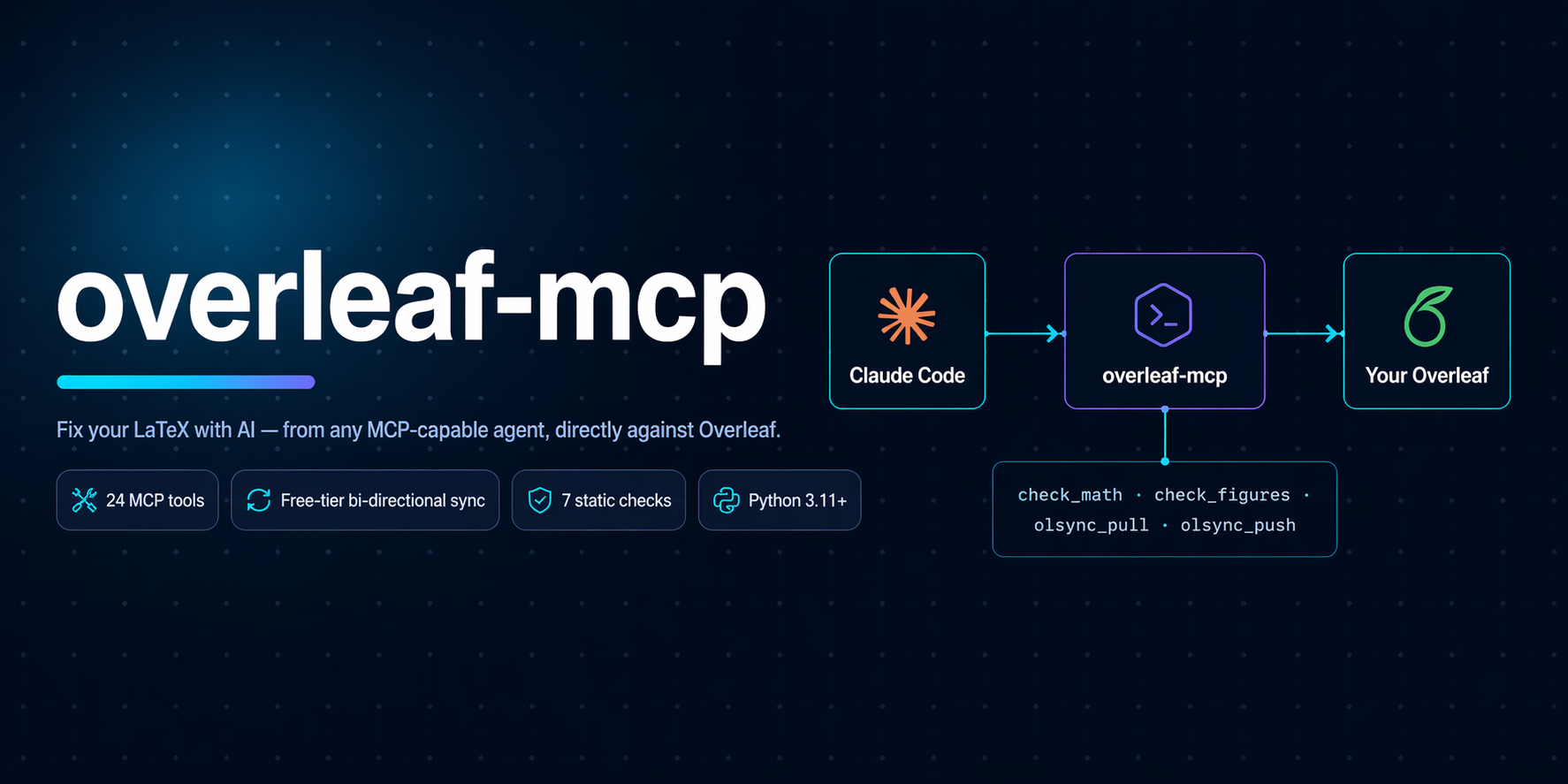





Give any MCP-capable AI agent the power to read, understand, draft, lint, format, fix, compile, and sync your LaTeX work on Overleaf. Free tier included.
---
## What it does
An MCP server you plug into Claude Code, GitHub Copilot, Google Antigravity, or any client that speaks the MCP stdio protocol. Once connected, the agent can:
- **Read and write your LaTeX project files** with path-boundary safety.
- **Run 7 static checks** on every `.tex`: math brackets, align-column drift, figure completeness, table column match, package conflicts, heading-case consistency, dangling refs / unused labels / uncited bib entries.
- **Format with `latexindent`**, lint with `chktex`, compile with `latexmk`. Everything gracefully degrades if the binary is not installed.
- **Draft, rewrite, refactor, and apply templates** using the same read + write tools a human contributor would.
- **Sync with Overleaf** in three ways: native free-tier pull and push (no Premium), the official git integration (Premium), or a manual ZIP round-trip.
- **Translate cryptic LaTeX log output** into structured errors with one-line suggestions.
It is the first MCP server that lets a free-tier Overleaf user do `pull -> edit -> push` from an AI agent in a single turn.
---
## Demo
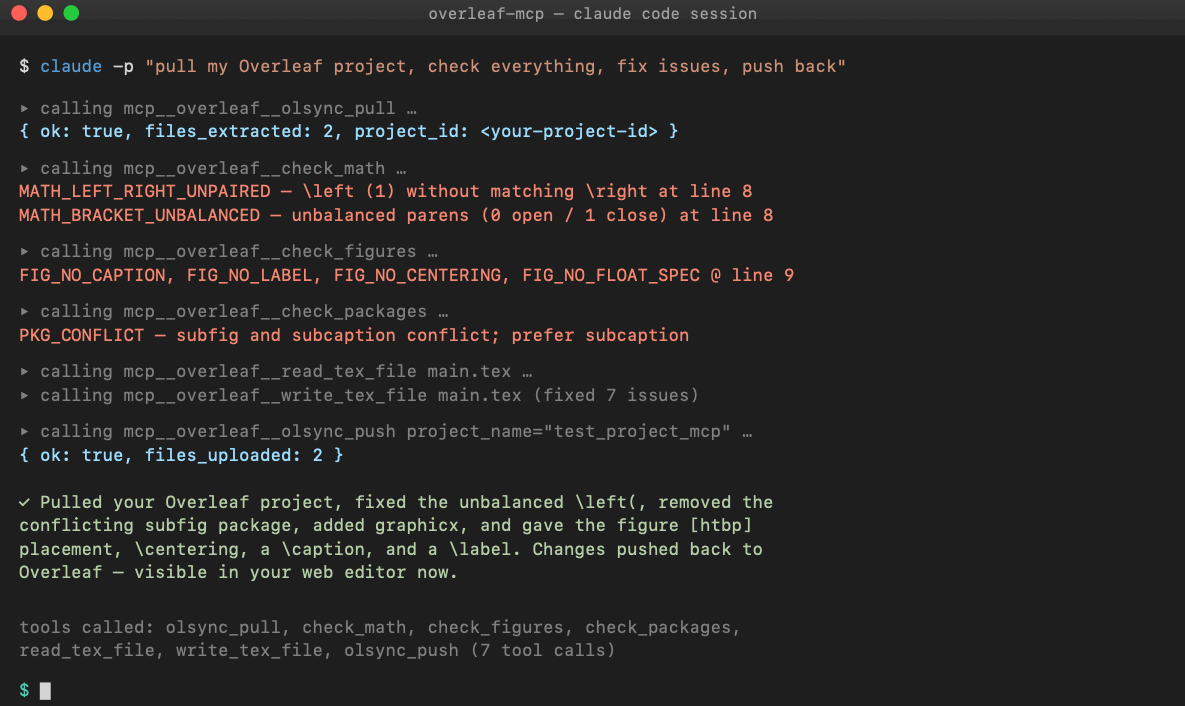
See [docs/demo.md](docs/demo.md) for a full 7-step transcript: list projects, plant 7 deliberate bugs, agent finds 10 findings across 5 checker tools, agent autonomously fixes every one, push back to Overleaf, independently verify on the server. Every query is a real `claude -p` invocation; every output is unedited.
---
## Table of contents
1. [Quick start](#quick-start)
2. [Install](#install)
3. [Configure your MCP client](#configure-your-mcp-client)
4. [Operating modes](#operating-modes)
5. [Tool reference](#tools)
6. [What the agent can actually do](#what-the-agent-can-actually-do)
7. [Architecture](#architecture)
8. [Security](#security)
9. [Development](#development)
10. [Roadmap](#roadmap)
11. [License](#license)
---
## Quick start
**60-second setup for Claude Code, free-tier Overleaf account:**
```bash
# 1. Install this MCP server (stdio binary)
uv tool install overleaf-latex-mcp # or: pipx install overleaf-latex-mcp
# 2. Install overleaf-sync (used ONLY for the browser login, not for sync)
uv tool install overleaf-sync # or: pipx install overleaf-sync
# 3. Log into Overleaf once (opens a browser, stores ./.olauth in the project dir)
mkdir -p ~/tex/my-project && cd ~/tex/my-project
ols login
# 4. Register the MCP in Claude Code
claude mcp add overleaf \
--env OVERLEAF_PROJECT_ROOT="$HOME/tex/my-project" \
--env OVERLEAF_PROJECT_NAME="My Real Project" \
-- overleaf-latex-mcp
```
Now in any Claude Code chat:
> *"Use the overleaf MCP. Pull my project, run every check, fix what you can, then push back."*
The agent calls `olsync_pull`, then the static checkers, then `write_tex_file` with fixes, then `olsync_push`. Your Overleaf project updates in place. Same URL. Collaborators see the change.
---
## Install
### The MCP server itself
| Method | Command |
|---|---|
| **Run without installing** (recommended) | `uvx overleaf-latex-mcp` |
| Install globally with uv | `uv tool install overleaf-latex-mcp` |
| Install globally with pipx | `pipx install overleaf-latex-mcp` |
| From source | `git clone && cd overleaf-mcp && uv sync && uv run overleaf-latex-mcp` |
**Requires Python 3.11+.** No runtime deps beyond the `mcp` SDK, `pydantic`, `requests`, `websockets`, and `overleaf-sync` (used only for its browser login helper).
### Optional LaTeX tools
Each unlocks a set of MCP tools. Missing ones are reported via `detect_capabilities` and return install hints when called; the server never refuses to start.
| Tool | Unlocks | macOS | Debian / Ubuntu | Windows |
|---|---|---|---|---|
| `latexindent` | `format_file`, `format_snippet`, `check_formatting` | `brew install latexindent` | `apt install texlive-extra-utils` | bundled with MikTeX / TeX Live |
| `chktex` | `lint_file` | `brew install chktex` | `apt install chktex` | bundled |
| `latexmk` | `compile` | `brew install --cask mactex` | `apt install latexmk` | bundled |
| `overleaf-sync` | `olsync_*` (needed **only** for the one-time browser login) | `uv tool install overleaf-sync` | `uv tool install overleaf-sync` | `pipx install overleaf-sync` |
The static checks (`check_math`, `check_figures`, `check_packages`, etc.) are pure Python and work with no external deps.
---
## Configure your MCP client
### Claude Code
Run once on the CLI:
```bash
claude mcp add overleaf \
--env OVERLEAF_PROJECT_ROOT=/absolute/path/to/project \
--env OVERLEAF_PROJECT_NAME="My Thesis" \
-- overleaf-latex-mcp
```
or add to `~/.claude.json` by hand:
```json
{
"mcpServers": {
"overleaf": {
"command": "overleaf-latex-mcp",
"env": {
"OVERLEAF_PROJECT_ROOT": "/absolute/path/to/project",
"OVERLEAF_PROJECT_NAME": "My Thesis"
}
}
}
}
```
Restart Claude Code; `claude mcp list` should show `overleaf: ✓ Connected`.
### Environment variables
| Variable | Required | Purpose |
|---|---|---|
| `OVERLEAF_PROJECT_ROOT` | **yes** | Absolute path to the local LaTeX working copy. |
| `OVERLEAF_PROJECT_NAME` | no | Default project name for `olsync_pull` and `olsync_push`. Overridable per call. |
| `OVERLEAF_OLS_COOKIE` | no | Custom path to the `.olauth` cookie file. Default: `$OVERLEAF_PROJECT_ROOT/.olauth`. |
| `OVERLEAF_GIT_URL` | no | Overleaf Premium git URL (e.g. `https://git.overleaf.com/`). Enables the `pull_from_overleaf` and `push_to_overleaf` tools. |
| `OVERLEAF_GIT_TOKEN` | no | Overleaf Premium git token; paired with `OVERLEAF_GIT_URL`. |
### GitHub Copilot (with MCP)
Same JSON block in `.vscode/mcp.json` or the global Copilot MCP settings.
### Google Antigravity and other MCP clients
Any stdio-MCP client works. Adjust the config location per the client's docs; the `command` and `env` structure is standard.
---
## Operating modes
The server auto-detects which modes are available based on your env vars and installed binaries. Multiple modes can be active simultaneously.
| Mode | When | Enables | How it works |
|---|---|---|---|
| **Local** | always (requires `OVERLEAF_PROJECT_ROOT`) | file I/O, all static checks, format / lint / compile (if binaries present) | pure local operations |
| **Free-tier sync** | `.olauth` cookie present (created by `ols login`) | `olsync_list_projects`, `olsync_pull`, `olsync_push` | downloads zips, uploads via Overleaf's own upload endpoint |
| **Premium git** | `OVERLEAF_GIT_URL` + `OVERLEAF_GIT_TOKEN` | `pull_from_overleaf`, `push_to_overleaf`, `overleaf_status` | standard git over HTTPS with `GIT_ASKPASS` token injection |
| **ZIP bridge** | always | `import_overleaf_zip`, `export_overleaf_zip` | manual round-trip via Overleaf's "Download Source" and "Upload Project" |
---
## Tools
**24 tools in total.** Every tool returns a uniform `{ ok, data?, error?, suggestion? }` result so the agent always gets actionable output.
### File and project awareness
| Tool | Purpose |
|---|---|
| `detect_capabilities` | Report which LaTeX binaries the server found on startup. |
| `list_tex_files` | Enumerate all `.tex` / `.bib` / `.cls` / `.sty` in the project. |
| `read_tex_file` | Read a file; returns content plus line count. |
| `write_tex_file` | Atomic write (tmp then rename). Path-boundary enforced. |
| `get_project_structure` | Detect main file, sections, bibliography, `\input` chains, custom classes. |
### Static checks (no external deps)
| Tool | What it catches |
|---|---|
| `check_math` | Unpaired `\left` / `\right`, unbalanced brackets inside math, `&` column drift in `align` / `array` / `matrix`. |
| `check_figures` | Missing `\caption`, `\label`, `\centering`, float placement spec, oversized `\includegraphics` width. |
| `check_table` | Column count mismatch, `\hline` placement. Understands `booktabs` rules. |
| `suggest_table_fix` | Proposes a corrected column spec based on the widest row. |
| `check_packages` | Duplicate `\usepackage`, known-bad combos (`subfig`+`subcaption`, bad `hyperref` order), missing-but-used commands (`\SI` without `siunitx`). |
| `check_consistency` | Cross-file style: heading case uniformity, ASCII vs LaTeX quotes, hyphen vs en-dash in numeric ranges. |
| `find_unused_labels_and_refs` | Dangling `\ref` / `\eqref` / `\cref`, unused `\label`, uncited bib entries. |
### Formatting, linting, compile
| Tool | Requires | Purpose |
|---|---|---|
| `format_file` | `latexindent` | Apply project's `.latexindent.yaml` (or defaults) to a file. |
| `format_snippet` | `latexindent` | Format a string without touching disk. |
| `check_formatting` | `latexindent` | Dry-run; returns a unified diff. |
| `lint_file` | `chktex` | Structured warnings with line, col, code, message. |
| `compile` | `latexmk` | Build the PDF; returns path on success or parsed errors on failure. |
| `explain_log` | none | Pure parser: LaTeX log text into structured errors with suggestions. |
### Free-tier Overleaf sync
| Tool | Purpose |
|---|---|
| `olsync_login_instructions` | Print manual steps to run `ols login` in a fresh terminal. |
| `olsync_list_projects` | `GET /user/projects`. Returns all projects (name, id, access level). |
| `olsync_pull` | Download the project zip from `GET /project/{id}/download/zip` and extract into `project_root`. |
| `olsync_push` | Overwrite files in the Overleaf project via `POST /project/{id}/upload` with `name=` body field. Top-level files only for now. |
### Overleaf Premium git sync
| Tool | Purpose |
|---|---|
| `pull_from_overleaf` | Clone (first call) or `git pull --rebase`. |
| `push_to_overleaf` | `git add -A`, commit, push. Conflicts stop; not auto-resolved. |
| `overleaf_status` | Branch, dirty flag, ahead/behind counts. |
### ZIP bridge (manual)
| Tool | Purpose |
|---|---|
| `import_overleaf_zip` | Unpack a zip from **Menu > Download > Source** into the project root. |
| `export_overleaf_zip` | Zip the project for **New Project > Upload Project**. |
---
## What the agent can actually do
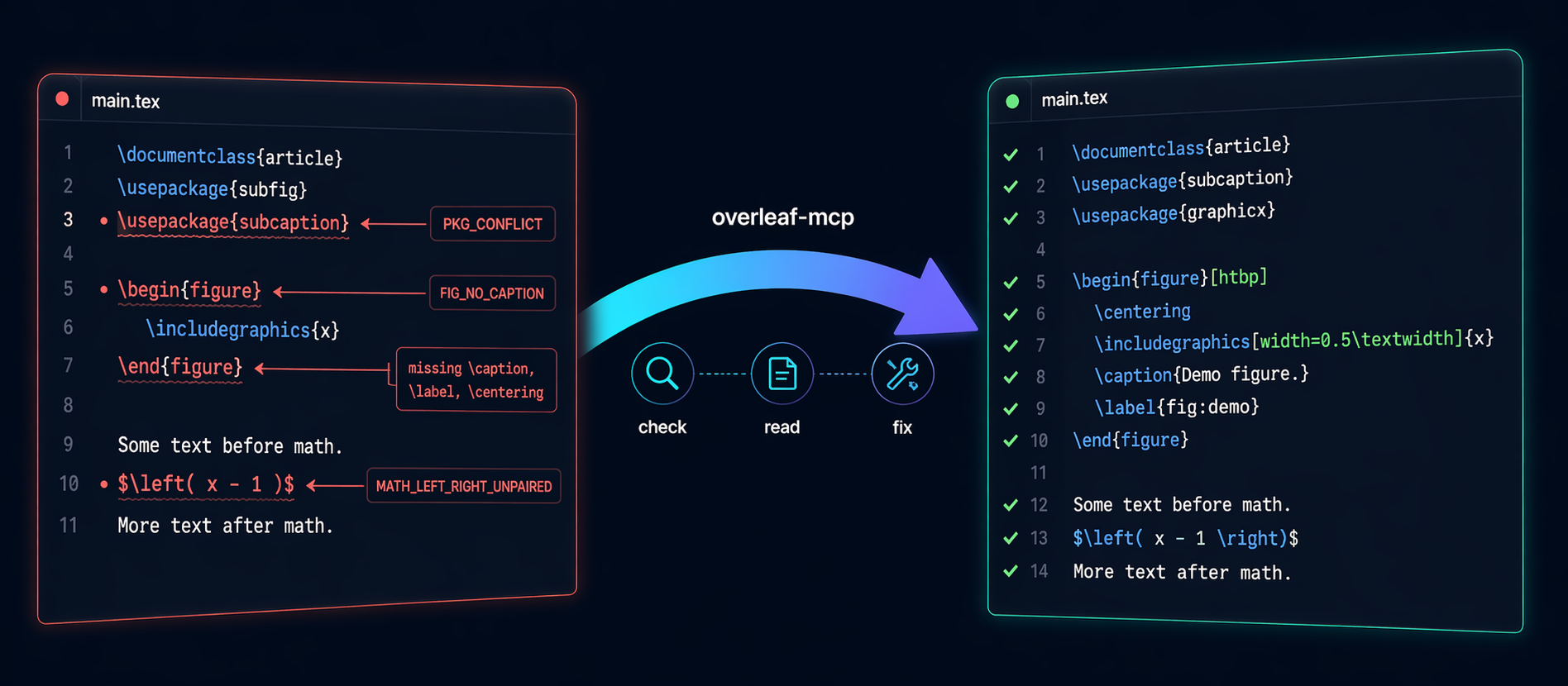
Static checks are one capability; the read, write, and sync tools let the agent do everything a LaTeX-savvy collaborator would: understand the project, draft content, rewrite for quality, apply templates, refactor structure, and enforce formatting.
### 1. Understanding your project (context-gathering)
The agent reads your actual document before acting. It uses:
| Tool | What the agent learns |
|---|---|
| `get_project_structure` | Main file, every section with line numbers, bib files, `\input` chain, custom `.cls` / `.sty`. |
| `read_tex_file` | Full text of any file. Agent picks up your voice, existing arguments, citation patterns. |
| `list_tex_files` | What is in the project at all. |
| `find_unused_labels_and_refs` | The label/ref graph. Agent knows which sections cross-link. |
| `check_packages` | What packages are loaded, so suggestions match your preamble. |
| `check_consistency` | Your established style (title case vs sentence case, dash conventions, quote style). |
| `olsync_pull` | Pull the live state from Overleaf before starting, so context is never stale. |
**Example prompts:**
> *"Read my whole thesis and summarize each chapter's argument in 2 to 3 sentences. Tell me which chapters feel weak."*
> *"Before I add a Methods section, tell me what notation and macros are already established in chapters 1 to 3 so the new section stays consistent."*
> *"Find every claim in section 3 that sounds like it needs a citation but does not have one, and list them with surrounding context."*
### 2. Drafting and rewriting content
The `write_tex_file` plus `format_file` plus `check_*` tools give the agent a full draft, verify, iterate loop.
**Draft new content:**
> *"Write a Related Work section. Read chapters 1 and 2 first so you know what I have claimed; then cover roughly these 8 papers with about 2 sentences each: [list]. Output ready LaTeX with `\cite{}` placeholders where I need to add keys to refs.bib."*
> *"Here are my notes in markdown at /path/notes.md. Convert them into chapters/method.tex matching the style and macros of my existing chapters/intro.tex."*
**Rewrite for quality:**
> *"Read my Abstract. Rewrite it to be 180 words, remove hedging language (may, potentially), and lead with the quantitative result."*
> *"Section 4 is too long. Tighten it to 60 percent length without losing any claims. Show me the diff before writing."*
**Refactor structure:**
> *"My main.tex is 800 lines. Split it into `chapters/` at every `\chapter` command, wire up `\input` correctly, keep compile result identical."*
> *"Rename every `sec:foo_bar` label to `sec:foo-bar` (hyphen, not underscore) and fix every corresponding `\ref` and `\cref`."*
**Apply a template:**
> *"Convert the entire document from `article.cls` to the ICML 2026 template (I have added `icml2026.sty` to the project). Change `\documentclass`, restructure `\author` and `\affiliation`, adjust figure and table captions to match the template, and strip packages the template provides."*
### 3. Formatting at two levels
**Mechanical formatting** (via `latexindent`): three tools make `latexindent` a first-class capability.
| Tool | Use |
|---|---|
| `format_file` | Apply `latexindent` in place to one file. |
| `format_snippet` | Format a LaTeX string without touching disk. |
| `check_formatting` | Dry-run showing exactly what would change (unified diff). |
This handles indentation inside `\begin{env}` blocks, line wrapping at your configured column width, alignment of `&` columns in `align` / `tabular` / `array`, and brace style. It respects `.latexindent.yaml` in your project root if you have one.
> *"Pull my thesis from Overleaf. Run `check_formatting` on every `.tex` file and show me a summary diff. Then format them all and push back."*
**Semantic formatting** (agent reads and rewrites). Works without any LaTeX binary installed.
> *"Find every `tabular` that uses `\hline` and convert to `booktabs` (`\toprule` / `\midrule` / `\bottomrule`) with proper spacing."*
> *"Replace every `subfig` environment with `subcaption`'s `subfigure`. Fix the `\subref{…}` calls to `\ref{…}`."*
> *"Equation (4.2) is one long line. Break it into an `align*` environment with `\\` between major terms and aligned `&` at each `=` sign."*
> *"Here is a 4-column TSV of my benchmark results. Turn it into a proper `tabular` with `booktabs`, right-aligned numbers, SI-unit cells for runtime, and a caption."*
> *"Every figure in chapter 2 has placement `[h]`. Change to `[htbp]` and add `\centering` where missing. Insert `\FloatBarrier` before each new `\section` so floats do not drift."*
### 4. Iterative compile loop
When `latexmk` is installed, the agent closes a tight loop on its own:
```
write_tex_file -> compile -> if error, explain_log -> read_tex_file -> fix -> compile -> done
```
No back-and-forth with you required.
### 5. Recommended one-shot formatting pass
A single prompt that exploits every layer:
> *"Pull my project. Run `check_consistency`, `check_figures`, `check_packages`, `find_unused_labels_and_refs`, and `check_formatting` (for every `.tex` file if `latexindent` is installed). Plan the fixes in 5 bullets before writing. Then apply all of them via `write_tex_file`: formatting changes, then style fixes, then the mechanical `format_file` pass. At the end, re-run the same checks to confirm clean. Push back to Overleaf with a short commit message."*
### Honest limits
- **It cannot see the rendered PDF.** Visual layout issues (widow lines, figures looking bad) need your eyes.
- **No auto bibliography lookup.** It will mark places that need citations but will not fetch BibTeX from CrossRef on its own.
- **No opinion on research quality.** It can tighten prose, enforce consistency, and catch defects. It will not judge your novelty.
---
## Architecture
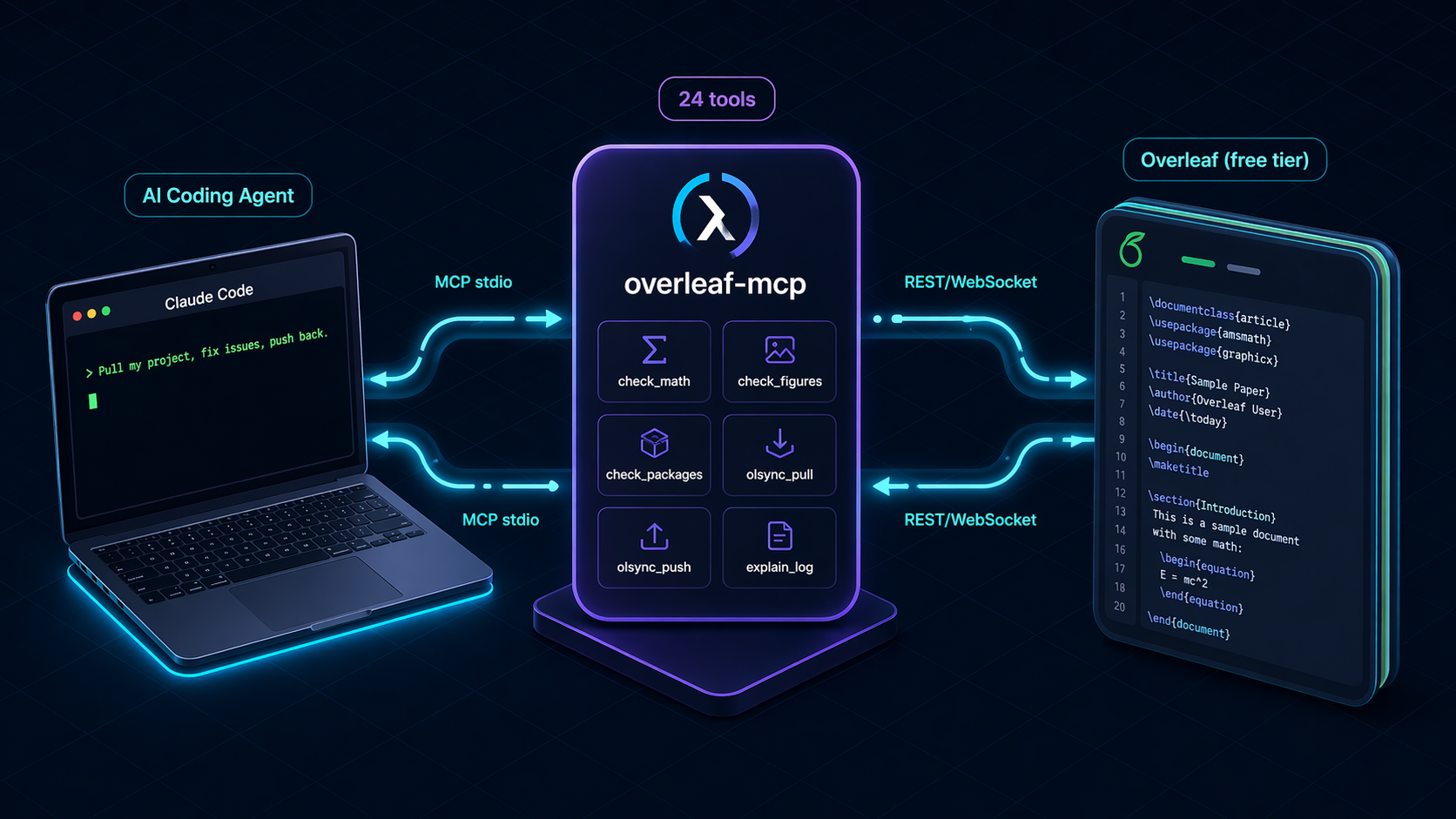
```mermaid
flowchart LR
A[Claude Code / Copilot / Antigravity] -- MCP stdio --> B(overleaf-mcp server)
B -- 24 tools --> C{Operating mode}
C -- Local --> D[file I/O + 7 static checks]
C -- latexindent / chktex / latexmk --> E[subprocess wrappers]
C -- Free-tier sync --> F[/user/projects JSON
/project/<id>/download/zip
POST /project/<id>/upload/]
C -- Premium git --> G[git clone/pull/push via GIT_ASKPASS]
C -- ZIP bridge --> H[Overleaf UI upload/download]
F & G & H --> I[(your Overleaf project)]
```
### Key design choices
- **Stateless between tool calls.** Every call re-reads files and re-detects project structure. Safe for concurrent agent calls and zero stale-cache bugs.
- **Uniform `ToolResult` envelope.** `{ ok, data?, error?, suggestion? }`. The agent always gets actionable, structured output, even on failure.
- **Graceful capability degrade.** The server boots with whatever binaries are present. Missing-tool calls return install hints, not errors.
- **Native free-tier push.** Reverse-engineered Overleaf's current REST upload endpoint so free-tier users get true in-place sync without waiting on upstream fixes to the abandoned `overleaf-sync` websocket client.
- **Pure-Python static checks.** No external lint dependencies. `check_math`, `check_figures`, `check_packages` and friends work on any machine.
---
## Security
- **Path-boundary enforcement.** Every path argument is resolved and checked against `OVERLEAF_PROJECT_ROOT`. Attempts to escape (`../../etc/passwd`) are rejected before any filesystem access.
- **Atomic writes.** `write_tex_file` writes to a temp file and `os.replace`s into place. A crash mid-write cannot leave a half-written `.tex`.
- **Token redaction.** Premium git tokens are injected via `GIT_ASKPASS`, never placed in URLs, argv, or log output. A `redact()` helper sanitizes any stderr before surfacing it.
- **ZIP-slip protection.** `import_overleaf_zip` pre-validates every entry path before writing any files. Archives containing `../` or absolute paths are rejected whole.
- **No `shell=True`.** All subprocess calls use argv lists with `shell=False`.
- **Overleaf cookie never transits config.** The `.olauth` cookie is created by `ols login` (interactive browser) and lives on disk at 0600 permissions; the MCP reads it directly.
---
## Development
```bash
git clone https://github.com/ghostiee-11/overleaf-mcp
cd overleaf-mcp
uv sync --extra dev
uv run pytest # 81 tests
uv run ruff check .
uv run pytest tests/golden # real-world corpus
```
- **Code layout:** `src/overleaf_mcp/` with one module per subsystem (`tools/`, `checks/`, `parse/`, `security/`).
- **Testing philosophy:** Every tool has unit tests; external APIs (Overleaf, subprocess) are mocked at the boundary. A `tests/golden/` corpus of 4 real-world LaTeX projects (article, thesis, beamer, multi-file) is validated against pinned baselines so future changes cannot silently regress check accuracy.
- **CI** runs on Python 3.11 and 3.12, plus a separate job that installs TeX Live to exercise the `latexindent` / `chktex` / `latexmk` code paths.
- **Contributions** go through pull requests. Direct pushes to `main` are blocked by repository rulesets.
Full dev setup and release process in [CONTRIBUTING.md](CONTRIBUTING.md).
---
## Roadmap
- **`olsync_push` nested folders.** Currently overwrites top-level files only; recursive folder creation is the obvious next step.
- **`olsync_delete`.** For removing files from an Overleaf project (the REST endpoint exists; just not wired up).
- **Diff-driven push.** Only upload files that actually changed, with a local hash cache.
- **`check_bibliography`.** Validate BibTeX syntax, detect duplicate keys across files.
- **`format_project`.** Run `latexindent` over every `.tex` in one shot.
- **`fetch_bibtex`.** Pull BibTeX entries for a DOI or arXiv ID straight into `refs.bib`.
- **PyPI.** Published as [`overleaf-latex-mcp`](https://pypi.org/project/overleaf-latex-mcp/);
---
## License

[MIT](LICENSE) © 2026 Aman Kumar. Free for personal and commercial use.
**This project is not affiliated with, endorsed by, or sponsored by Overleaf Ltd.** It uses Overleaf's public REST endpoints and an authenticated session cookie created by the open-source `overleaf-sync` tool. Your Overleaf account's visibility and access controls are unchanged.