# h2t - HTTP Hardening Tool
## Description
**h2t** is a simple tool to help sysadmins to hardening their websites.
Until now **h2t** checks the website headers and recommends how to make it better.
## Dependences
* [Python 3](https://www.python.org/download/releases/3.0/)
* [colorama](https://github.com/tartley/colorama)
* [requests](http://docs.python-requests.org/en/master/)
## Install
~~~
$ git clone https://github.com/gildasio/h2t
$ cd h2t
$ pip install -r requirements.txt
$ ./h2t.py -h
~~~
... or the Docker way:
~~~
$ git clone https://github.com/gildasio/h2t
$ cd h2t
$ docker build -t h2t .
$ docker run --rm h2t -h
~~~
You also can put `alias h2t='docker run --rm h2t'` on a file (such as `~/.bash_aliases`) and run as follows:
~~~
$ h2t -h
~~~
## Usage
**h2t** has subcommands: *list* and *scan*.
~~~
$ ./h2t.py -h
usage: h2t.py [-h] {list,l,scan,s} ...
h2t - HTTP Hardening Tool
positional arguments:
{list,l,scan,s} sub-command help
list (l) show a list of available headers in h2t catalog (that can
be used in scan subcommand -H option)
scan (s) scan url to hardening headers
optional arguments:
-h, --help show this help message and exit
~~~
### List Subcommand
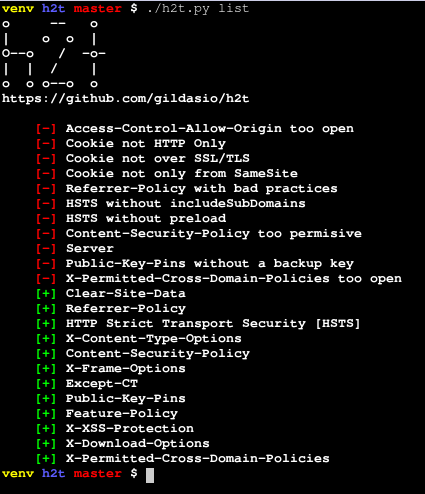
The **list** subcommand lists all headers cataloged in **h2t** and can show informations about it as a description, links for more information and for how to's.
~~~
$ ./h2t.py list -h
usage: h2t.py list [-h] [-p PRINT [PRINT ...]] [-B]
[-a | -H HEADERS [HEADERS ...]]
optional arguments:
-h, --help show this help message and exit
-p PRINT [PRINT ...], --print PRINT [PRINT ...]
a list of additional information about the headers to
print. For now there are two options: description and
refs (you can use either or both)
-B, --no-banner don't print the h2t banner
-a, --all list all available headers [default]
-H HEADERS [HEADERS ...], --headers HEADERS [HEADERS ...]
a list of headers to look for in the h2t catalog
~~~
### Scan Subcommand
The **scan** subcommand perform a scan in a website looking for their headers.
~~~
$ ./h2t.py scan -h
usage: h2t.py scan [-h] [-v] [-a] [-g] [-b] [-H HEADERS [HEADERS ...]]
[-p PRINT [PRINT ...]]
[-i IGNORE_HEADERS [IGNORE_HEADERS ...]] [-B] [-E] [-n]
[-u USER_AGENT] [-r | -s]
url
positional arguments:
url url to look for
optional arguments:
-h, --help show this help message and exit
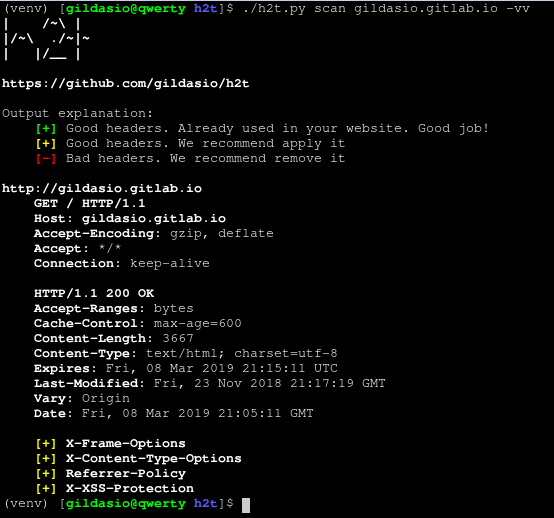
-v, --verbose increase output verbosity: -v print response headers,
-vv print response and request headers
-a, --all scan all cataloged headers [default]
-g, --good scan good headers only
-b, --bad scan bad headers only
-H HEADERS [HEADERS ...], --headers HEADERS [HEADERS ...]
scan only these headers (see available in list sub-
command)
-p PRINT [PRINT ...], --print PRINT [PRINT ...]
a list of additional information about the headers to
print. For now there are two options: description and
refs (you can use either or both)
-i IGNORE_HEADERS [IGNORE_HEADERS ...], --ignore-headers IGNORE_HEADERS [IGNORE_HEADERS ...]
a list of headers to ignore in the results
-B, --no-banner don't print the h2t banner
-E, --no-explanation don't print the h2t output explanation
-o {normal,csv,json}, --output {normal,csv,json}
choose which output format to use (available: normal,
csv, json)
-n, --no-redirect don't follow http redirects
-u USER_AGENT, --user-agent USER_AGENT
set user agent to scan request
-k, --insecure don't verify SSL certificate as valid
-r, --recommendation output only recommendations [default]
-s, --status output actual status (eg: existent headers only)
~~~
### Output
For now the output is only in normal mode. Understant it as follows:
* [+] Red Headers are bad headers that open a breach on your website or maybe show a lots of information. We recommend fix it.
* [+] Yellow Headers are good headers that is not applied on your website. We recommend apply them.
* [-] Green Headers are good headers that is already used in your website. It's shown when use `-s` flag.
Example:
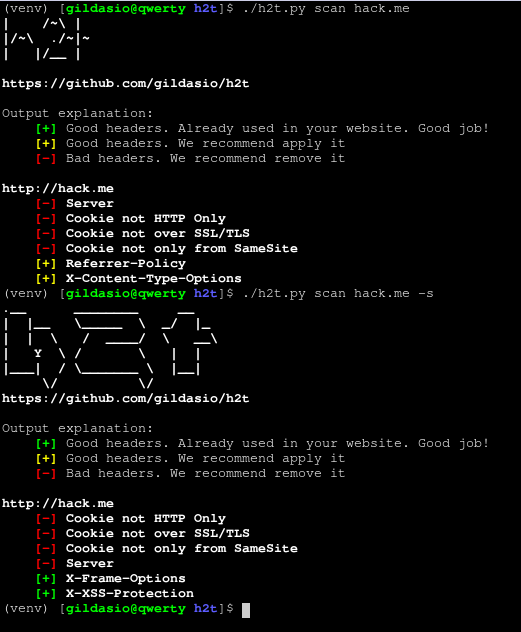
* Cookie HTTP Only would be good to be applied
* Cookie over SSL/TLS would be good to be applied
* Server header would be good to be removed
* Referrer-Policy would be good to be applied
* X-Frame-Options is already in use, nothing to do here
* X-XSS-Protection is already in use, nothing to do here
### Screenshots
#### List h2t catalog
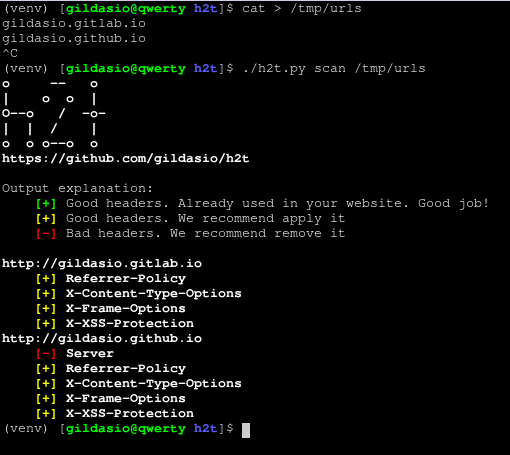
#### Scan from file
#### Scan url

#### Scan verbose
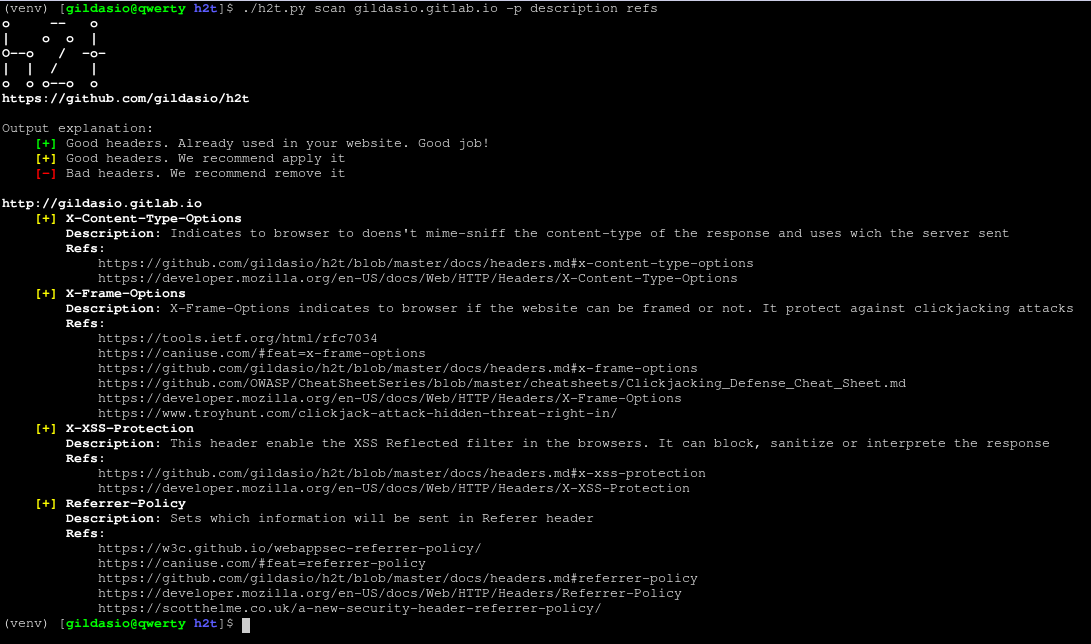
#### Headers information
## Contribute
For contribute guidelines look at [CONTRIBUTING](CONTRIBUTING.md)