中文 | English
> A plugin for DeepSeek Harness (DSH) that enables mobile and remote access via phone browser or WeChat. ## ✨ Features | Feature | Description | |---------|-------------| | 🌐 **Public Access** | Cloudflare Quick Tunnel — no public IP or registration needed; auto-downloads `cloudflared` | | 🖥️ **Official Desktop App** | Works in the DSH desktop app (`dsh-app://`): button injection via the official structured channel, target port auto-detection | | 📡 **LAN Direct** | HTTP + HTTPS as **two parallel links**: HTTP needs no cert, HTTPS is self-signed (just click "Proceed") | | 🔒 **Secure Auth** | Random token per start; HttpOnly Cookie; LAN can be token-free | | ⚡ **Performance** | Reverse proxy with automatic gzip compression for faster large session loads | | 📱 **Sidebar Icon** | Phone shortcut button persists in the bottom-left corner | | 🔗 **Custom Public URL** | Set your own public URL (e.g. ngrok); edit/clear from the panel | | 🔌 **Custom Port** | HTTP / HTTPS ports are **independently configurable**, with same-port conflict blocking and occupancy detection | | 🤖 **WeChat Bot** | iLink protocol direct connection to WeChat; AI chat, session control, model switching | | 💬 **Feishu Bot** | WebSocket long connection; command control, monitor notifications | | ✈️ **Telegram Bot** | Long polling; HTTP proxy support, command control, monitor push | | 🐧 **QQ Official Bot** | QQ Open Platform official integration; WebSocket long connection — **no extra QQ account, no public endpoint/ICP filing** | | 🔔 **DingTalk Bot** | Internal enterprise app + Stream-mode long connection — **no public endpoint**; webhook replies + OpenAPI proactive push | | 👁️ **Session Monitor** | `/monitor` — get notified on your bound channel when the agent finishes | | 🩺 **Channel Health** | Per-channel monitoring (WeChat/Feishu/Telegram/QQ/DingTalk); auto-stops after 3 consecutive failures, red-dot shortcut + one-click reconnect | ## 🚀 Quick Start **3 steps:** ```bash # 1. Install plugin (run in DSH profile directory) cd $DSH_HOME/profiles/web pnpm add github:godchen520/dsh-web-remote # 2. Register bundle (edit package.json) # Add "dsh-web-remote" to the "dsh.profile.bundles" array # 3. Restart DSH dsh web ``` A 📱 icon appears in the bottom-left corner → click to open the remote panel. ## 📸 Screenshots **Sidebar button** (bottom-left corner): 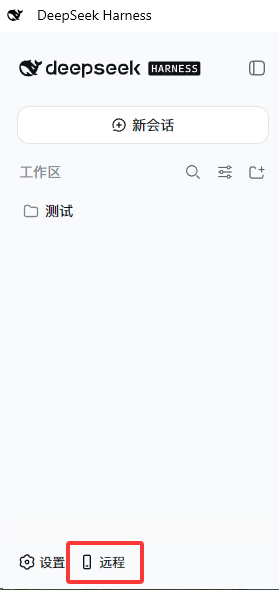 **Remote Panel** (Public / LAN switch, copy link, QR code, start/stop): 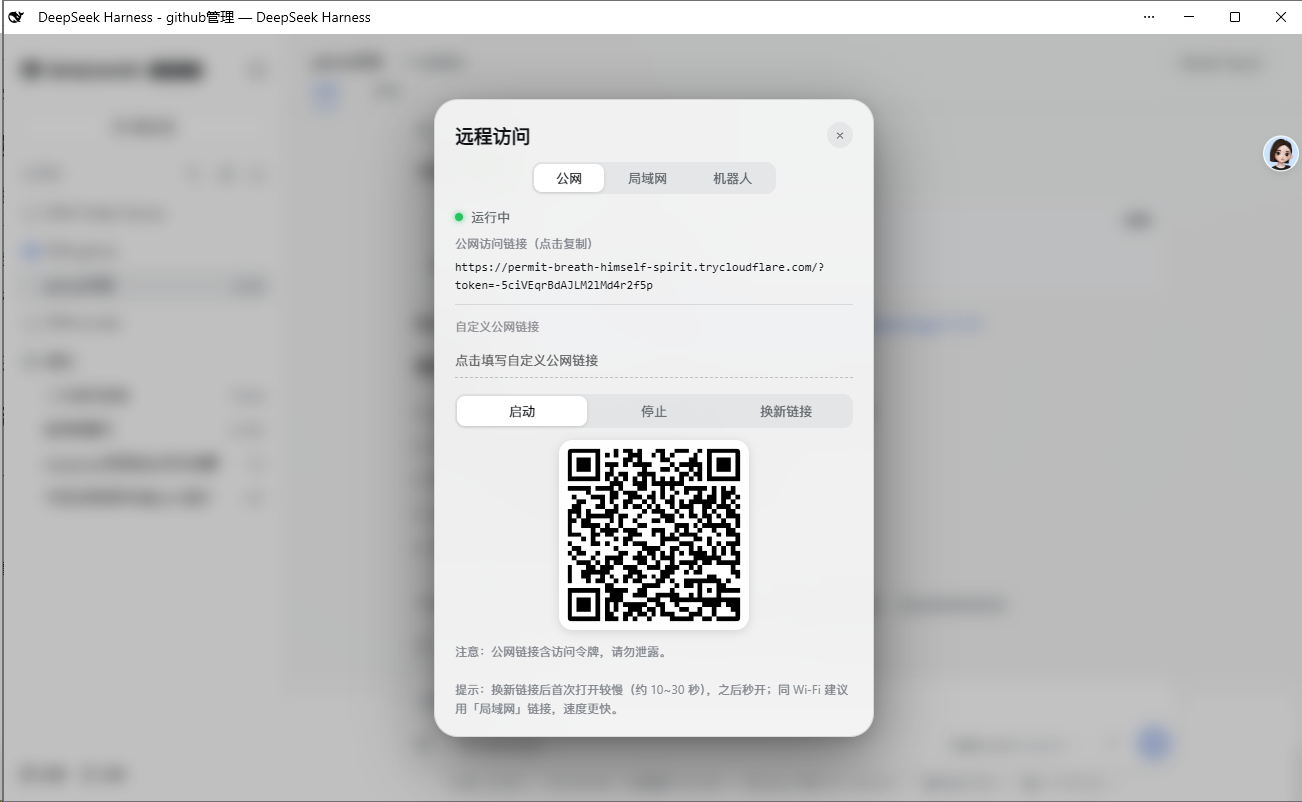 ## 📋 Installation ### Option 1: GitHub Install (Recommended) ```bash cd $DSH_HOME/profiles/web pnpm add github:godchen520/dsh-web-remote ``` Add `"dsh-web-remote"` to `dsh.profile.bundles` in `package.json`, then restart DSH. > Use `--config.minimumReleaseAge=0` if pnpm 11 blocks new packages. ### Option 2: Manual Patch Place the package in profile's `node_modules`, then add to `cordis.patch.yml`: ```yaml - insert: - id: web-remote name: 'dsh-web-remote' ``` > Bundle install requires restart; cordis.patch.yml supports HMR hot-reload. ## ⚙️ Configuration All optional. Override in `cordis.patch.yml`: | Option | Default | Description | |--------|---------|-------------| | `targetPort` | auto-detected | DSH's own port. **Explicit config wins**; otherwise `DSH_WEB_URL` → `DSH_PORT` → fallback `3080` | | `httpPortStart` | `3081` | LAN HTTP start port (auto-skips occupied) | | `httpsPortStart` | `3082` | LAN HTTPS start port | | `cloudflaredPath` | `''` | Specify cloudflared path; empty = auto-detect / auto-download | | `pfxPath` | `''` | PFX certificate; empty = auto-generate self-signed | | `pfxPass` | `''` | PFX password | | `toolsDir` | `''` | Tool & cert cache directory; empty = `$DSH_HOME/tools` | | `autoStart` | `true` | Auto-start on plugin load | | `lanOpen` | `true` | LAN token-free mode (private network bypass) | ## 📱 Usage 1. After start, a 📱 icon appears in the bottom-left corner 2. Click the icon → panel shows status and links 3. Open the link in your phone browser **Public:** `https://xxx.trycloudflare.com/?token=...` **LAN** (same Wi-Fi; token-free by default, **two parallel links**): - `http://192.168.x.x:3081` — **recommended**: no cert, opens straight away (not a secure context; clipboard API etc. are restricted) - `https://192.168.x.x:3082` — self-signed cert: the browser warns, click "Advanced → Proceed" (secure context) **Panel:** - Public tab: set a custom public URL (e.g. your own ngrok address) - LAN tab: each link's **port number is click-to-edit** (HTTP and HTTPS separately); the QR code points at the HTTP address so a phone scan opens it directly ## 🖥️ Official Desktop App The plugin works in the DSH desktop app (window URL `dsh-app://app/`). Two differences from the browser build: | Item | Note | |---|---| | **Button injection** | The desktop app uses the **static deployment** render path, which only consumes the official **structured injection rows** (`webserver/index-inject`) and **does not run `tapIndex`**. The plugin now uses both channels, so either build is covered | | **Target port** | The desktop app lets the host assign the port dynamically (measured: `19387`), and the plugin process **cannot see** `DSH_WEB_URL` (that is injected into the agent shell). It must be set explicitly | Add the port to the profile's `cordis.patch.yml`: ```yaml - id: web-remote name: dsh-web-remote config: targetPort: 19387 # replace with your desktop app's actual port ``` > Without it the plugin falls back to `3080`, which shows up as a tunnel **502 Bad Gateway / Host Error**. > `/remote/info` returns `targetPort` and `portSource` (`config` / `env` / `default`) so you can confirm which value was used. ## 🤖 WeChat Bot Control DSH directly from WeChat: **Remote Control Commands:** - `/link` — Get public link (auto-starts if stopped) - `/stop` — Stop remote service - `/monitor` — Toggle session monitor (notify when agent finishes) **Session Management:** - `/sessions` — List all sessions - `/select N` — Select session N - `/session` — Show selected session name - `/history` — Show session's recent output **Model Switching:** - `/model` — Show current model - `/switch-model` — List and switch models - `/effort N` — Set reasoning effort **Chat:** - Send content directly → auto-sends to selected session with result - Shows prompt to select a session when none is selected ## 💬 Feishu Bot Control DSH directly from Feishu (Lark): - `/link` — Get public link - `/stop` — Stop remote service - `/monitor` — Toggle session monitor - `/help` — Show command list **Setup:** DSH Web panel → Bot tab → Feishu, fill in App ID and App Secret, then bind. ## ✈️ Telegram Bot Control DSH directly from Telegram: - `/link` — Get public link - `/stop` — Stop remote service - `/monitor` — Toggle session monitor - `/help` — Show command list **Setup:** DSH Web panel → Bot tab → Telegram, fill in the Bot Token, then bind. **Proxy:** If the Telegram API is unreachable from your network, configure an HTTP proxy in the panel. ## 🐧 QQ Official Bot Official QQ bot via the **QQ Open Platform**: - `/link` — Get public link - `/stop` — Stop remote service - `/monitor` — Toggle session monitor - `/model` — Show current model - `/status` — Channel status - `/help` — Show command list **Scenarios:** QQ group chat + message-list private chat (C2C). **Setup (two options):** **Option 1 — QR binding (recommended; no secrets to copy):** 1. DSH Web panel → Bot tab → **QQ官方** → click "📱 扫码绑定" 2. Scan the QR code with **mobile QQ** 3. Pick the bot you want to bind in the page that opens, then confirm 4. Credentials are filled in automatically and the channel connects > Scanning **binds an existing bot** — it does not create one. Create one first via Option 2 if needed. **Option 2 — Manual entry:** 1. Open the [QQ Open Platform quick-create page](https://q.qq.com/qqbot/openclaw/login.html), sign in with QQ, click "Create Bot" (individual accounts may create up to 5) 2. Copy the **AppID** and **AppSecret** from the platform's developer settings 3. Paste them into the panel and click connect **Highlights:** | Item | Notes | |---|---| | Extra QQ account | **Not required** — the platform assigns a dedicated bot identity; your QQ is only the admin | | Public endpoint | **Not required** — WebSocket long connection with built-in heartbeat and RESUME | | ICP filing | **Not required** | | Session persistence | Supported — survives restarts via RESUME, replaying missed events | | Proactive push | Supported (you must have messaged the bot first; group needs owner permission) | **Group chat:** the group owner simply adds the bot to the group. Receiving *all* group messages requires the owner to enable it in the bot settings. **Note:** this is the plugin's **only** QQ integration. An earlier version shipped a OneBot 11 (NapCat) channel; it was removed in 5.0.0 — the official bot is compliant, stable, needs no extra QQ account and no NapCat middleware. ## 🔔 DingTalk Bot Integrated through a DingTalk Open Platform **internal enterprise app + robot**, using **Stream mode** (a long connection) — so, like Feishu/QQ Official, it needs **no public IP, domain, certificate or tunnel**. **Commands:** identical to every other channel — `/help` `/link` `/start` `/stop` `/monitor` `/status` `/sessions` `/select N` `/current` `/history` `/model` `/switch-model` `/effort`, plus **plain text** (no `/` prefix) which is relayed into the selected session. **Key facts:** | Item | Notes | |---|---| | Account requirement | An **organization** is required (personal DingTalk does not support app robots); a free team where you are admin works | | Public endpoint | **Not required** — Stream mode long connection | | Passive reply | Uses the message's `sessionWebhook` (**no extra permission**); valid **1.5 hours**, then falls back to the OpenAPI | | Proactive push | OpenAPI (`oToMessages/batchSend` for C2C, `groupMessages/send` for groups); needs the **"企业内机器人发送消息权限"** permission | | Monitor notifications | Sent via the OpenAPI, **not limited by the 1.5-hour window**; the last conversation target is restored after a restart | | Group chats | The robot must be **@mentioned** to receive a message; proactive push **cannot @ people** | | Message length | Auto-split at 4000 chars (group API caps `msgParam` at 15000 bytes) | **Setup:** 1. Sign in to the [DingTalk developer console](https://open-dev.dingtalk.com) as an **org admin** (or ask an admin to grant you developer permission) 2. App development → **Create internal enterprise app** → note the **Client ID / Client Secret** 3. App capabilities → add a **Robot** → set **message receive mode to "Stream mode"** → save 4. **Publish the app**: version management → new version (**tick "Robot"**) → publish > Until it is published the robot is not visible in chats and `senderStaffId` is not returned 5. Request the permission: development config → permissions → search **"企业内机器人发送消息权限"** > Passive replies work without it; `/monitor` notifications require it 6. For group chats: group settings → group management → robots → add the robot 7. DSH panel → Bot tab → **DingTalk** → enter Client ID / Client Secret → "Verify & connect" ## 🩺 Channel Health Monitoring WeChat / Feishu / Telegram / QQ Official / DingTalk are monitored independently: - **3 consecutive** failures → that channel stops automatically and raises an alert - The remote icon shows a **red dot** (lights up when any channel is down) - **Clicking the red dot jumps straight** to the broken channel page, with a **one-click reconnect** button ## 🔧 Compatibility | DSH version | Status | |---|---| | **0.2.x (tested on 0.2.0-rc.2)** | ✅ Supported | | 0.1.2-rc.1 ~ 0.1.x | ✅ Supported | | < 0.1.2-rc.1 | ❌ Not supported (`session.events` was still a property back then; no `snapshotEvents()`) | This plugin **imports no `@deepseek-ai/*` package** — every host capability (`webServer`, `subprocess`, `agents`, `sessions`, `sessionQuery`, …) comes from cordis service injection. So a DSH change to **package exports** (e.g. 0.2.x removing `settingsNamespace` / `installSettingsSection` from `dsh-settings`) cannot affect it. Only the **service interfaces themselves** need adapting: currently `session.snapshotEvents()` (the 0.1.2+ form). ## ❓ FAQ **Q: LAN link shows "not secure"?** A: That is the **self-signed HTTPS cert** behaving as expected (the public tunnel uses a real cert and never warns). **Simplest fix: use the HTTP link the panel lists alongside it** — no cert, opens straight away. Only use the HTTPS one when you actually need a secure context (clipboard API etc.): choose "Continue anyway" on mobile, or turn off "Enhanced Security" in Edge. **Q: Link changes after DSH restart?** A: Public tunnel generates a new address each restart — this is normal. WeChat-bound tokens auto-restore. **Q: cloudflared download fails?** A: First start needs internet to download cloudflared (~10MB). Afterwards it's cached. You can also manually place it in `toolsDir`. **Q: WeChat disconnects after scanning?** A: After DSH restart, WeChat auto-reconnects (token is persisted). If still disconnected, re-send `/link` to rebind. ## 📝 Changelog See [CHANGELOG.md](CHANGELOG.md) for version history. ## 🤝 Contributing See [CONTRIBUTING.md](.github/CONTRIBUTING.md) for development and submission guidelines. ## 📄 License [MIT](LICENSE)