---
## What is Minimal?
Minimal allows you to run coding agents in an isolated box on your own machine.
An unattended agent can only touch what you give it access to, so Minimal lets you scope access to specific projects, files, credentials, or configurations.
Each box is built from a `minimal.toml`, letting you compose the exact tools your agent needs, the files it needs, and other isolation mechanisms. On Linux the box is an unprivileged user namespace by default (`local-minimald`), or a libkrun microVM with `--provider local-minvmd`; on macOS it is always a libkrun microVM.
Minimal's secure package manager delivers the executables inside a sandbox (git, claude, compilers, shells, and more) from a curated registry refreshed daily. The coding agents it packages today are claude, codex, opencode, and pi. Because packages are addressed by content rather than mutable version tags and builds are hermetic, the same blueprint resolves to the same environment, regardless of the machine you launch it from.
> Full documentation lives at [minimal.dev/docs](https://minimal.dev/docs).
## Supported Platforms
Minimal works on:
- macOS on ARM64 (Apple Silicon)
- Ubuntu and Debian Linux on ARM64 and x86_64, with a Linux kernel >= 5.10. Rootless user-namespace creation must be enabled for non-VM usage.
Not on one of these platforms yet? Tell us what you'd like to see supported in [Discussions](https://github.com/gominimal/minimal/discussions).
## Installation
To get started, install Minimal with the following shell command:
```shell
curl --proto "=https" --tlsv1.2 -fsSL 'https://go.minimal.dev/stable' | sh
```
This installs the stable channel of Minimal, adds `min` to your PATH, and sets up shell completions for bash, fish, and zsh.
Minimal can be uninstalled with:
```shell
curl --proto "=https" --tlsv1.2 -fsSL 'https://go.minimal.dev/stable' | sh -s -- --uninstall
```
## For coding agents
If you are an agent setting up Minimal for your user, install the Minimal
plugin and follow its `minimal-setup` skill:
```shell
claude plugin marketplace add gominimal/minimal-skills
claude plugin install minimal@gominimal
```
Stop and ask your user before pasting any credential into a session.
Contributors to this repository should read [AGENTS.md](AGENTS.md).
## Getting Started
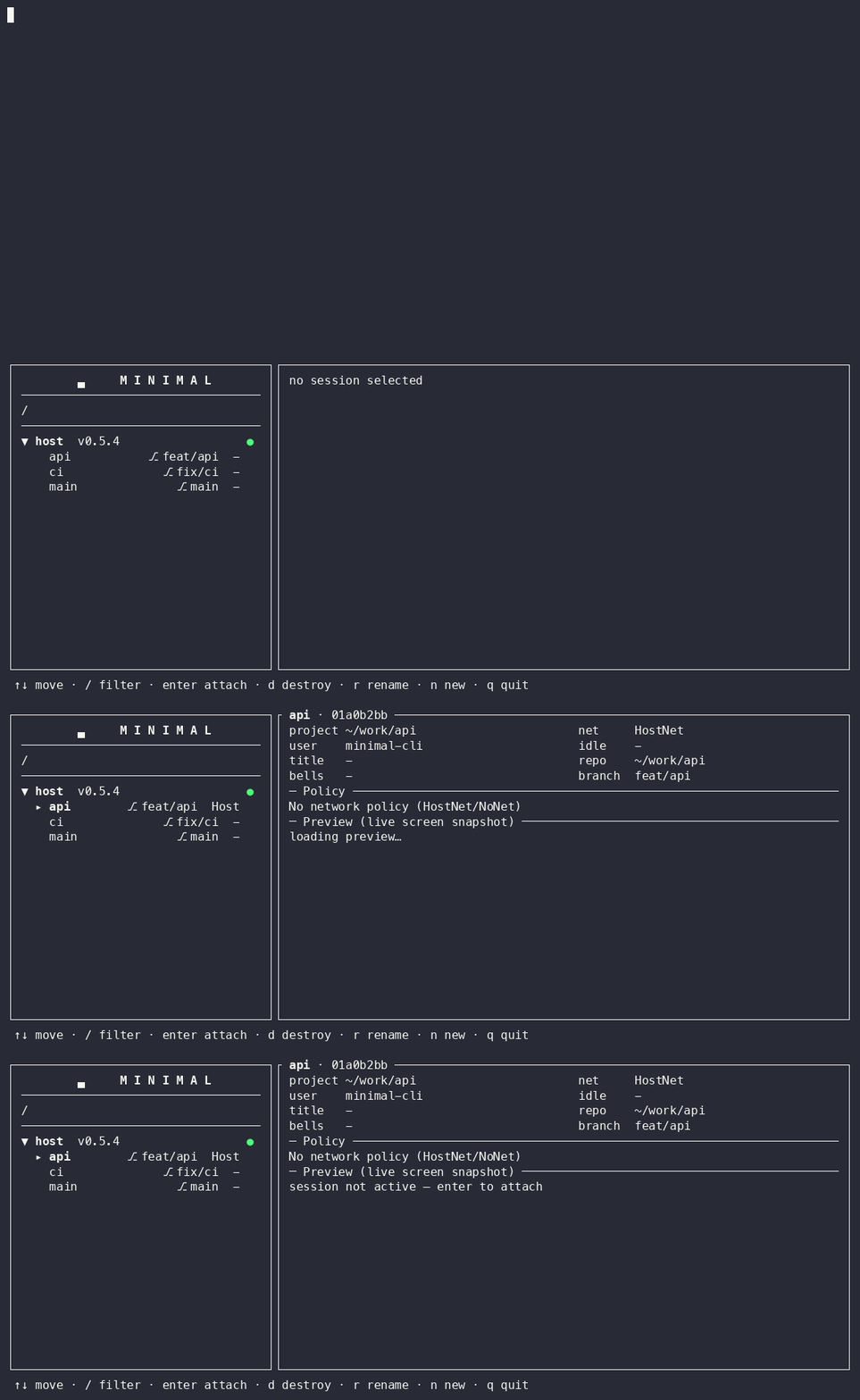
From a repository, three commands start a session. They do not need a GitHub PAT, a keychain entry or an account. The walkthroughs after them add a GitHub credential. One starts a brand-new project inside a sandbox. The other joins an existing project that already has a `minimal.toml`. Once sessions are running, `min dash` opens a terminal UI for browsing and managing them without attaching to each one. `min box show --network ` prints the effective networking policy for a session.
### Start in three commands
Run these from the root of a repository that has no `minimal.toml` yet. No PAT, no keychain entry, no account:
```shell
curl --proto "=https" --tlsv1.2 -fsSL https://go.minimal.dev/stable | sh
min init
min session start
```
Joining a project that already ships a `minimal.toml`? Skip `min init`; the walkthrough below covers it.
### See every session in `min dash`
The demo above is three sessions of one repository, each from its own checkout on its own branch. Start a session from each checkout without attaching, then open the dash:
```shell
min session start --detach --name api # run once in each checkout; --detach returns
min dash
```
Each row shows the session and its branch; `enter` attaches, `q` quits.
### Create a new project with Minimal
In this example we'll create a new git repo from within a Minimal sandbox, using tools from the [Minimal Public Registry](https://github.com/gominimal/pkgs/). The workflow keeps the agent credential-free: it uses a fine-grained GitHub personal access token (PAT) stored in the macOS keychain, revealed to the sandbox only after the agent has exited.
First create the new, empty GitHub repo, then create a fine-grained PAT scoped to it at . Store the PAT in your keychain with `security add-generic-password -s "PAT-foo-repo" -a "my-mac-user-name" -w`.
The following shows how to populate that repo from within a sandbox:
```shell
mkdir -p ~/projects/foo
cd ~/projects/foo
# create and update a minimal.toml file
min init
min add --session git gh claude-code mermaid-cli kittyview less emacs
# copy the GitHub PAT to your clipboard from your macOS keychain
security find-generic-password -w -s "PAT-foo-repo" -a "my-mac-user-name" | pbcopy
# start and enter a sandbox; the current directory's file tree is copied in
min session start
git init
# develop specs, generate code, etc. — skipping permission prompts is
# reasonable here: the agent is sealed in the sandbox with no credentials;
# agents can add build/runtime dependencies from the registry with "min add"
claude --dangerously-skip-permissions
# review the generated code before committing
git add -A
git commit -m "initial commit"
# add the GitHub credential now that the AI agent has exited
read -sp "paste GitHub PAT now: " GH_TOKEN && export GH_TOKEN
# push to github
git remote add origin https://github.com//.git
git branch -M main
git push -u origin main
exit
```
### Work on an existing project in a Minimal sandbox
In this example we'll work on an existing git repo that already has a `minimal.toml`, reusing the keychain-stored GitHub PAT from the previous example so Claude can pull the repo and open a PR.
```shell
cd ~/projects/foo
# get the latest files on the current branch; we need the minimal.toml
git pull
# copy the GitHub PAT to your clipboard from your macOS keychain
security find-generic-password -w -s "PAT-foo-repo" -a "my-mac-user-name" | pbcopy
# start and enter a sandbox; the current directory's file tree is copied in
min session start
# note: the exported GH_TOKEN is visible to Claude in this session
read -sp "paste GitHub PAT now: " GH_TOKEN && export GH_TOKEN
# tell claude to pull https://github.com//.git
# then add new features, fix bugs, etc.
# then ask claude to create a PR
claude
exit
```
Beyond GitHub, `git push min://` sends commits to another running session by
name, using a git helper that `min` installs.
### Add a Minimal Loadout with your preferred tools and configurations
The project's `minimal.toml` describes what every contributor's session
needs; a **loadout** carries what *you* want on top: your editor, shell
config, and dotfiles, so the environment stays identical for everyone while
you keep the muscle memory you have earned. Minimal is not a multiplexer:
run tmux or zellij inside the box, from your loadout.
Loadouts live under `~/.config/minimal/loadouts/`, either as `.toml` or
— to keep one under version control, alongside the files it ships — as
`/loadout.toml`; the
[`minimal-loadouts`](https://github.com/gominimal/minimal-skills/tree/main/skills/minimal-loadouts)
skill automates authoring one, and the
[`cozy`](https://minimal.dev/blog/theres-no-place-like-loadouts) loadout is a
worked example:
```toml
# ~/.config/minimal/loadouts/dev.toml
name = "dev"
description = "helix + zellij with my dotfiles"
packages = ["helix", "zellij"]
patches = [
# Helix: single config files plus a themes directory.
{ dest = ".config/helix/config.toml", source = "~/dotfiles/helix/config.toml" },
{ dest = ".config/helix/languages.toml", source = "~/dotfiles/helix/languages.toml" },
{ dest = ".config/helix/themes/", source = "~/dotfiles/helix/themes/**/*.toml" },
# Zellij: single config file plus a layouts directory.
{ dest = ".config/zellij/config.kdl", source = "~/dotfiles/zellij/config.kdl" },
{ dest = ".config/zellij/layouts/", source = "~/dotfiles/zellij/layouts/**/*.kdl" },
]
[env_vars]
EDITOR = "hx"
VISUAL = "hx"
# Declared to warm helix's tree-sitter grammar cache when the session
# comes up. Best-effort; failures don't tank activation.
[[lifecycle_hooks]]
on_activate = { type = "inline", value = "hx --grammar fetch >/dev/null 2>&1 || true" }
```
Apply one with `min session start --loadout dev`, or list it in
`default_loadouts` under `[loadouts]` in `~/.config/minimal/config.toml` to have it join every
session automatically. `min loadout list` shows what's available, in either
layout — so `git clone ~/.config/minimal/loadouts/dev` is enough to
pick up a loadout someone else published. Lifecycle hooks such as
`on_activate` run a command when a session is activated, as the loadout above
does to warm Helix's grammar cache. The full
schema (file patches, lifecycle hooks, environment-variable inheritance,
composition rules) is in the
[loadouts reference](docs/reference/loadouts.md).
## Tech Stack
Sandboxes: a pure Rust client, daemon, and VM manager. The sandbox VM is powered by [libkrun](https://github.com/libkrun/libkrun), a custom Linux kernel image, and an Alpine Linux rootfs.
[Packages](https://github.com/gominimal/pkgs/): glibc-based packages built frequently on Minimal's build servers from their canonical sources (GNU, GitHub, GitLab, etc.).
## Documentation
- [Architecture overview](docs/architecture.md): how the crates fit together
- [CLI reference](docs/reference/cli.md): every `min` command
- [`minimal.toml` reference](docs/reference/minimal-dot-toml.md): the project blueprint format
- [Linux host setup](docs/reference/linux-host-setup.md): kernel and namespace requirements
- More guides live in [docs/](docs/)
## Building and Testing
Minimal is a Cargo workspace, and the `just` recipes are the easiest way to
build and test it: they apply the correct per-OS scope for you. That matters
most on macOS, where the full workspace does not build yet (`minimald`'s
sandbox stack is Linux-only), so the recipes scope to what does.
```shell
just ci # the full pre-PR gate: fmt, clippy, cargo-deny, tests, doctests
just test # run the test suite
just clippy # lint
```
`just --list` shows every recipe (builds, VM bring-up, e2e, and more). On
Linux you can also drive Cargo directly against the whole workspace
(`cargo build`, `cargo test`); on macOS prefer the recipes so you never have
to scope crates by hand. Binaries land at
`target/debug/{min,mip,minimald,minvmd}` (or `target/release/`). Building the
entire package registry is heavy: 8 cores and at least 16 GB of RAM are
recommended. See [AGENTS.md](AGENTS.md#platform-matrix) for the platform
matrix.
### Ubuntu 24.04+ hosts
Sessions run in an unprivileged user namespace, which Ubuntu 24.04 blocks by
default (`kernel.apparmor_restrict_unprivileged_userns=1`), so every session dies
at `uid_map` with `Operation not permitted`. Install the AppArmor profile that
grants `minimald` the `userns` permission:
```shell
$> sudo scripts/install-apparmor-profile.sh # installed binary
$> sudo scripts/install-apparmor-profile.sh --path "$PWD/target/debug/minimald" # dev build
```
Installed via `curl … | sh` instead of a checkout? The installer offers to
finish the step when the host needs it. Later, run `min finalize-install`
(`min finalize-install --show` names what it changes).
See [docs/reference/linux-host-setup.md](docs/reference/linux-host-setup.md).
## Contributing
We'd love your help, and you don't need to be a Rust expert to pitch in: bug reports, docs fixes, and feature ideas are all valued contributions. Please [open an Issue](https://github.com/gominimal/minimal/issues/new/choose) (or start a [Discussion](https://github.com/gominimal/minimal/discussions/new/choose) if it's large in scope) to outline the improvements you're seeking.
If you want to contribute code, docs, etc., please head over to [CONTRIBUTING.md](./CONTRIBUTING.md) for the development workflow and what we look for in a contribution.
### Contributor License Agreement
Before we can merge your first pull request, you'll need to accept our **Individual Contributor License Agreement (ICLA)**. This is a one-time, ~30 second step: [CLA Assistant](https://cla-assistant.io/) will post a link on your PR, you click through, sign in with GitHub, and you're done. You're then covered for all future contributions to this repository.
If you're contributing on your employer's time, or with code your employer might own, your employer will also need a **Corporate CLA (CCLA)** on file listing you as an authorized contributor. See [CONTRIBUTING.md](./CONTRIBUTING.md) for details, or email **security@minimal.dev** if you need help getting one set up.
Full text: [ICLA](./legal/ICLA.md) · [CCLA](./legal/CCLA.md)
## Code of Conduct
We want everyone to feel welcome here, whatever your background or experience level. This project follows the [Contributor Covenant](./CODE_OF_CONDUCT.md); by participating (contributing code, filing issues, or joining discussions) you agree to uphold it.
## Security
If you believe you've found a security vulnerability, please email **security@minimal.dev** instead of opening a public issue. We appreciate responsible disclosure and will get back to you quickly.
## License
This project is licensed under the [Apache License Version 2.0](LICENSE). See the [LICENSE](LICENSE) file for details.