# Advanced Configuration
This document keeps the detailed workflow, provider, parameter, output, streaming, and error reference for Zoom Search.
## Requirements
- Python `>=3.10`
- `httpx>=0.27.0`
- `uv` is recommended for development workflows
## Workflow
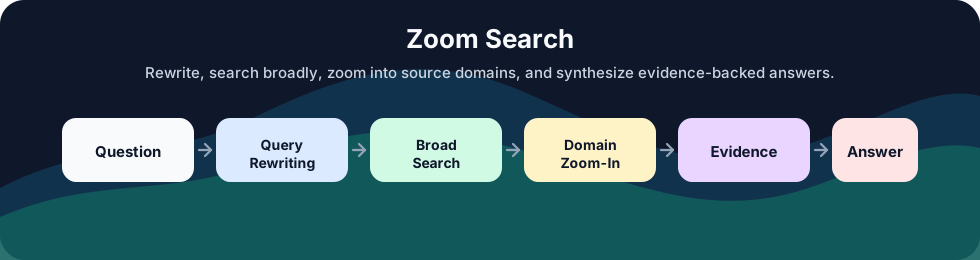
1. Normalize a `SearchRequest`, request dictionary, or flat keyword parameters.
2. Resolve LLM and search providers from capability declarations.
3. Rewrite the question into structured search groups and query variants.
4. Run broad zoom-out searches.
5. Select high-value source domains.
6. Run targeted zoom-in searches on those domains.
7. Deduplicate results and preserve traceability.
8. Format evidence and optionally synthesize an answer.
## Example Queries
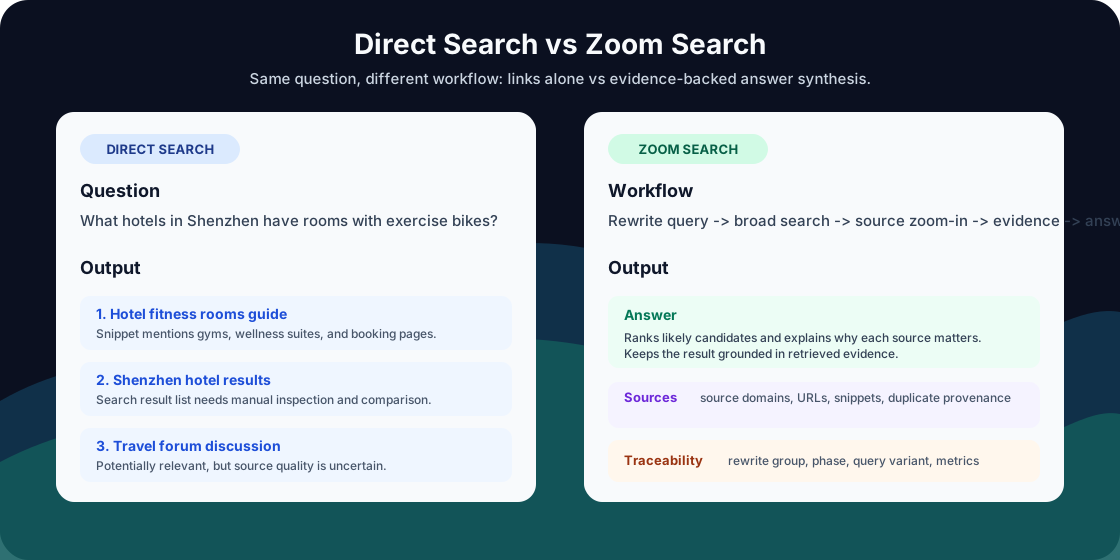
- What hotels in Shenzhen have rooms with exercise bikes?
- Which vector databases support hybrid search and metadata filtering for Python apps?
- What are the latest SQLite performance improvements and what versions introduced them?
- Which AI coding tools support self-hosted deployment for enterprise teams?
- What are the differences between Tavily, Brave Search API, and Serper for AI search apps?
## Output Modes
| Mode | Answer synthesis | Returned fields |
|---|---:|---|
| `answer` | yes | `request_id`, `metrics`, `answer`, `warnings` |
| `answer_with_sources` | yes | `request_id`, `metrics`, `answer`, `results`, `search_context`, `warnings` |
| `results_simple` | no | `request_id`, `metrics`, `results`, `warnings` |
| `results_detailed` | no | `request_id`, `metrics`, `results`, `warnings` |
Detailed results include `source_domain`, `traceability`, and `duplicate_traceabilities`.
### Response Fields
`search()` returns a `SearchResponse`. The selected output mode controls which optional fields are present.
| Field | Meaning |
|---|---|
| `request_id` | A `zs_...` identifier for correlating the response, warnings, metrics, and errors from one request. |
| `answer` | The synthesized answer. It is present in `answer` and `answer_with_sources` modes. |
| `results` | Search results after URL deduplication. `results_simple` returns `title`, `snippet`, and `url`; detailed modes add source and traceability fields. |
| `search_context` | Markdown evidence assembled from the detailed results and passed to answer synthesis. It is present in `answer_with_sources`; it is different from conversation history. |
| `metrics` | A runtime snapshot containing elapsed time, per-phase timing, search request counters, and LLM token usage. |
| `warnings` | Non-fatal issues encountered during the workflow. A successful response can contain warnings; an empty list means no warnings were recorded. |
| `raw_diagnostics` | Opt-in provider diagnostics. It is returned only when `include_raw_diagnostics=True` and diagnostic data exists. |
Each item in `results_detailed` or `answer_with_sources` is a `FinalSearchResult`:
| Result field | Meaning |
|---|---|
| `title` | Result title returned by the search provider. |
| `snippet` | Result summary returned by the search provider. |
| `url` | Canonical result URL used for deduplication. |
| `source_domain` | Hostname extracted from `url`, including subdomains such as `www.example.com`. |
| `traceability` | The conversation context, rewritten question, search phase, exact query, rank, split-question ID, and query-variant ID that produced the result. |
| `duplicate_traceabilities` | Other search paths that discovered the same URL. This preserves evidence of repeated discovery after URL deduplication. |
`traceability` contains these fields:
| Traceability field | Meaning |
|---|---|
| `previous_conversation` | The normalized recent history used for rewriting. |
| `original_input` | The current user question before rewriting. |
| `comparison_question` | The comparison question produced by rewriting, when applicable. |
| `split_question` | One focused question produced from the original input. |
| `phase` | Search stage that produced the result, such as zoom-out or zoom-in. |
| `search_query_used` | Exact query sent to the search provider. |
| `rank` | Result rank within that provider response. |
| `split_question_id` | Identifier of the focused question. |
| `query_variant_id` | Query variant `1` or `2` generated for the focused question. |
The `metrics` mapping has this structure:
```python
{
"elapsed_ms": 84,
"phase_elapsed_ms": {
"query_rewriting": 12,
"zoom_out_search": 20,
"zoom_in_search": 18,
"answer_synthesis": 25,
},
"search_requests": {
"planned": 3,
"attempted": 3,
"succeeded": 3,
"failed": 0,
"retries": 0,
"zoom_out_planned": 2,
"zoom_in_planned": 1,
"zoom_out_attempted": 2,
"zoom_in_attempted": 1,
"zoom_out_succeeded": 2,
"zoom_in_succeeded": 1,
"zoom_out_failed": 0,
"zoom_in_failed": 0,
},
"llm_usage": {
"query_rewriting": {
"input_tokens": 120,
"output_tokens": 60,
"total_tokens": 180,
"reasoning_tokens": 0,
"cached_input_tokens": 0,
},
"answer_synthesis": {
"input_tokens": 240,
"output_tokens": 100,
"total_tokens": 340,
"reasoning_tokens": 0,
"cached_input_tokens": 0,
},
"total": {
"input_tokens": 360,
"output_tokens": 160,
"total_tokens": 520,
"reasoning_tokens": 0,
"cached_input_tokens": 0,
},
},
}
```
Each token usage mapping contains `input_tokens`, `output_tokens`, `total_tokens`, `reasoning_tokens`, and `cached_input_tokens`. Unreported usage remains zero in the runtime snapshot.
`SearchResponse.to_dict()` preserves nested result and warning dataclass objects. The MCP adapter recursively converts them to JSON-compatible values; direct Python callers can access their typed attributes.
```python
response = await search(
question="Which vector databases support hybrid search?",
demo_mode=True,
output_mode="answer_with_sources",
)
print(response.answer)
print(response.metrics["elapsed_ms"])
for result in response.results:
print(result.title, result.source_domain)
print(result.traceability.search_query_used)
for warning in response.warnings:
print(warning.code, warning.message)
```
## Streaming Events
`astream_search()` is the streaming version of `search()`. It is an async iterator of `SearchStreamEvent` objects. Streaming lets an application show workflow progress and print answer text as the LLM produces it, instead of waiting for the complete answer.
```python
async def astream_search(
request: SearchRequest | dict | None = None,
**params,
) -> AsyncIterator[SearchStreamEvent]:
...
```
The following example runs without API keys and prints each answer chunk:
```python
import asyncio
from zoom_search import ZoomSearchError
from zoom_search import astream_search
async def main() -> None:
try:
async for event in astream_search(
question="What hotels in Shenzhen have rooms with exercise bikes?",
demo_mode=True,
output_mode="answer_with_sources",
):
if event.type == "search_started":
print(f"Search started: {event.request_id}")
elif event.type == "search_completed":
print(f"Found {len(event.results)} detailed results")
elif event.type == "answer_started":
print("Answer: ", end="", flush=True)
elif event.type == "answer_delta":
print(event.text, end="", flush=True)
elif event.type == "answer_completed":
print()
elif event.type == "completed":
print(f"Elapsed: {event.metrics['elapsed_ms']} ms")
print(f"Warnings: {len(event.response.warnings)}")
except ZoomSearchError as error:
print(f"{error.details.error_type}: {error.user_message}")
asyncio.run(main())
```
Every event contains `type`, `request_id`, and `warnings`. Event-specific fields are present only on the event types listed below.
| Event | Additional fields | Meaning |
|---|---|---|
| `search_started` | `metrics` | The runtime is ready and the search workflow is starting. |
| `search_completed` | `results`, `search_context`, `metrics` | Search, zoom-in, deduplication, and evidence formatting are complete. `results` always contains detailed results on this event. |
| `answer_started` | `metrics` | LLM answer synthesis is starting. |
| `answer_delta` | `text` | One newly generated answer text chunk. It can occur multiple times. |
| `answer_completed` | `answer`, `metrics` | All answer chunks have been joined into the final answer. |
| `completed` | `response`, `metrics` | The final output-mode-specific `SearchResponse` is available. |
Answer modes emit events in this order:
```text
search_started
search_completed
answer_started
answer_delta # one or more events
answer_completed
completed
```
`results_simple` and `results_detailed` skip answer synthesis:
```text
search_started
search_completed
completed
```
Streaming failures are raised as `ZoomSearchError`; there is no `error` event. Events already received remain valid, and the iterator stops before `completed`. Configuration errors can occur before the first event. Search or synthesis errors can occur after progress events have already been emitted. Use `try`/`except` around the entire `async for` loop, as shown above.
## Conversation History
Zoom Search requests are stateless. The application stores each conversation session and passes recent turns through `previous_conversation`. Zoom Search normalizes the list, keeps the latest two non-empty entries, and uses them during query rewriting and answer synthesis.
The two retained entries are usually the previous user question and assistant answer. The library treats them as context strings and does not assign or validate conversation roles.
```python
response = await search(
question="What about hotels with in-room fitness equipment?",
previous_conversation=[
"I am planning a business trip to Shenzhen.",
"I prefer hotels with wellness facilities.",
],
demo_mode=True,
output_mode="answer_with_sources",
)
```
This wrapper automatically supplies the previous user/assistant turn on every call:
```python
import asyncio
from zoom_search import search
class ZoomConversation:
def __init__(self) -> None:
self._history: list[str] = []
async def ask(self, question: str) -> str:
response = await search(
question=question,
previous_conversation=self._history,
demo_mode=True,
output_mode="answer",
)
assert response.answer is not None
answer = response.answer
self._history.extend([question, answer])
self._history = [item.strip() for item in self._history if item.strip()][-2:]
return answer
async def main() -> None:
conversation = ZoomConversation()
print(await conversation.ask("What are good business travel cities in China?"))
print(await conversation.ask("What hotels there have strong wellness facilities?"))
print(await conversation.ask("Which of those have exercise bikes in guest rooms?"))
asyncio.run(main())
```
On the second and third calls, `ZoomConversation.ask()` passes the preceding question and answer automatically. Query rewriting uses that history to resolve references such as "there" and "those". The application should maintain a separate `ZoomConversation` instance or history list for each user session.
Normalization rules for `previous_conversation`:
- A list or tuple is accepted.
- Items are converted to stripped strings and empty items are removed.
- Only the latest two entries are retained, in their original order.
- Other input shapes are normalized to an empty history.
## Request Parameters
`search()` and `astream_search()` accept either a `SearchRequest`, a request dictionary, or flat keyword arguments. Passing a request together with keyword arguments raises `TypeError`. The typed and nested forms use the fields from `SearchRequest`, `LLMConfig`, `SearchConfig`, `SearchLimits`, and `ProxyConfig` directly. Flat keyword arguments use the aliases below.
Within a request dictionary, flat provider fields such as `llm_model` and `search_api_key` override the corresponding fields in nested `llm` and `search` configurations. Likewise, flat search-limit and proxy fields override their nested values. Passing `llm_extra` or `search_extra` replaces the corresponding nested `extra` mapping, so combine all required entries in the flat mapping.
Top-level parameters:
| Parameter | Type | Default | Description |
|---|---|---|---|
| `question` | `str` | Required | User question to search and answer. Leading and trailing whitespace is removed. |
| `previous_conversation` | `list[str]` | `[]` | Recent context strings; only the latest two non-empty entries are kept. |
| `output_mode` | `str` | `"answer"` | `answer`, `answer_with_sources`, `results_simple`, or `results_detailed`. |
| `demo_mode` | `bool` | `False` | Use deterministic local demo providers without API keys. |
| `seed` | `int \| None` | `None` | Reproducibility hint for demo mode and supported LLM providers. |
| `include_raw_diagnostics` | `bool` | `False` | Include normalized provider diagnostics in responses and errors when diagnostic data exists. |
| `http_proxy` | `str \| None` | `None` | Global HTTP proxy used when a provider-specific proxy is absent. Nested equivalent: `proxy=ProxyConfig(http_proxy=...)`. |
LLM parameters:
| Flat parameter | Nested field | Type | Default | Description |
|---|---|---|---|---|
| `llm_engine` | `llm.engine` | `str \| None` | `None` | Built-in engine name, `openai-compatible`, or `custom`. Required outside demo mode. |
| `llm_model` | `llm.model` | `str \| None` | `None` | Model name passed to the selected LLM provider. |
| `llm_api_key` | `llm.api_key` | `str \| None` | `None` | API key for the LLM provider. |
| `llm_base_url` | `llm.base_url` | `str \| None` | Provider default | Custom endpoint base URL. Required for custom providers. |
| `llm_protocol` | `llm.protocol` | `"openai_compatible" \| "native" \| None` | `None` | Protocol selector for `llm_engine="custom"`. `openai-compatible` selects the OpenAI-compatible protocol automatically. |
| `llm_headers` | `llm.headers` | `dict[str, str]` | `{}` | Additional request headers. Explicit headers are preserved; adapters add authentication and content-type headers when absent. |
| `llm_http_proxy` | `llm.http_proxy` | `str \| None` | `None` | LLM-specific HTTP proxy; takes precedence over `http_proxy`. |
| `llm_request_options` | `llm.request_options` | `LLMRequestOptions \| dict` | All fields `None` | Tri-state feature controls described below. |
| `llm_extra` | `llm.extra` | `dict[str, Any]` | `{}` | Provider-specific body values and adapter control fields. Supported controls are listed below. |
Search parameters:
| Flat parameter | Nested field | Type | Default | Description |
|---|---|---|---|---|
| `search_engine` | `search.engine` | `str \| None` | `None` | Built-in search engine name or `custom`. Required outside demo mode. |
| `search_api_key` | `search.api_key` | `str \| None` | `None` | API key for the search provider. |
| `search_base_url` | `search.base_url` | `str \| None` | Provider default | Search endpoint URL. Required for a custom search provider. |
| `search_headers` | `search.headers` | `dict[str, str]` | `{}` | Additional search request headers. |
| `search_http_proxy` | `search.http_proxy` | `str \| None` | `None` | Search-specific HTTP proxy; takes precedence over `http_proxy`. |
| `search_extra` | `search.extra` | `dict[str, Any]` | `{}` | Provider-specific authentication or adapter settings listed below. |
| `search_result_collection_path` | `search.extra.result_collection_path` | `str` | Provider capability | Dot path to the result list for custom search responses. |
| `search_title_fields` | `search.extra.title_fields` | `list[str]` | Provider capability | Candidate title fields for custom result mapping. |
| `search_snippet_fields` | `search.extra.snippet_fields` | `list[str]` | Provider capability | Candidate snippet fields for custom result mapping. |
| `search_url_fields` | `search.extra.url_fields` | `list[str]` | Provider capability | Candidate URL fields for custom result mapping. |
Search limits:
| Parameter | Default | Description |
|---|---:|---|
| `zoomout_num_results` | `5` | Broad search result count per query. |
| `zoomin_num_results` | `5` | Domain-focused search result count. |
| `top_k_domains_per_query` | `1` | Number of source domains selected for zoom-in search. |
### LLM Request Options
Every `LLMRequestOptions` field is `bool | None`:
| Value | Meaning |
|---|---|
| `None` | Use Zoom Search's provider capability and adapter defaults. |
| `True` | Request the feature when the provider adapter implements an explicit enable path. Some providers always enable a feature or expose no enable control. |
| `False` | Omit or disable the feature when supported. The adapter may emit a warning when a provider or model cannot honor the request. |
The fields control these request features:
| Field | Effect |
|---|---|
| `temperature` | Include or omit generated temperature values. |
| `response_format` | Include or omit provider-native JSON response-format controls. Prompt-based JSON guidance may still be used. |
| `seed` | Include or omit the top-level reproducibility seed. |
| `stream` | Allow or suppress provider token streaming. `astream_search()` still emits workflow events when provider streaming is unavailable. |
| `reasoning` | Request provider-specific reasoning enable or disable controls. Support varies by provider and model family. |
Example:
```python
from zoom_search.models import LLMRequestOptions
options = LLMRequestOptions(
temperature=False,
response_format=None,
seed=False,
stream=True,
reasoning=False,
)
```
### Provider Extras
`llm_extra` is a provider-specific mapping. Ordinary keys are added to OpenAI-compatible request bodies as defaults, while Zoom Search's normalized request fields retain priority. Adapter control fields configure routing or normalization and are removed from outbound request bodies.
| Engine | Recognized `llm_extra` keys | Purpose |
|---|---|---|
| `openai-compatible` or custom OpenAI protocol | `supports_streaming` | Declares SSE streaming support for a custom endpoint. This is an adapter control field. |
| `gemini` | `logprobs`, `top_logprobs` | These fields are removed because the shared Gemini adapter does not expose log-probability output. |
| `doubao-global`, `doubao-china` | `endpoint_id`, `model_id` | Override the outbound `model` value with a provisioned endpoint or model identifier. These are adapter control fields. |
| `baichuan` | `top_k`, `with_search_enhance` | Configure Baichuan generation and search-enhancement request fields. Defaults are `5` and `False`. |
| `minimax-global`, `minimax-china` | `max_completion_tokens` | Reconcile the provider limit with Zoom Search's generated maximum-token value. |
| `minimax-china` | `structured_output_route`, `prefer_schema_native`, `structured_output_model` | Select the native structured-output route and optionally replace the model on that route. These are adapter control fields. |
| `replicate` | `poll_interval_seconds` | Set prediction polling interval. |
| `custom` with native protocol | `endpoint_path`, `path`, `request_mapping`, `response_mapping` | Configure the endpoint and dot-path mappings described under Custom Providers. These are adapter control fields. |
`search_extra` currently supports these provider controls:
| Engine | Supported `search_extra` keys | Purpose |
|---|---|---|
| `tiangong` | `app_secret` | Sign Tiangong requests; `search_api_key` supplies the app key. |
| `volcengine` | `access_key`, `secret_key` | Sign Volcengine requests when `search_api_key` is absent. |
| `custom` | `result_collection_path`, `title_fields`, `snippet_fields`, `url_fields` | Normalize custom result objects. The dedicated flat aliases are usually clearer. |
Keep credentials in environment variables or a secret manager and construct configuration at runtime. Provider extras and headers can contain credentials, so redact them from application logs.
### Raw Diagnostics
Set `include_raw_diagnostics=True` for troubleshooting and evaluation runs. Diagnostics may contain provider response fragments, normalized request metadata, URLs, exception messages, and provider-specific fields. Store them only in access-controlled logs, apply retention limits, and redact user content, authorization data, and provider payloads before exporting telemetry. Leave diagnostics disabled for responses exposed directly to end users.
## Provider Architecture
Zoom Search has three provider kinds:
- `demo`: built-in deterministic LLM and search providers.
- `builtin`: providers declared in `zoom_search.providers.capabilities`.
- `custom`: caller-supplied OpenAI-compatible or native HTTP providers.
Most built-in LLM providers use the shared OpenAI-compatible adapter. `claude` and `replicate` use dedicated native adapters. Custom LLMs can use `llm_engine="openai-compatible"` for Chat Completions-like endpoints or `llm_engine="custom"` for native HTTP endpoints with explicit mappings.
Search adapters normalize provider requests and responses through `UnifiedSearchRequest` and `UnifiedSearchResponse`. Capability declarations control query paths, result paths, site restriction behavior, provider-side result counts, and local filtering.
## Built-In Engines
Built-in `llm_engine` options:
`openai`, `gemini`, `doubao-global`, `doubao-china`, `qwen-global`, `qwen-china`, `glm-china`, `glm-global`, `baichuan`, `spark`, `huggingface`, `claude`, `replicate`, `minimax-global`, `minimax-china`, `deepseek`, `kimi-china`, `kimi-global`, `yi`, `hunyuan`, `stepfun`, `siliconflow`, `together`, `fireworks`, `groq`, `cerebras`, `perplexity`, `grok`, `mistral`, `cohere`, `openrouter`, `mimo`, `deepinfra`, `novita`, `hyperbolic`, `lepton`, `ollama`, `openai-compatible`, `custom`.
Built-in `search_engine` options:
`tavily`, `serper`, `brave`, `you`, `360search`, `firecrawl`, `baidu`, `linkup`, `perplexity`, `glm`, `volcengine`, `exa`, `bocha`, `querit`, `serpapi`, `metasota`, `searxng`, `tiangong`, `custom`.
## Custom Providers
OpenAI-compatible LLM endpoint:
```python
response = await search(
question="Summarize the latest SQLite performance news.",
llm_engine="openai-compatible",
llm_model="custom-model",
llm_base_url="https://llm.example.com/v1",
llm_api_key="YOUR_CUSTOM_LLM_API_KEY",
search_engine="tavily",
search_api_key="YOUR_TAVILY_API_KEY",
)
```
Custom native LLM endpoint:
```python
response = await search(
question="How should I store bananas on the counter?",
llm_engine="custom",
llm_model="native-model",
llm_base_url="https://native-llm.example.com",
llm_headers={"x-api-key": "YOUR_NATIVE_LLM_API_KEY"},
llm_extra={
"endpoint_path": "/v1/generate",
"request_mapping": {
"model_path": "payload.modelName",
"messages_path": "payload.chatMessages",
"response_format_path": "payload.responseFormat",
},
"response_mapping": {
"content_path": "data.output.text",
"json_payload_path": "data.output.json",
"usage_total_tokens_path": "usage.total",
"finish_reason_path": "state.finish",
},
},
search_engine="tavily",
search_api_key="YOUR_TAVILY_API_KEY",
)
```
Native request mappings use dot paths and create nested objects as needed. A path segment ending in `[]` writes the value as a list. `model_path` and `messages_path` default to `model` and `messages`; the remaining fields are written only when their mapping path is configured.
| `request_mapping` key | Source value |
|---|---|
| `model_path` | Configured model name. |
| `messages_path` | Normalized chat message list. |
| `prompt_path` or `input_path` | Messages flattened into one prompt string. |
| `temperature_path` | Normalized temperature. |
| `top_p_path` | Normalized top-p value. |
| `max_tokens_path` | Generated output-token limit. |
| `seed_path` | Request seed. |
| `stream_path` | `True` for a streaming provider request. |
| `stop_sequences_path` or `stop_path` | Stop-sequence list. |
| `response_format_path` | Normalized structured-output descriptor. |
Native response mappings read dot paths. Numeric path segments can address list elements, for example `choices.0.message.content`.
| `response_mapping` key | Normalized destination |
|---|---|
| `content_path` or `text_path` | Text response. |
| `json_payload_path` | Structured JSON object or list. Text is also parsed as JSON when possible. |
| `finish_reason_path` | Normalized finish reason. |
| `usage_path` | OpenAI-shaped usage object containing prompt, completion, and total token fields. |
| `usage_input_tokens_path` | Input-token count override. |
| `usage_output_tokens_path` | Output-token count override. |
| `usage_total_tokens_path` | Total-token count override. |
| `usage_reasoning_tokens_path` | Reasoning-token count override. |
| `usage_cached_input_tokens_path` | Cached-input-token count override. |
Flat aliases are available for every response mapping key, such as `llm_content_path`, `llm_json_payload_path`, and `llm_usage_total_tokens_path`. They are merged into `llm_extra["response_mapping"]` during request normalization.
Custom search endpoint:
```python
response = await search(
question="Latest SQLite performance news.",
llm_engine="gemini",
llm_model="gemini-2.5-flash",
llm_api_key="YOUR_GEMINI_API_KEY",
search_engine="custom",
search_base_url="https://search.example.com/search",
search_api_key="YOUR_SEARCH_API_KEY",
search_result_collection_path="data.items",
search_title_fields=["name", "title"],
search_snippet_fields=["summary", "snippet"],
search_url_fields=["link", "url"],
)
```
## Typed Requests
```python
import asyncio
from zoom_search import astream_search
from zoom_search import search
from zoom_search.models import LLMConfig
from zoom_search.models import LLMRequestOptions
from zoom_search.models import ProxyConfig
from zoom_search.models import SearchConfig
from zoom_search.models import SearchLimits
from zoom_search.models import SearchRequest
request = SearchRequest(
question="Summarize the latest SQLite performance news.",
previous_conversation=["I am evaluating embedded databases."],
output_mode="answer_with_sources",
search_limits=SearchLimits(
zoomout_num_results=8,
zoomin_num_results=4,
top_k_domains_per_query=2,
),
llm=LLMConfig(
engine="openai-compatible",
model="custom-model",
base_url="https://llm.example.com/v1",
api_key="YOUR_CUSTOM_LLM_API_KEY",
protocol="openai_compatible",
headers={"X-Tenant-ID": "tenant-a"},
request_options=LLMRequestOptions(
temperature=None,
response_format=True,
seed=False,
stream=True,
reasoning=False,
),
extra={"supports_streaming": True},
),
search=SearchConfig(
engine="custom",
base_url="https://search.example.com/search",
api_key="YOUR_SEARCH_API_KEY",
headers={"X-Search-Version": "2025-01"},
extra={
"result_collection_path": "data.items",
"title_fields": ["name", "title"],
"snippet_fields": ["summary", "snippet"],
"url_fields": ["link", "url"],
},
),
proxy=ProxyConfig(http_proxy="http://proxy.example.com:8080"),
seed=7,
include_raw_diagnostics=True,
)
async def main() -> None:
response = await search(request)
print(response.answer)
async for event in astream_search(request):
if event.type == "answer_delta":
print(event.text or "", end="", flush=True)
elif event.type == "completed":
print()
print(event.response.answer if event.response else None)
asyncio.run(main())
```
## Errors and Warnings
Zoom Search raises `ZoomSearchError` for fatal failures. Use `error.details.error_type` for stable application logic, `error.details.reason_code` for a more specific cause, and `error.retryable` to decide whether the caller should retry.
The main error fields are:
| Field | Meaning |
|---|---|
| `category` | Component-oriented category such as `llm_call_failure`, `search_call_failure`, or `network_connection_failure`. |
| `message` | Technical diagnostic message intended for logs. |
| `user_message` | Safer message suitable for an application user. |
| `component` | Component that failed, such as `llm`, `search`, or `proxy`. |
| `request_id` | Request identifier for correlating the failure with logs and diagnostics. |
| `provider_engine` / `provider_model` | Provider involved in the failure, when known. |
| `retryable` | Whether retrying may succeed. The caller should still use bounded retries and backoff. |
| `retry_attempted` | Whether Zoom Search already retried the failed operation. |
| `details.error_type` | Stable high-level error type listed below. |
| `details.reason_code` | More specific normalized cause, such as `rate_limited`, `read_timeout`, or `empty_results`. |
| `details.invalid_fields` | Request or configuration fields that require correction. |
| `details.http_status` | Provider HTTP status when one was available. |
| `details.provider_error_code` | Original provider business error code when one was available. |
```python
from zoom_search import ZoomSearchError
try:
response = await search(...)
except ZoomSearchError as error:
details = error.details
print(f"request_id={error.request_id}")
print(f"error_type={details.error_type}")
print(f"reason_code={details.reason_code}")
print(f"http_status={details.http_status}")
print(f"invalid_fields={details.invalid_fields}")
print(f"retryable={error.retryable}")
print(error.user_message)
if error.retryable:
# Apply a bounded retry with exponential backoff at the application layer.
pass
```
### Stable Error Types
| `details.error_type` | Typical causes | Usual retry behavior | Application action |
|---|---|---|---|
| `configuration_error` | Missing question, API key, model, engine, base URL, proxy settings, or invalid limits and output mode. | `retryable=False` | Read `invalid_fields`, correct the request or deployment configuration, and submit a new request. |
| `authentication_error` | HTTP `401` or `403`, invalid credentials, account authorization failure, or provider-specific authentication codes. | `retryable=False` | Verify the API key, endpoint region, account access, and model permission. |
| `invalid_request_error` | HTTP `400` or `422`, unsupported provider parameters, invalid query-rewriting JSON, or provider results missing required fields. | Depends on the cause. Structured rewriting failures can receive one internal retry. | Inspect `reason_code` and `invalid_fields`; correct the request, model, schema, or custom provider mapping. |
| `rate_limit_error` | HTTP `429` or a provider-specific rate-limit response. | Often retryable; use the actual `retryable` value. | Apply bounded exponential backoff and check provider RPM, TPM, and concurrency limits. |
| `quota_exceeded_error` | Provider account balance, credit, or quota has been exhausted. | `retryable=False` | Restore quota or billing, reduce usage, or select another provider. |
| `content_filtered_error` | The provider rejected the prompt, query, or generated content under its content policy. | `retryable=False` | Adjust the input and search scope in accordance with the provider policy. |
| `network_error` | DNS failure, connection or read timeout, refused connection, TLS failure, proxy connection failure, or another transport problem. | Usually retryable. | Check DNS, TLS, proxy, endpoint reachability, and timeout settings, then apply bounded backoff. |
| `provider_error` | Provider `5xx`, an unrecognized business error, an unsupported adapter operation, context-length overflow, all search branches failing, or another provider failure. | `5xx` failures are commonly retryable; other cases vary. | Inspect `http_status`, `reason_code`, provider fields, and opt-in raw diagnostics. |
| `empty_result_error` | The LLM returned empty output or an individual search operation returned no usable results. | Initial empty-result failures can be retried. Repeated empty results can exhaust all usable search branches. | Broaden the query, review search limits and provider coverage, or select another provider. |
`retryable=True` is a classification flag. Search operations use a small internal retry budget for retryable network, rate-limit, provider, and empty-result failures. Query rewriting can retry selected structured-output failures. Application code remains responsible for bounded request-level retries.
### Warnings
Warnings describe recoverable problems and are returned on `SearchResponse.warnings` and every stream event. A warning has `code`, `message`, `phase`, `request_id`, and a provider- or phase-specific `metadata` mapping.
| Warning code | Meaning |
|---|---|
| `low_confidence_site_restriction` | The search provider supports only best-effort restriction to the selected source domain. |
| `query_site_operator_support_unknown` | Zoom Search used a query-side site operator whose provider support is declared as unknown. |
| `zoom_in_domain_filtered_results` | Zoom-in returned off-domain results, which Zoom Search removed locally. |
| `zoom_in_filtered_to_empty` | Domain validation removed every zoom-in result for that branch. |
| `result_collection_path_not_list` | A custom provider's configured result path resolved to a value other than a list. |
| `missing_result_collection` | The provider response contained no result collection at the configured path. |
| Provider failure reason | One search branch failed after its retry budget; the warning code is its normalized `reason_code`, such as `read_timeout` or `empty_results`. Other branches can still produce a successful response. |
Warnings should be logged with `request_id` and reviewed alongside metrics. They are especially useful when a response succeeds with fewer source branches than planned.
## Development Checks
```bash
# Install development dependencies.
uv sync
# Run tests.
uv run pytest
# Build package artifacts.
uv run python -m build
# Check package metadata.
uv run twine check dist/*
```
See [Development](development.md) for additional development checks.