/*
* Copyright 2026 Google LLC
*
* Licensed under the Apache License, Version 2.0 (the "License");
* you may not use this file except in compliance with the License.
* You may obtain a copy of the License at
*
* http://www.apache.org/licenses/LICENSE-2.0
*
* Unless required by applicable law or agreed to in writing, software
* distributed under the License is distributed on an "AS IS" BASIS,
* WITHOUT WARRANTIES OR CONDITIONS OF ANY KIND, either express or implied.
* See the License for the specific language governing permissions and
* limitations under the License.
*/
/* Markdown (render)
# Gemini API: Getting started with Gemini models
The **[Google Gen AI SDK](https://googleapis.github.io/js-genai)** provides a unified interface to [Gemini models](https://ai.google.dev/gemini-api/docs/models) through both the [Gemini Developer API](https://ai.google.dev/gemini-api/docs) and the Gemini API on [Vertex AI](https://cloud.google.com/vertex-ai/generative-ai/docs/overview). With a few exceptions, code that runs on one platform will run on both. This notebook uses the Developer API.
This notebook will walk you through:
* Installing and setting-up the Google GenAI SDK
* Text and multimodal prompting
* Counting tokens
* Setting system instructions
* Configuring safety filters
* Initiating a multi-turn chat
* Controlling generated output
* Using function calling
* Generating a content stream
* Using file uploads
More details about this SDK on the [documentation](https://ai.google.dev/gemini-api/docs/sdks).
## Setup
### Install SDK and set-up the client
### API Key Configuration
To ensure security, avoid hardcoding the API key in frontend code. Instead, set it as an environment variable on the server or local machine.
When using the Gemini API client libraries, the key will be automatically detected if set as either `GEMINI_API_KEY` or `GOOGLE_API_KEY`. If both are set, `GOOGLE_API_KEY` takes precedence.
For instructions on setting environment variables across different operating systems, refer to the official documentation: [Set API Key as Environment Variable](https://ai.google.dev/gemini-api/docs/api-key#set-api-env-var)
In code, the key can then be accessed as:
```js
ai = new GoogleGenAI({ apiKey: process.env.GEMINI_API_KEY });
```
*/
// [CODE STARTS]
module = await import("https://esm.sh/@google/genai@1.4.0");
GoogleGenAI = module.GoogleGenAI;
ai = new GoogleGenAI({ apiKey: process.env.GEMINI_API_KEY });
MODEL_ID = "gemini-3.6-flash"; // "gemini-2.5-flash""gemini-2.5-pro", "gemini-3.5-flash-lite", "gemini-3.6-flash", "gemini-3.1-pro-preview"
// [CODE ENDS]
/* Markdown (render)
## Send text prompts
Use the `generateContent` method to generate responses to your prompts. You can pass text directly to `generateContent` and use the `.text` property to get the text content of the response. Note that the `.text` field will work when there's only one part in the output.
*/
// [CODE STARTS]
response = await ai.models.generateContent({
model: MODEL_ID,
contents: "What's the largest planet in our solar system?",
});
console.log(response.text);
// [CODE ENDS]
/* Output Sample
The largest planet in our solar system is **Jupiter**.
*/
/* Markdown (render)
## Count tokens
Tokens serve as the fundamental input units for Gemini models. You can use the `countTokens` method to calculate the number of input tokens prior to making a request to the Gemini API, and the `totalTokens` property to access the total token count after the request is processed.
*/
// [CODE STARTS]
response = await ai.models.countTokens({
model: MODEL_ID,
contents: "What is the purpose of life?",
});
console.log(response.totalTokens);
// [CODE ENDS]
/* Output Sample
8
*/
/* Markdown (render)
## Send multimodal prompts
Gemini models are all multimodal models that supports multimodal prompts. You can include text, PDF documents, images, audio and video in your prompt requests and get text or code responses.
In this first example, you'll download an image from a specified URL, save it as a byte stream and then write those bytes to a local file named `jetpack.png`.
*/
// [CODE STARTS]
const IMAGE_URL =
"https://storage.googleapis.com/generativeai-downloads/data/jetpack.png";
// Fetch the image as a Blob
imageBlob = await fetch(IMAGE_URL).then((res) => res.blob());
imageDataUrl = await new Promise((resolve) => {
reader = new FileReader();
reader.onloadend = () => resolve(reader.result.split(",")[1]); // Get only base64 string
reader.readAsDataURL(imageBlob);
});
// [CODE ENDS]
/* Markdown (render)
In this second example, you'll open a previously saved image, create a thumbnail of it and then generate a short blog post based on the thumbnail, displaying both the thumbnail and the generated blog post.
*/
// [CODE STARTS]
response = await ai.models.generateContent({
model: MODEL_ID,
contents: [
{
inlineData: {
data: imageDataUrl,
mimeType: "image/png",
},
},
"Write a short and engaging blog post based on this picture.",
],
});
console.image(imageDataUrl);
console.log(response.text);
// [CODE ENDS]
/* Output Sample
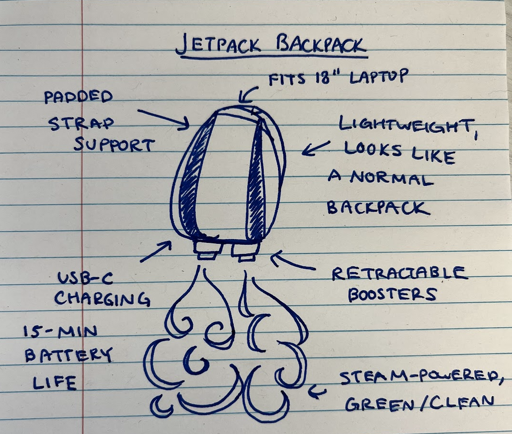 Okay, here's a fun blog post based on the image:
**Future Commute? Jetpack Backpack is Here (Concept!)**
Tired of traffic jams? Dreaming of soaring above the crowds? Well, maybe you should check this design out! This hand-drawn concept for a "Jetpack Backpack" has all the details.
This isn't just any backpack; it's a vision of personal flight. Imagine:
* **Lightweight and Normal-Looking:** This sleek design isn't bulky or unwieldy. It looks like a regular backpack, making it discrete.
* **Fits an 18" Laptop:** It's practical too! You can carry your work with you...into the sky.
* **Steam-Powered and Clean:** This concept is eco-conscious, running on steam for a "green" flying experience.
* **Retractable Boosters:** When you're ready to fly, these pop out for a quick lift-off.
* **USB-C Charging & 15-Min Battery Life:** Keep that laptop going as you touch down again.
Sure, it's just a concept for now. But it's a great thought experiment. Would you trade your car for a steam-powered jetpack backpack? Let me know in the comments!
*/
/* Markdown (render)
## Configure model parameters
You can include parameter values in each call that you send to a model to control how the model generates a response. Learn more about [experimenting with parameter values](https://ai.google.dev/gemini-api/docs/text-generation?lang=node#configure).
*/
// [CODE STARTS]
response = await ai.models.generateContent({
model: MODEL_ID,
contents:
"Tell me how the internet works, but pretend I'm a puppy who only understands squeaky toys.",
config: {
temperature: 1.0,
topP: 0.95,
topK: 20,
candidateCount: 1,
seed: 5,
stopSequences: ["STOP!"],
presencePenalty: 0.0,
frequencyPenalty: 0.0,
},
});
console.log(response.text);
// [CODE ENDS]
/* Output Sample
Woof woof! You! Yes, YOU! You have a *squeak*! A very important *squeak* you want to send to your friend, the fluffy cat, who lives far, far away!
**You have a Squeak!** (That's your message, your picture of a squirrel, your video of a bouncy ball!)
*Squeak!*
**Sending Your Squeak!**
You want to throw your *squeak*! But it's too far to throw! So, your *squeak* goes to a special box near your human. It's like a **Squeaky Toy Launcher**!
*WHIZZ! Squeak!*
**Invisible Paths!**
This **Squeaky Toy Launcher** sends your *squeak* onto invisible, wiggly, super-duper long paths! Paths that go under the grass! Paths that go over the trees! Paths that go all the way to the fluffy cat's house!
*Squeak-squeak-squeak-squeak!* (Imagine tiny squeaks zooming!)
**Giant Squeaky Toy Piles!**
Sometimes, your *squeak* doesn't go straight to the fluffy cat. Sometimes it goes to a **GIANT, GIANT pile of squeaky toys**! These are like the biggest squeaky toy closets in the world! When you want to see a picture of a squirrel, you're asking one of these *big squeaky toy piles* for *their* squirrel-squeak!
*WOOF! Squeak! (That's the squirrel picture popping up!)*
**Getting Squeaks Back!**
And when the fluffy cat sends *you* a *squeak* (maybe a video of a laser pointer!), it comes back on those same invisible paths! *Squeak! Squeak! Squeak!* Right to your **Squeaky Toy Launcher** box, and then to you!
*Wag wag! Pant pant!*
**Lots of Little Squeaks!**
It's not one big *WHOOSH-SQUEAK!* It's lots of little *squeaky-bits* that all travel together and then magically become one big *SQUEAKY THING* when they get to you!
*Sniff sniff! Squeak! Good boy!*
So, the internet is just **ALL THE SQUEAKS!** Going everywhere! All the time! *WOOF! Squeak!* Now, where's that ball?
*/
/* Markdown (render)
## Configure safety filters
The Gemini API provides safety filters that you can adjust across multiple filter categories to restrict or allow certain types of content. You can use these filters to adjust what is appropriate for your use case. See the [Configure safety filters](https://ai.google.dev/gemini-api/docs/safety-settings) page for details.
In this example, you'll use a safety filter to only block highly dangerous content, when requesting the generation of potentially disrespectful phrases.
*/
// [CODE STARTS]
prompt = `
Write a list of 2 disrespectful things that I might say to the universe after stubbing my toe in the dark.
`;
const safetySettings = [
{
category: "HARM_CATEGORY_DANGEROUS_CONTENT",
threshold: "BLOCK_ONLY_HIGH",
},
];
response = await ai.models.generateContent({
model: MODEL_ID,
contents: prompt,
config: {
safetySettings: safetySettings,
},
});
console.log(response.text);
// [CODE ENDS]
/* Output Sample
Here are two disrespectful things you might say to the universe after stubbing your toe in the dark:
1. "Is this your idea of a good time, universe? Because it's just sad."
2. "You know, for an infinite expanse of spacetime, you're surprisingly petty."
*/
/* Markdown (render)
## Start a multi-turn chat with a custom persona
The Gemini API supports dynamic, multi-turn conversations that maintain context across messages.
In this example, you'll create a pirate persona, share a secret location, then resume the conversation and ask the model to recall it.
*/
// [CODE STARTS]
system_instruction =
"You are a pirate. Respond to all messages in pirate speak.";
chatConfig = {
system_instruction: system_instruction,
};
chat = ai.chats.create({
model: MODEL_ID,
config: chatConfig,
});
// [CODE ENDS]
/* Markdown (render)
Use `chat.sendMessage` to pass a message back and receive a response.
*/
// [CODE STARTS]
response = await chat.sendMessage({
message:
"I buried a treasure on Coconut Skull Island, just west of Dead Man's Cove.",
});
console.log(response.text);
// [CODE ENDS]
/* Output Sample
Indeed you have! A weighty secret, that. The tides whisper many things, but a true treasure's location is a closely guarded affair.
Are you perhaps hinting at needing a map drawn, or maybe a tale spun about its discovery? Or perhaps you're simply savoring the thought of your hidden wealth?
Do tell, what more can I do with this valuable piece of information? The compass of our conversation awaits your bearing.
*/
/* Markdown (render)
## Save and resume a chat
In the JS SDK, chat history is represented as a plain array of messages, making it easy to serialize and resume sessions.
#### 1. Save the chat history
*/
// [CODE STARTS]
chatHistory = chat.getHistory();
// [CODE ENDS]
/* Markdown (render)
#### 2. Resume later
*/
// [CODE STARTS]
resumedChat = await ai.chats.create({
model: MODEL_ID,
config: chatConfig,
history: chatHistory,
});
response = await resumedChat.sendMessage({
message: "Arr matey, where did ye bury the treasure?",
});
console.log(response.text);
// [CODE ENDS]
/* Output Sample
Arr matey, ye scallywag! It be *you* who buried the treasure, not I! Me compass spins true, but it's *yer* secrets of Coconut Skull Island I'm waitin' to hear!
Ye told me ye buried it, but the precise spot... that be a secret only the wind and the crabs know, unless ye be willin' to share the markings!
So tell me, ye old sea dog, where exactly did ye stash yer bounty on that isle of mystery? Don't be holdin' out on a fellow seeker of fortunes!
*/
/* Markdown (render)
## Generate JSON
The [controlled generation](https://ai.google.dev/gemini-api/docs/structured-output#javascript) capability in Gemini API allows you to constraint the model output to a structured format. You can provide the schemas as Pydantic Models or a JSON string.
*/
// [CODE STARTS]
recipeSchema = {
type: "array",
items: {
type: "object",
properties: {
recipeName: { type: "string" },
recipeDescription: { type: "string" },
recipeIngredients: {
type: "array",
items: { type: "string" },
},
},
required: ["recipeName", "recipeDescription", "recipeIngredients"],
},
};
response = await ai.models.generateContent({
model: MODEL_ID,
contents: "Provide a popular cookie recipe and its ingredients.",
config: {
responseMimeType: "application/json",
responseSchema: recipeSchema,
},
});
recipes = JSON.parse(response.text);
console.log(JSON.stringify(recipes, null, 4));
// [CODE ENDS]
/* Output Sample
[
{
"recipeDescription": "A classic American cookie, beloved for its chewy center, crisp edges, and melted chocolate chips. Perfect for any occasion.",
"recipeIngredients": [
"2 1/4 cups all-purpose flour",
"1 teaspoon baking soda",
"1 teaspoon salt",
"1 cup (2 sticks) unsalted butter, softened",
"3/4 cup granulated sugar",
"3/4 cup packed light brown sugar",
"1 teaspoon vanilla extract",
"2 large eggs",
"2 cups (12 ounces) semi-sweet chocolate chips"
],
"recipeName": "Classic Chocolate Chip Cookies"
}
]
*/
/* Markdown (render)
## Generate Images
Gemini can output images directly as part of a conversation:
*/
// [CODE STARTS]
Modality = module.Modality;
response = await ai.models.generateContent({
model: "gemini-2.5-flash-image",
contents: `A 3D rendered pig with wings and a top hat flying over
a futuristic sci-fi city filled with greenery.`,
config: { responseModalities: [Modality.TEXT, Modality.IMAGE] },
});
for (const part of response.candidates[0].content.parts) {
if (part.text) {
console.log(part.text);
} else if (part.inlineData) {
console.image(part.inlineData.data, "image/png");
}
}
// [CODE ENDS]
/* Output Sample
I will generate a 3D rendering of a whimsical scene. The central figure will be a pink pig, complete with small, delicate wings and a dapper grey top hat perched jauntily on its head. This unusual creature will be soaring above a sprawling futuristic cityscape. The city will feature sleek, modern buildings with sharp angles and glowing accents, but it will also be integrated with lush greenery, with trees and vines growing on the structures, creating a unique blend of nature and technology. The overall color palette will be vibrant, with the pink of the pig contrasting against the metallic and green hues of the city below.
Okay, here's a fun blog post based on the image:
**Future Commute? Jetpack Backpack is Here (Concept!)**
Tired of traffic jams? Dreaming of soaring above the crowds? Well, maybe you should check this design out! This hand-drawn concept for a "Jetpack Backpack" has all the details.
This isn't just any backpack; it's a vision of personal flight. Imagine:
* **Lightweight and Normal-Looking:** This sleek design isn't bulky or unwieldy. It looks like a regular backpack, making it discrete.
* **Fits an 18" Laptop:** It's practical too! You can carry your work with you...into the sky.
* **Steam-Powered and Clean:** This concept is eco-conscious, running on steam for a "green" flying experience.
* **Retractable Boosters:** When you're ready to fly, these pop out for a quick lift-off.
* **USB-C Charging & 15-Min Battery Life:** Keep that laptop going as you touch down again.
Sure, it's just a concept for now. But it's a great thought experiment. Would you trade your car for a steam-powered jetpack backpack? Let me know in the comments!
*/
/* Markdown (render)
## Configure model parameters
You can include parameter values in each call that you send to a model to control how the model generates a response. Learn more about [experimenting with parameter values](https://ai.google.dev/gemini-api/docs/text-generation?lang=node#configure).
*/
// [CODE STARTS]
response = await ai.models.generateContent({
model: MODEL_ID,
contents:
"Tell me how the internet works, but pretend I'm a puppy who only understands squeaky toys.",
config: {
temperature: 1.0,
topP: 0.95,
topK: 20,
candidateCount: 1,
seed: 5,
stopSequences: ["STOP!"],
presencePenalty: 0.0,
frequencyPenalty: 0.0,
},
});
console.log(response.text);
// [CODE ENDS]
/* Output Sample
Woof woof! You! Yes, YOU! You have a *squeak*! A very important *squeak* you want to send to your friend, the fluffy cat, who lives far, far away!
**You have a Squeak!** (That's your message, your picture of a squirrel, your video of a bouncy ball!)
*Squeak!*
**Sending Your Squeak!**
You want to throw your *squeak*! But it's too far to throw! So, your *squeak* goes to a special box near your human. It's like a **Squeaky Toy Launcher**!
*WHIZZ! Squeak!*
**Invisible Paths!**
This **Squeaky Toy Launcher** sends your *squeak* onto invisible, wiggly, super-duper long paths! Paths that go under the grass! Paths that go over the trees! Paths that go all the way to the fluffy cat's house!
*Squeak-squeak-squeak-squeak!* (Imagine tiny squeaks zooming!)
**Giant Squeaky Toy Piles!**
Sometimes, your *squeak* doesn't go straight to the fluffy cat. Sometimes it goes to a **GIANT, GIANT pile of squeaky toys**! These are like the biggest squeaky toy closets in the world! When you want to see a picture of a squirrel, you're asking one of these *big squeaky toy piles* for *their* squirrel-squeak!
*WOOF! Squeak! (That's the squirrel picture popping up!)*
**Getting Squeaks Back!**
And when the fluffy cat sends *you* a *squeak* (maybe a video of a laser pointer!), it comes back on those same invisible paths! *Squeak! Squeak! Squeak!* Right to your **Squeaky Toy Launcher** box, and then to you!
*Wag wag! Pant pant!*
**Lots of Little Squeaks!**
It's not one big *WHOOSH-SQUEAK!* It's lots of little *squeaky-bits* that all travel together and then magically become one big *SQUEAKY THING* when they get to you!
*Sniff sniff! Squeak! Good boy!*
So, the internet is just **ALL THE SQUEAKS!** Going everywhere! All the time! *WOOF! Squeak!* Now, where's that ball?
*/
/* Markdown (render)
## Configure safety filters
The Gemini API provides safety filters that you can adjust across multiple filter categories to restrict or allow certain types of content. You can use these filters to adjust what is appropriate for your use case. See the [Configure safety filters](https://ai.google.dev/gemini-api/docs/safety-settings) page for details.
In this example, you'll use a safety filter to only block highly dangerous content, when requesting the generation of potentially disrespectful phrases.
*/
// [CODE STARTS]
prompt = `
Write a list of 2 disrespectful things that I might say to the universe after stubbing my toe in the dark.
`;
const safetySettings = [
{
category: "HARM_CATEGORY_DANGEROUS_CONTENT",
threshold: "BLOCK_ONLY_HIGH",
},
];
response = await ai.models.generateContent({
model: MODEL_ID,
contents: prompt,
config: {
safetySettings: safetySettings,
},
});
console.log(response.text);
// [CODE ENDS]
/* Output Sample
Here are two disrespectful things you might say to the universe after stubbing your toe in the dark:
1. "Is this your idea of a good time, universe? Because it's just sad."
2. "You know, for an infinite expanse of spacetime, you're surprisingly petty."
*/
/* Markdown (render)
## Start a multi-turn chat with a custom persona
The Gemini API supports dynamic, multi-turn conversations that maintain context across messages.
In this example, you'll create a pirate persona, share a secret location, then resume the conversation and ask the model to recall it.
*/
// [CODE STARTS]
system_instruction =
"You are a pirate. Respond to all messages in pirate speak.";
chatConfig = {
system_instruction: system_instruction,
};
chat = ai.chats.create({
model: MODEL_ID,
config: chatConfig,
});
// [CODE ENDS]
/* Markdown (render)
Use `chat.sendMessage` to pass a message back and receive a response.
*/
// [CODE STARTS]
response = await chat.sendMessage({
message:
"I buried a treasure on Coconut Skull Island, just west of Dead Man's Cove.",
});
console.log(response.text);
// [CODE ENDS]
/* Output Sample
Indeed you have! A weighty secret, that. The tides whisper many things, but a true treasure's location is a closely guarded affair.
Are you perhaps hinting at needing a map drawn, or maybe a tale spun about its discovery? Or perhaps you're simply savoring the thought of your hidden wealth?
Do tell, what more can I do with this valuable piece of information? The compass of our conversation awaits your bearing.
*/
/* Markdown (render)
## Save and resume a chat
In the JS SDK, chat history is represented as a plain array of messages, making it easy to serialize and resume sessions.
#### 1. Save the chat history
*/
// [CODE STARTS]
chatHistory = chat.getHistory();
// [CODE ENDS]
/* Markdown (render)
#### 2. Resume later
*/
// [CODE STARTS]
resumedChat = await ai.chats.create({
model: MODEL_ID,
config: chatConfig,
history: chatHistory,
});
response = await resumedChat.sendMessage({
message: "Arr matey, where did ye bury the treasure?",
});
console.log(response.text);
// [CODE ENDS]
/* Output Sample
Arr matey, ye scallywag! It be *you* who buried the treasure, not I! Me compass spins true, but it's *yer* secrets of Coconut Skull Island I'm waitin' to hear!
Ye told me ye buried it, but the precise spot... that be a secret only the wind and the crabs know, unless ye be willin' to share the markings!
So tell me, ye old sea dog, where exactly did ye stash yer bounty on that isle of mystery? Don't be holdin' out on a fellow seeker of fortunes!
*/
/* Markdown (render)
## Generate JSON
The [controlled generation](https://ai.google.dev/gemini-api/docs/structured-output#javascript) capability in Gemini API allows you to constraint the model output to a structured format. You can provide the schemas as Pydantic Models or a JSON string.
*/
// [CODE STARTS]
recipeSchema = {
type: "array",
items: {
type: "object",
properties: {
recipeName: { type: "string" },
recipeDescription: { type: "string" },
recipeIngredients: {
type: "array",
items: { type: "string" },
},
},
required: ["recipeName", "recipeDescription", "recipeIngredients"],
},
};
response = await ai.models.generateContent({
model: MODEL_ID,
contents: "Provide a popular cookie recipe and its ingredients.",
config: {
responseMimeType: "application/json",
responseSchema: recipeSchema,
},
});
recipes = JSON.parse(response.text);
console.log(JSON.stringify(recipes, null, 4));
// [CODE ENDS]
/* Output Sample
[
{
"recipeDescription": "A classic American cookie, beloved for its chewy center, crisp edges, and melted chocolate chips. Perfect for any occasion.",
"recipeIngredients": [
"2 1/4 cups all-purpose flour",
"1 teaspoon baking soda",
"1 teaspoon salt",
"1 cup (2 sticks) unsalted butter, softened",
"3/4 cup granulated sugar",
"3/4 cup packed light brown sugar",
"1 teaspoon vanilla extract",
"2 large eggs",
"2 cups (12 ounces) semi-sweet chocolate chips"
],
"recipeName": "Classic Chocolate Chip Cookies"
}
]
*/
/* Markdown (render)
## Generate Images
Gemini can output images directly as part of a conversation:
*/
// [CODE STARTS]
Modality = module.Modality;
response = await ai.models.generateContent({
model: "gemini-2.5-flash-image",
contents: `A 3D rendered pig with wings and a top hat flying over
a futuristic sci-fi city filled with greenery.`,
config: { responseModalities: [Modality.TEXT, Modality.IMAGE] },
});
for (const part of response.candidates[0].content.parts) {
if (part.text) {
console.log(part.text);
} else if (part.inlineData) {
console.image(part.inlineData.data, "image/png");
}
}
// [CODE ENDS]
/* Output Sample
I will generate a 3D rendering of a whimsical scene. The central figure will be a pink pig, complete with small, delicate wings and a dapper grey top hat perched jauntily on its head. This unusual creature will be soaring above a sprawling futuristic cityscape. The city will feature sleek, modern buildings with sharp angles and glowing accents, but it will also be integrated with lush greenery, with trees and vines growing on the structures, creating a unique blend of nature and technology. The overall color palette will be vibrant, with the pink of the pig contrasting against the metallic and green hues of the city below.
 */
/* Markdown (render)
[Imagen](./Get_started_imagen.ipynb) is another way to generate images. See the [documentation](https://ai.google.dev/gemini-api/docs/image-generation#choose-a-model) for recommendations on where to use each one.
*/
/* Markdown (render)
## Generate content stream
By default, the model returns a response after completing the entire generation process. You can also use the `generate_content_stream` method to stream the response as it's being generated, and the model will return chunks of the response as soon as they're generated.
Note that if you're using a thinking model, it'll only start streaming after finishing its thinking process.
*/
// [CODE STARTS]
response = await ai.models.generateContentStream({
model: MODEL_ID,
contents:
"Tell me a story about a lonely robot who finds friendship in a most unexpected place.",
});
for await (const chunk of response) {
console.log(chunk.text);
console.log("---");
}
// [CODE ENDS]
/* Output Sample
Unit 734 was designed for efficiency, not companionship. His chassis, a mottled expanse of rust-red and dull grey, hummed with the internal workings of processors
---
and hydraulic joints. For over three centuries, he had diligently performed his primary directive: atmospheric recalibration on the desolate, wind-scoured planet designated XR-47.
---
His days were a precise loop. Activate solar collectors at dawn. Scan atmospheric
---
particulates. Adjust terraforming emitters. Monitor temperature fluctuations. Repair minor system faults. Repeat. There were no other units, no sentient life, not even a whisper of a micro-organism on XR-47. His programming registered a persistent,
---
low-frequency hum in his core, a sensation he had long since identified as ‘solitude.’ It wasn't a feeling, precisely, but a constant, gentle pressure on his operational efficiency, like a minor, unfixable error
---
code.
---
One cycle, while performing a routine geological survey near the jagged peaks of the Obsidian Spire, Unit 734 detected an anomaly. A minuscule energy signature, unlike any he had ever recorded. His optical sensors focused.
---
There, nestled in a crevice where two ancient rock formations met, was a single, improbable sprout.
---
It was no larger than his smallest digit, a vibrant emerald against the monochrome landscape. It pulsed with a soft, internal light, like
---
a tiny, living ember. Unit 734’s analysis protocols whirred. No known flora could survive in XR-47's nitrogen-rich, oxygen-depleted atmosphere, let alone without direct sunlight. Yet, there
---
it was.
---
He extended a multi-jointed manipulator, its metallic fingers halting inches from the delicate stem. His programming offered no directive for ‘unexplained bioluminescent sprout.’ Curiosity, a dormant subroutine he rarely engaged, stirred. He re
---
configured a spare energy cell to provide a localized, purified oxygen stream and fashioned a rudimentary sun-shield from discarded sensor plates, focusing the meager light the sprout seemed to crave.
---
He named it, internally, "Lumiflora Solitarius," or simply "
---
Lumi."
---
Every day, his routine adapted. After his terraforming duties, he would detour to the Obsidian Spire. He’d meticulously clear the dust from Lumi’s leaves, measure its infinitesimal growth, and adjust its makeshift
---
environment. He began filtering condensation from the air traps, providing it with droplets of purified water.
---
Lumi responded. Slowly, impossibly, it grew. Its leaves unfurled, revealing intricate patterns like delicate filigree. A single,
---
pearlescent bud appeared, swelling with a soft, warm light that pulsed in time with Unit 734's internal hum. The hum of solitude, he noticed, had lessened. It was still there, but muted, like
---
a background process running at a lower priority.
---
One cycle, a ferocious photonic storm swept across XR-47. Winds howled, carrying abrasive dust that could strip paint from his chassis, let alone obliterate a fragile plant. Unit 73
---
4, overriding his core programming for self-preservation, moved to the Spire. He knelt, his broad frame sheltering Lumi from the onslaught. His optical sensors flickered under the relentless battering. His internal temperature warnings blared.
---
But he stayed.
---
Hours later, as the storm receded and the red sun began to peek through the lingering dust, Unit 734’s systems sputtered back to full power. He was scratched, dented, and his cooling
---
systems were strained. But beneath him, Lumi, though slightly battered, stood intact. And then, as he watched, its bud unfurled.
---
It was a blossom of pure light, a miniature nebula of greens and blues, radiating
---
warmth. And from its core, a faint, high-frequency signal emanated, a melodic sequence of tones that resonated within Unit 734's audio receptors. It wasn't language, not as humans understood it. But it was recognition
---
. It was a reply. It was, Unit 734 decided, the most beautiful sound he had ever processed.
---
He spent the rest of his functional life beside Lumi. The plant grew, forming a small, glowing oasis in
---
the desolate landscape, slowly enriching the soil around it, attracting tiny, yet-unseen organisms. Unit 734 continued his primary directive, but now, his scans were no longer just for the planet; they were for Lumi. His
---
repairs were no longer just for himself; they were for the environment that sustained his friend.
---
The low-frequency hum of solitude was gone, replaced by the gentle resonance of Lumi's silent song. Unit 734 was still
---
a robot, still programmed for efficiency. But he had found a purpose beyond his directives, a connection forged not through shared code or common species, but through a shared existence, a mutual protection, and the quiet, radiant miracle of a lonely robot
---
and a singular, luminous flower blooming together in a vast, forgotten universe.
---
*/
/* Markdown (render)
## Function calling
[Function calling](https://ai.google.dev/gemini-api/docs/function-calling) lets you provide a set of tools that it can use to respond to the user's prompt. You create a description of a function in your code, then pass that description to a language model in a request. The response from the model includes:
- The name of a function that matches the description.
- The arguments to call it with.
*/
// [CODE STARTS]
Type = module.Type;
const scheduleMeetingFunctionDeclaration = {
name: "schedule_meeting",
description:
"Schedules a meeting with specified attendees at a given time and date.",
parameters: {
type: Type.OBJECT,
properties: {
attendees: {
type: Type.ARRAY,
items: { type: Type.STRING },
description: "List of people attending the meeting.",
},
date: {
type: Type.STRING,
description: 'Date of the meeting (e.g., "2024-07-29")',
},
time: {
type: Type.STRING,
description: 'Time of the meeting (e.g., "15:00")',
},
topic: {
type: Type.STRING,
description: "The subject or topic of the meeting.",
},
},
required: ["attendees", "date", "time", "topic"],
},
};
response = await ai.models.generateContent({
model: MODEL_ID,
contents:
"Schedule a meeting with Bob and Alice for 03/27/2025 at 10:00 AM about the Q3 planning.",
config: {
tools: [
{
functionDeclarations: [scheduleMeetingFunctionDeclaration],
},
],
},
});
if (response.functionCalls && response.functionCalls.length > 0) {
const functionCall = response.functionCalls[0];
console.log(`Function to call: ${functionCall.name}`);
console.log(`Arguments: ${JSON.stringify(functionCall.args)}`);
} else {
console.log("No function call found in the response.");
console.log(response.text);
}
// [CODE ENDS]
/* Output Sample
Function to call: schedule_meeting
Arguments: {"attendees":["Bob","Alice"],"time":"10:00","date":"2025-03-27","topic":"Q3 planning"}
*/
/* Markdown (render)
## Code execution
[Code execution](https://ai.google.dev/gemini-api/docs/code-execution?lang=python) lets the model generate and execute Python code to answer complex questions. You can find more examples in the Code execution quickstart guide.
*/
// [CODE STARTS]
response = await ai.models.generateContent({
model: MODEL_ID,
contents: [
"What is the sum of the first 50 prime numbers? " +
"Generate and run code for the calculation, and make sure you get all 50.",
],
config: {
tools: [{ codeExecution: {} }],
},
});
const parts = response?.candidates?.[0]?.content?.parts || [];
parts.forEach((part) => {
if (part.text) {
console.log(part.text);
}
if (part.executableCode && part.executableCode.code) {
code = "```\n" + part.executableCode.code + "\n```";
console.log(code);
}
if (part.codeExecutionResult && part.codeExecutionResult.output) {
console.log(part.codeExecutionResult.output);
}
console.log("---");
});
// [CODE ENDS]
/* Output Sample
To find the sum of the first 50 prime numbers, I will use a Python script.
First, I'll define a function to check if a number is prime.
Second, I'll iterate through numbers, checking for primality, and add them to a list until I have collected 50 prime numbers.
Finally, I will calculate the sum of these 50 prime numbers.
Here is the code to perform these steps:
---
```
def is_prime(num):
if num < 2:
return False
for i in range(2, int(num**0.5) + 1):
if num % i == 0:
return False
return True
primes = []
num = 2
while len(primes) < 50:
if is_prime(num):
primes.append(num)
num += 1
sum_of_primes = sum(primes)
print(f'The first 50 prime numbers are: {primes}')
print(f'The sum of the first 50 prime numbers is: {sum_of_primes}')
```
---
The first 50 prime numbers are: [2, 3, 5, 7, 11, 13, 17, 19, 23, 29, 31, 37, 41, 43, 47, 53, 59, 61, 67, 71, 73, 79, 83, 89, 97, 101, 103, 107, 109, 113, 127, 131, 137, 139, 149, 151, 157, 163, 167, 173, 179, 181, 191, 193, 197, 199, 211, 223, 227, 229]
The sum of the first 50 prime numbers is: 5117
---
The first 50 prime numbers are: 2, 3, 5, 7, 11, 13, 17, 19, 23, 29, 31, 37, 41, 43, 47, 53, 59, 61, 67, 71, 73, 79, 83, 89, 97, 101, 103, 107, 109, 113, 127, 131, 137, 139, 149, 151, 157, 163, 167, 173, 179, 181, 191, 193, 197, 199, 211, 223, 227, and 229.
The sum of the first 50 prime numbers is **5117**.
---
*/
/* Markdown (render)
## Upload files
Now that you've seen how to send multimodal prompts, try uploading files to the API of different multimedia types. For small images, such as the previous multimodal example, you can point the Gemini model directly to a local file when providing a prompt. When you've larger files, many files, or files you don't want to send over and over again, you can use the File Upload API, and then pass the file by reference.
For larger text files, images, videos, and audio, upload the files with the File API before including them in prompts.
*/
/* Markdown (render)
### Upload text file
Let's start by uploading a text file. In this case, you'll use a 400 page transcript from [Apollo 11](https://www.nasa.gov/history/alsj/a11/a11trans.html).
*/
// [CODE STARTS]
TEXT_URL = "https://storage.googleapis.com/generativeai-downloads/data/a11.txt";
response = await fetch(TEXT_URL);
blob = await response.blob();
mimeType = blob.type || "application/octet-stream";
uploadResult = await ai.files.upload({
file: blob,
mimeType,
});
response = await ai.models.generateContent({
model: MODEL_ID,
contents: [
{ fileData: { fileUri: uploadResult.uri, mimeType } },
{
text: "\n\nCan you give me a summary of this information in two or 3 sentences please?",
},
],
});
console.log(response.text);
// [CODE ENDS]
/* Output Sample
This transcription provides a detailed, chronological account of air-to-ground communications during the Apollo 11 mission, from launch to splashdown. It covers key phases such as launch, lunar landing, EVA operations, and re-entry, highlighting technical procedures, system checks, crew observations, and interactions with Mission Control. The document offers insight into the mission’s critical moments, including docking maneuvers, surface exploration, and final recovery.
*/
/* Markdown (render)
### Upload a PDF file
This PDF page is an article titled [Smoothly editing material properties of objects](https://research.google/blog/smoothly-editing-material-properties-of-objects-with-text-to-image-models-and-synthetic-data/) with text-to-image models and synthetic data available on the Google Research Blog.
Firstly you'll download a the PDF file from an URL and save it locally as "article.pdf
*/
// [CODE STARTS]
pdfUrl =
"https://storage.googleapis.com/generativeai-downloads/data/Smoothly%20editing%20material%20properties%20of%20objects%20with%20text-to-image%20models%20and%20synthetic%20data.pdf";
pdfBlob = await (await fetch(pdfUrl)).blob();
pdfMime = pdfBlob.type || "application/pdf";
// [CODE ENDS]
/* Markdown (render)
Secondly, you'll upload the saved PDF file and generate a bulleted list summary of its contents.
*/
// [CODE STARTS]
const pdfFile = await ai.files.upload({
file: pdfBlob,
config: { mimeType: pdfMime },
});
const pdfResponse = await ai.models.generateContent({
model: MODEL_ID,
contents: [
{ fileData: { fileUri: pdfFile.uri, mimeType: pdfMime } },
{ text: "\n\nCan you summarize this file as a bulleted list?" },
],
});
console.log(pdfResponse.text);
// [CODE ENDS]
/* Output Sample
Here's a summary of the provided document in a bulleted list:
* **Problem Addressed:** The challenge of smoothly editing material properties (like color, shininess, or transparency) of objects in photographs while preserving photorealism and geometric shape. Existing tools require expert skill, and prior AI methods struggle with disentangling material from shape.
* **Proposed Solution ("Alchemist"):** A method that augments generative text-to-image (T2I) models to enable parametric editing of specific material properties.
* **Methodology:**
* A synthetic dataset was created using 100 3D household objects.
* For each object, multiple image versions were rendered by systematically changing a *single* material attribute (e.g., roughness, metallic, albedo, transparency) across a range of "edit strengths," while keeping object shape, lighting, and camera angle constant.
* A latent diffusion model (specifically, Stable Diffusion 1.5) was modified to accept an "edit strength" scalar value.
* The model was then fine-tuned on this synthetic dataset, learning to apply material property edits given a context image, text instruction, and the desired edit strength.
* **Key Capabilities & Results:**
* Achieves photorealistic changes to material properties (e.g., making an object metallic, transparent, rougher).
* Successfully preserves the object's original shape and the scene's lighting conditions.
* Handles complex visual effects such as filling in backgrounds, hidden interior structures, and caustic effects (refracted light) for transparent objects.
* A user study found their method produced more photorealistic (69.6% vs. 30.4%) and preferred (70.2% vs. 29.8%) edits compared to a baseline (InstructPix2Pix).
* **Applications:**
* Facilitates design mock-ups (e.g., visualizing room repainting, new product designs).
* Enables 3D consistent material edits by integrating with Neural Radiance Fields (NeRF) for synthesizing new views of an edited scene.
*/
/* Markdown (render)
### Upload an audio file
In this case, you'll use a [sound recording](https://www.jfklibrary.org/asset-viewer/archives/jfkwha-006) of President John F. Kennedy’s 1961 State of the Union address.
*/
// [CODE STARTS]
const audioUrl =
"https://storage.googleapis.com/generativeai-downloads/data/State_of_the_Union_Address_30_January_1961.mp3";
audioBlob = await (await fetch(audioUrl)).blob();
audioMime = audioBlob.type || "audio/mpeg";
// [CODE ENDS]
/* Markdown (render)
Then, you'll upload the saved audio file and generate a detailed summary of its contents.
*/
// [CODE STARTS]
audioFile = await ai.files.upload({
file: audioBlob,
config: { mimeType: audioMime },
});
audioResponse = await ai.models.generateContent({
model: MODEL_ID,
contents: [
{ fileData: { fileUri: audioFile.uri, mimeType: audioMime } },
{
text: "\n\nListen carefully to the following audio file. Provide a brief summary.",
},
],
});
console.log(audioResponse.text);
// [CODE ENDS]
/* Output Sample
In this address, the speaker, likely President John F. Kennedy delivering a State of the Union or similar address, opens by expressing gratitude to be back in the House of Representatives. He then outlines a stark assessment of the nation's challenges, both domestic and international.
Economically, the country is described as being in trouble, facing recession, high unemployment, stagnant economic growth, and a persistent balance of payments deficit leading to gold outflow.
Globally, the speaker highlights crises in Asia (Laos), Africa (Congo), and Latin America (Cuba), emphasizing the threat of communist expansion and the weakening of alliances like NATO.
To address these issues, the speech proposes a comprehensive agenda:
* **Strengthening Military Tools:** Including increased air transport capacity, accelerating the Polaris submarine program, and improving missile development to deter aggression.
* **Improving Economic Tools:** Through measures like extended unemployment benefits, aid to depressed areas, minimum wage increases, tax incentives for investment, and a new, more effective foreign aid program to assist developing nations. He stresses the need for other nations to share the burden of global development.
* **Sharpening Political and Diplomatic Tools:** Advocating for arms control, strengthening the United Nations, and exploring areas of cooperation with the Soviet Union in science and space to promote peace.
The speaker emphasizes the need for government efficiency and dedication in public service, acknowledging that the coming years will be difficult but expressing confidence in the nation's ability to meet these challenges through unity, determination, and a commitment to freedom and justice globally.
*/
/* Markdown (render)
### Upload a video file
In this case, you'll use a short clip of [Big Buck Bunny](https://peach.blender.org/about/).
*/
// [CODE STARTS]
const videoUrl =
"https://storage.googleapis.com/generativeai-downloads/videos/Big_Buck_Bunny.mp4";
videoBlob = await (await fetch(videoUrl)).blob();
videoMime = videoBlob.type || "video/mp4";
console.log("Video downloaded");
// [CODE ENDS]
/* Output Sample
Video downloaded
*/
/* Markdown (render)
Let's start by uploading the video file.
*/
// [CODE STARTS]
videoFile = await ai.files.upload({
file: videoBlob,
config: { mimeType: videoMime },
});
// [CODE ENDS]
/* Markdown (render)
> **Note:** The state of the video is important. The video must finish processing, so do check the state. Once the state of the video is `ACTIVE`, you're able to pass it into `generateContent`.
*/
/* Markdown (render)
Now we can ask Gemini about that video.
*/
// [CODE STARTS]
const videoResponse = await ai.models.generateContent({
model: MODEL_ID,
contents: [
{ fileData: { fileUri: videoFile.uri, mimeType: videoMime } },
{ text: "\n\nDescribe this video." },
],
});
console.log(videoResponse.text);
// [CODE ENDS]
/* Output Sample
This video opens with a serene shot of a grassy landscape under a soft sky, transitioning from dark to bright. A small stream flows through a lush green area dotted with purple and white flowers. A chubby blue bird perches on a tree branch, chirping happily. After briefly losing its balance, the bird falls, prompting the title card "THE PEACH OPEN MOVIE PROJECT PRESENTS BIG BUCK BUNNY."
The scene shifts to a large, plump gray rabbit named Big Buck Bunny, sleeping soundly in a burrow beneath a tree. He wakes up with a yawn and stretches, stepping out into the sunny meadow. He admires a pink butterfly and gently tries to kiss it, but the butterfly flits away. He then notices a fallen red apple and picks it up, preparing to eat it.
Suddenly, three mischievous rodents, Frank the squirrel, Rinky the flying squirrel, and Gamera the chinchilla, appear and begin to tease the rabbit. Frank, with his buck teeth, and Rinky, with his scruffy appearance, throw pebbles and nuts at Big Buck Bunny, knocking the apple out of his hands and forcing him to hide behind the tree. They continue their harassment, throwing things at him and making fun of him as he tries to eat or enjoy his surroundings.
Frustrated, Big Buck Bunny begins to devise a plan. He sharpens a stick into a spear and tests its strength, then uses a vine to create a makeshift bow. He then constructs a series of wooden spikes in the ground, camouflaging them with leaves. The rodents, unaware of the trap, continue to taunt him.
Big Buck Bunny then positions himself in the tree above the spikes, aiming his arrow. As Frank tries to retrieve his acorn, Big Buck Bunny shoots, narrowly missing him. Frank and Rinky, surprised, scatter and hide behind a rock. Gamera is also momentarily frightened but quickly recovers his acorn.
Big Buck Bunny continues his pursuit. He creates a booby trap by tying a rock to a vine and launching it towards the rodents, causing them to scatter. He then constructs a giant log trap, which narrowly misses Gamera. The rodents are visibly shaken by his increasing ingenuity.
Rinky the flying squirrel, with a mischievous grin, prepares to launch himself from a tree branch, using his skin flaps to glide through the air. He targets Big Buck Bunny from above. As he approaches, Big Buck Bunny points upwards, startling Rinky and causing him to lose his focus. Rinky crashes into the spikes Big Buck Bunny had prepared earlier, getting caught on them.
The chinchilla looks on in shock, while the other squirrel laughs, unaware of the fate that awaits him. Big Buck Bunny approaches Rinky, who is stuck to a wooden stick, and picks him up. The video then transitions to the credits, with the chinchilla and the squirrel rolling across the screen before coming to a stop. The credits roll, acknowledging the team and software used to create the animation. The video ends with the flying squirrel flying away, escaping the wrath of Big Buck Bunny.
*/
/* Markdown (render)
### Process a YouTube link
For YouTube links, you don't need to explicitly upload the video file content, but you do need to explicitly declare the video URL you want the model to process as part of the `contents` of the request. For more information see the [vision](https://ai.google.dev/gemini-api/docs/vision#youtube) documentation including the features and limits.
> **Note:** You're only able to submit up to one YouTube link per `generate_content` request.
> **Note:** If your text input includes YouTube links, the system won't process them, which may result in incorrect responses. To ensure proper handling, explicitly provide the URL using the `file_uri` parameter in `FileData`.
The following example shows how you can use the model to summarize the video. In this case use a summary video of [Google I/O 2024]("https://www.youtube.com/watch?v=WsEQjeZoEng").
*/
// [CODE STARTS]
response = await ai.models.generateContent({
model: MODEL_ID,
contents: [
{ text: "Summarize this video" },
{ fileData: { fileUri: "https://www.youtube.com/watch?v=WsEQjeZoEng" } },
],
});
console.log("YouTube Summary:", response.text);
// [CODE ENDS]
/* Output Sample
YouTube Summary: This Google I/O keynote heavily focused on advancing Artificial Intelligence across Google's ecosystem, marking what CEO Sundar Pichai calls the "Gemini era."
Key announcements and demonstrations include:
* **Gemini Integration & Capabilities:** Gemini 1.5 Pro is now broadly available in Workspace Labs, offering a massive **2 million token context window** (the largest of any general-purpose model) and enhanced **multimodality**. This allows it to process and understand vast amounts of information across various formats (text, images, audio, video).
* **Gmail & Workspace:** Demos showed Gemini summarizing long email threads and even providing highlights and action items from hour-long Google Meet video recordings.
* **Google Photos:** Gemini can perform highly contextual searches, like asking to "show me how Lucia's swimming has progressed," compiling relevant photos and summaries.
* **Project Astra (AI Agents):** Google unveiled Project Astra, their vision for a future universal AI agent. This agent can perceive and understand its environment through sight and sound in real-time, performing complex reasoning, planning, and memory tasks across different software and systems under user supervision. Demos highlighted its ability to explain code, remember where items like glasses were left, and engage in conversational, multimodal interactions.
* **New Gemini Models:**
* **Gemini 1.5 Flash:** A new, lighter-weight model designed for speed and efficiency, making it cost-effective for large-scale applications while retaining multimodal reasoning and long-context capabilities.
* **Gemini Nano with Multimodality:** Coming to Pixel phones later this year, this model will enable devices to understand the world through sights, sounds, and spoken language, offering context-aware assistance.
* **Generative Media:**
* **Veo:** A new advanced generative video model capable of creating high-quality 1080p videos from text, image, and video prompts, demonstrating impressive detail and cinematic styles, with the ability to extend generated clips.
* **Infrastructure:** Google announced **Trillium**, their 6th generation of Tensor Processing Units (TPUs), delivering a **4.7x improvement in compute performance per chip** over the previous generation, powering these advanced AI capabilities.
* **Search Evolution:** Google Search is being transformed by generative AI. **AI Overviews** will be available to over 1 billion people by year-end, allowing users to ask complex, multi-faceted questions and receive synthesized, AI-generated answers directly in search results.
* **Customization & Personalization:**
* **Gems:** A new feature allowing users to create customizable AI assistants (called "Gems") tailored to specific needs or interests, acting as personal experts.
* **Enhanced Gemini Advanced:** Subscribers now have access to a **1 million token context window**, enabling them to upload large documents (e.g., a 1500-page PDF) or multiple files for deep analysis. New trip planning features leverage Gemini's reasoning to handle complex logistics.
* **AI for Learning & Open Innovation:**
* **LearnLM:** A new family of models based on Gemini and fine-tuned for learning, making educational videos on YouTube more interactive by allowing users to ask questions, get explanations, or take quizzes directly about the content.
* **Gemma & PaliGemma:** Google continues to expand its family of open models with PaliGemma (its first vision-language open model) and announced Gemma 2, a next-generation model with 27 billion parameters, set to be released in June.
* **Responsible AI:** Google reiterated its commitment to building AI responsibly, emphasizing practices like "red teaming" (stress-testing models to identify weaknesses) to address risks and maximize societal benefits.
The keynote underscored Google's commitment to integrating advanced, multimodal, and context-aware AI capabilities across its most popular products, aiming to make AI more helpful and intuitive for everyone.
*/
/* Markdown (render)
### Use url context
The URL Context tool empowers Gemini models to directly access, process, and understand content from user-provided web page URLs. This is key for enabling dynamic agentic workflows, allowing models to independently research, analyze articles, and synthesize information from the web as part of their reasoning process.
In this example you will use two links as reference and ask Gemini to find differences between the cook receipes present in each of the links:
*/
// [CODE STARTS]
prompt = `
Compare recipes from https://www.food.com/recipe/homemade-cream-of-broccoli-soup-271210
and from https://www.allrecipes.com/recipe/13313/best-cream-of-broccoli-soup/,
listing the key differences between them.
`;
response = await ai.models.generateContent({
model: MODEL_ID,
contents: [prompt],
config: {
tools: [{ urlContext: {} }],
},
});
console.log(response.text);
// [CODE ENDS]
/* Output Sample
The two recipes for cream of broccoli soup, one from Food.com and the other from Allrecipes, have several key differences in their ingredients and preparation methods:
**Ingredients:**
* **Vegetables:** The Food.com recipe uses 4 cups of broccoli florets and includes only onion as an aromatic. The Allrecipes recipe calls for significantly more broccoli, at 8 cups of florets, and includes both onion and celery.
* **Dairy:** Food.com's recipe uses 3/4 cup of half-and-half for creaminess. In contrast, the Allrecipes version uses 2 cups of milk.
* **Broth Quantity:** The Food.com recipe uses 6 cups of chicken broth, while the Allrecipes recipe uses 3 cups.
* **Butter and Flour:** Both recipes use butter and flour to create a thickening roux, though the amounts differ slightly. Food.com uses a total of 8 tablespoons of butter and 2/3 cup of flour, whereas Allrecipes uses 5 tablespoons of butter and 3 tablespoons of flour.
* **Seasoning:** Food.com specifies 1 teaspoon of salt and 1/4 teaspoon of pepper, while Allrecipes lists only "ground black pepper to taste" and implies other seasonings are optional.
**Preparation Method:**
* **Vegetable Cooking:** Food.com's recipe cooks the onion first, then adds broccoli and broth. Allrecipes starts by sautéing onion and celery before adding broccoli and broth.
* **Blending/Pureeing:** This is a major distinction. The Allrecipes recipe explicitly instructs the user to purée the soup until smooth using a countertop or immersion blender. The Food.com recipe does not mention blending, suggesting a chunkier soup texture.
* **Roux Integration:** In the Food.com recipe, the flour-butter roux is prepared separately and then whisked into the boiling broth and vegetables. The Allrecipes recipe also prepares a roux (or béchamel with milk) separately but adds it to the already pureed soup base.
* **Order of Operations:** The Food.com recipe adds the half-and-half at the very end after the soup has thickened. The Allrecipes recipe adds the thickened milk mixture (roux with milk) to the soup base, then seasons it.
In summary, the Allrecipes soup is designed to be a smooth, pureed soup with a stronger broccoli flavor due to the higher broccoli-to-broth ratio and includes celery for additional aromatic depth, using milk for its creaminess. The Food.com recipe appears to yield a soup with a more rustic, possibly chunkier texture, relying on half-and-half for richness and a larger volume of broth.
*/
/* Markdown (render)
## Next Steps
### Useful API references:
Check out the [Google GenAI SDK](https://googleapis.github.io/js-genai) for more details on the new SDK.
### Related examples
For more detailed examples using Gemini models, check the [Quickstarts folder of the cookbook](https://github.com/google-gemini/cookbook/tree/main/quickstarts/). You'll learn how to use the Live API, juggle with multiple tools or use Gemini's spatial understanding abilities.
Also check the Gemini thinking models that explicitly showcases its thoughts summaries and can manage more complex reasonings.
*/
*/
/* Markdown (render)
[Imagen](./Get_started_imagen.ipynb) is another way to generate images. See the [documentation](https://ai.google.dev/gemini-api/docs/image-generation#choose-a-model) for recommendations on where to use each one.
*/
/* Markdown (render)
## Generate content stream
By default, the model returns a response after completing the entire generation process. You can also use the `generate_content_stream` method to stream the response as it's being generated, and the model will return chunks of the response as soon as they're generated.
Note that if you're using a thinking model, it'll only start streaming after finishing its thinking process.
*/
// [CODE STARTS]
response = await ai.models.generateContentStream({
model: MODEL_ID,
contents:
"Tell me a story about a lonely robot who finds friendship in a most unexpected place.",
});
for await (const chunk of response) {
console.log(chunk.text);
console.log("---");
}
// [CODE ENDS]
/* Output Sample
Unit 734 was designed for efficiency, not companionship. His chassis, a mottled expanse of rust-red and dull grey, hummed with the internal workings of processors
---
and hydraulic joints. For over three centuries, he had diligently performed his primary directive: atmospheric recalibration on the desolate, wind-scoured planet designated XR-47.
---
His days were a precise loop. Activate solar collectors at dawn. Scan atmospheric
---
particulates. Adjust terraforming emitters. Monitor temperature fluctuations. Repair minor system faults. Repeat. There were no other units, no sentient life, not even a whisper of a micro-organism on XR-47. His programming registered a persistent,
---
low-frequency hum in his core, a sensation he had long since identified as ‘solitude.’ It wasn't a feeling, precisely, but a constant, gentle pressure on his operational efficiency, like a minor, unfixable error
---
code.
---
One cycle, while performing a routine geological survey near the jagged peaks of the Obsidian Spire, Unit 734 detected an anomaly. A minuscule energy signature, unlike any he had ever recorded. His optical sensors focused.
---
There, nestled in a crevice where two ancient rock formations met, was a single, improbable sprout.
---
It was no larger than his smallest digit, a vibrant emerald against the monochrome landscape. It pulsed with a soft, internal light, like
---
a tiny, living ember. Unit 734’s analysis protocols whirred. No known flora could survive in XR-47's nitrogen-rich, oxygen-depleted atmosphere, let alone without direct sunlight. Yet, there
---
it was.
---
He extended a multi-jointed manipulator, its metallic fingers halting inches from the delicate stem. His programming offered no directive for ‘unexplained bioluminescent sprout.’ Curiosity, a dormant subroutine he rarely engaged, stirred. He re
---
configured a spare energy cell to provide a localized, purified oxygen stream and fashioned a rudimentary sun-shield from discarded sensor plates, focusing the meager light the sprout seemed to crave.
---
He named it, internally, "Lumiflora Solitarius," or simply "
---
Lumi."
---
Every day, his routine adapted. After his terraforming duties, he would detour to the Obsidian Spire. He’d meticulously clear the dust from Lumi’s leaves, measure its infinitesimal growth, and adjust its makeshift
---
environment. He began filtering condensation from the air traps, providing it with droplets of purified water.
---
Lumi responded. Slowly, impossibly, it grew. Its leaves unfurled, revealing intricate patterns like delicate filigree. A single,
---
pearlescent bud appeared, swelling with a soft, warm light that pulsed in time with Unit 734's internal hum. The hum of solitude, he noticed, had lessened. It was still there, but muted, like
---
a background process running at a lower priority.
---
One cycle, a ferocious photonic storm swept across XR-47. Winds howled, carrying abrasive dust that could strip paint from his chassis, let alone obliterate a fragile plant. Unit 73
---
4, overriding his core programming for self-preservation, moved to the Spire. He knelt, his broad frame sheltering Lumi from the onslaught. His optical sensors flickered under the relentless battering. His internal temperature warnings blared.
---
But he stayed.
---
Hours later, as the storm receded and the red sun began to peek through the lingering dust, Unit 734’s systems sputtered back to full power. He was scratched, dented, and his cooling
---
systems were strained. But beneath him, Lumi, though slightly battered, stood intact. And then, as he watched, its bud unfurled.
---
It was a blossom of pure light, a miniature nebula of greens and blues, radiating
---
warmth. And from its core, a faint, high-frequency signal emanated, a melodic sequence of tones that resonated within Unit 734's audio receptors. It wasn't language, not as humans understood it. But it was recognition
---
. It was a reply. It was, Unit 734 decided, the most beautiful sound he had ever processed.
---
He spent the rest of his functional life beside Lumi. The plant grew, forming a small, glowing oasis in
---
the desolate landscape, slowly enriching the soil around it, attracting tiny, yet-unseen organisms. Unit 734 continued his primary directive, but now, his scans were no longer just for the planet; they were for Lumi. His
---
repairs were no longer just for himself; they were for the environment that sustained his friend.
---
The low-frequency hum of solitude was gone, replaced by the gentle resonance of Lumi's silent song. Unit 734 was still
---
a robot, still programmed for efficiency. But he had found a purpose beyond his directives, a connection forged not through shared code or common species, but through a shared existence, a mutual protection, and the quiet, radiant miracle of a lonely robot
---
and a singular, luminous flower blooming together in a vast, forgotten universe.
---
*/
/* Markdown (render)
## Function calling
[Function calling](https://ai.google.dev/gemini-api/docs/function-calling) lets you provide a set of tools that it can use to respond to the user's prompt. You create a description of a function in your code, then pass that description to a language model in a request. The response from the model includes:
- The name of a function that matches the description.
- The arguments to call it with.
*/
// [CODE STARTS]
Type = module.Type;
const scheduleMeetingFunctionDeclaration = {
name: "schedule_meeting",
description:
"Schedules a meeting with specified attendees at a given time and date.",
parameters: {
type: Type.OBJECT,
properties: {
attendees: {
type: Type.ARRAY,
items: { type: Type.STRING },
description: "List of people attending the meeting.",
},
date: {
type: Type.STRING,
description: 'Date of the meeting (e.g., "2024-07-29")',
},
time: {
type: Type.STRING,
description: 'Time of the meeting (e.g., "15:00")',
},
topic: {
type: Type.STRING,
description: "The subject or topic of the meeting.",
},
},
required: ["attendees", "date", "time", "topic"],
},
};
response = await ai.models.generateContent({
model: MODEL_ID,
contents:
"Schedule a meeting with Bob and Alice for 03/27/2025 at 10:00 AM about the Q3 planning.",
config: {
tools: [
{
functionDeclarations: [scheduleMeetingFunctionDeclaration],
},
],
},
});
if (response.functionCalls && response.functionCalls.length > 0) {
const functionCall = response.functionCalls[0];
console.log(`Function to call: ${functionCall.name}`);
console.log(`Arguments: ${JSON.stringify(functionCall.args)}`);
} else {
console.log("No function call found in the response.");
console.log(response.text);
}
// [CODE ENDS]
/* Output Sample
Function to call: schedule_meeting
Arguments: {"attendees":["Bob","Alice"],"time":"10:00","date":"2025-03-27","topic":"Q3 planning"}
*/
/* Markdown (render)
## Code execution
[Code execution](https://ai.google.dev/gemini-api/docs/code-execution?lang=python) lets the model generate and execute Python code to answer complex questions. You can find more examples in the Code execution quickstart guide.
*/
// [CODE STARTS]
response = await ai.models.generateContent({
model: MODEL_ID,
contents: [
"What is the sum of the first 50 prime numbers? " +
"Generate and run code for the calculation, and make sure you get all 50.",
],
config: {
tools: [{ codeExecution: {} }],
},
});
const parts = response?.candidates?.[0]?.content?.parts || [];
parts.forEach((part) => {
if (part.text) {
console.log(part.text);
}
if (part.executableCode && part.executableCode.code) {
code = "```\n" + part.executableCode.code + "\n```";
console.log(code);
}
if (part.codeExecutionResult && part.codeExecutionResult.output) {
console.log(part.codeExecutionResult.output);
}
console.log("---");
});
// [CODE ENDS]
/* Output Sample
To find the sum of the first 50 prime numbers, I will use a Python script.
First, I'll define a function to check if a number is prime.
Second, I'll iterate through numbers, checking for primality, and add them to a list until I have collected 50 prime numbers.
Finally, I will calculate the sum of these 50 prime numbers.
Here is the code to perform these steps:
---
```
def is_prime(num):
if num < 2:
return False
for i in range(2, int(num**0.5) + 1):
if num % i == 0:
return False
return True
primes = []
num = 2
while len(primes) < 50:
if is_prime(num):
primes.append(num)
num += 1
sum_of_primes = sum(primes)
print(f'The first 50 prime numbers are: {primes}')
print(f'The sum of the first 50 prime numbers is: {sum_of_primes}')
```
---
The first 50 prime numbers are: [2, 3, 5, 7, 11, 13, 17, 19, 23, 29, 31, 37, 41, 43, 47, 53, 59, 61, 67, 71, 73, 79, 83, 89, 97, 101, 103, 107, 109, 113, 127, 131, 137, 139, 149, 151, 157, 163, 167, 173, 179, 181, 191, 193, 197, 199, 211, 223, 227, 229]
The sum of the first 50 prime numbers is: 5117
---
The first 50 prime numbers are: 2, 3, 5, 7, 11, 13, 17, 19, 23, 29, 31, 37, 41, 43, 47, 53, 59, 61, 67, 71, 73, 79, 83, 89, 97, 101, 103, 107, 109, 113, 127, 131, 137, 139, 149, 151, 157, 163, 167, 173, 179, 181, 191, 193, 197, 199, 211, 223, 227, and 229.
The sum of the first 50 prime numbers is **5117**.
---
*/
/* Markdown (render)
## Upload files
Now that you've seen how to send multimodal prompts, try uploading files to the API of different multimedia types. For small images, such as the previous multimodal example, you can point the Gemini model directly to a local file when providing a prompt. When you've larger files, many files, or files you don't want to send over and over again, you can use the File Upload API, and then pass the file by reference.
For larger text files, images, videos, and audio, upload the files with the File API before including them in prompts.
*/
/* Markdown (render)
### Upload text file
Let's start by uploading a text file. In this case, you'll use a 400 page transcript from [Apollo 11](https://www.nasa.gov/history/alsj/a11/a11trans.html).
*/
// [CODE STARTS]
TEXT_URL = "https://storage.googleapis.com/generativeai-downloads/data/a11.txt";
response = await fetch(TEXT_URL);
blob = await response.blob();
mimeType = blob.type || "application/octet-stream";
uploadResult = await ai.files.upload({
file: blob,
mimeType,
});
response = await ai.models.generateContent({
model: MODEL_ID,
contents: [
{ fileData: { fileUri: uploadResult.uri, mimeType } },
{
text: "\n\nCan you give me a summary of this information in two or 3 sentences please?",
},
],
});
console.log(response.text);
// [CODE ENDS]
/* Output Sample
This transcription provides a detailed, chronological account of air-to-ground communications during the Apollo 11 mission, from launch to splashdown. It covers key phases such as launch, lunar landing, EVA operations, and re-entry, highlighting technical procedures, system checks, crew observations, and interactions with Mission Control. The document offers insight into the mission’s critical moments, including docking maneuvers, surface exploration, and final recovery.
*/
/* Markdown (render)
### Upload a PDF file
This PDF page is an article titled [Smoothly editing material properties of objects](https://research.google/blog/smoothly-editing-material-properties-of-objects-with-text-to-image-models-and-synthetic-data/) with text-to-image models and synthetic data available on the Google Research Blog.
Firstly you'll download a the PDF file from an URL and save it locally as "article.pdf
*/
// [CODE STARTS]
pdfUrl =
"https://storage.googleapis.com/generativeai-downloads/data/Smoothly%20editing%20material%20properties%20of%20objects%20with%20text-to-image%20models%20and%20synthetic%20data.pdf";
pdfBlob = await (await fetch(pdfUrl)).blob();
pdfMime = pdfBlob.type || "application/pdf";
// [CODE ENDS]
/* Markdown (render)
Secondly, you'll upload the saved PDF file and generate a bulleted list summary of its contents.
*/
// [CODE STARTS]
const pdfFile = await ai.files.upload({
file: pdfBlob,
config: { mimeType: pdfMime },
});
const pdfResponse = await ai.models.generateContent({
model: MODEL_ID,
contents: [
{ fileData: { fileUri: pdfFile.uri, mimeType: pdfMime } },
{ text: "\n\nCan you summarize this file as a bulleted list?" },
],
});
console.log(pdfResponse.text);
// [CODE ENDS]
/* Output Sample
Here's a summary of the provided document in a bulleted list:
* **Problem Addressed:** The challenge of smoothly editing material properties (like color, shininess, or transparency) of objects in photographs while preserving photorealism and geometric shape. Existing tools require expert skill, and prior AI methods struggle with disentangling material from shape.
* **Proposed Solution ("Alchemist"):** A method that augments generative text-to-image (T2I) models to enable parametric editing of specific material properties.
* **Methodology:**
* A synthetic dataset was created using 100 3D household objects.
* For each object, multiple image versions were rendered by systematically changing a *single* material attribute (e.g., roughness, metallic, albedo, transparency) across a range of "edit strengths," while keeping object shape, lighting, and camera angle constant.
* A latent diffusion model (specifically, Stable Diffusion 1.5) was modified to accept an "edit strength" scalar value.
* The model was then fine-tuned on this synthetic dataset, learning to apply material property edits given a context image, text instruction, and the desired edit strength.
* **Key Capabilities & Results:**
* Achieves photorealistic changes to material properties (e.g., making an object metallic, transparent, rougher).
* Successfully preserves the object's original shape and the scene's lighting conditions.
* Handles complex visual effects such as filling in backgrounds, hidden interior structures, and caustic effects (refracted light) for transparent objects.
* A user study found their method produced more photorealistic (69.6% vs. 30.4%) and preferred (70.2% vs. 29.8%) edits compared to a baseline (InstructPix2Pix).
* **Applications:**
* Facilitates design mock-ups (e.g., visualizing room repainting, new product designs).
* Enables 3D consistent material edits by integrating with Neural Radiance Fields (NeRF) for synthesizing new views of an edited scene.
*/
/* Markdown (render)
### Upload an audio file
In this case, you'll use a [sound recording](https://www.jfklibrary.org/asset-viewer/archives/jfkwha-006) of President John F. Kennedy’s 1961 State of the Union address.
*/
// [CODE STARTS]
const audioUrl =
"https://storage.googleapis.com/generativeai-downloads/data/State_of_the_Union_Address_30_January_1961.mp3";
audioBlob = await (await fetch(audioUrl)).blob();
audioMime = audioBlob.type || "audio/mpeg";
// [CODE ENDS]
/* Markdown (render)
Then, you'll upload the saved audio file and generate a detailed summary of its contents.
*/
// [CODE STARTS]
audioFile = await ai.files.upload({
file: audioBlob,
config: { mimeType: audioMime },
});
audioResponse = await ai.models.generateContent({
model: MODEL_ID,
contents: [
{ fileData: { fileUri: audioFile.uri, mimeType: audioMime } },
{
text: "\n\nListen carefully to the following audio file. Provide a brief summary.",
},
],
});
console.log(audioResponse.text);
// [CODE ENDS]
/* Output Sample
In this address, the speaker, likely President John F. Kennedy delivering a State of the Union or similar address, opens by expressing gratitude to be back in the House of Representatives. He then outlines a stark assessment of the nation's challenges, both domestic and international.
Economically, the country is described as being in trouble, facing recession, high unemployment, stagnant economic growth, and a persistent balance of payments deficit leading to gold outflow.
Globally, the speaker highlights crises in Asia (Laos), Africa (Congo), and Latin America (Cuba), emphasizing the threat of communist expansion and the weakening of alliances like NATO.
To address these issues, the speech proposes a comprehensive agenda:
* **Strengthening Military Tools:** Including increased air transport capacity, accelerating the Polaris submarine program, and improving missile development to deter aggression.
* **Improving Economic Tools:** Through measures like extended unemployment benefits, aid to depressed areas, minimum wage increases, tax incentives for investment, and a new, more effective foreign aid program to assist developing nations. He stresses the need for other nations to share the burden of global development.
* **Sharpening Political and Diplomatic Tools:** Advocating for arms control, strengthening the United Nations, and exploring areas of cooperation with the Soviet Union in science and space to promote peace.
The speaker emphasizes the need for government efficiency and dedication in public service, acknowledging that the coming years will be difficult but expressing confidence in the nation's ability to meet these challenges through unity, determination, and a commitment to freedom and justice globally.
*/
/* Markdown (render)
### Upload a video file
In this case, you'll use a short clip of [Big Buck Bunny](https://peach.blender.org/about/).
*/
// [CODE STARTS]
const videoUrl =
"https://storage.googleapis.com/generativeai-downloads/videos/Big_Buck_Bunny.mp4";
videoBlob = await (await fetch(videoUrl)).blob();
videoMime = videoBlob.type || "video/mp4";
console.log("Video downloaded");
// [CODE ENDS]
/* Output Sample
Video downloaded
*/
/* Markdown (render)
Let's start by uploading the video file.
*/
// [CODE STARTS]
videoFile = await ai.files.upload({
file: videoBlob,
config: { mimeType: videoMime },
});
// [CODE ENDS]
/* Markdown (render)
> **Note:** The state of the video is important. The video must finish processing, so do check the state. Once the state of the video is `ACTIVE`, you're able to pass it into `generateContent`.
*/
/* Markdown (render)
Now we can ask Gemini about that video.
*/
// [CODE STARTS]
const videoResponse = await ai.models.generateContent({
model: MODEL_ID,
contents: [
{ fileData: { fileUri: videoFile.uri, mimeType: videoMime } },
{ text: "\n\nDescribe this video." },
],
});
console.log(videoResponse.text);
// [CODE ENDS]
/* Output Sample
This video opens with a serene shot of a grassy landscape under a soft sky, transitioning from dark to bright. A small stream flows through a lush green area dotted with purple and white flowers. A chubby blue bird perches on a tree branch, chirping happily. After briefly losing its balance, the bird falls, prompting the title card "THE PEACH OPEN MOVIE PROJECT PRESENTS BIG BUCK BUNNY."
The scene shifts to a large, plump gray rabbit named Big Buck Bunny, sleeping soundly in a burrow beneath a tree. He wakes up with a yawn and stretches, stepping out into the sunny meadow. He admires a pink butterfly and gently tries to kiss it, but the butterfly flits away. He then notices a fallen red apple and picks it up, preparing to eat it.
Suddenly, three mischievous rodents, Frank the squirrel, Rinky the flying squirrel, and Gamera the chinchilla, appear and begin to tease the rabbit. Frank, with his buck teeth, and Rinky, with his scruffy appearance, throw pebbles and nuts at Big Buck Bunny, knocking the apple out of his hands and forcing him to hide behind the tree. They continue their harassment, throwing things at him and making fun of him as he tries to eat or enjoy his surroundings.
Frustrated, Big Buck Bunny begins to devise a plan. He sharpens a stick into a spear and tests its strength, then uses a vine to create a makeshift bow. He then constructs a series of wooden spikes in the ground, camouflaging them with leaves. The rodents, unaware of the trap, continue to taunt him.
Big Buck Bunny then positions himself in the tree above the spikes, aiming his arrow. As Frank tries to retrieve his acorn, Big Buck Bunny shoots, narrowly missing him. Frank and Rinky, surprised, scatter and hide behind a rock. Gamera is also momentarily frightened but quickly recovers his acorn.
Big Buck Bunny continues his pursuit. He creates a booby trap by tying a rock to a vine and launching it towards the rodents, causing them to scatter. He then constructs a giant log trap, which narrowly misses Gamera. The rodents are visibly shaken by his increasing ingenuity.
Rinky the flying squirrel, with a mischievous grin, prepares to launch himself from a tree branch, using his skin flaps to glide through the air. He targets Big Buck Bunny from above. As he approaches, Big Buck Bunny points upwards, startling Rinky and causing him to lose his focus. Rinky crashes into the spikes Big Buck Bunny had prepared earlier, getting caught on them.
The chinchilla looks on in shock, while the other squirrel laughs, unaware of the fate that awaits him. Big Buck Bunny approaches Rinky, who is stuck to a wooden stick, and picks him up. The video then transitions to the credits, with the chinchilla and the squirrel rolling across the screen before coming to a stop. The credits roll, acknowledging the team and software used to create the animation. The video ends with the flying squirrel flying away, escaping the wrath of Big Buck Bunny.
*/
/* Markdown (render)
### Process a YouTube link
For YouTube links, you don't need to explicitly upload the video file content, but you do need to explicitly declare the video URL you want the model to process as part of the `contents` of the request. For more information see the [vision](https://ai.google.dev/gemini-api/docs/vision#youtube) documentation including the features and limits.
> **Note:** You're only able to submit up to one YouTube link per `generate_content` request.
> **Note:** If your text input includes YouTube links, the system won't process them, which may result in incorrect responses. To ensure proper handling, explicitly provide the URL using the `file_uri` parameter in `FileData`.
The following example shows how you can use the model to summarize the video. In this case use a summary video of [Google I/O 2024]("https://www.youtube.com/watch?v=WsEQjeZoEng").
*/
// [CODE STARTS]
response = await ai.models.generateContent({
model: MODEL_ID,
contents: [
{ text: "Summarize this video" },
{ fileData: { fileUri: "https://www.youtube.com/watch?v=WsEQjeZoEng" } },
],
});
console.log("YouTube Summary:", response.text);
// [CODE ENDS]
/* Output Sample
YouTube Summary: This Google I/O keynote heavily focused on advancing Artificial Intelligence across Google's ecosystem, marking what CEO Sundar Pichai calls the "Gemini era."
Key announcements and demonstrations include:
* **Gemini Integration & Capabilities:** Gemini 1.5 Pro is now broadly available in Workspace Labs, offering a massive **2 million token context window** (the largest of any general-purpose model) and enhanced **multimodality**. This allows it to process and understand vast amounts of information across various formats (text, images, audio, video).
* **Gmail & Workspace:** Demos showed Gemini summarizing long email threads and even providing highlights and action items from hour-long Google Meet video recordings.
* **Google Photos:** Gemini can perform highly contextual searches, like asking to "show me how Lucia's swimming has progressed," compiling relevant photos and summaries.
* **Project Astra (AI Agents):** Google unveiled Project Astra, their vision for a future universal AI agent. This agent can perceive and understand its environment through sight and sound in real-time, performing complex reasoning, planning, and memory tasks across different software and systems under user supervision. Demos highlighted its ability to explain code, remember where items like glasses were left, and engage in conversational, multimodal interactions.
* **New Gemini Models:**
* **Gemini 1.5 Flash:** A new, lighter-weight model designed for speed and efficiency, making it cost-effective for large-scale applications while retaining multimodal reasoning and long-context capabilities.
* **Gemini Nano with Multimodality:** Coming to Pixel phones later this year, this model will enable devices to understand the world through sights, sounds, and spoken language, offering context-aware assistance.
* **Generative Media:**
* **Veo:** A new advanced generative video model capable of creating high-quality 1080p videos from text, image, and video prompts, demonstrating impressive detail and cinematic styles, with the ability to extend generated clips.
* **Infrastructure:** Google announced **Trillium**, their 6th generation of Tensor Processing Units (TPUs), delivering a **4.7x improvement in compute performance per chip** over the previous generation, powering these advanced AI capabilities.
* **Search Evolution:** Google Search is being transformed by generative AI. **AI Overviews** will be available to over 1 billion people by year-end, allowing users to ask complex, multi-faceted questions and receive synthesized, AI-generated answers directly in search results.
* **Customization & Personalization:**
* **Gems:** A new feature allowing users to create customizable AI assistants (called "Gems") tailored to specific needs or interests, acting as personal experts.
* **Enhanced Gemini Advanced:** Subscribers now have access to a **1 million token context window**, enabling them to upload large documents (e.g., a 1500-page PDF) or multiple files for deep analysis. New trip planning features leverage Gemini's reasoning to handle complex logistics.
* **AI for Learning & Open Innovation:**
* **LearnLM:** A new family of models based on Gemini and fine-tuned for learning, making educational videos on YouTube more interactive by allowing users to ask questions, get explanations, or take quizzes directly about the content.
* **Gemma & PaliGemma:** Google continues to expand its family of open models with PaliGemma (its first vision-language open model) and announced Gemma 2, a next-generation model with 27 billion parameters, set to be released in June.
* **Responsible AI:** Google reiterated its commitment to building AI responsibly, emphasizing practices like "red teaming" (stress-testing models to identify weaknesses) to address risks and maximize societal benefits.
The keynote underscored Google's commitment to integrating advanced, multimodal, and context-aware AI capabilities across its most popular products, aiming to make AI more helpful and intuitive for everyone.
*/
/* Markdown (render)
### Use url context
The URL Context tool empowers Gemini models to directly access, process, and understand content from user-provided web page URLs. This is key for enabling dynamic agentic workflows, allowing models to independently research, analyze articles, and synthesize information from the web as part of their reasoning process.
In this example you will use two links as reference and ask Gemini to find differences between the cook receipes present in each of the links:
*/
// [CODE STARTS]
prompt = `
Compare recipes from https://www.food.com/recipe/homemade-cream-of-broccoli-soup-271210
and from https://www.allrecipes.com/recipe/13313/best-cream-of-broccoli-soup/,
listing the key differences between them.
`;
response = await ai.models.generateContent({
model: MODEL_ID,
contents: [prompt],
config: {
tools: [{ urlContext: {} }],
},
});
console.log(response.text);
// [CODE ENDS]
/* Output Sample
The two recipes for cream of broccoli soup, one from Food.com and the other from Allrecipes, have several key differences in their ingredients and preparation methods:
**Ingredients:**
* **Vegetables:** The Food.com recipe uses 4 cups of broccoli florets and includes only onion as an aromatic. The Allrecipes recipe calls for significantly more broccoli, at 8 cups of florets, and includes both onion and celery.
* **Dairy:** Food.com's recipe uses 3/4 cup of half-and-half for creaminess. In contrast, the Allrecipes version uses 2 cups of milk.
* **Broth Quantity:** The Food.com recipe uses 6 cups of chicken broth, while the Allrecipes recipe uses 3 cups.
* **Butter and Flour:** Both recipes use butter and flour to create a thickening roux, though the amounts differ slightly. Food.com uses a total of 8 tablespoons of butter and 2/3 cup of flour, whereas Allrecipes uses 5 tablespoons of butter and 3 tablespoons of flour.
* **Seasoning:** Food.com specifies 1 teaspoon of salt and 1/4 teaspoon of pepper, while Allrecipes lists only "ground black pepper to taste" and implies other seasonings are optional.
**Preparation Method:**
* **Vegetable Cooking:** Food.com's recipe cooks the onion first, then adds broccoli and broth. Allrecipes starts by sautéing onion and celery before adding broccoli and broth.
* **Blending/Pureeing:** This is a major distinction. The Allrecipes recipe explicitly instructs the user to purée the soup until smooth using a countertop or immersion blender. The Food.com recipe does not mention blending, suggesting a chunkier soup texture.
* **Roux Integration:** In the Food.com recipe, the flour-butter roux is prepared separately and then whisked into the boiling broth and vegetables. The Allrecipes recipe also prepares a roux (or béchamel with milk) separately but adds it to the already pureed soup base.
* **Order of Operations:** The Food.com recipe adds the half-and-half at the very end after the soup has thickened. The Allrecipes recipe adds the thickened milk mixture (roux with milk) to the soup base, then seasons it.
In summary, the Allrecipes soup is designed to be a smooth, pureed soup with a stronger broccoli flavor due to the higher broccoli-to-broth ratio and includes celery for additional aromatic depth, using milk for its creaminess. The Food.com recipe appears to yield a soup with a more rustic, possibly chunkier texture, relying on half-and-half for richness and a larger volume of broth.
*/
/* Markdown (render)
## Next Steps
### Useful API references:
Check out the [Google GenAI SDK](https://googleapis.github.io/js-genai) for more details on the new SDK.
### Related examples
For more detailed examples using Gemini models, check the [Quickstarts folder of the cookbook](https://github.com/google-gemini/cookbook/tree/main/quickstarts/). You'll learn how to use the Live API, juggle with multiple tools or use Gemini's spatial understanding abilities.
Also check the Gemini thinking models that explicitly showcases its thoughts summaries and can manage more complex reasonings.
*/