> **Note: This framework, introduced in the paper "PaperBanana", has been renamed to PaperVizAgent.**
This repository is the official implementation for **PaperVizAgent** (widely known as **PaperBanana**), a reference-driven multi-agent framework for automated academic illustration generation. Acting like a creative team of specialized agents, it transforms raw scientific content into publication-quality diagrams and plots through an orchestrated pipeline of **Retriever, Planner, Stylist, Visualizer, and Critic** agents. The framework leverages in-context learning from reference examples and iterative refinement to produce aesthetically pleasing and semantically accurate scientific illustrations.
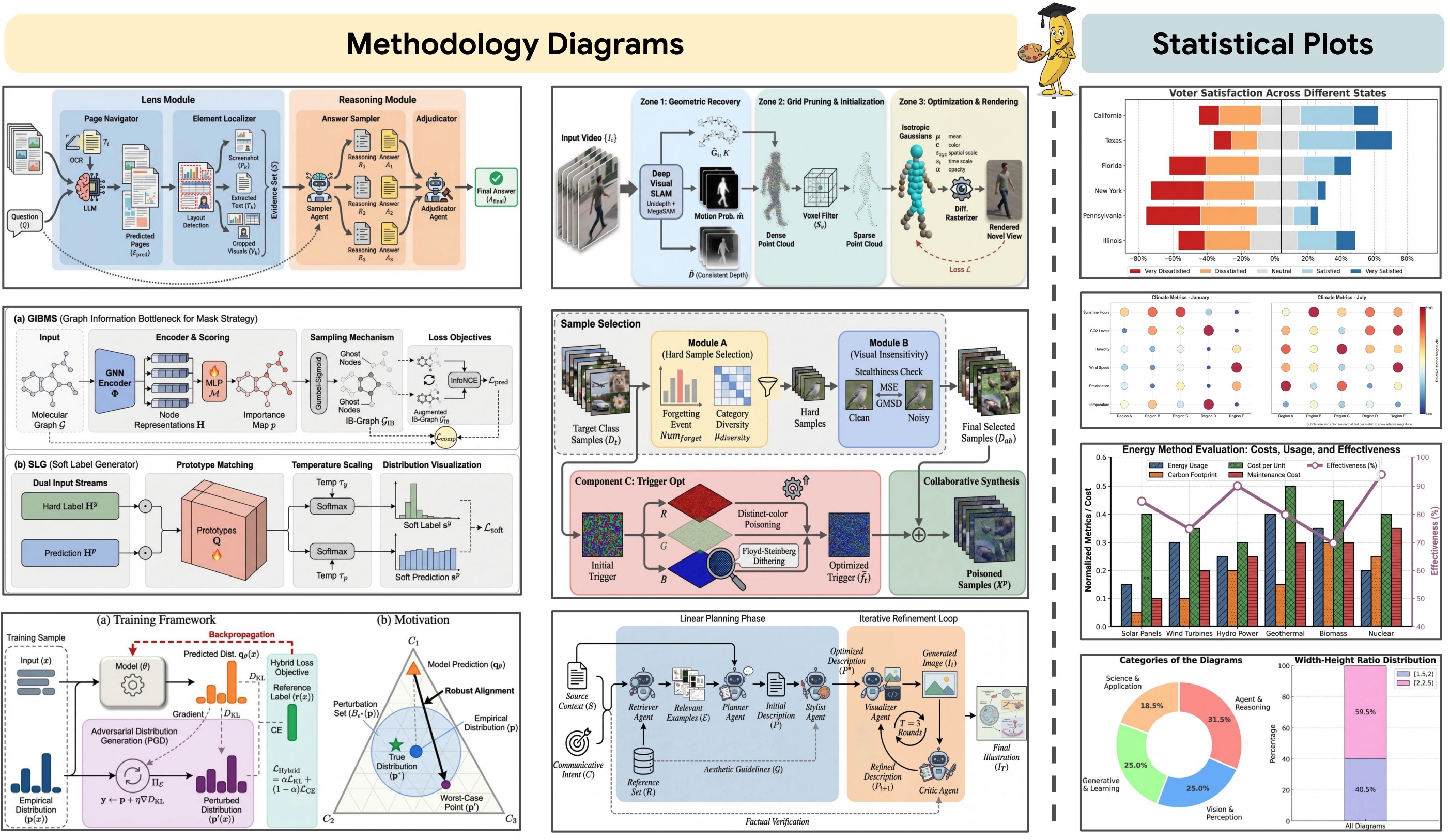
Here are some example diagrams and plots generated by PaperVizAgent (PaperBanana):
## Overview of PaperBanana / PaperVizAgent
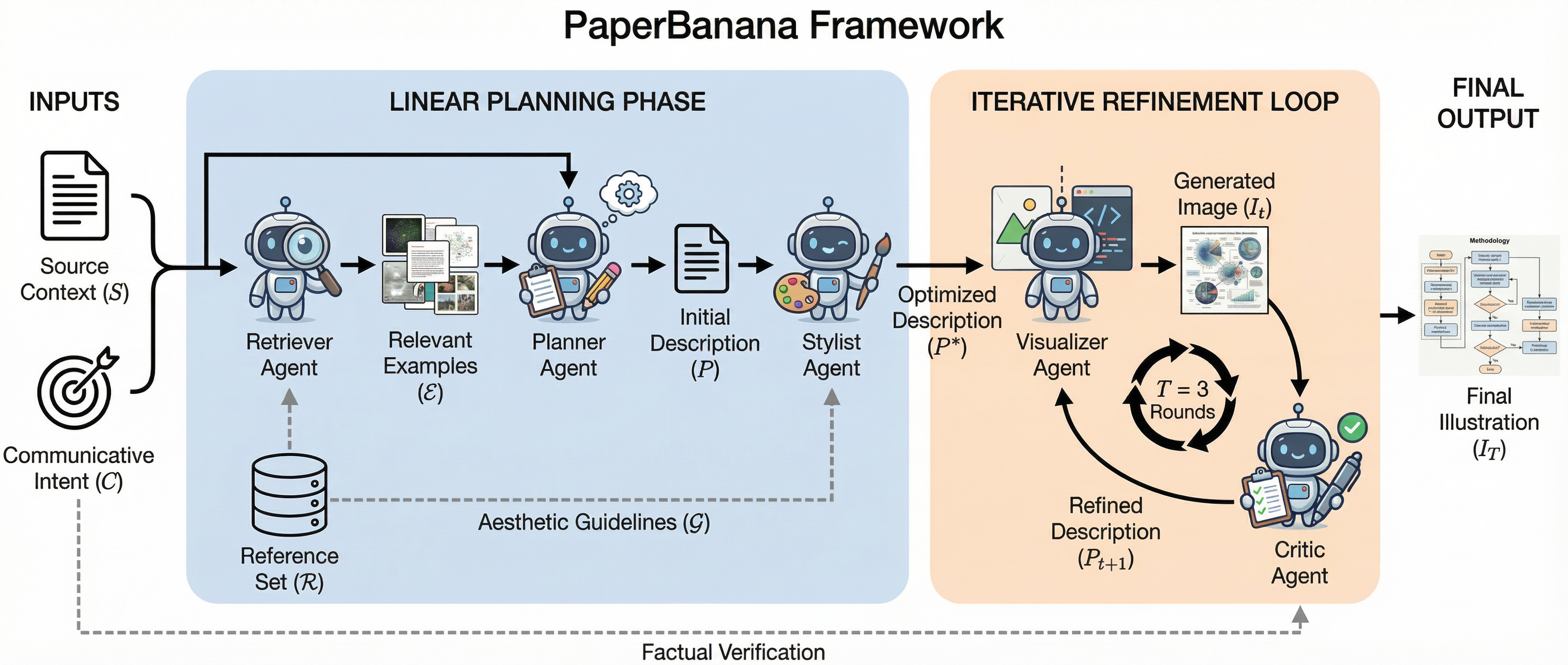
Originally published as **PaperBanana**, PaperVizAgent achieves high-quality academic illustration generation by orchestrating five specialized agents in a structured pipeline:
1. **Retriever Agent**: Identifies the most relevant reference diagrams from a curated collection to guide downstream agents
2. **Planner Agent**: Translates method content and communicative intent into comprehensive textual descriptions using in-context learning
3. **Stylist Agent**: Refines descriptions to adhere to academic aesthetic standards using automatically synthesized style guidelines
4. **Visualizer Agent**: Transforms textual descriptions into visual outputs using state-of-the-art image generation models
5. **Critic Agent**: Forms a closed-loop refinement mechanism with the Visualizer through multi-round iterative improvements
## Quick Start
### Clone the Repo
```bash
git clone [your-repo-url]
cd PaperVizAgent
```
### Configuration
PaperVizAgent supports configuring API keys and Google Cloud settings via environment variables OR a YAML configuration file.
You can duplicate the `configs/model_config.template.yaml` file into `configs/model_config.yaml` to externalize all user configurations. This file is ignored by git to keep your api keys and configurations secret.
### Downloading the Dataset
*PaperBananaBench dataset will be released shortly.*
Once available, you will place it under the `data` directory (e.g., `data/PaperBananaBench/`). The framework is designed to function gracefully without the dataset by bypassing the Retriever Agent's few-shot learning capability.
### Installing the Environment
1. We use `uv` to manage Python packages. Please install `uv` following the instructions [here](https://docs.astral.sh/uv/getting-started/installation/).
2. Create and activate a virtual environment
```bash
uv venv # This will create a virtual environment in the current directory, under .venv/
source .venv/bin/activate # or .venv\Scripts\activate on Windows
```
3. Install python 3.12
```bash
uv python install 3.12
```
4. Install required packages
```bash
uv pip install -r requirements.txt
```
5. Set up API Keys
```bash
export GOOGLE_API_KEY="your_google_api_key" #
export ANTHROPIC_API_KEY="your_anthropic_api_key"
export OPENAI_API_KEY="your_openai_api_key"
```
### Launch PaperVizAgent
#### Interactive Demo (Streamlit)
The easiest way to launch PaperVizAgent is via the interactive Streamlit demo:
```bash
streamlit run demo.py
```
The web interface provides two main workflows:
**1. Generate Candidates Tab**:
- Paste your method section content (Markdown recommended) and provide the figure caption.
- Configure settings (pipeline mode, retrieval setting, number of candidates, aspect ratio, critic rounds).
- Click "Generate Candidates" and wait for parallel processing.
- View results in a grid with evolution timelines and download individual images or batch ZIP.
**2. Refine Image Tab**:
- Upload a generated candidate or any diagram.
- Describe desired changes or request upscaling.
- Select resolution (2K/4K) and aspect ratio.
- Download the refined high-resolution output.
#### Command-Line Interface
You can also run PaperVizAgent from the command line:
```bash
# Basic usage with default settings
python main.py
# Advanced usage with custom settings
python main.py \
--dataset_name "PaperBananaBench" \
--task_name "diagram" \
--split_name "test" \
--exp_mode "dev_full" \
--retrieval_setting "auto"
```
**Available Options:**
- `--dataset_name`: Dataset to use (default: `PaperBananaBench`)
- `--task_name`: Task type - `diagram` or `plot` (default: `diagram`)
- `--split_name`: Dataset split (default: `test`)
- `--exp_mode`: Experiment mode (see section below)
- `--retrieval_setting`: Retrieval strategy - `auto`, `manual`, `random`, or `none` (default: `auto`)
**Experiment Modes:**
- `vanilla`: Direct generation without planning or refinement
- `dev_planner`: Planner → Visualizer only
- `dev_planner_stylist`: Planner → Stylist → Visualizer
- `dev_planner_critic`: Planner → Visualizer → Critic (multi-round)
- `dev_full`: Full pipeline with all agents
- `demo_planner_critic`: Demo mode (Planner → Visualizer → Critic) without evaluation
- `demo_full`: Demo mode (full pipeline) without evaluation
### Visualization Tools
View pipeline evolution and intermediate results:
```bash
streamlit run visualize/show_pipeline_evolution.py
```
View evaluation results:
```bash
streamlit run visualize/show_referenced_eval.py
```
## Project Structure
```
├── .venv/
│ └── ...
├── data/
│ └── PaperBananaBench/
│ ├── diagram/
│ │ ├── images/
│ │ ├── pdfs/
│ │ ├── test.json
│ │ └── ref.json
│ └── plot/
├── agents/
│ ├── __init__.py
│ ├── base_agent.py
│ ├── retriever_agent.py
│ ├── planner_agent.py
│ ├── stylist_agent.py
│ ├── visualizer_agent.py
│ ├── critic_agent.py
│ ├── vanilla_agent.py
│ └── polish_agent.py
├── prompts/
│ ├── __init__.py
│ ├── diagram_eval_prompts.py
│ └── plot_eval_prompts.py
├── style_guides/
│ ├── generate_category_style_guide.py
│ └── ...
├── utils/
│ ├── __init__.py
│ ├── config.py
│ ├── paperviz_processor.py
│ ├── eval_toolkits.py
│ ├── generation_utils.py
│ └── image_utils.py
├── visualize/
│ ├── show_pipeline_evolution.py
│ └── show_referenced_eval.py
├── scripts/
│ ├── run_main.sh
│ ├── run_demo.sh
├── configs/
│ └── model_config.template.yaml
├── results/
│ ├── PaperBananaBench_diagram/
│ └── parallel_demo/
├── main.py
├── demo.py
└── README.md
```
## Key Features
### Multi-Agent Pipeline
- **Reference-Driven**: Learns from curated examples through generative retrieval
- **Iterative Refinement**: Critic-Visualizer loop for progressive quality improvement
- **Style-Aware**: Automatically synthesized aesthetic guidelines ensure academic quality
- **Flexible Modes**: Multiple experiment modes for different use cases
### Interactive Demo
- **Parallel Generation**: Generate up to 20 candidate diagrams simultaneously
- **Pipeline Visualization**: Track the evolution through Planner → Stylist → Critic stages
- **High-Resolution Refinement**: Upscale to 2K/4K using Image Generation APIs
- **Batch Export**: Download all candidates as PNG or ZIP
### Extensible Design
- **Modular Agents**: Each agent is independently configurable
- **Task Support**: Handles both conceptual diagrams and data plots
- **Evaluation Framework**: Built-in evaluation against ground truth with multiple metrics
- **Async Processing**: Efficient batch processing with configurable concurrency
## Citation
If you find this repo helpful, please cite our paper as follows:
```bibtex
@article{zhu2026paperbanana,
title={PaperBanana: Automating Academic Illustration for AI Scientists},
author={Zhu, Dawei and Meng, Rui and Song, Yale and Wei, Xiyu and Li, Sujian and Pfister, Tomas and Yoon, Jinsung},
journal={arXiv preprint arXiv:2601.23265},
year={2026}
}
```
## Disclaimer
This is not an officially supported Google product. This project is not eligible for the [Google Open Source Software Vulnerability Rewards Program](https://bughunters.google.com/open-source-security).
This project is intended for demonstration purposes only. It is not intended for use in a production environment.




