# Agent Development Kit (ADK) for TypeScript
[](LICENSE)
[](https://www.npmjs.com/package/@google/adk)
[](https://www.reddit.com/r/agentdevelopmentkit/)

An open-source, code-first TypeScript toolkit for building, evaluating,
and deploying sophisticated AI agents with flexibility and control.
---
Agent Development Kit (ADK) is a flexible and modular framework for building,
deploying, and orchestrating AI agent workflows, from simple tasks to complex
multi-agent systems. Define agent behavior, orchestration, and tool use directly
in code, enabling robust debugging, versioning, and deployment anywhere.
The TypeScript version of ADK is built for the Node.js and browser ecosystems,
with full type safety, Zod schema validation, and support for ESM, CommonJS, and
web runtimes.
## ✨ Key Features
- **Code-First TypeScript**: Define agent logic, tools, and orchestration with
full type safety. Tool parameters support Zod v3 and v4 schemas with
compile-time type inference.
- **Browser and Server**: Ships ESM, CommonJS, and web bundles. Run agents in
Node.js or directly in the browser.
- **Rich Tool Ecosystem**: Built-in tools for Google Search, Google Maps, Vertex
AI Search, and URL context. Connect MCP servers, wrap any function as a tool,
or add code execution.
- **Multi-Agent Orchestration**: Compose agents into sequential, parallel, loop,
and routed workflows. Delegate to remote agents via the A2A protocol.
- **Dev Tools and CLI**: Interactive dev UI for testing and debugging. CLI
commands for scaffolding (`adk create`), local testing (`adk run`, `adk web`),
and deployment (`adk deploy cloud_run`).
## 🚀 Installation
> **Prerequisite:** ADK for TypeScript requires Node.js 20.19 or newer.
```bash
npm install @google/adk
npm install -D @google/adk-devtools
```
Or with yarn:
```bash
yarn add @google/adk
yarn add -D @google/adk-devtools
```
This installs the core SDK and the dev tools (CLI and dev UI) as a dev
dependency.
## Quick Start
Set up authentication. Get an API key from
[Google AI Studio](https://aistudio.google.com/app/apikey) and put it in a
`.env` file next to your agent:
```bash
echo "GOOGLE_GENAI_API_KEY=your-api-key-here" > .env
```
> Using Vertex AI instead? Set `GOOGLE_GENAI_USE_VERTEXAI=1`,
> `GOOGLE_CLOUD_PROJECT`, and `GOOGLE_CLOUD_LOCATION` in place of the API key,
> and authenticate with `gcloud auth application-default login`.
Define an agent in `agent.ts`:
```typescript
import {LlmAgent, GOOGLE_SEARCH} from '@google/adk';
export const rootAgent = new LlmAgent({
name: 'search_assistant',
description: 'An assistant that can search the web.',
model: 'gemini-flash-latest',
instruction:
'You are a helpful assistant. Answer user questions using Google Search when needed.',
tools: [GOOGLE_SEARCH],
});
```
Run from your agent project directory:
```bash
# Interactive CLI
npx @google/adk-devtools run agent.ts
# Web UI
npx @google/adk-devtools web
```
> Always name the package. If `@google/adk-devtools` is not installed, bare
> `npx adk` silently downloads and runs an unrelated `adk` package from the
> public registry.
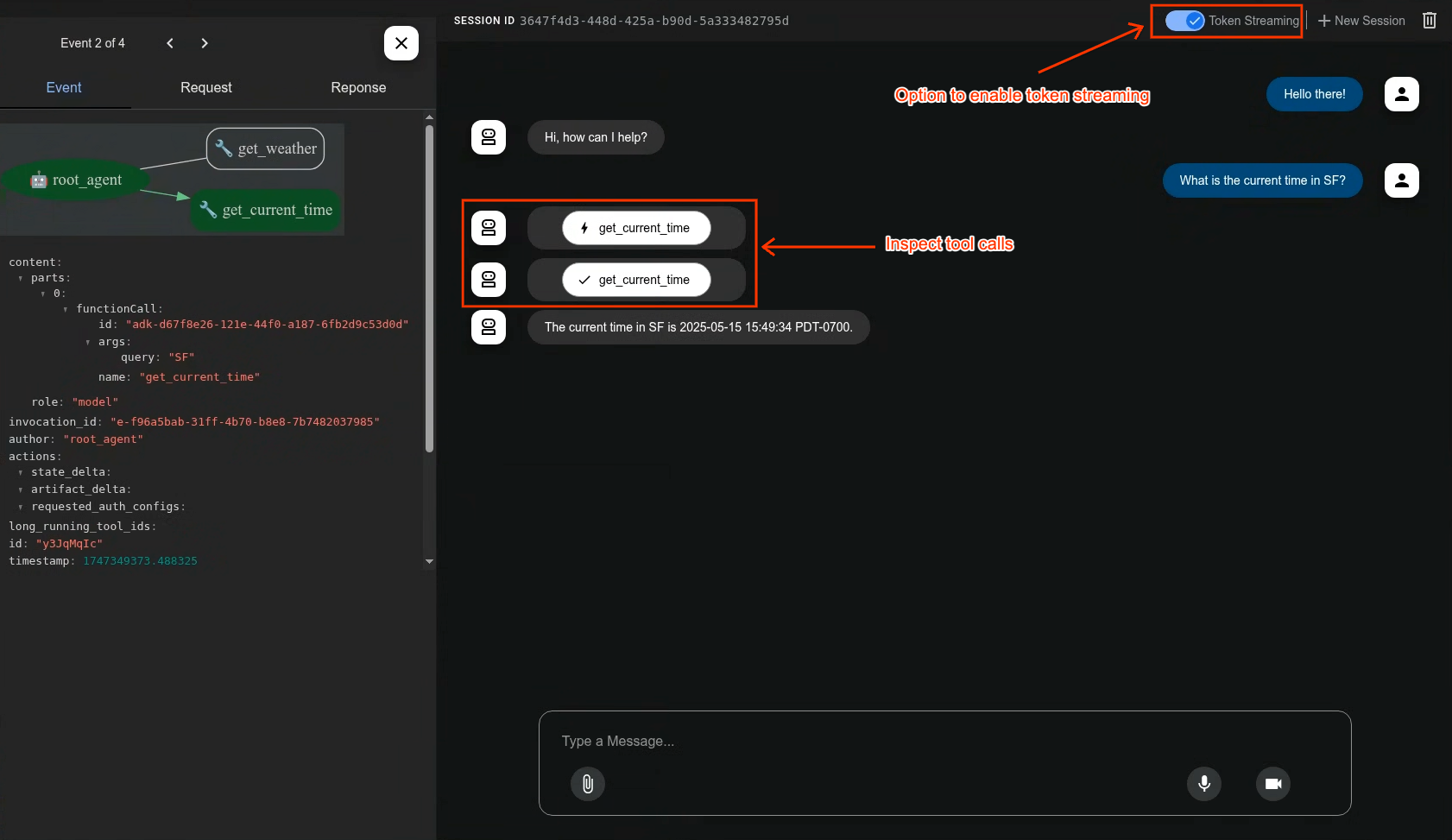
The `adk web` command launches a development UI for testing and debugging
agents:
 ## 📚 Documentation
- **Getting Started**: https://adk.dev/get-started/typescript
- **Samples**: https://github.com/google/adk-samples
- **Developer guides**: [docs/guides/README.md](./docs/guides/README.md)
- **Samples in this repository**:
[graph workflows](./samples/workflows/README.md),
[tools](./samples/tools/README.md),
[code execution](./samples/code_execution/README.md)
## 🤝 Contributing
We welcome contributions from the community! Whether it's bug reports, feature
requests, documentation improvements, or code contributions, please see the
[contributing guide](https://adk.dev/community/contributing-guide/) and
[CONTRIBUTING.md](./CONTRIBUTING.md) to get started.
## 📄 License
This project is licensed under the Apache 2.0 License - see the
[LICENSE](LICENSE) file for details.
## 📚 Documentation
- **Getting Started**: https://adk.dev/get-started/typescript
- **Samples**: https://github.com/google/adk-samples
- **Developer guides**: [docs/guides/README.md](./docs/guides/README.md)
- **Samples in this repository**:
[graph workflows](./samples/workflows/README.md),
[tools](./samples/tools/README.md),
[code execution](./samples/code_execution/README.md)
## 🤝 Contributing
We welcome contributions from the community! Whether it's bug reports, feature
requests, documentation improvements, or code contributions, please see the
[contributing guide](https://adk.dev/community/contributing-guide/) and
[CONTRIBUTING.md](./CONTRIBUTING.md) to get started.
## 📄 License
This project is licensed under the Apache 2.0 License - see the
[LICENSE](LICENSE) file for details.