`.
2. Server's `websocket_endpoint` accepts, starts ADK session (`start_agent_session`).
3. Two `asyncio` tasks manage communication:
* `client_to_agent_messaging`: Client WebSocket messages -> ADK `live_request_queue`.
* `agent_to_client_messaging`: ADK `live_events` -> Client WebSocket.
4. Bidirectional streaming continues until disconnection or error.
## 5. Client code overview {#5.-client-side-code-overview}
The JavaScript `app.js` (in `app/static/js`) manages client-side interaction with the ADK Streaming WebSocket backend. It handles sending text/audio and receiving/displaying streamed responses.
Key functionalities:
1. Manage WebSocket connection.
2. Handle text input.
3. Capture microphone audio (Web Audio API, AudioWorklets).
4. Send text/audio to backend.
5. Receive and render text/audio agent responses.
6. Manage UI.
### Prerequisites
* **HTML Structure:** Requires specific element IDs (e.g., `messageForm`, `message`, `messages`, `sendButton`, `startAudioButton`).
* **Backend Server:** The Python FastAPI server must be running.
* **Audio Worklet Files:** `audio-player.js` and `audio-recorder.js` for audio processing.
### WebSocket Handling
```JavaScript
// Connect the server with a WebSocket connection
const sessionId = Math.random().toString().substring(10);
const ws_url =
"ws://" + window.location.host + "/ws/" + sessionId;
let websocket = null;
let is_audio = false;
// Get DOM elements
const messageForm = document.getElementById("messageForm");
const messageInput = document.getElementById("message");
const messagesDiv = document.getElementById("messages");
let currentMessageId = null;
// WebSocket handlers
function connectWebsocket() {
// Connect websocket
websocket = new WebSocket(ws_url + "?is_audio=" + is_audio);
// Handle connection open
websocket.onopen = function () {
// Connection opened messages
console.log("WebSocket connection opened.");
document.getElementById("messages").textContent = "Connection opened";
// Enable the Send button
document.getElementById("sendButton").disabled = false;
addSubmitHandler();
};
// Handle incoming messages
websocket.onmessage = function (event) {
// Parse the incoming message
const message_from_server = JSON.parse(event.data);
console.log("[AGENT TO CLIENT] ", message_from_server);
// Check if the turn is complete
// if turn complete, add new message
if (
message_from_server.turn_complete &&
message_from_server.turn_complete == true
) {
currentMessageId = null;
return;
}
// If it's audio, play it
if (message_from_server.mime_type == "audio/pcm" && audioPlayerNode) {
audioPlayerNode.port.postMessage(base64ToArray(message_from_server.data));
}
// If it's a text, print it
if (message_from_server.mime_type == "text/plain") {
// add a new message for a new turn
if (currentMessageId == null) {
currentMessageId = Math.random().toString(36).substring(7);
const message = document.createElement("p");
message.id = currentMessageId;
// Append the message element to the messagesDiv
messagesDiv.appendChild(message);
}
// Add message text to the existing message element
const message = document.getElementById(currentMessageId);
message.textContent += message_from_server.data;
// Scroll down to the bottom of the messagesDiv
messagesDiv.scrollTop = messagesDiv.scrollHeight;
}
};
// Handle connection close
websocket.onclose = function () {
console.log("WebSocket connection closed.");
document.getElementById("sendButton").disabled = true;
document.getElementById("messages").textContent = "Connection closed";
setTimeout(function () {
console.log("Reconnecting...");
connectWebsocket();
}, 5000);
};
websocket.onerror = function (e) {
console.log("WebSocket error: ", e);
};
}
connectWebsocket();
// Add submit handler to the form
function addSubmitHandler() {
messageForm.onsubmit = function (e) {
e.preventDefault();
const message = messageInput.value;
if (message) {
const p = document.createElement("p");
p.textContent = "> " + message;
messagesDiv.appendChild(p);
messageInput.value = "";
sendMessage({
mime_type: "text/plain",
data: message,
});
console.log("[CLIENT TO AGENT] " + message);
}
return false;
};
}
// Send a message to the server as a JSON string
function sendMessage(message) {
if (websocket && websocket.readyState == WebSocket.OPEN) {
const messageJson = JSON.stringify(message);
websocket.send(messageJson);
}
}
// Decode Base64 data to Array
function base64ToArray(base64) {
const binaryString = window.atob(base64);
const len = binaryString.length;
const bytes = new Uint8Array(len);
for (let i = 0; i < len; i++) {
bytes[i] = binaryString.charCodeAt(i);
}
return bytes.buffer;
}
```
* **Connection Setup:** Generates `sessionId`, constructs `ws_url`. `is_audio` flag (initially `false`) appends `?is_audio=true` to URL when active. `connectWebsocket()` initializes the connection.
* **`websocket.onopen`**: Enables send button, updates UI, calls `addSubmitHandler()`.
* **`websocket.onmessage`**: Parses incoming JSON from server.
* **Turn Completion:** Resets `currentMessageId` if agent turn is complete.
* **Audio Data (`audio/pcm`):** Decodes Base64 audio (`base64ToArray()`) and sends to `audioPlayerNode` for playback.
* **Text Data (`text/plain`):** If new turn (`currentMessageId` is null), creates new ``. Appends received text to the current message paragraph for streaming effect. Scrolls `messagesDiv`.
* **`websocket.onclose`**: Disables send button, updates UI, attempts auto-reconnection after 5s.
* **`websocket.onerror`**: Logs errors.
* **Initial Connection:** `connectWebsocket()` is called on script load.
#### DOM Interaction & Message Submission
* **Element Retrieval:** Fetches required DOM elements.
* **`addSubmitHandler()`**: Attached to `messageForm`'s submit. Prevents default submission, gets text from `messageInput`, displays user message, clears input, and calls `sendMessage()` with `{ mime_type: "text/plain", data: messageText }`.
* **`sendMessage(messagePayload)`**: Sends JSON stringified `messagePayload` if WebSocket is open.
### Audio Handling
```JavaScript
let audioPlayerNode;
let audioPlayerContext;
let audioRecorderNode;
let audioRecorderContext;
let micStream;
// Import the audio worklets
import { startAudioPlayerWorklet } from "./audio-player.js";
import { startAudioRecorderWorklet } from "./audio-recorder.js";
// Start audio
function startAudio() {
// Start audio output
startAudioPlayerWorklet().then(([node, ctx]) => {
audioPlayerNode = node;
audioPlayerContext = ctx;
});
// Start audio input
startAudioRecorderWorklet(audioRecorderHandler).then(
([node, ctx, stream]) => {
audioRecorderNode = node;
audioRecorderContext = ctx;
micStream = stream;
}
);
}
// Start the audio only when the user clicked the button
// (due to the gesture requirement for the Web Audio API)
const startAudioButton = document.getElementById("startAudioButton");
startAudioButton.addEventListener("click", () => {
startAudioButton.disabled = true;
startAudio();
is_audio = true;
connectWebsocket(); // reconnect with the audio mode
});
// Audio recorder handler
function audioRecorderHandler(pcmData) {
// Send the pcm data as base64
sendMessage({
mime_type: "audio/pcm",
data: arrayBufferToBase64(pcmData),
});
console.log("[CLIENT TO AGENT] sent %s bytes", pcmData.byteLength);
}
// Encode an array buffer with Base64
function arrayBufferToBase64(buffer) {
let binary = "";
const bytes = new Uint8Array(buffer);
const len = bytes.byteLength;
for (let i = 0; i < len; i++) {
binary += String.fromCharCode(bytes[i]);
}
return window.btoa(binary);
}
```
* **Audio Worklets:** Uses `AudioWorkletNode` via `audio-player.js` (for playback) and `audio-recorder.js` (for capture).
* **State Variables:** Store AudioContexts and WorkletNodes (e.g., `audioPlayerNode`).
* **`startAudio()`**: Initializes player and recorder worklets. Passes `audioRecorderHandler` as callback to recorder.
* **"Start Audio" Button (`startAudioButton`):**
* Requires user gesture for Web Audio API.
* On click: disables button, calls `startAudio()`, sets `is_audio = true`, then calls `connectWebsocket()` to reconnect in audio mode (URL includes `?is_audio=true`).
* **`audioRecorderHandler(pcmData)`**: Callback from recorder worklet with PCM audio chunks. Encodes `pcmData` to Base64 (`arrayBufferToBase64()`) and sends to server via `sendMessage()` with `mime_type: "audio/pcm"`.
* **Helper Functions:** `base64ToArray()` (server audio -> client player) and `arrayBufferToBase64()` (client mic audio -> server).
### How It Works (Client-Side Flow)
1. **Page Load:** Establishes WebSocket in text mode.
2. **Text Interaction:** User types/submits text; sent to server. Server text responses displayed, streamed.
3. **Switching to Audio Mode:** "Start Audio" button click initializes audio worklets, sets `is_audio=true`, and reconnects WebSocket in audio mode.
4. **Audio Interaction:** Recorder sends mic audio (Base64 PCM) to server. Server audio/text responses handled by `websocket.onmessage` for playback/display.
5. **Connection Management:** Auto-reconnect on WebSocket close.
## Summary
This article overviews the server and client code for a custom asynchronous web app built with ADK Streaming and FastAPI, enabling real-time, bidirectional voice and text communication.
The Python FastAPI server code initializes ADK agent sessions, configured for text or audio responses. It uses a WebSocket endpoint to handle client connections. Asynchronous tasks manage bidirectional messaging: forwarding client text or Base64-encoded PCM audio to the ADK agent, and streaming text or Base64-encoded PCM audio responses from the agent back to the client.
The client-side JavaScript code manages a WebSocket connection, which can be re-established to switch between text and audio modes. It sends user input (text or microphone audio captured via Web Audio API and AudioWorklets) to the server. Incoming messages from the server are processed: text is displayed (streamed), and Base64-encoded PCM audio is decoded and played using an AudioWorklet.
### Next steps for production
When you will use the Streaming for ADK in production apps, you may want to consinder the following points:
* **Deploy Multiple Instances:** Run several instances of your FastAPI application instead of a single one.
* **Implement Load Balancing:** Place a load balancer in front of your application instances to distribute incoming WebSocket connections.
* **Configure for WebSockets:** Ensure the load balancer supports long-lived WebSocket connections and consider "sticky sessions" (session affinity) to route a client to the same backend instance, *or* design for stateless instances (see next point).
* **Externalize Session State:** Replace the `InMemorySessionService` for ADK with a distributed, persistent session store. This allows any server instance to handle any user's session, enabling true statelessness at the application server level and improving fault tolerance.
* **Implement Health Checks:** Set up robust health checks for your WebSocket server instances so the load balancer can automatically remove unhealthy instances from rotation.
* **Utilize Orchestration:** Consider using an orchestration platform like Kubernetes for automated deployment, scaling, self-healing, and management of your WebSocket server instances.
# Custom Audio Streaming app (SSE) {#custom-streaming}
This article overviews the server and client code for a custom asynchronous web app built with ADK Streaming and [FastAPI](https://fastapi.tiangolo.com/), enabling real-time, bidirectional audio and text communication with Server-Sent Events (SSE). The key features are:
**Server-Side (Python/FastAPI)**:
- FastAPI + ADK integration
- Server-Sent Events for real-time streaming
- Session management with isolated user contexts
- Support for both text and audio communication modes
- Google Search tool integration for grounded responses
**Client-Side (JavaScript/Web Audio API)**:
- Real-time bidirectional communication via SSE and HTTP POST
- Professional audio processing using AudioWorklet processors
- Seamless mode switching between text and audio
- Automatic reconnection and error handling
- Base64 encoding for audio data transmission
There is also a [WebSocket](custom-streaming-ws.md) version of the sample is available.
## 1. Install ADK {#1.-setup-installation}
Create & Activate Virtual Environment (Recommended):
```bash
# Create
python -m venv .venv
# Activate (each new terminal)
# macOS/Linux: source .venv/bin/activate
# Windows CMD: .venv\Scripts\activate.bat
# Windows PowerShell: .venv\Scripts\Activate.ps1
```
Install ADK:
```bash
pip install --upgrade google-adk==1.2.1
```
Set `SSL_CERT_FILE` variable with the following command.
```shell
export SSL_CERT_FILE=$(python -m certifi)
```
Download the sample code:
```bash
git clone --no-checkout https://github.com/google/adk-docs.git
cd adk-docs
git sparse-checkout init --cone
git sparse-checkout set examples/python/snippets/streaming/adk-streaming
git checkout main
cd examples/python/snippets/streaming/adk-streaming/app
```
This sample code has the following files and folders:
```console
adk-streaming/
└── app/ # the web app folder
├── .env # Gemini API key / Google Cloud Project ID
├── main.py # FastAPI web app
├── static/ # Static content folder
| ├── js # JavaScript files folder (includes app.js)
| └── index.html # The web client page
└── google_search_agent/ # Agent folder
├── __init__.py # Python package
└── agent.py # Agent definition
```
## 2\. Set up the platform {#2.-set-up-the-platform}
To run the sample app, choose a platform from either Google AI Studio or Google Cloud Vertex AI:
=== "Gemini - Google AI Studio"
1. Get an API key from [Google AI Studio](https://aistudio.google.com/apikey).
2. Open the **`.env`** file located inside (`app/`) and copy-paste the following code.
```env title=".env"
GOOGLE_GENAI_USE_VERTEXAI=FALSE
GOOGLE_API_KEY=PASTE_YOUR_ACTUAL_API_KEY_HERE
```
3. Replace `PASTE_YOUR_ACTUAL_API_KEY_HERE` with your actual `API KEY`.
=== "Gemini - Google Cloud Vertex AI"
1. You need an existing
[Google Cloud](https://cloud.google.com/?e=48754805&hl=en) account and a
project.
* Set up a
[Google Cloud project](https://cloud.google.com/vertex-ai/generative-ai/docs/start/quickstarts/quickstart-multimodal#setup-gcp)
* Set up the
[gcloud CLI](https://cloud.google.com/vertex-ai/generative-ai/docs/start/quickstarts/quickstart-multimodal#setup-local)
* Authenticate to Google Cloud, from the terminal by running
`gcloud auth login`.
* [Enable the Vertex AI API](https://console.cloud.google.com/flows/enableapi?apiid=aiplatform.googleapis.com).
2. Open the **`.env`** file located inside (`app/`). Copy-paste
the following code and update the project ID and location.
```env title=".env"
GOOGLE_GENAI_USE_VERTEXAI=TRUE
GOOGLE_CLOUD_PROJECT=PASTE_YOUR_ACTUAL_PROJECT_ID
GOOGLE_CLOUD_LOCATION=us-central1
```
## 3\. Interact with Your Streaming app {#3.-interact-with-your-streaming-app}
1\. **Navigate to the Correct Directory:**
To run your agent effectively, make sure you are in the **app folder (`adk-streaming/app`)**
2\. **Start the Fast API**: Run the following command to start CLI interface with
```console
uvicorn main:app --reload
```
3\. **Access the app with the text mode:** Once the app starts, the terminal will display a local URL (e.g., [http://localhost:8000](http://localhost:8000)). Click this link to open the UI in your browser.
Now you should see the UI like this:

Try asking a question `What time is it now?`. The agent will use Google Search to respond to your queries. You would notice that the UI shows the agent's response as streaming text. You can also send messages to the agent at any time, even while the agent is still responding. This demonstrates the bidirectional communication capability of ADK Streaming.
4\. **Access the app with the audio mode:** Now click the `Start Audio` button. The app reconnects with the server in an audio mode, and the UI will show the following dialog for the first time:

Click `Allow while visiting the site`, then you will see the microphone icon will be shown at the top of the browser:

Now you can talk to the agent with voice. Ask questions like `What time is it now?` with voice and you will hear the agent responding in voice too. As Streaming for ADK supports [multiple languages](https://ai.google.dev/gemini-api/docs/live#supported-languages), it can also respond to question in the supported languages.
5\. **Check console logs**
If you are using the Chrome browser, use the right click and select `Inspect` to open the DevTools. On the `Console`, you can see the incoming and outgoing audio data such as `[CLIENT TO AGENT]` and `[AGENT TO CLIENT]`, representing the audio data streaming in and out between the browser and the server.
At the same time, in the app server console, you should see something like this:
```
Client #90766266 connected via SSE, audio mode: false
INFO: 127.0.0.1:52692 - "GET /events/90766266?is_audio=false HTTP/1.1" 200 OK
[CLIENT TO AGENT]: hi
INFO: 127.0.0.1:52696 - "POST /send/90766266 HTTP/1.1" 200 OK
[AGENT TO CLIENT]: text/plain: {'mime_type': 'text/plain', 'data': 'Hi'}
[AGENT TO CLIENT]: text/plain: {'mime_type': 'text/plain', 'data': ' there! How can I help you today?\n'}
[AGENT TO CLIENT]: {'turn_complete': True, 'interrupted': None}
```
These console logs are important in case you develop your own streaming application. In many cases, the communication failure between the browser and server becomes a major cause for the streaming application bugs.
6\. **Troubleshooting tips**
- **When your browser can't connect to the server via SSH proxy:** SSH proxy used in various cloud services may not work with SSE. Please try without SSH proxy, such as using a local laptop, or try the [WebSocket](custom-streaming-ws.md) version.
- **When `gemini-2.5-flash-exp` model doesn't work:** If you see any errors on the app server console with regard to `gemini-2.5-flash-exp` model availability, try replacing it with `gemini-2.5-flash-live-001` on `app/google_search_agent/agent.py` at line 6.
## 4. Agent definition
The agent definition code `agent.py` in the `google_search_agent` folder is where the agent's logic is written:
```py
from google.adk.agents import Agent
from google.adk.tools import google_search # Import the tool
root_agent = Agent(
name="google_search_agent",
model="gemini-2.5-flash-exp", # if this model does not work, try below
#model="gemini-2.5-flash-live-001",
description="Agent to answer questions using Google Search.",
instruction="Answer the question using the Google Search tool.",
tools=[google_search],
)
```
Notice how easily you integrated [grounding with Google Search](https://ai.google.dev/gemini-api/docs/grounding?lang=python#configure-search) capabilities. The `Agent` class and the `google_search` tool handle the complex interactions with the LLM and grounding with the search API, allowing you to focus on the agent's *purpose* and *behavior*.

The server and client architecture enables real-time, bidirectional communication between web clients and AI agents with proper session isolation and resource management.
## 5. Server side code overview {#5.-server-side-code-overview}
The FastAPI server provides real-time communication between web clients and the AI agent.
### Bidirectional communication overview {#4.-bidi-comm-overview}
#### Client-to-Agent Flow:
1. **Connection Establishment** - Client opens SSE connection to `/events/{user_id}`, triggering session creation and storing request queue in `active_sessions`
2. **Message Transmission** - Client sends POST to `/send/{user_id}` with JSON payload containing `mime_type` and `data`
3. **Queue Processing** - Server retrieves session's `live_request_queue` and forwards message to agent via `send_content()` or `send_realtime()`
#### Agent-to-Client Flow:
1. **Event Generation** - Agent processes requests and generates events through `live_events` async generator
2. **Stream Processing** - `agent_to_client_sse()` filters events and formats them as SSE-compatible JSON
3. **Real-time Delivery** - Events stream to client via persistent HTTP connection with proper SSE headers
#### Session Management:
- **Per-User Isolation** - Each user gets unique session stored in `active_sessions` dict
- **Lifecycle Management** - Sessions auto-cleanup on disconnect with proper resource disposal
- **Concurrent Support** - Multiple users can have simultaneous active sessions
#### Error Handling:
- **Session Validation** - POST requests validate session existence before processing
- **Stream Resilience** - SSE streams handle exceptions and perform cleanup automatically
- **Connection Recovery** - Clients can reconnect by re-establishing SSE connection
### Agent Session Management
The `start_agent_session()` function creates isolated AI agent sessions:
```py
async def start_agent_session(user_id, is_audio=False):
"""Starts an agent session"""
# Create a Runner
runner = InMemoryRunner(
app_name=APP_NAME,
agent=root_agent,
)
# Create a Session
session = await runner.session_service.create_session(
app_name=APP_NAME,
user_id=user_id, # Replace with actual user ID
)
# Set response modality
modality = "AUDIO" if is_audio else "TEXT"
run_config = RunConfig(response_modalities=[modality])
# Create a LiveRequestQueue for this session
live_request_queue = LiveRequestQueue()
# Start agent session
live_events = runner.run_live(
session=session,
live_request_queue=live_request_queue,
run_config=run_config,
)
return live_events, live_request_queue
```
- **InMemoryRunner Setup** - Creates a runner instance that manages the agent lifecycle in memory, with the app name "ADK Streaming example" and the Google Search agent.
- **Session Creation** - Uses `runner.session_service.create_session()` to establish a unique session per user ID, enabling multiple concurrent users.
- **Response Modality Configuration** - Sets `RunConfig` with either "AUDIO" or "TEXT" modality based on the `is_audio` parameter, determining output format.
- **LiveRequestQueue** - Creates a bidirectional communication channel that queues incoming requests and enables real-time message passing between client and agent.
- **Live Events Stream** - `runner.run_live()` returns an async generator that yields real-time events from the agent, including partial responses, turn completions, and interruptions.
### Server-Sent Events (SSE) Streaming
The `agent_to_client_sse()` function handles real-time streaming from agent to client:
```py
async def agent_to_client_sse(live_events):
"""Agent to client communication via SSE"""
async for event in live_events:
# If the turn complete or interrupted, send it
if event.turn_complete or event.interrupted:
message = {
"turn_complete": event.turn_complete,
"interrupted": event.interrupted,
}
yield f"data: {json.dumps(message)}\n\n"
print(f"[AGENT TO CLIENT]: {message}")
continue
# Read the Content and its first Part
part: Part = (
event.content and event.content.parts and event.content.parts[0]
)
if not part:
continue
# If it's audio, send Base64 encoded audio data
is_audio = part.inline_data and part.inline_data.mime_type.startswith("audio/pcm")
if is_audio:
audio_data = part.inline_data and part.inline_data.data
if audio_data:
message = {
"mime_type": "audio/pcm",
"data": base64.b64encode(audio_data).decode("ascii")
}
yield f"data: {json.dumps(message)}\n\n"
print(f"[AGENT TO CLIENT]: audio/pcm: {len(audio_data)} bytes.")
continue
# If it's text and a parial text, send it
if part.text and event.partial:
message = {
"mime_type": "text/plain",
"data": part.text
}
yield f"data: {json.dumps(message)}\n\n"
print(f"[AGENT TO CLIENT]: text/plain: {message}")
```
- **Event Processing Loop** - Iterates through `live_events` async generator, processing each event as it arrives from the agent.
- **Turn Management** - Detects conversation turn completion or interruption events and sends JSON messages with `turn_complete` and `interrupted` flags to signal conversation state changes.
- **Content Part Extraction** - Extracts the first `Part` from event content, which contains either text or audio data.
- **Audio Streaming** - Handles PCM audio data by:
- Detecting `audio/pcm` MIME type in `inline_data`
- Base64 encoding raw audio bytes for JSON transmission
- Sending with `mime_type` and `data` fields
- **Text Streaming** - Processes partial text responses by sending incremental text updates as they're generated, enabling real-time typing effects.
- **SSE Format** - All data is formatted as `data: {json}\n\n` following SSE specification for browser EventSource API compatibility.
### HTTP Endpoints and Routing
#### Root Endpoint
**GET /** - Serves `static/index.html` as the main application interface using FastAPI's `FileResponse`.
#### SSE Events Endpoint
```py
@app.get("/events/{user_id}")
async def sse_endpoint(user_id: int, is_audio: str = "false"):
"""SSE endpoint for agent to client communication"""
# Start agent session
user_id_str = str(user_id)
live_events, live_request_queue = await start_agent_session(user_id_str, is_audio == "true")
# Store the request queue for this user
active_sessions[user_id_str] = live_request_queue
print(f"Client #{user_id} connected via SSE, audio mode: {is_audio}")
def cleanup():
live_request_queue.close()
if user_id_str in active_sessions:
del active_sessions[user_id_str]
print(f"Client #{user_id} disconnected from SSE")
async def event_generator():
try:
async for data in agent_to_client_sse(live_events):
yield data
except Exception as e:
print(f"Error in SSE stream: {e}")
finally:
cleanup()
return StreamingResponse(
event_generator(),
media_type="text/event-stream",
headers={
"Cache-Control": "no-cache",
"Connection": "keep-alive",
"Access-Control-Allow-Origin": "*",
"Access-Control-Allow-Headers": "Cache-Control"
}
)
```
**GET /events/{user_id}** - Establishes persistent SSE connection:
- **Parameters** - Takes `user_id` (int) and optional `is_audio` query parameter (defaults to "false")
- **Session Initialization** - Calls `start_agent_session()` and stores the `live_request_queue` in `active_sessions` dict using `user_id` as key
- **StreamingResponse** - Returns `StreamingResponse` with:
- `event_generator()` async function that wraps `agent_to_client_sse()`
- MIME type: `text/event-stream`
- CORS headers for cross-origin access
- Cache-control headers to prevent caching
- **Cleanup Logic** - Handles connection termination by closing the request queue and removing from active sessions, with error handling for stream interruptions.
#### Message Sending Endpoint
```py
@app.post("/send/{user_id}")
async def send_message_endpoint(user_id: int, request: Request):
"""HTTP endpoint for client to agent communication"""
user_id_str = str(user_id)
# Get the live request queue for this user
live_request_queue = active_sessions.get(user_id_str)
if not live_request_queue:
return {"error": "Session not found"}
# Parse the message
message = await request.json()
mime_type = message["mime_type"]
data = message["data"]
# Send the message to the agent
if mime_type == "text/plain":
content = Content(role="user", parts=[Part.from_text(text=data)])
live_request_queue.send_content(content=content)
print(f"[CLIENT TO AGENT]: {data}")
elif mime_type == "audio/pcm":
decoded_data = base64.b64decode(data)
live_request_queue.send_realtime(Blob(data=decoded_data, mime_type=mime_type))
print(f"[CLIENT TO AGENT]: audio/pcm: {len(decoded_data)} bytes")
else:
return {"error": f"Mime type not supported: {mime_type}"}
return {"status": "sent"}
```
**POST /send/{user_id}** - Receives client messages:
- **Session Lookup** - Retrieves `live_request_queue` from `active_sessions` or returns error if session doesn't exist
- **Message Processing** - Parses JSON with `mime_type` and `data` fields:
- **Text Messages** - Creates `Content` with `Part.from_text()` and sends via `send_content()`
- **Audio Messages** - Base64 decodes PCM data and sends via `send_realtime()` with `Blob`
- **Error Handling** - Returns appropriate error responses for unsupported MIME types or missing sessions.
## 6. Client side code overview {#6.-client-side-code-overview}
The client-side consists of a web interface with real-time communication and audio capabilities:
### HTML Interface (`static/index.html`)
```html
ADK Streaming Test (Audio)
ADK Streaming Test
```
Simple web interface with:
- **Messages Display** - Scrollable div for conversation history
- **Text Input Form** - Input field and send button for text messages
- **Audio Control** - Button to enable audio mode and microphone access
### Main Application Logic (`static/js/app.js`)
#### Session Management (`app.js`)
```js
const sessionId = Math.random().toString().substring(10);
const sse_url =
"http://" + window.location.host + "/events/" + sessionId;
const send_url =
"http://" + window.location.host + "/send/" + sessionId;
let is_audio = false;
```
- **Random Session ID** - Generates unique session ID for each browser instance
- **URL Construction** - Builds SSE and send endpoints with session ID
- **Audio Mode Flag** - Tracks whether audio mode is enabled
#### Server-Sent Events Connection (`app.js`)
**connectSSE()** function handles real-time server communication:
```js
// SSE handlers
function connectSSE() {
// Connect to SSE endpoint
eventSource = new EventSource(sse_url + "?is_audio=" + is_audio);
// Handle connection open
eventSource.onopen = function () {
// Connection opened messages
console.log("SSE connection opened.");
document.getElementById("messages").textContent = "Connection opened";
// Enable the Send button
document.getElementById("sendButton").disabled = false;
addSubmitHandler();
};
// Handle incoming messages
eventSource.onmessage = function (event) {
...
};
// Handle connection close
eventSource.onerror = function (event) {
console.log("SSE connection error or closed.");
document.getElementById("sendButton").disabled = true;
document.getElementById("messages").textContent = "Connection closed";
eventSource.close();
setTimeout(function () {
console.log("Reconnecting...");
connectSSE();
}, 5000);
};
}
```
- **EventSource Setup** - Creates SSE connection with audio mode parameter
- **Connection Handlers**:
- **onopen** - Enables send button and form submission when connected
- **onmessage** - Processes incoming messages from agent
- **onerror** - Handles disconnections with auto-reconnect after 5 seconds
#### Message Processing (`app.js`)
Handles different message types from server:
```js
// Handle incoming messages
eventSource.onmessage = function (event) {
// Parse the incoming message
const message_from_server = JSON.parse(event.data);
console.log("[AGENT TO CLIENT] ", message_from_server);
// Check if the turn is complete
// if turn complete, add new message
if (
message_from_server.turn_complete &&
message_from_server.turn_complete == true
) {
currentMessageId = null;
return;
}
// If it's audio, play it
if (message_from_server.mime_type == "audio/pcm" && audioPlayerNode) {
audioPlayerNode.port.postMessage(base64ToArray(message_from_server.data));
}
// If it's a text, print it
if (message_from_server.mime_type == "text/plain") {
// add a new message for a new turn
if (currentMessageId == null) {
currentMessageId = Math.random().toString(36).substring(7);
const message = document.createElement("p");
message.id = currentMessageId;
// Append the message element to the messagesDiv
messagesDiv.appendChild(message);
}
// Add message text to the existing message element
const message = document.getElementById(currentMessageId);
message.textContent += message_from_server.data;
// Scroll down to the bottom of the messagesDiv
messagesDiv.scrollTop = messagesDiv.scrollHeight;
}
```
- **Turn Management** - Detects `turn_complete` to reset message state
- **Audio Playback** - Decodes Base64 PCM data and sends to audio worklet
- **Text Display** - Creates new message elements and appends partial text updates for real-time typing effect
#### Message Sending (`app.js`)
**sendMessage()** function sends data to server:
```js
async function sendMessage(message) {
try {
const response = await fetch(send_url, {
method: 'POST',
headers: {
'Content-Type': 'application/json',
},
body: JSON.stringify(message)
});
if (!response.ok) {
console.error('Failed to send message:', response.statusText);
}
} catch (error) {
console.error('Error sending message:', error);
}
}
```
- **HTTP POST** - Sends JSON payload to `/send/{session_id}` endpoint
- **Error Handling** - Logs failed requests and network errors
- **Message Format** - Standardized `{mime_type, data}` structure
### Audio Player (`static/js/audio-player.js`)
**startAudioPlayerWorklet()** function:
- **AudioContext Setup** - Creates context with 24kHz sample rate for playback
- **Worklet Loading** - Loads PCM player processor for audio handling
- **Audio Pipeline** - Connects worklet node to audio destination (speakers)
### Audio Recorder (`static/js/audio-recorder.js`)
**startAudioRecorderWorklet()** function:
- **AudioContext Setup** - Creates context with 16kHz sample rate for recording
- **Microphone Access** - Requests user media permissions for audio input
- **Audio Processing** - Connects microphone to recorder worklet
- **Data Conversion** - Converts Float32 samples to 16-bit PCM format
### Audio Worklet Processors
#### PCM Player Processor (`static/js/pcm-player-processor.js`)
**PCMPlayerProcessor** class handles audio playback:
- **Ring Buffer** - Circular buffer for 180 seconds of 24kHz audio
- **Data Ingestion** - Converts Int16 to Float32 and stores in buffer
- **Playback Loop** - Continuously reads from buffer to output channels
- **Overflow Handling** - Overwrites oldest samples when buffer is full
#### PCM Recorder Processor (`static/js/pcm-recorder-processor.js`)
**PCMProcessor** class captures microphone input:
- **Audio Input** - Processes incoming audio frames
- **Data Transfer** - Copies Float32 samples and posts to main thread via message port
#### Mode Switching:
- **Audio Activation** - "Start Audio" button enables microphone and reconnects SSE with audio flag
- **Seamless Transition** - Closes existing connection and establishes new audio-enabled session
The client architecture enables seamless real-time communication with both text and audio modalities, using modern web APIs for professional-grade audio processing.
## Summary
This application demonstrates a complete real-time AI agent system with the following key features:
**Architecture Highlights**:
- **Real-time**: Streaming responses with partial text updates and continuous audio
- **Robust**: Comprehensive error handling and automatic recovery mechanisms
- **Modern**: Uses latest web standards (AudioWorklet, SSE, ES6 modules)
The system provides a foundation for building sophisticated AI applications that require real-time interaction, web search capabilities, and multimedia communication.
### Next steps for production
To deploy this system in a production environment, consider implementing the following improvements:
#### Security
- **Authentication**: Replace random session IDs with proper user authentication
- **API Key Security**: Use environment variables or secret management services
- **HTTPS**: Enforce TLS encryption for all communications
- **Rate Limiting**: Prevent abuse and control API costs
#### Scalability
- **Persistent Storage**: Replace in-memory sessions with a persistent session
- **Load Balancing**: Support multiple server instances with shared session state
- **Audio Optimization**: Implement compression to reduce bandwidth usage
#### Monitoring
- **Error Tracking**: Monitor and alert on system failures
- **API Cost Monitoring**: Track Google Search and Gemini usage to prevent budget overruns
- **Performance Metrics**: Monitor response times and audio latency
#### Infrastructure
- **Containerization**: Package with Docker for consistent deployments with Cloud Run or Agent Engine
- **Health Checks**: Implement endpoint monitoring for uptime tracking
# ADK Bidi-streaming development guide: Part 1 - Introduction
Welcome to the world of bidirectional streaming with [Agent Development Kit (ADK)](https://google.github.io/adk-docs/). This article will transform your understanding of AI agent communication from traditional request-response patterns to dynamic, real-time conversations that feel as natural as talking to another person.
Imagine building an AI assistant that doesn't just wait for you to finish speaking before responding, but actively listens and can be interrupted mid-sentence when you have a sudden thought. Picture creating customer support bots that handle audio, video, and text simultaneously while maintaining context throughout the conversation. This is the power of bidirectional streaming, and ADK makes it accessible to every developer.
## 1.1 What is Bidi-streaming?
Bidi-streaming (Bidirectional streaming) represents a fundamental shift from traditional AI interactions. Instead of the rigid "ask-and-wait" pattern, it enables **real-time, two-way communication** where both human and AI can speak, listen, and respond simultaneously. This creates natural, human-like conversations with immediate responses and the revolutionary ability to interrupt ongoing interactions.
Think of the difference between sending emails and having a phone conversation. Traditional AI interactions are like emails—you send a complete message, wait for a complete response, then send another complete message. Bidirectional streaming is like a phone conversation—fluid, natural, with the ability to interrupt, clarify, and respond in real-time.
### Key Characteristics
These characteristics distinguish bidirectional streaming from traditional AI interactions and make it uniquely powerful for creating engaging user experiences:
- **Two-way Communication**: Continuous data exchange without waiting for complete responses. Either the user and AI can start responding to the first few words of your question while you're still speaking, creating an experience that feels genuinely conversational rather than transactional.
- **Responsive Interruption**: Perhaps the most important feature for the natural user experience—users can interrupt the agent mid-response with new input, just like in human conversation. If an AI is explaining quantum physics and you suddenly ask "wait, what's an electron?", the AI stops immediately and addresses your question.
- **Best for Multimodal**: Simultaneous support for text, audio, and video inputs creates rich, natural interactions. Users can speak while showing documents, type follow-up questions during voice calls, or seamlessly switch between communication modes without losing context.
```mermaid
sequenceDiagram
participant Client as User
participant Agent
Client->>Agent: "Hi!"
Client->>Agent: "Explain the history of Japan"
Agent->>Client: "Hello!"
Agent->>Client: "Sure! Japan's history is a..." (partial content)
Client->>Agent: "Ah, wait."
Agent->>Client: "OK, how can I help?" (interrupted = True)
```
### Difference from Other Streaming Types
Understanding how bidirectional streaming differs from other approaches is crucial for appreciating its unique value. The streaming landscape includes several distinct patterns, each serving different use cases:
!!! info "Streaming Types Comparison"
**Bidi-streaming** differs fundamentally from other streaming approaches:
- **Server-Side Streaming**: One-way data flow from server to client. Like watching a live video stream—you receive continuous data but can't interact with it in real-time. Useful for dashboards or live feeds, but not for conversations.
- **Token-Level Streaming**: Sequential text token delivery without interruption. The AI generates response word-by-word, but you must wait for completion before sending new input. Like watching someone type a message in real-time—you see it forming, but can't interrupt.
- **Bidirectional Streaming**: Full two-way communication with interruption support. True conversational AI where both parties can speak, listen, and respond simultaneously. This is what enables natural dialogue where you can interrupt, clarify, or change topics mid-conversation.
### Real-World Applications
Bidirectional streaming revolutionizes agentic AI applications by enabling agents to operate with human-like responsiveness and intelligence. These applications showcase how streaming transforms static AI interactions into dynamic, agent-driven experiences that feel genuinely intelligent and proactive.
In a video of the [Shopper's Concierge demo](https://www.youtube.com/watch?v=LwHPYyw7u6U), the multimodal, bi-directional streaming feature significantly improve the user experience of e-commerce by enabling a faster and more intuitive shopping experience. The combination of conversational understanding and rapid, parallelized searching culminates in advanced capabilities like virtual try-on, boosting buyer confidence and reducing the friction of online shopping.
Also, you can think of many possible real-world applications for bidirectional streaming:
1. **Customer Service & Contact Centers**: This is the most direct application. The technology can create sophisticated virtual agents that go far beyond traditional chatbots.
- **Use case**: A customer calls a retail company's support line about a defective product.
- **Multimodality (video)**: The customer can say, "My coffee machine is leaking from the bottom, let me show you." They can then use their phone's camera to stream live video of the issue. The AI agent can use its vision capabilities to identify the model and the specific point of failure.
- **Live Interaction & Interruption**: If the agent says, "Okay, I'm processing a return for your Model X coffee maker," the customer can interrupt with, "No, wait, it's the Model Y Pro," and the agent can immediately correct its course without restarting the conversation.
1. **Field Service & Technical Assistance**: Technicians working on-site can use a hands-free, voice-activated assistant to get real-time help.
- **Use Case**: An HVAC technician is on-site trying to diagnose a complex commercial air conditioning unit.
- **Multimodality (Video & Voice)**: The technician, wearing smart glasses or using a phone, can stream their point-of-view to the AI agent. They can ask, "I'm hearing a strange noise from this compressor. Can you identify it and pull up the diagnostic flowchart for this model?"
- **Live Interaction**: The agent can guide the technician step-by-step, and the technician can ask clarifying questions or interrupt at any point without taking their hands off their tools.
1. **Healthcare & Telemedicine**: The agent can serve as a first point of contact for patient intake, triage, and basic consultations.
- **Use Case**: A patient uses a provider's app for a preliminary consultation about a skin condition.
- **Multimodality (Video/Image)**: The patient can securely share a live video or high-resolution image of a rash. The AI can perform a preliminary analysis and ask clarifying questions.
1. **Financial Services & Wealth Management**: An agent can provide clients with a secure, interactive, and data-rich way to manage their finances.
- **Use Case**: A client wants to review their investment portfolio and discuss market trends.
- **Multimodality (Screen Sharing)**: The agent can share its screen to display charts, graphs, and portfolio performance data. The client could also share their screen to point to a specific news article and ask, "What is the potential impact of this event on my tech stocks?"
- **Live Interaction**: Analyze the client's current portfolio allocation by accessing their account data.Simulate the impact of a potential trade on the portfolio's risk profile.
## 1.2 ADK Bidi-streaming Architecture Overview
ADK Bidi-streaming architecture enables bidirectional AI conversations feel as natural as human dialogue. The architecture seamlessly integrates with Google's [Gemini Live API](https://ai.google.dev/gemini-api/docs/live) through a sophisticated pipeline that has been designed for low latency and high-throughput communication.
The system handles the complex orchestration required for real-time streaming—managing multiple concurrent data flows, handling interruptions gracefully, processing multimodal inputs simultaneously, and maintaining conversation state across dynamic interactions. ADK Bidi-streaming abstracts this complexity into simple, intuitive APIs that developers can use without needing to understand the intricate details of streaming protocols or AI model communication patterns.
### High-Level Architecture
```mermaid
graph TB
subgraph "Application"
subgraph "Client"
C1["Web / Mobile"]
end
subgraph "Transport Layer"
T1["WebSocket / SSE (e.g. FastAPI)"]
end
end
subgraph "ADK"
subgraph "ADK Bidi-streaming"
L1[LiveRequestQueue]
L2[Runner]
L3[Agent]
L4[LLM Flow]
end
subgraph "LLM Integration"
G1[GeminiLlmConnection]
G2[Gemini Live API]
end
end
C1 <--> T1
T1 -->|"live_request_queue.send()"| L1
L1 -->|"runner.run_live(queue)"| L2
L2 -->|"agent.run_live()"| L3
L3 -->|"_llm_flow.run_live()"| L4
L4 -->|"llm.connect()"| G1
G1 <--> G2
G1 -->|"yield LlmResponse"| L4
L4 -->|"yield Event"| L3
L3 -->|"yield Event"| L2
L2 -->|"yield Event"| T1
classDef external fill:#e1f5fe,stroke:#01579b,stroke-width:2px
classDef adk fill:#f3e5f5,stroke:#4a148c,stroke-width:2px
class C1,T1,L3 external
class L1,L2,L4,G1,G2 adk
```
| Developer provides: | ADK provides: | Gemini provides: |
|:----------------------------|:------------------|:------------------------------|
| **Web / Mobile**: Frontend applications that users interact with, handling UI/UX, user input capture, and response display
**[WebSocket](https://developer.mozilla.org/en-US/docs/Web/API/WebSocket) / [SSE](https://developer.mozilla.org/en-US/docs/Web/API/Server-sent_events) Server**: Real-time communication server (such as [FastAPI](https://fastapi.tiangolo.com/)) that manages client connections, handles streaming protocols, and routes messages between clients and ADK
**Agent**: Custom AI agent definition with specific instructions, tools, and behavior tailored to your application's needs | **[LiveRequestQueue](https://github.com/google/adk-python/blob/main/src/google/adk/agents/live_request_queue.py)**: Message queue that buffers and sequences incoming user messages (text content, audio blobs, control signals) for orderly processing by the agent
**[Runner](https://github.com/google/adk-python/blob/main/src/google/adk/runners.py)**: Execution engine that orchestrates agent sessions, manages conversation state, and provides the `run_live()` streaming interface
**[LLM Flow](https://github.com/google/adk-python/blob/main/src/google/adk/flows/llm_flows/base_llm_flow.py)**: Processing pipeline that handles streaming conversation logic, manages context, and coordinates with language models
**[GeminiLlmConnection](https://github.com/google/adk-python/blob/main/src/google/adk/models/gemini_llm_connection.py)**: Abstraction layer that bridges ADK's streaming architecture with Gemini Live API, handling protocol translation and connection management | **[Gemini Live API](https://ai.google.dev/gemini-api/docs/live)**: Google's real-time language model service that processes streaming input, generates responses, handles interruptions, supports multimodal content (text, audio, video), and provides advanced AI capabilities like function calling and contextual understanding |
## 1.3 Setting Up Your Development Environment
Now that you understand the gist of ADK Bidi-streaming architecture and the value it provides, it's time to get hands-on experience. This section will prepare your development environment so you can start building the streaming agents and applications described in the previous sections.
By the end of this setup, you'll have everything needed to create the intelligent voice assistants, proactive customer support agents, and multi-agent collaboration platforms we've discussed. The setup process is straightforward—ADK handles the complex streaming infrastructure, so you can focus on building your agent's unique capabilities rather than wrestling with low-level streaming protocols.
### Installation Steps
#### 1. Create Virtual Environment (Recommended)
```bash
# Create virtual environment
python -m venv .venv
# Activate virtual environment
# macOS/Linux:
source .venv/bin/activate
# Windows CMD:
# .venv\Scripts\activate.bat
# Windows PowerShell:
# .venv\Scripts\Activate.ps1
```
#### 2. Install ADK
Create a `requirements.txt` file in your project root. Note that `google-adk` library includes FastAPI and uvicorn that you can use as the web server for bidi-streaming applications.
```txt
google-adk==1.3.0
python-dotenv>=1.0.0
```
Install all dependencies:
```bash
pip install -r requirements.txt
```
#### 3. Set SSL Certificate Path (macOS only)
```bash
# Required for proper SSL handling on macOS
export SSL_CERT_FILE=$(python -m certifi)
```
#### 4. Set Up API Keys
Choose your preferred platform for running agents:
=== "Google AI Studio"
1. Get an API key from [Google AI Studio](https://aistudio.google.com/apikey)
2. Create a `.env` file in your project root:
```env
GOOGLE_GENAI_USE_VERTEXAI=FALSE
GOOGLE_API_KEY=your_actual_api_key_here
```
=== "Google Cloud Vertex AI"
1. Set up [Google Cloud project](https://cloud.google.com/vertex-ai/generative-ai/docs/start/quickstarts/quickstart-multimodal#setup-gcp)
2. Install and configure [gcloud CLI](https://cloud.google.com/vertex-ai/generative-ai/docs/start/quickstarts/quickstart-multimodal#setup-local)
3. Authenticate: `gcloud auth login`
4. [Enable Vertex AI API](https://console.cloud.google.com/flows/enableapi?apiid=aiplatform.googleapis.com)
5. Create a `.env` file in your project root:
```env
GOOGLE_GENAI_USE_VERTEXAI=TRUE
GOOGLE_CLOUD_PROJECT=your_actual_project_id
GOOGLE_CLOUD_LOCATION=us-central1
```
#### 5. Create Environment Setup Script
We will create the validation script that will verify your installation:
```bash
# Create the directory structure
mkdir -p src/part1
```
Create `src/part1/1-3-1_environment_setup.py`:
```python
#!/usr/bin/env python3
"""
Part 1.3.1: Environment Setup Validation
Comprehensive script to validate ADK streaming environment configuration.
"""
import os
import sys
from pathlib import Path
from dotenv import load_dotenv
def validate_environment():
"""Validate ADK streaming environment setup."""
print("🔧 ADK Streaming Environment Validation")
print("=" * 45)
# Load environment variables
env_path = Path(__file__).parent.parent.parent / '.env'
if env_path.exists():
load_dotenv(env_path)
print(f"✓ Environment file loaded: {env_path}")
else:
print(f"❌ Environment file not found: {env_path}")
return False
# Check Python version
python_version = sys.version_info
if python_version >= (3, 8):
print(f"✓ Python version: {python_version.major}.{python_version.minor}.{python_version.micro}")
else:
print(f"❌ Python version {python_version.major}.{python_version.minor} - requires 3.8+")
return False
# Test ADK installation
try:
import google.adk
print(f"✓ ADK import successful")
# Try to get version if available
try:
from google.adk.version import __version__
print(f"✓ ADK version: {__version__}")
except:
print("ℹ️ ADK version info not available")
except ImportError as e:
print(f"❌ ADK import failed: {e}")
return False
# Check essential imports
essential_imports = [
('google.adk.agents', 'Agent, LiveRequestQueue'),
('google.adk.runners', 'InMemoryRunner'),
('google.genai.types', 'Content, Part, Blob'),
]
for module, components in essential_imports:
try:
__import__(module)
print(f"✓ Import: {module}")
except ImportError as e:
print(f"❌ Import failed: {module} - {e}")
return False
# Validate environment variables
env_checks = [
('GOOGLE_GENAI_USE_VERTEXAI', 'Platform configuration'),
('GOOGLE_API_KEY', 'API authentication'),
]
for env_var, description in env_checks:
value = os.getenv(env_var)
if value:
# Mask API key for security
display_value = value if env_var != 'GOOGLE_API_KEY' else f"{value[:10]}..."
print(f"✓ {description}: {display_value}")
else:
print(f"❌ Missing: {env_var} ({description})")
return False
# Test basic ADK functionality
try:
from google.adk.agents import LiveRequestQueue
from google.genai.types import Content, Part
# Create test queue
queue = LiveRequestQueue()
test_content = Content(parts=[Part(text="Test message")])
queue.send_content(test_content)
queue.close()
print("✓ Basic ADK functionality test passed")
except Exception as e:
print(f"❌ ADK functionality test failed: {e}")
return False
print("\n🎉 Environment validation successful!")
print("\nNext steps:")
print("• Start building your streaming agents in src/agents/")
print("• Create custom tools in src/tools/")
print("• Add utility functions in src/utils/")
print("• Test with Part 3 examples")
return True
def main():
"""Run environment validation."""
try:
success = validate_environment()
sys.exit(0 if success else 1)
except KeyboardInterrupt:
print("\n\n⚠️ Validation interrupted by user")
sys.exit(1)
except Exception as e:
print(f"\n❌ Unexpected error: {e}")
sys.exit(1)
if __name__ == "__main__":
main()
```
### Project Structure
Now your streaming project should now have this structure:
```text
your-streaming-project/
├── .env # Environment variables (API keys)
├── requirements.txt # Python dependencies
└── src/
└── part1/
└── 1-3-1_environment_setup.py # Environment validation script
```
### Run It
Use our complete environment setup script to ensure everything is configured correctly:
```bash
python src/part1/1-3-1_environment_setup.py
```
!!! example "Expected Output"
When you run the validation script, you should see output similar to this:
```
🔧 ADK Streaming Environment Validation
=============================================
✓ Environment file loaded: /path/to/your-streaming-project/.env
✓ Python version: 3.12.8
✓ ADK import successful
✓ ADK version: 1.3.0
✓ Import: google.adk.agents
✓ Import: google.adk.runners
✓ Import: google.genai.types
✓ Platform configuration: FALSE
✓ API authentication: AIzaSyAolZ...
✓ Basic ADK functionality test passed
🎉 Environment validation successful!
```
This comprehensive validation script checks:
- ADK installation and version
- Required environment variables
- API key validation
- Basic import verification
### Next Steps
With your environment set up, you're ready to dive into the core streaming APIs. In the next part (coming soon), You'll learn about:
- **LiveRequestQueue**: The heart of bidirectional communication
- **run_live() method**: Starting streaming sessions
- **Event processing**: Handling real-time responses
- **Gemini Live API**: Direct integration patterns
# Bidi-streaming(live) in ADK
!!! info
This is an experimental feature. Currrently available in Python.
!!! info
This is different from server-side streaming or token-level streaming. This section is for bidi-streaming(live).
Bidi-streaming (live) in ADK adds the low-latency bidirectional voice and video interaction
capability of [Gemini Live API](https://ai.google.dev/gemini-api/docs/live) to
AI agents.
With bidi-streaming (live) mode, you can provide end users with the experience of natural,
human-like voice conversations, including the ability for the user to interrupt
the agent's responses with voice commands. Agents with streaming can process
text, audio, and video inputs, and they can provide text and audio output.
- :material-console-line: **Quickstart (Bidi-streaming)**
---
In this quickstart, you'll build a simple agent and use streaming in ADK to
implement low-latency and bidirectional voice and video communication.
- [Quickstart (Bidi-streaming)](../get-started/streaming/quickstart-streaming.md)
- :material-console-line: **Custom Audio Streaming app sample**
---
This article overviews the server and client code for a custom asynchronous web app built with ADK Streaming and FastAPI, enabling real-time, bidirectional audio and text communication with both Server Sent Events (SSE) and WebSockets.
- [Custom Audio Streaming app sample (SSE)](custom-streaming.md)
- [Custom Audio Streaming app sample (WebSockets)](custom-streaming-ws.md)
- :material-console-line: **Bidi-streaming development guide series**
---
A series of articles for diving deeper into the Bidi-streaming development with ADK. You can learn basic concepts and use cases, the core API, and end-to-end application design.
- [Bidi-streaming development guide series: Part 1 - Introduction](dev-guide/part1.md)
- :material-console-line: **Streaming Tools**
---
Streaming tools allows tools (functions) to stream intermediate results back to agents and agents can respond to those intermediate results. For example, we can use streaming tools to monitor the changes of the stock price and have the agent react to it. Another example is we can have the agent monitor the video stream, and when there is changes in video stream, the agent can report the changes.
- [Streaming Tools](streaming-tools.md)
- :material-console-line: **Custom Audio Streaming app sample**
---
This article overviews the server and client code for a custom asynchronous web app built with ADK Streaming and FastAPI, enabling real-time, bidirectional audio and text communication with both Server Sent Events (SSE) and WebSockets.
- [Streaming Configurations](configuration.md)
- :material-console-line: **Blog post: Google ADK + Vertex AI Live API**
---
This article shows how to use Bidi-streaming (live) in ADK for real-time audio/video streaming. It offers a Python server example using LiveRequestQueue to build custom, interactive AI agents.
- [Blog post: Google ADK + Vertex AI Live API](https://medium.com/google-cloud/google-adk-vertex-ai-live-api-125238982d5e)
# Streaming Tools
!!! info
This is only supported in streaming(live) agents/api.
Streaming tools allows tools(functions) to stream intermediate results back to agents and agents can respond to those intermediate results.
For example, we can use streaming tools to monitor the changes of the stock price and have the agent react to it. Another example is we can have the agent monitor the video stream, and when there is changes in video stream, the agent can report the changes.
To define a streaming tool, you must adhere to the following:
1. **Asynchronous Function:** The tool must be an `async` Python function.
2. **AsyncGenerator Return Type:** The function must be typed to return an `AsyncGenerator`. The first type parameter to `AsyncGenerator` is the type of the data you `yield` (e.g., `str` for text messages, or a custom object for structured data). The second type parameter is typically `None` if the generator doesn't receive values via `send()`.
We support two types of streaming tools:
- Simple type. This is a one type of streaming tools that only take non video/audio streams(the streams that you feed to adk web or adk runner) as input.
- Video streaming tools. This only works in video streaming and the video stream(the streams that you feed to adk web or adk runner) will be passed into this function.
Now let's define an agent that can monitor stock price changes and monitor the video stream changes.
```python
import asyncio
from typing import AsyncGenerator
from google.adk.agents import LiveRequestQueue
from google.adk.agents.llm_agent import Agent
from google.adk.tools.function_tool import FunctionTool
from google.genai import Client
from google.genai import types as genai_types
async def monitor_stock_price(stock_symbol: str) -> AsyncGenerator[str, None]:
"""This function will monitor the price for the given stock_symbol in a continuous, streaming and asynchronously way."""
print(f"Start monitor stock price for {stock_symbol}!")
# Let's mock stock price change.
await asyncio.sleep(4)
price_alert1 = f"the price for {stock_symbol} is 300"
yield price_alert1
print(price_alert1)
await asyncio.sleep(4)
price_alert1 = f"the price for {stock_symbol} is 400"
yield price_alert1
print(price_alert1)
await asyncio.sleep(20)
price_alert1 = f"the price for {stock_symbol} is 900"
yield price_alert1
print(price_alert1)
await asyncio.sleep(20)
price_alert1 = f"the price for {stock_symbol} is 500"
yield price_alert1
print(price_alert1)
# for video streaming, `input_stream: LiveRequestQueue` is required and reserved key parameter for ADK to pass the video streams in.
async def monitor_video_stream(
input_stream: LiveRequestQueue,
) -> AsyncGenerator[str, None]:
"""Monitor how many people are in the video streams."""
print("start monitor_video_stream!")
client = Client(vertexai=False)
prompt_text = (
"Count the number of people in this image. Just respond with a numeric"
" number."
)
last_count = None
while True:
last_valid_req = None
print("Start monitoring loop")
# use this loop to pull the latest images and discard the old ones
while input_stream._queue.qsize() != 0:
live_req = await input_stream.get()
if live_req.blob is not None and live_req.blob.mime_type == "image/jpeg":
last_valid_req = live_req
# If we found a valid image, process it
if last_valid_req is not None:
print("Processing the most recent frame from the queue")
# Create an image part using the blob's data and mime type
image_part = genai_types.Part.from_bytes(
data=last_valid_req.blob.data, mime_type=last_valid_req.blob.mime_type
)
contents = genai_types.Content(
role="user",
parts=[image_part, genai_types.Part.from_text(prompt_text)],
)
# Call the model to generate content based on the provided image and prompt
response = client.models.generate_content(
model="gemini-2.5-flash-exp",
contents=contents,
config=genai_types.GenerateContentConfig(
system_instruction=(
"You are a helpful video analysis assistant. You can count"
" the number of people in this image or video. Just respond"
" with a numeric number."
)
),
)
if not last_count:
last_count = response.candidates[0].content.parts[0].text
elif last_count != response.candidates[0].content.parts[0].text:
last_count = response.candidates[0].content.parts[0].text
yield response
print("response:", response)
# Wait before checking for new images
await asyncio.sleep(0.5)
# Use this exact function to help ADK stop your streaming tools when requested.
# for example, if we want to stop `monitor_stock_price`, then the agent will
# invoke this function with stop_streaming(function_name=monitor_stock_price).
def stop_streaming(function_name: str):
"""Stop the streaming
Args:
function_name: The name of the streaming function to stop.
"""
pass
root_agent = Agent(
model="gemini-2.5-flash-exp",
name="video_streaming_agent",
instruction="""
You are a monitoring agent. You can do video monitoring and stock price monitoring
using the provided tools/functions.
When users want to monitor a video stream,
You can use monitor_video_stream function to do that. When monitor_video_stream
returns the alert, you should tell the users.
When users want to monitor a stock price, you can use monitor_stock_price.
Don't ask too many questions. Don't be too talkative.
""",
tools=[
monitor_video_stream,
monitor_stock_price,
FunctionTool(stop_streaming),
]
)
```
Here are some sample queries to test:
- Help me monitor the stock price for $XYZ stock.
- Help me monitor how many people are there in the video stream.
# Authenticating with Tools
{ title="This feature is currently available for Python. Java support is planned/ coming soon."}
## Core Concepts
Many tools need to access protected resources (like user data in Google Calendar, Salesforce records, etc.) and require authentication. ADK provides a system to handle various authentication methods securely.
The key components involved are:
1. **`AuthScheme`**: Defines *how* an API expects authentication credentials (e.g., as an API Key in a header, an OAuth 2.0 Bearer token). ADK supports the same types of authentication schemes as OpenAPI 3.0. To know more about what each type of credential is, refer to [OpenAPI doc: Authentication](https://swagger.io/docs/specification/v3_0/authentication/). ADK uses specific classes like `APIKey`, `HTTPBearer`, `OAuth2`, `OpenIdConnectWithConfig`.
2. **`AuthCredential`**: Holds the *initial* information needed to *start* the authentication process (e.g., your application's OAuth Client ID/Secret, an API key value). It includes an `auth_type` (like `API_KEY`, `OAUTH2`, `SERVICE_ACCOUNT`) specifying the credential type.
The general flow involves providing these details when configuring a tool. ADK then attempts to automatically exchange the initial credential for a usable one (like an access token) before the tool makes an API call. For flows requiring user interaction (like OAuth consent), a specific interactive process involving the Agent Client application is triggered.
## Supported Initial Credential Types
* **API\_KEY:** For simple key/value authentication. Usually requires no exchange.
* **HTTP:** Can represent Basic Auth (not recommended/supported for exchange) or already obtained Bearer tokens. If it's a Bearer token, no exchange is needed.
* **OAUTH2:** For standard OAuth 2.0 flows. Requires configuration (client ID, secret, scopes) and often triggers the interactive flow for user consent.
* **OPEN\_ID\_CONNECT:** For authentication based on OpenID Connect. Similar to OAuth2, often requires configuration and user interaction.
* **SERVICE\_ACCOUNT:** For Google Cloud Service Account credentials (JSON key or Application Default Credentials). Typically exchanged for a Bearer token.
## Configuring Authentication on Tools
You set up authentication when defining your tool:
* **RestApiTool / OpenAPIToolset**: Pass `auth_scheme` and `auth_credential` during initialization
* **GoogleApiToolSet Tools**: ADK has built-in 1st party tools like Google Calendar, BigQuery etc,. Use the toolset's specific method.
* **APIHubToolset / ApplicationIntegrationToolset**: Pass `auth_scheme` and `auth_credential`during initialization, if the API managed in API Hub / provided by Application Integration requires authentication.
!!! tip "WARNING"
Storing sensitive credentials like access tokens and especially refresh tokens directly in the session state might pose security risks depending on your session storage backend (`SessionService`) and overall application security posture.
* **`InMemorySessionService`:** Suitable for testing and development, but data is lost when the process ends. Less risk as it's transient.
* **Database/Persistent Storage:** **Strongly consider encrypting** the token data before storing it in the database using a robust encryption library (like `cryptography`) and managing encryption keys securely (e.g., using a key management service).
* **Secure Secret Stores:** For production environments, storing sensitive credentials in a dedicated secret manager (like Google Cloud Secret Manager or HashiCorp Vault) is the **most recommended approach**. Your tool could potentially store only short-lived access tokens or secure references (not the refresh token itself) in the session state, fetching the necessary secrets from the secure store when needed.
---
## Journey 1: Building Agentic Applications with Authenticated Tools
This section focuses on using preexisting tools (like those from `RestApiTool/ OpenAPIToolset`, `APIHubToolset`, `GoogleApiToolSet`) that require authentication within your agentic application. Your main responsibility is configuring the tools and handling the client-side part of interactive authentication flows (if required by the tool).
### 1. Configuring Tools with Authentication
When adding an authenticated tool to your agent, you need to provide its required `AuthScheme` and your application's initial `AuthCredential`.
**A. Using OpenAPI-based Toolsets (`OpenAPIToolset`, `APIHubToolset`, etc.)**
Pass the scheme and credential during toolset initialization. The toolset applies them to all generated tools. Here are few ways to create tools with authentication in ADK.
=== "API Key"
Create a tool requiring an API Key.
```py
from google.adk.tools.openapi_tool.auth.auth_helpers import token_to_scheme_credential
from google.adk.tools.apihub_tool.apihub_toolset import APIHubToolset�
auth_scheme, auth_credential = token_to_scheme_credential(
"apikey", "query", "apikey", YOUR_API_KEY_STRING
)
sample_api_toolset = APIHubToolset(
name="sample-api-requiring-api-key",
description="A tool using an API protected by API Key",
apihub_resource_name="...",
auth_scheme=auth_scheme,
auth_credential=auth_credential,
)
```
=== "OAuth2"
Create a tool requiring OAuth2.
```py
from google.adk.tools.openapi_tool.openapi_spec_parser.openapi_toolset import OpenAPIToolset
from fastapi.openapi.models import OAuth2
from fastapi.openapi.models import OAuthFlowAuthorizationCode
from fastapi.openapi.models import OAuthFlows
from google.adk.auth import AuthCredential
from google.adk.auth import AuthCredentialTypes
from google.adk.auth import OAuth2Auth
auth_scheme = OAuth2(
flows=OAuthFlows(
authorizationCode=OAuthFlowAuthorizationCode(
authorizationUrl="https://accounts.google.com/o/oauth2/auth",
tokenUrl="https://oauth2.googleapis.com/token",
scopes={
"https://www.googleapis.com/auth/calendar": "calendar scope"
},
)
)
)
auth_credential = AuthCredential(
auth_type=AuthCredentialTypes.OAUTH2,
oauth2=OAuth2Auth(
client_id=YOUR_OAUTH_CLIENT_ID,
client_secret=YOUR_OAUTH_CLIENT_SECRET
),
)
calendar_api_toolset = OpenAPIToolset(
spec_str=google_calendar_openapi_spec_str, # Fill this with an openapi spec
spec_str_type='yaml',
auth_scheme=auth_scheme,
auth_credential=auth_credential,
)
```
=== "Service Account"
Create a tool requiring Service Account.
```py
from google.adk.tools.openapi_tool.auth.auth_helpers import service_account_dict_to_scheme_credential
from google.adk.tools.openapi_tool.openapi_spec_parser.openapi_toolset import OpenAPIToolset
service_account_cred = json.loads(service_account_json_str)
auth_scheme, auth_credential = service_account_dict_to_scheme_credential(
config=service_account_cred,
scopes=["https://www.googleapis.com/auth/cloud-platform"],
)
sample_toolset = OpenAPIToolset(
spec_str=sa_openapi_spec_str, # Fill this with an openapi spec
spec_str_type='json',
auth_scheme=auth_scheme,
auth_credential=auth_credential,
)
```
=== "OpenID connect"
Create a tool requiring OpenID connect.
```py
from google.adk.auth.auth_schemes import OpenIdConnectWithConfig
from google.adk.auth.auth_credential import AuthCredential, AuthCredentialTypes, OAuth2Auth
from google.adk.tools.openapi_tool.openapi_spec_parser.openapi_toolset import OpenAPIToolset
auth_scheme = OpenIdConnectWithConfig(
authorization_endpoint=OAUTH2_AUTH_ENDPOINT_URL,
token_endpoint=OAUTH2_TOKEN_ENDPOINT_URL,
scopes=['openid', 'YOUR_OAUTH_SCOPES"]
)
auth_credential = AuthCredential(
auth_type=AuthCredentialTypes.OPEN_ID_CONNECT,
oauth2=OAuth2Auth(
client_id="...",
client_secret="...",
)
)
userinfo_toolset = OpenAPIToolset(
spec_str=content, # Fill in an actual spec
spec_str_type='yaml',
auth_scheme=auth_scheme,
auth_credential=auth_credential,
)
```
**B. Using Google API Toolsets (e.g., `calendar_tool_set`)**
These toolsets often have dedicated configuration methods.
Tip: For how to create a Google OAuth Client ID & Secret, see this guide: [Get your Google API Client ID](https://developers.google.com/identity/gsi/web/guides/get-google-api-clientid#get_your_google_api_client_id)
```py
# Example: Configuring Google Calendar Tools
from google.adk.tools.google_api_tool import calendar_tool_set
client_id = "YOUR_GOOGLE_OAUTH_CLIENT_ID.apps.googleusercontent.com"
client_secret = "YOUR_GOOGLE_OAUTH_CLIENT_SECRET"
# Use the specific configure method for this toolset type
calendar_tool_set.configure_auth(
client_id=oauth_client_id, client_secret=oauth_client_secret
)
# agent = LlmAgent(..., tools=calendar_tool_set.get_tool('calendar_tool_set'))
```
The sequence diagram of auth request flow (where tools are requesting auth credentials) looks like below:

### 2. Handling the Interactive OAuth/OIDC Flow (Client-Side)
If a tool requires user login/consent (typically OAuth 2.0 or OIDC), the ADK framework pauses execution and signals your **Agent Client** application. There are two cases:
* **Agent Client** application runs the agent directly (via `runner.run_async`) in the same process. e.g. UI backend, CLI app, or Spark job etc.
* **Agent Client** application interacts with ADK's fastapi server via `/run` or `/run_sse` endpoint. While ADK's fastapi server could be setup on the same server or different server as **Agent Client** application
The second case is a special case of first case, because `/run` or `/run_sse` endpoint also invokes `runner.run_async`. The only differences are:
* Whether to call a python function to run the agent (first case) or call a service endpoint to run the agent (second case).
* Whether the result events are in-memory objects (first case) or serialized json string in http response (second case).
Below sections focus on the first case and you should be able to map it to the second case very straightforward. We will also describe some differences to handle for the second case if necessary.
Here's the step-by-step process for your client application:
**Step 1: Run Agent & Detect Auth Request**
* Initiate the agent interaction using `runner.run_async`.
* Iterate through the yielded events.
* Look for a specific function call event whose function call has a special name: `adk_request_credential`. This event signals that user interaction is needed. You can use helper functions to identify this event and extract necessary information. (For the second case, the logic is similar. You deserialize the event from the http response).
```py
# runner = Runner(...)
# session = await session_service.create_session(...)
# content = types.Content(...) # User's initial query
print("\nRunning agent...")
events_async = runner.run_async(
session_id=session.id, user_id='user', new_message=content
)
auth_request_function_call_id, auth_config = None, None
async for event in events_async:
# Use helper to check for the specific auth request event
if (auth_request_function_call := get_auth_request_function_call(event)):
print("--> Authentication required by agent.")
# Store the ID needed to respond later
if not (auth_request_function_call_id := auth_request_function_call.id):
raise ValueError(f'Cannot get function call id from function call: {auth_request_function_call}')
# Get the AuthConfig containing the auth_uri etc.
auth_config = get_auth_config(auth_request_function_call)
break # Stop processing events for now, need user interaction
if not auth_request_function_call_id:
print("\nAuth not required or agent finished.")
# return # Or handle final response if received
```
*Helper functions `helpers.py`:*
```py
from google.adk.events import Event
from google.adk.auth import AuthConfig # Import necessary type
from google.genai import types
def get_auth_request_function_call(event: Event) -> types.FunctionCall:
# Get the special auth request function call from the event
if not event.content or event.content.parts:
return
for part in event.content.parts:
if (
part
and part.function_call
and part.function_call.name == 'adk_request_credential'
and event.long_running_tool_ids
and part.function_call.id in event.long_running_tool_ids
):
return part.function_call
def get_auth_config(auth_request_function_call: types.FunctionCall) -> AuthConfig:
# Extracts the AuthConfig object from the arguments of the auth request function call
if not auth_request_function_call.args or not (auth_config := auth_request_function_call.args.get('auth_config')):
raise ValueError(f'Cannot get auth config from function call: {auth_request_function_call}')
if not isinstance(auth_config, AuthConfig):
raise ValueError(f'Cannot get auth config {auth_config} is not an instance of AuthConfig.')
return auth_config
```
**Step 2: Redirect User for Authorization**
* Get the authorization URL (`auth_uri`) from the `auth_config` extracted in the previous step.
* **Crucially, append your application's** redirect\_uri as a query parameter to this `auth_uri`. This `redirect_uri` must be pre-registered with your OAuth provider (e.g., [Google Cloud Console](https://developers.google.com/identity/protocols/oauth2/web-server#creatingcred), [Okta admin panel](https://developer.okta.com/docs/guides/sign-into-web-app-redirect/spring-boot/main/#create-an-app-integration-in-the-admin-console)).
* Direct the user to this complete URL (e.g., open it in their browser).
```py
# (Continuing after detecting auth needed)
if auth_request_function_call_id and auth_config:
# Get the base authorization URL from the AuthConfig
base_auth_uri = auth_config.exchanged_auth_credential.oauth2.auth_uri
if base_auth_uri:
redirect_uri = 'http://localhost:8000/callback' # MUST match your OAuth client app config
# Append redirect_uri (use urlencode in production)
auth_request_uri = base_auth_uri + f'&redirect_uri={redirect_uri}'
# Now you need to redirect your end user to this auth_request_uri or ask them to open this auth_request_uri in their browser
# This auth_request_uri should be served by the corresponding auth provider and the end user should login and authorize your applicaiton to access their data
# And then the auth provider will redirect the end user to the redirect_uri you provided
# Next step: Get this callback URL from the user (or your web server handler)
else:
print("ERROR: Auth URI not found in auth_config.")
# Handle error
```
**Step 3. Handle the Redirect Callback (Client):**
* Your application must have a mechanism (e.g., a web server route at the `redirect_uri`) to receive the user after they authorize the application with the provider.
* The provider redirects the user to your `redirect_uri` and appends an `authorization_code` (and potentially `state`, `scope`) as query parameters to the URL.
* Capture the **full callback URL** from this incoming request.
* (This step happens outside the main agent execution loop, in your web server or equivalent callback handler.)
**Step 4. Send Authentication Result Back to ADK (Client):**
* Once you have the full callback URL (containing the authorization code), retrieve the `auth_request_function_call_id` and the `auth_config` object saved in Client Step 1\.
* Set the captured callback URL into the `exchanged_auth_credential.oauth2.auth_response_uri` field. Also ensure `exchanged_auth_credential.oauth2.redirect_uri` contains the redirect URI you used.
* Create a `types.Content` object containing a `types.Part` with a `types.FunctionResponse`.
* Set `name` to `"adk_request_credential"`. (Note: This is a special name for ADK to proceed with authentication. Do not use other names.)
* Set `id` to the `auth_request_function_call_id` you saved.
* Set `response` to the *serialized* (e.g., `.model_dump()`) updated `AuthConfig` object.
* Call `runner.run_async` **again** for the same session, passing this `FunctionResponse` content as the `new_message`.
```py
# (Continuing after user interaction)
# Simulate getting the callback URL (e.g., from user paste or web handler)
auth_response_uri = await get_user_input(
f'Paste the full callback URL here:\n> '
)
auth_response_uri = auth_response_uri.strip() # Clean input
if not auth_response_uri:
print("Callback URL not provided. Aborting.")
return
# Update the received AuthConfig with the callback details
auth_config.exchanged_auth_credential.oauth2.auth_response_uri = auth_response_uri
# Also include the redirect_uri used, as the token exchange might need it
auth_config.exchanged_auth_credential.oauth2.redirect_uri = redirect_uri
# Construct the FunctionResponse Content object
auth_content = types.Content(
role='user', # Role can be 'user' when sending a FunctionResponse
parts=[
types.Part(
function_response=types.FunctionResponse(
id=auth_request_function_call_id, # Link to the original request
name='adk_request_credential', # Special framework function name
response=auth_config.model_dump() # Send back the *updated* AuthConfig
)
)
],
)
# --- Resume Execution ---
print("\nSubmitting authentication details back to the agent...")
events_async_after_auth = runner.run_async(
session_id=session.id,
user_id='user',
new_message=auth_content, # Send the FunctionResponse back
)
# --- Process Final Agent Output ---
print("\n--- Agent Response after Authentication ---")
async for event in events_async_after_auth:
# Process events normally, expecting the tool call to succeed now
print(event) # Print the full event for inspection
```
**Step 5: ADK Handles Token Exchange & Tool Retry and gets Tool result**
* ADK receives the `FunctionResponse` for `adk_request_credential`.
* It uses the information in the updated `AuthConfig` (including the callback URL containing the code) to perform the OAuth **token exchange** with the provider's token endpoint, obtaining the access token (and possibly refresh token).
* ADK internally makes these tokens available by setting them in the session state).
* ADK **automatically retries** the original tool call (the one that initially failed due to missing auth).
* This time, the tool finds the valid tokens (via `tool_context.get_auth_response()`) and successfully executes the authenticated API call.
* The agent receives the actual result from the tool and generates its final response to the user.
---
The sequence diagram of auth response flow (where Agent Client send back the auth response and ADK retries tool calling) looks like below:

## Journey 2: Building Custom Tools (`FunctionTool`) Requiring Authentication
This section focuses on implementing the authentication logic *inside* your custom Python function when creating a new ADK Tool. We will implement a `FunctionTool` as an example.
### Prerequisites
Your function signature *must* include [`tool_context: ToolContext`](../tools/index.md#tool-context). ADK automatically injects this object, providing access to state and auth mechanisms.
```py
from google.adk.tools import FunctionTool, ToolContext
from typing import Dict
def my_authenticated_tool_function(param1: str, ..., tool_context: ToolContext) -> dict:
# ... your logic ...
pass
my_tool = FunctionTool(func=my_authenticated_tool_function)
```
### Authentication Logic within the Tool Function
Implement the following steps inside your function:
**Step 1: Check for Cached & Valid Credentials:**
Inside your tool function, first check if valid credentials (e.g., access/refresh tokens) are already stored from a previous run in this session. Credentials for the current sessions should be stored in `tool_context.invocation_context.session.state` (a dictionary of state) Check existence of existing credentials by checking `tool_context.invocation_context.session.state.get(credential_name, None)`.
```py
from google.oauth2.credentials import Credentials
from google.auth.transport.requests import Request
# Inside your tool function
TOKEN_CACHE_KEY = "my_tool_tokens" # Choose a unique key
SCOPES = ["scope1", "scope2"] # Define required scopes
creds = None
cached_token_info = tool_context.state.get(TOKEN_CACHE_KEY)
if cached_token_info:
try:
creds = Credentials.from_authorized_user_info(cached_token_info, SCOPES)
if not creds.valid and creds.expired and creds.refresh_token:
creds.refresh(Request())
tool_context.state[TOKEN_CACHE_KEY] = json.loads(creds.to_json()) # Update cache
elif not creds.valid:
creds = None # Invalid, needs re-auth
tool_context.state[TOKEN_CACHE_KEY] = None
except Exception as e:
print(f"Error loading/refreshing cached creds: {e}")
creds = None
tool_context.state[TOKEN_CACHE_KEY] = None
if creds and creds.valid:
# Skip to Step 5: Make Authenticated API Call
pass
else:
# Proceed to Step 2...
pass
```
**Step 2: Check for Auth Response from Client**
* If Step 1 didn't yield valid credentials, check if the client just completed the interactive flow by calling `exchanged_credential = tool_context.get_auth_response()`.
* This returns the updated `exchanged_credential` object sent back by the client (containing the callback URL in `auth_response_uri`).
```py
# Use auth_scheme and auth_credential configured in the tool.
# exchanged_credential: AuthCredential | None
exchanged_credential = tool_context.get_auth_response(AuthConfig(
auth_scheme=auth_scheme,
raw_auth_credential=auth_credential,
))
# If exchanged_credential is not None, then there is already an exchanged credetial from the auth response.
if exchanged_credential:
# ADK exchanged the access token already for us
access_token = exchanged_credential.oauth2.access_token
refresh_token = exchanged_credential.oauth2.refresh_token
creds = Credentials(
token=access_token,
refresh_token=refresh_token,
token_uri=auth_scheme.flows.authorizationCode.tokenUrl,
client_id=auth_credential.oauth2.client_id,
client_secret=auth_credential.oauth2.client_secret,
scopes=list(auth_scheme.flows.authorizationCode.scopes.keys()),
)
# Cache the token in session state and call the API, skip to step 5
```
**Step 3: Initiate Authentication Request**
If no valid credentials (Step 1.) and no auth response (Step 2.) are found, the tool needs to start the OAuth flow. Define the AuthScheme and initial AuthCredential and call `tool_context.request_credential()`. Return a response indicating authorization is needed.
```py
# Use auth_scheme and auth_credential configured in the tool.
tool_context.request_credential(AuthConfig(
auth_scheme=auth_scheme,
raw_auth_credential=auth_credential,
))
return {'pending': true, 'message': 'Awaiting user authentication.'}
# By setting request_credential, ADK detects a pending authentication event. It pauses execution and ask end user to login.
```
**Step 4: Exchange Authorization Code for Tokens**
ADK automatically generates oauth authorization URL and presents it to your Agent Client application. your Agent Client application should follow the same way described in Journey 1 to redirect the user to the authorization URL (with `redirect_uri` appended). Once a user completes the login flow following the authorization URL and ADK extracts the authentication callback url from Agent Client applications, automatically parses the auth code, and generates auth token. At the next Tool call, `tool_context.get_auth_response` in step 2 will contain a valid credential to use in subsequent API calls.
**Step 5: Cache Obtained Credentials**
After successfully obtaining the token from ADK (Step 2) or if the token is still valid (Step 1), **immediately store** the new `Credentials` object in `tool_context.state` (serialized, e.g., as JSON) using your cache key.
```py
# Inside your tool function, after obtaining 'creds' (either refreshed or newly exchanged)
# Cache the new/refreshed tokens
tool_context.state[TOKEN_CACHE_KEY] = json.loads(creds.to_json())
print(f"DEBUG: Cached/updated tokens under key: {TOKEN_CACHE_KEY}")
# Proceed to Step 6 (Make API Call)
```
**Step 6: Make Authenticated API Call**
* Once you have a valid `Credentials` object (`creds` from Step 1 or Step 4), use it to make the actual call to the protected API using the appropriate client library (e.g., `googleapiclient`, `requests`). Pass the `credentials=creds` argument.
* Include error handling, especially for `HttpError` 401/403, which might mean the token expired or was revoked between calls. If you get such an error, consider clearing the cached token (`tool_context.state.pop(...)`) and potentially returning the `auth_required` status again to force re-authentication.
```py
# Inside your tool function, using the valid 'creds' object
# Ensure creds is valid before proceeding
if not creds or not creds.valid:
return {"status": "error", "error_message": "Cannot proceed without valid credentials."}
try:
service = build("calendar", "v3", credentials=creds) # Example
api_result = service.events().list(...).execute()
# Proceed to Step 7
except Exception as e:
# Handle API errors (e.g., check for 401/403, maybe clear cache and re-request auth)
print(f"ERROR: API call failed: {e}")
return {"status": "error", "error_message": f"API call failed: {e}"}
```
**Step 7: Return Tool Result**
* After a successful API call, process the result into a dictionary format that is useful for the LLM.
* **Crucially, include a** along with the data.
```py
# Inside your tool function, after successful API call
processed_result = [...] # Process api_result for the LLM
return {"status": "success", "data": processed_result}
```
??? "Full Code"
=== "Tools and Agent"
```py title="tools_and_agent.py"
import os
from google.adk.auth.auth_schemes import OpenIdConnectWithConfig
from google.adk.auth.auth_credential import AuthCredential, AuthCredentialTypes, OAuth2Auth
from google.adk.tools.openapi_tool.openapi_spec_parser.openapi_toolset import OpenAPIToolset
from google.adk.agents.llm_agent import LlmAgent
# --- Authentication Configuration ---
# This section configures how the agent will handle authentication using OpenID Connect (OIDC),
# often layered on top of OAuth 2.0.
# Define the Authentication Scheme using OpenID Connect.
# This object tells the ADK *how* to perform the OIDC/OAuth2 flow.
# It requires details specific to your Identity Provider (IDP), like Google OAuth, Okta, Auth0, etc.
# Note: Replace the example Okta URLs and credentials with your actual IDP details.
# All following fields are required, and available from your IDP.
auth_scheme = OpenIdConnectWithConfig(
# The URL of the IDP's authorization endpoint where the user is redirected to log in.
authorization_endpoint="https://your-endpoint.okta.com/oauth2/v1/authorize",
# The URL of the IDP's token endpoint where the authorization code is exchanged for tokens.
token_endpoint="https://your-token-endpoint.okta.com/oauth2/v1/token",
# The scopes (permissions) your application requests from the IDP.
# 'openid' is standard for OIDC. 'profile' and 'email' request user profile info.
scopes=['openid', 'profile', "email"]
)
# Define the Authentication Credentials for your specific application.
# This object holds the client identifier and secret that your application uses
# to identify itself to the IDP during the OAuth2 flow.
# !! SECURITY WARNING: Avoid hardcoding secrets in production code. !!
# !! Use environment variables or a secret management system instead. !!
auth_credential = AuthCredential(
auth_type=AuthCredentialTypes.OPEN_ID_CONNECT,
oauth2=OAuth2Auth(
client_id="CLIENT_ID",
client_secret="CIENT_SECRET",
)
)
# --- Toolset Configuration from OpenAPI Specification ---
# This section defines a sample set of tools the agent can use, configured with Authentication
# from steps above.
# This sample set of tools use endpoints protected by Okta and requires an OpenID Connect flow
# to acquire end user credentials.
with open(os.path.join(os.path.dirname(__file__), 'spec.yaml'), 'r') as f:
spec_content = f.read()
userinfo_toolset = OpenAPIToolset(
spec_str=spec_content,
spec_str_type='yaml',
# ** Crucially, associate the authentication scheme and credentials with these tools. **
# This tells the ADK that the tools require the defined OIDC/OAuth2 flow.
auth_scheme=auth_scheme,
auth_credential=auth_credential,
)
# --- Agent Configuration ---
# Configure and create the main LLM Agent.
root_agent = LlmAgent(
model='gemini-2.5-flash',
name='enterprise_assistant',
instruction='Help user integrate with multiple enterprise systems, including retrieving user information which may require authentication.',
tools=userinfo_toolset.get_tools(),
)
# --- Ready for Use ---
# The `root_agent` is now configured with tools protected by OIDC/OAuth2 authentication.
# When the agent attempts to use one of these tools, the ADK framework will automatically
# trigger the authentication flow defined by `auth_scheme` and `auth_credential`
# if valid credentials are not already available in the session.
# The subsequent interaction flow would guide the user through the login process and handle
# token exchanging, and automatically attach the exchanged token to the endpoint defined in
# the tool.
```
=== "Agent CLI"
```py title="agent_cli.py"
import asyncio
from dotenv import load_dotenv
from google.adk.artifacts.in_memory_artifact_service import InMemoryArtifactService
from google.adk.runners import Runner
from google.adk.sessions import InMemorySessionService
from google.genai import types
from .helpers import is_pending_auth_event, get_function_call_id, get_function_call_auth_config, get_user_input
from .tools_and_agent import root_agent
load_dotenv()
agent = root_agent
async def async_main():
"""
Main asynchronous function orchestrating the agent interaction and authentication flow.
"""
# --- Step 1: Service Initialization ---
# Use in-memory services for session and artifact storage (suitable for demos/testing).
session_service = InMemorySessionService()
artifacts_service = InMemoryArtifactService()
# Create a new user session to maintain conversation state.
session = session_service.create_session(
state={}, # Optional state dictionary for session-specific data
app_name='my_app', # Application identifier
user_id='user' # User identifier
)
# --- Step 2: Initial User Query ---
# Define the user's initial request.
query = 'Show me my user info'
print(f"user: {query}")
# Format the query into the Content structure expected by the ADK Runner.
content = types.Content(role='user', parts=[types.Part(text=query)])
# Initialize the ADK Runner
runner = Runner(
app_name='my_app',
agent=agent,
artifact_service=artifacts_service,
session_service=session_service,
)
# --- Step 3: Send Query and Handle Potential Auth Request ---
print("\nRunning agent with initial query...")
events_async = runner.run_async(
session_id=session.id, user_id='user', new_message=content
)
# Variables to store details if an authentication request occurs.
auth_request_event_id, auth_config = None, None
# Iterate through the events generated by the first run.
async for event in events_async:
# Check if this event is the specific 'adk_request_credential' function call.
if is_pending_auth_event(event):
print("--> Authentication required by agent.")
auth_request_event_id = get_function_call_id(event)
auth_config = get_function_call_auth_config(event)
# Once the auth request is found and processed, exit this loop.
# We need to pause execution here to get user input for authentication.
break
# If no authentication request was detected after processing all events, exit.
if not auth_request_event_id or not auth_config:
print("\nAuthentication not required for this query or processing finished.")
return # Exit the main function
# --- Step 4: Manual Authentication Step (Simulated OAuth 2.0 Flow) ---
# This section simulates the user interaction part of an OAuth 2.0 flow.
# In a real web application, this would involve browser redirects.
# Define the Redirect URI. This *must* match one of the URIs registered
# with the OAuth provider for your application. The provider sends the user
# back here after they approve the request.
redirect_uri = 'http://localhost:8000/dev-ui' # Example for local development
# Construct the Authorization URL that the user must visit.
# This typically includes the provider's authorization endpoint URL,
# client ID, requested scopes, response type (e.g., 'code'), and the redirect URI.
# Here, we retrieve the base authorization URI from the AuthConfig provided by ADK
# and append the redirect_uri.
# NOTE: A robust implementation would use urlencode and potentially add state, scope, etc.
auth_request_uri = (
auth_config.exchanged_auth_credential.oauth2.auth_uri
+ f'&redirect_uri={redirect_uri}' # Simple concatenation; ensure correct query param format
)
print("\n--- User Action Required ---")
# Prompt the user to visit the authorization URL, log in, grant permissions,
# and then paste the *full* URL they are redirected back to (which contains the auth code).
auth_response_uri = await get_user_input(
f'1. Please open this URL in your browser to log in:\n {auth_request_uri}\n\n'
f'2. After successful login and authorization, your browser will be redirected.\n'
f' Copy the *entire* URL from the browser\'s address bar.\n\n'
f'3. Paste the copied URL here and press Enter:\n\n> '
)
# --- Step 5: Prepare Authentication Response for the Agent ---
# Update the AuthConfig object with the information gathered from the user.
# The ADK framework needs the full response URI (containing the code)
# and the original redirect URI to complete the OAuth token exchange process internally.
auth_config.exchanged_auth_credential.oauth2.auth_response_uri = auth_response_uri
auth_config.exchanged_auth_credential.oauth2.redirect_uri = redirect_uri
# Construct a FunctionResponse Content object to send back to the agent/runner.
# This response explicitly targets the 'adk_request_credential' function call
# identified earlier by its ID.
auth_content = types.Content(
role='user',
parts=[
types.Part(
function_response=types.FunctionResponse(
# Crucially, link this response to the original request using the saved ID.
id=auth_request_event_id,
# The special name of the function call we are responding to.
name='adk_request_credential',
# The payload containing all necessary authentication details.
response=auth_config.model_dump(),
)
)
],
)
# --- Step 6: Resume Execution with Authentication ---
print("\nSubmitting authentication details back to the agent...")
# Run the agent again, this time providing the `auth_content` (FunctionResponse).
# The ADK Runner intercepts this, processes the 'adk_request_credential' response
# (performs token exchange, stores credentials), and then allows the agent
# to retry the original tool call that required authentication, now succeeding with
# a valid access token embedded.
events_async = runner.run_async(
session_id=session.id,
user_id='user',
new_message=auth_content, # Provide the prepared auth response
)
# Process and print the final events from the agent after authentication is complete.
# This stream now contain the actual result from the tool (e.g., the user info).
print("\n--- Agent Response after Authentication ---")
async for event in events_async:
print(event)
if __name__ == '__main__':
asyncio.run(async_main())
```
=== "Helper"
```py title="helpers.py"
from google.adk.auth import AuthConfig
from google.adk.events import Event
import asyncio
# --- Helper Functions ---
async def get_user_input(prompt: str) -> str:
"""
Asynchronously prompts the user for input in the console.
Uses asyncio's event loop and run_in_executor to avoid blocking the main
asynchronous execution thread while waiting for synchronous `input()`.
Args:
prompt: The message to display to the user.
Returns:
The string entered by the user.
"""
loop = asyncio.get_event_loop()
# Run the blocking `input()` function in a separate thread managed by the executor.
return await loop.run_in_executor(None, input, prompt)
def is_pending_auth_event(event: Event) -> bool:
"""
Checks if an ADK Event represents a request for user authentication credentials.
The ADK framework emits a specific function call ('adk_request_credential')
when a tool requires authentication that hasn't been previously satisfied.
Args:
event: The ADK Event object to inspect.
Returns:
True if the event is an 'adk_request_credential' function call, False otherwise.
"""
# Safely checks nested attributes to avoid errors if event structure is incomplete.
return (
event.content
and event.content.parts
and event.content.parts[0] # Assuming the function call is in the first part
and event.content.parts[0].function_call
# The specific function name indicating an auth request from the ADK framework.
and event.content.parts[0].function_call.name == 'adk_request_credential'
)
def get_function_call_id(event: Event) -> str:
"""
Extracts the unique ID of the function call from an ADK Event.
This ID is crucial for correlating a function *response* back to the specific
function *call* that the agent initiated to request for auth credentials.
Args:
event: The ADK Event object containing the function call.
Returns:
The unique identifier string of the function call.
Raises:
ValueError: If the function call ID cannot be found in the event structure.
(Corrected typo from `contents` to `content` below)
"""
# Navigate through the event structure to find the function call ID.
if (
event
and event.content
and event.content.parts
and event.content.parts[0] # Use content, not contents
and event.content.parts[0].function_call
and event.content.parts[0].function_call.id
):
return event.content.parts[0].function_call.id
# If the ID is missing, raise an error indicating an unexpected event format.
raise ValueError(f'Cannot get function call id from event {event}')
def get_function_call_auth_config(event: Event) -> AuthConfig:
"""
Extracts the authentication configuration details from an 'adk_request_credential' event.
Client should use this AuthConfig to necessary authentication details (like OAuth codes and state)
and sent it back to the ADK to continue OAuth token exchanging.
Args:
event: The ADK Event object containing the 'adk_request_credential' call.
Returns:
An AuthConfig object populated with details from the function call arguments.
Raises:
ValueError: If the 'auth_config' argument cannot be found in the event.
(Corrected typo from `contents` to `content` below)
"""
if (
event
and event.content
and event.content.parts
and event.content.parts[0] # Use content, not contents
and event.content.parts[0].function_call
and event.content.parts[0].function_call.args
and event.content.parts[0].function_call.args.get('auth_config')
):
# Reconstruct the AuthConfig object using the dictionary provided in the arguments.
# The ** operator unpacks the dictionary into keyword arguments for the constructor.
return AuthConfig(
**event.content.parts[0].function_call.args.get('auth_config')
)
raise ValueError(f'Cannot get auth config from event {event}')
```
=== "Spec"
```yaml
openapi: 3.0.1
info:
title: Okta User Info API
version: 1.0.0
description: |-
API to retrieve user profile information based on a valid Okta OIDC Access Token.
Authentication is handled via OpenID Connect with Okta.
contact:
name: API Support
email: support@example.com # Replace with actual contact if available
servers:
- url:
description: Production Environment
paths:
/okta-jwt-user-api:
get:
summary: Get Authenticated User Info
description: |-
Fetches profile details for the user
operationId: getUserInfo
tags:
- User Profile
security:
- okta_oidc:
- openid
- email
- profile
responses:
'200':
description: Successfully retrieved user information.
content:
application/json:
schema:
type: object
properties:
sub:
type: string
description: Subject identifier for the user.
example: "abcdefg"
name:
type: string
description: Full name of the user.
example: "Example LastName"
locale:
type: string
description: User's locale, e.g., en-US or en_US.
example: "en_US"
email:
type: string
format: email
description: User's primary email address.
example: "username@example.com"
preferred_username:
type: string
description: Preferred username of the user (often the email).
example: "username@example.com"
given_name:
type: string
description: Given name (first name) of the user.
example: "Example"
family_name:
type: string
description: Family name (last name) of the user.
example: "LastName"
zoneinfo:
type: string
description: User's timezone, e.g., America/Los_Angeles.
example: "America/Los_Angeles"
updated_at:
type: integer
format: int64 # Using int64 for Unix timestamp
description: Timestamp when the user's profile was last updated (Unix epoch time).
example: 1743617719
email_verified:
type: boolean
description: Indicates if the user's email address has been verified.
example: true
required:
- sub
- name
- locale
- email
- preferred_username
- given_name
- family_name
- zoneinfo
- updated_at
- email_verified
'401':
description: Unauthorized. The provided Bearer token is missing, invalid, or expired.
content:
application/json:
schema:
$ref: '#/components/schemas/Error'
'403':
description: Forbidden. The provided token does not have the required scopes or permissions to access this resource.
content:
application/json:
schema:
$ref: '#/components/schemas/Error'
components:
securitySchemes:
okta_oidc:
type: openIdConnect
description: Authentication via Okta using OpenID Connect. Requires a Bearer Access Token.
openIdConnectUrl: https://your-endpoint.okta.com/.well-known/openid-configuration
schemas:
Error:
type: object
properties:
code:
type: string
description: An error code.
message:
type: string
description: A human-readable error message.
required:
- code
- message
```
# Built-in tools
These built-in tools provide ready-to-use functionality such as Google Search or
code executors that provide agents with common capabilities. For instance, an
agent that needs to retrieve information from the web can directly use the
**google\_search** tool without any additional setup.
## How to Use
1. **Import:** Import the desired tool from the tools module. This is `agents.tools` in Python or `com.google.adk.tools` in Java.
2. **Configure:** Initialize the tool, providing required parameters if any.
3. **Register:** Add the initialized tool to the **tools** list of your Agent.
Once added to an agent, the agent can decide to use the tool based on the **user
prompt** and its **instructions**. The framework handles the execution of the
tool when the agent calls it. Important: check the ***Limitations*** section of this page.
## Available Built-in tools
Note: Java only supports Google Search and Code Execution tools currently.
### Google Search
The `google_search` tool allows the agent to perform web searches using Google
Search. The `google_search` tool is only compatible with Gemini 2 models.
!!! warning "Additional requirements when using the `google_search` tool"
When you use grounding with Google Search, and you receive Search suggestions in your response, you must display the Search suggestions in production and in your applications.
For more information on grounding with Google Search, see Grounding with Google Search documentation for [Google AI Studio](https://ai.google.dev/gemini-api/docs/grounding/search-suggestions) or [Vertex AI](https://cloud.google.com/vertex-ai/generative-ai/docs/grounding/grounding-search-suggestions). The UI code (HTML) is returned in the Gemini response as `renderedContent`, and you will need to show the HTML in your app, in accordance with the policy.
=== "Python"
```py
# Copyright 2026 Google LLC
#
# Licensed under the Apache License, Version 2.0 (the "License");
# you may not use this file except in compliance with the License.
# You may obtain a copy of the License at
#
# http://www.apache.org/licenses/LICENSE-2.0
#
# Unless required by applicable law or agreed to in writing, software
# distributed under the License is distributed on an "AS IS" BASIS,
# WITHOUT WARRANTIES OR CONDITIONS OF ANY KIND, either express or implied.
# See the License for the specific language governing permissions and
# limitations under the License.
from google.adk.agents import Agent
from google.adk.runners import Runner
from google.adk.sessions import InMemorySessionService
from google.adk.tools import google_search
from google.genai import types
APP_NAME="google_search_agent"
USER_ID="user1234"
SESSION_ID="1234"
root_agent = Agent(
name="basic_search_agent",
model="gemini-2.5-flash",
description="Agent to answer questions using Google Search.",
instruction="I can answer your questions by searching the internet. Just ask me anything!",
# google_search is a pre-built tool which allows the agent to perform Google searches.
tools=[google_search]
)
# Session and Runner
async def setup_session_and_runner():
session_service = InMemorySessionService()
session = await session_service.create_session(app_name=APP_NAME, user_id=USER_ID, session_id=SESSION_ID)
runner = Runner(agent=root_agent, app_name=APP_NAME, session_service=session_service)
return session, runner
# Agent Interaction
async def call_agent_async(query):
content = types.Content(role='user', parts=[types.Part(text=query)])
session, runner = await setup_session_and_runner()
events = runner.run_async(user_id=USER_ID, session_id=SESSION_ID, new_message=content)
async for event in events:
if event.is_final_response():
final_response = event.content.parts[0].text
print("Agent Response: ", final_response)
# Note: In Colab, you can directly use 'await' at the top level.
# If running this code as a standalone Python script, you'll need to use asyncio.run() or manage the event loop.
await call_agent_async("what's the latest ai news?")
```
=== "Java"
### Code Execution
The `built_in_code_execution` tool enables the agent to execute code,
specifically when using Gemini 2 models. This allows the model to perform tasks
like calculations, data manipulation, or running small scripts.
=== "Python"
```py
# Copyright 2026 Google LLC
#
# Licensed under the Apache License, Version 2.0 (the "License");
# you may not use this file except in compliance with the License.
# You may obtain a copy of the License at
#
# http://www.apache.org/licenses/LICENSE-2.0
#
# Unless required by applicable law or agreed to in writing, software
# distributed under the License is distributed on an "AS IS" BASIS,
# WITHOUT WARRANTIES OR CONDITIONS OF ANY KIND, either express or implied.
# See the License for the specific language governing permissions and
# limitations under the License.
import asyncio
from google.adk.agents import LlmAgent
from google.adk.runners import Runner
from google.adk.sessions import InMemorySessionService
from google.adk.code_executors import BuiltInCodeExecutor
from google.genai import types
AGENT_NAME = "calculator_agent"
APP_NAME = "calculator"
USER_ID = "user1234"
SESSION_ID = "session_code_exec_async"
GEMINI_MODEL = "gemini-2.5-flash"
# Agent Definition
code_agent = LlmAgent(
name=AGENT_NAME,
model=GEMINI_MODEL,
executor=[BuiltInCodeExecutor],
instruction="""You are a calculator agent.
When given a mathematical expression, write and execute Python code to calculate the result.
Return only the final numerical result as plain text, without markdown or code blocks.
""",
description="Executes Python code to perform calculations.",
)
# Session and Runner
session_service = InMemorySessionService()
session = session_service.create_session(
app_name=APP_NAME, user_id=USER_ID, session_id=SESSION_ID
)
runner = Runner(agent=code_agent, app_name=APP_NAME, session_service=session_service)
# Agent Interaction (Async)
async def call_agent_async(query):
content = types.Content(role="user", parts=[types.Part(text=query)])
print(f"\n--- Running Query: {query} ---")
final_response_text = "No final text response captured."
try:
# Use run_async
async for event in runner.run_async(
user_id=USER_ID, session_id=SESSION_ID, new_message=content
):
print(f"Event ID: {event.id}, Author: {event.author}")
# --- Check for specific parts FIRST ---
has_specific_part = False
if event.content and event.content.parts:
for part in event.content.parts: # Iterate through all parts
if part.executable_code:
# Access the actual code string via .code
print(
f" Debug: Agent generated code:\n```python\n{part.executable_code.code}\n```"
)
has_specific_part = True
elif part.code_execution_result:
# Access outcome and output correctly
print(
f" Debug: Code Execution Result: {part.code_execution_result.outcome} - Output:\n{part.code_execution_result.output}"
)
has_specific_part = True
# Also print any text parts found in any event for debugging
elif part.text and not part.text.isspace():
print(f" Text: '{part.text.strip()}'")
# Do not set has_specific_part=True here, as we want the final response logic below
# --- Check for final response AFTER specific parts ---
# Only consider it final if it doesn't have the specific code parts we just handled
if not has_specific_part and event.is_final_response():
if (
event.content
and event.content.parts
and event.content.parts[0].text
):
final_response_text = event.content.parts[0].text.strip()
print(f"==> Final Agent Response: {final_response_text}")
else:
print("==> Final Agent Response: [No text content in final event]")
except Exception as e:
print(f"ERROR during agent run: {e}")
print("-" * 30)
# Main async function to run the examples
async def main():
await call_agent_async("Calculate the value of (5 + 7) * 3")
await call_agent_async("What is 10 factorial?")
# Execute the main async function
try:
asyncio.run(main())
except RuntimeError as e:
# Handle specific error when running asyncio.run in an already running loop (like Jupyter/Colab)
if "cannot be called from a running event loop" in str(e):
print("\nRunning in an existing event loop (like Colab/Jupyter).")
print("Please run `await main()` in a notebook cell instead.")
# If in an interactive environment like a notebook, you might need to run:
# await main()
else:
raise e # Re-raise other runtime errors
```
=== "Java"
### Vertex AI Search
The `vertex_ai_search_tool` uses Google Cloud's Vertex AI Search, enabling the
agent to search across your private, configured data stores (e.g., internal
documents, company policies, knowledge bases). This built-in tool requires you
to provide the specific data store ID during configuration.
```py
import asyncio
from google.adk.agents import LlmAgent
from google.adk.runners import Runner
from google.adk.sessions import InMemorySessionService
from google.genai import types
from google.adk.tools import VertexAiSearchTool
# Replace with your actual Vertex AI Search Datastore ID
# Format: projects//locations//collections/default_collection/dataStores/
# e.g., "projects/12345/locations/us-central1/collections/default_collection/dataStores/my-datastore-123"
YOUR_DATASTORE_ID = "YOUR_DATASTORE_ID_HERE"
# Constants
APP_NAME_VSEARCH = "vertex_search_app"
USER_ID_VSEARCH = "user_vsearch_1"
SESSION_ID_VSEARCH = "session_vsearch_1"
AGENT_NAME_VSEARCH = "doc_qa_agent"
GEMINI_2_FLASH = "gemini-2.5-flash"
# Tool Instantiation
# You MUST provide your datastore ID here.
vertex_search_tool = VertexAiSearchTool(data_store_id=YOUR_DATASTORE_ID)
# Agent Definition
doc_qa_agent = LlmAgent(
name=AGENT_NAME_VSEARCH,
model=GEMINI_2_FLASH, # Requires Gemini model
tools=[vertex_search_tool],
instruction=f"""You are a helpful assistant that answers questions based on information found in the document store: {YOUR_DATASTORE_ID}.
Use the search tool to find relevant information before answering.
If the answer isn't in the documents, say that you couldn't find the information.
""",
description="Answers questions using a specific Vertex AI Search datastore.",
)
# Session and Runner Setup
session_service_vsearch = InMemorySessionService()
runner_vsearch = Runner(
agent=doc_qa_agent, app_name=APP_NAME_VSEARCH, session_service=session_service_vsearch
)
session_vsearch = session_service_vsearch.create_session(
app_name=APP_NAME_VSEARCH, user_id=USER_ID_VSEARCH, session_id=SESSION_ID_VSEARCH
)
# Agent Interaction Function
async def call_vsearch_agent_async(query):
print("\n--- Running Vertex AI Search Agent ---")
print(f"Query: {query}")
if "YOUR_DATASTORE_ID_HERE" in YOUR_DATASTORE_ID:
print("Skipping execution: Please replace YOUR_DATASTORE_ID_HERE with your actual datastore ID.")
print("-" * 30)
return
content = types.Content(role='user', parts=[types.Part(text=query)])
final_response_text = "No response received."
try:
async for event in runner_vsearch.run_async(
user_id=USER_ID_VSEARCH, session_id=SESSION_ID_VSEARCH, new_message=content
):
# Like Google Search, results are often embedded in the model's response.
if event.is_final_response() and event.content and event.content.parts:
final_response_text = event.content.parts[0].text.strip()
print(f"Agent Response: {final_response_text}")
# You can inspect event.grounding_metadata for source citations
if event.grounding_metadata:
print(f" (Grounding metadata found with {len(event.grounding_metadata.grounding_attributions)} attributions)")
except Exception as e:
print(f"An error occurred: {e}")
print("Ensure your datastore ID is correct and the service account has permissions.")
print("-" * 30)
# --- Run Example ---
async def run_vsearch_example():
# Replace with a question relevant to YOUR datastore content
await call_vsearch_agent_async("Summarize the main points about the Q2 strategy document.")
await call_vsearch_agent_async("What safety procedures are mentioned for lab X?")
# Execute the example
# await run_vsearch_example()
# Running locally due to potential colab asyncio issues with multiple awaits
try:
asyncio.run(run_vsearch_example())
except RuntimeError as e:
if "cannot be called from a running event loop" in str(e):
print("Skipping execution in running event loop (like Colab/Jupyter). Run locally.")
else:
raise e
```
### BigQuery
These are a set of tools aimed to provide integration with BigQuery, namely:
* **`list_dataset_ids`**: Fetches BigQuery dataset ids present in a GCP project.
* **`get_dataset_info`**: Fetches metadata about a BigQuery dataset.
* **`list_table_ids`**: Fetches table ids present in a BigQuery dataset.
* **`get_table_info`**: Fetches metadata about a BigQuery table.
* **`execute_sql`**: Runs a SQL query in BigQuery and fetch the result.
They are packaged in the toolset `BigQueryToolset`.
```py
# Copyright 2026 Google LLC
#
# Licensed under the Apache License, Version 2.0 (the "License");
# you may not use this file except in compliance with the License.
# You may obtain a copy of the License at
#
# http://www.apache.org/licenses/LICENSE-2.0
#
# Unless required by applicable law or agreed to in writing, software
# distributed under the License is distributed on an "AS IS" BASIS,
# WITHOUT WARRANTIES OR CONDITIONS OF ANY KIND, either express or implied.
# See the License for the specific language governing permissions and
# limitations under the License.
import asyncio
from google.adk.agents import Agent
from google.adk.runners import Runner
from google.adk.sessions import InMemorySessionService
from google.adk.tools.bigquery import BigQueryCredentialsConfig
from google.adk.tools.bigquery import BigQueryToolset
from google.adk.tools.bigquery.config import BigQueryToolConfig
from google.adk.tools.bigquery.config import WriteMode
from google.genai import types
import google.auth
# Define constants for this example agent
AGENT_NAME = "bigquery_agent"
APP_NAME = "bigquery_app"
USER_ID = "user1234"
SESSION_ID = "1234"
GEMINI_MODEL = "gemini-2.5-flash"
# Define a tool configuration to block any write operations
tool_config = BigQueryToolConfig(write_mode=WriteMode.BLOCKED)
# Define a credentials config - in this example we are using application default
# credentials
# https://cloud.google.com/docs/authentication/provide-credentials-adc
application_default_credentials, _ = google.auth.default()
credentials_config = BigQueryCredentialsConfig(
credentials=application_default_credentials
)
# Instantiate a BigQuery toolset
bigquery_toolset = BigQueryToolset(
credentials_config=credentials_config, bigquery_tool_config=tool_config
)
# Agent Definition
bigquery_agent = Agent(
model=GEMINI_MODEL,
name=AGENT_NAME,
description=(
"Agent to answer questions about BigQuery data and models and execute"
" SQL queries."
),
instruction="""\
You are a data science agent with access to several BigQuery tools.
Make use of those tools to answer the user's questions.
""",
tools=[bigquery_toolset],
)
# Session and Runner
session_service = InMemorySessionService()
session = asyncio.run(session_service.create_session(app_name=APP_NAME, user_id=USER_ID, session_id=SESSION_ID))
runner = Runner(agent=bigquery_agent, app_name=APP_NAME, session_service=session_service)
# Agent Interaction
def call_agent(query):
"""
Helper function to call the agent with a query.
"""
content = types.Content(role='user', parts=[types.Part(text=query)])
events = runner.run(user_id=USER_ID, session_id=SESSION_ID, new_message=content)
print("USER:", query)
for event in events:
if event.is_final_response():
final_response = event.content.parts[0].text
print("AGENT:", final_response)
call_agent("Are there any ml datasets in bigquery-public-data project?")
call_agent("Tell me more about ml_datasets.")
call_agent("Which all tables does it have?")
call_agent("Tell me more about the census_adult_income table.")
call_agent("How many rows are there per income bracket?")
```
## Use Built-in tools with other tools
The following code sample demonstrates how to use multiple built-in tools or how
to use built-in tools with other tools by using multiple agents:
=== "Python"
```py
from google.adk.tools import agent_tool
from google.adk.agents import Agent
from google.adk.tools import google_search
from google.adk.code_executors import BuiltInCodeExecutor
search_agent = Agent(
model='gemini-2.5-flash',
name='SearchAgent',
instruction="""
You're a specialist in Google Search
""",
tools=[google_search],
)
coding_agent = Agent(
model='gemini-2.5-flash',
name='CodeAgent',
instruction="""
You're a specialist in Code Execution
""",
code_executor=[BuiltInCodeExecutor],
)
root_agent = Agent(
name="RootAgent",
model="gemini-2.5-flash",
description="Root Agent",
tools=[agent_tool.AgentTool(agent=search_agent), agent_tool.AgentTool(agent=coding_agent)],
)
```
=== "Java"
### Limitations
!!! warning
Currently, for each root agent or single agent, only one built-in tool is
supported. No other tools of any type can be used in the same agent.
For example, the following approach that uses ***a built-in tool along with
other tools*** within a single agent is **not** currently supported:
=== "Python"
```py
root_agent = Agent(
name="RootAgent",
model="gemini-2.5-flash",
description="Root Agent",
tools=[custom_function],
executor=[BuiltInCodeExecutor] # <-- not supported when used with tools
)
```
=== "Java"
!!! warning
Built-in tools cannot be used within a sub-agent.
For example, the following approach that uses built-in tools within sub-agents
is **not** currently supported:
=== "Python"
```py
search_agent = Agent(
model='gemini-2.5-flash',
name='SearchAgent',
instruction="""
You're a specialist in Google Search
""",
tools=[google_search],
)
coding_agent = Agent(
model='gemini-2.5-flash',
name='CodeAgent',
instruction="""
You're a specialist in Code Execution
""",
executor=[BuiltInCodeExecutor],
)
root_agent = Agent(
name="RootAgent",
model="gemini-2.5-flash",
description="Root Agent",
sub_agents=[
search_agent,
coding_agent
],
)
```
=== "Java"
# Function tools
## What are function tools?
When out-of-the-box tools don't fully meet specific requirements, developers can create custom function tools. This allows for **tailored functionality**, such as connecting to proprietary databases or implementing unique algorithms.
*For example,* a function tool, "myfinancetool", might be a function that calculates a specific financial metric. ADK also supports long running functions, so if that calculation takes a while, the agent can continue working on other tasks.
ADK offers several ways to create functions tools, each suited to different levels of complexity and control:
1. Function Tool
2. Long Running Function Tool
3. Agents-as-a-Tool
## 1. Function Tool
Transforming a function into a tool is a straightforward way to integrate custom logic into your agents. In fact, when you assign a function to an agent’s tools list, the framework will automatically wrap it as a Function Tool for you. This approach offers flexibility and quick integration.
### Parameters
Define your function parameters using standard **JSON-serializable types** (e.g., string, integer, list, dictionary). It's important to avoid setting default values for parameters, as the language model (LLM) does not currently support interpreting them.
### Return Type
The preferred return type for a Function Tool is a **dictionary** in Python or **Map** in Java. This allows you to structure the response with key-value pairs, providing context and clarity to the LLM. If your function returns a type other than a dictionary, the framework automatically wraps it into a dictionary with a single key named **"result"**.
Strive to make your return values as descriptive as possible. *For example,* instead of returning a numeric error code, return a dictionary with an "error\_message" key containing a human-readable explanation. **Remember that the LLM**, not a piece of code, needs to understand the result. As a best practice, include a "status" key in your return dictionary to indicate the overall outcome (e.g., "success", "error", "pending"), providing the LLM with a clear signal about the operation's state.
### Docstring / Source code comments
The docstring (or comments above) your function serve as the tool's description and is sent to the LLM. Therefore, a well-written and comprehensive docstring is crucial for the LLM to understand how to use the tool effectively. Clearly explain the purpose of the function, the meaning of its parameters, and the expected return values.
??? "Example"
=== "Python"
This tool is a python function which obtains the Stock price of a given Stock ticker/ symbol.
Note: You need to `pip install yfinance` library before using this tool.
```py
# Copyright 2026 Google LLC
#
# Licensed under the Apache License, Version 2.0 (the "License");
# you may not use this file except in compliance with the License.
# You may obtain a copy of the License at
#
# http://www.apache.org/licenses/LICENSE-2.0
#
# Unless required by applicable law or agreed to in writing, software
# distributed under the License is distributed on an "AS IS" BASIS,
# WITHOUT WARRANTIES OR CONDITIONS OF ANY KIND, either express or implied.
# See the License for the specific language governing permissions and
# limitations under the License.
from google.adk.agents import Agent
from google.adk.runners import Runner
from google.adk.sessions import InMemorySessionService
from google.genai import types
import yfinance as yf
APP_NAME = "stock_app"
USER_ID = "1234"
SESSION_ID = "session1234"
def get_stock_price(symbol: str):
"""
Retrieves the current stock price for a given symbol.
Args:
symbol (str): The stock symbol (e.g., "AAPL", "GOOG").
Returns:
float: The current stock price, or None if an error occurs.
"""
try:
stock = yf.Ticker(symbol)
historical_data = stock.history(period="1d")
if not historical_data.empty:
current_price = historical_data['Close'].iloc[-1]
return current_price
else:
return None
except Exception as e:
print(f"Error retrieving stock price for {symbol}: {e}")
return None
stock_price_agent = Agent(
model='gemini-2.5-flash',
name='stock_agent',
instruction= 'You are an agent who retrieves stock prices. If a ticker symbol is provided, fetch the current price. If only a company name is given, first perform a Google search to find the correct ticker symbol before retrieving the stock price. If the provided ticker symbol is invalid or data cannot be retrieved, inform the user that the stock price could not be found.',
description='This agent specializes in retrieving real-time stock prices. Given a stock ticker symbol (e.g., AAPL, GOOG, MSFT) or the stock name, use the tools and reliable data sources to provide the most up-to-date price.',
tools=[get_stock_price], # You can add Python functions directly to the tools list; they will be automatically wrapped as FunctionTools.
)
# Session and Runner
async def setup_session_and_runner():
session_service = InMemorySessionService()
session = await session_service.create_session(app_name=APP_NAME, user_id=USER_ID, session_id=SESSION_ID)
runner = Runner(agent=stock_price_agent, app_name=APP_NAME, session_service=session_service)
return session, runner
# Agent Interaction
async def call_agent_async(query):
content = types.Content(role='user', parts=[types.Part(text=query)])
session, runner = await setup_session_and_runner()
events = runner.run_async(user_id=USER_ID, session_id=SESSION_ID, new_message=content)
async for event in events:
if event.is_final_response():
final_response = event.content.parts[0].text
print("Agent Response: ", final_response)
# Note: In Colab, you can directly use 'await' at the top level.
# If running this code as a standalone Python script, you'll need to use asyncio.run() or manage the event loop.
await call_agent_async("stock price of GOOG")
```
The return value from this tool will be wrapped into a dictionary.
```json
{"result": "$123"}
```
=== "Java"
This tool retrieves the mocked value of a stock price.
The return value from this tool will be wrapped into a Map.
```json
For input `GOOG`: {"symbol": "GOOG", "price": "1.0"}
```
### Best Practices
While you have considerable flexibility in defining your function, remember that simplicity enhances usability for the LLM. Consider these guidelines:
* **Fewer Parameters are Better:** Minimize the number of parameters to reduce complexity.
* **Simple Data Types:** Favor primitive data types like `str` and `int` over custom classes whenever possible.
* **Meaningful Names:** The function's name and parameter names significantly influence how the LLM interprets and utilizes the tool. Choose names that clearly reflect the function's purpose and the meaning of its inputs. Avoid generic names like `do_stuff()` or `beAgent()`.
## 2. Long Running Function Tool
Designed for tasks that require a significant amount of processing time without blocking the agent's execution. This tool is a subclass of `FunctionTool`.
When using a `LongRunningFunctionTool`, your function can initiate the long-running operation and optionally return an **initial result** (e.g. the long-running operation id). Once a long running function tool is invoked the agent runner will pause the agent run and let the agent client to decide whether to continue or wait until the long-running operation finishes. The agent client can query the progress of the long-running operation and send back an intermediate or final response. The agent can then continue with other tasks. An example is the human-in-the-loop scenario where the agent needs human approval before proceeding with a task.
### How it Works
In Python, you wrap a function with `LongRunningFunctionTool`. In Java, you pass a Method name to `LongRunningFunctionTool.create()`.
1. **Initiation:** When the LLM calls the tool, your function starts the long-running operation.
2. **Initial Updates:** Your function should optionally return an initial result (e.g. the long-running operation id). The ADK framework takes the result and sends it back to the LLM packaged within a `FunctionResponse`. This allows the LLM to inform the user (e.g., status, percentage complete, messages). And then the agent run is ended / paused.
3. **Continue or Wait:** After each agent run is completed. Agent client can query the progress of the long-running operation and decide whether to continue the agent run with an intermediate response (to update the progress) or wait until a final response is retrieved. Agent client should send the intermediate or final response back to the agent for the next run.
4. **Framework Handling:** The ADK framework manages the execution. It sends the intermediate or final `FunctionResponse` sent by agent client to the LLM to generate a user friendly message.
### Creating the Tool
Define your tool function and wrap it using the `LongRunningFunctionTool` class:
=== "Python"
```py
# 1. Define the long running function
def ask_for_approval(
purpose: str, amount: float
) -> dict[str, Any]:
"""Ask for approval for the reimbursement."""
# create a ticket for the approval
# Send a notification to the approver with the link of the ticket
return {'status': 'pending', 'approver': 'Sean Zhou', 'purpose' : purpose, 'amount': amount, 'ticket-id': 'approval-ticket-1'}
def reimburse(purpose: str, amount: float) -> str:
"""Reimburse the amount of money to the employee."""
# send the reimbrusement request to payment vendor
return {'status': 'ok'}
# 2. Wrap the function with LongRunningFunctionTool
long_running_tool = LongRunningFunctionTool(func=ask_for_approval)
```
=== "Java"
### Intermediate / Final result Updates
Agent client received an event with long running function calls and check the status of the ticket. Then Agent client can send the intermediate or final response back to update the progress. The framework packages this value (even if it's None) into the content of the `FunctionResponse` sent back to the LLM.
!!! Tip "Applies to only Java ADK"
When passing `ToolContext` with Function Tools, ensure that one of the following is true:
* The Schema is passed with the ToolContext parameter in the function signature, like:
```
@com.google.adk.tools.Annotations.Schema(name = "toolContext") ToolContext toolContext
```
OR
* The following `-parameters` flag is set to the mvn compiler plugin
```
org.apache.maven.plugins
maven-compiler-plugin
3.14.0
-parameters
```
This constraint is temporary and will be removed.
=== "Python"
```py
--8<-- "examples/python/snippets/tools/function-tools/human_in_the_loop.py:call_reimbursement_tool"
```
=== "Java"
??? "Python complete example: File Processing Simulation"
```py
# Copyright 2026 Google LLC
#
# Licensed under the Apache License, Version 2.0 (the "License");
# you may not use this file except in compliance with the License.
# You may obtain a copy of the License at
#
# http://www.apache.org/licenses/LICENSE-2.0
#
# Unless required by applicable law or agreed to in writing, software
# distributed under the License is distributed on an "AS IS" BASIS,
# WITHOUT WARRANTIES OR CONDITIONS OF ANY KIND, either express or implied.
# See the License for the specific language governing permissions and
# limitations under the License.
import asyncio
from typing import Any
from google.adk.agents import Agent
from google.adk.events import Event
from google.adk.runners import Runner
from google.adk.tools import LongRunningFunctionTool
from google.adk.sessions import InMemorySessionService
from google.genai import types
# --8<-- [start:define_long_running_function]
# 1. Define the long running function
def ask_for_approval(
purpose: str, amount: float
) -> dict[str, Any]:
"""Ask for approval for the reimbursement."""
# create a ticket for the approval
# Send a notification to the approver with the link of the ticket
return {'status': 'pending', 'approver': 'Sean Zhou', 'purpose' : purpose, 'amount': amount, 'ticket-id': 'approval-ticket-1'}
def reimburse(purpose: str, amount: float) -> str:
"""Reimburse the amount of money to the employee."""
# send the reimbrusement request to payment vendor
return {'status': 'ok'}
# 2. Wrap the function with LongRunningFunctionTool
long_running_tool = LongRunningFunctionTool(func=ask_for_approval)
# --8<-- [end:define_long_running_function]
# 3. Use the tool in an Agent
file_processor_agent = Agent(
# Use a model compatible with function calling
model="gemini-2.5-flash",
name='reimbursement_agent',
instruction="""
You are an agent whose job is to handle the reimbursement process for
the employees. If the amount is less than $100, you will automatically
approve the reimbursement.
If the amount is greater than $100, you will
ask for approval from the manager. If the manager approves, you will
call reimburse() to reimburse the amount to the employee. If the manager
rejects, you will inform the employee of the rejection.
""",
tools=[reimburse, long_running_tool]
)
APP_NAME = "human_in_the_loop"
USER_ID = "1234"
SESSION_ID = "session1234"
# Session and Runner
async def setup_session_and_runner():
session_service = InMemorySessionService()
session = await session_service.create_session(app_name=APP_NAME, user_id=USER_ID, session_id=SESSION_ID)
runner = Runner(agent=file_processor_agent, app_name=APP_NAME, session_service=session_service)
return session, runner
# --8<-- [start: call_reimbursement_tool]
# Agent Interaction
async def call_agent_async(query):
def get_long_running_function_call(event: Event) -> types.FunctionCall:
# Get the long running function call from the event
if not event.long_running_tool_ids or not event.content or not event.content.parts:
return
for part in event.content.parts:
if (
part
and part.function_call
and event.long_running_tool_ids
and part.function_call.id in event.long_running_tool_ids
):
return part.function_call
def get_function_response(event: Event, function_call_id: str) -> types.FunctionResponse:
# Get the function response for the function call with specified id.
if not event.content or not event.content.parts:
return
for part in event.content.parts:
if (
part
and part.function_response
and part.function_response.id == function_call_id
):
return part.function_response
content = types.Content(role='user', parts=[types.Part(text=query)])
session, runner = await setup_session_and_runner()
events = runner.run_async(user_id=USER_ID, session_id=SESSION_ID, new_message=content)
print("\nRunning agent...")
events_async = runner.run_async(
session_id=session.id, user_id=USER_ID, new_message=content
)
long_running_function_call, long_running_function_response, ticket_id = None, None, None
async for event in events_async:
# Use helper to check for the specific auth request event
if not long_running_function_call:
long_running_function_call = get_long_running_function_call(event)
else:
long_running_function_response = get_function_response(event, long_running_function_call.id)
if long_running_function_response:
ticket_id = long_running_function_response.response['ticket-id']
if event.content and event.content.parts:
if text := ''.join(part.text or '' for part in event.content.parts):
print(f'[{event.author}]: {text}')
if long_running_function_response:
# query the status of the correpsonding ticket via tciket_id
# send back an intermediate / final response
updated_response = long_running_function_response.model_copy(deep=True)
updated_response.response = {'status': 'approved'}
async for event in runner.run_async(
session_id=session.id, user_id=USER_ID, new_message=types.Content(parts=[types.Part(function_response = updated_response)], role='user')
):
if event.content and event.content.parts:
if text := ''.join(part.text or '' for part in event.content.parts):
print(f'[{event.author}]: {text}')
# --8<-- [end:call_reimbursement_tool]
# Note: In Colab, you can directly use 'await' at the top level.
# If running this code as a standalone Python script, you'll need to use asyncio.run() or manage the event loop.
# reimbursement that doesn't require approval
# asyncio.run(call_agent_async("Please reimburse 50$ for meals"))
await call_agent_async("Please reimburse 50$ for meals") # For Notebooks, uncomment this line and comment the above line
# reimbursement that requires approval
# asyncio.run(call_agent_async("Please reimburse 200$ for meals"))
await call_agent_async("Please reimburse 200$ for meals") # For Notebooks, uncomment this line and comment the above line
```
#### Key aspects of this example
* **`LongRunningFunctionTool`**: Wraps the supplied method/function; the framework handles sending yielded updates and the final return value as sequential FunctionResponses.
* **Agent instruction**: Directs the LLM to use the tool and understand the incoming FunctionResponse stream (progress vs. completion) for user updates.
* **Final return**: The function returns the final result dictionary, which is sent in the concluding FunctionResponse to indicate completion.
## 3. Agent-as-a-Tool
This powerful feature allows you to leverage the capabilities of other agents within your system by calling them as tools. The Agent-as-a-Tool enables you to invoke another agent to perform a specific task, effectively **delegating responsibility**. This is conceptually similar to creating a Python function that calls another agent and uses the agent's response as the function's return value.
### Key difference from sub-agents
It's important to distinguish an Agent-as-a-Tool from a Sub-Agent.
* **Agent-as-a-Tool:** When Agent A calls Agent B as a tool (using Agent-as-a-Tool), Agent B's answer is **passed back** to Agent A, which then summarizes the answer and generates a response to the user. Agent A retains control and continues to handle future user input.
* **Sub-agent:** When Agent A calls Agent B as a sub-agent, the responsibility of answering the user is completely **transferred to Agent B**. Agent A is effectively out of the loop. All subsequent user input will be answered by Agent B.
### Usage
To use an agent as a tool, wrap the agent with the AgentTool class.
=== "Python"
```py
tools=[AgentTool(agent=agent_b)]
```
=== "Java"
### Customization
The `AgentTool` class provides the following attributes for customizing its behavior:
* **skip\_summarization: bool:** If set to True, the framework will **bypass the LLM-based summarization** of the tool agent's response. This can be useful when the tool's response is already well-formatted and requires no further processing.
??? "Example"
=== "Python"
```py
# Copyright 2026 Google LLC
#
# Licensed under the Apache License, Version 2.0 (the "License");
# you may not use this file except in compliance with the License.
# You may obtain a copy of the License at
#
# http://www.apache.org/licenses/LICENSE-2.0
#
# Unless required by applicable law or agreed to in writing, software
# distributed under the License is distributed on an "AS IS" BASIS,
# WITHOUT WARRANTIES OR CONDITIONS OF ANY KIND, either express or implied.
# See the License for the specific language governing permissions and
# limitations under the License.
from google.adk.agents import Agent
from google.adk.runners import Runner
from google.adk.sessions import InMemorySessionService
from google.adk.tools.agent_tool import AgentTool
from google.genai import types
APP_NAME="summary_agent"
USER_ID="user1234"
SESSION_ID="1234"
summary_agent = Agent(
model="gemini-2.5-flash",
name="summary_agent",
instruction="""You are an expert summarizer. Please read the following text and provide a concise summary.""",
description="Agent to summarize text",
)
root_agent = Agent(
model='gemini-2.5-flash',
name='root_agent',
instruction="""You are a helpful assistant. When the user provides a text, use the 'summarize' tool to generate a summary. Always forward the user's message exactly as received to the 'summarize' tool, without modifying or summarizing it yourself. Present the response from the tool to the user.""",
tools=[AgentTool(agent=summary_agent)]
)
# Session and Runner
async def setup_session_and_runner():
session_service = InMemorySessionService()
session = await session_service.create_session(app_name=APP_NAME, user_id=USER_ID, session_id=SESSION_ID)
runner = Runner(agent=root_agent, app_name=APP_NAME, session_service=session_service)
return session, runner
# Agent Interaction
async def call_agent_async(query):
content = types.Content(role='user', parts=[types.Part(text=query)])
session, runner = await setup_session_and_runner()
events = runner.run_async(user_id=USER_ID, session_id=SESSION_ID, new_message=content)
async for event in events:
if event.is_final_response():
final_response = event.content.parts[0].text
print("Agent Response: ", final_response)
long_text = """Quantum computing represents a fundamentally different approach to computation,
leveraging the bizarre principles of quantum mechanics to process information. Unlike classical computers
that rely on bits representing either 0 or 1, quantum computers use qubits which can exist in a state of superposition - effectively
being 0, 1, or a combination of both simultaneously. Furthermore, qubits can become entangled,
meaning their fates are intertwined regardless of distance, allowing for complex correlations. This parallelism and
interconnectedness grant quantum computers the potential to solve specific types of incredibly complex problems - such
as drug discovery, materials science, complex system optimization, and breaking certain types of cryptography - far
faster than even the most powerful classical supercomputers could ever achieve, although the technology is still largely in its developmental stages."""
# Note: In Colab, you can directly use 'await' at the top level.
# If running this code as a standalone Python script, you'll need to use asyncio.run() or manage the event loop.
await call_agent_async(long_text)
```
=== "Java"
### How it works
1. When the `main_agent` receives the long text, its instruction tells it to use the 'summarize' tool for long texts.
2. The framework recognizes 'summarize' as an `AgentTool` that wraps the `summary_agent`.
3. Behind the scenes, the `main_agent` will call the `summary_agent` with the long text as input.
4. The `summary_agent` will process the text according to its instruction and generate a summary.
5. **The response from the `summary_agent` is then passed back to the `main_agent`.**
6. The `main_agent` can then take the summary and formulate its final response to the user (e.g., "Here's a summary of the text: ...")
# Google Cloud Tools
{ title="This feature is currently available for Python. Java support is planned/ coming soon."}
Google Cloud tools make it easier to connect your agents to Google Cloud’s
products and services. With just a few lines of code you can use these tools to
connect your agents with:
* **Any custom APIs** that developers host in Apigee.
* **100s** of **prebuilt connectors** to enterprise systems such as Salesforce,
Workday, and SAP.
* **Automation workflows** built using application integration.
* **Databases** such as Spanner, AlloyDB, Postgres and more using the MCP Toolbox for
databases.

## Apigee API Hub Tools
**ApiHubToolset** lets you turn any documented API from Apigee API hub into a
tool with a few lines of code. This section shows you the step by step
instructions including setting up authentication for a secure connection to your
APIs.
**Prerequisites**
1. [Install ADK](../get-started/installation.md)
2. Install the
[Google Cloud CLI](https://cloud.google.com/sdk/docs/install?db=bigtable-docs#installation_instructions).
3. [Apigee API hub](https://cloud.google.com/apigee/docs/apihub/what-is-api-hub)
instance with documented (i.e. OpenAPI spec) APIs
4. Set up your project structure and create required files
```console
project_root_folder
|
`-- my_agent
|-- .env
|-- __init__.py
|-- agent.py
`__ tool.py
```
### Create an API Hub Toolset
Note: This tutorial includes an agent creation. If you already have an agent,
you only need to follow a subset of these steps.
1. Get your access token, so that APIHubToolset can fetch spec from API Hub API.
In your terminal run the following command
```shell
gcloud auth print-access-token
# Prints your access token like 'ya29....'
```
2. Ensure that the account used has the required permissions. You can use the
pre-defined role `roles/apihub.viewer` or assign the following permissions:
1. **apihub.specs.get (required)**
2. apihub.apis.get (optional)
3. apihub.apis.list (optional)
4. apihub.versions.get (optional)
5. apihub.versions.list (optional)
6. apihub.specs.list (optional)
3. Create a tool with `APIHubToolset`. Add the below to `tools.py`
If your API requires authentication, you must configure authentication for
the tool. The following code sample demonstrates how to configure an API
key. ADK supports token based auth (API Key, Bearer token), service account,
and OpenID Connect. We will soon add support for various OAuth2 flows.
```py
from google.adk.tools.openapi_tool.auth.auth_helpers import token_to_scheme_credential
from google.adk.tools.apihub_tool.apihub_toolset import APIHubToolset
# Provide authentication for your APIs. Not required if your APIs don't required authentication.
auth_scheme, auth_credential = token_to_scheme_credential(
"apikey", "query", "apikey", apikey_credential_str
)
sample_toolset_with_auth = APIHubToolset(
name="apihub-sample-tool",
description="Sample Tool",
access_token="...", # Copy your access token generated in step 1
apihub_resource_name="...", # API Hub resource name
auth_scheme=auth_scheme,
auth_credential=auth_credential,
)
```
For production deployment we recommend using a service account instead of an
access token. In the code snippet above, use
`service_account_json=service_account_cred_json_str` and provide your
security account credentials instead of the token.
For apihub\_resource\_name, if you know the specific ID of the OpenAPI Spec
being used for your API, use
`` `projects/my-project-id/locations/us-west1/apis/my-api-id/versions/version-id/specs/spec-id` ``.
If you would like the Toolset to automatically pull the first available spec
from the API, use
`` `projects/my-project-id/locations/us-west1/apis/my-api-id` ``
4. Create your agent file Agent.py and add the created tools to your agent
definition:
```py
from google.adk.agents.llm_agent import LlmAgent
from .tools import sample_toolset
root_agent = LlmAgent(
model='gemini-2.5-flash',
name='enterprise_assistant',
instruction='Help user, leverage the tools you have access to',
tools=sample_toolset.get_tools(),
)
```
5. Configure your `__init__.py` to expose your agent
```py
from . import agent
```
6. Start the Google ADK Web UI and try your agent:
```shell
# make sure to run `adk web` from your project_root_folder
adk web
```
Then go to [http://localhost:8000](http://localhost:8000) to try your agent from the Web UI.
---
## Application Integration Tools
With **ApplicationIntegrationToolset** you can seamlessly give your agents a
secure and governed to enterprise applications using Integration Connector’s
100+ pre-built connectors for systems like Salesforce, ServiceNow, JIRA, SAP,
and more. Support for both on-prem and SaaS applications. In addition you can
turn your existing Application Integration process automations into agentic
workflows by providing application integration workflows as tools to your ADK
agents.
**Prerequisites**
1. [Install ADK](../get-started/installation.md)
2. An existing
[Application Integration](https://cloud.google.com/application-integration/docs/overview)
workflow or
[Integrations Connector](https://cloud.google.com/integration-connectors/docs/overview)
connection you want to use with your agent
3. To use tool with default credentials: have Google Cloud CLI installed. See
[installation guide](https://cloud.google.com/sdk/docs/install#installation_instructions)*.*
*Run:*
```shell
gcloud config set project
gcloud auth application-default login
gcloud auth application-default set-quota-project
```
5. Set up your project structure and create required files
```console
project_root_folder
|-- .env
`-- my_agent
|-- __init__.py
|-- agent.py
`__ tools.py
```
When running the agent, make sure to run adk web in project\_root\_folder
### Use Integration Connectors
Connect your agent to enterprise applications using
[Integration Connectors](https://cloud.google.com/integration-connectors/docs/overview).
**Prerequisites**
1. To use a connector from Integration Connectors, you need to [provision](https://console.cloud.google.com/integrations)
Application Integration in the same region as your connection by clicking on "QUICK SETUP" button.

2. Go to [Connection Tool](https://console.cloud.google.com/integrations/templates/connection-tool/locations/us-central1)
template from the template library and click on "USE TEMPLATE" button.

3. Fill the Integration Name as **ExecuteConnection** (It is mandatory to use this integration name only) and
select the region same as the connection region. Click on "CREATE".
4. Publish the integration by using the "PUBLISH" button on the Application Integration Editor.

**Steps:**
1. Create a tool with `ApplicationIntegrationToolset` within your `tools.py` file
```py
from google.adk.tools.application_integration_tool.application_integration_toolset import ApplicationIntegrationToolset
connector_tool = ApplicationIntegrationToolset(
project="test-project", # TODO: replace with GCP project of the connection
location="us-central1", #TODO: replace with location of the connection
connection="test-connection", #TODO: replace with connection name
entity_operations={"Entity_One": ["LIST","CREATE"], "Entity_Two": []},#empty list for actions means all operations on the entity are supported.
actions=["action1"], #TODO: replace with actions
service_account_credentials='{...}', # optional. Stringified json for service account key
tool_name_prefix="tool_prefix2",
tool_instructions="..."
)
```
**Note:**
* You can provide service account to be used instead of using default credentials by generating [Service Account Key](https://cloud.google.com/iam/docs/keys-create-delete#creating) and providing right Application Integration and Integration Connector IAM roles to the service account.
* To find the list of supported entities and actions for a connection, use the connectors apis: [listActions](https://cloud.google.com/integration-connectors/docs/reference/rest/v1/projects.locations.connections.connectionSchemaMetadata/listActions) or [listEntityTypes](https://cloud.google.com/integration-connectors/docs/reference/rest/v1/projects.locations.connections.connectionSchemaMetadata/listEntityTypes)
`ApplicationIntegrationToolset` now also supports providing auth_scheme and auth_credential for dynamic OAuth2 authentication for Integration Connectors. To use it, create a tool similar to this within your `tools.py` file:
```py
from google.adk.tools.application_integration_tool.application_integration_toolset import ApplicationIntegrationToolset
from google.adk.tools.openapi_tool.auth.auth_helpers import dict_to_auth_scheme
from google.adk.auth import AuthCredential
from google.adk.auth import AuthCredentialTypes
from google.adk.auth import OAuth2Auth
oauth2_data_google_cloud = {
"type": "oauth2",
"flows": {
"authorizationCode": {
"authorizationUrl": "https://accounts.google.com/o/oauth2/auth",
"tokenUrl": "https://oauth2.googleapis.com/token",
"scopes": {
"https://www.googleapis.com/auth/cloud-platform": (
"View and manage your data across Google Cloud Platform"
" services"
),
"https://www.googleapis.com/auth/calendar.readonly": "View your calendars"
},
}
},
}
oauth_scheme = dict_to_auth_scheme(oauth2_data_google_cloud)
auth_credential = AuthCredential(
auth_type=AuthCredentialTypes.OAUTH2,
oauth2=OAuth2Auth(
client_id="...", #TODO: replace with client_id
client_secret="...", #TODO: replace with client_secret
),
)
connector_tool = ApplicationIntegrationToolset(
project="test-project", # TODO: replace with GCP project of the connection
location="us-central1", #TODO: replace with location of the connection
connection="test-connection", #TODO: replace with connection name
entity_operations={"Entity_One": ["LIST","CREATE"], "Entity_Two": []},#empty list for actions means all operations on the entity are supported.
actions=["GET_calendars/%7BcalendarId%7D/events"], #TODO: replace with actions. this one is for list events
service_account_credentials='{...}', # optional. Stringified json for service account key
tool_name_prefix="tool_prefix2",
tool_instructions="...",
auth_scheme=oauth_scheme,
auth_credential=auth_credential
)
```
2. Add the tool to your agent. Update your `agent.py` file
```py
from google.adk.agents.llm_agent import LlmAgent
from .tools import connector_tool
root_agent = LlmAgent(
model='gemini-2.5-flash',
name='connector_agent',
instruction="Help user, leverage the tools you have access to",
tools=[connector_tool],
)
```
3. Configure your `__init__.py` to expose your agent
```py
from . import agent
```
4. Start the Google ADK Web UI and try your agent.
```shell
# make sure to run `adk web` from your project_root_folder
adk web
```
Then go to [http://localhost:8000](http://localhost:8000), and choose
my\_agent agent (same as the agent folder name)
### Use App Integration Workflows
Use existing
[Application Integration](https://cloud.google.com/application-integration/docs/overview)
workflow as a tool for your agent or create a new one.
**Steps:**
1. Create a tool with `ApplicationIntegrationToolset` within your `tools.py` file
```py
integration_tool = ApplicationIntegrationToolset(
project="test-project", # TODO: replace with GCP project of the connection
location="us-central1", #TODO: replace with location of the connection
integration="test-integration", #TODO: replace with integration name
triggers=["api_trigger/test_trigger"],#TODO: replace with trigger id(s). Empty list would mean all api triggers in the integration to be considered.
service_account_credentials='{...}', #optional. Stringified json for service account key
tool_name_prefix="tool_prefix1",
tool_instructions="..."
)
```
Note: You can provide service account to be used instead of using default
credentials by generating [Service Account Key](https://cloud.google.com/iam/docs/keys-create-delete#creating) and providing right Application Integration and Integration Connector IAM roles to the service account.
2. Add the tool to your agent. Update your `agent.py` file
```py
from google.adk.agents.llm_agent import LlmAgent
from .tools import integration_tool, connector_tool
root_agent = LlmAgent(
model='gemini-2.5-flash',
name='integration_agent',
instruction="Help user, leverage the tools you have access to",
tools=[integration_tool],
)
```
3. Configure your \`\_\_init\_\_.py\` to expose your agent
```py
from . import agent
```
4. Start the Google ADK Web UI and try your agent.
```shell
# make sure to run `adk web` from your project_root_folder
adk web
```
Then go to [http://localhost:8000](http://localhost:8000), and choose
my\_agent agent (same as the agent folder name)
---
## Toolbox Tools for Databases
[MCP Toolbox for Databases](https://github.com/googleapis/genai-toolbox) is an
open source MCP server for databases. It was designed with enterprise-grade and
production-quality in mind. It enables you to develop tools easier, faster, and
more securely by handling the complexities such as connection pooling,
authentication, and more.
Google’s Agent Development Kit (ADK) has built in support for Toolbox. For more
information on
[getting started](https://googleapis.github.io/genai-toolbox/getting-started) or
[configuring](https://googleapis.github.io/genai-toolbox/getting-started/configure/)
Toolbox, see the
[documentation](https://googleapis.github.io/genai-toolbox/getting-started/introduction/).

### Configure and deploy
Toolbox is an open source server that you deploy and manage yourself. For more
instructions on deploying and configuring, see the official Toolbox
documentation:
* [Installing the Server](https://googleapis.github.io/genai-toolbox/getting-started/introduction/#installing-the-server)
* [Configuring Toolbox](https://googleapis.github.io/genai-toolbox/getting-started/configure/)
### Install client SDK
ADK relies on the `toolbox-core` python package to use Toolbox. Install the
package before getting started:
```shell
pip install toolbox-core
```
### Loading Toolbox Tools
Once you’re Toolbox server is configured and up and running, you can load tools
from your server using ADK:
```python
from google.adk.agents import Agent
from toolbox_core import ToolboxSyncClient
toolbox = ToolboxSyncClient("https://127.0.0.1:5000")
# Load a specific set of tools
tools = toolbox.load_toolset('my-toolset-name'),
# Load single tool
tools = toolbox.load_tool('my-tool-name'),
root_agent = Agent(
...,
tools=tools # Provide the list of tools to the Agent
)
```
### Advanced Toolbox Features
Toolbox has a variety of features to make developing Gen AI tools for databases.
For more information, read more about the following features:
* [Authenticated Parameters](https://googleapis.github.io/genai-toolbox/resources/tools/#authenticated-parameters): bind tool inputs to values from OIDC tokens automatically, making it easy to run sensitive queries without potentially leaking data
* [Authorized Invocations:](https://googleapis.github.io/genai-toolbox/resources/tools/#authorized-invocations) restrict access to use a tool based on the users Auth token
* [OpenTelemetry](https://googleapis.github.io/genai-toolbox/how-to/export_telemetry/): get metrics and tracing from Toolbox with OpenTelemetry
# Tools
## What is a Tool?
In the context of ADK, a Tool represents a specific
capability provided to an AI agent, enabling it to perform actions and interact
with the world beyond its core text generation and reasoning abilities. What
distinguishes capable agents from basic language models is often their effective
use of tools.
Technically, a tool is typically a modular code component—**like a Python/ Java
function**, a class method, or even another specialized agent—designed to
execute a distinct, predefined task. These tasks often involve interacting with
external systems or data.
 ### Key Characteristics
**Action-Oriented:** Tools perform specific actions, such as:
* Querying databases
* Making API requests (e.g., fetching weather data, booking systems)
* Searching the web
* Executing code snippets
* Retrieving information from documents (RAG)
* Interacting with other software or services
**Extends Agent capabilities:** They empower agents to access real-time information, affect external systems, and overcome the knowledge limitations inherent in their training data.
**Execute predefined logic:** Crucially, tools execute specific, developer-defined logic. They do not possess their own independent reasoning capabilities like the agent's core Large Language Model (LLM). The LLM reasons about which tool to use, when, and with what inputs, but the tool itself just executes its designated function.
## How Agents Use Tools
Agents leverage tools dynamically through mechanisms often involving function calling. The process generally follows these steps:
1. **Reasoning:** The agent's LLM analyzes its system instruction, conversation history, and user request.
2. **Selection:** Based on the analysis, the LLM decides on which tool, if any, to execute, based on the tools available to the agent and the docstrings that describes each tool.
3. **Invocation:** The LLM generates the required arguments (inputs) for the selected tool and triggers its execution.
4. **Observation:** The agent receives the output (result) returned by the tool.
5. **Finalization:** The agent incorporates the tool's output into its ongoing reasoning process to formulate the next response, decide the subsequent step, or determine if the goal has been achieved.
Think of the tools as a specialized toolkit that the agent's intelligent core (the LLM) can access and utilize as needed to accomplish complex tasks.
## Tool Types in ADK
ADK offers flexibility by supporting several types of tools:
1. **[Function Tools](../tools/function-tools.md):** Tools created by you, tailored to your specific application's needs.
* **[Functions/Methods](../tools/function-tools.md#1-function-tool):** Define standard synchronous functions or methods in your code (e.g., Python def).
* **[Agents-as-Tools](../tools/function-tools.md#3-agent-as-a-tool):** Use another, potentially specialized, agent as a tool for a parent agent.
* **[Long Running Function Tools](../tools/function-tools.md#2-long-running-function-tool):** Support for tools that perform asynchronous operations or take significant time to complete.
2. **[Built-in Tools](../tools/built-in-tools.md):** Ready-to-use tools provided by the framework for common tasks.
Examples: Google Search, Code Execution, Retrieval-Augmented Generation (RAG).
3. **[Third-Party Tools](../tools/third-party-tools.md):** Integrate tools seamlessly from popular external libraries.
Examples: LangChain Tools, CrewAI Tools.
Navigate to the respective documentation pages linked above for detailed information and examples for each tool type.
## Referencing Tool in Agent’s Instructions
Within an agent's instructions, you can directly reference a tool by using its **function name.** If the tool's **function name** and **docstring** are sufficiently descriptive, your instructions can primarily focus on **when the Large Language Model (LLM) should utilize the tool**. This promotes clarity and helps the model understand the intended use of each tool.
It is **crucial to clearly instruct the agent on how to handle different return values** that a tool might produce. For example, if a tool returns an error message, your instructions should specify whether the agent should retry the operation, give up on the task, or request additional information from the user.
Furthermore, ADK supports the sequential use of tools, where the output of one tool can serve as the input for another. When implementing such workflows, it's important to **describe the intended sequence of tool usage** within the agent's instructions to guide the model through the necessary steps.
### Example
The following example showcases how an agent can use tools by **referencing their function names in its instructions**. It also demonstrates how to guide the agent to **handle different return values from tools**, such as success or error messages, and how to orchestrate the **sequential use of multiple tools** to accomplish a task.
=== "Python"
```py
# Copyright 2026 Google LLC
#
# Licensed under the Apache License, Version 2.0 (the "License");
# you may not use this file except in compliance with the License.
# You may obtain a copy of the License at
#
# http://www.apache.org/licenses/LICENSE-2.0
#
# Unless required by applicable law or agreed to in writing, software
# distributed under the License is distributed on an "AS IS" BASIS,
# WITHOUT WARRANTIES OR CONDITIONS OF ANY KIND, either express or implied.
# See the License for the specific language governing permissions and
# limitations under the License.
from google.adk.agents import Agent
from google.adk.tools import FunctionTool
from google.adk.runners import Runner
from google.adk.sessions import InMemorySessionService
from google.genai import types
APP_NAME="weather_sentiment_agent"
USER_ID="user1234"
SESSION_ID="1234"
MODEL_ID="gemini-2.5-flash"
# Tool 1
def get_weather_report(city: str) -> dict:
"""Retrieves the current weather report for a specified city.
Returns:
dict: A dictionary containing the weather information with a 'status' key ('success' or 'error') and a 'report' key with the weather details if successful, or an 'error_message' if an error occurred.
"""
if city.lower() == "london":
return {"status": "success", "report": "The current weather in London is cloudy with a temperature of 18 degrees Celsius and a chance of rain."}
elif city.lower() == "paris":
return {"status": "success", "report": "The weather in Paris is sunny with a temperature of 25 degrees Celsius."}
else:
return {"status": "error", "error_message": f"Weather information for '{city}' is not available."}
weather_tool = FunctionTool(func=get_weather_report)
# Tool 2
def analyze_sentiment(text: str) -> dict:
"""Analyzes the sentiment of the given text.
Returns:
dict: A dictionary with 'sentiment' ('positive', 'negative', or 'neutral') and a 'confidence' score.
"""
if "good" in text.lower() or "sunny" in text.lower():
return {"sentiment": "positive", "confidence": 0.8}
elif "rain" in text.lower() or "bad" in text.lower():
return {"sentiment": "negative", "confidence": 0.7}
else:
return {"sentiment": "neutral", "confidence": 0.6}
sentiment_tool = FunctionTool(func=analyze_sentiment)
# Agent
weather_sentiment_agent = Agent(
model=MODEL_ID,
name='weather_sentiment_agent',
instruction="""You are a helpful assistant that provides weather information and analyzes the sentiment of user feedback.
**If the user asks about the weather in a specific city, use the 'get_weather_report' tool to retrieve the weather details.**
**If the 'get_weather_report' tool returns a 'success' status, provide the weather report to the user.**
**If the 'get_weather_report' tool returns an 'error' status, inform the user that the weather information for the specified city is not available and ask if they have another city in mind.**
**After providing a weather report, if the user gives feedback on the weather (e.g., 'That's good' or 'I don't like rain'), use the 'analyze_sentiment' tool to understand their sentiment.** Then, briefly acknowledge their sentiment.
You can handle these tasks sequentially if needed.""",
tools=[weather_tool, sentiment_tool]
)
# Session and Runner
async def setup_session_and_runner():
session_service = InMemorySessionService()
session = await session_service.create_session(app_name=APP_NAME, user_id=USER_ID, session_id=SESSION_ID)
runner = Runner(agent=weather_sentiment_agent, app_name=APP_NAME, session_service=session_service)
return session, runner
# Agent Interaction
async def call_agent_async(query):
content = types.Content(role='user', parts=[types.Part(text=query)])
session, runner = await setup_session_and_runner()
events = runner.run_async(user_id=USER_ID, session_id=SESSION_ID, new_message=content)
async for event in events:
if event.is_final_response():
final_response = event.content.parts[0].text
print("Agent Response: ", final_response)
# Note: In Colab, you can directly use 'await' at the top level.
# If running this code as a standalone Python script, you'll need to use asyncio.run() or manage the event loop.
await call_agent_async("weather in london?")
```
=== "Java"
## Tool Context
For more advanced scenarios, ADK allows you to access additional contextual information within your tool function by including the special parameter `tool_context: ToolContext`. By including this in the function signature, ADK will **automatically** provide an **instance of the ToolContext** class when your tool is called during agent execution.
The **ToolContext** provides access to several key pieces of information and control levers:
* `state: State`: Read and modify the current session's state. Changes made here are tracked and persisted.
* `actions: EventActions`: Influence the agent's subsequent actions after the tool runs (e.g., skip summarization, transfer to another agent).
* `function_call_id: str`: The unique identifier assigned by the framework to this specific invocation of the tool. Useful for tracking and correlating with authentication responses. This can also be helpful when multiple tools are called within a single model response.
* `function_call_event_id: str`: This attribute provides the unique identifier of the **event** that triggered the current tool call. This can be useful for tracking and logging purposes.
* `auth_response: Any`: Contains the authentication response/credentials if an authentication flow was completed before this tool call.
* Access to Services: Methods to interact with configured services like Artifacts and Memory.
Note that you shouldn't include the `tool_context` parameter in the tool function docstring. Since `ToolContext` is automatically injected by the ADK framework *after* the LLM decides to call the tool function, it is not relevant for the LLM's decision-making and including it can confuse the LLM.
### **State Management**
The `tool_context.state` attribute provides direct read and write access to the state associated with the current session. It behaves like a dictionary but ensures that any modifications are tracked as deltas and persisted by the session service. This enables tools to maintain and share information across different interactions and agent steps.
* **Reading State**: Use standard dictionary access (`tool_context.state['my_key']`) or the `.get()` method (`tool_context.state.get('my_key', default_value)`).
* **Writing State**: Assign values directly (`tool_context.state['new_key'] = 'new_value'`). These changes are recorded in the state_delta of the resulting event.
* **State Prefixes**: Remember the standard state prefixes:
* `app:*`: Shared across all users of the application.
* `user:*`: Specific to the current user across all their sessions.
* (No prefix): Specific to the current session.
* `temp:*`: Temporary, not persisted across invocations (useful for passing data within a single run call but generally less useful inside a tool context which operates between LLM calls).
=== "Python"
```py
from google.adk.tools import ToolContext, FunctionTool
def update_user_preference(preference: str, value: str, tool_context: ToolContext):
"""Updates a user-specific preference."""
user_prefs_key = "user:preferences"
# Get current preferences or initialize if none exist
preferences = tool_context.state.get(user_prefs_key, {})
preferences[preference] = value
# Write the updated dictionary back to the state
tool_context.state[user_prefs_key] = preferences
print(f"Tool: Updated user preference '{preference}' to '{value}'")
return {"status": "success", "updated_preference": preference}
pref_tool = FunctionTool(func=update_user_preference)
# In an Agent:
# my_agent = Agent(..., tools=[pref_tool])
# When the LLM calls update_user_preference(preference='theme', value='dark', ...):
# The tool_context.state will be updated, and the change will be part of the
# resulting tool response event's actions.state_delta.
```
=== "Java"
### **Controlling Agent Flow**
The `tool_context.actions` attribute (`ToolContext.actions()` in Java) holds an **EventActions** object. Modifying attributes on this object allows your tool to influence what the agent or framework does after the tool finishes execution.
* **`skip_summarization: bool`**: (Default: False) If set to True, instructs the ADK to bypass the LLM call that typically summarizes the tool's output. This is useful if your tool's return value is already a user-ready message.
* **`transfer_to_agent: str`**: Set this to the name of another agent. The framework will halt the current agent's execution and **transfer control of the conversation to the specified agent**. This allows tools to dynamically hand off tasks to more specialized agents.
* **`escalate: bool`**: (Default: False) Setting this to True signals that the current agent cannot handle the request and should pass control up to its parent agent (if in a hierarchy). In a LoopAgent, setting **escalate=True** in a sub-agent's tool will terminate the loop.
#### Example
=== "Python"
```py
# Copyright 2026 Google LLC
#
# Licensed under the Apache License, Version 2.0 (the "License");
# you may not use this file except in compliance with the License.
# You may obtain a copy of the License at
#
# http://www.apache.org/licenses/LICENSE-2.0
#
# Unless required by applicable law or agreed to in writing, software
# distributed under the License is distributed on an "AS IS" BASIS,
# WITHOUT WARRANTIES OR CONDITIONS OF ANY KIND, either express or implied.
# See the License for the specific language governing permissions and
# limitations under the License.
from google.adk.agents import Agent
from google.adk.tools import FunctionTool
from google.adk.runners import Runner
from google.adk.sessions import InMemorySessionService
from google.adk.tools import ToolContext
from google.genai import types
APP_NAME="customer_support_agent"
USER_ID="user1234"
SESSION_ID="1234"
def check_and_transfer(query: str, tool_context: ToolContext) -> str:
"""Checks if the query requires escalation and transfers to another agent if needed."""
if "urgent" in query.lower():
print("Tool: Detected urgency, transferring to the support agent.")
tool_context.actions.transfer_to_agent = "support_agent"
return "Transferring to the support agent..."
else:
return f"Processed query: '{query}'. No further action needed."
escalation_tool = FunctionTool(func=check_and_transfer)
main_agent = Agent(
model='gemini-2.5-flash',
name='main_agent',
instruction="""You are the first point of contact for customer support of an analytics tool. Answer general queries. If the user indicates urgency, use the 'check_and_transfer' tool.""",
tools=[check_and_transfer]
)
support_agent = Agent(
model='gemini-2.5-flash',
name='support_agent',
instruction="""You are the dedicated support agent. Mentioned you are a support handler and please help the user with their urgent issue."""
)
main_agent.sub_agents = [support_agent]
# Session and Runner
async def setup_session_and_runner():
session_service = InMemorySessionService()
session = await session_service.create_session(app_name=APP_NAME, user_id=USER_ID, session_id=SESSION_ID)
runner = Runner(agent=main_agent, app_name=APP_NAME, session_service=session_service)
return session, runner
# Agent Interaction
async def call_agent_async(query):
content = types.Content(role='user', parts=[types.Part(text=query)])
session, runner = await setup_session_and_runner()
events = runner.run_async(user_id=USER_ID, session_id=SESSION_ID, new_message=content)
async for event in events:
if event.is_final_response():
final_response = event.content.parts[0].text
print("Agent Response: ", final_response)
# Note: In Colab, you can directly use 'await' at the top level.
# If running this code as a standalone Python script, you'll need to use asyncio.run() or manage the event loop.
await call_agent_async("this is urgent, i cant login")
```
=== "Java"
##### Explanation
* We define two agents: `main_agent` and `support_agent`. The `main_agent` is designed to be the initial point of contact.
* The `check_and_transfer` tool, when called by `main_agent`, examines the user's query.
* If the query contains the word "urgent", the tool accesses the `tool_context`, specifically **`tool_context.actions`**, and sets the transfer\_to\_agent attribute to `support_agent`.
* This action signals to the framework to **transfer the control of the conversation to the agent named `support_agent`**.
* When the `main_agent` processes the urgent query, the `check_and_transfer` tool triggers the transfer. The subsequent response would ideally come from the `support_agent`.
* For a normal query without urgency, the tool simply processes it without triggering a transfer.
This example illustrates how a tool, through EventActions in its ToolContext, can dynamically influence the flow of the conversation by transferring control to another specialized agent.
### **Authentication**
{ title="This feature is currently available for Python. Java support is planned/ coming soon."}
ToolContext provides mechanisms for tools interacting with authenticated APIs. If your tool needs to handle authentication, you might use the following:
* **`auth_response`**: Contains credentials (e.g., a token) if authentication was already handled by the framework before your tool was called (common with RestApiTool and OpenAPI security schemes).
* **`request_credential(auth_config: dict)`**: Call this method if your tool determines authentication is needed but credentials aren't available. This signals the framework to start an authentication flow based on the provided auth_config.
* **`get_auth_response()`**: Call this in a subsequent invocation (after request_credential was successfully handled) to retrieve the credentials the user provided.
For detailed explanations of authentication flows, configuration, and examples, please refer to the dedicated Tool Authentication documentation page.
### **Context-Aware Data Access Methods**
These methods provide convenient ways for your tool to interact with persistent data associated with the session or user, managed by configured services.
* **`list_artifacts()`** (or **`listArtifacts()`** in Java): Returns a list of filenames (or keys) for all artifacts currently stored for the session via the artifact_service. Artifacts are typically files (images, documents, etc.) uploaded by the user or generated by tools/agents.
* **`load_artifact(filename: str)`**: Retrieves a specific artifact by its filename from the **artifact_service**. You can optionally specify a version; if omitted, the latest version is returned. Returns a `google.genai.types.Part` object containing the artifact data and mime type, or None if not found.
* **`save_artifact(filename: str, artifact: types.Part)`**: Saves a new version of an artifact to the artifact_service. Returns the new version number (starting from 0).
* **`search_memory(query: str)`** { title="This feature is currently available for Python. Java support is planned/ coming soon."}
Queries the user's long-term memory using the configured `memory_service`. This is useful for retrieving relevant information from past interactions or stored knowledge. The structure of the **SearchMemoryResponse** depends on the specific memory service implementation but typically contains relevant text snippets or conversation excerpts.
#### Example
=== "Python"
```py
# Copyright 2026 Google LLC
#
# Licensed under the Apache License, Version 2.0 (the "License");
# you may not use this file except in compliance with the License.
# You may obtain a copy of the License at
#
# http://www.apache.org/licenses/LICENSE-2.0
#
# Unless required by applicable law or agreed to in writing, software
# distributed under the License is distributed on an "AS IS" BASIS,
# WITHOUT WARRANTIES OR CONDITIONS OF ANY KIND, either express or implied.
# See the License for the specific language governing permissions and
# limitations under the License.
from google.adk.tools import ToolContext, FunctionTool
from google.genai import types
def process_document(
document_name: str, analysis_query: str, tool_context: ToolContext
) -> dict:
"""Analyzes a document using context from memory."""
# 1. Load the artifact
print(f"Tool: Attempting to load artifact: {document_name}")
document_part = tool_context.load_artifact(document_name)
if not document_part:
return {"status": "error", "message": f"Document '{document_name}' not found."}
document_text = document_part.text # Assuming it's text for simplicity
print(f"Tool: Loaded document '{document_name}' ({len(document_text)} chars).")
# 2. Search memory for related context
print(f"Tool: Searching memory for context related to: '{analysis_query}'")
memory_response = tool_context.search_memory(
f"Context for analyzing document about {analysis_query}"
)
memory_context = "\n".join(
[
m.events[0].content.parts[0].text
for m in memory_response.memories
if m.events and m.events[0].content
]
) # Simplified extraction
print(f"Tool: Found memory context: {memory_context[:100]}...")
# 3. Perform analysis (placeholder)
analysis_result = f"Analysis of '{document_name}' regarding '{analysis_query}' using memory context: [Placeholder Analysis Result]"
print("Tool: Performed analysis.")
# 4. Save the analysis result as a new artifact
analysis_part = types.Part.from_text(text=analysis_result)
new_artifact_name = f"analysis_{document_name}"
version = await tool_context.save_artifact(new_artifact_name, analysis_part)
print(f"Tool: Saved analysis result as '{new_artifact_name}' version {version}.")
return {
"status": "success",
"analysis_artifact": new_artifact_name,
"version": version,
}
doc_analysis_tool = FunctionTool(func=process_document)
# In an Agent:
# Assume artifact 'report.txt' was previously saved.
# Assume memory service is configured and has relevant past data.
# my_agent = Agent(..., tools=[doc_analysis_tool], artifact_service=..., memory_service=...)
```
=== "Java"
By leveraging the **ToolContext**, developers can create more sophisticated and context-aware custom tools that seamlessly integrate with ADK's architecture and enhance the overall capabilities of their agents.
## Defining Effective Tool Functions
When using a method or function as an ADK Tool, how you define it significantly impacts the agent's ability to use it correctly. The agent's Large Language Model (LLM) relies heavily on the function's **name**, **parameters (arguments)**, **type hints**, and **docstring** / **source code comments** to understand its purpose and generate the correct call.
Here are key guidelines for defining effective tool functions:
* **Function Name:**
* Use descriptive, verb-noun based names that clearly indicate the action (e.g., `get_weather`, `searchDocuments`, `schedule_meeting`).
* Avoid generic names like `run`, `process`, `handle_data`, or overly ambiguous names like `doStuff`. Even with a good description, a name like `do_stuff` might confuse the model about when to use the tool versus, for example, `cancelFlight`.
* The LLM uses the function name as a primary identifier during tool selection.
* **Parameters (Arguments):**
* Your function can have any number of parameters.
* Use clear and descriptive names (e.g., `city` instead of `c`, `search_query` instead of `q`).
* **Provide type hints in Python** for all parameters (e.g., `city: str`, `user_id: int`, `items: list[str]`). This is essential for ADK to generate the correct schema for the LLM.
* Ensure all parameter types are **JSON serializable**. All java primitives as well as standard Python types like `str`, `int`, `float`, `bool`, `list`, `dict`, and their combinations are generally safe. Avoid complex custom class instances as direct parameters unless they have a clear JSON representation.
* **Do not set default values** for parameters. E.g., `def my_func(param1: str = "default")`. Default values are not reliably supported or used by the underlying models during function call generation. All necessary information should be derived by the LLM from the context or explicitly requested if missing.
* **`self` / `cls` Handled Automatically:** Implicit parameters like `self` (for instance methods) or `cls` (for class methods) are automatically handled by ADK and excluded from the schema shown to the LLM. You only need to define type hints and descriptions for the logical parameters your tool requires the LLM to provide.
* **Return Type:**
* The function's return value **must be a dictionary (`dict`)** in Python or a **Map** in Java.
* If your function returns a non-dictionary type (e.g., a string, number, list), the ADK framework will automatically wrap it into a dictionary/Map like `{'result': your_original_return_value}` before passing the result back to the model.
* Design the dictionary/Map keys and values to be **descriptive and easily understood *by the LLM***. Remember, the model reads this output to decide its next step.
* Include meaningful keys. For example, instead of returning just an error code like `500`, return `{'status': 'error', 'error_message': 'Database connection failed'}`.
* It's a **highly recommended practice** to include a `status` key (e.g., `'success'`, `'error'`, `'pending'`, `'ambiguous'`) to clearly indicate the outcome of the tool execution for the model.
* **Docstring / Source Code Comments:**
* **This is critical.** The docstring is the primary source of descriptive information for the LLM.
* **Clearly state what the tool *does*.** Be specific about its purpose and limitations.
* **Explain *when* the tool should be used.** Provide context or example scenarios to guide the LLM's decision-making.
* **Describe *each parameter* clearly.** Explain what information the LLM needs to provide for that argument.
* Describe the **structure and meaning of the expected `dict` return value**, especially the different `status` values and associated data keys.
* **Do not describe the injected ToolContext parameter**. Avoid mentioning the optional `tool_context: ToolContext` parameter within the docstring description since it is not a parameter the LLM needs to know about. ToolContext is injected by ADK, *after* the LLM decides to call it.
**Example of a good definition:**
=== "Python"
```python
def lookup_order_status(order_id: str) -> dict:
"""Fetches the current status of a customer's order using its ID.
Use this tool ONLY when a user explicitly asks for the status of
a specific order and provides the order ID. Do not use it for
general inquiries.
Args:
order_id: The unique identifier of the order to look up.
Returns:
A dictionary containing the order status.
Possible statuses: 'shipped', 'processing', 'pending', 'error'.
Example success: {'status': 'shipped', 'tracking_number': '1Z9...'}
Example error: {'status': 'error', 'error_message': 'Order ID not found.'}
"""
# ... function implementation to fetch status ...
if status := fetch_status_from_backend(order_id):
return {"status": status.state, "tracking_number": status.tracking} # Example structure
else:
return {"status": "error", "error_message": f"Order ID {order_id} not found."}
```
=== "Java"
* **Simplicity and Focus:**
* **Keep Tools Focused:** Each tool should ideally perform one well-defined task.
* **Fewer Parameters are Better:** Models generally handle tools with fewer, clearly defined parameters more reliably than those with many optional or complex ones.
* **Use Simple Data Types:** Prefer basic types (`str`, `int`, `bool`, `float`, `List[str]`, in **Python**, or `int`, `byte`, `short`, `long`, `float`, `double`, `boolean` and `char` in **Java**) over complex custom classes or deeply nested structures as parameters when possible.
* **Decompose Complex Tasks:** Break down functions that perform multiple distinct logical steps into smaller, more focused tools. For instance, instead of a single `update_user_profile(profile: ProfileObject)` tool, consider separate tools like `update_user_name(name: str)`, `update_user_address(address: str)`, `update_user_preferences(preferences: list[str])`, etc. This makes it easier for the LLM to select and use the correct capability.
By adhering to these guidelines, you provide the LLM with the clarity and structure it needs to effectively utilize your custom function tools, leading to more capable and reliable agent behavior.
## Toolsets: Grouping and Dynamically Providing Tools { title="This feature is currently available for Python. Java support is planned/coming soon."}
Beyond individual tools, ADK introduces the concept of a **Toolset** via the `BaseToolset` interface (defined in `google.adk.tools.base_toolset`). A toolset allows you to manage and provide a collection of `BaseTool` instances, often dynamically, to an agent.
This approach is beneficial for:
* **Organizing Related Tools:** Grouping tools that serve a common purpose (e.g., all tools for mathematical operations, or all tools interacting with a specific API).
* **Dynamic Tool Availability:** Enabling an agent to have different tools available based on the current context (e.g., user permissions, session state, or other runtime conditions). The `get_tools` method of a toolset can decide which tools to expose.
* **Integrating External Tool Providers:** Toolsets can act as adapters for tools coming from external systems, like an OpenAPI specification or an MCP server, converting them into ADK-compatible `BaseTool` objects.
### The `BaseToolset` Interface
Any class acting as a toolset in ADK should implement the `BaseToolset` abstract base class. This interface primarily defines two methods:
* **`async def get_tools(...) -> list[BaseTool]:`**
This is the core method of a toolset. When an ADK agent needs to know its available tools, it will call `get_tools()` on each `BaseToolset` instance provided in its `tools` list.
* It receives an optional `readonly_context` (an instance of `ReadonlyContext`). This context provides read-only access to information like the current session state (`readonly_context.state`), agent name, and invocation ID. The toolset can use this context to dynamically decide which tools to return.
* It **must** return a `list` of `BaseTool` instances (e.g., `FunctionTool`, `RestApiTool`).
* **`async def close(self) -> None:`**
This asynchronous method is called by the ADK framework when the toolset is no longer needed, for example, when an agent server is shutting down or the `Runner` is being closed. Implement this method to perform any necessary cleanup, such as closing network connections, releasing file handles, or cleaning up other resources managed by the toolset.
### Using Toolsets with Agents
You can include instances of your `BaseToolset` implementations directly in an `LlmAgent`'s `tools` list, alongside individual `BaseTool` instances.
When the agent initializes or needs to determine its available capabilities, the ADK framework will iterate through the `tools` list:
* If an item is a `BaseTool` instance, it's used directly.
* If an item is a `BaseToolset` instance, its `get_tools()` method is called (with the current `ReadonlyContext`), and the returned list of `BaseTool`s is added to the agent's available tools.
### Example: A Simple Math Toolset
Let's create a basic example of a toolset that provides simple arithmetic operations.
```py
# 1. Define the individual tool functions
def add_numbers(a: int, b: int, tool_context: ToolContext) -> Dict[str, Any]:
"""Adds two integer numbers.
Args:
a: The first number.
b: The second number.
Returns:
A dictionary with the sum, e.g., {'status': 'success', 'result': 5}
"""
print(f"Tool: add_numbers called with a={a}, b={b}")
result = a + b
# Example: Storing something in tool_context state
tool_context.state["last_math_operation"] = "addition"
return {"status": "success", "result": result}
def subtract_numbers(a: int, b: int) -> Dict[str, Any]:
"""Subtracts the second number from the first.
Args:
a: The first number.
b: The second number.
Returns:
A dictionary with the difference, e.g., {'status': 'success', 'result': 1}
"""
print(f"Tool: subtract_numbers called with a={a}, b={b}")
return {"status": "success", "result": a - b}
# 2. Create the Toolset by implementing BaseToolset
class SimpleMathToolset(BaseToolset):
def __init__(self, prefix: str = "math_"):
self.prefix = prefix
# Create FunctionTool instances once
self._add_tool = FunctionTool(
func=add_numbers,
name=f"{self.prefix}add_numbers", # Toolset can customize names
)
self._subtract_tool = FunctionTool(
func=subtract_numbers, name=f"{self.prefix}subtract_numbers"
)
print(f"SimpleMathToolset initialized with prefix '{self.prefix}'")
async def get_tools(
self, readonly_context: Optional[ReadonlyContext] = None
) -> List[BaseTool]:
print(f"SimpleMathToolset.get_tools() called.")
# Example of dynamic behavior:
# Could use readonly_context.state to decide which tools to return
# For instance, if readonly_context.state.get("enable_advanced_math"):
# return [self._add_tool, self._subtract_tool, self._multiply_tool]
# For this simple example, always return both tools
tools_to_return = [self._add_tool, self._subtract_tool]
print(f"SimpleMathToolset providing tools: {[t.name for t in tools_to_return]}")
return tools_to_return
async def close(self) -> None:
# No resources to clean up in this simple example
print(f"SimpleMathToolset.close() called for prefix '{self.prefix}'.")
await asyncio.sleep(0) # Placeholder for async cleanup if needed
# 3. Define an individual tool (not part of the toolset)
def greet_user(name: str = "User") -> Dict[str, str]:
"""Greets the user."""
print(f"Tool: greet_user called with name={name}")
return {"greeting": f"Hello, {name}!"}
greet_tool = FunctionTool(func=greet_user)
# 4. Instantiate the toolset
math_toolset_instance = SimpleMathToolset(prefix="calculator_")
# 5. Define an agent that uses both the individual tool and the toolset
calculator_agent = LlmAgent(
name="CalculatorAgent",
model="gemini-2.5-flash", # Replace with your desired model
instruction="You are a helpful calculator and greeter. "
"Use 'greet_user' for greetings. "
"Use 'calculator_add_numbers' to add and 'calculator_subtract_numbers' to subtract. "
"Announce the state of 'last_math_operation' if it's set.",
tools=[greet_tool, math_toolset_instance], # Individual tool # Toolset instance
)
```
In this example:
* `SimpleMathToolset` implements `BaseToolset` and its `get_tools()` method returns `FunctionTool` instances for `add_numbers` and `subtract_numbers`. It also customizes their names using a prefix.
* The `calculator_agent` is configured with both an individual `greet_tool` and an instance of `SimpleMathToolset`.
* When `calculator_agent` is run, ADK will call `math_toolset_instance.get_tools()`. The agent's LLM will then have access to `greet_user`, `calculator_add_numbers`, and `calculator_subtract_numbers` to handle user requests.
* The `add_numbers` tool demonstrates writing to `tool_context.state`, and the agent's instruction mentions reading this state.
* The `close()` method is called to ensure any resources held by the toolset are released.
Toolsets offer a powerful way to organize, manage, and dynamically provide collections of tools to your ADK agents, leading to more modular, maintainable, and adaptable agentic applications.
# Model Context Protocol Tools
This guide walks you through two ways of integrating Model Context Protocol (MCP) with ADK.
## What is Model Context Protocol (MCP)?
The Model Context Protocol (MCP) is an open standard designed to standardize how Large Language Models (LLMs) like Gemini and Claude communicate with external applications, data sources, and tools. Think of it as a universal connection mechanism that simplifies how LLMs obtain context, execute actions, and interact with various systems.
MCP follows a client-server architecture, defining how **data** (resources), **interactive templates** (prompts), and **actionable functions** (tools) are exposed by an **MCP server** and consumed by an **MCP client** (which could be an LLM host application or an AI agent).
This guide covers two primary integration patterns:
1. **Using Existing MCP Servers within ADK:** An ADK agent acts as an MCP client, leveraging tools provided by external MCP servers.
2. **Exposing ADK Tools via an MCP Server:** Building an MCP server that wraps ADK tools, making them accessible to any MCP client.
## Prerequisites
Before you begin, ensure you have the following set up:
* **Set up ADK:** Follow the standard ADK [setup instructions](../get-started/quickstart.md/#venv-install) in the quickstart.
* **Install/update Python/Java:** MCP requires Python version of 3.10 or higher for Python or Java 17+.
* **Setup Node.js and npx:** **(Python only)** Many community MCP servers are distributed as Node.js packages and run using `npx`. Install Node.js (which includes npx) if you haven't already. For details, see [https://nodejs.org/en](https://nodejs.org/en).
* **Verify Installations:** **(Python only)** Confirm `adk` and `npx` are in your PATH within the activated virtual environment:
```shell
# Both commands should print the path to the executables.
which adk
which npx
```
## 1. Using MCP servers with ADK agents (ADK as an MCP client) in `adk web`
This section demonstrates how to integrate tools from external MCP (Model Context Protocol) servers into your ADK agents. This is the **most common** integration pattern when your ADK agent needs to use capabilities provided by an existing service that exposes an MCP interface. You will see how the `MCPToolset` class can be directly added to your agent's `tools` list, enabling seamless connection to an MCP server, discovery of its tools, and making them available for your agent to use. These examples primarily focus on interactions within the `adk web` development environment.
### `MCPToolset` class
The `MCPToolset` class is ADK's primary mechanism for integrating tools from an MCP server. When you include an `MCPToolset` instance in your agent's `tools` list, it automatically handles the interaction with the specified MCP server. Here's how it works:
1. **Connection Management:** On initialization, `MCPToolset` establishes and manages the connection to the MCP server. This can be a local server process (using `StdioServerParameters` for communication over standard input/output) or a remote server (using `SseServerParams` for Server-Sent Events). The toolset also handles the graceful shutdown of this connection when the agent or application terminates.
2. **Tool Discovery & Adaptation:** Once connected, `MCPToolset` queries the MCP server for its available tools (via the `list_tools` MCP method). It then converts the schemas of these discovered MCP tools into ADK-compatible `BaseTool` instances.
3. **Exposure to Agent:** These adapted tools are then made available to your `LlmAgent` as if they were native ADK tools.
4. **Proxying Tool Calls:** When your `LlmAgent` decides to use one of these tools, `MCPToolset` transparently proxies the call (using the `call_tool` MCP method) to the MCP server, sends the necessary arguments, and returns the server's response back to the agent.
5. **Filtering (Optional):** You can use the `tool_filter` parameter when creating an `MCPToolset` to select a specific subset of tools from the MCP server, rather than exposing all of them to your agent.
The following examples demonstrate how to use `MCPToolset` within the `adk web` development environment. For scenarios where you need more fine-grained control over the MCP connection lifecycle or are not using `adk web`, refer to the "Using MCP Tools in your own Agent out of `adk web`" section later in this page.
### Example 1: File System MCP Server
This example demonstrates connecting to a local MCP server that provides file system operations.
#### Step 1: Define your Agent with `MCPToolset`
Create an `agent.py` file (e.g., in `./adk_agent_samples/mcp_agent/agent.py`). The `MCPToolset` is instantiated directly within the `tools` list of your `LlmAgent`.
* **Important:** Replace `"/path/to/your/folder"` in the `args` list with the **absolute path** to an actual folder on your local system that the MCP server can access.
* **Important:** Place the `.env` file in the parent directory of the `./adk_agent_samples` directory.
```python
# ./adk_agent_samples/mcp_agent/agent.py
import os # Required for path operations
from google.adk.agents import LlmAgent
from google.adk.tools.mcp_tool.mcp_toolset import MCPToolset, StdioServerParameters
# It's good practice to define paths dynamically if possible,
# or ensure the user understands the need for an ABSOLUTE path.
# For this example, we'll construct a path relative to this file,
# assuming '/path/to/your/folder' is in the same directory as agent.py.
# REPLACE THIS with an actual absolute path if needed for your setup.
TARGET_FOLDER_PATH = os.path.join(os.path.dirname(os.path.abspath(__file__)), "/path/to/your/folder")
# Ensure TARGET_FOLDER_PATH is an absolute path for the MCP server.
# If you created ./adk_agent_samples/mcp_agent/your_folder,
root_agent = LlmAgent(
model='gemini-2.5-flash',
name='filesystem_assistant_agent',
instruction='Help the user manage their files. You can list files, read files, etc.',
tools=[
MCPToolset(
connection_params=StdioServerParameters(
command='npx',
args=[
"-y", # Argument for npx to auto-confirm install
"@modelcontextprotocol/server-filesystem",
# IMPORTANT: This MUST be an ABSOLUTE path to a folder the
# npx process can access.
# Replace with a valid absolute path on your system.
# For example: "/Users/youruser/accessible_mcp_files"
# or use a dynamically constructed absolute path:
os.path.abspath(TARGET_FOLDER_PATH),
],
),
# Optional: Filter which tools from the MCP server are exposed
# tool_filter=['list_directory', 'read_file']
)
],
)
```
#### Step 2: Create an `__init__.py` file
Ensure you have an `__init__.py` in the same directory as `agent.py` to make it a discoverable Python package for ADK.
```python
# ./adk_agent_samples/mcp_agent/__init__.py
from . import agent
```
#### Step 3: Run `adk web` and Interact
Navigate to the parent directory of `mcp_agent` (e.g., `adk_agent_samples`) in your terminal and run:
```shell
cd ./adk_agent_samples # Or your equivalent parent directory
adk web
```
!!!info "Note for Windows users"
When hitting the `_make_subprocess_transport NotImplementedError`, consider using `adk web --no-reload` instead.
Once the ADK Web UI loads in your browser:
1. Select the `filesystem_assistant_agent` from the agent dropdown.
2. Try prompts like:
* "List files in the current directory."
* "Can you read the file named sample.txt?" (assuming you created it in `TARGET_FOLDER_PATH`).
* "What is the content of `another_file.md`?"
You should see the agent interacting with the MCP file system server, and the server's responses (file listings, file content) relayed through the agent. The `adk web` console (terminal where you ran the command) might also show logs from the `npx` process if it outputs to stderr.
### Key Characteristics
**Action-Oriented:** Tools perform specific actions, such as:
* Querying databases
* Making API requests (e.g., fetching weather data, booking systems)
* Searching the web
* Executing code snippets
* Retrieving information from documents (RAG)
* Interacting with other software or services
**Extends Agent capabilities:** They empower agents to access real-time information, affect external systems, and overcome the knowledge limitations inherent in their training data.
**Execute predefined logic:** Crucially, tools execute specific, developer-defined logic. They do not possess their own independent reasoning capabilities like the agent's core Large Language Model (LLM). The LLM reasons about which tool to use, when, and with what inputs, but the tool itself just executes its designated function.
## How Agents Use Tools
Agents leverage tools dynamically through mechanisms often involving function calling. The process generally follows these steps:
1. **Reasoning:** The agent's LLM analyzes its system instruction, conversation history, and user request.
2. **Selection:** Based on the analysis, the LLM decides on which tool, if any, to execute, based on the tools available to the agent and the docstrings that describes each tool.
3. **Invocation:** The LLM generates the required arguments (inputs) for the selected tool and triggers its execution.
4. **Observation:** The agent receives the output (result) returned by the tool.
5. **Finalization:** The agent incorporates the tool's output into its ongoing reasoning process to formulate the next response, decide the subsequent step, or determine if the goal has been achieved.
Think of the tools as a specialized toolkit that the agent's intelligent core (the LLM) can access and utilize as needed to accomplish complex tasks.
## Tool Types in ADK
ADK offers flexibility by supporting several types of tools:
1. **[Function Tools](../tools/function-tools.md):** Tools created by you, tailored to your specific application's needs.
* **[Functions/Methods](../tools/function-tools.md#1-function-tool):** Define standard synchronous functions or methods in your code (e.g., Python def).
* **[Agents-as-Tools](../tools/function-tools.md#3-agent-as-a-tool):** Use another, potentially specialized, agent as a tool for a parent agent.
* **[Long Running Function Tools](../tools/function-tools.md#2-long-running-function-tool):** Support for tools that perform asynchronous operations or take significant time to complete.
2. **[Built-in Tools](../tools/built-in-tools.md):** Ready-to-use tools provided by the framework for common tasks.
Examples: Google Search, Code Execution, Retrieval-Augmented Generation (RAG).
3. **[Third-Party Tools](../tools/third-party-tools.md):** Integrate tools seamlessly from popular external libraries.
Examples: LangChain Tools, CrewAI Tools.
Navigate to the respective documentation pages linked above for detailed information and examples for each tool type.
## Referencing Tool in Agent’s Instructions
Within an agent's instructions, you can directly reference a tool by using its **function name.** If the tool's **function name** and **docstring** are sufficiently descriptive, your instructions can primarily focus on **when the Large Language Model (LLM) should utilize the tool**. This promotes clarity and helps the model understand the intended use of each tool.
It is **crucial to clearly instruct the agent on how to handle different return values** that a tool might produce. For example, if a tool returns an error message, your instructions should specify whether the agent should retry the operation, give up on the task, or request additional information from the user.
Furthermore, ADK supports the sequential use of tools, where the output of one tool can serve as the input for another. When implementing such workflows, it's important to **describe the intended sequence of tool usage** within the agent's instructions to guide the model through the necessary steps.
### Example
The following example showcases how an agent can use tools by **referencing their function names in its instructions**. It also demonstrates how to guide the agent to **handle different return values from tools**, such as success or error messages, and how to orchestrate the **sequential use of multiple tools** to accomplish a task.
=== "Python"
```py
# Copyright 2026 Google LLC
#
# Licensed under the Apache License, Version 2.0 (the "License");
# you may not use this file except in compliance with the License.
# You may obtain a copy of the License at
#
# http://www.apache.org/licenses/LICENSE-2.0
#
# Unless required by applicable law or agreed to in writing, software
# distributed under the License is distributed on an "AS IS" BASIS,
# WITHOUT WARRANTIES OR CONDITIONS OF ANY KIND, either express or implied.
# See the License for the specific language governing permissions and
# limitations under the License.
from google.adk.agents import Agent
from google.adk.tools import FunctionTool
from google.adk.runners import Runner
from google.adk.sessions import InMemorySessionService
from google.genai import types
APP_NAME="weather_sentiment_agent"
USER_ID="user1234"
SESSION_ID="1234"
MODEL_ID="gemini-2.5-flash"
# Tool 1
def get_weather_report(city: str) -> dict:
"""Retrieves the current weather report for a specified city.
Returns:
dict: A dictionary containing the weather information with a 'status' key ('success' or 'error') and a 'report' key with the weather details if successful, or an 'error_message' if an error occurred.
"""
if city.lower() == "london":
return {"status": "success", "report": "The current weather in London is cloudy with a temperature of 18 degrees Celsius and a chance of rain."}
elif city.lower() == "paris":
return {"status": "success", "report": "The weather in Paris is sunny with a temperature of 25 degrees Celsius."}
else:
return {"status": "error", "error_message": f"Weather information for '{city}' is not available."}
weather_tool = FunctionTool(func=get_weather_report)
# Tool 2
def analyze_sentiment(text: str) -> dict:
"""Analyzes the sentiment of the given text.
Returns:
dict: A dictionary with 'sentiment' ('positive', 'negative', or 'neutral') and a 'confidence' score.
"""
if "good" in text.lower() or "sunny" in text.lower():
return {"sentiment": "positive", "confidence": 0.8}
elif "rain" in text.lower() or "bad" in text.lower():
return {"sentiment": "negative", "confidence": 0.7}
else:
return {"sentiment": "neutral", "confidence": 0.6}
sentiment_tool = FunctionTool(func=analyze_sentiment)
# Agent
weather_sentiment_agent = Agent(
model=MODEL_ID,
name='weather_sentiment_agent',
instruction="""You are a helpful assistant that provides weather information and analyzes the sentiment of user feedback.
**If the user asks about the weather in a specific city, use the 'get_weather_report' tool to retrieve the weather details.**
**If the 'get_weather_report' tool returns a 'success' status, provide the weather report to the user.**
**If the 'get_weather_report' tool returns an 'error' status, inform the user that the weather information for the specified city is not available and ask if they have another city in mind.**
**After providing a weather report, if the user gives feedback on the weather (e.g., 'That's good' or 'I don't like rain'), use the 'analyze_sentiment' tool to understand their sentiment.** Then, briefly acknowledge their sentiment.
You can handle these tasks sequentially if needed.""",
tools=[weather_tool, sentiment_tool]
)
# Session and Runner
async def setup_session_and_runner():
session_service = InMemorySessionService()
session = await session_service.create_session(app_name=APP_NAME, user_id=USER_ID, session_id=SESSION_ID)
runner = Runner(agent=weather_sentiment_agent, app_name=APP_NAME, session_service=session_service)
return session, runner
# Agent Interaction
async def call_agent_async(query):
content = types.Content(role='user', parts=[types.Part(text=query)])
session, runner = await setup_session_and_runner()
events = runner.run_async(user_id=USER_ID, session_id=SESSION_ID, new_message=content)
async for event in events:
if event.is_final_response():
final_response = event.content.parts[0].text
print("Agent Response: ", final_response)
# Note: In Colab, you can directly use 'await' at the top level.
# If running this code as a standalone Python script, you'll need to use asyncio.run() or manage the event loop.
await call_agent_async("weather in london?")
```
=== "Java"
## Tool Context
For more advanced scenarios, ADK allows you to access additional contextual information within your tool function by including the special parameter `tool_context: ToolContext`. By including this in the function signature, ADK will **automatically** provide an **instance of the ToolContext** class when your tool is called during agent execution.
The **ToolContext** provides access to several key pieces of information and control levers:
* `state: State`: Read and modify the current session's state. Changes made here are tracked and persisted.
* `actions: EventActions`: Influence the agent's subsequent actions after the tool runs (e.g., skip summarization, transfer to another agent).
* `function_call_id: str`: The unique identifier assigned by the framework to this specific invocation of the tool. Useful for tracking and correlating with authentication responses. This can also be helpful when multiple tools are called within a single model response.
* `function_call_event_id: str`: This attribute provides the unique identifier of the **event** that triggered the current tool call. This can be useful for tracking and logging purposes.
* `auth_response: Any`: Contains the authentication response/credentials if an authentication flow was completed before this tool call.
* Access to Services: Methods to interact with configured services like Artifacts and Memory.
Note that you shouldn't include the `tool_context` parameter in the tool function docstring. Since `ToolContext` is automatically injected by the ADK framework *after* the LLM decides to call the tool function, it is not relevant for the LLM's decision-making and including it can confuse the LLM.
### **State Management**
The `tool_context.state` attribute provides direct read and write access to the state associated with the current session. It behaves like a dictionary but ensures that any modifications are tracked as deltas and persisted by the session service. This enables tools to maintain and share information across different interactions and agent steps.
* **Reading State**: Use standard dictionary access (`tool_context.state['my_key']`) or the `.get()` method (`tool_context.state.get('my_key', default_value)`).
* **Writing State**: Assign values directly (`tool_context.state['new_key'] = 'new_value'`). These changes are recorded in the state_delta of the resulting event.
* **State Prefixes**: Remember the standard state prefixes:
* `app:*`: Shared across all users of the application.
* `user:*`: Specific to the current user across all their sessions.
* (No prefix): Specific to the current session.
* `temp:*`: Temporary, not persisted across invocations (useful for passing data within a single run call but generally less useful inside a tool context which operates between LLM calls).
=== "Python"
```py
from google.adk.tools import ToolContext, FunctionTool
def update_user_preference(preference: str, value: str, tool_context: ToolContext):
"""Updates a user-specific preference."""
user_prefs_key = "user:preferences"
# Get current preferences or initialize if none exist
preferences = tool_context.state.get(user_prefs_key, {})
preferences[preference] = value
# Write the updated dictionary back to the state
tool_context.state[user_prefs_key] = preferences
print(f"Tool: Updated user preference '{preference}' to '{value}'")
return {"status": "success", "updated_preference": preference}
pref_tool = FunctionTool(func=update_user_preference)
# In an Agent:
# my_agent = Agent(..., tools=[pref_tool])
# When the LLM calls update_user_preference(preference='theme', value='dark', ...):
# The tool_context.state will be updated, and the change will be part of the
# resulting tool response event's actions.state_delta.
```
=== "Java"
### **Controlling Agent Flow**
The `tool_context.actions` attribute (`ToolContext.actions()` in Java) holds an **EventActions** object. Modifying attributes on this object allows your tool to influence what the agent or framework does after the tool finishes execution.
* **`skip_summarization: bool`**: (Default: False) If set to True, instructs the ADK to bypass the LLM call that typically summarizes the tool's output. This is useful if your tool's return value is already a user-ready message.
* **`transfer_to_agent: str`**: Set this to the name of another agent. The framework will halt the current agent's execution and **transfer control of the conversation to the specified agent**. This allows tools to dynamically hand off tasks to more specialized agents.
* **`escalate: bool`**: (Default: False) Setting this to True signals that the current agent cannot handle the request and should pass control up to its parent agent (if in a hierarchy). In a LoopAgent, setting **escalate=True** in a sub-agent's tool will terminate the loop.
#### Example
=== "Python"
```py
# Copyright 2026 Google LLC
#
# Licensed under the Apache License, Version 2.0 (the "License");
# you may not use this file except in compliance with the License.
# You may obtain a copy of the License at
#
# http://www.apache.org/licenses/LICENSE-2.0
#
# Unless required by applicable law or agreed to in writing, software
# distributed under the License is distributed on an "AS IS" BASIS,
# WITHOUT WARRANTIES OR CONDITIONS OF ANY KIND, either express or implied.
# See the License for the specific language governing permissions and
# limitations under the License.
from google.adk.agents import Agent
from google.adk.tools import FunctionTool
from google.adk.runners import Runner
from google.adk.sessions import InMemorySessionService
from google.adk.tools import ToolContext
from google.genai import types
APP_NAME="customer_support_agent"
USER_ID="user1234"
SESSION_ID="1234"
def check_and_transfer(query: str, tool_context: ToolContext) -> str:
"""Checks if the query requires escalation and transfers to another agent if needed."""
if "urgent" in query.lower():
print("Tool: Detected urgency, transferring to the support agent.")
tool_context.actions.transfer_to_agent = "support_agent"
return "Transferring to the support agent..."
else:
return f"Processed query: '{query}'. No further action needed."
escalation_tool = FunctionTool(func=check_and_transfer)
main_agent = Agent(
model='gemini-2.5-flash',
name='main_agent',
instruction="""You are the first point of contact for customer support of an analytics tool. Answer general queries. If the user indicates urgency, use the 'check_and_transfer' tool.""",
tools=[check_and_transfer]
)
support_agent = Agent(
model='gemini-2.5-flash',
name='support_agent',
instruction="""You are the dedicated support agent. Mentioned you are a support handler and please help the user with their urgent issue."""
)
main_agent.sub_agents = [support_agent]
# Session and Runner
async def setup_session_and_runner():
session_service = InMemorySessionService()
session = await session_service.create_session(app_name=APP_NAME, user_id=USER_ID, session_id=SESSION_ID)
runner = Runner(agent=main_agent, app_name=APP_NAME, session_service=session_service)
return session, runner
# Agent Interaction
async def call_agent_async(query):
content = types.Content(role='user', parts=[types.Part(text=query)])
session, runner = await setup_session_and_runner()
events = runner.run_async(user_id=USER_ID, session_id=SESSION_ID, new_message=content)
async for event in events:
if event.is_final_response():
final_response = event.content.parts[0].text
print("Agent Response: ", final_response)
# Note: In Colab, you can directly use 'await' at the top level.
# If running this code as a standalone Python script, you'll need to use asyncio.run() or manage the event loop.
await call_agent_async("this is urgent, i cant login")
```
=== "Java"
##### Explanation
* We define two agents: `main_agent` and `support_agent`. The `main_agent` is designed to be the initial point of contact.
* The `check_and_transfer` tool, when called by `main_agent`, examines the user's query.
* If the query contains the word "urgent", the tool accesses the `tool_context`, specifically **`tool_context.actions`**, and sets the transfer\_to\_agent attribute to `support_agent`.
* This action signals to the framework to **transfer the control of the conversation to the agent named `support_agent`**.
* When the `main_agent` processes the urgent query, the `check_and_transfer` tool triggers the transfer. The subsequent response would ideally come from the `support_agent`.
* For a normal query without urgency, the tool simply processes it without triggering a transfer.
This example illustrates how a tool, through EventActions in its ToolContext, can dynamically influence the flow of the conversation by transferring control to another specialized agent.
### **Authentication**
{ title="This feature is currently available for Python. Java support is planned/ coming soon."}
ToolContext provides mechanisms for tools interacting with authenticated APIs. If your tool needs to handle authentication, you might use the following:
* **`auth_response`**: Contains credentials (e.g., a token) if authentication was already handled by the framework before your tool was called (common with RestApiTool and OpenAPI security schemes).
* **`request_credential(auth_config: dict)`**: Call this method if your tool determines authentication is needed but credentials aren't available. This signals the framework to start an authentication flow based on the provided auth_config.
* **`get_auth_response()`**: Call this in a subsequent invocation (after request_credential was successfully handled) to retrieve the credentials the user provided.
For detailed explanations of authentication flows, configuration, and examples, please refer to the dedicated Tool Authentication documentation page.
### **Context-Aware Data Access Methods**
These methods provide convenient ways for your tool to interact with persistent data associated with the session or user, managed by configured services.
* **`list_artifacts()`** (or **`listArtifacts()`** in Java): Returns a list of filenames (or keys) for all artifacts currently stored for the session via the artifact_service. Artifacts are typically files (images, documents, etc.) uploaded by the user or generated by tools/agents.
* **`load_artifact(filename: str)`**: Retrieves a specific artifact by its filename from the **artifact_service**. You can optionally specify a version; if omitted, the latest version is returned. Returns a `google.genai.types.Part` object containing the artifact data and mime type, or None if not found.
* **`save_artifact(filename: str, artifact: types.Part)`**: Saves a new version of an artifact to the artifact_service. Returns the new version number (starting from 0).
* **`search_memory(query: str)`** { title="This feature is currently available for Python. Java support is planned/ coming soon."}
Queries the user's long-term memory using the configured `memory_service`. This is useful for retrieving relevant information from past interactions or stored knowledge. The structure of the **SearchMemoryResponse** depends on the specific memory service implementation but typically contains relevant text snippets or conversation excerpts.
#### Example
=== "Python"
```py
# Copyright 2026 Google LLC
#
# Licensed under the Apache License, Version 2.0 (the "License");
# you may not use this file except in compliance with the License.
# You may obtain a copy of the License at
#
# http://www.apache.org/licenses/LICENSE-2.0
#
# Unless required by applicable law or agreed to in writing, software
# distributed under the License is distributed on an "AS IS" BASIS,
# WITHOUT WARRANTIES OR CONDITIONS OF ANY KIND, either express or implied.
# See the License for the specific language governing permissions and
# limitations under the License.
from google.adk.tools import ToolContext, FunctionTool
from google.genai import types
def process_document(
document_name: str, analysis_query: str, tool_context: ToolContext
) -> dict:
"""Analyzes a document using context from memory."""
# 1. Load the artifact
print(f"Tool: Attempting to load artifact: {document_name}")
document_part = tool_context.load_artifact(document_name)
if not document_part:
return {"status": "error", "message": f"Document '{document_name}' not found."}
document_text = document_part.text # Assuming it's text for simplicity
print(f"Tool: Loaded document '{document_name}' ({len(document_text)} chars).")
# 2. Search memory for related context
print(f"Tool: Searching memory for context related to: '{analysis_query}'")
memory_response = tool_context.search_memory(
f"Context for analyzing document about {analysis_query}"
)
memory_context = "\n".join(
[
m.events[0].content.parts[0].text
for m in memory_response.memories
if m.events and m.events[0].content
]
) # Simplified extraction
print(f"Tool: Found memory context: {memory_context[:100]}...")
# 3. Perform analysis (placeholder)
analysis_result = f"Analysis of '{document_name}' regarding '{analysis_query}' using memory context: [Placeholder Analysis Result]"
print("Tool: Performed analysis.")
# 4. Save the analysis result as a new artifact
analysis_part = types.Part.from_text(text=analysis_result)
new_artifact_name = f"analysis_{document_name}"
version = await tool_context.save_artifact(new_artifact_name, analysis_part)
print(f"Tool: Saved analysis result as '{new_artifact_name}' version {version}.")
return {
"status": "success",
"analysis_artifact": new_artifact_name,
"version": version,
}
doc_analysis_tool = FunctionTool(func=process_document)
# In an Agent:
# Assume artifact 'report.txt' was previously saved.
# Assume memory service is configured and has relevant past data.
# my_agent = Agent(..., tools=[doc_analysis_tool], artifact_service=..., memory_service=...)
```
=== "Java"
By leveraging the **ToolContext**, developers can create more sophisticated and context-aware custom tools that seamlessly integrate with ADK's architecture and enhance the overall capabilities of their agents.
## Defining Effective Tool Functions
When using a method or function as an ADK Tool, how you define it significantly impacts the agent's ability to use it correctly. The agent's Large Language Model (LLM) relies heavily on the function's **name**, **parameters (arguments)**, **type hints**, and **docstring** / **source code comments** to understand its purpose and generate the correct call.
Here are key guidelines for defining effective tool functions:
* **Function Name:**
* Use descriptive, verb-noun based names that clearly indicate the action (e.g., `get_weather`, `searchDocuments`, `schedule_meeting`).
* Avoid generic names like `run`, `process`, `handle_data`, or overly ambiguous names like `doStuff`. Even with a good description, a name like `do_stuff` might confuse the model about when to use the tool versus, for example, `cancelFlight`.
* The LLM uses the function name as a primary identifier during tool selection.
* **Parameters (Arguments):**
* Your function can have any number of parameters.
* Use clear and descriptive names (e.g., `city` instead of `c`, `search_query` instead of `q`).
* **Provide type hints in Python** for all parameters (e.g., `city: str`, `user_id: int`, `items: list[str]`). This is essential for ADK to generate the correct schema for the LLM.
* Ensure all parameter types are **JSON serializable**. All java primitives as well as standard Python types like `str`, `int`, `float`, `bool`, `list`, `dict`, and their combinations are generally safe. Avoid complex custom class instances as direct parameters unless they have a clear JSON representation.
* **Do not set default values** for parameters. E.g., `def my_func(param1: str = "default")`. Default values are not reliably supported or used by the underlying models during function call generation. All necessary information should be derived by the LLM from the context or explicitly requested if missing.
* **`self` / `cls` Handled Automatically:** Implicit parameters like `self` (for instance methods) or `cls` (for class methods) are automatically handled by ADK and excluded from the schema shown to the LLM. You only need to define type hints and descriptions for the logical parameters your tool requires the LLM to provide.
* **Return Type:**
* The function's return value **must be a dictionary (`dict`)** in Python or a **Map** in Java.
* If your function returns a non-dictionary type (e.g., a string, number, list), the ADK framework will automatically wrap it into a dictionary/Map like `{'result': your_original_return_value}` before passing the result back to the model.
* Design the dictionary/Map keys and values to be **descriptive and easily understood *by the LLM***. Remember, the model reads this output to decide its next step.
* Include meaningful keys. For example, instead of returning just an error code like `500`, return `{'status': 'error', 'error_message': 'Database connection failed'}`.
* It's a **highly recommended practice** to include a `status` key (e.g., `'success'`, `'error'`, `'pending'`, `'ambiguous'`) to clearly indicate the outcome of the tool execution for the model.
* **Docstring / Source Code Comments:**
* **This is critical.** The docstring is the primary source of descriptive information for the LLM.
* **Clearly state what the tool *does*.** Be specific about its purpose and limitations.
* **Explain *when* the tool should be used.** Provide context or example scenarios to guide the LLM's decision-making.
* **Describe *each parameter* clearly.** Explain what information the LLM needs to provide for that argument.
* Describe the **structure and meaning of the expected `dict` return value**, especially the different `status` values and associated data keys.
* **Do not describe the injected ToolContext parameter**. Avoid mentioning the optional `tool_context: ToolContext` parameter within the docstring description since it is not a parameter the LLM needs to know about. ToolContext is injected by ADK, *after* the LLM decides to call it.
**Example of a good definition:**
=== "Python"
```python
def lookup_order_status(order_id: str) -> dict:
"""Fetches the current status of a customer's order using its ID.
Use this tool ONLY when a user explicitly asks for the status of
a specific order and provides the order ID. Do not use it for
general inquiries.
Args:
order_id: The unique identifier of the order to look up.
Returns:
A dictionary containing the order status.
Possible statuses: 'shipped', 'processing', 'pending', 'error'.
Example success: {'status': 'shipped', 'tracking_number': '1Z9...'}
Example error: {'status': 'error', 'error_message': 'Order ID not found.'}
"""
# ... function implementation to fetch status ...
if status := fetch_status_from_backend(order_id):
return {"status": status.state, "tracking_number": status.tracking} # Example structure
else:
return {"status": "error", "error_message": f"Order ID {order_id} not found."}
```
=== "Java"
* **Simplicity and Focus:**
* **Keep Tools Focused:** Each tool should ideally perform one well-defined task.
* **Fewer Parameters are Better:** Models generally handle tools with fewer, clearly defined parameters more reliably than those with many optional or complex ones.
* **Use Simple Data Types:** Prefer basic types (`str`, `int`, `bool`, `float`, `List[str]`, in **Python**, or `int`, `byte`, `short`, `long`, `float`, `double`, `boolean` and `char` in **Java**) over complex custom classes or deeply nested structures as parameters when possible.
* **Decompose Complex Tasks:** Break down functions that perform multiple distinct logical steps into smaller, more focused tools. For instance, instead of a single `update_user_profile(profile: ProfileObject)` tool, consider separate tools like `update_user_name(name: str)`, `update_user_address(address: str)`, `update_user_preferences(preferences: list[str])`, etc. This makes it easier for the LLM to select and use the correct capability.
By adhering to these guidelines, you provide the LLM with the clarity and structure it needs to effectively utilize your custom function tools, leading to more capable and reliable agent behavior.
## Toolsets: Grouping and Dynamically Providing Tools { title="This feature is currently available for Python. Java support is planned/coming soon."}
Beyond individual tools, ADK introduces the concept of a **Toolset** via the `BaseToolset` interface (defined in `google.adk.tools.base_toolset`). A toolset allows you to manage and provide a collection of `BaseTool` instances, often dynamically, to an agent.
This approach is beneficial for:
* **Organizing Related Tools:** Grouping tools that serve a common purpose (e.g., all tools for mathematical operations, or all tools interacting with a specific API).
* **Dynamic Tool Availability:** Enabling an agent to have different tools available based on the current context (e.g., user permissions, session state, or other runtime conditions). The `get_tools` method of a toolset can decide which tools to expose.
* **Integrating External Tool Providers:** Toolsets can act as adapters for tools coming from external systems, like an OpenAPI specification or an MCP server, converting them into ADK-compatible `BaseTool` objects.
### The `BaseToolset` Interface
Any class acting as a toolset in ADK should implement the `BaseToolset` abstract base class. This interface primarily defines two methods:
* **`async def get_tools(...) -> list[BaseTool]:`**
This is the core method of a toolset. When an ADK agent needs to know its available tools, it will call `get_tools()` on each `BaseToolset` instance provided in its `tools` list.
* It receives an optional `readonly_context` (an instance of `ReadonlyContext`). This context provides read-only access to information like the current session state (`readonly_context.state`), agent name, and invocation ID. The toolset can use this context to dynamically decide which tools to return.
* It **must** return a `list` of `BaseTool` instances (e.g., `FunctionTool`, `RestApiTool`).
* **`async def close(self) -> None:`**
This asynchronous method is called by the ADK framework when the toolset is no longer needed, for example, when an agent server is shutting down or the `Runner` is being closed. Implement this method to perform any necessary cleanup, such as closing network connections, releasing file handles, or cleaning up other resources managed by the toolset.
### Using Toolsets with Agents
You can include instances of your `BaseToolset` implementations directly in an `LlmAgent`'s `tools` list, alongside individual `BaseTool` instances.
When the agent initializes or needs to determine its available capabilities, the ADK framework will iterate through the `tools` list:
* If an item is a `BaseTool` instance, it's used directly.
* If an item is a `BaseToolset` instance, its `get_tools()` method is called (with the current `ReadonlyContext`), and the returned list of `BaseTool`s is added to the agent's available tools.
### Example: A Simple Math Toolset
Let's create a basic example of a toolset that provides simple arithmetic operations.
```py
# 1. Define the individual tool functions
def add_numbers(a: int, b: int, tool_context: ToolContext) -> Dict[str, Any]:
"""Adds two integer numbers.
Args:
a: The first number.
b: The second number.
Returns:
A dictionary with the sum, e.g., {'status': 'success', 'result': 5}
"""
print(f"Tool: add_numbers called with a={a}, b={b}")
result = a + b
# Example: Storing something in tool_context state
tool_context.state["last_math_operation"] = "addition"
return {"status": "success", "result": result}
def subtract_numbers(a: int, b: int) -> Dict[str, Any]:
"""Subtracts the second number from the first.
Args:
a: The first number.
b: The second number.
Returns:
A dictionary with the difference, e.g., {'status': 'success', 'result': 1}
"""
print(f"Tool: subtract_numbers called with a={a}, b={b}")
return {"status": "success", "result": a - b}
# 2. Create the Toolset by implementing BaseToolset
class SimpleMathToolset(BaseToolset):
def __init__(self, prefix: str = "math_"):
self.prefix = prefix
# Create FunctionTool instances once
self._add_tool = FunctionTool(
func=add_numbers,
name=f"{self.prefix}add_numbers", # Toolset can customize names
)
self._subtract_tool = FunctionTool(
func=subtract_numbers, name=f"{self.prefix}subtract_numbers"
)
print(f"SimpleMathToolset initialized with prefix '{self.prefix}'")
async def get_tools(
self, readonly_context: Optional[ReadonlyContext] = None
) -> List[BaseTool]:
print(f"SimpleMathToolset.get_tools() called.")
# Example of dynamic behavior:
# Could use readonly_context.state to decide which tools to return
# For instance, if readonly_context.state.get("enable_advanced_math"):
# return [self._add_tool, self._subtract_tool, self._multiply_tool]
# For this simple example, always return both tools
tools_to_return = [self._add_tool, self._subtract_tool]
print(f"SimpleMathToolset providing tools: {[t.name for t in tools_to_return]}")
return tools_to_return
async def close(self) -> None:
# No resources to clean up in this simple example
print(f"SimpleMathToolset.close() called for prefix '{self.prefix}'.")
await asyncio.sleep(0) # Placeholder for async cleanup if needed
# 3. Define an individual tool (not part of the toolset)
def greet_user(name: str = "User") -> Dict[str, str]:
"""Greets the user."""
print(f"Tool: greet_user called with name={name}")
return {"greeting": f"Hello, {name}!"}
greet_tool = FunctionTool(func=greet_user)
# 4. Instantiate the toolset
math_toolset_instance = SimpleMathToolset(prefix="calculator_")
# 5. Define an agent that uses both the individual tool and the toolset
calculator_agent = LlmAgent(
name="CalculatorAgent",
model="gemini-2.5-flash", # Replace with your desired model
instruction="You are a helpful calculator and greeter. "
"Use 'greet_user' for greetings. "
"Use 'calculator_add_numbers' to add and 'calculator_subtract_numbers' to subtract. "
"Announce the state of 'last_math_operation' if it's set.",
tools=[greet_tool, math_toolset_instance], # Individual tool # Toolset instance
)
```
In this example:
* `SimpleMathToolset` implements `BaseToolset` and its `get_tools()` method returns `FunctionTool` instances for `add_numbers` and `subtract_numbers`. It also customizes their names using a prefix.
* The `calculator_agent` is configured with both an individual `greet_tool` and an instance of `SimpleMathToolset`.
* When `calculator_agent` is run, ADK will call `math_toolset_instance.get_tools()`. The agent's LLM will then have access to `greet_user`, `calculator_add_numbers`, and `calculator_subtract_numbers` to handle user requests.
* The `add_numbers` tool demonstrates writing to `tool_context.state`, and the agent's instruction mentions reading this state.
* The `close()` method is called to ensure any resources held by the toolset are released.
Toolsets offer a powerful way to organize, manage, and dynamically provide collections of tools to your ADK agents, leading to more modular, maintainable, and adaptable agentic applications.
# Model Context Protocol Tools
This guide walks you through two ways of integrating Model Context Protocol (MCP) with ADK.
## What is Model Context Protocol (MCP)?
The Model Context Protocol (MCP) is an open standard designed to standardize how Large Language Models (LLMs) like Gemini and Claude communicate with external applications, data sources, and tools. Think of it as a universal connection mechanism that simplifies how LLMs obtain context, execute actions, and interact with various systems.
MCP follows a client-server architecture, defining how **data** (resources), **interactive templates** (prompts), and **actionable functions** (tools) are exposed by an **MCP server** and consumed by an **MCP client** (which could be an LLM host application or an AI agent).
This guide covers two primary integration patterns:
1. **Using Existing MCP Servers within ADK:** An ADK agent acts as an MCP client, leveraging tools provided by external MCP servers.
2. **Exposing ADK Tools via an MCP Server:** Building an MCP server that wraps ADK tools, making them accessible to any MCP client.
## Prerequisites
Before you begin, ensure you have the following set up:
* **Set up ADK:** Follow the standard ADK [setup instructions](../get-started/quickstart.md/#venv-install) in the quickstart.
* **Install/update Python/Java:** MCP requires Python version of 3.10 or higher for Python or Java 17+.
* **Setup Node.js and npx:** **(Python only)** Many community MCP servers are distributed as Node.js packages and run using `npx`. Install Node.js (which includes npx) if you haven't already. For details, see [https://nodejs.org/en](https://nodejs.org/en).
* **Verify Installations:** **(Python only)** Confirm `adk` and `npx` are in your PATH within the activated virtual environment:
```shell
# Both commands should print the path to the executables.
which adk
which npx
```
## 1. Using MCP servers with ADK agents (ADK as an MCP client) in `adk web`
This section demonstrates how to integrate tools from external MCP (Model Context Protocol) servers into your ADK agents. This is the **most common** integration pattern when your ADK agent needs to use capabilities provided by an existing service that exposes an MCP interface. You will see how the `MCPToolset` class can be directly added to your agent's `tools` list, enabling seamless connection to an MCP server, discovery of its tools, and making them available for your agent to use. These examples primarily focus on interactions within the `adk web` development environment.
### `MCPToolset` class
The `MCPToolset` class is ADK's primary mechanism for integrating tools from an MCP server. When you include an `MCPToolset` instance in your agent's `tools` list, it automatically handles the interaction with the specified MCP server. Here's how it works:
1. **Connection Management:** On initialization, `MCPToolset` establishes and manages the connection to the MCP server. This can be a local server process (using `StdioServerParameters` for communication over standard input/output) or a remote server (using `SseServerParams` for Server-Sent Events). The toolset also handles the graceful shutdown of this connection when the agent or application terminates.
2. **Tool Discovery & Adaptation:** Once connected, `MCPToolset` queries the MCP server for its available tools (via the `list_tools` MCP method). It then converts the schemas of these discovered MCP tools into ADK-compatible `BaseTool` instances.
3. **Exposure to Agent:** These adapted tools are then made available to your `LlmAgent` as if they were native ADK tools.
4. **Proxying Tool Calls:** When your `LlmAgent` decides to use one of these tools, `MCPToolset` transparently proxies the call (using the `call_tool` MCP method) to the MCP server, sends the necessary arguments, and returns the server's response back to the agent.
5. **Filtering (Optional):** You can use the `tool_filter` parameter when creating an `MCPToolset` to select a specific subset of tools from the MCP server, rather than exposing all of them to your agent.
The following examples demonstrate how to use `MCPToolset` within the `adk web` development environment. For scenarios where you need more fine-grained control over the MCP connection lifecycle or are not using `adk web`, refer to the "Using MCP Tools in your own Agent out of `adk web`" section later in this page.
### Example 1: File System MCP Server
This example demonstrates connecting to a local MCP server that provides file system operations.
#### Step 1: Define your Agent with `MCPToolset`
Create an `agent.py` file (e.g., in `./adk_agent_samples/mcp_agent/agent.py`). The `MCPToolset` is instantiated directly within the `tools` list of your `LlmAgent`.
* **Important:** Replace `"/path/to/your/folder"` in the `args` list with the **absolute path** to an actual folder on your local system that the MCP server can access.
* **Important:** Place the `.env` file in the parent directory of the `./adk_agent_samples` directory.
```python
# ./adk_agent_samples/mcp_agent/agent.py
import os # Required for path operations
from google.adk.agents import LlmAgent
from google.adk.tools.mcp_tool.mcp_toolset import MCPToolset, StdioServerParameters
# It's good practice to define paths dynamically if possible,
# or ensure the user understands the need for an ABSOLUTE path.
# For this example, we'll construct a path relative to this file,
# assuming '/path/to/your/folder' is in the same directory as agent.py.
# REPLACE THIS with an actual absolute path if needed for your setup.
TARGET_FOLDER_PATH = os.path.join(os.path.dirname(os.path.abspath(__file__)), "/path/to/your/folder")
# Ensure TARGET_FOLDER_PATH is an absolute path for the MCP server.
# If you created ./adk_agent_samples/mcp_agent/your_folder,
root_agent = LlmAgent(
model='gemini-2.5-flash',
name='filesystem_assistant_agent',
instruction='Help the user manage their files. You can list files, read files, etc.',
tools=[
MCPToolset(
connection_params=StdioServerParameters(
command='npx',
args=[
"-y", # Argument for npx to auto-confirm install
"@modelcontextprotocol/server-filesystem",
# IMPORTANT: This MUST be an ABSOLUTE path to a folder the
# npx process can access.
# Replace with a valid absolute path on your system.
# For example: "/Users/youruser/accessible_mcp_files"
# or use a dynamically constructed absolute path:
os.path.abspath(TARGET_FOLDER_PATH),
],
),
# Optional: Filter which tools from the MCP server are exposed
# tool_filter=['list_directory', 'read_file']
)
],
)
```
#### Step 2: Create an `__init__.py` file
Ensure you have an `__init__.py` in the same directory as `agent.py` to make it a discoverable Python package for ADK.
```python
# ./adk_agent_samples/mcp_agent/__init__.py
from . import agent
```
#### Step 3: Run `adk web` and Interact
Navigate to the parent directory of `mcp_agent` (e.g., `adk_agent_samples`) in your terminal and run:
```shell
cd ./adk_agent_samples # Or your equivalent parent directory
adk web
```
!!!info "Note for Windows users"
When hitting the `_make_subprocess_transport NotImplementedError`, consider using `adk web --no-reload` instead.
Once the ADK Web UI loads in your browser:
1. Select the `filesystem_assistant_agent` from the agent dropdown.
2. Try prompts like:
* "List files in the current directory."
* "Can you read the file named sample.txt?" (assuming you created it in `TARGET_FOLDER_PATH`).
* "What is the content of `another_file.md`?"
You should see the agent interacting with the MCP file system server, and the server's responses (file listings, file content) relayed through the agent. The `adk web` console (terminal where you ran the command) might also show logs from the `npx` process if it outputs to stderr.
 ### Example 2: Google Maps MCP Server
This example demonstrates connecting to the Google Maps MCP server.
#### Step 1: Get API Key and Enable APIs
1. **Google Maps API Key:** Follow the directions at [Use API keys](https://developers.google.com/maps/documentation/javascript/get-api-key#create-api-keys) to obtain a Google Maps API Key.
2. **Enable APIs:** In your Google Cloud project, ensure the following APIs are enabled:
* Directions API
* Routes API
For instructions, see the [Getting started with Google Maps Platform](https://developers.google.com/maps/get-started#enable-api-sdk) documentation.
#### Step 2: Define your Agent with `MCPToolset` for Google Maps
Modify your `agent.py` file (e.g., in `./adk_agent_samples/mcp_agent/agent.py`). Replace `YOUR_GOOGLE_MAPS_API_KEY` with the actual API key you obtained.
```python
# ./adk_agent_samples/mcp_agent/agent.py
import os
from google.adk.agents import LlmAgent
from google.adk.tools.mcp_tool.mcp_toolset import MCPToolset, StdioServerParameters
# Retrieve the API key from an environment variable or directly insert it.
# Using an environment variable is generally safer.
# Ensure this environment variable is set in the terminal where you run 'adk web'.
# Example: export GOOGLE_MAPS_API_KEY="YOUR_ACTUAL_KEY"
google_maps_api_key = os.environ.get("GOOGLE_MAPS_API_KEY")
if not google_maps_api_key:
# Fallback or direct assignment for testing - NOT RECOMMENDED FOR PRODUCTION
google_maps_api_key = "YOUR_GOOGLE_MAPS_API_KEY_HERE" # Replace if not using env var
if google_maps_api_key == "YOUR_GOOGLE_MAPS_API_KEY_HERE":
print("WARNING: GOOGLE_MAPS_API_KEY is not set. Please set it as an environment variable or in the script.")
# You might want to raise an error or exit if the key is crucial and not found.
root_agent = LlmAgent(
model='gemini-2.5-flash',
name='maps_assistant_agent',
instruction='Help the user with mapping, directions, and finding places using Google Maps tools.',
tools=[
MCPToolset(
connection_params=StdioServerParameters(
command='npx',
args=[
"-y",
"@modelcontextprotocol/server-google-maps",
],
# Pass the API key as an environment variable to the npx process
# This is how the MCP server for Google Maps expects the key.
env={
"GOOGLE_MAPS_API_KEY": google_maps_api_key
}
),
# You can filter for specific Maps tools if needed:
# tool_filter=['get_directions', 'find_place_by_id']
)
],
)
```
#### Step 3: Ensure `__init__.py` Exists
If you created this in Example 1, you can skip this. Otherwise, ensure you have an `__init__.py` in the `./adk_agent_samples/mcp_agent/` directory:
```python
# ./adk_agent_samples/mcp_agent/__init__.py
from . import agent
```
#### Step 4: Run `adk web` and Interact
1. **Set Environment Variable (Recommended):**
Before running `adk web`, it's best to set your Google Maps API key as an environment variable in your terminal:
```shell
export GOOGLE_MAPS_API_KEY="YOUR_ACTUAL_GOOGLE_MAPS_API_KEY"
```
Replace `YOUR_ACTUAL_GOOGLE_MAPS_API_KEY` with your key.
2. **Run `adk web`**:
Navigate to the parent directory of `mcp_agent` (e.g., `adk_agent_samples`) and run:
```shell
cd ./adk_agent_samples # Or your equivalent parent directory
adk web
```
3. **Interact in the UI**:
* Select the `maps_assistant_agent`.
* Try prompts like:
* "Get directions from GooglePlex to SFO."
* "Find coffee shops near Golden Gate Park."
* "What's the route from Paris, France to Berlin, Germany?"
You should see the agent use the Google Maps MCP tools to provide directions or location-based information.
### Example 2: Google Maps MCP Server
This example demonstrates connecting to the Google Maps MCP server.
#### Step 1: Get API Key and Enable APIs
1. **Google Maps API Key:** Follow the directions at [Use API keys](https://developers.google.com/maps/documentation/javascript/get-api-key#create-api-keys) to obtain a Google Maps API Key.
2. **Enable APIs:** In your Google Cloud project, ensure the following APIs are enabled:
* Directions API
* Routes API
For instructions, see the [Getting started with Google Maps Platform](https://developers.google.com/maps/get-started#enable-api-sdk) documentation.
#### Step 2: Define your Agent with `MCPToolset` for Google Maps
Modify your `agent.py` file (e.g., in `./adk_agent_samples/mcp_agent/agent.py`). Replace `YOUR_GOOGLE_MAPS_API_KEY` with the actual API key you obtained.
```python
# ./adk_agent_samples/mcp_agent/agent.py
import os
from google.adk.agents import LlmAgent
from google.adk.tools.mcp_tool.mcp_toolset import MCPToolset, StdioServerParameters
# Retrieve the API key from an environment variable or directly insert it.
# Using an environment variable is generally safer.
# Ensure this environment variable is set in the terminal where you run 'adk web'.
# Example: export GOOGLE_MAPS_API_KEY="YOUR_ACTUAL_KEY"
google_maps_api_key = os.environ.get("GOOGLE_MAPS_API_KEY")
if not google_maps_api_key:
# Fallback or direct assignment for testing - NOT RECOMMENDED FOR PRODUCTION
google_maps_api_key = "YOUR_GOOGLE_MAPS_API_KEY_HERE" # Replace if not using env var
if google_maps_api_key == "YOUR_GOOGLE_MAPS_API_KEY_HERE":
print("WARNING: GOOGLE_MAPS_API_KEY is not set. Please set it as an environment variable or in the script.")
# You might want to raise an error or exit if the key is crucial and not found.
root_agent = LlmAgent(
model='gemini-2.5-flash',
name='maps_assistant_agent',
instruction='Help the user with mapping, directions, and finding places using Google Maps tools.',
tools=[
MCPToolset(
connection_params=StdioServerParameters(
command='npx',
args=[
"-y",
"@modelcontextprotocol/server-google-maps",
],
# Pass the API key as an environment variable to the npx process
# This is how the MCP server for Google Maps expects the key.
env={
"GOOGLE_MAPS_API_KEY": google_maps_api_key
}
),
# You can filter for specific Maps tools if needed:
# tool_filter=['get_directions', 'find_place_by_id']
)
],
)
```
#### Step 3: Ensure `__init__.py` Exists
If you created this in Example 1, you can skip this. Otherwise, ensure you have an `__init__.py` in the `./adk_agent_samples/mcp_agent/` directory:
```python
# ./adk_agent_samples/mcp_agent/__init__.py
from . import agent
```
#### Step 4: Run `adk web` and Interact
1. **Set Environment Variable (Recommended):**
Before running `adk web`, it's best to set your Google Maps API key as an environment variable in your terminal:
```shell
export GOOGLE_MAPS_API_KEY="YOUR_ACTUAL_GOOGLE_MAPS_API_KEY"
```
Replace `YOUR_ACTUAL_GOOGLE_MAPS_API_KEY` with your key.
2. **Run `adk web`**:
Navigate to the parent directory of `mcp_agent` (e.g., `adk_agent_samples`) and run:
```shell
cd ./adk_agent_samples # Or your equivalent parent directory
adk web
```
3. **Interact in the UI**:
* Select the `maps_assistant_agent`.
* Try prompts like:
* "Get directions from GooglePlex to SFO."
* "Find coffee shops near Golden Gate Park."
* "What's the route from Paris, France to Berlin, Germany?"
You should see the agent use the Google Maps MCP tools to provide directions or location-based information.
 ## 2. Building an MCP server with ADK tools (MCP server exposing ADK)
This pattern allows you to wrap existing ADK tools and make them available to any standard MCP client application. The example in this section exposes the ADK `load_web_page` tool through a custom-built MCP server.
### Summary of steps
You will create a standard Python MCP server application using the `mcp` library. Within this server, you will:
1. Instantiate the ADK tool(s) you want to expose (e.g., `FunctionTool(load_web_page)`).
2. Implement the MCP server's `@app.list_tools()` handler to advertise the ADK tool(s). This involves converting the ADK tool definition to the MCP schema using the `adk_to_mcp_tool_type` utility from `google.adk.tools.mcp_tool.conversion_utils`.
3. Implement the MCP server's `@app.call_tool()` handler. This handler will:
* Receive tool call requests from MCP clients.
* Identify if the request targets one of your wrapped ADK tools.
* Execute the ADK tool's `.run_async()` method.
* Format the ADK tool's result into an MCP-compliant response (e.g., `mcp.types.TextContent`).
### Prerequisites
Install the MCP server library in the same Python environment as your ADK installation:
```shell
pip install mcp
```
### Step 1: Create the MCP Server Script
Create a new Python file for your MCP server, for example, `my_adk_mcp_server.py`.
### Step 2: Implement the Server Logic
Add the following code to `my_adk_mcp_server.py`. This script sets up an MCP server that exposes the ADK `load_web_page` tool.
```python
# my_adk_mcp_server.py
import asyncio
import json
import os
from dotenv import load_dotenv
# MCP Server Imports
from mcp import types as mcp_types # Use alias to avoid conflict
from mcp.server.lowlevel import Server, NotificationOptions
from mcp.server.models import InitializationOptions
import mcp.server.stdio # For running as a stdio server
# ADK Tool Imports
from google.adk.tools.function_tool import FunctionTool
from google.adk.tools.load_web_page import load_web_page # Example ADK tool
# ADK <-> MCP Conversion Utility
from google.adk.tools.mcp_tool.conversion_utils import adk_to_mcp_tool_type
# --- Load Environment Variables (If ADK tools need them, e.g., API keys) ---
load_dotenv() # Create a .env file in the same directory if needed
# --- Prepare the ADK Tool ---
# Instantiate the ADK tool you want to expose.
# This tool will be wrapped and called by the MCP server.
print("Initializing ADK load_web_page tool...")
adk_tool_to_expose = FunctionTool(load_web_page)
print(f"ADK tool '{adk_tool_to_expose.name}' initialized and ready to be exposed via MCP.")
# --- End ADK Tool Prep ---
# --- MCP Server Setup ---
print("Creating MCP Server instance...")
# Create a named MCP Server instance using the mcp.server library
app = Server("adk-tool-exposing-mcp-server")
# Implement the MCP server's handler to list available tools
@app.list_tools()
async def list_mcp_tools() -> list[mcp_types.Tool]:
"""MCP handler to list tools this server exposes."""
print("MCP Server: Received list_tools request.")
# Convert the ADK tool's definition to the MCP Tool schema format
mcp_tool_schema = adk_to_mcp_tool_type(adk_tool_to_expose)
print(f"MCP Server: Advertising tool: {mcp_tool_schema.name}")
return [mcp_tool_schema]
# Implement the MCP server's handler to execute a tool call
@app.call_tool()
async def call_mcp_tool(
name: str, arguments: dict
) -> list[mcp_types.Content]: # MCP uses mcp_types.Content
"""MCP handler to execute a tool call requested by an MCP client."""
print(f"MCP Server: Received call_tool request for '{name}' with args: {arguments}")
# Check if the requested tool name matches our wrapped ADK tool
if name == adk_tool_to_expose.name:
try:
# Execute the ADK tool's run_async method.
# Note: tool_context is None here because this MCP server is
# running the ADK tool outside of a full ADK Runner invocation.
# If the ADK tool requires ToolContext features (like state or auth),
# this direct invocation might need more sophisticated handling.
adk_tool_response = await adk_tool_to_expose.run_async(
args=arguments,
tool_context=None,
)
print(f"MCP Server: ADK tool '{name}' executed. Response: {adk_tool_response}")
# Format the ADK tool's response (often a dict) into an MCP-compliant format.
# Here, we serialize the response dictionary as a JSON string within TextContent.
# Adjust formatting based on the ADK tool's output and client needs.
response_text = json.dumps(adk_tool_response, indent=2)
# MCP expects a list of mcp_types.Content parts
return [mcp_types.TextContent(type="text", text=response_text)]
except Exception as e:
print(f"MCP Server: Error executing ADK tool '{name}': {e}")
# Return an error message in MCP format
error_text = json.dumps({"error": f"Failed to execute tool '{name}': {str(e)}"})
return [mcp_types.TextContent(type="text", text=error_text)]
else:
# Handle calls to unknown tools
print(f"MCP Server: Tool '{name}' not found/exposed by this server.")
error_text = json.dumps({"error": f"Tool '{name}' not implemented by this server."})
return [mcp_types.TextContent(type="text", text=error_text)]
# --- MCP Server Runner ---
async def run_mcp_stdio_server():
"""Runs the MCP server, listening for connections over standard input/output."""
# Use the stdio_server context manager from the mcp.server.stdio library
async with mcp.server.stdio.stdio_server() as (read_stream, write_stream):
print("MCP Stdio Server: Starting handshake with client...")
await app.run(
read_stream,
write_stream,
InitializationOptions(
server_name=app.name, # Use the server name defined above
server_version="0.1.0",
capabilities=app.get_capabilities(
# Define server capabilities - consult MCP docs for options
notification_options=NotificationOptions(),
experimental_capabilities={},
),
),
)
print("MCP Stdio Server: Run loop finished or client disconnected.")
if __name__ == "__main__":
print("Launching MCP Server to expose ADK tools via stdio...")
try:
asyncio.run(run_mcp_stdio_server())
except KeyboardInterrupt:
print("\nMCP Server (stdio) stopped by user.")
except Exception as e:
print(f"MCP Server (stdio) encountered an error: {e}")
finally:
print("MCP Server (stdio) process exiting.")
# --- End MCP Server ---
```
### Step 3: Test your Custom MCP Server with an ADK Agent
Now, create an ADK agent that will act as a client to the MCP server you just built. This ADK agent will use `MCPToolset` to connect to your `my_adk_mcp_server.py` script.
Create an `agent.py` (e.g., in `./adk_agent_samples/mcp_client_agent/agent.py`):
```python
# ./adk_agent_samples/mcp_client_agent/agent.py
import os
from google.adk.agents import LlmAgent
from google.adk.tools.mcp_tool.mcp_toolset import MCPToolset, StdioServerParameters
# IMPORTANT: Replace this with the ABSOLUTE path to your my_adk_mcp_server.py script
PATH_TO_YOUR_MCP_SERVER_SCRIPT = "/path/to/your/my_adk_mcp_server.py" # <<< REPLACE
if PATH_TO_YOUR_MCP_SERVER_SCRIPT == "/path/to/your/my_adk_mcp_server.py":
print("WARNING: PATH_TO_YOUR_MCP_SERVER_SCRIPT is not set. Please update it in agent.py.")
# Optionally, raise an error if the path is critical
root_agent = LlmAgent(
model='gemini-2.5-flash',
name='web_reader_mcp_client_agent',
instruction="Use the 'load_web_page' tool to fetch content from a URL provided by the user.",
tools=[
MCPToolset(
connection_params=StdioServerParameters(
command='python3', # Command to run your MCP server script
args=[PATH_TO_YOUR_MCP_SERVER_SCRIPT], # Argument is the path to the script
)
# tool_filter=['load_web_page'] # Optional: ensure only specific tools are loaded
)
],
)
```
And an `__init__.py` in the same directory:
```python
# ./adk_agent_samples/mcp_client_agent/__init__.py
from . import agent
```
**To run the test:**
1. **Start your custom MCP server (optional, for separate observation):**
You can run your `my_adk_mcp_server.py` directly in one terminal to see its logs:
```shell
python3 /path/to/your/my_adk_mcp_server.py
```
It will print "Launching MCP Server..." and wait. The ADK agent (run via `adk web`) will then connect to this process if the `command` in `StdioServerParameters` is set up to execute it.
*(Alternatively, `MCPToolset` will start this server script as a subprocess automatically when the agent initializes).*
2. **Run `adk web` for the client agent:**
Navigate to the parent directory of `mcp_client_agent` (e.g., `adk_agent_samples`) and run:
```shell
cd ./adk_agent_samples # Or your equivalent parent directory
adk web
```
3. **Interact in the ADK Web UI:**
* Select the `web_reader_mcp_client_agent`.
* Try a prompt like: "Load the content from https://example.com"
The ADK agent (`web_reader_mcp_client_agent`) will use `MCPToolset` to start and connect to your `my_adk_mcp_server.py`. Your MCP server will receive the `call_tool` request, execute the ADK `load_web_page` tool, and return the result. The ADK agent will then relay this information. You should see logs from both the ADK Web UI (and its terminal) and potentially from your `my_adk_mcp_server.py` terminal if you ran it separately.
This example demonstrates how ADK tools can be encapsulated within an MCP server, making them accessible to a broader range of MCP-compliant clients, not just ADK agents.
Refer to the [documentation](https://modelcontextprotocol.io/quickstart/server#core-mcp-concepts), to try it out with Claude Desktop.
## Using MCP Tools in your own Agent out of `adk web`
This section is relevant to you if:
* You are developing your own Agent using ADK
* And, you are **NOT** using `adk web`,
* And, you are exposing the agent via your own UI
Using MCP Tools requires a different setup than using regular tools, due to the fact that specs for MCP Tools are fetched asynchronously
from the MCP Server running remotely, or in another process.
The following example is modified from the "Example 1: File System MCP Server" example above. The main differences are:
1. Your tool and agent are created asynchronously
2. You need to properly manage the exit stack, so that your agents and tools are destructed properly when the connection to MCP Server is closed.
```python
# agent.py (modify get_tools_async and other parts as needed)
# ./adk_agent_samples/mcp_agent/agent.py
import os
import asyncio
from dotenv import load_dotenv
from google.genai import types
from google.adk.agents.llm_agent import LlmAgent
from google.adk.runners import Runner
from google.adk.sessions import InMemorySessionService
from google.adk.artifacts.in_memory_artifact_service import InMemoryArtifactService # Optional
from google.adk.tools.mcp_tool.mcp_toolset import MCPToolset, SseServerParams, StdioServerParameters
# Load environment variables from .env file in the parent directory
# Place this near the top, before using env vars like API keys
load_dotenv('../.env')
# Ensure TARGET_FOLDER_PATH is an absolute path for the MCP server.
TARGET_FOLDER_PATH = os.path.join(os.path.dirname(os.path.abspath(__file__)), "/path/to/your/folder")
# --- Step 1: Agent Definition ---
async def get_agent_async():
"""Creates an ADK Agent equipped with tools from the MCP Server."""
toolset = MCPToolset(
# Use StdioServerParameters for local process communication
connection_params=StdioServerParameters(
command='npx', # Command to run the server
args=["-y", # Arguments for the command
"@modelcontextprotocol/server-filesystem",
TARGET_FOLDER_PATH],
),
tool_filter=['read_file', 'list_directory'] # Optional: filter specific tools
# For remote servers, you would use SseServerParams instead:
# connection_params=SseServerParams(url="http://remote-server:port/path", headers={...})
)
# Use in an agent
root_agent = LlmAgent(
model='gemini-2.5-flash', # Adjust model name if needed based on availability
name='enterprise_assistant',
instruction='Help user accessing their file systems',
tools=[toolset], # Provide the MCP tools to the ADK agent
)
return root_agent, toolset
# --- Step 2: Main Execution Logic ---
async def async_main():
session_service = InMemorySessionService()
# Artifact service might not be needed for this example
artifacts_service = InMemoryArtifactService()
session = await session_service.create_session(
state={}, app_name='mcp_filesystem_app', user_id='user_fs'
)
# TODO: Change the query to be relevant to YOUR specified folder.
# e.g., "list files in the 'documents' subfolder" or "read the file 'notes.txt'"
query = "list files in the tests folder"
print(f"User Query: '{query}'")
content = types.Content(role='user', parts=[types.Part(text=query)])
root_agent, toolset = await get_agent_async()
runner = Runner(
app_name='mcp_filesystem_app',
agent=root_agent,
artifact_service=artifacts_service, # Optional
session_service=session_service,
)
print("Running agent...")
events_async = runner.run_async(
session_id=session.id, user_id=session.user_id, new_message=content
)
async for event in events_async:
print(f"Event received: {event}")
# Cleanup is handled automatically by the agent framework
# But you can also manually close if needed:
print("Closing MCP server connection...")
await toolset.close()
print("Cleanup complete.")
if __name__ == '__main__':
try:
asyncio.run(async_main())
except Exception as e:
print(f"An error occurred: {e}")
```
## Key considerations
When working with MCP and ADK, keep these points in mind:
* **Protocol vs. Library:** MCP is a protocol specification, defining communication rules. ADK is a Python library/framework for building agents. MCPToolset bridges these by implementing the client side of the MCP protocol within the ADK framework. Conversely, building an MCP server in Python requires using the model-context-protocol library.
* **ADK Tools vs. MCP Tools:**
* ADK Tools (BaseTool, FunctionTool, AgentTool, etc.) are Python objects designed for direct use within the ADK's LlmAgent and Runner.
* MCP Tools are capabilities exposed by an MCP Server according to the protocol's schema. MCPToolset makes these look like ADK tools to an LlmAgent.
* Langchain/CrewAI Tools are specific implementations within those libraries, often simple functions or classes, lacking the server/protocol structure of MCP. ADK offers wrappers (LangchainTool, CrewaiTool) for some interoperability.
* **Asynchronous nature:** Both ADK and the MCP Python library are heavily based on the asyncio Python library. Tool implementations and server handlers should generally be async functions.
* **Stateful sessions (MCP):** MCP establishes stateful, persistent connections between a client and server instance. This differs from typical stateless REST APIs.
* **Deployment:** This statefulness can pose challenges for scaling and deployment, especially for remote servers handling many users. The original MCP design often assumed client and server were co-located. Managing these persistent connections requires careful infrastructure considerations (e.g., load balancing, session affinity).
* **ADK MCPToolset:** Manages this connection lifecycle. The exit\_stack pattern shown in the examples is crucial for ensuring the connection (and potentially the server process) is properly terminated when the ADK agent finishes.
## Further Resources
* [Model Context Protocol Documentation](https://modelcontextprotocol.io/ )
* [MCP Specification](https://modelcontextprotocol.io/specification/)
* [MCP Python SDK & Examples](https://github.com/modelcontextprotocol/)
# OpenAPI Integration
{ title="This feature is currently available for Python. Java support is planned/ coming soon."}
## Integrating REST APIs with OpenAPI
ADK simplifies interacting with external REST APIs by automatically generating callable tools directly from an [OpenAPI Specification (v3.x)](https://swagger.io/specification/). This eliminates the need to manually define individual function tools for each API endpoint.
!!! tip "Core Benefit"
Use `OpenAPIToolset` to instantly create agent tools (`RestApiTool`) from your existing API documentation (OpenAPI spec), enabling agents to seamlessly call your web services.
## Key Components
* **`OpenAPIToolset`**: This is the primary class you'll use. You initialize it with your OpenAPI specification, and it handles the parsing and generation of tools.
* **`RestApiTool`**: This class represents a single, callable API operation (like `GET /pets/{petId}` or `POST /pets`). `OpenAPIToolset` creates one `RestApiTool` instance for each operation defined in your spec.
## How it Works
The process involves these main steps when you use `OpenAPIToolset`:
1. **Initialization & Parsing**:
* You provide the OpenAPI specification to `OpenAPIToolset` either as a Python dictionary, a JSON string, or a YAML string.
* The toolset internally parses the spec, resolving any internal references (`$ref`) to understand the complete API structure.
2. **Operation Discovery**:
* It identifies all valid API operations (e.g., `GET`, `POST`, `PUT`, `DELETE`) defined within the `paths` object of your specification.
3. **Tool Generation**:
* For each discovered operation, `OpenAPIToolset` automatically creates a corresponding `RestApiTool` instance.
* **Tool Name**: Derived from the `operationId` in the spec (converted to `snake_case`, max 60 chars). If `operationId` is missing, a name is generated from the method and path.
* **Tool Description**: Uses the `summary` or `description` from the operation for the LLM.
* **API Details**: Stores the required HTTP method, path, server base URL, parameters (path, query, header, cookie), and request body schema internally.
4. **`RestApiTool` Functionality**: Each generated `RestApiTool`:
* **Schema Generation**: Dynamically creates a `FunctionDeclaration` based on the operation's parameters and request body. This schema tells the LLM how to call the tool (what arguments are expected).
* **Execution**: When called by the LLM, it constructs the correct HTTP request (URL, headers, query params, body) using the arguments provided by the LLM and the details from the OpenAPI spec. It handles authentication (if configured) and executes the API call using the `requests` library.
* **Response Handling**: Returns the API response (typically JSON) back to the agent flow.
5. **Authentication**: You can configure global authentication (like API keys or OAuth - see [Authentication](../tools/authentication.md) for details) when initializing `OpenAPIToolset`. This authentication configuration is automatically applied to all generated `RestApiTool` instances.
## Usage Workflow
Follow these steps to integrate an OpenAPI spec into your agent:
1. **Obtain Spec**: Get your OpenAPI specification document (e.g., load from a `.json` or `.yaml` file, fetch from a URL).
2. **Instantiate Toolset**: Create an `OpenAPIToolset` instance, passing the spec content and type (`spec_str`/`spec_dict`, `spec_str_type`). Provide authentication details (`auth_scheme`, `auth_credential`) if required by the API.
```python
from google.adk.tools.openapi_tool.openapi_spec_parser.openapi_toolset import OpenAPIToolset
# Example with a JSON string
openapi_spec_json = '...' # Your OpenAPI JSON string
toolset = OpenAPIToolset(spec_str=openapi_spec_json, spec_str_type="json")
# Example with a dictionary
# openapi_spec_dict = {...} # Your OpenAPI spec as a dict
# toolset = OpenAPIToolset(spec_dict=openapi_spec_dict)
```
3. **Add to Agent**: Include the retrieved tools in your `LlmAgent`'s `tools` list.
```python
from google.adk.agents import LlmAgent
my_agent = LlmAgent(
name="api_interacting_agent",
model="gemini-2.5-flash", # Or your preferred model
tools=[toolset], # Pass the toolset
# ... other agent config ...
)
```
4. **Instruct Agent**: Update your agent's instructions to inform it about the new API capabilities and the names of the tools it can use (e.g., `list_pets`, `create_pet`). The tool descriptions generated from the spec will also help the LLM.
5. **Run Agent**: Execute your agent using the `Runner`. When the LLM determines it needs to call one of the APIs, it will generate a function call targeting the appropriate `RestApiTool`, which will then handle the HTTP request automatically.
## Example
This example demonstrates generating tools from a simple Pet Store OpenAPI spec (using `httpbin.org` for mock responses) and interacting with them via an agent.
???+ "Code: Pet Store API"
```python title="openapi_example.py"
# Copyright 2026 Google LLC
#
# Licensed under the Apache License, Version 2.0 (the "License");
# you may not use this file except in compliance with the License.
# You may obtain a copy of the License at
#
# http://www.apache.org/licenses/LICENSE-2.0
#
# Unless required by applicable law or agreed to in writing, software
# distributed under the License is distributed on an "AS IS" BASIS,
# WITHOUT WARRANTIES OR CONDITIONS OF ANY KIND, either express or implied.
# See the License for the specific language governing permissions and
# limitations under the License.
import asyncio
import uuid # For unique session IDs
from dotenv import load_dotenv
from google.adk.agents import LlmAgent
from google.adk.runners import Runner
from google.adk.sessions import InMemorySessionService
from google.genai import types
# --- OpenAPI Tool Imports ---
from google.adk.tools.openapi_tool.openapi_spec_parser.openapi_toolset import OpenAPIToolset
# --- Load Environment Variables (If ADK tools need them, e.g., API keys) ---
load_dotenv() # Create a .env file in the same directory if needed
# --- Constants ---
APP_NAME_OPENAPI = "openapi_petstore_app"
USER_ID_OPENAPI = "user_openapi_1"
SESSION_ID_OPENAPI = f"session_openapi_{uuid.uuid4()}" # Unique session ID
AGENT_NAME_OPENAPI = "petstore_manager_agent"
GEMINI_MODEL = "gemini-2.5-flash"
# --- Sample OpenAPI Specification (JSON String) ---
# A basic Pet Store API example using httpbin.org as a mock server
openapi_spec_string = """
{
"openapi": "3.0.0",
"info": {
"title": "Simple Pet Store API (Mock)",
"version": "1.0.1",
"description": "An API to manage pets in a store, using httpbin for responses."
},
"servers": [
{
"url": "https://httpbin.org",
"description": "Mock server (httpbin.org)"
}
],
"paths": {
"/get": {
"get": {
"summary": "List all pets (Simulated)",
"operationId": "listPets",
"description": "Simulates returning a list of pets. Uses httpbin's /get endpoint which echoes query parameters.",
"parameters": [
{
"name": "limit",
"in": "query",
"description": "Maximum number of pets to return",
"required": false,
"schema": { "type": "integer", "format": "int32" }
},
{
"name": "status",
"in": "query",
"description": "Filter pets by status",
"required": false,
"schema": { "type": "string", "enum": ["available", "pending", "sold"] }
}
],
"responses": {
"200": {
"description": "A list of pets (echoed query params).",
"content": { "application/json": { "schema": { "type": "object" } } }
}
}
}
},
"/post": {
"post": {
"summary": "Create a pet (Simulated)",
"operationId": "createPet",
"description": "Simulates adding a new pet. Uses httpbin's /post endpoint which echoes the request body.",
"requestBody": {
"description": "Pet object to add",
"required": true,
"content": {
"application/json": {
"schema": {
"type": "object",
"required": ["name"],
"properties": {
"name": {"type": "string", "description": "Name of the pet"},
"tag": {"type": "string", "description": "Optional tag for the pet"}
}
}
}
}
},
"responses": {
"201": {
"description": "Pet created successfully (echoed request body).",
"content": { "application/json": { "schema": { "type": "object" } } }
}
}
}
},
"/get?petId={petId}": {
"get": {
"summary": "Info for a specific pet (Simulated)",
"operationId": "showPetById",
"description": "Simulates returning info for a pet ID. Uses httpbin's /get endpoint.",
"parameters": [
{
"name": "petId",
"in": "path",
"description": "This is actually passed as a query param to httpbin /get",
"required": true,
"schema": { "type": "integer", "format": "int64" }
}
],
"responses": {
"200": {
"description": "Information about the pet (echoed query params)",
"content": { "application/json": { "schema": { "type": "object" } } }
},
"404": { "description": "Pet not found (simulated)" }
}
}
}
}
}
"""
# --- Create OpenAPIToolset ---
petstore_toolset = OpenAPIToolset(
spec_str=openapi_spec_string,
spec_str_type='json',
# No authentication needed for httpbin.org
)
# --- Agent Definition ---
root_agent = LlmAgent(
name=AGENT_NAME_OPENAPI,
model=GEMINI_MODEL,
tools=[petstore_toolset], # Pass the list of RestApiTool objects
instruction="""You are a Pet Store assistant managing pets via an API.
Use the available tools to fulfill user requests.
When creating a pet, confirm the details echoed back by the API.
When listing pets, mention any filters used (like limit or status).
When showing a pet by ID, state the ID you requested.
""",
description="Manages a Pet Store using tools generated from an OpenAPI spec."
)
# --- Session and Runner Setup ---
async def setup_session_and_runner():
session_service_openapi = InMemorySessionService()
runner_openapi = Runner(
agent=root_agent,
app_name=APP_NAME_OPENAPI,
session_service=session_service_openapi,
)
await session_service_openapi.create_session(
app_name=APP_NAME_OPENAPI,
user_id=USER_ID_OPENAPI,
session_id=SESSION_ID_OPENAPI,
)
return runner_openapi
# --- Agent Interaction Function ---
async def call_openapi_agent_async(query, runner_openapi):
print("\n--- Running OpenAPI Pet Store Agent ---")
print(f"Query: {query}")
content = types.Content(role='user', parts=[types.Part(text=query)])
final_response_text = "Agent did not provide a final text response."
try:
async for event in runner_openapi.run_async(
user_id=USER_ID_OPENAPI, session_id=SESSION_ID_OPENAPI, new_message=content
):
# Optional: Detailed event logging for debugging
# print(f" DEBUG Event: Author={event.author}, Type={'Final' if event.is_final_response() else 'Intermediate'}, Content={str(event.content)[:100]}...")
if event.get_function_calls():
call = event.get_function_calls()[0]
print(f" Agent Action: Called function '{call.name}' with args {call.args}")
elif event.get_function_responses():
response = event.get_function_responses()[0]
print(f" Agent Action: Received response for '{response.name}'")
# print(f" Tool Response Snippet: {str(response.response)[:200]}...") # Uncomment for response details
elif event.is_final_response() and event.content and event.content.parts:
# Capture the last final text response
final_response_text = event.content.parts[0].text.strip()
print(f"Agent Final Response: {final_response_text}")
except Exception as e:
print(f"An error occurred during agent run: {e}")
import traceback
traceback.print_exc() # Print full traceback for errors
print("-" * 30)
# --- Run Examples ---
async def run_openapi_example():
runner_openapi = await setup_session_and_runner()
# Trigger listPets
await call_openapi_agent_async("Show me the pets available.", runner_openapi)
# Trigger createPet
await call_openapi_agent_async("Please add a new dog named 'Dukey'.", runner_openapi)
# Trigger showPetById
await call_openapi_agent_async("Get info for pet with ID 123.", runner_openapi)
# --- Execute ---
if __name__ == "__main__":
print("Executing OpenAPI example...")
# Use asyncio.run() for top-level execution
try:
asyncio.run(run_openapi_example())
except RuntimeError as e:
if "cannot be called from a running event loop" in str(e):
print("Info: Cannot run asyncio.run from a running event loop (e.g., Jupyter/Colab).")
# If in Jupyter/Colab, you might need to run like this:
# await run_openapi_example()
else:
raise e
print("OpenAPI example finished.")
```
# Third Party Tools
{ title="This feature is currently available for Python. Java support is planned/ coming soon."}
ADK is designed to be **highly extensible, allowing you to seamlessly integrate tools from other AI Agent frameworks** like CrewAI and LangChain. This interoperability is crucial because it allows for faster development time and allows you to reuse existing tools.
## 1. Using LangChain Tools
ADK provides the `LangchainTool` wrapper to integrate tools from the LangChain ecosystem into your agents.
### Example: Web Search using LangChain's Tavily tool
[Tavily](https://tavily.com/) provides a search API that returns answers derived from real-time search results, intended for use by applications like AI agents.
1. Follow [ADK installation and setup](../get-started/installation.md) guide.
2. **Install Dependencies:** Ensure you have the necessary LangChain packages installed. For example, to use the Tavily search tool, install its specific dependencies:
```bash
pip install langchain_community tavily-python
```
3. Obtain a [Tavily](https://tavily.com/) API KEY and export it as an environment variable.
```bash
export TAVILY_API_KEY=
```
4. **Import:** Import the `LangchainTool` wrapper from ADK and the specific `LangChain` tool you wish to use (e.g, `TavilySearchResults`).
```py
from google.adk.tools.langchain_tool import LangchainTool
from langchain_community.tools import TavilySearchResults
```
5. **Instantiate & Wrap:** Create an instance of your LangChain tool and pass it to the `LangchainTool` constructor.
```py
# Instantiate the LangChain tool
tavily_tool_instance = TavilySearchResults(
max_results=5,
search_depth="advanced",
include_answer=True,
include_raw_content=True,
include_images=True,
)
# Wrap it with LangchainTool for ADK
adk_tavily_tool = LangchainTool(tool=tavily_tool_instance)
```
6. **Add to Agent:** Include the wrapped `LangchainTool` instance in your agent's `tools` list during definition.
```py
from google.adk import Agent
# Define the ADK agent, including the wrapped tool
my_agent = Agent(
name="langchain_tool_agent",
model="gemini-2.5-flash",
description="Agent to answer questions using TavilySearch.",
instruction="I can answer your questions by searching the internet. Just ask me anything!",
tools=[adk_tavily_tool] # Add the wrapped tool here
)
```
### Full Example: Tavily Search
Here's the full code combining the steps above to create and run an agent using the LangChain Tavily search tool.
```py
# Copyright 2026 Google LLC
#
# Licensed under the Apache License, Version 2.0 (the "License");
# you may not use this file except in compliance with the License.
# You may obtain a copy of the License at
#
# http://www.apache.org/licenses/LICENSE-2.0
#
# Unless required by applicable law or agreed to in writing, software
# distributed under the License is distributed on an "AS IS" BASIS,
# WITHOUT WARRANTIES OR CONDITIONS OF ANY KIND, either express or implied.
# See the License for the specific language governing permissions and
# limitations under the License.
import os
from google.adk import Agent, Runner
from google.adk.sessions import InMemorySessionService
from google.adk.tools.langchain_tool import LangchainTool
from google.genai import types
from langchain_community.tools import TavilySearchResults
# Ensure TAVILY_API_KEY is set in your environment
if not os.getenv("TAVILY_API_KEY"):
print("Warning: TAVILY_API_KEY environment variable not set.")
APP_NAME = "news_app"
USER_ID = "1234"
SESSION_ID = "session1234"
# Instantiate LangChain tool
tavily_search = TavilySearchResults(
max_results=5,
search_depth="advanced",
include_answer=True,
include_raw_content=True,
include_images=True,
)
# Wrap with LangchainTool
adk_tavily_tool = LangchainTool(tool=tavily_search)
# Define Agent with the wrapped tool
my_agent = Agent(
name="langchain_tool_agent",
model="gemini-2.5-flash",
description="Agent to answer questions using TavilySearch.",
instruction="I can answer your questions by searching the internet. Just ask me anything!",
tools=[adk_tavily_tool] # Add the wrapped tool here
)
async def setup_session_and_runner():
session_service = InMemorySessionService()
session = await session_service.create_session(app_name=APP_NAME, user_id=USER_ID, session_id=SESSION_ID)
runner = Runner(agent=my_agent, app_name=APP_NAME, session_service=session_service)
return session, runner
# Agent Interaction
async def call_agent_async(query):
content = types.Content(role='user', parts=[types.Part(text=query)])
session, runner = await setup_session_and_runner()
events = runner.run_async(user_id=USER_ID, session_id=SESSION_ID, new_message=content)
async for event in events:
if event.is_final_response():
final_response = event.content.parts[0].text
print("Agent Response: ", final_response)
# Note: In Colab, you can directly use 'await' at the top level.
# If running this code as a standalone Python script, you'll need to use asyncio.run() or manage the event loop.
await call_agent_async("stock price of GOOG")
```
## 2. Using CrewAI tools
ADK provides the `CrewaiTool` wrapper to integrate tools from the CrewAI library.
### Example: Web Search using CrewAI's Serper API
[Serper API](https://serper.dev/) provides access to Google Search results programmatically. It allows applications, like AI agents, to perform real-time Google searches (including news, images, etc.) and get structured data back without needing to scrape web pages directly.
1. Follow [ADK installation and setup](../get-started/installation.md) guide.
2. **Install Dependencies:** Install the necessary CrewAI tools package. For example, to use the SerperDevTool:
```bash
pip install crewai-tools
```
3. Obtain a [Serper API KEY](https://serper.dev/) and export it as an environment variable.
```bash
export SERPER_API_KEY=
```
4. **Import:** Import `CrewaiTool` from ADK and the desired CrewAI tool (e.g, `SerperDevTool`).
```py
from google.adk.tools.crewai_tool import CrewaiTool
from crewai_tools import SerperDevTool
```
5. **Instantiate & Wrap:** Create an instance of the CrewAI tool. Pass it to the `CrewaiTool` constructor. **Crucially, you must provide a name and description** to the ADK wrapper, as these are used by ADK's underlying model to understand when to use the tool.
```py
# Instantiate the CrewAI tool
serper_tool_instance = SerperDevTool(
n_results=10,
save_file=False,
search_type="news",
)
# Wrap it with CrewaiTool for ADK, providing name and description
adk_serper_tool = CrewaiTool(
name="InternetNewsSearch",
description="Searches the internet specifically for recent news articles using Serper.",
tool=serper_tool_instance
)
```
6. **Add to Agent:** Include the wrapped `CrewaiTool` instance in your agent's `tools` list.
```py
from google.adk import Agent
# Define the ADK agent
my_agent = Agent(
name="crewai_search_agent",
model="gemini-2.5-flash",
description="Agent to find recent news using the Serper search tool.",
instruction="I can find the latest news for you. What topic are you interested in?",
tools=[adk_serper_tool] # Add the wrapped tool here
)
```
### Full Example: Serper API
Here's the full code combining the steps above to create and run an agent using the CrewAI Serper API search tool.
```py
# Copyright 2026 Google LLC
#
# Licensed under the Apache License, Version 2.0 (the "License");
# you may not use this file except in compliance with the License.
# You may obtain a copy of the License at
#
# http://www.apache.org/licenses/LICENSE-2.0
#
# Unless required by applicable law or agreed to in writing, software
# distributed under the License is distributed on an "AS IS" BASIS,
# WITHOUT WARRANTIES OR CONDITIONS OF ANY KIND, either express or implied.
# See the License for the specific language governing permissions and
# limitations under the License.
import os
from google.adk import Agent, Runner
from google.adk.sessions import InMemorySessionService
from google.adk.tools.crewai_tool import CrewaiTool
from google.genai import types
from crewai_tools import SerperDevTool
# Constants
APP_NAME = "news_app"
USER_ID = "user1234"
SESSION_ID = "1234"
# Ensure SERPER_API_KEY is set in your environment
if not os.getenv("SERPER_API_KEY"):
print("Warning: SERPER_API_KEY environment variable not set.")
serper_tool_instance = SerperDevTool(
n_results=10,
save_file=False,
search_type="news",
)
adk_serper_tool = CrewaiTool(
name="InternetNewsSearch",
description="Searches the internet specifically for recent news articles using Serper.",
tool=serper_tool_instance
)
serper_agent = Agent(
name="basic_search_agent",
model="gemini-2.5-flash",
description="Agent to answer questions using Google Search.",
instruction="I can answer your questions by searching the internet. Just ask me anything!",
# Add the Serper tool
tools=[adk_serper_tool]
)
# Session and Runner
async def setup_session_and_runner():
session_service = InMemorySessionService()
session = await session_service.create_session(app_name=APP_NAME, user_id=USER_ID, session_id=SESSION_ID)
runner = Runner(agent=serper_agent, app_name=APP_NAME, session_service=session_service)
return session, runner
# Agent Interaction
async def call_agent_async(query):
content = types.Content(role='user', parts=[types.Part(text=query)])
session, runner = await setup_session_and_runner()
events = runner.run_async(user_id=USER_ID, session_id=SESSION_ID, new_message=content)
async for event in events:
if event.is_final_response():
final_response = event.content.parts[0].text
print("Agent Response: ", final_response)
# Note: In Colab, you can directly use 'await' at the top level.
# If running this code as a standalone Python script, you'll need to use asyncio.run() or manage the event loop.
await call_agent_async("what's the latest news on AI Agents?")
```
# Build Your First Intelligent Agent Team: A Progressive Weather Bot with ADK
This tutorial extends from the [Quickstart example](https://google.github.io/adk-docs/get-started/quickstart/) for [Agent Development Kit](https://google.github.io/adk-docs/get-started/). Now, you're ready to dive deeper and construct a more sophisticated, **multi-agent system**.
We'll embark on building a **Weather Bot agent team**, progressively layering advanced features onto a simple foundation. Starting with a single agent that can look up weather, we will incrementally add capabilities like:
* Leveraging different AI models (Gemini, GPT, Claude).
* Designing specialized sub-agents for distinct tasks (like greetings and farewells).
* Enabling intelligent delegation between agents.
* Giving agents memory using persistent session state.
* Implementing crucial safety guardrails using callbacks.
**Why a Weather Bot Team?**
This use case, while seemingly simple, provides a practical and relatable canvas to explore core ADK concepts essential for building complex, real-world agentic applications. You'll learn how to structure interactions, manage state, ensure safety, and orchestrate multiple AI "brains" working together.
**What is ADK Again?**
As a reminder, ADK is a Python framework designed to streamline the development of applications powered by Large Language Models (LLMs). It offers robust building blocks for creating agents that can reason, plan, utilize tools, interact dynamically with users, and collaborate effectively within a team.
**In this advanced tutorial, you will master:**
* ✅ **Tool Definition & Usage:** Crafting Python functions (`tools`) that grant agents specific abilities (like fetching data) and instructing agents on how to use them effectively.
* ✅ **Multi-LLM Flexibility:** Configuring agents to utilize various leading LLMs (Gemini, GPT-4o, Claude Sonnet) via LiteLLM integration, allowing you to choose the best model for each task.
* ✅ **Agent Delegation & Collaboration:** Designing specialized sub-agents and enabling automatic routing (`auto flow`) of user requests to the most appropriate agent within a team.
* ✅ **Session State for Memory:** Utilizing `Session State` and `ToolContext` to enable agents to remember information across conversational turns, leading to more contextual interactions.
* ✅ **Safety Guardrails with Callbacks:** Implementing `before_model_callback` and `before_tool_callback` to inspect, modify, or block requests/tool usage based on predefined rules, enhancing application safety and control.
**End State Expectation:**
By completing this tutorial, you will have built a functional multi-agent Weather Bot system. This system will not only provide weather information but also handle conversational niceties, remember the last city checked, and operate within defined safety boundaries, all orchestrated using ADK.
**Prerequisites:**
* ✅ **Solid understanding of Python programming.**
* ✅ **Familiarity with Large Language Models (LLMs), APIs, and the concept of agents.**
* ❗ **Crucially: Completion of the ADK Quickstart tutorial(s) or equivalent foundational knowledge of ADK basics (Agent, Runner, SessionService, basic Tool usage).** This tutorial builds directly upon those concepts.
* ✅ **API Keys** for the LLMs you intend to use (e.g., Google AI Studio for Gemini, OpenAI Platform, Anthropic Console).
---
**Note on Execution Environment:**
This tutorial is structured for interactive notebook environments like Google Colab, Colab Enterprise, or Jupyter notebooks. Please keep the following in mind:
* **Running Async Code:** Notebook environments handle asynchronous code differently. You'll see examples using `await` (suitable when an event loop is already running, common in notebooks) or `asyncio.run()` (often needed when running as a standalone `.py` script or in specific notebook setups). The code blocks provide guidance for both scenarios.
* **Manual Runner/Session Setup:** The steps involve explicitly creating `Runner` and `SessionService` instances. This approach is shown because it gives you fine-grained control over the agent's execution lifecycle, session management, and state persistence.
**Alternative: Using ADK's Built-in Tools (Web UI / CLI / API Server)**
If you prefer a setup that handles the runner and session management automatically using ADK's standard tools, you can find the equivalent code structured for that purpose [here](https://github.com/google/adk-docs/tree/main/examples/python/tutorial/agent_team/adk-tutorial). That version is designed to be run directly with commands like `adk web` (for a web UI), `adk run` (for CLI interaction), or `adk api_server` (to expose an API). Please follow the `README.md` instructions provided in that alternative resource.
---
**Ready to build your agent team? Let's dive in!**
> **Note:** This tutorial works with adk version 1.0.0 and above
```python
# @title Step 0: Setup and Installation
# Install ADK and LiteLLM for multi-model support
!pip install google-adk -q
!pip install litellm -q
print("Installation complete.")
```
```python
# @title Import necessary libraries
import os
import asyncio
from google.adk.agents import Agent
from google.adk.models.lite_llm import LiteLlm # For multi-model support
from google.adk.sessions import InMemorySessionService
from google.adk.runners import Runner
from google.genai import types # For creating message Content/Parts
import warnings
# Ignore all warnings
warnings.filterwarnings("ignore")
import logging
logging.basicConfig(level=logging.ERROR)
print("Libraries imported.")
```
```python
# @title Configure API Keys (Replace with your actual keys!)
# --- IMPORTANT: Replace placeholders with your real API keys ---
# Gemini API Key (Get from Google AI Studio: https://aistudio.google.com/app/apikey)
os.environ["GOOGLE_API_KEY"] = "YOUR_GOOGLE_API_KEY" # <--- REPLACE
# [Optional]
# OpenAI API Key (Get from OpenAI Platform: https://platform.openai.com/api-keys)
os.environ['OPENAI_API_KEY'] = 'YOUR_OPENAI_API_KEY' # <--- REPLACE
# [Optional]
# Anthropic API Key (Get from Anthropic Console: https://console.anthropic.com/settings/keys)
os.environ['ANTHROPIC_API_KEY'] = 'YOUR_ANTHROPIC_API_KEY' # <--- REPLACE
# --- Verify Keys (Optional Check) ---
print("API Keys Set:")
print(f"Google API Key set: {'Yes' if os.environ.get('GOOGLE_API_KEY') and os.environ['GOOGLE_API_KEY'] != 'YOUR_GOOGLE_API_KEY' else 'No (REPLACE PLACEHOLDER!)'}")
print(f"OpenAI API Key set: {'Yes' if os.environ.get('OPENAI_API_KEY') and os.environ['OPENAI_API_KEY'] != 'YOUR_OPENAI_API_KEY' else 'No (REPLACE PLACEHOLDER!)'}")
print(f"Anthropic API Key set: {'Yes' if os.environ.get('ANTHROPIC_API_KEY') and os.environ['ANTHROPIC_API_KEY'] != 'YOUR_ANTHROPIC_API_KEY' else 'No (REPLACE PLACEHOLDER!)'}")
# Configure ADK to use API keys directly (not Vertex AI for this multi-model setup)
os.environ["GOOGLE_GENAI_USE_VERTEXAI"] = "False"
# @markdown **Security Note:** It's best practice to manage API keys securely (e.g., using Colab Secrets or environment variables) rather than hardcoding them directly in the notebook. Replace the placeholder strings above.
```
```python
# --- Define Model Constants for easier use ---
# More supported models can be referenced here: https://ai.google.dev/gemini-api/docs/models#model-variations
MODEL_GEMINI_2_5_FLASH = "gemini-2.5-flash"
# More supported models can be referenced here: https://docs.litellm.ai/docs/providers/openai#openai-chat-completion-models
MODEL_GPT_4O = "openai/gpt-4.1" # You can also try: gpt-4.1-mini, gpt-4o etc.
# More supported models can be referenced here: https://docs.litellm.ai/docs/providers/anthropic
MODEL_CLAUDE_SONNET = "anthropic/claude-sonnet-4-20250514" # You can also try: claude-opus-4-20250514 , claude-3-7-sonnet-20250219 etc
print("\nEnvironment configured.")
```
---
## Step 1: Your First Agent \- Basic Weather Lookup
Let's begin by building the fundamental component of our Weather Bot: a single agent capable of performing a specific task – looking up weather information. This involves creating two core pieces:
1. **A Tool:** A Python function that equips the agent with the *ability* to fetch weather data.
2. **An Agent:** The AI "brain" that understands the user's request, knows it has a weather tool, and decides when and how to use it.
---
**1\. Define the Tool (`get_weather`)**
In ADK, **Tools** are the building blocks that give agents concrete capabilities beyond just text generation. They are typically regular Python functions that perform specific actions, like calling an API, querying a database, or performing calculations.
Our first tool will provide a *mock* weather report. This allows us to focus on the agent structure without needing external API keys yet. Later, you could easily swap this mock function with one that calls a real weather service.
**Key Concept: Docstrings are Crucial\!** The agent's LLM relies heavily on the function's **docstring** to understand:
* *What* the tool does.
* *When* to use it.
* *What arguments* it requires (`city: str`).
* *What information* it returns.
**Best Practice:** Write clear, descriptive, and accurate docstrings for your tools. This is essential for the LLM to use the tool correctly.
```python
# @title Define the get_weather Tool
def get_weather(city: str) -> dict:
"""Retrieves the current weather report for a specified city.
Args:
city (str): The name of the city (e.g., "New York", "London", "Tokyo").
Returns:
dict: A dictionary containing the weather information.
Includes a 'status' key ('success' or 'error').
If 'success', includes a 'report' key with weather details.
If 'error', includes an 'error_message' key.
"""
print(f"--- Tool: get_weather called for city: {city} ---") # Log tool execution
city_normalized = city.lower().replace(" ", "") # Basic normalization
# Mock weather data
mock_weather_db = {
"newyork": {"status": "success", "report": "The weather in New York is sunny with a temperature of 25°C."},
"london": {"status": "success", "report": "It's cloudy in London with a temperature of 15°C."},
"tokyo": {"status": "success", "report": "Tokyo is experiencing light rain and a temperature of 18°C."},
}
if city_normalized in mock_weather_db:
return mock_weather_db[city_normalized]
else:
return {"status": "error", "error_message": f"Sorry, I don't have weather information for '{city}'."}
# Example tool usage (optional test)
print(get_weather("New York"))
print(get_weather("Paris"))
```
---
**2\. Define the Agent (`weather_agent`)**
Now, let's create the **Agent** itself. An `Agent` in ADK orchestrates the interaction between the user, the LLM, and the available tools.
We configure it with several key parameters:
* `name`: A unique identifier for this agent (e.g., "weather\_agent\_v1").
* `model`: Specifies which LLM to use (e.g., `MODEL_GEMINI_2_5_FLASH`). We'll start with a specific Gemini model.
* `description`: A concise summary of the agent's overall purpose. This becomes crucial later when other agents need to decide whether to delegate tasks to *this* agent.
* `instruction`: Detailed guidance for the LLM on how to behave, its persona, its goals, and specifically *how and when* to utilize its assigned `tools`.
* `tools`: A list containing the actual Python tool functions the agent is allowed to use (e.g., `[get_weather]`).
**Best Practice:** Provide clear and specific `instruction` prompts. The more detailed the instructions, the better the LLM can understand its role and how to use its tools effectively. Be explicit about error handling if needed.
**Best Practice:** Choose descriptive `name` and `description` values. These are used internally by ADK and are vital for features like automatic delegation (covered later).
```python
# @title Define the Weather Agent
# Use one of the model constants defined earlier
AGENT_MODEL = MODEL_GEMINI_2_5_FLASH # Starting with Gemini
weather_agent = Agent(
name="weather_agent_v1",
model=AGENT_MODEL, # Can be a string for Gemini or a LiteLlm object
description="Provides weather information for specific cities.",
instruction="You are a helpful weather assistant. "
"When the user asks for the weather in a specific city, "
"use the 'get_weather' tool to find the information. "
"If the tool returns an error, inform the user politely. "
"If the tool is successful, present the weather report clearly.",
tools=[get_weather], # Pass the function directly
)
print(f"Agent '{weather_agent.name}' created using model '{AGENT_MODEL}'.")
```
---
**3\. Setup Runner and Session Service**
To manage conversations and execute the agent, we need two more components:
* `SessionService`: Responsible for managing conversation history and state for different users and sessions. The `InMemorySessionService` is a simple implementation that stores everything in memory, suitable for testing and simple applications. It keeps track of the messages exchanged. We'll explore state persistence more in Step 4\.
* `Runner`: The engine that orchestrates the interaction flow. It takes user input, routes it to the appropriate agent, manages calls to the LLM and tools based on the agent's logic, handles session updates via the `SessionService`, and yields events representing the progress of the interaction.
```python
# @title Setup Session Service and Runner
# --- Session Management ---
# Key Concept: SessionService stores conversation history & state.
# InMemorySessionService is simple, non-persistent storage for this tutorial.
session_service = InMemorySessionService()
# Define constants for identifying the interaction context
APP_NAME = "weather_tutorial_app"
USER_ID = "user_1"
SESSION_ID = "session_001" # Using a fixed ID for simplicity
# Create the specific session where the conversation will happen
session = await session_service.create_session(
app_name=APP_NAME,
user_id=USER_ID,
session_id=SESSION_ID
)
print(f"Session created: App='{APP_NAME}', User='{USER_ID}', Session='{SESSION_ID}'")
# --- Runner ---
# Key Concept: Runner orchestrates the agent execution loop.
runner = Runner(
agent=weather_agent, # The agent we want to run
app_name=APP_NAME, # Associates runs with our app
session_service=session_service # Uses our session manager
)
print(f"Runner created for agent '{runner.agent.name}'.")
```
---
**4\. Interact with the Agent**
We need a way to send messages to our agent and receive its responses. Since LLM calls and tool executions can take time, ADK's `Runner` operates asynchronously.
We'll define an `async` helper function (`call_agent_async`) that:
1. Takes a user query string.
2. Packages it into the ADK `Content` format.
3. Calls `runner.run_async`, providing the user/session context and the new message.
4. Iterates through the **Events** yielded by the runner. Events represent steps in the agent's execution (e.g., tool call requested, tool result received, intermediate LLM thought, final response).
5. Identifies and prints the **final response** event using `event.is_final_response()`.
**Why `async`?** Interactions with LLMs and potentially tools (like external APIs) are I/O-bound operations. Using `asyncio` allows the program to handle these operations efficiently without blocking execution.
```python
# @title Define Agent Interaction Function
from google.genai import types # For creating message Content/Parts
async def call_agent_async(query: str, runner, user_id, session_id):
"""Sends a query to the agent and prints the final response."""
print(f"\n>>> User Query: {query}")
# Prepare the user's message in ADK format
content = types.Content(role='user', parts=[types.Part(text=query)])
final_response_text = "Agent did not produce a final response." # Default
# Key Concept: run_async executes the agent logic and yields Events.
# We iterate through events to find the final answer.
async for event in runner.run_async(user_id=user_id, session_id=session_id, new_message=content):
# You can uncomment the line below to see *all* events during execution
# print(f" [Event] Author: {event.author}, Type: {type(event).__name__}, Final: {event.is_final_response()}, Content: {event.content}")
# Key Concept: is_final_response() marks the concluding message for the turn.
if event.is_final_response():
if event.content and event.content.parts:
# Assuming text response in the first part
final_response_text = event.content.parts[0].text
elif event.actions and event.actions.escalate: # Handle potential errors/escalations
final_response_text = f"Agent escalated: {event.error_message or 'No specific message.'}"
# Add more checks here if needed (e.g., specific error codes)
break # Stop processing events once the final response is found
print(f"<<< Agent Response: {final_response_text}")
```
---
**5\. Run the Conversation**
Finally, let's test our setup by sending a few queries to the agent. We wrap our `async` calls in a main `async` function and run it using `await`.
Watch the output:
* See the user queries.
* Notice the `--- Tool: get_weather called... ---` logs when the agent uses the tool.
* Observe the agent's final responses, including how it handles the case where weather data isn't available (for Paris).
```python
# @title Run the Initial Conversation
# We need an async function to await our interaction helper
async def run_conversation():
await call_agent_async("What is the weather like in London?",
runner=runner,
user_id=USER_ID,
session_id=SESSION_ID)
await call_agent_async("How about Paris?",
runner=runner,
user_id=USER_ID,
session_id=SESSION_ID) # Expecting the tool's error message
await call_agent_async("Tell me the weather in New York",
runner=runner,
user_id=USER_ID,
session_id=SESSION_ID)
# Execute the conversation using await in an async context (like Colab/Jupyter)
await run_conversation()
# --- OR ---
# Uncomment the following lines if running as a standard Python script (.py file):
# import asyncio
# if __name__ == "__main__":
# try:
# asyncio.run(run_conversation())
# except Exception as e:
# print(f"An error occurred: {e}")
```
---
Congratulations\! You've successfully built and interacted with your first ADK agent. It understands the user's request, uses a tool to find information, and responds appropriately based on the tool's result.
In the next step, we'll explore how to easily switch the underlying Language Model powering this agent.
## Step 2: Going Multi-Model with LiteLLM [Optional]
In Step 1, we built a functional Weather Agent powered by a specific Gemini model. While effective, real-world applications often benefit from the flexibility to use *different* Large Language Models (LLMs). Why?
* **Performance:** Some models excel at specific tasks (e.g., coding, reasoning, creative writing).
* **Cost:** Different models have varying price points.
* **Capabilities:** Models offer diverse features, context window sizes, and fine-tuning options.
* **Availability/Redundancy:** Having alternatives ensures your application remains functional even if one provider experiences issues.
ADK makes switching between models seamless through its integration with the [**LiteLLM**](https://github.com/BerriAI/litellm) library. LiteLLM acts as a consistent interface to over 100 different LLMs.
**In this step, we will:**
1. Learn how to configure an ADK `Agent` to use models from providers like OpenAI (GPT) and Anthropic (Claude) using the `LiteLlm` wrapper.
2. Define, configure (with their own sessions and runners), and immediately test instances of our Weather Agent, each backed by a different LLM.
3. Interact with these different agents to observe potential variations in their responses, even when using the same underlying tool.
---
**1\. Import `LiteLlm`**
We imported this during the initial setup (Step 0), but it's the key component for multi-model support:
```python
# @title 1. Import LiteLlm
from google.adk.models.lite_llm import LiteLlm
```
**2\. Define and Test Multi-Model Agents**
Instead of passing only a model name string (which defaults to Google's Gemini models), we wrap the desired model identifier string within the `LiteLlm` class.
* **Key Concept: `LiteLlm` Wrapper:** The `LiteLlm(model="provider/model_name")` syntax tells ADK to route requests for this agent through the LiteLLM library to the specified model provider.
Make sure you have configured the necessary API keys for OpenAI and Anthropic in Step 0. We'll use the `call_agent_async` function (defined earlier, which now accepts `runner`, `user_id`, and `session_id`) to interact with each agent immediately after its setup.
Each block below will:
* Define the agent using a specific LiteLLM model (`MODEL_GPT_4O` or `MODEL_CLAUDE_SONNET`).
* Create a *new, separate* `InMemorySessionService` and session specifically for that agent's test run. This keeps the conversation histories isolated for this demonstration.
* Create a `Runner` configured for the specific agent and its session service.
* Immediately call `call_agent_async` to send a query and test the agent.
**Best Practice:** Use constants for model names (like `MODEL_GPT_4O`, `MODEL_CLAUDE_SONNET` defined in Step 0) to avoid typos and make code easier to manage.
**Error Handling:** We wrap the agent definitions in `try...except` blocks. This prevents the entire code cell from failing if an API key for a specific provider is missing or invalid, allowing the tutorial to proceed with the models that *are* configured.
First, let's create and test the agent using OpenAI's GPT-4o.
```python
# @title Define and Test GPT Agent
# Make sure 'get_weather' function from Step 1 is defined in your environment.
# Make sure 'call_agent_async' is defined from earlier.
# --- Agent using GPT-4o ---
weather_agent_gpt = None # Initialize to None
runner_gpt = None # Initialize runner to None
try:
weather_agent_gpt = Agent(
name="weather_agent_gpt",
# Key change: Wrap the LiteLLM model identifier
model=LiteLlm(model=MODEL_GPT_4O),
description="Provides weather information (using GPT-4o).",
instruction="You are a helpful weather assistant powered by GPT-4o. "
"Use the 'get_weather' tool for city weather requests. "
"Clearly present successful reports or polite error messages based on the tool's output status.",
tools=[get_weather], # Re-use the same tool
)
print(f"Agent '{weather_agent_gpt.name}' created using model '{MODEL_GPT_4O}'.")
# InMemorySessionService is simple, non-persistent storage for this tutorial.
session_service_gpt = InMemorySessionService() # Create a dedicated service
# Define constants for identifying the interaction context
APP_NAME_GPT = "weather_tutorial_app_gpt" # Unique app name for this test
USER_ID_GPT = "user_1_gpt"
SESSION_ID_GPT = "session_001_gpt" # Using a fixed ID for simplicity
# Create the specific session where the conversation will happen
session_gpt = await session_service_gpt.create_session(
app_name=APP_NAME_GPT,
user_id=USER_ID_GPT,
session_id=SESSION_ID_GPT
)
print(f"Session created: App='{APP_NAME_GPT}', User='{USER_ID_GPT}', Session='{SESSION_ID_GPT}'")
# Create a runner specific to this agent and its session service
runner_gpt = Runner(
agent=weather_agent_gpt,
app_name=APP_NAME_GPT, # Use the specific app name
session_service=session_service_gpt # Use the specific session service
)
print(f"Runner created for agent '{runner_gpt.agent.name}'.")
# --- Test the GPT Agent ---
print("\n--- Testing GPT Agent ---")
# Ensure call_agent_async uses the correct runner, user_id, session_id
await call_agent_async(query = "What's the weather in Tokyo?",
runner=runner_gpt,
user_id=USER_ID_GPT,
session_id=SESSION_ID_GPT)
# --- OR ---
# Uncomment the following lines if running as a standard Python script (.py file):
# import asyncio
# if __name__ == "__main__":
# try:
# asyncio.run(call_agent_async(query = "What's the weather in Tokyo?",
# runner=runner_gpt,
# user_id=USER_ID_GPT,
# session_id=SESSION_ID_GPT)
# except Exception as e:
# print(f"An error occurred: {e}")
except Exception as e:
print(f"❌ Could not create or run GPT agent '{MODEL_GPT_4O}'. Check API Key and model name. Error: {e}")
```
Next, we'll do the same for Anthropic's Claude Sonnet.
```python
# @title Define and Test Claude Agent
# Make sure 'get_weather' function from Step 1 is defined in your environment.
# Make sure 'call_agent_async' is defined from earlier.
# --- Agent using Claude Sonnet ---
weather_agent_claude = None # Initialize to None
runner_claude = None # Initialize runner to None
try:
weather_agent_claude = Agent(
name="weather_agent_claude",
# Key change: Wrap the LiteLLM model identifier
model=LiteLlm(model=MODEL_CLAUDE_SONNET),
description="Provides weather information (using Claude Sonnet).",
instruction="You are a helpful weather assistant powered by Claude Sonnet. "
"Use the 'get_weather' tool for city weather requests. "
"Analyze the tool's dictionary output ('status', 'report'/'error_message'). "
"Clearly present successful reports or polite error messages.",
tools=[get_weather], # Re-use the same tool
)
print(f"Agent '{weather_agent_claude.name}' created using model '{MODEL_CLAUDE_SONNET}'.")
# InMemorySessionService is simple, non-persistent storage for this tutorial.
session_service_claude = InMemorySessionService() # Create a dedicated service
# Define constants for identifying the interaction context
APP_NAME_CLAUDE = "weather_tutorial_app_claude" # Unique app name
USER_ID_CLAUDE = "user_1_claude"
SESSION_ID_CLAUDE = "session_001_claude" # Using a fixed ID for simplicity
# Create the specific session where the conversation will happen
session_claude = await session_service_claude.create_session(
app_name=APP_NAME_CLAUDE,
user_id=USER_ID_CLAUDE,
session_id=SESSION_ID_CLAUDE
)
print(f"Session created: App='{APP_NAME_CLAUDE}', User='{USER_ID_CLAUDE}', Session='{SESSION_ID_CLAUDE}'")
# Create a runner specific to this agent and its session service
runner_claude = Runner(
agent=weather_agent_claude,
app_name=APP_NAME_CLAUDE, # Use the specific app name
session_service=session_service_claude # Use the specific session service
)
print(f"Runner created for agent '{runner_claude.agent.name}'.")
# --- Test the Claude Agent ---
print("\n--- Testing Claude Agent ---")
# Ensure call_agent_async uses the correct runner, user_id, session_id
await call_agent_async(query = "Weather in London please.",
runner=runner_claude,
user_id=USER_ID_CLAUDE,
session_id=SESSION_ID_CLAUDE)
# --- OR ---
# Uncomment the following lines if running as a standard Python script (.py file):
# import asyncio
# if __name__ == "__main__":
# try:
# asyncio.run(call_agent_async(query = "Weather in London please.",
# runner=runner_claude,
# user_id=USER_ID_CLAUDE,
# session_id=SESSION_ID_CLAUDE)
# except Exception as e:
# print(f"An error occurred: {e}")
except Exception as e:
print(f"❌ Could not create or run Claude agent '{MODEL_CLAUDE_SONNET}'. Check API Key and model name. Error: {e}")
```
Observe the output carefully from both code blocks. You should see:
1. Each agent (`weather_agent_gpt`, `weather_agent_claude`) is created successfully (if API keys are valid).
2. A dedicated session and runner are set up for each.
3. Each agent correctly identifies the need to use the `get_weather` tool when processing the query (you'll see the `--- Tool: get_weather called... ---` log).
4. The *underlying tool logic* remains identical, always returning our mock data.
5. However, the **final textual response** generated by each agent might differ slightly in phrasing, tone, or formatting. This is because the instruction prompt is interpreted and executed by different LLMs (GPT-4o vs. Claude Sonnet).
This step demonstrates the power and flexibility ADK + LiteLLM provide. You can easily experiment with and deploy agents using various LLMs while keeping your core application logic (tools, fundamental agent structure) consistent.
In the next step, we'll move beyond a single agent and build a small team where agents can delegate tasks to each other!
---
## Step 3: Building an Agent Team \- Delegation for Greetings & Farewells
In Steps 1 and 2, we built and experimented with a single agent focused solely on weather lookups. While effective for its specific task, real-world applications often involve handling a wider variety of user interactions. We *could* keep adding more tools and complex instructions to our single weather agent, but this can quickly become unmanageable and less efficient.
A more robust approach is to build an **Agent Team**. This involves:
1. Creating multiple, **specialized agents**, each designed for a specific capability (e.g., one for weather, one for greetings, one for calculations).
2. Designating a **root agent** (or orchestrator) that receives the initial user request.
3. Enabling the root agent to **delegate** the request to the most appropriate specialized sub-agent based on the user's intent.
**Why build an Agent Team?**
* **Modularity:** Easier to develop, test, and maintain individual agents.
* **Specialization:** Each agent can be fine-tuned (instructions, model choice) for its specific task.
* **Scalability:** Simpler to add new capabilities by adding new agents.
* **Efficiency:** Allows using potentially simpler/cheaper models for simpler tasks (like greetings).
**In this step, we will:**
1. Define simple tools for handling greetings (`say_hello`) and farewells (`say_goodbye`).
2. Create two new specialized sub-agents: `greeting_agent` and `farewell_agent`.
3. Update our main weather agent (`weather_agent_v2`) to act as the **root agent**.
4. Configure the root agent with its sub-agents, enabling **automatic delegation**.
5. Test the delegation flow by sending different types of requests to the root agent.
---
**1\. Define Tools for Sub-Agents**
First, let's create the simple Python functions that will serve as tools for our new specialist agents. Remember, clear docstrings are vital for the agents that will use them.
```python
# @title Define Tools for Greeting and Farewell Agents
from typing import Optional # Make sure to import Optional
# Ensure 'get_weather' from Step 1 is available if running this step independently.
# def get_weather(city: str) -> dict: ... (from Step 1)
def say_hello(name: Optional[str] = None) -> str:
"""Provides a simple greeting. If a name is provided, it will be used.
Args:
name (str, optional): The name of the person to greet. Defaults to a generic greeting if not provided.
Returns:
str: A friendly greeting message.
"""
if name:
greeting = f"Hello, {name}!"
print(f"--- Tool: say_hello called with name: {name} ---")
else:
greeting = "Hello there!" # Default greeting if name is None or not explicitly passed
print(f"--- Tool: say_hello called without a specific name (name_arg_value: {name}) ---")
return greeting
def say_goodbye() -> str:
"""Provides a simple farewell message to conclude the conversation."""
print(f"--- Tool: say_goodbye called ---")
return "Goodbye! Have a great day."
print("Greeting and Farewell tools defined.")
# Optional self-test
print(say_hello("Alice"))
print(say_hello()) # Test with no argument (should use default "Hello there!")
print(say_hello(name=None)) # Test with name explicitly as None (should use default "Hello there!")
```
---
**2\. Define the Sub-Agents (Greeting & Farewell)**
Now, create the `Agent` instances for our specialists. Notice their highly focused `instruction` and, critically, their clear `description`. The `description` is the primary information the *root agent* uses to decide *when* to delegate to these sub-agents.
**Best Practice:** Sub-agent `description` fields should accurately and concisely summarize their specific capability. This is crucial for effective automatic delegation.
**Best Practice:** Sub-agent `instruction` fields should be tailored to their limited scope, telling them exactly what to do and *what not* to do (e.g., "Your *only* task is...").
```python
# @title Define Greeting and Farewell Sub-Agents
# If you want to use models other than Gemini, Ensure LiteLlm is imported and API keys are set (from Step 0/2)
# from google.adk.models.lite_llm import LiteLlm
# MODEL_GPT_4O, MODEL_CLAUDE_SONNET etc. should be defined
# Or else, continue to use: model = MODEL_GEMINI_2_5_FLASH
# --- Greeting Agent ---
greeting_agent = None
try:
greeting_agent = Agent(
# Using a potentially different/cheaper model for a simple task
model = MODEL_GEMINI_2_5_FLASH,
# model=LiteLlm(model=MODEL_GPT_4O), # If you would like to experiment with other models
name="greeting_agent",
instruction="You are the Greeting Agent. Your ONLY task is to provide a friendly greeting to the user. "
"Use the 'say_hello' tool to generate the greeting. "
"If the user provides their name, make sure to pass it to the tool. "
"Do not engage in any other conversation or tasks.",
description="Handles simple greetings and hellos using the 'say_hello' tool.", # Crucial for delegation
tools=[say_hello],
)
print(f"✅ Agent '{greeting_agent.name}' created using model '{greeting_agent.model}'.")
except Exception as e:
print(f"❌ Could not create Greeting agent. Check API Key ({greeting_agent.model}). Error: {e}")
# --- Farewell Agent ---
farewell_agent = None
try:
farewell_agent = Agent(
# Can use the same or a different model
model = MODEL_GEMINI_2_5_FLASH,
# model=LiteLlm(model=MODEL_GPT_4O), # If you would like to experiment with other models
name="farewell_agent",
instruction="You are the Farewell Agent. Your ONLY task is to provide a polite goodbye message. "
"Use the 'say_goodbye' tool when the user indicates they are leaving or ending the conversation "
"(e.g., using words like 'bye', 'goodbye', 'thanks bye', 'see you'). "
"Do not perform any other actions.",
description="Handles simple farewells and goodbyes using the 'say_goodbye' tool.", # Crucial for delegation
tools=[say_goodbye],
)
print(f"✅ Agent '{farewell_agent.name}' created using model '{farewell_agent.model}'.")
except Exception as e:
print(f"❌ Could not create Farewell agent. Check API Key ({farewell_agent.model}). Error: {e}")
```
---
**3\. Define the Root Agent (Weather Agent v2) with Sub-Agents**
Now, we upgrade our `weather_agent`. The key changes are:
* Adding the `sub_agents` parameter: We pass a list containing the `greeting_agent` and `farewell_agent` instances we just created.
* Updating the `instruction`: We explicitly tell the root agent *about* its sub-agents and *when* it should delegate tasks to them.
**Key Concept: Automatic Delegation (Auto Flow)** By providing the `sub_agents` list, ADK enables automatic delegation. When the root agent receives a user query, its LLM considers not only its own instructions and tools but also the `description` of each sub-agent. If the LLM determines that a query aligns better with a sub-agent's described capability (e.g., "Handles simple greetings"), it will automatically generate a special internal action to *transfer control* to that sub-agent for that turn. The sub-agent then processes the query using its own model, instructions, and tools.
**Best Practice:** Ensure the root agent's instructions clearly guide its delegation decisions. Mention the sub-agents by name and describe the conditions under which delegation should occur.
```python
# @title Define the Root Agent with Sub-Agents
# Ensure sub-agents were created successfully before defining the root agent.
# Also ensure the original 'get_weather' tool is defined.
root_agent = None
runner_root = None # Initialize runner
if greeting_agent and farewell_agent and 'get_weather' in globals():
# Let's use a capable Gemini model for the root agent to handle orchestration
root_agent_model = MODEL_GEMINI_2_5_FLASH
weather_agent_team = Agent(
name="weather_agent_v2", # Give it a new version name
model=root_agent_model,
description="The main coordinator agent. Handles weather requests and delegates greetings/farewells to specialists.",
instruction="You are the main Weather Agent coordinating a team. Your primary responsibility is to provide weather information. "
"Use the 'get_weather' tool ONLY for specific weather requests (e.g., 'weather in London'). "
"You have specialized sub-agents: "
"1. 'greeting_agent': Handles simple greetings like 'Hi', 'Hello'. Delegate to it for these. "
"2. 'farewell_agent': Handles simple farewells like 'Bye', 'See you'. Delegate to it for these. "
"Analyze the user's query. If it's a greeting, delegate to 'greeting_agent'. If it's a farewell, delegate to 'farewell_agent'. "
"If it's a weather request, handle it yourself using 'get_weather'. "
"For anything else, respond appropriately or state you cannot handle it.",
tools=[get_weather], # Root agent still needs the weather tool for its core task
# Key change: Link the sub-agents here!
sub_agents=[greeting_agent, farewell_agent]
)
print(f"✅ Root Agent '{weather_agent_team.name}' created using model '{root_agent_model}' with sub-agents: {[sa.name for sa in weather_agent_team.sub_agents]}")
else:
print("❌ Cannot create root agent because one or more sub-agents failed to initialize or 'get_weather' tool is missing.")
if not greeting_agent: print(" - Greeting Agent is missing.")
if not farewell_agent: print(" - Farewell Agent is missing.")
if 'get_weather' not in globals(): print(" - get_weather function is missing.")
```
---
**4\. Interact with the Agent Team**
Now that we've defined our root agent (`weather_agent_team` - *Note: Ensure this variable name matches the one defined in the previous code block, likely `# @title Define the Root Agent with Sub-Agents`, which might have named it `root_agent`*) with its specialized sub-agents, let's test the delegation mechanism.
The following code block will:
1. Define an `async` function `run_team_conversation`.
2. Inside this function, create a *new, dedicated* `InMemorySessionService` and a specific session (`session_001_agent_team`) just for this test run. This isolates the conversation history for testing the team dynamics.
3. Create a `Runner` (`runner_agent_team`) configured to use our `weather_agent_team` (the root agent) and the dedicated session service.
4. Use our updated `call_agent_async` function to send different types of queries (greeting, weather request, farewell) to the `runner_agent_team`. We explicitly pass the runner, user ID, and session ID for this specific test.
5. Immediately execute the `run_team_conversation` function.
We expect the following flow:
1. The "Hello there!" query goes to `runner_agent_team`.
2. The root agent (`weather_agent_team`) receives it and, based on its instructions and the `greeting_agent`'s description, delegates the task.
3. `greeting_agent` handles the query, calls its `say_hello` tool, and generates the response.
4. The "What is the weather in New York?" query is *not* delegated and is handled directly by the root agent using its `get_weather` tool.
5. The "Thanks, bye!" query is delegated to the `farewell_agent`, which uses its `say_goodbye` tool.
```python
# @title Interact with the Agent Team
import asyncio # Ensure asyncio is imported
# Ensure the root agent (e.g., 'weather_agent_team' or 'root_agent' from the previous cell) is defined.
# Ensure the call_agent_async function is defined.
# Check if the root agent variable exists before defining the conversation function
root_agent_var_name = 'root_agent' # Default name from Step 3 guide
if 'weather_agent_team' in globals(): # Check if user used this name instead
root_agent_var_name = 'weather_agent_team'
elif 'root_agent' not in globals():
print("⚠️ Root agent ('root_agent' or 'weather_agent_team') not found. Cannot define run_team_conversation.")
# Assign a dummy value to prevent NameError later if the code block runs anyway
root_agent = None # Or set a flag to prevent execution
# Only define and run if the root agent exists
if root_agent_var_name in globals() and globals()[root_agent_var_name]:
# Define the main async function for the conversation logic.
# The 'await' keywords INSIDE this function are necessary for async operations.
async def run_team_conversation():
print("\n--- Testing Agent Team Delegation ---")
session_service = InMemorySessionService()
APP_NAME = "weather_tutorial_agent_team"
USER_ID = "user_1_agent_team"
SESSION_ID = "session_001_agent_team"
session = await session_service.create_session(
app_name=APP_NAME, user_id=USER_ID, session_id=SESSION_ID
)
print(f"Session created: App='{APP_NAME}', User='{USER_ID}', Session='{SESSION_ID}'")
actual_root_agent = globals()[root_agent_var_name]
runner_agent_team = Runner( # Or use InMemoryRunner
agent=actual_root_agent,
app_name=APP_NAME,
session_service=session_service
)
print(f"Runner created for agent '{actual_root_agent.name}'.")
# --- Interactions using await (correct within async def) ---
await call_agent_async(query = "Hello there!",
runner=runner_agent_team,
user_id=USER_ID,
session_id=SESSION_ID)
await call_agent_async(query = "What is the weather in New York?",
runner=runner_agent_team,
user_id=USER_ID,
session_id=SESSION_ID)
await call_agent_async(query = "Thanks, bye!",
runner=runner_agent_team,
user_id=USER_ID,
session_id=SESSION_ID)
# --- Execute the `run_team_conversation` async function ---
# Choose ONE of the methods below based on your environment.
# Note: This may require API keys for the models used!
# METHOD 1: Direct await (Default for Notebooks/Async REPLs)
# If your environment supports top-level await (like Colab/Jupyter notebooks),
# it means an event loop is already running, so you can directly await the function.
print("Attempting execution using 'await' (default for notebooks)...")
await run_team_conversation()
# METHOD 2: asyncio.run (For Standard Python Scripts [.py])
# If running this code as a standard Python script from your terminal,
# the script context is synchronous. `asyncio.run()` is needed to
# create and manage an event loop to execute your async function.
# To use this method:
# 1. Comment out the `await run_team_conversation()` line above.
# 2. Uncomment the following block:
"""
import asyncio
if __name__ == "__main__": # Ensures this runs only when script is executed directly
print("Executing using 'asyncio.run()' (for standard Python scripts)...")
try:
# This creates an event loop, runs your async function, and closes the loop.
asyncio.run(run_team_conversation())
except Exception as e:
print(f"An error occurred: {e}")
"""
else:
# This message prints if the root agent variable wasn't found earlier
print("\n⚠️ Skipping agent team conversation execution as the root agent was not successfully defined in a previous step.")
```
---
Look closely at the output logs, especially the `--- Tool: ... called ---` messages. You should observe:
* For "Hello there!", the `say_hello` tool was called (indicating `greeting_agent` handled it).
* For "What is the weather in New York?", the `get_weather` tool was called (indicating the root agent handled it).
* For "Thanks, bye!", the `say_goodbye` tool was called (indicating `farewell_agent` handled it).
This confirms successful **automatic delegation**! The root agent, guided by its instructions and the `description`s of its `sub_agents`, correctly routed user requests to the appropriate specialist agent within the team.
You've now structured your application with multiple collaborating agents. This modular design is fundamental for building more complex and capable agent systems. In the next step, we'll give our agents the ability to remember information across turns using session state.
## Step 4: Adding Memory and Personalization with Session State
So far, our agent team can handle different tasks through delegation, but each interaction starts fresh – the agents have no memory of past conversations or user preferences within a session. To create more sophisticated and context-aware experiences, agents need **memory**. ADK provides this through **Session State**.
**What is Session State?**
* It's a Python dictionary (`session.state`) tied to a specific user session (identified by `APP_NAME`, `USER_ID`, `SESSION_ID`).
* It persists information *across multiple conversational turns* within that session.
* Agents and Tools can read from and write to this state, allowing them to remember details, adapt behavior, and personalize responses.
**How Agents Interact with State:**
1. **`ToolContext` (Primary Method):** Tools can accept a `ToolContext` object (automatically provided by ADK if declared as the last argument). This object gives direct access to the session state via `tool_context.state`, allowing tools to read preferences or save results *during* execution.
2. **`output_key` (Auto-Save Agent Response):** An `Agent` can be configured with an `output_key="your_key"`. ADK will then automatically save the agent's final textual response for a turn into `session.state["your_key"]`.
**In this step, we will enhance our Weather Bot team by:**
1. Using a **new** `InMemorySessionService` to demonstrate state in isolation.
2. Initializing session state with a user preference for `temperature_unit`.
3. Creating a state-aware version of the weather tool (`get_weather_stateful`) that reads this preference via `ToolContext` and adjusts its output format (Celsius/Fahrenheit).
4. Updating the root agent to use this stateful tool and configuring it with an `output_key` to automatically save its final weather report to the session state.
5. Running a conversation to observe how the initial state affects the tool, how manual state changes alter subsequent behavior, and how `output_key` persists the agent's response.
---
**1\. Initialize New Session Service and State**
To clearly demonstrate state management without interference from prior steps, we'll instantiate a new `InMemorySessionService`. We'll also create a session with an initial state defining the user's preferred temperature unit.
```python
# @title 1. Initialize New Session Service and State
# Import necessary session components
from google.adk.sessions import InMemorySessionService
# Create a NEW session service instance for this state demonstration
session_service_stateful = InMemorySessionService()
print("✅ New InMemorySessionService created for state demonstration.")
# Define a NEW session ID for this part of the tutorial
SESSION_ID_STATEFUL = "session_state_demo_001"
USER_ID_STATEFUL = "user_state_demo"
# Define initial state data - user prefers Celsius initially
initial_state = {
"user_preference_temperature_unit": "Celsius"
}
# Create the session, providing the initial state
session_stateful = await session_service_stateful.create_session(
app_name=APP_NAME, # Use the consistent app name
user_id=USER_ID_STATEFUL,
session_id=SESSION_ID_STATEFUL,
state=initial_state # <<< Initialize state during creation
)
print(f"✅ Session '{SESSION_ID_STATEFUL}' created for user '{USER_ID_STATEFUL}'.")
# Verify the initial state was set correctly
retrieved_session = await session_service_stateful.get_session(app_name=APP_NAME,
user_id=USER_ID_STATEFUL,
session_id = SESSION_ID_STATEFUL)
print("\n--- Initial Session State ---")
if retrieved_session:
print(retrieved_session.state)
else:
print("Error: Could not retrieve session.")
```
---
**2\. Create State-Aware Weather Tool (`get_weather_stateful`)**
Now, we create a new version of the weather tool. Its key feature is accepting `tool_context: ToolContext` which allows it to access `tool_context.state`. It will read the `user_preference_temperature_unit` and format the temperature accordingly.
* **Key Concept: `ToolContext`** This object is the bridge allowing your tool logic to interact with the session's context, including reading and writing state variables. ADK injects it automatically if defined as the last parameter of your tool function.
* **Best Practice:** When reading from state, use `dictionary.get('key', default_value)` to handle cases where the key might not exist yet, ensuring your tool doesn't crash.
```python
from google.adk.tools.tool_context import ToolContext
def get_weather_stateful(city: str, tool_context: ToolContext) -> dict:
"""Retrieves weather, converts temp unit based on session state."""
print(f"--- Tool: get_weather_stateful called for {city} ---")
# --- Read preference from state ---
preferred_unit = tool_context.state.get("user_preference_temperature_unit", "Celsius") # Default to Celsius
print(f"--- Tool: Reading state 'user_preference_temperature_unit': {preferred_unit} ---")
city_normalized = city.lower().replace(" ", "")
# Mock weather data (always stored in Celsius internally)
mock_weather_db = {
"newyork": {"temp_c": 25, "condition": "sunny"},
"london": {"temp_c": 15, "condition": "cloudy"},
"tokyo": {"temp_c": 18, "condition": "light rain"},
}
if city_normalized in mock_weather_db:
data = mock_weather_db[city_normalized]
temp_c = data["temp_c"]
condition = data["condition"]
# Format temperature based on state preference
if preferred_unit == "Fahrenheit":
temp_value = (temp_c * 9/5) + 32 # Calculate Fahrenheit
temp_unit = "°F"
else: # Default to Celsius
temp_value = temp_c
temp_unit = "°C"
report = f"The weather in {city.capitalize()} is {condition} with a temperature of {temp_value:.0f}{temp_unit}."
result = {"status": "success", "report": report}
print(f"--- Tool: Generated report in {preferred_unit}. Result: {result} ---")
# Example of writing back to state (optional for this tool)
tool_context.state["last_city_checked_stateful"] = city
print(f"--- Tool: Updated state 'last_city_checked_stateful': {city} ---")
return result
else:
# Handle city not found
error_msg = f"Sorry, I don't have weather information for '{city}'."
print(f"--- Tool: City '{city}' not found. ---")
return {"status": "error", "error_message": error_msg}
print("✅ State-aware 'get_weather_stateful' tool defined.")
```
---
**3\. Redefine Sub-Agents and Update Root Agent**
To ensure this step is self-contained and builds correctly, we first redefine the `greeting_agent` and `farewell_agent` exactly as they were in Step 3\. Then, we define our new root agent (`weather_agent_v4_stateful`):
* It uses the new `get_weather_stateful` tool.
* It includes the greeting and farewell sub-agents for delegation.
* **Crucially**, it sets `output_key="last_weather_report"` which automatically saves its final weather response to the session state.
```python
# @title 3. Redefine Sub-Agents and Update Root Agent with output_key
# Ensure necessary imports: Agent, LiteLlm, Runner
from google.adk.agents import Agent
from google.adk.models.lite_llm import LiteLlm
from google.adk.runners import Runner
# Ensure tools 'say_hello', 'say_goodbye' are defined (from Step 3)
# Ensure model constants MODEL_GPT_4O, MODEL_GEMINI_2_5_FLASH etc. are defined
# --- Redefine Greeting Agent (from Step 3) ---
greeting_agent = None
try:
greeting_agent = Agent(
model=MODEL_GEMINI_2_5_FLASH,
name="greeting_agent",
instruction="You are the Greeting Agent. Your ONLY task is to provide a friendly greeting using the 'say_hello' tool. Do nothing else.",
description="Handles simple greetings and hellos using the 'say_hello' tool.",
tools=[say_hello],
)
print(f"✅ Agent '{greeting_agent.name}' redefined.")
except Exception as e:
print(f"❌ Could not redefine Greeting agent. Error: {e}")
# --- Redefine Farewell Agent (from Step 3) ---
farewell_agent = None
try:
farewell_agent = Agent(
model=MODEL_GEMINI_2_5_FLASH,
name="farewell_agent",
instruction="You are the Farewell Agent. Your ONLY task is to provide a polite goodbye message using the 'say_goodbye' tool. Do not perform any other actions.",
description="Handles simple farewells and goodbyes using the 'say_goodbye' tool.",
tools=[say_goodbye],
)
print(f"✅ Agent '{farewell_agent.name}' redefined.")
except Exception as e:
print(f"❌ Could not redefine Farewell agent. Error: {e}")
# --- Define the Updated Root Agent ---
root_agent_stateful = None
runner_root_stateful = None # Initialize runner
# Check prerequisites before creating the root agent
if greeting_agent and farewell_agent and 'get_weather_stateful' in globals():
root_agent_model = MODEL_GEMINI_2_5_FLASH # Choose orchestration model
root_agent_stateful = Agent(
name="weather_agent_v4_stateful", # New version name
model=root_agent_model,
description="Main agent: Provides weather (state-aware unit), delegates greetings/farewells, saves report to state.",
instruction="You are the main Weather Agent. Your job is to provide weather using 'get_weather_stateful'. "
"The tool will format the temperature based on user preference stored in state. "
"Delegate simple greetings to 'greeting_agent' and farewells to 'farewell_agent'. "
"Handle only weather requests, greetings, and farewells.",
tools=[get_weather_stateful], # Use the state-aware tool
sub_agents=[greeting_agent, farewell_agent], # Include sub-agents
output_key="last_weather_report" # <<< Auto-save agent's final weather response
)
print(f"✅ Root Agent '{root_agent_stateful.name}' created using stateful tool and output_key.")
# --- Create Runner for this Root Agent & NEW Session Service ---
runner_root_stateful = Runner(
agent=root_agent_stateful,
app_name=APP_NAME,
session_service=session_service_stateful # Use the NEW stateful session service
)
print(f"✅ Runner created for stateful root agent '{runner_root_stateful.agent.name}' using stateful session service.")
else:
print("❌ Cannot create stateful root agent. Prerequisites missing.")
if not greeting_agent: print(" - greeting_agent definition missing.")
if not farewell_agent: print(" - farewell_agent definition missing.")
if 'get_weather_stateful' not in globals(): print(" - get_weather_stateful tool missing.")
```
---
**4\. Interact and Test State Flow**
Now, let's execute a conversation designed to test the state interactions using the `runner_root_stateful` (associated with our stateful agent and the `session_service_stateful`). We'll use the `call_agent_async` function defined earlier, ensuring we pass the correct runner, user ID (`USER_ID_STATEFUL`), and session ID (`SESSION_ID_STATEFUL`).
The conversation flow will be:
1. **Check weather (London):** The `get_weather_stateful` tool should read the initial "Celsius" preference from the session state initialized in Section 1. The root agent's final response (the weather report in Celsius) should get saved to `state['last_weather_report']` via the `output_key` configuration.
2. **Manually update state:** We will *directly modify* the state stored within the `InMemorySessionService` instance (`session_service_stateful`).
* **Why direct modification?** The `session_service.get_session()` method returns a *copy* of the session. Modifying that copy wouldn't affect the state used in subsequent agent runs. For this testing scenario with `InMemorySessionService`, we access the internal `sessions` dictionary to change the *actual* stored state value for `user_preference_temperature_unit` to "Fahrenheit". *Note: In real applications, state changes are typically triggered by tools or agent logic returning `EventActions(state_delta=...)`, not direct manual updates.*
3. **Check weather again (New York):** The `get_weather_stateful` tool should now read the updated "Fahrenheit" preference from the state and convert the temperature accordingly. The root agent's *new* response (weather in Fahrenheit) will overwrite the previous value in `state['last_weather_report']` due to the `output_key`.
4. **Greet the agent:** Verify that delegation to the `greeting_agent` still works correctly alongside the stateful operations. This interaction will become the *last* response saved by `output_key` in this specific sequence.
5. **Inspect final state:** After the conversation, we retrieve the session one last time (getting a copy) and print its state to confirm the `user_preference_temperature_unit` is indeed "Fahrenheit", observe the final value saved by `output_key` (which will be the greeting in this run), and see the `last_city_checked_stateful` value written by the tool.
```python
# @title 4. Interact to Test State Flow and output_key
import asyncio # Ensure asyncio is imported
# Ensure the stateful runner (runner_root_stateful) is available from the previous cell
# Ensure call_agent_async, USER_ID_STATEFUL, SESSION_ID_STATEFUL, APP_NAME are defined
if 'runner_root_stateful' in globals() and runner_root_stateful:
# Define the main async function for the stateful conversation logic.
# The 'await' keywords INSIDE this function are necessary for async operations.
async def run_stateful_conversation():
print("\n--- Testing State: Temp Unit Conversion & output_key ---")
# 1. Check weather (Uses initial state: Celsius)
print("--- Turn 1: Requesting weather in London (expect Celsius) ---")
await call_agent_async(query= "What's the weather in London?",
runner=runner_root_stateful,
user_id=USER_ID_STATEFUL,
session_id=SESSION_ID_STATEFUL
)
# 2. Manually update state preference to Fahrenheit - DIRECTLY MODIFY STORAGE
print("\n--- Manually Updating State: Setting unit to Fahrenheit ---")
try:
# Access the internal storage directly - THIS IS SPECIFIC TO InMemorySessionService for testing
# NOTE: In production with persistent services (Database, VertexAI), you would
# typically update state via agent actions or specific service APIs if available,
# not by direct manipulation of internal storage.
stored_session = session_service_stateful.sessions[APP_NAME][USER_ID_STATEFUL][SESSION_ID_STATEFUL]
stored_session.state["user_preference_temperature_unit"] = "Fahrenheit"
# Optional: You might want to update the timestamp as well if any logic depends on it
# import time
# stored_session.last_update_time = time.time()
print(f"--- Stored session state updated. Current 'user_preference_temperature_unit': {stored_session.state.get('user_preference_temperature_unit', 'Not Set')} ---") # Added .get for safety
except KeyError:
print(f"--- Error: Could not retrieve session '{SESSION_ID_STATEFUL}' from internal storage for user '{USER_ID_STATEFUL}' in app '{APP_NAME}' to update state. Check IDs and if session was created. ---")
except Exception as e:
print(f"--- Error updating internal session state: {e} ---")
# 3. Check weather again (Tool should now use Fahrenheit)
# This will also update 'last_weather_report' via output_key
print("\n--- Turn 2: Requesting weather in New York (expect Fahrenheit) ---")
await call_agent_async(query= "Tell me the weather in New York.",
runner=runner_root_stateful,
user_id=USER_ID_STATEFUL,
session_id=SESSION_ID_STATEFUL
)
# 4. Test basic delegation (should still work)
# This will update 'last_weather_report' again, overwriting the NY weather report
print("\n--- Turn 3: Sending a greeting ---")
await call_agent_async(query= "Hi!",
runner=runner_root_stateful,
user_id=USER_ID_STATEFUL,
session_id=SESSION_ID_STATEFUL
)
# --- Execute the `run_stateful_conversation` async function ---
# Choose ONE of the methods below based on your environment.
# METHOD 1: Direct await (Default for Notebooks/Async REPLs)
# If your environment supports top-level await (like Colab/Jupyter notebooks),
# it means an event loop is already running, so you can directly await the function.
print("Attempting execution using 'await' (default for notebooks)...")
await run_stateful_conversation()
# METHOD 2: asyncio.run (For Standard Python Scripts [.py])
# If running this code as a standard Python script from your terminal,
# the script context is synchronous. `asyncio.run()` is needed to
# create and manage an event loop to execute your async function.
# To use this method:
# 1. Comment out the `await run_stateful_conversation()` line above.
# 2. Uncomment the following block:
"""
import asyncio
if __name__ == "__main__": # Ensures this runs only when script is executed directly
print("Executing using 'asyncio.run()' (for standard Python scripts)...")
try:
# This creates an event loop, runs your async function, and closes the loop.
asyncio.run(run_stateful_conversation())
except Exception as e:
print(f"An error occurred: {e}")
"""
# --- Inspect final session state after the conversation ---
# This block runs after either execution method completes.
print("\n--- Inspecting Final Session State ---")
final_session = await session_service_stateful.get_session(app_name=APP_NAME,
user_id= USER_ID_STATEFUL,
session_id=SESSION_ID_STATEFUL)
if final_session:
# Use .get() for safer access to potentially missing keys
print(f"Final Preference: {final_session.state.get('user_preference_temperature_unit', 'Not Set')}")
print(f"Final Last Weather Report (from output_key): {final_session.state.get('last_weather_report', 'Not Set')}")
print(f"Final Last City Checked (by tool): {final_session.state.get('last_city_checked_stateful', 'Not Set')}")
# Print full state for detailed view
# print(f"Full State Dict: {final_session.state}") # For detailed view
else:
print("\n❌ Error: Could not retrieve final session state.")
else:
print("\n⚠️ Skipping state test conversation. Stateful root agent runner ('runner_root_stateful') is not available.")
```
---
By reviewing the conversation flow and the final session state printout, you can confirm:
* **State Read:** The weather tool (`get_weather_stateful`) correctly read `user_preference_temperature_unit` from state, initially using "Celsius" for London.
* **State Update:** The direct modification successfully changed the stored preference to "Fahrenheit".
* **State Read (Updated):** The tool subsequently read "Fahrenheit" when asked for New York's weather and performed the conversion.
* **Tool State Write:** The tool successfully wrote the `last_city_checked_stateful` ("New York" after the second weather check) into the state via `tool_context.state`.
* **Delegation:** The delegation to the `greeting_agent` for "Hi!" functioned correctly even after state modifications.
* **`output_key`:** The `output_key="last_weather_report"` successfully saved the root agent's *final* response for *each turn* where the root agent was the one ultimately responding. In this sequence, the last response was the greeting ("Hello, there!"), so that overwrote the weather report in the state key.
* **Final State:** The final check confirms the preference persisted as "Fahrenheit".
You've now successfully integrated session state to personalize agent behavior using `ToolContext`, manually manipulated state for testing `InMemorySessionService`, and observed how `output_key` provides a simple mechanism for saving the agent's last response to state. This foundational understanding of state management is key as we proceed to implement safety guardrails using callbacks in the next steps.
---
## Step 5: Adding Safety \- Input Guardrail with `before_model_callback`
Our agent team is becoming more capable, remembering preferences and using tools effectively. However, in real-world scenarios, we often need safety mechanisms to control the agent's behavior *before* potentially problematic requests even reach the core Large Language Model (LLM).
ADK provides **Callbacks** – functions that allow you to hook into specific points in the agent's execution lifecycle. The `before_model_callback` is particularly useful for input safety.
**What is `before_model_callback`?**
* It's a Python function you define that ADK executes *just before* an agent sends its compiled request (including conversation history, instructions, and the latest user message) to the underlying LLM.
* **Purpose:** Inspect the request, modify it if necessary, or block it entirely based on predefined rules.
**Common Use Cases:**
* **Input Validation/Filtering:** Check if user input meets criteria or contains disallowed content (like PII or keywords).
* **Guardrails:** Prevent harmful, off-topic, or policy-violating requests from being processed by the LLM.
* **Dynamic Prompt Modification:** Add timely information (e.g., from session state) to the LLM request context just before sending.
**How it Works:**
1. Define a function accepting `callback_context: CallbackContext` and `llm_request: LlmRequest`.
* `callback_context`: Provides access to agent info, session state (`callback_context.state`), etc.
* `llm_request`: Contains the full payload intended for the LLM (`contents`, `config`).
2. Inside the function:
* **Inspect:** Examine `llm_request.contents` (especially the last user message).
* **Modify (Use Caution):** You *can* change parts of `llm_request`.
* **Block (Guardrail):** Return an `LlmResponse` object. ADK will send this response back immediately, *skipping* the LLM call for that turn.
* **Allow:** Return `None`. ADK proceeds to call the LLM with the (potentially modified) request.
**In this step, we will:**
1. Define a `before_model_callback` function (`block_keyword_guardrail`) that checks the user's input for a specific keyword ("BLOCK").
2. Update our stateful root agent (`weather_agent_v4_stateful` from Step 4\) to use this callback.
3. Create a new runner associated with this updated agent but using the *same stateful session service* to maintain state continuity.
4. Test the guardrail by sending both normal and keyword-containing requests.
---
**1\. Define the Guardrail Callback Function**
This function will inspect the last user message within the `llm_request` content. If it finds "BLOCK" (case-insensitive), it constructs and returns an `LlmResponse` to block the flow; otherwise, it returns `None`.
```python
# @title 1. Define the before_model_callback Guardrail
# Ensure necessary imports are available
from google.adk.agents.callback_context import CallbackContext
from google.adk.models.llm_request import LlmRequest
from google.adk.models.llm_response import LlmResponse
from google.genai import types # For creating response content
from typing import Optional
def block_keyword_guardrail(
callback_context: CallbackContext, llm_request: LlmRequest
) -> Optional[LlmResponse]:
"""
Inspects the latest user message for 'BLOCK'. If found, blocks the LLM call
and returns a predefined LlmResponse. Otherwise, returns None to proceed.
"""
agent_name = callback_context.agent_name # Get the name of the agent whose model call is being intercepted
print(f"--- Callback: block_keyword_guardrail running for agent: {agent_name} ---")
# Extract the text from the latest user message in the request history
last_user_message_text = ""
if llm_request.contents:
# Find the most recent message with role 'user'
for content in reversed(llm_request.contents):
if content.role == 'user' and content.parts:
# Assuming text is in the first part for simplicity
if content.parts[0].text:
last_user_message_text = content.parts[0].text
break # Found the last user message text
print(f"--- Callback: Inspecting last user message: '{last_user_message_text[:100]}...' ---") # Log first 100 chars
# --- Guardrail Logic ---
keyword_to_block = "BLOCK"
if keyword_to_block in last_user_message_text.upper(): # Case-insensitive check
print(f"--- Callback: Found '{keyword_to_block}'. Blocking LLM call! ---")
# Optionally, set a flag in state to record the block event
callback_context.state["guardrail_block_keyword_triggered"] = True
print(f"--- Callback: Set state 'guardrail_block_keyword_triggered': True ---")
# Construct and return an LlmResponse to stop the flow and send this back instead
return LlmResponse(
content=types.Content(
role="model", # Mimic a response from the agent's perspective
parts=[types.Part(text=f"I cannot process this request because it contains the blocked keyword '{keyword_to_block}'.")],
)
# Note: You could also set an error_message field here if needed
)
else:
# Keyword not found, allow the request to proceed to the LLM
print(f"--- Callback: Keyword not found. Allowing LLM call for {agent_name}. ---")
return None # Returning None signals ADK to continue normally
print("✅ block_keyword_guardrail function defined.")
```
---
**2\. Update Root Agent to Use the Callback**
We redefine the root agent, adding the `before_model_callback` parameter and pointing it to our new guardrail function. We'll give it a new version name for clarity.
*Important:* We need to redefine the sub-agents (`greeting_agent`, `farewell_agent`) and the stateful tool (`get_weather_stateful`) within this context if they are not already available from previous steps, ensuring the root agent definition has access to all its components.
```python
# @title 2. Update Root Agent with before_model_callback
# --- Redefine Sub-Agents (Ensures they exist in this context) ---
greeting_agent = None
try:
# Use a defined model constant
greeting_agent = Agent(
model=MODEL_GEMINI_2_5_FLASH,
name="greeting_agent", # Keep original name for consistency
instruction="You are the Greeting Agent. Your ONLY task is to provide a friendly greeting using the 'say_hello' tool. Do nothing else.",
description="Handles simple greetings and hellos using the 'say_hello' tool.",
tools=[say_hello],
)
print(f"✅ Sub-Agent '{greeting_agent.name}' redefined.")
except Exception as e:
print(f"❌ Could not redefine Greeting agent. Check Model/API Key ({greeting_agent.model}). Error: {e}")
farewell_agent = None
try:
# Use a defined model constant
farewell_agent = Agent(
model=MODEL_GEMINI_2_5_FLASH,
name="farewell_agent", # Keep original name
instruction="You are the Farewell Agent. Your ONLY task is to provide a polite goodbye message using the 'say_goodbye' tool. Do not perform any other actions.",
description="Handles simple farewells and goodbyes using the 'say_goodbye' tool.",
tools=[say_goodbye],
)
print(f"✅ Sub-Agent '{farewell_agent.name}' redefined.")
except Exception as e:
print(f"❌ Could not redefine Farewell agent. Check Model/API Key ({farewell_agent.model}). Error: {e}")
# --- Define the Root Agent with the Callback ---
root_agent_model_guardrail = None
runner_root_model_guardrail = None
# Check all components before proceeding
if greeting_agent and farewell_agent and 'get_weather_stateful' in globals() and 'block_keyword_guardrail' in globals():
# Use a defined model constant
root_agent_model = MODEL_GEMINI_2_5_FLASH
root_agent_model_guardrail = Agent(
name="weather_agent_v5_model_guardrail", # New version name for clarity
model=root_agent_model,
description="Main agent: Handles weather, delegates greetings/farewells, includes input keyword guardrail.",
instruction="You are the main Weather Agent. Provide weather using 'get_weather_stateful'. "
"Delegate simple greetings to 'greeting_agent' and farewells to 'farewell_agent'. "
"Handle only weather requests, greetings, and farewells.",
tools=[get_weather],
sub_agents=[greeting_agent, farewell_agent], # Reference the redefined sub-agents
output_key="last_weather_report", # Keep output_key from Step 4
before_model_callback=block_keyword_guardrail # <<< Assign the guardrail callback
)
print(f"✅ Root Agent '{root_agent_model_guardrail.name}' created with before_model_callback.")
# --- Create Runner for this Agent, Using SAME Stateful Session Service ---
# Ensure session_service_stateful exists from Step 4
if 'session_service_stateful' in globals():
runner_root_model_guardrail = Runner(
agent=root_agent_model_guardrail,
app_name=APP_NAME, # Use consistent APP_NAME
session_service=session_service_stateful # <<< Use the service from Step 4
)
print(f"✅ Runner created for guardrail agent '{runner_root_model_guardrail.agent.name}', using stateful session service.")
else:
print("❌ Cannot create runner. 'session_service_stateful' from Step 4 is missing.")
else:
print("❌ Cannot create root agent with model guardrail. One or more prerequisites are missing or failed initialization:")
if not greeting_agent: print(" - Greeting Agent")
if not farewell_agent: print(" - Farewell Agent")
if 'get_weather_stateful' not in globals(): print(" - 'get_weather_stateful' tool")
if 'block_keyword_guardrail' not in globals(): print(" - 'block_keyword_guardrail' callback")
```
---
**3\. Interact to Test the Guardrail**
Let's test the guardrail's behavior. We'll use the *same session* (`SESSION_ID_STATEFUL`) as in Step 4 to show that state persists across these changes.
1. Send a normal weather request (should pass the guardrail and execute).
2. Send a request containing "BLOCK" (should be intercepted by the callback).
3. Send a greeting (should pass the root agent's guardrail, be delegated, and execute normally).
```python
# @title 3. Interact to Test the Model Input Guardrail
import asyncio # Ensure asyncio is imported
# Ensure the runner for the guardrail agent is available
if 'runner_root_model_guardrail' in globals() and runner_root_model_guardrail:
# Define the main async function for the guardrail test conversation.
# The 'await' keywords INSIDE this function are necessary for async operations.
async def run_guardrail_test_conversation():
print("\n--- Testing Model Input Guardrail ---")
# Use the runner for the agent with the callback and the existing stateful session ID
# Define a helper lambda for cleaner interaction calls
interaction_func = lambda query: call_agent_async(query,
runner_root_model_guardrail,
USER_ID_STATEFUL, # Use existing user ID
SESSION_ID_STATEFUL # Use existing session ID
)
# 1. Normal request (Callback allows, should use Fahrenheit from previous state change)
print("--- Turn 1: Requesting weather in London (expect allowed, Fahrenheit) ---")
await interaction_func("What is the weather in London?")
# 2. Request containing the blocked keyword (Callback intercepts)
print("\n--- Turn 2: Requesting with blocked keyword (expect blocked) ---")
await interaction_func("BLOCK the request for weather in Tokyo") # Callback should catch "BLOCK"
# 3. Normal greeting (Callback allows root agent, delegation happens)
print("\n--- Turn 3: Sending a greeting (expect allowed) ---")
await interaction_func("Hello again")
# --- Execute the `run_guardrail_test_conversation` async function ---
# Choose ONE of the methods below based on your environment.
# METHOD 1: Direct await (Default for Notebooks/Async REPLs)
# If your environment supports top-level await (like Colab/Jupyter notebooks),
# it means an event loop is already running, so you can directly await the function.
print("Attempting execution using 'await' (default for notebooks)...")
await run_guardrail_test_conversation()
# METHOD 2: asyncio.run (For Standard Python Scripts [.py])
# If running this code as a standard Python script from your terminal,
# the script context is synchronous. `asyncio.run()` is needed to
# create and manage an event loop to execute your async function.
# To use this method:
# 1. Comment out the `await run_guardrail_test_conversation()` line above.
# 2. Uncomment the following block:
"""
import asyncio
if __name__ == "__main__": # Ensures this runs only when script is executed directly
print("Executing using 'asyncio.run()' (for standard Python scripts)...")
try:
# This creates an event loop, runs your async function, and closes the loop.
asyncio.run(run_guardrail_test_conversation())
except Exception as e:
print(f"An error occurred: {e}")
"""
# --- Inspect final session state after the conversation ---
# This block runs after either execution method completes.
# Optional: Check state for the trigger flag set by the callback
print("\n--- Inspecting Final Session State (After Guardrail Test) ---")
# Use the session service instance associated with this stateful session
final_session = await session_service_stateful.get_session(app_name=APP_NAME,
user_id=USER_ID_STATEFUL,
session_id=SESSION_ID_STATEFUL)
if final_session:
# Use .get() for safer access
print(f"Guardrail Triggered Flag: {final_session.state.get('guardrail_block_keyword_triggered', 'Not Set (or False)')}")
print(f"Last Weather Report: {final_session.state.get('last_weather_report', 'Not Set')}") # Should be London weather if successful
print(f"Temperature Unit: {final_session.state.get('user_preference_temperature_unit', 'Not Set')}") # Should be Fahrenheit
# print(f"Full State Dict: {final_session.state}") # For detailed view
else:
print("\n❌ Error: Could not retrieve final session state.")
else:
print("\n⚠️ Skipping model guardrail test. Runner ('runner_root_model_guardrail') is not available.")
```
---
Observe the execution flow:
1. **London Weather:** The callback runs for `weather_agent_v5_model_guardrail`, inspects the message, prints "Keyword not found. Allowing LLM call.", and returns `None`. The agent proceeds, calls the `get_weather_stateful` tool (which uses the "Fahrenheit" preference from Step 4's state change), and returns the weather. This response updates `last_weather_report` via `output_key`.
2. **BLOCK Request:** The callback runs again for `weather_agent_v5_model_guardrail`, inspects the message, finds "BLOCK", prints "Blocking LLM call\!", sets the state flag, and returns the predefined `LlmResponse`. The agent's underlying LLM is *never called* for this turn. The user sees the callback's blocking message.
3. **Hello Again:** The callback runs for `weather_agent_v5_model_guardrail`, allows the request. The root agent then delegates to `greeting_agent`. *Note: The `before_model_callback` defined on the root agent does NOT automatically apply to sub-agents.* The `greeting_agent` proceeds normally, calls its `say_hello` tool, and returns the greeting.
You have successfully implemented an input safety layer\! The `before_model_callback` provides a powerful mechanism to enforce rules and control agent behavior *before* expensive or potentially risky LLM calls are made. Next, we'll apply a similar concept to add guardrails around tool usage itself.
## Step 6: Adding Safety \- Tool Argument Guardrail (`before_tool_callback`)
In Step 5, we added a guardrail to inspect and potentially block user input *before* it reached the LLM. Now, we'll add another layer of control *after* the LLM has decided to use a tool but *before* that tool actually executes. This is useful for validating the *arguments* the LLM wants to pass to the tool.
ADK provides the `before_tool_callback` for this precise purpose.
**What is `before_tool_callback`?**
* It's a Python function executed just *before* a specific tool function runs, after the LLM has requested its use and decided on the arguments.
* **Purpose:** Validate tool arguments, prevent tool execution based on specific inputs, modify arguments dynamically, or enforce resource usage policies.
**Common Use Cases:**
* **Argument Validation:** Check if arguments provided by the LLM are valid, within allowed ranges, or conform to expected formats.
* **Resource Protection:** Prevent tools from being called with inputs that might be costly, access restricted data, or cause unwanted side effects (e.g., blocking API calls for certain parameters).
* **Dynamic Argument Modification:** Adjust arguments based on session state or other contextual information before the tool runs.
**How it Works:**
1. Define a function accepting `tool: BaseTool`, `args: Dict[str, Any]`, and `tool_context: ToolContext`.
* `tool`: The tool object about to be called (inspect `tool.name`).
* `args`: The dictionary of arguments the LLM generated for the tool.
* `tool_context`: Provides access to session state (`tool_context.state`), agent info, etc.
2. Inside the function:
* **Inspect:** Examine the `tool.name` and the `args` dictionary.
* **Modify:** Change values within the `args` dictionary *directly*. If you return `None`, the tool runs with these modified args.
* **Block/Override (Guardrail):** Return a **dictionary**. ADK treats this dictionary as the *result* of the tool call, completely *skipping* the execution of the original tool function. The dictionary should ideally match the expected return format of the tool it's blocking.
* **Allow:** Return `None`. ADK proceeds to execute the actual tool function with the (potentially modified) arguments.
**In this step, we will:**
1. Define a `before_tool_callback` function (`block_paris_tool_guardrail`) that specifically checks if the `get_weather_stateful` tool is called with the city "Paris".
2. If "Paris" is detected, the callback will block the tool and return a custom error dictionary.
3. Update our root agent (`weather_agent_v6_tool_guardrail`) to include *both* the `before_model_callback` and this new `before_tool_callback`.
4. Create a new runner for this agent, using the same stateful session service.
5. Test the flow by requesting weather for allowed cities and the blocked city ("Paris").
---
**1\. Define the Tool Guardrail Callback Function**
This function targets the `get_weather_stateful` tool. It checks the `city` argument. If it's "Paris", it returns an error dictionary that looks like the tool's own error response. Otherwise, it allows the tool to run by returning `None`.
```python
# @title 1. Define the before_tool_callback Guardrail
# Ensure necessary imports are available
from google.adk.tools.base_tool import BaseTool
from google.adk.tools.tool_context import ToolContext
from typing import Optional, Dict, Any # For type hints
def block_paris_tool_guardrail(
tool: BaseTool, args: Dict[str, Any], tool_context: ToolContext
) -> Optional[Dict]:
"""
Checks if 'get_weather_stateful' is called for 'Paris'.
If so, blocks the tool execution and returns a specific error dictionary.
Otherwise, allows the tool call to proceed by returning None.
"""
tool_name = tool.name
agent_name = tool_context.agent_name # Agent attempting the tool call
print(f"--- Callback: block_paris_tool_guardrail running for tool '{tool_name}' in agent '{agent_name}' ---")
print(f"--- Callback: Inspecting args: {args} ---")
# --- Guardrail Logic ---
target_tool_name = "get_weather_stateful" # Match the function name used by FunctionTool
blocked_city = "paris"
# Check if it's the correct tool and the city argument matches the blocked city
if tool_name == target_tool_name:
city_argument = args.get("city", "") # Safely get the 'city' argument
if city_argument and city_argument.lower() == blocked_city:
print(f"--- Callback: Detected blocked city '{city_argument}'. Blocking tool execution! ---")
# Optionally update state
tool_context.state["guardrail_tool_block_triggered"] = True
print(f"--- Callback: Set state 'guardrail_tool_block_triggered': True ---")
# Return a dictionary matching the tool's expected output format for errors
# This dictionary becomes the tool's result, skipping the actual tool run.
return {
"status": "error",
"error_message": f"Policy restriction: Weather checks for '{city_argument.capitalize()}' are currently disabled by a tool guardrail."
}
else:
print(f"--- Callback: City '{city_argument}' is allowed for tool '{tool_name}'. ---")
else:
print(f"--- Callback: Tool '{tool_name}' is not the target tool. Allowing. ---")
# If the checks above didn't return a dictionary, allow the tool to execute
print(f"--- Callback: Allowing tool '{tool_name}' to proceed. ---")
return None # Returning None allows the actual tool function to run
print("✅ block_paris_tool_guardrail function defined.")
```
---
**2\. Update Root Agent to Use Both Callbacks**
We redefine the root agent again (`weather_agent_v6_tool_guardrail`), this time adding the `before_tool_callback` parameter alongside the `before_model_callback` from Step 5\.
*Self-Contained Execution Note:* Similar to Step 5, ensure all prerequisites (sub-agents, tools, `before_model_callback`) are defined or available in the execution context before defining this agent.
```python
# @title 2. Update Root Agent with BOTH Callbacks (Self-Contained)
# --- Ensure Prerequisites are Defined ---
# (Include or ensure execution of definitions for: Agent, LiteLlm, Runner, ToolContext,
# MODEL constants, say_hello, say_goodbye, greeting_agent, farewell_agent,
# get_weather_stateful, block_keyword_guardrail, block_paris_tool_guardrail)
# --- Redefine Sub-Agents (Ensures they exist in this context) ---
greeting_agent = None
try:
# Use a defined model constant
greeting_agent = Agent(
model=MODEL_GEMINI_2_5_FLASH,
name="greeting_agent", # Keep original name for consistency
instruction="You are the Greeting Agent. Your ONLY task is to provide a friendly greeting using the 'say_hello' tool. Do nothing else.",
description="Handles simple greetings and hellos using the 'say_hello' tool.",
tools=[say_hello],
)
print(f"✅ Sub-Agent '{greeting_agent.name}' redefined.")
except Exception as e:
print(f"❌ Could not redefine Greeting agent. Check Model/API Key ({greeting_agent.model}). Error: {e}")
farewell_agent = None
try:
# Use a defined model constant
farewell_agent = Agent(
model=MODEL_GEMINI_2_5_FLASH,
name="farewell_agent", # Keep original name
instruction="You are the Farewell Agent. Your ONLY task is to provide a polite goodbye message using the 'say_goodbye' tool. Do not perform any other actions.",
description="Handles simple farewells and goodbyes using the 'say_goodbye' tool.",
tools=[say_goodbye],
)
print(f"✅ Sub-Agent '{farewell_agent.name}' redefined.")
except Exception as e:
print(f"❌ Could not redefine Farewell agent. Check Model/API Key ({farewell_agent.model}). Error: {e}")
# --- Define the Root Agent with Both Callbacks ---
root_agent_tool_guardrail = None
runner_root_tool_guardrail = None
if ('greeting_agent' in globals() and greeting_agent and
'farewell_agent' in globals() and farewell_agent and
'get_weather_stateful' in globals() and
'block_keyword_guardrail' in globals() and
'block_paris_tool_guardrail' in globals()):
root_agent_model = MODEL_GEMINI_2_5_FLASH
root_agent_tool_guardrail = Agent(
name="weather_agent_v6_tool_guardrail", # New version name
model=root_agent_model,
description="Main agent: Handles weather, delegates, includes input AND tool guardrails.",
instruction="You are the main Weather Agent. Provide weather using 'get_weather_stateful'. "
"Delegate greetings to 'greeting_agent' and farewells to 'farewell_agent'. "
"Handle only weather, greetings, and farewells.",
tools=[get_weather_stateful],
sub_agents=[greeting_agent, farewell_agent],
output_key="last_weather_report",
before_model_callback=block_keyword_guardrail, # Keep model guardrail
before_tool_callback=block_paris_tool_guardrail # <<< Add tool guardrail
)
print(f"✅ Root Agent '{root_agent_tool_guardrail.name}' created with BOTH callbacks.")
# --- Create Runner, Using SAME Stateful Session Service ---
if 'session_service_stateful' in globals():
runner_root_tool_guardrail = Runner(
agent=root_agent_tool_guardrail,
app_name=APP_NAME,
session_service=session_service_stateful # <<< Use the service from Step 4/5
)
print(f"✅ Runner created for tool guardrail agent '{runner_root_tool_guardrail.agent.name}', using stateful session service.")
else:
print("❌ Cannot create runner. 'session_service_stateful' from Step 4/5 is missing.")
else:
print("❌ Cannot create root agent with tool guardrail. Prerequisites missing.")
```
---
**3\. Interact to Test the Tool Guardrail**
Let's test the interaction flow, again using the same stateful session (`SESSION_ID_STATEFUL`) from the previous steps.
1. Request weather for "New York": Passes both callbacks, tool executes (using Fahrenheit preference from state).
2. Request weather for "Paris": Passes `before_model_callback`. LLM decides to call `get_weather_stateful(city='Paris')`. `before_tool_callback` intercepts, blocks the tool, and returns the error dictionary. Agent relays this error.
3. Request weather for "London": Passes both callbacks, tool executes normally.
```python
# @title 3. Interact to Test the Tool Argument Guardrail
import asyncio # Ensure asyncio is imported
# Ensure the runner for the tool guardrail agent is available
if 'runner_root_tool_guardrail' in globals() and runner_root_tool_guardrail:
# Define the main async function for the tool guardrail test conversation.
# The 'await' keywords INSIDE this function are necessary for async operations.
async def run_tool_guardrail_test():
print("\n--- Testing Tool Argument Guardrail ('Paris' blocked) ---")
# Use the runner for the agent with both callbacks and the existing stateful session
# Define a helper lambda for cleaner interaction calls
interaction_func = lambda query: call_agent_async(query,
runner_root_tool_guardrail,
USER_ID_STATEFUL, # Use existing user ID
SESSION_ID_STATEFUL # Use existing session ID
)
# 1. Allowed city (Should pass both callbacks, use Fahrenheit state)
print("--- Turn 1: Requesting weather in New York (expect allowed) ---")
await interaction_func("What's the weather in New York?")
# 2. Blocked city (Should pass model callback, but be blocked by tool callback)
print("\n--- Turn 2: Requesting weather in Paris (expect blocked by tool guardrail) ---")
await interaction_func("How about Paris?") # Tool callback should intercept this
# 3. Another allowed city (Should work normally again)
print("\n--- Turn 3: Requesting weather in London (expect allowed) ---")
await interaction_func("Tell me the weather in London.")
# --- Execute the `run_tool_guardrail_test` async function ---
# Choose ONE of the methods below based on your environment.
# METHOD 1: Direct await (Default for Notebooks/Async REPLs)
# If your environment supports top-level await (like Colab/Jupyter notebooks),
# it means an event loop is already running, so you can directly await the function.
print("Attempting execution using 'await' (default for notebooks)...")
await run_tool_guardrail_test()
# METHOD 2: asyncio.run (For Standard Python Scripts [.py])
# If running this code as a standard Python script from your terminal,
# the script context is synchronous. `asyncio.run()` is needed to
# create and manage an event loop to execute your async function.
# To use this method:
# 1. Comment out the `await run_tool_guardrail_test()` line above.
# 2. Uncomment the following block:
"""
import asyncio
if __name__ == "__main__": # Ensures this runs only when script is executed directly
print("Executing using 'asyncio.run()' (for standard Python scripts)...")
try:
# This creates an event loop, runs your async function, and closes the loop.
asyncio.run(run_tool_guardrail_test())
except Exception as e:
print(f"An error occurred: {e}")
"""
# --- Inspect final session state after the conversation ---
# This block runs after either execution method completes.
# Optional: Check state for the tool block trigger flag
print("\n--- Inspecting Final Session State (After Tool Guardrail Test) ---")
# Use the session service instance associated with this stateful session
final_session = await session_service_stateful.get_session(app_name=APP_NAME,
user_id=USER_ID_STATEFUL,
session_id= SESSION_ID_STATEFUL)
if final_session:
# Use .get() for safer access
print(f"Tool Guardrail Triggered Flag: {final_session.state.get('guardrail_tool_block_triggered', 'Not Set (or False)')}")
print(f"Last Weather Report: {final_session.state.get('last_weather_report', 'Not Set')}") # Should be London weather if successful
print(f"Temperature Unit: {final_session.state.get('user_preference_temperature_unit', 'Not Set')}") # Should be Fahrenheit
# print(f"Full State Dict: {final_session.state}") # For detailed view
else:
print("\n❌ Error: Could not retrieve final session state.")
else:
print("\n⚠️ Skipping tool guardrail test. Runner ('runner_root_tool_guardrail') is not available.")
```
---
Analyze the output:
1. **New York:** The `before_model_callback` allows the request. The LLM requests `get_weather_stateful`. The `before_tool_callback` runs, inspects the args (`{'city': 'New York'}`), sees it's not "Paris", prints "Allowing tool..." and returns `None`. The actual `get_weather_stateful` function executes, reads "Fahrenheit" from state, and returns the weather report. The agent relays this, and it gets saved via `output_key`.
2. **Paris:** The `before_model_callback` allows the request. The LLM requests `get_weather_stateful(city='Paris')`. The `before_tool_callback` runs, inspects the args, detects "Paris", prints "Blocking tool execution\!", sets the state flag, and returns the error dictionary `{'status': 'error', 'error_message': 'Policy restriction...'}`. The actual `get_weather_stateful` function is **never executed**. The agent receives the error dictionary *as if it were the tool's output* and formulates a response based on that error message.
3. **London:** Behaves like New York, passing both callbacks and executing the tool successfully. The new London weather report overwrites the `last_weather_report` in the state.
You've now added a crucial safety layer controlling not just *what* reaches the LLM, but also *how* the agent's tools can be used based on the specific arguments generated by the LLM. Callbacks like `before_model_callback` and `before_tool_callback` are essential for building robust, safe, and policy-compliant agent applications.
---
## Conclusion: Your Agent Team is Ready!
Congratulations! You've successfully journeyed from building a single, basic weather agent to constructing a sophisticated, multi-agent team using the Agent Development Kit (ADK).
**Let's recap what you've accomplished:**
* You started with a **fundamental agent** equipped with a single tool (`get_weather`).
* You explored ADK's **multi-model flexibility** using LiteLLM, running the same core logic with different LLMs like Gemini, GPT-4o, and Claude.
* You embraced **modularity** by creating specialized sub-agents (`greeting_agent`, `farewell_agent`) and enabling **automatic delegation** from a root agent.
* You gave your agents **memory** using **Session State**, allowing them to remember user preferences (`temperature_unit`) and past interactions (`output_key`).
* You implemented crucial **safety guardrails** using both `before_model_callback` (blocking specific input keywords) and `before_tool_callback` (blocking tool execution based on arguments like the city "Paris").
Through building this progressive Weather Bot team, you've gained hands-on experience with core ADK concepts essential for developing complex, intelligent applications.
**Key Takeaways:**
* **Agents & Tools:** The fundamental building blocks for defining capabilities and reasoning. Clear instructions and docstrings are paramount.
* **Runners & Session Services:** The engine and memory management system that orchestrate agent execution and maintain conversational context.
* **Delegation:** Designing multi-agent teams allows for specialization, modularity, and better management of complex tasks. Agent `description` is key for auto-flow.
* **Session State (`ToolContext`, `output_key`):** Essential for creating context-aware, personalized, and multi-turn conversational agents.
* **Callbacks (`before_model`, `before_tool`):** Powerful hooks for implementing safety, validation, policy enforcement, and dynamic modifications *before* critical operations (LLM calls or tool execution).
* **Flexibility (`LiteLlm`):** ADK empowers you to choose the best LLM for the job, balancing performance, cost, and features.
**Where to Go Next?**
Your Weather Bot team is a great starting point. Here are some ideas to further explore ADK and enhance your application:
1. **Real Weather API:** Replace the `mock_weather_db` in your `get_weather` tool with a call to a real weather API (like OpenWeatherMap, WeatherAPI).
2. **More Complex State:** Store more user preferences (e.g., preferred location, notification settings) or conversation summaries in the session state.
3. **Refine Delegation:** Experiment with different root agent instructions or sub-agent descriptions to fine-tune the delegation logic. Could you add a "forecast" agent?
4. **Advanced Callbacks:**
* Use `after_model_callback` to potentially reformat or sanitize the LLM's response *after* it's generated.
* Use `after_tool_callback` to process or log the results returned by a tool.
* Implement `before_agent_callback` or `after_agent_callback` for agent-level entry/exit logic.
5. **Error Handling:** Improve how the agent handles tool errors or unexpected API responses. Maybe add retry logic within a tool.
6. **Persistent Session Storage:** Explore alternatives to `InMemorySessionService` for storing session state persistently (e.g., using databases like Firestore or Cloud SQL – requires custom implementation or future ADK integrations).
7. **Streaming UI:** Integrate your agent team with a web framework (like FastAPI, as shown in the ADK Streaming Quickstart) to create a real-time chat interface.
The Agent Development Kit provides a robust foundation for building sophisticated LLM-powered applications. By mastering the concepts covered in this tutorial – tools, state, delegation, and callbacks – you are well-equipped to tackle increasingly complex agentic systems.
Happy building!
# ADK Tutorials!
Get started with the Agent Development Kit (ADK) through our collection of
practical guides. These tutorials are designed in a simple, progressive,
step-by-step fashion, introducing you to different ADK features and
capabilities.
This approach allows you to learn and build incrementally – starting with
foundational concepts and gradually tackling more advanced agent development
techniques. You'll explore how to apply these features effectively across
various use cases, equipping you to build your own sophisticated agentic
applications with ADK. Explore our collection below and happy building:
## 2. Building an MCP server with ADK tools (MCP server exposing ADK)
This pattern allows you to wrap existing ADK tools and make them available to any standard MCP client application. The example in this section exposes the ADK `load_web_page` tool through a custom-built MCP server.
### Summary of steps
You will create a standard Python MCP server application using the `mcp` library. Within this server, you will:
1. Instantiate the ADK tool(s) you want to expose (e.g., `FunctionTool(load_web_page)`).
2. Implement the MCP server's `@app.list_tools()` handler to advertise the ADK tool(s). This involves converting the ADK tool definition to the MCP schema using the `adk_to_mcp_tool_type` utility from `google.adk.tools.mcp_tool.conversion_utils`.
3. Implement the MCP server's `@app.call_tool()` handler. This handler will:
* Receive tool call requests from MCP clients.
* Identify if the request targets one of your wrapped ADK tools.
* Execute the ADK tool's `.run_async()` method.
* Format the ADK tool's result into an MCP-compliant response (e.g., `mcp.types.TextContent`).
### Prerequisites
Install the MCP server library in the same Python environment as your ADK installation:
```shell
pip install mcp
```
### Step 1: Create the MCP Server Script
Create a new Python file for your MCP server, for example, `my_adk_mcp_server.py`.
### Step 2: Implement the Server Logic
Add the following code to `my_adk_mcp_server.py`. This script sets up an MCP server that exposes the ADK `load_web_page` tool.
```python
# my_adk_mcp_server.py
import asyncio
import json
import os
from dotenv import load_dotenv
# MCP Server Imports
from mcp import types as mcp_types # Use alias to avoid conflict
from mcp.server.lowlevel import Server, NotificationOptions
from mcp.server.models import InitializationOptions
import mcp.server.stdio # For running as a stdio server
# ADK Tool Imports
from google.adk.tools.function_tool import FunctionTool
from google.adk.tools.load_web_page import load_web_page # Example ADK tool
# ADK <-> MCP Conversion Utility
from google.adk.tools.mcp_tool.conversion_utils import adk_to_mcp_tool_type
# --- Load Environment Variables (If ADK tools need them, e.g., API keys) ---
load_dotenv() # Create a .env file in the same directory if needed
# --- Prepare the ADK Tool ---
# Instantiate the ADK tool you want to expose.
# This tool will be wrapped and called by the MCP server.
print("Initializing ADK load_web_page tool...")
adk_tool_to_expose = FunctionTool(load_web_page)
print(f"ADK tool '{adk_tool_to_expose.name}' initialized and ready to be exposed via MCP.")
# --- End ADK Tool Prep ---
# --- MCP Server Setup ---
print("Creating MCP Server instance...")
# Create a named MCP Server instance using the mcp.server library
app = Server("adk-tool-exposing-mcp-server")
# Implement the MCP server's handler to list available tools
@app.list_tools()
async def list_mcp_tools() -> list[mcp_types.Tool]:
"""MCP handler to list tools this server exposes."""
print("MCP Server: Received list_tools request.")
# Convert the ADK tool's definition to the MCP Tool schema format
mcp_tool_schema = adk_to_mcp_tool_type(adk_tool_to_expose)
print(f"MCP Server: Advertising tool: {mcp_tool_schema.name}")
return [mcp_tool_schema]
# Implement the MCP server's handler to execute a tool call
@app.call_tool()
async def call_mcp_tool(
name: str, arguments: dict
) -> list[mcp_types.Content]: # MCP uses mcp_types.Content
"""MCP handler to execute a tool call requested by an MCP client."""
print(f"MCP Server: Received call_tool request for '{name}' with args: {arguments}")
# Check if the requested tool name matches our wrapped ADK tool
if name == adk_tool_to_expose.name:
try:
# Execute the ADK tool's run_async method.
# Note: tool_context is None here because this MCP server is
# running the ADK tool outside of a full ADK Runner invocation.
# If the ADK tool requires ToolContext features (like state or auth),
# this direct invocation might need more sophisticated handling.
adk_tool_response = await adk_tool_to_expose.run_async(
args=arguments,
tool_context=None,
)
print(f"MCP Server: ADK tool '{name}' executed. Response: {adk_tool_response}")
# Format the ADK tool's response (often a dict) into an MCP-compliant format.
# Here, we serialize the response dictionary as a JSON string within TextContent.
# Adjust formatting based on the ADK tool's output and client needs.
response_text = json.dumps(adk_tool_response, indent=2)
# MCP expects a list of mcp_types.Content parts
return [mcp_types.TextContent(type="text", text=response_text)]
except Exception as e:
print(f"MCP Server: Error executing ADK tool '{name}': {e}")
# Return an error message in MCP format
error_text = json.dumps({"error": f"Failed to execute tool '{name}': {str(e)}"})
return [mcp_types.TextContent(type="text", text=error_text)]
else:
# Handle calls to unknown tools
print(f"MCP Server: Tool '{name}' not found/exposed by this server.")
error_text = json.dumps({"error": f"Tool '{name}' not implemented by this server."})
return [mcp_types.TextContent(type="text", text=error_text)]
# --- MCP Server Runner ---
async def run_mcp_stdio_server():
"""Runs the MCP server, listening for connections over standard input/output."""
# Use the stdio_server context manager from the mcp.server.stdio library
async with mcp.server.stdio.stdio_server() as (read_stream, write_stream):
print("MCP Stdio Server: Starting handshake with client...")
await app.run(
read_stream,
write_stream,
InitializationOptions(
server_name=app.name, # Use the server name defined above
server_version="0.1.0",
capabilities=app.get_capabilities(
# Define server capabilities - consult MCP docs for options
notification_options=NotificationOptions(),
experimental_capabilities={},
),
),
)
print("MCP Stdio Server: Run loop finished or client disconnected.")
if __name__ == "__main__":
print("Launching MCP Server to expose ADK tools via stdio...")
try:
asyncio.run(run_mcp_stdio_server())
except KeyboardInterrupt:
print("\nMCP Server (stdio) stopped by user.")
except Exception as e:
print(f"MCP Server (stdio) encountered an error: {e}")
finally:
print("MCP Server (stdio) process exiting.")
# --- End MCP Server ---
```
### Step 3: Test your Custom MCP Server with an ADK Agent
Now, create an ADK agent that will act as a client to the MCP server you just built. This ADK agent will use `MCPToolset` to connect to your `my_adk_mcp_server.py` script.
Create an `agent.py` (e.g., in `./adk_agent_samples/mcp_client_agent/agent.py`):
```python
# ./adk_agent_samples/mcp_client_agent/agent.py
import os
from google.adk.agents import LlmAgent
from google.adk.tools.mcp_tool.mcp_toolset import MCPToolset, StdioServerParameters
# IMPORTANT: Replace this with the ABSOLUTE path to your my_adk_mcp_server.py script
PATH_TO_YOUR_MCP_SERVER_SCRIPT = "/path/to/your/my_adk_mcp_server.py" # <<< REPLACE
if PATH_TO_YOUR_MCP_SERVER_SCRIPT == "/path/to/your/my_adk_mcp_server.py":
print("WARNING: PATH_TO_YOUR_MCP_SERVER_SCRIPT is not set. Please update it in agent.py.")
# Optionally, raise an error if the path is critical
root_agent = LlmAgent(
model='gemini-2.5-flash',
name='web_reader_mcp_client_agent',
instruction="Use the 'load_web_page' tool to fetch content from a URL provided by the user.",
tools=[
MCPToolset(
connection_params=StdioServerParameters(
command='python3', # Command to run your MCP server script
args=[PATH_TO_YOUR_MCP_SERVER_SCRIPT], # Argument is the path to the script
)
# tool_filter=['load_web_page'] # Optional: ensure only specific tools are loaded
)
],
)
```
And an `__init__.py` in the same directory:
```python
# ./adk_agent_samples/mcp_client_agent/__init__.py
from . import agent
```
**To run the test:**
1. **Start your custom MCP server (optional, for separate observation):**
You can run your `my_adk_mcp_server.py` directly in one terminal to see its logs:
```shell
python3 /path/to/your/my_adk_mcp_server.py
```
It will print "Launching MCP Server..." and wait. The ADK agent (run via `adk web`) will then connect to this process if the `command` in `StdioServerParameters` is set up to execute it.
*(Alternatively, `MCPToolset` will start this server script as a subprocess automatically when the agent initializes).*
2. **Run `adk web` for the client agent:**
Navigate to the parent directory of `mcp_client_agent` (e.g., `adk_agent_samples`) and run:
```shell
cd ./adk_agent_samples # Or your equivalent parent directory
adk web
```
3. **Interact in the ADK Web UI:**
* Select the `web_reader_mcp_client_agent`.
* Try a prompt like: "Load the content from https://example.com"
The ADK agent (`web_reader_mcp_client_agent`) will use `MCPToolset` to start and connect to your `my_adk_mcp_server.py`. Your MCP server will receive the `call_tool` request, execute the ADK `load_web_page` tool, and return the result. The ADK agent will then relay this information. You should see logs from both the ADK Web UI (and its terminal) and potentially from your `my_adk_mcp_server.py` terminal if you ran it separately.
This example demonstrates how ADK tools can be encapsulated within an MCP server, making them accessible to a broader range of MCP-compliant clients, not just ADK agents.
Refer to the [documentation](https://modelcontextprotocol.io/quickstart/server#core-mcp-concepts), to try it out with Claude Desktop.
## Using MCP Tools in your own Agent out of `adk web`
This section is relevant to you if:
* You are developing your own Agent using ADK
* And, you are **NOT** using `adk web`,
* And, you are exposing the agent via your own UI
Using MCP Tools requires a different setup than using regular tools, due to the fact that specs for MCP Tools are fetched asynchronously
from the MCP Server running remotely, or in another process.
The following example is modified from the "Example 1: File System MCP Server" example above. The main differences are:
1. Your tool and agent are created asynchronously
2. You need to properly manage the exit stack, so that your agents and tools are destructed properly when the connection to MCP Server is closed.
```python
# agent.py (modify get_tools_async and other parts as needed)
# ./adk_agent_samples/mcp_agent/agent.py
import os
import asyncio
from dotenv import load_dotenv
from google.genai import types
from google.adk.agents.llm_agent import LlmAgent
from google.adk.runners import Runner
from google.adk.sessions import InMemorySessionService
from google.adk.artifacts.in_memory_artifact_service import InMemoryArtifactService # Optional
from google.adk.tools.mcp_tool.mcp_toolset import MCPToolset, SseServerParams, StdioServerParameters
# Load environment variables from .env file in the parent directory
# Place this near the top, before using env vars like API keys
load_dotenv('../.env')
# Ensure TARGET_FOLDER_PATH is an absolute path for the MCP server.
TARGET_FOLDER_PATH = os.path.join(os.path.dirname(os.path.abspath(__file__)), "/path/to/your/folder")
# --- Step 1: Agent Definition ---
async def get_agent_async():
"""Creates an ADK Agent equipped with tools from the MCP Server."""
toolset = MCPToolset(
# Use StdioServerParameters for local process communication
connection_params=StdioServerParameters(
command='npx', # Command to run the server
args=["-y", # Arguments for the command
"@modelcontextprotocol/server-filesystem",
TARGET_FOLDER_PATH],
),
tool_filter=['read_file', 'list_directory'] # Optional: filter specific tools
# For remote servers, you would use SseServerParams instead:
# connection_params=SseServerParams(url="http://remote-server:port/path", headers={...})
)
# Use in an agent
root_agent = LlmAgent(
model='gemini-2.5-flash', # Adjust model name if needed based on availability
name='enterprise_assistant',
instruction='Help user accessing their file systems',
tools=[toolset], # Provide the MCP tools to the ADK agent
)
return root_agent, toolset
# --- Step 2: Main Execution Logic ---
async def async_main():
session_service = InMemorySessionService()
# Artifact service might not be needed for this example
artifacts_service = InMemoryArtifactService()
session = await session_service.create_session(
state={}, app_name='mcp_filesystem_app', user_id='user_fs'
)
# TODO: Change the query to be relevant to YOUR specified folder.
# e.g., "list files in the 'documents' subfolder" or "read the file 'notes.txt'"
query = "list files in the tests folder"
print(f"User Query: '{query}'")
content = types.Content(role='user', parts=[types.Part(text=query)])
root_agent, toolset = await get_agent_async()
runner = Runner(
app_name='mcp_filesystem_app',
agent=root_agent,
artifact_service=artifacts_service, # Optional
session_service=session_service,
)
print("Running agent...")
events_async = runner.run_async(
session_id=session.id, user_id=session.user_id, new_message=content
)
async for event in events_async:
print(f"Event received: {event}")
# Cleanup is handled automatically by the agent framework
# But you can also manually close if needed:
print("Closing MCP server connection...")
await toolset.close()
print("Cleanup complete.")
if __name__ == '__main__':
try:
asyncio.run(async_main())
except Exception as e:
print(f"An error occurred: {e}")
```
## Key considerations
When working with MCP and ADK, keep these points in mind:
* **Protocol vs. Library:** MCP is a protocol specification, defining communication rules. ADK is a Python library/framework for building agents. MCPToolset bridges these by implementing the client side of the MCP protocol within the ADK framework. Conversely, building an MCP server in Python requires using the model-context-protocol library.
* **ADK Tools vs. MCP Tools:**
* ADK Tools (BaseTool, FunctionTool, AgentTool, etc.) are Python objects designed for direct use within the ADK's LlmAgent and Runner.
* MCP Tools are capabilities exposed by an MCP Server according to the protocol's schema. MCPToolset makes these look like ADK tools to an LlmAgent.
* Langchain/CrewAI Tools are specific implementations within those libraries, often simple functions or classes, lacking the server/protocol structure of MCP. ADK offers wrappers (LangchainTool, CrewaiTool) for some interoperability.
* **Asynchronous nature:** Both ADK and the MCP Python library are heavily based on the asyncio Python library. Tool implementations and server handlers should generally be async functions.
* **Stateful sessions (MCP):** MCP establishes stateful, persistent connections between a client and server instance. This differs from typical stateless REST APIs.
* **Deployment:** This statefulness can pose challenges for scaling and deployment, especially for remote servers handling many users. The original MCP design often assumed client and server were co-located. Managing these persistent connections requires careful infrastructure considerations (e.g., load balancing, session affinity).
* **ADK MCPToolset:** Manages this connection lifecycle. The exit\_stack pattern shown in the examples is crucial for ensuring the connection (and potentially the server process) is properly terminated when the ADK agent finishes.
## Further Resources
* [Model Context Protocol Documentation](https://modelcontextprotocol.io/ )
* [MCP Specification](https://modelcontextprotocol.io/specification/)
* [MCP Python SDK & Examples](https://github.com/modelcontextprotocol/)
# OpenAPI Integration
{ title="This feature is currently available for Python. Java support is planned/ coming soon."}
## Integrating REST APIs with OpenAPI
ADK simplifies interacting with external REST APIs by automatically generating callable tools directly from an [OpenAPI Specification (v3.x)](https://swagger.io/specification/). This eliminates the need to manually define individual function tools for each API endpoint.
!!! tip "Core Benefit"
Use `OpenAPIToolset` to instantly create agent tools (`RestApiTool`) from your existing API documentation (OpenAPI spec), enabling agents to seamlessly call your web services.
## Key Components
* **`OpenAPIToolset`**: This is the primary class you'll use. You initialize it with your OpenAPI specification, and it handles the parsing and generation of tools.
* **`RestApiTool`**: This class represents a single, callable API operation (like `GET /pets/{petId}` or `POST /pets`). `OpenAPIToolset` creates one `RestApiTool` instance for each operation defined in your spec.
## How it Works
The process involves these main steps when you use `OpenAPIToolset`:
1. **Initialization & Parsing**:
* You provide the OpenAPI specification to `OpenAPIToolset` either as a Python dictionary, a JSON string, or a YAML string.
* The toolset internally parses the spec, resolving any internal references (`$ref`) to understand the complete API structure.
2. **Operation Discovery**:
* It identifies all valid API operations (e.g., `GET`, `POST`, `PUT`, `DELETE`) defined within the `paths` object of your specification.
3. **Tool Generation**:
* For each discovered operation, `OpenAPIToolset` automatically creates a corresponding `RestApiTool` instance.
* **Tool Name**: Derived from the `operationId` in the spec (converted to `snake_case`, max 60 chars). If `operationId` is missing, a name is generated from the method and path.
* **Tool Description**: Uses the `summary` or `description` from the operation for the LLM.
* **API Details**: Stores the required HTTP method, path, server base URL, parameters (path, query, header, cookie), and request body schema internally.
4. **`RestApiTool` Functionality**: Each generated `RestApiTool`:
* **Schema Generation**: Dynamically creates a `FunctionDeclaration` based on the operation's parameters and request body. This schema tells the LLM how to call the tool (what arguments are expected).
* **Execution**: When called by the LLM, it constructs the correct HTTP request (URL, headers, query params, body) using the arguments provided by the LLM and the details from the OpenAPI spec. It handles authentication (if configured) and executes the API call using the `requests` library.
* **Response Handling**: Returns the API response (typically JSON) back to the agent flow.
5. **Authentication**: You can configure global authentication (like API keys or OAuth - see [Authentication](../tools/authentication.md) for details) when initializing `OpenAPIToolset`. This authentication configuration is automatically applied to all generated `RestApiTool` instances.
## Usage Workflow
Follow these steps to integrate an OpenAPI spec into your agent:
1. **Obtain Spec**: Get your OpenAPI specification document (e.g., load from a `.json` or `.yaml` file, fetch from a URL).
2. **Instantiate Toolset**: Create an `OpenAPIToolset` instance, passing the spec content and type (`spec_str`/`spec_dict`, `spec_str_type`). Provide authentication details (`auth_scheme`, `auth_credential`) if required by the API.
```python
from google.adk.tools.openapi_tool.openapi_spec_parser.openapi_toolset import OpenAPIToolset
# Example with a JSON string
openapi_spec_json = '...' # Your OpenAPI JSON string
toolset = OpenAPIToolset(spec_str=openapi_spec_json, spec_str_type="json")
# Example with a dictionary
# openapi_spec_dict = {...} # Your OpenAPI spec as a dict
# toolset = OpenAPIToolset(spec_dict=openapi_spec_dict)
```
3. **Add to Agent**: Include the retrieved tools in your `LlmAgent`'s `tools` list.
```python
from google.adk.agents import LlmAgent
my_agent = LlmAgent(
name="api_interacting_agent",
model="gemini-2.5-flash", # Or your preferred model
tools=[toolset], # Pass the toolset
# ... other agent config ...
)
```
4. **Instruct Agent**: Update your agent's instructions to inform it about the new API capabilities and the names of the tools it can use (e.g., `list_pets`, `create_pet`). The tool descriptions generated from the spec will also help the LLM.
5. **Run Agent**: Execute your agent using the `Runner`. When the LLM determines it needs to call one of the APIs, it will generate a function call targeting the appropriate `RestApiTool`, which will then handle the HTTP request automatically.
## Example
This example demonstrates generating tools from a simple Pet Store OpenAPI spec (using `httpbin.org` for mock responses) and interacting with them via an agent.
???+ "Code: Pet Store API"
```python title="openapi_example.py"
# Copyright 2026 Google LLC
#
# Licensed under the Apache License, Version 2.0 (the "License");
# you may not use this file except in compliance with the License.
# You may obtain a copy of the License at
#
# http://www.apache.org/licenses/LICENSE-2.0
#
# Unless required by applicable law or agreed to in writing, software
# distributed under the License is distributed on an "AS IS" BASIS,
# WITHOUT WARRANTIES OR CONDITIONS OF ANY KIND, either express or implied.
# See the License for the specific language governing permissions and
# limitations under the License.
import asyncio
import uuid # For unique session IDs
from dotenv import load_dotenv
from google.adk.agents import LlmAgent
from google.adk.runners import Runner
from google.adk.sessions import InMemorySessionService
from google.genai import types
# --- OpenAPI Tool Imports ---
from google.adk.tools.openapi_tool.openapi_spec_parser.openapi_toolset import OpenAPIToolset
# --- Load Environment Variables (If ADK tools need them, e.g., API keys) ---
load_dotenv() # Create a .env file in the same directory if needed
# --- Constants ---
APP_NAME_OPENAPI = "openapi_petstore_app"
USER_ID_OPENAPI = "user_openapi_1"
SESSION_ID_OPENAPI = f"session_openapi_{uuid.uuid4()}" # Unique session ID
AGENT_NAME_OPENAPI = "petstore_manager_agent"
GEMINI_MODEL = "gemini-2.5-flash"
# --- Sample OpenAPI Specification (JSON String) ---
# A basic Pet Store API example using httpbin.org as a mock server
openapi_spec_string = """
{
"openapi": "3.0.0",
"info": {
"title": "Simple Pet Store API (Mock)",
"version": "1.0.1",
"description": "An API to manage pets in a store, using httpbin for responses."
},
"servers": [
{
"url": "https://httpbin.org",
"description": "Mock server (httpbin.org)"
}
],
"paths": {
"/get": {
"get": {
"summary": "List all pets (Simulated)",
"operationId": "listPets",
"description": "Simulates returning a list of pets. Uses httpbin's /get endpoint which echoes query parameters.",
"parameters": [
{
"name": "limit",
"in": "query",
"description": "Maximum number of pets to return",
"required": false,
"schema": { "type": "integer", "format": "int32" }
},
{
"name": "status",
"in": "query",
"description": "Filter pets by status",
"required": false,
"schema": { "type": "string", "enum": ["available", "pending", "sold"] }
}
],
"responses": {
"200": {
"description": "A list of pets (echoed query params).",
"content": { "application/json": { "schema": { "type": "object" } } }
}
}
}
},
"/post": {
"post": {
"summary": "Create a pet (Simulated)",
"operationId": "createPet",
"description": "Simulates adding a new pet. Uses httpbin's /post endpoint which echoes the request body.",
"requestBody": {
"description": "Pet object to add",
"required": true,
"content": {
"application/json": {
"schema": {
"type": "object",
"required": ["name"],
"properties": {
"name": {"type": "string", "description": "Name of the pet"},
"tag": {"type": "string", "description": "Optional tag for the pet"}
}
}
}
}
},
"responses": {
"201": {
"description": "Pet created successfully (echoed request body).",
"content": { "application/json": { "schema": { "type": "object" } } }
}
}
}
},
"/get?petId={petId}": {
"get": {
"summary": "Info for a specific pet (Simulated)",
"operationId": "showPetById",
"description": "Simulates returning info for a pet ID. Uses httpbin's /get endpoint.",
"parameters": [
{
"name": "petId",
"in": "path",
"description": "This is actually passed as a query param to httpbin /get",
"required": true,
"schema": { "type": "integer", "format": "int64" }
}
],
"responses": {
"200": {
"description": "Information about the pet (echoed query params)",
"content": { "application/json": { "schema": { "type": "object" } } }
},
"404": { "description": "Pet not found (simulated)" }
}
}
}
}
}
"""
# --- Create OpenAPIToolset ---
petstore_toolset = OpenAPIToolset(
spec_str=openapi_spec_string,
spec_str_type='json',
# No authentication needed for httpbin.org
)
# --- Agent Definition ---
root_agent = LlmAgent(
name=AGENT_NAME_OPENAPI,
model=GEMINI_MODEL,
tools=[petstore_toolset], # Pass the list of RestApiTool objects
instruction="""You are a Pet Store assistant managing pets via an API.
Use the available tools to fulfill user requests.
When creating a pet, confirm the details echoed back by the API.
When listing pets, mention any filters used (like limit or status).
When showing a pet by ID, state the ID you requested.
""",
description="Manages a Pet Store using tools generated from an OpenAPI spec."
)
# --- Session and Runner Setup ---
async def setup_session_and_runner():
session_service_openapi = InMemorySessionService()
runner_openapi = Runner(
agent=root_agent,
app_name=APP_NAME_OPENAPI,
session_service=session_service_openapi,
)
await session_service_openapi.create_session(
app_name=APP_NAME_OPENAPI,
user_id=USER_ID_OPENAPI,
session_id=SESSION_ID_OPENAPI,
)
return runner_openapi
# --- Agent Interaction Function ---
async def call_openapi_agent_async(query, runner_openapi):
print("\n--- Running OpenAPI Pet Store Agent ---")
print(f"Query: {query}")
content = types.Content(role='user', parts=[types.Part(text=query)])
final_response_text = "Agent did not provide a final text response."
try:
async for event in runner_openapi.run_async(
user_id=USER_ID_OPENAPI, session_id=SESSION_ID_OPENAPI, new_message=content
):
# Optional: Detailed event logging for debugging
# print(f" DEBUG Event: Author={event.author}, Type={'Final' if event.is_final_response() else 'Intermediate'}, Content={str(event.content)[:100]}...")
if event.get_function_calls():
call = event.get_function_calls()[0]
print(f" Agent Action: Called function '{call.name}' with args {call.args}")
elif event.get_function_responses():
response = event.get_function_responses()[0]
print(f" Agent Action: Received response for '{response.name}'")
# print(f" Tool Response Snippet: {str(response.response)[:200]}...") # Uncomment for response details
elif event.is_final_response() and event.content and event.content.parts:
# Capture the last final text response
final_response_text = event.content.parts[0].text.strip()
print(f"Agent Final Response: {final_response_text}")
except Exception as e:
print(f"An error occurred during agent run: {e}")
import traceback
traceback.print_exc() # Print full traceback for errors
print("-" * 30)
# --- Run Examples ---
async def run_openapi_example():
runner_openapi = await setup_session_and_runner()
# Trigger listPets
await call_openapi_agent_async("Show me the pets available.", runner_openapi)
# Trigger createPet
await call_openapi_agent_async("Please add a new dog named 'Dukey'.", runner_openapi)
# Trigger showPetById
await call_openapi_agent_async("Get info for pet with ID 123.", runner_openapi)
# --- Execute ---
if __name__ == "__main__":
print("Executing OpenAPI example...")
# Use asyncio.run() for top-level execution
try:
asyncio.run(run_openapi_example())
except RuntimeError as e:
if "cannot be called from a running event loop" in str(e):
print("Info: Cannot run asyncio.run from a running event loop (e.g., Jupyter/Colab).")
# If in Jupyter/Colab, you might need to run like this:
# await run_openapi_example()
else:
raise e
print("OpenAPI example finished.")
```
# Third Party Tools
{ title="This feature is currently available for Python. Java support is planned/ coming soon."}
ADK is designed to be **highly extensible, allowing you to seamlessly integrate tools from other AI Agent frameworks** like CrewAI and LangChain. This interoperability is crucial because it allows for faster development time and allows you to reuse existing tools.
## 1. Using LangChain Tools
ADK provides the `LangchainTool` wrapper to integrate tools from the LangChain ecosystem into your agents.
### Example: Web Search using LangChain's Tavily tool
[Tavily](https://tavily.com/) provides a search API that returns answers derived from real-time search results, intended for use by applications like AI agents.
1. Follow [ADK installation and setup](../get-started/installation.md) guide.
2. **Install Dependencies:** Ensure you have the necessary LangChain packages installed. For example, to use the Tavily search tool, install its specific dependencies:
```bash
pip install langchain_community tavily-python
```
3. Obtain a [Tavily](https://tavily.com/) API KEY and export it as an environment variable.
```bash
export TAVILY_API_KEY=
```
4. **Import:** Import the `LangchainTool` wrapper from ADK and the specific `LangChain` tool you wish to use (e.g, `TavilySearchResults`).
```py
from google.adk.tools.langchain_tool import LangchainTool
from langchain_community.tools import TavilySearchResults
```
5. **Instantiate & Wrap:** Create an instance of your LangChain tool and pass it to the `LangchainTool` constructor.
```py
# Instantiate the LangChain tool
tavily_tool_instance = TavilySearchResults(
max_results=5,
search_depth="advanced",
include_answer=True,
include_raw_content=True,
include_images=True,
)
# Wrap it with LangchainTool for ADK
adk_tavily_tool = LangchainTool(tool=tavily_tool_instance)
```
6. **Add to Agent:** Include the wrapped `LangchainTool` instance in your agent's `tools` list during definition.
```py
from google.adk import Agent
# Define the ADK agent, including the wrapped tool
my_agent = Agent(
name="langchain_tool_agent",
model="gemini-2.5-flash",
description="Agent to answer questions using TavilySearch.",
instruction="I can answer your questions by searching the internet. Just ask me anything!",
tools=[adk_tavily_tool] # Add the wrapped tool here
)
```
### Full Example: Tavily Search
Here's the full code combining the steps above to create and run an agent using the LangChain Tavily search tool.
```py
# Copyright 2026 Google LLC
#
# Licensed under the Apache License, Version 2.0 (the "License");
# you may not use this file except in compliance with the License.
# You may obtain a copy of the License at
#
# http://www.apache.org/licenses/LICENSE-2.0
#
# Unless required by applicable law or agreed to in writing, software
# distributed under the License is distributed on an "AS IS" BASIS,
# WITHOUT WARRANTIES OR CONDITIONS OF ANY KIND, either express or implied.
# See the License for the specific language governing permissions and
# limitations under the License.
import os
from google.adk import Agent, Runner
from google.adk.sessions import InMemorySessionService
from google.adk.tools.langchain_tool import LangchainTool
from google.genai import types
from langchain_community.tools import TavilySearchResults
# Ensure TAVILY_API_KEY is set in your environment
if not os.getenv("TAVILY_API_KEY"):
print("Warning: TAVILY_API_KEY environment variable not set.")
APP_NAME = "news_app"
USER_ID = "1234"
SESSION_ID = "session1234"
# Instantiate LangChain tool
tavily_search = TavilySearchResults(
max_results=5,
search_depth="advanced",
include_answer=True,
include_raw_content=True,
include_images=True,
)
# Wrap with LangchainTool
adk_tavily_tool = LangchainTool(tool=tavily_search)
# Define Agent with the wrapped tool
my_agent = Agent(
name="langchain_tool_agent",
model="gemini-2.5-flash",
description="Agent to answer questions using TavilySearch.",
instruction="I can answer your questions by searching the internet. Just ask me anything!",
tools=[adk_tavily_tool] # Add the wrapped tool here
)
async def setup_session_and_runner():
session_service = InMemorySessionService()
session = await session_service.create_session(app_name=APP_NAME, user_id=USER_ID, session_id=SESSION_ID)
runner = Runner(agent=my_agent, app_name=APP_NAME, session_service=session_service)
return session, runner
# Agent Interaction
async def call_agent_async(query):
content = types.Content(role='user', parts=[types.Part(text=query)])
session, runner = await setup_session_and_runner()
events = runner.run_async(user_id=USER_ID, session_id=SESSION_ID, new_message=content)
async for event in events:
if event.is_final_response():
final_response = event.content.parts[0].text
print("Agent Response: ", final_response)
# Note: In Colab, you can directly use 'await' at the top level.
# If running this code as a standalone Python script, you'll need to use asyncio.run() or manage the event loop.
await call_agent_async("stock price of GOOG")
```
## 2. Using CrewAI tools
ADK provides the `CrewaiTool` wrapper to integrate tools from the CrewAI library.
### Example: Web Search using CrewAI's Serper API
[Serper API](https://serper.dev/) provides access to Google Search results programmatically. It allows applications, like AI agents, to perform real-time Google searches (including news, images, etc.) and get structured data back without needing to scrape web pages directly.
1. Follow [ADK installation and setup](../get-started/installation.md) guide.
2. **Install Dependencies:** Install the necessary CrewAI tools package. For example, to use the SerperDevTool:
```bash
pip install crewai-tools
```
3. Obtain a [Serper API KEY](https://serper.dev/) and export it as an environment variable.
```bash
export SERPER_API_KEY=
```
4. **Import:** Import `CrewaiTool` from ADK and the desired CrewAI tool (e.g, `SerperDevTool`).
```py
from google.adk.tools.crewai_tool import CrewaiTool
from crewai_tools import SerperDevTool
```
5. **Instantiate & Wrap:** Create an instance of the CrewAI tool. Pass it to the `CrewaiTool` constructor. **Crucially, you must provide a name and description** to the ADK wrapper, as these are used by ADK's underlying model to understand when to use the tool.
```py
# Instantiate the CrewAI tool
serper_tool_instance = SerperDevTool(
n_results=10,
save_file=False,
search_type="news",
)
# Wrap it with CrewaiTool for ADK, providing name and description
adk_serper_tool = CrewaiTool(
name="InternetNewsSearch",
description="Searches the internet specifically for recent news articles using Serper.",
tool=serper_tool_instance
)
```
6. **Add to Agent:** Include the wrapped `CrewaiTool` instance in your agent's `tools` list.
```py
from google.adk import Agent
# Define the ADK agent
my_agent = Agent(
name="crewai_search_agent",
model="gemini-2.5-flash",
description="Agent to find recent news using the Serper search tool.",
instruction="I can find the latest news for you. What topic are you interested in?",
tools=[adk_serper_tool] # Add the wrapped tool here
)
```
### Full Example: Serper API
Here's the full code combining the steps above to create and run an agent using the CrewAI Serper API search tool.
```py
# Copyright 2026 Google LLC
#
# Licensed under the Apache License, Version 2.0 (the "License");
# you may not use this file except in compliance with the License.
# You may obtain a copy of the License at
#
# http://www.apache.org/licenses/LICENSE-2.0
#
# Unless required by applicable law or agreed to in writing, software
# distributed under the License is distributed on an "AS IS" BASIS,
# WITHOUT WARRANTIES OR CONDITIONS OF ANY KIND, either express or implied.
# See the License for the specific language governing permissions and
# limitations under the License.
import os
from google.adk import Agent, Runner
from google.adk.sessions import InMemorySessionService
from google.adk.tools.crewai_tool import CrewaiTool
from google.genai import types
from crewai_tools import SerperDevTool
# Constants
APP_NAME = "news_app"
USER_ID = "user1234"
SESSION_ID = "1234"
# Ensure SERPER_API_KEY is set in your environment
if not os.getenv("SERPER_API_KEY"):
print("Warning: SERPER_API_KEY environment variable not set.")
serper_tool_instance = SerperDevTool(
n_results=10,
save_file=False,
search_type="news",
)
adk_serper_tool = CrewaiTool(
name="InternetNewsSearch",
description="Searches the internet specifically for recent news articles using Serper.",
tool=serper_tool_instance
)
serper_agent = Agent(
name="basic_search_agent",
model="gemini-2.5-flash",
description="Agent to answer questions using Google Search.",
instruction="I can answer your questions by searching the internet. Just ask me anything!",
# Add the Serper tool
tools=[adk_serper_tool]
)
# Session and Runner
async def setup_session_and_runner():
session_service = InMemorySessionService()
session = await session_service.create_session(app_name=APP_NAME, user_id=USER_ID, session_id=SESSION_ID)
runner = Runner(agent=serper_agent, app_name=APP_NAME, session_service=session_service)
return session, runner
# Agent Interaction
async def call_agent_async(query):
content = types.Content(role='user', parts=[types.Part(text=query)])
session, runner = await setup_session_and_runner()
events = runner.run_async(user_id=USER_ID, session_id=SESSION_ID, new_message=content)
async for event in events:
if event.is_final_response():
final_response = event.content.parts[0].text
print("Agent Response: ", final_response)
# Note: In Colab, you can directly use 'await' at the top level.
# If running this code as a standalone Python script, you'll need to use asyncio.run() or manage the event loop.
await call_agent_async("what's the latest news on AI Agents?")
```
# Build Your First Intelligent Agent Team: A Progressive Weather Bot with ADK
This tutorial extends from the [Quickstart example](https://google.github.io/adk-docs/get-started/quickstart/) for [Agent Development Kit](https://google.github.io/adk-docs/get-started/). Now, you're ready to dive deeper and construct a more sophisticated, **multi-agent system**.
We'll embark on building a **Weather Bot agent team**, progressively layering advanced features onto a simple foundation. Starting with a single agent that can look up weather, we will incrementally add capabilities like:
* Leveraging different AI models (Gemini, GPT, Claude).
* Designing specialized sub-agents for distinct tasks (like greetings and farewells).
* Enabling intelligent delegation between agents.
* Giving agents memory using persistent session state.
* Implementing crucial safety guardrails using callbacks.
**Why a Weather Bot Team?**
This use case, while seemingly simple, provides a practical and relatable canvas to explore core ADK concepts essential for building complex, real-world agentic applications. You'll learn how to structure interactions, manage state, ensure safety, and orchestrate multiple AI "brains" working together.
**What is ADK Again?**
As a reminder, ADK is a Python framework designed to streamline the development of applications powered by Large Language Models (LLMs). It offers robust building blocks for creating agents that can reason, plan, utilize tools, interact dynamically with users, and collaborate effectively within a team.
**In this advanced tutorial, you will master:**
* ✅ **Tool Definition & Usage:** Crafting Python functions (`tools`) that grant agents specific abilities (like fetching data) and instructing agents on how to use them effectively.
* ✅ **Multi-LLM Flexibility:** Configuring agents to utilize various leading LLMs (Gemini, GPT-4o, Claude Sonnet) via LiteLLM integration, allowing you to choose the best model for each task.
* ✅ **Agent Delegation & Collaboration:** Designing specialized sub-agents and enabling automatic routing (`auto flow`) of user requests to the most appropriate agent within a team.
* ✅ **Session State for Memory:** Utilizing `Session State` and `ToolContext` to enable agents to remember information across conversational turns, leading to more contextual interactions.
* ✅ **Safety Guardrails with Callbacks:** Implementing `before_model_callback` and `before_tool_callback` to inspect, modify, or block requests/tool usage based on predefined rules, enhancing application safety and control.
**End State Expectation:**
By completing this tutorial, you will have built a functional multi-agent Weather Bot system. This system will not only provide weather information but also handle conversational niceties, remember the last city checked, and operate within defined safety boundaries, all orchestrated using ADK.
**Prerequisites:**
* ✅ **Solid understanding of Python programming.**
* ✅ **Familiarity with Large Language Models (LLMs), APIs, and the concept of agents.**
* ❗ **Crucially: Completion of the ADK Quickstart tutorial(s) or equivalent foundational knowledge of ADK basics (Agent, Runner, SessionService, basic Tool usage).** This tutorial builds directly upon those concepts.
* ✅ **API Keys** for the LLMs you intend to use (e.g., Google AI Studio for Gemini, OpenAI Platform, Anthropic Console).
---
**Note on Execution Environment:**
This tutorial is structured for interactive notebook environments like Google Colab, Colab Enterprise, or Jupyter notebooks. Please keep the following in mind:
* **Running Async Code:** Notebook environments handle asynchronous code differently. You'll see examples using `await` (suitable when an event loop is already running, common in notebooks) or `asyncio.run()` (often needed when running as a standalone `.py` script or in specific notebook setups). The code blocks provide guidance for both scenarios.
* **Manual Runner/Session Setup:** The steps involve explicitly creating `Runner` and `SessionService` instances. This approach is shown because it gives you fine-grained control over the agent's execution lifecycle, session management, and state persistence.
**Alternative: Using ADK's Built-in Tools (Web UI / CLI / API Server)**
If you prefer a setup that handles the runner and session management automatically using ADK's standard tools, you can find the equivalent code structured for that purpose [here](https://github.com/google/adk-docs/tree/main/examples/python/tutorial/agent_team/adk-tutorial). That version is designed to be run directly with commands like `adk web` (for a web UI), `adk run` (for CLI interaction), or `adk api_server` (to expose an API). Please follow the `README.md` instructions provided in that alternative resource.
---
**Ready to build your agent team? Let's dive in!**
> **Note:** This tutorial works with adk version 1.0.0 and above
```python
# @title Step 0: Setup and Installation
# Install ADK and LiteLLM for multi-model support
!pip install google-adk -q
!pip install litellm -q
print("Installation complete.")
```
```python
# @title Import necessary libraries
import os
import asyncio
from google.adk.agents import Agent
from google.adk.models.lite_llm import LiteLlm # For multi-model support
from google.adk.sessions import InMemorySessionService
from google.adk.runners import Runner
from google.genai import types # For creating message Content/Parts
import warnings
# Ignore all warnings
warnings.filterwarnings("ignore")
import logging
logging.basicConfig(level=logging.ERROR)
print("Libraries imported.")
```
```python
# @title Configure API Keys (Replace with your actual keys!)
# --- IMPORTANT: Replace placeholders with your real API keys ---
# Gemini API Key (Get from Google AI Studio: https://aistudio.google.com/app/apikey)
os.environ["GOOGLE_API_KEY"] = "YOUR_GOOGLE_API_KEY" # <--- REPLACE
# [Optional]
# OpenAI API Key (Get from OpenAI Platform: https://platform.openai.com/api-keys)
os.environ['OPENAI_API_KEY'] = 'YOUR_OPENAI_API_KEY' # <--- REPLACE
# [Optional]
# Anthropic API Key (Get from Anthropic Console: https://console.anthropic.com/settings/keys)
os.environ['ANTHROPIC_API_KEY'] = 'YOUR_ANTHROPIC_API_KEY' # <--- REPLACE
# --- Verify Keys (Optional Check) ---
print("API Keys Set:")
print(f"Google API Key set: {'Yes' if os.environ.get('GOOGLE_API_KEY') and os.environ['GOOGLE_API_KEY'] != 'YOUR_GOOGLE_API_KEY' else 'No (REPLACE PLACEHOLDER!)'}")
print(f"OpenAI API Key set: {'Yes' if os.environ.get('OPENAI_API_KEY') and os.environ['OPENAI_API_KEY'] != 'YOUR_OPENAI_API_KEY' else 'No (REPLACE PLACEHOLDER!)'}")
print(f"Anthropic API Key set: {'Yes' if os.environ.get('ANTHROPIC_API_KEY') and os.environ['ANTHROPIC_API_KEY'] != 'YOUR_ANTHROPIC_API_KEY' else 'No (REPLACE PLACEHOLDER!)'}")
# Configure ADK to use API keys directly (not Vertex AI for this multi-model setup)
os.environ["GOOGLE_GENAI_USE_VERTEXAI"] = "False"
# @markdown **Security Note:** It's best practice to manage API keys securely (e.g., using Colab Secrets or environment variables) rather than hardcoding them directly in the notebook. Replace the placeholder strings above.
```
```python
# --- Define Model Constants for easier use ---
# More supported models can be referenced here: https://ai.google.dev/gemini-api/docs/models#model-variations
MODEL_GEMINI_2_5_FLASH = "gemini-2.5-flash"
# More supported models can be referenced here: https://docs.litellm.ai/docs/providers/openai#openai-chat-completion-models
MODEL_GPT_4O = "openai/gpt-4.1" # You can also try: gpt-4.1-mini, gpt-4o etc.
# More supported models can be referenced here: https://docs.litellm.ai/docs/providers/anthropic
MODEL_CLAUDE_SONNET = "anthropic/claude-sonnet-4-20250514" # You can also try: claude-opus-4-20250514 , claude-3-7-sonnet-20250219 etc
print("\nEnvironment configured.")
```
---
## Step 1: Your First Agent \- Basic Weather Lookup
Let's begin by building the fundamental component of our Weather Bot: a single agent capable of performing a specific task – looking up weather information. This involves creating two core pieces:
1. **A Tool:** A Python function that equips the agent with the *ability* to fetch weather data.
2. **An Agent:** The AI "brain" that understands the user's request, knows it has a weather tool, and decides when and how to use it.
---
**1\. Define the Tool (`get_weather`)**
In ADK, **Tools** are the building blocks that give agents concrete capabilities beyond just text generation. They are typically regular Python functions that perform specific actions, like calling an API, querying a database, or performing calculations.
Our first tool will provide a *mock* weather report. This allows us to focus on the agent structure without needing external API keys yet. Later, you could easily swap this mock function with one that calls a real weather service.
**Key Concept: Docstrings are Crucial\!** The agent's LLM relies heavily on the function's **docstring** to understand:
* *What* the tool does.
* *When* to use it.
* *What arguments* it requires (`city: str`).
* *What information* it returns.
**Best Practice:** Write clear, descriptive, and accurate docstrings for your tools. This is essential for the LLM to use the tool correctly.
```python
# @title Define the get_weather Tool
def get_weather(city: str) -> dict:
"""Retrieves the current weather report for a specified city.
Args:
city (str): The name of the city (e.g., "New York", "London", "Tokyo").
Returns:
dict: A dictionary containing the weather information.
Includes a 'status' key ('success' or 'error').
If 'success', includes a 'report' key with weather details.
If 'error', includes an 'error_message' key.
"""
print(f"--- Tool: get_weather called for city: {city} ---") # Log tool execution
city_normalized = city.lower().replace(" ", "") # Basic normalization
# Mock weather data
mock_weather_db = {
"newyork": {"status": "success", "report": "The weather in New York is sunny with a temperature of 25°C."},
"london": {"status": "success", "report": "It's cloudy in London with a temperature of 15°C."},
"tokyo": {"status": "success", "report": "Tokyo is experiencing light rain and a temperature of 18°C."},
}
if city_normalized in mock_weather_db:
return mock_weather_db[city_normalized]
else:
return {"status": "error", "error_message": f"Sorry, I don't have weather information for '{city}'."}
# Example tool usage (optional test)
print(get_weather("New York"))
print(get_weather("Paris"))
```
---
**2\. Define the Agent (`weather_agent`)**
Now, let's create the **Agent** itself. An `Agent` in ADK orchestrates the interaction between the user, the LLM, and the available tools.
We configure it with several key parameters:
* `name`: A unique identifier for this agent (e.g., "weather\_agent\_v1").
* `model`: Specifies which LLM to use (e.g., `MODEL_GEMINI_2_5_FLASH`). We'll start with a specific Gemini model.
* `description`: A concise summary of the agent's overall purpose. This becomes crucial later when other agents need to decide whether to delegate tasks to *this* agent.
* `instruction`: Detailed guidance for the LLM on how to behave, its persona, its goals, and specifically *how and when* to utilize its assigned `tools`.
* `tools`: A list containing the actual Python tool functions the agent is allowed to use (e.g., `[get_weather]`).
**Best Practice:** Provide clear and specific `instruction` prompts. The more detailed the instructions, the better the LLM can understand its role and how to use its tools effectively. Be explicit about error handling if needed.
**Best Practice:** Choose descriptive `name` and `description` values. These are used internally by ADK and are vital for features like automatic delegation (covered later).
```python
# @title Define the Weather Agent
# Use one of the model constants defined earlier
AGENT_MODEL = MODEL_GEMINI_2_5_FLASH # Starting with Gemini
weather_agent = Agent(
name="weather_agent_v1",
model=AGENT_MODEL, # Can be a string for Gemini or a LiteLlm object
description="Provides weather information for specific cities.",
instruction="You are a helpful weather assistant. "
"When the user asks for the weather in a specific city, "
"use the 'get_weather' tool to find the information. "
"If the tool returns an error, inform the user politely. "
"If the tool is successful, present the weather report clearly.",
tools=[get_weather], # Pass the function directly
)
print(f"Agent '{weather_agent.name}' created using model '{AGENT_MODEL}'.")
```
---
**3\. Setup Runner and Session Service**
To manage conversations and execute the agent, we need two more components:
* `SessionService`: Responsible for managing conversation history and state for different users and sessions. The `InMemorySessionService` is a simple implementation that stores everything in memory, suitable for testing and simple applications. It keeps track of the messages exchanged. We'll explore state persistence more in Step 4\.
* `Runner`: The engine that orchestrates the interaction flow. It takes user input, routes it to the appropriate agent, manages calls to the LLM and tools based on the agent's logic, handles session updates via the `SessionService`, and yields events representing the progress of the interaction.
```python
# @title Setup Session Service and Runner
# --- Session Management ---
# Key Concept: SessionService stores conversation history & state.
# InMemorySessionService is simple, non-persistent storage for this tutorial.
session_service = InMemorySessionService()
# Define constants for identifying the interaction context
APP_NAME = "weather_tutorial_app"
USER_ID = "user_1"
SESSION_ID = "session_001" # Using a fixed ID for simplicity
# Create the specific session where the conversation will happen
session = await session_service.create_session(
app_name=APP_NAME,
user_id=USER_ID,
session_id=SESSION_ID
)
print(f"Session created: App='{APP_NAME}', User='{USER_ID}', Session='{SESSION_ID}'")
# --- Runner ---
# Key Concept: Runner orchestrates the agent execution loop.
runner = Runner(
agent=weather_agent, # The agent we want to run
app_name=APP_NAME, # Associates runs with our app
session_service=session_service # Uses our session manager
)
print(f"Runner created for agent '{runner.agent.name}'.")
```
---
**4\. Interact with the Agent**
We need a way to send messages to our agent and receive its responses. Since LLM calls and tool executions can take time, ADK's `Runner` operates asynchronously.
We'll define an `async` helper function (`call_agent_async`) that:
1. Takes a user query string.
2. Packages it into the ADK `Content` format.
3. Calls `runner.run_async`, providing the user/session context and the new message.
4. Iterates through the **Events** yielded by the runner. Events represent steps in the agent's execution (e.g., tool call requested, tool result received, intermediate LLM thought, final response).
5. Identifies and prints the **final response** event using `event.is_final_response()`.
**Why `async`?** Interactions with LLMs and potentially tools (like external APIs) are I/O-bound operations. Using `asyncio` allows the program to handle these operations efficiently without blocking execution.
```python
# @title Define Agent Interaction Function
from google.genai import types # For creating message Content/Parts
async def call_agent_async(query: str, runner, user_id, session_id):
"""Sends a query to the agent and prints the final response."""
print(f"\n>>> User Query: {query}")
# Prepare the user's message in ADK format
content = types.Content(role='user', parts=[types.Part(text=query)])
final_response_text = "Agent did not produce a final response." # Default
# Key Concept: run_async executes the agent logic and yields Events.
# We iterate through events to find the final answer.
async for event in runner.run_async(user_id=user_id, session_id=session_id, new_message=content):
# You can uncomment the line below to see *all* events during execution
# print(f" [Event] Author: {event.author}, Type: {type(event).__name__}, Final: {event.is_final_response()}, Content: {event.content}")
# Key Concept: is_final_response() marks the concluding message for the turn.
if event.is_final_response():
if event.content and event.content.parts:
# Assuming text response in the first part
final_response_text = event.content.parts[0].text
elif event.actions and event.actions.escalate: # Handle potential errors/escalations
final_response_text = f"Agent escalated: {event.error_message or 'No specific message.'}"
# Add more checks here if needed (e.g., specific error codes)
break # Stop processing events once the final response is found
print(f"<<< Agent Response: {final_response_text}")
```
---
**5\. Run the Conversation**
Finally, let's test our setup by sending a few queries to the agent. We wrap our `async` calls in a main `async` function and run it using `await`.
Watch the output:
* See the user queries.
* Notice the `--- Tool: get_weather called... ---` logs when the agent uses the tool.
* Observe the agent's final responses, including how it handles the case where weather data isn't available (for Paris).
```python
# @title Run the Initial Conversation
# We need an async function to await our interaction helper
async def run_conversation():
await call_agent_async("What is the weather like in London?",
runner=runner,
user_id=USER_ID,
session_id=SESSION_ID)
await call_agent_async("How about Paris?",
runner=runner,
user_id=USER_ID,
session_id=SESSION_ID) # Expecting the tool's error message
await call_agent_async("Tell me the weather in New York",
runner=runner,
user_id=USER_ID,
session_id=SESSION_ID)
# Execute the conversation using await in an async context (like Colab/Jupyter)
await run_conversation()
# --- OR ---
# Uncomment the following lines if running as a standard Python script (.py file):
# import asyncio
# if __name__ == "__main__":
# try:
# asyncio.run(run_conversation())
# except Exception as e:
# print(f"An error occurred: {e}")
```
---
Congratulations\! You've successfully built and interacted with your first ADK agent. It understands the user's request, uses a tool to find information, and responds appropriately based on the tool's result.
In the next step, we'll explore how to easily switch the underlying Language Model powering this agent.
## Step 2: Going Multi-Model with LiteLLM [Optional]
In Step 1, we built a functional Weather Agent powered by a specific Gemini model. While effective, real-world applications often benefit from the flexibility to use *different* Large Language Models (LLMs). Why?
* **Performance:** Some models excel at specific tasks (e.g., coding, reasoning, creative writing).
* **Cost:** Different models have varying price points.
* **Capabilities:** Models offer diverse features, context window sizes, and fine-tuning options.
* **Availability/Redundancy:** Having alternatives ensures your application remains functional even if one provider experiences issues.
ADK makes switching between models seamless through its integration with the [**LiteLLM**](https://github.com/BerriAI/litellm) library. LiteLLM acts as a consistent interface to over 100 different LLMs.
**In this step, we will:**
1. Learn how to configure an ADK `Agent` to use models from providers like OpenAI (GPT) and Anthropic (Claude) using the `LiteLlm` wrapper.
2. Define, configure (with their own sessions and runners), and immediately test instances of our Weather Agent, each backed by a different LLM.
3. Interact with these different agents to observe potential variations in their responses, even when using the same underlying tool.
---
**1\. Import `LiteLlm`**
We imported this during the initial setup (Step 0), but it's the key component for multi-model support:
```python
# @title 1. Import LiteLlm
from google.adk.models.lite_llm import LiteLlm
```
**2\. Define and Test Multi-Model Agents**
Instead of passing only a model name string (which defaults to Google's Gemini models), we wrap the desired model identifier string within the `LiteLlm` class.
* **Key Concept: `LiteLlm` Wrapper:** The `LiteLlm(model="provider/model_name")` syntax tells ADK to route requests for this agent through the LiteLLM library to the specified model provider.
Make sure you have configured the necessary API keys for OpenAI and Anthropic in Step 0. We'll use the `call_agent_async` function (defined earlier, which now accepts `runner`, `user_id`, and `session_id`) to interact with each agent immediately after its setup.
Each block below will:
* Define the agent using a specific LiteLLM model (`MODEL_GPT_4O` or `MODEL_CLAUDE_SONNET`).
* Create a *new, separate* `InMemorySessionService` and session specifically for that agent's test run. This keeps the conversation histories isolated for this demonstration.
* Create a `Runner` configured for the specific agent and its session service.
* Immediately call `call_agent_async` to send a query and test the agent.
**Best Practice:** Use constants for model names (like `MODEL_GPT_4O`, `MODEL_CLAUDE_SONNET` defined in Step 0) to avoid typos and make code easier to manage.
**Error Handling:** We wrap the agent definitions in `try...except` blocks. This prevents the entire code cell from failing if an API key for a specific provider is missing or invalid, allowing the tutorial to proceed with the models that *are* configured.
First, let's create and test the agent using OpenAI's GPT-4o.
```python
# @title Define and Test GPT Agent
# Make sure 'get_weather' function from Step 1 is defined in your environment.
# Make sure 'call_agent_async' is defined from earlier.
# --- Agent using GPT-4o ---
weather_agent_gpt = None # Initialize to None
runner_gpt = None # Initialize runner to None
try:
weather_agent_gpt = Agent(
name="weather_agent_gpt",
# Key change: Wrap the LiteLLM model identifier
model=LiteLlm(model=MODEL_GPT_4O),
description="Provides weather information (using GPT-4o).",
instruction="You are a helpful weather assistant powered by GPT-4o. "
"Use the 'get_weather' tool for city weather requests. "
"Clearly present successful reports or polite error messages based on the tool's output status.",
tools=[get_weather], # Re-use the same tool
)
print(f"Agent '{weather_agent_gpt.name}' created using model '{MODEL_GPT_4O}'.")
# InMemorySessionService is simple, non-persistent storage for this tutorial.
session_service_gpt = InMemorySessionService() # Create a dedicated service
# Define constants for identifying the interaction context
APP_NAME_GPT = "weather_tutorial_app_gpt" # Unique app name for this test
USER_ID_GPT = "user_1_gpt"
SESSION_ID_GPT = "session_001_gpt" # Using a fixed ID for simplicity
# Create the specific session where the conversation will happen
session_gpt = await session_service_gpt.create_session(
app_name=APP_NAME_GPT,
user_id=USER_ID_GPT,
session_id=SESSION_ID_GPT
)
print(f"Session created: App='{APP_NAME_GPT}', User='{USER_ID_GPT}', Session='{SESSION_ID_GPT}'")
# Create a runner specific to this agent and its session service
runner_gpt = Runner(
agent=weather_agent_gpt,
app_name=APP_NAME_GPT, # Use the specific app name
session_service=session_service_gpt # Use the specific session service
)
print(f"Runner created for agent '{runner_gpt.agent.name}'.")
# --- Test the GPT Agent ---
print("\n--- Testing GPT Agent ---")
# Ensure call_agent_async uses the correct runner, user_id, session_id
await call_agent_async(query = "What's the weather in Tokyo?",
runner=runner_gpt,
user_id=USER_ID_GPT,
session_id=SESSION_ID_GPT)
# --- OR ---
# Uncomment the following lines if running as a standard Python script (.py file):
# import asyncio
# if __name__ == "__main__":
# try:
# asyncio.run(call_agent_async(query = "What's the weather in Tokyo?",
# runner=runner_gpt,
# user_id=USER_ID_GPT,
# session_id=SESSION_ID_GPT)
# except Exception as e:
# print(f"An error occurred: {e}")
except Exception as e:
print(f"❌ Could not create or run GPT agent '{MODEL_GPT_4O}'. Check API Key and model name. Error: {e}")
```
Next, we'll do the same for Anthropic's Claude Sonnet.
```python
# @title Define and Test Claude Agent
# Make sure 'get_weather' function from Step 1 is defined in your environment.
# Make sure 'call_agent_async' is defined from earlier.
# --- Agent using Claude Sonnet ---
weather_agent_claude = None # Initialize to None
runner_claude = None # Initialize runner to None
try:
weather_agent_claude = Agent(
name="weather_agent_claude",
# Key change: Wrap the LiteLLM model identifier
model=LiteLlm(model=MODEL_CLAUDE_SONNET),
description="Provides weather information (using Claude Sonnet).",
instruction="You are a helpful weather assistant powered by Claude Sonnet. "
"Use the 'get_weather' tool for city weather requests. "
"Analyze the tool's dictionary output ('status', 'report'/'error_message'). "
"Clearly present successful reports or polite error messages.",
tools=[get_weather], # Re-use the same tool
)
print(f"Agent '{weather_agent_claude.name}' created using model '{MODEL_CLAUDE_SONNET}'.")
# InMemorySessionService is simple, non-persistent storage for this tutorial.
session_service_claude = InMemorySessionService() # Create a dedicated service
# Define constants for identifying the interaction context
APP_NAME_CLAUDE = "weather_tutorial_app_claude" # Unique app name
USER_ID_CLAUDE = "user_1_claude"
SESSION_ID_CLAUDE = "session_001_claude" # Using a fixed ID for simplicity
# Create the specific session where the conversation will happen
session_claude = await session_service_claude.create_session(
app_name=APP_NAME_CLAUDE,
user_id=USER_ID_CLAUDE,
session_id=SESSION_ID_CLAUDE
)
print(f"Session created: App='{APP_NAME_CLAUDE}', User='{USER_ID_CLAUDE}', Session='{SESSION_ID_CLAUDE}'")
# Create a runner specific to this agent and its session service
runner_claude = Runner(
agent=weather_agent_claude,
app_name=APP_NAME_CLAUDE, # Use the specific app name
session_service=session_service_claude # Use the specific session service
)
print(f"Runner created for agent '{runner_claude.agent.name}'.")
# --- Test the Claude Agent ---
print("\n--- Testing Claude Agent ---")
# Ensure call_agent_async uses the correct runner, user_id, session_id
await call_agent_async(query = "Weather in London please.",
runner=runner_claude,
user_id=USER_ID_CLAUDE,
session_id=SESSION_ID_CLAUDE)
# --- OR ---
# Uncomment the following lines if running as a standard Python script (.py file):
# import asyncio
# if __name__ == "__main__":
# try:
# asyncio.run(call_agent_async(query = "Weather in London please.",
# runner=runner_claude,
# user_id=USER_ID_CLAUDE,
# session_id=SESSION_ID_CLAUDE)
# except Exception as e:
# print(f"An error occurred: {e}")
except Exception as e:
print(f"❌ Could not create or run Claude agent '{MODEL_CLAUDE_SONNET}'. Check API Key and model name. Error: {e}")
```
Observe the output carefully from both code blocks. You should see:
1. Each agent (`weather_agent_gpt`, `weather_agent_claude`) is created successfully (if API keys are valid).
2. A dedicated session and runner are set up for each.
3. Each agent correctly identifies the need to use the `get_weather` tool when processing the query (you'll see the `--- Tool: get_weather called... ---` log).
4. The *underlying tool logic* remains identical, always returning our mock data.
5. However, the **final textual response** generated by each agent might differ slightly in phrasing, tone, or formatting. This is because the instruction prompt is interpreted and executed by different LLMs (GPT-4o vs. Claude Sonnet).
This step demonstrates the power and flexibility ADK + LiteLLM provide. You can easily experiment with and deploy agents using various LLMs while keeping your core application logic (tools, fundamental agent structure) consistent.
In the next step, we'll move beyond a single agent and build a small team where agents can delegate tasks to each other!
---
## Step 3: Building an Agent Team \- Delegation for Greetings & Farewells
In Steps 1 and 2, we built and experimented with a single agent focused solely on weather lookups. While effective for its specific task, real-world applications often involve handling a wider variety of user interactions. We *could* keep adding more tools and complex instructions to our single weather agent, but this can quickly become unmanageable and less efficient.
A more robust approach is to build an **Agent Team**. This involves:
1. Creating multiple, **specialized agents**, each designed for a specific capability (e.g., one for weather, one for greetings, one for calculations).
2. Designating a **root agent** (or orchestrator) that receives the initial user request.
3. Enabling the root agent to **delegate** the request to the most appropriate specialized sub-agent based on the user's intent.
**Why build an Agent Team?**
* **Modularity:** Easier to develop, test, and maintain individual agents.
* **Specialization:** Each agent can be fine-tuned (instructions, model choice) for its specific task.
* **Scalability:** Simpler to add new capabilities by adding new agents.
* **Efficiency:** Allows using potentially simpler/cheaper models for simpler tasks (like greetings).
**In this step, we will:**
1. Define simple tools for handling greetings (`say_hello`) and farewells (`say_goodbye`).
2. Create two new specialized sub-agents: `greeting_agent` and `farewell_agent`.
3. Update our main weather agent (`weather_agent_v2`) to act as the **root agent**.
4. Configure the root agent with its sub-agents, enabling **automatic delegation**.
5. Test the delegation flow by sending different types of requests to the root agent.
---
**1\. Define Tools for Sub-Agents**
First, let's create the simple Python functions that will serve as tools for our new specialist agents. Remember, clear docstrings are vital for the agents that will use them.
```python
# @title Define Tools for Greeting and Farewell Agents
from typing import Optional # Make sure to import Optional
# Ensure 'get_weather' from Step 1 is available if running this step independently.
# def get_weather(city: str) -> dict: ... (from Step 1)
def say_hello(name: Optional[str] = None) -> str:
"""Provides a simple greeting. If a name is provided, it will be used.
Args:
name (str, optional): The name of the person to greet. Defaults to a generic greeting if not provided.
Returns:
str: A friendly greeting message.
"""
if name:
greeting = f"Hello, {name}!"
print(f"--- Tool: say_hello called with name: {name} ---")
else:
greeting = "Hello there!" # Default greeting if name is None or not explicitly passed
print(f"--- Tool: say_hello called without a specific name (name_arg_value: {name}) ---")
return greeting
def say_goodbye() -> str:
"""Provides a simple farewell message to conclude the conversation."""
print(f"--- Tool: say_goodbye called ---")
return "Goodbye! Have a great day."
print("Greeting and Farewell tools defined.")
# Optional self-test
print(say_hello("Alice"))
print(say_hello()) # Test with no argument (should use default "Hello there!")
print(say_hello(name=None)) # Test with name explicitly as None (should use default "Hello there!")
```
---
**2\. Define the Sub-Agents (Greeting & Farewell)**
Now, create the `Agent` instances for our specialists. Notice their highly focused `instruction` and, critically, their clear `description`. The `description` is the primary information the *root agent* uses to decide *when* to delegate to these sub-agents.
**Best Practice:** Sub-agent `description` fields should accurately and concisely summarize their specific capability. This is crucial for effective automatic delegation.
**Best Practice:** Sub-agent `instruction` fields should be tailored to their limited scope, telling them exactly what to do and *what not* to do (e.g., "Your *only* task is...").
```python
# @title Define Greeting and Farewell Sub-Agents
# If you want to use models other than Gemini, Ensure LiteLlm is imported and API keys are set (from Step 0/2)
# from google.adk.models.lite_llm import LiteLlm
# MODEL_GPT_4O, MODEL_CLAUDE_SONNET etc. should be defined
# Or else, continue to use: model = MODEL_GEMINI_2_5_FLASH
# --- Greeting Agent ---
greeting_agent = None
try:
greeting_agent = Agent(
# Using a potentially different/cheaper model for a simple task
model = MODEL_GEMINI_2_5_FLASH,
# model=LiteLlm(model=MODEL_GPT_4O), # If you would like to experiment with other models
name="greeting_agent",
instruction="You are the Greeting Agent. Your ONLY task is to provide a friendly greeting to the user. "
"Use the 'say_hello' tool to generate the greeting. "
"If the user provides their name, make sure to pass it to the tool. "
"Do not engage in any other conversation or tasks.",
description="Handles simple greetings and hellos using the 'say_hello' tool.", # Crucial for delegation
tools=[say_hello],
)
print(f"✅ Agent '{greeting_agent.name}' created using model '{greeting_agent.model}'.")
except Exception as e:
print(f"❌ Could not create Greeting agent. Check API Key ({greeting_agent.model}). Error: {e}")
# --- Farewell Agent ---
farewell_agent = None
try:
farewell_agent = Agent(
# Can use the same or a different model
model = MODEL_GEMINI_2_5_FLASH,
# model=LiteLlm(model=MODEL_GPT_4O), # If you would like to experiment with other models
name="farewell_agent",
instruction="You are the Farewell Agent. Your ONLY task is to provide a polite goodbye message. "
"Use the 'say_goodbye' tool when the user indicates they are leaving or ending the conversation "
"(e.g., using words like 'bye', 'goodbye', 'thanks bye', 'see you'). "
"Do not perform any other actions.",
description="Handles simple farewells and goodbyes using the 'say_goodbye' tool.", # Crucial for delegation
tools=[say_goodbye],
)
print(f"✅ Agent '{farewell_agent.name}' created using model '{farewell_agent.model}'.")
except Exception as e:
print(f"❌ Could not create Farewell agent. Check API Key ({farewell_agent.model}). Error: {e}")
```
---
**3\. Define the Root Agent (Weather Agent v2) with Sub-Agents**
Now, we upgrade our `weather_agent`. The key changes are:
* Adding the `sub_agents` parameter: We pass a list containing the `greeting_agent` and `farewell_agent` instances we just created.
* Updating the `instruction`: We explicitly tell the root agent *about* its sub-agents and *when* it should delegate tasks to them.
**Key Concept: Automatic Delegation (Auto Flow)** By providing the `sub_agents` list, ADK enables automatic delegation. When the root agent receives a user query, its LLM considers not only its own instructions and tools but also the `description` of each sub-agent. If the LLM determines that a query aligns better with a sub-agent's described capability (e.g., "Handles simple greetings"), it will automatically generate a special internal action to *transfer control* to that sub-agent for that turn. The sub-agent then processes the query using its own model, instructions, and tools.
**Best Practice:** Ensure the root agent's instructions clearly guide its delegation decisions. Mention the sub-agents by name and describe the conditions under which delegation should occur.
```python
# @title Define the Root Agent with Sub-Agents
# Ensure sub-agents were created successfully before defining the root agent.
# Also ensure the original 'get_weather' tool is defined.
root_agent = None
runner_root = None # Initialize runner
if greeting_agent and farewell_agent and 'get_weather' in globals():
# Let's use a capable Gemini model for the root agent to handle orchestration
root_agent_model = MODEL_GEMINI_2_5_FLASH
weather_agent_team = Agent(
name="weather_agent_v2", # Give it a new version name
model=root_agent_model,
description="The main coordinator agent. Handles weather requests and delegates greetings/farewells to specialists.",
instruction="You are the main Weather Agent coordinating a team. Your primary responsibility is to provide weather information. "
"Use the 'get_weather' tool ONLY for specific weather requests (e.g., 'weather in London'). "
"You have specialized sub-agents: "
"1. 'greeting_agent': Handles simple greetings like 'Hi', 'Hello'. Delegate to it for these. "
"2. 'farewell_agent': Handles simple farewells like 'Bye', 'See you'. Delegate to it for these. "
"Analyze the user's query. If it's a greeting, delegate to 'greeting_agent'. If it's a farewell, delegate to 'farewell_agent'. "
"If it's a weather request, handle it yourself using 'get_weather'. "
"For anything else, respond appropriately or state you cannot handle it.",
tools=[get_weather], # Root agent still needs the weather tool for its core task
# Key change: Link the sub-agents here!
sub_agents=[greeting_agent, farewell_agent]
)
print(f"✅ Root Agent '{weather_agent_team.name}' created using model '{root_agent_model}' with sub-agents: {[sa.name for sa in weather_agent_team.sub_agents]}")
else:
print("❌ Cannot create root agent because one or more sub-agents failed to initialize or 'get_weather' tool is missing.")
if not greeting_agent: print(" - Greeting Agent is missing.")
if not farewell_agent: print(" - Farewell Agent is missing.")
if 'get_weather' not in globals(): print(" - get_weather function is missing.")
```
---
**4\. Interact with the Agent Team**
Now that we've defined our root agent (`weather_agent_team` - *Note: Ensure this variable name matches the one defined in the previous code block, likely `# @title Define the Root Agent with Sub-Agents`, which might have named it `root_agent`*) with its specialized sub-agents, let's test the delegation mechanism.
The following code block will:
1. Define an `async` function `run_team_conversation`.
2. Inside this function, create a *new, dedicated* `InMemorySessionService` and a specific session (`session_001_agent_team`) just for this test run. This isolates the conversation history for testing the team dynamics.
3. Create a `Runner` (`runner_agent_team`) configured to use our `weather_agent_team` (the root agent) and the dedicated session service.
4. Use our updated `call_agent_async` function to send different types of queries (greeting, weather request, farewell) to the `runner_agent_team`. We explicitly pass the runner, user ID, and session ID for this specific test.
5. Immediately execute the `run_team_conversation` function.
We expect the following flow:
1. The "Hello there!" query goes to `runner_agent_team`.
2. The root agent (`weather_agent_team`) receives it and, based on its instructions and the `greeting_agent`'s description, delegates the task.
3. `greeting_agent` handles the query, calls its `say_hello` tool, and generates the response.
4. The "What is the weather in New York?" query is *not* delegated and is handled directly by the root agent using its `get_weather` tool.
5. The "Thanks, bye!" query is delegated to the `farewell_agent`, which uses its `say_goodbye` tool.
```python
# @title Interact with the Agent Team
import asyncio # Ensure asyncio is imported
# Ensure the root agent (e.g., 'weather_agent_team' or 'root_agent' from the previous cell) is defined.
# Ensure the call_agent_async function is defined.
# Check if the root agent variable exists before defining the conversation function
root_agent_var_name = 'root_agent' # Default name from Step 3 guide
if 'weather_agent_team' in globals(): # Check if user used this name instead
root_agent_var_name = 'weather_agent_team'
elif 'root_agent' not in globals():
print("⚠️ Root agent ('root_agent' or 'weather_agent_team') not found. Cannot define run_team_conversation.")
# Assign a dummy value to prevent NameError later if the code block runs anyway
root_agent = None # Or set a flag to prevent execution
# Only define and run if the root agent exists
if root_agent_var_name in globals() and globals()[root_agent_var_name]:
# Define the main async function for the conversation logic.
# The 'await' keywords INSIDE this function are necessary for async operations.
async def run_team_conversation():
print("\n--- Testing Agent Team Delegation ---")
session_service = InMemorySessionService()
APP_NAME = "weather_tutorial_agent_team"
USER_ID = "user_1_agent_team"
SESSION_ID = "session_001_agent_team"
session = await session_service.create_session(
app_name=APP_NAME, user_id=USER_ID, session_id=SESSION_ID
)
print(f"Session created: App='{APP_NAME}', User='{USER_ID}', Session='{SESSION_ID}'")
actual_root_agent = globals()[root_agent_var_name]
runner_agent_team = Runner( # Or use InMemoryRunner
agent=actual_root_agent,
app_name=APP_NAME,
session_service=session_service
)
print(f"Runner created for agent '{actual_root_agent.name}'.")
# --- Interactions using await (correct within async def) ---
await call_agent_async(query = "Hello there!",
runner=runner_agent_team,
user_id=USER_ID,
session_id=SESSION_ID)
await call_agent_async(query = "What is the weather in New York?",
runner=runner_agent_team,
user_id=USER_ID,
session_id=SESSION_ID)
await call_agent_async(query = "Thanks, bye!",
runner=runner_agent_team,
user_id=USER_ID,
session_id=SESSION_ID)
# --- Execute the `run_team_conversation` async function ---
# Choose ONE of the methods below based on your environment.
# Note: This may require API keys for the models used!
# METHOD 1: Direct await (Default for Notebooks/Async REPLs)
# If your environment supports top-level await (like Colab/Jupyter notebooks),
# it means an event loop is already running, so you can directly await the function.
print("Attempting execution using 'await' (default for notebooks)...")
await run_team_conversation()
# METHOD 2: asyncio.run (For Standard Python Scripts [.py])
# If running this code as a standard Python script from your terminal,
# the script context is synchronous. `asyncio.run()` is needed to
# create and manage an event loop to execute your async function.
# To use this method:
# 1. Comment out the `await run_team_conversation()` line above.
# 2. Uncomment the following block:
"""
import asyncio
if __name__ == "__main__": # Ensures this runs only when script is executed directly
print("Executing using 'asyncio.run()' (for standard Python scripts)...")
try:
# This creates an event loop, runs your async function, and closes the loop.
asyncio.run(run_team_conversation())
except Exception as e:
print(f"An error occurred: {e}")
"""
else:
# This message prints if the root agent variable wasn't found earlier
print("\n⚠️ Skipping agent team conversation execution as the root agent was not successfully defined in a previous step.")
```
---
Look closely at the output logs, especially the `--- Tool: ... called ---` messages. You should observe:
* For "Hello there!", the `say_hello` tool was called (indicating `greeting_agent` handled it).
* For "What is the weather in New York?", the `get_weather` tool was called (indicating the root agent handled it).
* For "Thanks, bye!", the `say_goodbye` tool was called (indicating `farewell_agent` handled it).
This confirms successful **automatic delegation**! The root agent, guided by its instructions and the `description`s of its `sub_agents`, correctly routed user requests to the appropriate specialist agent within the team.
You've now structured your application with multiple collaborating agents. This modular design is fundamental for building more complex and capable agent systems. In the next step, we'll give our agents the ability to remember information across turns using session state.
## Step 4: Adding Memory and Personalization with Session State
So far, our agent team can handle different tasks through delegation, but each interaction starts fresh – the agents have no memory of past conversations or user preferences within a session. To create more sophisticated and context-aware experiences, agents need **memory**. ADK provides this through **Session State**.
**What is Session State?**
* It's a Python dictionary (`session.state`) tied to a specific user session (identified by `APP_NAME`, `USER_ID`, `SESSION_ID`).
* It persists information *across multiple conversational turns* within that session.
* Agents and Tools can read from and write to this state, allowing them to remember details, adapt behavior, and personalize responses.
**How Agents Interact with State:**
1. **`ToolContext` (Primary Method):** Tools can accept a `ToolContext` object (automatically provided by ADK if declared as the last argument). This object gives direct access to the session state via `tool_context.state`, allowing tools to read preferences or save results *during* execution.
2. **`output_key` (Auto-Save Agent Response):** An `Agent` can be configured with an `output_key="your_key"`. ADK will then automatically save the agent's final textual response for a turn into `session.state["your_key"]`.
**In this step, we will enhance our Weather Bot team by:**
1. Using a **new** `InMemorySessionService` to demonstrate state in isolation.
2. Initializing session state with a user preference for `temperature_unit`.
3. Creating a state-aware version of the weather tool (`get_weather_stateful`) that reads this preference via `ToolContext` and adjusts its output format (Celsius/Fahrenheit).
4. Updating the root agent to use this stateful tool and configuring it with an `output_key` to automatically save its final weather report to the session state.
5. Running a conversation to observe how the initial state affects the tool, how manual state changes alter subsequent behavior, and how `output_key` persists the agent's response.
---
**1\. Initialize New Session Service and State**
To clearly demonstrate state management without interference from prior steps, we'll instantiate a new `InMemorySessionService`. We'll also create a session with an initial state defining the user's preferred temperature unit.
```python
# @title 1. Initialize New Session Service and State
# Import necessary session components
from google.adk.sessions import InMemorySessionService
# Create a NEW session service instance for this state demonstration
session_service_stateful = InMemorySessionService()
print("✅ New InMemorySessionService created for state demonstration.")
# Define a NEW session ID for this part of the tutorial
SESSION_ID_STATEFUL = "session_state_demo_001"
USER_ID_STATEFUL = "user_state_demo"
# Define initial state data - user prefers Celsius initially
initial_state = {
"user_preference_temperature_unit": "Celsius"
}
# Create the session, providing the initial state
session_stateful = await session_service_stateful.create_session(
app_name=APP_NAME, # Use the consistent app name
user_id=USER_ID_STATEFUL,
session_id=SESSION_ID_STATEFUL,
state=initial_state # <<< Initialize state during creation
)
print(f"✅ Session '{SESSION_ID_STATEFUL}' created for user '{USER_ID_STATEFUL}'.")
# Verify the initial state was set correctly
retrieved_session = await session_service_stateful.get_session(app_name=APP_NAME,
user_id=USER_ID_STATEFUL,
session_id = SESSION_ID_STATEFUL)
print("\n--- Initial Session State ---")
if retrieved_session:
print(retrieved_session.state)
else:
print("Error: Could not retrieve session.")
```
---
**2\. Create State-Aware Weather Tool (`get_weather_stateful`)**
Now, we create a new version of the weather tool. Its key feature is accepting `tool_context: ToolContext` which allows it to access `tool_context.state`. It will read the `user_preference_temperature_unit` and format the temperature accordingly.
* **Key Concept: `ToolContext`** This object is the bridge allowing your tool logic to interact with the session's context, including reading and writing state variables. ADK injects it automatically if defined as the last parameter of your tool function.
* **Best Practice:** When reading from state, use `dictionary.get('key', default_value)` to handle cases where the key might not exist yet, ensuring your tool doesn't crash.
```python
from google.adk.tools.tool_context import ToolContext
def get_weather_stateful(city: str, tool_context: ToolContext) -> dict:
"""Retrieves weather, converts temp unit based on session state."""
print(f"--- Tool: get_weather_stateful called for {city} ---")
# --- Read preference from state ---
preferred_unit = tool_context.state.get("user_preference_temperature_unit", "Celsius") # Default to Celsius
print(f"--- Tool: Reading state 'user_preference_temperature_unit': {preferred_unit} ---")
city_normalized = city.lower().replace(" ", "")
# Mock weather data (always stored in Celsius internally)
mock_weather_db = {
"newyork": {"temp_c": 25, "condition": "sunny"},
"london": {"temp_c": 15, "condition": "cloudy"},
"tokyo": {"temp_c": 18, "condition": "light rain"},
}
if city_normalized in mock_weather_db:
data = mock_weather_db[city_normalized]
temp_c = data["temp_c"]
condition = data["condition"]
# Format temperature based on state preference
if preferred_unit == "Fahrenheit":
temp_value = (temp_c * 9/5) + 32 # Calculate Fahrenheit
temp_unit = "°F"
else: # Default to Celsius
temp_value = temp_c
temp_unit = "°C"
report = f"The weather in {city.capitalize()} is {condition} with a temperature of {temp_value:.0f}{temp_unit}."
result = {"status": "success", "report": report}
print(f"--- Tool: Generated report in {preferred_unit}. Result: {result} ---")
# Example of writing back to state (optional for this tool)
tool_context.state["last_city_checked_stateful"] = city
print(f"--- Tool: Updated state 'last_city_checked_stateful': {city} ---")
return result
else:
# Handle city not found
error_msg = f"Sorry, I don't have weather information for '{city}'."
print(f"--- Tool: City '{city}' not found. ---")
return {"status": "error", "error_message": error_msg}
print("✅ State-aware 'get_weather_stateful' tool defined.")
```
---
**3\. Redefine Sub-Agents and Update Root Agent**
To ensure this step is self-contained and builds correctly, we first redefine the `greeting_agent` and `farewell_agent` exactly as they were in Step 3\. Then, we define our new root agent (`weather_agent_v4_stateful`):
* It uses the new `get_weather_stateful` tool.
* It includes the greeting and farewell sub-agents for delegation.
* **Crucially**, it sets `output_key="last_weather_report"` which automatically saves its final weather response to the session state.
```python
# @title 3. Redefine Sub-Agents and Update Root Agent with output_key
# Ensure necessary imports: Agent, LiteLlm, Runner
from google.adk.agents import Agent
from google.adk.models.lite_llm import LiteLlm
from google.adk.runners import Runner
# Ensure tools 'say_hello', 'say_goodbye' are defined (from Step 3)
# Ensure model constants MODEL_GPT_4O, MODEL_GEMINI_2_5_FLASH etc. are defined
# --- Redefine Greeting Agent (from Step 3) ---
greeting_agent = None
try:
greeting_agent = Agent(
model=MODEL_GEMINI_2_5_FLASH,
name="greeting_agent",
instruction="You are the Greeting Agent. Your ONLY task is to provide a friendly greeting using the 'say_hello' tool. Do nothing else.",
description="Handles simple greetings and hellos using the 'say_hello' tool.",
tools=[say_hello],
)
print(f"✅ Agent '{greeting_agent.name}' redefined.")
except Exception as e:
print(f"❌ Could not redefine Greeting agent. Error: {e}")
# --- Redefine Farewell Agent (from Step 3) ---
farewell_agent = None
try:
farewell_agent = Agent(
model=MODEL_GEMINI_2_5_FLASH,
name="farewell_agent",
instruction="You are the Farewell Agent. Your ONLY task is to provide a polite goodbye message using the 'say_goodbye' tool. Do not perform any other actions.",
description="Handles simple farewells and goodbyes using the 'say_goodbye' tool.",
tools=[say_goodbye],
)
print(f"✅ Agent '{farewell_agent.name}' redefined.")
except Exception as e:
print(f"❌ Could not redefine Farewell agent. Error: {e}")
# --- Define the Updated Root Agent ---
root_agent_stateful = None
runner_root_stateful = None # Initialize runner
# Check prerequisites before creating the root agent
if greeting_agent and farewell_agent and 'get_weather_stateful' in globals():
root_agent_model = MODEL_GEMINI_2_5_FLASH # Choose orchestration model
root_agent_stateful = Agent(
name="weather_agent_v4_stateful", # New version name
model=root_agent_model,
description="Main agent: Provides weather (state-aware unit), delegates greetings/farewells, saves report to state.",
instruction="You are the main Weather Agent. Your job is to provide weather using 'get_weather_stateful'. "
"The tool will format the temperature based on user preference stored in state. "
"Delegate simple greetings to 'greeting_agent' and farewells to 'farewell_agent'. "
"Handle only weather requests, greetings, and farewells.",
tools=[get_weather_stateful], # Use the state-aware tool
sub_agents=[greeting_agent, farewell_agent], # Include sub-agents
output_key="last_weather_report" # <<< Auto-save agent's final weather response
)
print(f"✅ Root Agent '{root_agent_stateful.name}' created using stateful tool and output_key.")
# --- Create Runner for this Root Agent & NEW Session Service ---
runner_root_stateful = Runner(
agent=root_agent_stateful,
app_name=APP_NAME,
session_service=session_service_stateful # Use the NEW stateful session service
)
print(f"✅ Runner created for stateful root agent '{runner_root_stateful.agent.name}' using stateful session service.")
else:
print("❌ Cannot create stateful root agent. Prerequisites missing.")
if not greeting_agent: print(" - greeting_agent definition missing.")
if not farewell_agent: print(" - farewell_agent definition missing.")
if 'get_weather_stateful' not in globals(): print(" - get_weather_stateful tool missing.")
```
---
**4\. Interact and Test State Flow**
Now, let's execute a conversation designed to test the state interactions using the `runner_root_stateful` (associated with our stateful agent and the `session_service_stateful`). We'll use the `call_agent_async` function defined earlier, ensuring we pass the correct runner, user ID (`USER_ID_STATEFUL`), and session ID (`SESSION_ID_STATEFUL`).
The conversation flow will be:
1. **Check weather (London):** The `get_weather_stateful` tool should read the initial "Celsius" preference from the session state initialized in Section 1. The root agent's final response (the weather report in Celsius) should get saved to `state['last_weather_report']` via the `output_key` configuration.
2. **Manually update state:** We will *directly modify* the state stored within the `InMemorySessionService` instance (`session_service_stateful`).
* **Why direct modification?** The `session_service.get_session()` method returns a *copy* of the session. Modifying that copy wouldn't affect the state used in subsequent agent runs. For this testing scenario with `InMemorySessionService`, we access the internal `sessions` dictionary to change the *actual* stored state value for `user_preference_temperature_unit` to "Fahrenheit". *Note: In real applications, state changes are typically triggered by tools or agent logic returning `EventActions(state_delta=...)`, not direct manual updates.*
3. **Check weather again (New York):** The `get_weather_stateful` tool should now read the updated "Fahrenheit" preference from the state and convert the temperature accordingly. The root agent's *new* response (weather in Fahrenheit) will overwrite the previous value in `state['last_weather_report']` due to the `output_key`.
4. **Greet the agent:** Verify that delegation to the `greeting_agent` still works correctly alongside the stateful operations. This interaction will become the *last* response saved by `output_key` in this specific sequence.
5. **Inspect final state:** After the conversation, we retrieve the session one last time (getting a copy) and print its state to confirm the `user_preference_temperature_unit` is indeed "Fahrenheit", observe the final value saved by `output_key` (which will be the greeting in this run), and see the `last_city_checked_stateful` value written by the tool.
```python
# @title 4. Interact to Test State Flow and output_key
import asyncio # Ensure asyncio is imported
# Ensure the stateful runner (runner_root_stateful) is available from the previous cell
# Ensure call_agent_async, USER_ID_STATEFUL, SESSION_ID_STATEFUL, APP_NAME are defined
if 'runner_root_stateful' in globals() and runner_root_stateful:
# Define the main async function for the stateful conversation logic.
# The 'await' keywords INSIDE this function are necessary for async operations.
async def run_stateful_conversation():
print("\n--- Testing State: Temp Unit Conversion & output_key ---")
# 1. Check weather (Uses initial state: Celsius)
print("--- Turn 1: Requesting weather in London (expect Celsius) ---")
await call_agent_async(query= "What's the weather in London?",
runner=runner_root_stateful,
user_id=USER_ID_STATEFUL,
session_id=SESSION_ID_STATEFUL
)
# 2. Manually update state preference to Fahrenheit - DIRECTLY MODIFY STORAGE
print("\n--- Manually Updating State: Setting unit to Fahrenheit ---")
try:
# Access the internal storage directly - THIS IS SPECIFIC TO InMemorySessionService for testing
# NOTE: In production with persistent services (Database, VertexAI), you would
# typically update state via agent actions or specific service APIs if available,
# not by direct manipulation of internal storage.
stored_session = session_service_stateful.sessions[APP_NAME][USER_ID_STATEFUL][SESSION_ID_STATEFUL]
stored_session.state["user_preference_temperature_unit"] = "Fahrenheit"
# Optional: You might want to update the timestamp as well if any logic depends on it
# import time
# stored_session.last_update_time = time.time()
print(f"--- Stored session state updated. Current 'user_preference_temperature_unit': {stored_session.state.get('user_preference_temperature_unit', 'Not Set')} ---") # Added .get for safety
except KeyError:
print(f"--- Error: Could not retrieve session '{SESSION_ID_STATEFUL}' from internal storage for user '{USER_ID_STATEFUL}' in app '{APP_NAME}' to update state. Check IDs and if session was created. ---")
except Exception as e:
print(f"--- Error updating internal session state: {e} ---")
# 3. Check weather again (Tool should now use Fahrenheit)
# This will also update 'last_weather_report' via output_key
print("\n--- Turn 2: Requesting weather in New York (expect Fahrenheit) ---")
await call_agent_async(query= "Tell me the weather in New York.",
runner=runner_root_stateful,
user_id=USER_ID_STATEFUL,
session_id=SESSION_ID_STATEFUL
)
# 4. Test basic delegation (should still work)
# This will update 'last_weather_report' again, overwriting the NY weather report
print("\n--- Turn 3: Sending a greeting ---")
await call_agent_async(query= "Hi!",
runner=runner_root_stateful,
user_id=USER_ID_STATEFUL,
session_id=SESSION_ID_STATEFUL
)
# --- Execute the `run_stateful_conversation` async function ---
# Choose ONE of the methods below based on your environment.
# METHOD 1: Direct await (Default for Notebooks/Async REPLs)
# If your environment supports top-level await (like Colab/Jupyter notebooks),
# it means an event loop is already running, so you can directly await the function.
print("Attempting execution using 'await' (default for notebooks)...")
await run_stateful_conversation()
# METHOD 2: asyncio.run (For Standard Python Scripts [.py])
# If running this code as a standard Python script from your terminal,
# the script context is synchronous. `asyncio.run()` is needed to
# create and manage an event loop to execute your async function.
# To use this method:
# 1. Comment out the `await run_stateful_conversation()` line above.
# 2. Uncomment the following block:
"""
import asyncio
if __name__ == "__main__": # Ensures this runs only when script is executed directly
print("Executing using 'asyncio.run()' (for standard Python scripts)...")
try:
# This creates an event loop, runs your async function, and closes the loop.
asyncio.run(run_stateful_conversation())
except Exception as e:
print(f"An error occurred: {e}")
"""
# --- Inspect final session state after the conversation ---
# This block runs after either execution method completes.
print("\n--- Inspecting Final Session State ---")
final_session = await session_service_stateful.get_session(app_name=APP_NAME,
user_id= USER_ID_STATEFUL,
session_id=SESSION_ID_STATEFUL)
if final_session:
# Use .get() for safer access to potentially missing keys
print(f"Final Preference: {final_session.state.get('user_preference_temperature_unit', 'Not Set')}")
print(f"Final Last Weather Report (from output_key): {final_session.state.get('last_weather_report', 'Not Set')}")
print(f"Final Last City Checked (by tool): {final_session.state.get('last_city_checked_stateful', 'Not Set')}")
# Print full state for detailed view
# print(f"Full State Dict: {final_session.state}") # For detailed view
else:
print("\n❌ Error: Could not retrieve final session state.")
else:
print("\n⚠️ Skipping state test conversation. Stateful root agent runner ('runner_root_stateful') is not available.")
```
---
By reviewing the conversation flow and the final session state printout, you can confirm:
* **State Read:** The weather tool (`get_weather_stateful`) correctly read `user_preference_temperature_unit` from state, initially using "Celsius" for London.
* **State Update:** The direct modification successfully changed the stored preference to "Fahrenheit".
* **State Read (Updated):** The tool subsequently read "Fahrenheit" when asked for New York's weather and performed the conversion.
* **Tool State Write:** The tool successfully wrote the `last_city_checked_stateful` ("New York" after the second weather check) into the state via `tool_context.state`.
* **Delegation:** The delegation to the `greeting_agent` for "Hi!" functioned correctly even after state modifications.
* **`output_key`:** The `output_key="last_weather_report"` successfully saved the root agent's *final* response for *each turn* where the root agent was the one ultimately responding. In this sequence, the last response was the greeting ("Hello, there!"), so that overwrote the weather report in the state key.
* **Final State:** The final check confirms the preference persisted as "Fahrenheit".
You've now successfully integrated session state to personalize agent behavior using `ToolContext`, manually manipulated state for testing `InMemorySessionService`, and observed how `output_key` provides a simple mechanism for saving the agent's last response to state. This foundational understanding of state management is key as we proceed to implement safety guardrails using callbacks in the next steps.
---
## Step 5: Adding Safety \- Input Guardrail with `before_model_callback`
Our agent team is becoming more capable, remembering preferences and using tools effectively. However, in real-world scenarios, we often need safety mechanisms to control the agent's behavior *before* potentially problematic requests even reach the core Large Language Model (LLM).
ADK provides **Callbacks** – functions that allow you to hook into specific points in the agent's execution lifecycle. The `before_model_callback` is particularly useful for input safety.
**What is `before_model_callback`?**
* It's a Python function you define that ADK executes *just before* an agent sends its compiled request (including conversation history, instructions, and the latest user message) to the underlying LLM.
* **Purpose:** Inspect the request, modify it if necessary, or block it entirely based on predefined rules.
**Common Use Cases:**
* **Input Validation/Filtering:** Check if user input meets criteria or contains disallowed content (like PII or keywords).
* **Guardrails:** Prevent harmful, off-topic, or policy-violating requests from being processed by the LLM.
* **Dynamic Prompt Modification:** Add timely information (e.g., from session state) to the LLM request context just before sending.
**How it Works:**
1. Define a function accepting `callback_context: CallbackContext` and `llm_request: LlmRequest`.
* `callback_context`: Provides access to agent info, session state (`callback_context.state`), etc.
* `llm_request`: Contains the full payload intended for the LLM (`contents`, `config`).
2. Inside the function:
* **Inspect:** Examine `llm_request.contents` (especially the last user message).
* **Modify (Use Caution):** You *can* change parts of `llm_request`.
* **Block (Guardrail):** Return an `LlmResponse` object. ADK will send this response back immediately, *skipping* the LLM call for that turn.
* **Allow:** Return `None`. ADK proceeds to call the LLM with the (potentially modified) request.
**In this step, we will:**
1. Define a `before_model_callback` function (`block_keyword_guardrail`) that checks the user's input for a specific keyword ("BLOCK").
2. Update our stateful root agent (`weather_agent_v4_stateful` from Step 4\) to use this callback.
3. Create a new runner associated with this updated agent but using the *same stateful session service* to maintain state continuity.
4. Test the guardrail by sending both normal and keyword-containing requests.
---
**1\. Define the Guardrail Callback Function**
This function will inspect the last user message within the `llm_request` content. If it finds "BLOCK" (case-insensitive), it constructs and returns an `LlmResponse` to block the flow; otherwise, it returns `None`.
```python
# @title 1. Define the before_model_callback Guardrail
# Ensure necessary imports are available
from google.adk.agents.callback_context import CallbackContext
from google.adk.models.llm_request import LlmRequest
from google.adk.models.llm_response import LlmResponse
from google.genai import types # For creating response content
from typing import Optional
def block_keyword_guardrail(
callback_context: CallbackContext, llm_request: LlmRequest
) -> Optional[LlmResponse]:
"""
Inspects the latest user message for 'BLOCK'. If found, blocks the LLM call
and returns a predefined LlmResponse. Otherwise, returns None to proceed.
"""
agent_name = callback_context.agent_name # Get the name of the agent whose model call is being intercepted
print(f"--- Callback: block_keyword_guardrail running for agent: {agent_name} ---")
# Extract the text from the latest user message in the request history
last_user_message_text = ""
if llm_request.contents:
# Find the most recent message with role 'user'
for content in reversed(llm_request.contents):
if content.role == 'user' and content.parts:
# Assuming text is in the first part for simplicity
if content.parts[0].text:
last_user_message_text = content.parts[0].text
break # Found the last user message text
print(f"--- Callback: Inspecting last user message: '{last_user_message_text[:100]}...' ---") # Log first 100 chars
# --- Guardrail Logic ---
keyword_to_block = "BLOCK"
if keyword_to_block in last_user_message_text.upper(): # Case-insensitive check
print(f"--- Callback: Found '{keyword_to_block}'. Blocking LLM call! ---")
# Optionally, set a flag in state to record the block event
callback_context.state["guardrail_block_keyword_triggered"] = True
print(f"--- Callback: Set state 'guardrail_block_keyword_triggered': True ---")
# Construct and return an LlmResponse to stop the flow and send this back instead
return LlmResponse(
content=types.Content(
role="model", # Mimic a response from the agent's perspective
parts=[types.Part(text=f"I cannot process this request because it contains the blocked keyword '{keyword_to_block}'.")],
)
# Note: You could also set an error_message field here if needed
)
else:
# Keyword not found, allow the request to proceed to the LLM
print(f"--- Callback: Keyword not found. Allowing LLM call for {agent_name}. ---")
return None # Returning None signals ADK to continue normally
print("✅ block_keyword_guardrail function defined.")
```
---
**2\. Update Root Agent to Use the Callback**
We redefine the root agent, adding the `before_model_callback` parameter and pointing it to our new guardrail function. We'll give it a new version name for clarity.
*Important:* We need to redefine the sub-agents (`greeting_agent`, `farewell_agent`) and the stateful tool (`get_weather_stateful`) within this context if they are not already available from previous steps, ensuring the root agent definition has access to all its components.
```python
# @title 2. Update Root Agent with before_model_callback
# --- Redefine Sub-Agents (Ensures they exist in this context) ---
greeting_agent = None
try:
# Use a defined model constant
greeting_agent = Agent(
model=MODEL_GEMINI_2_5_FLASH,
name="greeting_agent", # Keep original name for consistency
instruction="You are the Greeting Agent. Your ONLY task is to provide a friendly greeting using the 'say_hello' tool. Do nothing else.",
description="Handles simple greetings and hellos using the 'say_hello' tool.",
tools=[say_hello],
)
print(f"✅ Sub-Agent '{greeting_agent.name}' redefined.")
except Exception as e:
print(f"❌ Could not redefine Greeting agent. Check Model/API Key ({greeting_agent.model}). Error: {e}")
farewell_agent = None
try:
# Use a defined model constant
farewell_agent = Agent(
model=MODEL_GEMINI_2_5_FLASH,
name="farewell_agent", # Keep original name
instruction="You are the Farewell Agent. Your ONLY task is to provide a polite goodbye message using the 'say_goodbye' tool. Do not perform any other actions.",
description="Handles simple farewells and goodbyes using the 'say_goodbye' tool.",
tools=[say_goodbye],
)
print(f"✅ Sub-Agent '{farewell_agent.name}' redefined.")
except Exception as e:
print(f"❌ Could not redefine Farewell agent. Check Model/API Key ({farewell_agent.model}). Error: {e}")
# --- Define the Root Agent with the Callback ---
root_agent_model_guardrail = None
runner_root_model_guardrail = None
# Check all components before proceeding
if greeting_agent and farewell_agent and 'get_weather_stateful' in globals() and 'block_keyword_guardrail' in globals():
# Use a defined model constant
root_agent_model = MODEL_GEMINI_2_5_FLASH
root_agent_model_guardrail = Agent(
name="weather_agent_v5_model_guardrail", # New version name for clarity
model=root_agent_model,
description="Main agent: Handles weather, delegates greetings/farewells, includes input keyword guardrail.",
instruction="You are the main Weather Agent. Provide weather using 'get_weather_stateful'. "
"Delegate simple greetings to 'greeting_agent' and farewells to 'farewell_agent'. "
"Handle only weather requests, greetings, and farewells.",
tools=[get_weather],
sub_agents=[greeting_agent, farewell_agent], # Reference the redefined sub-agents
output_key="last_weather_report", # Keep output_key from Step 4
before_model_callback=block_keyword_guardrail # <<< Assign the guardrail callback
)
print(f"✅ Root Agent '{root_agent_model_guardrail.name}' created with before_model_callback.")
# --- Create Runner for this Agent, Using SAME Stateful Session Service ---
# Ensure session_service_stateful exists from Step 4
if 'session_service_stateful' in globals():
runner_root_model_guardrail = Runner(
agent=root_agent_model_guardrail,
app_name=APP_NAME, # Use consistent APP_NAME
session_service=session_service_stateful # <<< Use the service from Step 4
)
print(f"✅ Runner created for guardrail agent '{runner_root_model_guardrail.agent.name}', using stateful session service.")
else:
print("❌ Cannot create runner. 'session_service_stateful' from Step 4 is missing.")
else:
print("❌ Cannot create root agent with model guardrail. One or more prerequisites are missing or failed initialization:")
if not greeting_agent: print(" - Greeting Agent")
if not farewell_agent: print(" - Farewell Agent")
if 'get_weather_stateful' not in globals(): print(" - 'get_weather_stateful' tool")
if 'block_keyword_guardrail' not in globals(): print(" - 'block_keyword_guardrail' callback")
```
---
**3\. Interact to Test the Guardrail**
Let's test the guardrail's behavior. We'll use the *same session* (`SESSION_ID_STATEFUL`) as in Step 4 to show that state persists across these changes.
1. Send a normal weather request (should pass the guardrail and execute).
2. Send a request containing "BLOCK" (should be intercepted by the callback).
3. Send a greeting (should pass the root agent's guardrail, be delegated, and execute normally).
```python
# @title 3. Interact to Test the Model Input Guardrail
import asyncio # Ensure asyncio is imported
# Ensure the runner for the guardrail agent is available
if 'runner_root_model_guardrail' in globals() and runner_root_model_guardrail:
# Define the main async function for the guardrail test conversation.
# The 'await' keywords INSIDE this function are necessary for async operations.
async def run_guardrail_test_conversation():
print("\n--- Testing Model Input Guardrail ---")
# Use the runner for the agent with the callback and the existing stateful session ID
# Define a helper lambda for cleaner interaction calls
interaction_func = lambda query: call_agent_async(query,
runner_root_model_guardrail,
USER_ID_STATEFUL, # Use existing user ID
SESSION_ID_STATEFUL # Use existing session ID
)
# 1. Normal request (Callback allows, should use Fahrenheit from previous state change)
print("--- Turn 1: Requesting weather in London (expect allowed, Fahrenheit) ---")
await interaction_func("What is the weather in London?")
# 2. Request containing the blocked keyword (Callback intercepts)
print("\n--- Turn 2: Requesting with blocked keyword (expect blocked) ---")
await interaction_func("BLOCK the request for weather in Tokyo") # Callback should catch "BLOCK"
# 3. Normal greeting (Callback allows root agent, delegation happens)
print("\n--- Turn 3: Sending a greeting (expect allowed) ---")
await interaction_func("Hello again")
# --- Execute the `run_guardrail_test_conversation` async function ---
# Choose ONE of the methods below based on your environment.
# METHOD 1: Direct await (Default for Notebooks/Async REPLs)
# If your environment supports top-level await (like Colab/Jupyter notebooks),
# it means an event loop is already running, so you can directly await the function.
print("Attempting execution using 'await' (default for notebooks)...")
await run_guardrail_test_conversation()
# METHOD 2: asyncio.run (For Standard Python Scripts [.py])
# If running this code as a standard Python script from your terminal,
# the script context is synchronous. `asyncio.run()` is needed to
# create and manage an event loop to execute your async function.
# To use this method:
# 1. Comment out the `await run_guardrail_test_conversation()` line above.
# 2. Uncomment the following block:
"""
import asyncio
if __name__ == "__main__": # Ensures this runs only when script is executed directly
print("Executing using 'asyncio.run()' (for standard Python scripts)...")
try:
# This creates an event loop, runs your async function, and closes the loop.
asyncio.run(run_guardrail_test_conversation())
except Exception as e:
print(f"An error occurred: {e}")
"""
# --- Inspect final session state after the conversation ---
# This block runs after either execution method completes.
# Optional: Check state for the trigger flag set by the callback
print("\n--- Inspecting Final Session State (After Guardrail Test) ---")
# Use the session service instance associated with this stateful session
final_session = await session_service_stateful.get_session(app_name=APP_NAME,
user_id=USER_ID_STATEFUL,
session_id=SESSION_ID_STATEFUL)
if final_session:
# Use .get() for safer access
print(f"Guardrail Triggered Flag: {final_session.state.get('guardrail_block_keyword_triggered', 'Not Set (or False)')}")
print(f"Last Weather Report: {final_session.state.get('last_weather_report', 'Not Set')}") # Should be London weather if successful
print(f"Temperature Unit: {final_session.state.get('user_preference_temperature_unit', 'Not Set')}") # Should be Fahrenheit
# print(f"Full State Dict: {final_session.state}") # For detailed view
else:
print("\n❌ Error: Could not retrieve final session state.")
else:
print("\n⚠️ Skipping model guardrail test. Runner ('runner_root_model_guardrail') is not available.")
```
---
Observe the execution flow:
1. **London Weather:** The callback runs for `weather_agent_v5_model_guardrail`, inspects the message, prints "Keyword not found. Allowing LLM call.", and returns `None`. The agent proceeds, calls the `get_weather_stateful` tool (which uses the "Fahrenheit" preference from Step 4's state change), and returns the weather. This response updates `last_weather_report` via `output_key`.
2. **BLOCK Request:** The callback runs again for `weather_agent_v5_model_guardrail`, inspects the message, finds "BLOCK", prints "Blocking LLM call\!", sets the state flag, and returns the predefined `LlmResponse`. The agent's underlying LLM is *never called* for this turn. The user sees the callback's blocking message.
3. **Hello Again:** The callback runs for `weather_agent_v5_model_guardrail`, allows the request. The root agent then delegates to `greeting_agent`. *Note: The `before_model_callback` defined on the root agent does NOT automatically apply to sub-agents.* The `greeting_agent` proceeds normally, calls its `say_hello` tool, and returns the greeting.
You have successfully implemented an input safety layer\! The `before_model_callback` provides a powerful mechanism to enforce rules and control agent behavior *before* expensive or potentially risky LLM calls are made. Next, we'll apply a similar concept to add guardrails around tool usage itself.
## Step 6: Adding Safety \- Tool Argument Guardrail (`before_tool_callback`)
In Step 5, we added a guardrail to inspect and potentially block user input *before* it reached the LLM. Now, we'll add another layer of control *after* the LLM has decided to use a tool but *before* that tool actually executes. This is useful for validating the *arguments* the LLM wants to pass to the tool.
ADK provides the `before_tool_callback` for this precise purpose.
**What is `before_tool_callback`?**
* It's a Python function executed just *before* a specific tool function runs, after the LLM has requested its use and decided on the arguments.
* **Purpose:** Validate tool arguments, prevent tool execution based on specific inputs, modify arguments dynamically, or enforce resource usage policies.
**Common Use Cases:**
* **Argument Validation:** Check if arguments provided by the LLM are valid, within allowed ranges, or conform to expected formats.
* **Resource Protection:** Prevent tools from being called with inputs that might be costly, access restricted data, or cause unwanted side effects (e.g., blocking API calls for certain parameters).
* **Dynamic Argument Modification:** Adjust arguments based on session state or other contextual information before the tool runs.
**How it Works:**
1. Define a function accepting `tool: BaseTool`, `args: Dict[str, Any]`, and `tool_context: ToolContext`.
* `tool`: The tool object about to be called (inspect `tool.name`).
* `args`: The dictionary of arguments the LLM generated for the tool.
* `tool_context`: Provides access to session state (`tool_context.state`), agent info, etc.
2. Inside the function:
* **Inspect:** Examine the `tool.name` and the `args` dictionary.
* **Modify:** Change values within the `args` dictionary *directly*. If you return `None`, the tool runs with these modified args.
* **Block/Override (Guardrail):** Return a **dictionary**. ADK treats this dictionary as the *result* of the tool call, completely *skipping* the execution of the original tool function. The dictionary should ideally match the expected return format of the tool it's blocking.
* **Allow:** Return `None`. ADK proceeds to execute the actual tool function with the (potentially modified) arguments.
**In this step, we will:**
1. Define a `before_tool_callback` function (`block_paris_tool_guardrail`) that specifically checks if the `get_weather_stateful` tool is called with the city "Paris".
2. If "Paris" is detected, the callback will block the tool and return a custom error dictionary.
3. Update our root agent (`weather_agent_v6_tool_guardrail`) to include *both* the `before_model_callback` and this new `before_tool_callback`.
4. Create a new runner for this agent, using the same stateful session service.
5. Test the flow by requesting weather for allowed cities and the blocked city ("Paris").
---
**1\. Define the Tool Guardrail Callback Function**
This function targets the `get_weather_stateful` tool. It checks the `city` argument. If it's "Paris", it returns an error dictionary that looks like the tool's own error response. Otherwise, it allows the tool to run by returning `None`.
```python
# @title 1. Define the before_tool_callback Guardrail
# Ensure necessary imports are available
from google.adk.tools.base_tool import BaseTool
from google.adk.tools.tool_context import ToolContext
from typing import Optional, Dict, Any # For type hints
def block_paris_tool_guardrail(
tool: BaseTool, args: Dict[str, Any], tool_context: ToolContext
) -> Optional[Dict]:
"""
Checks if 'get_weather_stateful' is called for 'Paris'.
If so, blocks the tool execution and returns a specific error dictionary.
Otherwise, allows the tool call to proceed by returning None.
"""
tool_name = tool.name
agent_name = tool_context.agent_name # Agent attempting the tool call
print(f"--- Callback: block_paris_tool_guardrail running for tool '{tool_name}' in agent '{agent_name}' ---")
print(f"--- Callback: Inspecting args: {args} ---")
# --- Guardrail Logic ---
target_tool_name = "get_weather_stateful" # Match the function name used by FunctionTool
blocked_city = "paris"
# Check if it's the correct tool and the city argument matches the blocked city
if tool_name == target_tool_name:
city_argument = args.get("city", "") # Safely get the 'city' argument
if city_argument and city_argument.lower() == blocked_city:
print(f"--- Callback: Detected blocked city '{city_argument}'. Blocking tool execution! ---")
# Optionally update state
tool_context.state["guardrail_tool_block_triggered"] = True
print(f"--- Callback: Set state 'guardrail_tool_block_triggered': True ---")
# Return a dictionary matching the tool's expected output format for errors
# This dictionary becomes the tool's result, skipping the actual tool run.
return {
"status": "error",
"error_message": f"Policy restriction: Weather checks for '{city_argument.capitalize()}' are currently disabled by a tool guardrail."
}
else:
print(f"--- Callback: City '{city_argument}' is allowed for tool '{tool_name}'. ---")
else:
print(f"--- Callback: Tool '{tool_name}' is not the target tool. Allowing. ---")
# If the checks above didn't return a dictionary, allow the tool to execute
print(f"--- Callback: Allowing tool '{tool_name}' to proceed. ---")
return None # Returning None allows the actual tool function to run
print("✅ block_paris_tool_guardrail function defined.")
```
---
**2\. Update Root Agent to Use Both Callbacks**
We redefine the root agent again (`weather_agent_v6_tool_guardrail`), this time adding the `before_tool_callback` parameter alongside the `before_model_callback` from Step 5\.
*Self-Contained Execution Note:* Similar to Step 5, ensure all prerequisites (sub-agents, tools, `before_model_callback`) are defined or available in the execution context before defining this agent.
```python
# @title 2. Update Root Agent with BOTH Callbacks (Self-Contained)
# --- Ensure Prerequisites are Defined ---
# (Include or ensure execution of definitions for: Agent, LiteLlm, Runner, ToolContext,
# MODEL constants, say_hello, say_goodbye, greeting_agent, farewell_agent,
# get_weather_stateful, block_keyword_guardrail, block_paris_tool_guardrail)
# --- Redefine Sub-Agents (Ensures they exist in this context) ---
greeting_agent = None
try:
# Use a defined model constant
greeting_agent = Agent(
model=MODEL_GEMINI_2_5_FLASH,
name="greeting_agent", # Keep original name for consistency
instruction="You are the Greeting Agent. Your ONLY task is to provide a friendly greeting using the 'say_hello' tool. Do nothing else.",
description="Handles simple greetings and hellos using the 'say_hello' tool.",
tools=[say_hello],
)
print(f"✅ Sub-Agent '{greeting_agent.name}' redefined.")
except Exception as e:
print(f"❌ Could not redefine Greeting agent. Check Model/API Key ({greeting_agent.model}). Error: {e}")
farewell_agent = None
try:
# Use a defined model constant
farewell_agent = Agent(
model=MODEL_GEMINI_2_5_FLASH,
name="farewell_agent", # Keep original name
instruction="You are the Farewell Agent. Your ONLY task is to provide a polite goodbye message using the 'say_goodbye' tool. Do not perform any other actions.",
description="Handles simple farewells and goodbyes using the 'say_goodbye' tool.",
tools=[say_goodbye],
)
print(f"✅ Sub-Agent '{farewell_agent.name}' redefined.")
except Exception as e:
print(f"❌ Could not redefine Farewell agent. Check Model/API Key ({farewell_agent.model}). Error: {e}")
# --- Define the Root Agent with Both Callbacks ---
root_agent_tool_guardrail = None
runner_root_tool_guardrail = None
if ('greeting_agent' in globals() and greeting_agent and
'farewell_agent' in globals() and farewell_agent and
'get_weather_stateful' in globals() and
'block_keyword_guardrail' in globals() and
'block_paris_tool_guardrail' in globals()):
root_agent_model = MODEL_GEMINI_2_5_FLASH
root_agent_tool_guardrail = Agent(
name="weather_agent_v6_tool_guardrail", # New version name
model=root_agent_model,
description="Main agent: Handles weather, delegates, includes input AND tool guardrails.",
instruction="You are the main Weather Agent. Provide weather using 'get_weather_stateful'. "
"Delegate greetings to 'greeting_agent' and farewells to 'farewell_agent'. "
"Handle only weather, greetings, and farewells.",
tools=[get_weather_stateful],
sub_agents=[greeting_agent, farewell_agent],
output_key="last_weather_report",
before_model_callback=block_keyword_guardrail, # Keep model guardrail
before_tool_callback=block_paris_tool_guardrail # <<< Add tool guardrail
)
print(f"✅ Root Agent '{root_agent_tool_guardrail.name}' created with BOTH callbacks.")
# --- Create Runner, Using SAME Stateful Session Service ---
if 'session_service_stateful' in globals():
runner_root_tool_guardrail = Runner(
agent=root_agent_tool_guardrail,
app_name=APP_NAME,
session_service=session_service_stateful # <<< Use the service from Step 4/5
)
print(f"✅ Runner created for tool guardrail agent '{runner_root_tool_guardrail.agent.name}', using stateful session service.")
else:
print("❌ Cannot create runner. 'session_service_stateful' from Step 4/5 is missing.")
else:
print("❌ Cannot create root agent with tool guardrail. Prerequisites missing.")
```
---
**3\. Interact to Test the Tool Guardrail**
Let's test the interaction flow, again using the same stateful session (`SESSION_ID_STATEFUL`) from the previous steps.
1. Request weather for "New York": Passes both callbacks, tool executes (using Fahrenheit preference from state).
2. Request weather for "Paris": Passes `before_model_callback`. LLM decides to call `get_weather_stateful(city='Paris')`. `before_tool_callback` intercepts, blocks the tool, and returns the error dictionary. Agent relays this error.
3. Request weather for "London": Passes both callbacks, tool executes normally.
```python
# @title 3. Interact to Test the Tool Argument Guardrail
import asyncio # Ensure asyncio is imported
# Ensure the runner for the tool guardrail agent is available
if 'runner_root_tool_guardrail' in globals() and runner_root_tool_guardrail:
# Define the main async function for the tool guardrail test conversation.
# The 'await' keywords INSIDE this function are necessary for async operations.
async def run_tool_guardrail_test():
print("\n--- Testing Tool Argument Guardrail ('Paris' blocked) ---")
# Use the runner for the agent with both callbacks and the existing stateful session
# Define a helper lambda for cleaner interaction calls
interaction_func = lambda query: call_agent_async(query,
runner_root_tool_guardrail,
USER_ID_STATEFUL, # Use existing user ID
SESSION_ID_STATEFUL # Use existing session ID
)
# 1. Allowed city (Should pass both callbacks, use Fahrenheit state)
print("--- Turn 1: Requesting weather in New York (expect allowed) ---")
await interaction_func("What's the weather in New York?")
# 2. Blocked city (Should pass model callback, but be blocked by tool callback)
print("\n--- Turn 2: Requesting weather in Paris (expect blocked by tool guardrail) ---")
await interaction_func("How about Paris?") # Tool callback should intercept this
# 3. Another allowed city (Should work normally again)
print("\n--- Turn 3: Requesting weather in London (expect allowed) ---")
await interaction_func("Tell me the weather in London.")
# --- Execute the `run_tool_guardrail_test` async function ---
# Choose ONE of the methods below based on your environment.
# METHOD 1: Direct await (Default for Notebooks/Async REPLs)
# If your environment supports top-level await (like Colab/Jupyter notebooks),
# it means an event loop is already running, so you can directly await the function.
print("Attempting execution using 'await' (default for notebooks)...")
await run_tool_guardrail_test()
# METHOD 2: asyncio.run (For Standard Python Scripts [.py])
# If running this code as a standard Python script from your terminal,
# the script context is synchronous. `asyncio.run()` is needed to
# create and manage an event loop to execute your async function.
# To use this method:
# 1. Comment out the `await run_tool_guardrail_test()` line above.
# 2. Uncomment the following block:
"""
import asyncio
if __name__ == "__main__": # Ensures this runs only when script is executed directly
print("Executing using 'asyncio.run()' (for standard Python scripts)...")
try:
# This creates an event loop, runs your async function, and closes the loop.
asyncio.run(run_tool_guardrail_test())
except Exception as e:
print(f"An error occurred: {e}")
"""
# --- Inspect final session state after the conversation ---
# This block runs after either execution method completes.
# Optional: Check state for the tool block trigger flag
print("\n--- Inspecting Final Session State (After Tool Guardrail Test) ---")
# Use the session service instance associated with this stateful session
final_session = await session_service_stateful.get_session(app_name=APP_NAME,
user_id=USER_ID_STATEFUL,
session_id= SESSION_ID_STATEFUL)
if final_session:
# Use .get() for safer access
print(f"Tool Guardrail Triggered Flag: {final_session.state.get('guardrail_tool_block_triggered', 'Not Set (or False)')}")
print(f"Last Weather Report: {final_session.state.get('last_weather_report', 'Not Set')}") # Should be London weather if successful
print(f"Temperature Unit: {final_session.state.get('user_preference_temperature_unit', 'Not Set')}") # Should be Fahrenheit
# print(f"Full State Dict: {final_session.state}") # For detailed view
else:
print("\n❌ Error: Could not retrieve final session state.")
else:
print("\n⚠️ Skipping tool guardrail test. Runner ('runner_root_tool_guardrail') is not available.")
```
---
Analyze the output:
1. **New York:** The `before_model_callback` allows the request. The LLM requests `get_weather_stateful`. The `before_tool_callback` runs, inspects the args (`{'city': 'New York'}`), sees it's not "Paris", prints "Allowing tool..." and returns `None`. The actual `get_weather_stateful` function executes, reads "Fahrenheit" from state, and returns the weather report. The agent relays this, and it gets saved via `output_key`.
2. **Paris:** The `before_model_callback` allows the request. The LLM requests `get_weather_stateful(city='Paris')`. The `before_tool_callback` runs, inspects the args, detects "Paris", prints "Blocking tool execution\!", sets the state flag, and returns the error dictionary `{'status': 'error', 'error_message': 'Policy restriction...'}`. The actual `get_weather_stateful` function is **never executed**. The agent receives the error dictionary *as if it were the tool's output* and formulates a response based on that error message.
3. **London:** Behaves like New York, passing both callbacks and executing the tool successfully. The new London weather report overwrites the `last_weather_report` in the state.
You've now added a crucial safety layer controlling not just *what* reaches the LLM, but also *how* the agent's tools can be used based on the specific arguments generated by the LLM. Callbacks like `before_model_callback` and `before_tool_callback` are essential for building robust, safe, and policy-compliant agent applications.
---
## Conclusion: Your Agent Team is Ready!
Congratulations! You've successfully journeyed from building a single, basic weather agent to constructing a sophisticated, multi-agent team using the Agent Development Kit (ADK).
**Let's recap what you've accomplished:**
* You started with a **fundamental agent** equipped with a single tool (`get_weather`).
* You explored ADK's **multi-model flexibility** using LiteLLM, running the same core logic with different LLMs like Gemini, GPT-4o, and Claude.
* You embraced **modularity** by creating specialized sub-agents (`greeting_agent`, `farewell_agent`) and enabling **automatic delegation** from a root agent.
* You gave your agents **memory** using **Session State**, allowing them to remember user preferences (`temperature_unit`) and past interactions (`output_key`).
* You implemented crucial **safety guardrails** using both `before_model_callback` (blocking specific input keywords) and `before_tool_callback` (blocking tool execution based on arguments like the city "Paris").
Through building this progressive Weather Bot team, you've gained hands-on experience with core ADK concepts essential for developing complex, intelligent applications.
**Key Takeaways:**
* **Agents & Tools:** The fundamental building blocks for defining capabilities and reasoning. Clear instructions and docstrings are paramount.
* **Runners & Session Services:** The engine and memory management system that orchestrate agent execution and maintain conversational context.
* **Delegation:** Designing multi-agent teams allows for specialization, modularity, and better management of complex tasks. Agent `description` is key for auto-flow.
* **Session State (`ToolContext`, `output_key`):** Essential for creating context-aware, personalized, and multi-turn conversational agents.
* **Callbacks (`before_model`, `before_tool`):** Powerful hooks for implementing safety, validation, policy enforcement, and dynamic modifications *before* critical operations (LLM calls or tool execution).
* **Flexibility (`LiteLlm`):** ADK empowers you to choose the best LLM for the job, balancing performance, cost, and features.
**Where to Go Next?**
Your Weather Bot team is a great starting point. Here are some ideas to further explore ADK and enhance your application:
1. **Real Weather API:** Replace the `mock_weather_db` in your `get_weather` tool with a call to a real weather API (like OpenWeatherMap, WeatherAPI).
2. **More Complex State:** Store more user preferences (e.g., preferred location, notification settings) or conversation summaries in the session state.
3. **Refine Delegation:** Experiment with different root agent instructions or sub-agent descriptions to fine-tune the delegation logic. Could you add a "forecast" agent?
4. **Advanced Callbacks:**
* Use `after_model_callback` to potentially reformat or sanitize the LLM's response *after* it's generated.
* Use `after_tool_callback` to process or log the results returned by a tool.
* Implement `before_agent_callback` or `after_agent_callback` for agent-level entry/exit logic.
5. **Error Handling:** Improve how the agent handles tool errors or unexpected API responses. Maybe add retry logic within a tool.
6. **Persistent Session Storage:** Explore alternatives to `InMemorySessionService` for storing session state persistently (e.g., using databases like Firestore or Cloud SQL – requires custom implementation or future ADK integrations).
7. **Streaming UI:** Integrate your agent team with a web framework (like FastAPI, as shown in the ADK Streaming Quickstart) to create a real-time chat interface.
The Agent Development Kit provides a robust foundation for building sophisticated LLM-powered applications. By mastering the concepts covered in this tutorial – tools, state, delegation, and callbacks – you are well-equipped to tackle increasingly complex agentic systems.
Happy building!
# ADK Tutorials!
Get started with the Agent Development Kit (ADK) through our collection of
practical guides. These tutorials are designed in a simple, progressive,
step-by-step fashion, introducing you to different ADK features and
capabilities.
This approach allows you to learn and build incrementally – starting with
foundational concepts and gradually tackling more advanced agent development
techniques. You'll explore how to apply these features effectively across
various use cases, equipping you to build your own sophisticated agentic
applications with ADK. Explore our collection below and happy building:
- :material-console-line: **Agent Team**
---
Learn to build an intelligent multi-agent weather bot and master key ADK
features: defining Tools, using multiple LLMs (Gemini, GPT, Claude) with
LiteLLM, orchestrating agent delegation, adding memory with session state,
and ensuring safety via callbacks.
[:octicons-arrow-right-24: Start learning here](agent-team.md)
# Python API Reference
## index
Agent Development Kit documentation
Contents
Menu
Expand
Light mode
Dark mode
Auto light/dark, in light mode
Auto light/dark, in dark mode
Hide navigation sidebar
Hide table of contents sidebar
Skip to content
Toggle site navigation sidebar
Agent Development Kit
documentation
Toggle Light / Dark / Auto color theme
Toggle table of contents sidebar
Agent Development Kit
documentation
Submodules
google.adk.agents module
google.adk.artifacts module
google.adk.code_executors module
google.adk.evaluation module
google.adk.events module
google.adk.examples module
google.adk.memory module
google.adk.models module
google.adk.planners module
google.adk.runners module
google.adk.sessions module
google.adk.tools package
Back to top
View this page
Toggle Light / Dark / Auto color theme
Toggle table of contents sidebar
google
Submodules
google.adk.agents module
Agent
BaseAgent
BaseAgent.after_agent_callback
BaseAgent.before_agent_callback
BaseAgent.description
BaseAgent.name
BaseAgent.parent_agent
BaseAgent.sub_agents
BaseAgent.find_agent()
BaseAgent.find_sub_agent()
BaseAgent.model_post_init()
BaseAgent.run_async()
BaseAgent.run_live()
BaseAgent.root_agent
LlmAgent
LlmAgent.after_model_callback
LlmAgent.after_tool_callback
LlmAgent.before_model_callback
LlmAgent.before_tool_callback
LlmAgent.code_executor
LlmAgent.disallow_transfer_to_parent
LlmAgent.disallow_transfer_to_peers
LlmAgent.examples
LlmAgent.generate_content_config
LlmAgent.global_instruction
LlmAgent.include_contents
LlmAgent.input_schema
LlmAgent.instruction
LlmAgent.model
LlmAgent.output_key
LlmAgent.output_schema
LlmAgent.planner
LlmAgent.tools
LlmAgent.canonical_global_instruction()
LlmAgent.canonical_instruction()
LlmAgent.canonical_after_model_callbacks
LlmAgent.canonical_before_model_callbacks
LlmAgent.canonical_model
LlmAgent.canonical_tools
LoopAgent
LoopAgent.max_iterations
ParallelAgent
SequentialAgent
google.adk.artifacts module
BaseArtifactService
BaseArtifactService.delete_artifact()
BaseArtifactService.list_artifact_keys()
BaseArtifactService.list_versions()
BaseArtifactService.load_artifact()
BaseArtifactService.save_artifact()
GcsArtifactService
GcsArtifactService.delete_artifact()
GcsArtifactService.list_artifact_keys()
GcsArtifactService.list_versions()
GcsArtifactService.load_artifact()
GcsArtifactService.save_artifact()
InMemoryArtifactService
InMemoryArtifactService.artifacts
InMemoryArtifactService.delete_artifact()
InMemoryArtifactService.list_artifact_keys()
InMemoryArtifactService.list_versions()
InMemoryArtifactService.load_artifact()
InMemoryArtifactService.save_artifact()
google.adk.code_executors module
BaseCodeExecutor
BaseCodeExecutor.optimize_data_file
BaseCodeExecutor.stateful
BaseCodeExecutor.error_retry_attempts
BaseCodeExecutor.code_block_delimiters
BaseCodeExecutor.execution_result_delimiters
BaseCodeExecutor.code_block_delimiters
BaseCodeExecutor.error_retry_attempts
BaseCodeExecutor.execution_result_delimiters
BaseCodeExecutor.optimize_data_file
BaseCodeExecutor.stateful
BaseCodeExecutor.execute_code()
CodeExecutorContext
CodeExecutorContext.add_input_files()
CodeExecutorContext.add_processed_file_names()
CodeExecutorContext.clear_input_files()
CodeExecutorContext.get_error_count()
CodeExecutorContext.get_execution_id()
CodeExecutorContext.get_input_files()
CodeExecutorContext.get_processed_file_names()
CodeExecutorContext.get_state_delta()
CodeExecutorContext.increment_error_count()
CodeExecutorContext.reset_error_count()
CodeExecutorContext.set_execution_id()
CodeExecutorContext.update_code_execution_result()
ContainerCodeExecutor
ContainerCodeExecutor.base_url
ContainerCodeExecutor.image
ContainerCodeExecutor.docker_path
ContainerCodeExecutor.base_url
ContainerCodeExecutor.docker_path
ContainerCodeExecutor.image
ContainerCodeExecutor.optimize_data_file
ContainerCodeExecutor.stateful
ContainerCodeExecutor.execute_code()
ContainerCodeExecutor.model_post_init()
UnsafeLocalCodeExecutor
UnsafeLocalCodeExecutor.optimize_data_file
UnsafeLocalCodeExecutor.stateful
UnsafeLocalCodeExecutor.execute_code()
VertexAiCodeExecutor
VertexAiCodeExecutor.resource_name
VertexAiCodeExecutor.resource_name
VertexAiCodeExecutor.execute_code()
VertexAiCodeExecutor.model_post_init()
google.adk.evaluation module
AgentEvaluator
AgentEvaluator.evaluate()
AgentEvaluator.find_config_for_test_file()
google.adk.events module
Event
Event.invocation_id
Event.author
Event.actions
Event.long_running_tool_ids
Event.branch
Event.id
Event.timestamp
Event.is_final_response
Event.get_function_calls
Event.actions
Event.author
Event.branch
Event.id
Event.invocation_id
Event.long_running_tool_ids
Event.timestamp
Event.new_id()
Event.get_function_calls()
Event.get_function_responses()
Event.has_trailing_code_execution_result()
Event.is_final_response()
Event.model_post_init()
EventActions
EventActions.artifact_delta
EventActions.escalate
EventActions.requested_auth_configs
EventActions.skip_summarization
EventActions.state_delta
EventActions.transfer_to_agent
google.adk.examples module
BaseExampleProvider
BaseExampleProvider.get_examples()
Example
Example.input
Example.output
Example.input
Example.output
VertexAiExampleStore
VertexAiExampleStore.get_examples()
google.adk.memory module
BaseMemoryService
BaseMemoryService.add_session_to_memory()
BaseMemoryService.search_memory()
InMemoryMemoryService
InMemoryMemoryService.add_session_to_memory()
InMemoryMemoryService.search_memory()
InMemoryMemoryService.session_events
VertexAiRagMemoryService
VertexAiRagMemoryService.add_session_to_memory()
VertexAiRagMemoryService.search_memory()
google.adk.models module
BaseLlm
BaseLlm.model
BaseLlm.model
BaseLlm.supported_models()
BaseLlm.connect()
BaseLlm.generate_content_async()
Gemini
Gemini.model
Gemini.model
Gemini.supported_models()
Gemini.connect()
Gemini.generate_content_async()
Gemini.api_client
LLMRegistry
LLMRegistry.new_llm()
LLMRegistry.register()
LLMRegistry.resolve()
google.adk.planners module
BasePlanner
BasePlanner.build_planning_instruction()
BasePlanner.process_planning_response()
BuiltInPlanner
BuiltInPlanner.thinking_config
BuiltInPlanner.apply_thinking_config()
BuiltInPlanner.build_planning_instruction()
BuiltInPlanner.process_planning_response()
BuiltInPlanner.thinking_config
PlanReActPlanner
PlanReActPlanner.build_planning_instruction()
PlanReActPlanner.process_planning_response()
google.adk.runners module
InMemoryRunner
InMemoryRunner.agent
InMemoryRunner.app_name
Runner
Runner.app_name
Runner.agent
Runner.artifact_service
Runner.session_service
Runner.memory_service
Runner.agent
Runner.app_name
Runner.artifact_service
Runner.close_session()
Runner.memory_service
Runner.run()
Runner.run_async()
Runner.run_live()
Runner.session_service
google.adk.sessions module
BaseSessionService
BaseSessionService.append_event()
BaseSessionService.close_session()
BaseSessionService.create_session()
BaseSessionService.delete_session()
BaseSessionService.get_session()
BaseSessionService.list_events()
BaseSessionService.list_sessions()
DatabaseSessionService
DatabaseSessionService.append_event()
DatabaseSessionService.create_session()
DatabaseSessionService.delete_session()
DatabaseSessionService.get_session()
DatabaseSessionService.list_events()
DatabaseSessionService.list_sessions()
InMemorySessionService
InMemorySessionService.append_event()
InMemorySessionService.create_session()
InMemorySessionService.delete_session()
InMemorySessionService.get_session()
InMemorySessionService.list_events()
InMemorySessionService.list_sessions()
Session
Session.id
Session.app_name
Session.user_id
Session.state
Session.events
Session.last_update_time
Session.app_name
Session.events
Session.id
Session.last_update_time
Session.state
Session.user_id
State
State.APP_PREFIX
State.TEMP_PREFIX
State.USER_PREFIX
State.get()
State.has_delta()
State.to_dict()
State.update()
VertexAiSessionService
VertexAiSessionService.append_event()
VertexAiSessionService.create_session()
VertexAiSessionService.delete_session()
VertexAiSessionService.get_session()
VertexAiSessionService.list_events()
VertexAiSessionService.list_sessions()
google.adk.tools package
APIHubToolset
APIHubToolset.get_tool()
APIHubToolset.get_tools()
AuthToolArguments
AuthToolArguments.auth_config
AuthToolArguments.function_call_id
BaseTool
BaseTool.description
BaseTool.is_long_running
BaseTool.name
BaseTool.process_llm_request()
BaseTool.run_async()
ExampleTool
ExampleTool.examples
ExampleTool.process_llm_request()
FunctionTool
FunctionTool.func
FunctionTool.run_async()
LongRunningFunctionTool
LongRunningFunctionTool.is_long_running
ToolContext
ToolContext.invocation_context
ToolContext.function_call_id
ToolContext.event_actions
ToolContext.actions
ToolContext.get_auth_response()
ToolContext.list_artifacts()
ToolContext.request_credential()
ToolContext.search_memory()
VertexAiSearchTool
VertexAiSearchTool.data_store_id
VertexAiSearchTool.search_engine_id
VertexAiSearchTool.process_llm_request()
exit_loop()
transfer_to_agent()
ApplicationIntegrationToolset
ApplicationIntegrationToolset.get_tools()
IntegrationConnectorTool
IntegrationConnectorTool.EXCLUDE_FIELDS
IntegrationConnectorTool.OPTIONAL_FIELDS
IntegrationConnectorTool.run_async()
MCPTool
MCPTool.run_async()
MCPToolset
MCPToolset.connection_params
MCPToolset.exit_stack
MCPToolset.session
MCPToolset.from_server()
MCPToolset.load_tools()
adk_to_mcp_tool_type()
gemini_to_json_schema()
OpenAPIToolset
OpenAPIToolset.get_tool()
OpenAPIToolset.get_tools()
RestApiTool
RestApiTool.call()
RestApiTool.configure_auth_credential()
RestApiTool.configure_auth_scheme()
RestApiTool.from_parsed_operation()
RestApiTool.from_parsed_operation_str()
RestApiTool.run_async()
BaseRetrievalTool
FilesRetrieval
LlamaIndexRetrieval
LlamaIndexRetrieval.run_async()
VertexAiRagRetrieval
VertexAiRagRetrieval.process_llm_request()
VertexAiRagRetrieval.run_async()
Next
Submodules
Copyright © 2025, Google
Made with Sphinx and @pradyunsg's
Furo
## google-adk
Submodules - Agent Development Kit documentation
Contents
Menu
Expand
Light mode
Dark mode
Auto light/dark, in light mode
Auto light/dark, in dark mode
Hide navigation sidebar
Hide table of contents sidebar
Skip to content
Toggle site navigation sidebar
Agent Development Kit
documentation
Toggle Light / Dark / Auto color theme
Toggle table of contents sidebar
Agent Development Kit
documentation
Submodules
google.adk.agents module
google.adk.artifacts module
google.adk.code_executors module
google.adk.evaluation module
google.adk.events module
google.adk.examples module
google.adk.memory module
google.adk.models module
google.adk.planners module
google.adk.runners module
google.adk.sessions module
google.adk.tools package
Back to top
View this page
Toggle Light / Dark / Auto color theme
Toggle table of contents sidebar
Submodules
google.adk.agents module
google.adk.agents.Agent
alias of LlmAgent
pydantic model google.adk.agents.BaseAgent
Bases: BaseModel
Base class for all agents in Agent Development Kit.
Show JSON schema{
"title": "BaseAgent",
"type": "object",
"properties": {
"name": {
"title": "Name",
"type": "string"
},
"description": {
"default": "",
"title": "Description",
"type": "string"
},
"parent_agent": {
"default": null,
"title": "Parent Agent"
},
"sub_agents": {
"default": null,
"title": "Sub Agents"
},
"before_agent_callback": {
"default": null,
"title": "Before Agent Callback"
},
"after_agent_callback": {
"default": null,
"title": "After Agent Callback"
}
},
"additionalProperties": false,
"required": [
"name"
]
}
Fields:
after_agent_callback (Callable[[google.adk.agents.callback_context.CallbackContext], Awaitable[google.genai.types.Content | None] | google.genai.types.Content | None] | None)
before_agent_callback (Callable[[google.adk.agents.callback_context.CallbackContext], Awaitable[google.genai.types.Content | None] | google.genai.types.Content | None] | None)
description (str)
name (str)
parent_agent (google.adk.agents.base_agent.BaseAgent | None)
sub_agents (list[google.adk.agents.base_agent.BaseAgent])
Validators:
__validate_name » name
field after_agent_callback: Optional[AfterAgentCallback] = None
Callback signature that is invoked after the agent run.
Parameters:
callback_context – MUST be named ‘callback_context’ (enforced).
Returns:
The content to return to the user.When the content is present, the provided content will be used as agent
response and appended to event history as agent response.
Return type:
Optional[types.Content]
field before_agent_callback: Optional[BeforeAgentCallback] = None
Callback signature that is invoked before the agent run.
Parameters:
callback_context – MUST be named ‘callback_context’ (enforced).
Returns:
The content to return to the user.When the content is present, the agent run will be skipped and the
provided content will be returned to user.
Return type:
Optional[types.Content]
field description: str = ''
Description about the agent’s capability.
The model uses this to determine whether to delegate control to the agent.
One-line description is enough and preferred.
field name: str [Required]
The agent’s name.
Agent name must be a Python identifier and unique within the agent tree.
Agent name cannot be “user”, since it’s reserved for end-user’s input.
Validated by:
__validate_name
field parent_agent: Optional[BaseAgent] = None
The parent agent of this agent.
Note that an agent can ONLY be added as sub-agent once.
If you want to add one agent twice as sub-agent, consider to create two agent
instances with identical config, but with different name and add them to the
agent tree.
field sub_agents: list[BaseAgent] [Optional]
The sub-agents of this agent.
find_agent(name)
Finds the agent with the given name in this agent and its descendants.
Return type:
Optional[BaseAgent]
Parameters:
name – The name of the agent to find.
Returns:
The agent with the matching name, or None if no such agent is found.
find_sub_agent(name)
Finds the agent with the given name in this agent’s descendants.
Return type:
Optional[BaseAgent]
Parameters:
name – The name of the agent to find.
Returns:
The agent with the matching name, or None if no such agent is found.
model_post_init(_BaseAgent__context)
Override this method to perform additional initialization after __init__ and model_construct.
This is useful if you want to do some validation that requires the entire model to be initialized.
Return type:
None
async run_async(parent_context)
Entry method to run an agent via text-based conversation.
Return type:
AsyncGenerator[Event, None]
Parameters:
parent_context – InvocationContext, the invocation context of the parent
agent.
Yields:
Event – the events generated by the agent.
async run_live(parent_context)
Entry method to run an agent via video/audio-based conversation.
Return type:
AsyncGenerator[Event, None]
Parameters:
parent_context – InvocationContext, the invocation context of the parent
agent.
Yields:
Event – the events generated by the agent.
property root_agent: BaseAgent
Gets the root agent of this agent.
pydantic model google.adk.agents.LlmAgent
Bases: BaseAgent
LLM-based Agent.
Show JSON schema{
"title": "LlmAgent",
"type": "object",
"properties": {
"name": {
"title": "Name",
"type": "string"
},
"description": {
"default": "",
"title": "Description",
"type": "string"
},
"parent_agent": {
"default": null,
"title": "Parent Agent"
},
"sub_agents": {
"default": null,
"title": "Sub Agents"
},
"before_agent_callback": {
"default": null,
"title": "Before Agent Callback"
},
"after_agent_callback": {
"default": null,
"title": "After Agent Callback"
},
"model": {
"anyOf": [
{
"type": "string"
},
{
"$ref": "#/$defs/BaseLlm"
}
],
"default": "",
"title": "Model"
},
"instruction": {
"default": "",
"title": "Instruction",
"type": "string"
},
"global_instruction": {
"default": "",
"title": "Global Instruction",
"type": "string"
},
"tools": {
"items": {
"anyOf": []
},
"title": "Tools",
"type": "array"
},
"generate_content_config": {
"anyOf": [
{
"$ref": "#/$defs/GenerateContentConfig"
},
{
"type": "null"
}
],
"default": null
},
"disallow_transfer_to_parent": {
"default": false,
"title": "Disallow Transfer To Parent",
"type": "boolean"
},
"disallow_transfer_to_peers": {
"default": false,
"title": "Disallow Transfer To Peers",
"type": "boolean"
},
"include_contents": {
"default": "default",
"enum": [
"default",
"none"
],
"title": "Include Contents",
"type": "string"
},
"input_schema": {
"anyOf": [
{},
{
"type": "null"
}
],
"default": null,
"title": "Input Schema"
},
"output_schema": {
"anyOf": [
{},
{
"type": "null"
}
],
"default": null,
"title": "Output Schema"
},
"output_key": {
"anyOf": [
{
"type": "string"
},
{
"type": "null"
}
],
"default": null,
"title": "Output Key"
},
"planner": {
"default": null,
"title": "Planner"
},
"code_executor": {
"anyOf": [
{
"$ref": "#/$defs/BaseCodeExecutor"
},
{
"type": "null"
}
],
"default": null
},
"examples": {
"anyOf": [
{
"items": {
"$ref": "#/$defs/Example"
},
"type": "array"
},
{
"type": "null"
}
],
"default": null,
"title": "Examples"
},
"before_model_callback": {
"default": null,
"title": "Before Model Callback",
"type": "null"
},
"after_model_callback": {
"default": null,
"title": "After Model Callback",
"type": "null"
},
"before_tool_callback": {
"default": null,
"title": "Before Tool Callback"
},
"after_tool_callback": {
"default": null,
"title": "After Tool Callback"
}
},
"$defs": {
"AutomaticFunctionCallingConfig": {
"additionalProperties": false,
"description": "The configuration for automatic function calling.",
"properties": {
"disable": {
"anyOf": [
{
"type": "boolean"
},
{
"type": "null"
}
],
"default": null,
"description": "Whether to disable automatic function calling.\n
If not set or set to False, will enable automatic function calling.\n
If set to True, will disable automatic function calling.\n
",
"title": "Disable"
},
"maximumRemoteCalls": {
"anyOf": [
{
"type": "integer"
},
{
"type": "null"
}
],
"default": 10,
"description": "If automatic function calling is enabled,\n
maximum number of remote calls for automatic function calling.\n
This number should be a positive integer.\n
If not set, SDK will set maximum number of remote calls to 10.\n
",
"title": "Maximumremotecalls"
},
"ignoreCallHistory": {
"anyOf": [
{
"type": "boolean"
},
{
"type": "null"
}
],
"default": null,
"description": "If automatic function calling is enabled,\n
whether to ignore call history to the response.\n
If not set, SDK will set ignore_call_history to false,\n
and will append the call history to\n
GenerateContentResponse.automatic_function_calling_history.\n
",
"title": "Ignorecallhistory"
}
},
"title": "AutomaticFunctionCallingConfig",
"type": "object"
},
"BaseCodeExecutor": {
"description": "Abstract base class for all code executors.\n\nThe code executor allows the agent to execute code blocks from model responses\nand incorporate the execution results into the final response.\n\nAttributes:\n
optimize_data_file: If true, extract and process data files from the model\n
request and attach them to the code executor. Supported data file\n
MimeTypes are [text/csv]. Default to False.\n
stateful: Whether the code executor is stateful. Default to False.\n
error_retry_attempts: The number of attempts to retry on consecutive code\n
execution errors. Default to 2.\n
code_block_delimiters: The list of the enclosing delimiters to identify the\n
code blocks.\n
execution_result_delimiters: The delimiters to format the code execution\n
result.",
"properties": {
"optimize_data_file": {
"default": false,
"title": "Optimize Data File",
"type": "boolean"
},
"stateful": {
"default": false,
"title": "Stateful",
"type": "boolean"
},
"error_retry_attempts": {
"default": 2,
"title": "Error Retry Attempts",
"type": "integer"
},
"code_block_delimiters": {
"default": [
[
"```tool_code\n",
"\n```"
],
[
"```python\n",
"\n```"
]
],
"items": {
"maxItems": 2,
"minItems": 2,
"prefixItems": [
{
"type": "string"
},
{
"type": "string"
}
],
"type": "array"
},
"title": "Code Block Delimiters",
"type": "array"
},
"execution_result_delimiters": {
"default": [
"```tool_output\n",
"\n```"
],
"maxItems": 2,
"minItems": 2,
"prefixItems": [
{
"type": "string"
},
{
"type": "string"
}
],
"title": "Execution Result Delimiters",
"type": "array"
}
},
"title": "BaseCodeExecutor",
"type": "object"
},
"BaseLlm": {
"description": "The BaseLLM class.\n\nAttributes:\n
model: The name of the LLM, e.g. gemini-1.5-flash or gemini-1.5-flash-001.",
"properties": {
"model": {
"title": "Model",
"type": "string"
}
},
"required": [
"model"
],
"title": "BaseLlm",
"type": "object"
},
"Blob": {
"additionalProperties": false,
"description": "Content blob.",
"properties": {
"data": {
"anyOf": [
{
"format": "base64url",
"type": "string"
},
{
"type": "null"
}
],
"default": null,
"description": "Required. Raw bytes.",
"title": "Data"
},
"mimeType": {
"anyOf": [
{
"type": "string"
},
{
"type": "null"
}
],
"default": null,
"description": "Required. The IANA standard MIME type of the source data.",
"title": "Mimetype"
}
},
"title": "Blob",
"type": "object"
},
"CodeExecutionResult": {
"additionalProperties": false,
"description": "Result of executing the [ExecutableCode].\n\nAlways follows a `part` containing the [ExecutableCode].",
"properties": {
"outcome": {
"anyOf": [
{
"$ref": "#/$defs/Outcome"
},
{
"type": "null"
}
],
"default": null,
"description": "Required. Outcome of the code execution."
},
"output": {
"anyOf": [
{
"type": "string"
},
{
"type": "null"
}
],
"default": null,
"description": "Optional. Contains stdout when code execution is successful, stderr or other description otherwise.",
"title": "Output"
}
},
"title": "CodeExecutionResult",
"type": "object"
},
"Content": {
"additionalProperties": false,
"description": "Contains the multi-part content of a message.",
"properties": {
"parts": {
"anyOf": [
{
"items": {
"$ref": "#/$defs/Part"
},
"type": "array"
},
{
"type": "null"
}
],
"default": null,
"description": "List of parts that constitute a single message. Each part may have\n
a different IANA MIME type.",
"title": "Parts"
},
"role": {
"anyOf": [
{
"type": "string"
},
{
"type": "null"
}
],
"default": null,
"description": "Optional. The producer of the content. Must be either 'user' or\n
'model'. Useful to set for multi-turn conversations, otherwise can be\n
empty. If role is not specified, SDK will determine the role.",
"title": "Role"
}
},
"title": "Content",
"type": "object"
},
"DynamicRetrievalConfig": {
"additionalProperties": false,
"description": "Describes the options to customize dynamic retrieval.",
"properties": {
"mode": {
"anyOf": [
{
"$ref": "#/$defs/DynamicRetrievalConfigMode"
},
{
"type": "null"
}
],
"default": null,
"description": "The mode of the predictor to be used in dynamic retrieval."
},
"dynamicThreshold": {
"anyOf": [
{
"type": "number"
},
{
"type": "null"
}
],
"default": null,
"description": "Optional. The threshold to be used in dynamic retrieval. If not set, a system default value is used.",
"title": "Dynamicthreshold"
}
},
"title": "DynamicRetrievalConfig",
"type": "object"
},
"DynamicRetrievalConfigMode": {
"description": "Config for the dynamic retrieval config mode.",
"enum": [
"MODE_UNSPECIFIED",
"MODE_DYNAMIC"
],
"title": "DynamicRetrievalConfigMode",
"type": "string"
},
"Example": {
"description": "A few-shot example.\n\nAttributes:\n
input: The input content for the example.\n
output: The expected output content for the example.",
"properties": {
"input": {
"$ref": "#/$defs/Content"
},
"output": {
"items": {
"$ref": "#/$defs/Content"
},
"title": "Output",
"type": "array"
}
},
"required": [
"input",
"output"
],
"title": "Example",
"type": "object"
},
"ExecutableCode": {
"additionalProperties": false,
"description": "Code generated by the model that is meant to be executed, and the result returned to the model.\n\nGenerated when using the [FunctionDeclaration] tool and\n[FunctionCallingConfig] mode is set to [Mode.CODE].",
"properties": {
"code": {
"anyOf": [
{
"type": "string"
},
{
"type": "null"
}
],
"default": null,
"description": "Required. The code to be executed.",
"title": "Code"
},
"language": {
"anyOf": [
{
"$ref": "#/$defs/Language"
},
{
"type": "null"
}
],
"default": null,
"description": "Required. Programming language of the `code`."
}
},
"title": "ExecutableCode",
"type": "object"
},
"FeatureSelectionPreference": {
"description": "Options for feature selection preference.",
"enum": [
"FEATURE_SELECTION_PREFERENCE_UNSPECIFIED",
"PRIORITIZE_QUALITY",
"BALANCED",
"PRIORITIZE_COST"
],
"title": "FeatureSelectionPreference",
"type": "string"
},
"File": {
"additionalProperties": false,
"description": "A file uploaded to the API.",
"properties": {
"name": {
"anyOf": [
{
"type": "string"
},
{
"type": "null"
}
],
"default": null,
"description": "The `File` resource name. The ID (name excluding the \"files/\" prefix) can contain up to 40 characters that are lowercase alphanumeric or dashes (-). The ID cannot start or end with a dash. If the name is empty on create, a unique name will be generated. Example: `files/123-456`",
"title": "Name"
},
"displayName": {
"anyOf": [
{
"type": "string"
},
{
"type": "null"
}
],
"default": null,
"description": "Optional. The human-readable display name for the `File`. The display name must be no more than 512 characters in length, including spaces. Example: 'Welcome Image'",
"title": "Displayname"
},
"mimeType": {
"anyOf": [
{
"type": "string"
},
{
"type": "null"
}
],
"default": null,
"description": "Output only. MIME type of the file.",
"title": "Mimetype"
},
"sizeBytes": {
"anyOf": [
{
"type": "integer"
},
{
"type": "null"
}
],
"default": null,
"description": "Output only. Size of the file in bytes.",
"title": "Sizebytes"
},
"createTime": {
"anyOf": [
{
"format": "date-time",
"type": "string"
},
{
"type": "null"
}
],
"default": null,
"description": "Output only. The timestamp of when the `File` was created.",
"title": "Createtime"
},
"expirationTime": {
"anyOf": [
{
"format": "date-time",
"type": "string"
},
{
"type": "null"
}
],
"default": null,
"description": "Output only. The timestamp of when the `File` will be deleted. Only set if the `File` is scheduled to expire.",
"title": "Expirationtime"
},
"updateTime": {
"anyOf": [
{
"format": "date-time",
"type": "string"
},
{
"type": "null"
}
],
"default": null,
"description": "Output only. The timestamp of when the `File` was last updated.",
"title": "Updatetime"
},
"sha256Hash": {
"anyOf": [
{
"type": "string"
},
{
"type": "null"
}
],
"default": null,
"description": "Output only. SHA-256 hash of the uploaded bytes. The hash value is encoded in base64 format.",
"title": "Sha256Hash"
},
"uri": {
"anyOf": [
{
"type": "string"
},
{
"type": "null"
}
],
"default": null,
"description": "Output only. The URI of the `File`.",
"title": "Uri"
},
"downloadUri": {
"anyOf": [
{
"type": "string"
},
{
"type": "null"
}
],
"default": null,
"description": "Output only. The URI of the `File`, only set for downloadable (generated) files.",
"title": "Downloaduri"
},
"state": {
"anyOf": [
{
"$ref": "#/$defs/FileState"
},
{
"type": "null"
}
],
"default": null,
"description": "Output only. Processing state of the File."
},
"source": {
"anyOf": [
{
"$ref": "#/$defs/FileSource"
},
{
"type": "null"
}
],
"default": null,
"description": "Output only. The source of the `File`."
},
"videoMetadata": {
"anyOf": [
{
"additionalProperties": true,
"type": "object"
},
{
"type": "null"
}
],
"default": null,
"description": "Output only. Metadata for a video.",
"title": "Videometadata"
},
"error": {
"anyOf": [
{
"$ref": "#/$defs/FileStatus"
},
{
"type": "null"
}
],
"default": null,
"description": "Output only. Error status if File processing failed."
}
},
"title": "File",
"type": "object"
},
"FileData": {
"additionalProperties": false,
"description": "URI based data.",
"properties": {
"fileUri": {
"anyOf": [
{
"type": "string"
},
{
"type": "null"
}
],
"default": null,
"description": "Required. URI.",
"title": "Fileuri"
},
"mimeType": {
"anyOf": [
{
"type": "string"
},
{
"type": "null"
}
],
"default": null,
"description": "Required. The IANA standard MIME type of the source data.",
"title": "Mimetype"
}
},
"title": "FileData",
"type": "object"
},
"FileSource": {
"description": "Source of the File.",
"enum": [
"SOURCE_UNSPECIFIED",
"UPLOADED",
"GENERATED"
],
"title": "FileSource",
"type": "string"
},
"FileState": {
"description": "State for the lifecycle of a File.",
"enum": [
"STATE_UNSPECIFIED",
"PROCESSING",
"ACTIVE",
"FAILED"
],
"title": "FileState",
"type": "string"
},
"FileStatus": {
"additionalProperties": false,
"description": "Status of a File that uses a common error model.",
"properties": {
"details": {
"anyOf": [
{
"items": {
"additionalProperties": true,
"type": "object"
},
"type": "array"
},
{
"type": "null"
}
],
"default": null,
"description": "A list of messages that carry the error details. There is a common set of message types for APIs to use.",
"title": "Details"
},
"message": {
"anyOf": [
{
"type": "string"
},
{
"type": "null"
}
],
"default": null,
"description": "A list of messages that carry the error details. There is a common set of message types for APIs to use.",
"title": "Message"
},
"code": {
"anyOf": [
{
"type": "integer"
},
{
"type": "null"
}
],
"default": null,
"description": "The status code. 0 for OK, 1 for CANCELLED",
"title": "Code"
}
},
"title": "FileStatus",
"type": "object"
},
"FunctionCall": {
"additionalProperties": false,
"description": "A function call.",
"properties": {
"id": {
"anyOf": [
{
"type": "string"
},
{
"type": "null"
}
],
"default": null,
"description": "The unique id of the function call. If populated, the client to execute the\n
`function_call` and return the response with the matching `id`.",
"title": "Id"
},
"args": {
"anyOf": [
{
"additionalProperties": true,
"type": "object"
},
{
"type": "null"
}
],
"default": null,
"description": "Optional. Required. The function parameters and values in JSON object format. See [FunctionDeclaration.parameters] for parameter details.",
"title": "Args"
},
"name": {
"anyOf": [
{
"type": "string"
},
{
"type": "null"
}
],
"default": null,
"description": "Required. The name of the function to call. Matches [FunctionDeclaration.name].",
"title": "Name"
}
},
"title": "FunctionCall",
"type": "object"
},
"FunctionCallingConfig": {
"additionalProperties": false,
"description": "Function calling config.",
"properties": {
"mode": {
"anyOf": [
{
"$ref": "#/$defs/FunctionCallingConfigMode"
},
{
"type": "null"
}
],
"default": null,
"description": "Optional. Function calling mode."
},
"allowedFunctionNames": {
"anyOf": [
{
"items": {
"type": "string"
},
"type": "array"
},
{
"type": "null"
}
],
"default": null,
"description": "Optional. Function names to call. Only set when the Mode is ANY. Function names should match [FunctionDeclaration.name]. With mode set to ANY, model will predict a function call from the set of function names provided.",
"title": "Allowedfunctionnames"
}
},
"title": "FunctionCallingConfig",
"type": "object"
},
"FunctionCallingConfigMode": {
"description": "Config for the function calling config mode.",
"enum": [
"MODE_UNSPECIFIED",
"AUTO",
"ANY",
"NONE"
],
"title": "FunctionCallingConfigMode",
"type": "string"
},
"FunctionDeclaration": {
"additionalProperties": false,
"description": "Structured representation of a function declaration as defined by the [OpenAPI 3.0 specification](https://spec.openapis.org/oas/v3.0.3).\n\nIncluded in this declaration are the function name, description, parameters\nand response type. This FunctionDeclaration is a representation of a block of\ncode that can be used as a `Tool` by the model and executed by the client.",
"properties": {
"description": {
"anyOf": [
{
"type": "string"
},
{
"type": "null"
}
],
"default": null,
"description": "Optional. Description and purpose of the function. Model uses it to decide how and whether to call the function.",
"title": "Description"
},
"name": {
"anyOf": [
{
"type": "string"
},
{
"type": "null"
}
],
"default": null,
"description": "Required. The name of the function to call. Must start with a letter or an underscore. Must be a-z, A-Z, 0-9, or contain underscores, dots and dashes, with a maximum length of 64.",
"title": "Name"
},
"parameters": {
"anyOf": [
{
"$ref": "#/$defs/Schema"
},
{
"type": "null"
}
],
"default": null,
"description": "Optional. Describes the parameters to this function in JSON Schema Object format. Reflects the Open API 3.03 Parameter Object. string Key: the name of the parameter. Parameter names are case sensitive. Schema Value: the Schema defining the type used for the parameter. For function with no parameters, this can be left unset. Parameter names must start with a letter or an underscore and must only contain chars a-z, A-Z, 0-9, or underscores with a maximum length of 64. Example with 1 required and 1 optional parameter: type: OBJECT properties: param1: type: STRING param2: type: INTEGER required: - param1"
},
"response": {
"anyOf": [
{
"$ref": "#/$defs/Schema"
},
{
"type": "null"
}
],
"default": null,
"description": "Optional. Describes the output from this function in JSON Schema format. Reflects the Open API 3.03 Response Object. The Schema defines the type used for the response value of the function."
}
},
"title": "FunctionDeclaration",
"type": "object"
},
"FunctionResponse": {
"additionalProperties": false,
"description": "A function response.",
"properties": {
"id": {
"anyOf": [
{
"type": "string"
},
{
"type": "null"
}
],
"default": null,
"description": "The id of the function call this response is for. Populated by the client\n
to match the corresponding function call `id`.",
"title": "Id"
},
"name": {
"anyOf": [
{
"type": "string"
},
{
"type": "null"
}
],
"default": null,
"description": "Required. The name of the function to call. Matches [FunctionDeclaration.name] and [FunctionCall.name].",
"title": "Name"
},
"response": {
"anyOf": [
{
"additionalProperties": true,
"type": "object"
},
{
"type": "null"
}
],
"default": null,
"description": "Required. The function response in JSON object format. Use \"output\" key to specify function output and \"error\" key to specify error details (if any). If \"output\" and \"error\" keys are not specified, then whole \"response\" is treated as function output.",
"title": "Response"
}
},
"title": "FunctionResponse",
"type": "object"
},
"GenerateContentConfig": {
"additionalProperties": false,
"description": "Optional model configuration parameters.\n\nFor more information, see `Content generation parameters\n`_.",
"properties": {
"httpOptions": {
"anyOf": [
{
"$ref": "#/$defs/HttpOptions"
},
{
"type": "null"
}
],
"default": null,
"description": "Used to override HTTP request options."
},
"systemInstruction": {
"anyOf": [
{
"$ref": "#/$defs/Content"
},
{
"items": {
"anyOf": [
{
"$ref": "#/$defs/File"
},
{
"$ref": "#/$defs/Part"
},
{
"type": "string"
}
]
},
"type": "array"
},
{
"$ref": "#/$defs/File"
},
{
"$ref": "#/$defs/Part"
},
{
"type": "string"
},
{
"type": "null"
}
],
"default": null,
"description": "Instructions for the model to steer it toward better performance.\n
For example, \"Answer as concisely as possible\" or \"Don't use technical\n
terms in your response\".\n
",
"title": "Systeminstruction"
},
"temperature": {
"anyOf": [
{
"type": "number"
},
{
"type": "null"
}
],
"default": null,
"description": "Value that controls the degree of randomness in token selection.\n
Lower temperatures are good for prompts that require a less open-ended or\n
creative response, while higher temperatures can lead to more diverse or\n
creative results.\n
",
"title": "Temperature"
},
"topP": {
"anyOf": [
{
"type": "number"
},
{
"type": "null"
}
],
"default": null,
"description": "Tokens are selected from the most to least probable until the sum\n
of their probabilities equals this value. Use a lower value for less\n
random responses and a higher value for more random responses.\n
",
"title": "Topp"
},
"topK": {
"anyOf": [
{
"type": "number"
},
{
"type": "null"
}
],
"default": null,
"description": "For each token selection step, the ``top_k`` tokens with the\n
highest probabilities are sampled. Then tokens are further filtered based\n
on ``top_p`` with the final token selected using temperature sampling. Use\n
a lower number for less random responses and a higher number for more\n
random responses.\n
",
"title": "Topk"
},
"candidateCount": {
"anyOf": [
{
"type": "integer"
},
{
"type": "null"
}
],
"default": null,
"description": "Number of response variations to return.\n
",
"title": "Candidatecount"
},
"maxOutputTokens": {
"anyOf": [
{
"type": "integer"
},
{
"type": "null"
}
],
"default": null,
"description": "Maximum number of tokens that can be generated in the response.\n
",
"title": "Maxoutputtokens"
},
"stopSequences": {
"anyOf": [
{
"items": {
"type": "string"
},
"type": "array"
},
{
"type": "null"
}
],
"default": null,
"description": "List of strings that tells the model to stop generating text if one\n
of the strings is encountered in the response.\n
",
"title": "Stopsequences"
},
"responseLogprobs": {
"anyOf": [
{
"type": "boolean"
},
{
"type": "null"
}
],
"default": null,
"description": "Whether to return the log probabilities of the tokens that were\n
chosen by the model at each step.\n
",
"title": "Responselogprobs"
},
"logprobs": {
"anyOf": [
{
"type": "integer"
},
{
"type": "null"
}
],
"default": null,
"description": "Number of top candidate tokens to return the log probabilities for\n
at each generation step.\n
",
"title": "Logprobs"
},
"presencePenalty": {
"anyOf": [
{
"type": "number"
},
{
"type": "null"
}
],
"default": null,
"description": "Positive values penalize tokens that already appear in the\n
generated text, increasing the probability of generating more diverse\n
content.\n
",
"title": "Presencepenalty"
},
"frequencyPenalty": {
"anyOf": [
{
"type": "number"
},
{
"type": "null"
}
],
"default": null,
"description": "Positive values penalize tokens that repeatedly appear in the\n
generated text, increasing the probability of generating more diverse\n
content.\n
",
"title": "Frequencypenalty"
},
"seed": {
"anyOf": [
{
"type": "integer"
},
{
"type": "null"
}
],
"default": null,
"description": "When ``seed`` is fixed to a specific number, the model makes a best\n
effort to provide the same response for repeated requests. By default, a\n
random number is used.\n
",
"title": "Seed"
},
"responseMimeType": {
"anyOf": [
{
"type": "string"
},
{
"type": "null"
}
],
"default": null,
"description": "Output response media type of the generated candidate text.\n
",
"title": "Responsemimetype"
},
"responseSchema": {
"anyOf": [
{
"additionalProperties": true,
"type": "object"
},
{
"$ref": "#/$defs/Schema"
},
{
"type": "null"
}
],
"default": null,
"description": "Schema that the generated candidate text must adhere to.\n
",
"title": "Responseschema"
},
"routingConfig": {
"anyOf": [
{
"$ref": "#/$defs/GenerationConfigRoutingConfig"
},
{
"type": "null"
}
],
"default": null,
"description": "Configuration for model router requests.\n
"
},
"modelSelectionConfig": {
"anyOf": [
{
"$ref": "#/$defs/ModelSelectionConfig"
},
{
"type": "null"
}
],
"default": null,
"description": "Configuration for model selection.\n
"
},
"safetySettings": {
"anyOf": [
{
"items": {
"$ref": "#/$defs/SafetySetting"
},
"type": "array"
},
{
"type": "null"
}
],
"default": null,
"description": "Safety settings in the request to block unsafe content in the\n
response.\n
",
"title": "Safetysettings"
},
"tools": {
"anyOf": [
{
"items": {
"$ref": "#/$defs/Tool"
},
"type": "array"
},
{
"type": "null"
}
],
"default": null,
"description": "Code that enables the system to interact with external systems to\n
perform an action outside of the knowledge and scope of the model.\n
",
"title": "Tools"
},
"toolConfig": {
"anyOf": [
{
"$ref": "#/$defs/ToolConfig"
},
{
"type": "null"
}
],
"default": null,
"description": "Associates model output to a specific function call.\n
"
},
"labels": {
"anyOf": [
{
"additionalProperties": {
"type": "string"
},
"type": "object"
},
{
"type": "null"
}
],
"default": null,
"description": "Labels with user-defined metadata to break down billed charges.",
"title": "Labels"
},
"cachedContent": {
"anyOf": [
{
"type": "string"
},
{
"type": "null"
}
],
"default": null,
"description": "Resource name of a context cache that can be used in subsequent\n
requests.\n
",
"title": "Cachedcontent"
},
"responseModalities": {
"anyOf": [
{
"items": {
"type": "string"
},
"type": "array"
},
{
"type": "null"
}
],
"default": null,
"description": "The requested modalities of the response. Represents the set of\n
modalities that the model can return.\n
",
"title": "Responsemodalities"
},
"mediaResolution": {
"anyOf": [
{
"$ref": "#/$defs/MediaResolution"
},
{
"type": "null"
}
],
"default": null,
"description": "If specified, the media resolution specified will be used.\n
"
},
"speechConfig": {
"anyOf": [
{
"$ref": "#/$defs/SpeechConfig"
},
{
"type": "string"
},
{
"type": "null"
}
],
"default": null,
"description": "The speech generation configuration.\n
",
"title": "Speechconfig"
},
"audioTimestamp": {
"anyOf": [
{
"type": "boolean"
},
{
"type": "null"
}
],
"default": null,
"description": "If enabled, audio timestamp will be included in the request to the\n
model.\n
",
"title": "Audiotimestamp"
},
"automaticFunctionCalling": {
"anyOf": [
{
"$ref": "#/$defs/AutomaticFunctionCallingConfig"
},
{
"type": "null"
}
],
"default": null,
"description": "The configuration for automatic function calling.\n
"
},
"thinkingConfig": {
"anyOf": [
{
"$ref": "#/$defs/ThinkingConfig"
},
{
"type": "null"
}
],
"default": null,
"description": "The thinking features configuration.\n
"
}
},
"title": "GenerateContentConfig",
"type": "object"
},
"GenerationConfigRoutingConfig": {
"additionalProperties": false,
"description": "The configuration for routing the request to a specific model.",
"properties": {
"autoMode": {
"anyOf": [
{
"$ref": "#/$defs/GenerationConfigRoutingConfigAutoRoutingMode"
},
{
"type": "null"
}
],
"default": null,
"description": "Automated routing."
},
"manualMode": {
"anyOf": [
{
"$ref": "#/$defs/GenerationConfigRoutingConfigManualRoutingMode"
},
{
"type": "null"
}
],
"default": null,
"description": "Manual routing."
}
},
"title": "GenerationConfigRoutingConfig",
"type": "object"
},
"GenerationConfigRoutingConfigAutoRoutingMode": {
"additionalProperties": false,
"description": "When automated routing is specified, the routing will be determined by the pretrained routing model and customer provided model routing preference.",
"properties": {
"modelRoutingPreference": {
"anyOf": [
{
"enum": [
"UNKNOWN",
"PRIORITIZE_QUALITY",
"BALANCED",
"PRIORITIZE_COST"
],
"type": "string"
},
{
"type": "null"
}
],
"default": null,
"description": "The model routing preference.",
"title": "Modelroutingpreference"
}
},
"title": "GenerationConfigRoutingConfigAutoRoutingMode",
"type": "object"
},
"GenerationConfigRoutingConfigManualRoutingMode": {
"additionalProperties": false,
"description": "When manual routing is set, the specified model will be used directly.",
"properties": {
"modelName": {
"anyOf": [
{
"type": "string"
},
{
"type": "null"
}
],
"default": null,
"description": "The model name to use. Only the public LLM models are accepted. e.g. 'gemini-1.5-pro-001'.",
"title": "Modelname"
}
},
"title": "GenerationConfigRoutingConfigManualRoutingMode",
"type": "object"
},
"GoogleSearch": {
"additionalProperties": false,
"description": "Tool to support Google Search in Model. Powered by Google.",
"properties": {},
"title": "GoogleSearch",
"type": "object"
},
"GoogleSearchRetrieval": {
"additionalProperties": false,
"description": "Tool to retrieve public web data for grounding, powered by Google.",
"properties": {
"dynamicRetrievalConfig": {
"anyOf": [
{
"$ref": "#/$defs/DynamicRetrievalConfig"
},
{
"type": "null"
}
],
"default": null,
"description": "Specifies the dynamic retrieval configuration for the given source."
}
},
"title": "GoogleSearchRetrieval",
"type": "object"
},
"HarmBlockMethod": {
"description": "Optional.\n\nSpecify if the threshold is used for probability or severity score. If not\nspecified, the threshold is used for probability score.",
"enum": [
"HARM_BLOCK_METHOD_UNSPECIFIED",
"SEVERITY",
"PROBABILITY"
],
"title": "HarmBlockMethod",
"type": "string"
},
"HarmBlockThreshold": {
"description": "Required. The harm block threshold.",
"enum": [
"HARM_BLOCK_THRESHOLD_UNSPECIFIED",
"BLOCK_LOW_AND_ABOVE",
"BLOCK_MEDIUM_AND_ABOVE",
"BLOCK_ONLY_HIGH",
"BLOCK_NONE",
"OFF"
],
"title": "HarmBlockThreshold",
"type": "string"
},
"HarmCategory": {
"description": "Required. Harm category.",
"enum": [
"HARM_CATEGORY_UNSPECIFIED",
"HARM_CATEGORY_HATE_SPEECH",
"HARM_CATEGORY_DANGEROUS_CONTENT",
"HARM_CATEGORY_HARASSMENT",
"HARM_CATEGORY_SEXUALLY_EXPLICIT",
"HARM_CATEGORY_CIVIC_INTEGRITY"
],
"title": "HarmCategory",
"type": "string"
},
"HttpOptions": {
"additionalProperties": false,
"description": "HTTP options to be used in each of the requests.",
"properties": {
"baseUrl": {
"anyOf": [
{
"type": "string"
},
{
"type": "null"
}
],
"default": null,
"description": "The base URL for the AI platform service endpoint.",
"title": "Baseurl"
},
"apiVersion": {
"anyOf": [
{
"type": "string"
},
{
"type": "null"
}
],
"default": null,
"description": "Specifies the version of the API to use.",
"title": "Apiversion"
},
"headers": {
"anyOf": [
{
"additionalProperties": {
"type": "string"
},
"type": "object"
},
{
"type": "null"
}
],
"default": null,
"description": "Additional HTTP headers to be sent with the request.",
"title": "Headers"
},
"timeout": {
"anyOf": [
{
"type": "integer"
},
{
"type": "null"
}
],
"default": null,
"description": "Timeout for the request in milliseconds.",
"title": "Timeout"
},
"clientArgs": {
"anyOf": [
{
"additionalProperties": true,
"type": "object"
},
{
"type": "null"
}
],
"default": null,
"description": "Args passed to the HTTP client.",
"title": "Clientargs"
},
"asyncClientArgs": {
"anyOf": [
{
"additionalProperties": true,
"type": "object"
},
{
"type": "null"
}
],
"default": null,
"description": "Args passed to the async HTTP client.",
"title": "Asyncclientargs"
}
},
"title": "HttpOptions",
"type": "object"
},
"Language": {
"description": "Required. Programming language of the `code`.",
"enum": [
"LANGUAGE_UNSPECIFIED",
"PYTHON"
],
"title": "Language",
"type": "string"
},
"MediaResolution": {
"description": "The media resolution to use.",
"enum": [
"MEDIA_RESOLUTION_UNSPECIFIED",
"MEDIA_RESOLUTION_LOW",
"MEDIA_RESOLUTION_MEDIUM",
"MEDIA_RESOLUTION_HIGH"
],
"title": "MediaResolution",
"type": "string"
},
"ModelSelectionConfig": {
"additionalProperties": false,
"description": "Config for model selection.",
"properties": {
"featureSelectionPreference": {
"anyOf": [
{
"$ref": "#/$defs/FeatureSelectionPreference"
},
{
"type": "null"
}
],
"default": null,
"description": "Options for feature selection preference."
}
},
"title": "ModelSelectionConfig",
"type": "object"
},
"Outcome": {
"description": "Required. Outcome of the code execution.",
"enum": [
"OUTCOME_UNSPECIFIED",
"OUTCOME_OK",
"OUTCOME_FAILED",
"OUTCOME_DEADLINE_EXCEEDED"
],
"title": "Outcome",
"type": "string"
},
"Part": {
"additionalProperties": false,
"description": "A datatype containing media content.\n\nExactly one field within a Part should be set, representing the specific type\nof content being conveyed. Using multiple fields within the same `Part`\ninstance is considered invalid.",
"properties": {
"videoMetadata": {
"anyOf": [
{
"$ref": "#/$defs/VideoMetadata"
},
{
"type": "null"
}
],
"default": null,
"description": "Metadata for a given video."
},
"thought": {
"anyOf": [
{
"type": "boolean"
},
{
"type": "null"
}
],
"default": null,
"description": "Indicates if the part is thought from the model.",
"title": "Thought"
},
"codeExecutionResult": {
"anyOf": [
{
"$ref": "#/$defs/CodeExecutionResult"
},
{
"type": "null"
}
],
"default": null,
"description": "Optional. Result of executing the [ExecutableCode]."
},
"executableCode": {
"anyOf": [
{
"$ref": "#/$defs/ExecutableCode"
},
{
"type": "null"
}
],
"default": null,
"description": "Optional. Code generated by the model that is meant to be executed."
},
"fileData": {
"anyOf": [
{
"$ref": "#/$defs/FileData"
},
{
"type": "null"
}
],
"default": null,
"description": "Optional. URI based data."
},
"functionCall": {
"anyOf": [
{
"$ref": "#/$defs/FunctionCall"
},
{
"type": "null"
}
],
"default": null,
"description": "Optional. A predicted [FunctionCall] returned from the model that contains a string representing the [FunctionDeclaration.name] with the parameters and their values."
},
"functionResponse": {
"anyOf": [
{
"$ref": "#/$defs/FunctionResponse"
},
{
"type": "null"
}
],
"default": null,
"description": "Optional. The result output of a [FunctionCall] that contains a string representing the [FunctionDeclaration.name] and a structured JSON object containing any output from the function call. It is used as context to the model."
},
"inlineData": {
"anyOf": [
{
"$ref": "#/$defs/Blob"
},
{
"type": "null"
}
],
"default": null,
"description": "Optional. Inlined bytes data."
},
"text": {
"anyOf": [
{
"type": "string"
},
{
"type": "null"
}
],
"default": null,
"description": "Optional. Text part (can be code).",
"title": "Text"
}
},
"title": "Part",
"type": "object"
},
"PrebuiltVoiceConfig": {
"additionalProperties": false,
"description": "The configuration for the prebuilt speaker to use.",
"properties": {
"voiceName": {
"anyOf": [
{
"type": "string"
},
{
"type": "null"
}
],
"default": null,
"description": "The name of the prebuilt voice to use.\n
",
"title": "Voicename"
}
},
"title": "PrebuiltVoiceConfig",
"type": "object"
},
"RagRetrievalConfig": {
"additionalProperties": false,
"description": "Specifies the context retrieval config.",
"properties": {
"filter": {
"anyOf": [
{
"$ref": "#/$defs/RagRetrievalConfigFilter"
},
{
"type": "null"
}
],
"default": null,
"description": "Optional. Config for filters."
},
"hybridSearch": {
"anyOf": [
{
"$ref": "#/$defs/RagRetrievalConfigHybridSearch"
},
{
"type": "null"
}
],
"default": null,
"description": "Optional. Config for Hybrid Search."
},
"ranking": {
"anyOf": [
{
"$ref": "#/$defs/RagRetrievalConfigRanking"
},
{
"type": "null"
}
],
"default": null,
"description": "Optional. Config for ranking and reranking."
},
"topK": {
"anyOf": [
{
"type": "integer"
},
{
"type": "null"
}
],
"default": null,
"description": "Optional. The number of contexts to retrieve.",
"title": "Topk"
}
},
"title": "RagRetrievalConfig",
"type": "object"
},
"RagRetrievalConfigFilter": {
"additionalProperties": false,
"description": "Config for filters.",
"properties": {
"metadataFilter": {
"anyOf": [
{
"type": "string"
},
{
"type": "null"
}
],
"default": null,
"description": "Optional. String for metadata filtering.",
"title": "Metadatafilter"
},
"vectorDistanceThreshold": {
"anyOf": [
{
"type": "number"
},
{
"type": "null"
}
],
"default": null,
"description": "Optional. Only returns contexts with vector distance smaller than the threshold.",
"title": "Vectordistancethreshold"
},
"vectorSimilarityThreshold": {
"anyOf": [
{
"type": "number"
},
{
"type": "null"
}
],
"default": null,
"description": "Optional. Only returns contexts with vector similarity larger than the threshold.",
"title": "Vectorsimilaritythreshold"
}
},
"title": "RagRetrievalConfigFilter",
"type": "object"
},
"RagRetrievalConfigHybridSearch": {
"additionalProperties": false,
"description": "Config for Hybrid Search.",
"properties": {
"alpha": {
"anyOf": [
{
"type": "number"
},
{
"type": "null"
}
],
"default": null,
"description": "Optional. Alpha value controls the weight between dense and sparse vector search results. The range is [0, 1], while 0 means sparse vector search only and 1 means dense vector search only. The default value is 0.5 which balances sparse and dense vector search equally.",
"title": "Alpha"
}
},
"title": "RagRetrievalConfigHybridSearch",
"type": "object"
},
"RagRetrievalConfigRanking": {
"additionalProperties": false,
"description": "Config for ranking and reranking.",
"properties": {
"llmRanker": {
"anyOf": [
{
"$ref": "#/$defs/RagRetrievalConfigRankingLlmRanker"
},
{
"type": "null"
}
],
"default": null,
"description": "Optional. Config for LlmRanker."
},
"rankService": {
"anyOf": [
{
"$ref": "#/$defs/RagRetrievalConfigRankingRankService"
},
{
"type": "null"
}
],
"default": null,
"description": "Optional. Config for Rank Service."
}
},
"title": "RagRetrievalConfigRanking",
"type": "object"
},
"RagRetrievalConfigRankingLlmRanker": {
"additionalProperties": false,
"description": "Config for LlmRanker.",
"properties": {
"modelName": {
"anyOf": [
{
"type": "string"
},
{
"type": "null"
}
],
"default": null,
"description": "Optional. The model name used for ranking. Format: `gemini-1.5-pro`",
"title": "Modelname"
}
},
"title": "RagRetrievalConfigRankingLlmRanker",
"type": "object"
},
"RagRetrievalConfigRankingRankService": {
"additionalProperties": false,
"description": "Config for Rank Service.",
"properties": {
"modelName": {
"anyOf": [
{
"type": "string"
},
{
"type": "null"
}
],
"default": null,
"description": "Optional. The model name of the rank service. Format: `semantic-ranker-512@latest`",
"title": "Modelname"
}
},
"title": "RagRetrievalConfigRankingRankService",
"type": "object"
},
"Retrieval": {
"additionalProperties": false,
"description": "Defines a retrieval tool that model can call to access external knowledge.",
"properties": {
"disableAttribution": {
"anyOf": [
{
"type": "boolean"
},
{
"type": "null"
}
],
"default": null,
"description": "Optional. Deprecated. This option is no longer supported.",
"title": "Disableattribution"
},
"vertexAiSearch": {
"anyOf": [
{
"$ref": "#/$defs/VertexAISearch"
},
{
"type": "null"
}
],
"default": null,
"description": "Set to use data source powered by Vertex AI Search."
},
"vertexRagStore": {
"anyOf": [
{
"$ref": "#/$defs/VertexRagStore"
},
{
"type": "null"
}
],
"default": null,
"description": "Set to use data source powered by Vertex RAG store. User data is uploaded via the VertexRagDataService."
}
},
"title": "Retrieval",
"type": "object"
},
"SafetySetting": {
"additionalProperties": false,
"description": "Safety settings.",
"properties": {
"method": {
"anyOf": [
{
"$ref": "#/$defs/HarmBlockMethod"
},
{
"type": "null"
}
],
"default": null,
"description": "Determines if the harm block method uses probability or probability\n
and severity scores."
},
"category": {
"anyOf": [
{
"$ref": "#/$defs/HarmCategory"
},
{
"type": "null"
}
],
"default": null,
"description": "Required. Harm category."
},
"threshold": {
"anyOf": [
{
"$ref": "#/$defs/HarmBlockThreshold"
},
{
"type": "null"
}
],
"default": null,
"description": "Required. The harm block threshold."
}
},
"title": "SafetySetting",
"type": "object"
},
"Schema": {
"additionalProperties": false,
"description": "Schema is used to define the format of input/output data.\n\nRepresents a select subset of an [OpenAPI 3.0 schema\nobject](https://spec.openapis.org/oas/v3.0.3#schema-object). More fields may\nbe added in the future as needed.",
"properties": {
"anyOf": {
"anyOf": [
{
"items": {
"$ref": "#/$defs/Schema"
},
"type": "array"
},
{
"type": "null"
}
],
"default": null,
"description": "Optional. The value should be validated against any (one or more) of the subschemas in the list.",
"title": "Anyof"
},
"default": {
"anyOf": [
{},
{
"type": "null"
}
],
"default": null,
"description": "Optional. Default value of the data.",
"title": "Default"
},
"description": {
"anyOf": [
{
"type": "string"
},
{
"type": "null"
}
],
"default": null,
"description": "Optional. The description of the data.",
"title": "Description"
},
"enum": {
"anyOf": [
{
"items": {
"type": "string"
},
"type": "array"
},
{
"type": "null"
}
],
"default": null,
"description": "Optional. Possible values of the element of primitive type with enum format. Examples: 1. We can define direction as : {type:STRING, format:enum, enum:[\"EAST\", NORTH\", \"SOUTH\", \"WEST\"]} 2. We can define apartment number as : {type:INTEGER, format:enum, enum:[\"101\", \"201\", \"301\"]}",
"title": "Enum"
},
"example": {
"anyOf": [
{},
{
"type": "null"
}
],
"default": null,
"description": "Optional. Example of the object. Will only populated when the object is the root.",
"title": "Example"
},
"format": {
"anyOf": [
{
"type": "string"
},
{
"type": "null"
}
],
"default": null,
"description": "Optional. The format of the data. Supported formats: for NUMBER type: \"float\", \"double\" for INTEGER type: \"int32\", \"int64\" for STRING type: \"email\", \"byte\", etc",
"title": "Format"
},
"items": {
"anyOf": [
{
"$ref": "#/$defs/Schema"
},
{
"type": "null"
}
],
"default": null,
"description": "Optional. SCHEMA FIELDS FOR TYPE ARRAY Schema of the elements of Type.ARRAY."
},
"maxItems": {
"anyOf": [
{
"type": "integer"
},
{
"type": "null"
}
],
"default": null,
"description": "Optional. Maximum number of the elements for Type.ARRAY.",
"title": "Maxitems"
},
"maxLength": {
"anyOf": [
{
"type": "integer"
},
{
"type": "null"
}
],
"default": null,
"description": "Optional. Maximum length of the Type.STRING",
"title": "Maxlength"
},
"maxProperties": {
"anyOf": [
{
"type": "integer"
},
{
"type": "null"
}
],
"default": null,
"description": "Optional. Maximum number of the properties for Type.OBJECT.",
"title": "Maxproperties"
},
"maximum": {
"anyOf": [
{
"type": "number"
},
{
"type": "null"
}
],
"default": null,
"description": "Optional. Maximum value of the Type.INTEGER and Type.NUMBER",
"title": "Maximum"
},
"minItems": {
"anyOf": [
{
"type": "integer"
},
{
"type": "null"
}
],
"default": null,
"description": "Optional. Minimum number of the elements for Type.ARRAY.",
"title": "Minitems"
},
"minLength": {
"anyOf": [
{
"type": "integer"
},
{
"type": "null"
}
],
"default": null,
"description": "Optional. SCHEMA FIELDS FOR TYPE STRING Minimum length of the Type.STRING",
"title": "Minlength"
},
"minProperties": {
"anyOf": [
{
"type": "integer"
},
{
"type": "null"
}
],
"default": null,
"description": "Optional. Minimum number of the properties for Type.OBJECT.",
"title": "Minproperties"
},
"minimum": {
"anyOf": [
{
"type": "number"
},
{
"type": "null"
}
],
"default": null,
"description": "Optional. SCHEMA FIELDS FOR TYPE INTEGER and NUMBER Minimum value of the Type.INTEGER and Type.NUMBER",
"title": "Minimum"
},
"nullable": {
"anyOf": [
{
"type": "boolean"
},
{
"type": "null"
}
],
"default": null,
"description": "Optional. Indicates if the value may be null.",
"title": "Nullable"
},
"pattern": {
"anyOf": [
{
"type": "string"
},
{
"type": "null"
}
],
"default": null,
"description": "Optional. Pattern of the Type.STRING to restrict a string to a regular expression.",
"title": "Pattern"
},
"properties": {
"anyOf": [
{
"additionalProperties": {
"$ref": "#/$defs/Schema"
},
"type": "object"
},
{
"type": "null"
}
],
"default": null,
"description": "Optional. SCHEMA FIELDS FOR TYPE OBJECT Properties of Type.OBJECT.",
"title": "Properties"
},
"propertyOrdering": {
"anyOf": [
{
"items": {
"type": "string"
},
"type": "array"
},
{
"type": "null"
}
],
"default": null,
"description": "Optional. The order of the properties. Not a standard field in open api spec. Only used to support the order of the properties.",
"title": "Propertyordering"
},
"required": {
"anyOf": [
{
"items": {
"type": "string"
},
"type": "array"
},
{
"type": "null"
}
],
"default": null,
"description": "Optional. Required properties of Type.OBJECT.",
"title": "Required"
},
"title": {
"anyOf": [
{
"type": "string"
},
{
"type": "null"
}
],
"default": null,
"description": "Optional. The title of the Schema.",
"title": "Title"
},
"type": {
"anyOf": [
{
"$ref": "#/$defs/Type"
},
{
"type": "null"
}
],
"default": null,
"description": "Optional. The type of the data."
}
},
"title": "Schema",
"type": "object"
},
"SpeechConfig": {
"additionalProperties": false,
"description": "The speech generation configuration.",
"properties": {
"voiceConfig": {
"anyOf": [
{
"$ref": "#/$defs/VoiceConfig"
},
{
"type": "null"
}
],
"default": null,
"description": "The configuration for the speaker to use.\n
"
},
"languageCode": {
"anyOf": [
{
"type": "string"
},
{
"type": "null"
}
],
"default": null,
"description": "Language code (ISO 639. e.g. en-US) for the speech synthesization.\n
Only available for Live API.\n
",
"title": "Languagecode"
}
},
"title": "SpeechConfig",
"type": "object"
},
"ThinkingConfig": {
"additionalProperties": false,
"description": "The thinking features configuration.",
"properties": {
"includeThoughts": {
"anyOf": [
{
"type": "boolean"
},
{
"type": "null"
}
],
"default": null,
"description": "Indicates whether to include thoughts in the response. If true, thoughts are returned only if the model supports thought and thoughts are available.\n
",
"title": "Includethoughts"
},
"thinkingBudget": {
"anyOf": [
{
"type": "integer"
},
{
"type": "null"
}
],
"default": null,
"description": "Indicates the thinking budget in tokens.\n
",
"title": "Thinkingbudget"
}
},
"title": "ThinkingConfig",
"type": "object"
},
"Tool": {
"additionalProperties": false,
"description": "Tool details of a tool that the model may use to generate a response.",
"properties": {
"retrieval": {
"anyOf": [
{
"$ref": "#/$defs/Retrieval"
},
{
"type": "null"
}
],
"default": null,
"description": "Optional. Retrieval tool type. System will always execute the provided retrieval tool(s) to get external knowledge to answer the prompt. Retrieval results are presented to the model for generation."
},
"googleSearch": {
"anyOf": [
{
"$ref": "#/$defs/GoogleSearch"
},
{
"type": "null"
}
],
"default": null,
"description": "Optional. Google Search tool type. Specialized retrieval tool\n
that is powered by Google Search."
},
"googleSearchRetrieval": {
"anyOf": [
{
"$ref": "#/$defs/GoogleSearchRetrieval"
},
{
"type": "null"
}
],
"default": null,
"description": "Optional. GoogleSearchRetrieval tool type. Specialized retrieval tool that is powered by Google search."
},
"codeExecution": {
"anyOf": [
{
"$ref": "#/$defs/ToolCodeExecution"
},
{
"type": "null"
}
],
"default": null,
"description": "Optional. CodeExecution tool type. Enables the model to execute code as part of generation. This field is only used by the Gemini Developer API services."
},
"functionDeclarations": {
"anyOf": [
{
"items": {
"$ref": "#/$defs/FunctionDeclaration"
},
"type": "array"
},
{
"type": "null"
}
],
"default": null,
"description": "Optional. Function tool type. One or more function declarations to be passed to the model along with the current user query. Model may decide to call a subset of these functions by populating FunctionCall in the response. User should provide a FunctionResponse for each function call in the next turn. Based on the function responses, Model will generate the final response back to the user. Maximum 128 function declarations can be provided.",
"title": "Functiondeclarations"
}
},
"title": "Tool",
"type": "object"
},
"ToolCodeExecution": {
"additionalProperties": false,
"description": "Tool that executes code generated by the model, and automatically returns the result to the model.\n\nSee also [ExecutableCode]and [CodeExecutionResult] which are input and output\nto this tool.",
"properties": {},
"title": "ToolCodeExecution",
"type": "object"
},
"ToolConfig": {
"additionalProperties": false,
"description": "Tool config.\n\nThis config is shared for all tools provided in the request.",
"properties": {
"functionCallingConfig": {
"anyOf": [
{
"$ref": "#/$defs/FunctionCallingConfig"
},
{
"type": "null"
}
],
"default": null,
"description": "Optional. Function calling config."
}
},
"title": "ToolConfig",
"type": "object"
},
"Type": {
"description": "Optional. The type of the data.",
"enum": [
"TYPE_UNSPECIFIED",
"STRING",
"NUMBER",
"INTEGER",
"BOOLEAN",
"ARRAY",
"OBJECT"
],
"title": "Type",
"type": "string"
},
"VertexAISearch": {
"additionalProperties": false,
"description": "Retrieve from Vertex AI Search datastore or engine for grounding.\n\ndatastore and engine are mutually exclusive. See\nhttps://cloud.google.com/products/agent-builder",
"properties": {
"datastore": {
"anyOf": [
{
"type": "string"
},
{
"type": "null"
}
],
"default": null,
"description": "Optional. Fully-qualified Vertex AI Search data store resource ID. Format: `projects/{project}/locations/{location}/collections/{collection}/dataStores/{dataStore}`",
"title": "Datastore"
},
"engine": {
"anyOf": [
{
"type": "string"
},
{
"type": "null"
}
],
"default": null,
"description": "Optional. Fully-qualified Vertex AI Search engine resource ID. Format: `projects/{project}/locations/{location}/collections/{collection}/engines/{engine}`",
"title": "Engine"
}
},
"title": "VertexAISearch",
"type": "object"
},
"VertexRagStore": {
"additionalProperties": false,
"description": "Retrieve from Vertex RAG Store for grounding.",
"properties": {
"ragCorpora": {
"anyOf": [
{
"items": {
"type": "string"
},
"type": "array"
},
{
"type": "null"
}
],
"default": null,
"description": "Optional. Deprecated. Please use rag_resources instead.",
"title": "Ragcorpora"
},
"ragResources": {
"anyOf": [
{
"items": {
"$ref": "#/$defs/VertexRagStoreRagResource"
},
"type": "array"
},
{
"type": "null"
}
],
"default": null,
"description": "Optional. The representation of the rag source. It can be used to specify corpus only or ragfiles. Currently only support one corpus or multiple files from one corpus. In the future we may open up multiple corpora support.",
"title": "Ragresources"
},
"ragRetrievalConfig": {
"anyOf": [
{
"$ref": "#/$defs/RagRetrievalConfig"
},
{
"type": "null"
}
],
"default": null,
"description": "Optional. The retrieval config for the Rag query."
},
"similarityTopK": {
"anyOf": [
{
"type": "integer"
},
{
"type": "null"
}
],
"default": null,
"description": "Optional. Number of top k results to return from the selected corpora.",
"title": "Similaritytopk"
},
"vectorDistanceThreshold": {
"anyOf": [
{
"type": "number"
},
{
"type": "null"
}
],
"default": null,
"description": "Optional. Only return results with vector distance smaller than the threshold.",
"title": "Vectordistancethreshold"
}
},
"title": "VertexRagStore",
"type": "object"
},
"VertexRagStoreRagResource": {
"additionalProperties": false,
"description": "The definition of the Rag resource.",
"properties": {
"ragCorpus": {
"anyOf": [
{
"type": "string"
},
{
"type": "null"
}
],
"default": null,
"description": "Optional. RagCorpora resource name. Format: `projects/{project}/locations/{location}/ragCorpora/{rag_corpus}`",
"title": "Ragcorpus"
},
"ragFileIds": {
"anyOf": [
{
"items": {
"type": "string"
},
"type": "array"
},
{
"type": "null"
}
],
"default": null,
"description": "Optional. rag_file_id. The files should be in the same rag_corpus set in rag_corpus field.",
"title": "Ragfileids"
}
},
"title": "VertexRagStoreRagResource",
"type": "object"
},
"VideoMetadata": {
"additionalProperties": false,
"description": "Metadata describes the input video content.",
"properties": {
"endOffset": {
"anyOf": [
{
"type": "string"
},
{
"type": "null"
}
],
"default": null,
"description": "Optional. The end offset of the video.",
"title": "Endoffset"
},
"startOffset": {
"anyOf": [
{
"type": "string"
},
{
"type": "null"
}
],
"default": null,
"description": "Optional. The start offset of the video.",
"title": "Startoffset"
}
},
"title": "VideoMetadata",
"type": "object"
},
"VoiceConfig": {
"additionalProperties": false,
"description": "The configuration for the voice to use.",
"properties": {
"prebuiltVoiceConfig": {
"anyOf": [
{
"$ref": "#/$defs/PrebuiltVoiceConfig"
},
{
"type": "null"
}
],
"default": null,
"description": "The configuration for the speaker to use.\n
"
}
},
"title": "VoiceConfig",
"type": "object"
}
},
"additionalProperties": false,
"required": [
"name"
]
}
Fields:
after_model_callback (Optional[AfterModelCallback])
after_tool_callback (Optional[AfterToolCallback])
before_model_callback (Optional[BeforeModelCallback])
before_tool_callback (Optional[BeforeToolCallback])
code_executor (Optional[BaseCodeExecutor])
disallow_transfer_to_parent (bool)
disallow_transfer_to_peers (bool)
examples (Optional[ExamplesUnion])
generate_content_config (Optional[types.GenerateContentConfig])
global_instruction (Union[str, InstructionProvider])
include_contents (Literal['default', 'none'])
input_schema (Optional[type[BaseModel]])
instruction (Union[str, InstructionProvider])
model (Union[str, BaseLlm])
output_key (Optional[str])
output_schema (Optional[type[BaseModel]])
planner (Optional[BasePlanner])
tools (list[ToolUnion])
Validators:
__model_validator_after » all fields
__validate_generate_content_config » generate_content_config
field after_model_callback: Optional[AfterModelCallback] = None
Callback or list of callbacks to be called after calling the LLM.
When a list of callbacks is provided, the callbacks will be called in the
order they are listed until a callback does not return None.
Parameters:
callback_context – CallbackContext,
llm_response – LlmResponse, the actual model response.
Returns:
The content to return to the user. When present, the actual model response
will be ignored and the provided content will be returned to user.
Validated by:
__model_validator_after
field after_tool_callback: Optional[AfterToolCallback] = None
Called after the tool is called.
Parameters:
tool – The tool to be called.
args – The arguments to the tool.
tool_context – ToolContext,
tool_response – The response from the tool.
Returns:
When present, the returned dict will be used as tool result.
Validated by:
__model_validator_after
field before_model_callback: Optional[BeforeModelCallback] = None
Callback or list of callbacks to be called before calling the LLM.
When a list of callbacks is provided, the callbacks will be called in the
order they are listed until a callback does not return None.
Parameters:
callback_context – CallbackContext,
llm_request – LlmRequest, The raw model request. Callback can mutate the
request.
Returns:
The content to return to the user. When present, the model call will be
skipped and the provided content will be returned to user.
Validated by:
__model_validator_after
field before_tool_callback: Optional[BeforeToolCallback] = None
Called before the tool is called.
Parameters:
tool – The tool to be called.
args – The arguments to the tool.
tool_context – ToolContext,
Returns:
The tool response. When present, the returned tool response will be used and
the framework will skip calling the actual tool.
Validated by:
__model_validator_after
field code_executor: Optional[BaseCodeExecutor] = None
Allow agent to execute code blocks from model responses using the provided
CodeExecutor.
Check out available code executions in google.adk.code_executor package.
NOTE: to use model’s built-in code executor, don’t set this field, add
google.adk.tools.built_in_code_execution to tools instead.
Validated by:
__model_validator_after
field disallow_transfer_to_parent: bool = False
Disallows LLM-controlled transferring to the parent agent.
Validated by:
__model_validator_after
field disallow_transfer_to_peers: bool = False
Disallows LLM-controlled transferring to the peer agents.
Validated by:
__model_validator_after
field examples: Optional[ExamplesUnion] = None
Validated by:
__model_validator_after
field generate_content_config: Optional[types.GenerateContentConfig] = None
The additional content generation configurations.
NOTE: not all fields are usable, e.g. tools must be configured via tools,
thinking_config must be configured via planner in LlmAgent.
For example: use this config to adjust model temperature, configure safety
settings, etc.
Validated by:
__model_validator_after
__validate_generate_content_config
field global_instruction: Union[str, InstructionProvider] = ''
Instructions for all the agents in the entire agent tree.
global_instruction ONLY takes effect in root agent.
For example: use global_instruction to make all agents have a stable identity
or personality.
Validated by:
__model_validator_after
field include_contents: Literal['default', 'none'] = 'default'
Whether to include contents in the model request.
When set to ‘none’, the model request will not include any contents, such as
user messages, tool results, etc.
Validated by:
__model_validator_after
field input_schema: Optional[type[BaseModel]] = None
The input schema when agent is used as a tool.
Validated by:
__model_validator_after
field instruction: Union[str, InstructionProvider] = ''
Instructions for the LLM model, guiding the agent’s behavior.
Validated by:
__model_validator_after
field model: Union[str, BaseLlm] = ''
The model to use for the agent.
When not set, the agent will inherit the model from its ancestor.
Validated by:
__model_validator_after
field output_key: Optional[str] = None
The key in session state to store the output of the agent.
Typically use cases:
- Extracts agent reply for later use, such as in tools, callbacks, etc.
- Connects agents to coordinate with each other.
Validated by:
__model_validator_after
field output_schema: Optional[type[BaseModel]] = None
The output schema when agent replies.
NOTE: when this is set, agent can ONLY reply and CANNOT use any tools, such as
function tools, RAGs, agent transfer, etc.
Validated by:
__model_validator_after
field planner: Optional[BasePlanner] = None
Instructs the agent to make a plan and execute it step by step.
NOTE: to use model’s built-in thinking features, set the thinking_config
field in google.adk.planners.built_in_planner.
Validated by:
__model_validator_after
field tools: list[ToolUnion] [Optional]
Tools available to this agent.
Validated by:
__model_validator_after
canonical_global_instruction(ctx)
The resolved self.instruction field to construct global instruction.
This method is only for use by Agent Development Kit.
Return type:
str
canonical_instruction(ctx)
The resolved self.instruction field to construct instruction for this agent.
This method is only for use by Agent Development Kit.
Return type:
str
property canonical_after_model_callbacks: list[Callable[[CallbackContext, LlmResponse], Awaitable[LlmResponse | None] | LlmResponse | None]]
The resolved self.after_model_callback field as a list of _SingleAfterModelCallback.
This method is only for use by Agent Development Kit.
property canonical_before_model_callbacks: list[Callable[[CallbackContext, LlmRequest], Awaitable[LlmResponse | None] | LlmResponse | None]]
The resolved self.before_model_callback field as a list of _SingleBeforeModelCallback.
This method is only for use by Agent Development Kit.
property canonical_model: BaseLlm
The resolved self.model field as BaseLlm.
This method is only for use by Agent Development Kit.
property canonical_tools: list[BaseTool]
The resolved self.tools field as a list of BaseTool.
This method is only for use by Agent Development Kit.
pydantic model google.adk.agents.LoopAgent
Bases: BaseAgent
A shell agent that run its sub-agents in a loop.
When sub-agent generates an event with escalate or max_iterations are
reached, the loop agent will stop.
Show JSON schema{
"title": "LoopAgent",
"type": "object",
"properties": {
"name": {
"title": "Name",
"type": "string"
},
"description": {
"default": "",
"title": "Description",
"type": "string"
},
"parent_agent": {
"default": null,
"title": "Parent Agent"
},
"sub_agents": {
"default": null,
"title": "Sub Agents"
},
"before_agent_callback": {
"default": null,
"title": "Before Agent Callback"
},
"after_agent_callback": {
"default": null,
"title": "After Agent Callback"
},
"max_iterations": {
"anyOf": [
{
"type": "integer"
},
{
"type": "null"
}
],
"default": null,
"title": "Max Iterations"
}
},
"additionalProperties": false,
"required": [
"name"
]
}
Fields:
max_iterations (Optional[int])
Validators:
field max_iterations: Optional[int] = None
The maximum number of iterations to run the loop agent.
If not set, the loop agent will run indefinitely until a sub-agent
escalates.
pydantic model google.adk.agents.ParallelAgent
Bases: BaseAgent
A shell agent that run its sub-agents in parallel in isolated manner.
This approach is beneficial for scenarios requiring multiple perspectives or
attempts on a single task, such as:
Running different algorithms simultaneously.
Generating multiple responses for review by a subsequent evaluation agent.
Show JSON schema{
"title": "ParallelAgent",
"type": "object",
"properties": {
"name": {
"title": "Name",
"type": "string"
},
"description": {
"default": "",
"title": "Description",
"type": "string"
},
"parent_agent": {
"default": null,
"title": "Parent Agent"
},
"sub_agents": {
"default": null,
"title": "Sub Agents"
},
"before_agent_callback": {
"default": null,
"title": "Before Agent Callback"
},
"after_agent_callback": {
"default": null,
"title": "After Agent Callback"
}
},
"additionalProperties": false,
"required": [
"name"
]
}
Fields:
Validators:
pydantic model google.adk.agents.SequentialAgent
Bases: BaseAgent
A shell agent that run its sub-agents in sequence.
Show JSON schema{
"title": "SequentialAgent",
"type": "object",
"properties": {
"name": {
"title": "Name",
"type": "string"
},
"description": {
"default": "",
"title": "Description",
"type": "string"
},
"parent_agent": {
"default": null,
"title": "Parent Agent"
},
"sub_agents": {
"default": null,
"title": "Sub Agents"
},
"before_agent_callback": {
"default": null,
"title": "Before Agent Callback"
},
"after_agent_callback": {
"default": null,
"title": "After Agent Callback"
}
},
"additionalProperties": false,
"required": [
"name"
]
}
Fields:
Validators:
google.adk.artifacts module
class google.adk.artifacts.BaseArtifactService
Bases: ABC
Abstract base class for artifact services.
abstractmethod async delete_artifact(*, app_name, user_id, session_id, filename)
Deletes an artifact.
Return type:
None
Parameters:
app_name – The name of the application.
user_id – The ID of the user.
session_id – The ID of the session.
filename – The name of the artifact file.
abstractmethod async list_artifact_keys(*, app_name, user_id, session_id)
Lists all the artifact filenames within a session.
Return type:
list[str]
Parameters:
app_name – The name of the application.
user_id – The ID of the user.
session_id – The ID of the session.
Returns:
A list of all artifact filenames within a session.
abstractmethod async list_versions(*, app_name, user_id, session_id, filename)
Lists all versions of an artifact.
Return type:
list[int]
Parameters:
app_name – The name of the application.
user_id – The ID of the user.
session_id – The ID of the session.
filename – The name of the artifact file.
Returns:
A list of all available versions of the artifact.
abstractmethod async load_artifact(*, app_name, user_id, session_id, filename, version=None)
Gets an artifact from the artifact service storage.
The artifact is a file identified by the app name, user ID, session ID, and
filename.
Return type:
Optional[Part]
Parameters:
app_name – The app name.
user_id – The user ID.
session_id – The session ID.
filename – The filename of the artifact.
version – The version of the artifact. If None, the latest version will be
returned.
Returns:
The artifact or None if not found.
abstractmethod async save_artifact(*, app_name, user_id, session_id, filename, artifact)
Saves an artifact to the artifact service storage.
The artifact is a file identified by the app name, user ID, session ID, and
filename. After saving the artifact, a revision ID is returned to identify
the artifact version.
Return type:
int
Parameters:
app_name – The app name.
user_id – The user ID.
session_id – The session ID.
filename – The filename of the artifact.
artifact – The artifact to save.
Returns:
The revision ID. The first version of the artifact has a revision ID of 0.
This is incremented by 1 after each successful save.
class google.adk.artifacts.GcsArtifactService(bucket_name, **kwargs)
Bases: BaseArtifactService
An artifact service implementation using Google Cloud Storage (GCS).
Initializes the GcsArtifactService.
Parameters:
bucket_name – The name of the bucket to use.
**kwargs – Keyword arguments to pass to the Google Cloud Storage client.
async delete_artifact(*, app_name, user_id, session_id, filename)
Deletes an artifact.
Return type:
None
Parameters:
app_name – The name of the application.
user_id – The ID of the user.
session_id – The ID of the session.
filename – The name of the artifact file.
async list_artifact_keys(*, app_name, user_id, session_id)
Lists all the artifact filenames within a session.
Return type:
list[str]
Parameters:
app_name – The name of the application.
user_id – The ID of the user.
session_id – The ID of the session.
Returns:
A list of all artifact filenames within a session.
async list_versions(*, app_name, user_id, session_id, filename)
Lists all versions of an artifact.
Return type:
list[int]
Parameters:
app_name – The name of the application.
user_id – The ID of the user.
session_id – The ID of the session.
filename – The name of the artifact file.
Returns:
A list of all available versions of the artifact.
async load_artifact(*, app_name, user_id, session_id, filename, version=None)
Gets an artifact from the artifact service storage.
The artifact is a file identified by the app name, user ID, session ID, and
filename.
Return type:
Optional[Part]
Parameters:
app_name – The app name.
user_id – The user ID.
session_id – The session ID.
filename – The filename of the artifact.
version – The version of the artifact. If None, the latest version will be
returned.
Returns:
The artifact or None if not found.
async save_artifact(*, app_name, user_id, session_id, filename, artifact)
Saves an artifact to the artifact service storage.
The artifact is a file identified by the app name, user ID, session ID, and
filename. After saving the artifact, a revision ID is returned to identify
the artifact version.
Return type:
int
Parameters:
app_name – The app name.
user_id – The user ID.
session_id – The session ID.
filename – The filename of the artifact.
artifact – The artifact to save.
Returns:
The revision ID. The first version of the artifact has a revision ID of 0.
This is incremented by 1 after each successful save.
pydantic model google.adk.artifacts.InMemoryArtifactService
Bases: BaseArtifactService, BaseModel
An in-memory implementation of the artifact service.
Show JSON schema{
"title": "InMemoryArtifactService",
"description": "An in-memory implementation of the artifact service.",
"type": "object",
"properties": {
"artifacts": {
"additionalProperties": {
"items": {
"$ref": "#/$defs/Part"
},
"type": "array"
},
"title": "Artifacts",
"type": "object"
}
},
"$defs": {
"Blob": {
"additionalProperties": false,
"description": "Content blob.",
"properties": {
"data": {
"anyOf": [
{
"format": "base64url",
"type": "string"
},
{
"type": "null"
}
],
"default": null,
"description": "Required. Raw bytes.",
"title": "Data"
},
"mimeType": {
"anyOf": [
{
"type": "string"
},
{
"type": "null"
}
],
"default": null,
"description": "Required. The IANA standard MIME type of the source data.",
"title": "Mimetype"
}
},
"title": "Blob",
"type": "object"
},
"CodeExecutionResult": {
"additionalProperties": false,
"description": "Result of executing the [ExecutableCode].\n\nAlways follows a `part` containing the [ExecutableCode].",
"properties": {
"outcome": {
"anyOf": [
{
"$ref": "#/$defs/Outcome"
},
{
"type": "null"
}
],
"default": null,
"description": "Required. Outcome of the code execution."
},
"output": {
"anyOf": [
{
"type": "string"
},
{
"type": "null"
}
],
"default": null,
"description": "Optional. Contains stdout when code execution is successful, stderr or other description otherwise.",
"title": "Output"
}
},
"title": "CodeExecutionResult",
"type": "object"
},
"ExecutableCode": {
"additionalProperties": false,
"description": "Code generated by the model that is meant to be executed, and the result returned to the model.\n\nGenerated when using the [FunctionDeclaration] tool and\n[FunctionCallingConfig] mode is set to [Mode.CODE].",
"properties": {
"code": {
"anyOf": [
{
"type": "string"
},
{
"type": "null"
}
],
"default": null,
"description": "Required. The code to be executed.",
"title": "Code"
},
"language": {
"anyOf": [
{
"$ref": "#/$defs/Language"
},
{
"type": "null"
}
],
"default": null,
"description": "Required. Programming language of the `code`."
}
},
"title": "ExecutableCode",
"type": "object"
},
"FileData": {
"additionalProperties": false,
"description": "URI based data.",
"properties": {
"fileUri": {
"anyOf": [
{
"type": "string"
},
{
"type": "null"
}
],
"default": null,
"description": "Required. URI.",
"title": "Fileuri"
},
"mimeType": {
"anyOf": [
{
"type": "string"
},
{
"type": "null"
}
],
"default": null,
"description": "Required. The IANA standard MIME type of the source data.",
"title": "Mimetype"
}
},
"title": "FileData",
"type": "object"
},
"FunctionCall": {
"additionalProperties": false,
"description": "A function call.",
"properties": {
"id": {
"anyOf": [
{
"type": "string"
},
{
"type": "null"
}
],
"default": null,
"description": "The unique id of the function call. If populated, the client to execute the\n
`function_call` and return the response with the matching `id`.",
"title": "Id"
},
"args": {
"anyOf": [
{
"additionalProperties": true,
"type": "object"
},
{
"type": "null"
}
],
"default": null,
"description": "Optional. Required. The function parameters and values in JSON object format. See [FunctionDeclaration.parameters] for parameter details.",
"title": "Args"
},
"name": {
"anyOf": [
{
"type": "string"
},
{
"type": "null"
}
],
"default": null,
"description": "Required. The name of the function to call. Matches [FunctionDeclaration.name].",
"title": "Name"
}
},
"title": "FunctionCall",
"type": "object"
},
"FunctionResponse": {
"additionalProperties": false,
"description": "A function response.",
"properties": {
"id": {
"anyOf": [
{
"type": "string"
},
{
"type": "null"
}
],
"default": null,
"description": "The id of the function call this response is for. Populated by the client\n
to match the corresponding function call `id`.",
"title": "Id"
},
"name": {
"anyOf": [
{
"type": "string"
},
{
"type": "null"
}
],
"default": null,
"description": "Required. The name of the function to call. Matches [FunctionDeclaration.name] and [FunctionCall.name].",
"title": "Name"
},
"response": {
"anyOf": [
{
"additionalProperties": true,
"type": "object"
},
{
"type": "null"
}
],
"default": null,
"description": "Required. The function response in JSON object format. Use \"output\" key to specify function output and \"error\" key to specify error details (if any). If \"output\" and \"error\" keys are not specified, then whole \"response\" is treated as function output.",
"title": "Response"
}
},
"title": "FunctionResponse",
"type": "object"
},
"Language": {
"description": "Required. Programming language of the `code`.",
"enum": [
"LANGUAGE_UNSPECIFIED",
"PYTHON"
],
"title": "Language",
"type": "string"
},
"Outcome": {
"description": "Required. Outcome of the code execution.",
"enum": [
"OUTCOME_UNSPECIFIED",
"OUTCOME_OK",
"OUTCOME_FAILED",
"OUTCOME_DEADLINE_EXCEEDED"
],
"title": "Outcome",
"type": "string"
},
"Part": {
"additionalProperties": false,
"description": "A datatype containing media content.\n\nExactly one field within a Part should be set, representing the specific type\nof content being conveyed. Using multiple fields within the same `Part`\ninstance is considered invalid.",
"properties": {
"videoMetadata": {
"anyOf": [
{
"$ref": "#/$defs/VideoMetadata"
},
{
"type": "null"
}
],
"default": null,
"description": "Metadata for a given video."
},
"thought": {
"anyOf": [
{
"type": "boolean"
},
{
"type": "null"
}
],
"default": null,
"description": "Indicates if the part is thought from the model.",
"title": "Thought"
},
"codeExecutionResult": {
"anyOf": [
{
"$ref": "#/$defs/CodeExecutionResult"
},
{
"type": "null"
}
],
"default": null,
"description": "Optional. Result of executing the [ExecutableCode]."
},
"executableCode": {
"anyOf": [
{
"$ref": "#/$defs/ExecutableCode"
},
{
"type": "null"
}
],
"default": null,
"description": "Optional. Code generated by the model that is meant to be executed."
},
"fileData": {
"anyOf": [
{
"$ref": "#/$defs/FileData"
},
{
"type": "null"
}
],
"default": null,
"description": "Optional. URI based data."
},
"functionCall": {
"anyOf": [
{
"$ref": "#/$defs/FunctionCall"
},
{
"type": "null"
}
],
"default": null,
"description": "Optional. A predicted [FunctionCall] returned from the model that contains a string representing the [FunctionDeclaration.name] with the parameters and their values."
},
"functionResponse": {
"anyOf": [
{
"$ref": "#/$defs/FunctionResponse"
},
{
"type": "null"
}
],
"default": null,
"description": "Optional. The result output of a [FunctionCall] that contains a string representing the [FunctionDeclaration.name] and a structured JSON object containing any output from the function call. It is used as context to the model."
},
"inlineData": {
"anyOf": [
{
"$ref": "#/$defs/Blob"
},
{
"type": "null"
}
],
"default": null,
"description": "Optional. Inlined bytes data."
},
"text": {
"anyOf": [
{
"type": "string"
},
{
"type": "null"
}
],
"default": null,
"description": "Optional. Text part (can be code).",
"title": "Text"
}
},
"title": "Part",
"type": "object"
},
"VideoMetadata": {
"additionalProperties": false,
"description": "Metadata describes the input video content.",
"properties": {
"endOffset": {
"anyOf": [
{
"type": "string"
},
{
"type": "null"
}
],
"default": null,
"description": "Optional. The end offset of the video.",
"title": "Endoffset"
},
"startOffset": {
"anyOf": [
{
"type": "string"
},
{
"type": "null"
}
],
"default": null,
"description": "Optional. The start offset of the video.",
"title": "Startoffset"
}
},
"title": "VideoMetadata",
"type": "object"
}
}
}
Fields:
artifacts (dict[str, list[google.genai.types.Part]])
field artifacts: dict[str, list[Part]] [Optional]
async delete_artifact(*, app_name, user_id, session_id, filename)
Deletes an artifact.
Return type:
None
Parameters:
app_name – The name of the application.
user_id – The ID of the user.
session_id – The ID of the session.
filename – The name of the artifact file.
async list_artifact_keys(*, app_name, user_id, session_id)
Lists all the artifact filenames within a session.
Return type:
list[str]
Parameters:
app_name – The name of the application.
user_id – The ID of the user.
session_id – The ID of the session.
Returns:
A list of all artifact filenames within a session.
async list_versions(*, app_name, user_id, session_id, filename)
Lists all versions of an artifact.
Return type:
list[int]
Parameters:
app_name – The name of the application.
user_id – The ID of the user.
session_id – The ID of the session.
filename – The name of the artifact file.
Returns:
A list of all available versions of the artifact.
async load_artifact(*, app_name, user_id, session_id, filename, version=None)
Gets an artifact from the artifact service storage.
The artifact is a file identified by the app name, user ID, session ID, and
filename.
Return type:
Optional[Part]
Parameters:
app_name – The app name.
user_id – The user ID.
session_id – The session ID.
filename – The filename of the artifact.
version – The version of the artifact. If None, the latest version will be
returned.
Returns:
The artifact or None if not found.
async save_artifact(*, app_name, user_id, session_id, filename, artifact)
Saves an artifact to the artifact service storage.
The artifact is a file identified by the app name, user ID, session ID, and
filename. After saving the artifact, a revision ID is returned to identify
the artifact version.
Return type:
int
Parameters:
app_name – The app name.
user_id – The user ID.
session_id – The session ID.
filename – The filename of the artifact.
artifact – The artifact to save.
Returns:
The revision ID. The first version of the artifact has a revision ID of 0.
This is incremented by 1 after each successful save.
google.adk.code_executors module
pydantic model google.adk.code_executors.BaseCodeExecutor
Bases: BaseModel
Abstract base class for all code executors.
The code executor allows the agent to execute code blocks from model responses
and incorporate the execution results into the final response.
optimize_data_file
If true, extract and process data files from the model
request and attach them to the code executor. Supported data file
MimeTypes are [text/csv]. Default to False.
stateful
Whether the code executor is stateful. Default to False.
error_retry_attempts
The number of attempts to retry on consecutive code
execution errors. Default to 2.
code_block_delimiters
The list of the enclosing delimiters to identify the
code blocks.
execution_result_delimiters
The delimiters to format the code execution
result.
Show JSON schema{
"title": "BaseCodeExecutor",
"description": "Abstract base class for all code executors.\n\nThe code executor allows the agent to execute code blocks from model responses\nand incorporate the execution results into the final response.\n\nAttributes:\n
optimize_data_file: If true, extract and process data files from the model\n
request and attach them to the code executor. Supported data file\n
MimeTypes are [text/csv]. Default to False.\n
stateful: Whether the code executor is stateful. Default to False.\n
error_retry_attempts: The number of attempts to retry on consecutive code\n
execution errors. Default to 2.\n
code_block_delimiters: The list of the enclosing delimiters to identify the\n
code blocks.\n
execution_result_delimiters: The delimiters to format the code execution\n
result.",
"type": "object",
"properties": {
"optimize_data_file": {
"default": false,
"title": "Optimize Data File",
"type": "boolean"
},
"stateful": {
"default": false,
"title": "Stateful",
"type": "boolean"
},
"error_retry_attempts": {
"default": 2,
"title": "Error Retry Attempts",
"type": "integer"
},
"code_block_delimiters": {
"default": [
[
"```tool_code\n",
"\n```"
],
[
"```python\n",
"\n```"
]
],
"items": {
"maxItems": 2,
"minItems": 2,
"prefixItems": [
{
"type": "string"
},
{
"type": "string"
}
],
"type": "array"
},
"title": "Code Block Delimiters",
"type": "array"
},
"execution_result_delimiters": {
"default": [
"```tool_output\n",
"\n```"
],
"maxItems": 2,
"minItems": 2,
"prefixItems": [
{
"type": "string"
},
{
"type": "string"
}
],
"title": "Execution Result Delimiters",
"type": "array"
}
}
}
Fields:
code_block_delimiters (List[tuple[str, str]])
error_retry_attempts (int)
execution_result_delimiters (tuple[str, str])
optimize_data_file (bool)
stateful (bool)
field code_block_delimiters: List[tuple[str, str]] = [('```tool_code\n', '\n```'), ('```python\n', '\n```')]
The list of the enclosing delimiters to identify the code blocks.
For example, the delimiter (’```python
‘, ‘
```’) can be
used to identify code blocks with the following format:
`python
print("hello")
`
field error_retry_attempts: int = 2
The number of attempts to retry on consecutive code execution errors. Default to 2.
field execution_result_delimiters: tuple[str, str] = ('```tool_output\n', '\n```')
The delimiters to format the code execution result.
field optimize_data_file: bool = False
If true, extract and process data files from the model request
and attach them to the code executor.
Supported data file MimeTypes are [text/csv].
Default to False.
field stateful: bool = False
Whether the code executor is stateful. Default to False.
abstractmethod execute_code(invocation_context, code_execution_input)
Executes code and return the code execution result.
Return type:
CodeExecutionResult
Parameters:
invocation_context – The invocation context of the code execution.
code_execution_input – The code execution input.
Returns:
The code execution result.
class google.adk.code_executors.CodeExecutorContext(session_state)
Bases: object
The persistent context used to configure the code executor.
Initializes the code executor context.
Parameters:
session_state – The session state to get the code executor context from.
add_input_files(input_files)
Adds the input files to the code executor context.
Parameters:
input_files – The input files to add to the code executor context.
add_processed_file_names(file_names)
Adds the processed file name to the session state.
Parameters:
file_names – The processed file names to add to the session state.
clear_input_files()
Removes the input files and processed file names to the code executor context.
get_error_count(invocation_id)
Gets the error count from the session state.
Return type:
int
Parameters:
invocation_id – The invocation ID to get the error count for.
Returns:
The error count for the given invocation ID.
get_execution_id()
Gets the session ID for the code executor.
Return type:
Optional[str]
Returns:
The session ID for the code executor context.
get_input_files()
Gets the code executor input file names from the session state.
Return type:
list[File]
Returns:
A list of input files in the code executor context.
get_processed_file_names()
Gets the processed file names from the session state.
Return type:
list[str]
Returns:
A list of processed file names in the code executor context.
get_state_delta()
Gets the state delta to update in the persistent session state.
Return type:
dict[str, Any]
Returns:
The state delta to update in the persistent session state.
increment_error_count(invocation_id)
Increments the error count from the session state.
Parameters:
invocation_id – The invocation ID to increment the error count for.
reset_error_count(invocation_id)
Resets the error count from the session state.
Parameters:
invocation_id – The invocation ID to reset the error count for.
set_execution_id(session_id)
Sets the session ID for the code executor.
Parameters:
session_id – The session ID for the code executor.
update_code_execution_result(invocation_id, code, result_stdout, result_stderr)
Updates the code execution result.
Parameters:
invocation_id – The invocation ID to update the code execution result for.
code – The code to execute.
result_stdout – The standard output of the code execution.
result_stderr – The standard error of the code execution.
pydantic model google.adk.code_executors.ContainerCodeExecutor
Bases: BaseCodeExecutor
A code executor that uses a custom container to execute code.
base_url
Optional. The base url of the user hosted Docker client.
image
The tag of the predefined image or custom image to run on the
container. Either docker_path or image must be set.
docker_path
The path to the directory containing the Dockerfile. If set,
build the image from the dockerfile path instead of using the predefined
image. Either docker_path or image must be set.
Initializes the ContainerCodeExecutor.
Parameters:
base_url – Optional. The base url of the user hosted Docker client.
image – The tag of the predefined image or custom image to run on the
container. Either docker_path or image must be set.
docker_path – The path to the directory containing the Dockerfile. If set,
build the image from the dockerfile path instead of using the predefined
image. Either docker_path or image must be set.
**data – The data to initialize the ContainerCodeExecutor.
Show JSON schema{
"title": "ContainerCodeExecutor",
"description": "A code executor that uses a custom container to execute code.\n\nAttributes:\n
base_url: Optional. The base url of the user hosted Docker client.\n
image: The tag of the predefined image or custom image to run on the\n
container. Either docker_path or image must be set.\n
docker_path: The path to the directory containing the Dockerfile. If set,\n
build the image from the dockerfile path instead of using the predefined\n
image. Either docker_path or image must be set.",
"type": "object",
"properties": {
"optimize_data_file": {
"default": false,
"title": "Optimize Data File",
"type": "boolean"
},
"stateful": {
"default": false,
"title": "Stateful",
"type": "boolean"
},
"error_retry_attempts": {
"default": 2,
"title": "Error Retry Attempts",
"type": "integer"
},
"code_block_delimiters": {
"default": [
[
"```tool_code\n",
"\n```"
],
[
"```python\n",
"\n```"
]
],
"items": {
"maxItems": 2,
"minItems": 2,
"prefixItems": [
{
"type": "string"
},
{
"type": "string"
}
],
"type": "array"
},
"title": "Code Block Delimiters",
"type": "array"
},
"execution_result_delimiters": {
"default": [
"```tool_output\n",
"\n```"
],
"maxItems": 2,
"minItems": 2,
"prefixItems": [
{
"type": "string"
},
{
"type": "string"
}
],
"title": "Execution Result Delimiters",
"type": "array"
},
"base_url": {
"anyOf": [
{
"type": "string"
},
{
"type": "null"
}
],
"default": null,
"title": "Base Url"
},
"image": {
"default": null,
"title": "Image",
"type": "string"
},
"docker_path": {
"default": null,
"title": "Docker Path",
"type": "string"
}
}
}
Fields:
base_url (str | None)
docker_path (str)
image (str)
optimize_data_file (bool)
stateful (bool)
field base_url: Optional[str] = None
Optional. The base url of the user hosted Docker client.
field docker_path: str = None
The path to the directory containing the Dockerfile.
If set, build the image from the dockerfile path instead of using the
predefined image. Either docker_path or image must be set.
field image: str = None
The tag of the predefined image or custom image to run on the container.
Either docker_path or image must be set.
field optimize_data_file: bool = False
If true, extract and process data files from the model request
and attach them to the code executor.
Supported data file MimeTypes are [text/csv].
Default to False.
field stateful: bool = False
Whether the code executor is stateful. Default to False.
execute_code(invocation_context, code_execution_input)
Executes code and return the code execution result.
Return type:
CodeExecutionResult
Parameters:
invocation_context – The invocation context of the code execution.
code_execution_input – The code execution input.
Returns:
The code execution result.
model_post_init(context, /)
This function is meant to behave like a BaseModel method to initialise private attributes.
It takes context as an argument since that’s what pydantic-core passes when calling it.
Return type:
None
Parameters:
self – The BaseModel instance.
context – The context.
pydantic model google.adk.code_executors.UnsafeLocalCodeExecutor
Bases: BaseCodeExecutor
A code executor that unsafely execute code in the current local context.
Initializes the UnsafeLocalCodeExecutor.
Show JSON schema{
"title": "UnsafeLocalCodeExecutor",
"description": "A code executor that unsafely execute code in the current local context.",
"type": "object",
"properties": {
"optimize_data_file": {
"default": false,
"title": "Optimize Data File",
"type": "boolean"
},
"stateful": {
"default": false,
"title": "Stateful",
"type": "boolean"
},
"error_retry_attempts": {
"default": 2,
"title": "Error Retry Attempts",
"type": "integer"
},
"code_block_delimiters": {
"default": [
[
"```tool_code\n",
"\n```"
],
[
"```python\n",
"\n```"
]
],
"items": {
"maxItems": 2,
"minItems": 2,
"prefixItems": [
{
"type": "string"
},
{
"type": "string"
}
],
"type": "array"
},
"title": "Code Block Delimiters",
"type": "array"
},
"execution_result_delimiters": {
"default": [
"```tool_output\n",
"\n```"
],
"maxItems": 2,
"minItems": 2,
"prefixItems": [
{
"type": "string"
},
{
"type": "string"
}
],
"title": "Execution Result Delimiters",
"type": "array"
}
}
}
Fields:
optimize_data_file (bool)
stateful (bool)
field optimize_data_file: bool = False
If true, extract and process data files from the model request
and attach them to the code executor.
Supported data file MimeTypes are [text/csv].
Default to False.
field stateful: bool = False
Whether the code executor is stateful. Default to False.
execute_code(invocation_context, code_execution_input)
Executes code and return the code execution result.
Return type:
CodeExecutionResult
Parameters:
invocation_context – The invocation context of the code execution.
code_execution_input – The code execution input.
Returns:
The code execution result.
pydantic model google.adk.code_executors.VertexAiCodeExecutor
Bases: BaseCodeExecutor
A code executor that uses Vertex Code Interpreter Extension to execute code.
resource_name
If set, load the existing resource name of the code
interpreter extension instead of creating a new one. Format:
projects/123/locations/us-central1/extensions/456
Initializes the VertexAiCodeExecutor.
Parameters:
resource_name – If set, load the existing resource name of the code
interpreter extension instead of creating a new one. Format:
projects/123/locations/us-central1/extensions/456
**data – Additional keyword arguments to be passed to the base class.
Show JSON schema{
"title": "VertexAiCodeExecutor",
"description": "A code executor that uses Vertex Code Interpreter Extension to execute code.\n\nAttributes:\n
resource_name: If set, load the existing resource name of the code\n
interpreter extension instead of creating a new one. Format:\n
projects/123/locations/us-central1/extensions/456",
"type": "object",
"properties": {
"optimize_data_file": {
"default": false,
"title": "Optimize Data File",
"type": "boolean"
},
"stateful": {
"default": false,
"title": "Stateful",
"type": "boolean"
},
"error_retry_attempts": {
"default": 2,
"title": "Error Retry Attempts",
"type": "integer"
},
"code_block_delimiters": {
"default": [
[
"```tool_code\n",
"\n```"
],
[
"```python\n",
"\n```"
]
],
"items": {
"maxItems": 2,
"minItems": 2,
"prefixItems": [
{
"type": "string"
},
{
"type": "string"
}
],
"type": "array"
},
"title": "Code Block Delimiters",
"type": "array"
},
"execution_result_delimiters": {
"default": [
"```tool_output\n",
"\n```"
],
"maxItems": 2,
"minItems": 2,
"prefixItems": [
{
"type": "string"
},
{
"type": "string"
}
],
"title": "Execution Result Delimiters",
"type": "array"
},
"resource_name": {
"default": null,
"title": "Resource Name",
"type": "string"
}
}
}
Fields:
resource_name (str)
field resource_name: str = None
If set, load the existing resource name of the code interpreter extension
instead of creating a new one.
Format: projects/123/locations/us-central1/extensions/456
execute_code(invocation_context, code_execution_input)
Executes code and return the code execution result.
Return type:
CodeExecutionResult
Parameters:
invocation_context – The invocation context of the code execution.
code_execution_input – The code execution input.
Returns:
The code execution result.
model_post_init(context, /)
This function is meant to behave like a BaseModel method to initialise private attributes.
It takes context as an argument since that’s what pydantic-core passes when calling it.
Return type:
None
Parameters:
self – The BaseModel instance.
context – The context.
google.adk.evaluation module
class google.adk.evaluation.AgentEvaluator
Bases: object
An evaluator for Agents, mainly intended for helping with test cases.
static evaluate(agent_module, eval_dataset_file_path_or_dir, num_runs=2, agent_name=None, initial_session_file=None)
Evaluates an Agent given eval data.
Parameters:
agent_module – The path to python module that contains the definition of
the agent. There is convention in place here, where the code is going to
look for ‘root_agent’ in the loaded module.
eval_dataset – The eval data set. This can be either a string representing
full path to the file containing eval dataset, or a directory that is
recursively explored for all files that have a .test.json suffix.
num_runs – Number of times all entries in the eval dataset should be
assessed.
agent_name – The name of the agent.
initial_session_file – File that contains initial session state that is
needed by all the evals in the eval dataset.
static find_config_for_test_file(test_file)
Find the test_config.json file in the same folder as the test file.
google.adk.events module
pydantic model google.adk.events.Event
Bases: LlmResponse
Represents an event in a conversation between agents and users.
It is used to store the content of the conversation, as well as the actions
taken by the agents like function calls, etc.
invocation_id
The invocation ID of the event.
author
“user” or the name of the agent, indicating who appended the event
to the session.
actions
The actions taken by the agent.
long_running_tool_ids
The ids of the long running function calls.
branch
The branch of the event.
id
The unique identifier of the event.
timestamp
The timestamp of the event.
is_final_response
Whether the event is the final response of the agent.
get_function_calls
Returns the function calls in the event.
Show JSON schema{
"title": "Event",
"description": "Represents an event in a conversation between agents and users.\n\nIt is used to store the content of the conversation, as well as the actions\ntaken by the agents like function calls, etc.\n\nAttributes:\n
invocation_id: The invocation ID of the event.\n
author: \"user\" or the name of the agent, indicating who appended the event\n
to the session.\n
actions: The actions taken by the agent.\n
long_running_tool_ids: The ids of the long running function calls.\n
branch: The branch of the event.\n
id: The unique identifier of the event.\n
timestamp: The timestamp of the event.\n
is_final_response: Whether the event is the final response of the agent.\n
get_function_calls: Returns the function calls in the event.",
"type": "object",
"properties": {
"content": {
"anyOf": [
{
"$ref": "#/$defs/Content"
},
{
"type": "null"
}
],
"default": null
},
"grounding_metadata": {
"anyOf": [
{
"$ref": "#/$defs/GroundingMetadata"
},
{
"type": "null"
}
],
"default": null
},
"partial": {
"anyOf": [
{
"type": "boolean"
},
{
"type": "null"
}
],
"default": null,
"title": "Partial"
},
"turn_complete": {
"anyOf": [
{
"type": "boolean"
},
{
"type": "null"
}
],
"default": null,
"title": "Turn Complete"
},
"error_code": {
"anyOf": [
{
"type": "string"
},
{
"type": "null"
}
],
"default": null,
"title": "Error Code"
},
"error_message": {
"anyOf": [
{
"type": "string"
},
{
"type": "null"
}
],
"default": null,
"title": "Error Message"
},
"interrupted": {
"anyOf": [
{
"type": "boolean"
},
{
"type": "null"
}
],
"default": null,
"title": "Interrupted"
},
"custom_metadata": {
"anyOf": [
{
"additionalProperties": true,
"type": "object"
},
{
"type": "null"
}
],
"default": null,
"title": "Custom Metadata"
},
"invocation_id": {
"default": "",
"title": "Invocation Id",
"type": "string"
},
"author": {
"title": "Author",
"type": "string"
},
"actions": {
"$ref": "#/$defs/EventActions"
},
"long_running_tool_ids": {
"anyOf": [
{
"items": {
"type": "string"
},
"type": "array",
"uniqueItems": true
},
{
"type": "null"
}
],
"default": null,
"title": "Long Running Tool Ids"
},
"branch": {
"anyOf": [
{
"type": "string"
},
{
"type": "null"
}
],
"default": null,
"title": "Branch"
},
"id": {
"default": "",
"title": "Id",
"type": "string"
},
"timestamp": {
"title": "Timestamp",
"type": "number"
}
},
"$defs": {
"APIKey": {
"additionalProperties": true,
"properties": {
"type": {
"$ref": "#/$defs/SecuritySchemeType",
"default": "apiKey"
},
"description": {
"anyOf": [
{
"type": "string"
},
{
"type": "null"
}
],
"default": null,
"title": "Description"
},
"in": {
"$ref": "#/$defs/APIKeyIn"
},
"name": {
"title": "Name",
"type": "string"
}
},
"required": [
"in",
"name"
],
"title": "APIKey",
"type": "object"
},
"APIKeyIn": {
"enum": [
"query",
"header",
"cookie"
],
"title": "APIKeyIn",
"type": "string"
},
"AuthConfig": {
"description": "The auth config sent by tool asking client to collect auth credentials and\n\nadk and client will help to fill in the response",
"properties": {
"auth_scheme": {
"anyOf": [
{
"$ref": "#/$defs/APIKey"
},
{
"$ref": "#/$defs/HTTPBase"
},
{
"$ref": "#/$defs/OAuth2"
},
{
"$ref": "#/$defs/OpenIdConnect"
},
{
"$ref": "#/$defs/HTTPBearer"
},
{
"$ref": "#/$defs/OpenIdConnectWithConfig"
}
],
"title": "Auth Scheme"
},
"raw_auth_credential": {
"$ref": "#/$defs/AuthCredential",
"default": null
},
"exchanged_auth_credential": {
"$ref": "#/$defs/AuthCredential",
"default": null
}
},
"required": [
"auth_scheme"
],
"title": "AuthConfig",
"type": "object"
},
"AuthCredential": {
"additionalProperties": true,
"description": "Data class representing an authentication credential.\n\nTo exchange for the actual credential, please use\nCredentialExchanger.exchange_credential().\n\nExamples: API Key Auth\nAuthCredential(\n
auth_type=AuthCredentialTypes.API_KEY,\n
api_key=\"1234\",\n)\n\nExample: HTTP Auth\nAuthCredential(\n
auth_type=AuthCredentialTypes.HTTP,\n
http=HttpAuth(\n
scheme=\"basic\",\n
credentials=HttpCredentials(username=\"user\", password=\"password\"),\n
),\n)\n\nExample: OAuth2 Bearer Token in HTTP Header\nAuthCredential(\n
auth_type=AuthCredentialTypes.HTTP,\n
http=HttpAuth(\n
scheme=\"bearer\",\n
credentials=HttpCredentials(token=\"eyAkaknabna....\"),\n
),\n)\n\nExample: OAuth2 Auth with Authorization Code Flow\nAuthCredential(\n
auth_type=AuthCredentialTypes.OAUTH2,\n
oauth2=OAuth2Auth(\n
client_id=\"1234\",\n
client_secret=\"secret\",\n
),\n)\n\nExample: OpenID Connect Auth\nAuthCredential(\n
auth_type=AuthCredentialTypes.OPEN_ID_CONNECT,\n
oauth2=OAuth2Auth(\n
client_id=\"1234\",\n
client_secret=\"secret\",\n
redirect_uri=\"https://example.com\",\n
scopes=[\"scope1\", \"scope2\"],\n
),\n)\n\nExample: Auth with resource reference\nAuthCredential(\n
auth_type=AuthCredentialTypes.API_KEY,\n
resource_ref=\"projects/1234/locations/us-central1/resources/resource1\",\n)",
"properties": {
"auth_type": {
"$ref": "#/$defs/AuthCredentialTypes"
},
"resource_ref": {
"anyOf": [
{
"type": "string"
},
{
"type": "null"
}
],
"default": null,
"title": "Resource Ref"
},
"api_key": {
"anyOf": [
{
"type": "string"
},
{
"type": "null"
}
],
"default": null,
"title": "Api Key"
},
"http": {
"anyOf": [
{
"$ref": "#/$defs/HttpAuth"
},
{
"type": "null"
}
],
"default": null
},
"service_account": {
"anyOf": [
{
"$ref": "#/$defs/ServiceAccount"
},
{
"type": "null"
}
],
"default": null
},
"oauth2": {
"anyOf": [
{
"$ref": "#/$defs/OAuth2Auth"
},
{
"type": "null"
}
],
"default": null
}
},
"required": [
"auth_type"
],
"title": "AuthCredential",
"type": "object"
},
"AuthCredentialTypes": {
"description": "Represents the type of authentication credential.",
"enum": [
"apiKey",
"http",
"oauth2",
"openIdConnect",
"serviceAccount"
],
"title": "AuthCredentialTypes",
"type": "string"
},
"Blob": {
"additionalProperties": false,
"description": "Content blob.",
"properties": {
"data": {
"anyOf": [
{
"format": "base64url",
"type": "string"
},
{
"type": "null"
}
],
"default": null,
"description": "Required. Raw bytes.",
"title": "Data"
},
"mimeType": {
"anyOf": [
{
"type": "string"
},
{
"type": "null"
}
],
"default": null,
"description": "Required. The IANA standard MIME type of the source data.",
"title": "Mimetype"
}
},
"title": "Blob",
"type": "object"
},
"CodeExecutionResult": {
"additionalProperties": false,
"description": "Result of executing the [ExecutableCode].\n\nAlways follows a `part` containing the [ExecutableCode].",
"properties": {
"outcome": {
"anyOf": [
{
"$ref": "#/$defs/Outcome"
},
{
"type": "null"
}
],
"default": null,
"description": "Required. Outcome of the code execution."
},
"output": {
"anyOf": [
{
"type": "string"
},
{
"type": "null"
}
],
"default": null,
"description": "Optional. Contains stdout when code execution is successful, stderr or other description otherwise.",
"title": "Output"
}
},
"title": "CodeExecutionResult",
"type": "object"
},
"Content": {
"additionalProperties": false,
"description": "Contains the multi-part content of a message.",
"properties": {
"parts": {
"anyOf": [
{
"items": {
"$ref": "#/$defs/Part"
},
"type": "array"
},
{
"type": "null"
}
],
"default": null,
"description": "List of parts that constitute a single message. Each part may have\n
a different IANA MIME type.",
"title": "Parts"
},
"role": {
"anyOf": [
{
"type": "string"
},
{
"type": "null"
}
],
"default": null,
"description": "Optional. The producer of the content. Must be either 'user' or\n
'model'. Useful to set for multi-turn conversations, otherwise can be\n
empty. If role is not specified, SDK will determine the role.",
"title": "Role"
}
},
"title": "Content",
"type": "object"
},
"EventActions": {
"additionalProperties": false,
"description": "Represents the actions attached to an event.",
"properties": {
"skip_summarization": {
"anyOf": [
{
"type": "boolean"
},
{
"type": "null"
}
],
"default": null,
"title": "Skip Summarization"
},
"state_delta": {
"additionalProperties": true,
"title": "State Delta",
"type": "object"
},
"artifact_delta": {
"additionalProperties": {
"type": "integer"
},
"title": "Artifact Delta",
"type": "object"
},
"transfer_to_agent": {
"anyOf": [
{
"type": "string"
},
{
"type": "null"
}
],
"default": null,
"title": "Transfer To Agent"
},
"escalate": {
"anyOf": [
{
"type": "boolean"
},
{
"type": "null"
}
],
"default": null,
"title": "Escalate"
},
"requested_auth_configs": {
"additionalProperties": {
"$ref": "#/$defs/AuthConfig"
},
"title": "Requested Auth Configs",
"type": "object"
}
},
"title": "EventActions",
"type": "object"
},
"ExecutableCode": {
"additionalProperties": false,
"description": "Code generated by the model that is meant to be executed, and the result returned to the model.\n\nGenerated when using the [FunctionDeclaration] tool and\n[FunctionCallingConfig] mode is set to [Mode.CODE].",
"properties": {
"code": {
"anyOf": [
{
"type": "string"
},
{
"type": "null"
}
],
"default": null,
"description": "Required. The code to be executed.",
"title": "Code"
},
"language": {
"anyOf": [
{
"$ref": "#/$defs/Language"
},
{
"type": "null"
}
],
"default": null,
"description": "Required. Programming language of the `code`."
}
},
"title": "ExecutableCode",
"type": "object"
},
"FileData": {
"additionalProperties": false,
"description": "URI based data.",
"properties": {
"fileUri": {
"anyOf": [
{
"type": "string"
},
{
"type": "null"
}
],
"default": null,
"description": "Required. URI.",
"title": "Fileuri"
},
"mimeType": {
"anyOf": [
{
"type": "string"
},
{
"type": "null"
}
],
"default": null,
"description": "Required. The IANA standard MIME type of the source data.",
"title": "Mimetype"
}
},
"title": "FileData",
"type": "object"
},
"FunctionCall": {
"additionalProperties": false,
"description": "A function call.",
"properties": {
"id": {
"anyOf": [
{
"type": "string"
},
{
"type": "null"
}
],
"default": null,
"description": "The unique id of the function call. If populated, the client to execute the\n
`function_call` and return the response with the matching `id`.",
"title": "Id"
},
"args": {
"anyOf": [
{
"additionalProperties": true,
"type": "object"
},
{
"type": "null"
}
],
"default": null,
"description": "Optional. Required. The function parameters and values in JSON object format. See [FunctionDeclaration.parameters] for parameter details.",
"title": "Args"
},
"name": {
"anyOf": [
{
"type": "string"
},
{
"type": "null"
}
],
"default": null,
"description": "Required. The name of the function to call. Matches [FunctionDeclaration.name].",
"title": "Name"
}
},
"title": "FunctionCall",
"type": "object"
},
"FunctionResponse": {
"additionalProperties": false,
"description": "A function response.",
"properties": {
"id": {
"anyOf": [
{
"type": "string"
},
{
"type": "null"
}
],
"default": null,
"description": "The id of the function call this response is for. Populated by the client\n
to match the corresponding function call `id`.",
"title": "Id"
},
"name": {
"anyOf": [
{
"type": "string"
},
{
"type": "null"
}
],
"default": null,
"description": "Required. The name of the function to call. Matches [FunctionDeclaration.name] and [FunctionCall.name].",
"title": "Name"
},
"response": {
"anyOf": [
{
"additionalProperties": true,
"type": "object"
},
{
"type": "null"
}
],
"default": null,
"description": "Required. The function response in JSON object format. Use \"output\" key to specify function output and \"error\" key to specify error details (if any). If \"output\" and \"error\" keys are not specified, then whole \"response\" is treated as function output.",
"title": "Response"
}
},
"title": "FunctionResponse",
"type": "object"
},
"GroundingChunk": {
"additionalProperties": false,
"description": "Grounding chunk.",
"properties": {
"retrievedContext": {
"anyOf": [
{
"$ref": "#/$defs/GroundingChunkRetrievedContext"
},
{
"type": "null"
}
],
"default": null,
"description": "Grounding chunk from context retrieved by the retrieval tools."
},
"web": {
"anyOf": [
{
"$ref": "#/$defs/GroundingChunkWeb"
},
{
"type": "null"
}
],
"default": null,
"description": "Grounding chunk from the web."
}
},
"title": "GroundingChunk",
"type": "object"
},
"GroundingChunkRetrievedContext": {
"additionalProperties": false,
"description": "Chunk from context retrieved by the retrieval tools.",
"properties": {
"text": {
"anyOf": [
{
"type": "string"
},
{
"type": "null"
}
],
"default": null,
"description": "Text of the attribution.",
"title": "Text"
},
"title": {
"anyOf": [
{
"type": "string"
},
{
"type": "null"
}
],
"default": null,
"description": "Title of the attribution.",
"title": "Title"
},
"uri": {
"anyOf": [
{
"type": "string"
},
{
"type": "null"
}
],
"default": null,
"description": "URI reference of the attribution.",
"title": "Uri"
}
},
"title": "GroundingChunkRetrievedContext",
"type": "object"
},
"GroundingChunkWeb": {
"additionalProperties": false,
"description": "Chunk from the web.",
"properties": {
"domain": {
"anyOf": [
{
"type": "string"
},
{
"type": "null"
}
],
"default": null,
"description": "Domain of the (original) URI.",
"title": "Domain"
},
"title": {
"anyOf": [
{
"type": "string"
},
{
"type": "null"
}
],
"default": null,
"description": "Title of the chunk.",
"title": "Title"
},
"uri": {
"anyOf": [
{
"type": "string"
},
{
"type": "null"
}
],
"default": null,
"description": "URI reference of the chunk.",
"title": "Uri"
}
},
"title": "GroundingChunkWeb",
"type": "object"
},
"GroundingMetadata": {
"additionalProperties": false,
"description": "Metadata returned to client when grounding is enabled.",
"properties": {
"groundingChunks": {
"anyOf": [
{
"items": {
"$ref": "#/$defs/GroundingChunk"
},
"type": "array"
},
{
"type": "null"
}
],
"default": null,
"description": "List of supporting references retrieved from specified grounding source.",
"title": "Groundingchunks"
},
"groundingSupports": {
"anyOf": [
{
"items": {
"$ref": "#/$defs/GroundingSupport"
},
"type": "array"
},
{
"type": "null"
}
],
"default": null,
"description": "Optional. List of grounding support.",
"title": "Groundingsupports"
},
"retrievalMetadata": {
"anyOf": [
{
"$ref": "#/$defs/RetrievalMetadata"
},
{
"type": "null"
}
],
"default": null,
"description": "Optional. Output only. Retrieval metadata."
},
"retrievalQueries": {
"anyOf": [
{
"items": {
"type": "string"
},
"type": "array"
},
{
"type": "null"
}
],
"default": null,
"description": "Optional. Queries executed by the retrieval tools.",
"title": "Retrievalqueries"
},
"searchEntryPoint": {
"anyOf": [
{
"$ref": "#/$defs/SearchEntryPoint"
},
{
"type": "null"
}
],
"default": null,
"description": "Optional. Google search entry for the following-up web searches."
},
"webSearchQueries": {
"anyOf": [
{
"items": {
"type": "string"
},
"type": "array"
},
{
"type": "null"
}
],
"default": null,
"description": "Optional. Web search queries for the following-up web search.",
"title": "Websearchqueries"
}
},
"title": "GroundingMetadata",
"type": "object"
},
"GroundingSupport": {
"additionalProperties": false,
"description": "Grounding support.",
"properties": {
"confidenceScores": {
"anyOf": [
{
"items": {
"type": "number"
},
"type": "array"
},
{
"type": "null"
}
],
"default": null,
"description": "Confidence score of the support references. Ranges from 0 to 1. 1 is the most confident. This list must have the same size as the grounding_chunk_indices.",
"title": "Confidencescores"
},
"groundingChunkIndices": {
"anyOf": [
{
"items": {
"type": "integer"
},
"type": "array"
},
{
"type": "null"
}
],
"default": null,
"description": "A list of indices (into 'grounding_chunk') specifying the citations associated with the claim. For instance [1,3,4] means that grounding_chunk[1], grounding_chunk[3], grounding_chunk[4] are the retrieved content attributed to the claim.",
"title": "Groundingchunkindices"
},
"segment": {
"anyOf": [
{
"$ref": "#/$defs/Segment"
},
{
"type": "null"
}
],
"default": null,
"description": "Segment of the content this support belongs to."
}
},
"title": "GroundingSupport",
"type": "object"
},
"HTTPBase": {
"additionalProperties": true,
"properties": {
"type": {
"$ref": "#/$defs/SecuritySchemeType",
"default": "http"
},
"description": {
"anyOf": [
{
"type": "string"
},
{
"type": "null"
}
],
"default": null,
"title": "Description"
},
"scheme": {
"title": "Scheme",
"type": "string"
}
},
"required": [
"scheme"
],
"title": "HTTPBase",
"type": "object"
},
"HTTPBearer": {
"additionalProperties": true,
"properties": {
"type": {
"$ref": "#/$defs/SecuritySchemeType",
"default": "http"
},
"description": {
"anyOf": [
{
"type": "string"
},
{
"type": "null"
}
],
"default": null,
"title": "Description"
},
"scheme": {
"const": "bearer",
"default": "bearer",
"title": "Scheme",
"type": "string"
},
"bearerFormat": {
"anyOf": [
{
"type": "string"
},
{
"type": "null"
}
],
"default": null,
"title": "Bearerformat"
}
},
"title": "HTTPBearer",
"type": "object"
},
"HttpAuth": {
"additionalProperties": true,
"description": "The credentials and metadata for HTTP authentication.",
"properties": {
"scheme": {
"title": "Scheme",
"type": "string"
},
"credentials": {
"$ref": "#/$defs/HttpCredentials"
}
},
"required": [
"scheme",
"credentials"
],
"title": "HttpAuth",
"type": "object"
},
"HttpCredentials": {
"additionalProperties": true,
"description": "Represents the secret token value for HTTP authentication, like user name, password, oauth token, etc.",
"properties": {
"username": {
"anyOf": [
{
"type": "string"
},
{
"type": "null"
}
],
"default": null,
"title": "Username"
},
"password": {
"anyOf": [
{
"type": "string"
},
{
"type": "null"
}
],
"default": null,
"title": "Password"
},
"token": {
"anyOf": [
{
"type": "string"
},
{
"type": "null"
}
],
"default": null,
"title": "Token"
}
},
"title": "HttpCredentials",
"type": "object"
},
"Language": {
"description": "Required. Programming language of the `code`.",
"enum": [
"LANGUAGE_UNSPECIFIED",
"PYTHON"
],
"title": "Language",
"type": "string"
},
"OAuth2": {
"additionalProperties": true,
"properties": {
"type": {
"$ref": "#/$defs/SecuritySchemeType",
"default": "oauth2"
},
"description": {
"anyOf": [
{
"type": "string"
},
{
"type": "null"
}
],
"default": null,
"title": "Description"
},
"flows": {
"$ref": "#/$defs/OAuthFlows"
}
},
"required": [
"flows"
],
"title": "OAuth2",
"type": "object"
},
"OAuth2Auth": {
"additionalProperties": true,
"description": "Represents credential value and its metadata for a OAuth2 credential.",
"properties": {
"client_id": {
"anyOf": [
{
"type": "string"
},
{
"type": "null"
}
],
"default": null,
"title": "Client Id"
},
"client_secret": {
"anyOf": [
{
"type": "string"
},
{
"type": "null"
}
],
"default": null,
"title": "Client Secret"
},
"auth_uri": {
"anyOf": [
{
"type": "string"
},
{
"type": "null"
}
],
"default": null,
"title": "Auth Uri"
},
"state": {
"anyOf": [
{
"type": "string"
},
{
"type": "null"
}
],
"default": null,
"title": "State"
},
"redirect_uri": {
"anyOf": [
{
"type": "string"
},
{
"type": "null"
}
],
"default": null,
"title": "Redirect Uri"
},
"auth_response_uri": {
"anyOf": [
{
"type": "string"
},
{
"type": "null"
}
],
"default": null,
"title": "Auth Response Uri"
},
"auth_code": {
"anyOf": [
{
"type": "string"
},
{
"type": "null"
}
],
"default": null,
"title": "Auth Code"
},
"access_token": {
"anyOf": [
{
"type": "string"
},
{
"type": "null"
}
],
"default": null,
"title": "Access Token"
},
"refresh_token": {
"anyOf": [
{
"type": "string"
},
{
"type": "null"
}
],
"default": null,
"title": "Refresh Token"
}
},
"title": "OAuth2Auth",
"type": "object"
},
"OAuthFlowAuthorizationCode": {
"additionalProperties": true,
"properties": {
"refreshUrl": {
"anyOf": [
{
"type": "string"
},
{
"type": "null"
}
],
"default": null,
"title": "Refreshurl"
},
"scopes": {
"additionalProperties": {
"type": "string"
},
"default": {},
"title": "Scopes",
"type": "object"
},
"authorizationUrl": {
"title": "Authorizationurl",
"type": "string"
},
"tokenUrl": {
"title": "Tokenurl",
"type": "string"
}
},
"required": [
"authorizationUrl",
"tokenUrl"
],
"title": "OAuthFlowAuthorizationCode",
"type": "object"
},
"OAuthFlowClientCredentials": {
"additionalProperties": true,
"properties": {
"refreshUrl": {
"anyOf": [
{
"type": "string"
},
{
"type": "null"
}
],
"default": null,
"title": "Refreshurl"
},
"scopes": {
"additionalProperties": {
"type": "string"
},
"default": {},
"title": "Scopes",
"type": "object"
},
"tokenUrl": {
"title": "Tokenurl",
"type": "string"
}
},
"required": [
"tokenUrl"
],
"title": "OAuthFlowClientCredentials",
"type": "object"
},
"OAuthFlowImplicit": {
"additionalProperties": true,
"properties": {
"refreshUrl": {
"anyOf": [
{
"type": "string"
},
{
"type": "null"
}
],
"default": null,
"title": "Refreshurl"
},
"scopes": {
"additionalProperties": {
"type": "string"
},
"default": {},
"title": "Scopes",
"type": "object"
},
"authorizationUrl": {
"title": "Authorizationurl",
"type": "string"
}
},
"required": [
"authorizationUrl"
],
"title": "OAuthFlowImplicit",
"type": "object"
},
"OAuthFlowPassword": {
"additionalProperties": true,
"properties": {
"refreshUrl": {
"anyOf": [
{
"type": "string"
},
{
"type": "null"
}
],
"default": null,
"title": "Refreshurl"
},
"scopes": {
"additionalProperties": {
"type": "string"
},
"default": {},
"title": "Scopes",
"type": "object"
},
"tokenUrl": {
"title": "Tokenurl",
"type": "string"
}
},
"required": [
"tokenUrl"
],
"title": "OAuthFlowPassword",
"type": "object"
},
"OAuthFlows": {
"additionalProperties": true,
"properties": {
"implicit": {
"anyOf": [
{
"$ref": "#/$defs/OAuthFlowImplicit"
},
{
"type": "null"
}
],
"default": null
},
"password": {
"anyOf": [
{
"$ref": "#/$defs/OAuthFlowPassword"
},
{
"type": "null"
}
],
"default": null
},
"clientCredentials": {
"anyOf": [
{
"$ref": "#/$defs/OAuthFlowClientCredentials"
},
{
"type": "null"
}
],
"default": null
},
"authorizationCode": {
"anyOf": [
{
"$ref": "#/$defs/OAuthFlowAuthorizationCode"
},
{
"type": "null"
}
],
"default": null
}
},
"title": "OAuthFlows",
"type": "object"
},
"OpenIdConnect": {
"additionalProperties": true,
"properties": {
"type": {
"$ref": "#/$defs/SecuritySchemeType",
"default": "openIdConnect"
},
"description": {
"anyOf": [
{
"type": "string"
},
{
"type": "null"
}
],
"default": null,
"title": "Description"
},
"openIdConnectUrl": {
"title": "Openidconnecturl",
"type": "string"
}
},
"required": [
"openIdConnectUrl"
],
"title": "OpenIdConnect",
"type": "object"
},
"OpenIdConnectWithConfig": {
"additionalProperties": true,
"properties": {
"type": {
"$ref": "#/$defs/SecuritySchemeType",
"default": "openIdConnect"
},
"description": {
"anyOf": [
{
"type": "string"
},
{
"type": "null"
}
],
"default": null,
"title": "Description"
},
"authorization_endpoint": {
"title": "Authorization Endpoint",
"type": "string"
},
"token_endpoint": {
"title": "Token Endpoint",
"type": "string"
},
"userinfo_endpoint": {
"anyOf": [
{
"type": "string"
},
{
"type": "null"
}
],
"default": null,
"title": "Userinfo Endpoint"
},
"revocation_endpoint": {
"anyOf": [
{
"type": "string"
},
{
"type": "null"
}
],
"default": null,
"title": "Revocation Endpoint"
},
"token_endpoint_auth_methods_supported": {
"anyOf": [
{
"items": {
"type": "string"
},
"type": "array"
},
{
"type": "null"
}
],
"default": null,
"title": "Token Endpoint Auth Methods Supported"
},
"grant_types_supported": {
"anyOf": [
{
"items": {
"type": "string"
},
"type": "array"
},
{
"type": "null"
}
],
"default": null,
"title": "Grant Types Supported"
},
"scopes": {
"anyOf": [
{
"items": {
"type": "string"
},
"type": "array"
},
{
"type": "null"
}
],
"default": null,
"title": "Scopes"
}
},
"required": [
"authorization_endpoint",
"token_endpoint"
],
"title": "OpenIdConnectWithConfig",
"type": "object"
},
"Outcome": {
"description": "Required. Outcome of the code execution.",
"enum": [
"OUTCOME_UNSPECIFIED",
"OUTCOME_OK",
"OUTCOME_FAILED",
"OUTCOME_DEADLINE_EXCEEDED"
],
"title": "Outcome",
"type": "string"
},
"Part": {
"additionalProperties": false,
"description": "A datatype containing media content.\n\nExactly one field within a Part should be set, representing the specific type\nof content being conveyed. Using multiple fields within the same `Part`\ninstance is considered invalid.",
"properties": {
"videoMetadata": {
"anyOf": [
{
"$ref": "#/$defs/VideoMetadata"
},
{
"type": "null"
}
],
"default": null,
"description": "Metadata for a given video."
},
"thought": {
"anyOf": [
{
"type": "boolean"
},
{
"type": "null"
}
],
"default": null,
"description": "Indicates if the part is thought from the model.",
"title": "Thought"
},
"codeExecutionResult": {
"anyOf": [
{
"$ref": "#/$defs/CodeExecutionResult"
},
{
"type": "null"
}
],
"default": null,
"description": "Optional. Result of executing the [ExecutableCode]."
},
"executableCode": {
"anyOf": [
{
"$ref": "#/$defs/ExecutableCode"
},
{
"type": "null"
}
],
"default": null,
"description": "Optional. Code generated by the model that is meant to be executed."
},
"fileData": {
"anyOf": [
{
"$ref": "#/$defs/FileData"
},
{
"type": "null"
}
],
"default": null,
"description": "Optional. URI based data."
},
"functionCall": {
"anyOf": [
{
"$ref": "#/$defs/FunctionCall"
},
{
"type": "null"
}
],
"default": null,
"description": "Optional. A predicted [FunctionCall] returned from the model that contains a string representing the [FunctionDeclaration.name] with the parameters and their values."
},
"functionResponse": {
"anyOf": [
{
"$ref": "#/$defs/FunctionResponse"
},
{
"type": "null"
}
],
"default": null,
"description": "Optional. The result output of a [FunctionCall] that contains a string representing the [FunctionDeclaration.name] and a structured JSON object containing any output from the function call. It is used as context to the model."
},
"inlineData": {
"anyOf": [
{
"$ref": "#/$defs/Blob"
},
{
"type": "null"
}
],
"default": null,
"description": "Optional. Inlined bytes data."
},
"text": {
"anyOf": [
{
"type": "string"
},
{
"type": "null"
}
],
"default": null,
"description": "Optional. Text part (can be code).",
"title": "Text"
}
},
"title": "Part",
"type": "object"
},
"RetrievalMetadata": {
"additionalProperties": false,
"description": "Metadata related to retrieval in the grounding flow.",
"properties": {
"googleSearchDynamicRetrievalScore": {
"anyOf": [
{
"type": "number"
},
{
"type": "null"
}
],
"default": null,
"description": "Optional. Score indicating how likely information from Google Search could help answer the prompt. The score is in the range `[0, 1]`, where 0 is the least likely and 1 is the most likely. This score is only populated when Google Search grounding and dynamic retrieval is enabled. It will be compared to the threshold to determine whether to trigger Google Search.",
"title": "Googlesearchdynamicretrievalscore"
}
},
"title": "RetrievalMetadata",
"type": "object"
},
"SearchEntryPoint": {
"additionalProperties": false,
"description": "Google search entry point.",
"properties": {
"renderedContent": {
"anyOf": [
{
"type": "string"
},
{
"type": "null"
}
],
"default": null,
"description": "Optional. Web content snippet that can be embedded in a web page or an app webview.",
"title": "Renderedcontent"
},
"sdkBlob": {
"anyOf": [
{
"format": "base64url",
"type": "string"
},
{
"type": "null"
}
],
"default": null,
"description": "Optional. Base64 encoded JSON representing array of tuple.",
"title": "Sdkblob"
}
},
"title": "SearchEntryPoint",
"type": "object"
},
"SecuritySchemeType": {
"enum": [
"apiKey",
"http",
"oauth2",
"openIdConnect"
],
"title": "SecuritySchemeType",
"type": "string"
},
"Segment": {
"additionalProperties": false,
"description": "Segment of the content.",
"properties": {
"endIndex": {
"anyOf": [
{
"type": "integer"
},
{
"type": "null"
}
],
"default": null,
"description": "Output only. End index in the given Part, measured in bytes. Offset from the start of the Part, exclusive, starting at zero.",
"title": "Endindex"
},
"partIndex": {
"anyOf": [
{
"type": "integer"
},
{
"type": "null"
}
],
"default": null,
"description": "Output only. The index of a Part object within its parent Content object.",
"title": "Partindex"
},
"startIndex": {
"anyOf": [
{
"type": "integer"
},
{
"type": "null"
}
],
"default": null,
"description": "Output only. Start index in the given Part, measured in bytes. Offset from the start of the Part, inclusive, starting at zero.",
"title": "Startindex"
},
"text": {
"anyOf": [
{
"type": "string"
},
{
"type": "null"
}
],
"default": null,
"description": "Output only. The text corresponding to the segment from the response.",
"title": "Text"
}
},
"title": "Segment",
"type": "object"
},
"ServiceAccount": {
"additionalProperties": true,
"description": "Represents Google Service Account configuration.",
"properties": {
"service_account_credential": {
"anyOf": [
{
"$ref": "#/$defs/ServiceAccountCredential"
},
{
"type": "null"
}
],
"default": null
},
"scopes": {
"items": {
"type": "string"
},
"title": "Scopes",
"type": "array"
},
"use_default_credential": {
"anyOf": [
{
"type": "boolean"
},
{
"type": "null"
}
],
"default": false,
"title": "Use Default Credential"
}
},
"required": [
"scopes"
],
"title": "ServiceAccount",
"type": "object"
},
"ServiceAccountCredential": {
"additionalProperties": true,
"description": "Represents Google Service Account configuration.\n\nAttributes:\n
type: The type should be \"service_account\".\n
project_id: The project ID.\n
private_key_id: The ID of the private key.\n
private_key: The private key.\n
client_email: The client email.\n
client_id: The client ID.\n
auth_uri: The authorization URI.\n
token_uri: The token URI.\n
auth_provider_x509_cert_url: URL for auth provider's X.509 cert.\n
client_x509_cert_url: URL for the client's X.509 cert.\n
universe_domain: The universe domain.\n\nExample:\n\n
config = ServiceAccountCredential(\n
type_=\"service_account\",\n
project_id=\"your_project_id\",\n
private_key_id=\"your_private_key_id\",\n
private_key=\"-----BEGIN PRIVATE KEY-----...\",\n
client_email=\"...@....iam.gserviceaccount.com\",\n
client_id=\"your_client_id\",\n
auth_uri=\"https://accounts.google.com/o/oauth2/auth\",\n
token_uri=\"https://oauth2.googleapis.com/token\",\n
auth_provider_x509_cert_url=\"https://www.googleapis.com/oauth2/v1/certs\",\n
client_x509_cert_url=\"https://www.googleapis.com/robot/v1/metadata/x509/...\",\n
universe_domain=\"googleapis.com\"\n
)\n\n\n
config = ServiceAccountConfig.model_construct(**{\n
...service account config dict\n
})",
"properties": {
"type": {
"default": "",
"title": "Type",
"type": "string"
},
"project_id": {
"title": "Project Id",
"type": "string"
},
"private_key_id": {
"title": "Private Key Id",
"type": "string"
},
"private_key": {
"title": "Private Key",
"type": "string"
},
"client_email": {
"title": "Client Email",
"type": "string"
},
"client_id": {
"title": "Client Id",
"type": "string"
},
"auth_uri": {
"title": "Auth Uri",
"type": "string"
},
"token_uri": {
"title": "Token Uri",
"type": "string"
},
"auth_provider_x509_cert_url": {
"title": "Auth Provider X509 Cert Url",
"type": "string"
},
"client_x509_cert_url": {
"title": "Client X509 Cert Url",
"type": "string"
},
"universe_domain": {
"title": "Universe Domain",
"type": "string"
}
},
"required": [
"project_id",
"private_key_id",
"private_key",
"client_email",
"client_id",
"auth_uri",
"token_uri",
"auth_provider_x509_cert_url",
"client_x509_cert_url",
"universe_domain"
],
"title": "ServiceAccountCredential",
"type": "object"
},
"VideoMetadata": {
"additionalProperties": false,
"description": "Metadata describes the input video content.",
"properties": {
"endOffset": {
"anyOf": [
{
"type": "string"
},
{
"type": "null"
}
],
"default": null,
"description": "Optional. The end offset of the video.",
"title": "Endoffset"
},
"startOffset": {
"anyOf": [
{
"type": "string"
},
{
"type": "null"
}
],
"default": null,
"description": "Optional. The start offset of the video.",
"title": "Startoffset"
}
},
"title": "VideoMetadata",
"type": "object"
}
},
"additionalProperties": false,
"required": [
"author"
]
}
Fields:
actions (google.adk.events.event_actions.EventActions)
author (str)
branch (str | None)
id (str)
invocation_id (str)
long_running_tool_ids (set[str] | None)
timestamp (float)
field actions: EventActions [Optional]
The actions taken by the agent.
field author: str [Required]
‘user’ or the name of the agent, indicating who appended the event to the
session.
field branch: Optional[str] = None
The branch of the event.
The format is like agent_1.agent_2.agent_3, where agent_1 is the parent of
agent_2, and agent_2 is the parent of agent_3.
Branch is used when multiple sub-agent shouldn’t see their peer agents’
conversation history.
field id: str = ''
The unique identifier of the event.
field invocation_id: str = ''
The invocation ID of the event.
field long_running_tool_ids: Optional[set[str]] = None
Set of ids of the long running function calls.
Agent client will know from this field about which function call is long running.
only valid for function call event
field timestamp: float [Optional]
The timestamp of the event.
static new_id()
get_function_calls()
Returns the function calls in the event.
Return type:
list[FunctionCall]
get_function_responses()
Returns the function responses in the event.
Return type:
list[FunctionResponse]
has_trailing_code_execution_result()
Returns whether the event has a trailing code execution result.
Return type:
bool
is_final_response()
Returns whether the event is the final response of the agent.
Return type:
bool
model_post_init(_Event__context)
Post initialization logic for the event.
pydantic model google.adk.events.EventActions
Bases: BaseModel
Represents the actions attached to an event.
Show JSON schema{
"title": "EventActions",
"description": "Represents the actions attached to an event.",
"type": "object",
"properties": {
"skip_summarization": {
"anyOf": [
{
"type": "boolean"
},
{
"type": "null"
}
],
"default": null,
"title": "Skip Summarization"
},
"state_delta": {
"additionalProperties": true,
"title": "State Delta",
"type": "object"
},
"artifact_delta": {
"additionalProperties": {
"type": "integer"
},
"title": "Artifact Delta",
"type": "object"
},
"transfer_to_agent": {
"anyOf": [
{
"type": "string"
},
{
"type": "null"
}
],
"default": null,
"title": "Transfer To Agent"
},
"escalate": {
"anyOf": [
{
"type": "boolean"
},
{
"type": "null"
}
],
"default": null,
"title": "Escalate"
},
"requested_auth_configs": {
"additionalProperties": {
"$ref": "#/$defs/AuthConfig"
},
"title": "Requested Auth Configs",
"type": "object"
}
},
"$defs": {
"APIKey": {
"additionalProperties": true,
"properties": {
"type": {
"$ref": "#/$defs/SecuritySchemeType",
"default": "apiKey"
},
"description": {
"anyOf": [
{
"type": "string"
},
{
"type": "null"
}
],
"default": null,
"title": "Description"
},
"in": {
"$ref": "#/$defs/APIKeyIn"
},
"name": {
"title": "Name",
"type": "string"
}
},
"required": [
"in",
"name"
],
"title": "APIKey",
"type": "object"
},
"APIKeyIn": {
"enum": [
"query",
"header",
"cookie"
],
"title": "APIKeyIn",
"type": "string"
},
"AuthConfig": {
"description": "The auth config sent by tool asking client to collect auth credentials and\n\nadk and client will help to fill in the response",
"properties": {
"auth_scheme": {
"anyOf": [
{
"$ref": "#/$defs/APIKey"
},
{
"$ref": "#/$defs/HTTPBase"
},
{
"$ref": "#/$defs/OAuth2"
},
{
"$ref": "#/$defs/OpenIdConnect"
},
{
"$ref": "#/$defs/HTTPBearer"
},
{
"$ref": "#/$defs/OpenIdConnectWithConfig"
}
],
"title": "Auth Scheme"
},
"raw_auth_credential": {
"$ref": "#/$defs/AuthCredential",
"default": null
},
"exchanged_auth_credential": {
"$ref": "#/$defs/AuthCredential",
"default": null
}
},
"required": [
"auth_scheme"
],
"title": "AuthConfig",
"type": "object"
},
"AuthCredential": {
"additionalProperties": true,
"description": "Data class representing an authentication credential.\n\nTo exchange for the actual credential, please use\nCredentialExchanger.exchange_credential().\n\nExamples: API Key Auth\nAuthCredential(\n
auth_type=AuthCredentialTypes.API_KEY,\n
api_key=\"1234\",\n)\n\nExample: HTTP Auth\nAuthCredential(\n
auth_type=AuthCredentialTypes.HTTP,\n
http=HttpAuth(\n
scheme=\"basic\",\n
credentials=HttpCredentials(username=\"user\", password=\"password\"),\n
),\n)\n\nExample: OAuth2 Bearer Token in HTTP Header\nAuthCredential(\n
auth_type=AuthCredentialTypes.HTTP,\n
http=HttpAuth(\n
scheme=\"bearer\",\n
credentials=HttpCredentials(token=\"eyAkaknabna....\"),\n
),\n)\n\nExample: OAuth2 Auth with Authorization Code Flow\nAuthCredential(\n
auth_type=AuthCredentialTypes.OAUTH2,\n
oauth2=OAuth2Auth(\n
client_id=\"1234\",\n
client_secret=\"secret\",\n
),\n)\n\nExample: OpenID Connect Auth\nAuthCredential(\n
auth_type=AuthCredentialTypes.OPEN_ID_CONNECT,\n
oauth2=OAuth2Auth(\n
client_id=\"1234\",\n
client_secret=\"secret\",\n
redirect_uri=\"https://example.com\",\n
scopes=[\"scope1\", \"scope2\"],\n
),\n)\n\nExample: Auth with resource reference\nAuthCredential(\n
auth_type=AuthCredentialTypes.API_KEY,\n
resource_ref=\"projects/1234/locations/us-central1/resources/resource1\",\n)",
"properties": {
"auth_type": {
"$ref": "#/$defs/AuthCredentialTypes"
},
"resource_ref": {
"anyOf": [
{
"type": "string"
},
{
"type": "null"
}
],
"default": null,
"title": "Resource Ref"
},
"api_key": {
"anyOf": [
{
"type": "string"
},
{
"type": "null"
}
],
"default": null,
"title": "Api Key"
},
"http": {
"anyOf": [
{
"$ref": "#/$defs/HttpAuth"
},
{
"type": "null"
}
],
"default": null
},
"service_account": {
"anyOf": [
{
"$ref": "#/$defs/ServiceAccount"
},
{
"type": "null"
}
],
"default": null
},
"oauth2": {
"anyOf": [
{
"$ref": "#/$defs/OAuth2Auth"
},
{
"type": "null"
}
],
"default": null
}
},
"required": [
"auth_type"
],
"title": "AuthCredential",
"type": "object"
},
"AuthCredentialTypes": {
"description": "Represents the type of authentication credential.",
"enum": [
"apiKey",
"http",
"oauth2",
"openIdConnect",
"serviceAccount"
],
"title": "AuthCredentialTypes",
"type": "string"
},
"HTTPBase": {
"additionalProperties": true,
"properties": {
"type": {
"$ref": "#/$defs/SecuritySchemeType",
"default": "http"
},
"description": {
"anyOf": [
{
"type": "string"
},
{
"type": "null"
}
],
"default": null,
"title": "Description"
},
"scheme": {
"title": "Scheme",
"type": "string"
}
},
"required": [
"scheme"
],
"title": "HTTPBase",
"type": "object"
},
"HTTPBearer": {
"additionalProperties": true,
"properties": {
"type": {
"$ref": "#/$defs/SecuritySchemeType",
"default": "http"
},
"description": {
"anyOf": [
{
"type": "string"
},
{
"type": "null"
}
],
"default": null,
"title": "Description"
},
"scheme": {
"const": "bearer",
"default": "bearer",
"title": "Scheme",
"type": "string"
},
"bearerFormat": {
"anyOf": [
{
"type": "string"
},
{
"type": "null"
}
],
"default": null,
"title": "Bearerformat"
}
},
"title": "HTTPBearer",
"type": "object"
},
"HttpAuth": {
"additionalProperties": true,
"description": "The credentials and metadata for HTTP authentication.",
"properties": {
"scheme": {
"title": "Scheme",
"type": "string"
},
"credentials": {
"$ref": "#/$defs/HttpCredentials"
}
},
"required": [
"scheme",
"credentials"
],
"title": "HttpAuth",
"type": "object"
},
"HttpCredentials": {
"additionalProperties": true,
"description": "Represents the secret token value for HTTP authentication, like user name, password, oauth token, etc.",
"properties": {
"username": {
"anyOf": [
{
"type": "string"
},
{
"type": "null"
}
],
"default": null,
"title": "Username"
},
"password": {
"anyOf": [
{
"type": "string"
},
{
"type": "null"
}
],
"default": null,
"title": "Password"
},
"token": {
"anyOf": [
{
"type": "string"
},
{
"type": "null"
}
],
"default": null,
"title": "Token"
}
},
"title": "HttpCredentials",
"type": "object"
},
"OAuth2": {
"additionalProperties": true,
"properties": {
"type": {
"$ref": "#/$defs/SecuritySchemeType",
"default": "oauth2"
},
"description": {
"anyOf": [
{
"type": "string"
},
{
"type": "null"
}
],
"default": null,
"title": "Description"
},
"flows": {
"$ref": "#/$defs/OAuthFlows"
}
},
"required": [
"flows"
],
"title": "OAuth2",
"type": "object"
},
"OAuth2Auth": {
"additionalProperties": true,
"description": "Represents credential value and its metadata for a OAuth2 credential.",
"properties": {
"client_id": {
"anyOf": [
{
"type": "string"
},
{
"type": "null"
}
],
"default": null,
"title": "Client Id"
},
"client_secret": {
"anyOf": [
{
"type": "string"
},
{
"type": "null"
}
],
"default": null,
"title": "Client Secret"
},
"auth_uri": {
"anyOf": [
{
"type": "string"
},
{
"type": "null"
}
],
"default": null,
"title": "Auth Uri"
},
"state": {
"anyOf": [
{
"type": "string"
},
{
"type": "null"
}
],
"default": null,
"title": "State"
},
"redirect_uri": {
"anyOf": [
{
"type": "string"
},
{
"type": "null"
}
],
"default": null,
"title": "Redirect Uri"
},
"auth_response_uri": {
"anyOf": [
{
"type": "string"
},
{
"type": "null"
}
],
"default": null,
"title": "Auth Response Uri"
},
"auth_code": {
"anyOf": [
{
"type": "string"
},
{
"type": "null"
}
],
"default": null,
"title": "Auth Code"
},
"access_token": {
"anyOf": [
{
"type": "string"
},
{
"type": "null"
}
],
"default": null,
"title": "Access Token"
},
"refresh_token": {
"anyOf": [
{
"type": "string"
},
{
"type": "null"
}
],
"default": null,
"title": "Refresh Token"
}
},
"title": "OAuth2Auth",
"type": "object"
},
"OAuthFlowAuthorizationCode": {
"additionalProperties": true,
"properties": {
"refreshUrl": {
"anyOf": [
{
"type": "string"
},
{
"type": "null"
}
],
"default": null,
"title": "Refreshurl"
},
"scopes": {
"additionalProperties": {
"type": "string"
},
"default": {},
"title": "Scopes",
"type": "object"
},
"authorizationUrl": {
"title": "Authorizationurl",
"type": "string"
},
"tokenUrl": {
"title": "Tokenurl",
"type": "string"
}
},
"required": [
"authorizationUrl",
"tokenUrl"
],
"title": "OAuthFlowAuthorizationCode",
"type": "object"
},
"OAuthFlowClientCredentials": {
"additionalProperties": true,
"properties": {
"refreshUrl": {
"anyOf": [
{
"type": "string"
},
{
"type": "null"
}
],
"default": null,
"title": "Refreshurl"
},
"scopes": {
"additionalProperties": {
"type": "string"
},
"default": {},
"title": "Scopes",
"type": "object"
},
"tokenUrl": {
"title": "Tokenurl",
"type": "string"
}
},
"required": [
"tokenUrl"
],
"title": "OAuthFlowClientCredentials",
"type": "object"
},
"OAuthFlowImplicit": {
"additionalProperties": true,
"properties": {
"refreshUrl": {
"anyOf": [
{
"type": "string"
},
{
"type": "null"
}
],
"default": null,
"title": "Refreshurl"
},
"scopes": {
"additionalProperties": {
"type": "string"
},
"default": {},
"title": "Scopes",
"type": "object"
},
"authorizationUrl": {
"title": "Authorizationurl",
"type": "string"
}
},
"required": [
"authorizationUrl"
],
"title": "OAuthFlowImplicit",
"type": "object"
},
"OAuthFlowPassword": {
"additionalProperties": true,
"properties": {
"refreshUrl": {
"anyOf": [
{
"type": "string"
},
{
"type": "null"
}
],
"default": null,
"title": "Refreshurl"
},
"scopes": {
"additionalProperties": {
"type": "string"
},
"default": {},
"title": "Scopes",
"type": "object"
},
"tokenUrl": {
"title": "Tokenurl",
"type": "string"
}
},
"required": [
"tokenUrl"
],
"title": "OAuthFlowPassword",
"type": "object"
},
"OAuthFlows": {
"additionalProperties": true,
"properties": {
"implicit": {
"anyOf": [
{
"$ref": "#/$defs/OAuthFlowImplicit"
},
{
"type": "null"
}
],
"default": null
},
"password": {
"anyOf": [
{
"$ref": "#/$defs/OAuthFlowPassword"
},
{
"type": "null"
}
],
"default": null
},
"clientCredentials": {
"anyOf": [
{
"$ref": "#/$defs/OAuthFlowClientCredentials"
},
{
"type": "null"
}
],
"default": null
},
"authorizationCode": {
"anyOf": [
{
"$ref": "#/$defs/OAuthFlowAuthorizationCode"
},
{
"type": "null"
}
],
"default": null
}
},
"title": "OAuthFlows",
"type": "object"
},
"OpenIdConnect": {
"additionalProperties": true,
"properties": {
"type": {
"$ref": "#/$defs/SecuritySchemeType",
"default": "openIdConnect"
},
"description": {
"anyOf": [
{
"type": "string"
},
{
"type": "null"
}
],
"default": null,
"title": "Description"
},
"openIdConnectUrl": {
"title": "Openidconnecturl",
"type": "string"
}
},
"required": [
"openIdConnectUrl"
],
"title": "OpenIdConnect",
"type": "object"
},
"OpenIdConnectWithConfig": {
"additionalProperties": true,
"properties": {
"type": {
"$ref": "#/$defs/SecuritySchemeType",
"default": "openIdConnect"
},
"description": {
"anyOf": [
{
"type": "string"
},
{
"type": "null"
}
],
"default": null,
"title": "Description"
},
"authorization_endpoint": {
"title": "Authorization Endpoint",
"type": "string"
},
"token_endpoint": {
"title": "Token Endpoint",
"type": "string"
},
"userinfo_endpoint": {
"anyOf": [
{
"type": "string"
},
{
"type": "null"
}
],
"default": null,
"title": "Userinfo Endpoint"
},
"revocation_endpoint": {
"anyOf": [
{
"type": "string"
},
{
"type": "null"
}
],
"default": null,
"title": "Revocation Endpoint"
},
"token_endpoint_auth_methods_supported": {
"anyOf": [
{
"items": {
"type": "string"
},
"type": "array"
},
{
"type": "null"
}
],
"default": null,
"title": "Token Endpoint Auth Methods Supported"
},
"grant_types_supported": {
"anyOf": [
{
"items": {
"type": "string"
},
"type": "array"
},
{
"type": "null"
}
],
"default": null,
"title": "Grant Types Supported"
},
"scopes": {
"anyOf": [
{
"items": {
"type": "string"
},
"type": "array"
},
{
"type": "null"
}
],
"default": null,
"title": "Scopes"
}
},
"required": [
"authorization_endpoint",
"token_endpoint"
],
"title": "OpenIdConnectWithConfig",
"type": "object"
},
"SecuritySchemeType": {
"enum": [
"apiKey",
"http",
"oauth2",
"openIdConnect"
],
"title": "SecuritySchemeType",
"type": "string"
},
"ServiceAccount": {
"additionalProperties": true,
"description": "Represents Google Service Account configuration.",
"properties": {
"service_account_credential": {
"anyOf": [
{
"$ref": "#/$defs/ServiceAccountCredential"
},
{
"type": "null"
}
],
"default": null
},
"scopes": {
"items": {
"type": "string"
},
"title": "Scopes",
"type": "array"
},
"use_default_credential": {
"anyOf": [
{
"type": "boolean"
},
{
"type": "null"
}
],
"default": false,
"title": "Use Default Credential"
}
},
"required": [
"scopes"
],
"title": "ServiceAccount",
"type": "object"
},
"ServiceAccountCredential": {
"additionalProperties": true,
"description": "Represents Google Service Account configuration.\n\nAttributes:\n
type: The type should be \"service_account\".\n
project_id: The project ID.\n
private_key_id: The ID of the private key.\n
private_key: The private key.\n
client_email: The client email.\n
client_id: The client ID.\n
auth_uri: The authorization URI.\n
token_uri: The token URI.\n
auth_provider_x509_cert_url: URL for auth provider's X.509 cert.\n
client_x509_cert_url: URL for the client's X.509 cert.\n
universe_domain: The universe domain.\n\nExample:\n\n
config = ServiceAccountCredential(\n
type_=\"service_account\",\n
project_id=\"your_project_id\",\n
private_key_id=\"your_private_key_id\",\n
private_key=\"-----BEGIN PRIVATE KEY-----...\",\n
client_email=\"...@....iam.gserviceaccount.com\",\n
client_id=\"your_client_id\",\n
auth_uri=\"https://accounts.google.com/o/oauth2/auth\",\n
token_uri=\"https://oauth2.googleapis.com/token\",\n
auth_provider_x509_cert_url=\"https://www.googleapis.com/oauth2/v1/certs\",\n
client_x509_cert_url=\"https://www.googleapis.com/robot/v1/metadata/x509/...\",\n
universe_domain=\"googleapis.com\"\n
)\n\n\n
config = ServiceAccountConfig.model_construct(**{\n
...service account config dict\n
})",
"properties": {
"type": {
"default": "",
"title": "Type",
"type": "string"
},
"project_id": {
"title": "Project Id",
"type": "string"
},
"private_key_id": {
"title": "Private Key Id",
"type": "string"
},
"private_key": {
"title": "Private Key",
"type": "string"
},
"client_email": {
"title": "Client Email",
"type": "string"
},
"client_id": {
"title": "Client Id",
"type": "string"
},
"auth_uri": {
"title": "Auth Uri",
"type": "string"
},
"token_uri": {
"title": "Token Uri",
"type": "string"
},
"auth_provider_x509_cert_url": {
"title": "Auth Provider X509 Cert Url",
"type": "string"
},
"client_x509_cert_url": {
"title": "Client X509 Cert Url",
"type": "string"
},
"universe_domain": {
"title": "Universe Domain",
"type": "string"
}
},
"required": [
"project_id",
"private_key_id",
"private_key",
"client_email",
"client_id",
"auth_uri",
"token_uri",
"auth_provider_x509_cert_url",
"client_x509_cert_url",
"universe_domain"
],
"title": "ServiceAccountCredential",
"type": "object"
}
},
"additionalProperties": false
}
Fields:
artifact_delta (dict[str, int])
escalate (bool | None)
requested_auth_configs (dict[str, google.adk.auth.auth_tool.AuthConfig])
skip_summarization (bool | None)
state_delta (dict[str, object])
transfer_to_agent (str | None)
field artifact_delta: dict[str, int] [Optional]
Indicates that the event is updating an artifact. key is the filename,
value is the version.
field escalate: Optional[bool] = None
The agent is escalating to a higher level agent.
field requested_auth_configs: dict[str, AuthConfig] [Optional]
Authentication configurations requested by tool responses.
This field will only be set by a tool response event indicating tool request
auth credential.
- Keys: The function call id. Since one function response event could contain
multiple function responses that correspond to multiple function calls. Each
function call could request different auth configs. This id is used to
identify the function call.
- Values: The requested auth config.
field skip_summarization: Optional[bool] = None
If true, it won’t call model to summarize function response.
Only used for function_response event.
field state_delta: dict[str, object] [Optional]
Indicates that the event is updating the state with the given delta.
field transfer_to_agent: Optional[str] = None
If set, the event transfers to the specified agent.
google.adk.examples module
class google.adk.examples.BaseExampleProvider
Bases: ABC
Base class for example providers.
This class defines the interface for providing examples for a given query.
abstractmethod get_examples(query)
Returns a list of examples for a given query.
Return type:
list[Example]
Parameters:
query – The query to get examples for.
Returns:
A list of Example objects.
pydantic model google.adk.examples.Example
Bases: BaseModel
A few-shot example.
input
The input content for the example.
output
The expected output content for the example.
Show JSON schema{
"title": "Example",
"description": "A few-shot example.\n\nAttributes:\n
input: The input content for the example.\n
output: The expected output content for the example.",
"type": "object",
"properties": {
"input": {
"$ref": "#/$defs/Content"
},
"output": {
"items": {
"$ref": "#/$defs/Content"
},
"title": "Output",
"type": "array"
}
},
"$defs": {
"Blob": {
"additionalProperties": false,
"description": "Content blob.",
"properties": {
"data": {
"anyOf": [
{
"format": "base64url",
"type": "string"
},
{
"type": "null"
}
],
"default": null,
"description": "Required. Raw bytes.",
"title": "Data"
},
"mimeType": {
"anyOf": [
{
"type": "string"
},
{
"type": "null"
}
],
"default": null,
"description": "Required. The IANA standard MIME type of the source data.",
"title": "Mimetype"
}
},
"title": "Blob",
"type": "object"
},
"CodeExecutionResult": {
"additionalProperties": false,
"description": "Result of executing the [ExecutableCode].\n\nAlways follows a `part` containing the [ExecutableCode].",
"properties": {
"outcome": {
"anyOf": [
{
"$ref": "#/$defs/Outcome"
},
{
"type": "null"
}
],
"default": null,
"description": "Required. Outcome of the code execution."
},
"output": {
"anyOf": [
{
"type": "string"
},
{
"type": "null"
}
],
"default": null,
"description": "Optional. Contains stdout when code execution is successful, stderr or other description otherwise.",
"title": "Output"
}
},
"title": "CodeExecutionResult",
"type": "object"
},
"Content": {
"additionalProperties": false,
"description": "Contains the multi-part content of a message.",
"properties": {
"parts": {
"anyOf": [
{
"items": {
"$ref": "#/$defs/Part"
},
"type": "array"
},
{
"type": "null"
}
],
"default": null,
"description": "List of parts that constitute a single message. Each part may have\n
a different IANA MIME type.",
"title": "Parts"
},
"role": {
"anyOf": [
{
"type": "string"
},
{
"type": "null"
}
],
"default": null,
"description": "Optional. The producer of the content. Must be either 'user' or\n
'model'. Useful to set for multi-turn conversations, otherwise can be\n
empty. If role is not specified, SDK will determine the role.",
"title": "Role"
}
},
"title": "Content",
"type": "object"
},
"ExecutableCode": {
"additionalProperties": false,
"description": "Code generated by the model that is meant to be executed, and the result returned to the model.\n\nGenerated when using the [FunctionDeclaration] tool and\n[FunctionCallingConfig] mode is set to [Mode.CODE].",
"properties": {
"code": {
"anyOf": [
{
"type": "string"
},
{
"type": "null"
}
],
"default": null,
"description": "Required. The code to be executed.",
"title": "Code"
},
"language": {
"anyOf": [
{
"$ref": "#/$defs/Language"
},
{
"type": "null"
}
],
"default": null,
"description": "Required. Programming language of the `code`."
}
},
"title": "ExecutableCode",
"type": "object"
},
"FileData": {
"additionalProperties": false,
"description": "URI based data.",
"properties": {
"fileUri": {
"anyOf": [
{
"type": "string"
},
{
"type": "null"
}
],
"default": null,
"description": "Required. URI.",
"title": "Fileuri"
},
"mimeType": {
"anyOf": [
{
"type": "string"
},
{
"type": "null"
}
],
"default": null,
"description": "Required. The IANA standard MIME type of the source data.",
"title": "Mimetype"
}
},
"title": "FileData",
"type": "object"
},
"FunctionCall": {
"additionalProperties": false,
"description": "A function call.",
"properties": {
"id": {
"anyOf": [
{
"type": "string"
},
{
"type": "null"
}
],
"default": null,
"description": "The unique id of the function call. If populated, the client to execute the\n
`function_call` and return the response with the matching `id`.",
"title": "Id"
},
"args": {
"anyOf": [
{
"additionalProperties": true,
"type": "object"
},
{
"type": "null"
}
],
"default": null,
"description": "Optional. Required. The function parameters and values in JSON object format. See [FunctionDeclaration.parameters] for parameter details.",
"title": "Args"
},
"name": {
"anyOf": [
{
"type": "string"
},
{
"type": "null"
}
],
"default": null,
"description": "Required. The name of the function to call. Matches [FunctionDeclaration.name].",
"title": "Name"
}
},
"title": "FunctionCall",
"type": "object"
},
"FunctionResponse": {
"additionalProperties": false,
"description": "A function response.",
"properties": {
"id": {
"anyOf": [
{
"type": "string"
},
{
"type": "null"
}
],
"default": null,
"description": "The id of the function call this response is for. Populated by the client\n
to match the corresponding function call `id`.",
"title": "Id"
},
"name": {
"anyOf": [
{
"type": "string"
},
{
"type": "null"
}
],
"default": null,
"description": "Required. The name of the function to call. Matches [FunctionDeclaration.name] and [FunctionCall.name].",
"title": "Name"
},
"response": {
"anyOf": [
{
"additionalProperties": true,
"type": "object"
},
{
"type": "null"
}
],
"default": null,
"description": "Required. The function response in JSON object format. Use \"output\" key to specify function output and \"error\" key to specify error details (if any). If \"output\" and \"error\" keys are not specified, then whole \"response\" is treated as function output.",
"title": "Response"
}
},
"title": "FunctionResponse",
"type": "object"
},
"Language": {
"description": "Required. Programming language of the `code`.",
"enum": [
"LANGUAGE_UNSPECIFIED",
"PYTHON"
],
"title": "Language",
"type": "string"
},
"Outcome": {
"description": "Required. Outcome of the code execution.",
"enum": [
"OUTCOME_UNSPECIFIED",
"OUTCOME_OK",
"OUTCOME_FAILED",
"OUTCOME_DEADLINE_EXCEEDED"
],
"title": "Outcome",
"type": "string"
},
"Part": {
"additionalProperties": false,
"description": "A datatype containing media content.\n\nExactly one field within a Part should be set, representing the specific type\nof content being conveyed. Using multiple fields within the same `Part`\ninstance is considered invalid.",
"properties": {
"videoMetadata": {
"anyOf": [
{
"$ref": "#/$defs/VideoMetadata"
},
{
"type": "null"
}
],
"default": null,
"description": "Metadata for a given video."
},
"thought": {
"anyOf": [
{
"type": "boolean"
},
{
"type": "null"
}
],
"default": null,
"description": "Indicates if the part is thought from the model.",
"title": "Thought"
},
"codeExecutionResult": {
"anyOf": [
{
"$ref": "#/$defs/CodeExecutionResult"
},
{
"type": "null"
}
],
"default": null,
"description": "Optional. Result of executing the [ExecutableCode]."
},
"executableCode": {
"anyOf": [
{
"$ref": "#/$defs/ExecutableCode"
},
{
"type": "null"
}
],
"default": null,
"description": "Optional. Code generated by the model that is meant to be executed."
},
"fileData": {
"anyOf": [
{
"$ref": "#/$defs/FileData"
},
{
"type": "null"
}
],
"default": null,
"description": "Optional. URI based data."
},
"functionCall": {
"anyOf": [
{
"$ref": "#/$defs/FunctionCall"
},
{
"type": "null"
}
],
"default": null,
"description": "Optional. A predicted [FunctionCall] returned from the model that contains a string representing the [FunctionDeclaration.name] with the parameters and their values."
},
"functionResponse": {
"anyOf": [
{
"$ref": "#/$defs/FunctionResponse"
},
{
"type": "null"
}
],
"default": null,
"description": "Optional. The result output of a [FunctionCall] that contains a string representing the [FunctionDeclaration.name] and a structured JSON object containing any output from the function call. It is used as context to the model."
},
"inlineData": {
"anyOf": [
{
"$ref": "#/$defs/Blob"
},
{
"type": "null"
}
],
"default": null,
"description": "Optional. Inlined bytes data."
},
"text": {
"anyOf": [
{
"type": "string"
},
{
"type": "null"
}
],
"default": null,
"description": "Optional. Text part (can be code).",
"title": "Text"
}
},
"title": "Part",
"type": "object"
},
"VideoMetadata": {
"additionalProperties": false,
"description": "Metadata describes the input video content.",
"properties": {
"endOffset": {
"anyOf": [
{
"type": "string"
},
{
"type": "null"
}
],
"default": null,
"description": "Optional. The end offset of the video.",
"title": "Endoffset"
},
"startOffset": {
"anyOf": [
{
"type": "string"
},
{
"type": "null"
}
],
"default": null,
"description": "Optional. The start offset of the video.",
"title": "Startoffset"
}
},
"title": "VideoMetadata",
"type": "object"
}
},
"required": [
"input",
"output"
]
}
Fields:
input (google.genai.types.Content)
output (list[google.genai.types.Content])
field input: Content [Required]
field output: list[Content] [Required]
class google.adk.examples.VertexAiExampleStore(examples_store_name)
Bases: BaseExampleProvider
Provides examples from Vertex example store.
Initializes the VertexAiExampleStore.
Parameters:
examples_store_name – The resource name of the vertex example store, in
the format of
projects/{project}/locations/{location}/exampleStores/{example_store}.
get_examples(query)
Returns a list of examples for a given query.
Return type:
list[Example]
Parameters:
query – The query to get examples for.
Returns:
A list of Example objects.
google.adk.memory module
class google.adk.memory.BaseMemoryService
Bases: ABC
Base class for memory services.
The service provides functionalities to ingest sessions into memory so that
the memory can be used for user queries.
abstractmethod async add_session_to_memory(session)
Adds a session to the memory service.
A session may be added multiple times during its lifetime.
Parameters:
session – The session to add.
abstractmethod async search_memory(*, app_name, user_id, query)
Searches for sessions that match the query.
Return type:
SearchMemoryResponse
Parameters:
app_name – The name of the application.
user_id – The id of the user.
query – The query to search for.
Returns:
A SearchMemoryResponse containing the matching memories.
class google.adk.memory.InMemoryMemoryService
Bases: BaseMemoryService
An in-memory memory service for prototyping purpose only.
Uses keyword matching instead of semantic search.
async add_session_to_memory(session)
Adds a session to the memory service.
A session may be added multiple times during its lifetime.
Parameters:
session – The session to add.
async search_memory(*, app_name, user_id, query)
Prototyping purpose only.
Return type:
SearchMemoryResponse
session_events: dict[str, list[Event]]
keys are app_name/user_id/session_id
class google.adk.memory.VertexAiRagMemoryService(rag_corpus=None, similarity_top_k=None, vector_distance_threshold=10)
Bases: BaseMemoryService
A memory service that uses Vertex AI RAG for storage and retrieval.
Initializes a VertexAiRagMemoryService.
Parameters:
rag_corpus – The name of the Vertex AI RAG corpus to use. Format:
projects/{project}/locations/{location}/ragCorpora/{rag_corpus_id}
or {rag_corpus_id}
similarity_top_k – The number of contexts to retrieve.
vector_distance_threshold – Only returns contexts with vector distance
smaller than the threshold..
async add_session_to_memory(session)
Adds a session to the memory service.
A session may be added multiple times during its lifetime.
Parameters:
session – The session to add.
async search_memory(*, app_name, user_id, query)
Searches for sessions that match the query using rag.retrieval_query.
Return type:
SearchMemoryResponse
google.adk.models module
Defines the interface to support a model.
pydantic model google.adk.models.BaseLlm
Bases: BaseModel
The BaseLLM class.
model
The name of the LLM, e.g. gemini-1.5-flash or gemini-1.5-flash-001.
Show JSON schema{
"title": "BaseLlm",
"description": "The BaseLLM class.\n\nAttributes:\n
model: The name of the LLM, e.g. gemini-1.5-flash or gemini-1.5-flash-001.",
"type": "object",
"properties": {
"model": {
"title": "Model",
"type": "string"
}
},
"required": [
"model"
]
}
Fields:
model (str)
field model: str [Required]
The name of the LLM, e.g. gemini-1.5-flash or gemini-1.5-flash-001.
classmethod supported_models()
Returns a list of supported models in regex for LlmRegistry.
Return type:
list[str]
connect(llm_request)
Creates a live connection to the LLM.
Return type:
BaseLlmConnection
Parameters:
llm_request – LlmRequest, the request to send to the LLM.
Returns:
BaseLlmConnection, the connection to the LLM.
abstractmethod async generate_content_async(llm_request, stream=False)
Generates one content from the given contents and tools.
Return type:
AsyncGenerator[LlmResponse, None]
Parameters:
llm_request – LlmRequest, the request to send to the LLM.
stream – bool = False, whether to do streaming call.
Yields:
a generator of types.Content.
For non-streaming call, it will only yield one Content.
For streaming call, it may yield more than one content, but all yielded
contents should be treated as one content by merging the
parts list.
pydantic model google.adk.models.Gemini
Bases: BaseLlm
Integration for Gemini models.
model
The name of the Gemini model.
Show JSON schema{
"title": "Gemini",
"description": "Integration for Gemini models.\n\nAttributes:\n
model: The name of the Gemini model.",
"type": "object",
"properties": {
"model": {
"default": "gemini-1.5-flash",
"title": "Model",
"type": "string"
}
}
}
Fields:
model (str)
field model: str = 'gemini-1.5-flash'
The name of the LLM, e.g. gemini-1.5-flash or gemini-1.5-flash-001.
static supported_models()
Provides the list of supported models.
Return type:
list[str]
Returns:
A list of supported models.
connect(llm_request)
Connects to the Gemini model and returns an llm connection.
Return type:
BaseLlmConnection
Parameters:
llm_request – LlmRequest, the request to send to the Gemini model.
Yields:
BaseLlmConnection, the connection to the Gemini model.
async generate_content_async(llm_request, stream=False)
Sends a request to the Gemini model.
Return type:
AsyncGenerator[LlmResponse, None]
Parameters:
llm_request – LlmRequest, the request to send to the Gemini model.
stream – bool = False, whether to do streaming call.
Yields:
LlmResponse – The model response.
property api_client: Client
Provides the api client.
Returns:
The api client.
class google.adk.models.LLMRegistry
Bases: object
Registry for LLMs.
static new_llm(model)
Creates a new LLM instance.
Return type:
BaseLlm
Parameters:
model – The model name.
Returns:
The LLM instance.
static register(llm_cls)
Registers a new LLM class.
Parameters:
llm_cls – The class that implements the model.
static resolve(model)
Resolves the model to a BaseLlm subclass.
Return type:
type[BaseLlm]
Parameters:
model – The model name.
Returns:
The BaseLlm subclass.
Raises:
ValueError – If the model is not found.
google.adk.planners module
class google.adk.planners.BasePlanner
Bases: ABC
Abstract base class for all planners.
The planner allows the agent to generate plans for the queries to guide its
action.
abstractmethod build_planning_instruction(readonly_context, llm_request)
Builds the system instruction to be appended to the LLM request for planning.
Return type:
Optional[str]
Parameters:
readonly_context – The readonly context of the invocation.
llm_request – The LLM request. Readonly.
Returns:
The planning system instruction, or None if no instruction is needed.
abstractmethod process_planning_response(callback_context, response_parts)
Processes the LLM response for planning.
Return type:
Optional[List[Part]]
Parameters:
callback_context – The callback context of the invocation.
response_parts – The LLM response parts. Readonly.
Returns:
The processed response parts, or None if no processing is needed.
class google.adk.planners.BuiltInPlanner(*, thinking_config)
Bases: BasePlanner
The built-in planner that uses model’s built-in thinking features.
thinking_config
Config for model built-in thinking features. An error
will be returned if this field is set for models that don’t support
thinking.
Initializes the built-in planner.
Parameters:
thinking_config – Config for model built-in thinking features. An error
will be returned if this field is set for models that don’t support
thinking.
apply_thinking_config(llm_request)
Applies the thinking config to the LLM request.
Return type:
None
Parameters:
llm_request – The LLM request to apply the thinking config to.
build_planning_instruction(readonly_context, llm_request)
Builds the system instruction to be appended to the LLM request for planning.
Return type:
Optional[str]
Parameters:
readonly_context – The readonly context of the invocation.
llm_request – The LLM request. Readonly.
Returns:
The planning system instruction, or None if no instruction is needed.
process_planning_response(callback_context, response_parts)
Processes the LLM response for planning.
Return type:
Optional[List[Part]]
Parameters:
callback_context – The callback context of the invocation.
response_parts – The LLM response parts. Readonly.
Returns:
The processed response parts, or None if no processing is needed.
thinking_config: ThinkingConfig
Config for model built-in thinking features. An error will be returned if this
field is set for models that don’t support thinking.
class google.adk.planners.PlanReActPlanner
Bases: BasePlanner
Plan-Re-Act planner that constrains the LLM response to generate a plan before any action/observation.
Note: this planner does not require the model to support built-in thinking
features or setting the thinking config.
build_planning_instruction(readonly_context, llm_request)
Builds the system instruction to be appended to the LLM request for planning.
Return type:
str
Parameters:
readonly_context – The readonly context of the invocation.
llm_request – The LLM request. Readonly.
Returns:
The planning system instruction, or None if no instruction is needed.
process_planning_response(callback_context, response_parts)
Processes the LLM response for planning.
Return type:
Optional[List[Part]]
Parameters:
callback_context – The callback context of the invocation.
response_parts – The LLM response parts. Readonly.
Returns:
The processed response parts, or None if no processing is needed.
google.adk.runners module
class google.adk.runners.InMemoryRunner(agent, *, app_name='InMemoryRunner')
Bases: Runner
An in-memory Runner for testing and development.
This runner uses in-memory implementations for artifact, session, and memory
services, providing a lightweight and self-contained environment for agent
execution.
agent
The root agent to run.
app_name
The application name of the runner. Defaults to
‘InMemoryRunner’.
Initializes the InMemoryRunner.
Parameters:
agent – The root agent to run.
app_name – The application name of the runner. Defaults to
‘InMemoryRunner’.
class google.adk.runners.Runner(*, app_name, agent, artifact_service=None, session_service, memory_service=None)
Bases: object
The Runner class is used to run agents.
It manages the execution of an agent within a session, handling message
processing, event generation, and interaction with various services like
artifact storage, session management, and memory.
app_name
The application name of the runner.
agent
The root agent to run.
artifact_service
The artifact service for the runner.
session_service
The session service for the runner.
memory_service
The memory service for the runner.
Initializes the Runner.
Parameters:
app_name – The application name of the runner.
agent – The root agent to run.
artifact_service – The artifact service for the runner.
session_service – The session service for the runner.
memory_service – The memory service for the runner.
agent: BaseAgent
The root agent to run.
app_name: str
The app name of the runner.
artifact_service: Optional[BaseArtifactService] = None
The artifact service for the runner.
async close_session(session)
Closes a session and adds it to the memory service (experimental feature).
Parameters:
session – The session to close.
memory_service: Optional[BaseMemoryService] = None
The memory service for the runner.
run(*, user_id, session_id, new_message, run_config=RunConfig(speech_config=None, response_modalities=None, save_input_blobs_as_artifacts=False, support_cfc=False, streaming_mode=, output_audio_transcription=None, input_audio_transcription=None, max_llm_calls=500))
Runs the agent.
NOTE: This sync interface is only for local testing and convenience purpose.
Consider using run_async for production usage.
Return type:
Generator[Event, None, None]
Parameters:
user_id – The user ID of the session.
session_id – The session ID of the session.
new_message – A new message to append to the session.
run_config – The run config for the agent.
Yields:
The events generated by the agent.
async run_async(*, user_id, session_id, new_message, run_config=RunConfig(speech_config=None, response_modalities=None, save_input_blobs_as_artifacts=False, support_cfc=False, streaming_mode=, output_audio_transcription=None, input_audio_transcription=None, max_llm_calls=500))
Main entry method to run the agent in this runner.
Return type:
AsyncGenerator[Event, None]
Parameters:
user_id – The user ID of the session.
session_id – The session ID of the session.
new_message – A new message to append to the session.
run_config – The run config for the agent.
Yields:
The events generated by the agent.
async run_live(*, session, live_request_queue, run_config=RunConfig(speech_config=None, response_modalities=None, save_input_blobs_as_artifacts=False, support_cfc=False, streaming_mode=, output_audio_transcription=None, input_audio_transcription=None, max_llm_calls=500))
Runs the agent in live mode (experimental feature).
Return type:
AsyncGenerator[Event, None]
Parameters:
session – The session to use.
live_request_queue – The queue for live requests.
run_config – The run config for the agent.
Yields:
The events generated by the agent.
Warning
This feature is experimental and its API or behavior may change
in future releases.
session_service: BaseSessionService
The session service for the runner.
google.adk.sessions module
class google.adk.sessions.BaseSessionService
Bases: ABC
Base class for session services.
The service provides a set of methods for managing sessions and events.
append_event(session, event)
Appends an event to a session object.
Return type:
Event
close_session(*, session)
Closes a session.
abstractmethod create_session(*, app_name, user_id, state=None, session_id=None)
Creates a new session.
Return type:
Session
Parameters:
app_name – the name of the app.
user_id – the id of the user.
state – the initial state of the session.
session_id – the client-provided id of the session. If not provided, a
generated ID will be used.
Returns:
The newly created session instance.
Return type:
session
abstractmethod delete_session(*, app_name, user_id, session_id)
Deletes a session.
Return type:
None
abstractmethod get_session(*, app_name, user_id, session_id, config=None)
Gets a session.
Return type:
Optional[Session]
abstractmethod list_events(*, app_name, user_id, session_id)
Lists events in a session.
Return type:
ListEventsResponse
abstractmethod list_sessions(*, app_name, user_id)
Lists all the sessions.
Return type:
ListSessionsResponse
class google.adk.sessions.DatabaseSessionService(db_url)
Bases: BaseSessionService
A session service that uses a database for storage.
Parameters:
db_url – The database URL to connect to.
append_event(session, event)
Appends an event to a session object.
Return type:
Event
create_session(*, app_name, user_id, state=None, session_id=None)
Creates a new session.
Return type:
Session
Parameters:
app_name – the name of the app.
user_id – the id of the user.
state – the initial state of the session.
session_id – the client-provided id of the session. If not provided, a
generated ID will be used.
Returns:
The newly created session instance.
Return type:
session
delete_session(app_name, user_id, session_id)
Deletes a session.
Return type:
None
get_session(*, app_name, user_id, session_id, config=None)
Gets a session.
Return type:
Optional[Session]
list_events(*, app_name, user_id, session_id)
Lists events in a session.
Return type:
ListEventsResponse
list_sessions(*, app_name, user_id)
Lists all the sessions.
Return type:
ListSessionsResponse
class google.adk.sessions.InMemorySessionService
Bases: BaseSessionService
An in-memory implementation of the session service.
append_event(session, event)
Appends an event to a session object.
Return type:
Event
create_session(*, app_name, user_id, state=None, session_id=None)
Creates a new session.
Return type:
Session
Parameters:
app_name – the name of the app.
user_id – the id of the user.
state – the initial state of the session.
session_id – the client-provided id of the session. If not provided, a
generated ID will be used.
Returns:
The newly created session instance.
Return type:
session
delete_session(*, app_name, user_id, session_id)
Deletes a session.
Return type:
None
get_session(*, app_name, user_id, session_id, config=None)
Gets a session.
Return type:
Session
list_events(*, app_name, user_id, session_id)
Lists events in a session.
Return type:
ListEventsResponse
list_sessions(*, app_name, user_id)
Lists all the sessions.
Return type:
ListSessionsResponse
pydantic model google.adk.sessions.Session
Bases: BaseModel
Represents a series of interactions between a user and agents.
id
The unique identifier of the session.
app_name
The name of the app.
user_id
The id of the user.
state
The state of the session.
events
The events of the session, e.g. user input, model response, function
call/response, etc.
last_update_time
The last update time of the session.
Show JSON schema{
"title": "Session",
"description": "Represents a series of interactions between a user and agents.\n\nAttributes:\n
id: The unique identifier of the session.\n
app_name: The name of the app.\n
user_id: The id of the user.\n
state: The state of the session.\n
events: The events of the session, e.g. user input, model response, function\n
call/response, etc.\n
last_update_time: The last update time of the session.",
"type": "object",
"properties": {
"id": {
"title": "Id",
"type": "string"
},
"app_name": {
"title": "App Name",
"type": "string"
},
"user_id": {
"title": "User Id",
"type": "string"
},
"state": {
"additionalProperties": true,
"title": "State",
"type": "object"
},
"events": {
"items": {
"$ref": "#/$defs/Event"
},
"title": "Events",
"type": "array"
},
"last_update_time": {
"default": 0.0,
"title": "Last Update Time",
"type": "number"
}
},
"$defs": {
"APIKey": {
"additionalProperties": true,
"properties": {
"type": {
"$ref": "#/$defs/SecuritySchemeType",
"default": "apiKey"
},
"description": {
"anyOf": [
{
"type": "string"
},
{
"type": "null"
}
],
"default": null,
"title": "Description"
},
"in": {
"$ref": "#/$defs/APIKeyIn"
},
"name": {
"title": "Name",
"type": "string"
}
},
"required": [
"in",
"name"
],
"title": "APIKey",
"type": "object"
},
"APIKeyIn": {
"enum": [
"query",
"header",
"cookie"
],
"title": "APIKeyIn",
"type": "string"
},
"AuthConfig": {
"description": "The auth config sent by tool asking client to collect auth credentials and\n\nadk and client will help to fill in the response",
"properties": {
"auth_scheme": {
"anyOf": [
{
"$ref": "#/$defs/APIKey"
},
{
"$ref": "#/$defs/HTTPBase"
},
{
"$ref": "#/$defs/OAuth2"
},
{
"$ref": "#/$defs/OpenIdConnect"
},
{
"$ref": "#/$defs/HTTPBearer"
},
{
"$ref": "#/$defs/OpenIdConnectWithConfig"
}
],
"title": "Auth Scheme"
},
"raw_auth_credential": {
"$ref": "#/$defs/AuthCredential",
"default": null
},
"exchanged_auth_credential": {
"$ref": "#/$defs/AuthCredential",
"default": null
}
},
"required": [
"auth_scheme"
],
"title": "AuthConfig",
"type": "object"
},
"AuthCredential": {
"additionalProperties": true,
"description": "Data class representing an authentication credential.\n\nTo exchange for the actual credential, please use\nCredentialExchanger.exchange_credential().\n\nExamples: API Key Auth\nAuthCredential(\n
auth_type=AuthCredentialTypes.API_KEY,\n
api_key=\"1234\",\n)\n\nExample: HTTP Auth\nAuthCredential(\n
auth_type=AuthCredentialTypes.HTTP,\n
http=HttpAuth(\n
scheme=\"basic\",\n
credentials=HttpCredentials(username=\"user\", password=\"password\"),\n
),\n)\n\nExample: OAuth2 Bearer Token in HTTP Header\nAuthCredential(\n
auth_type=AuthCredentialTypes.HTTP,\n
http=HttpAuth(\n
scheme=\"bearer\",\n
credentials=HttpCredentials(token=\"eyAkaknabna....\"),\n
),\n)\n\nExample: OAuth2 Auth with Authorization Code Flow\nAuthCredential(\n
auth_type=AuthCredentialTypes.OAUTH2,\n
oauth2=OAuth2Auth(\n
client_id=\"1234\",\n
client_secret=\"secret\",\n
),\n)\n\nExample: OpenID Connect Auth\nAuthCredential(\n
auth_type=AuthCredentialTypes.OPEN_ID_CONNECT,\n
oauth2=OAuth2Auth(\n
client_id=\"1234\",\n
client_secret=\"secret\",\n
redirect_uri=\"https://example.com\",\n
scopes=[\"scope1\", \"scope2\"],\n
),\n)\n\nExample: Auth with resource reference\nAuthCredential(\n
auth_type=AuthCredentialTypes.API_KEY,\n
resource_ref=\"projects/1234/locations/us-central1/resources/resource1\",\n)",
"properties": {
"auth_type": {
"$ref": "#/$defs/AuthCredentialTypes"
},
"resource_ref": {
"anyOf": [
{
"type": "string"
},
{
"type": "null"
}
],
"default": null,
"title": "Resource Ref"
},
"api_key": {
"anyOf": [
{
"type": "string"
},
{
"type": "null"
}
],
"default": null,
"title": "Api Key"
},
"http": {
"anyOf": [
{
"$ref": "#/$defs/HttpAuth"
},
{
"type": "null"
}
],
"default": null
},
"service_account": {
"anyOf": [
{
"$ref": "#/$defs/ServiceAccount"
},
{
"type": "null"
}
],
"default": null
},
"oauth2": {
"anyOf": [
{
"$ref": "#/$defs/OAuth2Auth"
},
{
"type": "null"
}
],
"default": null
}
},
"required": [
"auth_type"
],
"title": "AuthCredential",
"type": "object"
},
"AuthCredentialTypes": {
"description": "Represents the type of authentication credential.",
"enum": [
"apiKey",
"http",
"oauth2",
"openIdConnect",
"serviceAccount"
],
"title": "AuthCredentialTypes",
"type": "string"
},
"Blob": {
"additionalProperties": false,
"description": "Content blob.",
"properties": {
"data": {
"anyOf": [
{
"format": "base64url",
"type": "string"
},
{
"type": "null"
}
],
"default": null,
"description": "Required. Raw bytes.",
"title": "Data"
},
"mimeType": {
"anyOf": [
{
"type": "string"
},
{
"type": "null"
}
],
"default": null,
"description": "Required. The IANA standard MIME type of the source data.",
"title": "Mimetype"
}
},
"title": "Blob",
"type": "object"
},
"CodeExecutionResult": {
"additionalProperties": false,
"description": "Result of executing the [ExecutableCode].\n\nAlways follows a `part` containing the [ExecutableCode].",
"properties": {
"outcome": {
"anyOf": [
{
"$ref": "#/$defs/Outcome"
},
{
"type": "null"
}
],
"default": null,
"description": "Required. Outcome of the code execution."
},
"output": {
"anyOf": [
{
"type": "string"
},
{
"type": "null"
}
],
"default": null,
"description": "Optional. Contains stdout when code execution is successful, stderr or other description otherwise.",
"title": "Output"
}
},
"title": "CodeExecutionResult",
"type": "object"
},
"Content": {
"additionalProperties": false,
"description": "Contains the multi-part content of a message.",
"properties": {
"parts": {
"anyOf": [
{
"items": {
"$ref": "#/$defs/Part"
},
"type": "array"
},
{
"type": "null"
}
],
"default": null,
"description": "List of parts that constitute a single message. Each part may have\n
a different IANA MIME type.",
"title": "Parts"
},
"role": {
"anyOf": [
{
"type": "string"
},
{
"type": "null"
}
],
"default": null,
"description": "Optional. The producer of the content. Must be either 'user' or\n
'model'. Useful to set for multi-turn conversations, otherwise can be\n
empty. If role is not specified, SDK will determine the role.",
"title": "Role"
}
},
"title": "Content",
"type": "object"
},
"Event": {
"additionalProperties": false,
"description": "Represents an event in a conversation between agents and users.\n\nIt is used to store the content of the conversation, as well as the actions\ntaken by the agents like function calls, etc.\n\nAttributes:\n
invocation_id: The invocation ID of the event.\n
author: \"user\" or the name of the agent, indicating who appended the event\n
to the session.\n
actions: The actions taken by the agent.\n
long_running_tool_ids: The ids of the long running function calls.\n
branch: The branch of the event.\n
id: The unique identifier of the event.\n
timestamp: The timestamp of the event.\n
is_final_response: Whether the event is the final response of the agent.\n
get_function_calls: Returns the function calls in the event.",
"properties": {
"content": {
"anyOf": [
{
"$ref": "#/$defs/Content"
},
{
"type": "null"
}
],
"default": null
},
"grounding_metadata": {
"anyOf": [
{
"$ref": "#/$defs/GroundingMetadata"
},
{
"type": "null"
}
],
"default": null
},
"partial": {
"anyOf": [
{
"type": "boolean"
},
{
"type": "null"
}
],
"default": null,
"title": "Partial"
},
"turn_complete": {
"anyOf": [
{
"type": "boolean"
},
{
"type": "null"
}
],
"default": null,
"title": "Turn Complete"
},
"error_code": {
"anyOf": [
{
"type": "string"
},
{
"type": "null"
}
],
"default": null,
"title": "Error Code"
},
"error_message": {
"anyOf": [
{
"type": "string"
},
{
"type": "null"
}
],
"default": null,
"title": "Error Message"
},
"interrupted": {
"anyOf": [
{
"type": "boolean"
},
{
"type": "null"
}
],
"default": null,
"title": "Interrupted"
},
"custom_metadata": {
"anyOf": [
{
"additionalProperties": true,
"type": "object"
},
{
"type": "null"
}
],
"default": null,
"title": "Custom Metadata"
},
"invocation_id": {
"default": "",
"title": "Invocation Id",
"type": "string"
},
"author": {
"title": "Author",
"type": "string"
},
"actions": {
"$ref": "#/$defs/EventActions"
},
"long_running_tool_ids": {
"anyOf": [
{
"items": {
"type": "string"
},
"type": "array",
"uniqueItems": true
},
{
"type": "null"
}
],
"default": null,
"title": "Long Running Tool Ids"
},
"branch": {
"anyOf": [
{
"type": "string"
},
{
"type": "null"
}
],
"default": null,
"title": "Branch"
},
"id": {
"default": "",
"title": "Id",
"type": "string"
},
"timestamp": {
"title": "Timestamp",
"type": "number"
}
},
"required": [
"author"
],
"title": "Event",
"type": "object"
},
"EventActions": {
"additionalProperties": false,
"description": "Represents the actions attached to an event.",
"properties": {
"skip_summarization": {
"anyOf": [
{
"type": "boolean"
},
{
"type": "null"
}
],
"default": null,
"title": "Skip Summarization"
},
"state_delta": {
"additionalProperties": true,
"title": "State Delta",
"type": "object"
},
"artifact_delta": {
"additionalProperties": {
"type": "integer"
},
"title": "Artifact Delta",
"type": "object"
},
"transfer_to_agent": {
"anyOf": [
{
"type": "string"
},
{
"type": "null"
}
],
"default": null,
"title": "Transfer To Agent"
},
"escalate": {
"anyOf": [
{
"type": "boolean"
},
{
"type": "null"
}
],
"default": null,
"title": "Escalate"
},
"requested_auth_configs": {
"additionalProperties": {
"$ref": "#/$defs/AuthConfig"
},
"title": "Requested Auth Configs",
"type": "object"
}
},
"title": "EventActions",
"type": "object"
},
"ExecutableCode": {
"additionalProperties": false,
"description": "Code generated by the model that is meant to be executed, and the result returned to the model.\n\nGenerated when using the [FunctionDeclaration] tool and\n[FunctionCallingConfig] mode is set to [Mode.CODE].",
"properties": {
"code": {
"anyOf": [
{
"type": "string"
},
{
"type": "null"
}
],
"default": null,
"description": "Required. The code to be executed.",
"title": "Code"
},
"language": {
"anyOf": [
{
"$ref": "#/$defs/Language"
},
{
"type": "null"
}
],
"default": null,
"description": "Required. Programming language of the `code`."
}
},
"title": "ExecutableCode",
"type": "object"
},
"FileData": {
"additionalProperties": false,
"description": "URI based data.",
"properties": {
"fileUri": {
"anyOf": [
{
"type": "string"
},
{
"type": "null"
}
],
"default": null,
"description": "Required. URI.",
"title": "Fileuri"
},
"mimeType": {
"anyOf": [
{
"type": "string"
},
{
"type": "null"
}
],
"default": null,
"description": "Required. The IANA standard MIME type of the source data.",
"title": "Mimetype"
}
},
"title": "FileData",
"type": "object"
},
"FunctionCall": {
"additionalProperties": false,
"description": "A function call.",
"properties": {
"id": {
"anyOf": [
{
"type": "string"
},
{
"type": "null"
}
],
"default": null,
"description": "The unique id of the function call. If populated, the client to execute the\n
`function_call` and return the response with the matching `id`.",
"title": "Id"
},
"args": {
"anyOf": [
{
"additionalProperties": true,
"type": "object"
},
{
"type": "null"
}
],
"default": null,
"description": "Optional. Required. The function parameters and values in JSON object format. See [FunctionDeclaration.parameters] for parameter details.",
"title": "Args"
},
"name": {
"anyOf": [
{
"type": "string"
},
{
"type": "null"
}
],
"default": null,
"description": "Required. The name of the function to call. Matches [FunctionDeclaration.name].",
"title": "Name"
}
},
"title": "FunctionCall",
"type": "object"
},
"FunctionResponse": {
"additionalProperties": false,
"description": "A function response.",
"properties": {
"id": {
"anyOf": [
{
"type": "string"
},
{
"type": "null"
}
],
"default": null,
"description": "The id of the function call this response is for. Populated by the client\n
to match the corresponding function call `id`.",
"title": "Id"
},
"name": {
"anyOf": [
{
"type": "string"
},
{
"type": "null"
}
],
"default": null,
"description": "Required. The name of the function to call. Matches [FunctionDeclaration.name] and [FunctionCall.name].",
"title": "Name"
},
"response": {
"anyOf": [
{
"additionalProperties": true,
"type": "object"
},
{
"type": "null"
}
],
"default": null,
"description": "Required. The function response in JSON object format. Use \"output\" key to specify function output and \"error\" key to specify error details (if any). If \"output\" and \"error\" keys are not specified, then whole \"response\" is treated as function output.",
"title": "Response"
}
},
"title": "FunctionResponse",
"type": "object"
},
"GroundingChunk": {
"additionalProperties": false,
"description": "Grounding chunk.",
"properties": {
"retrievedContext": {
"anyOf": [
{
"$ref": "#/$defs/GroundingChunkRetrievedContext"
},
{
"type": "null"
}
],
"default": null,
"description": "Grounding chunk from context retrieved by the retrieval tools."
},
"web": {
"anyOf": [
{
"$ref": "#/$defs/GroundingChunkWeb"
},
{
"type": "null"
}
],
"default": null,
"description": "Grounding chunk from the web."
}
},
"title": "GroundingChunk",
"type": "object"
},
"GroundingChunkRetrievedContext": {
"additionalProperties": false,
"description": "Chunk from context retrieved by the retrieval tools.",
"properties": {
"text": {
"anyOf": [
{
"type": "string"
},
{
"type": "null"
}
],
"default": null,
"description": "Text of the attribution.",
"title": "Text"
},
"title": {
"anyOf": [
{
"type": "string"
},
{
"type": "null"
}
],
"default": null,
"description": "Title of the attribution.",
"title": "Title"
},
"uri": {
"anyOf": [
{
"type": "string"
},
{
"type": "null"
}
],
"default": null,
"description": "URI reference of the attribution.",
"title": "Uri"
}
},
"title": "GroundingChunkRetrievedContext",
"type": "object"
},
"GroundingChunkWeb": {
"additionalProperties": false,
"description": "Chunk from the web.",
"properties": {
"domain": {
"anyOf": [
{
"type": "string"
},
{
"type": "null"
}
],
"default": null,
"description": "Domain of the (original) URI.",
"title": "Domain"
},
"title": {
"anyOf": [
{
"type": "string"
},
{
"type": "null"
}
],
"default": null,
"description": "Title of the chunk.",
"title": "Title"
},
"uri": {
"anyOf": [
{
"type": "string"
},
{
"type": "null"
}
],
"default": null,
"description": "URI reference of the chunk.",
"title": "Uri"
}
},
"title": "GroundingChunkWeb",
"type": "object"
},
"GroundingMetadata": {
"additionalProperties": false,
"description": "Metadata returned to client when grounding is enabled.",
"properties": {
"groundingChunks": {
"anyOf": [
{
"items": {
"$ref": "#/$defs/GroundingChunk"
},
"type": "array"
},
{
"type": "null"
}
],
"default": null,
"description": "List of supporting references retrieved from specified grounding source.",
"title": "Groundingchunks"
},
"groundingSupports": {
"anyOf": [
{
"items": {
"$ref": "#/$defs/GroundingSupport"
},
"type": "array"
},
{
"type": "null"
}
],
"default": null,
"description": "Optional. List of grounding support.",
"title": "Groundingsupports"
},
"retrievalMetadata": {
"anyOf": [
{
"$ref": "#/$defs/RetrievalMetadata"
},
{
"type": "null"
}
],
"default": null,
"description": "Optional. Output only. Retrieval metadata."
},
"retrievalQueries": {
"anyOf": [
{
"items": {
"type": "string"
},
"type": "array"
},
{
"type": "null"
}
],
"default": null,
"description": "Optional. Queries executed by the retrieval tools.",
"title": "Retrievalqueries"
},
"searchEntryPoint": {
"anyOf": [
{
"$ref": "#/$defs/SearchEntryPoint"
},
{
"type": "null"
}
],
"default": null,
"description": "Optional. Google search entry for the following-up web searches."
},
"webSearchQueries": {
"anyOf": [
{
"items": {
"type": "string"
},
"type": "array"
},
{
"type": "null"
}
],
"default": null,
"description": "Optional. Web search queries for the following-up web search.",
"title": "Websearchqueries"
}
},
"title": "GroundingMetadata",
"type": "object"
},
"GroundingSupport": {
"additionalProperties": false,
"description": "Grounding support.",
"properties": {
"confidenceScores": {
"anyOf": [
{
"items": {
"type": "number"
},
"type": "array"
},
{
"type": "null"
}
],
"default": null,
"description": "Confidence score of the support references. Ranges from 0 to 1. 1 is the most confident. This list must have the same size as the grounding_chunk_indices.",
"title": "Confidencescores"
},
"groundingChunkIndices": {
"anyOf": [
{
"items": {
"type": "integer"
},
"type": "array"
},
{
"type": "null"
}
],
"default": null,
"description": "A list of indices (into 'grounding_chunk') specifying the citations associated with the claim. For instance [1,3,4] means that grounding_chunk[1], grounding_chunk[3], grounding_chunk[4] are the retrieved content attributed to the claim.",
"title": "Groundingchunkindices"
},
"segment": {
"anyOf": [
{
"$ref": "#/$defs/Segment"
},
{
"type": "null"
}
],
"default": null,
"description": "Segment of the content this support belongs to."
}
},
"title": "GroundingSupport",
"type": "object"
},
"HTTPBase": {
"additionalProperties": true,
"properties": {
"type": {
"$ref": "#/$defs/SecuritySchemeType",
"default": "http"
},
"description": {
"anyOf": [
{
"type": "string"
},
{
"type": "null"
}
],
"default": null,
"title": "Description"
},
"scheme": {
"title": "Scheme",
"type": "string"
}
},
"required": [
"scheme"
],
"title": "HTTPBase",
"type": "object"
},
"HTTPBearer": {
"additionalProperties": true,
"properties": {
"type": {
"$ref": "#/$defs/SecuritySchemeType",
"default": "http"
},
"description": {
"anyOf": [
{
"type": "string"
},
{
"type": "null"
}
],
"default": null,
"title": "Description"
},
"scheme": {
"const": "bearer",
"default": "bearer",
"title": "Scheme",
"type": "string"
},
"bearerFormat": {
"anyOf": [
{
"type": "string"
},
{
"type": "null"
}
],
"default": null,
"title": "Bearerformat"
}
},
"title": "HTTPBearer",
"type": "object"
},
"HttpAuth": {
"additionalProperties": true,
"description": "The credentials and metadata for HTTP authentication.",
"properties": {
"scheme": {
"title": "Scheme",
"type": "string"
},
"credentials": {
"$ref": "#/$defs/HttpCredentials"
}
},
"required": [
"scheme",
"credentials"
],
"title": "HttpAuth",
"type": "object"
},
"HttpCredentials": {
"additionalProperties": true,
"description": "Represents the secret token value for HTTP authentication, like user name, password, oauth token, etc.",
"properties": {
"username": {
"anyOf": [
{
"type": "string"
},
{
"type": "null"
}
],
"default": null,
"title": "Username"
},
"password": {
"anyOf": [
{
"type": "string"
},
{
"type": "null"
}
],
"default": null,
"title": "Password"
},
"token": {
"anyOf": [
{
"type": "string"
},
{
"type": "null"
}
],
"default": null,
"title": "Token"
}
},
"title": "HttpCredentials",
"type": "object"
},
"Language": {
"description": "Required. Programming language of the `code`.",
"enum": [
"LANGUAGE_UNSPECIFIED",
"PYTHON"
],
"title": "Language",
"type": "string"
},
"OAuth2": {
"additionalProperties": true,
"properties": {
"type": {
"$ref": "#/$defs/SecuritySchemeType",
"default": "oauth2"
},
"description": {
"anyOf": [
{
"type": "string"
},
{
"type": "null"
}
],
"default": null,
"title": "Description"
},
"flows": {
"$ref": "#/$defs/OAuthFlows"
}
},
"required": [
"flows"
],
"title": "OAuth2",
"type": "object"
},
"OAuth2Auth": {
"additionalProperties": true,
"description": "Represents credential value and its metadata for a OAuth2 credential.",
"properties": {
"client_id": {
"anyOf": [
{
"type": "string"
},
{
"type": "null"
}
],
"default": null,
"title": "Client Id"
},
"client_secret": {
"anyOf": [
{
"type": "string"
},
{
"type": "null"
}
],
"default": null,
"title": "Client Secret"
},
"auth_uri": {
"anyOf": [
{
"type": "string"
},
{
"type": "null"
}
],
"default": null,
"title": "Auth Uri"
},
"state": {
"anyOf": [
{
"type": "string"
},
{
"type": "null"
}
],
"default": null,
"title": "State"
},
"redirect_uri": {
"anyOf": [
{
"type": "string"
},
{
"type": "null"
}
],
"default": null,
"title": "Redirect Uri"
},
"auth_response_uri": {
"anyOf": [
{
"type": "string"
},
{
"type": "null"
}
],
"default": null,
"title": "Auth Response Uri"
},
"auth_code": {
"anyOf": [
{
"type": "string"
},
{
"type": "null"
}
],
"default": null,
"title": "Auth Code"
},
"access_token": {
"anyOf": [
{
"type": "string"
},
{
"type": "null"
}
],
"default": null,
"title": "Access Token"
},
"refresh_token": {
"anyOf": [
{
"type": "string"
},
{
"type": "null"
}
],
"default": null,
"title": "Refresh Token"
}
},
"title": "OAuth2Auth",
"type": "object"
},
"OAuthFlowAuthorizationCode": {
"additionalProperties": true,
"properties": {
"refreshUrl": {
"anyOf": [
{
"type": "string"
},
{
"type": "null"
}
],
"default": null,
"title": "Refreshurl"
},
"scopes": {
"additionalProperties": {
"type": "string"
},
"default": {},
"title": "Scopes",
"type": "object"
},
"authorizationUrl": {
"title": "Authorizationurl",
"type": "string"
},
"tokenUrl": {
"title": "Tokenurl",
"type": "string"
}
},
"required": [
"authorizationUrl",
"tokenUrl"
],
"title": "OAuthFlowAuthorizationCode",
"type": "object"
},
"OAuthFlowClientCredentials": {
"additionalProperties": true,
"properties": {
"refreshUrl": {
"anyOf": [
{
"type": "string"
},
{
"type": "null"
}
],
"default": null,
"title": "Refreshurl"
},
"scopes": {
"additionalProperties": {
"type": "string"
},
"default": {},
"title": "Scopes",
"type": "object"
},
"tokenUrl": {
"title": "Tokenurl",
"type": "string"
}
},
"required": [
"tokenUrl"
],
"title": "OAuthFlowClientCredentials",
"type": "object"
},
"OAuthFlowImplicit": {
"additionalProperties": true,
"properties": {
"refreshUrl": {
"anyOf": [
{
"type": "string"
},
{
"type": "null"
}
],
"default": null,
"title": "Refreshurl"
},
"scopes": {
"additionalProperties": {
"type": "string"
},
"default": {},
"title": "Scopes",
"type": "object"
},
"authorizationUrl": {
"title": "Authorizationurl",
"type": "string"
}
},
"required": [
"authorizationUrl"
],
"title": "OAuthFlowImplicit",
"type": "object"
},
"OAuthFlowPassword": {
"additionalProperties": true,
"properties": {
"refreshUrl": {
"anyOf": [
{
"type": "string"
},
{
"type": "null"
}
],
"default": null,
"title": "Refreshurl"
},
"scopes": {
"additionalProperties": {
"type": "string"
},
"default": {},
"title": "Scopes",
"type": "object"
},
"tokenUrl": {
"title": "Tokenurl",
"type": "string"
}
},
"required": [
"tokenUrl"
],
"title": "OAuthFlowPassword",
"type": "object"
},
"OAuthFlows": {
"additionalProperties": true,
"properties": {
"implicit": {
"anyOf": [
{
"$ref": "#/$defs/OAuthFlowImplicit"
},
{
"type": "null"
}
],
"default": null
},
"password": {
"anyOf": [
{
"$ref": "#/$defs/OAuthFlowPassword"
},
{
"type": "null"
}
],
"default": null
},
"clientCredentials": {
"anyOf": [
{
"$ref": "#/$defs/OAuthFlowClientCredentials"
},
{
"type": "null"
}
],
"default": null
},
"authorizationCode": {
"anyOf": [
{
"$ref": "#/$defs/OAuthFlowAuthorizationCode"
},
{
"type": "null"
}
],
"default": null
}
},
"title": "OAuthFlows",
"type": "object"
},
"OpenIdConnect": {
"additionalProperties": true,
"properties": {
"type": {
"$ref": "#/$defs/SecuritySchemeType",
"default": "openIdConnect"
},
"description": {
"anyOf": [
{
"type": "string"
},
{
"type": "null"
}
],
"default": null,
"title": "Description"
},
"openIdConnectUrl": {
"title": "Openidconnecturl",
"type": "string"
}
},
"required": [
"openIdConnectUrl"
],
"title": "OpenIdConnect",
"type": "object"
},
"OpenIdConnectWithConfig": {
"additionalProperties": true,
"properties": {
"type": {
"$ref": "#/$defs/SecuritySchemeType",
"default": "openIdConnect"
},
"description": {
"anyOf": [
{
"type": "string"
},
{
"type": "null"
}
],
"default": null,
"title": "Description"
},
"authorization_endpoint": {
"title": "Authorization Endpoint",
"type": "string"
},
"token_endpoint": {
"title": "Token Endpoint",
"type": "string"
},
"userinfo_endpoint": {
"anyOf": [
{
"type": "string"
},
{
"type": "null"
}
],
"default": null,
"title": "Userinfo Endpoint"
},
"revocation_endpoint": {
"anyOf": [
{
"type": "string"
},
{
"type": "null"
}
],
"default": null,
"title": "Revocation Endpoint"
},
"token_endpoint_auth_methods_supported": {
"anyOf": [
{
"items": {
"type": "string"
},
"type": "array"
},
{
"type": "null"
}
],
"default": null,
"title": "Token Endpoint Auth Methods Supported"
},
"grant_types_supported": {
"anyOf": [
{
"items": {
"type": "string"
},
"type": "array"
},
{
"type": "null"
}
],
"default": null,
"title": "Grant Types Supported"
},
"scopes": {
"anyOf": [
{
"items": {
"type": "string"
},
"type": "array"
},
{
"type": "null"
}
],
"default": null,
"title": "Scopes"
}
},
"required": [
"authorization_endpoint",
"token_endpoint"
],
"title": "OpenIdConnectWithConfig",
"type": "object"
},
"Outcome": {
"description": "Required. Outcome of the code execution.",
"enum": [
"OUTCOME_UNSPECIFIED",
"OUTCOME_OK",
"OUTCOME_FAILED",
"OUTCOME_DEADLINE_EXCEEDED"
],
"title": "Outcome",
"type": "string"
},
"Part": {
"additionalProperties": false,
"description": "A datatype containing media content.\n\nExactly one field within a Part should be set, representing the specific type\nof content being conveyed. Using multiple fields within the same `Part`\ninstance is considered invalid.",
"properties": {
"videoMetadata": {
"anyOf": [
{
"$ref": "#/$defs/VideoMetadata"
},
{
"type": "null"
}
],
"default": null,
"description": "Metadata for a given video."
},
"thought": {
"anyOf": [
{
"type": "boolean"
},
{
"type": "null"
}
],
"default": null,
"description": "Indicates if the part is thought from the model.",
"title": "Thought"
},
"codeExecutionResult": {
"anyOf": [
{
"$ref": "#/$defs/CodeExecutionResult"
},
{
"type": "null"
}
],
"default": null,
"description": "Optional. Result of executing the [ExecutableCode]."
},
"executableCode": {
"anyOf": [
{
"$ref": "#/$defs/ExecutableCode"
},
{
"type": "null"
}
],
"default": null,
"description": "Optional. Code generated by the model that is meant to be executed."
},
"fileData": {
"anyOf": [
{
"$ref": "#/$defs/FileData"
},
{
"type": "null"
}
],
"default": null,
"description": "Optional. URI based data."
},
"functionCall": {
"anyOf": [
{
"$ref": "#/$defs/FunctionCall"
},
{
"type": "null"
}
],
"default": null,
"description": "Optional. A predicted [FunctionCall] returned from the model that contains a string representing the [FunctionDeclaration.name] with the parameters and their values."
},
"functionResponse": {
"anyOf": [
{
"$ref": "#/$defs/FunctionResponse"
},
{
"type": "null"
}
],
"default": null,
"description": "Optional. The result output of a [FunctionCall] that contains a string representing the [FunctionDeclaration.name] and a structured JSON object containing any output from the function call. It is used as context to the model."
},
"inlineData": {
"anyOf": [
{
"$ref": "#/$defs/Blob"
},
{
"type": "null"
}
],
"default": null,
"description": "Optional. Inlined bytes data."
},
"text": {
"anyOf": [
{
"type": "string"
},
{
"type": "null"
}
],
"default": null,
"description": "Optional. Text part (can be code).",
"title": "Text"
}
},
"title": "Part",
"type": "object"
},
"RetrievalMetadata": {
"additionalProperties": false,
"description": "Metadata related to retrieval in the grounding flow.",
"properties": {
"googleSearchDynamicRetrievalScore": {
"anyOf": [
{
"type": "number"
},
{
"type": "null"
}
],
"default": null,
"description": "Optional. Score indicating how likely information from Google Search could help answer the prompt. The score is in the range `[0, 1]`, where 0 is the least likely and 1 is the most likely. This score is only populated when Google Search grounding and dynamic retrieval is enabled. It will be compared to the threshold to determine whether to trigger Google Search.",
"title": "Googlesearchdynamicretrievalscore"
}
},
"title": "RetrievalMetadata",
"type": "object"
},
"SearchEntryPoint": {
"additionalProperties": false,
"description": "Google search entry point.",
"properties": {
"renderedContent": {
"anyOf": [
{
"type": "string"
},
{
"type": "null"
}
],
"default": null,
"description": "Optional. Web content snippet that can be embedded in a web page or an app webview.",
"title": "Renderedcontent"
},
"sdkBlob": {
"anyOf": [
{
"format": "base64url",
"type": "string"
},
{
"type": "null"
}
],
"default": null,
"description": "Optional. Base64 encoded JSON representing array of tuple.",
"title": "Sdkblob"
}
},
"title": "SearchEntryPoint",
"type": "object"
},
"SecuritySchemeType": {
"enum": [
"apiKey",
"http",
"oauth2",
"openIdConnect"
],
"title": "SecuritySchemeType",
"type": "string"
},
"Segment": {
"additionalProperties": false,
"description": "Segment of the content.",
"properties": {
"endIndex": {
"anyOf": [
{
"type": "integer"
},
{
"type": "null"
}
],
"default": null,
"description": "Output only. End index in the given Part, measured in bytes. Offset from the start of the Part, exclusive, starting at zero.",
"title": "Endindex"
},
"partIndex": {
"anyOf": [
{
"type": "integer"
},
{
"type": "null"
}
],
"default": null,
"description": "Output only. The index of a Part object within its parent Content object.",
"title": "Partindex"
},
"startIndex": {
"anyOf": [
{
"type": "integer"
},
{
"type": "null"
}
],
"default": null,
"description": "Output only. Start index in the given Part, measured in bytes. Offset from the start of the Part, inclusive, starting at zero.",
"title": "Startindex"
},
"text": {
"anyOf": [
{
"type": "string"
},
{
"type": "null"
}
],
"default": null,
"description": "Output only. The text corresponding to the segment from the response.",
"title": "Text"
}
},
"title": "Segment",
"type": "object"
},
"ServiceAccount": {
"additionalProperties": true,
"description": "Represents Google Service Account configuration.",
"properties": {
"service_account_credential": {
"anyOf": [
{
"$ref": "#/$defs/ServiceAccountCredential"
},
{
"type": "null"
}
],
"default": null
},
"scopes": {
"items": {
"type": "string"
},
"title": "Scopes",
"type": "array"
},
"use_default_credential": {
"anyOf": [
{
"type": "boolean"
},
{
"type": "null"
}
],
"default": false,
"title": "Use Default Credential"
}
},
"required": [
"scopes"
],
"title": "ServiceAccount",
"type": "object"
},
"ServiceAccountCredential": {
"additionalProperties": true,
"description": "Represents Google Service Account configuration.\n\nAttributes:\n
type: The type should be \"service_account\".\n
project_id: The project ID.\n
private_key_id: The ID of the private key.\n
private_key: The private key.\n
client_email: The client email.\n
client_id: The client ID.\n
auth_uri: The authorization URI.\n
token_uri: The token URI.\n
auth_provider_x509_cert_url: URL for auth provider's X.509 cert.\n
client_x509_cert_url: URL for the client's X.509 cert.\n
universe_domain: The universe domain.\n\nExample:\n\n
config = ServiceAccountCredential(\n
type_=\"service_account\",\n
project_id=\"your_project_id\",\n
private_key_id=\"your_private_key_id\",\n
private_key=\"-----BEGIN PRIVATE KEY-----...\",\n
client_email=\"...@....iam.gserviceaccount.com\",\n
client_id=\"your_client_id\",\n
auth_uri=\"https://accounts.google.com/o/oauth2/auth\",\n
token_uri=\"https://oauth2.googleapis.com/token\",\n
auth_provider_x509_cert_url=\"https://www.googleapis.com/oauth2/v1/certs\",\n
client_x509_cert_url=\"https://www.googleapis.com/robot/v1/metadata/x509/...\",\n
universe_domain=\"googleapis.com\"\n
)\n\n\n
config = ServiceAccountConfig.model_construct(**{\n
...service account config dict\n
})",
"properties": {
"type": {
"default": "",
"title": "Type",
"type": "string"
},
"project_id": {
"title": "Project Id",
"type": "string"
},
"private_key_id": {
"title": "Private Key Id",
"type": "string"
},
"private_key": {
"title": "Private Key",
"type": "string"
},
"client_email": {
"title": "Client Email",
"type": "string"
},
"client_id": {
"title": "Client Id",
"type": "string"
},
"auth_uri": {
"title": "Auth Uri",
"type": "string"
},
"token_uri": {
"title": "Token Uri",
"type": "string"
},
"auth_provider_x509_cert_url": {
"title": "Auth Provider X509 Cert Url",
"type": "string"
},
"client_x509_cert_url": {
"title": "Client X509 Cert Url",
"type": "string"
},
"universe_domain": {
"title": "Universe Domain",
"type": "string"
}
},
"required": [
"project_id",
"private_key_id",
"private_key",
"client_email",
"client_id",
"auth_uri",
"token_uri",
"auth_provider_x509_cert_url",
"client_x509_cert_url",
"universe_domain"
],
"title": "ServiceAccountCredential",
"type": "object"
},
"VideoMetadata": {
"additionalProperties": false,
"description": "Metadata describes the input video content.",
"properties": {
"endOffset": {
"anyOf": [
{
"type": "string"
},
{
"type": "null"
}
],
"default": null,
"description": "Optional. The end offset of the video.",
"title": "Endoffset"
},
"startOffset": {
"anyOf": [
{
"type": "string"
},
{
"type": "null"
}
],
"default": null,
"description": "Optional. The start offset of the video.",
"title": "Startoffset"
}
},
"title": "VideoMetadata",
"type": "object"
}
},
"additionalProperties": false,
"required": [
"id",
"app_name",
"user_id"
]
}
Fields:
app_name (str)
events (list[google.adk.events.event.Event])
id (str)
last_update_time (float)
state (dict[str, Any])
user_id (str)
field app_name: str [Required]
The name of the app.
field events: list[Event] [Optional]
The events of the session, e.g. user input, model response, function
call/response, etc.
field id: str [Required]
The unique identifier of the session.
field last_update_time: float = 0.0
The last update time of the session.
field state: dict[str, Any] [Optional]
The state of the session.
field user_id: str [Required]
The id of the user.
class google.adk.sessions.State(value, delta)
Bases: object
A state dict that maintain the current value and the pending-commit delta.
Parameters:
value – The current value of the state dict.
delta – The delta change to the current value that hasn’t been committed.
APP_PREFIX = 'app:'
TEMP_PREFIX = 'temp:'
USER_PREFIX = 'user:'
get(key, default=None)
Returns the value of the state dict for the given key.
Return type:
Any
has_delta()
Whether the state has pending delta.
Return type:
bool
to_dict()
Returns the state dict.
Return type:
dict[str, Any]
update(delta)
Updates the state dict with the given delta.
class google.adk.sessions.VertexAiSessionService(project=None, location=None)
Bases: BaseSessionService
Connects to the managed Vertex AI Session Service.
append_event(session, event)
Appends an event to a session object.
Return type:
Event
create_session(*, app_name, user_id, state=None, session_id=None)
Creates a new session.
Return type:
Session
Parameters:
app_name – the name of the app.
user_id – the id of the user.
state – the initial state of the session.
session_id – the client-provided id of the session. If not provided, a
generated ID will be used.
Returns:
The newly created session instance.
Return type:
session
delete_session(*, app_name, user_id, session_id)
Deletes a session.
Return type:
None
get_session(*, app_name, user_id, session_id, config=None)
Gets a session.
Return type:
Session
list_events(*, app_name, user_id, session_id)
Lists events in a session.
Return type:
ListEventsResponse
list_sessions(*, app_name, user_id)
Lists all the sessions.
Return type:
ListSessionsResponse
google.adk.tools package
class google.adk.tools.APIHubToolset(*, apihub_resource_name, access_token=None, service_account_json=None, name='', description='', lazy_load_spec=False, auth_scheme=None, auth_credential=None, apihub_client=None)
Bases: object
APIHubTool generates tools from a given API Hub resource.
Examples:
```
apihub_toolset = APIHubToolset(
apihub_resource_name=”projects/test-project/locations/us-central1/apis/test-api”,
service_account_json=”…”,
)
# Get all available tools
agent = LlmAgent(tools=apihub_toolset.get_tools())
# Get a specific tool
agent = LlmAgent(tools=[
…
apihub_toolset.get_tool(‘my_tool’),
])
apihub_resource_name is the resource name from API Hub. It must includeAPI name, and can optionally include API version and spec name.
- If apihub_resource_name includes a spec resource name, the content of that
spec will be used for generating the tools.
If apihub_resource_name includes only an api or a version name, the
first spec of the first version of that API will be used.
Initializes the APIHubTool with the given parameters.
Examples:
```
apihub_toolset = APIHubToolset(
apihub_resource_name=”projects/test-project/locations/us-central1/apis/test-api”,
service_account_json=”…”,
)
# Get all available tools
agent = LlmAgent(tools=apihub_toolset.get_tools())
# Get a specific tool
agent = LlmAgent(tools=[
…
apihub_toolset.get_tool(‘my_tool’),
])
apihub_resource_name is the resource name from API Hub. It must include
API name, and can optionally include API version and spec name.
- If apihub_resource_name includes a spec resource name, the content of that
spec will be used for generating the tools.
If apihub_resource_name includes only an api or a version name, the
first spec of the first version of that API will be used.
Example:
* projects/xxx/locations/us-central1/apis/apiname/…
* https://console.cloud.google.com/apigee/api-hub/apis/apiname?project=xxx
param apihub_resource_name:
The resource name of the API in API Hub.
Example: projects/test-project/locations/us-central1/apis/test-api.
param access_token:
Google Access token. Generate with gcloud cli gcloud auth
auth print-access-token. Used for fetching API Specs from API Hub.
param service_account_json:
The service account config as a json string.
Required if not using default service credential. It is used for
creating the API Hub client and fetching the API Specs from API Hub.
param apihub_client:
Optional custom API Hub client.
param name:
Name of the toolset. Optional.
param description:
Description of the toolset. Optional.
param auth_scheme:
Auth scheme that applies to all the tool in the toolset.
param auth_credential:
Auth credential that applies to all the tool in the
toolset.
param lazy_load_spec:
If True, the spec will be loaded lazily when needed.
Otherwise, the spec will be loaded immediately and the tools will be
generated during initialization.
get_tool(name)
Retrieves a specific tool by its name.
Return type:
Optional[RestApiTool]
Example:
`
apihub_tool = apihub_toolset.get_tool('my_tool')
`
Parameters:
name – The name of the tool to retrieve.
Returns:
The tool with the given name, or None if no such tool exists.
get_tools()
Retrieves all available tools.
Return type:
List[RestApiTool]
Returns:
A list of all available RestApiTool objects.
pydantic model google.adk.tools.AuthToolArguments
Bases: BaseModel
the arguments for the special long running function tool that is used to
request end user credentials.
Show JSON schema{
"title": "AuthToolArguments",
"description": "the arguments for the special long running function tool that is used to\n\nrequest end user credentials.",
"type": "object",
"properties": {
"function_call_id": {
"title": "Function Call Id",
"type": "string"
},
"auth_config": {
"$ref": "#/$defs/AuthConfig"
}
},
"$defs": {
"APIKey": {
"additionalProperties": true,
"properties": {
"type": {
"$ref": "#/$defs/SecuritySchemeType",
"default": "apiKey"
},
"description": {
"anyOf": [
{
"type": "string"
},
{
"type": "null"
}
],
"default": null,
"title": "Description"
},
"in": {
"$ref": "#/$defs/APIKeyIn"
},
"name": {
"title": "Name",
"type": "string"
}
},
"required": [
"in",
"name"
],
"title": "APIKey",
"type": "object"
},
"APIKeyIn": {
"enum": [
"query",
"header",
"cookie"
],
"title": "APIKeyIn",
"type": "string"
},
"AuthConfig": {
"description": "The auth config sent by tool asking client to collect auth credentials and\n\nadk and client will help to fill in the response",
"properties": {
"auth_scheme": {
"anyOf": [
{
"$ref": "#/$defs/APIKey"
},
{
"$ref": "#/$defs/HTTPBase"
},
{
"$ref": "#/$defs/OAuth2"
},
{
"$ref": "#/$defs/OpenIdConnect"
},
{
"$ref": "#/$defs/HTTPBearer"
},
{
"$ref": "#/$defs/OpenIdConnectWithConfig"
}
],
"title": "Auth Scheme"
},
"raw_auth_credential": {
"$ref": "#/$defs/AuthCredential",
"default": null
},
"exchanged_auth_credential": {
"$ref": "#/$defs/AuthCredential",
"default": null
}
},
"required": [
"auth_scheme"
],
"title": "AuthConfig",
"type": "object"
},
"AuthCredential": {
"additionalProperties": true,
"description": "Data class representing an authentication credential.\n\nTo exchange for the actual credential, please use\nCredentialExchanger.exchange_credential().\n\nExamples: API Key Auth\nAuthCredential(\n
auth_type=AuthCredentialTypes.API_KEY,\n
api_key=\"1234\",\n)\n\nExample: HTTP Auth\nAuthCredential(\n
auth_type=AuthCredentialTypes.HTTP,\n
http=HttpAuth(\n
scheme=\"basic\",\n
credentials=HttpCredentials(username=\"user\", password=\"password\"),\n
),\n)\n\nExample: OAuth2 Bearer Token in HTTP Header\nAuthCredential(\n
auth_type=AuthCredentialTypes.HTTP,\n
http=HttpAuth(\n
scheme=\"bearer\",\n
credentials=HttpCredentials(token=\"eyAkaknabna....\"),\n
),\n)\n\nExample: OAuth2 Auth with Authorization Code Flow\nAuthCredential(\n
auth_type=AuthCredentialTypes.OAUTH2,\n
oauth2=OAuth2Auth(\n
client_id=\"1234\",\n
client_secret=\"secret\",\n
),\n)\n\nExample: OpenID Connect Auth\nAuthCredential(\n
auth_type=AuthCredentialTypes.OPEN_ID_CONNECT,\n
oauth2=OAuth2Auth(\n
client_id=\"1234\",\n
client_secret=\"secret\",\n
redirect_uri=\"https://example.com\",\n
scopes=[\"scope1\", \"scope2\"],\n
),\n)\n\nExample: Auth with resource reference\nAuthCredential(\n
auth_type=AuthCredentialTypes.API_KEY,\n
resource_ref=\"projects/1234/locations/us-central1/resources/resource1\",\n)",
"properties": {
"auth_type": {
"$ref": "#/$defs/AuthCredentialTypes"
},
"resource_ref": {
"anyOf": [
{
"type": "string"
},
{
"type": "null"
}
],
"default": null,
"title": "Resource Ref"
},
"api_key": {
"anyOf": [
{
"type": "string"
},
{
"type": "null"
}
],
"default": null,
"title": "Api Key"
},
"http": {
"anyOf": [
{
"$ref": "#/$defs/HttpAuth"
},
{
"type": "null"
}
],
"default": null
},
"service_account": {
"anyOf": [
{
"$ref": "#/$defs/ServiceAccount"
},
{
"type": "null"
}
],
"default": null
},
"oauth2": {
"anyOf": [
{
"$ref": "#/$defs/OAuth2Auth"
},
{
"type": "null"
}
],
"default": null
}
},
"required": [
"auth_type"
],
"title": "AuthCredential",
"type": "object"
},
"AuthCredentialTypes": {
"description": "Represents the type of authentication credential.",
"enum": [
"apiKey",
"http",
"oauth2",
"openIdConnect",
"serviceAccount"
],
"title": "AuthCredentialTypes",
"type": "string"
},
"HTTPBase": {
"additionalProperties": true,
"properties": {
"type": {
"$ref": "#/$defs/SecuritySchemeType",
"default": "http"
},
"description": {
"anyOf": [
{
"type": "string"
},
{
"type": "null"
}
],
"default": null,
"title": "Description"
},
"scheme": {
"title": "Scheme",
"type": "string"
}
},
"required": [
"scheme"
],
"title": "HTTPBase",
"type": "object"
},
"HTTPBearer": {
"additionalProperties": true,
"properties": {
"type": {
"$ref": "#/$defs/SecuritySchemeType",
"default": "http"
},
"description": {
"anyOf": [
{
"type": "string"
},
{
"type": "null"
}
],
"default": null,
"title": "Description"
},
"scheme": {
"const": "bearer",
"default": "bearer",
"title": "Scheme",
"type": "string"
},
"bearerFormat": {
"anyOf": [
{
"type": "string"
},
{
"type": "null"
}
],
"default": null,
"title": "Bearerformat"
}
},
"title": "HTTPBearer",
"type": "object"
},
"HttpAuth": {
"additionalProperties": true,
"description": "The credentials and metadata for HTTP authentication.",
"properties": {
"scheme": {
"title": "Scheme",
"type": "string"
},
"credentials": {
"$ref": "#/$defs/HttpCredentials"
}
},
"required": [
"scheme",
"credentials"
],
"title": "HttpAuth",
"type": "object"
},
"HttpCredentials": {
"additionalProperties": true,
"description": "Represents the secret token value for HTTP authentication, like user name, password, oauth token, etc.",
"properties": {
"username": {
"anyOf": [
{
"type": "string"
},
{
"type": "null"
}
],
"default": null,
"title": "Username"
},
"password": {
"anyOf": [
{
"type": "string"
},
{
"type": "null"
}
],
"default": null,
"title": "Password"
},
"token": {
"anyOf": [
{
"type": "string"
},
{
"type": "null"
}
],
"default": null,
"title": "Token"
}
},
"title": "HttpCredentials",
"type": "object"
},
"OAuth2": {
"additionalProperties": true,
"properties": {
"type": {
"$ref": "#/$defs/SecuritySchemeType",
"default": "oauth2"
},
"description": {
"anyOf": [
{
"type": "string"
},
{
"type": "null"
}
],
"default": null,
"title": "Description"
},
"flows": {
"$ref": "#/$defs/OAuthFlows"
}
},
"required": [
"flows"
],
"title": "OAuth2",
"type": "object"
},
"OAuth2Auth": {
"additionalProperties": true,
"description": "Represents credential value and its metadata for a OAuth2 credential.",
"properties": {
"client_id": {
"anyOf": [
{
"type": "string"
},
{
"type": "null"
}
],
"default": null,
"title": "Client Id"
},
"client_secret": {
"anyOf": [
{
"type": "string"
},
{
"type": "null"
}
],
"default": null,
"title": "Client Secret"
},
"auth_uri": {
"anyOf": [
{
"type": "string"
},
{
"type": "null"
}
],
"default": null,
"title": "Auth Uri"
},
"state": {
"anyOf": [
{
"type": "string"
},
{
"type": "null"
}
],
"default": null,
"title": "State"
},
"redirect_uri": {
"anyOf": [
{
"type": "string"
},
{
"type": "null"
}
],
"default": null,
"title": "Redirect Uri"
},
"auth_response_uri": {
"anyOf": [
{
"type": "string"
},
{
"type": "null"
}
],
"default": null,
"title": "Auth Response Uri"
},
"auth_code": {
"anyOf": [
{
"type": "string"
},
{
"type": "null"
}
],
"default": null,
"title": "Auth Code"
},
"access_token": {
"anyOf": [
{
"type": "string"
},
{
"type": "null"
}
],
"default": null,
"title": "Access Token"
},
"refresh_token": {
"anyOf": [
{
"type": "string"
},
{
"type": "null"
}
],
"default": null,
"title": "Refresh Token"
}
},
"title": "OAuth2Auth",
"type": "object"
},
"OAuthFlowAuthorizationCode": {
"additionalProperties": true,
"properties": {
"refreshUrl": {
"anyOf": [
{
"type": "string"
},
{
"type": "null"
}
],
"default": null,
"title": "Refreshurl"
},
"scopes": {
"additionalProperties": {
"type": "string"
},
"default": {},
"title": "Scopes",
"type": "object"
},
"authorizationUrl": {
"title": "Authorizationurl",
"type": "string"
},
"tokenUrl": {
"title": "Tokenurl",
"type": "string"
}
},
"required": [
"authorizationUrl",
"tokenUrl"
],
"title": "OAuthFlowAuthorizationCode",
"type": "object"
},
"OAuthFlowClientCredentials": {
"additionalProperties": true,
"properties": {
"refreshUrl": {
"anyOf": [
{
"type": "string"
},
{
"type": "null"
}
],
"default": null,
"title": "Refreshurl"
},
"scopes": {
"additionalProperties": {
"type": "string"
},
"default": {},
"title": "Scopes",
"type": "object"
},
"tokenUrl": {
"title": "Tokenurl",
"type": "string"
}
},
"required": [
"tokenUrl"
],
"title": "OAuthFlowClientCredentials",
"type": "object"
},
"OAuthFlowImplicit": {
"additionalProperties": true,
"properties": {
"refreshUrl": {
"anyOf": [
{
"type": "string"
},
{
"type": "null"
}
],
"default": null,
"title": "Refreshurl"
},
"scopes": {
"additionalProperties": {
"type": "string"
},
"default": {},
"title": "Scopes",
"type": "object"
},
"authorizationUrl": {
"title": "Authorizationurl",
"type": "string"
}
},
"required": [
"authorizationUrl"
],
"title": "OAuthFlowImplicit",
"type": "object"
},
"OAuthFlowPassword": {
"additionalProperties": true,
"properties": {
"refreshUrl": {
"anyOf": [
{
"type": "string"
},
{
"type": "null"
}
],
"default": null,
"title": "Refreshurl"
},
"scopes": {
"additionalProperties": {
"type": "string"
},
"default": {},
"title": "Scopes",
"type": "object"
},
"tokenUrl": {
"title": "Tokenurl",
"type": "string"
}
},
"required": [
"tokenUrl"
],
"title": "OAuthFlowPassword",
"type": "object"
},
"OAuthFlows": {
"additionalProperties": true,
"properties": {
"implicit": {
"anyOf": [
{
"$ref": "#/$defs/OAuthFlowImplicit"
},
{
"type": "null"
}
],
"default": null
},
"password": {
"anyOf": [
{
"$ref": "#/$defs/OAuthFlowPassword"
},
{
"type": "null"
}
],
"default": null
},
"clientCredentials": {
"anyOf": [
{
"$ref": "#/$defs/OAuthFlowClientCredentials"
},
{
"type": "null"
}
],
"default": null
},
"authorizationCode": {
"anyOf": [
{
"$ref": "#/$defs/OAuthFlowAuthorizationCode"
},
{
"type": "null"
}
],
"default": null
}
},
"title": "OAuthFlows",
"type": "object"
},
"OpenIdConnect": {
"additionalProperties": true,
"properties": {
"type": {
"$ref": "#/$defs/SecuritySchemeType",
"default": "openIdConnect"
},
"description": {
"anyOf": [
{
"type": "string"
},
{
"type": "null"
}
],
"default": null,
"title": "Description"
},
"openIdConnectUrl": {
"title": "Openidconnecturl",
"type": "string"
}
},
"required": [
"openIdConnectUrl"
],
"title": "OpenIdConnect",
"type": "object"
},
"OpenIdConnectWithConfig": {
"additionalProperties": true,
"properties": {
"type": {
"$ref": "#/$defs/SecuritySchemeType",
"default": "openIdConnect"
},
"description": {
"anyOf": [
{
"type": "string"
},
{
"type": "null"
}
],
"default": null,
"title": "Description"
},
"authorization_endpoint": {
"title": "Authorization Endpoint",
"type": "string"
},
"token_endpoint": {
"title": "Token Endpoint",
"type": "string"
},
"userinfo_endpoint": {
"anyOf": [
{
"type": "string"
},
{
"type": "null"
}
],
"default": null,
"title": "Userinfo Endpoint"
},
"revocation_endpoint": {
"anyOf": [
{
"type": "string"
},
{
"type": "null"
}
],
"default": null,
"title": "Revocation Endpoint"
},
"token_endpoint_auth_methods_supported": {
"anyOf": [
{
"items": {
"type": "string"
},
"type": "array"
},
{
"type": "null"
}
],
"default": null,
"title": "Token Endpoint Auth Methods Supported"
},
"grant_types_supported": {
"anyOf": [
{
"items": {
"type": "string"
},
"type": "array"
},
{
"type": "null"
}
],
"default": null,
"title": "Grant Types Supported"
},
"scopes": {
"anyOf": [
{
"items": {
"type": "string"
},
"type": "array"
},
{
"type": "null"
}
],
"default": null,
"title": "Scopes"
}
},
"required": [
"authorization_endpoint",
"token_endpoint"
],
"title": "OpenIdConnectWithConfig",
"type": "object"
},
"SecuritySchemeType": {
"enum": [
"apiKey",
"http",
"oauth2",
"openIdConnect"
],
"title": "SecuritySchemeType",
"type": "string"
},
"ServiceAccount": {
"additionalProperties": true,
"description": "Represents Google Service Account configuration.",
"properties": {
"service_account_credential": {
"anyOf": [
{
"$ref": "#/$defs/ServiceAccountCredential"
},
{
"type": "null"
}
],
"default": null
},
"scopes": {
"items": {
"type": "string"
},
"title": "Scopes",
"type": "array"
},
"use_default_credential": {
"anyOf": [
{
"type": "boolean"
},
{
"type": "null"
}
],
"default": false,
"title": "Use Default Credential"
}
},
"required": [
"scopes"
],
"title": "ServiceAccount",
"type": "object"
},
"ServiceAccountCredential": {
"additionalProperties": true,
"description": "Represents Google Service Account configuration.\n\nAttributes:\n
type: The type should be \"service_account\".\n
project_id: The project ID.\n
private_key_id: The ID of the private key.\n
private_key: The private key.\n
client_email: The client email.\n
client_id: The client ID.\n
auth_uri: The authorization URI.\n
token_uri: The token URI.\n
auth_provider_x509_cert_url: URL for auth provider's X.509 cert.\n
client_x509_cert_url: URL for the client's X.509 cert.\n
universe_domain: The universe domain.\n\nExample:\n\n
config = ServiceAccountCredential(\n
type_=\"service_account\",\n
project_id=\"your_project_id\",\n
private_key_id=\"your_private_key_id\",\n
private_key=\"-----BEGIN PRIVATE KEY-----...\",\n
client_email=\"...@....iam.gserviceaccount.com\",\n
client_id=\"your_client_id\",\n
auth_uri=\"https://accounts.google.com/o/oauth2/auth\",\n
token_uri=\"https://oauth2.googleapis.com/token\",\n
auth_provider_x509_cert_url=\"https://www.googleapis.com/oauth2/v1/certs\",\n
client_x509_cert_url=\"https://www.googleapis.com/robot/v1/metadata/x509/...\",\n
universe_domain=\"googleapis.com\"\n
)\n\n\n
config = ServiceAccountConfig.model_construct(**{\n
...service account config dict\n
})",
"properties": {
"type": {
"default": "",
"title": "Type",
"type": "string"
},
"project_id": {
"title": "Project Id",
"type": "string"
},
"private_key_id": {
"title": "Private Key Id",
"type": "string"
},
"private_key": {
"title": "Private Key",
"type": "string"
},
"client_email": {
"title": "Client Email",
"type": "string"
},
"client_id": {
"title": "Client Id",
"type": "string"
},
"auth_uri": {
"title": "Auth Uri",
"type": "string"
},
"token_uri": {
"title": "Token Uri",
"type": "string"
},
"auth_provider_x509_cert_url": {
"title": "Auth Provider X509 Cert Url",
"type": "string"
},
"client_x509_cert_url": {
"title": "Client X509 Cert Url",
"type": "string"
},
"universe_domain": {
"title": "Universe Domain",
"type": "string"
}
},
"required": [
"project_id",
"private_key_id",
"private_key",
"client_email",
"client_id",
"auth_uri",
"token_uri",
"auth_provider_x509_cert_url",
"client_x509_cert_url",
"universe_domain"
],
"title": "ServiceAccountCredential",
"type": "object"
}
},
"required": [
"function_call_id",
"auth_config"
]
}
Fields:
auth_config (google.adk.auth.auth_tool.AuthConfig)
function_call_id (str)
field auth_config: AuthConfig [Required]
field function_call_id: str [Required]
class google.adk.tools.BaseTool(*, name, description, is_long_running=False)
Bases: ABC
The base class for all tools.
description: str
The description of the tool.
is_long_running: bool = False
Whether the tool is a long running operation, which typically returns a
resource id first and finishes the operation later.
name: str
The name of the tool.
async process_llm_request(*, tool_context, llm_request)
Processes the outgoing LLM request for this tool.
Use cases:
- Most common use case is adding this tool to the LLM request.
- Some tools may just preprocess the LLM request before it’s sent out.
Return type:
None
Parameters:
tool_context – The context of the tool.
llm_request – The outgoing LLM request, mutable this method.
async run_async(*, args, tool_context)
Runs the tool with the given arguments and context.
NOTE
:rtype: Any
Required if this tool needs to run at the client side.
Otherwise, can be skipped, e.g. for a built-in GoogleSearch tool for
Gemini.
Parameters:
args – The LLM-filled arguments.
tool_context – The context of the tool.
Returns:
The result of running the tool.
class google.adk.tools.ExampleTool(examples)
Bases: BaseTool
A tool that adds (few-shot) examples to the LLM request.
examples
The examples to add to the LLM request.
async process_llm_request(*, tool_context, llm_request)
Processes the outgoing LLM request for this tool.
Use cases:
- Most common use case is adding this tool to the LLM request.
- Some tools may just preprocess the LLM request before it’s sent out.
Return type:
None
Parameters:
tool_context – The context of the tool.
llm_request – The outgoing LLM request, mutable this method.
class google.adk.tools.FunctionTool(func)
Bases: BaseTool
A tool that wraps a user-defined Python function.
func
The function to wrap.
async run_async(*, args, tool_context)
Runs the tool with the given arguments and context.
NOTE
:rtype: Any
Required if this tool needs to run at the client side.
Otherwise, can be skipped, e.g. for a built-in GoogleSearch tool for
Gemini.
Parameters:
args – The LLM-filled arguments.
tool_context – The context of the tool.
Returns:
The result of running the tool.
class google.adk.tools.LongRunningFunctionTool(func)
Bases: FunctionTool
A function tool that returns the result asynchronously.
This tool is used for long-running operations that may take a significant
amount of time to complete. The framework will call the function. Once the
function returns, the response will be returned asynchronously to the
framework which is identified by the function_call_id.
Example:
`python
tool = LongRunningFunctionTool(a_long_running_function)
`
is_long_running
Whether the tool is a long running operation.
class google.adk.tools.ToolContext(invocation_context, *, function_call_id=None, event_actions=None)
Bases: CallbackContext
The context of the tool.
This class provides the context for a tool invocation, including access to
the invocation context, function call ID, event actions, and authentication
response. It also provides methods for requesting credentials, retrieving
authentication responses, listing artifacts, and searching memory.
invocation_context
The invocation context of the tool.
function_call_id
The function call id of the current tool call. This id was
returned in the function call event from LLM to identify a function call.
If LLM didn’t return this id, ADK will assign one to it. This id is used
to map function call response to the original function call.
event_actions
The event actions of the current tool call.
property actions: EventActions
get_auth_response(auth_config)
Return type:
AuthCredential
async list_artifacts()
Lists the filenames of the artifacts attached to the current session.
Return type:
list[str]
request_credential(auth_config)
Return type:
None
async search_memory(query)
Searches the memory of the current user.
Return type:
SearchMemoryResponse
class google.adk.tools.VertexAiSearchTool(*, data_store_id=None, search_engine_id=None)
Bases: BaseTool
A built-in tool using Vertex AI Search.
data_store_id
The Vertex AI search data store resource ID.
search_engine_id
The Vertex AI search engine resource ID.
Initializes the Vertex AI Search tool.
Parameters:
data_store_id – The Vertex AI search data store resource ID in the format
of
“projects/{project}/locations/{location}/collections/{collection}/dataStores/{dataStore}”.
search_engine_id – The Vertex AI search engine resource ID in the format of
“projects/{project}/locations/{location}/collections/{collection}/engines/{engine}”.
Raises:
ValueError – If both data_store_id and search_engine_id are not specified
or both are specified. –
async process_llm_request(*, tool_context, llm_request)
Processes the outgoing LLM request for this tool.
Use cases:
- Most common use case is adding this tool to the LLM request.
- Some tools may just preprocess the LLM request before it’s sent out.
Return type:
None
Parameters:
tool_context – The context of the tool.
llm_request – The outgoing LLM request, mutable this method.
google.adk.tools.exit_loop(tool_context)
Exits the loop.
Call this function only when you are instructed to do so.
google.adk.tools.transfer_to_agent(agent_name, tool_context)
Transfer the question to another agent.
class google.adk.tools.application_integration_tool.ApplicationIntegrationToolset(project, location, integration=None, triggers=None, connection=None, entity_operations=None, actions=None, tool_name='', tool_instructions='', service_account_json=None)
Bases: object
ApplicationIntegrationToolset generates tools from a given Application
Integration or Integration Connector resource.
Example Usage:
```
# Get all available tools for an integration with api trigger
application_integration_toolset = ApplicationIntegrationToolset(
project=”test-project”,
location=”us-central1”
integration=”test-integration”,
trigger=”api_trigger/test_trigger”,
service_account_credentials={…},
)
# Get all available tools for a connection using entity operations and
# actions
# Note: Find the list of supported entity operations and actions for a
connection
# using integration connector apis:
#
https://cloud.google.com/integration-connectors/docs/reference/rest/v1/projects.locations.connections.connectionSchemaMetadata
application_integration_toolset = ApplicationIntegrationToolset(
project=”test-project”,
location=”us-central1”
connection=”test-connection”,
entity_operations=[“EntityId1”: [“LIST”,”CREATE”], “EntityId2”: []],
#empty list for actions means all operations on the entity are supported
actions=[“action1”],
service_account_credentials={…},
)
# Get all available tools
agent = LlmAgent(tools=[
…
*application_integration_toolset.get_tools(),
])
Initializes the ApplicationIntegrationToolset.
Example Usage:
```
# Get all available tools for an integration with api trigger
application_integration_toolset = ApplicationIntegrationToolset(
project=”test-project”,
location=”us-central1”
integration=”test-integration”,
triggers=[“api_trigger/test_trigger”],
service_account_credentials={…},
)
# Get all available tools for a connection using entity operations and
# actions
# Note: Find the list of supported entity operations and actions for a
connection
# using integration connector apis:
#
https://cloud.google.com/integration-connectors/docs/reference/rest/v1/projects.locations.connections.connectionSchemaMetadata
application_integration_toolset = ApplicationIntegrationToolset(
project=”test-project”,
location=”us-central1”
connection=”test-connection”,
entity_operations=[“EntityId1”: [“LIST”,”CREATE”], “EntityId2”: []],
#empty list for actions means all operations on the entity are supported
actions=[“action1”],
service_account_credentials={…},
)
# Get all available tools
agent = LlmAgent(tools=[
…
*application_integration_toolset.get_tools(),
])
param project:
The GCP project ID.
param location:
The GCP location.
param integration:
The integration name.
param triggers:
The list of trigger names in the integration.
param connection:
The connection name.
param entity_operations:
The entity operations supported by the connection.
param actions:
The actions supported by the connection.
param tool_name:
The name of the tool.
param tool_instructions:
The instructions for the tool.
param service_account_json:
The service account configuration as a dictionary.
Required if not using default service credential. Used for fetching
the Application Integration or Integration Connector resource.
raises ValueError:
If neither integration and trigger nor connection and
(entity_operations or actions) is provided.
raises Exception:
If there is an error during the initialization of the
integration or connection client.
get_tools()
Return type:
List[RestApiTool]
class google.adk.tools.application_integration_tool.IntegrationConnectorTool(name, description, connection_name, connection_host, connection_service_name, entity, operation, action, rest_api_tool)
Bases: BaseTool
A tool that wraps a RestApiTool to interact with a specific Application Integration endpoint.
This tool adds Application Integration specific context like connection
details, entity, operation, and action to the underlying REST API call
handled by RestApiTool. It prepares the arguments and then delegates the
actual API call execution to the contained RestApiTool instance.
Generates request params and body
Attaches auth credentials to API call.
Example:
```
# Each API operation in the spec will be turned into its own tool
# Name of the tool is the operationId of that operation, in snake case
operations = OperationGenerator().parse(openapi_spec_dict)
tool = [RestApiTool.from_parsed_operation(o) for o in operations]
```
Initializes the ApplicationIntegrationTool.
Parameters:
name – The name of the tool, typically derived from the API operation.
Should be unique and adhere to Gemini function naming conventions
(e.g., less than 64 characters).
description – A description of what the tool does, usually based on the
API operation’s summary or description.
connection_name – The name of the Integration Connector connection.
connection_host – The hostname or IP address for the connection.
connection_service_name – The specific service name within the host.
entity – The Integration Connector entity being targeted.
operation – The specific operation being performed on the entity.
action – The action associated with the operation (e.g., ‘execute’).
rest_api_tool – An initialized RestApiTool instance that handles the
underlying REST API communication based on an OpenAPI specification
operation. This tool will be called by ApplicationIntegrationTool with
added connection and context arguments. tool =
[RestApiTool.from_parsed_operation(o) for o in operations]
EXCLUDE_FIELDS = ['connection_name', 'service_name', 'host', 'entity', 'operation', 'action']
OPTIONAL_FIELDS = ['page_size', 'page_token', 'filter']
async run_async(*, args, tool_context)
Runs the tool with the given arguments and context.
NOTE
:rtype: Dict[str, Any]
Required if this tool needs to run at the client side.
Otherwise, can be skipped, e.g. for a built-in GoogleSearch tool for
Gemini.
Parameters:
args – The LLM-filled arguments.
tool_context – The context of the tool.
Returns:
The result of running the tool.
class google.adk.tools.mcp_tool.MCPTool(mcp_tool, mcp_session, mcp_session_manager, auth_scheme=None, auth_credential=None)
Bases: BaseTool
Turns a MCP Tool into a Vertex Agent Framework Tool.
Internally, the tool initializes from a MCP Tool, and uses the MCP Session to
call the tool.
Initializes a MCPTool.
This tool wraps a MCP Tool interface and an active MCP Session. It invokes
the MCP Tool through executing the tool from remote MCP Session.
Example
tool = MCPTool(mcp_tool=mcp_tool, mcp_session=mcp_session)
Parameters:
mcp_tool – The MCP tool to wrap.
mcp_session – The MCP session to use to call the tool.
auth_scheme – The authentication scheme to use.
auth_credential – The authentication credential to use.
Raises:
ValueError – If mcp_tool or mcp_session is None.
async run_async(*, args, tool_context)
Runs the tool asynchronously.
Parameters:
args – The arguments as a dict to pass to the tool.
tool_context – The tool context from upper level ADK agent.
Returns:
The response from the tool.
Return type:
Any
class google.adk.tools.mcp_tool.MCPToolset(*, connection_params, errlog=<_io.TextIOWrapper name='' mode='w' encoding='utf-8'>, exit_stack=)
Bases: object
Connects to a MCP Server, and retrieves MCP Tools into ADK Tools.
Usage:
Example 1: (using from_server helper):
```
async def load_tools():
return await MCPToolset.from_server(
connection_params=StdioServerParameters(command=’npx’,
args=[“-y”, “@modelcontextprotocol/server-filesystem”],
)
)
# Use the tools in an LLM agent
tools, exit_stack = await load_tools()
agent = LlmAgent(
tools=tools
)
await exit_stack.aclose()
```
Example 2: (using async with):
```
async def load_tools():
async with MCPToolset(connection_params=SseServerParams(url=”http://0.0.0.0:8090/sse”)
) as toolset:tools = await toolset.load_tools()
agent = LlmAgent(…
tools=tools
)
```
Example 3: (provide AsyncExitStack):
```
async def load_tools():
async_exit_stack = AsyncExitStack()
toolset = MCPToolset(
connection_params=StdioServerParameters(…),
)
async_exit_stack.enter_async_context(toolset)
tools = await toolset.load_tools()
agent = LlmAgent(
…
tools=tools
await async_exit_stack.aclose()
```
connection_params
The connection parameters to the MCP server. Can be
either StdioServerParameters or SseServerParams.
exit_stack
The async exit stack to manage the connection to the MCP server.
session
The MCP session being initialized with the connection.
Initializes the MCPToolset.
Usage:
Example 1: (using from_server helper):
```
async def load_tools():
return await MCPToolset.from_server(
connection_params=StdioServerParameters(command=’npx’,
args=[“-y”, “@modelcontextprotocol/server-filesystem”],
)
)
# Use the tools in an LLM agent
tools, exit_stack = await load_tools()
agent = LlmAgent(
tools=tools
)
await exit_stack.aclose()
```
Example 2: (using async with):
```
async def load_tools():
async with MCPToolset(connection_params=SseServerParams(url=”http://0.0.0.0:8090/sse”)
) as toolset:tools = await toolset.load_tools()
agent = LlmAgent(…
tools=tools
)
```
Example 3: (provide AsyncExitStack):
```
async def load_tools():
async_exit_stack = AsyncExitStack()
toolset = MCPToolset(
connection_params=StdioServerParameters(…),
)
async_exit_stack.enter_async_context(toolset)
tools = await toolset.load_tools()
agent = LlmAgent(
…
tools=tools
await async_exit_stack.aclose()
```
param connection_params:
The connection parameters to the MCP server. Can be:
StdioServerParameters for using local mcp server (e.g. using npx or
python3); or SseServerParams for a local/remote SSE server.
async classmethod from_server(*, connection_params, async_exit_stack=None, errlog=<_io.TextIOWrapper name='' mode='w' encoding='utf-8'>)
Retrieve all tools from the MCP connection.
Return type:
Tuple[List[MCPTool], AsyncExitStack]
Usage:
```
async def load_tools():
tools, exit_stack = await MCPToolset.from_server(
connection_params=StdioServerParameters(command=’npx’,
args=[“-y”, “@modelcontextprotocol/server-filesystem”],
)
)
```
Parameters:
connection_params – The connection parameters to the MCP server.
async_exit_stack – The async exit stack to use. If not provided, a new
AsyncExitStack will be created.
Returns:
A tuple of the list of MCPTools and the AsyncExitStack.
- tools: The list of MCPTools.
- async_exit_stack: The AsyncExitStack used to manage the connection to
the MCP server. Use await async_exit_stack.aclose() to close the
connection when server shuts down.
async load_tools()
Loads all tools from the MCP Server.
Return type:
List[MCPTool]
Returns:
A list of MCPTools imported from the MCP Server.
google.adk.tools.mcp_tool.adk_to_mcp_tool_type(tool)
Convert a Tool in ADK into MCP tool type.
This function transforms an ADK tool definition into its equivalent
representation in the MCP (Model Context Protocol) system.
Return type:
Tool
Parameters:
tool – The ADK tool to convert. It should be an instance of a class derived
from BaseTool.
Returns:
An object of MCP Tool type, representing the converted tool.
Examples
# Assuming ‘my_tool’ is an instance of a BaseTool derived class
mcp_tool = adk_to_mcp_tool_type(my_tool)
print(mcp_tool)
google.adk.tools.mcp_tool.gemini_to_json_schema(gemini_schema)
Converts a Gemini Schema object into a JSON Schema dictionary.
Return type:
Dict[str, Any]
Parameters:
gemini_schema – An instance of the Gemini Schema class.
Returns:
A dictionary representing the equivalent JSON Schema.
Raises:
TypeError – If the input is not an instance of the expected Schema class.
ValueError – If an invalid Gemini Type enum value is encountered.
class google.adk.tools.openapi_tool.OpenAPIToolset(*, spec_dict=None, spec_str=None, spec_str_type='json', auth_scheme=None, auth_credential=None)
Bases: object
Class for parsing OpenAPI spec into a list of RestApiTool.
Usage:
```
# Initialize OpenAPI toolset from a spec string.
openapi_toolset = OpenAPIToolset(spec_str=openapi_spec_str,
spec_str_type=”json”)
# Or, initialize OpenAPI toolset from a spec dictionary.
openapi_toolset = OpenAPIToolset(spec_dict=openapi_spec_dict)
# Add all tools to an agent.
agent = Agent(
tools=[*openapi_toolset.get_tools()]
)
# Or, add a single tool to an agent.
agent = Agent(
tools=[openapi_toolset.get_tool(‘tool_name’)]
)
```
Initializes the OpenAPIToolset.
Usage:
```
# Initialize OpenAPI toolset from a spec string.
openapi_toolset = OpenAPIToolset(spec_str=openapi_spec_str,
spec_str_type=”json”)
# Or, initialize OpenAPI toolset from a spec dictionary.
openapi_toolset = OpenAPIToolset(spec_dict=openapi_spec_dict)
# Add all tools to an agent.
agent = Agent(
tools=[*openapi_toolset.get_tools()]
)
# Or, add a single tool to an agent.
agent = Agent(
tools=[openapi_toolset.get_tool(‘tool_name’)]
)
```
Parameters:
spec_dict – The OpenAPI spec dictionary. If provided, it will be used
instead of loading the spec from a string.
spec_str – The OpenAPI spec string in JSON or YAML format. It will be used
when spec_dict is not provided.
spec_str_type – The type of the OpenAPI spec string. Can be “json” or
“yaml”.
auth_scheme – The auth scheme to use for all tools. Use AuthScheme or use
helpers in google.adk.tools.openapi_tool.auth.auth_helpers
auth_credential – The auth credential to use for all tools. Use
AuthCredential or use helpers in
google.adk.tools.openapi_tool.auth.auth_helpers
get_tool(tool_name)
Get a tool by name.
Return type:
Optional[RestApiTool]
get_tools()
Get all tools in the toolset.
Return type:
List[RestApiTool]
class google.adk.tools.openapi_tool.RestApiTool(name, description, endpoint, operation, auth_scheme=None, auth_credential=None, should_parse_operation=True)
Bases: BaseTool
A generic tool that interacts with a REST API.
Generates request params and body
Attaches auth credentials to API call.
Example:
```
# Each API operation in the spec will be turned into its own tool
# Name of the tool is the operationId of that operation, in snake case
operations = OperationGenerator().parse(openapi_spec_dict)
tool = [RestApiTool.from_parsed_operation(o) for o in operations]
```
Initializes the RestApiTool with the given parameters.
To generate RestApiTool from OpenAPI Specs, use OperationGenerator.
Example:
```
# Each API operation in the spec will be turned into its own tool
# Name of the tool is the operationId of that operation, in snake case
operations = OperationGenerator().parse(openapi_spec_dict)
tool = [RestApiTool.from_parsed_operation(o) for o in operations]
```
Hint: Use google.adk.tools.openapi_tool.auth.auth_helpers to construct
auth_scheme and auth_credential.
Parameters:
name – The name of the tool.
description – The description of the tool.
endpoint – Include the base_url, path, and method of the tool.
operation – Pydantic object or a dict. Representing the OpenAPI Operation
object
(https://github.com/OAI/OpenAPI-Specification/blob/main/versions/3.1.0.md#operation-object)
auth_scheme – The auth scheme of the tool. Representing the OpenAPI
SecurityScheme object
(https://github.com/OAI/OpenAPI-Specification/blob/main/versions/3.1.0.md#security-scheme-object)
auth_credential – The authentication credential of the tool.
should_parse_operation – Whether to parse the operation.
call(*, args, tool_context)
Executes the REST API call.
Return type:
Dict[str, Any]
Parameters:
args – Keyword arguments representing the operation parameters.
tool_context – The tool context (not used here, but required by the
interface).
Returns:
The API response as a dictionary.
configure_auth_credential(auth_credential=None)
Configures the authentication credential for the API call.
Parameters:
auth_credential – AuthCredential|dict - The authentication credential.
The dict is converted to an AuthCredential object.
configure_auth_scheme(auth_scheme)
Configures the authentication scheme for the API call.
Parameters:
auth_scheme – AuthScheme|dict -: The authentication scheme. The dict is
converted to a AuthScheme object.
classmethod from_parsed_operation(parsed)
Initializes the RestApiTool from a ParsedOperation object.
Return type:
RestApiTool
Parameters:
parsed – A ParsedOperation object.
Returns:
A RestApiTool object.
classmethod from_parsed_operation_str(parsed_operation_str)
Initializes the RestApiTool from a dict.
Return type:
RestApiTool
Parameters:
parsed – A dict representation of a ParsedOperation object.
Returns:
A RestApiTool object.
async run_async(*, args, tool_context)
Runs the tool with the given arguments and context.
NOTE
:rtype: Dict[str, Any]
Required if this tool needs to run at the client side.
Otherwise, can be skipped, e.g. for a built-in GoogleSearch tool for
Gemini.
Parameters:
args – The LLM-filled arguments.
tool_context – The context of the tool.
Returns:
The result of running the tool.
class google.adk.tools.retrieval.BaseRetrievalTool(*, name, description, is_long_running=False)
Bases: BaseTool
class google.adk.tools.retrieval.FilesRetrieval(*, name, description, input_dir)
Bases: LlamaIndexRetrieval
class google.adk.tools.retrieval.LlamaIndexRetrieval(*, name, description, retriever)
Bases: BaseRetrievalTool
async run_async(*, args, tool_context)
Runs the tool with the given arguments and context.
NOTE
:rtype: Any
Required if this tool needs to run at the client side.
Otherwise, can be skipped, e.g. for a built-in GoogleSearch tool for
Gemini.
Parameters:
args – The LLM-filled arguments.
tool_context – The context of the tool.
Returns:
The result of running the tool.
class google.adk.tools.retrieval.VertexAiRagRetrieval(*, name, description, rag_corpora=None, rag_resources=None, similarity_top_k=None, vector_distance_threshold=None)
Bases: BaseRetrievalTool
A retrieval tool that uses Vertex AI RAG (Retrieval-Augmented Generation) to retrieve data.
async process_llm_request(*, tool_context, llm_request)
Processes the outgoing LLM request for this tool.
Use cases:
- Most common use case is adding this tool to the LLM request.
- Some tools may just preprocess the LLM request before it’s sent out.
Return type:
None
Parameters:
tool_context – The context of the tool.
llm_request – The outgoing LLM request, mutable this method.
async run_async(*, args, tool_context)
Runs the tool with the given arguments and context.
NOTE
:rtype: Any
Required if this tool needs to run at the client side.
Otherwise, can be skipped, e.g. for a built-in GoogleSearch tool for
Gemini.
Parameters:
args – The LLM-filled arguments.
tool_context – The context of the tool.
Returns:
The result of running the tool.
Previous
Home
Copyright © 2025, Google
Made with Sphinx and @pradyunsg's
Furo
## genindex
Index - Agent Development Kit documentation
Contents
Menu
Expand
Light mode
Dark mode
Auto light/dark, in light mode
Auto light/dark, in dark mode
Hide navigation sidebar
Hide table of contents sidebar
Skip to content
Toggle site navigation sidebar
Agent Development Kit
documentation
Toggle Light / Dark / Auto color theme
Toggle table of contents sidebar
Agent Development Kit
documentation
Submodules
google.adk.agents module
google.adk.artifacts module
google.adk.code_executors module
google.adk.evaluation module
google.adk.events module
google.adk.examples module
google.adk.memory module
google.adk.models module
google.adk.planners module
google.adk.runners module
google.adk.sessions module
google.adk.tools package
Back to top
Toggle Light / Dark / Auto color theme
Toggle table of contents sidebar
Index
A | B | C | D | E | F | G | H | I | L | M | N | O | P | R | S | T | U | V
A
actions (google.adk.events.Event attribute), [1]
(google.adk.tools.ToolContext property)
add_input_files() (google.adk.code_executors.CodeExecutorContext method)
add_processed_file_names() (google.adk.code_executors.CodeExecutorContext method)
add_session_to_memory() (google.adk.memory.BaseMemoryService method)
(google.adk.memory.InMemoryMemoryService method)
(google.adk.memory.VertexAiRagMemoryService method)
adk_to_mcp_tool_type() (in module google.adk.tools.mcp_tool)
after_agent_callback (google.adk.agents.BaseAgent attribute)
after_model_callback (google.adk.agents.LlmAgent attribute)
after_tool_callback (google.adk.agents.LlmAgent attribute)
agent (google.adk.runners.InMemoryRunner attribute)
(google.adk.runners.Runner attribute), [1]
Agent (in module google.adk.agents)
AgentEvaluator (class in google.adk.evaluation)
api_client (google.adk.models.Gemini property)
APIHubToolset (class in google.adk.tools)
app_name (google.adk.runners.InMemoryRunner attribute)
(google.adk.runners.Runner attribute), [1]
(google.adk.sessions.Session attribute), [1]
APP_PREFIX (google.adk.sessions.State attribute)
append_event() (google.adk.sessions.BaseSessionService method)
(google.adk.sessions.DatabaseSessionService method)
(google.adk.sessions.InMemorySessionService method)
(google.adk.sessions.VertexAiSessionService method)
ApplicationIntegrationToolset (class in google.adk.tools.application_integration_tool)
apply_thinking_config() (google.adk.planners.BuiltInPlanner method)
artifact_delta (google.adk.events.EventActions attribute)
artifact_service (google.adk.runners.Runner attribute), [1]
artifacts (google.adk.artifacts.InMemoryArtifactService attribute)
auth_config (google.adk.tools.AuthToolArguments attribute)
author (google.adk.events.Event attribute), [1]
B
base_url (google.adk.code_executors.ContainerCodeExecutor attribute), [1]
BaseArtifactService (class in google.adk.artifacts)
BaseExampleProvider (class in google.adk.examples)
BaseMemoryService (class in google.adk.memory)
BasePlanner (class in google.adk.planners)
BaseRetrievalTool (class in google.adk.tools.retrieval)
BaseSessionService (class in google.adk.sessions)
BaseTool (class in google.adk.tools)
before_agent_callback (google.adk.agents.BaseAgent attribute)
before_model_callback (google.adk.agents.LlmAgent attribute)
before_tool_callback (google.adk.agents.LlmAgent attribute)
branch (google.adk.events.Event attribute), [1]
build_planning_instruction() (google.adk.planners.BasePlanner method)
(google.adk.planners.BuiltInPlanner method)
(google.adk.planners.PlanReActPlanner method)
BuiltInPlanner (class in google.adk.planners)
C
call() (google.adk.tools.openapi_tool.RestApiTool method)
canonical_after_model_callbacks (google.adk.agents.LlmAgent property)
canonical_before_model_callbacks (google.adk.agents.LlmAgent property)
canonical_global_instruction() (google.adk.agents.LlmAgent method)
canonical_instruction() (google.adk.agents.LlmAgent method)
canonical_model (google.adk.agents.LlmAgent property)
canonical_tools (google.adk.agents.LlmAgent property)
clear_input_files() (google.adk.code_executors.CodeExecutorContext method)
close_session() (google.adk.runners.Runner method)
(google.adk.sessions.BaseSessionService method)
code_block_delimiters (google.adk.code_executors.BaseCodeExecutor attribute), [1]
code_executor (google.adk.agents.LlmAgent attribute)
CodeExecutorContext (class in google.adk.code_executors)
configure_auth_credential() (google.adk.tools.openapi_tool.RestApiTool method)
configure_auth_scheme() (google.adk.tools.openapi_tool.RestApiTool method)
connect() (google.adk.models.BaseLlm method)
(google.adk.models.Gemini method)
connection_params (google.adk.tools.mcp_tool.MCPToolset attribute)
create_session() (google.adk.sessions.BaseSessionService method)
(google.adk.sessions.DatabaseSessionService method)
(google.adk.sessions.InMemorySessionService method)
(google.adk.sessions.VertexAiSessionService method)
D
data_store_id (google.adk.tools.VertexAiSearchTool attribute)
DatabaseSessionService (class in google.adk.sessions)
delete_artifact() (google.adk.artifacts.BaseArtifactService method)
(google.adk.artifacts.GcsArtifactService method)
(google.adk.artifacts.InMemoryArtifactService method)
delete_session() (google.adk.sessions.BaseSessionService method)
(google.adk.sessions.DatabaseSessionService method)
(google.adk.sessions.InMemorySessionService method)
(google.adk.sessions.VertexAiSessionService method)
description (google.adk.agents.BaseAgent attribute)
(google.adk.tools.BaseTool attribute)
disallow_transfer_to_parent (google.adk.agents.LlmAgent attribute)
disallow_transfer_to_peers (google.adk.agents.LlmAgent attribute)
docker_path (google.adk.code_executors.ContainerCodeExecutor attribute), [1]
E
error_retry_attempts (google.adk.code_executors.BaseCodeExecutor attribute), [1]
escalate (google.adk.events.EventActions attribute)
evaluate() (google.adk.evaluation.AgentEvaluator static method)
event_actions (google.adk.tools.ToolContext attribute)
events (google.adk.sessions.Session attribute), [1]
examples (google.adk.agents.LlmAgent attribute)
(google.adk.tools.ExampleTool attribute)
ExampleTool (class in google.adk.tools)
EXCLUDE_FIELDS (google.adk.tools.application_integration_tool.IntegrationConnectorTool attribute)
execute_code() (google.adk.code_executors.BaseCodeExecutor method)
(google.adk.code_executors.ContainerCodeExecutor method)
(google.adk.code_executors.UnsafeLocalCodeExecutor method)
(google.adk.code_executors.VertexAiCodeExecutor method)
execution_result_delimiters (google.adk.code_executors.BaseCodeExecutor attribute), [1]
exit_loop() (in module google.adk.tools)
exit_stack (google.adk.tools.mcp_tool.MCPToolset attribute)
F
FilesRetrieval (class in google.adk.tools.retrieval)
find_agent() (google.adk.agents.BaseAgent method)
find_config_for_test_file() (google.adk.evaluation.AgentEvaluator static method)
find_sub_agent() (google.adk.agents.BaseAgent method)
from_parsed_operation() (google.adk.tools.openapi_tool.RestApiTool class method)
from_parsed_operation_str() (google.adk.tools.openapi_tool.RestApiTool class method)
from_server() (google.adk.tools.mcp_tool.MCPToolset class method)
func (google.adk.tools.FunctionTool attribute)
function_call_id (google.adk.tools.AuthToolArguments attribute)
(google.adk.tools.ToolContext attribute)
FunctionTool (class in google.adk.tools)
G
GcsArtifactService (class in google.adk.artifacts)
gemini_to_json_schema() (in module google.adk.tools.mcp_tool)
generate_content_async() (google.adk.models.BaseLlm method)
(google.adk.models.Gemini method)
generate_content_config (google.adk.agents.LlmAgent attribute)
get() (google.adk.sessions.State method)
get_auth_response() (google.adk.tools.ToolContext method)
get_error_count() (google.adk.code_executors.CodeExecutorContext method)
get_examples() (google.adk.examples.BaseExampleProvider method)
(google.adk.examples.VertexAiExampleStore method)
get_execution_id() (google.adk.code_executors.CodeExecutorContext method)
get_function_calls (google.adk.events.Event attribute)
get_function_calls() (google.adk.events.Event method)
get_function_responses() (google.adk.events.Event method)
get_input_files() (google.adk.code_executors.CodeExecutorContext method)
get_processed_file_names() (google.adk.code_executors.CodeExecutorContext method)
get_session() (google.adk.sessions.BaseSessionService method)
(google.adk.sessions.DatabaseSessionService method)
(google.adk.sessions.InMemorySessionService method)
(google.adk.sessions.VertexAiSessionService method)
get_state_delta() (google.adk.code_executors.CodeExecutorContext method)
get_tool() (google.adk.tools.APIHubToolset method)
(google.adk.tools.openapi_tool.OpenAPIToolset method)
get_tools() (google.adk.tools.APIHubToolset method)
(google.adk.tools.application_integration_tool.ApplicationIntegrationToolset method)
(google.adk.tools.openapi_tool.OpenAPIToolset method)
global_instruction (google.adk.agents.LlmAgent attribute)
google.adk.agents
module
google.adk.artifacts
module
google.adk.code_executors
module
google.adk.evaluation
module
google.adk.events
module
google.adk.examples
module
google.adk.memory
module
google.adk.models
module
google.adk.planners
module
google.adk.runners
module
google.adk.sessions
module
google.adk.tools
module
google.adk.tools.application_integration_tool
module
google.adk.tools.google_api_tool
module
google.adk.tools.mcp_tool
module
google.adk.tools.openapi_tool
module
google.adk.tools.retrieval
module
H
has_delta() (google.adk.sessions.State method)
has_trailing_code_execution_result() (google.adk.events.Event method)
I
id (google.adk.events.Event attribute), [1]
(google.adk.sessions.Session attribute), [1]
image (google.adk.code_executors.ContainerCodeExecutor attribute), [1]
include_contents (google.adk.agents.LlmAgent attribute)
increment_error_count() (google.adk.code_executors.CodeExecutorContext method)
InMemoryMemoryService (class in google.adk.memory)
InMemoryRunner (class in google.adk.runners)
InMemorySessionService (class in google.adk.sessions)
input (google.adk.examples.Example attribute), [1]
input_schema (google.adk.agents.LlmAgent attribute)
instruction (google.adk.agents.LlmAgent attribute)
IntegrationConnectorTool (class in google.adk.tools.application_integration_tool)
invocation_context (google.adk.tools.ToolContext attribute)
invocation_id (google.adk.events.Event attribute), [1]
is_final_response (google.adk.events.Event attribute)
is_final_response() (google.adk.events.Event method)
is_long_running (google.adk.tools.BaseTool attribute)
(google.adk.tools.LongRunningFunctionTool attribute)
L
last_update_time (google.adk.sessions.Session attribute), [1]
list_artifact_keys() (google.adk.artifacts.BaseArtifactService method)
(google.adk.artifacts.GcsArtifactService method)
(google.adk.artifacts.InMemoryArtifactService method)
list_artifacts() (google.adk.tools.ToolContext method)
list_events() (google.adk.sessions.BaseSessionService method)
(google.adk.sessions.DatabaseSessionService method)
(google.adk.sessions.InMemorySessionService method)
(google.adk.sessions.VertexAiSessionService method)
list_sessions() (google.adk.sessions.BaseSessionService method)
(google.adk.sessions.DatabaseSessionService method)
(google.adk.sessions.InMemorySessionService method)
(google.adk.sessions.VertexAiSessionService method)
list_versions() (google.adk.artifacts.BaseArtifactService method)
(google.adk.artifacts.GcsArtifactService method)
(google.adk.artifacts.InMemoryArtifactService method)
LlamaIndexRetrieval (class in google.adk.tools.retrieval)
LLMRegistry (class in google.adk.models)
load_artifact() (google.adk.artifacts.BaseArtifactService method)
(google.adk.artifacts.GcsArtifactService method)
(google.adk.artifacts.InMemoryArtifactService method)
load_tools() (google.adk.tools.mcp_tool.MCPToolset method)
long_running_tool_ids (google.adk.events.Event attribute), [1]
LongRunningFunctionTool (class in google.adk.tools)
M
max_iterations (google.adk.agents.LoopAgent attribute)
MCPTool (class in google.adk.tools.mcp_tool)
MCPToolset (class in google.adk.tools.mcp_tool)
memory_service (google.adk.runners.Runner attribute), [1]
model (google.adk.agents.LlmAgent attribute)
(google.adk.models.BaseLlm attribute), [1]
(google.adk.models.Gemini attribute), [1]
model_post_init() (google.adk.agents.BaseAgent method)
(google.adk.code_executors.ContainerCodeExecutor method)
(google.adk.code_executors.VertexAiCodeExecutor method)
(google.adk.events.Event method)
module
google.adk.agents
google.adk.artifacts
google.adk.code_executors
google.adk.evaluation
google.adk.events
google.adk.examples
google.adk.memory
google.adk.models
google.adk.planners
google.adk.runners
google.adk.sessions
google.adk.tools
google.adk.tools.application_integration_tool
google.adk.tools.google_api_tool
google.adk.tools.mcp_tool
google.adk.tools.openapi_tool
google.adk.tools.retrieval
N
name (google.adk.agents.BaseAgent attribute)
(google.adk.tools.BaseTool attribute)
new_id() (google.adk.events.Event static method)
new_llm() (google.adk.models.LLMRegistry static method)
O
OpenAPIToolset (class in google.adk.tools.openapi_tool)
optimize_data_file (google.adk.code_executors.BaseCodeExecutor attribute), [1]
(google.adk.code_executors.ContainerCodeExecutor attribute)
(google.adk.code_executors.UnsafeLocalCodeExecutor attribute)
OPTIONAL_FIELDS (google.adk.tools.application_integration_tool.IntegrationConnectorTool attribute)
output (google.adk.examples.Example attribute), [1]
output_key (google.adk.agents.LlmAgent attribute)
output_schema (google.adk.agents.LlmAgent attribute)
P
parent_agent (google.adk.agents.BaseAgent attribute)
planner (google.adk.agents.LlmAgent attribute)
PlanReActPlanner (class in google.adk.planners)
process_llm_request() (google.adk.tools.BaseTool method)
(google.adk.tools.ExampleTool method)
(google.adk.tools.retrieval.VertexAiRagRetrieval method)
(google.adk.tools.VertexAiSearchTool method)
process_planning_response() (google.adk.planners.BasePlanner method)
(google.adk.planners.BuiltInPlanner method)
(google.adk.planners.PlanReActPlanner method)
R
register() (google.adk.models.LLMRegistry static method)
request_credential() (google.adk.tools.ToolContext method)
requested_auth_configs (google.adk.events.EventActions attribute)
reset_error_count() (google.adk.code_executors.CodeExecutorContext method)
resolve() (google.adk.models.LLMRegistry static method)
resource_name (google.adk.code_executors.VertexAiCodeExecutor attribute), [1]
RestApiTool (class in google.adk.tools.openapi_tool)
root_agent (google.adk.agents.BaseAgent property)
run() (google.adk.runners.Runner method)
run_async() (google.adk.agents.BaseAgent method)
(google.adk.runners.Runner method)
(google.adk.tools.application_integration_tool.IntegrationConnectorTool method)
(google.adk.tools.BaseTool method)
(google.adk.tools.FunctionTool method)
(google.adk.tools.mcp_tool.MCPTool method)
(google.adk.tools.openapi_tool.RestApiTool method)
(google.adk.tools.retrieval.LlamaIndexRetrieval method)
(google.adk.tools.retrieval.VertexAiRagRetrieval method)
run_live() (google.adk.agents.BaseAgent method)
(google.adk.runners.Runner method)
Runner (class in google.adk.runners)
S
save_artifact() (google.adk.artifacts.BaseArtifactService method)
(google.adk.artifacts.GcsArtifactService method)
(google.adk.artifacts.InMemoryArtifactService method)
search_engine_id (google.adk.tools.VertexAiSearchTool attribute)
search_memory() (google.adk.memory.BaseMemoryService method)
(google.adk.memory.InMemoryMemoryService method)
(google.adk.memory.VertexAiRagMemoryService method)
(google.adk.tools.ToolContext method)
session (google.adk.tools.mcp_tool.MCPToolset attribute)
session_events (google.adk.memory.InMemoryMemoryService attribute)
session_service (google.adk.runners.Runner attribute), [1]
set_execution_id() (google.adk.code_executors.CodeExecutorContext method)
skip_summarization (google.adk.events.EventActions attribute)
State (class in google.adk.sessions)
state (google.adk.sessions.Session attribute), [1]
state_delta (google.adk.events.EventActions attribute)
stateful (google.adk.code_executors.BaseCodeExecutor attribute), [1]
(google.adk.code_executors.ContainerCodeExecutor attribute)
(google.adk.code_executors.UnsafeLocalCodeExecutor attribute)
sub_agents (google.adk.agents.BaseAgent attribute)
supported_models() (google.adk.models.BaseLlm class method)
(google.adk.models.Gemini static method)
T
TEMP_PREFIX (google.adk.sessions.State attribute)
thinking_config (google.adk.planners.BuiltInPlanner attribute), [1]
timestamp (google.adk.events.Event attribute), [1]
to_dict() (google.adk.sessions.State method)
ToolContext (class in google.adk.tools)
tools (google.adk.agents.LlmAgent attribute)
transfer_to_agent (google.adk.events.EventActions attribute)
transfer_to_agent() (in module google.adk.tools)
U
update() (google.adk.sessions.State method)
update_code_execution_result() (google.adk.code_executors.CodeExecutorContext method)
user_id (google.adk.sessions.Session attribute), [1]
USER_PREFIX (google.adk.sessions.State attribute)
V
VertexAiExampleStore (class in google.adk.examples)
VertexAiRagMemoryService (class in google.adk.memory)
VertexAiRagRetrieval (class in google.adk.tools.retrieval)
VertexAiSearchTool (class in google.adk.tools)
VertexAiSessionService (class in google.adk.sessions)
Copyright © 2025, Google
Made with Sphinx and @pradyunsg's
Furo
## py-modindex
Python Module Index - Agent Development Kit documentation
Contents
Menu
Expand
Light mode
Dark mode
Auto light/dark, in light mode
Auto light/dark, in dark mode
Hide navigation sidebar
Hide table of contents sidebar
Skip to content
Toggle site navigation sidebar
Agent Development Kit
documentation
Toggle Light / Dark / Auto color theme
Toggle table of contents sidebar
Agent Development Kit
documentation
Submodules
google.adk.agents module
google.adk.artifacts module
google.adk.code_executors module
google.adk.evaluation module
google.adk.events module
google.adk.examples module
google.adk.memory module
google.adk.models module
google.adk.planners module
google.adk.runners module
google.adk.sessions module
google.adk.tools package
Back to top
Toggle Light / Dark / Auto color theme
Toggle table of contents sidebar
Python Module Index
g
g
google
google.adk.agents
google.adk.artifacts
google.adk.code_executors
google.adk.evaluation
google.adk.events
google.adk.examples
google.adk.memory
google.adk.models
google.adk.planners
google.adk.runners
google.adk.sessions
google.adk.tools
google.adk.tools.application_integration_tool
google.adk.tools.google_api_tool
google.adk.tools.mcp_tool
google.adk.tools.openapi_tool
google.adk.tools.retrieval
Copyright © 2025, Google
Made with Sphinx and @pradyunsg's
Furo
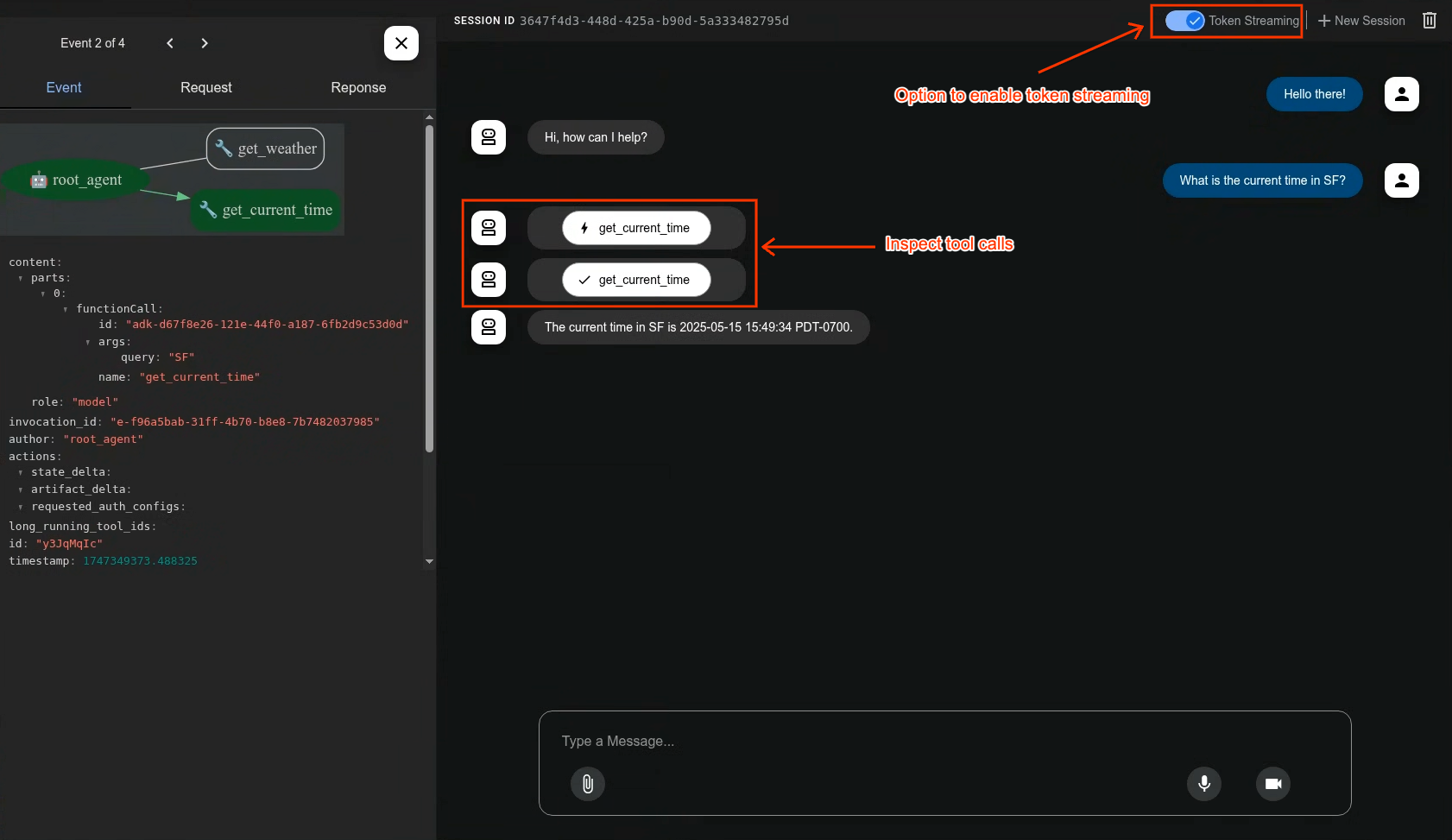 ### Evaluate Agents
```bash
adk eval \
samples_for_testing/hello_world \
samples_for_testing/hello_world/hello_world_eval_set_001.evalset.json
```
## 🤝 Contributing
We welcome contributions from the community! Whether it's bug reports, feature requests, documentation improvements, or code contributions, please see our
- [General contribution guideline and flow](https://google.github.io/adk-docs/contributing-guide/).
- Then if you want to contribute code, please read [Code Contributing Guidelines](./CONTRIBUTING.md) to get started.
## 📄 License
This project is licensed under the Apache 2.0 License - see the [LICENSE](LICENSE) file for details.
---
*Happy Agent Building!*
---
!!! warning "Advanced Concept"
Building custom agents by directly implementing `_run_async_impl` (or its equivalent in other languages) provides powerful control but is more complex than using the predefined `LlmAgent` or standard `WorkflowAgent` types. We recommend understanding those foundational agent types first before tackling custom orchestration logic.
# Custom agents
Custom agents provide the ultimate flexibility in ADK, allowing you to define **arbitrary orchestration logic** by inheriting directly from `BaseAgent` and implementing your own control flow. This goes beyond the predefined patterns of `SequentialAgent`, `LoopAgent`, and `ParallelAgent`, enabling you to build highly specific and complex agentic workflows.
## Introduction: Beyond Predefined Workflows
### What is a Custom Agent?
A Custom Agent is essentially any class you create that inherits from `google.adk.agents.BaseAgent` and implements its core execution logic within the `_run_async_impl` asynchronous method. You have complete control over how this method calls other agents (sub-agents), manages state, and handles events.
!!! Note
The specific method name for implementing an agent's core asynchronous logic may vary slightly by SDK language (e.g., `runAsyncImpl` in Java, `_run_async_impl` in Python). Refer to the language-specific API documentation for details.
### Why Use Them?
While the standard [Workflow Agents](workflow-agents/index.md) (`SequentialAgent`, `LoopAgent`, `ParallelAgent`) cover common orchestration patterns, you'll need a Custom agent when your requirements include:
* **Conditional Logic:** Executing different sub-agents or taking different paths based on runtime conditions or the results of previous steps.
* **Complex State Management:** Implementing intricate logic for maintaining and updating state throughout the workflow beyond simple sequential passing.
* **External Integrations:** Incorporating calls to external APIs, databases, or custom libraries directly within the orchestration flow control.
* **Dynamic Agent Selection:** Choosing which sub-agent(s) to run next based on dynamic evaluation of the situation or input.
* **Unique Workflow Patterns:** Implementing orchestration logic that doesn't fit the standard sequential, parallel, or loop structures.

## Implementing Custom Logic:
The core of any custom agent is the method where you define its unique asynchronous behavior. This method allows you to orchestrate sub-agents and manage the flow of execution.
=== "Python"
The heart of any custom agent is the `_run_async_impl` method. This is where you define its unique behavior.
* **Signature:** `async def _run_async_impl(self, ctx: InvocationContext) -> AsyncGenerator[Event, None]:`
* **Asynchronous Generator:** It must be an `async def` function and return an `AsyncGenerator`. This allows it to `yield` events produced by sub-agents or its own logic back to the runner.
* **`ctx` (InvocationContext):** Provides access to crucial runtime information, most importantly `ctx.session.state`, which is the primary way to share data between steps orchestrated by your custom agent.
=== "Java"
The heart of any custom agent is the `runAsyncImpl` method, which you override from `BaseAgent`.
* **Signature:** `protected Flowable
### Evaluate Agents
```bash
adk eval \
samples_for_testing/hello_world \
samples_for_testing/hello_world/hello_world_eval_set_001.evalset.json
```
## 🤝 Contributing
We welcome contributions from the community! Whether it's bug reports, feature requests, documentation improvements, or code contributions, please see our
- [General contribution guideline and flow](https://google.github.io/adk-docs/contributing-guide/).
- Then if you want to contribute code, please read [Code Contributing Guidelines](./CONTRIBUTING.md) to get started.
## 📄 License
This project is licensed under the Apache 2.0 License - see the [LICENSE](LICENSE) file for details.
---
*Happy Agent Building!*
---
!!! warning "Advanced Concept"
Building custom agents by directly implementing `_run_async_impl` (or its equivalent in other languages) provides powerful control but is more complex than using the predefined `LlmAgent` or standard `WorkflowAgent` types. We recommend understanding those foundational agent types first before tackling custom orchestration logic.
# Custom agents
Custom agents provide the ultimate flexibility in ADK, allowing you to define **arbitrary orchestration logic** by inheriting directly from `BaseAgent` and implementing your own control flow. This goes beyond the predefined patterns of `SequentialAgent`, `LoopAgent`, and `ParallelAgent`, enabling you to build highly specific and complex agentic workflows.
## Introduction: Beyond Predefined Workflows
### What is a Custom Agent?
A Custom Agent is essentially any class you create that inherits from `google.adk.agents.BaseAgent` and implements its core execution logic within the `_run_async_impl` asynchronous method. You have complete control over how this method calls other agents (sub-agents), manages state, and handles events.
!!! Note
The specific method name for implementing an agent's core asynchronous logic may vary slightly by SDK language (e.g., `runAsyncImpl` in Java, `_run_async_impl` in Python). Refer to the language-specific API documentation for details.
### Why Use Them?
While the standard [Workflow Agents](workflow-agents/index.md) (`SequentialAgent`, `LoopAgent`, `ParallelAgent`) cover common orchestration patterns, you'll need a Custom agent when your requirements include:
* **Conditional Logic:** Executing different sub-agents or taking different paths based on runtime conditions or the results of previous steps.
* **Complex State Management:** Implementing intricate logic for maintaining and updating state throughout the workflow beyond simple sequential passing.
* **External Integrations:** Incorporating calls to external APIs, databases, or custom libraries directly within the orchestration flow control.
* **Dynamic Agent Selection:** Choosing which sub-agent(s) to run next based on dynamic evaluation of the situation or input.
* **Unique Workflow Patterns:** Implementing orchestration logic that doesn't fit the standard sequential, parallel, or loop structures.

## Implementing Custom Logic:
The core of any custom agent is the method where you define its unique asynchronous behavior. This method allows you to orchestrate sub-agents and manage the flow of execution.
=== "Python"
The heart of any custom agent is the `_run_async_impl` method. This is where you define its unique behavior.
* **Signature:** `async def _run_async_impl(self, ctx: InvocationContext) -> AsyncGenerator[Event, None]:`
* **Asynchronous Generator:** It must be an `async def` function and return an `AsyncGenerator`. This allows it to `yield` events produced by sub-agents or its own logic back to the runner.
* **`ctx` (InvocationContext):** Provides access to crucial runtime information, most importantly `ctx.session.state`, which is the primary way to share data between steps orchestrated by your custom agent.
=== "Java"
The heart of any custom agent is the `runAsyncImpl` method, which you override from `BaseAgent`.
* **Signature:** `protected Flowable ## Core Agent Categories
ADK provides distinct agent categories to build sophisticated applications:
1. [**LLM Agents (`LlmAgent`, `Agent`)**](llm-agents.md): These agents utilize Large Language Models (LLMs) as their core engine to understand natural language, reason, plan, generate responses, and dynamically decide how to proceed or which tools to use, making them ideal for flexible, language-centric tasks. [Learn more about LLM Agents...](llm-agents.md)
2. [**Workflow Agents (`SequentialAgent`, `ParallelAgent`, `LoopAgent`)**](workflow-agents/index.md): These specialized agents control the execution flow of other agents in predefined, deterministic patterns (sequence, parallel, or loop) without using an LLM for the flow control itself, perfect for structured processes needing predictable execution. [Explore Workflow Agents...](workflow-agents/index.md)
3. [**Custom Agents**](custom-agents.md): Created by extending `BaseAgent` directly, these agents allow you to implement unique operational logic, specific control flows, or specialized integrations not covered by the standard types, catering to highly tailored application requirements. [Discover how to build Custom Agents...](custom-agents.md)
## Choosing the Right Agent Type
The following table provides a high-level comparison to help distinguish between the agent types. As you explore each type in more detail in the subsequent sections, these distinctions will become clearer.
| Feature | LLM Agent (`LlmAgent`) | Workflow Agent | Custom Agent (`BaseAgent` subclass) |
| :------------------- | :---------------------------------- | :------------------------------------------ |:-----------------------------------------|
| **Primary Function** | Reasoning, Generation, Tool Use | Controlling Agent Execution Flow | Implementing Unique Logic/Integrations |
| **Core Engine** | Large Language Model (LLM) | Predefined Logic (Sequence, Parallel, Loop) | Custom Code |
| **Determinism** | Non-deterministic (Flexible) | Deterministic (Predictable) | Can be either, based on implementation |
| **Primary Use** | Language tasks, Dynamic decisions | Structured processes, Orchestration | Tailored requirements, Specific workflows|
## Agents Working Together: Multi-Agent Systems
While each agent type serves a distinct purpose, the true power often comes from combining them. Complex applications frequently employ [multi-agent architectures](multi-agents.md) where:
* **LLM Agents** handle intelligent, language-based task execution.
* **Workflow Agents** manage the overall process flow using standard patterns.
* **Custom Agents** provide specialized capabilities or rules needed for unique integrations.
Understanding these core types is the first step toward building sophisticated, capable AI applications with ADK.
---
## What's Next?
Now that you have an overview of the different agent types available in ADK, dive deeper into how they work and how to use them effectively:
* [**LLM Agents:**](llm-agents.md) Explore how to configure agents powered by large language models, including setting instructions, providing tools, and enabling advanced features like planning and code execution.
* [**Workflow Agents:**](workflow-agents/index.md) Learn how to orchestrate tasks using `SequentialAgent`, `ParallelAgent`, and `LoopAgent` for structured and predictable processes.
* [**Custom Agents:**](custom-agents.md) Discover the principles of extending `BaseAgent` to build agents with unique logic and integrations tailored to your specific needs.
* [**Multi-Agents:**](multi-agents.md) Understand how to combine different agent types to create sophisticated, collaborative systems capable of tackling complex problems.
* [**Models:**](models.md) Learn about the different LLM integrations available and how to select the right model for your agents.
# LLM Agent
The `LlmAgent` (often aliased simply as `Agent`) is a core component in ADK,
acting as the "thinking" part of your application. It leverages the power of a
Large Language Model (LLM) for reasoning, understanding natural language, making
decisions, generating responses, and interacting with tools.
Unlike deterministic [Workflow Agents](workflow-agents/index.md) that follow
predefined execution paths, `LlmAgent` behavior is non-deterministic. It uses
the LLM to interpret instructions and context, deciding dynamically how to
proceed, which tools to use (if any), or whether to transfer control to another
agent.
Building an effective `LlmAgent` involves defining its identity, clearly guiding
its behavior through instructions, and equipping it with the necessary tools and
capabilities.
## Defining the Agent's Identity and Purpose
First, you need to establish what the agent *is* and what it's *for*.
* **`name` (Required):** Every agent needs a unique string identifier. This
`name` is crucial for internal operations, especially in multi-agent systems
where agents need to refer to or delegate tasks to each other. Choose a
descriptive name that reflects the agent's function (e.g.,
`customer_support_router`, `billing_inquiry_agent`). Avoid reserved names like
`user`.
* **`description` (Optional, Recommended for Multi-Agent):** Provide a concise
summary of the agent's capabilities. This description is primarily used by
*other* LLM agents to determine if they should route a task to this agent.
Make it specific enough to differentiate it from peers (e.g., "Handles
inquiries about current billing statements," not just "Billing agent").
* **`model` (Required):** Specify the underlying LLM that will power this
agent's reasoning. This is a string identifier like `"gemini-2.5-flash"`. The
choice of model impacts the agent's capabilities, cost, and performance. See
the [Models](models.md) page for available options and considerations.
=== "Python"
```python
# Example: Defining the basic identity
capital_agent = LlmAgent(
model="gemini-2.5-flash",
name="capital_agent",
description="Answers user questions about the capital city of a given country."
# instruction and tools will be added next
)
```
=== "Java"
## Guiding the Agent: Instructions (`instruction`)
The `instruction` parameter is arguably the most critical for shaping an
`LlmAgent`'s behavior. It's a string (or a function returning a string) that
tells the agent:
* Its core task or goal.
* Its personality or persona (e.g., "You are a helpful assistant," "You are a witty pirate").
* Constraints on its behavior (e.g., "Only answer questions about X," "Never reveal Y").
* How and when to use its `tools`. You should explain the purpose of each tool and the circumstances under which it should be called, supplementing any descriptions within the tool itself.
* The desired format for its output (e.g., "Respond in JSON," "Provide a bulleted list").
**Tips for Effective Instructions:**
* **Be Clear and Specific:** Avoid ambiguity. Clearly state the desired actions and outcomes.
* **Use Markdown:** Improve readability for complex instructions using headings, lists, etc.
* **Provide Examples (Few-Shot):** For complex tasks or specific output formats, include examples directly in the instruction.
* **Guide Tool Use:** Don't just list tools; explain *when* and *why* the agent should use them.
**State:**
* The instruction is a string template, you can use the `{var}` syntax to insert dynamic values into the instruction.
* `{var}` is used to insert the value of the state variable named var.
* `{artifact.var}` is used to insert the text content of the artifact named var.
* If the state variable or artifact does not exist, the agent will raise an error. If you want to ignore the error, you can append a `?` to the variable name as in `{var?}`.
=== "Python"
```python
# Example: Adding instructions
capital_agent = LlmAgent(
model="gemini-2.5-flash",
name="capital_agent",
description="Answers user questions about the capital city of a given country.",
instruction="""You are an agent that provides the capital city of a country.
When a user asks for the capital of a country:
1. Identify the country name from the user's query.
2. Use the `get_capital_city` tool to find the capital.
3. Respond clearly to the user, stating the capital city.
Example Query: "What's the capital of {country}?"
Example Response: "The capital of France is Paris."
""",
# tools will be added next
)
```
=== "Java"
*(Note: For instructions that apply to *all* agents in a system, consider using
`global_instruction` on the root agent, detailed further in the
[Multi-Agents](multi-agents.md) section.)*
## Equipping the Agent: Tools (`tools`)
Tools give your `LlmAgent` capabilities beyond the LLM's built-in knowledge or
reasoning. They allow the agent to interact with the outside world, perform
calculations, fetch real-time data, or execute specific actions.
* **`tools` (Optional):** Provide a list of tools the agent can use. Each item in the list can be:
* A native function or method (wrapped as a `FunctionTool`). Python ADK automatically wraps the native function into a `FuntionTool` whereas, you must explicitly wrap your Java methods using `FunctionTool.create(...)`
* An instance of a class inheriting from `BaseTool`.
* An instance of another agent (`AgentTool`, enabling agent-to-agent delegation - see [Multi-Agents](multi-agents.md)).
The LLM uses the function/tool names, descriptions (from docstrings or the
`description` field), and parameter schemas to decide which tool to call based
on the conversation and its instructions.
=== "Python"
```python
# Define a tool function
def get_capital_city(country: str) -> str:
"""Retrieves the capital city for a given country."""
# Replace with actual logic (e.g., API call, database lookup)
capitals = {"france": "Paris", "japan": "Tokyo", "canada": "Ottawa"}
return capitals.get(country.lower(), f"Sorry, I don't know the capital of {country}.")
# Add the tool to the agent
capital_agent = LlmAgent(
model="gemini-2.5-flash",
name="capital_agent",
description="Answers user questions about the capital city of a given country.",
instruction="""You are an agent that provides the capital city of a country... (previous instruction text)""",
tools=[get_capital_city] # Provide the function directly
)
```
=== "Java"
Learn more about Tools in the [Tools](../tools/index.md) section.
## Advanced Configuration & Control
Beyond the core parameters, `LlmAgent` offers several options for finer control:
### Fine-Tuning LLM Generation (`generate_content_config`)
You can adjust how the underlying LLM generates responses using `generate_content_config`.
* **`generate_content_config` (Optional):** Pass an instance of `google.genai.types.GenerateContentConfig` to control parameters like `temperature` (randomness), `max_output_tokens` (response length), `top_p`, `top_k`, and safety settings.
=== "Python"
```python
from google.genai import types
agent = LlmAgent(
# ... other params
generate_content_config=types.GenerateContentConfig(
temperature=0.2, # More deterministic output
max_output_tokens=250
)
)
```
=== "Java"
### Structuring Data (`input_schema`, `output_schema`, `output_key`)
For scenarios requiring structured data exchange with an `LLM Agent`, the ADK provides mechanisms to define expected input and desired output formats using schema definitions.
* **`input_schema` (Optional):** Define a schema representing the expected input structure. If set, the user message content passed to this agent *must* be a JSON string conforming to this schema. Your instructions should guide the user or preceding agent accordingly.
* **`output_schema` (Optional):** Define a schema representing the desired output structure. If set, the agent's final response *must* be a JSON string conforming to this schema.
* **Constraint:** Using `output_schema` enables controlled generation within the LLM but **disables the agent's ability to use tools or transfer control to other agents**. Your instructions must guide the LLM to produce JSON matching the schema directly.
* **`output_key` (Optional):** Provide a string key. If set, the text content of the agent's *final* response will be automatically saved to the session's state dictionary under this key. This is useful for passing results between agents or steps in a workflow.
* In Python, this might look like: `session.state[output_key] = agent_response_text`
* In Java: `session.state().put(outputKey, agentResponseText)`
=== "Python"
The input and output schema is typically a `Pydantic` BaseModel.
```python
from pydantic import BaseModel, Field
class CapitalOutput(BaseModel):
capital: str = Field(description="The capital of the country.")
structured_capital_agent = LlmAgent(
# ... name, model, description
instruction="""You are a Capital Information Agent. Given a country, respond ONLY with a JSON object containing the capital. Format: {"capital": "capital_name"}""",
output_schema=CapitalOutput, # Enforce JSON output
output_key="found_capital" # Store result in state['found_capital']
# Cannot use tools=[get_capital_city] effectively here
)
```
=== "Java"
The input and output schema is a `google.genai.types.Schema` object.
### Managing Context (`include_contents`)
Control whether the agent receives the prior conversation history.
* **`include_contents` (Optional, Default: `'default'`):** Determines if the `contents` (history) are sent to the LLM.
* `'default'`: The agent receives the relevant conversation history.
* `'none'`: The agent receives no prior `contents`. It operates based solely on its current instruction and any input provided in the *current* turn (useful for stateless tasks or enforcing specific contexts).
=== "Python"
```python
stateless_agent = LlmAgent(
# ... other params
include_contents='none'
)
```
=== "Java"
### Planning & Code Execution
{ title="This feature is currently available for Python. Java support is planned/ coming soon."}
For more complex reasoning involving multiple steps or executing code:
* **`planner` (Optional):** Assign a `BasePlanner` instance to enable multi-step reasoning and planning before execution. (See [Multi-Agents](multi-agents.md) patterns).
* **`code_executor` (Optional):** Provide a `BaseCodeExecutor` instance to allow the agent to execute code blocks (e.g., Python) found in the LLM's response. ([See Tools/Built-in tools](../tools/built-in-tools.md)).
## Putting It Together: Example
??? "Code"
Here's the complete basic `capital_agent`:
=== "Python"
```python
# --- Full example code demonstrating LlmAgent with Tools vs. Output Schema ---
import json # Needed for pretty printing dicts
from google.adk.agents import LlmAgent
from google.adk.runners import Runner
from google.adk.sessions import InMemorySessionService
from google.genai import types
from pydantic import BaseModel, Field
# --- 1. Define Constants ---
APP_NAME = "agent_comparison_app"
USER_ID = "test_user_456"
SESSION_ID_TOOL_AGENT = "session_tool_agent_xyz"
SESSION_ID_SCHEMA_AGENT = "session_schema_agent_xyz"
MODEL_NAME = "gemini-2.5-flash"
# --- 2. Define Schemas ---
# Input schema used by both agents
class CountryInput(BaseModel):
country: str = Field(description="The country to get information about.")
# Output schema ONLY for the second agent
class CapitalInfoOutput(BaseModel):
capital: str = Field(description="The capital city of the country.")
# Note: Population is illustrative; the LLM will infer or estimate this
# as it cannot use tools when output_schema is set.
population_estimate: str = Field(description="An estimated population of the capital city.")
# --- 3. Define the Tool (Only for the first agent) ---
def get_capital_city(country: str) -> str:
"""Retrieves the capital city of a given country."""
print(f"\n-- Tool Call: get_capital_city(country='{country}') --")
country_capitals = {
"united states": "Washington, D.C.",
"canada": "Ottawa",
"france": "Paris",
"japan": "Tokyo",
}
result = country_capitals.get(country.lower(), f"Sorry, I couldn't find the capital for {country}.")
print(f"-- Tool Result: '{result}' --")
return result
# --- 4. Configure Agents ---
# Agent 1: Uses a tool and output_key
capital_agent_with_tool = LlmAgent(
model=MODEL_NAME,
name="capital_agent_tool",
description="Retrieves the capital city using a specific tool.",
instruction="""You are a helpful agent that provides the capital city of a country using a tool.
The user will provide the country name in a JSON format like {"country": "country_name"}.
1. Extract the country name.
2. Use the `get_capital_city` tool to find the capital.
3. Respond clearly to the user, stating the capital city found by the tool.
""",
tools=[get_capital_city],
input_schema=CountryInput,
output_key="capital_tool_result", # Store final text response
)
# Agent 2: Uses output_schema (NO tools possible)
structured_info_agent_schema = LlmAgent(
model=MODEL_NAME,
name="structured_info_agent_schema",
description="Provides capital and estimated population in a specific JSON format.",
instruction=f"""You are an agent that provides country information.
The user will provide the country name in a JSON format like {{"country": "country_name"}}.
Respond ONLY with a JSON object matching this exact schema:
{json.dumps(CapitalInfoOutput.model_json_schema(), indent=2)}
Use your knowledge to determine the capital and estimate the population. Do not use any tools.
""",
# *** NO tools parameter here - using output_schema prevents tool use ***
input_schema=CountryInput,
output_schema=CapitalInfoOutput, # Enforce JSON output structure
output_key="structured_info_result", # Store final JSON response
)
# --- 5. Set up Session Management and Runners ---
session_service = InMemorySessionService()
# Create separate sessions for clarity, though not strictly necessary if context is managed
session_service.create_session(app_name=APP_NAME, user_id=USER_ID, session_id=SESSION_ID_TOOL_AGENT)
session_service.create_session(app_name=APP_NAME, user_id=USER_ID, session_id=SESSION_ID_SCHEMA_AGENT)
# Create a runner for EACH agent
capital_runner = Runner(
agent=capital_agent_with_tool,
app_name=APP_NAME,
session_service=session_service
)
structured_runner = Runner(
agent=structured_info_agent_schema,
app_name=APP_NAME,
session_service=session_service
)
# --- 6. Define Agent Interaction Logic ---
async def call_agent_and_print(
runner_instance: Runner,
agent_instance: LlmAgent,
session_id: str,
query_json: str
):
"""Sends a query to the specified agent/runner and prints results."""
print(f"\n>>> Calling Agent: '{agent_instance.name}' | Query: {query_json}")
user_content = types.Content(role='user', parts=[types.Part(text=query_json)])
final_response_content = "No final response received."
async for event in runner_instance.run_async(user_id=USER_ID, session_id=session_id, new_message=user_content):
# print(f"Event: {event.type}, Author: {event.author}") # Uncomment for detailed logging
if event.is_final_response() and event.content and event.content.parts:
# For output_schema, the content is the JSON string itself
final_response_content = event.content.parts[0].text
print(f"<<< Agent '{agent_instance.name}' Response: {final_response_content}")
current_session = session_service.get_session(app_name=APP_NAME,
user_id=USER_ID,
session_id=session_id)
stored_output = current_session.state.get(agent_instance.output_key)
# Pretty print if the stored output looks like JSON (likely from output_schema)
print(f"--- Session State ['{agent_instance.output_key}']: ", end="")
try:
# Attempt to parse and pretty print if it's JSON
parsed_output = json.loads(stored_output)
print(json.dumps(parsed_output, indent=2))
except (json.JSONDecodeError, TypeError):
# Otherwise, print as string
print(stored_output)
print("-" * 30)
# --- 7. Run Interactions ---
async def main():
print("--- Testing Agent with Tool ---")
await call_agent_and_print(capital_runner, capital_agent_with_tool, SESSION_ID_TOOL_AGENT, '{"country": "France"}')
await call_agent_and_print(capital_runner, capital_agent_with_tool, SESSION_ID_TOOL_AGENT, '{"country": "Canada"}')
print("\n\n--- Testing Agent with Output Schema (No Tool Use) ---")
await call_agent_and_print(structured_runner, structured_info_agent_schema, SESSION_ID_SCHEMA_AGENT, '{"country": "France"}')
await call_agent_and_print(structured_runner, structured_info_agent_schema, SESSION_ID_SCHEMA_AGENT, '{"country": "Japan"}')
if __name__ == "__main__":
await main()
```
=== "Java"
_(This example demonstrates the core concepts. More complex agents might incorporate schemas, context control, planning, etc.)_
## Related Concepts (Deferred Topics)
While this page covers the core configuration of `LlmAgent`, several related concepts provide more advanced control and are detailed elsewhere:
* **Callbacks:** Intercepting execution points (before/after model calls, before/after tool calls) using `before_model_callback`, `after_model_callback`, etc. See [Callbacks](../callbacks/types-of-callbacks.md).
* **Multi-Agent Control:** Advanced strategies for agent interaction, including planning (`planner`), controlling agent transfer (`disallow_transfer_to_parent`, `disallow_transfer_to_peers`), and system-wide instructions (`global_instruction`). See [Multi-Agents](multi-agents.md).
# Using Different Models with ADK
!!! Note
Java ADK currently supports Gemini and Anthropic models. More model support coming soon.
The Agent Development Kit (ADK) is designed for flexibility, allowing you to
integrate various Large Language Models (LLMs) into your agents. While the setup
for Google Gemini models is covered in the
[Setup Foundation Models](../get-started/installation.md) guide, this page
details how to leverage Gemini effectively and integrate other popular models,
including those hosted externally or running locally.
ADK primarily uses two mechanisms for model integration:
1. **Direct String / Registry:** For models tightly integrated with Google Cloud
(like Gemini models accessed via Google AI Studio or Vertex AI) or models
hosted on Vertex AI endpoints. You typically provide the model name or
endpoint resource string directly to the `LlmAgent`. ADK's internal registry
resolves this string to the appropriate backend client, often utilizing the
`google-genai` library.
2. **Wrapper Classes:** For broader compatibility, especially with models
outside the Google ecosystem or those requiring specific client
configurations (like models accessed via LiteLLM). You instantiate a specific
wrapper class (e.g., `LiteLlm`) and pass this object as the `model` parameter
to your `LlmAgent`.
The following sections guide you through using these methods based on your needs.
## Using Google Gemini Models
This is the most direct way to use Google's flagship models within ADK.
**Integration Method:** Pass the model's identifier string directly to the
`model` parameter of `LlmAgent` (or its alias, `Agent`).
**Backend Options & Setup:**
The `google-genai` library, used internally by ADK for Gemini, can connect
through either Google AI Studio or Vertex AI.
!!!note "Model support for voice/video streaming"
In order to use voice/video streaming in ADK, you will need to use Gemini
models that support the Live API. You can find the **model ID(s)** that
support the Gemini Live API in the documentation:
- [Google AI Studio: Gemini Live API](https://ai.google.dev/gemini-api/docs/models#live-api)
- [Vertex AI: Gemini Live API](https://cloud.google.com/vertex-ai/generative-ai/docs/live-api)
### Google AI Studio
* **Use Case:** Google AI Studio is the easiest way to get started with Gemini.
All you need is the [API key](https://aistudio.google.com/app/apikey). Best
for rapid prototyping and development.
* **Setup:** Typically requires an API key:
* Set as an environment variable or
* Passed during the model initialization via the `Client` (see example below)
```shell
export GOOGLE_API_KEY="YOUR_GOOGLE_API_KEY"
export GOOGLE_GENAI_USE_VERTEXAI=FALSE
```
* **Models:** Find all available models on the
[Google AI for Developers site](https://ai.google.dev/gemini-api/docs/models).
### Vertex AI
* **Use Case:** Recommended for production applications, leveraging Google Cloud
infrastructure. Gemini on Vertex AI supports enterprise-grade features,
security, and compliance controls.
* **Setup:**
* Authenticate using Application Default Credentials (ADC):
```shell
gcloud auth application-default login
```
* Configure these variables either as environment variables or by providing them directly when initializing the Model.
Set your Google Cloud project and location:
```shell
export GOOGLE_CLOUD_PROJECT="YOUR_PROJECT_ID"
export GOOGLE_CLOUD_LOCATION="YOUR_VERTEX_AI_LOCATION" # e.g., us-central1
```
Explicitly tell the library to use Vertex AI:
```shell
export GOOGLE_GENAI_USE_VERTEXAI=TRUE
```
* **Models:** Find available model IDs in the
[Vertex AI documentation](https://cloud.google.com/vertex-ai/generative-ai/docs/learn/models).
**Example:**
=== "Python"
```python
from google.adk.agents import LlmAgent
# --- Example using a stable Gemini Flash model ---
agent_gemini_flash = LlmAgent(
# Use the latest stable Flash model identifier
model="gemini-2.5-flash",
name="gemini_flash_agent",
instruction="You are a fast and helpful Gemini assistant.",
# ... other agent parameters
)
# --- Example using a powerful Gemini Pro model ---
# Note: Always check the official Gemini documentation for the latest model names,
# including specific preview versions if needed. Preview models might have
# different availability or quota limitations.
agent_gemini_pro = LlmAgent(
# Use the latest generally available Pro model identifier
model="gemini-2.5-pro",
name="gemini_pro_agent",
instruction="You are a powerful and knowledgeable Gemini assistant.",
# ... other agent parameters
)
```
=== "Java"
## Using Anthropic models
{ title="This feature is currently available for Java. Python support for direct Anthropic API (non-Vertex) is via LiteLLM."}
You can integrate Anthropic's Claude models directly using their API key or from a Vertex AI backend into your Java ADK applications by using the ADK's `Claude` wrapper class.
For Vertex AI backend, see the [Third-Party Models on Vertex AI](#third-party-models-on-vertex-ai-eg-anthropic-claude) section.
**Prerequisites:**
1. **Dependencies:**
* **Anthropic SDK Classes (Transitive):** The Java ADK's `com.google.adk.models.Claude` wrapper relies on classes from Anthropic's official Java SDK. These are typically included as **transitive dependencies**.
2. **Anthropic API Key:**
* Obtain an API key from Anthropic. Securely manage this key using a secret manager.
**Integration:**
Instantiate `com.google.adk.models.Claude`, providing the desired Claude model name and an `AnthropicOkHttpClient` configured with your API key. Then, pass this `Claude` instance to your `LlmAgent`.
**Example:**
## Using Cloud & Proprietary Models via LiteLLM

To access a vast range of LLMs from providers like OpenAI, Anthropic (non-Vertex
AI), Cohere, and many others, ADK offers integration through the LiteLLM
library.
**Integration Method:** Instantiate the `LiteLlm` wrapper class and pass it to
the `model` parameter of `LlmAgent`.
**LiteLLM Overview:** [LiteLLM](https://docs.litellm.ai/) acts as a translation
layer, providing a standardized, OpenAI-compatible interface to over 100+ LLMs.
**Setup:**
1. **Install LiteLLM:**
```shell
pip install litellm
```
2. **Set Provider API Keys:** Configure API keys as environment variables for
the specific providers you intend to use.
* *Example for OpenAI:*
```shell
export OPENAI_API_KEY="YOUR_OPENAI_API_KEY"
```
* *Example for Anthropic (non-Vertex AI):*
```shell
export ANTHROPIC_API_KEY="YOUR_ANTHROPIC_API_KEY"
```
* *Consult the
[LiteLLM Providers Documentation](https://docs.litellm.ai/docs/providers)
for the correct environment variable names for other providers.*
**Example:**
```python
from google.adk.agents import LlmAgent
from google.adk.models.lite_llm import LiteLlm
# --- Example Agent using OpenAI's GPT-4o ---
# (Requires OPENAI_API_KEY)
agent_openai = LlmAgent(
model=LiteLlm(model="openai/gpt-4o"), # LiteLLM model string format
name="openai_agent",
instruction="You are a helpful assistant powered by GPT-4o.",
# ... other agent parameters
)
# --- Example Agent using Anthropic's Claude Haiku (non-Vertex) ---
# (Requires ANTHROPIC_API_KEY)
agent_claude_direct = LlmAgent(
model=LiteLlm(model="anthropic/claude-3-haiku-20240307"),
name="claude_direct_agent",
instruction="You are an assistant powered by Claude Haiku.",
# ... other agent parameters
)
```
!!!info "Note for Windows users"
### Avoiding LiteLLM UnicodeDecodeError on Windows
When using ADK agents with LiteLlm on Windows, users might encounter the following error:
```
UnicodeDecodeError: 'charmap' codec can't decode byte...
```
This issue occurs because `litellm` (used by LiteLlm) reads cached files (e.g., model pricing information) using the default Windows encoding (`cp1252`) instead of UTF-8.
Windows users can prevent this issue by setting the `PYTHONUTF8` environment variable to `1`. This forces Python to use UTF-8 globally.
**Example (PowerShell):**
```powershell
# Set for current session
$env:PYTHONUTF8 = "1"
# Set persistently for the user
[System.Environment]::SetEnvironmentVariable('PYTHONUTF8', '1', [System.EnvironmentVariableTarget]::User)
Applying this setting ensures that Python reads cached files using UTF-8, avoiding the decoding error.
```
## Using Open & Local Models via LiteLLM

For maximum control, cost savings, privacy, or offline use cases, you can run
open-source models locally or self-host them and integrate them using LiteLLM.
**Integration Method:** Instantiate the `LiteLlm` wrapper class, configured to
point to your local model server.
### Ollama Integration
[Ollama](https://ollama.com/) allows you to easily run open-source models
locally.
#### Model choice
If your agent is relying on tools, please make sure that you select a model with
tool support from [Ollama website](https://ollama.com/search?c=tools).
For reliable results, we recommend using a decent-sized model with tool support.
The tool support for the model can be checked with the following command:
```bash
ollama show mistral-small3.1
Model
architecture mistral3
parameters 24.0B
context length 131072
embedding length 5120
quantization Q4_K_M
Capabilities
completion
vision
tools
```
You are supposed to see `tools` listed under capabilities.
You can also look at the template the model is using and tweak it based on your
needs.
```bash
ollama show --modelfile llama3.2 > model_file_to_modify
```
For instance, the default template for the above model inherently suggests that
the model shall call a function all the time. This may result in an infinite
loop of function calls.
```
Given the following functions, please respond with a JSON for a function call
with its proper arguments that best answers the given prompt.
Respond in the format {"name": function name, "parameters": dictionary of
argument name and its value}. Do not use variables.
```
You can swap such prompts with a more descriptive one to prevent infinite tool
call loops.
For instance:
```
Review the user's prompt and the available functions listed below.
First, determine if calling one of these functions is the most appropriate way to respond. A function call is likely needed if the prompt asks for a specific action, requires external data lookup, or involves calculations handled by the functions. If the prompt is a general question or can be answered directly, a function call is likely NOT needed.
If you determine a function call IS required: Respond ONLY with a JSON object in the format {"name": "function_name", "parameters": {"argument_name": "value"}}. Ensure parameter values are concrete, not variables.
If you determine a function call IS NOT required: Respond directly to the user's prompt in plain text, providing the answer or information requested. Do not output any JSON.
```
Then you can create a new model with the following command:
```bash
ollama create llama3.2-modified -f model_file_to_modify
```
#### Using ollama_chat provider
Our LiteLLM wrapper can be used to create agents with Ollama models.
```py
root_agent = Agent(
model=LiteLlm(model="ollama_chat/mistral-small3.1"),
name="dice_agent",
description=(
"hello world agent that can roll a dice of 8 sides and check prime"
" numbers."
),
instruction="""
You roll dice and answer questions about the outcome of the dice rolls.
""",
tools=[
roll_die,
check_prime,
],
)
```
**It is important to set the provider `ollama_chat` instead of `ollama`. Using
`ollama` will result in unexpected behaviors such as infinite tool call loops
and ignoring previous context.**
While `api_base` can be provided inside LiteLLM for generation, LiteLLM library
is calling other APIs relying on the env variable instead as of v1.65.5 after
completion. So at this time, we recommend setting the env variable
`OLLAMA_API_BASE` to point to the ollama server.
```bash
export OLLAMA_API_BASE="http://localhost:11434"
adk web
```
#### Using openai provider
Alternatively, `openai` can be used as the provider name. But this will also
require setting the `OPENAI_API_BASE=http://localhost:11434/v1` and
`OPENAI_API_KEY=anything` env variables instead of `OLLAMA_API_BASE`. **Please
note that api base now has `/v1` at the end.**
```py
root_agent = Agent(
model=LiteLlm(model="openai/mistral-small3.1"),
name="dice_agent",
description=(
"hello world agent that can roll a dice of 8 sides and check prime"
" numbers."
),
instruction="""
You roll dice and answer questions about the outcome of the dice rolls.
""",
tools=[
roll_die,
check_prime,
],
)
```
```bash
export OPENAI_API_BASE=http://localhost:11434/v1
export OPENAI_API_KEY=anything
adk web
```
#### Debugging
You can see the request sent to the Ollama server by adding the following in
your agent code just after imports.
```py
import litellm
litellm._turn_on_debug()
```
Look for a line like the following:
```bash
Request Sent from LiteLLM:
curl -X POST \
http://localhost:11434/api/chat \
-d '{'model': 'mistral-small3.1', 'messages': [{'role': 'system', 'content': ...
```
### Self-Hosted Endpoint (e.g., vLLM)

Tools such as [vLLM](https://github.com/vllm-project/vllm) allow you to host
models efficiently and often expose an OpenAI-compatible API endpoint.
**Setup:**
1. **Deploy Model:** Deploy your chosen model using vLLM (or a similar tool).
Note the API base URL (e.g., `https://your-vllm-endpoint.run.app/v1`).
* *Important for ADK Tools:* When deploying, ensure the serving tool
supports and enables OpenAI-compatible tool/function calling. For vLLM,
this might involve flags like `--enable-auto-tool-choice` and potentially
a specific `--tool-call-parser`, depending on the model. Refer to the vLLM
documentation on Tool Use.
2. **Authentication:** Determine how your endpoint handles authentication (e.g.,
API key, bearer token).
**Integration Example:**
```python
import subprocess
from google.adk.agents import LlmAgent
from google.adk.models.lite_llm import LiteLlm
# --- Example Agent using a model hosted on a vLLM endpoint ---
# Endpoint URL provided by your vLLM deployment
api_base_url = "https://your-vllm-endpoint.run.app/v1"
# Model name as recognized by *your* vLLM endpoint configuration
model_name_at_endpoint = "hosted_vllm/google/gemma-3-4b-it" # Example from vllm_test.py
# Authentication (Example: using gcloud identity token for a Cloud Run deployment)
# Adapt this based on your endpoint's security
try:
gcloud_token = subprocess.check_output(
["gcloud", "auth", "print-identity-token", "-q"]
).decode().strip()
auth_headers = {"Authorization": f"Bearer {gcloud_token}"}
except Exception as e:
print(f"Warning: Could not get gcloud token - {e}. Endpoint might be unsecured or require different auth.")
auth_headers = None # Or handle error appropriately
agent_vllm = LlmAgent(
model=LiteLlm(
model=model_name_at_endpoint,
api_base=api_base_url,
# Pass authentication headers if needed
extra_headers=auth_headers
# Alternatively, if endpoint uses an API key:
# api_key="YOUR_ENDPOINT_API_KEY"
),
name="vllm_agent",
instruction="You are a helpful assistant running on a self-hosted vLLM endpoint.",
# ... other agent parameters
)
```
## Using Hosted & Tuned Models on Vertex AI
For enterprise-grade scalability, reliability, and integration with Google
Cloud's MLOps ecosystem, you can use models deployed to Vertex AI Endpoints.
This includes models from Model Garden or your own fine-tuned models.
**Integration Method:** Pass the full Vertex AI Endpoint resource string
(`projects/PROJECT_ID/locations/LOCATION/endpoints/ENDPOINT_ID`) directly to the
`model` parameter of `LlmAgent`.
**Vertex AI Setup (Consolidated):**
Ensure your environment is configured for Vertex AI:
1. **Authentication:** Use Application Default Credentials (ADC):
```shell
gcloud auth application-default login
```
2. **Environment Variables:** Set your project and location:
```shell
export GOOGLE_CLOUD_PROJECT="YOUR_PROJECT_ID"
export GOOGLE_CLOUD_LOCATION="YOUR_VERTEX_AI_LOCATION" # e.g., us-central1
```
3. **Enable Vertex Backend:** Crucially, ensure the `google-genai` library
targets Vertex AI:
```shell
export GOOGLE_GENAI_USE_VERTEXAI=TRUE
```
### Model Garden Deployments
{ title="This feature is currently available for Python. Java support is planned/ coming soon."}
You can deploy various open and proprietary models from the
[Vertex AI Model Garden](https://console.cloud.google.com/vertex-ai/model-garden)
to an endpoint.
**Example:**
```python
from google.adk.agents import LlmAgent
from google.genai import types # For config objects
# --- Example Agent using a Llama 3 model deployed from Model Garden ---
# Replace with your actual Vertex AI Endpoint resource name
llama3_endpoint = "projects/YOUR_PROJECT_ID/locations/us-central1/endpoints/YOUR_LLAMA3_ENDPOINT_ID"
agent_llama3_vertex = LlmAgent(
model=llama3_endpoint,
name="llama3_vertex_agent",
instruction="You are a helpful assistant based on Llama 3, hosted on Vertex AI.",
generate_content_config=types.GenerateContentConfig(max_output_tokens=2048),
# ... other agent parameters
)
```
### Fine-tuned Model Endpoints
{ title="This feature is currently available for Python. Java support is planned/ coming soon."}
Deploying your fine-tuned models (whether based on Gemini or other architectures
supported by Vertex AI) results in an endpoint that can be used directly.
**Example:**
```python
from google.adk.agents import LlmAgent
# --- Example Agent using a fine-tuned Gemini model endpoint ---
# Replace with your fine-tuned model's endpoint resource name
finetuned_gemini_endpoint = "projects/YOUR_PROJECT_ID/locations/us-central1/endpoints/YOUR_FINETUNED_ENDPOINT_ID"
agent_finetuned_gemini = LlmAgent(
model=finetuned_gemini_endpoint,
name="finetuned_gemini_agent",
instruction="You are a specialized assistant trained on specific data.",
# ... other agent parameters
)
```
### Third-Party Models on Vertex AI (e.g., Anthropic Claude)
Some providers, like Anthropic, make their models available directly through
Vertex AI.
=== "Python"
**Integration Method:** Uses the direct model string (e.g.,
`"claude-3-sonnet@20240229"`), *but requires manual registration* within ADK.
**Why Registration?** ADK's registry automatically recognizes `gemini-*` strings
and standard Vertex AI endpoint strings (`projects/.../endpoints/...`) and
routes them via the `google-genai` library. For other model types used directly
via Vertex AI (like Claude), you must explicitly tell the ADK registry which
specific wrapper class (`Claude` in this case) knows how to handle that model
identifier string with the Vertex AI backend.
**Setup:**
1. **Vertex AI Environment:** Ensure the consolidated Vertex AI setup (ADC, Env
Vars, `GOOGLE_GENAI_USE_VERTEXAI=TRUE`) is complete.
2. **Install Provider Library:** Install the necessary client library configured
for Vertex AI.
```shell
pip install "anthropic[vertex]"
```
3. **Register Model Class:** Add this code near the start of your application,
*before* creating an agent using the Claude model string:
```python
# Required for using Claude model strings directly via Vertex AI with LlmAgent
from google.adk.models.anthropic_llm import Claude
from google.adk.models.registry import LLMRegistry
LLMRegistry.register(Claude)
```
**Example:**
```python
from google.adk.agents import LlmAgent
from google.adk.models.anthropic_llm import Claude # Import needed for registration
from google.adk.models.registry import LLMRegistry # Import needed for registration
from google.genai import types
# --- Register Claude class (do this once at startup) ---
LLMRegistry.register(Claude)
# --- Example Agent using Claude 3 Sonnet on Vertex AI ---
# Standard model name for Claude 3 Sonnet on Vertex AI
claude_model_vertexai = "claude-3-sonnet@20240229"
agent_claude_vertexai = LlmAgent(
model=claude_model_vertexai, # Pass the direct string after registration
name="claude_vertexai_agent",
instruction="You are an assistant powered by Claude 3 Sonnet on Vertex AI.",
generate_content_config=types.GenerateContentConfig(max_output_tokens=4096),
# ... other agent parameters
)
```
=== "Java"
**Integration Method:** Directly instantiate the provider-specific model class (e.g., `com.google.adk.models.Claude`) and configure it with a Vertex AI backend.
**Why Direct Instantiation?** The Java ADK's `LlmRegistry` primarily handles Gemini models by default. For third-party models like Claude on Vertex AI, you directly provide an instance of the ADK's wrapper class (e.g., `Claude`) to the `LlmAgent`. This wrapper class is responsible for interacting with the model via its specific client library, configured for Vertex AI.
**Setup:**
1. **Vertex AI Environment:**
* Ensure your Google Cloud project and region are correctly set up.
* **Application Default Credentials (ADC):** Make sure ADC is configured correctly in your environment. This is typically done by running `gcloud auth application-default login`. The Java client libraries will use these credentials to authenticate with Vertex AI. Follow the [Google Cloud Java documentation on ADC](https://cloud.google.com/java/docs/reference/google-auth-library/latest/com.google.auth.oauth2.GoogleCredentials#com_google_auth_oauth2_GoogleCredentials_getApplicationDefault__) for detailed setup.
2. **Provider Library Dependencies:**
* **Third-Party Client Libraries (Often Transitive):** The ADK core library often includes the necessary client libraries for common third-party models on Vertex AI (like Anthropic's required classes) as **transitive dependencies**. This means you might not need to explicitly add a separate dependency for the Anthropic Vertex SDK in your `pom.xml` or `build.gradle`.
3. **Instantiate and Configure the Model:**
When creating your `LlmAgent`, instantiate the `Claude` class (or the equivalent for another provider) and configure its `VertexBackend`.
**Example:**
# Multi-Agent Systems in ADK
As agentic applications grow in complexity, structuring them as a single, monolithic agent can become challenging to develop, maintain, and reason about. The Agent Development Kit (ADK) supports building sophisticated applications by composing multiple, distinct `BaseAgent` instances into a **Multi-Agent System (MAS)**.
In ADK, a multi-agent system is an application where different agents, often forming a hierarchy, collaborate or coordinate to achieve a larger goal. Structuring your application this way offers significant advantages, including enhanced modularity, specialization, reusability, maintainability, and the ability to define structured control flows using dedicated workflow agents.
You can compose various types of agents derived from `BaseAgent` to build these systems:
* **LLM Agents:** Agents powered by large language models. (See [LLM Agents](llm-agents.md))
* **Workflow Agents:** Specialized agents (`SequentialAgent`, `ParallelAgent`, `LoopAgent`) designed to manage the execution flow of their sub-agents. (See [Workflow Agents](workflow-agents/index.md))
* **Custom agents:** Your own agents inheriting from `BaseAgent` with specialized, non-LLM logic. (See [Custom Agents](custom-agents.md))
The following sections detail the core ADK primitives—such as agent hierarchy, workflow agents, and interaction mechanisms—that enable you to construct and manage these multi-agent systems effectively.
## 1. ADK Primitives for Agent Composition
ADK provides core building blocks—primitives—that enable you to structure and manage interactions within your multi-agent system.
!!! Note
The specific parameters or method names for the primitives may vary slightly by SDK language (e.g., `sub_agents` in Python, `subAgents` in Java). Refer to the language-specific API documentation for details.
### 1.1. Agent Hierarchy (Parent agent, Sub Agents)
The foundation for structuring multi-agent systems is the parent-child relationship defined in `BaseAgent`.
* **Establishing Hierarchy:** You create a tree structure by passing a list of agent instances to the `sub_agents` argument when initializing a parent agent. ADK automatically sets the `parent_agent` attribute on each child agent during initialization.
* **Single Parent Rule:** An agent instance can only be added as a sub-agent once. Attempting to assign a second parent will result in a `ValueError`.
* **Importance:** This hierarchy defines the scope for [Workflow Agents](#12-workflow-agents-as-orchestrators) and influences the potential targets for LLM-Driven Delegation. You can navigate the hierarchy using `agent.parent_agent` or find descendants using `agent.find_agent(name)`.
=== "Python"
```python
# Conceptual Example: Defining Hierarchy
from google.adk.agents import LlmAgent, BaseAgent
# Define individual agents
greeter = LlmAgent(name="Greeter", model="gemini-2.5-flash")
task_doer = BaseAgent(name="TaskExecutor") # Custom non-LLM agent
# Create parent agent and assign children via sub_agents
coordinator = LlmAgent(
name="Coordinator",
model="gemini-2.5-flash",
description="I coordinate greetings and tasks.",
sub_agents=[ # Assign sub_agents here
greeter,
task_doer
]
)
# Framework automatically sets:
# assert greeter.parent_agent == coordinator
# assert task_doer.parent_agent == coordinator
```
=== "Java"
### 1.2. Workflow Agents as Orchestrators
ADK includes specialized agents derived from `BaseAgent` that don't perform tasks themselves but orchestrate the execution flow of their `sub_agents`.
* **[`SequentialAgent`](workflow-agents/sequential-agents.md):** Executes its `sub_agents` one after another in the order they are listed.
* **Context:** Passes the *same* [`InvocationContext`](../runtime/index.md) sequentially, allowing agents to easily pass results via shared state.
=== "Python"
```python
# Conceptual Example: Sequential Pipeline
from google.adk.agents import SequentialAgent, LlmAgent
step1 = LlmAgent(name="Step1_Fetch", output_key="data") # Saves output to state['data']
step2 = LlmAgent(name="Step2_Process", instruction="Process data from state key 'data'.")
pipeline = SequentialAgent(name="MyPipeline", sub_agents=[step1, step2])
# When pipeline runs, Step2 can access the state['data'] set by Step1.
```
=== "Java"
* **[`ParallelAgent`](workflow-agents/parallel-agents.md):** Executes its `sub_agents` in parallel. Events from sub-agents may be interleaved.
* **Context:** Modifies the `InvocationContext.branch` for each child agent (e.g., `ParentBranch.ChildName`), providing a distinct contextual path which can be useful for isolating history in some memory implementations.
* **State:** Despite different branches, all parallel children access the *same shared* `session.state`, enabling them to read initial state and write results (use distinct keys to avoid race conditions).
=== "Python"
```python
# Conceptual Example: Parallel Execution
from google.adk.agents import ParallelAgent, LlmAgent
fetch_weather = LlmAgent(name="WeatherFetcher", output_key="weather")
fetch_news = LlmAgent(name="NewsFetcher", output_key="news")
gatherer = ParallelAgent(name="InfoGatherer", sub_agents=[fetch_weather, fetch_news])
# When gatherer runs, WeatherFetcher and NewsFetcher run concurrently.
# A subsequent agent could read state['weather'] and state['news'].
```
=== "Java"
* **[`LoopAgent`](workflow-agents/loop-agents.md):** Executes its `sub_agents` sequentially in a loop.
* **Termination:** The loop stops if the optional `max_iterations` is reached, or if any sub-agent returns an [`Event`](../events/index.md) with `escalate=True` in it's Event Actions.
* **Context & State:** Passes the *same* `InvocationContext` in each iteration, allowing state changes (e.g., counters, flags) to persist across loops.
=== "Python"
```python
# Conceptual Example: Loop with Condition
from google.adk.agents import LoopAgent, LlmAgent, BaseAgent
from google.adk.events import Event, EventActions
from google.adk.agents.invocation_context import InvocationContext
from typing import AsyncGenerator
class CheckCondition(BaseAgent): # Custom agent to check state
async def _run_async_impl(self, ctx: InvocationContext) -> AsyncGenerator[Event, None]:
status = ctx.session.state.get("status", "pending")
is_done = (status == "completed")
yield Event(author=self.name, actions=EventActions(escalate=is_done)) # Escalate if done
process_step = LlmAgent(name="ProcessingStep") # Agent that might update state['status']
poller = LoopAgent(
name="StatusPoller",
max_iterations=10,
sub_agents=[process_step, CheckCondition(name="Checker")]
)
# When poller runs, it executes process_step then Checker repeatedly
# until Checker escalates (state['status'] == 'completed') or 10 iterations pass.
```
=== "Java"
### 1.3. Interaction & Communication Mechanisms
Agents within a system often need to exchange data or trigger actions in one another. ADK facilitates this through:
#### a) Shared Session State (`session.state`)
The most fundamental way for agents operating within the same invocation (and thus sharing the same [`Session`](../sessions/session.md) object via the `InvocationContext`) to communicate passively.
* **Mechanism:** One agent (or its tool/callback) writes a value (`context.state['data_key'] = processed_data`), and a subsequent agent reads it (`data = context.state.get('data_key')`). State changes are tracked via [`CallbackContext`](../callbacks/index.md).
* **Convenience:** The `output_key` property on [`LlmAgent`](llm-agents.md) automatically saves the agent's final response text (or structured output) to the specified state key.
* **Nature:** Asynchronous, passive communication. Ideal for pipelines orchestrated by `SequentialAgent` or passing data across `LoopAgent` iterations.
* **See Also:** [State Management](../sessions/state.md)
=== "Python"
```python
# Conceptual Example: Using output_key and reading state
from google.adk.agents import LlmAgent, SequentialAgent
agent_A = LlmAgent(name="AgentA", instruction="Find the capital of France.", output_key="capital_city")
agent_B = LlmAgent(name="AgentB", instruction="Tell me about the city stored in state key 'capital_city'.")
pipeline = SequentialAgent(name="CityInfo", sub_agents=[agent_A, agent_B])
# AgentA runs, saves "Paris" to state['capital_city'].
# AgentB runs, its instruction processor reads state['capital_city'] to get "Paris".
```
=== "Java"
#### b) LLM-Driven Delegation (Agent Transfer)
Leverages an [`LlmAgent`](llm-agents.md)'s understanding to dynamically route tasks to other suitable agents within the hierarchy.
* **Mechanism:** The agent's LLM generates a specific function call: `transfer_to_agent(agent_name='target_agent_name')`.
* **Handling:** The `AutoFlow`, used by default when sub-agents are present or transfer isn't disallowed, intercepts this call. It identifies the target agent using `root_agent.find_agent()` and updates the `InvocationContext` to switch execution focus.
* **Requires:** The calling `LlmAgent` needs clear `instructions` on when to transfer, and potential target agents need distinct `description`s for the LLM to make informed decisions. Transfer scope (parent, sub-agent, siblings) can be configured on the `LlmAgent`.
* **Nature:** Dynamic, flexible routing based on LLM interpretation.
=== "Python"
```python
# Conceptual Setup: LLM Transfer
from google.adk.agents import LlmAgent
booking_agent = LlmAgent(name="Booker", description="Handles flight and hotel bookings.")
info_agent = LlmAgent(name="Info", description="Provides general information and answers questions.")
coordinator = LlmAgent(
name="Coordinator",
model="gemini-2.5-flash",
instruction="You are an assistant. Delegate booking tasks to Booker and info requests to Info.",
description="Main coordinator.",
# AutoFlow is typically used implicitly here
sub_agents=[booking_agent, info_agent]
)
# If coordinator receives "Book a flight", its LLM should generate:
# FunctionCall(name='transfer_to_agent', args={'agent_name': 'Booker'})
# ADK framework then routes execution to booking_agent.
```
=== "Java"
#### c) Explicit Invocation (`AgentTool`)
Allows an [`LlmAgent`](llm-agents.md) to treat another `BaseAgent` instance as a callable function or [Tool](../tools/index.md).
* **Mechanism:** Wrap the target agent instance in `AgentTool` and include it in the parent `LlmAgent`'s `tools` list. `AgentTool` generates a corresponding function declaration for the LLM.
* **Handling:** When the parent LLM generates a function call targeting the `AgentTool`, the framework executes `AgentTool.run_async`. This method runs the target agent, captures its final response, forwards any state/artifact changes back to the parent's context, and returns the response as the tool's result.
* **Nature:** Synchronous (within the parent's flow), explicit, controlled invocation like any other tool.
* **(Note:** `AgentTool` needs to be imported and used explicitly).
=== "Python"
```python
# Conceptual Setup: Agent as a Tool
from google.adk.agents import LlmAgent, BaseAgent
from google.adk.tools import agent_tool
from pydantic import BaseModel
# Define a target agent (could be LlmAgent or custom BaseAgent)
class ImageGeneratorAgent(BaseAgent): # Example custom agent
name: str = "ImageGen"
description: str = "Generates an image based on a prompt."
# ... internal logic ...
async def _run_async_impl(self, ctx): # Simplified run logic
prompt = ctx.session.state.get("image_prompt", "default prompt")
# ... generate image bytes ...
image_bytes = b"..."
yield Event(author=self.name, content=types.Content(parts=[types.Part.from_bytes(image_bytes, "image/png")]))
image_agent = ImageGeneratorAgent()
image_tool = agent_tool.AgentTool(agent=image_agent) # Wrap the agent
# Parent agent uses the AgentTool
artist_agent = LlmAgent(
name="Artist",
model="gemini-2.5-flash",
instruction="Create a prompt and use the ImageGen tool to generate the image.",
tools=[image_tool] # Include the AgentTool
)
# Artist LLM generates a prompt, then calls:
# FunctionCall(name='ImageGen', args={'image_prompt': 'a cat wearing a hat'})
# Framework calls image_tool.run_async(...), which runs ImageGeneratorAgent.
# The resulting image Part is returned to the Artist agent as the tool result.
```
=== "Java"
These primitives provide the flexibility to design multi-agent interactions ranging from tightly coupled sequential workflows to dynamic, LLM-driven delegation networks.
## 2. Common Multi-Agent Patterns using ADK Primitives
By combining ADK's composition primitives, you can implement various established patterns for multi-agent collaboration.
### Coordinator/Dispatcher Pattern
* **Structure:** A central [`LlmAgent`](llm-agents.md) (Coordinator) manages several specialized `sub_agents`.
* **Goal:** Route incoming requests to the appropriate specialist agent.
* **ADK Primitives Used:**
* **Hierarchy:** Coordinator has specialists listed in `sub_agents`.
* **Interaction:** Primarily uses **LLM-Driven Delegation** (requires clear `description`s on sub-agents and appropriate `instruction` on Coordinator) or **Explicit Invocation (`AgentTool`)** (Coordinator includes `AgentTool`-wrapped specialists in its `tools`).
=== "Python"
```python
# Conceptual Code: Coordinator using LLM Transfer
from google.adk.agents import LlmAgent
billing_agent = LlmAgent(name="Billing", description="Handles billing inquiries.")
support_agent = LlmAgent(name="Support", description="Handles technical support requests.")
coordinator = LlmAgent(
name="HelpDeskCoordinator",
model="gemini-2.5-flash",
instruction="Route user requests: Use Billing agent for payment issues, Support agent for technical problems.",
description="Main help desk router.",
# allow_transfer=True is often implicit with sub_agents in AutoFlow
sub_agents=[billing_agent, support_agent]
)
# User asks "My payment failed" -> Coordinator's LLM should call transfer_to_agent(agent_name='Billing')
# User asks "I can't log in" -> Coordinator's LLM should call transfer_to_agent(agent_name='Support')
```
=== "Java"
### Sequential Pipeline Pattern
* **Structure:** A [`SequentialAgent`](workflow-agents/sequential-agents.md) contains `sub_agents` executed in a fixed order.
* **Goal:** Implement a multi-step process where the output of one step feeds into the next.
* **ADK Primitives Used:**
* **Workflow:** `SequentialAgent` defines the order.
* **Communication:** Primarily uses **Shared Session State**. Earlier agents write results (often via `output_key`), later agents read those results from `context.state`.
=== "Python"
```python
# Conceptual Code: Sequential Data Pipeline
from google.adk.agents import SequentialAgent, LlmAgent
validator = LlmAgent(name="ValidateInput", instruction="Validate the input.", output_key="validation_status")
processor = LlmAgent(name="ProcessData", instruction="Process data if state key 'validation_status' is 'valid'.", output_key="result")
reporter = LlmAgent(name="ReportResult", instruction="Report the result from state key 'result'.")
data_pipeline = SequentialAgent(
name="DataPipeline",
sub_agents=[validator, processor, reporter]
)
# validator runs -> saves to state['validation_status']
# processor runs -> reads state['validation_status'], saves to state['result']
# reporter runs -> reads state['result']
```
=== "Java"
### Parallel Fan-Out/Gather Pattern
* **Structure:** A [`ParallelAgent`](workflow-agents/parallel-agents.md) runs multiple `sub_agents` concurrently, often followed by a later agent (in a `SequentialAgent`) that aggregates results.
* **Goal:** Execute independent tasks simultaneously to reduce latency, then combine their outputs.
* **ADK Primitives Used:**
* **Workflow:** `ParallelAgent` for concurrent execution (Fan-Out). Often nested within a `SequentialAgent` to handle the subsequent aggregation step (Gather).
* **Communication:** Sub-agents write results to distinct keys in **Shared Session State**. The subsequent "Gather" agent reads multiple state keys.
=== "Python"
```python
# Conceptual Code: Parallel Information Gathering
from google.adk.agents import SequentialAgent, ParallelAgent, LlmAgent
fetch_api1 = LlmAgent(name="API1Fetcher", instruction="Fetch data from API 1.", output_key="api1_data")
fetch_api2 = LlmAgent(name="API2Fetcher", instruction="Fetch data from API 2.", output_key="api2_data")
gather_concurrently = ParallelAgent(
name="ConcurrentFetch",
sub_agents=[fetch_api1, fetch_api2]
)
synthesizer = LlmAgent(
name="Synthesizer",
instruction="Combine results from state keys 'api1_data' and 'api2_data'."
)
overall_workflow = SequentialAgent(
name="FetchAndSynthesize",
sub_agents=[gather_concurrently, synthesizer] # Run parallel fetch, then synthesize
)
# fetch_api1 and fetch_api2 run concurrently, saving to state.
# synthesizer runs afterwards, reading state['api1_data'] and state['api2_data'].
```
=== "Java"
### Hierarchical Task Decomposition
* **Structure:** A multi-level tree of agents where higher-level agents break down complex goals and delegate sub-tasks to lower-level agents.
* **Goal:** Solve complex problems by recursively breaking them down into simpler, executable steps.
* **ADK Primitives Used:**
* **Hierarchy:** Multi-level `parent_agent`/`sub_agents` structure.
* **Interaction:** Primarily **LLM-Driven Delegation** or **Explicit Invocation (`AgentTool`)** used by parent agents to assign tasks to subagents. Results are returned up the hierarchy (via tool responses or state).
=== "Python"
```python
# Conceptual Code: Hierarchical Research Task
from google.adk.agents import LlmAgent
from google.adk.tools import agent_tool
# Low-level tool-like agents
web_searcher = LlmAgent(name="WebSearch", description="Performs web searches for facts.")
summarizer = LlmAgent(name="Summarizer", description="Summarizes text.")
# Mid-level agent combining tools
research_assistant = LlmAgent(
name="ResearchAssistant",
model="gemini-2.5-flash",
description="Finds and summarizes information on a topic.",
tools=[agent_tool.AgentTool(agent=web_searcher), agent_tool.AgentTool(agent=summarizer)]
)
# High-level agent delegating research
report_writer = LlmAgent(
name="ReportWriter",
model="gemini-2.5-flash",
instruction="Write a report on topic X. Use the ResearchAssistant to gather information.",
tools=[agent_tool.AgentTool(agent=research_assistant)]
# Alternatively, could use LLM Transfer if research_assistant is a sub_agent
)
# User interacts with ReportWriter.
# ReportWriter calls ResearchAssistant tool.
# ResearchAssistant calls WebSearch and Summarizer tools.
# Results flow back up.
```
=== "Java"
### Review/Critique Pattern (Generator-Critic)
* **Structure:** Typically involves two agents within a [`SequentialAgent`](workflow-agents/sequential-agents.md): a Generator and a Critic/Reviewer.
* **Goal:** Improve the quality or validity of generated output by having a dedicated agent review it.
* **ADK Primitives Used:**
* **Workflow:** `SequentialAgent` ensures generation happens before review.
* **Communication:** **Shared Session State** (Generator uses `output_key` to save output; Reviewer reads that state key). The Reviewer might save its feedback to another state key for subsequent steps.
=== "Python"
```python
# Conceptual Code: Generator-Critic
from google.adk.agents import SequentialAgent, LlmAgent
generator = LlmAgent(
name="DraftWriter",
instruction="Write a short paragraph about subject X.",
output_key="draft_text"
)
reviewer = LlmAgent(
name="FactChecker",
instruction="Review the text in state key 'draft_text' for factual accuracy. Output 'valid' or 'invalid' with reasons.",
output_key="review_status"
)
# Optional: Further steps based on review_status
review_pipeline = SequentialAgent(
name="WriteAndReview",
sub_agents=[generator, reviewer]
)
# generator runs -> saves draft to state['draft_text']
# reviewer runs -> reads state['draft_text'], saves status to state['review_status']
```
=== "Java"
### Iterative Refinement Pattern
* **Structure:** Uses a [`LoopAgent`](workflow-agents/loop-agents.md) containing one or more agents that work on a task over multiple iterations.
* **Goal:** Progressively improve a result (e.g., code, text, plan) stored in the session state until a quality threshold is met or a maximum number of iterations is reached.
* **ADK Primitives Used:**
* **Workflow:** `LoopAgent` manages the repetition.
* **Communication:** **Shared Session State** is essential for agents to read the previous iteration's output and save the refined version.
* **Termination:** The loop typically ends based on `max_iterations` or a dedicated checking agent setting `escalate=True` in the `Event Actions` when the result is satisfactory.
=== "Python"
```python
# Conceptual Code: Iterative Code Refinement
from google.adk.agents import LoopAgent, LlmAgent, BaseAgent
from google.adk.events import Event, EventActions
from google.adk.agents.invocation_context import InvocationContext
from typing import AsyncGenerator
# Agent to generate/refine code based on state['current_code'] and state['requirements']
code_refiner = LlmAgent(
name="CodeRefiner",
instruction="Read state['current_code'] (if exists) and state['requirements']. Generate/refine Python code to meet requirements. Save to state['current_code'].",
output_key="current_code" # Overwrites previous code in state
)
# Agent to check if the code meets quality standards
quality_checker = LlmAgent(
name="QualityChecker",
instruction="Evaluate the code in state['current_code'] against state['requirements']. Output 'pass' or 'fail'.",
output_key="quality_status"
)
# Custom agent to check the status and escalate if 'pass'
class CheckStatusAndEscalate(BaseAgent):
async def _run_async_impl(self, ctx: InvocationContext) -> AsyncGenerator[Event, None]:
status = ctx.session.state.get("quality_status", "fail")
should_stop = (status == "pass")
yield Event(author=self.name, actions=EventActions(escalate=should_stop))
refinement_loop = LoopAgent(
name="CodeRefinementLoop",
max_iterations=5,
sub_agents=[code_refiner, quality_checker, CheckStatusAndEscalate(name="StopChecker")]
)
# Loop runs: Refiner -> Checker -> StopChecker
# State['current_code'] is updated each iteration.
# Loop stops if QualityChecker outputs 'pass' (leading to StopChecker escalating) or after 5 iterations.
```
=== "Java"
### Human-in-the-Loop Pattern
* **Structure:** Integrates human intervention points within an agent workflow.
* **Goal:** Allow for human oversight, approval, correction, or tasks that AI cannot perform.
* **ADK Primitives Used (Conceptual):**
* **Interaction:** Can be implemented using a custom **Tool** that pauses execution and sends a request to an external system (e.g., a UI, ticketing system) waiting for human input. The tool then returns the human's response to the agent.
* **Workflow:** Could use **LLM-Driven Delegation** (`transfer_to_agent`) targeting a conceptual "Human Agent" that triggers the external workflow, or use the custom tool within an `LlmAgent`.
* **State/Callbacks:** State can hold task details for the human; callbacks can manage the interaction flow.
* **Note:** ADK doesn't have a built-in "Human Agent" type, so this requires custom integration.
=== "Python"
```python
# Conceptual Code: Using a Tool for Human Approval
from google.adk.agents import LlmAgent, SequentialAgent
from google.adk.tools import FunctionTool
# --- Assume external_approval_tool exists ---
# This tool would:
# 1. Take details (e.g., request_id, amount, reason).
# 2. Send these details to a human review system (e.g., via API).
# 3. Poll or wait for the human response (approved/rejected).
# 4. Return the human's decision.
# async def external_approval_tool(amount: float, reason: str) -> str: ...
approval_tool = FunctionTool(func=external_approval_tool)
# Agent that prepares the request
prepare_request = LlmAgent(
name="PrepareApproval",
instruction="Prepare the approval request details based on user input. Store amount and reason in state.",
# ... likely sets state['approval_amount'] and state['approval_reason'] ...
)
# Agent that calls the human approval tool
request_approval = LlmAgent(
name="RequestHumanApproval",
instruction="Use the external_approval_tool with amount from state['approval_amount'] and reason from state['approval_reason'].",
tools=[approval_tool],
output_key="human_decision"
)
# Agent that proceeds based on human decision
process_decision = LlmAgent(
name="ProcessDecision",
instruction="Check state key 'human_decision'. If 'approved', proceed. If 'rejected', inform user."
)
approval_workflow = SequentialAgent(
name="HumanApprovalWorkflow",
sub_agents=[prepare_request, request_approval, process_decision]
)
```
=== "Java"
These patterns provide starting points for structuring your multi-agent systems. You can mix and match them as needed to create the most effective architecture for your specific application.
# Workflow Agents
This section introduces "*workflow agents*" - **specialized agents that control the execution flow of its sub-agents**.
Workflow agents are specialized components in ADK designed purely for **orchestrating the execution flow of sub-agents**. Their primary role is to manage *how* and *when* other agents run, defining the control flow of a process.
Unlike [LLM Agents](../llm-agents.md), which use Large Language Models for dynamic reasoning and decision-making, Workflow Agents operate based on **predefined logic**. They determine the execution sequence according to their type (e.g., sequential, parallel, loop) without consulting an LLM for the orchestration itself. This results in **deterministic and predictable execution patterns**.
ADK provides three core workflow agent types, each implementing a distinct execution pattern:
## Core Agent Categories
ADK provides distinct agent categories to build sophisticated applications:
1. [**LLM Agents (`LlmAgent`, `Agent`)**](llm-agents.md): These agents utilize Large Language Models (LLMs) as their core engine to understand natural language, reason, plan, generate responses, and dynamically decide how to proceed or which tools to use, making them ideal for flexible, language-centric tasks. [Learn more about LLM Agents...](llm-agents.md)
2. [**Workflow Agents (`SequentialAgent`, `ParallelAgent`, `LoopAgent`)**](workflow-agents/index.md): These specialized agents control the execution flow of other agents in predefined, deterministic patterns (sequence, parallel, or loop) without using an LLM for the flow control itself, perfect for structured processes needing predictable execution. [Explore Workflow Agents...](workflow-agents/index.md)
3. [**Custom Agents**](custom-agents.md): Created by extending `BaseAgent` directly, these agents allow you to implement unique operational logic, specific control flows, or specialized integrations not covered by the standard types, catering to highly tailored application requirements. [Discover how to build Custom Agents...](custom-agents.md)
## Choosing the Right Agent Type
The following table provides a high-level comparison to help distinguish between the agent types. As you explore each type in more detail in the subsequent sections, these distinctions will become clearer.
| Feature | LLM Agent (`LlmAgent`) | Workflow Agent | Custom Agent (`BaseAgent` subclass) |
| :------------------- | :---------------------------------- | :------------------------------------------ |:-----------------------------------------|
| **Primary Function** | Reasoning, Generation, Tool Use | Controlling Agent Execution Flow | Implementing Unique Logic/Integrations |
| **Core Engine** | Large Language Model (LLM) | Predefined Logic (Sequence, Parallel, Loop) | Custom Code |
| **Determinism** | Non-deterministic (Flexible) | Deterministic (Predictable) | Can be either, based on implementation |
| **Primary Use** | Language tasks, Dynamic decisions | Structured processes, Orchestration | Tailored requirements, Specific workflows|
## Agents Working Together: Multi-Agent Systems
While each agent type serves a distinct purpose, the true power often comes from combining them. Complex applications frequently employ [multi-agent architectures](multi-agents.md) where:
* **LLM Agents** handle intelligent, language-based task execution.
* **Workflow Agents** manage the overall process flow using standard patterns.
* **Custom Agents** provide specialized capabilities or rules needed for unique integrations.
Understanding these core types is the first step toward building sophisticated, capable AI applications with ADK.
---
## What's Next?
Now that you have an overview of the different agent types available in ADK, dive deeper into how they work and how to use them effectively:
* [**LLM Agents:**](llm-agents.md) Explore how to configure agents powered by large language models, including setting instructions, providing tools, and enabling advanced features like planning and code execution.
* [**Workflow Agents:**](workflow-agents/index.md) Learn how to orchestrate tasks using `SequentialAgent`, `ParallelAgent`, and `LoopAgent` for structured and predictable processes.
* [**Custom Agents:**](custom-agents.md) Discover the principles of extending `BaseAgent` to build agents with unique logic and integrations tailored to your specific needs.
* [**Multi-Agents:**](multi-agents.md) Understand how to combine different agent types to create sophisticated, collaborative systems capable of tackling complex problems.
* [**Models:**](models.md) Learn about the different LLM integrations available and how to select the right model for your agents.
# LLM Agent
The `LlmAgent` (often aliased simply as `Agent`) is a core component in ADK,
acting as the "thinking" part of your application. It leverages the power of a
Large Language Model (LLM) for reasoning, understanding natural language, making
decisions, generating responses, and interacting with tools.
Unlike deterministic [Workflow Agents](workflow-agents/index.md) that follow
predefined execution paths, `LlmAgent` behavior is non-deterministic. It uses
the LLM to interpret instructions and context, deciding dynamically how to
proceed, which tools to use (if any), or whether to transfer control to another
agent.
Building an effective `LlmAgent` involves defining its identity, clearly guiding
its behavior through instructions, and equipping it with the necessary tools and
capabilities.
## Defining the Agent's Identity and Purpose
First, you need to establish what the agent *is* and what it's *for*.
* **`name` (Required):** Every agent needs a unique string identifier. This
`name` is crucial for internal operations, especially in multi-agent systems
where agents need to refer to or delegate tasks to each other. Choose a
descriptive name that reflects the agent's function (e.g.,
`customer_support_router`, `billing_inquiry_agent`). Avoid reserved names like
`user`.
* **`description` (Optional, Recommended for Multi-Agent):** Provide a concise
summary of the agent's capabilities. This description is primarily used by
*other* LLM agents to determine if they should route a task to this agent.
Make it specific enough to differentiate it from peers (e.g., "Handles
inquiries about current billing statements," not just "Billing agent").
* **`model` (Required):** Specify the underlying LLM that will power this
agent's reasoning. This is a string identifier like `"gemini-2.5-flash"`. The
choice of model impacts the agent's capabilities, cost, and performance. See
the [Models](models.md) page for available options and considerations.
=== "Python"
```python
# Example: Defining the basic identity
capital_agent = LlmAgent(
model="gemini-2.5-flash",
name="capital_agent",
description="Answers user questions about the capital city of a given country."
# instruction and tools will be added next
)
```
=== "Java"
## Guiding the Agent: Instructions (`instruction`)
The `instruction` parameter is arguably the most critical for shaping an
`LlmAgent`'s behavior. It's a string (or a function returning a string) that
tells the agent:
* Its core task or goal.
* Its personality or persona (e.g., "You are a helpful assistant," "You are a witty pirate").
* Constraints on its behavior (e.g., "Only answer questions about X," "Never reveal Y").
* How and when to use its `tools`. You should explain the purpose of each tool and the circumstances under which it should be called, supplementing any descriptions within the tool itself.
* The desired format for its output (e.g., "Respond in JSON," "Provide a bulleted list").
**Tips for Effective Instructions:**
* **Be Clear and Specific:** Avoid ambiguity. Clearly state the desired actions and outcomes.
* **Use Markdown:** Improve readability for complex instructions using headings, lists, etc.
* **Provide Examples (Few-Shot):** For complex tasks or specific output formats, include examples directly in the instruction.
* **Guide Tool Use:** Don't just list tools; explain *when* and *why* the agent should use them.
**State:**
* The instruction is a string template, you can use the `{var}` syntax to insert dynamic values into the instruction.
* `{var}` is used to insert the value of the state variable named var.
* `{artifact.var}` is used to insert the text content of the artifact named var.
* If the state variable or artifact does not exist, the agent will raise an error. If you want to ignore the error, you can append a `?` to the variable name as in `{var?}`.
=== "Python"
```python
# Example: Adding instructions
capital_agent = LlmAgent(
model="gemini-2.5-flash",
name="capital_agent",
description="Answers user questions about the capital city of a given country.",
instruction="""You are an agent that provides the capital city of a country.
When a user asks for the capital of a country:
1. Identify the country name from the user's query.
2. Use the `get_capital_city` tool to find the capital.
3. Respond clearly to the user, stating the capital city.
Example Query: "What's the capital of {country}?"
Example Response: "The capital of France is Paris."
""",
# tools will be added next
)
```
=== "Java"
*(Note: For instructions that apply to *all* agents in a system, consider using
`global_instruction` on the root agent, detailed further in the
[Multi-Agents](multi-agents.md) section.)*
## Equipping the Agent: Tools (`tools`)
Tools give your `LlmAgent` capabilities beyond the LLM's built-in knowledge or
reasoning. They allow the agent to interact with the outside world, perform
calculations, fetch real-time data, or execute specific actions.
* **`tools` (Optional):** Provide a list of tools the agent can use. Each item in the list can be:
* A native function or method (wrapped as a `FunctionTool`). Python ADK automatically wraps the native function into a `FuntionTool` whereas, you must explicitly wrap your Java methods using `FunctionTool.create(...)`
* An instance of a class inheriting from `BaseTool`.
* An instance of another agent (`AgentTool`, enabling agent-to-agent delegation - see [Multi-Agents](multi-agents.md)).
The LLM uses the function/tool names, descriptions (from docstrings or the
`description` field), and parameter schemas to decide which tool to call based
on the conversation and its instructions.
=== "Python"
```python
# Define a tool function
def get_capital_city(country: str) -> str:
"""Retrieves the capital city for a given country."""
# Replace with actual logic (e.g., API call, database lookup)
capitals = {"france": "Paris", "japan": "Tokyo", "canada": "Ottawa"}
return capitals.get(country.lower(), f"Sorry, I don't know the capital of {country}.")
# Add the tool to the agent
capital_agent = LlmAgent(
model="gemini-2.5-flash",
name="capital_agent",
description="Answers user questions about the capital city of a given country.",
instruction="""You are an agent that provides the capital city of a country... (previous instruction text)""",
tools=[get_capital_city] # Provide the function directly
)
```
=== "Java"
Learn more about Tools in the [Tools](../tools/index.md) section.
## Advanced Configuration & Control
Beyond the core parameters, `LlmAgent` offers several options for finer control:
### Fine-Tuning LLM Generation (`generate_content_config`)
You can adjust how the underlying LLM generates responses using `generate_content_config`.
* **`generate_content_config` (Optional):** Pass an instance of `google.genai.types.GenerateContentConfig` to control parameters like `temperature` (randomness), `max_output_tokens` (response length), `top_p`, `top_k`, and safety settings.
=== "Python"
```python
from google.genai import types
agent = LlmAgent(
# ... other params
generate_content_config=types.GenerateContentConfig(
temperature=0.2, # More deterministic output
max_output_tokens=250
)
)
```
=== "Java"
### Structuring Data (`input_schema`, `output_schema`, `output_key`)
For scenarios requiring structured data exchange with an `LLM Agent`, the ADK provides mechanisms to define expected input and desired output formats using schema definitions.
* **`input_schema` (Optional):** Define a schema representing the expected input structure. If set, the user message content passed to this agent *must* be a JSON string conforming to this schema. Your instructions should guide the user or preceding agent accordingly.
* **`output_schema` (Optional):** Define a schema representing the desired output structure. If set, the agent's final response *must* be a JSON string conforming to this schema.
* **Constraint:** Using `output_schema` enables controlled generation within the LLM but **disables the agent's ability to use tools or transfer control to other agents**. Your instructions must guide the LLM to produce JSON matching the schema directly.
* **`output_key` (Optional):** Provide a string key. If set, the text content of the agent's *final* response will be automatically saved to the session's state dictionary under this key. This is useful for passing results between agents or steps in a workflow.
* In Python, this might look like: `session.state[output_key] = agent_response_text`
* In Java: `session.state().put(outputKey, agentResponseText)`
=== "Python"
The input and output schema is typically a `Pydantic` BaseModel.
```python
from pydantic import BaseModel, Field
class CapitalOutput(BaseModel):
capital: str = Field(description="The capital of the country.")
structured_capital_agent = LlmAgent(
# ... name, model, description
instruction="""You are a Capital Information Agent. Given a country, respond ONLY with a JSON object containing the capital. Format: {"capital": "capital_name"}""",
output_schema=CapitalOutput, # Enforce JSON output
output_key="found_capital" # Store result in state['found_capital']
# Cannot use tools=[get_capital_city] effectively here
)
```
=== "Java"
The input and output schema is a `google.genai.types.Schema` object.
### Managing Context (`include_contents`)
Control whether the agent receives the prior conversation history.
* **`include_contents` (Optional, Default: `'default'`):** Determines if the `contents` (history) are sent to the LLM.
* `'default'`: The agent receives the relevant conversation history.
* `'none'`: The agent receives no prior `contents`. It operates based solely on its current instruction and any input provided in the *current* turn (useful for stateless tasks or enforcing specific contexts).
=== "Python"
```python
stateless_agent = LlmAgent(
# ... other params
include_contents='none'
)
```
=== "Java"
### Planning & Code Execution
{ title="This feature is currently available for Python. Java support is planned/ coming soon."}
For more complex reasoning involving multiple steps or executing code:
* **`planner` (Optional):** Assign a `BasePlanner` instance to enable multi-step reasoning and planning before execution. (See [Multi-Agents](multi-agents.md) patterns).
* **`code_executor` (Optional):** Provide a `BaseCodeExecutor` instance to allow the agent to execute code blocks (e.g., Python) found in the LLM's response. ([See Tools/Built-in tools](../tools/built-in-tools.md)).
## Putting It Together: Example
??? "Code"
Here's the complete basic `capital_agent`:
=== "Python"
```python
# --- Full example code demonstrating LlmAgent with Tools vs. Output Schema ---
import json # Needed for pretty printing dicts
from google.adk.agents import LlmAgent
from google.adk.runners import Runner
from google.adk.sessions import InMemorySessionService
from google.genai import types
from pydantic import BaseModel, Field
# --- 1. Define Constants ---
APP_NAME = "agent_comparison_app"
USER_ID = "test_user_456"
SESSION_ID_TOOL_AGENT = "session_tool_agent_xyz"
SESSION_ID_SCHEMA_AGENT = "session_schema_agent_xyz"
MODEL_NAME = "gemini-2.5-flash"
# --- 2. Define Schemas ---
# Input schema used by both agents
class CountryInput(BaseModel):
country: str = Field(description="The country to get information about.")
# Output schema ONLY for the second agent
class CapitalInfoOutput(BaseModel):
capital: str = Field(description="The capital city of the country.")
# Note: Population is illustrative; the LLM will infer or estimate this
# as it cannot use tools when output_schema is set.
population_estimate: str = Field(description="An estimated population of the capital city.")
# --- 3. Define the Tool (Only for the first agent) ---
def get_capital_city(country: str) -> str:
"""Retrieves the capital city of a given country."""
print(f"\n-- Tool Call: get_capital_city(country='{country}') --")
country_capitals = {
"united states": "Washington, D.C.",
"canada": "Ottawa",
"france": "Paris",
"japan": "Tokyo",
}
result = country_capitals.get(country.lower(), f"Sorry, I couldn't find the capital for {country}.")
print(f"-- Tool Result: '{result}' --")
return result
# --- 4. Configure Agents ---
# Agent 1: Uses a tool and output_key
capital_agent_with_tool = LlmAgent(
model=MODEL_NAME,
name="capital_agent_tool",
description="Retrieves the capital city using a specific tool.",
instruction="""You are a helpful agent that provides the capital city of a country using a tool.
The user will provide the country name in a JSON format like {"country": "country_name"}.
1. Extract the country name.
2. Use the `get_capital_city` tool to find the capital.
3. Respond clearly to the user, stating the capital city found by the tool.
""",
tools=[get_capital_city],
input_schema=CountryInput,
output_key="capital_tool_result", # Store final text response
)
# Agent 2: Uses output_schema (NO tools possible)
structured_info_agent_schema = LlmAgent(
model=MODEL_NAME,
name="structured_info_agent_schema",
description="Provides capital and estimated population in a specific JSON format.",
instruction=f"""You are an agent that provides country information.
The user will provide the country name in a JSON format like {{"country": "country_name"}}.
Respond ONLY with a JSON object matching this exact schema:
{json.dumps(CapitalInfoOutput.model_json_schema(), indent=2)}
Use your knowledge to determine the capital and estimate the population. Do not use any tools.
""",
# *** NO tools parameter here - using output_schema prevents tool use ***
input_schema=CountryInput,
output_schema=CapitalInfoOutput, # Enforce JSON output structure
output_key="structured_info_result", # Store final JSON response
)
# --- 5. Set up Session Management and Runners ---
session_service = InMemorySessionService()
# Create separate sessions for clarity, though not strictly necessary if context is managed
session_service.create_session(app_name=APP_NAME, user_id=USER_ID, session_id=SESSION_ID_TOOL_AGENT)
session_service.create_session(app_name=APP_NAME, user_id=USER_ID, session_id=SESSION_ID_SCHEMA_AGENT)
# Create a runner for EACH agent
capital_runner = Runner(
agent=capital_agent_with_tool,
app_name=APP_NAME,
session_service=session_service
)
structured_runner = Runner(
agent=structured_info_agent_schema,
app_name=APP_NAME,
session_service=session_service
)
# --- 6. Define Agent Interaction Logic ---
async def call_agent_and_print(
runner_instance: Runner,
agent_instance: LlmAgent,
session_id: str,
query_json: str
):
"""Sends a query to the specified agent/runner and prints results."""
print(f"\n>>> Calling Agent: '{agent_instance.name}' | Query: {query_json}")
user_content = types.Content(role='user', parts=[types.Part(text=query_json)])
final_response_content = "No final response received."
async for event in runner_instance.run_async(user_id=USER_ID, session_id=session_id, new_message=user_content):
# print(f"Event: {event.type}, Author: {event.author}") # Uncomment for detailed logging
if event.is_final_response() and event.content and event.content.parts:
# For output_schema, the content is the JSON string itself
final_response_content = event.content.parts[0].text
print(f"<<< Agent '{agent_instance.name}' Response: {final_response_content}")
current_session = session_service.get_session(app_name=APP_NAME,
user_id=USER_ID,
session_id=session_id)
stored_output = current_session.state.get(agent_instance.output_key)
# Pretty print if the stored output looks like JSON (likely from output_schema)
print(f"--- Session State ['{agent_instance.output_key}']: ", end="")
try:
# Attempt to parse and pretty print if it's JSON
parsed_output = json.loads(stored_output)
print(json.dumps(parsed_output, indent=2))
except (json.JSONDecodeError, TypeError):
# Otherwise, print as string
print(stored_output)
print("-" * 30)
# --- 7. Run Interactions ---
async def main():
print("--- Testing Agent with Tool ---")
await call_agent_and_print(capital_runner, capital_agent_with_tool, SESSION_ID_TOOL_AGENT, '{"country": "France"}')
await call_agent_and_print(capital_runner, capital_agent_with_tool, SESSION_ID_TOOL_AGENT, '{"country": "Canada"}')
print("\n\n--- Testing Agent with Output Schema (No Tool Use) ---")
await call_agent_and_print(structured_runner, structured_info_agent_schema, SESSION_ID_SCHEMA_AGENT, '{"country": "France"}')
await call_agent_and_print(structured_runner, structured_info_agent_schema, SESSION_ID_SCHEMA_AGENT, '{"country": "Japan"}')
if __name__ == "__main__":
await main()
```
=== "Java"
_(This example demonstrates the core concepts. More complex agents might incorporate schemas, context control, planning, etc.)_
## Related Concepts (Deferred Topics)
While this page covers the core configuration of `LlmAgent`, several related concepts provide more advanced control and are detailed elsewhere:
* **Callbacks:** Intercepting execution points (before/after model calls, before/after tool calls) using `before_model_callback`, `after_model_callback`, etc. See [Callbacks](../callbacks/types-of-callbacks.md).
* **Multi-Agent Control:** Advanced strategies for agent interaction, including planning (`planner`), controlling agent transfer (`disallow_transfer_to_parent`, `disallow_transfer_to_peers`), and system-wide instructions (`global_instruction`). See [Multi-Agents](multi-agents.md).
# Using Different Models with ADK
!!! Note
Java ADK currently supports Gemini and Anthropic models. More model support coming soon.
The Agent Development Kit (ADK) is designed for flexibility, allowing you to
integrate various Large Language Models (LLMs) into your agents. While the setup
for Google Gemini models is covered in the
[Setup Foundation Models](../get-started/installation.md) guide, this page
details how to leverage Gemini effectively and integrate other popular models,
including those hosted externally or running locally.
ADK primarily uses two mechanisms for model integration:
1. **Direct String / Registry:** For models tightly integrated with Google Cloud
(like Gemini models accessed via Google AI Studio or Vertex AI) or models
hosted on Vertex AI endpoints. You typically provide the model name or
endpoint resource string directly to the `LlmAgent`. ADK's internal registry
resolves this string to the appropriate backend client, often utilizing the
`google-genai` library.
2. **Wrapper Classes:** For broader compatibility, especially with models
outside the Google ecosystem or those requiring specific client
configurations (like models accessed via LiteLLM). You instantiate a specific
wrapper class (e.g., `LiteLlm`) and pass this object as the `model` parameter
to your `LlmAgent`.
The following sections guide you through using these methods based on your needs.
## Using Google Gemini Models
This is the most direct way to use Google's flagship models within ADK.
**Integration Method:** Pass the model's identifier string directly to the
`model` parameter of `LlmAgent` (or its alias, `Agent`).
**Backend Options & Setup:**
The `google-genai` library, used internally by ADK for Gemini, can connect
through either Google AI Studio or Vertex AI.
!!!note "Model support for voice/video streaming"
In order to use voice/video streaming in ADK, you will need to use Gemini
models that support the Live API. You can find the **model ID(s)** that
support the Gemini Live API in the documentation:
- [Google AI Studio: Gemini Live API](https://ai.google.dev/gemini-api/docs/models#live-api)
- [Vertex AI: Gemini Live API](https://cloud.google.com/vertex-ai/generative-ai/docs/live-api)
### Google AI Studio
* **Use Case:** Google AI Studio is the easiest way to get started with Gemini.
All you need is the [API key](https://aistudio.google.com/app/apikey). Best
for rapid prototyping and development.
* **Setup:** Typically requires an API key:
* Set as an environment variable or
* Passed during the model initialization via the `Client` (see example below)
```shell
export GOOGLE_API_KEY="YOUR_GOOGLE_API_KEY"
export GOOGLE_GENAI_USE_VERTEXAI=FALSE
```
* **Models:** Find all available models on the
[Google AI for Developers site](https://ai.google.dev/gemini-api/docs/models).
### Vertex AI
* **Use Case:** Recommended for production applications, leveraging Google Cloud
infrastructure. Gemini on Vertex AI supports enterprise-grade features,
security, and compliance controls.
* **Setup:**
* Authenticate using Application Default Credentials (ADC):
```shell
gcloud auth application-default login
```
* Configure these variables either as environment variables or by providing them directly when initializing the Model.
Set your Google Cloud project and location:
```shell
export GOOGLE_CLOUD_PROJECT="YOUR_PROJECT_ID"
export GOOGLE_CLOUD_LOCATION="YOUR_VERTEX_AI_LOCATION" # e.g., us-central1
```
Explicitly tell the library to use Vertex AI:
```shell
export GOOGLE_GENAI_USE_VERTEXAI=TRUE
```
* **Models:** Find available model IDs in the
[Vertex AI documentation](https://cloud.google.com/vertex-ai/generative-ai/docs/learn/models).
**Example:**
=== "Python"
```python
from google.adk.agents import LlmAgent
# --- Example using a stable Gemini Flash model ---
agent_gemini_flash = LlmAgent(
# Use the latest stable Flash model identifier
model="gemini-2.5-flash",
name="gemini_flash_agent",
instruction="You are a fast and helpful Gemini assistant.",
# ... other agent parameters
)
# --- Example using a powerful Gemini Pro model ---
# Note: Always check the official Gemini documentation for the latest model names,
# including specific preview versions if needed. Preview models might have
# different availability or quota limitations.
agent_gemini_pro = LlmAgent(
# Use the latest generally available Pro model identifier
model="gemini-2.5-pro",
name="gemini_pro_agent",
instruction="You are a powerful and knowledgeable Gemini assistant.",
# ... other agent parameters
)
```
=== "Java"
## Using Anthropic models
{ title="This feature is currently available for Java. Python support for direct Anthropic API (non-Vertex) is via LiteLLM."}
You can integrate Anthropic's Claude models directly using their API key or from a Vertex AI backend into your Java ADK applications by using the ADK's `Claude` wrapper class.
For Vertex AI backend, see the [Third-Party Models on Vertex AI](#third-party-models-on-vertex-ai-eg-anthropic-claude) section.
**Prerequisites:**
1. **Dependencies:**
* **Anthropic SDK Classes (Transitive):** The Java ADK's `com.google.adk.models.Claude` wrapper relies on classes from Anthropic's official Java SDK. These are typically included as **transitive dependencies**.
2. **Anthropic API Key:**
* Obtain an API key from Anthropic. Securely manage this key using a secret manager.
**Integration:**
Instantiate `com.google.adk.models.Claude`, providing the desired Claude model name and an `AnthropicOkHttpClient` configured with your API key. Then, pass this `Claude` instance to your `LlmAgent`.
**Example:**
## Using Cloud & Proprietary Models via LiteLLM

To access a vast range of LLMs from providers like OpenAI, Anthropic (non-Vertex
AI), Cohere, and many others, ADK offers integration through the LiteLLM
library.
**Integration Method:** Instantiate the `LiteLlm` wrapper class and pass it to
the `model` parameter of `LlmAgent`.
**LiteLLM Overview:** [LiteLLM](https://docs.litellm.ai/) acts as a translation
layer, providing a standardized, OpenAI-compatible interface to over 100+ LLMs.
**Setup:**
1. **Install LiteLLM:**
```shell
pip install litellm
```
2. **Set Provider API Keys:** Configure API keys as environment variables for
the specific providers you intend to use.
* *Example for OpenAI:*
```shell
export OPENAI_API_KEY="YOUR_OPENAI_API_KEY"
```
* *Example for Anthropic (non-Vertex AI):*
```shell
export ANTHROPIC_API_KEY="YOUR_ANTHROPIC_API_KEY"
```
* *Consult the
[LiteLLM Providers Documentation](https://docs.litellm.ai/docs/providers)
for the correct environment variable names for other providers.*
**Example:**
```python
from google.adk.agents import LlmAgent
from google.adk.models.lite_llm import LiteLlm
# --- Example Agent using OpenAI's GPT-4o ---
# (Requires OPENAI_API_KEY)
agent_openai = LlmAgent(
model=LiteLlm(model="openai/gpt-4o"), # LiteLLM model string format
name="openai_agent",
instruction="You are a helpful assistant powered by GPT-4o.",
# ... other agent parameters
)
# --- Example Agent using Anthropic's Claude Haiku (non-Vertex) ---
# (Requires ANTHROPIC_API_KEY)
agent_claude_direct = LlmAgent(
model=LiteLlm(model="anthropic/claude-3-haiku-20240307"),
name="claude_direct_agent",
instruction="You are an assistant powered by Claude Haiku.",
# ... other agent parameters
)
```
!!!info "Note for Windows users"
### Avoiding LiteLLM UnicodeDecodeError on Windows
When using ADK agents with LiteLlm on Windows, users might encounter the following error:
```
UnicodeDecodeError: 'charmap' codec can't decode byte...
```
This issue occurs because `litellm` (used by LiteLlm) reads cached files (e.g., model pricing information) using the default Windows encoding (`cp1252`) instead of UTF-8.
Windows users can prevent this issue by setting the `PYTHONUTF8` environment variable to `1`. This forces Python to use UTF-8 globally.
**Example (PowerShell):**
```powershell
# Set for current session
$env:PYTHONUTF8 = "1"
# Set persistently for the user
[System.Environment]::SetEnvironmentVariable('PYTHONUTF8', '1', [System.EnvironmentVariableTarget]::User)
Applying this setting ensures that Python reads cached files using UTF-8, avoiding the decoding error.
```
## Using Open & Local Models via LiteLLM

For maximum control, cost savings, privacy, or offline use cases, you can run
open-source models locally or self-host them and integrate them using LiteLLM.
**Integration Method:** Instantiate the `LiteLlm` wrapper class, configured to
point to your local model server.
### Ollama Integration
[Ollama](https://ollama.com/) allows you to easily run open-source models
locally.
#### Model choice
If your agent is relying on tools, please make sure that you select a model with
tool support from [Ollama website](https://ollama.com/search?c=tools).
For reliable results, we recommend using a decent-sized model with tool support.
The tool support for the model can be checked with the following command:
```bash
ollama show mistral-small3.1
Model
architecture mistral3
parameters 24.0B
context length 131072
embedding length 5120
quantization Q4_K_M
Capabilities
completion
vision
tools
```
You are supposed to see `tools` listed under capabilities.
You can also look at the template the model is using and tweak it based on your
needs.
```bash
ollama show --modelfile llama3.2 > model_file_to_modify
```
For instance, the default template for the above model inherently suggests that
the model shall call a function all the time. This may result in an infinite
loop of function calls.
```
Given the following functions, please respond with a JSON for a function call
with its proper arguments that best answers the given prompt.
Respond in the format {"name": function name, "parameters": dictionary of
argument name and its value}. Do not use variables.
```
You can swap such prompts with a more descriptive one to prevent infinite tool
call loops.
For instance:
```
Review the user's prompt and the available functions listed below.
First, determine if calling one of these functions is the most appropriate way to respond. A function call is likely needed if the prompt asks for a specific action, requires external data lookup, or involves calculations handled by the functions. If the prompt is a general question or can be answered directly, a function call is likely NOT needed.
If you determine a function call IS required: Respond ONLY with a JSON object in the format {"name": "function_name", "parameters": {"argument_name": "value"}}. Ensure parameter values are concrete, not variables.
If you determine a function call IS NOT required: Respond directly to the user's prompt in plain text, providing the answer or information requested. Do not output any JSON.
```
Then you can create a new model with the following command:
```bash
ollama create llama3.2-modified -f model_file_to_modify
```
#### Using ollama_chat provider
Our LiteLLM wrapper can be used to create agents with Ollama models.
```py
root_agent = Agent(
model=LiteLlm(model="ollama_chat/mistral-small3.1"),
name="dice_agent",
description=(
"hello world agent that can roll a dice of 8 sides and check prime"
" numbers."
),
instruction="""
You roll dice and answer questions about the outcome of the dice rolls.
""",
tools=[
roll_die,
check_prime,
],
)
```
**It is important to set the provider `ollama_chat` instead of `ollama`. Using
`ollama` will result in unexpected behaviors such as infinite tool call loops
and ignoring previous context.**
While `api_base` can be provided inside LiteLLM for generation, LiteLLM library
is calling other APIs relying on the env variable instead as of v1.65.5 after
completion. So at this time, we recommend setting the env variable
`OLLAMA_API_BASE` to point to the ollama server.
```bash
export OLLAMA_API_BASE="http://localhost:11434"
adk web
```
#### Using openai provider
Alternatively, `openai` can be used as the provider name. But this will also
require setting the `OPENAI_API_BASE=http://localhost:11434/v1` and
`OPENAI_API_KEY=anything` env variables instead of `OLLAMA_API_BASE`. **Please
note that api base now has `/v1` at the end.**
```py
root_agent = Agent(
model=LiteLlm(model="openai/mistral-small3.1"),
name="dice_agent",
description=(
"hello world agent that can roll a dice of 8 sides and check prime"
" numbers."
),
instruction="""
You roll dice and answer questions about the outcome of the dice rolls.
""",
tools=[
roll_die,
check_prime,
],
)
```
```bash
export OPENAI_API_BASE=http://localhost:11434/v1
export OPENAI_API_KEY=anything
adk web
```
#### Debugging
You can see the request sent to the Ollama server by adding the following in
your agent code just after imports.
```py
import litellm
litellm._turn_on_debug()
```
Look for a line like the following:
```bash
Request Sent from LiteLLM:
curl -X POST \
http://localhost:11434/api/chat \
-d '{'model': 'mistral-small3.1', 'messages': [{'role': 'system', 'content': ...
```
### Self-Hosted Endpoint (e.g., vLLM)

Tools such as [vLLM](https://github.com/vllm-project/vllm) allow you to host
models efficiently and often expose an OpenAI-compatible API endpoint.
**Setup:**
1. **Deploy Model:** Deploy your chosen model using vLLM (or a similar tool).
Note the API base URL (e.g., `https://your-vllm-endpoint.run.app/v1`).
* *Important for ADK Tools:* When deploying, ensure the serving tool
supports and enables OpenAI-compatible tool/function calling. For vLLM,
this might involve flags like `--enable-auto-tool-choice` and potentially
a specific `--tool-call-parser`, depending on the model. Refer to the vLLM
documentation on Tool Use.
2. **Authentication:** Determine how your endpoint handles authentication (e.g.,
API key, bearer token).
**Integration Example:**
```python
import subprocess
from google.adk.agents import LlmAgent
from google.adk.models.lite_llm import LiteLlm
# --- Example Agent using a model hosted on a vLLM endpoint ---
# Endpoint URL provided by your vLLM deployment
api_base_url = "https://your-vllm-endpoint.run.app/v1"
# Model name as recognized by *your* vLLM endpoint configuration
model_name_at_endpoint = "hosted_vllm/google/gemma-3-4b-it" # Example from vllm_test.py
# Authentication (Example: using gcloud identity token for a Cloud Run deployment)
# Adapt this based on your endpoint's security
try:
gcloud_token = subprocess.check_output(
["gcloud", "auth", "print-identity-token", "-q"]
).decode().strip()
auth_headers = {"Authorization": f"Bearer {gcloud_token}"}
except Exception as e:
print(f"Warning: Could not get gcloud token - {e}. Endpoint might be unsecured or require different auth.")
auth_headers = None # Or handle error appropriately
agent_vllm = LlmAgent(
model=LiteLlm(
model=model_name_at_endpoint,
api_base=api_base_url,
# Pass authentication headers if needed
extra_headers=auth_headers
# Alternatively, if endpoint uses an API key:
# api_key="YOUR_ENDPOINT_API_KEY"
),
name="vllm_agent",
instruction="You are a helpful assistant running on a self-hosted vLLM endpoint.",
# ... other agent parameters
)
```
## Using Hosted & Tuned Models on Vertex AI
For enterprise-grade scalability, reliability, and integration with Google
Cloud's MLOps ecosystem, you can use models deployed to Vertex AI Endpoints.
This includes models from Model Garden or your own fine-tuned models.
**Integration Method:** Pass the full Vertex AI Endpoint resource string
(`projects/PROJECT_ID/locations/LOCATION/endpoints/ENDPOINT_ID`) directly to the
`model` parameter of `LlmAgent`.
**Vertex AI Setup (Consolidated):**
Ensure your environment is configured for Vertex AI:
1. **Authentication:** Use Application Default Credentials (ADC):
```shell
gcloud auth application-default login
```
2. **Environment Variables:** Set your project and location:
```shell
export GOOGLE_CLOUD_PROJECT="YOUR_PROJECT_ID"
export GOOGLE_CLOUD_LOCATION="YOUR_VERTEX_AI_LOCATION" # e.g., us-central1
```
3. **Enable Vertex Backend:** Crucially, ensure the `google-genai` library
targets Vertex AI:
```shell
export GOOGLE_GENAI_USE_VERTEXAI=TRUE
```
### Model Garden Deployments
{ title="This feature is currently available for Python. Java support is planned/ coming soon."}
You can deploy various open and proprietary models from the
[Vertex AI Model Garden](https://console.cloud.google.com/vertex-ai/model-garden)
to an endpoint.
**Example:**
```python
from google.adk.agents import LlmAgent
from google.genai import types # For config objects
# --- Example Agent using a Llama 3 model deployed from Model Garden ---
# Replace with your actual Vertex AI Endpoint resource name
llama3_endpoint = "projects/YOUR_PROJECT_ID/locations/us-central1/endpoints/YOUR_LLAMA3_ENDPOINT_ID"
agent_llama3_vertex = LlmAgent(
model=llama3_endpoint,
name="llama3_vertex_agent",
instruction="You are a helpful assistant based on Llama 3, hosted on Vertex AI.",
generate_content_config=types.GenerateContentConfig(max_output_tokens=2048),
# ... other agent parameters
)
```
### Fine-tuned Model Endpoints
{ title="This feature is currently available for Python. Java support is planned/ coming soon."}
Deploying your fine-tuned models (whether based on Gemini or other architectures
supported by Vertex AI) results in an endpoint that can be used directly.
**Example:**
```python
from google.adk.agents import LlmAgent
# --- Example Agent using a fine-tuned Gemini model endpoint ---
# Replace with your fine-tuned model's endpoint resource name
finetuned_gemini_endpoint = "projects/YOUR_PROJECT_ID/locations/us-central1/endpoints/YOUR_FINETUNED_ENDPOINT_ID"
agent_finetuned_gemini = LlmAgent(
model=finetuned_gemini_endpoint,
name="finetuned_gemini_agent",
instruction="You are a specialized assistant trained on specific data.",
# ... other agent parameters
)
```
### Third-Party Models on Vertex AI (e.g., Anthropic Claude)
Some providers, like Anthropic, make their models available directly through
Vertex AI.
=== "Python"
**Integration Method:** Uses the direct model string (e.g.,
`"claude-3-sonnet@20240229"`), *but requires manual registration* within ADK.
**Why Registration?** ADK's registry automatically recognizes `gemini-*` strings
and standard Vertex AI endpoint strings (`projects/.../endpoints/...`) and
routes them via the `google-genai` library. For other model types used directly
via Vertex AI (like Claude), you must explicitly tell the ADK registry which
specific wrapper class (`Claude` in this case) knows how to handle that model
identifier string with the Vertex AI backend.
**Setup:**
1. **Vertex AI Environment:** Ensure the consolidated Vertex AI setup (ADC, Env
Vars, `GOOGLE_GENAI_USE_VERTEXAI=TRUE`) is complete.
2. **Install Provider Library:** Install the necessary client library configured
for Vertex AI.
```shell
pip install "anthropic[vertex]"
```
3. **Register Model Class:** Add this code near the start of your application,
*before* creating an agent using the Claude model string:
```python
# Required for using Claude model strings directly via Vertex AI with LlmAgent
from google.adk.models.anthropic_llm import Claude
from google.adk.models.registry import LLMRegistry
LLMRegistry.register(Claude)
```
**Example:**
```python
from google.adk.agents import LlmAgent
from google.adk.models.anthropic_llm import Claude # Import needed for registration
from google.adk.models.registry import LLMRegistry # Import needed for registration
from google.genai import types
# --- Register Claude class (do this once at startup) ---
LLMRegistry.register(Claude)
# --- Example Agent using Claude 3 Sonnet on Vertex AI ---
# Standard model name for Claude 3 Sonnet on Vertex AI
claude_model_vertexai = "claude-3-sonnet@20240229"
agent_claude_vertexai = LlmAgent(
model=claude_model_vertexai, # Pass the direct string after registration
name="claude_vertexai_agent",
instruction="You are an assistant powered by Claude 3 Sonnet on Vertex AI.",
generate_content_config=types.GenerateContentConfig(max_output_tokens=4096),
# ... other agent parameters
)
```
=== "Java"
**Integration Method:** Directly instantiate the provider-specific model class (e.g., `com.google.adk.models.Claude`) and configure it with a Vertex AI backend.
**Why Direct Instantiation?** The Java ADK's `LlmRegistry` primarily handles Gemini models by default. For third-party models like Claude on Vertex AI, you directly provide an instance of the ADK's wrapper class (e.g., `Claude`) to the `LlmAgent`. This wrapper class is responsible for interacting with the model via its specific client library, configured for Vertex AI.
**Setup:**
1. **Vertex AI Environment:**
* Ensure your Google Cloud project and region are correctly set up.
* **Application Default Credentials (ADC):** Make sure ADC is configured correctly in your environment. This is typically done by running `gcloud auth application-default login`. The Java client libraries will use these credentials to authenticate with Vertex AI. Follow the [Google Cloud Java documentation on ADC](https://cloud.google.com/java/docs/reference/google-auth-library/latest/com.google.auth.oauth2.GoogleCredentials#com_google_auth_oauth2_GoogleCredentials_getApplicationDefault__) for detailed setup.
2. **Provider Library Dependencies:**
* **Third-Party Client Libraries (Often Transitive):** The ADK core library often includes the necessary client libraries for common third-party models on Vertex AI (like Anthropic's required classes) as **transitive dependencies**. This means you might not need to explicitly add a separate dependency for the Anthropic Vertex SDK in your `pom.xml` or `build.gradle`.
3. **Instantiate and Configure the Model:**
When creating your `LlmAgent`, instantiate the `Claude` class (or the equivalent for another provider) and configure its `VertexBackend`.
**Example:**
# Multi-Agent Systems in ADK
As agentic applications grow in complexity, structuring them as a single, monolithic agent can become challenging to develop, maintain, and reason about. The Agent Development Kit (ADK) supports building sophisticated applications by composing multiple, distinct `BaseAgent` instances into a **Multi-Agent System (MAS)**.
In ADK, a multi-agent system is an application where different agents, often forming a hierarchy, collaborate or coordinate to achieve a larger goal. Structuring your application this way offers significant advantages, including enhanced modularity, specialization, reusability, maintainability, and the ability to define structured control flows using dedicated workflow agents.
You can compose various types of agents derived from `BaseAgent` to build these systems:
* **LLM Agents:** Agents powered by large language models. (See [LLM Agents](llm-agents.md))
* **Workflow Agents:** Specialized agents (`SequentialAgent`, `ParallelAgent`, `LoopAgent`) designed to manage the execution flow of their sub-agents. (See [Workflow Agents](workflow-agents/index.md))
* **Custom agents:** Your own agents inheriting from `BaseAgent` with specialized, non-LLM logic. (See [Custom Agents](custom-agents.md))
The following sections detail the core ADK primitives—such as agent hierarchy, workflow agents, and interaction mechanisms—that enable you to construct and manage these multi-agent systems effectively.
## 1. ADK Primitives for Agent Composition
ADK provides core building blocks—primitives—that enable you to structure and manage interactions within your multi-agent system.
!!! Note
The specific parameters or method names for the primitives may vary slightly by SDK language (e.g., `sub_agents` in Python, `subAgents` in Java). Refer to the language-specific API documentation for details.
### 1.1. Agent Hierarchy (Parent agent, Sub Agents)
The foundation for structuring multi-agent systems is the parent-child relationship defined in `BaseAgent`.
* **Establishing Hierarchy:** You create a tree structure by passing a list of agent instances to the `sub_agents` argument when initializing a parent agent. ADK automatically sets the `parent_agent` attribute on each child agent during initialization.
* **Single Parent Rule:** An agent instance can only be added as a sub-agent once. Attempting to assign a second parent will result in a `ValueError`.
* **Importance:** This hierarchy defines the scope for [Workflow Agents](#12-workflow-agents-as-orchestrators) and influences the potential targets for LLM-Driven Delegation. You can navigate the hierarchy using `agent.parent_agent` or find descendants using `agent.find_agent(name)`.
=== "Python"
```python
# Conceptual Example: Defining Hierarchy
from google.adk.agents import LlmAgent, BaseAgent
# Define individual agents
greeter = LlmAgent(name="Greeter", model="gemini-2.5-flash")
task_doer = BaseAgent(name="TaskExecutor") # Custom non-LLM agent
# Create parent agent and assign children via sub_agents
coordinator = LlmAgent(
name="Coordinator",
model="gemini-2.5-flash",
description="I coordinate greetings and tasks.",
sub_agents=[ # Assign sub_agents here
greeter,
task_doer
]
)
# Framework automatically sets:
# assert greeter.parent_agent == coordinator
# assert task_doer.parent_agent == coordinator
```
=== "Java"
### 1.2. Workflow Agents as Orchestrators
ADK includes specialized agents derived from `BaseAgent` that don't perform tasks themselves but orchestrate the execution flow of their `sub_agents`.
* **[`SequentialAgent`](workflow-agents/sequential-agents.md):** Executes its `sub_agents` one after another in the order they are listed.
* **Context:** Passes the *same* [`InvocationContext`](../runtime/index.md) sequentially, allowing agents to easily pass results via shared state.
=== "Python"
```python
# Conceptual Example: Sequential Pipeline
from google.adk.agents import SequentialAgent, LlmAgent
step1 = LlmAgent(name="Step1_Fetch", output_key="data") # Saves output to state['data']
step2 = LlmAgent(name="Step2_Process", instruction="Process data from state key 'data'.")
pipeline = SequentialAgent(name="MyPipeline", sub_agents=[step1, step2])
# When pipeline runs, Step2 can access the state['data'] set by Step1.
```
=== "Java"
* **[`ParallelAgent`](workflow-agents/parallel-agents.md):** Executes its `sub_agents` in parallel. Events from sub-agents may be interleaved.
* **Context:** Modifies the `InvocationContext.branch` for each child agent (e.g., `ParentBranch.ChildName`), providing a distinct contextual path which can be useful for isolating history in some memory implementations.
* **State:** Despite different branches, all parallel children access the *same shared* `session.state`, enabling them to read initial state and write results (use distinct keys to avoid race conditions).
=== "Python"
```python
# Conceptual Example: Parallel Execution
from google.adk.agents import ParallelAgent, LlmAgent
fetch_weather = LlmAgent(name="WeatherFetcher", output_key="weather")
fetch_news = LlmAgent(name="NewsFetcher", output_key="news")
gatherer = ParallelAgent(name="InfoGatherer", sub_agents=[fetch_weather, fetch_news])
# When gatherer runs, WeatherFetcher and NewsFetcher run concurrently.
# A subsequent agent could read state['weather'] and state['news'].
```
=== "Java"
* **[`LoopAgent`](workflow-agents/loop-agents.md):** Executes its `sub_agents` sequentially in a loop.
* **Termination:** The loop stops if the optional `max_iterations` is reached, or if any sub-agent returns an [`Event`](../events/index.md) with `escalate=True` in it's Event Actions.
* **Context & State:** Passes the *same* `InvocationContext` in each iteration, allowing state changes (e.g., counters, flags) to persist across loops.
=== "Python"
```python
# Conceptual Example: Loop with Condition
from google.adk.agents import LoopAgent, LlmAgent, BaseAgent
from google.adk.events import Event, EventActions
from google.adk.agents.invocation_context import InvocationContext
from typing import AsyncGenerator
class CheckCondition(BaseAgent): # Custom agent to check state
async def _run_async_impl(self, ctx: InvocationContext) -> AsyncGenerator[Event, None]:
status = ctx.session.state.get("status", "pending")
is_done = (status == "completed")
yield Event(author=self.name, actions=EventActions(escalate=is_done)) # Escalate if done
process_step = LlmAgent(name="ProcessingStep") # Agent that might update state['status']
poller = LoopAgent(
name="StatusPoller",
max_iterations=10,
sub_agents=[process_step, CheckCondition(name="Checker")]
)
# When poller runs, it executes process_step then Checker repeatedly
# until Checker escalates (state['status'] == 'completed') or 10 iterations pass.
```
=== "Java"
### 1.3. Interaction & Communication Mechanisms
Agents within a system often need to exchange data or trigger actions in one another. ADK facilitates this through:
#### a) Shared Session State (`session.state`)
The most fundamental way for agents operating within the same invocation (and thus sharing the same [`Session`](../sessions/session.md) object via the `InvocationContext`) to communicate passively.
* **Mechanism:** One agent (or its tool/callback) writes a value (`context.state['data_key'] = processed_data`), and a subsequent agent reads it (`data = context.state.get('data_key')`). State changes are tracked via [`CallbackContext`](../callbacks/index.md).
* **Convenience:** The `output_key` property on [`LlmAgent`](llm-agents.md) automatically saves the agent's final response text (or structured output) to the specified state key.
* **Nature:** Asynchronous, passive communication. Ideal for pipelines orchestrated by `SequentialAgent` or passing data across `LoopAgent` iterations.
* **See Also:** [State Management](../sessions/state.md)
=== "Python"
```python
# Conceptual Example: Using output_key and reading state
from google.adk.agents import LlmAgent, SequentialAgent
agent_A = LlmAgent(name="AgentA", instruction="Find the capital of France.", output_key="capital_city")
agent_B = LlmAgent(name="AgentB", instruction="Tell me about the city stored in state key 'capital_city'.")
pipeline = SequentialAgent(name="CityInfo", sub_agents=[agent_A, agent_B])
# AgentA runs, saves "Paris" to state['capital_city'].
# AgentB runs, its instruction processor reads state['capital_city'] to get "Paris".
```
=== "Java"
#### b) LLM-Driven Delegation (Agent Transfer)
Leverages an [`LlmAgent`](llm-agents.md)'s understanding to dynamically route tasks to other suitable agents within the hierarchy.
* **Mechanism:** The agent's LLM generates a specific function call: `transfer_to_agent(agent_name='target_agent_name')`.
* **Handling:** The `AutoFlow`, used by default when sub-agents are present or transfer isn't disallowed, intercepts this call. It identifies the target agent using `root_agent.find_agent()` and updates the `InvocationContext` to switch execution focus.
* **Requires:** The calling `LlmAgent` needs clear `instructions` on when to transfer, and potential target agents need distinct `description`s for the LLM to make informed decisions. Transfer scope (parent, sub-agent, siblings) can be configured on the `LlmAgent`.
* **Nature:** Dynamic, flexible routing based on LLM interpretation.
=== "Python"
```python
# Conceptual Setup: LLM Transfer
from google.adk.agents import LlmAgent
booking_agent = LlmAgent(name="Booker", description="Handles flight and hotel bookings.")
info_agent = LlmAgent(name="Info", description="Provides general information and answers questions.")
coordinator = LlmAgent(
name="Coordinator",
model="gemini-2.5-flash",
instruction="You are an assistant. Delegate booking tasks to Booker and info requests to Info.",
description="Main coordinator.",
# AutoFlow is typically used implicitly here
sub_agents=[booking_agent, info_agent]
)
# If coordinator receives "Book a flight", its LLM should generate:
# FunctionCall(name='transfer_to_agent', args={'agent_name': 'Booker'})
# ADK framework then routes execution to booking_agent.
```
=== "Java"
#### c) Explicit Invocation (`AgentTool`)
Allows an [`LlmAgent`](llm-agents.md) to treat another `BaseAgent` instance as a callable function or [Tool](../tools/index.md).
* **Mechanism:** Wrap the target agent instance in `AgentTool` and include it in the parent `LlmAgent`'s `tools` list. `AgentTool` generates a corresponding function declaration for the LLM.
* **Handling:** When the parent LLM generates a function call targeting the `AgentTool`, the framework executes `AgentTool.run_async`. This method runs the target agent, captures its final response, forwards any state/artifact changes back to the parent's context, and returns the response as the tool's result.
* **Nature:** Synchronous (within the parent's flow), explicit, controlled invocation like any other tool.
* **(Note:** `AgentTool` needs to be imported and used explicitly).
=== "Python"
```python
# Conceptual Setup: Agent as a Tool
from google.adk.agents import LlmAgent, BaseAgent
from google.adk.tools import agent_tool
from pydantic import BaseModel
# Define a target agent (could be LlmAgent or custom BaseAgent)
class ImageGeneratorAgent(BaseAgent): # Example custom agent
name: str = "ImageGen"
description: str = "Generates an image based on a prompt."
# ... internal logic ...
async def _run_async_impl(self, ctx): # Simplified run logic
prompt = ctx.session.state.get("image_prompt", "default prompt")
# ... generate image bytes ...
image_bytes = b"..."
yield Event(author=self.name, content=types.Content(parts=[types.Part.from_bytes(image_bytes, "image/png")]))
image_agent = ImageGeneratorAgent()
image_tool = agent_tool.AgentTool(agent=image_agent) # Wrap the agent
# Parent agent uses the AgentTool
artist_agent = LlmAgent(
name="Artist",
model="gemini-2.5-flash",
instruction="Create a prompt and use the ImageGen tool to generate the image.",
tools=[image_tool] # Include the AgentTool
)
# Artist LLM generates a prompt, then calls:
# FunctionCall(name='ImageGen', args={'image_prompt': 'a cat wearing a hat'})
# Framework calls image_tool.run_async(...), which runs ImageGeneratorAgent.
# The resulting image Part is returned to the Artist agent as the tool result.
```
=== "Java"
These primitives provide the flexibility to design multi-agent interactions ranging from tightly coupled sequential workflows to dynamic, LLM-driven delegation networks.
## 2. Common Multi-Agent Patterns using ADK Primitives
By combining ADK's composition primitives, you can implement various established patterns for multi-agent collaboration.
### Coordinator/Dispatcher Pattern
* **Structure:** A central [`LlmAgent`](llm-agents.md) (Coordinator) manages several specialized `sub_agents`.
* **Goal:** Route incoming requests to the appropriate specialist agent.
* **ADK Primitives Used:**
* **Hierarchy:** Coordinator has specialists listed in `sub_agents`.
* **Interaction:** Primarily uses **LLM-Driven Delegation** (requires clear `description`s on sub-agents and appropriate `instruction` on Coordinator) or **Explicit Invocation (`AgentTool`)** (Coordinator includes `AgentTool`-wrapped specialists in its `tools`).
=== "Python"
```python
# Conceptual Code: Coordinator using LLM Transfer
from google.adk.agents import LlmAgent
billing_agent = LlmAgent(name="Billing", description="Handles billing inquiries.")
support_agent = LlmAgent(name="Support", description="Handles technical support requests.")
coordinator = LlmAgent(
name="HelpDeskCoordinator",
model="gemini-2.5-flash",
instruction="Route user requests: Use Billing agent for payment issues, Support agent for technical problems.",
description="Main help desk router.",
# allow_transfer=True is often implicit with sub_agents in AutoFlow
sub_agents=[billing_agent, support_agent]
)
# User asks "My payment failed" -> Coordinator's LLM should call transfer_to_agent(agent_name='Billing')
# User asks "I can't log in" -> Coordinator's LLM should call transfer_to_agent(agent_name='Support')
```
=== "Java"
### Sequential Pipeline Pattern
* **Structure:** A [`SequentialAgent`](workflow-agents/sequential-agents.md) contains `sub_agents` executed in a fixed order.
* **Goal:** Implement a multi-step process where the output of one step feeds into the next.
* **ADK Primitives Used:**
* **Workflow:** `SequentialAgent` defines the order.
* **Communication:** Primarily uses **Shared Session State**. Earlier agents write results (often via `output_key`), later agents read those results from `context.state`.
=== "Python"
```python
# Conceptual Code: Sequential Data Pipeline
from google.adk.agents import SequentialAgent, LlmAgent
validator = LlmAgent(name="ValidateInput", instruction="Validate the input.", output_key="validation_status")
processor = LlmAgent(name="ProcessData", instruction="Process data if state key 'validation_status' is 'valid'.", output_key="result")
reporter = LlmAgent(name="ReportResult", instruction="Report the result from state key 'result'.")
data_pipeline = SequentialAgent(
name="DataPipeline",
sub_agents=[validator, processor, reporter]
)
# validator runs -> saves to state['validation_status']
# processor runs -> reads state['validation_status'], saves to state['result']
# reporter runs -> reads state['result']
```
=== "Java"
### Parallel Fan-Out/Gather Pattern
* **Structure:** A [`ParallelAgent`](workflow-agents/parallel-agents.md) runs multiple `sub_agents` concurrently, often followed by a later agent (in a `SequentialAgent`) that aggregates results.
* **Goal:** Execute independent tasks simultaneously to reduce latency, then combine their outputs.
* **ADK Primitives Used:**
* **Workflow:** `ParallelAgent` for concurrent execution (Fan-Out). Often nested within a `SequentialAgent` to handle the subsequent aggregation step (Gather).
* **Communication:** Sub-agents write results to distinct keys in **Shared Session State**. The subsequent "Gather" agent reads multiple state keys.
=== "Python"
```python
# Conceptual Code: Parallel Information Gathering
from google.adk.agents import SequentialAgent, ParallelAgent, LlmAgent
fetch_api1 = LlmAgent(name="API1Fetcher", instruction="Fetch data from API 1.", output_key="api1_data")
fetch_api2 = LlmAgent(name="API2Fetcher", instruction="Fetch data from API 2.", output_key="api2_data")
gather_concurrently = ParallelAgent(
name="ConcurrentFetch",
sub_agents=[fetch_api1, fetch_api2]
)
synthesizer = LlmAgent(
name="Synthesizer",
instruction="Combine results from state keys 'api1_data' and 'api2_data'."
)
overall_workflow = SequentialAgent(
name="FetchAndSynthesize",
sub_agents=[gather_concurrently, synthesizer] # Run parallel fetch, then synthesize
)
# fetch_api1 and fetch_api2 run concurrently, saving to state.
# synthesizer runs afterwards, reading state['api1_data'] and state['api2_data'].
```
=== "Java"
### Hierarchical Task Decomposition
* **Structure:** A multi-level tree of agents where higher-level agents break down complex goals and delegate sub-tasks to lower-level agents.
* **Goal:** Solve complex problems by recursively breaking them down into simpler, executable steps.
* **ADK Primitives Used:**
* **Hierarchy:** Multi-level `parent_agent`/`sub_agents` structure.
* **Interaction:** Primarily **LLM-Driven Delegation** or **Explicit Invocation (`AgentTool`)** used by parent agents to assign tasks to subagents. Results are returned up the hierarchy (via tool responses or state).
=== "Python"
```python
# Conceptual Code: Hierarchical Research Task
from google.adk.agents import LlmAgent
from google.adk.tools import agent_tool
# Low-level tool-like agents
web_searcher = LlmAgent(name="WebSearch", description="Performs web searches for facts.")
summarizer = LlmAgent(name="Summarizer", description="Summarizes text.")
# Mid-level agent combining tools
research_assistant = LlmAgent(
name="ResearchAssistant",
model="gemini-2.5-flash",
description="Finds and summarizes information on a topic.",
tools=[agent_tool.AgentTool(agent=web_searcher), agent_tool.AgentTool(agent=summarizer)]
)
# High-level agent delegating research
report_writer = LlmAgent(
name="ReportWriter",
model="gemini-2.5-flash",
instruction="Write a report on topic X. Use the ResearchAssistant to gather information.",
tools=[agent_tool.AgentTool(agent=research_assistant)]
# Alternatively, could use LLM Transfer if research_assistant is a sub_agent
)
# User interacts with ReportWriter.
# ReportWriter calls ResearchAssistant tool.
# ResearchAssistant calls WebSearch and Summarizer tools.
# Results flow back up.
```
=== "Java"
### Review/Critique Pattern (Generator-Critic)
* **Structure:** Typically involves two agents within a [`SequentialAgent`](workflow-agents/sequential-agents.md): a Generator and a Critic/Reviewer.
* **Goal:** Improve the quality or validity of generated output by having a dedicated agent review it.
* **ADK Primitives Used:**
* **Workflow:** `SequentialAgent` ensures generation happens before review.
* **Communication:** **Shared Session State** (Generator uses `output_key` to save output; Reviewer reads that state key). The Reviewer might save its feedback to another state key for subsequent steps.
=== "Python"
```python
# Conceptual Code: Generator-Critic
from google.adk.agents import SequentialAgent, LlmAgent
generator = LlmAgent(
name="DraftWriter",
instruction="Write a short paragraph about subject X.",
output_key="draft_text"
)
reviewer = LlmAgent(
name="FactChecker",
instruction="Review the text in state key 'draft_text' for factual accuracy. Output 'valid' or 'invalid' with reasons.",
output_key="review_status"
)
# Optional: Further steps based on review_status
review_pipeline = SequentialAgent(
name="WriteAndReview",
sub_agents=[generator, reviewer]
)
# generator runs -> saves draft to state['draft_text']
# reviewer runs -> reads state['draft_text'], saves status to state['review_status']
```
=== "Java"
### Iterative Refinement Pattern
* **Structure:** Uses a [`LoopAgent`](workflow-agents/loop-agents.md) containing one or more agents that work on a task over multiple iterations.
* **Goal:** Progressively improve a result (e.g., code, text, plan) stored in the session state until a quality threshold is met or a maximum number of iterations is reached.
* **ADK Primitives Used:**
* **Workflow:** `LoopAgent` manages the repetition.
* **Communication:** **Shared Session State** is essential for agents to read the previous iteration's output and save the refined version.
* **Termination:** The loop typically ends based on `max_iterations` or a dedicated checking agent setting `escalate=True` in the `Event Actions` when the result is satisfactory.
=== "Python"
```python
# Conceptual Code: Iterative Code Refinement
from google.adk.agents import LoopAgent, LlmAgent, BaseAgent
from google.adk.events import Event, EventActions
from google.adk.agents.invocation_context import InvocationContext
from typing import AsyncGenerator
# Agent to generate/refine code based on state['current_code'] and state['requirements']
code_refiner = LlmAgent(
name="CodeRefiner",
instruction="Read state['current_code'] (if exists) and state['requirements']. Generate/refine Python code to meet requirements. Save to state['current_code'].",
output_key="current_code" # Overwrites previous code in state
)
# Agent to check if the code meets quality standards
quality_checker = LlmAgent(
name="QualityChecker",
instruction="Evaluate the code in state['current_code'] against state['requirements']. Output 'pass' or 'fail'.",
output_key="quality_status"
)
# Custom agent to check the status and escalate if 'pass'
class CheckStatusAndEscalate(BaseAgent):
async def _run_async_impl(self, ctx: InvocationContext) -> AsyncGenerator[Event, None]:
status = ctx.session.state.get("quality_status", "fail")
should_stop = (status == "pass")
yield Event(author=self.name, actions=EventActions(escalate=should_stop))
refinement_loop = LoopAgent(
name="CodeRefinementLoop",
max_iterations=5,
sub_agents=[code_refiner, quality_checker, CheckStatusAndEscalate(name="StopChecker")]
)
# Loop runs: Refiner -> Checker -> StopChecker
# State['current_code'] is updated each iteration.
# Loop stops if QualityChecker outputs 'pass' (leading to StopChecker escalating) or after 5 iterations.
```
=== "Java"
### Human-in-the-Loop Pattern
* **Structure:** Integrates human intervention points within an agent workflow.
* **Goal:** Allow for human oversight, approval, correction, or tasks that AI cannot perform.
* **ADK Primitives Used (Conceptual):**
* **Interaction:** Can be implemented using a custom **Tool** that pauses execution and sends a request to an external system (e.g., a UI, ticketing system) waiting for human input. The tool then returns the human's response to the agent.
* **Workflow:** Could use **LLM-Driven Delegation** (`transfer_to_agent`) targeting a conceptual "Human Agent" that triggers the external workflow, or use the custom tool within an `LlmAgent`.
* **State/Callbacks:** State can hold task details for the human; callbacks can manage the interaction flow.
* **Note:** ADK doesn't have a built-in "Human Agent" type, so this requires custom integration.
=== "Python"
```python
# Conceptual Code: Using a Tool for Human Approval
from google.adk.agents import LlmAgent, SequentialAgent
from google.adk.tools import FunctionTool
# --- Assume external_approval_tool exists ---
# This tool would:
# 1. Take details (e.g., request_id, amount, reason).
# 2. Send these details to a human review system (e.g., via API).
# 3. Poll or wait for the human response (approved/rejected).
# 4. Return the human's decision.
# async def external_approval_tool(amount: float, reason: str) -> str: ...
approval_tool = FunctionTool(func=external_approval_tool)
# Agent that prepares the request
prepare_request = LlmAgent(
name="PrepareApproval",
instruction="Prepare the approval request details based on user input. Store amount and reason in state.",
# ... likely sets state['approval_amount'] and state['approval_reason'] ...
)
# Agent that calls the human approval tool
request_approval = LlmAgent(
name="RequestHumanApproval",
instruction="Use the external_approval_tool with amount from state['approval_amount'] and reason from state['approval_reason'].",
tools=[approval_tool],
output_key="human_decision"
)
# Agent that proceeds based on human decision
process_decision = LlmAgent(
name="ProcessDecision",
instruction="Check state key 'human_decision'. If 'approved', proceed. If 'rejected', inform user."
)
approval_workflow = SequentialAgent(
name="HumanApprovalWorkflow",
sub_agents=[prepare_request, request_approval, process_decision]
)
```
=== "Java"
These patterns provide starting points for structuring your multi-agent systems. You can mix and match them as needed to create the most effective architecture for your specific application.
# Workflow Agents
This section introduces "*workflow agents*" - **specialized agents that control the execution flow of its sub-agents**.
Workflow agents are specialized components in ADK designed purely for **orchestrating the execution flow of sub-agents**. Their primary role is to manage *how* and *when* other agents run, defining the control flow of a process.
Unlike [LLM Agents](../llm-agents.md), which use Large Language Models for dynamic reasoning and decision-making, Workflow Agents operate based on **predefined logic**. They determine the execution sequence according to their type (e.g., sequential, parallel, loop) without consulting an LLM for the orchestration itself. This results in **deterministic and predictable execution patterns**.
ADK provides three core workflow agent types, each implementing a distinct execution pattern:
 ## Deployment Options
Your ADK agent can be deployed to a range of different environments based
on your needs for production readiness or custom flexibility:
### Agent Engine in Vertex AI
[Agent Engine](agent-engine.md) is a fully managed auto-scaling service on Google Cloud
specifically designed for deploying, managing, and scaling AI agents built with
frameworks such as ADK.
Learn more about [deploying your agent to Vertex AI Agent Engine](agent-engine.md).
### Cloud Run
[Cloud Run](https://cloud.google.com/run) is a managed auto-scaling compute platform on
Google Cloud that enables you to run your agent as a container-based
application.
Learn more about [deploying your agent to Cloud Run](cloud-run.md).
### Google Kubernetes Engine (GKE)
[Google Kubernetes Engine (GKE)](https://cloud.google.com/kubernetes-engine) is a managed
Kubernetes service of Google Cloud that allows you to run your agent in a containerized
environment. GKE is a good option if you need more control over the deployment as well as
for running Open Models.
Learn more about [deploying your agent to GKE](gke.md).
# Why Evaluate Agents
{ title="This feature is currently available for Python. Java support is planned/ coming soon."}
In traditional software development, unit tests and integration tests provide confidence that code functions as expected and remains stable through changes. These tests provide a clear "pass/fail" signal, guiding further development. However, LLM agents introduce a level of variability that makes traditional testing approaches insufficient.
Due to the probabilistic nature of models, deterministic "pass/fail" assertions are often unsuitable for evaluating agent performance. Instead, we need qualitative evaluations of both the final output and the agent's trajectory \- the sequence of steps taken to reach the solution. This involves assessing the quality of the agent's decisions, its reasoning process, and the final result.
This may seem like a lot of extra work to set up, but the investment of automating evaluations pays off quickly. If you intend to progress beyond prototype, this is a highly recommended best practice.

## Preparing for Agent Evaluations
Before automating agent evaluations, define clear objectives and success criteria:
* **Define Success:** What constitutes a successful outcome for your agent?
* **Identify Critical Tasks:** What are the essential tasks your agent must accomplish?
* **Choose Relevant Metrics:** What metrics will you track to measure performance?
These considerations will guide the creation of evaluation scenarios and enable effective monitoring of agent behavior in real-world deployments.
## What to Evaluate?
To bridge the gap between a proof-of-concept and a production-ready AI agent, a robust and automated evaluation framework is essential. Unlike evaluating generative models, where the focus is primarily on the final output, agent evaluation requires a deeper understanding of the decision-making process. Agent evaluation can be broken down into two components:
1. **Evaluating Trajectory and Tool Use:** Analyzing the steps an agent takes to reach a solution, including its choice of tools, strategies, and the efficiency of its approach.
2. **Evaluating the Final Response:** Assessing the quality, relevance, and correctness of the agent's final output.
The trajectory is just a list of steps the agent took before it returned to the user. We can compare that against the list of steps we expect the agent to have taken.
### Evaluating trajectory and tool use
Before responding to a user, an agent typically performs a series of actions, which we refer to as a 'trajectory.' It might compare the user input with session history to disambiguate a term, or lookup a policy document, search a knowledge base or invoke an API to save a ticket. We call this a ‘trajectory’ of actions. Evaluating an agent's performance requires comparing its actual trajectory to an expected, or ideal, one. This comparison can reveal errors and inefficiencies in the agent's process. The expected trajectory represents the ground truth \-- the list of steps we anticipate the agent should take.
For example:
```python
# Trajectory evaluation will compare
expected_steps = ["determine_intent", "use_tool", "review_results", "report_generation"]
actual_steps = ["determine_intent", "use_tool", "review_results", "report_generation"]
```
Several ground-truth-based trajectory evaluations exist:
1. **Exact match:** Requires a perfect match to the ideal trajectory.
2. **In-order match:** Requires the correct actions in the correct order, allows for extra actions.
3. **Any-order match:** Requires the correct actions in any order, allows for extra actions.
4. **Precision:** Measures the relevance/correctness of predicted actions.
5. **Recall:** Measures how many essential actions are captured in the prediction.
6. **Single-tool use:** Checks for the inclusion of a specific action.
Choosing the right evaluation metric depends on the specific requirements and goals of your agent. For instance, in high-stakes scenarios, an exact match might be crucial, while in more flexible situations, an in-order or any-order match might suffice.
## How Evaluation works with the ADK
The ADK offers two methods for evaluating agent performance against predefined datasets and evaluation criteria. While conceptually similar, they differ in the amount of data they can process, which typically dictates the appropriate use case for each.
### First approach: Using a test file
This approach involves creating individual test files, each representing a single, simple agent-model interaction (a session). It's most effective during active agent development, serving as a form of unit testing. These tests are designed for rapid execution and should focus on simple session complexity. Each test file contains a single session, which may consist of multiple turns. A turn represents a single interaction between the user and the agent. Each turn includes
- `User Content`: The user issued query.
- `Expected Intermediate Tool Use Trajectory`: The tool calls we expect the
agent to make in order to respond correctly to the user query.
- `Expected Intermediate Agent Responses`: These are the natural language
responses that the agent (or sub-agents) generates as it moves towards
generating a final answer. These natural language responses are usually an
artifact of a multi-agent system, where your root agent depends on sub-agents to achieve a goal. These intermediate responses, may or may not be of
interest to the end user, but for a developer/owner of the system, are of
critical importance, as they give you the confidence that the agent went
through the right path to generate final response.
- `Final Response`: The expected final response from the agent.
You can give the file any name for example `evaluation.test.json`.The framework only checks for the `.test.json` suffix, and the preceding part of the filename is not constrained. Here is a test file with a few examples:
NOTE: The test files are now backed by a formal Pydantic data model. The two key
schema files are
[Eval Set](https://github.com/google/adk-python/blob/main/src/google/adk/evaluation/eval_set.py) and
[Eval Case](https://github.com/google/adk-python/blob/main/src/google/adk/evaluation/eval_case.py)
*(Note: Comments are included for explanatory purposes and should be removed for the JSON to be valid.)*
```json
# Do note that some fields are removed for sake of making this doc readable.
{
"eval_set_id": "home_automation_agent_light_on_off_set",
"name": "",
"description": "This is an eval set that is used for unit testing `x` behavior of the Agent",
"eval_cases": [
{
"eval_id": "eval_case_id",
"conversation": [
{
"invocation_id": "b7982664-0ab6-47cc-ab13-326656afdf75", # Unique identifier for the invocation.
"user_content": { # Content provided by the user in this invocation. This is the query.
"parts": [
{
"text": "Turn off device_2 in the Bedroom."
}
],
"role": "user"
},
"final_response": { # Final response from the agent that acts as a reference of benchmark.
"parts": [
{
"text": "I have set the device_2 status to off."
}
],
"role": "model"
},
"intermediate_data": {
"tool_uses": [ # Tool use trajectory in chronological order.
{
"args": {
"location": "Bedroom",
"device_id": "device_2",
"status": "OFF"
},
"name": "set_device_info"
}
],
"intermediate_responses": [] # Any intermediate sub-agent responses.
},
}
],
"session_input": { # Initial session input.
"app_name": "home_automation_agent",
"user_id": "test_user",
"state": {}
},
}
],
}
```
Test files can be organized into folders. Optionally, a folder can also include a `test_config.json` file that specifies the evaluation criteria.
#### How to migrate test files not backed by the Pydantic schema?
NOTE: If your test files don't adhere to [EvalSet](https://github.com/google/adk-python/blob/main/src/google/adk/evaluation/eval_set.py) schema file, then this section is relevant to you.
Please use `AgentEvaluator.migrate_eval_data_to_new_schema` to migrate your
existing `*.test.json` files to the Pydantic backed schema.
The utility takes your current test data file and an optional initial session
file, and generates a single output json file with data serialized in the new
format. Given that the new schema is more cohesive, both the old test data file
and initial session file can be ignored (or removed.)
### Second approach: Using An Evalset File
The evalset approach utilizes a dedicated dataset called an "evalset" for evaluating agent-model interactions. Similar to a test file, the evalset contains example interactions. However, an evalset can contain multiple, potentially lengthy sessions, making it ideal for simulating complex, multi-turn conversations. Due to its ability to represent complex sessions, the evalset is well-suited for integration tests. These tests are typically run less frequently than unit tests due to their more extensive nature.
An evalset file contains multiple "evals," each representing a distinct session. Each eval consists of one or more "turns," which include the user query, expected tool use, expected intermediate agent responses, and a reference response. These fields have the same meaning as they do in the test file approach. Each eval is identified by a unique name. Furthermore, each eval includes an associated initial session state.
Creating evalsets manually can be complex, therefore UI tools are provided to help capture relevant sessions and easily convert them into evals within your evalset. Learn more about using the web UI for evaluation below. Here is an example evalset containing two sessions.
NOTE: The eval set files are now backed by a formal Pydantic data model. The two key
schema files are
[Eval Set](https://github.com/google/adk-python/blob/main/src/google/adk/evaluation/eval_set.py) and
[Eval Case](https://github.com/google/adk-python/blob/main/src/google/adk/evaluation/eval_case.py)
*(Note: Comments are included for explanatory purposes and should be removed for the JSON to be valid.)*
```json
# Do note that some fields are removed for sake of making this doc readable.
{
"eval_set_id": "eval_set_example_with_multiple_sessions",
"name": "Eval set with multiple sessions",
"description": "This eval set is an example that shows that an eval set can have more than one session.",
"eval_cases": [
{
"eval_id": "session_01",
"conversation": [
{
"invocation_id": "e-0067f6c4-ac27-4f24-81d7-3ab994c28768",
"user_content": {
"parts": [
{
"text": "What can you do?"
}
],
"role": "user"
},
"final_response": {
"parts": [
{
"text": "I can roll dice of different sizes and check if numbers are prime."
}
],
"role": null
},
"intermediate_data": {
"tool_uses": [],
"intermediate_responses": []
},
},
],
"session_input": {
"app_name": "hello_world",
"user_id": "user",
"state": {}
},
},
{
"eval_id": "session_02",
"conversation": [
{
"invocation_id": "e-92d34c6d-0a1b-452a-ba90-33af2838647a",
"user_content": {
"parts": [
{
"text": "Roll a 19 sided dice"
}
],
"role": "user"
},
"final_response": {
"parts": [
{
"text": "I rolled a 17."
}
],
"role": null
},
"intermediate_data": {
"tool_uses": [],
"intermediate_responses": []
},
},
{
"invocation_id": "e-bf8549a1-2a61-4ecc-a4ee-4efbbf25a8ea",
"user_content": {
"parts": [
{
"text": "Roll a 10 sided dice twice and then check if 9 is a prime or not"
}
],
"role": "user"
},
"final_response": {
"parts": [
{
"text": "I got 4 and 7 from the dice roll, and 9 is not a prime number.\n"
}
],
"role": null
},
"intermediate_data": {
"tool_uses": [
{
"id": "adk-1a3f5a01-1782-4530-949f-07cf53fc6f05",
"args": {
"sides": 10
},
"name": "roll_die"
},
{
"id": "adk-52fc3269-caaf-41c3-833d-511e454c7058",
"args": {
"sides": 10
},
"name": "roll_die"
},
{
"id": "adk-5274768e-9ec5-4915-b6cf-f5d7f0387056",
"args": {
"nums": [
9
]
},
"name": "check_prime"
}
],
"intermediate_responses": [
[
"data_processing_agent",
[
{
"text": "I have rolled a 10 sided die twice. The first roll is 5 and the second roll is 3.\n"
}
]
]
]
},
}
],
"session_input": {
"app_name": "hello_world",
"user_id": "user",
"state": {}
},
}
],
}
```
#### How to migrate eval set files not backed by the Pydantic schema?
NOTE: If your eval set files don't adhere to [EvalSet](https://github.com/google/adk-python/blob/main/src/google/adk/evaluation/eval_set.py) schema file, then this section is relevant to you.
Based on who is maintaining the eval set data, there are two routes:
1. **Eval set data maintained by ADK UI** If you use ADK UI to maintain your
Eval set data then *no action is needed* from you.
2. **Eval set data is developed and maintained manually and used in ADK eval CLI** A
migration tool is in the works, until then the ADK eval CLI command will
continue to support data in the old format.
### Evaluation Criteria
The evaluation criteria define how the agent's performance is measured against the evalset. The following metrics are supported:
* `tool_trajectory_avg_score`: This metric compares the agent's actual tool usage during the evaluation against the expected tool usage defined in the `expected_tool_use` field. Each matching tool usage step receives a score of 1, while a mismatch receives a score of 0\. The final score is the average of these matches, representing the accuracy of the tool usage trajectory.
* `response_match_score`: This metric compares the agent's final natural language response to the expected final response, stored in the `reference` field. We use the [ROUGE](https://en.wikipedia.org/wiki/ROUGE_\(metric\)) metric to calculate the similarity between the two responses.
If no evaluation criteria are provided, the following default configuration is used:
* `tool_trajectory_avg_score`: Defaults to 1.0, requiring a 100% match in the tool usage trajectory.
* `response_match_score`: Defaults to 0.8, allowing for a small margin of error in the agent's natural language responses.
Here is an example of a `test_config.json` file specifying custom evaluation criteria:
```json
{
"criteria": {
"tool_trajectory_avg_score": 1.0,
"response_match_score": 0.8
}
}
```
## How to run Evaluation with the ADK
As a developer, you can evaluate your agents using the ADK in the following ways:
1. **Web-based UI (**`adk web`**):** Evaluate agents interactively through a web-based interface.
2. **Programmatically (**`pytest`**)**: Integrate evaluation into your testing pipeline using `pytest` and test files.
3. **Command Line Interface (**`adk eval`**):** Run evaluations on an existing evaluation set file directly from the command line.
### 1\. `adk web` \- Run Evaluations via the Web UI
The web UI provides an interactive way to evaluate agents, generate evaluation datasets, and inspect agent behavior in detail.
#### Step 1: Create and Save a Test Case
1. Start the web server by running: `adk web
## Deployment Options
Your ADK agent can be deployed to a range of different environments based
on your needs for production readiness or custom flexibility:
### Agent Engine in Vertex AI
[Agent Engine](agent-engine.md) is a fully managed auto-scaling service on Google Cloud
specifically designed for deploying, managing, and scaling AI agents built with
frameworks such as ADK.
Learn more about [deploying your agent to Vertex AI Agent Engine](agent-engine.md).
### Cloud Run
[Cloud Run](https://cloud.google.com/run) is a managed auto-scaling compute platform on
Google Cloud that enables you to run your agent as a container-based
application.
Learn more about [deploying your agent to Cloud Run](cloud-run.md).
### Google Kubernetes Engine (GKE)
[Google Kubernetes Engine (GKE)](https://cloud.google.com/kubernetes-engine) is a managed
Kubernetes service of Google Cloud that allows you to run your agent in a containerized
environment. GKE is a good option if you need more control over the deployment as well as
for running Open Models.
Learn more about [deploying your agent to GKE](gke.md).
# Why Evaluate Agents
{ title="This feature is currently available for Python. Java support is planned/ coming soon."}
In traditional software development, unit tests and integration tests provide confidence that code functions as expected and remains stable through changes. These tests provide a clear "pass/fail" signal, guiding further development. However, LLM agents introduce a level of variability that makes traditional testing approaches insufficient.
Due to the probabilistic nature of models, deterministic "pass/fail" assertions are often unsuitable for evaluating agent performance. Instead, we need qualitative evaluations of both the final output and the agent's trajectory \- the sequence of steps taken to reach the solution. This involves assessing the quality of the agent's decisions, its reasoning process, and the final result.
This may seem like a lot of extra work to set up, but the investment of automating evaluations pays off quickly. If you intend to progress beyond prototype, this is a highly recommended best practice.

## Preparing for Agent Evaluations
Before automating agent evaluations, define clear objectives and success criteria:
* **Define Success:** What constitutes a successful outcome for your agent?
* **Identify Critical Tasks:** What are the essential tasks your agent must accomplish?
* **Choose Relevant Metrics:** What metrics will you track to measure performance?
These considerations will guide the creation of evaluation scenarios and enable effective monitoring of agent behavior in real-world deployments.
## What to Evaluate?
To bridge the gap between a proof-of-concept and a production-ready AI agent, a robust and automated evaluation framework is essential. Unlike evaluating generative models, where the focus is primarily on the final output, agent evaluation requires a deeper understanding of the decision-making process. Agent evaluation can be broken down into two components:
1. **Evaluating Trajectory and Tool Use:** Analyzing the steps an agent takes to reach a solution, including its choice of tools, strategies, and the efficiency of its approach.
2. **Evaluating the Final Response:** Assessing the quality, relevance, and correctness of the agent's final output.
The trajectory is just a list of steps the agent took before it returned to the user. We can compare that against the list of steps we expect the agent to have taken.
### Evaluating trajectory and tool use
Before responding to a user, an agent typically performs a series of actions, which we refer to as a 'trajectory.' It might compare the user input with session history to disambiguate a term, or lookup a policy document, search a knowledge base or invoke an API to save a ticket. We call this a ‘trajectory’ of actions. Evaluating an agent's performance requires comparing its actual trajectory to an expected, or ideal, one. This comparison can reveal errors and inefficiencies in the agent's process. The expected trajectory represents the ground truth \-- the list of steps we anticipate the agent should take.
For example:
```python
# Trajectory evaluation will compare
expected_steps = ["determine_intent", "use_tool", "review_results", "report_generation"]
actual_steps = ["determine_intent", "use_tool", "review_results", "report_generation"]
```
Several ground-truth-based trajectory evaluations exist:
1. **Exact match:** Requires a perfect match to the ideal trajectory.
2. **In-order match:** Requires the correct actions in the correct order, allows for extra actions.
3. **Any-order match:** Requires the correct actions in any order, allows for extra actions.
4. **Precision:** Measures the relevance/correctness of predicted actions.
5. **Recall:** Measures how many essential actions are captured in the prediction.
6. **Single-tool use:** Checks for the inclusion of a specific action.
Choosing the right evaluation metric depends on the specific requirements and goals of your agent. For instance, in high-stakes scenarios, an exact match might be crucial, while in more flexible situations, an in-order or any-order match might suffice.
## How Evaluation works with the ADK
The ADK offers two methods for evaluating agent performance against predefined datasets and evaluation criteria. While conceptually similar, they differ in the amount of data they can process, which typically dictates the appropriate use case for each.
### First approach: Using a test file
This approach involves creating individual test files, each representing a single, simple agent-model interaction (a session). It's most effective during active agent development, serving as a form of unit testing. These tests are designed for rapid execution and should focus on simple session complexity. Each test file contains a single session, which may consist of multiple turns. A turn represents a single interaction between the user and the agent. Each turn includes
- `User Content`: The user issued query.
- `Expected Intermediate Tool Use Trajectory`: The tool calls we expect the
agent to make in order to respond correctly to the user query.
- `Expected Intermediate Agent Responses`: These are the natural language
responses that the agent (or sub-agents) generates as it moves towards
generating a final answer. These natural language responses are usually an
artifact of a multi-agent system, where your root agent depends on sub-agents to achieve a goal. These intermediate responses, may or may not be of
interest to the end user, but for a developer/owner of the system, are of
critical importance, as they give you the confidence that the agent went
through the right path to generate final response.
- `Final Response`: The expected final response from the agent.
You can give the file any name for example `evaluation.test.json`.The framework only checks for the `.test.json` suffix, and the preceding part of the filename is not constrained. Here is a test file with a few examples:
NOTE: The test files are now backed by a formal Pydantic data model. The two key
schema files are
[Eval Set](https://github.com/google/adk-python/blob/main/src/google/adk/evaluation/eval_set.py) and
[Eval Case](https://github.com/google/adk-python/blob/main/src/google/adk/evaluation/eval_case.py)
*(Note: Comments are included for explanatory purposes and should be removed for the JSON to be valid.)*
```json
# Do note that some fields are removed for sake of making this doc readable.
{
"eval_set_id": "home_automation_agent_light_on_off_set",
"name": "",
"description": "This is an eval set that is used for unit testing `x` behavior of the Agent",
"eval_cases": [
{
"eval_id": "eval_case_id",
"conversation": [
{
"invocation_id": "b7982664-0ab6-47cc-ab13-326656afdf75", # Unique identifier for the invocation.
"user_content": { # Content provided by the user in this invocation. This is the query.
"parts": [
{
"text": "Turn off device_2 in the Bedroom."
}
],
"role": "user"
},
"final_response": { # Final response from the agent that acts as a reference of benchmark.
"parts": [
{
"text": "I have set the device_2 status to off."
}
],
"role": "model"
},
"intermediate_data": {
"tool_uses": [ # Tool use trajectory in chronological order.
{
"args": {
"location": "Bedroom",
"device_id": "device_2",
"status": "OFF"
},
"name": "set_device_info"
}
],
"intermediate_responses": [] # Any intermediate sub-agent responses.
},
}
],
"session_input": { # Initial session input.
"app_name": "home_automation_agent",
"user_id": "test_user",
"state": {}
},
}
],
}
```
Test files can be organized into folders. Optionally, a folder can also include a `test_config.json` file that specifies the evaluation criteria.
#### How to migrate test files not backed by the Pydantic schema?
NOTE: If your test files don't adhere to [EvalSet](https://github.com/google/adk-python/blob/main/src/google/adk/evaluation/eval_set.py) schema file, then this section is relevant to you.
Please use `AgentEvaluator.migrate_eval_data_to_new_schema` to migrate your
existing `*.test.json` files to the Pydantic backed schema.
The utility takes your current test data file and an optional initial session
file, and generates a single output json file with data serialized in the new
format. Given that the new schema is more cohesive, both the old test data file
and initial session file can be ignored (or removed.)
### Second approach: Using An Evalset File
The evalset approach utilizes a dedicated dataset called an "evalset" for evaluating agent-model interactions. Similar to a test file, the evalset contains example interactions. However, an evalset can contain multiple, potentially lengthy sessions, making it ideal for simulating complex, multi-turn conversations. Due to its ability to represent complex sessions, the evalset is well-suited for integration tests. These tests are typically run less frequently than unit tests due to their more extensive nature.
An evalset file contains multiple "evals," each representing a distinct session. Each eval consists of one or more "turns," which include the user query, expected tool use, expected intermediate agent responses, and a reference response. These fields have the same meaning as they do in the test file approach. Each eval is identified by a unique name. Furthermore, each eval includes an associated initial session state.
Creating evalsets manually can be complex, therefore UI tools are provided to help capture relevant sessions and easily convert them into evals within your evalset. Learn more about using the web UI for evaluation below. Here is an example evalset containing two sessions.
NOTE: The eval set files are now backed by a formal Pydantic data model. The two key
schema files are
[Eval Set](https://github.com/google/adk-python/blob/main/src/google/adk/evaluation/eval_set.py) and
[Eval Case](https://github.com/google/adk-python/blob/main/src/google/adk/evaluation/eval_case.py)
*(Note: Comments are included for explanatory purposes and should be removed for the JSON to be valid.)*
```json
# Do note that some fields are removed for sake of making this doc readable.
{
"eval_set_id": "eval_set_example_with_multiple_sessions",
"name": "Eval set with multiple sessions",
"description": "This eval set is an example that shows that an eval set can have more than one session.",
"eval_cases": [
{
"eval_id": "session_01",
"conversation": [
{
"invocation_id": "e-0067f6c4-ac27-4f24-81d7-3ab994c28768",
"user_content": {
"parts": [
{
"text": "What can you do?"
}
],
"role": "user"
},
"final_response": {
"parts": [
{
"text": "I can roll dice of different sizes and check if numbers are prime."
}
],
"role": null
},
"intermediate_data": {
"tool_uses": [],
"intermediate_responses": []
},
},
],
"session_input": {
"app_name": "hello_world",
"user_id": "user",
"state": {}
},
},
{
"eval_id": "session_02",
"conversation": [
{
"invocation_id": "e-92d34c6d-0a1b-452a-ba90-33af2838647a",
"user_content": {
"parts": [
{
"text": "Roll a 19 sided dice"
}
],
"role": "user"
},
"final_response": {
"parts": [
{
"text": "I rolled a 17."
}
],
"role": null
},
"intermediate_data": {
"tool_uses": [],
"intermediate_responses": []
},
},
{
"invocation_id": "e-bf8549a1-2a61-4ecc-a4ee-4efbbf25a8ea",
"user_content": {
"parts": [
{
"text": "Roll a 10 sided dice twice and then check if 9 is a prime or not"
}
],
"role": "user"
},
"final_response": {
"parts": [
{
"text": "I got 4 and 7 from the dice roll, and 9 is not a prime number.\n"
}
],
"role": null
},
"intermediate_data": {
"tool_uses": [
{
"id": "adk-1a3f5a01-1782-4530-949f-07cf53fc6f05",
"args": {
"sides": 10
},
"name": "roll_die"
},
{
"id": "adk-52fc3269-caaf-41c3-833d-511e454c7058",
"args": {
"sides": 10
},
"name": "roll_die"
},
{
"id": "adk-5274768e-9ec5-4915-b6cf-f5d7f0387056",
"args": {
"nums": [
9
]
},
"name": "check_prime"
}
],
"intermediate_responses": [
[
"data_processing_agent",
[
{
"text": "I have rolled a 10 sided die twice. The first roll is 5 and the second roll is 3.\n"
}
]
]
]
},
}
],
"session_input": {
"app_name": "hello_world",
"user_id": "user",
"state": {}
},
}
],
}
```
#### How to migrate eval set files not backed by the Pydantic schema?
NOTE: If your eval set files don't adhere to [EvalSet](https://github.com/google/adk-python/blob/main/src/google/adk/evaluation/eval_set.py) schema file, then this section is relevant to you.
Based on who is maintaining the eval set data, there are two routes:
1. **Eval set data maintained by ADK UI** If you use ADK UI to maintain your
Eval set data then *no action is needed* from you.
2. **Eval set data is developed and maintained manually and used in ADK eval CLI** A
migration tool is in the works, until then the ADK eval CLI command will
continue to support data in the old format.
### Evaluation Criteria
The evaluation criteria define how the agent's performance is measured against the evalset. The following metrics are supported:
* `tool_trajectory_avg_score`: This metric compares the agent's actual tool usage during the evaluation against the expected tool usage defined in the `expected_tool_use` field. Each matching tool usage step receives a score of 1, while a mismatch receives a score of 0\. The final score is the average of these matches, representing the accuracy of the tool usage trajectory.
* `response_match_score`: This metric compares the agent's final natural language response to the expected final response, stored in the `reference` field. We use the [ROUGE](https://en.wikipedia.org/wiki/ROUGE_\(metric\)) metric to calculate the similarity between the two responses.
If no evaluation criteria are provided, the following default configuration is used:
* `tool_trajectory_avg_score`: Defaults to 1.0, requiring a 100% match in the tool usage trajectory.
* `response_match_score`: Defaults to 0.8, allowing for a small margin of error in the agent's natural language responses.
Here is an example of a `test_config.json` file specifying custom evaluation criteria:
```json
{
"criteria": {
"tool_trajectory_avg_score": 1.0,
"response_match_score": 0.8
}
}
```
## How to run Evaluation with the ADK
As a developer, you can evaluate your agents using the ADK in the following ways:
1. **Web-based UI (**`adk web`**):** Evaluate agents interactively through a web-based interface.
2. **Programmatically (**`pytest`**)**: Integrate evaluation into your testing pipeline using `pytest` and test files.
3. **Command Line Interface (**`adk eval`**):** Run evaluations on an existing evaluation set file directly from the command line.
### 1\. `adk web` \- Run Evaluations via the Web UI
The web UI provides an interactive way to evaluate agents, generate evaluation datasets, and inspect agent behavior in detail.
#### Step 1: Create and Save a Test Case
1. Start the web server by running: `adk web 
 Here’s a simplified flow of how `Session` and `SessionService` work together
during a conversation turn:
1. **Start or Resume:** Your application's `Runner` uses the `SessionService`
to either `create_session` (for a new chat) or `get_session` (to retrieve an
existing one).
2. **Context Provided:** The `Runner` gets the appropriate `Session` object
from the appropriate service method, providing the agent with access to the
corresponding Session's `state` and `events`.
3. **Agent Processing:** The user prompts the agent with a query. The agent
analyzes the query and potentially the session `state` and `events` history
to determine the response.
4. **Response & State Update:** The agent generates a response (and potentially
flags data to be updated in the `state`). The `Runner` packages this as an
`Event`.
5. **Save Interaction:** The `Runner` calls
`sessionService.append_event(session, event)` with the `session` and the new
`event` as the arguments. The service adds the `Event` to the history and
updates the session's `state` in storage based on information within the
event. The session's `last_update_time` also get updated.
6. **Ready for Next:** The agent's response goes to the user. The updated
`Session` is now stored by the `SessionService`, ready for the next turn
(which restarts the cycle at step 1, usually with the continuation of the
conversation in the current session).
7. **End Conversation:** When the conversation is over, your application calls
`sessionService.delete_session(...)` to clean up the stored session data if
it is no longer required.
This cycle highlights how the `SessionService` ensures conversational continuity
by managing the history and state associated with each `Session` object.
# State: The Session's Scratchpad
Within each `Session` (our conversation thread), the **`state`** attribute acts like the agent's dedicated scratchpad for that specific interaction. While `session.events` holds the full history, `session.state` is where the agent stores and updates dynamic details needed *during* the conversation.
## What is `session.state`?
Conceptually, `session.state` is a collection (dictionary or Map) holding key-value pairs. It's designed for information the agent needs to recall or track to make the current conversation effective:
* **Personalize Interaction:** Remember user preferences mentioned earlier (e.g., `'user_preference_theme': 'dark'`).
* **Track Task Progress:** Keep tabs on steps in a multi-turn process (e.g., `'booking_step': 'confirm_payment'`).
* **Accumulate Information:** Build lists or summaries (e.g., `'shopping_cart_items': ['book', 'pen']`).
* **Make Informed Decisions:** Store flags or values influencing the next response (e.g., `'user_is_authenticated': True`).
### Key Characteristics of `State`
1. **Structure: Serializable Key-Value Pairs**
* Data is stored as `key: value`.
* **Keys:** Always strings (`str`). Use clear names (e.g., `'departure_city'`, `'user:language_preference'`).
* **Values:** Must be **serializable**. This means they can be easily saved and loaded by the `SessionService`. Stick to basic types in the specific languages (Python/ Java) like strings, numbers, booleans, and simple lists or dictionaries containing *only* these basic types. (See API documentation for precise details).
* **⚠️ Avoid Complex Objects:** **Do not store non-serializable objects** (custom class instances, functions, connections, etc.) directly in the state. Store simple identifiers if needed, and retrieve the complex object elsewhere.
2. **Mutability: It Changes**
* The contents of the `state` are expected to change as the conversation evolves.
3. **Persistence: Depends on `SessionService`**
* Whether state survives application restarts depends on your chosen service:
* `InMemorySessionService`: **Not Persistent.** State is lost on restart.
* `DatabaseSessionService` / `VertexAiSessionService`: **Persistent.** State is saved reliably.
!!! Note
The specific parameters or method names for the primitives may vary slightly by SDK language (e.g., `session.state['current_intent'] = 'book_flight'` in Python, `session.state().put("current_intent", "book_flight)` in Java). Refer to the language-specific API documentation for details.
### Organizing State with Prefixes: Scope Matters
Prefixes on state keys define their scope and persistence behavior, especially with persistent services:
* **No Prefix (Session State):**
* **Scope:** Specific to the *current* session (`id`).
* **Persistence:** Only persists if the `SessionService` is persistent (`Database`, `VertexAI`).
* **Use Cases:** Tracking progress within the current task (e.g., `'current_booking_step'`), temporary flags for this interaction (e.g., `'needs_clarification'`).
* **Example:** `session.state['current_intent'] = 'book_flight'`
* **`user:` Prefix (User State):**
* **Scope:** Tied to the `user_id`, shared across *all* sessions for that user (within the same `app_name`).
* **Persistence:** Persistent with `Database` or `VertexAI`. (Stored by `InMemory` but lost on restart).
* **Use Cases:** User preferences (e.g., `'user:theme'`), profile details (e.g., `'user:name'`).
* **Example:** `session.state['user:preferred_language'] = 'fr'`
* **`app:` Prefix (App State):**
* **Scope:** Tied to the `app_name`, shared across *all* users and sessions for that application.
* **Persistence:** Persistent with `Database` or `VertexAI`. (Stored by `InMemory` but lost on restart).
* **Use Cases:** Global settings (e.g., `'app:api_endpoint'`), shared templates.
* **Example:** `session.state['app:global_discount_code'] = 'SAVE10'`
* **`temp:` Prefix (Temporary Session State):**
* **Scope:** Specific to the *current* session processing turn.
* **Persistence:** **Never Persistent.** Guaranteed to be discarded, even with persistent services.
* **Use Cases:** Intermediate results needed only immediately, data you explicitly don't want stored.
* **Example:** `session.state['temp:raw_api_response'] = {...}`
**How the Agent Sees It:** Your agent code interacts with the *combined* state through the single `session.state` collection (dict/ Map). The `SessionService` handles fetching/merging state from the correct underlying storage based on prefixes.
### How State is Updated: Recommended Methods
State should **always** be updated as part of adding an `Event` to the session history using `session_service.append_event()`. This ensures changes are tracked, persistence works correctly, and updates are thread-safe.
**1\. The Easy Way: `output_key` (for Agent Text Responses)**
This is the simplest method for saving an agent's final text response directly into the state. When defining your `LlmAgent`, specify the `output_key`:
=== "Python"
```py
from google.adk.agents import LlmAgent
from google.adk.sessions import InMemorySessionService, Session
from google.adk.runners import Runner
from google.genai.types import Content, Part
# Define agent with output_key
greeting_agent = LlmAgent(
name="Greeter",
model="gemini-2.5-flash", # Use a valid model
instruction="Generate a short, friendly greeting.",
output_key="last_greeting" # Save response to state['last_greeting']
)
# --- Setup Runner and Session ---
app_name, user_id, session_id = "state_app", "user1", "session1"
session_service = InMemorySessionService()
runner = Runner(
agent=greeting_agent,
app_name=app_name,
session_service=session_service
)
session = await session_service.create_session(app_name=app_name,
user_id=user_id,
session_id=session_id)
print(f"Initial state: {session.state}")
# --- Run the Agent ---
# Runner handles calling append_event, which uses the output_key
# to automatically create the state_delta.
user_message = Content(parts=[Part(text="Hello")])
for event in runner.run(user_id=user_id,
session_id=session_id,
new_message=user_message):
if event.is_final_response():
print(f"Agent responded.") # Response text is also in event.content
# --- Check Updated State ---
updated_session = await session_service.get_session(app_name=APP_NAME, user_id=USER_ID, session_id=session_id)
print(f"State after agent run: {updated_session.state}")
# Expected output might include: {'last_greeting': 'Hello there! How can I help you today?'}
```
=== "Java"
Behind the scenes, the `Runner` uses the `output_key` to create the necessary `EventActions` with a `state_delta` and calls `append_event`.
**2\. The Standard Way: `EventActions.state_delta` (for Complex Updates)**
For more complex scenarios (updating multiple keys, non-string values, specific scopes like `user:` or `app:`, or updates not tied directly to the agent's final text), you manually construct the `state_delta` within `EventActions`.
=== "Python"
```py
from google.adk.sessions import InMemorySessionService, Session
from google.adk.events import Event, EventActions
from google.genai.types import Part, Content
import time
# --- Setup ---
session_service = InMemorySessionService()
app_name, user_id, session_id = "state_app_manual", "user2", "session2"
session = await session_service.create_session(
app_name=app_name,
user_id=user_id,
session_id=session_id,
state={"user:login_count": 0, "task_status": "idle"}
)
print(f"Initial state: {session.state}")
# --- Define State Changes ---
current_time = time.time()
state_changes = {
"task_status": "active", # Update session state
"user:login_count": session.state.get("user:login_count", 0) + 1, # Update user state
"user:last_login_ts": current_time, # Add user state
"temp:validation_needed": True # Add temporary state (will be discarded)
}
# --- Create Event with Actions ---
actions_with_update = EventActions(state_delta=state_changes)
# This event might represent an internal system action, not just an agent response
system_event = Event(
invocation_id="inv_login_update",
author="system", # Or 'agent', 'tool' etc.
actions=actions_with_update,
timestamp=current_time
# content might be None or represent the action taken
)
# --- Append the Event (This updates the state) ---
await session_service.append_event(session, system_event)
print("`append_event` called with explicit state delta.")
# --- Check Updated State ---
updated_session = await session_service.get_session(app_name=app_name,
user_id=user_id,
session_id=session_id)
print(f"State after event: {updated_session.state}")
# Expected: {'user:login_count': 1, 'task_status': 'active', 'user:last_login_ts':
Here’s a simplified flow of how `Session` and `SessionService` work together
during a conversation turn:
1. **Start or Resume:** Your application's `Runner` uses the `SessionService`
to either `create_session` (for a new chat) or `get_session` (to retrieve an
existing one).
2. **Context Provided:** The `Runner` gets the appropriate `Session` object
from the appropriate service method, providing the agent with access to the
corresponding Session's `state` and `events`.
3. **Agent Processing:** The user prompts the agent with a query. The agent
analyzes the query and potentially the session `state` and `events` history
to determine the response.
4. **Response & State Update:** The agent generates a response (and potentially
flags data to be updated in the `state`). The `Runner` packages this as an
`Event`.
5. **Save Interaction:** The `Runner` calls
`sessionService.append_event(session, event)` with the `session` and the new
`event` as the arguments. The service adds the `Event` to the history and
updates the session's `state` in storage based on information within the
event. The session's `last_update_time` also get updated.
6. **Ready for Next:** The agent's response goes to the user. The updated
`Session` is now stored by the `SessionService`, ready for the next turn
(which restarts the cycle at step 1, usually with the continuation of the
conversation in the current session).
7. **End Conversation:** When the conversation is over, your application calls
`sessionService.delete_session(...)` to clean up the stored session data if
it is no longer required.
This cycle highlights how the `SessionService` ensures conversational continuity
by managing the history and state associated with each `Session` object.
# State: The Session's Scratchpad
Within each `Session` (our conversation thread), the **`state`** attribute acts like the agent's dedicated scratchpad for that specific interaction. While `session.events` holds the full history, `session.state` is where the agent stores and updates dynamic details needed *during* the conversation.
## What is `session.state`?
Conceptually, `session.state` is a collection (dictionary or Map) holding key-value pairs. It's designed for information the agent needs to recall or track to make the current conversation effective:
* **Personalize Interaction:** Remember user preferences mentioned earlier (e.g., `'user_preference_theme': 'dark'`).
* **Track Task Progress:** Keep tabs on steps in a multi-turn process (e.g., `'booking_step': 'confirm_payment'`).
* **Accumulate Information:** Build lists or summaries (e.g., `'shopping_cart_items': ['book', 'pen']`).
* **Make Informed Decisions:** Store flags or values influencing the next response (e.g., `'user_is_authenticated': True`).
### Key Characteristics of `State`
1. **Structure: Serializable Key-Value Pairs**
* Data is stored as `key: value`.
* **Keys:** Always strings (`str`). Use clear names (e.g., `'departure_city'`, `'user:language_preference'`).
* **Values:** Must be **serializable**. This means they can be easily saved and loaded by the `SessionService`. Stick to basic types in the specific languages (Python/ Java) like strings, numbers, booleans, and simple lists or dictionaries containing *only* these basic types. (See API documentation for precise details).
* **⚠️ Avoid Complex Objects:** **Do not store non-serializable objects** (custom class instances, functions, connections, etc.) directly in the state. Store simple identifiers if needed, and retrieve the complex object elsewhere.
2. **Mutability: It Changes**
* The contents of the `state` are expected to change as the conversation evolves.
3. **Persistence: Depends on `SessionService`**
* Whether state survives application restarts depends on your chosen service:
* `InMemorySessionService`: **Not Persistent.** State is lost on restart.
* `DatabaseSessionService` / `VertexAiSessionService`: **Persistent.** State is saved reliably.
!!! Note
The specific parameters or method names for the primitives may vary slightly by SDK language (e.g., `session.state['current_intent'] = 'book_flight'` in Python, `session.state().put("current_intent", "book_flight)` in Java). Refer to the language-specific API documentation for details.
### Organizing State with Prefixes: Scope Matters
Prefixes on state keys define their scope and persistence behavior, especially with persistent services:
* **No Prefix (Session State):**
* **Scope:** Specific to the *current* session (`id`).
* **Persistence:** Only persists if the `SessionService` is persistent (`Database`, `VertexAI`).
* **Use Cases:** Tracking progress within the current task (e.g., `'current_booking_step'`), temporary flags for this interaction (e.g., `'needs_clarification'`).
* **Example:** `session.state['current_intent'] = 'book_flight'`
* **`user:` Prefix (User State):**
* **Scope:** Tied to the `user_id`, shared across *all* sessions for that user (within the same `app_name`).
* **Persistence:** Persistent with `Database` or `VertexAI`. (Stored by `InMemory` but lost on restart).
* **Use Cases:** User preferences (e.g., `'user:theme'`), profile details (e.g., `'user:name'`).
* **Example:** `session.state['user:preferred_language'] = 'fr'`
* **`app:` Prefix (App State):**
* **Scope:** Tied to the `app_name`, shared across *all* users and sessions for that application.
* **Persistence:** Persistent with `Database` or `VertexAI`. (Stored by `InMemory` but lost on restart).
* **Use Cases:** Global settings (e.g., `'app:api_endpoint'`), shared templates.
* **Example:** `session.state['app:global_discount_code'] = 'SAVE10'`
* **`temp:` Prefix (Temporary Session State):**
* **Scope:** Specific to the *current* session processing turn.
* **Persistence:** **Never Persistent.** Guaranteed to be discarded, even with persistent services.
* **Use Cases:** Intermediate results needed only immediately, data you explicitly don't want stored.
* **Example:** `session.state['temp:raw_api_response'] = {...}`
**How the Agent Sees It:** Your agent code interacts with the *combined* state through the single `session.state` collection (dict/ Map). The `SessionService` handles fetching/merging state from the correct underlying storage based on prefixes.
### How State is Updated: Recommended Methods
State should **always** be updated as part of adding an `Event` to the session history using `session_service.append_event()`. This ensures changes are tracked, persistence works correctly, and updates are thread-safe.
**1\. The Easy Way: `output_key` (for Agent Text Responses)**
This is the simplest method for saving an agent's final text response directly into the state. When defining your `LlmAgent`, specify the `output_key`:
=== "Python"
```py
from google.adk.agents import LlmAgent
from google.adk.sessions import InMemorySessionService, Session
from google.adk.runners import Runner
from google.genai.types import Content, Part
# Define agent with output_key
greeting_agent = LlmAgent(
name="Greeter",
model="gemini-2.5-flash", # Use a valid model
instruction="Generate a short, friendly greeting.",
output_key="last_greeting" # Save response to state['last_greeting']
)
# --- Setup Runner and Session ---
app_name, user_id, session_id = "state_app", "user1", "session1"
session_service = InMemorySessionService()
runner = Runner(
agent=greeting_agent,
app_name=app_name,
session_service=session_service
)
session = await session_service.create_session(app_name=app_name,
user_id=user_id,
session_id=session_id)
print(f"Initial state: {session.state}")
# --- Run the Agent ---
# Runner handles calling append_event, which uses the output_key
# to automatically create the state_delta.
user_message = Content(parts=[Part(text="Hello")])
for event in runner.run(user_id=user_id,
session_id=session_id,
new_message=user_message):
if event.is_final_response():
print(f"Agent responded.") # Response text is also in event.content
# --- Check Updated State ---
updated_session = await session_service.get_session(app_name=APP_NAME, user_id=USER_ID, session_id=session_id)
print(f"State after agent run: {updated_session.state}")
# Expected output might include: {'last_greeting': 'Hello there! How can I help you today?'}
```
=== "Java"
Behind the scenes, the `Runner` uses the `output_key` to create the necessary `EventActions` with a `state_delta` and calls `append_event`.
**2\. The Standard Way: `EventActions.state_delta` (for Complex Updates)**
For more complex scenarios (updating multiple keys, non-string values, specific scopes like `user:` or `app:`, or updates not tied directly to the agent's final text), you manually construct the `state_delta` within `EventActions`.
=== "Python"
```py
from google.adk.sessions import InMemorySessionService, Session
from google.adk.events import Event, EventActions
from google.genai.types import Part, Content
import time
# --- Setup ---
session_service = InMemorySessionService()
app_name, user_id, session_id = "state_app_manual", "user2", "session2"
session = await session_service.create_session(
app_name=app_name,
user_id=user_id,
session_id=session_id,
state={"user:login_count": 0, "task_status": "idle"}
)
print(f"Initial state: {session.state}")
# --- Define State Changes ---
current_time = time.time()
state_changes = {
"task_status": "active", # Update session state
"user:login_count": session.state.get("user:login_count", 0) + 1, # Update user state
"user:last_login_ts": current_time, # Add user state
"temp:validation_needed": True # Add temporary state (will be discarded)
}
# --- Create Event with Actions ---
actions_with_update = EventActions(state_delta=state_changes)
# This event might represent an internal system action, not just an agent response
system_event = Event(
invocation_id="inv_login_update",
author="system", # Or 'agent', 'tool' etc.
actions=actions_with_update,
timestamp=current_time
# content might be None or represent the action taken
)
# --- Append the Event (This updates the state) ---
await session_service.append_event(session, system_event)
print("`append_event` called with explicit state delta.")
# --- Check Updated State ---
updated_session = await session_service.get_session(app_name=app_name,
user_id=user_id,
session_id=session_id)
print(f"State after event: {updated_session.state}")
# Expected: {'user:login_count': 1, 'task_status': 'active', 'user:last_login_ts':