# 📄 High-Volume Document Analyzer Agent
An AI-powered agent built with the [Google Agent Development Kit (ADK)](https://google.github.io/adk-docs/) designed to analyze massive collections of unstructured documents from external systems or middlewares. It uses Google's Vertex AI and Gemini models to read, summarize, and answer questions about large collections of files in a chunked, iterative manner.
---
## A. Overview & Functionalities
### 📊 Agent Details Table
| Attribute | Details |
| :--- | :--- |
| **Interaction Type** | Workflow & Conversational |
| **Complexity** | Advanced |
| **Agent Type** | Single Agent (with Dual Gemini Role mapping) |
| **Vertical** | Cross-Industry (Legal, Corporate, Financial, Operations) |
| **Framework** | ADK |
| **Model** | Gemini 3.7 Flash |
### 🌟 Key Features
| Feature | Description |
| :--- | :--- |
| **Dynamic External Data Fetching (Enterprise-Grade Proxy)** | Solves scenarios where documents cannot be moved to a Vector DB or GCS due to compliance. Instead of passing URLs directly to the model (which fails if files are locked behind strict corporate firewalls or VPNs), the ADK tool acts as a secure proxy:
1. Authenticates internally via Secret Manager.
2. Asynchronously downloads dozens of files into memory in parallel.
3. Packages the multiple raw byte streams simultaneously directly into the Gemini multimodal prompt. |
| **Stateful Batch Processing** | Bypasses LLM context limits by reading hundreds of documents sequentially in configurable batches (default: 10). It uses `ToolContext.state` to remember its position across conversation turns. |
| **Dual Gemini Role Layout** | The core ADK agent orchestrates the conversation, while an inner multimodal Gemini instance (inside the tool) processes raw byte streams (PDFs, Images) directly. |
| **Smart Search Interruption** | If a specific answer is found early in the document queue, the agent terminates the search immediately, saving latency and token costs. |
| **Secure API Authentication** | Integrates natively with Google Cloud Secret Manager to retrieve production credentials (`CLIENT_ID` and `CLIENT_SECRET`) dynamically at runtime, ensuring sensitive data is never hardcoded. |
| **Supported Media Types** | Natively filters and processes various file formats: **PDFs** (`application/pdf`), **Text** (`text/plain`), **HTML** (`text/html`), and **Images** (`image/png`, `image/jpeg`, `image/webp`). Discards unsupported MIME types mid-stream to optimize bandwidth before passing allowed files to Gemini. |
### 💬 Example Interaction
**User:** Can you summarize the latest updates on collection 12345?
**Agent:** Let me check that for you. I'm fetching the documents for collection 12345 now.
*(Agent invokes `analyze_document_next_chunk` tool... reads docs #25 to #15)*
**Agent:** Here is the summary of the first batch of recent documents analyzed:
- Document #25 indicates the contract was approved by the legal department.
- Document #23 shows a pending signature from the client.
Would you like me to continue reading the older documents?
**User:** No, that's what I needed. But who is the client assigned to this case?
*(Agent invokes `analyze_document_next_chunk` with `reset_search=True`...)*
**Agent:** Based on the contract header in Document #25, the assigned client is "Acme Corp".
---
## B. Architecture Visuals
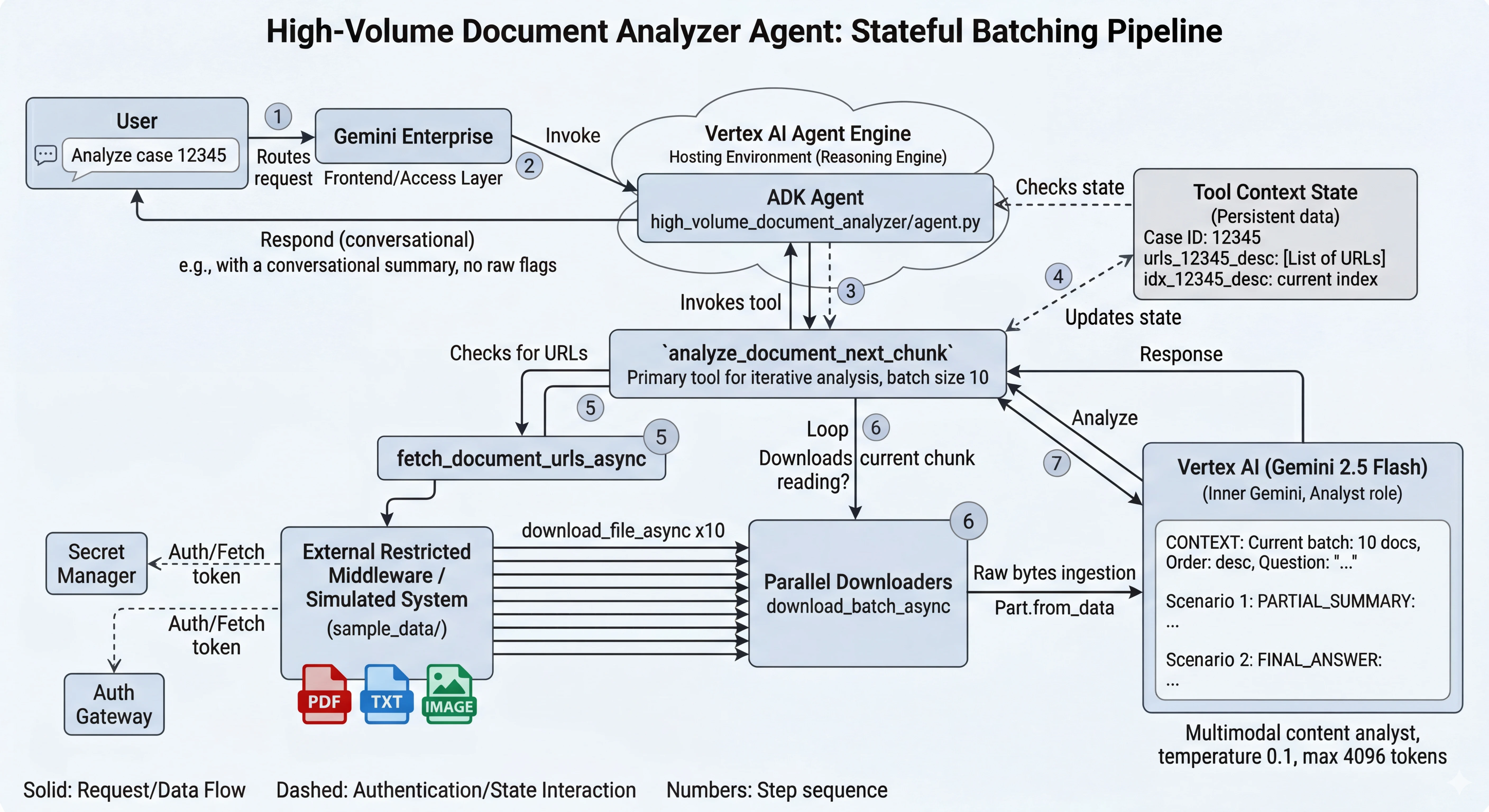
*The architecture illustrates the data flow: Gemini Enterprise (Frontend) routes the request to the Agent Runtime. The ADK Agent orchestrates the tools, which authenticate via Secret Manager and fetch document batches from the External System, feeding them to the multimodal Gemini model.*
### 🔐 Authentication Cycle
1. **User Authorization:** End-user logs into **Gemini Enterprise**.
2. **Agent Runtime Connection:** Gemini Enterprise securely invokes the hosted agent using IAM roles.
3. **Downstream Authentication:** The agent securely retrieves external credentials from **Google Cloud Secret Manager**.
4. **External Access:** The tool fetches OAuth tokens to download document chunks securely.
---
## C. Setup & Execution
### ⚙️ Prerequisites & Installation
1. **Prerequisites**
* Python 3.11+
* uv
* For dependency management and packaging. Please follow the
instructions on the official
[uv website](https://docs.astral.sh/uv/) for installation.
```bash
curl -LsSf https://astral.sh/uv/install.sh | sh
```
* A project on Google Cloud Platform
* Google Cloud SDK (gcloud) installed and authenticated
2. **Clone the repository:**
```bash
git clone https://github.com/google/adk-recipes.git
cd adk-recipes/contrib/python/high-volume-document-analyzer
# Install the package and dependencies.
uv sync
# Configure environment
cp .env.example .env
```
3. **Environment Variables:**
Edit the `.env` file with your GCP project details
```env
GOOGLE_CLOUD_PROJECT=your-project-id
GOOGLE_CLOUD_LOCATION=us-central1
```
Depending on your deployment, you may also need to configure the following variables in your `.env` file:
* **`USE_MOCK_API`**: Kept as `"True"` for local testing without authentication, or `"False"` to enable the production backend pipeline.
* **`DOCUMENT_API_BASE_URL`**: The domain endpoint for your organization's document fetching API.
* **`CLIENT_ID` & `CLIENT_SECRET`**: If using the production pipeline, set these to the short names of your Google Secret Manager secrets prefixed with `prod-` (e.g., `prod-client-id` and `prod-client-secret`). The code automatically builds the full resource path for your project.
* **`BATCH_SIZE` & `MAX_CONCURRENT_DOWNLOADS`**: Fine-tuning parameters for document ingestion (defaults: 10 and 20).
4. **Google Cloud Setup:**
Ensure you are logged in and enable the required APIs:
```bash
gcloud auth application-default login
gcloud config set project your-project-id
gcloud services enable \
aiplatform.googleapis.com \
secretmanager.googleapis.com
```
5. **IAM Permissions:**
If you deploy your agent using Agent Runtime, make sure the service account running the Agent (often the Default Compute Service Account) has the **Secret Manager Secret Accessor** role so it can read your credentials:
```bash
gcloud projects add-iam-policy-binding your-project-id \
--member="serviceAccount:YOUR_SERVICE_ACCOUNT_EMAIL" \
--role="roles/secretmanager.secretAccessor"
```
### 🚀 Running the Agent
To install dependencies and run the agent locally in the ADK interactive playground:
```bash
uv sync --dev
uv run adk web . --port 8080 --reload_agents
```
#### 🛠️ Development Scenarios
You can run this agent in three different modes. Follow the specific steps for your chosen environment:
| Scenario | Mode (`USE_MOCK_API`) | Description | Use Case |
| :--- | :--- | :--- | :--- |
| **1. Built-in Mock** | `True` | Uses a hardcoded list of PDF URLs (W3C dummy docs). | Fast logic testing without any infrastructure. |
| **2. Local Simulation** | `False` | Uses the included `mock_server.py` to simulate OAuth + Document API. | **Highly Recommended:** Validates the full authentication and dynamic API integration locally. |
| **3. Production** | `False` | Connects to your organization's real APIs and Google Secret Manager. | Final validation and deployment. |
---
### **Scenario 1: Built-in Mock (Plug-and-Play)**
The simplest way to see the agent in action without setting up any servers.
1. **Configure `.env`**:
```env
USE_MOCK_API=True
```
2. **Run the Playground**:
```bash
uv run adk web . --port 8080 --reload_agents
```
3. **Test Prompt**: *"Can you summarize the documents for collection 12345?"*
---
### **Scenario 2: Local Simulation (Recommended)**
Simulates the full production handshake (OAuth + Dynamic API) using a local server.
1. **Configure `.env`**:
```env
USE_MOCK_API=False
DOCUMENT_API_BASE_URL=http://127.0.0.1:5050/documents
URL_TOKEN_API_URL=http://127.0.0.1:5050/token
CLIENT_ID=local-test-id
CLIENT_SECRET=local-test-secret
```
2. **Start the Mock Server** (Terminal 1):
```bash
uv run python sample_data/mock_server.py
```
3. **Run the Agent/Playground** (Terminal 2):
```bash
uv run adk web . --port 8080 --reload_agents
```
4. **Test Prompt**: *"Analyze collection 12345"* (The mock server is configured specifically for this ID).
---
### **Scenario 3: Production (Cloud Integration)**
Connects to your organization's live middleware and Google Secret Manager.
1. **Prerequisites**:
* Create secrets in **Secret Manager** (e.g., `prod-client-id`, `prod-client-secret`).
* Authenticate locally: `gcloud auth application-default login`.
2. **Configure `.env`**:
```env
USE_MOCK_API=False
DOCUMENT_API_BASE_URL=https://api.your-org.com/v1/documents
URL_TOKEN_API_URL=https://auth.your-org.com/oauth/token
CLIENT_ID=prod-client-id # Name of the secret in GCP
CLIENT_SECRET=prod-client-secret # Name of the secret in GCP
```
3. **Run the Playground**:
```bash
uv run adk web . --port 8080 --reload_agents
```
For running tests and evaluation, install the extra dependencies:
```bash
uv sync --dev
```
Then the tests can be run from the `high-volume-document-analyzer` directory using
the `pytest` module:
```bash
uv run pytest tests
```
---
## D. Customization & Extension
This agent is built as a foundation for handling massive unstructured datasets. Here is how you can customize it for your specific enterprise needs:
* **Modifying the Flow (`prompt.py`):** The core instruction set defines the agent as a "Document Analysis Agent". You can modify `ROOT_AGENT_INSTRUCTION` to specialize the persona (e.g., "Insurance Claim Adjuster") or change the sorting logic (`desc` vs `asc`).
* **Changing Data Sources (`tools/process_toolset.py`):** The logic is governed by the `USE_MOCK_API` environment variable. By default (`True`), it returns open PDF URLs for testing out-of-the-box. To transition to a production API with OAuth and Google Secret Manager, switch `USE_MOCK_API` to `False` in your `.env` and fill in your keys. The mock code block inside the fetcher is visually isolated so you can easily delete it once in production.
* **Internal Data Integration (Future Roadmap):** While built for restricted external data, you can extend the tool to point to Google Cloud Storage (GCS) URIs if your documents are already ingested internally.
* **Adjusting Optimization Parameters:** Modify the `BATCH_SIZE` and `MAX_CONCURRENT_DOWNLOADS` variables directly in your `.env` file to process more or fewer documents per cycle depending on your external API rate limits and model token quotas.
---
## E. Evaluation
The performance of the High-Volume Document Analyzer is evaluated based on its ability to handle large payloads without context degradation.
* **Methodology:** The agent is tested against simulated cases containing up to 500 documents. We measure the success rate of finding a specific needle-in-a-haystack (e.g., "Find clause 42 in document #134") across multiple batch iterations.
* **Metrics Tracked:**
* *Latency:* Time taken to download and process a batch of 10 documents.
* *Accuracy:* The model's adherence to the `PARTIAL_SUMMARY` vs `FINAL_ANSWER` rules defined in the prompt.
* *Context Retention:* Validating that the `tool_context.state` correctly persists the `current_idx` between multi-turn user interactions.
* **Running Tests:** The project includes robust unit and integration testing batteries.
* **Run all tests together** (Recommended for CI/CD or full system checks):
```bash
uv run pytest tests -v
```
* **Run unit tests only** (Quick local checks for purely core logic without invoking Vertex AI):
```bash
uv run pytest tests/unit -v
```
* **Run integration tests only** (Smoke tests to explicitly verify end-to-end model interactions):
```bash
uv run pytest tests/integration -v
```
## F. Deploy
Use the [Google Agents CLI](https://github.com/google/agents-cli) to create a production-ready version of this agent with deployment options.
**Install the CLI** (one-time):
```bash
uvx google-agents-cli setup
```
**Create the project from this recipe** (run from the root of the `adk-recipes` repository, replace `my-document-analyzer` with your project name):
```bash
agents-cli create my-document-analyzer -a local@contrib/python/high-volume-document-analyzer
```
The Google Agents CLI will prompt you to select deployment options and provides additional production-ready features including automated CI/CD deployment scripts.
### 1. Agent Runtime Deployment
The project includes a dedicated deployment script that automates the creation and update of your Agent Runtime resource, ensuring all environment variables and dependencies are correctly configured.
1. **Configure Environment**: Ensure your `.env` file has the `STAGING_BUCKET` defined (e.g., `gs://your-bucket-name`).
2. **Run the Deployment Script**:
```bash
uv run python deployment_utils/deploy.py
```
> **💡 Pro Tip:** The script creates a `.agent_engine_resource.json` file to track your deployment. Subsequent runs will automatically **update** the existing agent instead of creating a new one.
For more details on the deployment process, see [`deployment_utils/deploy.py`](deployment_utils/deploy.py).
The service account running the agent must have access to **Secret Manager** if you are using it for production credentials:
```bash
export PROJECT_ID=your-project-id
export PROJECT_NUMBER=$(gcloud projects describe $PROJECT_ID --format='value(projectNumber)')
gcloud projects add-iam-policy-binding $PROJECT_ID \
--member="serviceAccount:service-${PROJECT_NUMBER}@gcp-sa-aiplatform-re.iam.gserviceaccount.com" \
--role="roles/secretmanager.secretAccessor"
```
### 2. Gemini Enterprise Integration
After a successful deployment, you can register your deployed Agent as a tool extension directly inside your **Gemini Enterprise** workspace:
```bash
uvx google-agents-cli publish gemini-enterprise
```
> **Note:** This is an interactive command that defaults to your currently authenticated Google Cloud project and will prompt you to select the deployed Agent App you wish to link. If you prefer to register it under a different GCP project, update your active project via `gcloud config set project ` beforehand or refer to the [Google Agents CLI documentation](https://github.com/google/agents-cli) for more details.