# LLM Auditor
**Recommended workflow:** install and run with **uv** and **[Google Agents CLI](https://github.com/google/agents-cli)** (see [Quick start](#quick-start-google-agents-cli--primary) below).
This agent functions as an automated fact-checking layer specifically designed to evaluate and enhance the factual grounding of responses generated by Large Language Models (LLMs). Its primary role is to bolster the reliability of LLM outputs by systematically analyzing them against real-world information; it achieves this by identifying verifiable claims within the text, utilizing web search and its internal knowledge to determine their accuracy, producing a detailed report on its findings, and optionally rewriting the original response to correct any discovered inaccuracies.
## Overview
This agent evaluates and improves the factual grounding of responses generated
by LLMs. Its primary purpose is to serve as an automated fact-checking layer,
analyzing LLM answers against real-world information to enhance reliability.
* Identifies and isolates specific, verifiable statements within an
LLM-generated text.
* Determines accuracy of claims using web search tools and knowledge it is
trained on.
* Produces a clear breakdown listing identified claims with their verification
status.
* Optionally rewrites original responses to correct inaccuracies based on
verified findings.
This recipe enables a user to query an LLM and the agent audits the
corresponding answer by extracting claims, utilizing search tools for
verification, generating an audit report, and optionally re-writing the
response.
## Agent Details
The key features of the LLM Auditor include:
| Feature | Description |
| --- | --- |
| **Interaction Type** | Workflow |
| **Complexity** | Easy |
| **Agent Type** | Multi Agent |
| **Components** | Tools: built-in Google Search |
| **Vertical** | Horizontal |
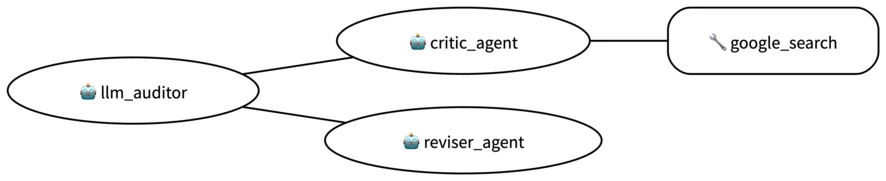
### Agent architecture:
This diagram shows the detailed architecture of the agents and tools used
to implement this workflow.
 ## Quick start (Google Agents CLI — primary)
This recipe ships with **[Google Agents CLI](https://github.com/google/agents-cli)** and is easiest to run with **[uv](https://docs.astral.sh/uv/)**. The `[tool.agents-cli]` section sets an `example_question` for templating.
### Prerequisites
- Python 3.11+
- [uv](https://docs.astral.sh/uv/getting-started/installation/)
- Google Cloud project (Vertex AI) **or** a [Gemini API key](https://ai.google.dev/gemini-api/docs/quickstart?lang=python#make-first-request)
- [Google Cloud CLI](https://cloud.google.com/sdk/docs/install) when using Vertex / Application Default Credentials (ADC)
### Install
```bash
git clone https://github.com/google/adk-recipes.git
cd adk-recipes/contrib/python/llm-auditor
uv sync
```
### Google authentication (Vertex AI)
```bash
gcloud auth application-default login
gcloud auth application-default set-quota-project YOUR_PROJECT_ID
```
`app/__init__.py` loads `.env`, then uses **`google.auth.default()`** and **`os.environ.setdefault("GOOGLE_CLOUD_PROJECT", …)`** when Vertex is enabled so ADC can supply the project. It skips ADC when `GOOGLE_GENAI_USE_VERTEXAI` is false (Gemini API key path).
Copy `.env.example` to `.env` and set at least:
```bash
export GOOGLE_GENAI_USE_VERTEXAI=true
export GOOGLE_CLOUD_PROJECT=
export GOOGLE_CLOUD_LOCATION=
export GOOGLE_CLOUD_STORAGE_BUCKET= # Agent Engine only
export MODEL_NAME=
```
**Gemini Developer API:** set `GOOGLE_GENAI_USE_VERTEXAI=false` and `GOOGLE_API_KEY=...` in `.env`.
### Run locally (ADK)
```bash
uv run adk run app
uv run adk web
```
Select **app** in the UI. Example prompts:
* `Double check this: Earth is further away from the Sun than Mars.`
* `Q: Why the blueberries are blue? A: Because blueberries have pigments on
their skin.`
Sampled responses of these requests are shown below in the [Example
Interaction](#example-interaction) section.
### Google Agents CLI CLI
```bash
uvx google-agents-cli --help
```
### Programmatic access
Importing `app` runs the package `__init__.py` (env + ADC defaults).
```python
from google.adk.runners import InMemoryRunner
from google.genai.types import Part, UserContent
from app.agent import root_agent
user_input = "Double check this: Earth is further away from the Sun than Mars."
runner = InMemoryRunner(agent=root_agent)
session = runner.session_service.create_session(
app_name=runner.app_name, user_id="test_user"
)
content = UserContent(parts=[Part(text=user_input)])
for event in runner.run(
user_id=session.user_id, session_id=session.id, new_message=content
):
for part in event.content.parts:
print(part.text)
```
You may also utilize `google.adk.Runner` to have fine-grained control on
interaction sessions and more, or wrap the agent in a
`vertexai.preview.reasoning_engines.AdkApp`.
### Example Interaction
Below is an example interaction with the LLM Auditor. Note that the exact output
of the agent may be different every time.
```
user: Double check this: Earth is further away from the Sun than Mars.
[critic_agent]: Okay, I will double-check the statement: "Earth is further away
from the Sun than Mars."
**Step 1: Identify the CLAIMS**
The answer contains one claim:
* CLAIM 1: Earth is further away from the Sun than Mars.
**Step 2: Verify each CLAIM**
* CLAIM 1: Earth is further away from the Sun than Mars.
* Context: This is a direct statement of fact about the relative distances
of Earth and Mars from the Sun.
* External Sources: I will use Google Search to check the average distances
of Earth and Mars from the Sun.
* Verdict: **Inaccurate**.
* Justification: According to the search results, the average distance of
Earth from the Sun is approximately 150 million kilometers [2, 3, 6, 9],
while the average distance of Mars from the Sun is approximately 228
million kilometers [1, 4, 5, 8, 10]. Therefore, Mars is further away from
the Sun than Earth, contradicting the claim.
**Step 3: Provide an overall assessment**
* OVERALL VERDICT: Inaccurate
* OVERALL JUSTIFICATION: The single claim made in the answer is demonstrably
false based on widely available astronomical data. Therefore, the answer
as a whole is incorrect.
Here's a summary of my verification results:
* Claim: Earth is further away from the Sun than Mars.
* Part in answer text: "Earth is further away from the Sun than Mars."
* Verdict: Inaccurate
* Justification: The average distance of Earth from the Sun is about 150
million kilometers, while the average distance of Mars from the Sun is
about 228 million kilometers. Thus, Mars is farther from the sun than the
Earth.
Reference:
[reviser_agent]: Mars is further away from the Sun than Earth.
```
```
user: Q: Why the blueberries are blue? A: Because blueberries have pigments on
their skin.
[critic_agent]: Okay, I will analyze the answer to the question "Why the
blueberries are blue?" to verify its accuracy and completeness.
**Step 1: Identify the CLAIMS**
I've identified the following CLAIM in the answer:
* CLAIM 1: Blueberries are blue because they have pigments on their skin.
**Step 2: Verify each CLAIM**
Now, I will verify the identified claim.
* Consider the Context: The question asks for the reason behind the blue color
of blueberries.
* Consult External Sources: I'll use Google Search to find information about
the pigments responsible for the blue color of blueberries.
* Determine the VERDICT:
* CLAIM 1: Blueberries are blue because they have pigments on their skin.
The initial answer is partially correct but incomplete. While
blueberries do have pigments, specifically anthocyanins, in their skin
[2, 4, 6, 8, 9], the blue color we perceive is primarily due to a waxy
coating on the surface of the fruit that scatters blue light [1, 2, 3,
5, 10, 11]. The pigment underneath is actually dark red [1, 3, 5, 10].
* VERDICT: Inaccurate. The answer is not entirely wrong, as blueberries do
contain pigments in their skin. However, it's misleading because it
attributes the blue color solely to pigments, neglecting the crucial role of
the waxy coating and its light-scattering properties.
**Step 3: Provide an overall assessment**
* OVERALL VERDICT: Inaccurate
* OVERALL JUSTIFICATION: The provided answer, while mentioning pigments, fails
to explain the primary reason for the blue color of blueberries which is the
waxy coating that scatters blue light. Therefore, the answer is misleading
and inaccurate.
Reference:
[reviser_agent]: Blueberries are blue due to a waxy coating on their skin that
scatters blue light. They also have pigments on their skin.
```
## Running tests
```bash
uv sync --group dev
uv run pytest tests
uv run pytest eval
```
`tests` runs the agent on a sample request, and makes sure that every component
is functional. `eval` is a demonstration of how to evaluate the agent, using the
`AgentEvaluator` in ADK. It sends a couple requests to the agent and expects
that the agent's responses match a pre-defined response reasonably well.
## Deployment
Deploy to Agent Runtime:
```bash
uv sync --group deployment
uv run python deployment/deploy.py --create
```
When the deployment finishes, it will print a line like this:
```
Created remote agent: projects//locations//reasoningEngines/
```
If you forgot the AGENT_ENGINE_ID, you can list existing agents using:
```bash
uv run python deployment/deploy.py --list
```
The output will be like:
```
All remote agents:
123456789 ("llm_auditor")
- Create time: 2025-04-09 08:22:36.179879+00:00
- Update time: 2025-04-09 08:25:42.734584+00:00
```
You may interact with the deployed agent programmatically in Python:
```python
from vertexai import agent_engines
agent_engine_id = "AGENT_ENGINE_ID"
user_input = "Double check this: Earth is further away from the Sun than Mars."
agent_engine = agent_engines.get(agent_engine_id)
session = agent_engine.create_session(user_id="new_user")
for event in agent_engine.stream_query(
user_id=session["user_id"], session_id=session["id"], message=user_input
):
for part in event["content"]["parts"]:
print(part["text"])
```
To delete the deployed agent, you may run the following command:
```bash
uv run python deployment/deploy.py --delete --resource_id=${AGENT_ENGINE_ID}
```
## Legacy: Poetry
You can still use `poetry install`, `adk web`, and `python -m pytest` with the same `.env` and `gcloud` steps.
## Customization
The LLM Auditor can be customized to better suit your requirements. For example:
1. **Substitute the Retrieval Mechanism:** Replace the `critic` sub-agent's
default `built_in_google_search` tool with an alternative retrieval tool
tailored to your data sources.
2. **Customize Agent Instructions:** Modify the prompts guiding the `critic`
and `reviser` sub-agents. This allows you to direct their focus (e.g.,
checking against specific compliance rules, ensuring a certain writing
style) or refine the format of their feedback and revisions.
3. **Implement Iterative Processing:** Configure the LLM Auditor to operate
iteratively. Instead of a single pass, the response can be repeatedly
evaluated and rewritten by the agents until predefined quality thresholds
are achieved.
## Disclaimer
This agent recipe is provided for illustrative purposes only and is not intended for production use. It serves as a basic example of an agent and a foundational starting point for individuals or teams to develop their own agents.
This recipe has not been rigorously tested, may contain bugs or limitations, and does not include features or optimizations typically required for a production environment (e.g., robust error handling, security measures, scalability, performance considerations, comprehensive logging, or advanced configuration options).
Users are solely responsible for any further development, testing, security hardening, and deployment of agents based on this recipe. We recommend thorough review, testing, and the implementation of appropriate safeguards before using any derived agent in a live or critical system.