# How to Contribute
We'd love to accept your patches and contributions to this project. There are
just a few small guidelines you need to follow.
## Contributor License Agreement
Contributions to this project must be accompanied by a Contributor License
Agreement. You (or your employer) retain the copyright to your contribution;
this simply gives us permission to use and redistribute your contributions as
part of the project. Head over to to see
your current agreements on file or to sign a new one.
You generally only need to submit a CLA once, so if you've already submitted one
(even if it was for a different project), you probably don't need to do it
again.
## Code reviews
All submissions, including submissions by project members, require review. We
use GitHub pull requests for this purpose. Consult
[GitHub Help](https://help.github.com/articles/about-pull-requests/) for more
information on using pull requests.
When creating a pull request, please use the provided
[pull request template](/.github/PULL_REQUEST_TEMPLATE/pull_request_template.md)
and fill out the sections to ensure a smooth review process.
For any new feature, please create an issue first to discuss the proposed changes
before proceeding to make a pull request. This helps ensure that your contribution
is aligned with the project's goals and avoids duplicate work.
## Community Guidelines
This project follows
[Google's Open Source Community Guidelines](https://opensource.google.com/conduct/).
## Contributing documentation
Please review the documentation [README](docs/README.md) for more information about contributing to documentation.
## Contributing code
### Prerequisites
Install:
1. [Go](https://go.dev/) 1.21+, use `go version` to check.
2. [GoReleaser](https://goreleaser.com/) (Optional, only if you want reproducible builds).
> **Note**
>
> The scripts within `/scripts` expect to be run from the root of the repository
### Building
#### Build using only `go`
Run the following in the project directory:
```shell
./scripts/build.sh
```
Produces `osv-scanner` binary in the project directory.
#### Build using `goreleaser`
Run the following in the project directory:
```shell
./scripts/build_snapshot.sh
```
See GoReleaser [documentation](https://goreleaser.com/cmd/goreleaser_build/) for build options.
You can also reproduce the downloadable builds by checking out the specific tag and running `goreleaser build`,
using the same Go version as the one used during the actual release (see goreleaser workflows).
### Running tests
To run tests:
```shell
./scripts/run_tests.sh
```
To get consistent test results, please run with `GOTOOLCHAIN=go`.
By default, tests that require additional dependencies beyond the go toolchain are skipped.
Enable these tests by setting the env variable `TEST_ACCEPTANCE=true`.
You can generate an HTML coverage report by running:
```shell
./scripts/generate_coverage_report.sh
```
You can regenerate snapshots by setting `UPDATE_SNAPS=true` when running tests:
```shell
UPDATE_SNAPS=true ./scripts/run_tests.sh
```
`cmd` tests use [`go-vcr`](https://github.com/dnaeon/go-vcr) to provide a custom `http.Client` for osv.dev requests to the `querybulk` endpoint which uses
snapshots of requests called cassettes to reduce noise from changes to advisories while still providing a high degree
of confidence.
You can control the recording behaviour by setting the `TEST_VCR_MODE` environment variable to one of the [supported modes](https://github.com/dnaeon/go-vcr/blob/v4/pkg/recorder/recorder.go#L51),
specified either by [its name without the `Mode` suffix or by its int value](./cmd/osv-scanner/internal/testcmd/vcr.go#L16).
The default mode locally is `ReplayWithNewEpisodes`, meaning existing interactions will be replayed while any new ones will
be recorded and added to the existing cassette; when running in CI, the default mode is `ReplayOnly` meaning an error will be
raised if an http interaction is missing from a test's cassette.
If adding a lockfile with known vulnerabilities for test data, also add an [`osv-scanner.toml`](https://google.github.io/osv-scanner/configuration/) config file to exclude those vulnerabilities from scans of the repository.
### Linting
To lint your code, run
```shell
./scripts/run_lints.sh
```
### Making commits
Please follow the [Conventional Commits](https://www.conventionalcommits.org/en/v1.0.0/) specification when squashing commits during a merge. This is typically the commit merged into the main branch and is often based on the PR title. Doing so helps us to automate processes like changelog generation and ensures a clear and consistent commit history.
Some types: `feat:`, `fix:`, `docs:`, `chore:`, `refactor:`, and others.
## Contributing documentation
Please follow these steps to successfully contribute documentation.
1. Fork the repository.
2. Make desired documentation changes.
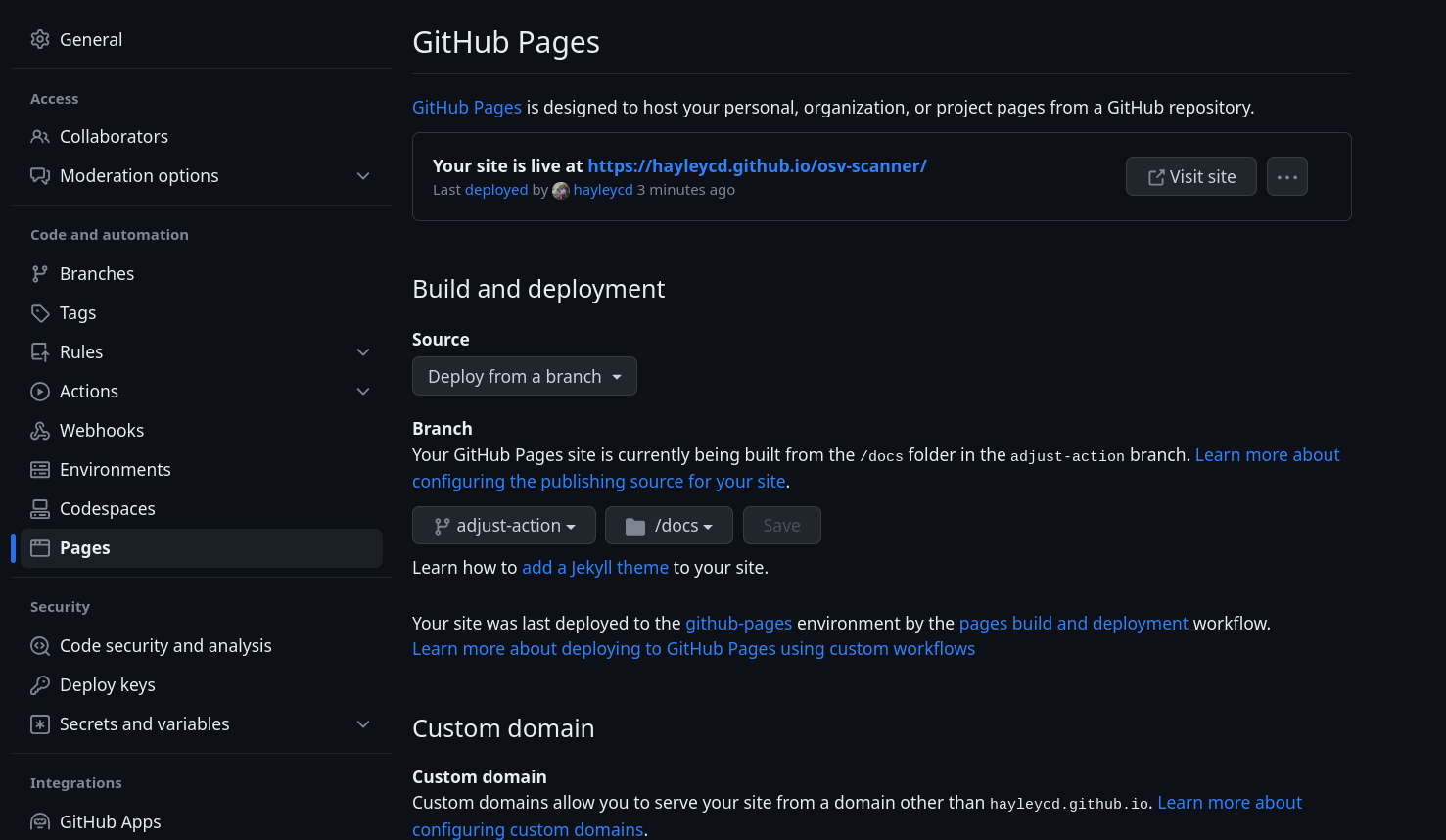
3. Preview the changes by spinning up a GitHub page for your fork, building from your working branch.
- On your fork, go to the settings tab and then the GitHub page settings. Sample URL: https://github.com/{your-github-profile}/osv-scanner/settings/pages
- Under "Build and deployment" select "Deploy from a branch"
- Set the branch to your working branch
- Set the github page to build from the "/docs" folder
- Hit save and wait for your site to build
- Once it is ready, click the link and preview the docs
4. If you are satisfied with the changes, open a PR.
5. In the PR, link to your fork's GitHub page, so we can preview the changes.
For information on how to run the documentation locally, please see our [documentation readme](https://github.com/google/osv-scanner/blob/main/docs/README.md/#running-docs-locally).