中文 · English
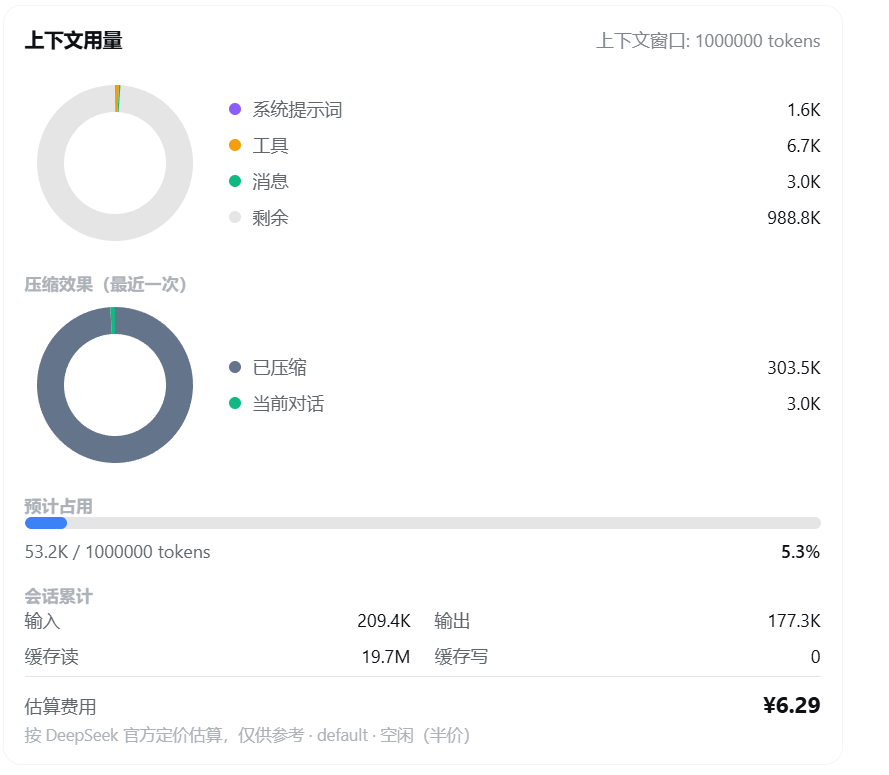
# context-vista [](https://awesome-dsh-plugin.com) > See your context window at a glance — token usage, compaction savings, and cost estimates, all in one view. A `/context` slash command for [DeepSeek Harness](https://github.com/deepseek-ai/deepseek-harness) that shows the current context token usage and allocation as a **donut chart**. A mini floating card also stays on the right side of the conversation area, showing occupancy and estimated cost live — draggable and collapsible. ## Installation ```sh npx @deepseek-ai/dsh plugin --profile web add github:GooodWei/context-vista npx @deepseek-ai/dsh web ``` > Install pnpm first (`dsh plugin add` invokes it internally). If dsh is installed globally, `npx @deepseek-ai/dsh` can be shortened to `dsh`. ## Usage Type `/context` and press Enter to see a card: a context composition donut (system / tools / messages / free), an occupancy bar, session totals, and an estimated cost. The mini donut card on the right updates live with no input; drag its title bar to move it vertically (position is remembered), and click the arrow to collapse/expand. A "Compact context" button at the bottom of the card triggers `/compact` (same effect as typing the command); it shows "Compacting…" and disables while the compaction runs. ## Custom pricing Built-in DeepSeek official pricing (CNY ¥, with peak/off-peak). To override or add, edit `~/.dsh/settings.yaml` (hot-reloaded, no restart). **Currency and peak/off-peak definitions both follow the API (route)** — each route can set its own. ### Minimal example ```yaml context-vista: pricing: "https://api.deepseek.com": models: deepseek-v4-pro: peak: { hit: 0.3, miss: 9, output: 27 } offpeak: { hit: 0.15, miss: 4.5, output: 13.5 } ``` ### Full example (DeepSeek ¥ + OpenAI $, all keys annotated) ```yaml context-vista: pricing: # pricing table: outer key = route name or baseURL "https://api.deepseek.com": # route 1: DeepSeek, CNY + Beijing-time peak/off-peak currency: "¥" # this API's currency symbol (omit for default "¥") timezone: 8 # timezone of peak/off-peak windows (UTC offset; omit for default 8) peakWindows: # peak windows, HH:MM, inclusive start, exclusive end; start > end = crossing midnight - start: "09:00" # peak start end: "12:00" # peak end - start: "14:00" # second peak start end: "18:00" # second peak end models: # models under this API (required) deepseek-v4-pro: # model name peak: # form 1 (peak/off-peak split) · peak price hit: 0.3 # cached input, per 1M tokens miss: 9 # uncached input, per 1M tokens output: 27 # output, per 1M tokens offpeak: # off-peak price hit: 0.15 # cached input miss: 4.5 # uncached input output: 13.5 # output "https://api.openai.com/v1": # route 2: OpenAI (ChatGPT), USD + no peak/off-peak currency: "$" # this API's currency symbol models: # no timezone/peakWindows → flat pricing "gpt-5.5": # model name hit: 2.5 # cached input, per 1M tokens miss: 10 # uncached input, per 1M tokens output: 30 # output, per 1M tokens ``` > Prices are per 1M tokens in each API's billing currency; `currency` only changes the displayed symbol, with no rate conversion. For APIs without peak/off-peak, just omit `timezone` / `peakWindows`. The numbers above are illustrative. - The outer key can be a provider route name (e.g. `deepseek-official`) or a baseURL (quote keys containing `:`). - Each route can set `currency` / `timezone` / `peakWindows` (each overrides the global default); `models` is required. - A model price entry is either **flat** `{ hit, miss, output }`, or **peak/off-peak** `{ peak, offpeak }`. - `*` is supported as a wildcard for the route name or model name. - Unmatched models use the built-in default (model names containing `flash` use the flash tier, otherwise pro). - The amount is an estimate, not a bill. ## License MIT